Skip to content

15 Lesson 15: Query Optimization / Functions

Native Markdown source page: Query Optimization / Functions
Note

This page is extracted from the official PDF into native Markdown. Slide text, code and speaker notes are kept in reading order; the original PDF and HTML remain the layout references. HTML source: No matching course-page link was captured in the source inventory. Archive: QPT-handouts-16-en-20251018.zip PDF pages: 26

Page 1: Query Optimization / Functions

© Postgres Professional, 2019–2024 Authors Authors: Egor Rogov, Pavel Luzanov, Ilya Bashtanov Photo by: Oleg Bartunov (Phu monastery, Bhrikuti summit, Nepal)

Use of course materials

Non-commercial use of course materials (presentations, demonstrations) is allowed without restrictions. Commercial use is possible only with the written permission of Postgres Professional. It is prohibited to make changes to the course materials.

Feedback

Please send your feedback, comments and suggestions to: edu@postgrespro.ru

Disclaimer

In no event shall Postgres Professional company be liable for any damages or loss, including loss of profits, that arise from direct or indirect, special or incidental use of course materials. Postgres Professional company specifically disclaims any warranties on course materials. Course materials are provided “as is,” and Postgres Professional company has no obligations to provide maintenance, support, updates, enhancements, or modifications.

Page 2: Topics

  • Volatility сategories
  • Inlining function code into the query
  • Invoking Table Functions
  • Settings for COST and ROWS
  • Planner Helper Functions
  • Configuration Parameters

Page 3: Volatility сategories

Volatile

  • may return different values for the same input arguments
  • is used by default
  • Stable
    • the value cannot change within a single SQL operator
    • the function cannot change the database state
  • Immutable
    • the value cannot change, the function is deterministic
    • the function cannot change the database state

Speaker notes

Each function is mapped to a particular volatility category, which defines the properties of the return value for the same input arguments.

The Volatile category indicates that the return value may vary arbitrarily. Such functions will be executed each time they are called. If the function is declared without a category specification, it is assumed to be volatile.

The Stable category is used for functions whose return value remains constant during a single SQL statement. In particular, such functions cannot change the state of the database. It could execute such a function only once during the query and then use the computed value.

The immutable category is even more strict: the return value always remains the same. Such a function could be executed at the planning stage, before the query is actually executed.

It does not mean that it happens so all the time, but the planner has the right to perform such optimizations.

https://postgrespro.com/docs/postgresql/16/xfunc-volatility

Page 4: Categories of Mutability and Optimization

Thanks to the additional information about a function’s behavior provided by the mutability category, the optimizer can reduce function calls. For testing, let’s create a function that generates a random number:

=> CREATE FUNCTION rnd() RETURNS float
LANGUAGE sql VOLATILE
RETURN random();
CREATE FUNCTION

Let’s examine the execution plan for the following query:

=> EXPLAIN (costs off)
SELECT * FROM generate_series(1,10) WHERE rnd() > 0.5;
                   QUERY PLAN
------------------------------------------------
 Function Scan on generate_series
   Filter: (random() > '0.5'::double precision)
(2 rows)

In the execution plan, the Function Scan node calls the set-returning function generate_series. The result is filtered, and the scalar function random is invoked for each row in the filter. You can see this in action:

=> SELECT * FROM generate_series(1,10) WHERE rnd() > 0.5;
 generate_series
-----------------
               1
               2
               3
               5
               6
               8
               9
(7 rows)
=> \g
 generate_series
-----------------
               3
               8
               9
              10
(4 rows)
=> \g
 generate_series
-----------------
               1
               5
               7
              10
(4 rows)
=> \g
 generate_series
-----------------
               2
               4
               6
               7
               9
              10
(6 rows)

Page 5: Page 5

=> \g
 generate_series
-----------------
               1
               2
               3
               7
               8
(5 rows)

Here, we randomly select between 0 and 10 rows. A function with the Stable mutability category will be invoked just once — because we’ve effectively indicated that its value remains unchanged throughout the statement:

=> ALTER FUNCTION rnd() STABLE;
ALTER FUNCTION
=> EXPLAIN (costs off)
SELECT * FROM generate_series(1,10) WHERE rnd() > 0.5;
                      QUERY PLAN
------------------------------------------------------
 Result
   One-Time Filter: (rnd() > '0.5'::double precision)
   ->  Function Scan on generate_series
(3 rows)

The Result node generates a sample row, and the One-Time Filter expression is evaluated once, resulting in either 0 or 10 rows being returned.

=> SELECT * FROM generate_series(1,10) WHERE rnd() > 0.5;
 generate_series
-----------------
               1
               2
               3
               4
               5
               6
               7
               8
               9
              10
(10 rows)
=> \g
 generate_series
-----------------
               1
               2
               3
               4
               5
               6
               7
               8
               9
              10
(10 rows)
=> \g
 generate_series
-----------------
(0 rows)
=> \g
 generate_series
-----------------
(0 rows)

Page 6: Page 6

Finally, the Immutable category enables the function’s value to be computed during the planning phase, eliminating the need to evaluate the filter condition at runtime:

=> ALTER FUNCTION rnd() IMMUTABLE;
ALTER FUNCTION
=> EXPLAIN (costs off)
SELECT * FROM generate_series(1,10) WHERE rnd() > 0.5;
            QUERY PLAN
----------------------------------
 Function Scan on generate_series
(1 row)
=> \g
        QUERY PLAN
--------------------------
 Result
   One-Time Filter: false
(2 rows)
=> \g
            QUERY PLAN
----------------------------------
 Function Scan on generate_series
(1 row)

For Immutable, we get a random execution plan! The developer is responsible for providing knowingly false information.

Page 7: Inlining of Function Code

SQL Scalar Functions

  • a single SELECT statement a SELECT statement without a FROM clause,
  • returns a single value
  • Called functions should not be more volatile than the calling function.
  • etc.
  • Set-Returning Functions
    • a single SELECT statement
    • Immutable or Stable category
    • Non-strict function
    • etc.

Speaker notes

The PostgreSQL optimizer can inline the function body into an SQL query. This applies to both scalar and set-returning functions.

In both cases, there are several limitations: the function must be written in SQL, use a single SELECT statement, and so on. Additionally, scalar functions must not access database tables or call functions with a less strict category, while set-returning functions must be stable or immutable.

A key benefit of inlining the function body into the query is that the function becomes transparent to the query planner. For instance, additional conditions in the main query can be applied to the query within the function’s body, enabling early filtering of unnecessary rows.

Page 8: Inline substitution of function code into the SQL query

The body of very simple SQL scalar functions can be inlined directly into the main SQL statement during query parsing. This eliminates function call overhead. We’ve already seen an example: our function rnd(). Let’s see what the query execution plan looks like when the volatility category of the function rnd (Stable) differs from that of the function random (Volatile):

=> ALTER FUNCTION rnd() STABLE;
ALTER FUNCTION
=> EXPLAIN (costs off)
SELECT * FROM generate_series(1,10) WHERE rnd() > 0.5;
                      QUERY PLAN
------------------------------------------------------
 Result
   One-Time Filter: (rnd() > '0.5'::double precision)
   ->  Function Scan on generate_series
(3 rows)

The filter references the rnd() function. Let’s change the function’s volatility category to Volatile:

=> ALTER FUNCTION rnd() VOLATILE;
ALTER FUNCTION
=> EXPLAIN (costs off)
SELECT * FROM generate_series(1,10) WHERE rnd() > 0.5;
                   QUERY PLAN
------------------------------------------------
 Function Scan on generate_series
   Filter: (random() > '0.5'::double precision)
(2 rows)

Now the filter references the random() function instead of rnd(). It will be called directly, bypassing the rnd() function’s “wrapper”. Table functions offer significantly more inlining opportunities. For example, they can reference tables.

=> CREATE FUNCTION flights_from(airport_name text)
RETURNS SETOF flights
AS $$
  SELECT f.*
  FROM flights f
    JOIN airports a ON f.departure_airport = a.airport_code
  WHERE a.airport_name = flights_from.airport_name;
$$
LANGUAGE sql STABLE;
CREATE FUNCTION

During inlining, table functions behave like parameterized views. The query planner optimizes the entire query, with the function being transparent to it:

=> EXPLAIN (costs off)
SELECT *
FROM flights_from('Orenburg Central')
WHERE status = 'Arrived';
                                  QUERY PLAN
------------------------------------------------------------------------------
 Hash Join
   Hash Cond: (f.departure_airport = ml.airport_code)
   ->  Seq Scan on flights f
         Filter: ((status)::text = 'Arrived'::text)
   ->  Hash
         ->  Seq Scan on airports_data ml
               Filter: ((airport_name ->> lang()) = 'Orenburg Central'::text)
(7 rows)

Page 9: Page 9

Page 10: Invoking Table Functions
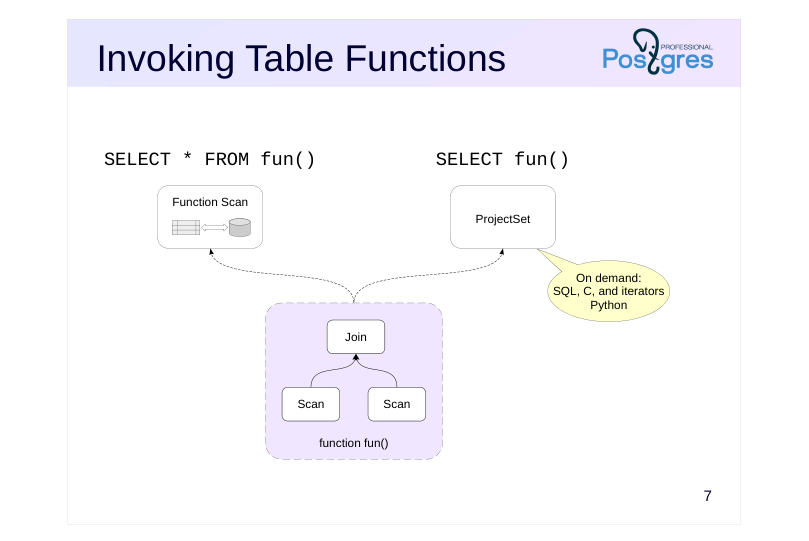
Source slide page 10: Invoking Table Functions{#source-figure-010 caption=“Source slide page 10: Invoking Table Functions”}

SELECT * FROM fun()
SELECT fun()

Speaker notes

When a set-returning function is called in the FROM clause, the Function Scan node is responsible for its execution. In this case, the function’s returned rows are materialized first and then passed to the parent plan node. This is the current implementation limitation.

If the function is called in the SELECT clause, it is executed by the ProjectSet node in the query plan. In this case, the function can take advantage of the on-demand row return interface (value-per-call) without materialization.

SQL functions, most built-in functions (written in C), and PL/Python functions that return an iterator operate in this manner. Functions written in other programming languages can also use this interface if the feature is implemented.

Page 11: Set-Returning Functions Functions Returning Tables

Let’s call the generate_series function in the FROM clause with a row limit (LIMIT):

=> EXPLAIN (analyze, costs off)
SELECT * FROM generate_series(1,10_000_000)
LIMIT 10;
                                       QUERY PLAN
-----------------------------------------------------------------------------------------
 Limit (actual time=1680.271..1680.278 rows=10 loops=1)
   ->  Function Scan on generate_series (actual time=1680.269..1680.272 rows=10 loops=1)
 Planning Time: 0.041 ms
 Execution Time: 1715.198 ms
(4 rows)

In the query plan, we see a Function Scan node — the function generated all rows first, and then the LIMIT was applied. Now let’s run the query again, but call the function from the SELECT clause:

=> EXPLAIN (analyze, costs off)
SELECT generate_series(1,10_000_000)
LIMIT 10;
                          QUERY PLAN
--------------------------------------------------------------
 Limit (actual time=0.004..0.006 rows=10 loops=1)
   ->  ProjectSet (actual time=0.003..0.004 rows=10 loops=1)
         ->  Result (actual time=0.000..0.001 rows=1 loops=1)
 Planning Time: 0.028 ms
 Execution Time: 0.018 ms
(5 rows)

Now, the query plan includes a ProjectSet node that produces ten sample rows — here, the optimizer was able to retrieve rows on demand. The query execution time decreased by orders of magnitude. The Result node here represents the omitted FROM clause in the query — it sends exactly one row to the parent node. However, not all functions can return rows one at a time. For example, invoking any PL/pgSQL function returns all result rows:

=> CREATE FUNCTION plpgsql_rows() RETURNS SETOF integer
AS $$
BEGIN
  RETURN QUERY
    SELECT * FROM generate_series(1,10_000_000);
END
$$ LANGUAGE plpgsql;
CREATE FUNCTION

Let’s invoke the function within the SELECT clause:

=> EXPLAIN (analyze, costs off)
SELECT plpgsql_rows() LIMIT 10;
                            QUERY PLAN
-------------------------------------------------------------------
 Limit (actual time=4491.581..4491.587 rows=10 loops=1)
   ->  ProjectSet (actual time=4491.579..4491.583 rows=10 loops=1)
         ->  Result (actual time=0.000..0.001 rows=1 loops=1)
 Planning Time: 0.031 ms
 Execution Time: 4546.070 ms
(5 rows)

The plan includes a ProjectSet node, but now the server must retrieve the function’s full result before applying the LIMIT. Execution time clearly demonstrates this. In the SELECT clause, you can have multiple set-returning function calls, and the functions can be nested within each other:

=> SELECT generate_series(1, generate_series(1,3)), unnest(ARRAY['A','B','C']);

Page 12: Page 12

 generate_series | unnest
-----------------+--------
               1 | A
               1 | B
               2 | B
               1 | C
               2 | C
               3 | C
(6 rows)
=> EXPLAIN (verbose, costs off)
SELECT generate_series(1, generate_series(1,3)), unnest(ARRAY['A','B','C']);
                                     QUERY PLAN
------------------------------------------------------------------------------------
 ProjectSet
   Output: generate_series(1, (generate_series(1, 3))), (unnest('{A,B,C}'::text[]))
   ->  ProjectSet
         Output: generate_series(1, 3), unnest('{A,B,C}'::text[])
         ->  Result
(5 rows)

The bottom ProjectSet node creates a result set by executing two set-returning functions: generate_series(1,3) and unnest. This results in three rows. The top ProjectSet node generates the final result set by executing the outer generate_series call. Ignoring materialization, this query is equivalent to the following one, where functions are invoked in the FROM clause:

=> SELECT g2.i, u.c
FROM generate_series(1,3) WITH ORDINALITY AS g1(i)
  FULL JOIN LATERAL unnest(ARRAY['A','B','C']) WITH ORDINALITY AS u(c)
    ON g1.ordinality = u.ordinality
  CROSS JOIN LATERAL generate_series(1, g1.i) AS g2(i);
 i | c
---+---
 1 | A
 1 | B
 2 | B
 1 | C
 2 | C
 3 | C
(6 rows)

Page 13: Settings for COST and ROWS

CREATE FUNCTION fun( )

SELECT * FROM fun()
  • Function Scan ( rows=1000 cost=100 )
  • оценки
  • by default
  • CREATE FUNCTION fun( ) ROWS 12 COST 123
SELECT * FROM fun()
  • Function Scan ( rows=12 cost=123 )
  • ROWS
  • COST

Speaker notes

Usually (when the function body cannot be integrated into the query), the optimizer can’t analyze the function code and treats it as a “black box”.

However, you can provide the optimizer with approximate information about the cost of calling the function and the number of rows it returns.

The COST parameter defines the cost of a user-defined function in units of cpu_operator_cost. By default, C functions are given a cost estimate of 1, whereas functions in other languages are estimated at 100.

The ROWS parameter specifies the approximate number of rows returned.

COST and ROWS can be set when creating a function or for existing functions.

https://postgrespro.com/docs/postgresql/16/sql-copy

Page 14: COST and ROWS Settings COST and ROWS Settings

We’ll create a set-returning function in PL/pgSQL that returns the days of the week:

=> CREATE FUNCTION days_of_week() RETURNS SETOF text
AS $$
BEGIN
    FOR i IN 7 .. 13 LOOP
        RETURN NEXT to_char(to_date(i::text,'J'),'TMDy');
    END LOOP;
END;
$$ LANGUAGE plpgsql;
CREATE FUNCTION
=> SELECT * FROM days_of_week();
 days_of_week
--------------
 Mon
 Tue
 Wed
 Thu
 Fri
 Sat
 Sun
(7 rows)

Execution Plan:

=> EXPLAIN
SELECT * FROM days_of_week();
                              QUERY PLAN
----------------------------------------------------------------------
 Function Scan on days_of_week  (cost=0.25..10.25 rows=1000 width=32)
(1 row)

The function execution cost is treated as constant, with user-defined functions defaulting to a cost of 100 operators:

=> SELECT 100 * current_setting('cpu_operator_cost')::float;
 ?column?
----------
     0.25
(1 row)

But this value can be adjusted:

=> ALTER FUNCTION days_of_week COST 1000;
ALTER FUNCTION
=> EXPLAIN
SELECT * FROM days_of_week();
                              QUERY PLAN
----------------------------------------------------------------------
 Function Scan on days_of_week  (cost=2.50..12.50 rows=1000 width=32)
(1 row)

The initial cost in the execution plan has changed. The server estimates the cardinality of this function’s result as 1000, even though the actual value is seven. By specifying ROWS, you can provide the server with an estimate of how many rows the function will return:

=> ALTER FUNCTION days_of_week ROWS 10;
ALTER FUNCTION

Let’s repeat the query:

=> EXPLAIN
SELECT * FROM days_of_week();

Page 15: Page 15

                            QUERY PLAN
-------------------------------------------------------------------
 Function Scan on days_of_week  (cost=2.50..2.60 rows=10 width=32)
(1 row)

Now the server estimates that the function will return 10 rows, resulting in a lower total cost for the node:

=> SELECT 1000 * current_setting('cpu_operator_cost')::float
+ 10 * current_setting('cpu_tuple_cost')::float;
 ?column?
----------
      2.6
(1 row)

Changed values are visible in the system catalog:

=> SELECT procost, prorows FROM pg_proc WHERE proname='days_of_week';
 procost | prorows
---------+---------
    1000 |      10
(1 row)

Alternatively, use the psql metacommand:

=> \sf days_of_week
CREATE OR REPLACE FUNCTION bookings.days_of_week()
 RETURNS SETOF text
 LANGUAGE plpgsql
 COST 1000 ROWS 10
AS $function$
BEGIN
    FOR i IN 7 .. 13 LOOP
        RETURN NEXT to_char(to_date(i::text,'J'),'TMDy');
    END LOOP;
END;
$function$

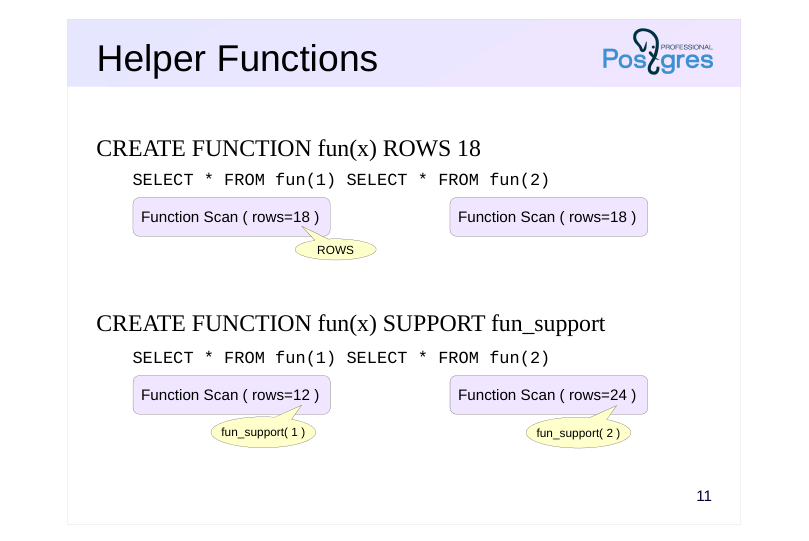
Page 16: Helper Functions

Source slide page 16: Helper Functions{#source-figure-016 caption=“Source slide page 16: Helper Functions”}

CREATE FUNCTION fun(x) ROWS 18

SELECT * FROM fun(1) SELECT * FROM fun(2)
  • CREATE FUNCTION fun(x) SUPPORT fun_support
SELECT * FROM fun(1) SELECT * FROM fun(2)

Speaker notes

The COST and ROWS parameters enable you to specify the cost and the number of rows returned by the function as fixed values.But constants don’t always yield the intended result.

In PostgreSQL, a function can use a helper function that provides the planner with information based on the arguments of the main (target) function.

The helper function can provide information using the values of the target function’s arguments:

● cost estimation

● estimate of the number of rows returned

● an expression equivalent to the function call

Additionally, for functions returning boolean:

● selectivity estimate

● an equivalent predicate using an indexable operator

The auxiliary function must be implemented in C.

https://postgrespro.com/docs/postgresql/16/sql-copy

Page 17: Planner auxiliary functions

Let’s examine the execution plan when calling the generate_series function:

=> EXPLAIN
SELECT n FROM generate_series(1,5) n;
                              QUERY PLAN
----------------------------------------------------------------------
 Function Scan on generate_series n  (cost=0.00..0.05 rows=5 width=4)
(1 row)

Unlike the days_of_week function, the optimizer correctly estimates the number of rows returned immediately. Moreover, this estimate depends on the function’s parameters:

=> EXPLAIN
SELECT n FROM generate_series(1,15) n;
                              QUERY PLAN
-----------------------------------------------------------------------
 Function Scan on generate_series n  (cost=0.00..0.15 rows=15 width=4)
(1 row)

The planner gains additional information via the auxiliary function (which can only be implemented in C), enabling it to determine the selectivity of conditions, the function’s cardinality, or its cost. You can check the pg_proc table to see if an auxiliary function exists:

=> SELECT left(pg_get_function_arguments(p.oid), 57) proargtypes, prosupport
FROM pg_proc p
WHERE p.proname = 'generate_series';
                        proargtypes                        |          prosupport
-----------------------------------------------------------+------------------------------
 integer, integer, integer                                 | generate_series_int4_support
 integer, integer                                          | generate_series_int4_support
 bigint, bigint, bigint                                    | generate_series_int8_support
 bigint, bigint                                            | generate_series_int8_support
 numeric, numeric, numeric                                 | -
 numeric, numeric                                          | -
 timestamp without time zone, timestamp without time zone, | -
 timestamp with time zone, timestamp with time zone, inter | -
 timestamp with time zone, timestamp with time zone, inter | -
(9 rows)

As shown, auxiliary functions are not available for all overloaded versions of the generate_series function. Let’s examine the execution plan of the query that generates a date series:

=> EXPLAIN SELECT *
FROM generate_series(now(), now() + interval '5 day','1 day');
                               QUERY PLAN
------------------------------------------------------------------------
 Function Scan on generate_series  (cost=0.01..10.01 rows=1000 width=8)
(1 row)

Without an auxiliary function or specifying ROWS, the optimizer doesn’t know the number of rows in the result and defaults to 1000. New auxiliary functions are introduced with each PostgreSQL version.

Page 18: Parallelism Annotations

CREATE FUNCTION fun( ) PARALLEL …

  • Parallel-safe

UNSAFE

  • partially parallelizable
  • RESTRICTED
  • Parallel-safe
  • SAFE

Speaker notes

The topic of “Parallel Processing” explained that not all queries can be run in parallel. Since the optimizer can’t analyze the function body, it uses parallelism annotations to determine if parallel processing is feasible.

When defining a function (or later), you can choose one of three annotations:

● UNSAFE — prohibits parallel execution plans when the query includes a function call;

● RESTRICTED — allows parallel execution plans, but prohibits function calls in the parallel section of the plan;

● SAFE — safe for parallel execution

The UNSAFE annotation is the default setting.

Parallelism annotations are also applied to user-defined aggregate functions.

https://postgrespro.com/docs/postgresql/16/sql-copy

Page 19: Parallelism annotations

Parallelism annotations are visible in the proparallel column of the pg_proc table (r=restricted, s=safe, u=unsafe):

=> SELECT proparallel, count(*)
FROM pg_proc
GROUP BY proparallel;
 proparallel | count
-------------+-------
 r           |   185
 s           |  3027
 u           |    91
(3 rows)

All primary standard functions are safe. The \df+ command in psql also displays the parallelism annotations (Parallel column):

=> \x
Expanded display is on.
=> \df+ random
List of functions
-[ RECORD 1 ]-------+-----------------
Schema              | pg_catalog
Name                | random
Result data type    | double precision
Argument data types |
Type                | func
Volatility          | volatile
Parallel            | restricted
Owner               | postgres
Security            | invoker
Access privileges   |
Language            | internal
Internal name       | drandom
Description         | random value
=> \x
Expanded display is off.

Let’s see how the parallelism annotation affects the query’s execution plan. Let’s write a function that calculates the ticket cost. It is marked as safe for parallel execution.

=> CREATE FUNCTION ticket_amount(ticket_no char(13)) RETURNS numeric
LANGUAGE plpgsql STABLE PARALLEL SAFE
AS $$
BEGIN
    RETURN (SELECT sum(amount)
            FROM ticket_flights tf
            WHERE tf.ticket_no = ticket_amount.ticket_no
    );
END;
$$;
CREATE FUNCTION

The query verifies that the total booking cost equals the total ticket cost:

=> EXPLAIN (costs off)
SELECT (SELECT sum(ticket_amount(ticket_no)) FROM tickets) =
       (SELECT sum(total_amount) FROM bookings);

Page 20: Page 20

                       QUERY PLAN
---------------------------------------------------------
 Result
   InitPlan 1 (returns $1)
     ->  Finalize Aggregate
           ->  Gather
                 Workers Planned: 2
                 ->  Partial Aggregate
                       ->  Parallel Seq Scan on tickets
   InitPlan 2 (returns $3)
     ->  Finalize Aggregate
           ->  Gather
                 Workers Planned: 2
                 ->  Partial Aggregate
                       ->  Parallel Seq Scan on bookings
(13 rows)

The query plan is split into two parts: the subquery in the InitPlan 1 node aggregates tickets, and the subquery in the InitPlan 2 node aggregates bookings. Both subqueries are currently running in parallel. Let’s change the parallelism annotation to UNSAFE:

=> ALTER FUNCTION ticket_amount PARALLEL UNSAFE;
ALTER FUNCTION
=> EXPLAIN (costs off)
SELECT (SELECT sum(ticket_amount(ticket_no)) FROM tickets) =
       (SELECT sum(total_amount) FROM bookings);
             QUERY PLAN
------------------------------------
 Result
   InitPlan 1 (returns $0)
     ->  Aggregate
           ->  Seq Scan on tickets
   InitPlan 2 (returns $1)
     ->  Aggregate
           ->  Seq Scan on bookings
(7 rows)

Now both subqueries run in sequence — the annotation prohibits parallel execution plans. Now let’s mark the function as restricted for parallelism (RESTRICTED):

=> ALTER FUNCTION ticket_amount PARALLEL RESTRICTED;
ALTER FUNCTION
=> EXPLAIN (costs off)
SELECT (SELECT sum(ticket_amount(ticket_no)) FROM tickets) =
       (SELECT sum(total_amount) FROM bookings);
                       QUERY PLAN
---------------------------------------------------------
 Result
   InitPlan 1 (returns $0)
     ->  Aggregate
           ->  Seq Scan on tickets
   InitPlan 2 (returns $2)
     ->  Finalize Aggregate
           ->  Gather
                 Workers Planned: 2
                 ->  Partial Aggregate
                       ->  Parallel Seq Scan on bookings
(10 rows)

The subquery containing the function runs sequentially on the primary process, while the second subquery employs a parallel execution plan.

Configuration parameters

In some cases, it may be beneficial to structure queries as stored routines (e.g., to grant the application access to them). In such scenarios, an added benefit is the ability to configure parameters for individual routines.

Page 21: Page 21

Let’s take the query as an example:

=> EXPLAIN (analyze, costs off, timing off)
SELECT count(*) FROM bookings;
                                  QUERY PLAN
------------------------------------------------------------------------------
 Finalize Aggregate (actual rows=1 loops=1)
   ->  Gather (actual rows=3 loops=1)
         Workers Planned: 2
         Workers Launched: 2
         ->  Partial Aggregate (actual rows=1 loops=3)
               ->  Parallel Seq Scan on bookings (actual rows=703703 loops=3)
 Planning Time: 0.120 ms
 Execution Time: 775.396 ms
(8 rows)

Suppose we want to use parallel execution plans, but this specific query is meant to run sequentially. In that case, we can configure the parameter at the function level:

=> CREATE FUNCTION count_bookings() RETURNS bigint
AS $$
SELECT count(*) FROM bookings;
$$ LANGUAGE sql STABLE;
CREATE FUNCTION
=> ALTER FUNCTION count_bookings SET max_parallel_workers_per_gather = 0;
ALTER FUNCTION

We covered how to check the query plan for a query executing inside a function in the “Profiling” section. We’ll use the auto_explain extension:

=> LOAD 'auto_explain';
LOAD
=> SET auto_explain.log_min_duration = 0;
SET
=> SET auto_explain.log_nested_statements = on;
SET

Run the query:

=> SELECT count_bookings();
 count_bookings
----------------
        2111110
(1 row)

Show the latest entries in the message log:

student$ tail -n 10 /var/log/postgresql/postgresql-16-main.log
2025-10-18 22:43:47.807 MSK [114856] postgres@demo LOG:  duration: 244.563 ms  plan:
Query Text:
SELECT count(*) FROM bookings;
Aggregate  (cost=39835.88..39835.89 rows=1 width=8)
  ->  Seq Scan on bookings  (cost=0.00..34558.10 rows=2111110 width=0)
2025-10-18 22:43:47.807 MSK [114856] postgres@demo CONTEXT:  SQL function
"count_bookings" statement 1
2025-10-18 22:43:47.807 MSK [114856] postgres@demo LOG:  duration: 271.541 ms  plan:
Query Text: SELECT count_bookings();
Result  (cost=0.00..0.26 rows=1 width=8)

Page 22: Takeaways

A function is a black box for the planner if its body is not inlined into the query.

  • The invocation of set-returning functions is typically materialized.
  • The planner can be provided with additional information.
    • function variability category
    • Cardinality and cost
    • parallelism flag
  • Helper functions aid in optimizing invocations of built-in functions.

Page 23: Practice

  1. Disable the materialization of a common table expression that uses the random function. Provide an explanation for the result. 2. Write a SQL wrapper function for the querySELECT * FROM generate_series (1, 10_000_000). Consider three scenarios: the original query and function calls in the FROM and SELECT clauses. Compare the query execution plans and the use of temporary files. What changes when the volatility category is set to Stable? 3. What volatility category does the days_of_week function in the demonstration have? What is its actual volatility?
    1. Function Definition:
CREATE FUNCTION days_of_week() RETURNS SETOF textAS $$BEGIN
FOR i IN 7 .. 13 LOOP RETURN NEXT
to_char(to_date(i::text,'J'),'TMDy'); END LOOP;END;$$
LANGUAGE plpgsql; 13 LOOP
 RETURN NEXT to_char(to_date(i::text,'J'),'TMDy');
 END LOOP;
END;
$$ LANGUAGE plpgsql;

Page 24: Materializing Mutable Functions in CTEs

A Common Table Expression containing a mutable function is always materialized:

=> EXPLAIN (costs off)
WITH c AS (
  SELECT random()
)
SELECT * FROM c;
   QUERY PLAN
----------------
 CTE Scan on c
   CTE c
     ->  Result
(3 rows)

In this case, the NOT MATERIALIZED clause has no effect:

=> EXPLAIN (costs off)
WITH c AS NOT MATERIALIZED (
  SELECT random()
)
SELECT * FROM c;
   QUERY PLAN
----------------
 CTE Scan on c
   CTE c
     ->  Result
(3 rows)

2. Wrapper Function 2. Function Wrapper

=> CREATE FUNCTION sql_rows_lab() RETURNS SETOF integer
AS $$
  SELECT * FROM generate_series(1,10_000_000);
$$ LANGUAGE sql;
CREATE FUNCTION

By default, the function is classified as volatile. Basic query:

=> EXPLAIN (analyze, buffers, costs off, timing off)
SELECT * FROM generate_series(1,10_000_000);
                           QUERY PLAN
-----------------------------------------------------------------
 Function Scan on generate_series (actual rows=10000000 loops=1)
   Buffers: temp read=17090 written=17090
 Planning Time: 0.034 ms
 Execution Time: 3307.851 ms
(4 rows)

Since the function is called in the FROM clause, materialization occurs. With insufficient work_mem, all rows are written to disk (temp written) and then read back (temp read). Invoking a function in the SELECT clause:

=> EXPLAIN (analyze, buffers, costs off, timing off)
SELECT sql_rows_lab();
                QUERY PLAN
-------------------------------------------
 ProjectSet (actual rows=10000000 loops=1)
   Buffers: temp read=17090 written=17090
   ->  Result (actual rows=1 loops=1)
 Planning Time: 0.025 ms
 Execution Time: 7465.508 ms
(5 rows)

Page 25: Page 25

The ProjectSet node does not perform materialization, so the temporary disk write/read counts remained unchanged. However, the execution time increased significantly, as it involves transferring ten million rows between nodes one at a time. Calling a function in the FROM clause:

=> EXPLAIN (analyze, buffers, costs off, timing off)
SELECT * FROM sql_rows_lab();
                          QUERY PLAN
--------------------------------------------------------------
 Function Scan on sql_rows_lab (actual rows=10000000 loops=1)
   Buffers: temp read=34180 written=34180
 Planning Time: 0.029 ms
 Execution Time: 6650.030 ms
(4 rows)

In the main query, an additional Function Scan node is added within the function, causing the number of temporary pages used to double. Let’s change the function’s mutability category:

=> ALTER FUNCTION sql_rows_lab STABLE;
ALTER FUNCTION

Calling the function in the SELECT clause results in no changes:

=> EXPLAIN (analyze, buffers, costs off, timing off)
SELECT sql_rows_lab();
                       QUERY PLAN
--------------------------------------------------------
 ProjectSet (actual rows=10000000 loops=1)
   Buffers: shared hit=8, temp read=17090 written=17090
   ->  Result (actual rows=1 loops=1)
 Planning Time: 0.022 ms
 Execution Time: 7098.144 ms
(5 rows)

Let’s invoke the function from the FROM clause:

=> EXPLAIN (analyze, buffers, costs off, timing off)
SELECT * FROM sql_rows_lab();
                           QUERY PLAN
-----------------------------------------------------------------
 Function Scan on generate_series (actual rows=10000000 loops=1)
   Buffers: temp read=17090 written=17090
 Planning Time: 0.078 ms
 Execution Time: 3076.198 ms
(4 rows)

Now the function’s body is inserted into the main query.

3. Days of the Week

The function was created using the following command:

=> CREATE FUNCTION days_of_week() RETURNS SETOF text
AS $$
BEGIN
    FOR i IN 7 .. 13 LOOP
        RETURN NEXT to_char(to_date(i::text,'J'),'TMDy');
    END LOOP;
END;
$$ LANGUAGE plpgsql;
CREATE FUNCTION

If the mutability category isn’t specified, it defaults to Volatile. It may seem like a constant function (Immutable) since it has no parameters and the list of days of the week remains unchanged.

=> SELECT * FROM days_of_week();

Page 26: Page 26

 days_of_week
--------------
 Mon
 Tue
 Wed
 Thu
 Fri
 Sat
 Sun
(7 rows)

However, the names of the days of the week depend on the locale settings. Current value:

=> \dconfig lc_time
List of configuration parameters
 Parameter |    Value
-----------+-------------
 lc_time   | en_US.UTF-8
(1 row)

Let’s adjust the configuration:

=> SET lc_time = 'en_US.UTF8';
SET
=> SELECT * FROM days_of_week();
 days_of_week
--------------
 Mon
 Tue
 Wed
 Thu
 Fri
 Sat
 Sun
(7 rows)

Now the function returns the names of the days of the week in English, so the appropriate category is Stable:

=> ALTER FUNCTION days_of_week() STABLE;
ALTER FUNCTION