14 Lesson 14: Query Optimization / Materialization
This page is extracted from the official PDF into native Markdown. Slide text, code and speaker notes are kept in reading order; the original PDF and HTML remain the layout references. HTML source: No matching course-page link was captured in the source inventory. Archive: QPT-handouts-16-en-20251018.zip PDF pages: 23
Page 1: Query Optimization / Materialization
Copyright
© Postgres Professional, 2019–2024 Authors Authors: Egor Rogov, Pavel Luzanov, Ilya Bashtanov Photo by: Oleg Bartunov (Phu monastery, Bhrikuti summit, Nepal)
Use of course materials
Non-commercial use of course materials (presentations, demonstrations) is allowed without restrictions. Commercial use is possible only with the written permission of Postgres Professional. It is prohibited to make changes to the course materials.
Feedback
Please send your feedback, comments and suggestions to: edu@postgrespro.ru
Disclaimer
In no event shall Postgres Professional company be liable for any damages or loss, including loss of profits, that arise from direct or indirect, special or incidental use of course materials. Postgres Professional company specifically disclaims any warranties on course materials. Course materials are provided “as is,” and Postgres Professional company has no obligations to provide maintenance, support, updates, enhancements, or modifications.
Page 2: Topics
- Query Materialization
- Temporary tables
- Managing Connection Order
- Materialized Views
Page 3: Materialize Node
 {#source-figure-003 caption=“Source slide page 3: Materialize Node”}
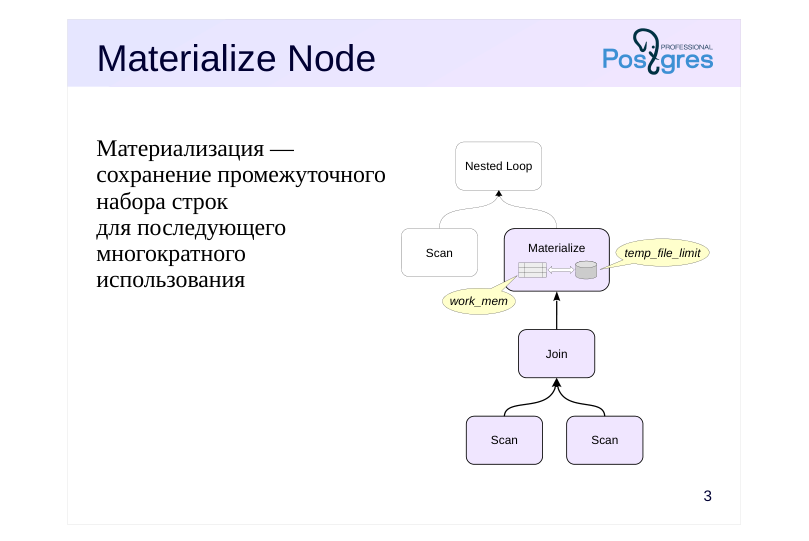
Материализация — сохранение промежуточного набора строк для последующего многократного использования
Speaker notes
Materialization refers to storing an intermediate set of rows for later reuse, often multiple times. The set can be stored at various levels: for a particular query, at the session level, or at the database level.
Query nodes typically exchange data using a pipeline model: when the algorithm in a plan node requires the next row from the dataset, the node requests the next batch from one of its child nodes. However, in some cases, it’s beneficial (and sometimes necessary) for the query executor to immediately retrieve all rows, store them, and have the ability to access the stored result again. This materialization is handled by the Materialize node.
Rows are stored in main memory as long as their size does not exceed the work_mem limit. When the limit is exceeded, all rows are written to a temporary file and read from it as needed. The total size of all temporary files per session is constrained by the temp_file_limit parameter value.
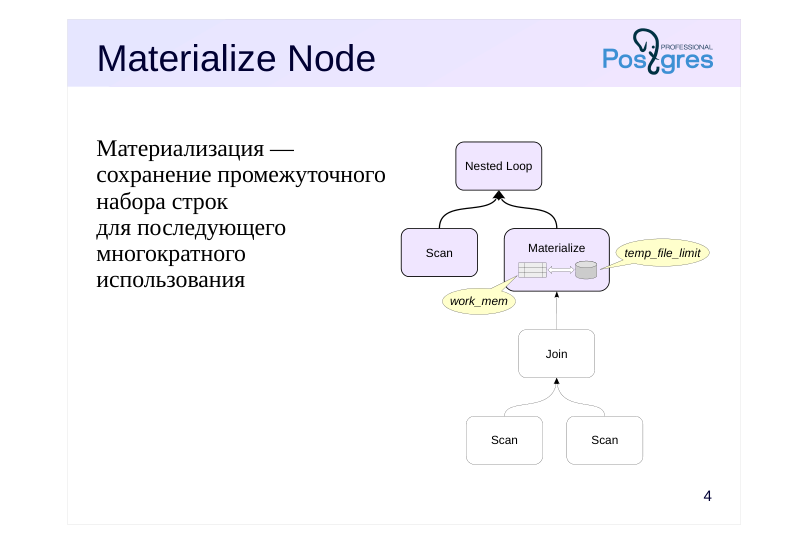
For example, the top Nested Loop node in the example executes a nested loop join, but there’s no efficient way to access the inner data set—it’s computed using another join. To avoid repeatedly executing the nested join, its result can be materialized.
Page 4: Materialize Node
 {#source-figure-004 caption=“Source slide page 4: Materialize Node”}
Материализация — сохранение промежуточного набора строк для последующего многократного использования
Speaker notes
Once the nested join’s result is materialized, the Nested Loop node accesses the already prepared row set.
Page 5: Materialize Node
If an operation requires significant resources and the result is accessed multiple times, the planner may opt for a plan with a Materialize node, which stores the retrieved rows for reuse:
Since there’s no suitable index for the inner row set’s predicate, the materialization plan becomes advantageous. In some cases, the planner employs materialization of the inner data set during a merge join to enable re-reading parts of the data when the outer set contains repeated values:
Page 6: CTE Materialization
 {#source-figure-006 caption=“Source slide page 6: CTE Materialization”}
Speaker notes
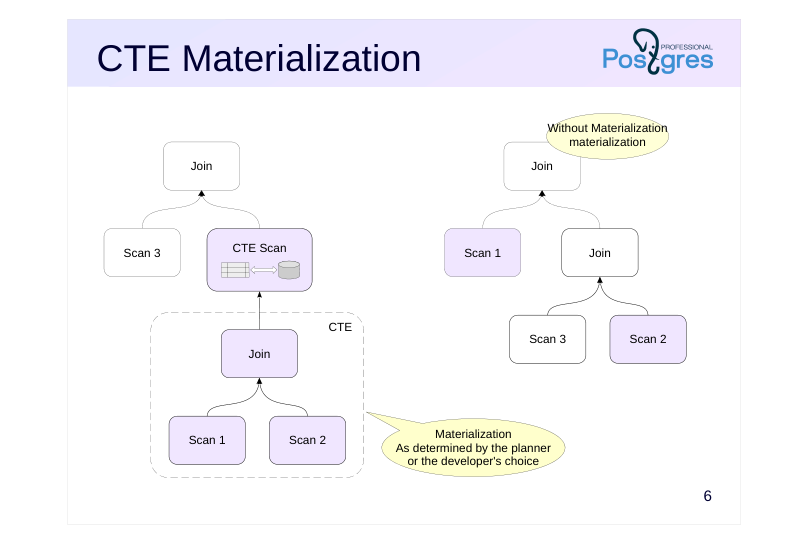
Common Table Expressions (CTE), also known as WITH subqueries, provide an effective way to structure a query and enhance its clarity. Unlike regular subqueries, CTEs avoid deep nesting.
The planner expands CTE subqueries (without materializing them) when possible. This allows it to select the optimal join order. By default, the subquery is materialized in the following cases:
● The main query accesses the subquery multiple times to avoid redundant calculations.
In such cases, materialization can be disabled by specifying the AS NOT MATERIALIZED clause.
● The subquery has side effects (modifies data) —so that the change occurs exactly once. (Side effects also include calls to volatile functions; see the «Functions» section.) (К побочным эффектам относится также обращение к изменчивым функциям, см. тему «Функции».)
Materialization cannot be disabled in this case.
You can always force materialization by specifying the AS MATERIALIZED clause.
https://postgrespro.ru/docs/postgresql/16/queries-with#QUERIES-WITH-CTE-MATERIALIZATION
Page 7: CTE Materialization
The optimizer avoids materializing subqueries in WITH unless necessary:
However, an explicit directive causes the optimizer to plan the subquery separately from the main query:
When a subquery is used multiple times in a query, the planner may choose to materialize it to avoid repeatedly executing the same operations:
Page 8: Page 8
This is typically justified, especially when the subquery involves costly operations. However, in some cases (such as this example), a materialization-free plan might be more efficient, so it can be avoided. Compare the buffers value to the previous version:
However, if the subquery modifies data, materialization will still be performed: the modification must occur only once.
Page 9: Recursive queries
 {#source-figure-009 caption=“Source slide page 9: Recursive queries”}
Speaker notes
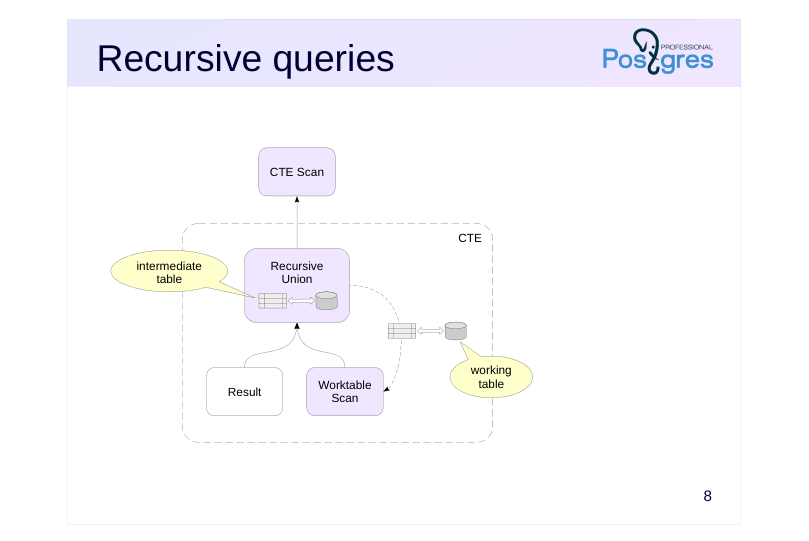
Recursive queries are based on common table expressions.
The Recursive Union node relies on a working table and an intermediate table: the working table stores the rows generated during the current iteration, while the intermediate table builds up the result. The Worktable Scan node reads the content of the working table during the recursive part of the query.
Each of these two tables is materialized following the same rules: while the table’s content fits into work_mem, it is stored in memory, and then all rows are written to disk.
Once the recursive query completes, the intermediate table’s accumulated data is passed to the CTE Scan node, while the working table is discarded.
https://postgrespro.com/docs/postgresql/16/sql-copy
Page 10: Recursive Queries
Let’s confirm that the recursive query materializes intermediate data. To achieve this, we’ll intentionally structure it so that the working and intermediate tables don’t fit in memory:
Pay attention to the temp read/write entries in the WorkTable Scan and Recursive Union nodes, which are specific to recursive queries.
Page 11: Window functions
 {#source-figure-011 caption=“Source slide page 11: Window functions”}
Speaker notes
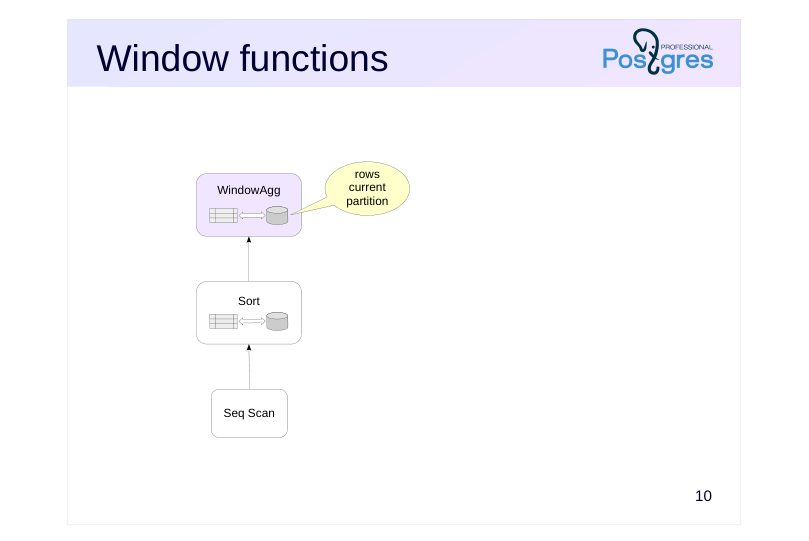
When evaluating window functions in the WindowAgg node (see the “Sorting” section), materialization is also used: rows from the current partition (PARTITION BY) may be included multiple times in the window, and thus get materialized.
In this case, only the WindowAgg node uses the materialized rows; the parent node receives the computed result, not these intermediate data.
https://postgrespro.com/docs/postgresql/16/sql-copy
Page 12: Temporary tables
A table accessible during a single session
- is stored in the system catalog
- is not written to the log
- Files are written to disk
- Session-local memory caching (temp_buffers)
- Vacuum and analysis
- only performed manually
Speaker notes
Intermediate data can be obtained using a complex algorithm, such as one written in a procedural language. In such a scenario, the data cannot be processed in a CTE but can be stored in a temporary table and reused across multiple queries.
Temporary tables are more suitable for intermediate data than regular tables because they exist only within a session or transaction (depending on the mode specified during creation) and are automatically removed along with the data and dependent objects like views and indexes. Moreover, temporary tables are not logged and are cached in the local memory of the backend process handling the session, making them more efficient to use.
The process’s local memory is not accessible to autovacuum processes, so vacuuming and analyzing must be done manually. The cache memory is allocated on demand and restricted by the temp_buffer parameter for the session (once the temporary table is accessed for the first time, the limit cannot be modified).
https://postgrespro.com/docs/postgresql/16/sql-copy
However, temporary tables generate entries in the system catalog and are stored as disk files. As a result, bulk processing of temporary tables—such as in the 1C system—can lead to the system catalog growing and increased strain on the file system. Therefore, 1C uses specific patches to mitigate these unwanted side effects.
Page 13: Temporary Tables Temporary Tables
We’ll create a temporary table:
The temporary table is created in the pg_temp schema. By default, the table persists until the end of the session; you can choose to have the rows deleted (ON COMMIT DELETE ROWS) or the table dropped (ON COMMIT DROP) when the transaction completes. It’s often useful to analyze a recently filled temporary table before incorporating it into queries. Compare the cardinality estimates when querying a regular table versus a temporary one:
In the latter case, without statistics, the optimizer estimates the table occupies 10 pages containing 520 rows, resulting in an overestimated cost:
If the table is analyzed, the estimate becomes accurate:
Page 14: Join Order
The number of join combinations increases exponentially as the number of tables in the query increases.
- JOIN Operation
- Full enumeration when the number of joins does not exceed
- join_collapse_limit = 8
- Next, in groups of join_collapse_limit tables
- Comma-separated join
- Full enumeration when the number of joins is no more than geqo_threshold =
- 12
- Next, using a genetic algorithm
- Materialization – Planner Hint
Speaker notes
As the number of tables in a query increases, the number of join combinations—and thus the cost of choosing a plan—grows exponentially.
If the number of joins (using the JOIN syntax) exceeds join_collapse_limit (default 8), the planner evaluates potential join combinations in groups of join_collapse_limit tables and then merges these groups.
There’s a similar parameter for subqueries in the FROM clause — from_collapse_limit.
If tables are joined with commas (without the JOIN keyword), the planner evaluates all join combinations but switches to a genetic algorithm when the number of joins exceeds geqo_threshold (default 12).
This can result in suboptimal execution plans. Details can be found in Pavel Tolmachev’s article:https://habr.com/ru/company/postgrespro/blog/662021/
By manually managing materialization—either through CTE or by breaking down the query into parts and utilizing temporary tables—developers can group tables, allowing the optimizer to plan each separately. Typically, CTE is a more straightforward and efficient way, but the second option enables analyzing a temporary table, thereby giving the planner more information about the data.
https://postgrespro.com/docs/postgresql/16/sql-copy
Page 15: Managing Join Order
The default value of the join_collapse_limit parameter is chosen to ensure that join planning for that many tables doesn’t require excessive resources:
Let’s execute a query that explicitly joins tables using the JOIN keyword:
In the selected plan, the flights (flights) and ticket_flights tables are joined first, and the resulting set is then joined with the tickets (tickets) table. By setting the join_collapse_limit parameter to 1, you can enforce a specific join order:
Now, the tables are joined in the order they appear in the query, even though the query cost is higher. However, this approach places too much responsibility on the query author. The planner can only choose which set of rows to use as the outer or inner join.
It is recommended to familiarize yourself with the similar parameter from_collapse_limit in practice.
Page 16: Materialized views
Materializing the Query Result
- read-only
- It is possible to create indexes
- Data Update
- Manual synchronization
- Incremental Update: pg_ivm Extension
- Vacuum and analysis
- manually and automatically
Speaker notes
A materialized view is a named query result stored at the database level. A materialized view can be treated like a regular read-only table.
You can create indexes on a materialized view (but you can’t add integrity constraints — these must be enforced in the base tables). A materialized view collects the same statistics as regular tables.
Unlike regular views, the rows of a materialized view remain unchanged when the base tables are modified. Synchronization is done manually.
https://postgrespro.com/docs/postgresql/16/sql-copy
Full synchronization of a materialized view may be too expensive. Built-in incremental update (individual rows as base tables change) is not natively supported, but the pg_ivm extension enables this feature (author – Suguru Nagata, https://github.com/sraoss/pg\_ivm
Page 17: Materialized Views Materialized Views
Create a materialized view:
The pg_temp schema is prioritized in the search order, so you’ll need to access the materialized view using its full name. This is inconvenient; it’s better to remove the temporary table:
Materialized views support indexing:
During analysis and auto-analysis, materialized views gather the same statistics as tables. When the content of underlying tables changes, the rows in the materialized view remain unchanged:
Synchronization must be performed explicitly. The REFRESH command fully locks the materialized view during rebuilding, which may be undesirable. In this case, you can avoid this by using the CONCURRENTLY option, as a unique index exists on the materialized view:
Page 18: Page 18
Page 19: Takeaways
The optimizer can materialize rows from the plan nodes for reuse
- You can control materialization using CTEs, temporary tables, and materialized views.
- Materialization enables control over the join order
Page 20: Practice
- At the start of the demo, examples of two queries with a Materialize node were shown. Instruct the planner not to use this node and check whether it can avoid materialization in some cases and not in others. 2. Check the query execution plan with the from_collapse_limit parameter set to 8 (default) and 1:
Speaker notes
- Use the enable_material parameter enable_material: https://postgrespro.ru/docs/postgresql/16/runtime-config-query#GUC-ENABLE-MATERIAL
- See the documentation for details on the parameter:https://postgrespro.ru/docs/postgresql/16/explicit-joins
Page 21: 1. Disabling the Materialize Node
Let’s examine the execution plan for the first query in the demonstration:
Let’s request the planner to avoid using materialization:
The planner avoided materialization, but the plan’s cost increased. Let’s check the second query: Let’s look at the second query:
Page 22: Page 22
In this case, the planner must use materialization because a merge join requires not just moving forward through the dataset but also moving backward.
2. The from\_collapse\_limit Parameter
First, let’s see how the query behaves with the default from_collapse_limit setting:
The subquery joins two tables, but the optimizer unfolds it and determines the join order for all three tables. The initial joins here involve the ticket_flights and flights tables. Now lets set from_collapse_limit to 1 and examine the new query plan for the same query:
The query plan has changed — the subquery is no longer unfolded, and the first join involves two tables from it. If a JOIN construct is used in FROM instead of a list of tables, the optimizer first converts each such construct into a table list
Page 23: Page 23
(processing tables in groups of up to join_collapse_limit), then unfolds subqueries (to a depth of up to from_collapse_limit). Therefore, it’s advisable to set both parameters to the same value.