11 Lesson 11: Statistics / Basic Statistics
This page is extracted from the official PDF into native Markdown. Slide text, code and speaker notes are kept in reading order; the original PDF and HTML remain the layout references. HTML source: No matching course-page link was captured in the source inventory. Archive: QPT-handouts-16-en-20251018.zip PDF pages: 27
Page 1: Statistics / Basic Statistics
Copyright
© Postgres Professional, 2019–2024 Authors Authors: Egor Rogov, Pavel Luzanov, Ilya Bashtanov Photo by: Oleg Bartunov (Phu monastery, Bhrikuti summit, Nepal)
Use of course materials
Non-commercial use of course materials (presentations, demonstrations) is allowed without restrictions. Commercial use is possible only with the written permission of Postgres Professional. It is prohibited to make changes to the course materials.
Feedback
Please send your feedback, comments and suggestions to: edu@postgrespro.ru
Disclaimer
In no event shall Postgres Professional company be liable for any damages or loss, including loss of profits, that arise from direct or indirect, special or incidental use of course materials. Postgres Professional company specifically disclaims any warranties on course materials. Course materials are provided “as is,” and Postgres Professional company has no obligations to provide maintenance, support, updates, enhancements, or modifications.
Page 2: Topics
- Basic statistics
- Most common values histogram
- Statistics for Elements of Composite Values
- Leveraging statistics to estimate cardinality and selectivity
- Private and Shared Execution Plans
- Partial Index and Expression Index
Page 3: Basic statistics
Table size
- rows (pg_class.reltuples) and pages (pg_class.relpages)
- Collected
- DDL operations
- vacuum
- through analysis
- Configuration
- default_statistics_target = 100
Speaker notes
Base statistics are collected at the table level and the column level.
Table statistics include data on the object’s size, such as reltuples and relpages in the pg_class table. Because this statistics is crucial, it is updated by certain DDL operations (CREATE INDEX, CREATE TABLE AS SELECT) and refined during vacuum and analyze.
Additionally, the planner adjusts the row count based on the difference between the actual data file size and the relpages value.
When analyzing, a random sample of rows is examined. Research has shown that the sample size ensuring accurate estimates is largely independent of the table size. The sample size is based on the statistical target defined by the parameter default_statistics_targe, multiplied by 300.
Keep in mind that the statistics doesn’t have to be perfectly accurate for the planner to select an acceptable plan; often, being in the right ballpark is sufficient.
https://postgrespro.com/docs/postgresql/16/sql-copy
Page 4: Basic statistics
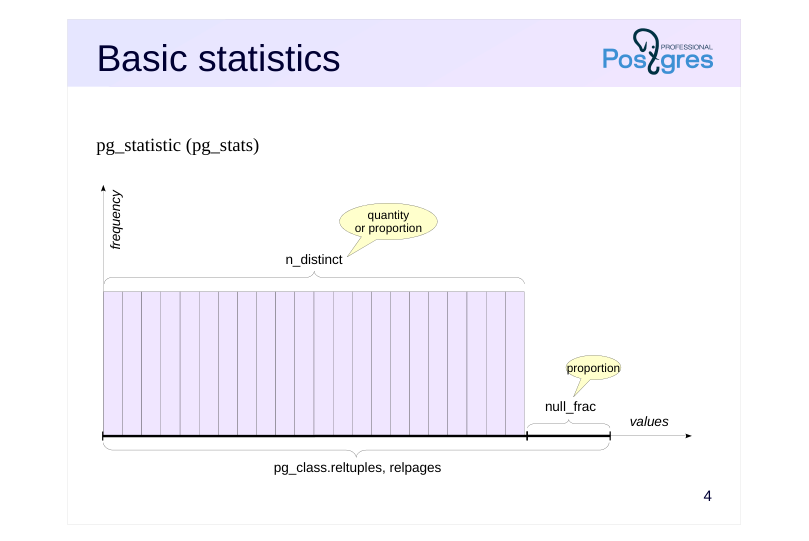 {#source-figure-004 caption=“Source slide page 4: Basic statistics”}
pg_statistic (pg_stats)
Speaker notes
During table analysis, all other statistics are collected separately for each column. This is typically handled by autoanalysis, with its configuration discussed in the DBA2 course.
The pg_statistic table stores column-level statistics.But the pg_stats view is easier to use, as it displays the information in a more convenient format.
The null_frac field indicates the proportion of rows with null values in the column (ranging from 0 to 1).
The n_distinct field contains the number of distinct values in the column. If n_distinct is negative, its absolute value represents the proportion of unique values. For example, -1 indicates that all values are unique (a typical case for a primary key).
https://postgrespro.com/docs/postgresql/16/sql-copy
Page 5: Row Count
Let’s start by estimating cardinality in a simple query without any conditions.
Exact value:
The optimizer retrieves the value from pg_class:
The parameter controlling the statistics target defaults to 100:
Because the analysis considers 300 × default_statistics_target rows, estimates for larger tables may not be entirely accurate.
Proportion of Null Values
Some flights have not yet departed, so their departure times are not yet determined:
Exact value:
The optimizer’s estimate is calculated as the total number of rows multiplied by the proportion of NULL values:
Page 6: Count of unique values
Let’s check the number of aircraft models in the flights table:
This is accurate:
What about the airplanes table?
A value of -1 here indicates that all values are unique. This makes sense since aircraft_code is the primary key in this table.
Join Cardinality
Join selectivity refers to the fraction of rows from the Cartesian product of two tables that remains after applying the join condition. Therefore, to calculate join cardinality, the optimizer estimates the cardinality of the Cartesian product and multiplies it by the join condition’s selectivity (and the selectivity of any filter conditions, if applicable). Consider an example:
Cardinality value:
The basic formula for calculating join selectivity (assuming uniform distribution) is the smaller of 1/nd1 and 1/nd2, where
Page 7: Page 7
nd1 - the count of distinct join key values in the first set of rows; nd2 - the number of unique join key values in the second row set. This gives us exactly what’s needed:
Page 8: Most common values
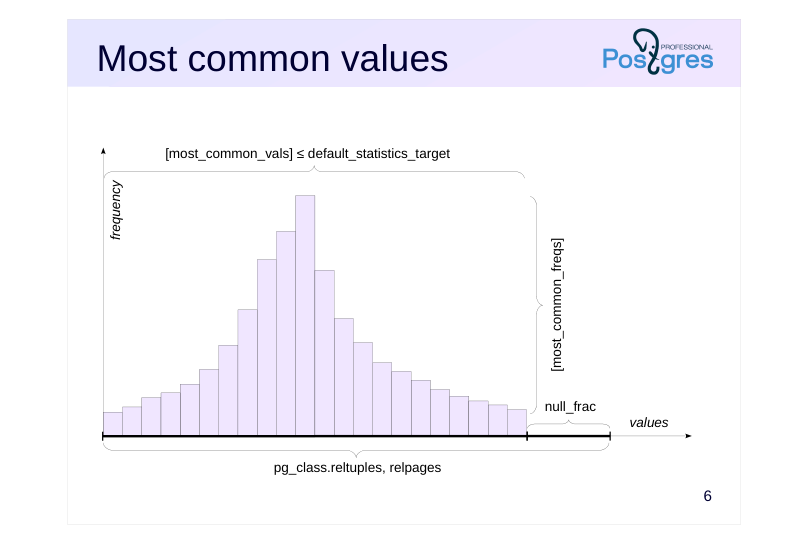 {#source-figure-008 caption=“Source slide page 8: Most common values”}
Speaker notes
Had the data been uniformly distributed—that is, if all values occurred with equal frequency—this information would have been nearly sufficient (minimum and maximum values would still be required).
However, non-uniform distributions are very common in practice. Therefore, the following information is also gathered.
● The most common values array — the most_common_vals field;
● The array of frequencies for these values is the most_common_freqs column.
The frequencies from these arrays directly serve as a selectivity estimate for querying a specific value.
This works well as long as the number of distinct values isn’t too large. The maximum size of each array is constrained by the default_statistics_target parameter. This value can be adjusted on a per-column basis; when doing so, the sample size is determined by the table’s maximum value.
The tricky part is “large” values. To prevent pg_statistic from growing and to avoid overloading the planner with unnecessary work, values exceeding 1 KB are excluded from statistics and analysis. In fact, if such large values are stored in the column, they’re likely unique and won’t be included in most_common_vals.
Page 9: Most Common Values
To experiment, limit the number of most frequent values (which is determined by the default_statistics_target parameter) at the column level:
If a value is among the most common values, its selectivity can be found directly in the statistics. Example (Sheremetyevo):
Exact value:
Here’s what the list of most common values and their frequencies looks like:
Cardinality is calculated by multiplying the number of rows by the value’s frequency:
The Most Common Values list can also be used to estimate the selectivity of inequalities. This involves identifying all values in most_common_vals that satisfy the inequality and summing the frequencies of the corresponding entries from most_common_freqs. If the specified value is not among the most frequent values, selectivity is calculated under the assumption that all other data (excluding the most frequent ones) are uniformly distributed. For example, Vladivostok is not among the most common values.
Page 10: Page 10
Exact value:
To estimate, sum the frequencies of the most common values:
The remaining rows account for less frequent values. Since we assume a uniform distribution of these values, the selectivity is calculated as 1/nd, where nd represents the number of unique values.
Given that 10 of these values are among the most frequent and no null values are present, the following estimate is obtained:
Page 11: Histogram
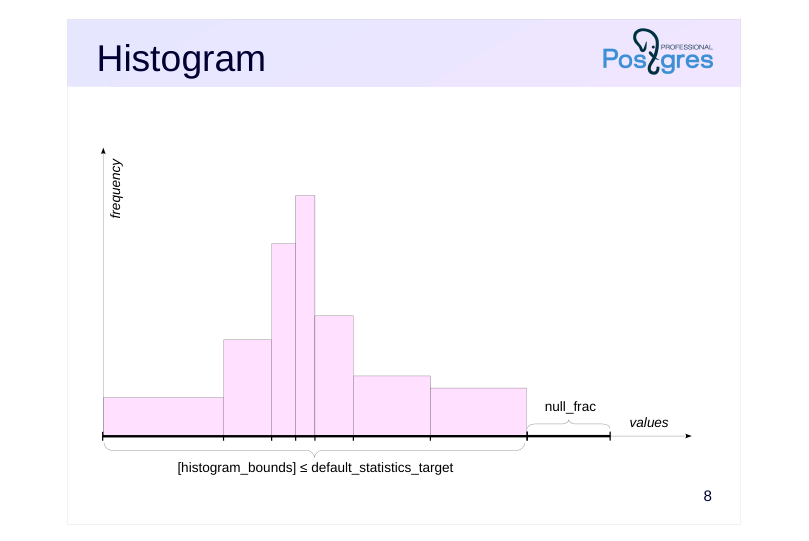 {#source-figure-011 caption=“Source slide page 11: Histogram”}
Speaker notes
When the number of distinct values grows too large to store them all in an array, the system applies the histogram representation. A histogram employs several buckets to store values in. The number of bins is limited by the same parameter, default_statistics_target.
The width of the bins is set to ensure each contains roughly the same number of values (as shown by equal rectangle areas in the figure).
With this setup, only the array of extreme values for each bin needs to be stored — the histogram_bounds field. The frequency of a bin is 1 divided by the number of bins.
To estimate the selectivity of the condition field < value, calculate N divided by the total number of bins, where N represents the number of bins located to the left of value. The estimate can be refined by including a portion of the bin that contains the value itself.
However, when estimating the selectivity of the condition field = value, the histogram cannot help, and you must rely on the assumption of a uniform distribution, taking 1/n_distinct as the estimate.
Page 12: Method Combination
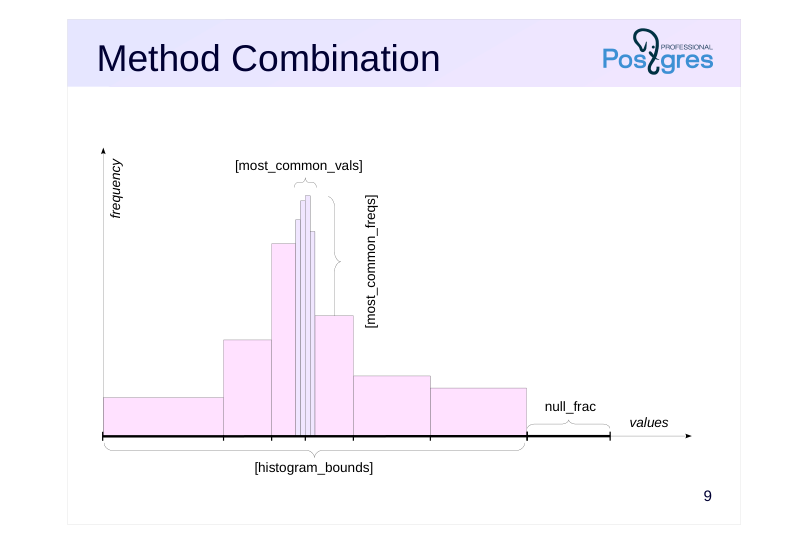 {#source-figure-012 caption=“Source slide page 12: Method Combination”}
Speaker notes
However, the two methods are typically integrated: a list of the most common values is created, with all remaining values represented in a histogram.
The histogram is constructed to exclude values that are already in the list. This helps improve the estimates.
Page 13: Histogram
Under “greater than” and “less than” conditions, the estimation process may utilize the most frequent values list, a histogram, or both. The histogram is constructed to exclude the most frequent values and NULLs:
The number of histogram bins is set by the default_statistics_target parameter, with boundaries chosen to ensure each bin contains roughly the same number of values. Consider the following example:
Exact value:
How is the estimate calculated? Consider the frequency of the most common values within the given range:
The specified interval covers exactly 2 out of 10 histogram bins, with no null values present in this column, leading to the following estimate:
In general, even partially filled bins are considered using linear approximation.
Join Cardinality
In the case of uneven data distribution in the join keys, the basic formula for calculating join selectivity (taking the minimum of 1/nd1 and 1/nd2) produces an incorrect result. For example, flights use different aircraft models with varying capacities, and joining flights with seats would result in:
Page 14: Page 14
However, the exact value is half:
However, the planner can account for lists of the most common values and histograms, leading to a nearly accurate estimate:
Unfortunately, the situation gets worse when joining multiple tables. For instance, adding the airplanes table to the previous query won’t affect the total number of rows in the sample:
However, the planner now makes an error:
The problem is that, when joining the first two tables, the planner doesn’t have detailed statistics on the resulting row set. In many cases, this is the main cause of poor estimates.
Page 15: Additional Fields
Ordering (Use a bit map?)
- pg_stats.correlation(1 = ascending, 0 = chaotic, –1 = descending)
- Visibility (Use index-only scan?)
- pg_class.relallvisible
- Average value size in bytes (memory estimate)
- pg_stats.avg_width
Speaker notes
The server maintains additional statistical metrics.
The pg_stats.correlation field records the physical ordering of the column’s values. If the values are stored in strictly ascending order, the value will be close to 1; if in descending order, close to -1. The more randomly the data is arranged on disk, the closer the value gets to zero. The optimizer uses this field when deciding between a bitmap scan and a regular index scan.
The pg_class.relallvisible field tracks the number of table pages containing only the latest tuple versions (this data is updated in conjunction with the visibility map). If the count is insufficient, the planner may prefer a bitmap scan over an index-only scan.
The pg_stats.avg_width field stores the average size of values in bytes for this column to estimate the memory needed for the operation.
https://postgrespro.com/docs/postgresql/16/sql-copy
Page 16: Composite Field Elements
Most Common Elements
- pg_stats.most_common_elems
- pg_stats.most_common_elem_freqs
- Element Count Histogram
- pg_stats.elem_count_histogram
Speaker notes
For composite types like arrays or tsvector, pg_stats stores not just the distribution of the values themselves, but also their elements:
● The most_common_elems and most_common_elem_freqs columns store the most frequent elements and their frequencies;
● elem_count_histogram contains an element count histogram within the value (such as, for an array, a histogram of array lengths)
This enables more accurate query planning for fields not in the first normal form.In particular, this information is crucial for GIN index method operator classes, as it enables distinguishing between frequent values (those appearing in many documents, representing low-selectivity conditions) and rare values (high-selectivity conditions).
Page 17: Composite Field Elements
As an example, let’s look at the pg_constraint table, which contains integrity constraints applied to tables. It also includes a conkey column that holds an array of column numbers forming the constraint:
For this field, we can retrieve the most common values and their frequencies. To make viewing the statistics easier, we’ll collect them with a lower target value:
In this case, the column contains arrays of elements. Such statistics cannot accurately estimate cardinality, especially for conditions checking if an element is present in the array. However, the planner’s estimation remains accurate:
For such conditions, per-element statistics are used:
Page 18: Page 18
At the end of the array, additional information (minimum, maximum, average) is available for frequencies and histograms, causing the number of values to exceed the target setting. The query planner uses the frequency of element 2 to generate an estimate:
Page 19: Private and General Plans
Private Plans
- May be beneficial in cases of uneven distribution, but the query is re-planned
- each time it’s executed.
- Seq Scan on tasks
- Index Scan on tasks
- Index Cond: status = ’todo'
- Filter: status = ‘done’
- is built
- with values
- parameters
- Common Plan
- Best suited for uniform distribution
- Cached within the session for prepared statements
- Index Scan on tasks
- Index Cond: id = $1
- is built
- without considering the values
- parameters
Speaker notes
With the simple query protocol (refer to the “Planningand Execution” section), each query is re-planned, taking into account the parameter values.
The extended protocol allows for the preparation of statements, which can have parameters. Preparation always involves parsing and query rewriting, with the parse tree stored in the backend process’s local memory.
When executing a prepared statement, there are options. The query is typically re-planned each time, taking into account the parameter values. Such plans are called custom and (custom)
It makes sense when there’s an uneven distribution, as optimal plans may vary depending on the values. For example, index access is more effective for highly selective conditions, while a sequential scan is preferable when the value is common.
But the query can be planned without considering parameter values. This allows not only saving the parse tree but also the plan itself, avoiding the need for re-planning. Such a plan is referred to as generic (generic).
A generic plan performs well in cases of uniform distribution, where the condition’s selectivity is not dependent on the specific value.But in the case of uneven distribution, a generic plan may perform well for some values but poorly for others.
Let’s see how the planner decides which option to use.
Page 20: Private and General Plans
Let’s prepare the query and create an index:
The query for canceled flights will use an index because the statistics show there are few such flights:
However, the query for arriving flights does not use the index, as there are many of them.
These plans are called private because they are generated based on specific parameter values. However, the planner also generates a general plan without considering specific parameter values. If at any point the cost of the general plan does not exceed the average cost of previously generated private plans, the planner switches to using the general plan, ceasing further planning. However, the first five times, private plans are used to accumulate statistics. Let’s run the statement three more times:
The number of executions for general and private plans can be found in the pg_prepared_statements view:
Page 21: Page 21
Next time, the planner will switch to a general plan. Instead of a specific value, the parameter number will be shown in the plan:
If you have a query with parameters displayed as numbers (e.g., from the server log), you can view the general execution plan for that query like this:
Switching to a general plan can be problematic in cases of uneven value distribution. The plan_cache_mode parameter allows you to disable private plans (or alternatively, use a general plan from the beginning):
Partial index Partial Index
The search for already arrived flights will be performed via a sequential scan of the flights table, so the index entries with the Arrived key are never used. However, they consume space and require resources to stay in sync with table row changes. We’ll check the size of the full index on the status column:
Page 22: Page 22
The index can only include row pointers that meet high-selectivity criteria. Replace the full index with a partial one:
The partial index is much smaller than the full index:
A partial index is used when it’s advantageous (for rare values):
…and for frequent values — sequential scan:
This way, you can save disk space and reduce the costs of maintaining the full index.
Expression Index Expression-Based Index
If the conditions involve functions instead of columns, the planner doesn’t consider the number of distinct values. For instance, flights in January would make up roughly 1/12 of the total:
However, the planner doesn’t recognize the purpose of the extract function and uses a fixed selectivity of 0.5%:
Page 23: Page 23
This situation can be addressed by building an expression index, since these expressions have their own statistics collected.
The estimate is now correct.
Expression index statistics are stored alongside the table’s basic column statistics:
An index can only be created using a deterministic expression, meaning that for the same column values, it must consistently return the same result. See the “Functions” section for more details.
Page 24: Takeaways
Data characteristics are collected as statistics.
- Statistics are used to estimate cardinality
- Cardinality is used to estimate cost.
- Cost is used to select the optimal plan
- The key to success lies in accurate statistics and proper cardinality.
Page 25: Practice
- Create an index on the tickets table (tickets) by the passenger name (passenger_name). 2. What statistics are available for this table? 3. Explain how cardinality is estimated and how the execution plan is selected for the following queries: a) selecting all tickets, b) selecting tickets by the name ALEKSANDR IVANOV, c) selecting tickets by the name ANNA VASILEVA, d) selecting a ticket by the identifier 0005432000284.
Page 26: Index
2. Availability of Statistics
Some key values:
No column contains null values. There are approximately half as many unique booking IDs as there are rows in the table (meaning each booking has on average two tickets). There are approximately 10,000 distinct names. All other columns have unique values. The arrays of most common values and histograms are sized to match the default_statistics_target parameter (100). Passenger names have most common values. For other columns, these values are not applicable because the maximum number of tickets (5) is found in 194 bookings, and the remaining columns are unique. Histograms exist for all columns and are used to evaluate inequality predicates. The table rows are physically sorted by ticket number. Data in other columns is arranged in a somewhat random order.
3. Query Execution Plans
Cardinality is equal to the number of rows in the table; a full scan was selected.
Page 27: Page 27
Selectivity was determined using the most common values list; a null bitmap scan was chosen.
Selectivity was estimated using a uniform distribution; a bitmap scan was chosen.
Cardinality is 1 because the column’s values are unique; an index scan was selected.