10 Lesson 10: Join Methods / Merge Join
This page is extracted from the official PDF into native Markdown. Slide text, code and speaker notes are kept in reading order; the original PDF and HTML remain the layout references. HTML source: No matching course-page link was captured in the source inventory. Archive: QPT-handouts-16-en-20251018.zip PDF pages: 25
Page 1: Join Methods / Merge Join
Copyright
© Postgres Professional, 2019–2024 Authors Authors: Egor Rogov, Pavel Luzanov, Ilya Bashtanov Photo by: Oleg Bartunov (Phu monastery, Bhrikuti summit, Nepal)
Use of course materials
Non-commercial use of course materials (presentations, demonstrations) is allowed without restrictions. Commercial use is possible only with the written permission of Postgres Professional. It is prohibited to make changes to the course materials.
Feedback
Please send your feedback, comments and suggestions to: edu@postgrespro.ru
Disclaimer
In no event shall Postgres Professional company be liable for any damages or loss, including loss of profits, that arise from direct or indirect, special or incidental use of course materials. Postgres Professional company specifically disclaims any warranties on course materials. Course materials are provided “as is,” and Postgres Professional company has no obligations to provide maintenance, support, updates, enhancements, or modifications.
Page 2: Topics
- Merge Join Algorithm
- Computational complexity
- Merge Join in Parallel Execution Plans
Page 3: Merge join
 {#source-figure-003 caption=“Source slide page 3: Merge join”}
Merging Two Sorted Row Sets
- The result of the join is automatically sorted
Speaker notes
The third and final join method is the merge join.
The idea of this method is that two pre-sorted data sets can be easily merged into a single combined set that is sorted in the same way. The Gather Merge node operates similarly.
Before performing a merge join, both sets of rows need to be sorted. Сортировка — дорогая операция, она имеет сложность O(N log N).
But sometimes this phase can be skipped if the rows are already sorted by the required columns, for example, via indexed access to the table.
Page 4: Merge
 {#source-figure-004 caption=“Source slide page 4: Merge”}
Speaker notes
The merge is straightforward. First, we take the first strings from both sets and compare them. In this case, we immediately found a match and can output the first tuple of the result: («Yellow Submarine», «All Together Now»).
The algorithm goes as follows. the general algorithm works by reading the next row from the set with the smaller join field value (one set “catches up” to the other). If the values are equal, as in our example, we proceed to the next row in the second (inner) set.
Page 5: Merge
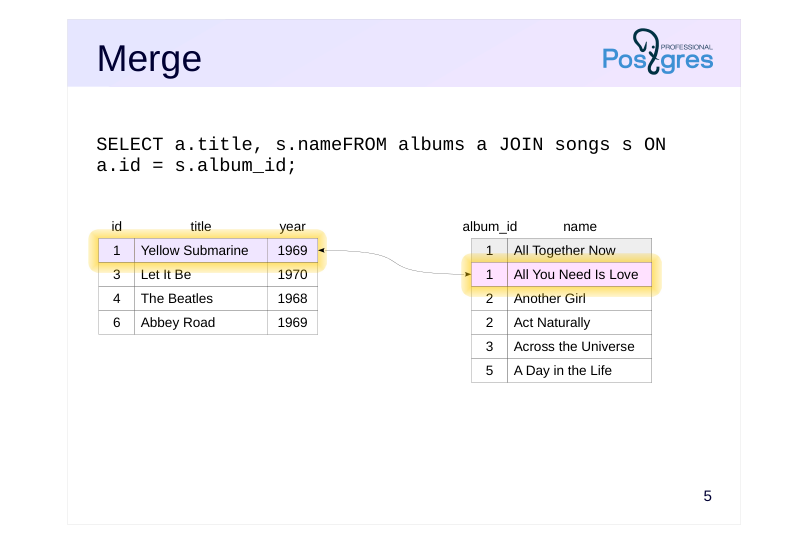 {#source-figure-005 caption=“Source slide page 5: Merge”}
Speaker notes
Once again, the match: (‘Yellow Submarine’, ‘All You Need Is Love’)
Once more, read the next row from the second dataset.
Page 6: Merge
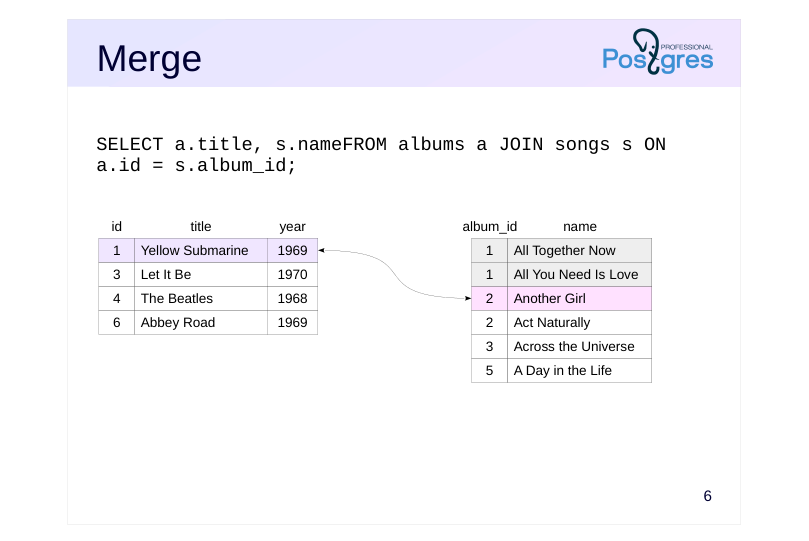 {#source-figure-006 caption=“Source slide page 6: Merge”}
Speaker notes
No match found in this case.
Since 1 < 2, we proceed to the next string in the first set.
Page 7: Merge
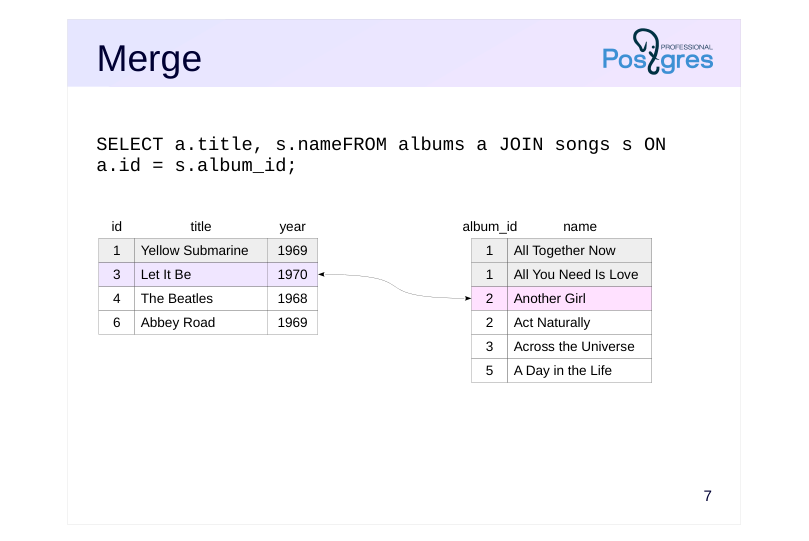 {#source-figure-007 caption=“Source slide page 7: Merge”}
Speaker notes
No match found.
Since 3 > 2, we proceed to the next row in the second set.
Page 8: Merge
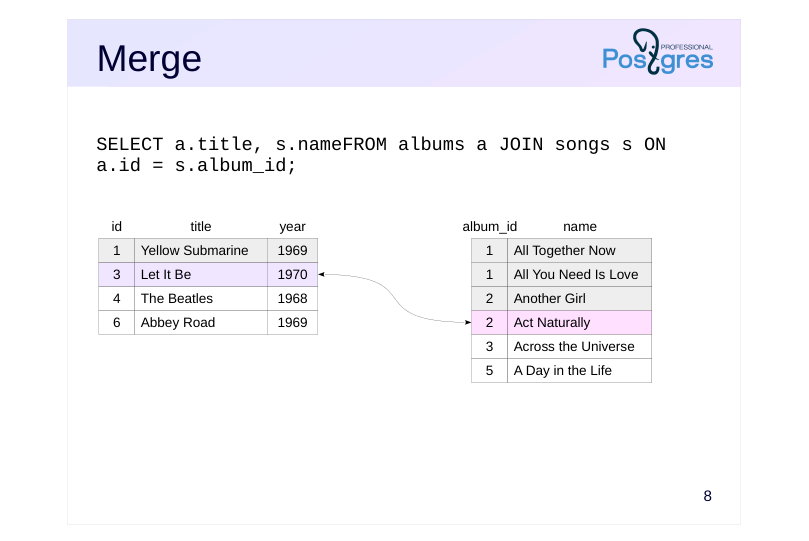 {#source-figure-008 caption=“Source slide page 8: Merge”}
Speaker notes
Once more, there’s no match, once more 3 > 2, we read the next row from the second set.
Page 9: Merge
 {#source-figure-009 caption=“Source slide page 9: Merge”}
Speaker notes
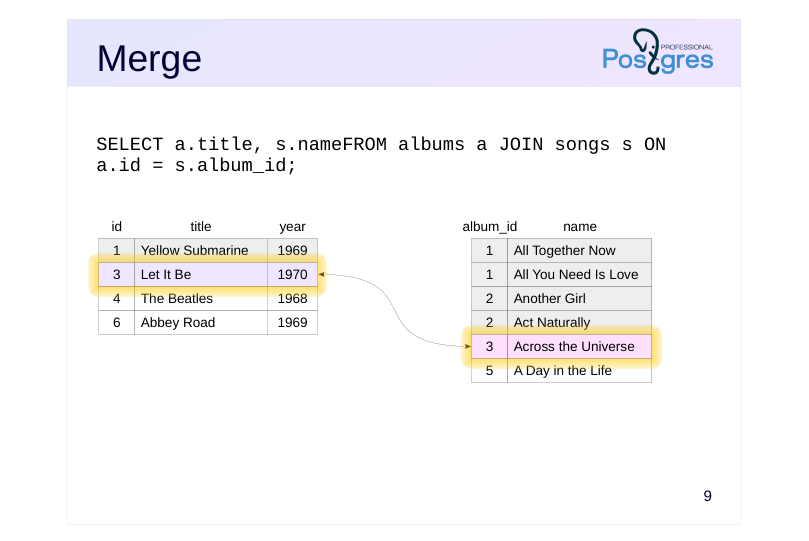
There is a match: ‘Let It Be’ and ‘Across the Universe’
3 = 3, proceed to the next line in the second set.
Page 10: Merge
 {#source-figure-010 caption=“Source slide page 10: Merge”}
No match found. 3 < 5, read the row from the first set.
Page 11: Merge
 {#source-figure-011 caption=“Source slide page 11: Merge”}
Speaker notes
No match found.
4 < 5, so read the row from the first set.
Page 12: Merge
 {#source-figure-012 caption=“Source slide page 12: Merge”}
Speaker notes
And the final step: no match again.
The merge join has concluded.
In reality, the algorithm is more complex — if the first (outer) row set has multiple identical values, it must be able to reread the rows of the second (inner) setusing the same join key.
The algorithm’s pseudocode can be found in the file src/backend/executor/nodeMergejoin.c.
Notably, the merge algorithm returns the join result in a sorted format. In particular, the resulting row set can be used for the next merge join without further sorting.
Page 13: Merge Join
If the result needs to be sorted, the optimizer might choose a merge join. This is especially the case when the data from the child nodes is already sorted — as shown in this example:
Here’s another example featuring two merge joins, where one Merge Join node receives a sorted dataset from another Merge Join node:
Here, ticket_flights and boarding_passes are joined, and the tickets (tickets) are joined using a set of rows that is already sorted by ticket numbers. Merge Join also supports Left, Right, Semi, Anti, and Full variations. Currently, merge joins support only equijoins. Joins based on ’greater than’ or ’less than’ operations are not implemented. Thus, the Full join is available only for hash and merge joins, and both types operate exclusively with equality conditions. If performance isn’t a concern, a full join can be implemented by combining the results of a left join and an anti-join—this method would be necessary when a full join with a different condition is required.
Page 14: Computational complexity
~ N+M, где
- N and M represent the number of rows in the first and second data sets.no
- joins required
- ~ N log N+M log M,
- if sorting is required
- Potential Initial Sorting Costs
- Efficient for a large number of rows
Speaker notes
In cases where data sorting isn’t required, the overall complexity of a merge join is proportional to the total number of rows in both data sets. However, unlike hash joins, there is no overhead involved in building a hash table here.
Therefore, merge joins can be effectively used in both OLTP-and OLAP-queries.
However, if sorting is required, the cost becomes proportional to the number of rows multiplied by the logarithm of that number. On large datasets, this approach is likely to be less efficient than a hash join.
Page 15: Computational Complexity
Let’s examine the cost of a merge join:
Startup cost includes: the sum of the startup costs of the child nodes (including the sorting cost if required); the cost of retrieving the first pair of matching rows The total cost includes the initial cost plus the total cost of acquiring both data sets the cost of comparing rows The overall conclusion is that the cost of a merge join is proportional to N + M (where N and M represent the number of rows being joined) when no separate sorting is required. Sorting a set of K rows adds at least K × log(K) to the estimate. In contrast to hash joins, merge joins without sorting are well suited for cases where quickly retrieving the initial rows is needed.
Also, note how the total cost has decreased.
Page 16: In parallel execution plans
 {#source-figure-016 caption=“Source slide page 16: In parallel execution plans”}
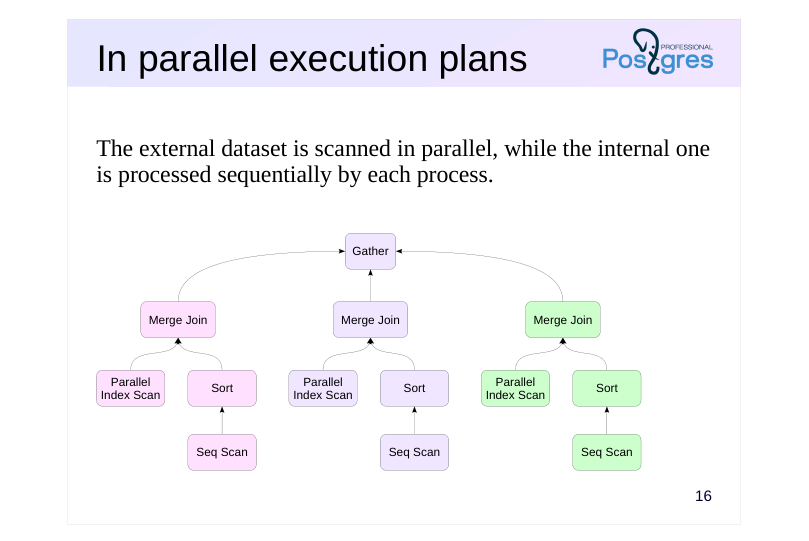
The external dataset is scanned in parallel, while the internal one is processed sequentially by each process.
Speaker notes
The merge join algorithm can be used in a parallelized plan.
Just like with a nested loop join, scanning one set of rows is executed in parallel by worker processes, but the other set of rows is read entirely by each worker process on its own. Therefore, hash joins are far more commonly used in parallel execution plans when dealing with large row sets, due to their efficient parallel algorithm.
Page 17: In parallel execution plans
 {#source-figure-017 caption=“Source slide page 17: In parallel execution plans”}
Speaker notes
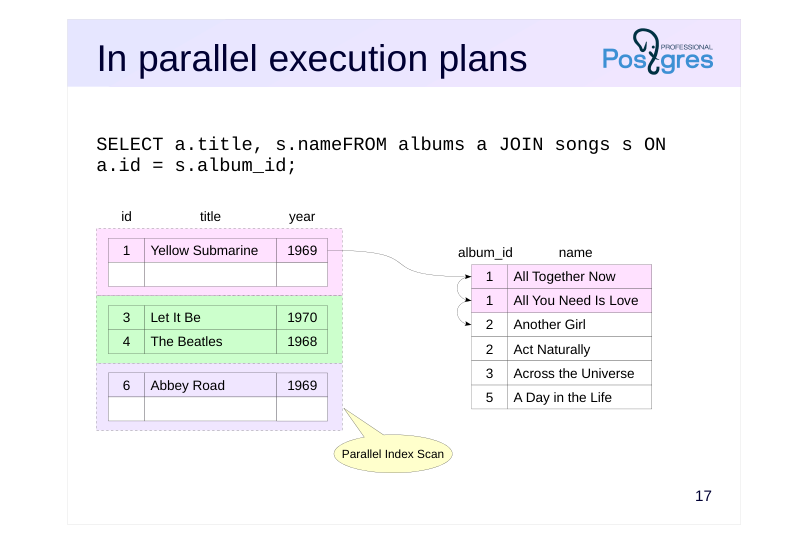
Each worker process will scan the internal dataset from the start until no more matches are found.
This slide shows the rows processed by the first process.
Page 18: In parallel execution plans
 {#source-figure-018 caption=“Source slide page 18: In parallel execution plans”}
Speaker notes
The second process will scan through the full set and find a match.
Page 19: In parallel execution plans
 {#source-figure-019 caption=“Source slide page 19: In parallel execution plans”}
Speaker notes
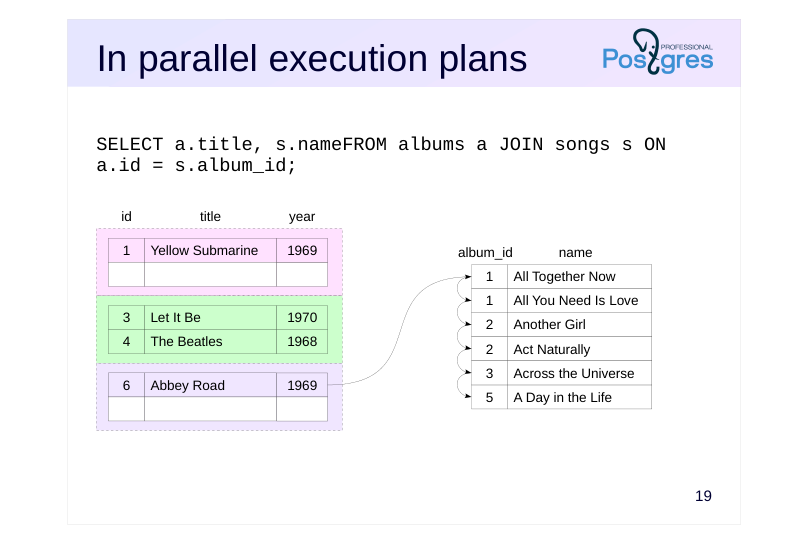
However, the third process will find no matches.
Of course, all three processes examine the internal set at the same time, rather than sequentially.
Page 20: In parallel execution plans
We’ll need an index:
Here’s an example of a parallel execution plan utilizing a merge join:
Here, the bookings_pkey index on the bookings table is scanned in parallel, while the aggregation result from subquery t is processed entirely by each process.
Page 21: Takeaways
Merge join may require some preparation
- The row sets need to be sorted
- or have them pre-sorted
- Efficient for large samples
- It’s beneficial if the row sets are already sorted.
- It’s beneficial if a sorted result is required
- This method is independent of the join order
- Only equijoins are supported.
- Other join types are not implemented, but there are no fundamental
- restrictions
Speaker notes
To perform a merge join, both row sets must be sorted. It’s beneficial if the data is already in the correct order; otherwise, sorting is required.
Merge operations are highly efficient, even for large data sets. As a nice bonus, the output is also sorted, making this join method advantageous when higher-level plan nodes need sorting (e.g., a query with an ORDER BY clause or another merge sort).
Thus, the planner has three join methods: nested loop, hashing, and merge (excluding various modifications). Each method has scenarios where it outperforms the others. This allows the planner to select the method that is expected to be the most suitable for each specific scenario.
Page 22: Practice
- Check the query’s execution plan for the list of all seats in the cabins, ordered by aircraft code: SELECT * FROM aircrafts a JOIN seats s ON a.aircraft_code = s.aircraft_codeORDER BY a.aircraft_code; But present it as a cursor. Reduce the cursor_tuple_fraction parameter value by a factor of ten. How did the execution plan change? 2. An aircraft can be replaced with another if the capacity difference is no more than 20%. Generate a replacement table between Boeing and Airbus models using a full join. How does the query execute?
- The query to execute:
Page 23: 1. The cursor_tuple_fraction configuration parameter
Cursor Execution Plan:
Current cursor_tuple_fraction value:
Lower it:
Now the planner chooses a different plan because its initial cost is lower, even though the total cost is higher.
2. Full Join
Let’s try executing the query.
We encounter an error: full joins are only implemented for equality conditions because only nested loops support joins with
Page 24: Page 24
arbitrary conditions, but they don’t support full joins. The restriction can be bypassed by combining the results of a left outer join and an anti-join:
The execution plan indicates that joins are implemented using a nested loop: