07 Lesson 07: Sorting and Grouping / Grouping
This page is extracted from the official PDF into native Markdown. Slide text, code and speaker notes are kept in reading order; the original PDF and HTML remain the layout references. HTML source: No matching course-page link was captured in the source inventory. Archive: QPT-handouts-16-en-20251018.zip PDF pages: 22
Page 1: Sorting and Grouping / Grouping
Copyright
© Postgres Professional, 2019–2024 Authors Authors: Egor Rogov, Pavel Luzanov, Ilya Bashtanov Photo by: Oleg Bartunov (Phu monastery, Bhrikuti summit, Nepal)
Use of course materials
Non-commercial use of course materials (presentations, demonstrations) is allowed without restrictions. Commercial use is possible only with the written permission of Postgres Professional. It is prohibited to make changes to the course materials.
Feedback
Please send your feedback, comments and suggestions to: edu@postgrespro.ru
Disclaimer
In no event shall Postgres Professional company be liable for any damages or loss, including loss of profits, that arise from direct or indirect, special or incidental use of course materials. Postgres Professional company specifically disclaims any warranties on course materials. Course materials are provided “as is,” and Postgres Professional company has no obligations to provide maintenance, support, updates, enhancements, or modifications.
Page 2: Topics
- Grouping Application
- Hash-based grouping
- Sorting-based grouping
- Hybrid grouping
- Grouping in Parallel Execution Plans
- Window functions
Page 3: Grouping Application
Explicit Indication
- GROUP BY
- Removing Duplicates
- DISTINCT
- UNION, INTERSECT, EXCEPT
Speaker notes
In a SQL query, you can group a set of rows using the GROUP BY clause, which is typically used with aggregate functions that process all rows in the group. The PARTITION BY clause provides a similar capability for window functions.
Grouping can occur implicitly when duplicates are removed in a query using the DISTINCT keyword or in set operations (UNION, INTERSECT, EXCEPT without the ALL keyword), which eliminate duplicates.
The server chooses one of the available grouping methods, considering factors such as resource availability, the ability to retrieve sorted data for the grouping key, and other factors.
Page 4: Grouping Application Applying Grouping
We will execute a query that explicitly groups the seats table’s rows by service classes:
Now, let’s retrieve all distinct service classes:
In the third (purely educational) example, we’ll retrieve all rows from the seats table twice and merge them using the UNION operator:
All three queries produce identical results, and each execution plan includes a HashAggregate node.
Page 5: Hash-based grouping
 {#source-figure-005 caption=“Source slide page 5: Hash-based grouping”}
Speaker notes
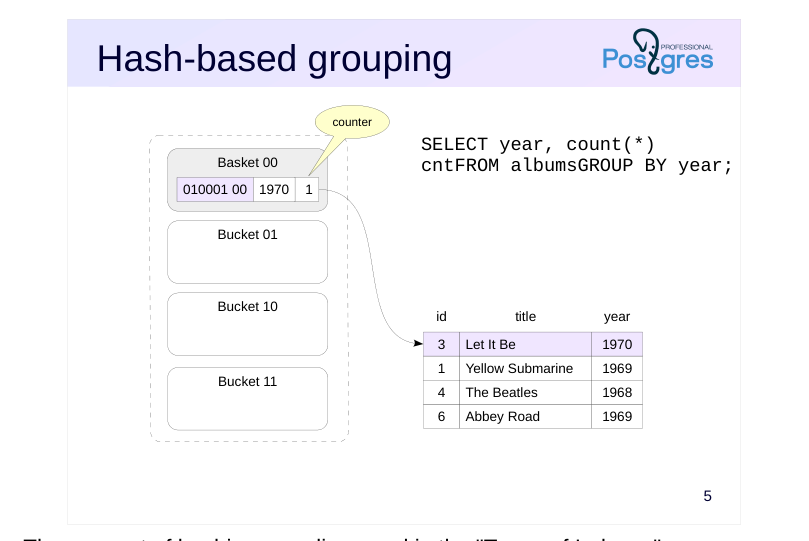
The concept of hashing was discussed in the “Types of Indexes” section.When grouping values, a similar approach can be used.
The example on the slide demonstrates how the COUNT aggregate function’s value is calculated during grouping by the year column. The server receives and processes the table rows in turn.
The number of buckets is precomputed as a power of two, and the number of bits in the hash code that represent the bucket number is determined. In the example on the slide, the last two bits are used.
The hash function is computed for the row’s year value. The bucket number is determined by the hash code, and a record with the hash code is added to the hash table if it is not already present.
Since the count aggregate function’s value is calculated in our example, each hash table entry also stores a counter that increments as each row is processed.
In our example, the first row creates a new entry in bucket 00.
Page 6: Hash-based grouping
 {#source-figure-006 caption=“Source slide page 6: Hash-based grouping”}
Speaker notes
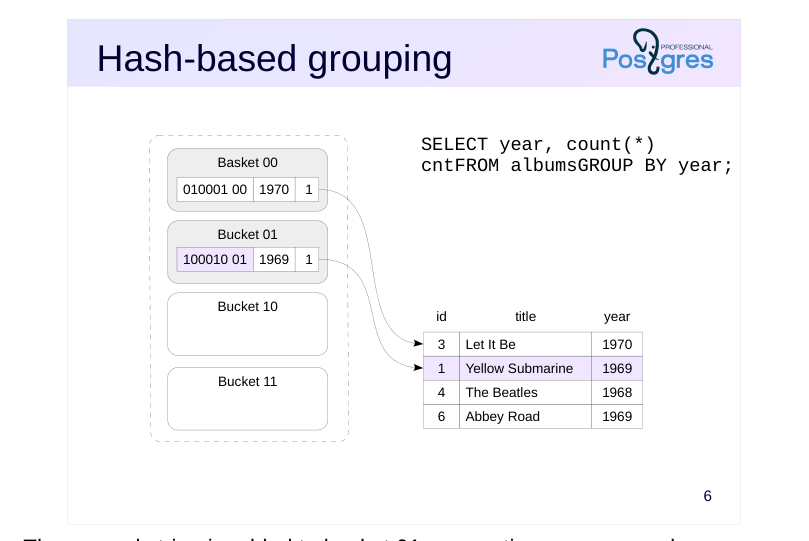
The second string is added to bucket 01, generating a new record.
Page 7: Hash-based grouping
 {#source-figure-007 caption=“Source slide page 7: Hash-based grouping”}
Speaker notes
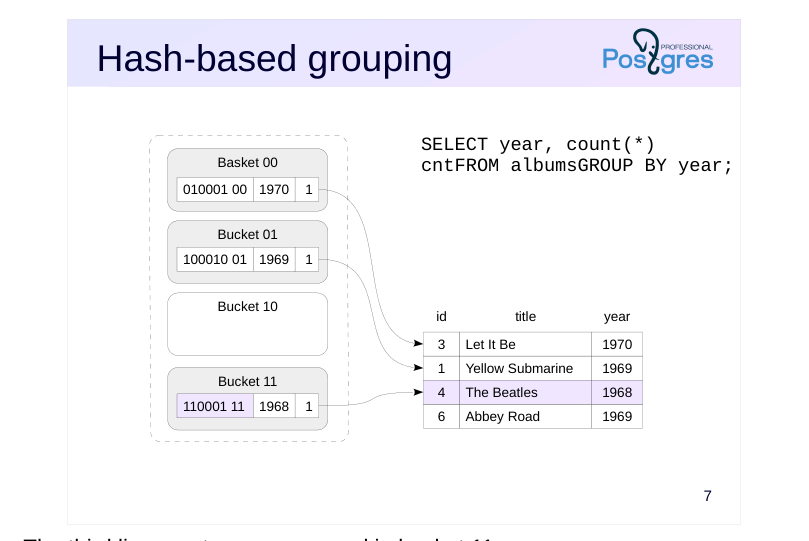
The third line creates a new record in bucket 11.
Page 8: Hash-based grouping
 {#source-figure-008 caption=“Source slide page 8: Hash-based grouping”}
Speaker notes
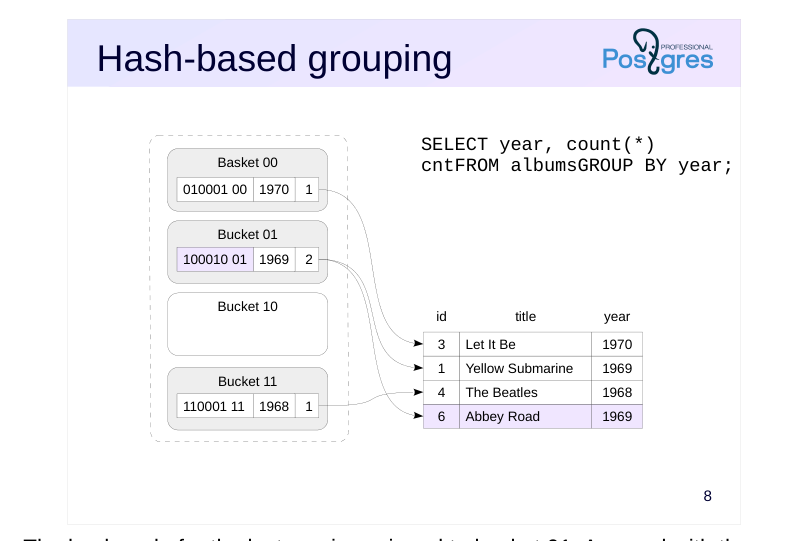
The hash code for the last row is assigned to bucket 01. A record with the same key value already exists in the bucket, so the server increases its counter by one. The table processing is complete at this point: the hash table now contains all unique values. The algorithm returns the values and their counts.
The same algorithm, with minor modifications, is used both for retrieving unique records without an aggregate function and for computing other aggregate functions.
Page 9: Hash-based Grouping
The node responsible for hash aggregation is shown in the execution plan as HashAggregate:
Be aware that results are only returned after the hash table is built for all rows, which is reflected in the startup cost. Once the query is executed, you can observe the memory allocated to the hash table:
Page 10: Hash-Based Grouping and Packets
 {#source-figure-010 caption=“Source slide page 10: Hash-Based Grouping and Packets”}
Speaker notes
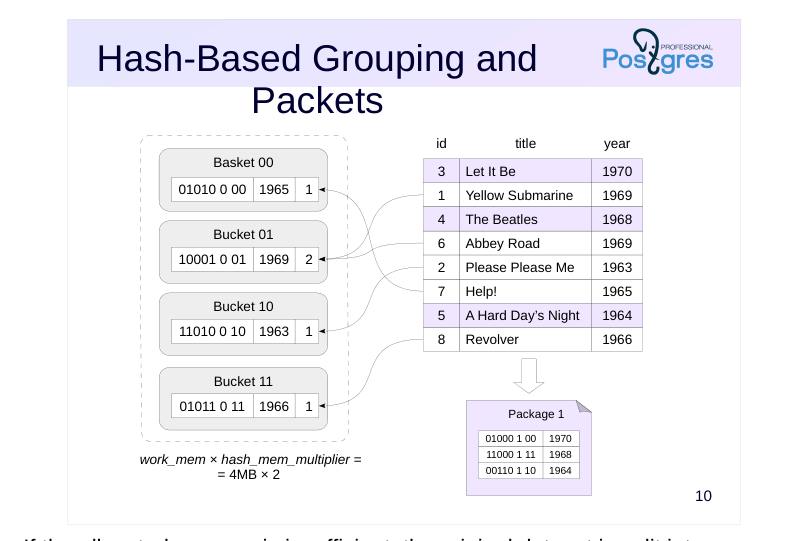
If the allocated memory is insufficient, the original dataset is split into packets to ensure each packet’s hash table fits in random access memory. The expected number of packets is a power of 2; the hash code reserves the necessary number of bits to determine which packet a record belongs to (since there are two packets on the slide, one bit suffices). The hash table for packet 0 resides in random access memory, while the rows of other packets are stored in temporary files — each packet in its own file.
Using temporary files significantly reduces performance, and this effect is more pronounced in hashing than in other algorithms. Therefore, during hash-based grouping, [work_mem] × hash_mem_multiplie of random access memory is allocated — by default, twice the usual amount.
Page 11: Hash-Based Grouping and Packets
 {#source-figure-011 caption=“Source slide page 11: Hash-Based Grouping and Packets”}
Speaker notes
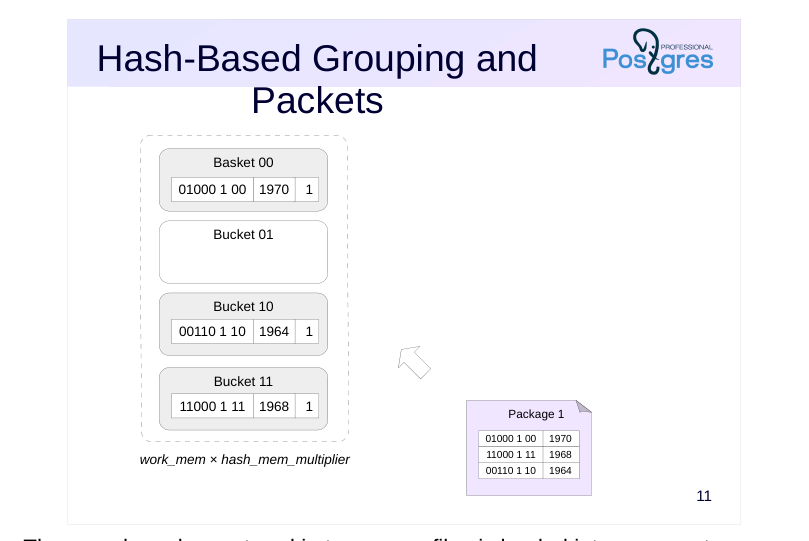
Then, each package stored in temporary files is loaded into memory to create a new hash table.
Once all original rows and additional data chunks have been processed, the server may return partial results, with each group’s rows always contained within a single package.
Page 12: Hash Grouping and Partitions
Let’s look at the execution plan of another query that performs grouping on a large table:
The execution plan now includes a “Planned Partitions” section — the optimizer predicts that the hash table will not fit in the allocated memory, so it will be split into batches. Let’s execute the query:
During execution, the size of one batch was found to be too large, so it was split into two smaller batches. The total number of batches (Batches) exceeded the estimated number.
Page 13: Sorting-based grouping
 {#source-figure-013 caption=“Source slide page 13: Sorting-based grouping”}
Speaker notes
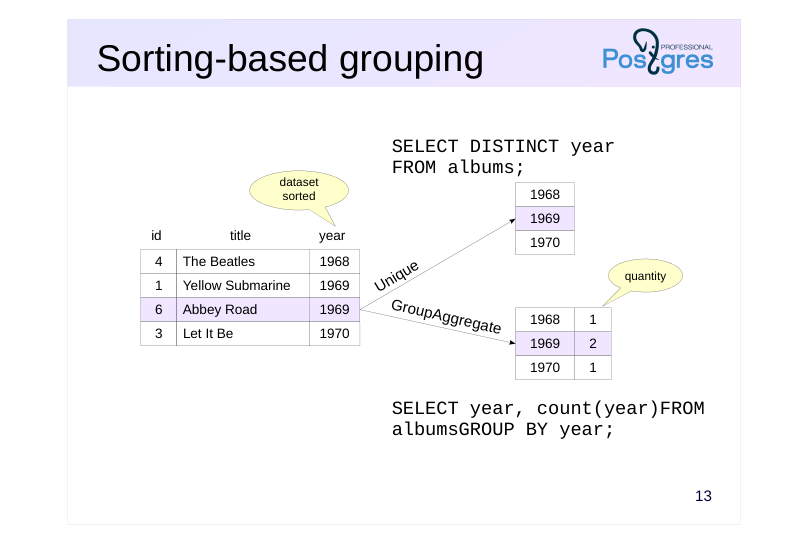
Duplicate elimination and grouping can be achieved not only via hashing but also through sorting. In this case, a dataset must be pre-sorted by the grouping fields.
The Unique node removes duplicates by appending the next value to the result when it differs from the previous one
The GroupAggregate node outputs aggregated data In the example on the slide, the node creates a list of unique year values and counts how often each value occurs in the dataset.
As discussed in the previous section, sorted rows can be obtained via index access or through sorting in the Sort node. In the first case, the Unique and GroupAggregate nodes are typically more efficient than HashAggregate because they run quickly and use less memory. However, in the second case, hash table construction is generally more efficient than sorting.
Unlike HashAggregate, both the Unique and GroupAggregate nodes return sorted data.
Page 14: Sort-Based Grouping
Example execution plan featuring a GroupAggregate node that performs grouping on a sorted dataset:
In this query, the dataset is sorted using index access. The DISTINCT query employs the Unique node to eliminate duplicates:
As the node returns results in the order required by the ORDER BY clause, no extra sorting is needed.
Hybrid Grouping
When grouping across multiple sets of fields (such as when using GROUPING SETS, CUBE, or ROLLUP in the GROUP BY clause), combining hash and sort-based grouping can be beneficial. The query plan displays this combined approach as a MixedAggregate node. Consider a query against the flights table that aggregates row counts for three distinct grouping scenarios:
The MixedAggregate node processes a dataset sorted by the fare_conditions column. At the first stage, grouping is applied to the fare_conditions column (Group Key) while processing the dataset. As rows are processed, they are sorted by the ticket_no column and simultaneously stored in a hash table using the amount key. In the second step, the previously sorted rows by the ticket_no column are scanned, and the data is grouped using the same column (Sort Key and nested Group Key). Finally, the hash table prepared in the first stage is processed, with values grouped by the amount column (Hash Key).
Page 15: In parallel execution plans
 {#source-figure-015 caption=“Source slide page 15: In parallel execution plans”}
Speaker notes
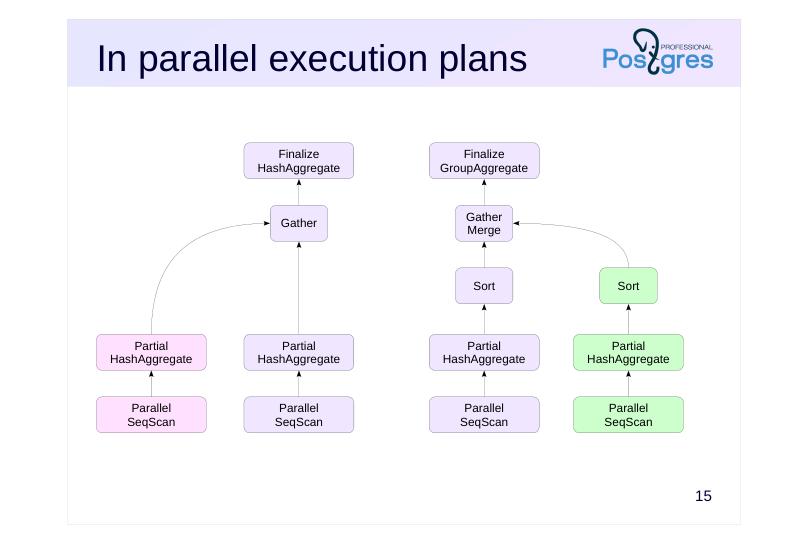
Aggregation doesn’t have a dedicated parallel implementation, but can be executed in parallel execution plans. In this case, each worker process aggregates its portion of the data and passes the results to a Gather node, which combines all the data into a single set. The next node handles the aggregation of the combined dataset and computes the result of the aggregate function.
An example of this plan is shown on the left. This approach is typically more effective when there are a sufficiently large number of groups.
If there are only a few groups, sorting the grouped data within each worker process can be more efficient. Leverage the sorted data and perform a more efficient grouping via sorting at the final stage.
An example of this plan is shown on the right slide.
Page 16: In parallel execution plans
Let’s group the rows of the flights table by flight (there are obviously many of them):
In the Partial HashAggregate node, each process computes the aggregate function on its own data using its own hash table. The coordinating process, after collecting data in the Gather node, retrieves the final aggregate result by combining the groups in the Finalize HashAggregate node through hashing as well. Now, we’ll group the rows of the flights table by cost. The number of groups will be small:
How will this query be executed?
Since there are few groups, it’s more efficient to sort the results in each process (Sort), collect them in the coordinating process into a single sorted set (Gather Merge), and then merge the groups to compute the aggregate function (Finalize GroupAggregate).
Page 17: Page 17
Page 18: Window functions
 {#source-figure-018 caption=“Source slide page 18: Window functions”}
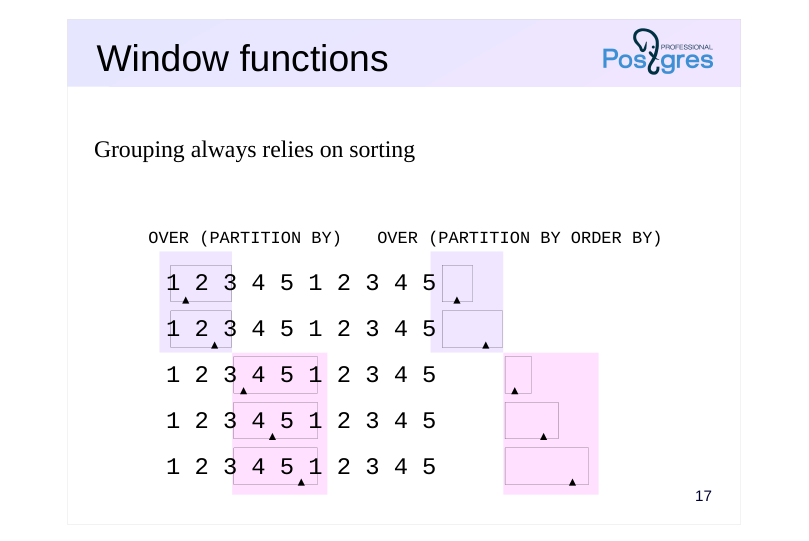
Grouping always relies on sorting
Speaker notes
Grouping is also used in window functions.
If the window definition includes the PARTITION BY clause, the window function operates on groups of rows, similar to GROUP BY grouping.
For each group of rows, the frame boundaries vary within their respective ranges. If no additional instructions are provided, the function will return the same value for all rows within a group.
Similar to the example in the “Sorting” section, the ORDER BY clause sorts the rows within each group; in this case, the frame is considered to include rows from the first to the current one.
Unlike standard GROUP BY grouping, window definition grouping always relies on sorting: the execution plan is designed to ensure that the WindowAgg node receives a set of rows sorted first by the PARTITION BY keys and then by the ORDER BY keys. Hashing is not used even without an ORDER BY clause.
Page 19: Takeaways
Grouping occurs not only during aggregation, but also during duplicate elimination.
- Performed using hashing or sorting
Page 20: Practice
- How does the query calculate the number of seats per category in the seats table?Try using the default parameter values, and then disable hash-based grouping. 2. Examine the query using a window function and the PARTITION BY clause: SELECT status, count(*) OVER (PARTITION BY status)FROM flightsWHERE flight_no = ‘PG0007’AND departure_airport = ‘VKO’AND flight_id BETWEEN 24104 AND 24115;
- Add a row_number function call using the same window and
- compare the results and execution plans.
Speaker notes
- Query GROUP BY fare_conditions;
To disable hash-based grouping, set the enable_hashagg parameter to off.
Page 21: 1. Different Grouping Methods
First, run the query with the default parameters:
The HashAggregate node is used for grouping. Disable hash-based grouping:
Run the query again and compare the execution plans:
Now, the only remaining option is the GroupAggregate node, which requires sorting data in the Sort node. Revert to default value:
2. Window Functions and the PARTITION BY Clause
The query returns the count of elements in each group:
In the execution plan, it’s clear that the same WindowAgg node handles grouping, as we saw when using the ORDER BY clause in the window definition:
Page 22: Page 22
Let’s add the current row’s number within its group using the row_number() function:
Adding a new function with a matching window does not introduce new nodes into the plan: