06 Lesson 06: Sorting and Grouping / Sorting
This page is extracted from the official PDF into native Markdown. Slide text, code and speaker notes are kept in reading order; the original PDF and HTML remain the layout references. HTML source: No matching course-page link was captured in the source inventory. Archive: QPT-handouts-16-en-20251018.zip PDF pages: 22
Page 1: Sorting and Grouping / Sorting
Copyright
© Postgres Professional, 2019–2024 Authors Authors: Egor Rogov, Pavel Luzanov, Ilya Bashtanov Photo by: Oleg Bartunov (Phu monastery, Bhrikuti summit, Nepal)
Use of course materials
Non-commercial use of course materials (presentations, demonstrations) is allowed without restrictions. Commercial use is possible only with the written permission of Postgres Professional. It is prohibited to make changes to the course materials.
Feedback
Please send your feedback, comments and suggestions to: edu@postgrespro.ru
Disclaimer
In no event shall Postgres Professional company be liable for any damages or loss, including loss of profits, that arise from direct or indirect, special or incidental use of course materials. Postgres Professional company specifically disclaims any warranties on course materials. Course materials are provided “as is,” and Postgres Professional company has no obligations to provide maintenance, support, updates, enhancements, or modifications.
Page 2: Topics
- Retrieving Sorted Data
- In-memory sorting
- External sort
- Incremental sort
- Sorting in Parallel Execution Plans
- Sorting During Index Construction
- Window functions involving sorting
Page 3: Data Access
Index Access (B-Tree)
- returns a sorted row set
- Sequential Access (Seq Scan)
- returns an unordered set of rows
- An additional sorting step is required
Speaker notes
As previously stated, index access (using a B-tree) enables the immediate retrieval of a row set sorted by the indexing keys.
But how do you handle it when sorting is needed on fields without an index? In this case, the server must first retrieve the data from the table using a sequential scan and then perform an additional sorting step.
Page 4: Retrieving Sorted Data
Index access automatically returns rows sorted by the indexed column:
But if you ask the server to sort data by a column that lacks an index, it will require two separate steps: retrieving the data and sorting it.
Next, we’ll explore how sorting works within the Sort node.
Page 5: In-memory sorting
Quick sort (quicksort)
- Top-N heapsort Top-N Heap Sort (Partial Heapsort)
- when only a portion of the values is needed
Speaker notes
In an ideal scenario, the set of rows to be sorted entirely fits within the memory constrained by the work_mem parameter. In this case, all rows are sorted using the Quick sort (quicksort) algorithm, and the result is passed up to the parent node.
If you need to retrieve just the first few rows of a sorted set (when using the LIMIT clause), you don’t need to sort the entire set. In this case, the server can use partial heap sort (top-N heapsort), which operates in random access memory.
Page 6: In-Memory Sorting
The planner has several sorting methods. In the following example, quicksort is employed (Sort Method: quicksort). The memory used is shown in the same line:
To begin outputting data, the Sort node must fully sort the row set. This means the initial cost estimate for the node includes the full cost of reading the table. The time complexity of quicksort is generally O(M log M), where M represents the number of rows in the input set. If the number of rows is limited, the planner can switch to partial sorting—essentially, instead of fully sorting all rows, it retrieves the top 100 minimum values here.
Notice that the query’s cost decreased and sorting required less memory. Generally, the top-N heapsort algorithm has lower complexity than quicksort—O(M log N).
Page 7: External sort
 {#source-figure-007 caption=“Source slide page 7: External sort”}
Speaker notes
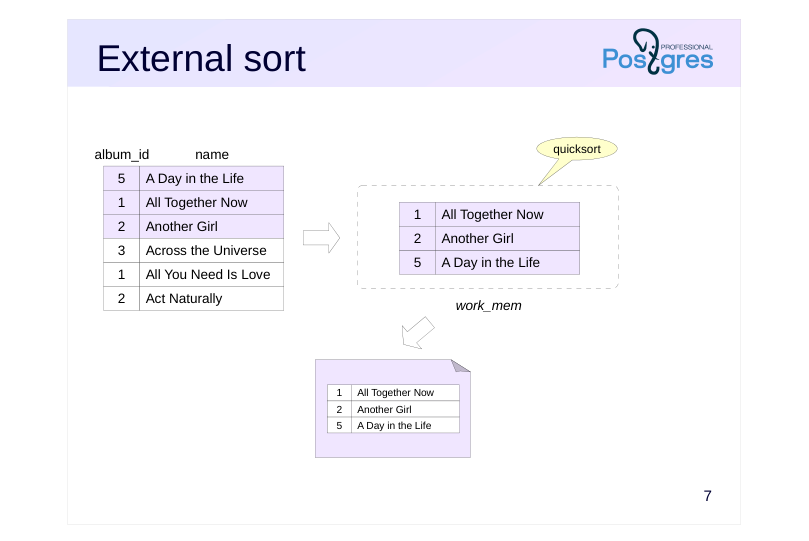
If the row set is too large, it won’t fit into memory all at once. In such cases, an external sort is used.
The row set is loaded into memory while there’s capacity, then sorted and written to a temporary file.
Page 8: External sort
 {#source-figure-008 caption=“Source slide page 8: External sort”}
Speaker notes
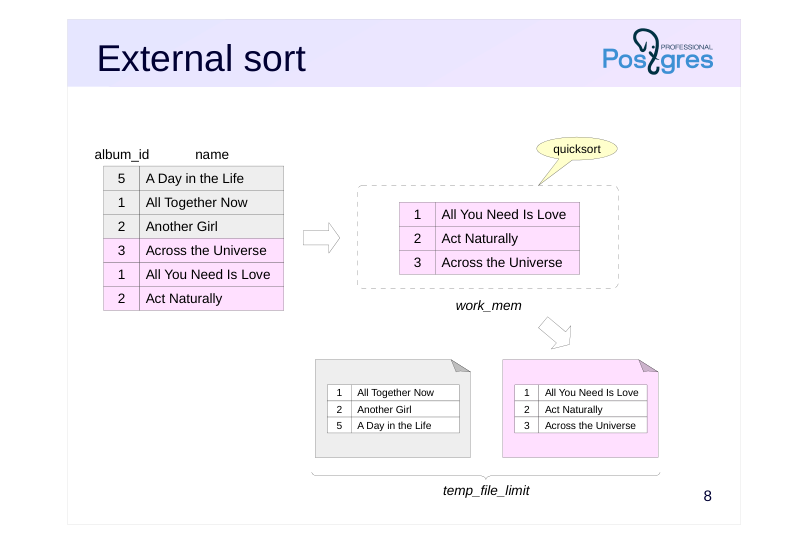
This procedure is repeated as needed to write all the data to files, each sorted separately.
Recall that the total size of session temporary files (excluding temporary tables) is constrained by the value of the temp_file_limit parameter.
Page 9: External sort
 {#source-figure-009 caption=“Source slide page 9: External sort”}
Speaker notes
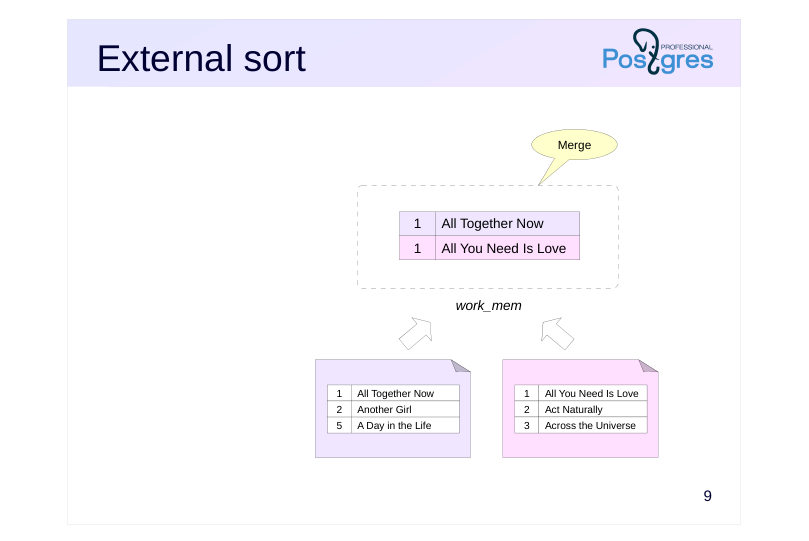
Subsequently, multiple files (two or more) are merged while maintaining the line order.
Merging doesn’t require much memory; you just need to keep one line from each file (as shown in the example on the slide). The minimum (maximum) is selected from these lines and returned as part of the output, with a new line read from the same file to replace it. In practice, lines are read in batches to speed up input/output, rather than one at a time.
When there isn’t enough RAM to merge all files at once, the process begins by merging a subset of files and saving the result to a temporary file. This is then merged with other temporary files, and the process continues iteratively.
We won’t go into all the details of the sorting implementation here; you can find them in the file src/backend/utils/sort/tuplesort.c.
The evolution of sorting techniques in PostgreSQL is thoroughly covered in Gregory Stark’s presentation «Sorting Through The Ages»: https://wiki.postgresql.org/images/5/59/Sorting\_through\_the\_ages.pdf with a synchronized Russian translation of the talk available at https://pgconf.ru/talk/1587768
Page 10: External Sorting External Sort
Example execution plan using external sorting (Sort Method: external merge):
Note Note that the Sort node reads and writes temporary data (temp reads and writes). Let’s raise the work_mem value:
Now that all rows fit in memory, the planner opted for a more efficient quicksort.
Page 11: Incremental Sort
 {#source-figure-011 caption=“Source slide page 11: Incremental Sort”}
Speaker notes
Let’s suppose you want to sort a set by keys K1 … Km … Kn, and it’s known that the set is already sorted by some of the first keys K1 … Km. Km … If the dataset is already sorted by the first m keys, there’s no need to re-sort the entire dataset. Instead, you can split the set into groups, with each group containing only rows with the same K1 … Km values (arranged consecutively) And then sort each group by the remaining keys Km+1 … Kn. This approach is referred to as incremental sorting .
The algorithm processes relatively large row groups separately while merging smaller groups and fully sorting them. As the data sets being sorted become smaller, the memory requirements also decrease. However, increasing the number of groups leads to higher overhead.
Sets can be handled either in RAM or on disk when there’s not enough work_mem available.
Incremental sorting enables delivering results as soon as the first group is processed, without waiting for the entire dataset to be sorted.
Disable incremental sorting by using the enable_incremental_sort parameter.
Page 12: Incremental Sorting Incremental Sort
Incremental Sorting can use both in-memory and external sorting. To illustrate, let’s create an index on the bookings table:
Let’s take a look at an example of Incremental Sorting:
Here, the data retrieved from the bookings table using the newly created bookings_total_amount_idx index is already sorted by the total_amount column (Presorted Key), so the remaining task is to sort the rows by the book_date column. The Pre-sorted Groups row refers to large groups that were partially sorted by the book_date column, while the Full-sort Groups row indicates small groups that were merged and fully sorted. In this example, all groups fit into the allocated memory, so quicksort was used. Let’s reduce work_mem and rerun the query:
Now, with insufficient memory, some large groups had to undergo external sorting using temporary files (Pre-sorted Groups … external merge).
Page 13: In parallel execution plans
 {#source-figure-013 caption=“Source slide page 13: In parallel execution plans”}
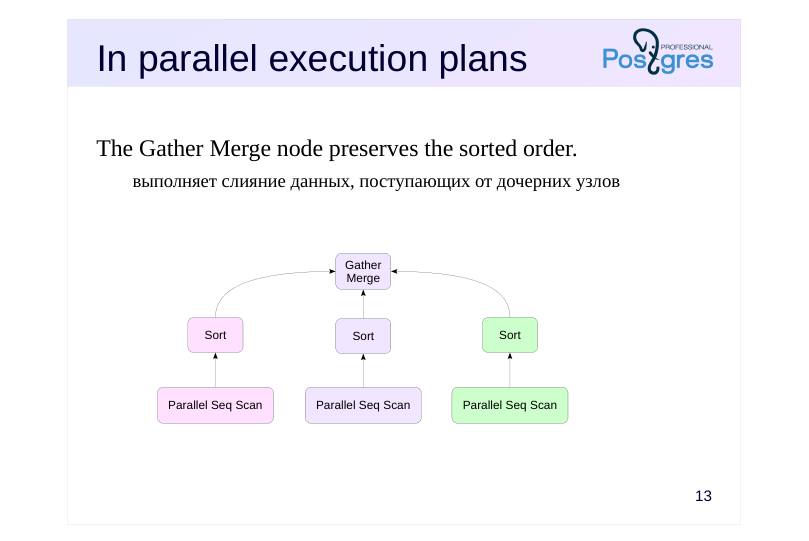
The Gather Merge node preserves the sorted order.
- выполняет слияние данных, поступающих от дочерних узлов
Speaker notes
Sorting can be part of parallel execution plans. Each worker process sorts its portion of the data and sends the sorted results to a parent node, which combines them into a single set.
But the Gather node isn’t suitable for this purpose because it outputs results in the order they are received from the worker processes.
Therefore, such plans use a Gather Merge node to maintain the sorted order of incoming rows. To achieve this, it uses a merge algorithm to combine multiple sorted sets into a single set.
Page 14: In parallel execution plans
A query that sorts a large table on an unindexed column can run in parallel:
Here, each process reads and sorts its portion of the table, and then the sorted data sets are combined when passed to the leader process, preserving the order.
Page 15: Building the B-Tree
Sorting is employed
- All rows are sorted first.
- Then the rows are gathered into leaf index pages
- The pointers are collected into next-level pages.
- and so on until the root is reached
- Can run in parallel
- max_parallel_maintenance_workers
- Constraint
- maintenance_work_mem, as the operation is not frequent
Speaker notes
When building an index (specifically a B-tree), the server would add records to an empty index one at a time, processing the table’s rows in sequence. However, this approach is highly inefficient.
Therefore, sorting is used when creating or rebuilding indexes: all table rows are sorted and then organized into leaf index pages. The upper levels of the tree, consisting of references to elements from lower-level pages, are then constructed until only one page remains — this becomes the root of the tree.
Sorting is done in the same way as described earlier. However, the memory limit is not determined by work_mem but by maintenance_work_mem, as the index creation process isn’t too frequent and it’s beneficial to allocate more memory for it.
Index building can be done in parallel. Number of worker processes the number of worker processes is determined similarly to parallel queries (depending on the table size), but is limited by the max_parallel_maintenance_worker parameter.
Page 16: Window functions
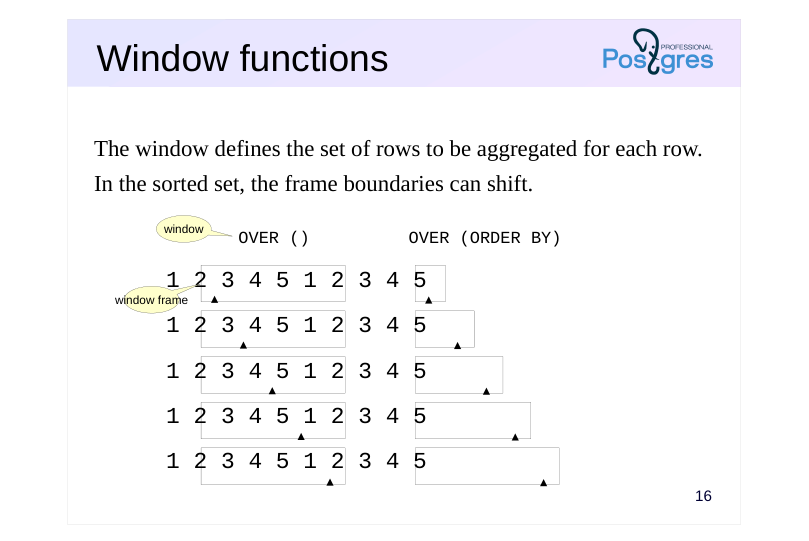 {#source-figure-016 caption=“Source slide page 16: Window functions”}
The window defines the set of rows to be aggregated for each row.
- In the sorted set, the frame boundaries can shift.
- OVER ()
- OVER (ORDER BY)
- window
Speaker notes
Using sorting in window functions has unique characteristics.
Unlike ordinary aggregate functions, window functions process every row in the set without altering its size. In the OVER clause, after the function name, a window is specified that defines the set of rows processed by the window function for each row in the dataset. Such a sample is referred to as a window frame.
If the window is specified as OVER(), the window frame is the same for each row and includes all rows in the dataset.
Page 17: Window Functions
Let’s examine the query plan for a query that computes the running total of bookings:
The window function is executed in the WindowAgg node, which receives sorted data from the Sort child node. Adding other window functions that use the same row order (not necessarily with a matching window) and the ORDER BY clause avoids unnecessary sorting:
Here, there are two WindowAgg nodes (each handling its own window) but a single Sort node. The query cost increased, but only marginally. Of course, window functions requiring different row orders force the server to re-sort the data:
In this example, the lower WindowAgg node (corresponding to the count function) receives an ordered set of rows through an index, while the upper WindowAgg node (corresponding to the sum function) has the Sort node re-sort the rows. Sorting in window functions can employ any of the methods discussed above. For example, quicksort:
Page 18: Page 18
Or a foreign key:
Page 19: Takeaways
Sorting is used during query execution and for building B-trees
- There are various ways to implement sorting
- in-memory
- external (uses temporary files)
- incremental
- Indexes can help avoid sorting
Page 20: Practice
- What execution plan will be selected for the following query? SELECT * FROM flights Will the execution plan change if we increase work_mem to 32 MB?
- Create an index on the passenger_name and passenger_id columns of the tickets table. Did this operation require a temporary file?
Speaker notes
- Turn on logging for temporary file usage by setting the log_temp_files parameter to zero.
Page 21: 1. Query Execution with Sorting
Let’s run the query with the default parameter values:
The server performed an external sort (Sort Method: external merge). Pay attention to the number of pages and I/O type (Buffers): the temp read and written values indicate that the server used temporary files. Run the query multiple times — you’ll notice that the server consistently runs out of memory. We’ll increase the work_mem parameter to 32 MB:
Increasing work_mem allows the server to use more random access memory for sorting. Run the query again and compare the execution plans
The server has switched to in-memory sorting (Sort Method: quicksort), with the temp read and written fields no longer appearing in the Buffers line.
2. Building an Index
Enable temporary file logging:
Current maintenance_work_mem setting:
Page 22: Page 22
Creating an Index:
A temporary file was required: