04 Lesson 04: Data Access / Parallel Data Access
This page is extracted from the official PDF into native Markdown. Slide text, code and speaker notes are kept in reading order; the original PDF and HTML remain the layout references. HTML source: No matching course-page link was captured in the source inventory. Archive: QPT-handouts-16-en-20251018.zip PDF pages: 28
Page 1: Data Access / Parallel Data Access
Copyright
© Postgres Professional, 2019–2024 Authors Authors: Egor Rogov, Pavel Luzanov, Ilya Bashtanov Photo by: Oleg Bartunov (Phu monastery, Bhrikuti summit, Nepal)
Use of course materials
Non-commercial use of course materials (presentations, demonstrations) is allowed without restrictions. Commercial use is possible only with the written permission of Postgres Professional. It is prohibited to make changes to the course materials.
Feedback
Please send your feedback, comments and suggestions to: edu@postgrespro.ru
Disclaimer
In no event shall Postgres Professional company be liable for any damages or loss, including loss of profits, that arise from direct or indirect, special or incidental use of course materials. Postgres Professional company specifically disclaims any warranties on course materials. Course materials are provided “as is,” and Postgres Professional company has no obligations to provide maintenance, support, updates, enhancements, or modifications.
Page 2: Topics
- Parallel Execution Plans
- Process Pool Size
- Parallel sequential scan
- Parallel Index Access
Page 3: Parallel Execution Plans
 {#source-figure-003 caption=“Source slide page 3: Parallel Execution Plans”}
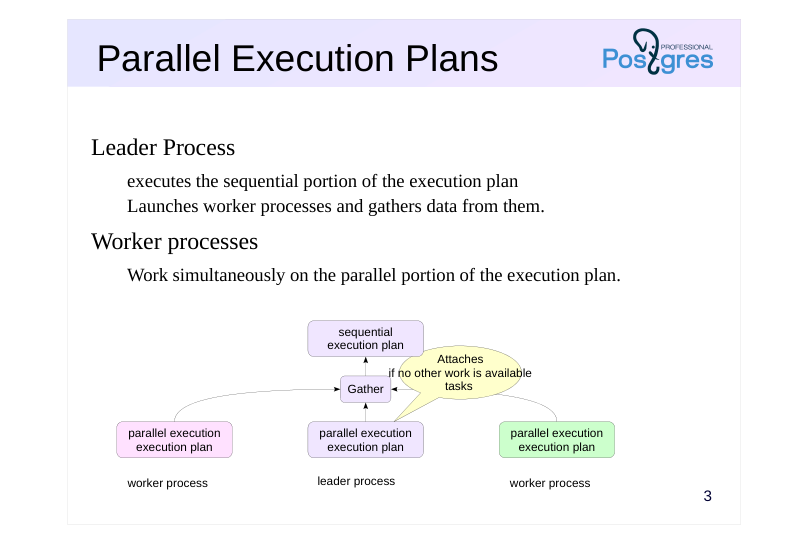
Leader Process
- executes the sequential portion of the execution plan
- Launches worker processes and gathers data from them.
- Worker processes
- Work simultaneously on the parallel portion of the execution plan.
Speaker notes
PostgreSQL supports parallel execution of queries. The main process executing the query spawns (via postmaster, naturally) multiple worker processes that simultaneously execute the same ‘parallel’ portion of the execution plan. The results are then gathered at the Gather node by the leader process.
If the worker processes can’t keep up with supplying data to the main process, the main process also joins the execution of the same parallel plan.
Of course, launching processes and data transfer require certain resources, so not every query runs in parallel.
Besides, there are operations that simply can’t be executed in parallel. Even with the parallel mode enabled, the leader process will still execute some of the steps alone, sequentially.
https://postgrespro.com/docs/postgresql/16/sql-copy
Note that PostgreSQL does not have another theoretically possible parallelization mode where multiple processes act as a pipeline for data processing (in other words, individual plan nodes are executed by separate processes). PostgreSQL developers considered this mode inefficient.
Page 4: Process Pool Size
 {#source-figure-004 caption=“Source slide page 4: Process Pool Size”}
Speaker notes
Several parameters govern parallel execution.
First, let’s look at the parameters that control the number of worker processes.
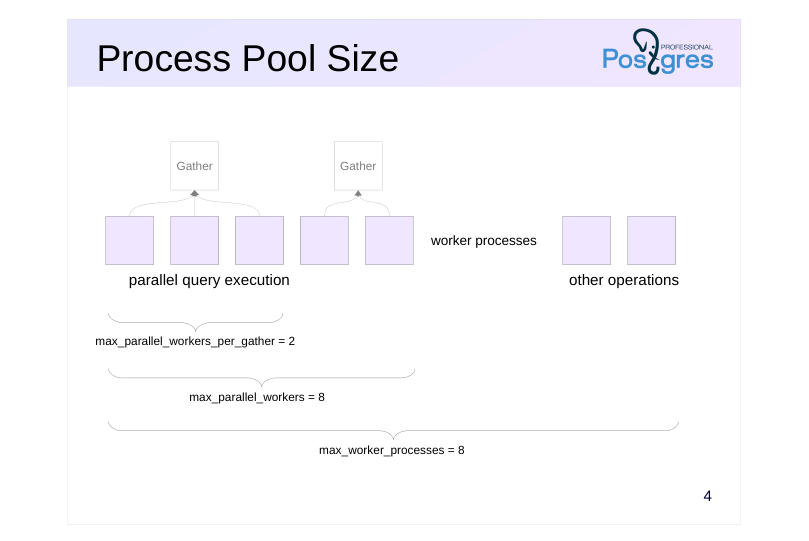
The worker process mechanism is not only used for parallel query execution. they are used by the logical replication mechanism and may be created by extensions. Worker processes can be used in application code (see the “Background Processes” topic in the DEV2 course for more details). The total number of concurrently running worker processes is controlled by the parameter max_worker_processes (default 8).
The number of concurrently running worker processes handling parallel plans is limited by the max_parallel_workers parameter (default 8).
The number of concurrently running worker processes handling a single leader process is limited by the max_parallel_workers_per_gather parameter (default 2).
You may choose to change these values based on several factors: these parameters should be adjusted based on hardware capabilities, data volume, and system load. For instance, even if the database contains large tables and queries could benefit from parallelization, but the system has no free cores, parallel execution would be pointless.
Page 5: Parallel Seq Scan
Parallel sequential scan
- aggregation
- Parallel Aggregation
- Number of worker processes
- Constraints
Page 6: Parallel Seq Scan
 {#source-figure-006 caption=“Source slide page 6: Parallel Seq Scan”}
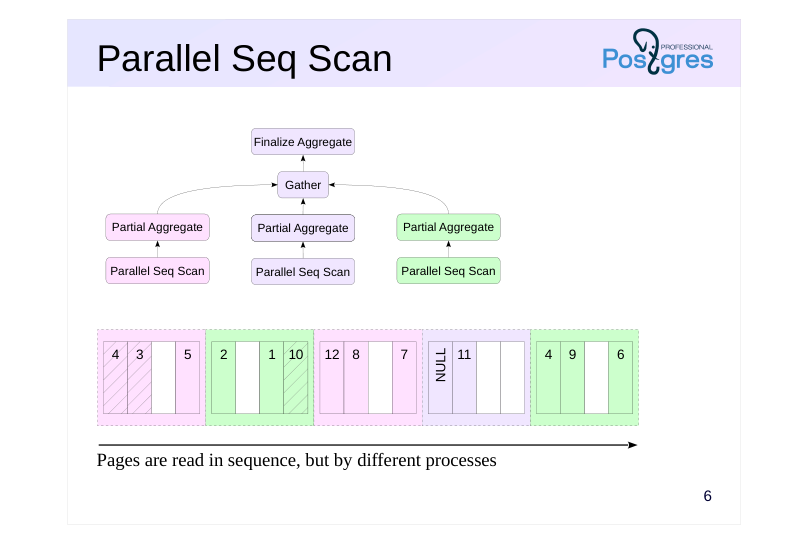
Pages are read in sequence, but by different processes
Speaker notes
An example of a node running in parallel mode is the Parallel Seq Scan — “parallel sequential scan”.
The name may seem contradictory, but it captures the essence of the operation. Table pages are read in the same order as they would be during a regular sequential scan. However, read requests are handled by several processes running in parallel. Processes synchronize with each other to ensure their requests are processed in the correct order.
The benefit of this approach is that parallel processes handle their pages simultaneously. In order for the benefit to outweigh the overhead associated with transferring data between processes, the processing must be sufficiently resource-intensive. A good example is data aggregation, because it demands significant CPU resources and only a single final number needs to be transferred. In such cases, parallel query execution can take significantly less time than sequential execution.
Page 7: Aggregation
Let’s examine a query with an aggregate function on a small table. This query is processed sequentially:
The execution plan consists of two nodes. The top Aggregate node, which performs the count calculation, receives data from the child Seq Scan node.
Note the Aggregate node: its startup cost is nearly equal to the total. This means the node cannot return a result (a single row) until it has processed all the data — which is logical. The difference between the Aggregate node’s estimate and the upper estimate for the Seq Scan is the cost of the Aggregate node’s processing. This cost is calculated based on the need to count each row produced by the Seq Scan node; each basic operation is valued at the cpu_operator_cost parameter.
Parallel Sequential Scan
Now let’s examine the same example, but with a large table. Here, in the query plan, we’ll observe a parallel sequential scan:
Everything below the Gather node constitutes the parallel part of the plan. It is executed by each worker process (with two worker processes planned) and potentially in the leader process as well. The Gather node and all nodes above it are executed exclusively by the leader process. This is the sequential part of the plan. Let’s start from the bottom up. The Parallel Seq Scan node represents parallel table scanning. The “rows” field shows an estimate of the number of rows processed by a single worker process. With two worker processes planned, the leader also handles part of the workload, so the total number of rows is divided by 2.4 (the leader’s share decreases as the number of worker processes increases).
By default, the leader process is involved in executing the parallel portion of the plan:
Page 8: Page 8
If the leader process becomes a bottleneck, you can offload it:
In this scenario, the total row count is split between the scheduled worker processes (2):
Reset the parallel_leader_participation parameter to its default value:
When evaluating the Parallel Seq Scan node, the I/O component is taken as a whole (the table will still need to be read page by page), while CPU resources are split between processes (2.4 in this case).
Let’s show the execution plan again:
Page 9: Page 9
The next node, Partial Aggregate, aggregates data from the worker process, effectively counting the number of rows in this case. The estimation follows the standard approach and is incorporated into the table scan estimate:
The next node is the Gather node, which is handled by the leader process. It manages the initiation of worker processes and collects data from them. The cost of starting processes and transmitting each data row is estimated as follows:
In this case, only one row is transmitted, and the main cost is due to the startup. Let’s take another look at the query plan:
The final node, Finalize Aggregate, aggregates the received partial aggregates. Since only three numbers need to be added, the cost is minimal.
Page 10: Number of worker processes
Zero (no parallel plan generated)
- If the table size is less than min_parallel_table_scan_size = 8MB
- Fixed
- If the ‘parallel_workers’ storage parameter is set for the table
- Calculated using the formula
- 1 plus the floor of log base 3 of (table size divided by
- min_parallel_table_scan_size)
- At most max_parallel_workers_per_gather
Speaker notes
How many worker processes will be used?
The planner will not consider parallel scans if the table’s physical size is below the min_parallel_table_scan_size parameter.
Below is the formula for calculating the number of planned worker processes.Possible combinations are listed on this slide. It means that when the table size triples, an additional process is added. For example, for the default value of min_parallel_table_scan_size = 8MB:
таблица процессы таблица процессы
8MB 1 216MB 4
24MB 2 648MB 5
72MB 3 1.9GB 6
The number of processes can be explicitly set via the table’s storage parameter parallel_workers.
However, the number of processes is capped at the value of the max_parallel_workers_per_gather parameter. If during query execution the available number of processes is fewer than planned, only the available ones will be used (up to sequential execution if the pool is exhausted).
Page 11: Number of worker processes during sequential scanning
The planner does not generate parallel plans for tables smaller than:
If you query a slightly larger table (flights, 19 MB), an additional process will be scheduled:
When querying data from a large table (bookings, 105 MB), the estimated number of worker processes is three.
However, only two processes are scheduled because the max_parallel_workers_per_gather parameter restricts the number of worker processes in the parallel plan, and the default value (2) is active.
By loosening the constraint, we’ll have a plan with three worker processes:
Page 12: Page 12
For a specific table, the storage parameter parallel_workers can be set to specify the recommended number of worker processes:
If the storage parameter is set to zero, the planner will always perform a sequential scan on this table. However, the number of worker processes will not exceed max_parallel_workers_per_gather, no matter the storage parameter setting. Reset the parameters to their original settings:
Page 13: Not parallelized
Write queries
- Additionally, queries with row-level locking
- Cursors
- such as queries in a FOR loop in PL/pgSQL
- Queries that use functions PARALLEL UNSAFE
- Queries within functions that are called from a parallelized query
Speaker notes
Not every query can be parallelized.
Queries that modify or lock data—such as UPDATE, DELETE, and SELECT FOR UPDATE—cannot be parallelized.
Queries whose execution can be paused are not parallelized—this includes queries in cursors, such as FOR PL/pgSQL loops.
Queries cannot be parallelized if they include functions marked as PARALLEL UNSAFE (parallelism notes are discussedin the ‘Functions’ section).
Queries within functions invoked by a parallelized query cannot be parallelized (to prevent recursive bloating).
Future PostgreSQL versions may remove some of these limitations.
https://postgrespro.com/docs/postgresql/16/sql-copy
Page 14: Only executed sequentially
Reading the results of common table expressions (CTE)
- Reading the results of subqueries not unrolled
- Accessing temporary tables
- Function callsPARALLEL RESTRICTED
- Functions that utilize nested transactions
Speaker notes
In general, the benefit of parallel planning depends mostly on how much of the plan is parallel-compatible. However, certain operations do not impede parallel execution but can only be executed sequentially in the main process.
These include:
● reading the results from common table expressions (subqueriesin the WITH clause);
● reading the results from other non-expandable subqueries (which appear in the plan as nodes, such as SubPlan);
● References to temporary tables (as they are accessible only to the backend process);
● function calls labeled as PARALLEL RESTRICTED
If a query invokes a function that uses subtransactions (such as a PL/pgSQL function with exception handling), it will result in an error. Such functions should be labeled as PARALLEL RESTRICTED. For more information on parallelism annotations, see the “Functions” topic.
https://postgrespro.com/docs/postgresql/16/sql-copy
Page 15: Only sequential operations Only operations executed sequentially
Some operations are always executed sequentially, such as accessing temporary tables. For example, let’s create a temporary table tmp_bookings, a copy of the bookings table:
Using the UNION ALL set operation (without removing duplicates), we combine the results of two queries: one for the main table and one for the temporary table:
Data from the bookings table is read in parallel (using two processes by default), whereas data from the temporary table tmp_bookings is read sequentially. If an operation isn’t executed in parallel, it doesn’t mean it’s inherently non-parallelizable—the scheduler might have determined that sequential execution is more efficient in this case. The debug_parallel_query parameter allows you to check if the operation can run in parallel. Without aggregation, accessing the bookings table is executed sequentially:
But with the parameter enabled, we can see that a parallel plan is theoretically possible:
The parameter is intended solely for debugging. It forces parallel execution planning, even when it’s not optimal, and always uses a single process.
Page 16: Parallel Index Scan
Parallel Index Scan
- Parallel Index-Only Scan
- Parallel Bit Map Scan
- Number of worker processes
Page 17: Parallel Index Scan
 {#source-figure-017 caption=“Source slide page 17: Parallel Index Scan”}
Speaker notes
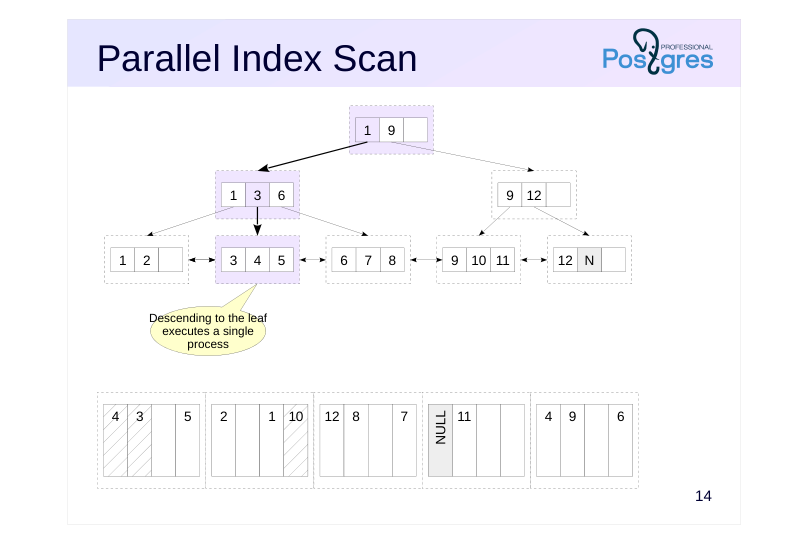
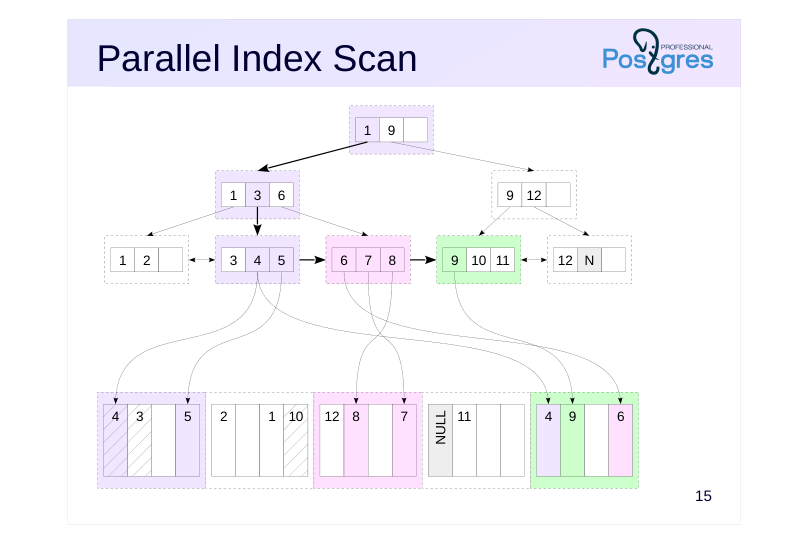
Index access can also be performed in parallel. This occurs in two steps. First, the main process traverses from the tree root to the leaf page.
Page 18: Parallel Index Scan
 {#source-figure-018 caption=“Source slide page 18: Parallel Index Scan”}
Speaker notes
Then, worker processes perform parallel reads of the index’s leaf pages while traversing the list.
The process that read the index page also reads the required table pages. This could result in multiple processes reading the same table page (as shown on the slide: the last table page contains rows that are referenced by multiple index pages read by different processes). Of course, the page will be stored in the buffer cache as a single instance.
Page 19: Parallel Index Scan
As an example of parallel index scanning, we will calculate the total cost of all bookings with codes less than 400000 (approximately one-quarter of the total number):
This is similar to the plan we saw during parallel sequential scanning, but here, the data is read using the Parallel Index Scan index node. The total cost is made up of the costs of accessing the index and the table. The index access cost calculation is not shared across processes because the index is read sequentially page by page by the processes:
The cpu_operator_cost parameter estimates the cost of value comparison operations, such as “less than”. The cost of accessing 1/4 of the table pages (divided among processes) is calculated similarly to sequential scanning, as the rows are physically ordered by book_ref:
Page 20: Parallel Index Only Scan
 {#source-figure-020 caption=“Source slide page 20: Parallel Index Only Scan”}
Speaker notes
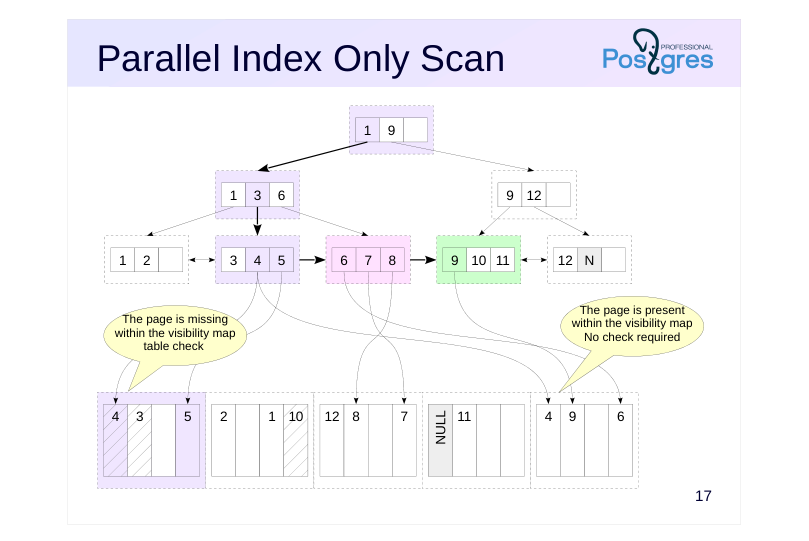
Index Only Scan sorting can be performed in parallel. This works the same way as a regular index scan: the coordinator process descends from the root to the leaf page, and then worker processes perform parallel scans of the index’s leaf pages, accessing the relevant table pages as needed to check visibility.
Page 21: Parallel Index-Only Scan
Let’s look at a similar example where index-only scanning is done in parallel.
The table access cost here accounts for row processing only, excluding I/O operations.
The impact of index access remains unchanged.
Page 22: Parallel Bitmap Heap Scan
 {#source-figure-022 caption=“Source slide page 22: Parallel Bitmap Heap Scan”}
Speaker notes
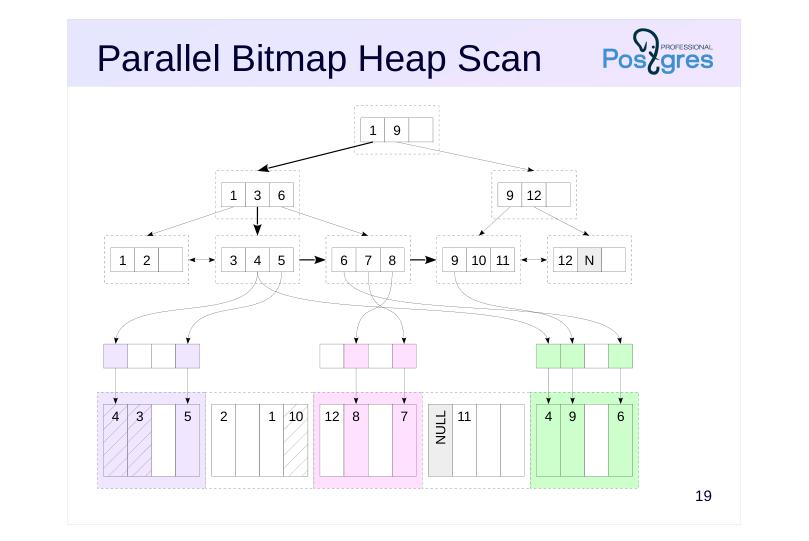
Bitmap Scan can run in parallel
The first stage—index scan and bitmap construction—is always executed sequentially by the leader process.
The second stage—table scan—is executed in parallel by worker processes. This works similarly to parallel sequential scanning.
Page 23: Parallel Bitmap Scan
To create a bitmap, we need a new index for the bookings table:
How many bookings were made in the last month for amounts up to 20,000 rubles?
The main process constructs a bitmap within the Bitmap Index Scan node. The table scan utilizing the constructed bitmap is executed in parallel within the Parallel Bitmap Heap Scan node.
Page 24: Number of worker processes
Zero (no parallel plan generated)
- If the sample size is less than 512kB, the min_parallel_index_scan_size is set
- to 512kB.
- Fixed
- If the ‘parallel_workers’ storage parameter is set for the table
- Calculated using the formula
- 1 + log3(sample size / min_parallel_index_scan_size)
- ⌊
- ⌋
- But not exceeding max_parallel_workers_per_gather
Speaker notes
The number of worker processes is determined similarly to sequential scanning. The data volume expected to be read from the index (determined by the number of index pages) is compared to the value of the min_parallel_index_scan_siz parameter (default 512kB).
In the case of a sequential table scan, the data volume is determined by the size of the entire table. However, with index access, the planner needs to estimate how many index pages will be read. The details of how this works are covered in the “Basic Statistics” section.
If the sample size is too small, the optimizer won’t consider a parallel plan. For example, accessing a single value will never be parallelized — there’s nothing to parallelize in this scenario.
If the sample size is large enough, the number of worker processes is calculated using a formula, unless it’s explicitly set in the table’s parallel_workers parameter (not the index).
The number of processes will not exceed the max_parallel_workers_per_gather parameter’s value.
Page 25: Takeaways
Parallel operations utilize CPU resources across multiple worker processes.
- PostgreSQL draws worker processes from a shared pool
- All access methods support parallel execution
Page 26: Practice
Execute a query that calculates the total number of bookings using different planner settings and compare the execution plans: 1. Using default settings 2. Disabling sequential scans 3. Also disabling index-only scan 4. Enabling all access methods while disabling parallelism
Speaker notes
- This refers to a query EXPLAIN (costs off) EXPLAIN (costs off)SELECT count(book_ref) FROM bookings;
- Disable the enable_seqscan parameter.
- Disable the enable_indexonlyscan parameter.
- Reset the parameters to their default values and set max_parallel_workers_per_gather to 0.
Page 27: 1. Query Plan with Default Settings
Parallel sequential scanning turns out to be the most advantageous.
2. Disabling Sequential Scanning
Disable Seq Scan and rerun the query:
Index access is slower than a table scan, but here, scanning just the index is sufficient.
3. Disabling Index Only Scan
Turn off Index Only Scan:
Other parallel data retrieval methods are not beneficial; it’s better to avoid using parallelism altogether.
4. Blocking Parallelism
Clear all settings and disable parallel query plans:
Page 28: Page 28
The planner selected sequential scanning as the most efficient method to retrieve all rows. By adjusting configuration parameters, you can observe how the optimizer behaves—such as identifying the alternative plans it evaluates.