03 Lesson 03: Data Access / Access Methods
This page is extracted from the official PDF into native Markdown. Slide text, code and speaker notes are kept in reading order; the original PDF and HTML remain the layout references. HTML source: No matching course-page link was captured in the source inventory. Archive: QPT-handouts-16-en-20251018.zip PDF pages: 38
Page 1: Data Access / Access Methods
Copyright
© Postgres Professional, 2019–2024 Authors Authors: Egor Rogov, Pavel Luzanov, Ilya Bashtanov Photo by: Oleg Bartunov (Phu monastery, Bhrikuti summit, Nepal)
Use of course materials
Non-commercial use of course materials (presentations, demonstrations) is allowed without restrictions. Commercial use is possible only with the written permission of Postgres Professional. It is prohibited to make changes to the course materials.
Feedback
Please send your feedback, comments and suggestions to: edu@postgrespro.com
Disclaimer
In no event shall Postgres Professional company be liable for any damages or loss, including loss of profits, that arise from direct or indirect, special or incidental use of course materials. Postgres Professional company specifically disclaims any warranties on course materials. Course materials are provided “as is,” and Postgres Professional company has no obligations to provide maintenance, support, updates, enhancements, or modifications.
Page 2: Topics
- Sequential Scan (Seq Scan)
- Index Scan
- Bitmap Scan Bitmap Heap Scan
- Index Only Scan Index-Only Scan
- Comparing Access Method Efficiency
Page 3: Seq Scan
 {#source-figure-003 caption=“Source slide page 3: Seq Scan”}
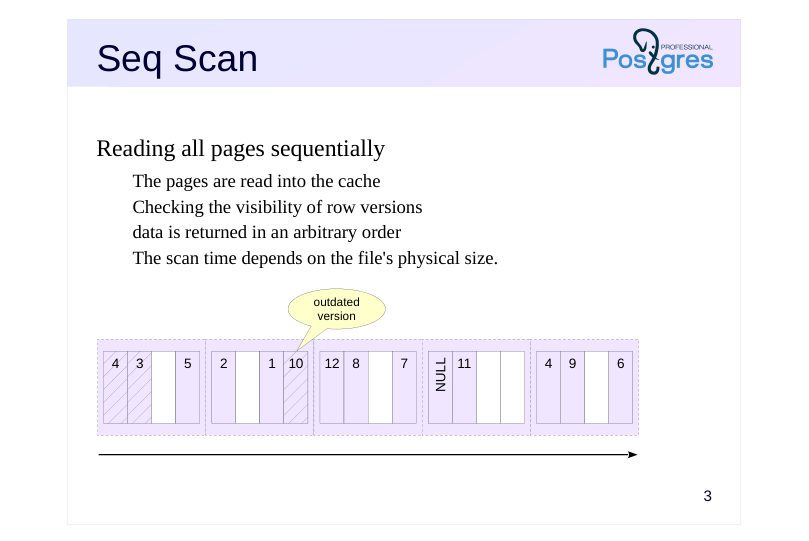
Reading all pages sequentially
- The pages are read into the cache
- Checking the visibility of row versions
- data is returned in an arbitrary order
- The scan time depends on the file’s physical size.
Speaker notes
The optimizer has several ways to access the data The simplest method is a sequential scan of the table. The table’s main data files are read in pages from beginning to end. Note that data is read through the buffer cache (for temporary tables, through the session-local cache).
Sequential file reading leverages the fact that the operating system typically reads data in larger portions than the page size — likely, several subsequent pages are already in the OS cache.
A sequential scan works well when reading the entire table or a significant portion of it (if the condition’s selectivity is low).
During a sequential scan, all row versions on each page are examined — including non-current (dead) versions that haven’t been removed by the cleanup (autovacuum) process yet. If the table’s files contain many dead row versions that haven’t been removed, this can cause a decrease in the performance of sequential scans.
Details on row versions, data snapshots, and cleaning up unnecessary row versions are covered in the DBA2 course.
https://postgrespro.com/docs/postgresql/16/sql-copy
https://postgrespro.com/docs/postgresql/16/sql-copy
Page 4: Sequential Scan
The query execution plan displays sequential scanning via the Seq Scan node:
The following key values are listed in parentheses: cost — cost estimate; rows — estimated number of rows returned by the operation; width — estimated average row size in bytes The cost is represented using arbitrary units and comprises two parts. The first number represents the startup cost for evaluating the node. For a sequential scan, this is zero — no setup is needed to begin returning data. The second number indicates the total cost of acquiring all the data. How is the total cost calculated? The PostgreSQL optimizer accounts for I/O and processor resources. The I/O cost is calculated by multiplying the number of table pages by the hypothetical cost of reading a single page:
The CPU cost component is calculated based on the processing cost per row:
Sequential Scans and Dead Row Versions
Create a copy of the flights table and disable autovacuum to prevent automatic removal of dead row versions:
Check the size of the created table:
Remove all rows from this table:
Page 5: Page 5
Dead row versions persist in the table file until the next cleanup, so the table size remains the same.
Obtain the query execution plan with analyze and buffers — pay attention to the number of pages in Buffers and the cost:
Over two thousand pages were read. Manually clean the table and check its size again:
Dead row versions have been removed, reducing the table size. Obtain the query execution plan again:
The table is empty — no row versions were read, and the plan’s cost is minimal. The time spent dealing with non-current row versions can be significant for larger tables.
Page 6: Bulk Page Replacement
 {#source-figure-006 caption=“Source slide page 6: Bulk Page Replacement”}
Speaker notes
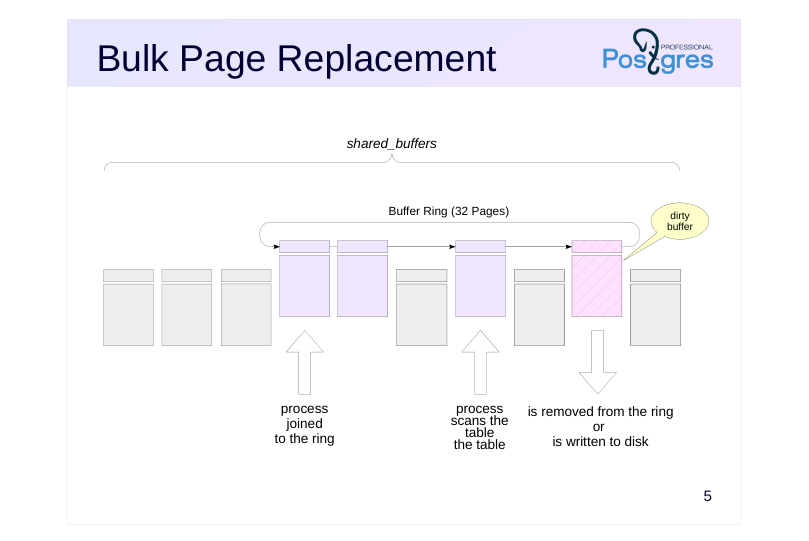
During a sequential scan of the buffer cache, a large number of pages containing “single-use” data are accessed, potentially evicting useful pages from the buffers. During a sequential scan of a large table (exceeding a quarter of the buffer cache size), only 32 pages from the entire cache are used, with eviction occurring within this subset. Meanwhile, the remaining data in the buffer remain unaffected.
If the hint bits or the actual data are modified during the read operation, a dirty buffer is generated. This buffer is removed from the ring and will be evicted normally, with a new buffer added to the ring. This strategy assumes that data is mainly read, not modified.
If another process needs the same table during a scan, it doesn’t start from the beginning but joins the existing buffer ring. After the scan completes, the process reads the “missed” beginning of the table.
When using temporary tables via the local cache, the buffer ring mechanism is not employed.
Page 7: Bulk Page Replacement
Clear the current I/O statistics:
Let’s read all rows from a table exceeding a quarter of shared_buffers:
A total of 49415 pages were read. The pg_stat_io view shows the cumulative statistics:
A total of 49415 pages were read (reads), with 49383 pages being loaded into the cache via replacement (reuses). Consequently, a buffer ring of size 49415 − 49383 = 32 pages was used for the scan. Reset the statistics and query the same table again:
Page 8: Page 8
We can now see that 32 pages were already in the cache from the previous read (hits), meaning the server had to read the remaining 49383 pages (reads). During this process, 49351 pages were evicted from the cache (reuses). The buffer ring size remains 49383 − 49351 = 32 buffers, but these now contain different pages than those used in the first scan.
Page 9: B-tree
Index
- Supporting structure in external memory
- maps keys to table row identifiers
- Structure: Search Tree
- Balanced
- Highly branched
- only sortable data types (using ‘greater than’ and ’less than’ operations)
- Search results are automatically sorted
- Using a composite type
- Improved access speed
- support for integrity constraints
Speaker notes
In this section, we will focus on one of the index types available in PostgreSQL: the B-tree (B-tree). B-tree (B-tree). This is the most commonly used index type in practice. Other types of indexes are covered later in this course within the “Types of Indexes” section.
Like all indexes in PostgreSQL, the B-tree is a secondary structure — it contains no information that isn’t already available from the table itself, but it does take up additional disk space. An index can be dropped and recreated. Indexes are used to accelerate operations that involve a small part of the table, such as retrieving a limited number of rows, and enforcing integrity constraints (primary and unique keys).
Indexes map the values of indexed fields (search keys) to table row identifiers. In the B-tree index, an ordered key tree is built, allowing quick lookup of the desired key along with item pointers to row versions. For example, numbers, strings, and dates can be indexed, but planar points cannot (other index types are available for them). When indexing text strings, you should take into account the specifics of sorting rules (for more details, see course DBA2, topic ‘Localization’).
The B-tree is characterized by its balanced structure (constant depth) and high branching factor. Although the tree’s size depends on the indexed columns, in practice, trees typically have a depth of no more than 4–5.
Page 10: B-tree
 {#source-figure-010 caption=“Source slide page 10: B-tree”}
Speaker notes
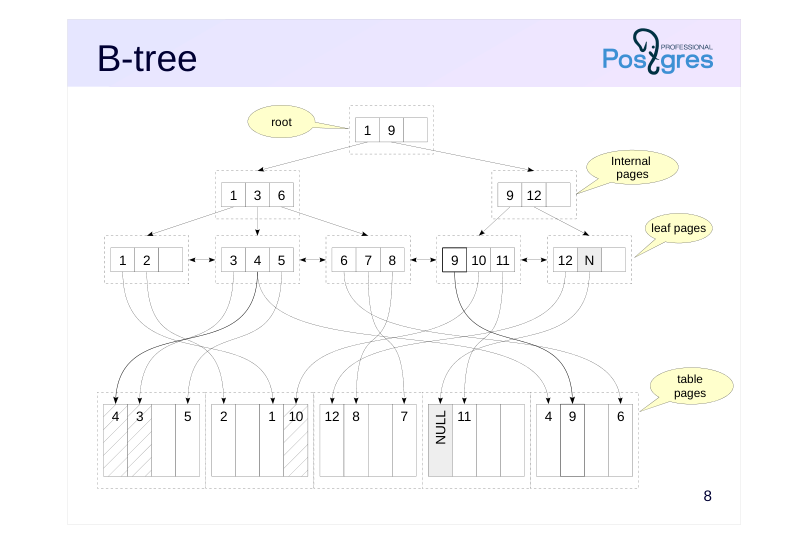
An example of a B-tree is shown at the top of the slide. Its pages are composed of index entries, each containing:
● The key represents the column values used to create the index (such columns are referred to as key columns);
● a pointer to another index page or pointers to tuple versions
The keys within a page are always sorted.
Leaf pages directly point to table tuple versions containing the index keys. These pages are linked in a bidirectional list to facilitate traversing keys in ascending or descending order.
Internal pages point to lower-level index pages, with key values defining the range of values accessible by following the link.
The root page of the tree, which has no parent pointers, is called root.
An index page may be only partially filled. Free space is used to insert new records into the index. If there’s not enough space on a page, it is split into two new pages. Split pages are never merged, which can lead to index growth in some cases.
By default, null values are treated as ‘greater than’ non-null values, so they are stored on the right side of the tree. This order can be adjusted when creating an index using the NULLS LAST and NULLS FIRST clauses.
Page 11: Index Scan: одно значение
 {#source-figure-011 caption=“Source slide page 11: Index Scan: одно значение”}
Speaker notes
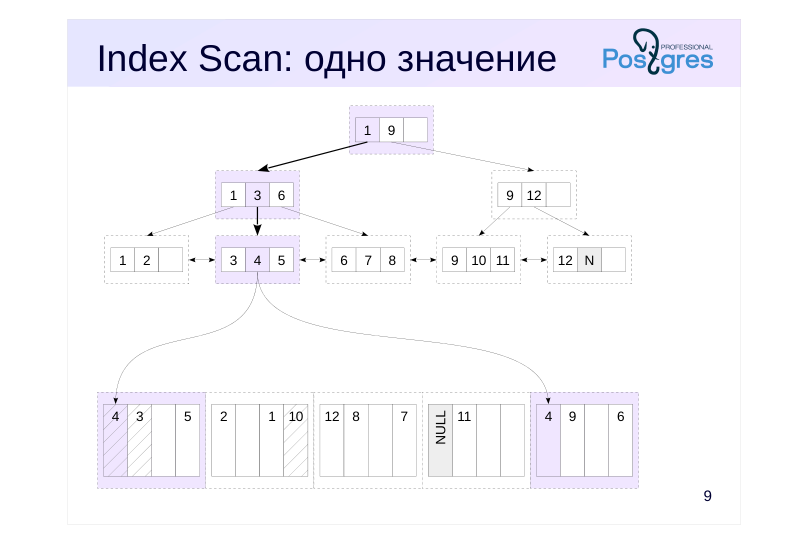
Let’s look at how searching for a single value using an index works. For example, we want to find a row in the table where the value of the indexed column is four.
We start at the tree’s root. The index entries on the root page specify the key value ranges for the lower-level pages: ‘1 to 9’ and ‘9 and above’. The ‘1 to 9’ range applies here, corresponding to a row with key 1. It’s worth noting that since the keys are stored in order, page-level searches are highly efficient.
The link in the found entry leads to the second-level page.In it, we find the ‘3 to 6’ range (key 3) and move to the third-level page.
This is a leaf page. In this page, we find the key value 4 and navigate to the table page.
Note that keys may be duplicated, even in a unique index, because the multiversion concurrency control mechanism can create different versions of the same row. To save space, keys are stored in the index page as a single instance.
Before returning the found row versions, check their visibility.
In the illustrations, the entries and pages that had to be read are color-coded.
Page 12: Index Scan
Let’s look at the bookings table:
The book_ref column serves as a primary key, and an index named bookings_pkey is automatically created for it. Let’s examine the query plan for a single value filter:
The Index Scan access method was chosen, and the name of the index used is shown. Access to both the index and the table is represented by a single plan node. The access condition is listed below. The initial cost of index access represents the estimated resources needed to reach the leaf node. This cost depends on the tree’s height. During estimation, it’s assumed that the required pages are already in the cache, so only CPU resources are considered, resulting in a low value. The full cost includes the estimated cost of reading the required leaf index pages and table pages. In this case, since the index is unique, the model assumes that one index page and one table page will be read. The cost of each read is estimated using the random_page_cost parameter:
Its value is typically higher than seq_page_cost because random access is more expensive (though this parameter should be considerably reduced for SSD drives). The total is 8, with a small additional cost for CPU time spent processing rows. The Index Cond line in the plan lists only the conditions used to access the index or that can be evaluated at the index level. Additional conditions that can only be evaluated using the table are shown in a separate Filter line:
Page 13: Index Scan: диапазон
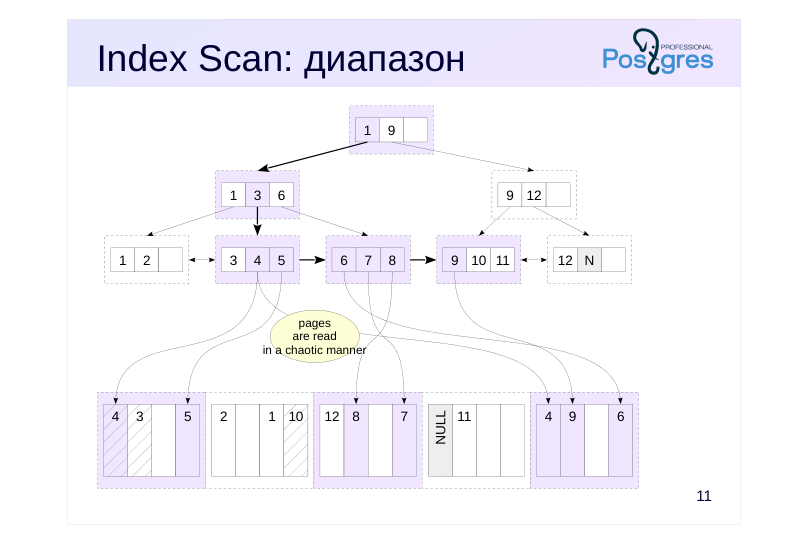 {#source-figure-013 caption=“Source slide page 13: Index Scan: диапазон”}
Speaker notes
B-trees enable efficient searching for not just individual values, but also ranges of values, such as “less than,” “greater than,” “less than or equal to,” “greater than or equal to,” and “between.”
This is how it works. First, we search for the condition’s extreme key. For example, for the “between 4 and 9” condition, we can select 4 or 9, whereas for the “less than 9” condition, we use 9. Then, we proceed to the index’s leaf page as discussed in the previous example and retrieve the first value from the table.
Then, we proceed along the index’s leaf pages in the appropriate direction (right or left, depending on the condition), scanning the records until we encounter a key outside the specified range.
The slide demonstrates an example of searching for values using the condition “x BETWEEN4 AND 9” or, equivalently, “x >= 4 AND x <= 9”. Once we reach the value 4, we then scan the keys 5, 6, and so on until 9. When we encounter key 10, we stop the search.
Two properties are at work: the ordered arrangement of keys on all pages and the bidirectional linking of leaf pages. The search results are automatically sorted.
Note that we had to access the same table page multiple times. We accessed the first table page (value 4), then the last one (also 4), followed by the first page again (5), then the last page (6), and so on.
Page 14: Range Scan
We retrieve data by traversing the index from the root to the leftmost leaf node and moving through the leaf pages. This is because an index scan returns data in the order they are stored within the index structure, as defined during its creation:
The same index can also be used to retrieve rows in reverse order:
In this case, we navigate from the tree root to the rightmost leaf node and move through the leaf pages in reverse order. Note the number of pages (Buffers) that had to be read. Compare range scan with repeated searches for individual values. Achieve the same result using the IN clause and determine how many pages were read in this case:
The number of pages increased because, in this case, we have to traverse from the root to each individual value. In PostgreSQL 17, this query is as efficient as a range scan.
Page 15: Bitmap Index Scan
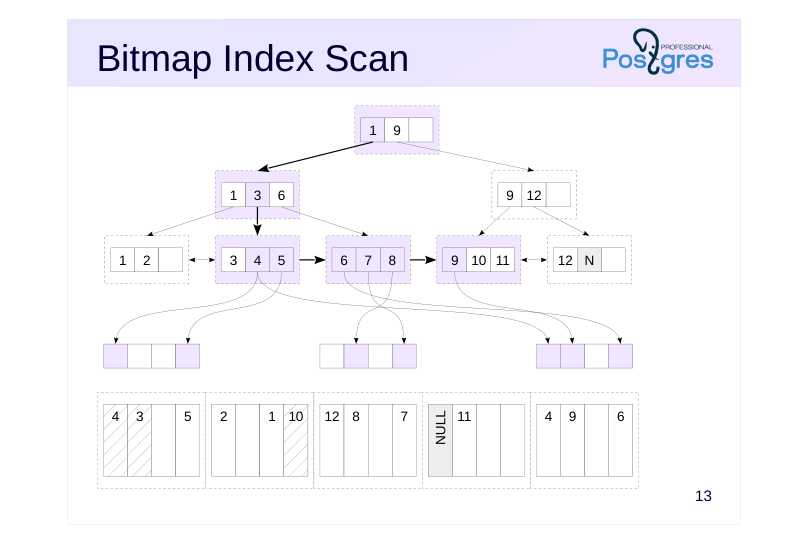 {#source-figure-015 caption=“Source slide page 15: Bitmap Index Scan”}
Speaker notes
Repeatedly accessing the same table pages is extremely inefficient. Even in the best case, if the required page is in the buffer cache, it must be located and locked (see DBA2 course: “Buffer Cache” topic in the “Journaling” module), whereas in the worst case, you end up dealing with random disk reads.
To avoid wasting resources on repeated access to table pages, a bitmap scan is used as an alternative access method. It’s similar to a standard index access, but it’s carried out in two stages.
First, the index (Bitmap Index Scan) is scanned, and a bitmap is constructed in the process’s local memory. The bitmap is divided into fragments. Fragments correspond to table pages, with each bit in a fragment representing a tuple on the page. When constructing a bitmap, the tuple versions that meet the condition and need to be read are marked within it.
By dividing the bitmap into fragments, the bitmap indicating only a few tuple versions will occupy minimal space.
Page 16: Bitmap Heap Scan
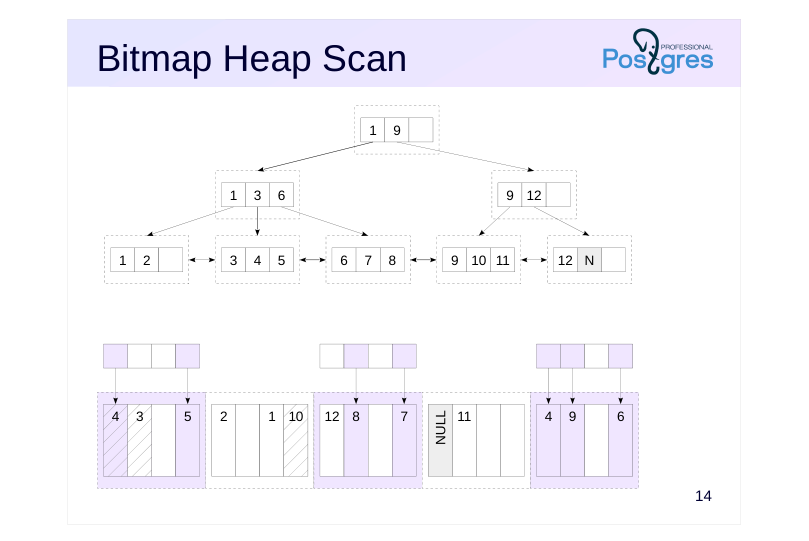 {#source-figure-016 caption=“Source slide page 16: Bitmap Heap Scan”}
Speaker notes
Once the index has been scanned and the bitmap is ready, the table scan starts (Bitmap Heap Scan). Meanwhile:
● A dedicated pre-fetching mechanism is employed, asynchronously reading effective_io_concurrency pages (the default is one);
● Multiple row versions can be checked on a single page, but each page is scanned exactly once.
Page 17: Bitmap Scan
We’ll be looking at the bookings table. Let’s create two additional indexes on it.
Let’s check which access method will be used for a range scan.
To efficiently scan a large number of pages, the planner opted for a bitmap scan. This approach involves two nodes: Bitmap Index Scan reads the index and constructs a bitmap; Bitmap Heap Scan reads the table pages using the constructed bitmap.
Note Note that the bitmap must be fully constructed before it can be used.
Combining Bitmaps
Moreover, a bitmap not only prevents repeated reads of table pages but also enables combining multiple conditions:
Here, two bitmaps were first constructed—one for each condition—and then combined using a bitwise ’OR’ operation. Similarly, various indexes can be utilized:
Page 18: Page 18
Page 19: Approximate fragments
Bitmap without accuracy loss
- As long as the map’s size is within work_mem,, the information is stored
- with row-version accuracy
- Bitmap with accuracy loss
- If memory is exhausted, part of the existing map is coarsened down to
- individual pages.
- Approximately 1 MB of memory is required per 64 GB of data; the
- work_mem limit may be exceeded
Speaker notes
The bitmap is stored in the local memory of the background process, and work_mem bytes are allocated for storing it. Temporary files are never used.
If the map exceeds the work_mem limit, some of its fragments are coarsened—each bit now corresponds to an entire page instead of an individual row version (lossy bitmap). The processing overhead for these fragments increases. The freed-up space is used to continue constructing the map.
Generally speaking, with heavily restricted work_mem and a large dataset, the bitmap may not fit in memory, even if no information remains at the row version level. In this case, the work_mem limit is exceeded — additional memory will be allocated for the bitmap as needed.
Page 20: Approximate fragments
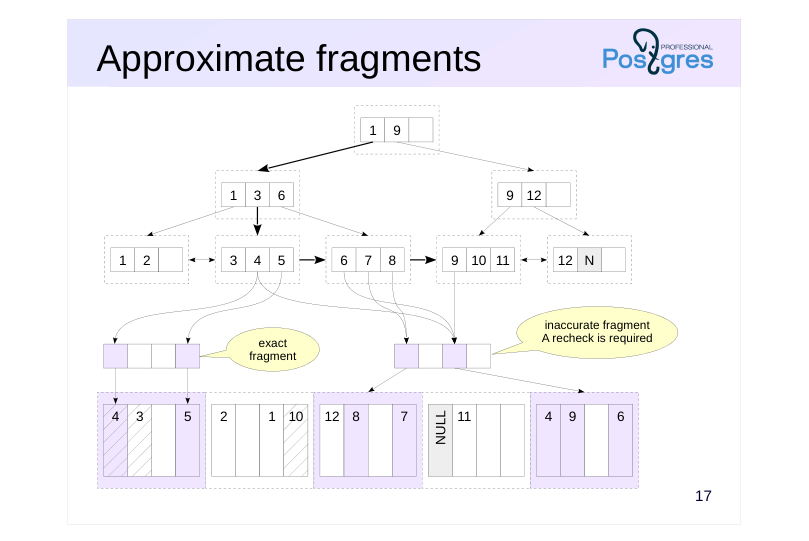 {#source-figure-020 caption=“Source slide page 20: Approximate fragments”}
Speaker notes
As shown in the figure, a bitmap consists of two fragments. The first fragment is precise, with each bit representing a single tuple. The second fragment is imprecise, with each bit representing an entire page.
Imprecise fragments require rechecking conditions for all tuple versions in a table page, which impacts performance. When combining two bitmaps, if at least one contains an imprecise fragment, the resulting fragment must also be imprecise. Therefore, the size work_mem is crucial for efficient bitmap scanning.
Page 21: Inexact Fragments
The Bitmap Heap Scan node indicates the recheck condition (Recheck Cond). The recheck is not always performed, but only when precision is lost, such as when the bitmap doesn’t fit into memory. Rerun the query with a modified condition: search for bookings with a sum of up to 5,000 RUB made in the last month.
The “Heap Blocks: exact” line indicates that all bitmap fragments are constructed with row-level precision — the recheck is skipped. Reduce the allocated memory size
Page 22: Page 22
Here, lossy bitmap fragments appeared — with page-level accuracy.It also shows how many rows were removed during the index recheck. Restore the parameter value. Reset the parameter value.
Page 23: Index Scan / Bitmap Scan
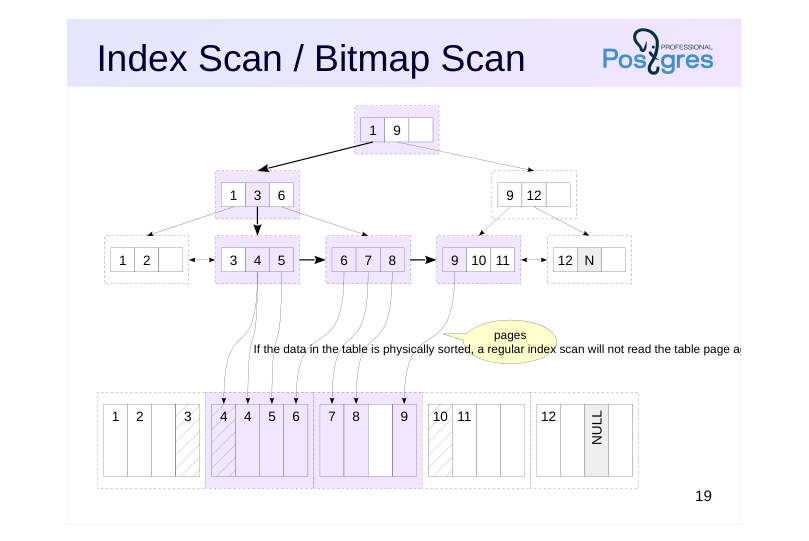 {#source-figure-023 caption=“Source slide page 23: Index Scan / Bitmap Scan”}
Speaker notes
If the table’s data is physically sorted, a regular index scan won’t read the data page again. In such (rare in practice) cases, the bitmap scan method is outperformed by a regular index scan.
Naturally, the query planner also accounts for this (how exactly is covered in the “Basic Statistics” section).
Page 24: Clustering
If the table rows are ordered identically to the index, the bitmap is no longer necessary. We’ll demonstrate this using the CLUSTER command. The table rows are currently physically ordered by the booking number:
Let’s rearrange the rows based on the index for the total_amount column.
Note that during the process: The CLUSTER command acquires an exclusive lock as it fully rebuilds the table, similar to VACUUM FULL; Rows are ordered, but this order isn’t maintained — clustering degrades over time.
Verify that the rows are ordered by cost:
Before clustering, a bitmapped scan was used, but now a regular index scan is simpler and more efficient.
Page 25: Index-Only Scan
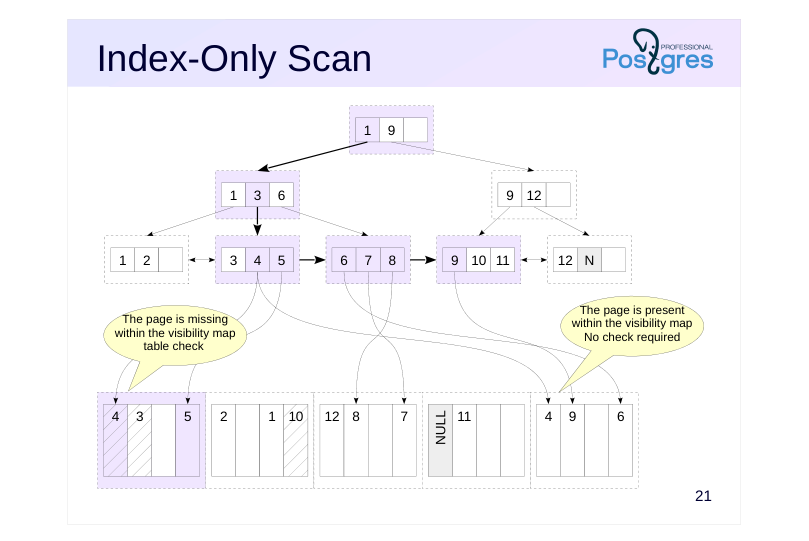 {#source-figure-025 caption=“Source slide page 25: Index-Only Scan”}
Speaker notes
If a query only needs indexed data, that data is already available in the index, so there’s no need to access the table. Such an index is referred to as a covering index for the query.
This is a good optimization that eliminates the need to access table pages. Unfortunately, index pages don’t contain information about row visibility – to determine if the row found in the index should be displayed, we have to examine the table page, which undermines the optimization.
Therefore, the visibility map is crucial for the efficiency of index-only scans. If a table page contains data that’s definitely visible and this is indicated in the visibility map, you don’t need to access that table page. However, pages not marked in the visibility map still need to be accessed.
One reason to run vacuum frequently is that this process updates the visibility map.
The planner doesn’t know exactly how many table pages will need checking, but it considers the estimated number. If the planner’s estimate is poor, it may avoid using index-only scans.
During processing of each index entry in a leaf node, the visibility map is first checked for the presence of the table page, and if it’s not found, the table page itself is read.
https://postgrespro.com/docs/postgresql/16/sql-copy
Page 26: Index-only scan
If all the required information is in the index itself, there’s no need to access the table except when checking visibility:
Let’s examine the execution plan for this query using EXPLAIN ANALYZE:
The Heap Fetches statistic indicates how many row versions were examined via the table. Here, the visibility map contains current data, making table access unnecessary. Update the first row in the table:
How many row versions will need to be checked now?
All versions on the modified page had to be checked.
Page 27: Multi-column Index
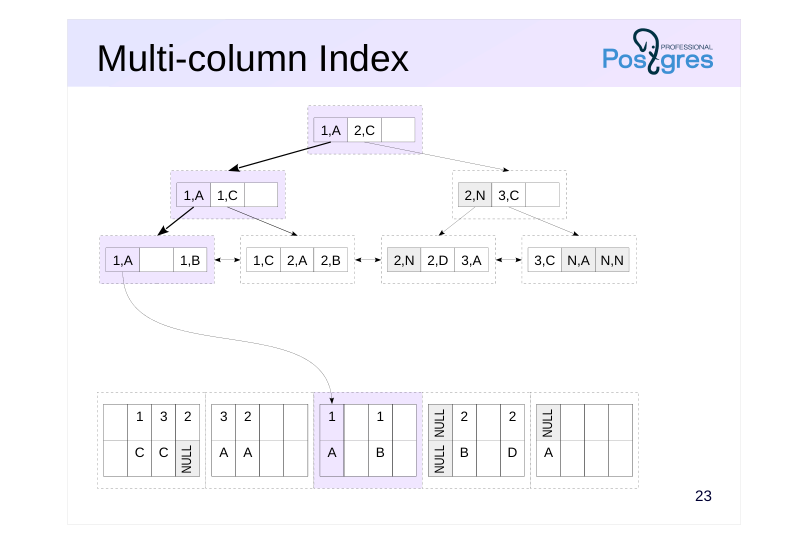 {#source-figure-027 caption=“Source slide page 27: Multi-column Index”}
Speaker notes
You can create an index on multiple columns. In this case, the order of the columns and the sort order matter.
The figure illustrates a multicolumn index created using two columns, both sorted in ascending order. This index improves query performance when the query involves conditions on one or more of the leading columns, as the index entries are sorted first by the first column, then the second, and so on.
In the example on the slide, the query involves the first and second columns; the index would also work for a condition that references only the first column.
Page 28: Multi-column Index
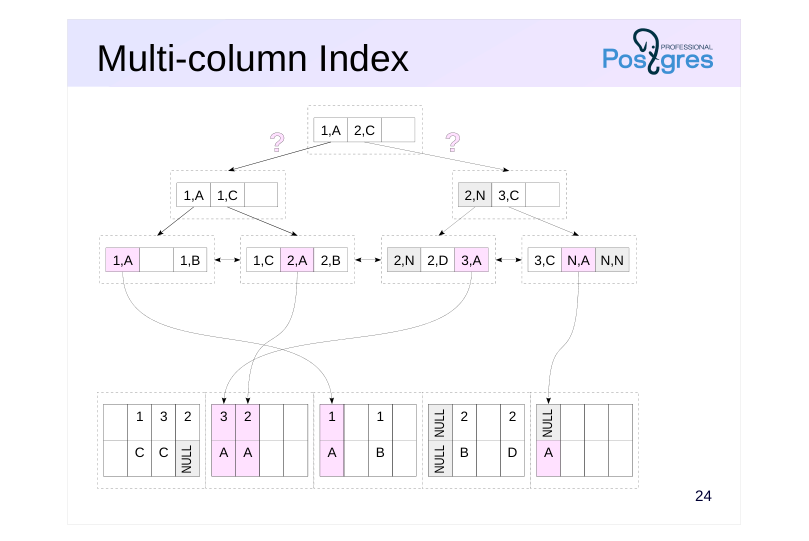 {#source-figure-028 caption=“Source slide page 28: Multi-column Index”}
Speaker notes
However, if the query contains a condition only on the second column, the index becomes ineffective. As illustrated on the slide, leaf entries where the second column is “A” can be found anywhere in the index — we don’t have a way to reach them from the root.
In such cases, the query planner may still opt for index-only scanning, but this results in a full index scan.
Similarly, the index cannot return records in a different order than the one specified during its creation. For example, the index depicted on the slide cannot return records ordered by the first column in ascending order and the second column in descending order.
Page 29: Multicolumn indexes
An index has been created on the ticket_flights table for columns ticket_no and flight_id. A query using both columns uses this index:
A query using only the ticket number also works:
But for a query by flight number, this index is not applicable:
Page 30: Indexes with an INCLUDE clause
Include indexes
- Non-key columns
- are not used in index searches
- are not subject to the unique constraint
- The values reside in the index entry and are retrieved without needing to
- access the table.
Speaker notes
A covering index typically improves query performance. To create a covering index, you might need to add columns, but this isn’t always feasible:
● Adding a column to a unique index would violate the unique constraint of the original columns;
● The added column’s data type might not be supported by the index.
In such cases, you can add non-key columns to the index by including them in the INCLUDE clause.
https://postgrespro.com/docs/postgresql/16/sql-copy
The values of such columns do not contribute to the index structure but are stored as supplementary data in leaf page index entries. Although queries on non-key columns aren’t supported, their values can be retrieved without accessing the table.
Currently, include indexes are only supported for B-tree, GiST, and SP-GiST indexes.
Include indexes are created to make the index covering, but these are not the same thing. An index can be covering for a query without using the INCLUDE clause.
Page 31: Include indexes Indexes with included columns
The tickets_pkey index is not a covering index for the given query because it requires returning not only the ticket_no column, which is included in the index, but also book_ref, which is not present in the index:
Buffers show the number of pages read (hit+read). Let’s create an include index by adding the non-key column book_ref, since the query requires it:
Re-run the query:
Now the optimizer chooses the Index Only Scan approach and utilizes the newly created index. The number of pages read has decreased. As the visibility map is current, the table didn’t need to be accessed (Heap Fetches: 0). Include indexes can include columns with data types not supported by B-tree, such as geometric types and XML.
Page 32: Efficiency Comparison
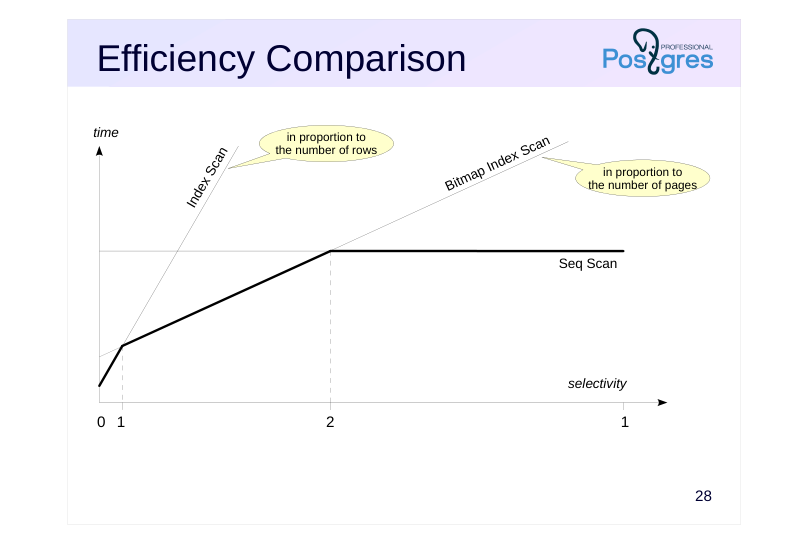 {#source-figure-032 caption=“Source slide page 32: Efficiency Comparison”}
Speaker notes
Index scans perform best under high selectivity, when a single or multiple values are retrieved using the index.
Bit map scans typically perform best at medium selectivity. Although this approach requires building a bit map first, it outperforms index scans by eliminating repeated reads of the same pages (unless the table data is physically ordered, which is uncommon). In the worst case, index scan performance scales with the number of selected rows, while bitmap scans scale with the number of pages.
At low selectivity, sequential scanning is most effective when selecting all or nearly all table rows, as accessing index pages adds unnecessary overhead. This effect is amplified when using rotating disks, as random read speeds are significantly lower than sequential read speeds.
The selectivity threshold at which switching to a different access method becomes beneficial varies significantly depending on the specific table and index. The planner considers multiple parameters to select the most suitable method.
Another observation: Index access returns results in sorted order, which can make it more attractive even at low selectivity.
Page 33: Efficiency Comparison
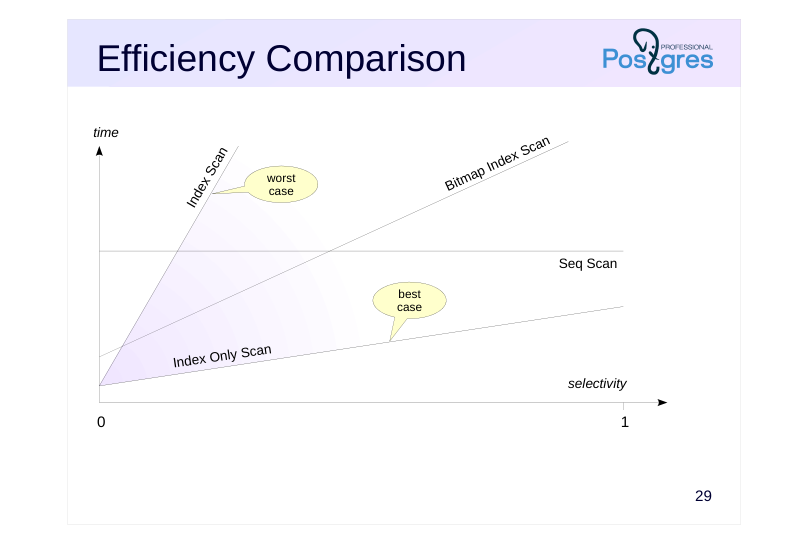 {#source-figure-033 caption=“Source slide page 33: Efficiency Comparison”}
Speaker notes
The effectiveness of index-only scanning is heavily dependent on the current state of the visibility map and the number of data pages that actually contain only up-to-date tuple versions.
In the best case, this access method can outperform sequential scanning even when selectivity is low, particularly when the index is smaller than the table, especially on SSDs.
In the worst-case scenario, when visibility for each row must be checked, the method reverts to a standard index scan.
Therefore, the planner must consider the visibility map’s state: if the forecast is unfavorable, index-only scans are avoided due to the risk of experiencing a slowdown instead of a speedup.
Page 34: Takeaways
The optimizer employs various access methods
- sequential scan
- index scan
- index-only scan
- bitmap scan
- The cost model considers numerous parameters
Page 35: Practice
- Make sure that when re-running the query that selects all rows from the flights table, it reads data from the DB cache. 2. An include index was created for the tickets table during the demo. Replace it with the primary key index. 3. Create an index for the amount column in the ticket_flights table. Identify flights costing more than 120,000 rubles (approximately 1% of the rows). Which access method was selected? 4. Repeat point 3 for costs under 4 rubles (approximately 90% of the rows).
Speaker notes
- Use the EXPLAIN command with the ANALYZE and BUFFERS options.
- Also try disabling the selected access method (parameter enable_seqscan) and compare the performance.
Page 36: 1. Querying all rows in the flights table
All pages were read from disk into shared memory (Buffers: shared read=2624). Some pages may have been fetched from the OS cache, though PostgreSQL isn’t aware of it. Let’s repeat the query
Since we’ve just accessed the table, its pages are still in the buffer cache. Therefore, the server reads data from the shared buffer cache (Buffers: shared hit=2624).
2. Include Index for the Primary Key
To ensure the changes are atomic, perform them within a transaction.
In the demonstration, this include index was created:
The tickets_pkey index is now redundant and can be replaced with a new one. To do this, we’ll remove the existing integrity constraint (which will also delete the old index) and add a new constraint using the name of the newly created index. Additionally, we need to account for the existing foreign key on the ticket_flights table, which will also need to be recreated:
Page 37: Page 37
Return to the original state
3. 1% of Rows
The bitmap scan was selected, as it fit into memory without losing accuracy. For small datasets, bitmap scans are more efficient than sequential scans.
4. 90% of Rows
Disable sequential scanning.
Page 38: Page 38
The exact bitmap doesn’t fit into memory, so all row versions had to be checked on many pages. For large datasets, a full scan is more efficient. To minimize the effect of random factors, it’s recommended to run queries multiple times and take an average of the results.