Skip to content

01 Lesson 01: Demo database "Air Transport"

Native Markdown source page: Demo database “Air Transport”
Note

This page is extracted from the official PDF into native Markdown. Slide text, code and speaker notes are kept in reading order; the original PDF and HTML remain the layout references. HTML source: No matching course-page link was captured in the source inventory. Archive: QPT-handouts-16-en-20251018.zip PDF pages: 28

Page 1: Demo database “Air Transport”

© Postgres Professional, 2019–2024 Authors Authors: Egor Rogov, Pavel Luzanov, Ilya Bashtanov Photo by: Oleg Bartunov (Phu monastery, Bhrikuti summit, Nepal)

Use of course materials

Non-commercial use of course materials (presentations, demonstrations) is allowed without restrictions. Commercial use is possible only with the written permission of Postgres Professional. It is prohibited to make changes to the course materials.

Feedback

Please send your feedback, comments and suggestions to: edu@postgrespro.com

Disclaimer

In no event shall Postgres Professional company be liable for any damages or loss, including loss of profits, that arise from direct or indirect, special or incidental use of course materials. Postgres Professional company specifically disclaims any warranties on course materials. Course materials are provided “as is,” and Postgres Professional company has no obligations to provide maintenance, support, updates, enhancements, or modifications.

Page 2: Topics

  • Goals and Objectives
  • Subject Area and General Schema of the Demonstration Database
  • Detailed Object Descriptions

Page 3: Aviation

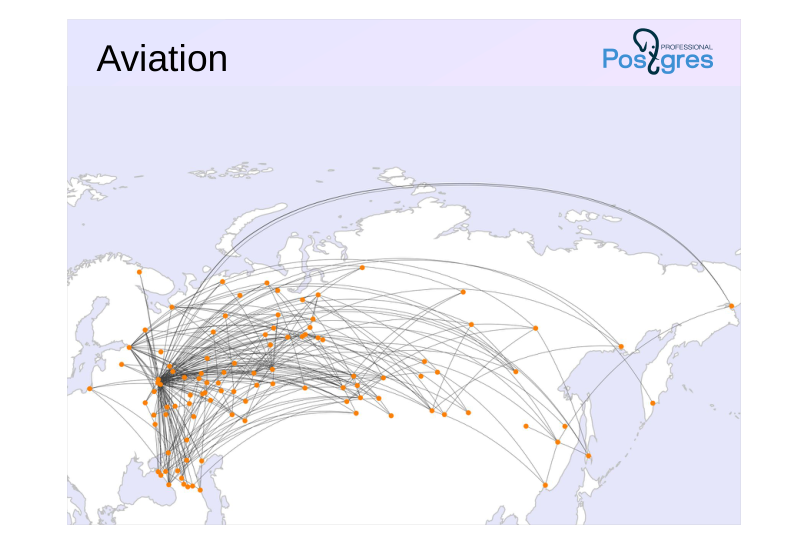
Source slide page 3: Aviation{#source-figure-003 caption=“Source slide page 3: Aviation”}

Speaker notes

The demonstration database was created for the following purposes:

● Self-directed study of the SQL query language

● Development of textbooks, guides, and training courses on SQL;

● Showcasing PostgreSQL features in articles and notes

When developing the demonstration database, we set out to achieve several objectives:

● The data schema should be simple enough to be understood without additional explanations.

● At the same time, the data schema should be sufficiently complex to enable the creation of meaningful queries;

● The database should be populated with realistic data that are engaging to work with.

The demonstration database is licensed under the PostgreSQL license.

The database is available in three versions with different sizes. For example, the large-volume database used in the query optimization course contains a year’s worth of flight data.

This topic covers the demo database version from 15.08.2017.

https://postgrespro.com/docs/postgresql/16/sql-copy

Page 4: Overview

Source slide page 4: Overview{#source-figure-004 caption=“Source slide page 4: Overview”}

Speaker notes

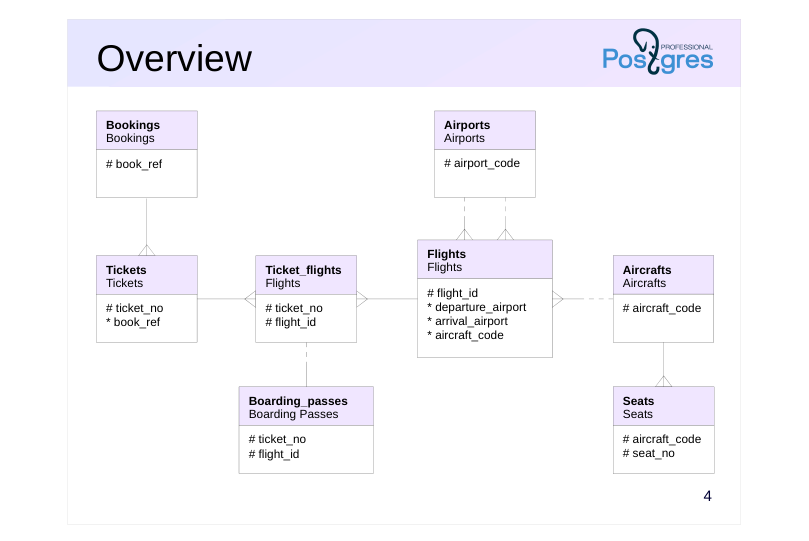
The primary entity is booking (bookings).

A booking can include multiple passengers, each receiving their own ticket (tickets).

A ticket may include one or more flights (ticket_flights). A ticket can include multiple flights when there’s no direct flight between the departure and destination (a connecting flight) or when it’s a round-trip ticket.

Each flight (flights) departs from one airport (airports) to another. Flights with the same number have identical departure and arrival locations but different departure dates.

When checking in for a flight, the passenger receives a boarding pass (boarding_passes) that specifies the seat on the plane. A passenger can only check in for the flight listed in their ticket Each flight and seat combination is unique.

The number of seats and their allocation across service classes in an aircraft depend on the specific aircraft model used for the flight. Each aircraft model is assumed to have only one cabin layout.

The schema highlights only the columns that correspond to primary and foreign keys. Next, we’ll take a closer look at the main objects in the demonstration database.

Page 5: Bookings

Bookings

  • A passenger books a ticket a month in advance for themselves and possibly
  • other passengers.
  • Booking number (alphanumeric combination)
  • Booking date
  • Total amount of tickets included in the booking

Speaker notes

The passenger books a ticket for themselves and possibly others in advance, with the booking date (book_date) up to a month before the flight. Bookings are identified by a unique identifier (book_ref, a six-character alphanumeric code).

The total_amount field stores the total cost of all passengers’ flights included in the booking.

Column | Type | Modifiers | Description
--------------+---------------+--------------+---------------------------
book_ref | char(6) | not null | Booking Number
book_date | timestamptz | not null | Booking date
total_amount | numeric(10,2) | not null | Total booking amount
Indexes:
PRIMARY KEY, btree (book_ref)
External References:
TABLE "tickets" FOREIGN KEY (book_ref) REFERENCES bookings(book_ref)

Page 6: Reservation

Let’s start with a reservation and pick any one:

=> SELECT * FROM bookings b WHERE b.book_ref = '0824C5';
 book_ref |       book_date        | total_amount
----------+------------------------+--------------
 0824C5   | 2017-07-25 23:36:00+03 |    112400.00
(1 row)

We can see the reservation date and the total amount. The reservation was made quite a long time ago when compared to the current date:

=> SELECT now();
              now
-------------------------------
 2025-10-18 22:23:32.312064+03
(1 row)

However, in the demo database, the “current” date is a different one:

=> SELECT bookings.now();
          now
------------------------
 2017-08-15 18:00:00+03
(1 row)

So, “in reality,” the tickets were booked 20 days ago:

=> SELECT bookings.now() - b.book_date
FROM bookings b
WHERE b.book_ref = '0824C5';
     ?column?
------------------
 20 days 18:24:00
(1 row)

Page 7: Tickets

Tickets

  • A ticket is issued to a single passenger and may cover multiple flights.
  • Neither the passenger ID nor the name is permanent; it is not possible to
  • uniquely identify all tickets for the same passenger.
  • Ticket No.
  • Booking reference
  • Passenger ID (Document Number)
  • passenger_name | 16
  • Passenger Contact Details

Speaker notes

The ticket contains a unique 13-digit number (ticket_no).

The ticket contains a passenger ID (passenger_id) — the passenger’s identity document number — along with their surname and name (passenger_name) and contact information (contact_data).

Neither the passenger ID nor the name is permanent (e.g., a passport can be replaced or a surname changed), making it impossible to uniquely identify all tickets for the same passenger.

Column | Type | Modifiers | Description
----------------+-------------+--------------+-----------------------------
ticket_no | char(13) | not null | Ticket Number
book_ref | char(6) | not null | Booking Number
passenger_id | varchar(20) | not null | Passenger ID
passenger_name | text | not null | Passenger's Name
contact_data | jsonb | | Passenger's Contact Information
Indexes:
PRIMARY KEY, btree (ticket_no)
Foreign Key Constraints:
FOREIGN KEY (book_ref) REFERENCES bookings(book_ref)
External References:
TABLE "ticket_flights" FOREIGN KEY (ticket_no) REFERENCES tickets(ticket_no)

Page 8: Tickets Ticket Details

Let’s check which tickets are included in the selected reservation.

=> SELECT t.*
FROM bookings b
  JOIN tickets t ON t.book_ref = b.book_ref
WHERE b.book_ref = '0824C5';
   ticket_no   | book_ref | passenger_id |  passenger_name   |       contact_data
---------------+----------+--------------+-------------------+---------------------------
 0005435126781 | 0824C5   | 7247 393204  | ALEKSANDR MATVEEV | {"phone": "+70095062310"}
 0005435126782 | 0824C5   | 1745 826066  | NINA KRASNOVA     | {"phone": "+70876976071"}
(2 rows)

Two passengers are traveling; each has an individual ticket containing their personal information.

Page 9: Flights

Ticket\_flights

  • Flight connects tickets to flights
  • Ticket No.
  • Flight ID
  • class of service
  • Flight Cost

Speaker notes

A flight links a ticket to a flight, identified by the ticket and flight numbers.

For each flight, the cost (amount) and service class (fare_conditions) are specified.

Column | Type | Modifiers | Description
-----------------+---------------+--------------+---------------------
ticket_no | char(13) | not null | Ticket Number
flight_id | integer | not null | Flight ID
fare_conditions | varchar(10) | not null | Class of service
amount | numeric(10,2) | not null | Flight Cost
Indexes:
PRIMARY KEY, btree (ticket_no, flight_id)
Check Constraints:
CHECK (amount >= 0)
CHECK (fare_conditions IN ('Economy', 'Comfort', 'Business'))
Foreign Key Constraints:
FOREIGN KEY (flight_id) REFERENCES flights(flight_id)
FOREIGN KEY (ticket_no) REFERENCES tickets(ticket_no)
External References:
TABLE "boarding_passes" FOREIGN KEY (ticket_no, flight_id)
REFERENCES ticket_flights(ticket_no, flight_id)

Page 10: Flight Details

What route are the passengers traveling on? Let’s include the flights in the query.

=> SELECT tf.*
FROM tickets t
  JOIN ticket_flights tf ON tf.ticket_no = t.ticket_no
WHERE t.ticket_no = '0005435126781';
   ticket_no   | flight_id | fare_conditions |  amount
---------------+-----------+-----------------+----------
 0005435126781 |     22566 | Economy         | 11700.00
 0005435126781 |     71439 | Economy         |  3200.00
 0005435126781 |     74643 | Economy         |  8800.00
 0005435126781 |     94335 | Economy         | 11700.00
 0005435126781 |     95726 | Economy         |  3200.00
 0005435126781 |    206625 | Business        | 26400.00
(6 rows)

Here, we’re only looking at one ticket – all routes in a booking always match. It appears that the ticket includes 6 flights, one in business class and the rest in economy class.

Page 11: Flights

Flights

  • The flight operates on schedule between airports.
  • Natural key: flight number and departure date, but a surrogate key is used.
  • Flight ID
  • flight number
  • scheduled departure and arrival
  • actual departure and arrival
  • Departure and arrival airports
  • Flight status
  • filter: (aircraft_code = f.aircraft_code)

Speaker notes

A flight connects the departure and arrival airports. If there’s no direct flight, the ticket includes multiple flights.

Column | Type | Modifiers | Description
---------------------+-------------+--------------+----------------------------
flight_id | integer | not null | Flight ID
flight_no | char(6) | not null | Flight Number
scheduled_departure | timestamptz | not null | Scheduled departure time
scheduled_arrival | timestamptz | not null | Scheduled Arrival Time
departure_airport | char(3) | not null | Departure Airport
Arrival Airport
status | varchar(20) | not null | Flight Status
aircraft_code | char(3) | not null | Aircraft code (IATA)
Actual Departure Time
actual_arrival | timestamptz | | Actual Arrival Time
Indexes:
PRIMARY KEY, btree (flight_id)
UNIQUE CONSTRAINT, btree (flight_no, scheduled_departure)
Check Constraints:
CHECK (scheduled_arrival > scheduled_departure)
CHECK ((actual_arrival IS NULL)
OR ((actual_departure IS NOT NULL AND actual_arrival IS NOT NULL)
AND (actual_arrival > actual_departure)))
CHECK (status IN ('On Time', 'Delayed', 'Departed',
'Arrived', 'Scheduled', 'Cancelled'))
Foreign Key Constraints:
FOREIGN KEY (aircraft_code) REFERENCES aircrafts_data(aircraft_code)
FOREIGN KEY (arrival_airport) REFERENCES airports_data(airport_code)
FOREIGN KEY (departure_airport) REFERENCES airports_data(airport_code)

Page 12: Flights Flight Details

Now let’s look into which flights are associated with the selected ones.

=> SELECT f.flight_id, f.scheduled_departure,
  f.departure_airport dep, f.arrival_airport arr,
  f.status, f.aircraft_code aircraft
FROM tickets t
  JOIN ticket_flights tf ON tf.ticket_no = t.ticket_no
  JOIN flights f ON f.flight_id = tf.flight_id
WHERE t.ticket_no = '0005435126781'
ORDER BY f.scheduled_departure;
 flight_id |  scheduled_departure   | dep | arr |  status   | aircraft
-----------+------------------------+-----+-----+-----------+----------
     22566 | 2017-08-12 11:00:00+03 | VKO | PEE | Arrived   | 773
     95726 | 2017-08-12 15:30:00+03 | PEE | SVX | Arrived   | SU9
     74643 | 2017-08-13 11:30:00+03 | SVX | SGC | Arrived   | SU9
    206625 | 2017-08-15 14:45:00+03 | SGC | SVX | Departed  | SU9
     71439 | 2017-08-16 08:50:00+03 | SVX | PEE | On Time   | SU9
     94335 | 2017-08-16 18:55:00+03 | PEE | VKO | Scheduled | 773
(6 rows)

There are three outbound and three return flights. All outbound flights have already arrived (Arrived), while the passenger is currently on the return flight (Departed). The next flight is on time (On Time), and check-in hasn’t opened yet for the final flight (Scheduled). Let’s take a closer look at all the columns of one of the flights.

=> SELECT * FROM flights f WHERE f.flight_id = 22566 \gx
-[ RECORD 1 ]-------+-----------------------
flight_id           | 22566
flight_no           | PG0412
scheduled_departure | 2017-08-12 11:00:00+03
scheduled_arrival   | 2017-08-12 12:25:00+03
departure_airport   | VKO
arrival_airport     | PEE
status              | Arrived
aircraft_code       | 773
actual_departure    | 2017-08-12 11:01:00+03
actual_arrival      | 2017-08-12 12:25:00+03

Actual time may vary from the scheduled time (typically by a small margin). All flights on the same route schedule share the same flight_no:

=> SELECT f.flight_id, f.flight_no, f.scheduled_departure
FROM flights f
WHERE f.flight_no = 'PG0412'
ORDER BY f.scheduled_departure
LIMIT 10;
 flight_id | flight_no |  scheduled_departure
-----------+-----------+------------------------
     22784 | PG0412    | 2016-08-15 11:00:00+03
     22746 | PG0412    | 2016-08-16 11:00:00+03
     22721 | PG0412    | 2016-08-17 11:00:00+03
     22691 | PG0412    | 2016-08-18 11:00:00+03
     22749 | PG0412    | 2016-08-19 11:00:00+03
     22508 | PG0412    | 2016-08-20 11:00:00+03
     22493 | PG0412    | 2016-08-21 11:00:00+03
     22496 | PG0412    | 2016-08-22 11:00:00+03
     22483 | PG0412    | 2016-08-23 11:00:00+03
     22501 | PG0412    | 2016-08-24 11:00:00+03
(10 rows)

Page 13: Airports

Airports

  • The city is not stored in a separate table
  • Implementation: Multilingual view on airports_data
  • airport code
  • airport name
  • city
  • Airport coordinates (longitude and latitude)
  • timezone

Speaker notes

The airport is identified by a three-letter code (airport_code) and is known as (airport_name).

Cities are not represented as a separate entity, but a “city” field has been introduced to help locate airports within the same city. This view also includes the airport’s coordinates (coordinates) and time zone (timezone).

The airport_name and city field values depend on the language set in the configuration parameter bookings.lang.

Column | Type | Modifiers | Description
--------------+---------+--------------+---------------------------------------
airport_code | char(3) | not null | Airport code
airport_name | text | not null | Description: Airport Name
city | text | not null | City
Description: Airport coordinates
timezone | text | not null | Airport Time Zone
View Definition:
SELECT ml.airport_code,
ml.airport_name ->> lang() AS airport_name,
ml.city ->> lang() AS city,
ml.coordinates,
ml.timezone
FROM airports_data ml;

Page 14: Airports

A standard three-letter code serves as the identifier for airports. Let’s examine the complete details of an airport:

=> SELECT * FROM airports WHERE airport_code = 'VKO' \gx
-[ RECORD 1 ]+------------------------------
airport_code | VKO
airport_name | Внуково
city         | Москва
coordinates  | (37.2615013123,55.5914993286)
timezone     | Europe/Moscow

Besides the name and city, the airport’s coordinates and time zone are also stored. Now we can interpret the flight details:

=> SELECT f.scheduled_departure,
  dep.airport_code || ' ' || dep.city || ' (' || dep.airport_name || ')' departure,
  arr.airport_code || ' ' || arr.city || ' (' || arr.airport_name || ')' arrival
FROM tickets t
  JOIN ticket_flights tf ON tf.ticket_no = t.ticket_no
  JOIN flights f ON f.flight_id = tf.flight_id
  JOIN airports dep ON dep.airport_code = f.departure_airport
  JOIN airports arr ON arr.airport_code = f.arrival_airport
WHERE t.ticket_no = '0005435126781'
ORDER BY f.scheduled_departure;
  scheduled_departure   |          departure          |           arrival
------------------------+-----------------------------+-----------------------------
 2017-08-12 11:00:00+03 | VKO Москва (Внуково)        | PEE Пермь (Пермь)
 2017-08-12 15:30:00+03 | PEE Пермь (Пермь)           | SVX Екатеринбург (Кольцово)
 2017-08-13 11:30:00+03 | SVX Екатеринбург (Кольцово) | SGC Сургут (Сургут)
 2017-08-15 14:45:00+03 | SGC Сургут (Сургут)         | SVX Екатеринбург (Кольцово)
 2017-08-16 08:50:00+03 | SVX Екатеринбург (Кольцово) | PEE Пермь (Пермь)
 2017-08-16 18:55:00+03 | PEE Пермь (Пермь)           | VKO Москва (Внуково)
(6 rows)

To avoid having to write such a query repeatedly, there is a view called flights_v:

=> SELECT * FROM flights_v f WHERE f.flight_id = 22566 \gx
-[ RECORD 1 ]-------------+-----------------------
flight_id                 | 22566
flight_no                 | PG0412
scheduled_departure       | 2017-08-12 11:00:00+03
scheduled_departure_local | 2017-08-12 11:00:00
scheduled_arrival         | 2017-08-12 12:25:00+03
scheduled_arrival_local   | 2017-08-12 14:25:00
scheduled_duration        | 01:25:00
departure_airport         | VKO
departure_airport_name    | Внуково
departure_city            | Москва
arrival_airport           | PEE
arrival_airport_name      | Пермь
arrival_city              | Пермь
status                    | Arrived
aircraft_code             | 773
actual_departure          | 2017-08-12 11:01:00+03
actual_departure_local    | 2017-08-12 11:01:00
actual_arrival            | 2017-08-12 12:25:00+03
actual_arrival_local      | 2017-08-12 14:25:00
actual_duration           | 01:24:00

We can see the local time in the departure and arrival cities’ time zones, flight duration, and airport names here. Since the routes in the demo database remain unchanged over time, we can isolate data that’s independent of a specific departure date from the flights table. This data is organized in the routes view:

=> SELECT * FROM routes r WHERE r.flight_no = 'PG0412' \gx

Page 15: Page 15

-[ RECORD 1 ]----------+----------------
flight_no              | PG0412
departure_airport      | VKO
departure_airport_name | Внуково
departure_city         | Москва
arrival_airport        | PEE
arrival_airport_name   | Пермь
arrival_city           | Пермь
aircraft_code          | 773
duration               | 01:25:00
days_of_week           | {1,2,3,4,5,6,7}

It’s clear that flights run daily (array days_of_week).

Page 16: Aircrafts

Aircrafts

  • aircraft models operating flights
  • Implementation: a multilingual view of aircrafts_data
  • filter: (aircraft_code = f.aircraft_code)
  • aircraft model
  • Maximum flight range (km)

Speaker notes

Each aircraft model is uniquely identified by its three-digit code (aircraft_code). Additionally, the model (model) and maximum flight range in kilometers (range) are specified.

The model field’s value is determined by the selected language specified in the configuration parameter bookings.lang.

Column | Type | Modifiers | Description
---------------+---------+--------------+-----------------------------------
aircraft_code | char(3) | not null | Aircraft code (IATA)
model | text | not null | Aircraft Model
range | integer | not null | Maximum flight range (km)
View Definition:
SELECT ml.aircraft_code,
ml.model ->> lang() AS model,
ml.range
FROM aircrafts_data ml;

Page 17: Aircraft Aircraft

Aircraft models that service flights also use standard three-character codes as primary keys.

=> SELECT a.*
FROM flights f
  JOIN aircrafts a ON a.aircraft_code = f.aircraft_code
WHERE f.flight_id = 22566;
 aircraft_code |     model     | range
---------------+---------------+-------
 773           | Боинг 777-300 | 11100
(1 row)

Page 18: Seats

Seats

  • Seats determine the cabin layout
  • All aircraft of the same model share the same cabin layout
  • filter: (aircraft_code = f.aircraft_code)
  • seat number
  • class of service

Speaker notes

Seats determine the cabin layout for each model. Each seat is identified by its seat number (seat_no) and is assigned a class of service (fare_conditions) – Economy, Comfort, or Business.

Column | Type | Modifiers | Description
-----------------+-------------+--------------+--------------------
aircraft_code | char(3) | not null | Aircraft code (IATA)
seat_no | varchar(4) | not null | Seat Number
fare_conditions | varchar(10) | not null | Class of service
Indexes:
PRIMARY KEY, btree (aircraft_code, seat_no)
Check Constraints:
CHECK (fare_conditions IN ('Economy', 'Comfort', 'Business'))
Foreign Key Constraints:
FOREIGN KEY (aircraft_code)
REFERENCES aircrafts(aircraft_code) ON DELETE CASCADE

Page 19: Seats

In the demo database, all aircraft of the same model share the same cabin configuration. Let’s look at the first row:

=> SELECT s.*
FROM flights f
  JOIN aircrafts a ON a.aircraft_code = f.aircraft_code
  JOIN seats s ON s.aircraft_code = a.aircraft_code
WHERE f.flight_id = 22566
AND s.seat_no ~ '^1.$';
 aircraft_code | seat_no | fare_conditions
---------------+---------+-----------------
 773           | 1A      | Business
 773           | 1C      | Business
 773           | 1D      | Business
 773           | 1G      | Business
 773           | 1H      | Business
 773           | 1K      | Business
(6 rows)

This is the business class section. Here’s the total number of seats across various service classes:

=> SELECT s.fare_conditions, count(*)
FROM seats s
WHERE s.aircraft_code = '733'
GROUP BY s.fare_conditions;
 fare_conditions | count
-----------------+-------
 Business        |    12
 Economy         |   118
(2 rows)

Page 20: Boarding Passes

Boarding\_passes

  • The boarding pass is issued when checking in for the flight.
  • Ticket No.
  • Flight ID
  • boarding pass number (in the order of registration)
  • seat number

Speaker notes

Passengers can register for a flight up to a day in advance of the scheduled departure date, and they are then issued a boarding pass.

Boarding passes are assigned sequential numbers (boarding_no) according to the order in which passengers register for the flight. This number is unique only within the flight. The boarding pass includes the seat number (seat_no).

Column | Type | Modifiers | Description
-------------+------------+--------------+--------------------------
ticket_no | char(13) | not null | Ticket Number
flight_id | integer | not null | Flight ID
boarding_no | integer | not null | Boarding Pass Number
seat_no | varchar(4) | not null | Seat Number
Indexes:
PRIMARY KEY, btree (ticket_no, flight_id)
UNIQUE CONSTRAINT, btree (flight_id, boarding_no)
UNIQUE CONSTRAINT, btree (flight_id, seat_no)
Foreign Key Constraints:
FOREIGN KEY (ticket_no, flight_id)
REFERENCES ticket_flights(ticket_no, flight_id)

Page 21: Boarding Tickets Boarding Passes

Where was our passenger seated? To find out, you need to check the boarding pass issued during check-in for the flight:

=> SELECT f.status, bp.*
FROM tickets t
  JOIN ticket_flights tf ON tf.ticket_no = t.ticket_no
  JOIN flights f ON f.flight_id = tf.flight_id
  LEFT JOIN boarding_passes bp
    ON bp.ticket_no = tf.ticket_no AND bp.flight_id = tf.flight_id
WHERE t.ticket_no = '0005435126781'
ORDER BY f.scheduled_departure;
  status   |   ticket_no   | flight_id | boarding_no | seat_no
-----------+---------------+-----------+-------------+---------
 Arrived   | 0005435126781 |     22566 |           4 | 22A
 Arrived   | 0005435126781 |     95726 |          64 | 19D
 Arrived   | 0005435126781 |     74643 |          42 | 8D
 Departed  | 0005435126781 |    206625 |          11 | 3F
 On Time   |               |           |             |
 Scheduled |               |           |             |
(6 rows)

The passenger hasn’t checked in for the two remaining flights yet.

Page 22: Multilingual Support

Configuration parameter

  • bookings.lang
  • Tables to store multilingual names
    • airports_data
    • aircrafts_data

Speaker notes

The language for displaying city, airport, and aircraft model names is set via the configuration parameter bookings.lang. The demo base contains names in Russian (ru) and English (en).

You can independently expand the language support by addingnames in any language to the rows of the airports_data and aircrafts_data tables.

Page 23: Multilingual Support

The demo database has the capability to translate the names of airports, cities, and aircraft into other languages. As we saw, by default, all names are displayed in Russian:

=> SELECT * FROM airports a WHERE a.airport_code = 'VKO' \gx
-[ RECORD 1 ]+------------------------------
airport_code | VKO
airport_name | Внуково
city         | Москва
coordinates  | (37.2615013123,55.5914993286)
timezone     | Europe/Moscow

To change the language, simply set the configuration parameter.

=> SET bookings.lang = 'en';
SET
=> SELECT * FROM airports a WHERE a.airport_code = 'VKO' \gx
-[ RECORD 1 ]+------------------------------
airport_code | VKO
airport_name | Vnukovo International Airport
city         | Moscow
coordinates  | (37.2615013123,55.5914993286)
timezone     | Europe/Moscow

The implementation uses a view on a base table containing JSON-formatted translations:

=> SELECT * FROM airports_data ml WHERE ml.airport_code = 'VKO' \gx
-[ RECORD 1 ]+---------------------------------------------------------
airport_code | VKO
airport_name | {"en": "Vnukovo International Airport", "ru": "Внуково"}
city         | {"en": "Moscow", "ru": "Москва"}
coordinates  | (37.2615013123,55.5914993286)
timezone     | Europe/Moscow

Page 24: Takeaways

The demo database’s schema is simple yet enables the creation of complex and intriguing queries.

  • The data in the demo database is similar to real data.
  • The demo database can be used for learning SQL, showcasing PostgreSQL features, and other purposes.

Page 25: Practice

Write a few queries against the demo database. 1. How many people are included in a single booking? 2. Which cities cannot be reached from Moscow without transfers? 3. Which airplane model operates the most flights, and which operates the fewest? 4. And which aircraft model carried the most passengers?

  1. The result will be two columns: Number of people per booking Booking count

Page 26: How many people are in each booking?

We’ll count the number of people in each booking and then determine how many bookings there are for each number of people.

=> SELECT tt.cnt, count(*)
FROM (
  SELECT count(*) cnt
  FROM tickets t
  GROUP BY t.book_ref
) tt
GROUP BY tt.cnt
ORDER BY tt.cnt;
 cnt |  count
-----+---------
   1 | 1388875
   2 |  613356
   3 |  101440
   4 |    7245
   5 |     194
(5 rows)

2. Which cities cannot be reached from Moscow without transfers?

We’ll identify the cities that can be reached and list the remaining ones.

=> SELECT a.city
FROM airports a
EXCEPT
SELECT arr.city
FROM flights f
  JOIN airports dep ON f.departure_airport = dep.airport_code
  JOIN airports arr ON f.arrival_airport = arr.airport_code
WHERE dep.city = 'Moscow';
           city
--------------------------
 Оренбург
 Липецк
 Южно-Сахалинск
 Красноярск
 Уфа
 Калуга
 Новый Уренгой
 Нарьян-Мар
 Белгород
 Нерюнгри
 Ульяновск
 Салехард
 Грозный
 Орск
 Нижневартовск
 Астрахань
 Минеральные Воды
 Краснодар
 Саранск
 Когалым
 Кемерово
 Братск
 Якутск
 Казань
 Новокузнецк
 Белоярский
 Нижний Новгород
 Екатеринбург
 Пенза
 Омск
 Пермь
 Чебоксары
 Сургут
 Надым
 Тюмень
 Сыктывкар
 Нальчик

Page 27: Page 27

 Иркутск
 Волгоград
 Томск
 Советский
 Норильск
 Анапа
 Ростов-на-Дону
 Курск
 Владикавказ
 Удачный
 Ставрополь
 Йошкар-Ола
 Петропавловск-Камчатский
 Новосибирск
 Кызыл
 Улан-Удэ
 Воронеж
 Киров
 Мирный
 Стрежевой
 Ярославль
 Саратов
 Горно-Алтайск
 Геленджик
 Петрозаводск
 Иваново
 Усть-Кут
 Магадан
 Абакан
 Хабаровск
 Самара
 Калининград
 Воркута
 Махачкала
 Тамбов
 Чита
 Анадырь
 Усинск
 Мурманск
 Брянск
 Череповец
 Урай
 Комсомольск-на-Амуре
 Челябинск
 Бугульма
 Сочи
 Усть-Илимск
 Москва
 Благовещенск
 Санкт-Петербург
 Ухта
 Элиста
 Барнаул
 Нефтеюганск
 Ханты-Мансийск
 Псков
 Магнитогорск
 Нижнекамск
 Нягань
 Курган
 Ноябрьск
 Ижевск
 Архангельск
 Владивосток
(101 rows)

It’s interesting that you can’t get from Moscow to Moscow without transfers.

Which models have the highest and lowest number of flights?
Page 28: Page 28

=> SELECT a.model, f.cnt
FROM aircrafts a
  LEFT JOIN (
    SELECT f.aircraft_code, count(*) cnt
    FROM flights f
    GROUP BY f.aircraft_code
  ) f
  ON f.aircraft_code = a.aircraft_code
ORDER BY cnt DESC NULLS LAST;
        model        |  cnt
---------------------+-------
 Сессна 208 Караван  | 60196
 Бомбардье CRJ-200   | 58611
 Сухой Суперджет-100 | 55213
 Аэробус A321-200    | 12672
 Боинг 737-300       |  8263
 Аэробус A319-100    |  8032
 Боинг 767-300       |  7920
 Боинг 777-300       |  3960
 Аэробус A320-200    |
(9 rows)

The small Cessna is the most active, while one fleet model isn’t used for flights at all.

4. Which model carried the highest number of passengers?

The number of passengers on a flight can be determined using boarding passes.

=> SELECT a.model, count(*) cnt
FROM boarding_passes bp
  JOIN flights f ON f.flight_id = bp.flight_id
  JOIN aircrafts a ON a.aircraft_code = f.aircraft_code
GROUP BY a.model
ORDER BY count(*) DESC;
        model        |   cnt
---------------------+---------
 Сухой Суперджет-100 | 2767457
 Бомбардье CRJ-200   | 1155683
 Боинг 777-300       | 1111547
 Боинг 767-300       |  945568
 Аэробус A321-200    |  777370
 Боинг 737-300       |  649730
 Аэробус A319-100    |  407361
 Сессна 208 Караван  |  111096
(8 rows)