18 Lesson 18: PL/pgSQL / Debugging
This page is extracted from the official PDF into native Markdown. Slide text, code and speaker notes are kept in reading order; the original PDF and HTML remain the layout references. HTML source: dev1_18_plpgsql_debug.html Archive: DEV1-handouts-16-en.zip PDF pages: 28
Page 1: PL/pgSQL / Debugging
Copyright
© Postgres Professional, 2017–2025 Authors: Egor Rogov, Pavel Luzanov, Ilya Bashtanov, Igor Gnatyuk Translated by: Liudmila Mantrova, Alexander Meleshko, Elena Sharafutdinova Photo by: Oleg Bartunov (Phu monastery, Bhrikuti summit, Nepal)
Use of Course Materials
Non-commercial use of course materials (presentations, demonstrations) is allowed without restrictions. Commercial use is possible only with the written permission of Postgres Professional. It is prohibited to make changes to the course materials.
Feedback
Please send your feedback, comments and suggestions to: edu@postgrespro.ru
Disclaimer
In no event shall Postgres Professional company be liable for any damages or loss, including loss of profits, that arise from direct or indirect, special or incidental use of course materials. Postgres Professional company specifically disclaims any warranties on course materials. Course materials are provided “as is,” and Postgres Professional company has no obligations to provide maintenance, support, updates, enhancements, or modifications.
Page 2: Topics
- Correctness Checks
- PL/pgSQL Debugger
- Debug Messages and their Implementations
- Session Tracing
Page 3: Correctness Checks
Сompile-time and runtime checks
- plpgsql.extra_warnings
- plpgsql.extra_errors
- additional checks provided by the plpgsql_check extension
- Built-in checks
- ASSERT statement
- Testing
Speaker notes
Debugging implies executing a program and analyzing the occurred issues, typically by running a debugger or by displaying debug messages.
But you can also avoid some particular error classes if you enable compile-time and runtime verification of source code. It is controlled by plpgsql.extra_warnings and plpgsql.extra_errors parameters, as explained in the PL/pgSQL. Query execution lesson.
https://postgrespro.com/docs/postgresql/16/plpgsql-development-tips#PLPG SQL-EXTRA-CHECKS
The extension plpgsql_check, mentioned earlier in the course, offers a wider range of checks.
Another way to make your code more secure is to check for conditions that must always hold true (the so-called sanity checks). A convenient way to do it is to use the ASSERT statement.
https://postgrespro.com/docs/postgresql/16/plpgsql-errors-and-messages#P LPGSQL-STATEMENTS-ASSERT
We must also mention the importance of testing the code. Apart from making sure from the very beginning that the code works as expected, testing also facilitates further maintenance: it ensures that the existing functionality is not broken by the introduced changes. We will not expand on this topic; but it’s worth noting that testing the code that accesses a database can turn out to be quite tricky as you have to prepare test cases.
Page 4: Correctness Checks
The ASSERT statement specifies conditions that, when violated, raise an error. These are somewhat similar to database integrity constraints. Example: a function that takes an apartment number in a block and returns the entrance number:
Let’s test the function by providing some sample values:
But with some invalid input values, the function will return invalid output. This output may then get forwarded to other programs, possibly breaking them too. Testing only the function code here will not suffice.
For additional safety, let’s add a check:
Now, a call with incorrect parameters will immediately return an error.
Page 5: PL/pgSQL Debugger
Interface
- the API is provided as an extension (pldbgapi)
- built-in support is available in some GUIs
- Features
- setting breakpoints
- step-by-step execution
- checking and setting variable values
- no need to modify the code
- debugging applications on the fly
Speaker notes
As its name suggests, PL/pgSQL Debugger is a debugging tool for PL/pgSQL. It is delivered as the pldbgapi extension, which is officially supported by PostgreSQL developers.
The pldbgapi extension is a collection of interface functions for the PostgreSQL server that enable you to set breakpoints, execute the application code step-by-step, check and set variable values.
There is no need to modify the source code of the application to debug, so debugging can be performed on the fly. In other words, you do not have to restart the process with an attached debugger, you can simply connect to the current session and start debugging it.
It is inconvenient to use these functions directly; they are mainly targeted for IDEs with graphical user interface. Some of these IDEs (including DBeaver) have a convenient built-in debugging user interface. But in order to use it, you still have to install the pldbgapi extension into the corresponding database first.
The source code of pldbgapi is available at:
https://github.com/EnterpriseDB/pldebugger
Page 6: Debugging with PL/pgSQL Debugger
Let’s debug one of the functions of our application. The VM comes with the debugger support package postgresql-16-pldebugger already installed. The debugger needs its shared library to be loaded. Add it to the list and restart the server:
Install the debugger extension into the bookstore database:
We will use DBeaver, a GUI tool, for debugging.
Page 7: Debug Messages
Not only debugging
- monitoring of long-running processes
- application logging
- Implementation strategies
- monitoring long-running processes
- writing messages to a table or a file
- passing information to other processes
Speaker notes
Another debugging approach consists in adding debug messages to the key parts of the code to provide the current context. As you analyze these messages, you can understand what exactly has gone wrong.
Apart from the debugging itself, debug messages can also perform other functions. Messages help to track down what stage the process is currently in. Similar to a database log, an application can write its own log. Having such a log with important data (for example, report-related data: the name of the report, the user who has collected it, date, arguments, etc.) can greatly facilitate technical support.
We can single out several strategies of implementing debug messages in PL/pgSQL. Apart from using the already familiar RAISE command, which can display messages in the terminal (or save them into the server log), it is also possible to send messages to another process, as well as write them into a table or into a file.
When choosing the approach to use, you have to take a lot of different aspects into account. Are messages transactional (are they sent before the end of the transaction or only after it has been committed)? Can you send them from several sessions simultaneously? How can you set up access to the log file and clean up old log entries? How does logging affect performance? Do you have to modify the source code?
Page 8: RAISE Statement
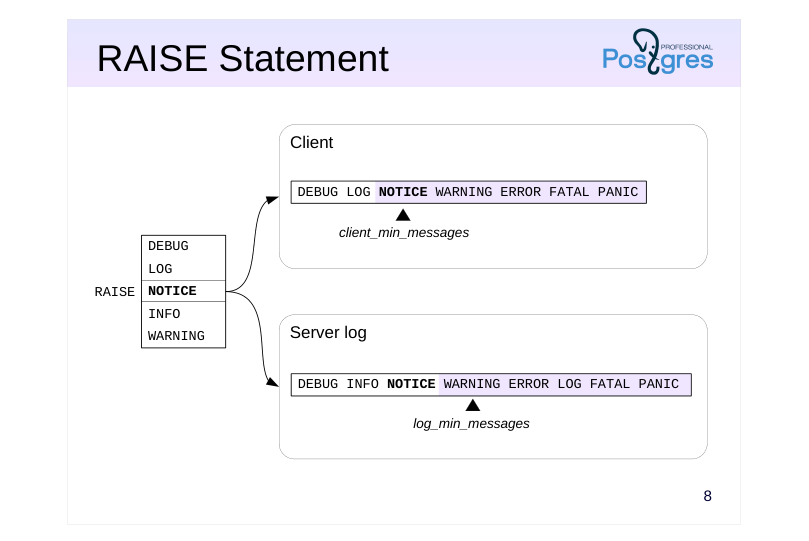 {#source-figure-008 caption=“Source slide page 8: RAISE Statement”}
Speaker notes
We are already familiar with the RAISE statement. It can be used both to raise exceptions (which is discussed in detail in the PL/pgSQL. Error Handling lesson) and to emit messages. Such messages can not only be sent to the client, but also written to the server log.
In a simple debugging case, you have to add RAISE NOTICE calls to the function code, start the function execution (for example, in a psql session), and analyze the received messages as the execution progresses. RAISE messages are non-transactional: they are emitted asynchronously and do not depend on the transaction status.
Message delivery is controlled by message levels (DEBUG, LOG, NOTICE, INFO, WARNING) and server parameters. Parameter values determine whether a message will be sent to the client (client_min_messages) and/or written to the server log (log_min_messages). A message will be sent if the RAISE message level is not lower than the value of the corresponding parameter (is shown to the right of the parameter value on this slide).
In the default configuration, NOTICE messages are only sent to the client, LOG messages are only written to the log file, and WARNING messages are both sent to the client and written to the log file.
INFO messages are always sent to the client; they cannot be trapped using the client_min_messages parameter.
https://postgrespro.com/docs/postgresql/16/plpgsql-errors-and-messages
Page 9: RAISE Statement
Let’s create a function that takes a table name as input and returns the number of rows in that table.
For dynamic execution, it is better to save the command text to a variable. In case of an error, you can analyze the variable value.
The string starting with “NOTICE” is our debug information. RAISE can be used to track the progress of a long query. Let’s consider a piece of code that has three distinct stages. As the code executes, we want to understand which stage we are at. To do this, we will call this procedure at each stage:
Upon completing each stage, the main procedure calls debug_message:
The RAISE statement issues messages immediately, rather than at the end of the main procedure:
This approach works fine when you call a function within a session. If, however, the function is called by an application, writing to and then reading from the server message log is much more convenient.
Page 10: Page 10
Let’s make debug_message emit a message with a specific level. The level will be defined by a custom parameter app.raise_level:
For this example, set it just for the current session:
This way, the procedure will not post any debug messages during “production” (app.raise_level = NONE):
Starting the function in a separate session, we can get debug messages by setting the app.raise_level to NOTICE:
To enable both debugging in the application and logging, set the message level to LOG:
Check the server log:
By adjusting app.raise_level, log_min_messages, and client_min_messages, you can achieve different debug message output behavior. Very importantly, all this is done without tampering with the application code.
Page 11: Process→Process (IPC)
NOTIFY → LISTEN
- SQL commands
- transactional execution is inconvenient for debugging
- Session status
- the application_name parameter
- is visible in the pg_stat_activity view and in the output of the ps command
- can be used in log messages
Speaker notes
In PostgreSQL, server processes can communicate between each other.
Among the built-in solutions, the following are worth noting.
● Sending messages via the NOTIFY command in one process and getting them via LISTEN in another. But since these commands are transactional, it is inconvenient to use them for debugging: 1. Messages are sent only at commit time, not right after the NOTIFY command execution, so it is impossible to track the execution progress. 2. If the transaction fails, messages won’t be sent at all.
● Using the application_name parameter. A session with a long-running process can periodically write its execution status into the application_name parameter. In a separate session, a DBA can poll the pg_stat_activity view, which contains detailed information about all active sessions. The application_name value is usually also visible in the output of the ps command. The application_name value can also be written to the server log (if you set up the log_line_prefix parameter). As a result, relevant log entries will be easier to find.
https://postgrespro.com/docs/postgresql/16/runtime-config-logging#RUNTIM E-CONFIG-LOGGING-WHAT
Page 12: Session Status
application_name is a useful parameter for debugging. The first session changes its value, the second session checks the pg_stat_activity view in a loop.
New version of the procedure:
In the first session:
In the second session, read the value from pg_stat_activity every two seconds:
Page 13: Process→Table
The dblink extension
- is part of the server
- incurs additional costs for opening a new connection
- Autonomous transactions
- Postgres Pro Enterprise
Speaker notes
Another way to save debug messages is to write them into a database table.
One of the advantages of this approach is that log access and concurrent execution are managed by the database system itself.
But you have to make sure that insertion operations on this table are non-transactional. It can be done using the dblink extension, which is provided as part of the PostgreSQL server. This extension enables you to open another connection to the same database, so insertion is performed in a separate transaction.
As for the disadvantages, opening a new connection takes additional server resources.
We cover dblink usage in more detail in the DEV2 course.
https://postgrespro.com/docs/postgresql/16/dblink
Postgres Pro Enterprise implements autonomous transactions with lower overhead than dblink usage (See the PGPRO course about Postgres Pro Enterprise features).
Page 14: Writing to a Table: the dblink Extension
Install the extension:
Create a table to write into. It makes sense to store information about the user and the time of record. The id column is there to make sure that the table is sorted in the order in which the rows are added.
Now, rewrite the procedure to add records to the table. The procedure opens a new session, performs an insert in a separate transaction, and closes the session.
Let’s test it: run our long_running procedure in a separate transaction, then roll it back.
Check if the table has all the debug_message records. The timestamps in ts tell us how much time has passed between the calls.
Page 15: Process→File
The adminpack extension
- is part of the server
- among other things, allows writing text files
- Untrusted languages
- for example, PL/Perl
Speaker notes
You can also write debug messages into an OS file.
It can be done using the adminpack extension, which allows writing data to any file that can be accessed by the postgres OS user.
Another option is to create a function in an untrusted language (such as PL/Perl — plperlu) that will perform the same task. Various server-side programming languages are covered in the DEV2 course.
https://postgrespro.com/docs/postgresql/16/adminpack
Page 16: Writing to a File: pg_file_write
Install the extension:
Rewrite debug_message again, now making it write debug information to a file. The postgres OS user who started the DBMS instance must be allowed write to this file. Let’s place it in the user’s home directory.
The function writes a separate line to the log file: the message passed by the parameter, the user responsible, and the timestamp. Test it: run long_running in a separate transaction, then roll it back.
Check the file contents. To access the file as student, you need to use sudo:
Page 17: Tracing SQL
Standard tracing into the log file
- logging overhead
- large log file
- profiling tools are required
- access to the log is required (security)
- Settings
- long-running statements
- log_min_duration_statement
- the statements to log
- log_statement
- message context
- log_line_prefix
- …
Speaker notes
In some cases, it may be useful to trace everything that happens in the code. Using the built-in functionality, you can save the executed SQL queries into the server log file. Make sure to take into account the following specifics:
● A high-load application can execute a huge number of queries. Writing them into a file can affect performance of the I/O subsystem.
● In most cases, you have to use special tools to analyze such data sets. A de-facto standard is pgBadger. https://github.com/darold/pgbadger
● Application developers may have no access to the log file on the server. Besides, in production systems, log files may contain commands with confidential information.
PostgreSQL provides several parameters to configure tracing; the main ones are listed on the slide. The full list is available here:
https://postgrespro.com/docs/postgresql/16/runtime-config-logging
You do not have to set configuration parameters for the whole cluster. Their scope can be limited to particular sessions using SET, ALTER DATABASE, and ALTER ROLE commands (as explained in Basic Tools. Installation and Management, psql and Data Organization. Logical Structure lessons).
Page 18: Tracing SQL
The auto\_explain extension
- logging execution plans
- tracing nested statements
- Settings
- plans of long-running commands
- auto_explain.log_min_duration
- nested statements
- auto_explain.log_nested_statements
- …
Speaker notes
When tracing is enabled, SQL commands make it into the log in their exact form that has been sent to the server. If a PL/pgSQL routine was called, the log will contain only this top-level call (for example, SELECT or CALL statement), but not the commands executed within the routine.
To log nested queries in addition to top-level commands, you have to use the auto_explain extension.
As suggested by its name, the main objective of this extension is to log both the text of the command and its execution plan. It can turn out to be useful, although it is not exactly tracing, but rather query optimization (which is covered in the QPT course).
https://postgrespro.com/docs/postgresql/16/auto-explain
Page 19: Tracing PL/pgSQL
The plpgsql\_check extension
- overhead incurred by logging
- loads of output data
- The main settings
- enabling tracing
- plpgsql_check.enable_tracer
- plpgsql_check.tracer
- message levels
- plpgsql_check.tracer_errlevel
Speaker notes
To figure out which code has been executed as you are looking at the log, you have to match SQL queries with PL/pgSQL routines, and it may be not that easy. There are no built-in tools for tracing PL/pgSQL code, but you can do it with the help of the plpgsql_check extension developed by Pavel Stehule (we have already mentioned this extension in PL/pgSQL. Executing Queries lesson).
Such tracing causes significant overhead and should only be used for debugging, not in production operations.
https://github.com/okbob/plpgsql\_check
Page 20: Session Tracing
One simple way to enable tracing is to set the log_statement parameter to ’all’ (write all commands, including DDL, data modification, and queries).
Run any query:
Disable tracing:
Information about the executed commands will appear in the server log:
Only the top level command is logged, not the query from within get_count. This is where the auto_explain extension comes in. This extension does not need to be installed, but must be loaded into memory. You can either set it up to load for the whole instance with shared_preload_libraries parameter, or just load it for the current session:
Enable tracing for all commands, regardless of execution time.
Enable tracing for nested queries:
The messages are raised the same way as with the RAISE statement. The LOG level is used by default, usually implying that the messages are recorded to the server log. You can change the log level to output tracing messages directly to the screen:
Try the query again:
Page 21: Page 21
Now we see not only the function call, but also the nested query and the execution plans.
Page 22: Takeaways
PL/pgSQL Debugger is a debugger API used in graphical development environments
- Debugging output can be displayed in the terminal, written into the server log, a table, or a file; it can also be sent to other processes
- Sessions can be traced
Page 23: Practice
- Modify the get_catalog function, so that the dynamically constructed text of the query is written into the server log.
- In the application, perform search several times by filling out different fields; make sure that SQL commands are constructed correctly. 2. Enable tracing of SQL statements at the server level.
- Perform some actions in the application and check which
- commands are logged.
- Disable tracing.
Speaker notes
- To enable tracing, set the log_min_duration_statement parameter to 0 and reload the configuration. All commands will be logged, together with their execution time.
The easiest way to do it is to use the ALTER SYSTEM SET command. Other ways of setting parameters are covered in Basic Tools. Installation and Management, psql lesson. Remember to reload the server configuration file.
After having a look at the log file, you should reset log_min_duration_statement to the default value (-1) to disable tracing. It is convenient to use ALTER SYSTEM RESET for this purpose.
Page 24: 1. The get_catalog Function
The text of a dynamic query is stored in a separate variable, which is saved to the server log before executing. Include parameter values in the message for clarity. Debug strings are marked with the “DEBUG get_catalog” substring in the log. After debugging, the RAISE LOG command can be removed or commented out.
2. Enabling and Disabling SQL Query Tracing
To enable tracing of all queries at the server level, run:
To disable:
Page 25: Page 25
The last two commands got into the message log:
Page 26: Practice+
1. Enable tracing of the PL/pgSQL code using the plpgsql\_check extension; check how it works on the example of several routines that call each other. 2. When getting debug messages from the PL/pgSQL code, it is convenient to know the exact routine they are related to. In the demo, the function name was entered manually. Implement the functionality that automatically adds the name of the current function or procedure to the message.
Speaker notes
To enable tracing, load the plpgsql_check extension into the session memory using the LOAD command, and then set both the plpgsql_check.enable_tracer and plpgsql_check.tracer parameters to on at the session level.
You can get the routine name by parsing the call stack. Use the results of Task 3 that you have completed as part of the practice for the Error Handling lesson.
Page 27: 1. Tracing with plpgsql_check
Download the extension (no need to install it with the CREATE EXTENSION command in this case):
Enabling tracing:
Multiple functions calling each other:
Example:
Not only the start and end events of the functions are displayed, but also the parameter values, as well as the time spent on execution (the extension can also do profiling, but we will not get into that here). Disable tracing:
Page 28: 2. Function Names in the Debug Log
Create a procedure that returns the top of the call stack (with the exception of the tracing procedure itself). The message is displayed with indentation proportional to the depth of the stack.
Example: