16 Lesson 16: PL/pgSQL / Error Handling
This page is extracted from the official PDF into native Markdown. Slide text, code and speaker notes are kept in reading order; the original PDF and HTML remain the layout references. HTML source: dev1_16_plpgsql_exceptions.html Archive: DEV1-handouts-16-en.zip PDF pages: 27
Page 1: PL/pgSQL / Error Handling
Copyright
© Postgres Professional, 2017–2025 Authors: Egor Rogov, Pavel Luzanov, Ilya Bashtanov, Igor Gnatyuk Translated by: Liudmila Mantrova, Alexander Meleshko, Elena Sharafutdinova Photo by: Oleg Bartunov (Phu monastery, Bhrikuti summit, Nepal)
Use of Course Materials
Non-commercial use of course materials (presentations, demonstrations) is allowed without restrictions. Commercial use is possible only with the written permission of Postgres Professional. It is prohibited to make changes to the course materials.
Feedback
Please send your feedback, comments and suggestions to: edu@postgrespro.ru
Disclaimer
Postgres Professional assumes no responsibility for any damages and losses, including loss of income, caused by direct or indirect, intentional or accidental use of course materials. Postgres Professional company specifically disclaims any warranties on course materials. Course materials are provided “as is,” and Postgres Professional company has no obligations to provide maintenance, support, updates, enhancements, or modifications.
Page 2: Topics
- Error Handling in PL/pgSQL Blocks
- Error Names and Codes
- Choosing an Error Handler
- Error Handling Overhead
Page 3: Error Handling in a Block
Error handling is performed if there is an EXCEPTION section
- Changes roll back to the savepoint at the beginning of the block
- an implicit savepoint is set if the block contains an EXCEPTION section
- If there is a handler that matches the error
- error handler commands are executed
- the block completes successfully
- If there is no suitable handler
- the block completes with an error
Speaker notes
If a run-time error occurs within a block, the program (block, function) is usually aborted, and the current transaction enters the failure mode: it cannot be committed and can only be rolled back.
But an error can be caught and processed. It can be done by extending the block with an additional EXCEPTION section, which lists error conditions and provides statements to handle each of them.
In general, EXCEPTION is similar to the try-catch construct available in some programming languages (except for specifics related to transactions, or course).
A savepoint is implicitly set at the start of every block containing an EXCEPTION section. Before an error is processed, all changes are rolled back to the savepoint and all locks are removed.
Because of the savepoint, COMMIT and ROLLBACK commands cannot be used in procedures with EXCEPTION. But although SAVEPOINT and ROLLBACK TO SAVEPOINT commands are not supported by PL/pgSQL, you can still use savepoints and rollbacks to savepoints both in functions and procedures implicitly.
https://postgrespro.com/docs/postgresql/16/plpgsql-control-structures#PLP GSQL-ERROR-TRAPPING
Page 4: Handling Errors in a Block
Let’s take a look at a simple example.
If there are no errors, all statements in a block are executed as usual:
Now let’s insert a “redundant” row to trigger an error.
If there is no EXCEPTION section in a block, the statement execution is interrupted, and the whole block is considered to be completed with an error condition:
To catch an error, a block must have an EXCEPTION section, which defines one or more error handlers. This construct works similar to CASE: conditions are scanned from top to bottom, the first suitable code path is selected, and its statements are executed. What will be displayed?
The executed handler corresponds to the too_many_rows error. Note: if a handler is executed, the table contains two rows because of a rollback to an implicit savepoint at the beginning of the block.
Page 5: Page 5
Also note that the local variable keeps the value that was there when the error occurred.
Note the following subtlety: if an error occurs in the DECLARE section or within the EXCEPTION section of the handler itself, it will be impossible to catch it in this block.
Page 6: Error Names and Codes
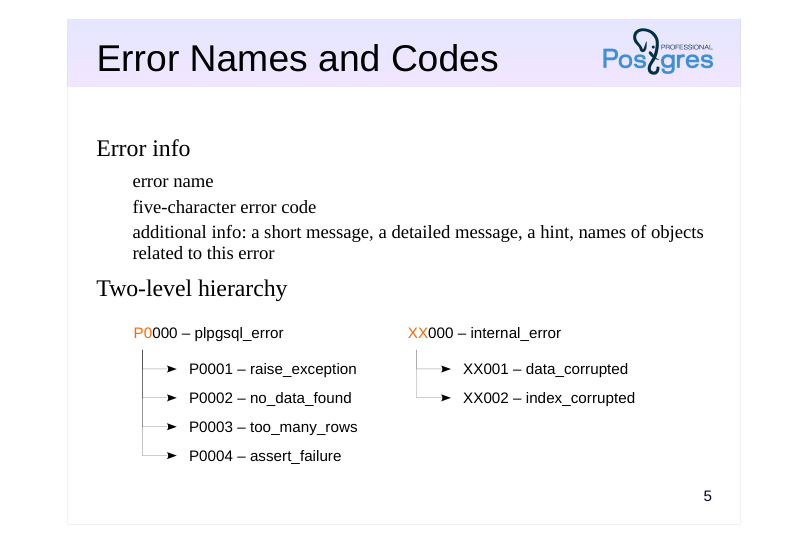 {#source-figure-006 caption=“Source slide page 6: Error Names and Codes”}
Error info
- error name
- five-character error code
- additional info: a short message, a detailed message, a hint, names of objects
- related to this error
- Two-level hierarchy
Speaker notes
Each possible error has a name and a code (a five-character string). WHEN clauses accept both error names and error codes.
All errors are classified into a two-level hierarchy of sorts. Each error class has a code that ends with three zeros; it corresponds to any error with the same first two characters in its code.
For example, the code 23000 defines the class that includes all errors dealing with violations of integrity constraints (such as 23502, which stands for NOT NULL constraint violation, or 23505, which indicates a UNIQUE constraint violation).
Thus, apart from regular errors, you can specify an error class by its name or code. Besides, you can use a special name OTHERS to catch any errors (except for the fatal ones).
Apart from the name and code, each error can provide additional debug information: a short error message, a detailed message, and a hint.
All errors are described in documentation in Appendix A:
https://postgrespro.com/docs/postgresql/16/errcodes-appendix
Errors can be not only trapped, but also raised programmatically.
https://postgrespro.com/docs/postgresql/16/plpgsql-errors-and-messages
Page 7: Error Names and Codes
We have already seen error names; error codes are specified using SQLSTATE. An error handler can return an error code and the corresponding message using the predefined variables SQLSTATE and SQLERRM (the variables are undefined outside of the EXCEPTION block).
Which error handler will be used?
The first applicable handler is selected, plpgsql_error in this case (remember: this is not a specific error, but an error category). We will never get to the last error handler. You can force an error using either its code or its name. Here we use a special name others, which corresponds to any error that can be trapped (except for assertion failures and cases when the execution is aborted by user — you can catch them separately, but you almost never need to).
If required, it is also possible to incorporate user-provided error codes that are not predefined, as well as pass some additional information (the example illustrates only some of the supported features):
Page 8: Page 8
Error handlers cannot get this information from variables; there is a special construct for analyzing such data in the code:
Page 9: Choosing a Handler
An unhandled error is sent one level up
- into the enclosing PL/pgSQL block, if available
- into the calling routine, if available
- The search path of a handler is determined by the call stack
- it is not defined statically, but depends on how the program executes
- An unhandled error is passed to the client
- the transaction enters the failure mode and has to be rolled back by the client
- the error is registered in the server log
Speaker notes
If none of the conditions listed in the EXCEPTION section is triggered, the error goes one level up.
If an error has occurred in the inner block of a nested structure, the server will search for a handler in the enclosing block. If there is no suitable handler either, the whole outer block will be treated as failed, while the error will be passed to the next nesting level, and so on.
If the error goes through the whole nested structure and does not find an appropriate handler, it goes further up to the level of the routine that has called the outermost block. Therefore, you have to analyze the call stack to determine the order in which different error handlers will be applied.
If none of the available error handlers is triggered:
● The error message usually gets into the server log (the exact behavior depends on the server settings; see PL/pgSQL. Debugging lesson).
● The error is reported to the client that has initiated this operation in the database. The client cannot do anything about the cause of the error at this point: the transaction enters the failure mode, and it can only be rolled back.
It is up to the client to choose how to handle the error from there. For example, psql will display the error message and all the debugging information available. An end-user client may display a generic message like “contact your system administrator”.
Page 10: Choosing a Handler
Let’s take a look at several examples of choosing a handler in nested blocks. What will be displayed?
An error is handled in the same block where it has occurred. The outer block is executed as if there has been no error at all. And now?
The handler in the inner block is not applicable; the block completes with an error that is handled in the outer block. Remember that the block containing an EXCEPTION section is rolled back to the implicit savepoint at the beginning of this block. In this case, all changes made in both blocks will be rolled back. And now?
None of the handlers is triggered, and the whole transaction is aborted.
Page 11: Page 11
There is usually no need to handle all possible errors in the server code. There is nothing wrong in passing an error to the client. In general, an error should be handled at the level where something meaningful can be done about it. So it makes sense to process an error within the database if it can be addressed on the server side (e.g., the operation can be repeated in case of a serialization failure). We’ll talk about logging error messages in PL/pgSQL. Debugging lesson. Now let’s take a look at an example that uses procedures.
What will happen if we call this procedure?
The error message displays the call stack: top to bottom means inside out.
Note Note that this message (like many others) uses the term “function” instead of “procedure”. An error handler can also provide access to the call stack, but it will be presented as a single string:
Let’s check the result:
Page 12: Page 12
Since a block with an EXCEPTION section creates an implicit savepoint, procedures cannot use COMMIT and ROLLBACK commands both in this block and in all the blocks up the call stack.
Page 13: Overhead
Any block with an EXCEPTION section is executed slower
- because of setting an implicit savepoint
- Additional costs are incurred in case of an error
- because of the rollback to the savepoint
- Error handling can and should be used, but not overused
- PL/pgSQL is an interpreted language that uses SQL to compute expressions
- anyway
- the speed is more than enough for most tasks
- performance issues are usually related to queries, not to PL/pgSQL code
Speaker notes
The mere inclusion of an EXCEPTION section already incurs overhead because it requires setting an implicit savepoint at the beginning of the block. If an error occurs, the rollback to the savepoint increases the overhead even more.
So if there is a simple way to avoid exception handling, it’s better to do without it; you should not base your application logic on “exception juggling”.
However, if error handing is really required, you should use it without doubt: errors can and must be handled regardless of the overhead.
First, the PL/pgSQL language itself is quite slow because of interpreting instructions and constantly calling SQL to compute expressions.
Second, its speed is usually still adequate. Yes, you can create a faster implementation in C, but what’s the point?
And third, the main performance issues are usually caused by bad query plans that affect query speed, not by the execution speed of procedural code (for details, see the QPT course that deals with query performance tuning).
But if there is an alternative that is both simpler and faster, it should certainly be preferred.
Page 14: Overhead
To estimate the overhead, let’s take a look at the following simple example. Suppose we have a table with a text field that stores arbitrary data inserted by users (although usually a sign of bad design, it may sometimes be required). We need to extract all numbers into a separate column of a numeric type.
Let’s solve this problem by handling errors that come up when converting text to integer:
Let’s check the result:
The following implementation of our function will check the format using a (slightly simplified) regular expression, without error handling:
Let’s check this implementation:
Page 15: Page 15
This implementation is significantly faster. In this example, the exception has occurred in 1% of cases only. The more often it occurs, the more overhead will be incurred by rollbacks to the savepoint.
In some cases (which are not infrequent), you can do without error handling if you choose other suitable means. Problem: return a row from a table or NULL, if there is no such row.
A function with error handling:
Let’s check that the function works as expected:
Page 16: Page 16
Can we make it simpler? Yes, we just need to remove STRICT or use a subquery:
It’s a good illustration that we do not need PL/pgSQL here at all: we can simply use SQL. Let’s check the result:
Problem: update a table row with the specified ID; if there is no such row, insert it. Here is the first approach. What is wrong with it?
Almost everything is bad here, starting from the fact that such a function will not work correctly at the Read Committed isolation level if there are several concurrent sessions. That’s because the data in the database can change between the executed SELECT statement and the next operation. It can be easily demonstrated by introducing a delay between the commands. For variety, let’s take a slightly different (but also incorrect) option:
Page 17: Page 17
Now let’s run this function in two different sessions, almost simultaneously:
A correct solution can be implemented using error handling:
Let’s check the result.
Page 18: Page 18
Yes, now everything is correct. But there is an easier way: you can use a special flavor of the INSERT command that attempts to insert a row and performs an update if a conflict occurs. Again, all you need is pure SQL.
Problem: make sure that the data is processed by one transaction at a time (at the Read Committed isolation level). Using the same table, let’s assume that the category sometimes requires a special single-threaded processing. The function can be declared as follows:
Let’s check that everything is correct:
But this problem can also be solved without error handling if we use advisory locks:
Let’s check the result:
Page 19: Page 19
Let’s see an example where we cannot do without error handling. Problem: process a set of documents; a processing error of a particular document should not result in a general failure.
A procedure that processes a single document can sometimes result in an error:
Now let’s create a procedure that processes all documents. It loops through the documents to process them one by one and catches an error if required.
Note Note that transactions are committed outside of the block that contains the EXCEPTION section.
Page 20: Page 20
You can set up a similar processing using a function, but then all documents will be handled within a single common transaction, which can be a problem if processing takes a long time. This question is discussed at length in the DEV2 course. Let’s check the result:
As you can see, some of the documents have not been processed, but it has not affected the processing of the others. It is convenient that the information about the occurred errors is stored in the table itself:
Please note once again that if an error occurs, the changes are rolled back to the savepoint at the beginning of the block; that’s why documents with the ERROR status still have version 1.
Page 21: Takeaways
The search for an error handler is performed “inside out” according to block nesting and routine call stack An implicit savepoint is set at the beginning of the block that contains EXCEPTION; if an error occurs, a rollback to this savepoint is performed
- An unhandled error aborts the transaction; the error message is passed to the client and registered in the server log
- Error handling incurs overhead
Page 22: Practice
- An attempt to put in the same author several times when adding a book causes an error. Modify the add_book function: catch the unique constraint violation error and produce an error with a meaningful message instead.
- Try it out in the application.
Speaker notes
- To determine the name of the error that has to be caught, catch all errors (WHEN OTHERS) and display the required information (by raising another error with the corresponding text).
Then remember to replace WITH OTHERS with a specific error: let all other error types be handled at a higher level if there is no opportunity to do anything useful in this particular position in the code.
(In a real environment, unique constraint violations should not be handled either: it is better to forbid entering the same author twice at the application level.)
Page 23: 1. Handling Duplicate Author Names When Adding Books
Page 24: Practice+
- Some languages use the construct try … catch … finally …, where try corresponds to BEGIN, catch corresponds to EXCEPTION, and the statements located in the finally block are always triggered regardless of whether an exception has occurred and whether it has been processed by the catch block. Find a way to achieve a similar behavior in PL/pgSQL. 2. Compare the call stacks returned by GET STACKED DIAGNOSTICS with pg_exception_context and GET [CURRENT] DIAGNOSTICS with pg_context. 3. Create a function getstack that returns the current call stack as a string array. The getstack function itself must not be a part of the stack.
Speaker notes
The easiest way to do it is to simply repeat the finally statements in several places. But you should try to come up with a solution that avoids code duplication.
First, refer to the documentation:
https://postgrespro.com/docs/postgresql/16/plpgsql-statements#PLPGSQL-STATEMENTS-DIAGNOSTICS
https://postgrespro.com/docs/postgresql/16/plpgsql-control-structures#PLPG SQL-EXCEPTION-DIAGNOSTICS
Page 25: 1. Try-catch-finally
The tricky part is the ’finally’ statements. They must always execute, even if there is an exception catch (in the EXCEPTION block). The solution can use two nested blocks and a dummy exception that is thrown when the inner block is executed as expected. This makes it possible to put finally statements in one place: the external block error handler.
Page 26: Page 26
But in the proposed solution, all changes made in the block are always rolled back, so it is not suitable for commands that change the database state. Also, don’t forget about the exception handling overhead. This task is just an exercise.
2. GET DIAGNOSTICS
GET STACKED DIAGNOSTICS provides the stack of calls that resulted in the error. GET CURRENT DIAGNOSTICS provides the current stack of calls.
3. Call Stack as an Array
The function itself:
To test it, create several functions that call each other: