15 Lesson 15: PL/pgSQL / Arrays
This page is extracted from the official PDF into native Markdown. Slide text, code and speaker notes are kept in reading order; the original PDF and HTML remain the layout references. HTML source: dev1_15_plpgsql_arrays.html Archive: DEV1-handouts-16-en.zip PDF pages: 24
Page 1: PL/pgSQL / Arrays
Copyright
© Postgres Professional, 2017–2025 Authors: Egor Rogov, Pavel Luzanov, Ilya Bashtanov, Igor Gnatyuk Translated by: Liudmila Mantrova, Alexander Meleshko, Elena Sharafutdinova Photo by: Oleg Bartunov (Phu monastery, Bhrikuti summit, Nepal)
Use of Course Materials
Non-commercial use of course materials (presentations, demonstrations) is allowed without restrictions. Commercial use is possible only with the written permission of Postgres Professional. It is prohibited to make changes to the course materials.
Feedback
Please send your feedback, comments and suggestions to: edu@postgrespro.ru
Disclaimer
Postgres Professional assumes no responsibility for any damages and losses, including loss of income, caused by direct or indirect, intentional or accidental use of course materials. Postgres Professional company specifically disclaims any warranties on course materials. Course materials are provided “as is,” and Postgres Professional company has no obligations to provide maintenance, support, updates, enhancements, or modifications.
Page 2: Topics
- Arrays and Their Usage in PL/pgSQL
- Loops over Array Elements
- Functions with a Variable Number of Arguments and Polymorphic Functions
- Array Usage in Tables
Page 3: Array Types
Array
- a set of numbered elements of the same type
- one-dimensional, multidimensional
- Initialization
- Usage
- elements as scalar values
- array slices
- operations on arrays: comparison, inclusion, intersection, concatenation,
- usage with ANY or ALL instead of a subquery, etc.
Speaker notes
Just like a composite type (a record), an array is not a scalar; it consists of several elements of another type. But unlike in records, a) all these elements are of the same type, and b) they are accessed by an integer index, not by name (here the term index is used in the mathematical sense of the word, not in the sense of a database index).
An array type does not have to be explicitly declared. When any type (or a table) is created, a new array type named _type is also declared. To declare an array variable, all you need is to append square brackets to the name of the element type.
An array is a full-fledged SQL type: you can create table columns of this type, pass arrays as function arguments, and so on. Array elements can be used as regular scalar values. Array slices can also be used.
Arrays can be compared and checked for NULL; you can search arrays for element inclusion and intersection with other arrays, perform concatenation, etc. Arrays can also be applied in ANY/SOME and ALL constructs, similar to subqueries.
https://postgrespro.com/docs/postgresql/16/arrays
You can find various array functions in course handouts.
Page 4: Initializing an Array and Referencing its Elements
Declaring a variable and initializing an array:
A one-dimensional array can be constructed element by element: it will be expanded automatically if required. If you omit some of the elements, they will receive NULL values. What will be displayed?
Since element numbering begins with a value other than one, the array itself is preceded by a range of element indexes. We can define a composite type and create an array of this type:
Another way to construct an array is to use a subquery:
Page 5: Page 5
You can also do the inverse operation: convert an array into a table:
Fun fact: the IN clause with a list of values is transformed into a search operation over the array:
A two-dimensional array is a rectangle matrix. Memory for the matrix is allocated at initialization. A literal looks like an array of arrays with the same number of elements. Here we have applied another initialization method that uses a string literal. Once initialized, a multidimensional array cannot be expanded.
Page 6: Arrays and Loops
A regular loop over element indexes
- array_lower
- array_upper
- A FOREACH loop over array elements
- this approach is easier, but it does not provide access to indexes
Speaker notes
To iterate through array elements, you can simply set up an integer FOR loop using functions that return the minimum and the maximum index of the array.
But there is also a specialized loop: FOREACH. In this case, a loop variable iterates through the elements, not their indexes. That’s why the variable must be of the same type as the array elements (as always, if the elements are records, you can replace a single composite variable with several scalar ones).
If a loop contains the SLICE clause, it will iterate through array slices. For example, the rows of a two-dimensional array will be treated as its one-dimensional slices.
https://postgrespro.com/docs/postgresql/16/plpgsql-control-structures#PLP GSQL-FOREACH-ARRAY
Page 7: Arrays and Loops
You can set up a loop that iterates through index values of array elements. The second parameter of the array_lower and array_upper functions defines the array dimension (1 denotes a one-dimensional array).
If you do not need to know index values, it’s easier to iterate directly though the elements:
Index iteration in a two-dimensional array:
You do not need a nested loop to iterate through the elements of a two-dimensional array:
Page 8: Page 8
You can also loop through slices, not just individual elements, in a similar way. The SLICE value must be an integer, no larger than the array size, and the variable to store the slices into must be an array itself. Here is a loop over one-dimensional slices as an example:
Page 9: Arrays and Routines
Routines with a variable number of arguments
- all optional arguments must be of the same type
- optional arguments are passed to the routine as an array
- the last parameter array is defined by the VARIADIC mode
- Polymorphic routines
- support arguments of various types;
- the actual type is defined at run time
- can use additional polymorphic pseudotypes anyarray, anynonarray,
- anycompatiblearray and anycompatiblenonarrray
- can have a variable number of arguments
Speaker notes
Using arrays, you can create routines (functions and procedures) with a variable number of arguments.
While parameters with default values have to be explicitly specified in routine declaration, optional arguments can be passed with no limit: they are provided as an array. Consequently, all of them must be of the same type (or a compatible one, if anycompatible or anycompatiblearray is used).
The last parameter in routine declaration must be marked as VARIADIC; it must be of an array type.
https://postgrespro.com/docs/postgresql/16/xfunc-sql#XFUNC-SQL-VARIAD IC-FUNCTIONS
We have already mentioned polymorphic routines which can accept arguments of various types. Routine declaration uses a special polymorphic pseudotype, while the actual type is defined at run time based on the types of the passed arguments.
There are special polymorphic types anyarray and anycompatiblearray (and anynonarray and anycompatiblenonarrray for non-arrays).
These types can be used when passing a variable number of arguments via a VARIADIC parameter.
https://postgrespro.com/docs/postgresql/16/xfunc-sql#XFUNC-SQL-POLYM ORPHIC-FUNCTIONS
Page 10: Arrays and Routines
When discussing polymorphism and overloading as part of the SQL. Procedures lecture, we created the maximum function to compare three numbers and find the greatest one. Now let’s generalize this function, so that it can be used with an arbitrary number of arguments. For this purpose, we’ll declare a single VARIADIC parameter:
Let’s try it out:
To complete this illustration, we can make this function polymorphic as well, so that it takes any data type (which supports comparison operators, of course).
Polymorphic types anycompatiblearray and anycompatible (also anyarray and anyelement) must match each other: anycompatiblearray = anycompatible[], anyarray = anyelement[]; We need a variable of the same type as an array element. But it cannot be declared as anycompatible: it must have an actual type. The %TYPE construct helps us out here.
Let’s check the result:
Page 11: Page 11
Now our function is almost completely analogous to the greatest expression provided in SQL.
Page 12: An Array or a Table?
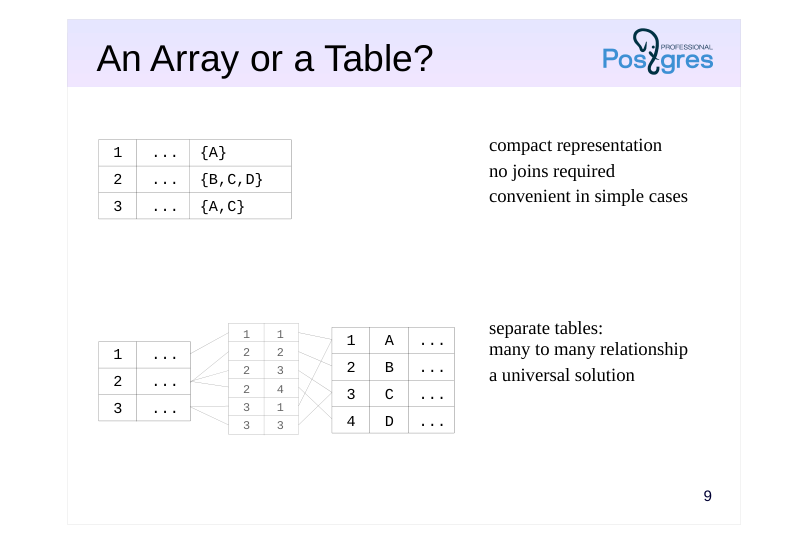 {#source-figure-012 caption=“Source slide page 12: An Array or a Table?”}
Speaker notes
A traditional relational approach assumes that a table stores atomic values (first normal form). The SQL language has no tools for peeking into composite values.
That’s why a traditional approach relies on creating an additional table connected to the main one by a many-to-many relationship.
Nevertheless, we can create a table with a column of an array type. PostgreSQL offers a rich set of array functions; the search for an array element can be sped up using special indexes (covered in the DEV2 course).
This approach can be convenient: we get a concise representation that does not require any joins. For example, arrays are extensively used in PostgreSQL system catalog.
The choice of approach depends on the goals and the operations required. Consider the example in the demo.
Page 13: An Array or a Table?
Imagine that we are designing a database for writing a blog. The blog contains some posts, and we would like to tag them. The traditional approach is to create a separate table for tags. For example:
Let’s connect posts and tags by a many-to-many relationship via an additional table:
Let’s fill our tables with text data:
Now we can display posts and tags:
Or we can do it a bit differently to get an array of tags. We are going to use an aggregate function for this purpose:
Page 14: Page 14
We can find all posts with a particular tag:
We may also need to find all the unique tags, and it is really easy:
Now let’s try another approach to this task. Suppose the tags are stored as a text array right inside the table with posts.
There are no tag IDs, but we don’t really need them.
Now it’s easier to display all posts:
It is also easy to find all posts with the same tag (using the intersection operator &&). This operation can be sped up using GIN index, and the query won’t require searching through the whole table of posts.
Page 15: Page 15
But it is quite hard to get the list of all tags. It requires unnesting all the tag arrays into a big table, and the search for unique values in this table is quite resource-intensive.
We can clearly see data duplication here. Thus, both approaches have the right to be applied. In simple cases, arrays look more straightforward and work well. In more complex scenarios (imagine that we would like to store the date of tag creation together with its name, or we need to use check constraints), the traditional approach becomes more preferable.
Page 16: Takeaways
An array consists of numbered elements of the same data type
- An array column is an alternative to a separate table: it offers convenient operations on arrays and index support
- Arrays enable you to create functions with a variable number of arguments
Page 17: Practice
- Create a function add_book for adding a new book.
- The function must take two arguments: the name of the book and
- an array of author IDs. It must return the ID of the added book.
- Check that the application now allows adding books.
Page 18: 1. The add_book Function
Page 19: Practice+
- Implement a function map that takes two arguments: array of real numbers and the name of an additional function that takes a single parameter of the real type.
- The map function must apply the additional function to each
- element of the array and return the result.
- Implement a function reduce that takes two arguments: an array of real numbers and the name of an additional function that takes two arguments of the real type.
- The function must return a real number calculated by
- sequentially folding the array from left to right.
- Make the functions map and reduce polymorphic.
Speaker notes
- For example:
- For example:
In this case, the value is calculated as follows:
Page 20: 1. The map Function
INTO a[i] doesn’t work, need a separate variable.
Another implementation with a FOREACH loop:
Page 21: 2. The reduce Function
greatest (as well as least) is not a function but a built-in conditional expression, and cannot be used directly due to escaping:
Instead, use the maximum function implemented in the demo.
The FOREACH option:
Page 22: Page 22
3. Polymorphic Function Variants
The map function.
A dummy parameter of the anyelement type is required to declare a variable of the same type inside the function.
Page 23: Page 23
Example with a different data type:
The reduce function.