13 Lesson 13: PL/pgSQL / Cursors
This page is extracted from the official PDF into native Markdown. Slide text, code and speaker notes are kept in reading order; the original PDF and HTML remain the layout references. HTML source: dev1_13_plpgsql_cursors.html Archive: DEV1-handouts-16-en.zip PDF pages: 19
Page 1: PL/pgSQL / Cursors
Copyright
© Postgres Professional, 2017–2025 Authors: Egor Rogov, Pavel Luzanov, Ilya Bashtanov, Igor Gnatyuk Translated by: Liudmila Mantrova, Alexander Meleshko, Elena Sharafutdinova Photo by: Oleg Bartunov (Phu monastery, Bhrikuti summit, Nepal)
Use of Course Materials
Non-commercial use of course materials (presentations, demonstrations) is allowed without restrictions. Commercial use is possible only with the written permission of Postgres Professional. It is prohibited to make changes to the course materials.
Feedback
Please send your feedback, comments and suggestions to: edu@postgrespro.ru
Disclaimer
Postgres Professional assumes no responsibility for any damages and losses, including loss of income, caused by direct or indirect, intentional or accidental use of course materials. Postgres Professional company specifically disclaims any warranties on course materials. Course materials are provided “as is,” and Postgres Professional company has no obligations to provide maintenance, support, updates, enhancements, or modifications.
Page 2: Topics
- What are Cursors
- Declaration and Opening
- Operations with Cursors
- Loops over Cursors and Query Results
- Passing a Cursor to Clients
Page 3: What are Cursors
A cursor implies iterative processing
- a full output takes too much memory
- only some part of the output is needed, but its size is unknown beforehand
- allows the client to control the output size
- you really need row-by-row processing (you usually don’t)
Speaker notes
We have already learned about the concept of cursors in the Architecture. PostgreSQL overview topic. In that topic, cursors were presented as a server feature, and we explained how to access them using SQL. Now let’s talk about how to use cursors in PL/pgSQL.
Why do we need cursors at all? SQL is a declarative language; first and foremost, it is designed to work with sets of rows, which is its strength and advantage. Being a procedural language, PL/pgSQL has to work with data row by row, using explicit loops. This can be achieved via cursors.
For example, a full SELECT result may take up too much memory, so it has to be processed piece by piece, or the required size of the output is unknown beforehand, for example, the query must be stopped at some point, or you need to let the client manage the output.
(Although row-by-row processing may be required from time to time, the same outcome can often be achieved using pure SQL, with simpler and more efficient code.)
Page 4: Declaration and Opening
Unbound cursor variables
- a variable of the refcursor type is declared
- the actual query is specified when the cursor is being opened
- Bound cursor variables
- Not supported in SQL
- the query is specified at declaration time (possibly with parameters)
- the arguments are passed when the cursor is opened
- Features
- the value of the cursor variable is the cursor name
- (can be specified explicitly or generated automatically)
- PL/pgSQL variables become implicit parameters of the query
- (their arguments are filled in when the cursor is opened)
- the query is prepared
Speaker notes
SQL uses a single DECLARE command that both declares and opens a cursor. In PL/pgSQL, these are two different steps. Besides, there are so-called cursor variables that are used for cursor access. These variables have the refcursor type and virtually contain the name of the cursor (if you do not provide this name explicitly, PL/pgSQL ensures that it is unique).
A cursor variable can be declared without being bound to a particular query. Then you have to specify the query when you open the cursor.
Alternatively, you can specify the query (including parameters) when declaring a variable. Then, you’ll only have to pass the arguments when opening the cursor.
These methods are equivalent; which one to use is a matter of taste. Both bound and unbound cursor variables are initialized only when the cursor is being opened. In both cases, a query can have implicit parameters, which are derived from PL/pgSQL variables.
A query opened with a cursor is prepared automatically.
https://postgrespro.com/docs/postgresql/16/plpgsql-cursors#PLPGSQL-CU RSOR-DECLARATIONS
https://postgrespro.com/docs/postgresql/16/plpgsql-cursors#PLPGSQL-CU RSOR-OPENING
Page 5: Declaration and Opening
Create a table:
Unbound variable:
Bound variable: the query is added during declaration. The variable cur is still of the refcursor type.
For bound variables, the query may be parameterized.
Note Note the name disambiguation in this example and the next one:
PL/pgSQL variables also serve as (implicit) cursor parameters.
You can use not only the SELECT command, but also any other command that returns a result (for example, INSERT, UPDATE, DELETE with the RETURNING keyword) as a query.
Page 6: Operations with Cursors
- in SQL
- the batch size
- is configurable
- Fetch
- row by row only
- Access the current row
- for simple queries only (one table, no grouping or sorting)
- Processing is usually performed in a loop
- a FOR loop over a cursor
- a FOR loop over a query without an explicitly declared cursor
- in SQL
- DECLARE
- WITH HOLD
- Close
- explicitly or automatically at transaction end
Speaker notes
PL/pgSQL allows fetching data from a cursor row by row only. It is done via the FETCH INTO command.
If the query is simple enough (it works with one table, without grouping or sorting), it is possible to access the current row of the cursor within commands such as UPDATE or DELETE.
Procedural processing implies looping through data. The rows returned by a cursor can be iterated through and processed using control commands that are already familiar to us. But since such loops are required quite often, PL/pgSQL offers a special flavor of the FOR command that implements them. We have already seen FOR working with integers in the PL/pgSQL. Overview and Programming Structures section; this one works with cursors. Moreover, there is one more flavor of the FOR loop that does not require cursor declaration at all: the query itself is specified within the command.
A cursor can be explicitly closed by the CLOSE command, but it will be closed anyway once the transaction is complete (in SQL, a cursor can remain open even after the transaction has finished if you have specified WITH HOLD).
https://postgrespro.com/docs/postgresql/16/plpgsql-cursors#PLPGSQL-CU RSOR-USING
https://postgrespro.com/docs/postgresql/16/plpgsql-cursors#PLPGSQL-CU RSOR-FOR-LOOP
Page 7: Operations with Cursors
The FETCH command reads the next row from the cursor position. To move to the next row without reading anything, use the MOVE command. What will this example return?
Usually, such data retrieval is done within a loop. For example:
PL/pgSQL offers a cursor FOR loop that does the same thing, but with much less code:
Moreover, you can forego explicit cursor commands altogether if the loop is all you really need. Parentheses around the query are optional, but convenient.
Page 8: Page 8
As with any loop, you can place a label here, which can be useful in nested loops. What will be output here?
After the loop is done, the FOUND variable will tell if at least one row got processed:
The current row of the cursor bound to a simple query (single table, no grouping or sorting) can be referenced with the CURRENT OF clause. One typical usecase for this is batch processing tasks and updating their status live.
Note Note that CURRENT OF does not work with FOR loops over queries, because they do not use the cursor explicitly. You can explicitly specify a unique table key (’WHERE id = rec.id’), of course, but CURRENT OF is faster and does not need an index. With all that said, a single SQL statement can do the job better and faster than a set of loops. Loops are often overused because of their familiar, procedural programming vibe. But databases are built different.
Page 9: Page 9
For example:
This loop is equivalent to one simple SQL command:
Page 10: Passing a Cursor to Clients
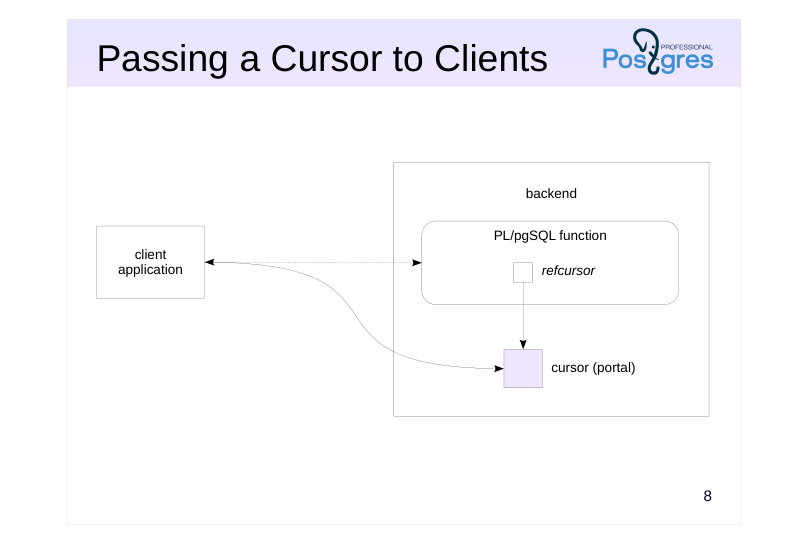 {#source-figure-010 caption=“Source slide page 10: Passing a Cursor to Clients”}
Speaker notes
A PL/pgSQL cursor variable (of the refcursor type) contains the name of an open SQL cursor. To denote the memory allocated in the backend for keeping the cursor state, the term portal is used.
This way, a PL/pgSQL function can open a cursor and return its name to the client. Then, the client will be able to work with the cursor as if it has been opened by this client, but will have access only to the provided data. It adds one more way of setting up the interface between the database and the application.
Page 11: Passing a Cursor to Clients
Open a cursor and print the value of the cursor variable:
This is the name of the cursor (portal) that was opened on the server. It was generated automatically. You can name it explicitly if you want (but it must be unique for the session):
With this, you can create a function that takes a cursor and returns its name:
The client starts a transaction…
…calls the function, gets the cursor name…
…and starts reading from it (the quotation marks are necessary because of the special characters in the name):
You can let the client set the cursor name:
Page 12: Page 12
The client code is simplified:
The function can also return several open cursors using OUT parameters. This makes it possible for the client to read data from multiple tables within one function call. An alternative is to bundle the data from different sources into a JSON or XML on the server and then return it. This is covered in the DEV2 course.
Page 13: Takeaways
A cursor allows fetching and processing data row by row
- A FOR loop can simplify cursor handling
- Processing data in loops is common for procedural languages, but should not be overused
Page 14: Practice
- Modify the book_name function: if the book has more than two authors, the title should include only the first two, while the rest are to be replaced with “et al.”
- Check that the function works fine in SQL and in the application. 2. Try rewriting the book_name function in SQL. Which implementation do you prefer: PL/pgSQL or SQL?
- For example:
Page 15: 1. book_name Function (Author Abbreviations)
A more universal function can be created that takes an additional parameter: the maximum number of authors in a book name. Since the function changes its signature (the number and/or types of input parameters), it must first be deleted and then recreated. In this case, the function has a dependent object, the catalog_v view, in which it is used. The view will also have to be recreated (in reality, all these actions must be performed in a single transaction for the changes to take effect atomically).
Also remember to recreate the get_catalog function which was deleted:
Page 16: Page 16
2. A Pure SQL Version
Page 17: Practice+
- Energy expenses must be distributed between different departments in proportion to their headcount (the list of departments is stored in a table). Create a function that takes the total energy cost as an argument and saves the distributed expenses in different table rows. The values are rounded to cents; the sum of expenses of all departments must exactly match the total cost. 2. Create a set returning function that simulates merge sort. The function should take two cursor variables; both cursors are already open and return sorted integers in non-decreasing order. It must return a single sorted sequence of integers from both sources.
Speaker notes
- We can use the following table:
A possible implementation:
If 100.00 is taken as an argument, the expected result is:
- A possible implementation:
For example, if the first cursor returns the sequence 1, 3, 5, and the second cursor returns the sequence 2, 3, 4, the expected result is as follows:
Page 18: 1. Expenses Distribution
Table:
Function:
Check:
Of course, other algorithms are also possible, for example, assigning all rounding errors to a single row, etc. The DEV2 course proposes another solution using custom aggregate functions.
2. Merging Sorted Sets
Page 19: Page 19
This implementation assumes that numbers cannot have undefined NULL values.
Test: