07 Lesson 07: The Bookstore App / Data Schema and API
This page is extracted from the official PDF into native Markdown. Slide text, code and speaker notes are kept in reading order; the original PDF and HTML remain the layout references. HTML source: dev1_07_bstore_schema.html Archive: DEV1-handouts-16-en.zip PDF pages: 29
Page 1: The Bookstore App / Data Schema and API
Copyright
© Postgres Professional, 2017–2025 Authors: Egor Rogov, Pavel Luzanov, Ilya Bashtanov, Igor Gnatyuk Translated by: Liudmila Mantrova, Alexander Meleshko, Elena Sharafutdinova Photo by: Oleg Bartunov (Phu monastery, Bhrikuti summit, Nepal)
Use of Course Materials
Non-commercial use of course materials (presentations, demonstrations) is allowed without restrictions. Commercial use is possible only with the written permission of Postgres Professional. It is prohibited to make changes to the course materials.
Feedback
Please send your feedback, comments and suggestions to: edu@postgrespro.ru
Disclaimer
Postgres Professional assumes no responsibility for any damages and losses, including loss of income, caused by direct or indirect, intentional or accidental use of course materials. Postgres Professional company specifically disclaims any warranties on course materials. Course materials are provided “as is,” and Postgres Professional company has no obligations to provide maintenance, support, updates, enhancements, or modifications.
Page 2: Topics
- Bookstore App Overview
- Data Schema Design, Normalization
- Data Schema, the Final Version
- Setting Up the API
Page 3: The Application
 {#source-figure-003 caption=“Source slide page 3: The Application”}
Speaker notes
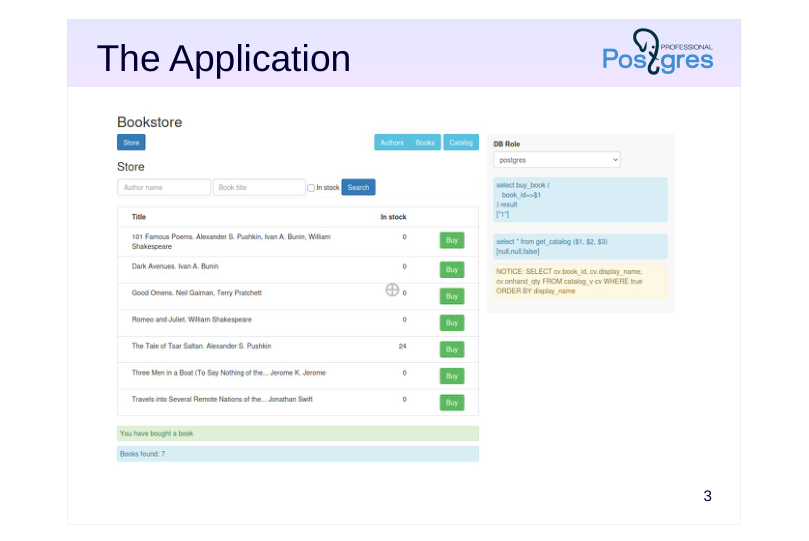
The application consists of several parts, which are provided as separate tabs.
“Store” is a customer UI for buying books online.
Other tabs represent the employee UI, which is available only to the bookstore staff (the admin panel).
“Catalog” is the storekeeper’s UI which is used for ordering books to the store and viewing arrivals and sales.
“Books” and “Authors” are the UI for librarians, where they can register arrivals.
For training purposes, all this functionality is exposed in a single web page. If any feature is unavailable because the required object (such as a table or a function) is missing, the application will report an error. It also displays the text of all queries sent to the server.
We will start with an empty database and will gradually implement all the required components by the end of the course.
The source code of the application frontend will not be discussed in this course, but is available for download: https://pubgit.postgrespro.ru/pub/dev1app.git
Page 4: Application Demonstration
This demo shows the Bookstore app as it would look like after completing all practice assignments. The app opens in a separate browser tab in the course VM: Opening http://localhost…
Page 5: Books
An ER model for high-level design
- entities — concepts of the application domain
- relationships — connections between entities
- attributes — properties of entities and relationships
- entity
Book
- attributes
- title
- authors
- quantity
- operations
Speaker notes
After taking a look at the application’s UI and functionality, we need to figure out its data schema. We will not go into details about database design: it is a separate branch of knowledge, which is beyond the scope of this course, but we cannot ignore this topic entirely.
High-level database design often uses the ER model (“Entity–Relationship”). It deals with entities (concepts of the subject area), their relationships, and attributes (the properties of entities and relationships). The model allows us to remain at the logical level, without getting down to data representation at the physical level (such as its table form).
The first approach to database design is creating a diagram as shown on this slide: a book is represented as a single big entity, and everything else becomes its attributes.
Page 6: Data Schema
 {#source-figure-006 caption=“Source slide page 6: Data Schema”}
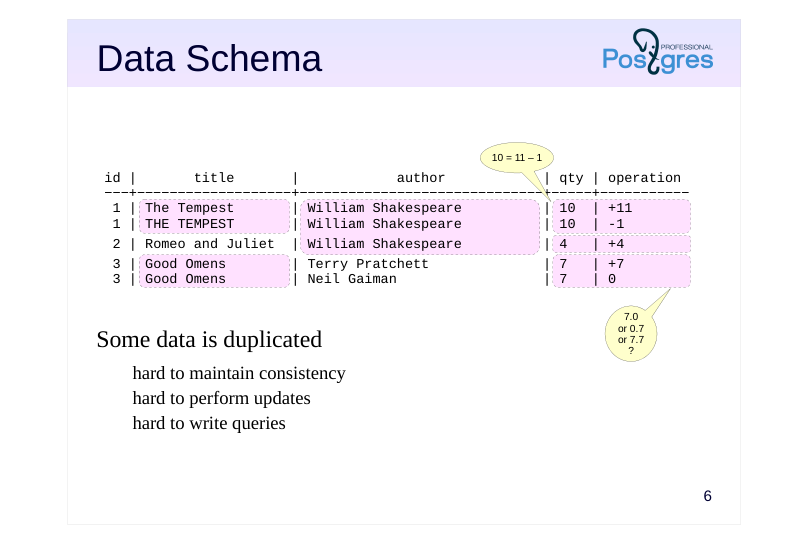
- Some data is duplicated
- hard to maintain consistency
- hard to perform updates
- hard to write queries
Speaker notes
Clearly, this approach cannot be correct. It may be not quite obvious in the diagram itself, but let’s try to map this diagram onto database tables. There are several ways to do it. One of them is shown on the slide: the table corresponds to the entity, and table columns represent the attributes of this entity.
This diagram is a good illustration that some data ends up duplicated (as highlighted on the slide). Data duplication may lead to problems with consistency, the very thing a database system is supposed to ensure.
For example, each of the two rows related to book 3 must list the total quantity (7 items). How should purchases be recorded, then? Some rows will need to be added to record the purchase operations. And then the quantity in all the duplicated rows will need to be reduced from 7 to 6. But what if an error leads to data discrepancy between these rows? How can we define a constraint to make sure the values stay in sync?
Many queries will also become overcomplicated. How can we find the total number of books? Or get a list of distinct authors?
Thus, such a schema will not work well for relational databases.
Page 7: Data Schema (Variant)
- Schemaless design
- consistency is maintained at the application side
- hard to write queries
- low performance (multiple joins)
Speaker notes
Another way to represent an entity as a table is a so-called EAV schema (“entity–attribute–value”). It allows storing anything at all in a single table. Technically, we get a relational database, but it has virtually no schema, and the database system cannot guarantee data consistency. Consistency has to be maintained by the application alone, and sooner or later it is bound to be compromised.
With such a schema, it is hard to write queries (although they are quite easy to generate). As a result, handling any significant volume of data becomes a problem because of multiple self-joins.
However, this approach has some advantages. For example, such a “schema” is easy to build up: when adding a new entity or attribute, you simply add new rows to the table.
Still, in general, this is not a good approach.
Page 8: Data Schema (Variant)
- Schemaless design
- consistency is maintained at the application side
- hard to write queries (a dedicated language)
- has index support
Speaker notes
Another similar approach involves representing data in JSON format, NoSQL-style. All the previous considerations still apply here.
Besides, you can’t query such a structure using SQL. Instead, a special language is used. (Previously, jsQuery was the usual choice, until the SQL:2016 standard brought SQL/JSON Path Language capabilities into PostgreSQL 16.)
https://github.com/postgrespro/jsquery
https://postgrespro.com/docs/postgresql/16/functions-json#FUNCTIONS-SQ LJSON-PATH
Although PostgreSQL provides JSON index support, performance is still a concern.
Such a schema is best used when the database only needs to get JSON data by ID, and no serious data alteration within the JSON structure is expected. For us, this is not the case.
(Naturally, nothing is set in stone here. See the last practice assignment for details on this.)
Page 9: Books and Operations
 {#source-figure-009 caption=“Source slide page 9: Books and Operations”}
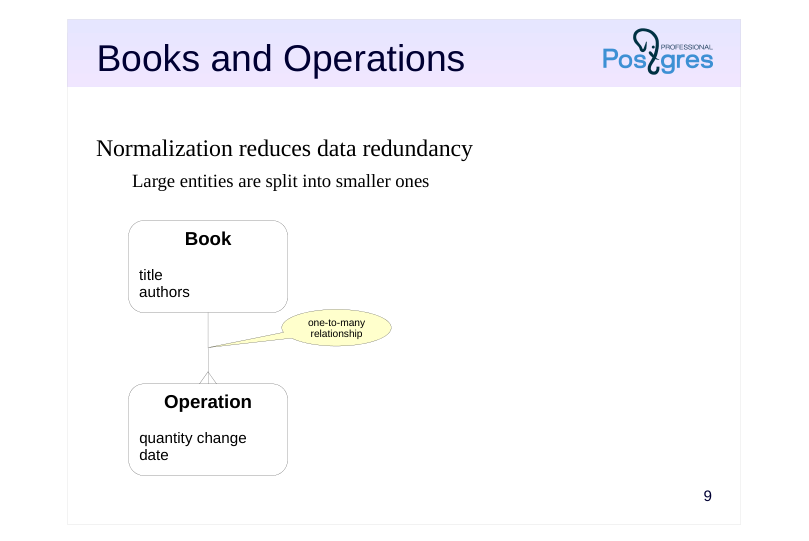
Normalization reduces data redundancy
- Large entities are split into smaller ones
Book
Operation
Speaker notes
To work with data in a relational database system properly, we need to eliminate redundancy. This process is called normalization.
You might be familiar with various normal form concepts (first, second, third, Boyce–Codd, etc.) We are not going to discuss them here; in essence, it is enough to understand that all this math pursues one and the same goal: eliminating redundancy.
The way to reduce redundancy is to split a larger entity into smaller ones. How exactly to split it should be prompted by common sense (which cannot be replaced by the knowledge of normal forms alone anyway).
In our case, everything is quite straightforward. Let’s start by separating books and operations. These two entities are connected by a one-to-many relationship: there can be several operations on each book, but each operation relates to only one book.
Page 10: Data Schema
Speaker notes
At the physical level, this can be represented by two tables: books and operations.
An operation changes the quantity of books (sell books if negative, order new books if positive). Note that the book entity has no quantity attribute anymore. Instead, you get the quantity by adding up all changes made by operations related to this book. Having an additional quantity attribute would only create data redundancy again.
This solution might raise some eyebrows at first. Is it really a good idea to have to calculate the amount every time instead of having a separate field to query? The answer is that we can simply create a view that shows the current amount of books in store. This will not lead to redundancy, because the view is just another query.
But what about performance? If summing up all changes brings too much overhead, we can resort to denormalization: add the quantity field to the books table and ensure its consistency with the operations table. Whether to do this or not is beyond the scope of this course (it is discussed in the QPT Query Performance Tuning course). Common sense suggests that it’s not required for our bare-bones app, but we will get back to denormalization when we get to the Triggers lecture.
Thus, moving all operations into a separate entity resolves most of the duplication issues, but not all of them.
Page 11: Books, Authors, Operations
 {#source-figure-011 caption=“Source slide page 11: Books, Authors, Operations”}
Book
Operation
Speaker notes
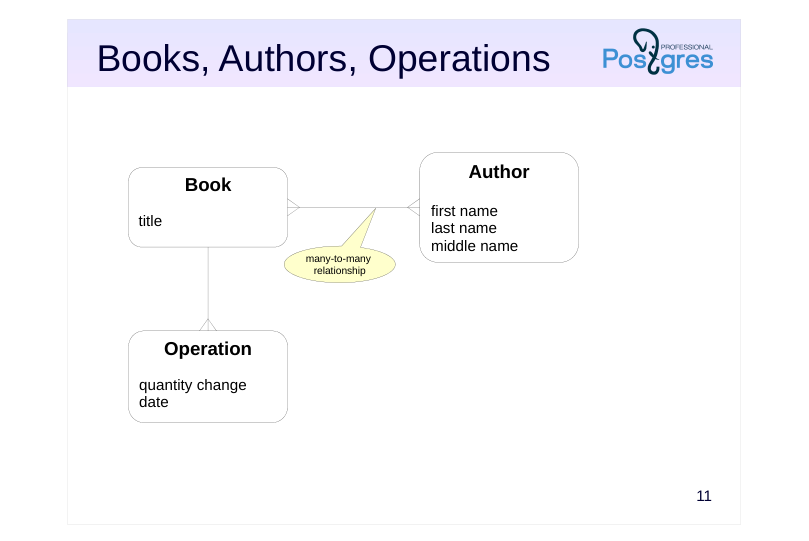
That’s why we have to go deeper: separate books from authors and tie them by a many-to-many relationship: a book can be written by several authors, and each author can have more than one book. At the table level, such relationship can be implemented using an additional intermediate table.
The author’s attributes will be their first, last and middle name. It makes sense because we may need to work with each of these attributes separately, for example, to display the author’s last name and initials.
Page 12: Application Schema
The application schema consists of four tables:
Books
We use the following data types here: integer; text, which is a text string of arbitrary length. We also use the PRIMARY KEY constraint. The GENERATED AS IDENTITY clause is used to automatically generate unique values. GENERATED AS IDENTITY columns take their values from special database objects called sequences. We can obtain the name of the used sequence as follows:
If required, you can also create sequences manually and query them directly:
A sequence is the most efficient way of generating unique IDs. But you should keep in mind that: there may be gaps in numbering (since the changes are not transactional); the numbers may not increase monotonically (if sessions cache values). Here is the data stored in the books table:
Page 13: Page 13
Note Note that book titles can be quite long. We use psql expanded display mode, and xheader_width parameter introduced in PostgreSQL 16 helps us cut out the header of the wide column:
Compare the output:
Authors
Page 14: Page 14
In this table, we also use the NOT NULL constraint, which means that undefined values are not allowed.
Note Note that the middle name might be missing (or defined by an empty string). The PRIMARY KEY constraint was mentioned in the \d output together with the terms “index” and “btree”. Btree is the main index type used in databases to speed up search and provide support for constraints (primary key and unique). Suppose that our bookstore sells books written by a million of different authors with the same name:
How long will it take to find an author in such a table?
If we ask the optimizer to display the query plan, we will see that Seq Scan is used; it means that the whole table is scanned sequentially using a Filter to find the required value:
And what if we perform the search by an indexed field?
Page 15: Page 15
The query time has been reduced by several orders of magnitude. And the query plan now contains an index:
We can also create an index by the last name (and analyze the table to gather up-to-date statistics):
However, the index is not a universal performance tuning tool. Having an index is usually very useful if the query needs to select only a small portion of all table rows. But if it is required to read a lot of data, the index will only add overhead, and the optimizer is smart enough to understand it:
Besides, you have to keep in mind that indexes take extra disk space, and index updates caused by table modifications bring extra overhead. Let’s cancel all our changes (including index creation):
Authorship
This table implements many-to-many relationship.
Page 16: Page 16
In addition to all the previously used constraints, this table also uses FOREIGN KEY, which is a referential integrity constraint. In fact, this table contains two foreign keys: one of them refers to the books table, and the other refers to the authors table. The seq_num column defines the order in which multiple authors of the same book should be listed.
Note Note that we have a composite primary key here.
Operations
This table uses one more data type: date, which defines a date without time of day. For the date_created column, the current date is specified as the default value (using the DEFAULT clause).
Apart from the data types used in application tables, we are going to come across the boolean type all the time. For example, the expressions in WHERE clauses are of the boolean type. It’s important to remember that, unlike traditional programming languages, SQL uses three-valued logic: in addition to true and false, there is also the NULL value (which can be interpreted as “the value is unknown”). You will see some other data types in the examples. Check the Basic Data Types and Functions handout (datatypes.pdf) for details. We will also cover some other types that are more complex: the composite type, which represents a record similar to a table row (in SQL. Composite Types);
Page 17: Page 17
arrays (in PL/pgSQL. Arrays).
Page 18: Designing the API
Tables and triggers
- reading data directly from tables (views)
- writing data directly to tables (views)
- using triggers for changing related tables
- the application must be aware of the data model
- this approach provides maximum flexibility
- hard to maintain consistency
- Functions
- reading data via table functions
- writing data by calling functions
- the application is separated from the data model and is limited by API
- lots of wrapper functions required
- potential performance issues
Speaker notes
There are several ways to set up an API.
The first option is to allow the application to access and modify database tables directly. In this case, the application must have the exact knowledge of the data model. This requirement can be relaxed to some extent by using views.
Another limitation of this approach is that the application has to follow certain rules; otherwise, it is very hard to maintain data consistency if you have to address all possible inappropriate operations at the database level. But this is the approach that provides the most flexibility.
Another option is to forbid direct table access from the application and allow only function calls. Reading data can be performed by table functions (which return a set of rows). Writing can be performed by calling other functions and passing the required data to them. In this case, all the necessary consistency checks can be implemented within functions: the database will be protected, but the application will be able to use only a limited set of features that we provide. It requires writing many wrapper functions and can lead to performance degradation.
You can also combine these two approaches. For example, you can allow the application to read data from tables directly, but perform modifications only by functions.
Page 19: Customer API
 {#source-figure-019 caption=“Source slide page 19: Customer API”}
Speaker notes
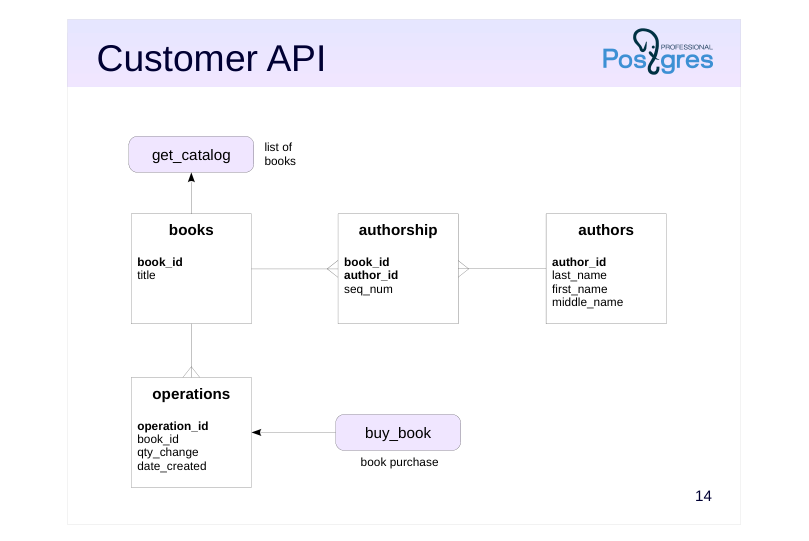
In this application, we will try different ways of setting up the interface (although it’s usually better to stick to one approach when developing real applications).
The store will use API functions:
● get_catalog for looking up books (see SQL. Composite Types lesson)
● buy_book for making a purchase (see PL/pgSQL. Query Execution)
Page 20: Employee API
 {#source-figure-020 caption=“Source slide page 20: Employee API”}
Speaker notes
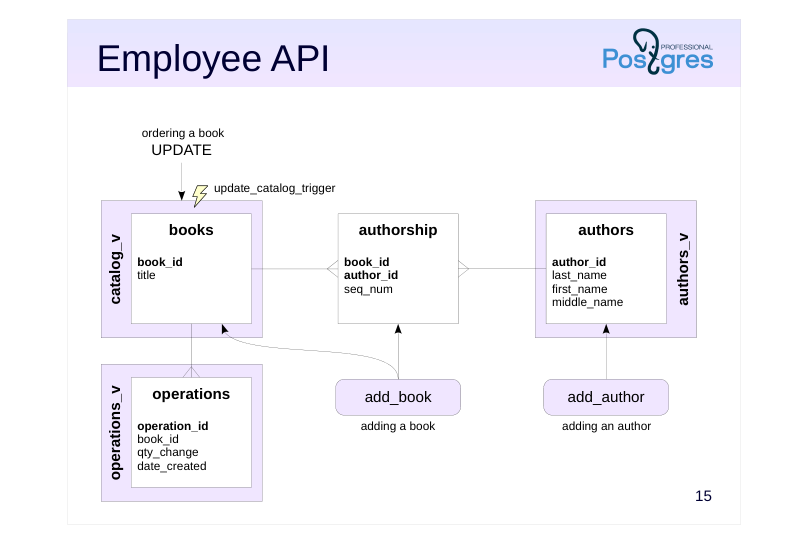
The admin panel is going to retrieve data by accessing the following views (which we create as part of the practice for this lecture):
● catalog_v for the list of books,
● authors_v for the list of authors,
● operations_v for the list of operations.
Authors will be added using the add_author function (we will create it once we get to the PL/pgSQL. Query Execution lecture). For adding books, we will implement the add_book function (PL/pgSQL. Arrays lecture).
To enable book purchase, we will make the catalog_v view updatable (PL/pgSQL. Triggers lecture).
Page 21: Views
A view is a named query. For example, you can create a view that displays only those authors who do not have a middle name, as follows:
Now this view can be used in queries almost like a regular table:
In a simple case, other operations can also be applied to a view, for example:
In complex cases, you can use triggers to enable insert, update, and delete operations. We will explain it in the PL/pgSQL. Triggers lecture. At the planning stage, the view “unfolds”, revealing the base tables:
The application uses three views. They will be very simple at first, but later we’ll move some application logic into them. The authors view displays a concatenation of the first name, last name, and middle name (if available):
The catalog view displays only the book title for now:
Page 22: Page 22
The operations view specifies the operation type (arrival or sale):
Page 23: Takeaways
Database design is a separate complex topic
- theory is important, but it should not take precedence over common sense
- Normalized data simplifies the development and facilitates consistency support
- The API can use tables, views, functions, and triggers
Page 24: Practice
- Create bookstore database and the bookstore schema in it. Set up the search path to this schema at the database level. 2. In the bookstore schema, create books, authors, authorship, and operations tables with all the necessary constraints, exactly as shown in the demo. 3. Insert data about several books into the tables. Check the result by running some queries. 4. In the bookstore schema, create authors_v, catalog_v, and operations_v views, so that they look exactly like shown in the demo. Check that the application now shows the data in Books, Authors, and Catalog tabs.
Speaker notes
- Recall the contents of the Data Organization. Logical structure lesson.
You can use the data shown in the demo, or come up with your own data.
Try writing queries to the base tables that return the same results as the queries to views shown in the demo. Then save these queries as views.
After completing the assignments, make sure to compare your queries with those in the provided keys. Make corrections if necessary.
Page 25: 1. Schema and Search Path
2. Tables
Authors:
Books:
Authorship:
Operations:
3. Data
Authors:
Page 26: Page 26
Books:
Authorship:
Operations:
4. Views
Authors view:
Catalog View:
Operations View:
Page 27: Page 27
Page 28: Practice+
- What additional attributes can appear for these entities as the application evolves? 2. Suppose you have to store the information about the publisher. Extend the ER diagram accordingly and create the corresponding tables. 3. Some books can belong to a series (such as “The Adventure Collection”). How will it affect the schema? 4. Suppose our store started selling hardware equipment (motherboards, CPUs, memory, storage devices, monitors, etc.). What entities and attributes would you use to classify them? Keep in mind that new types of equipment with new specifications are released regularly.
Speaker notes
- Different publishers may have different book series with the same title.
Page 29: 1. Additional Attributes
Some examples: Authors: role (author, editor, translator, etc.); Books: summary; Operations: current status (paid, shipped, etc.).
2. Publishers
Add the Publisher entity with at least the Name attribute. Books are linked to publishers by a many-to-many relationship: a book can be published by different publishers. Therefore, at the physical level, you will need an intermediate Publications table with the publication year attribute. (Of course, this is a simplified model; it can be refined further if desired.)
3. Series
Add the Series entity. It is not the book itself that belongs to the series, but its specific publication, so it makes sense to bring the Publication table to the ER model level and associate it with the series in a one-to-many relationship (each publication belongs to one series, each series may include several publications). A series is also linked by a one-to-many relationship with a publisher (a publisher may have several series, and each series belongs to a specific publisher). But there are also off-series editions. These can be placed into a fictitious No series series, or by never specifying the foreign key for the publication.
4. Computer Parts
Considering each type of computer component, you can easily identify the necessary attributes. Some attributes will be shared (for example, the manufacturer and the model name), and some will make sense only for this specific type. For example: Processor: frequency; Monitor: diagonal, resolution; Hard drive: size, volume. The problem is that the computer parts market is very dynamic. Some time ago, hard drives were determined by the disk rotation speed and capacity, but now the type is important (solid-state, rotating, hybrid). In the days of CRT monitors, the refresh rate was important, but now it’s about the type of matrix. Nobody needs CD drives anymore, but flash drives are prevalent. And so on. Thus, either you will have to constantly change the data schema (and, therefore, constantly change the application that works with this data!), or look for a more universal model by abandoning rigid structure and consistency control. We discussed some universal models (for example, storing part of the data in JSON) in the presentation.