06 Lesson 06: Data Organization / Physical Structure
This page is extracted from the official PDF into native Markdown. Slide text, code and speaker notes are kept in reading order; the original PDF and HTML remain the layout references. HTML source: dev1_06_data_physical.html Archive: DEV1-handouts-16-en.zip PDF pages: 15
Page 1: Data Organization / Physical Structure
Copyright
© Postgres Professional, 2017–2025 Authors Egor Rogov, Pavel Luzanov, Ilya Bashtanov, Igor Gnatyuk Translated by Liudmila Mantrova, Alexander Meleshko, Elena Sharafutdinova Photo by: Oleg Bartunov (Phu monastery, Bhrikuti summit, Nepal)
Use of course materials
Non-commercial use of course materials (presentations, demonstrations) is allowed without restrictions. Commercial use is possible only with the written permission of Postgres Professional. It is prohibited to make changes to the course materials.
Feedback
Please send your feedback, comments and suggestions to: edu@postgrespro.ru
Disclaimer
Postgres Professional assumes no responsibility for any damages and losses, including loss of income, caused by direct or indirect, intentional or accidental use of course materials. Postgres Professional company specifically disclaims any warranties on course materials. Course materials are provided “as is,” and Postgres Professional company has no obligations to provide maintenance, support, updates, enhancements, or modifications.
Page 2: Topics
- Tablespaces and Catalogs
- Files and Pages
- Forks: Main, Visibility Map, Free Space Map
- TOAST
Page 3: Tablespaces
 {#source-figure-003 caption=“Source slide page 3: Tablespaces”}
Speaker notes
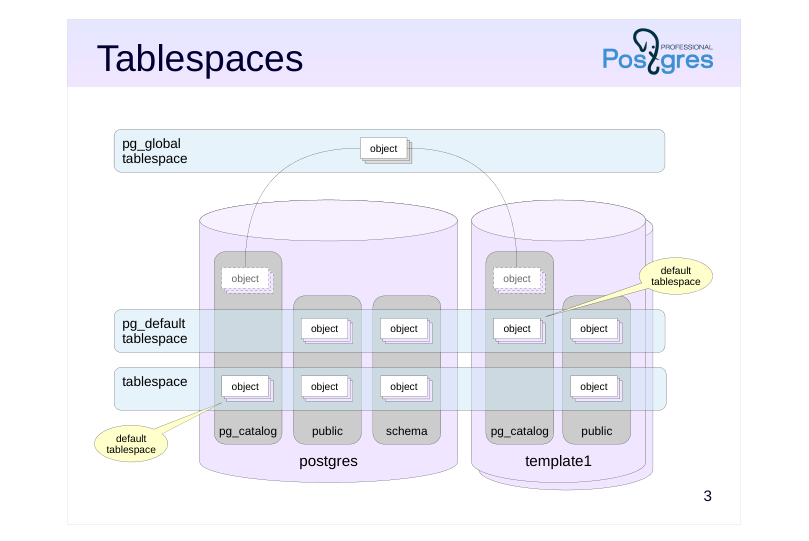
Tablespaces are used to organize the physical storage of data and determine the location of data in the file system. For example, one tablespace can be mapped to slow disks for archived data, and another on fast disks with frequent activity.
On cluster initialization, two tablespaces are created: pg_default and pg_global.
A tablespace can be used by multiple databases, and a database can use multiple tablespaces at once.
Each database has a default tablespace where all database objects are created (unless explicitly set otherwise). System catalog objects are also stored there. Databases will use the pg_default tablespace as their default, unless another one is set by the user.
The pg_global tablespace is special as it stores only those objects that are shared by the whole cluster.
Page 4: Catalogs
 {#source-figure-004 caption=“Source slide page 4: Catalogs”}
Speaker notes
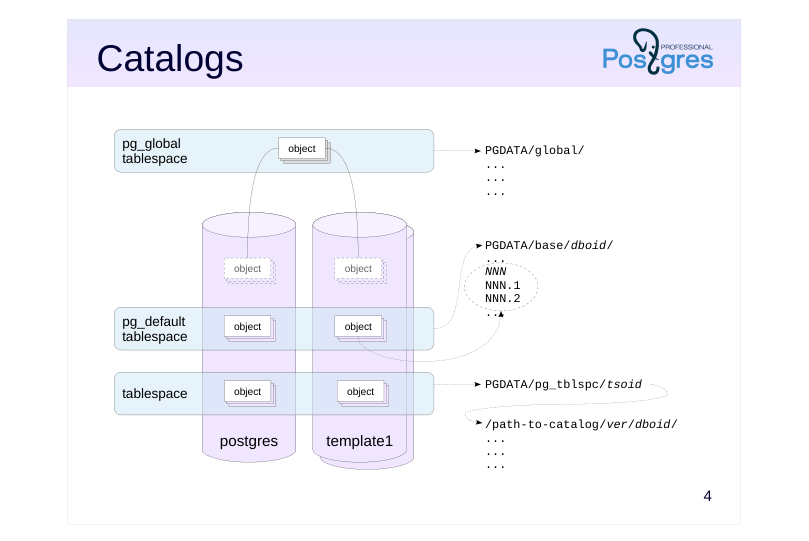
Essentially, a tablespace is a reference to the directory in which the data is located. The standard tablespaces pg_global and pg_default are always located in PGDATA/global/ and PGDATA/base/, respectively. When a custom tablespace is created, an arbitrary directory can be specified. For (internal) convenience, PostgreSQL also creates a symbolic link to the directory in PGDATA/pg_tblspc/.
The PGDATA/base/ directory comprises different subdirectories for each database (unlike PGDATA/global/, which stores data referring to the whole cluster).
Inside a custom tablespace directory, there is another level of subdirectories for different PostgreSQL server versions. This is helpful during server version upgrade.
Finally, these directories are where the actual objects are stored, one or more files per object.
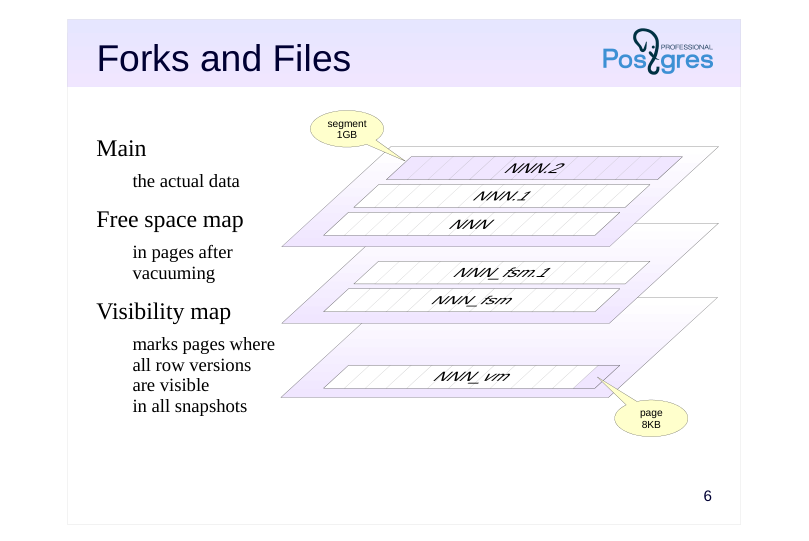
Each such file, called a segment, takes up no more than 1GB by default (this size can be changed when building the server). This is also why several files can correspond to each object. It is necessary to take into account the impact of a potentially large number of files on the file system used.
https://postgrespro.com/docs/postgresql/16/storage-file-layout
Page 5: Using Tablespaces
Initially, a cluster contains two tablespaces. You can learn about them from the system catalog:
Naturally, this is one of the cluster’s global tables. A command in psql that does a similar thing:
A new tablespace needs an empty directory owned by the same OS user who has started the database server:
Change the directory owner:
The tablespace can be created now:
When creating a database, you can set a tablespace to be used by default:
All new database objects will be created in this tablespace by default.
Page 6: Forks and Files
 {#source-figure-006 caption=“Source slide page 6: Forks and Files”}
Main
- the actual data
- Free space map
- in pages after
- vacuuming
- Visibility map
- marks pages where
- all row versions
- are visible
- in all snapshots
Speaker notes
Usually, each object has several corresponding forks. Each fork is a set of segments (that is, one or more files). The segment files that make up the forks are logically divided into pages, usually 8KB each (this size can be set for the entire cluster only when building the server). The file pages of all forks are read from disk in a completely uniform way through a shared buffer cache mechanism. The forks themselves contain different information and have different internal page structure.
The main fork contains the actual data, such as table row versions and index records.
The vm fork is the visibility (bit)map. It marks pages containing only the current row versions visible in all data snapshots. In other words, these pages have not been changed for so long that they have been completely vacuumed of obsolete tuples.
The visibility map is used to optimize vacuuming (marked pages do not need to be vacuumed) and to speed up index access. Row versioning information exists only for tables, but not for indexes. Therefore, after getting a link to the required row version from an index, you first need to check its visibility by reading the corresponding table page. But if the index itself already contains all the necessary columns, and the page is marked in the visibility map, then reading the table page can be skipped.
The fsm fork is the free space map. It marks the available space inside the pages, which is created, for example, during vacuuming. This map is used when inserting new row versions in order to quickly find the appropriate page.
Page 7: Forks and Files
Run vacuum to ensure that all forks exist in the new table:
You can check where an object’s files are stored:
Let’s check the files (names and sizes in bytes):
The files represent the three forks: main, free space map, and visibility map. Objects can be moved between tablespaces, but (unlike with schemas) this involves physically moving the data around.
Size of Objects
There are several ways to find the size of a database and objects in it.
Prettify the number for readability:
Total table size (with all indexes):
Table size (separately):
Page 8: Page 8
Index size (separately):
You can get the size of each individual fork, for example:
Another function shows the size of a tablespace on the disk:
Page 9: TOAST
A row version must fit into one page
- some of the attributes can be compressed
- or moved into a separate TOAST table
- or both compressed and moved
- TOAST table
- pg_toast schema
- supported by its own index
- oversized attributes are divided into parts smaller than a page
- accessed by querying a corresponding oversized attribute
- native versioning
- works transparently for the application
Speaker notes
Any row version in PostgreSQL must fit entirely into one page. Oversized row versions are stored using TOAST, The Oversized Attributes Storage Technique. It implies several strategies. Firstly, the oversized attribute can be compressed so that the row version fits into the page. If this fails, the attribute can be moved into a separate service table. Both approaches can be applied at the same time.
Any primary table can have a separate TOAST table (with a dedicated index) created for it, if necessary. Such tables and indexes are located in a separate pg_toast schema and therefore are usually hidden.
The row versions in the TOAST table must also fit into one page each, so longer values are split into multiple chunks and transparently “glued” together by PostgreSQL when the application demands.
TOAST tables are used only when oversized values are accessed. The tables have their own row versioning. Whenever a data update in the main table does not modify the oversized value in the TOAST table, the new row version in the main table will refer to the same old TOAST value, saving disk space.
https://postgrespro.com/docs/postgresql/16/storage-toast
Page 10: TOAST
Add a very long string to the table:
Will the table size change?
Yes. What about the main fork size?
No. Since the tuple won’t fit into a single page, the value of s will be sliced and put into a toast table. You can find this table in the system catalog (using the regclass type to get the table name from its oid):
The character string is sliced, and PostgreSQL will reassemble it as needed:
Finally, remove the database.
Since there are no objects left in the tablespace, it too can be dropped:
Page 11: Page 11
Page 12: Takeaways
On the physical level
- data is distributed across tablespaces (directories)
- an object comprises several forks
- a fork consists of one or more segments
- Tablespaces are managed by the administrator
- Forks, files, and TOAST are all PostgreSQL internals
Page 13: Practice
- Create a new database and connect to it. Create a tablespace ts. Create a table t in the ts tablespace and add several rows to it. 2. Calculate the space occupied by the database, table, and tablespaces ts and pg_default. 3. Move the table to the pg_default tablespace. How has the space used by tablespaces changed? 4. Delete the tablespace ts.
Page 14: 1. Tablespaces and Tables
Create a database:
Tablespace:
Create a table:
2. Data Size
Database size:
Table size:
Tablespace size:
The size of the tablespace is larger than the size of the table by 4KB due to how Linux calculates the size of the directory contents.
3. Moving a Table
Move the table:
New size of tablespaces:
Page 15: 4. Removing a Tablespace
Remove the tablespace…
…and the directory where its data was stored: