05 Lesson 05: Data Organization / Logical Structure
This page is extracted from the official PDF into native Markdown. Slide text, code and speaker notes are kept in reading order; the original PDF and HTML remain the layout references. HTML source: dev1_05_data_logical.html Archive: DEV1-handouts-16-en.zip PDF pages: 19
Page 1: Data Organization / Logical Structure
Copyright
© Postgres Professional, 2017–2025 Authors: Egor Rogov, Pavel Luzanov, Ilya Bashtanov, Igor Gnatyuk Translated by: Liudmila Mantrova, Alexander Meleshko, Elena Sharafutdinova Photo by: Oleg Bartunov (Phu monastery, Bhrikuti summit, Nepal)
Use of Course Materials
Non-commercial use of course materials (presentations, demonstrations) is allowed without restrictions. Commercial use is possible only with the written permission of Postgres Professional. It is prohibited to make changes to the course materials.
Feedback
Please send your feedback, comments and suggestions to: edu@postgrespro.ru
Disclaimer
Postgres Professional assumes no responsibility for any damages and losses, including loss of income, caused by direct or indirect, intentional or accidental use of course materials. Postgres Professional company specifically disclaims any warranties on course materials. Course materials are provided “as is,” and Postgres Professional company has no obligations to provide maintenance, support, updates, enhancements, or modifications.
Page 2: Topics
- Databases and Templates
- Schemas and Search Path
- Special Schemas
- System Catalog
Page 3: Database Cluster
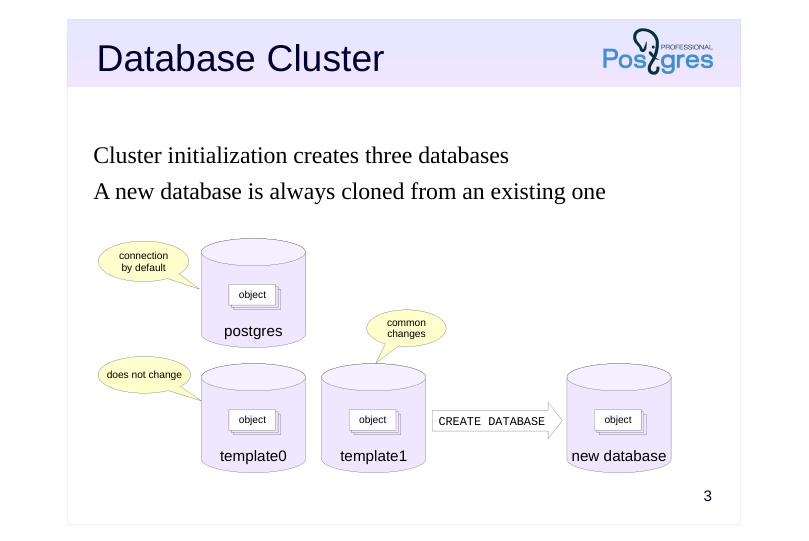 {#source-figure-003 caption=“Source slide page 3: Database Cluster”}
Cluster initialization creates three databases
- A new database is always cloned from an existing one
Speaker notes
A PostgreSQL instance manages multiple databases. This is known as a database cluster. During cluster initialization (which is performed either automatically during installation or manually using the initdb command), three identical databases are created. All other databases created by the user are cloned from an existing one.
By default, the template1 DB is used as the source for creating new databases. Any objects and extensions added to the template will be copied into any database created from it.
The template0 database must never be modified. It is required in at least two scenarios. First, to restore the database from a backup made by the pg_dump utility (this is discussed in the Logical Backup lesson). Secondly, it is used when creating a new database with an encoding different from the one specified during cluster initialization (this is discussed in the DBA2 course).
The postgres database is used to connect to by default by the postgres user. It is not a hard requirement to have it, but some utilities expect the postgres database to be there, so removing it is not a good idea, even if you never use the database directly.
https://postgrespro.com/docs/postgresql/16/manage-ag-templatedbs
Page 4: Databases
To obtain the list of databases, open psql and run:
The student database is there for the student user to connect to more easily. There are some columns in the output that are of no interest for us for now. When a database is created, the template1 template is used by default.
Page 5: Schemas
Namespaces for objects
- divide objects into logical groups
- prevent name conflicts between applications
- Schemas and users are different entities
- Special schemas
- public — all objects are created here by default
- pg_catalog — system catalog
- information_schema — an alternative variant of the system catalog
- pg_temp — a storage for temporary tables
- …
Speaker notes
Schemas are namespaces for database objects. They separate objects into groups for easier management and serve to prevent name conflicts when multiple users access the same database, or when multiple applications or extensions are installed.
In PostgreSQL, schema and user are different entities (although the default settings allow users to seamlessly operate schemas of the same name).
There are several special schemas usually present in any database.
The public schema is used by default for storing objects, unless intentionally configured otherwise.
The pg_catalog schema stores system catalog objects. The system catalog is a collection of tables containing metadata about objects belonging to the cluster. It is itself stored in the cluster. The information_schema is another one with an alternative representation of the system catalog (as defined in the SQL standard).
The pg_temp schema stores temporary tables. (In fact, temporary tables are created in schemas called pg_temp_1, pg_temp_2, and so on: each user has its own schema, but they are all referred to as pg_temp.)
There are other special schemas, more technical in nature.
https://postgrespro.com/docs/postgresql/16/ddl-schemas
Page 6: Cluster Databases and Schemas
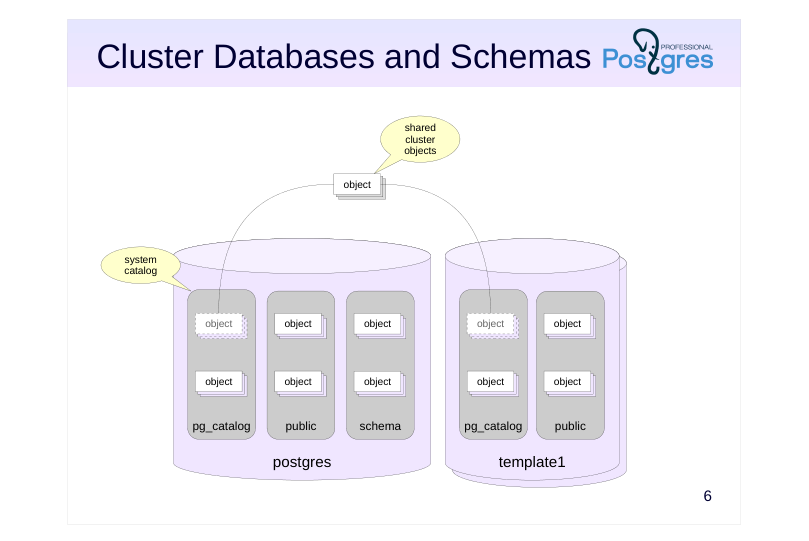 {#source-figure-006 caption=“Source slide page 6: Cluster Databases and Schemas”}
Speaker notes
Schemas belong to databases, and all database objects are distributed between schemas.
However, several system catalog tables store information that is shared by the entire cluster: the list of databases, the list of users, and some other data. These tables are stored outside of any single database, but at the same time they are accessible from any database within the cluster.
This way, a client connected to a database can see descriptions of not only objects that belong to the database but also of cluster-wide objects. Descriptions of objects in other databases, however, cannot be accessed without connecting to the databases first.
Page 7: Schemas
To display schemas in psql, use \dn command (= describe namespace):
It does not show any system schemas, though. To list them, add the ’S’ flag (it works for many other commands too):
We have already talked about some of these schemas (public, pg_catalog, information_schema); we will discuss the rest in other lectures. Another useful flag is the plus sign, which displays additional information:
Create a new schema:
Create a table:
By default, the table will be created in the public schema. To list all the tables in this schema, use the \dt command, specifying a template for schema and table names:
Page 8: Page 8
Tables (as well as other objects) can be moved between schemas. Since this is the logical level, the moving takes place only in the system catalog; physically, the data remains in place.
What will be left in the public schema?
Nothing. What about special?
The table has been moved. Now you can access it, as long as you specify the schema.
Without the schema name, no table is found.
Page 9: Search Path
Determining the object’s schema
- schema is explicitly defined by a qualified name (schema.name)
- name without a qualifier is looked up in the schemas specified in the
- search path
- Search path
- defined by the search_path parameter,
- the real value is shown by the current_schemas function
- non-existent and inaccessible schemas are excluded
- objects are created in the first schema explicitly specified in the path
- pg_temp and pg_catalog schemas are implicitly included first
- unless they are already specified in the search_path parameter
Speaker notes
When specifying an object, the schema it belongs to must be specified as well, since different schemas may contain objects with the same name.
If the object name is qualified by a schema, the explicitly specified schema is used. Otherwise, the schema is determined by the search_path configuration parameter. A search path is a list of schemas that is scanned sequentially from left to right, while excluding non-existent schemas and any schemas inaccessible to the current user.
When a new object is created with an unqualified name, the first viable schema from the search path is selected as the target schema for the object to be stored in. During object search, two schemas are implicitly added to the front of the search path:
● the pg_catalog schema for access to the system catalog,
● the pg_temp schema if the user has created any temporary objects.
The actual search path, including implicit schemas, can be obtained using the current_schemas(true) function.
The concept of search_path is similar to the PATH variable in operating systems.
https://postgrespro.com/docs/postgresql/16/runtime-config-client#GUC-SEA RCH-PATH
Page 10: Search Path
This is the default search path value:
“$user” stands for the schema with the same name as the current user (in our case, student). Since there is no student schema, it is ignored. Instead of guessing which schemas actually exist, which do not, and which are currently unavailable, you can use the function:
The logical parameter defines if the system schemas implicitly added to the path are displayed or not. Here, in addition to excluding the non-existent schema, PostgreSQL has implicitly included the system catalog schema at the top of the list:
We can define the search path, for example:
The table will now be found.
We have just set a configuration parameter at the session level. If we restart the session, it will have reverted to default. Setting the parameter at the cluster level is also ill-advised. Perhaps this path does not always work for everyone, and besides, different databases may have different sets of schemas. Thankfully, you can set the parameter for a specific database:
Now, it should apply for all connections to data_logical. Let’s try:
Page 11: System Catalog
Description of all cluster objects
- the list of tables in each database (the pg_catalog schema) and several
- cluster-wide objects
- several quality-of-life views
- Access
- SQL queries, special psql commands
- Conventions
- table names start with pg_
- column names contain a three-letter prefix
- the column oid of the oid type is used as the primary key
- object names are always lowercase
Speaker notes
The system catalog stores metadata about cluster objects. In each database, you can find a separate set of tables that describe the objects of this particular database, as well as several tables common to the whole cluster. There are several convenient views defined for these tables.
https://postgrespro.com/docs/postgresql/16/catalogs
You can access the system catalog using regular SQL queries. DDL commands can be used to modify data in the system catalog. In addition, psql offers a number of commands to browse the system catalog content.
https://postgrespro.com/docs/postgresql/16/app-psql
All system catalog table names start with pg_, for example, pg_database. Table columns start with a prefix, usually corresponding to the table name, for example, datname. Object names are always in lowercase, for example, postgres.
System catalog tables have primary keys. As a rule, these are columns with the name oid and of the oid type (object identifier, a 32-bit integer). These identifiers are also found in other columns as individual values or arrays, linking tables together logically. Foreign keys in the system catalog are not explicitly defined.
https://postgrespro.com/docs/postgresql/16/datatype-oid
Page 12: System Catalog
To display information about an object, psql (like other interactive user tools) accesses system catalog tables. For example, the \l command (list cluster databases) reads from pg_database table:
You can always check what queries a command performs:
This is one way to explore the system catalog. Disable extended command output.
The schema list is stored in the table:
Page 13: Page 13
You can get lists of objects such as tables or indexes like this:
All columns here start with rel (relation). relkind — object type (r - table, i - index, etc.) relnamespace — schema The relnamespace field is of the oid type; here is the corresponding row in the pg_namespace table:
To easily translate between text and oid formats, a special regnamespace type is used:
For example, let’s retrieve the list of objects from pg_catalog:
Similar reg types are defined for some other tables in the system catalog. They simplify queries and avoid unnecessary table joins.
Deleting Objects
Can you delete the special schema?
A schema cannot be deleted while there are any objects in it. You need to delete or move them elsewhere first. Or you can delete a schema along with all its objects:
Page 14: Page 14
What about deleting the entire database? Firstly, you cannot delete the database that you are currently connected to, so let’s disconnect.
Secondly, the database also cannot be deleted while there are any active connections to it. Let’s create a connection in a separate session and try to delete the database:
An expected error. However, there is the FORCE option that will try to forcibly terminate all database connections, and then proceed to delete it:
Page 15: Takeaways
On the logical level
- a cluster contains databases
- a database contains schemas
- a schema contains specific objects (tables, indexes etc.)
- New databases are created by cloning existing ones
- Object schemas are determined by the search path
- The system catalog stores a full description of the contents of the database cluster
Page 16: Practice
- In a new database, create a schema with the same name as the current user. Create a schema named app. Create several tables in both schemas. 2. Use psql to obtain descriptions of the schemas and a list of tables within them. 3. Modify the search path parameter so that when connecting to the database, tables from both schemas are accessible by an unqualified name. The “username” schema from task 1 should have priority. Verify that the new configuration works as intended.
Page 17: 1. Database, Schemas, Tables
Create a database:
Schemas:
Tables for the student schema:
Tables for the app schema:
2. Description of Schemas and Tables
Description of schemas:
Description of tables:
Page 18: Page 18
3. Search Path
The current search path settings show only the tables inside student:
Change the search path at the database level.
Tables from both schemas are visible now, with student taking precedence: