04 Lesson 04: Architecture / Buffer Cache and WAL
This page is extracted from the official PDF into native Markdown. Slide text, code and speaker notes are kept in reading order; the original PDF and HTML remain the layout references. HTML source: dev1_04_arch_wal_overview.html Archive: DEV1-handouts-16-en.zip PDF pages: 17
Page 1: Architecture / Buffer Cache and WAL
Copyright
© Postgres Professional, 2017–2025 Authors Egor Rogov, Pavel Luzanov, Ilya Bashtanov, Igor Gnatyuk Translated by: Liudmila Mantrova, Alexander Meleshko, Elena Sharafutdinova Photo by: Oleg Bartunov (Phu monastery, Bhrikuti Peak, Nepal)
Use of Course Materials
Non-commercial use of course materials (presentations, demonstrations) is allowed without restrictions. Commercial use is possible only with the written permission of Postgres Professional. It is prohibited to make changes to the course materials.
Feedback
Please send your feedback, comments and suggestions to: edu@postgrespro.ru
Disclaimer
Postgres Professional assumes no responsibility for any damages and losses, including loss of income, caused by direct or indirect, intentional or accidental use of course materials. Postgres Professional company specifically disclaims any warranties on course materials. Course materials are provided “as is,” and Postgres Professional company has no obligations to provide maintenance, support, updates, enhancements, or modifications.
Page 2: Topics
- Buffer Cache
- Replacement Algorithm
- Write-Ahead Log
- Checkpoint
- Processes Related to the Buffer Cache and WAL
Page 3: Buffer Cache
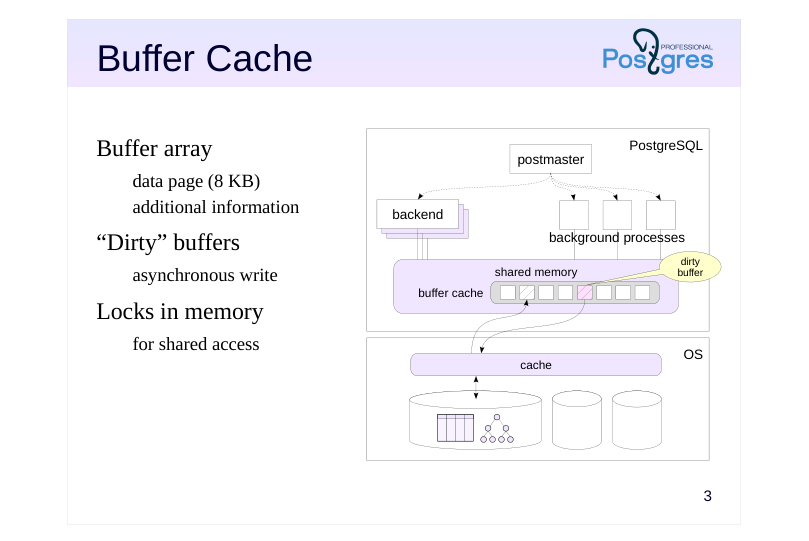 {#source-figure-003 caption=“Source slide page 3: Buffer Cache”}
Buffer array
- data page (8 KB)
- additional information
- “Dirty” buffers
- asynchronous write
- Locks in memory
- for shared access
Speaker notes
The buffer cache is used to smooth out the difference between the RAM and disk speed. It consists of an array of buffers which contain data pages and some additional information (for example, the file name and the position of the page inside this file).
The page size is usually 8 KB; the size can only be changed when building PostgreSQL.
Any work with data pages goes through the buffer cache. If any process is going to work with the page, it first tries to find it in the cache. If the page does not exist, the process requests the operating system to read this page and places it in the buffer cache. (Note that the OS can read the page either from disk or from its own cache.)
After the page is written to the buffer cache, it can be accessed repeatedly without the overhead of operating system calls.
If a process has changed the data in the page, the corresponding buffer becomes “dirty”. The modified page must be written on disk, but for performance reasons, the recording occurs asynchronously and may be delayed.
The buffer cache, like other shared memory structures, is protected by locks to control concurrent access. Although locks are implemented effectively, access to the buffer cache is not nearly as fast as simply accessing RAM. Therefore, in general, the less data a query reads and modifies, the faster it will work.
Page 4: Replacement
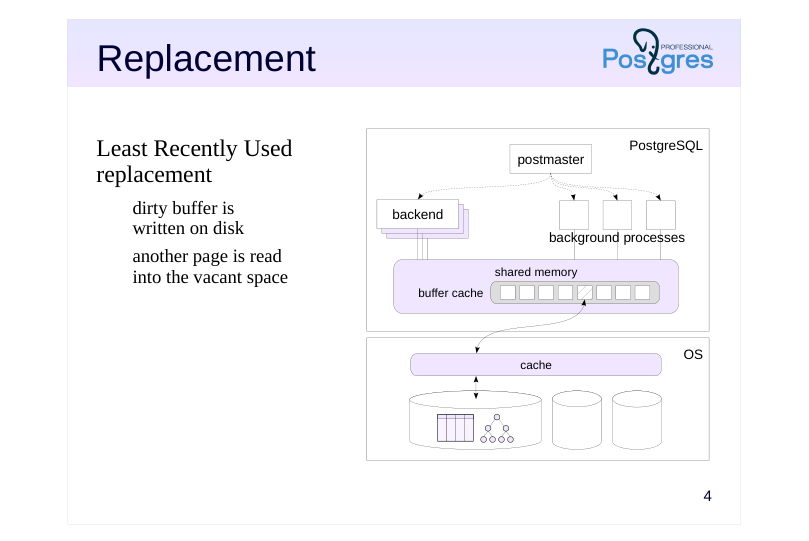 {#source-figure-004 caption=“Source slide page 4: Replacement”}
Least Recently Used replacement
- dirty buffer is
- written on disk
- another page is read
- into the vacant space
Speaker notes
The buffer cache size is usually not so large as to fit the entire database. It is limited by the available RAM. Also, the larger the buffer cache, the greater the overhead. Therefore, when reading the next page, sooner or later the buffer cache has to run out of space. In this case, page replacement happens.
The replacement algorithm selects a page in the cache that has been used less often than others. If the selected buffer is dirty, the page is written on disk first to store the changes made to it. Then, a new page is written into the buffer.
This replacement is called LRU (Least Recently Used). It keeps the most frequently accessed data in the cache. Such “hot” blocks of data are not very common, and this approach helps to significantly reduce the number of requests to OS (and disk operations), provided enough cache memory.
Page 5: The Impact of Buffer Cache on Query Execution
Creating a new database in the cluster and connecting to it (for more details about databases, see the Data Organization module):
Create a table:
Populate it with rows:
The shared_buffers parameter indicates the buffer cache size:
The default value is too low. In the real world, you should increase it immediately after server installation (it will be applied after restart). Restart the server to wipe the cache clean.
Now, let’s compare the behaviour of the system as we run a query once, and then the same query again. Query plans is not the topic of this course, but we will peek into them every now and again. The EXPLAIN ANALYZE command used below will execute the query as well as display the execution plan and some extra details:
The “Buffers: shared” line shows the buffer utilization. read — the number of buffers where pages had to be read from disk.
hit — the number of buffers where requested pages were found.
Page 6: Page 6
Note Note that on the second query execution, not only the execution time went down, but the planning time too (because system catalog pages are cached as well).
Page 7: Write-ahead Log (WAL)
Problem: when a crash occurs, data from RAM that is not written on disk is lost
- WAL
- stream of records of the actions being performed;
- can be used to redo the steps lost during the crash
- records are written to disk earlier than the changed data
- WAL tracks changes to
- pages in tables, indexes and other objects
- transaction status (clog)
- WAL does not track changes to
- temporary and unlogged tables
Speaker notes
Having a buffer cache (and other buffers in RAM) increases performance at the cost of reliability. When a crash happens, all buffer cache content is lost. If the crash occurs on the OS or hardware level, the content of OS buffers will also be lost (the OS may have its own failsafes for this).
To increase reliability, PostgreSQL uses the Write-ahead log. When performing any operation, the WAL records minimum necessary information about the operation to be able to perform it again. The record must be written into the disk (or another persistent storage) before the data modified by the operation is (that is why it is called Write-ahead log).
WAL files are located in the PGDATA/pg_wal directory.
All objects that are being worked on in RAM have their operations logged. These include tables, indexes and other objects, as well as transaction statuses. Operations with temporary tables (tables which exist only during the scope of a session or a transaction and are only available to the user who has created them) are not logged. You can also set a regular table to be explicitly unlogged. The table will be quicker to work with, but will be wiped on crash.
https://postgrespro.com/docs/postgresql/16/wal-intro
Page 8: Write-Ahead Log
The WAL can be considered as a continuous stream of records. Each record has a unique ID called an LSN (Log Sequence Number). This 64-bit number represents the record’s byte offset from the start of the WAL. The current WAL position can be seen with pg_current_wal_lsn function:
The position is displayed as two 32-bit numbers separated by a slash. Let’s save it for future reference. Now let’s perform some operations and see what’s changed.
It’s not the absolute values we’re interested in, but the distance between them, as it shows the size of generated WAL records in bytes:
The WAL is stored in files in a separate catalog (PGDATA/pg_wal). By default, the files are 16 MB each, but you can change that during cluster initialization. In addition to browsing the files by means of the OS, you can also display them by the following command:
Page 9: Checkpoint
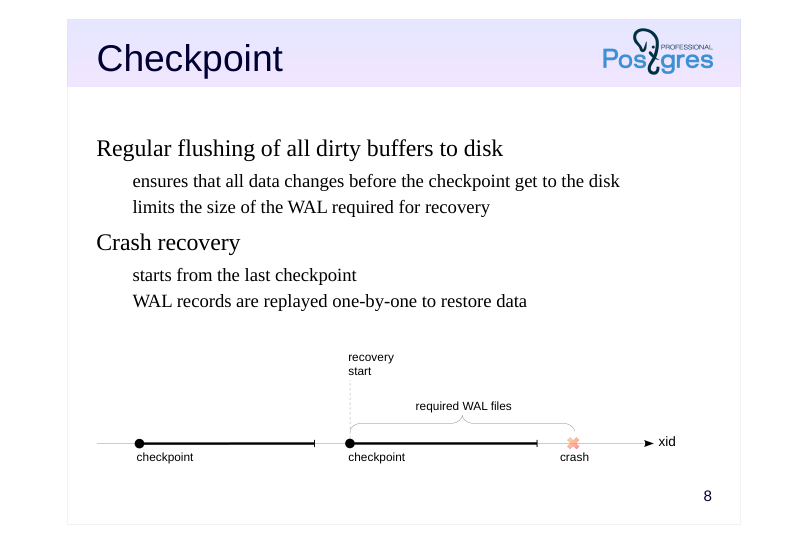 {#source-figure-009 caption=“Source slide page 9: Checkpoint”}
Regular flushing of all dirty buffers to disk
- ensures that all data changes before the checkpoint get to the disk
- limits the size of the WAL required for recovery
- Crash recovery
- starts from the last checkpoint
- WAL records are replayed one-by-one to restore data
Speaker notes
When PostgreSQL crashes, it enters the recovery mode on the next start. The data on disk at this point is inconsistent. Changes to hot pages were in the buffer cache, and are now lost, while some of the later changes have been flushed to disk already.
To restore consistency, PostgreSQL sequentially reads the WAL records, replaying the changes that did not make it to the disk. This way, the state of all transactions at the time of the crash is restored. Then, any transactions that have not been logged as committed are considered aborted.
However, logging all changes throughout a server’s lifetime and replaying everything from day one after each crash is impractical, if not impossible. Instead, PostgreSQL uses checkpoints. Every now and then, it forces all dirty buffers to disk (including clog buffers, which store transaction statuses).
A checkpoint is the moment in time when the flushing of all data to disk is started. However, you only have a valid checkpoint when the flushing of all such buffers is complete. It ensures that all data changes up to this point are safe in persistent memory.
In production environments with a large buffer cache, a checkpoint can flush many dirty buffers, so the server spreads this flushing over time to smooth out the I/O load.
When a crash occurs, recovery is started from the last completed checkpoint. Consequently, it is sufficient to store WAL files only as far back as the last completed checkpoint goes.
Page 10: Crash Recovery Using WAL
Modified table pages exist in the buffer cache but haven’t been written to disk yet. During normal shutdown, the server performs a checkpoint to flush all dirty pages to disk. However, we’ll simulate a system crash by sending a signal to the postmaster process.
When the server comes back up, it should begin the recovery. Let’s try:
All the changes have been recovered. After performing a checkpoint, PostgreSQL automatically deletes WAL files that are no longer necessary for recovery.
Page 11: Performance
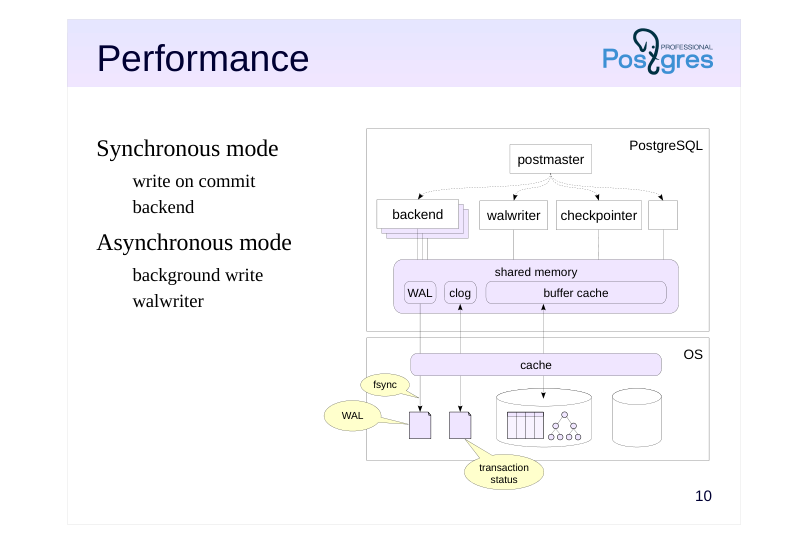 {#source-figure-011 caption=“Source slide page 11: Performance”}
Synchronous mode
- write on commit
- backend
- Asynchronous mode
- background write
- walwriter
Speaker notes
The WAL approach is faster than working directly with disk without a buffer cache. Firstly, a WAL record is smaller than an entire page of data. Secondly, the WAL is written sequentially (and usually not read until a crash occurs), which is better for basic hard disk drives.
Performance can also be managed via configuration settings. If the records are stored to disk immediately (synchronous mode), this guarantees that the committed transaction will not be lost. But recording to disk is expensive and forces the committing backend process to wait in line. To prevent WAL records from getting “stuck” in the OS cache, PostgreSQL relies on call of the fsync function, which forces the data into persistent storage.
There is also asynchronous mode, which has a background process walwriter constantly flushing WAL records to disk, with a certain delay. It is more efficient at the cost of some reliability, but still ensures consistency after crash recovery.
In fact, both modes work together. WAL records of a long transaction are written asynchronously (to free up WAL buffers). And if a page is getting flushed to disk and the corresponding WAL record is not there yet, it will immediately be flushed in synchronous mode.
Page 12: Main Processes
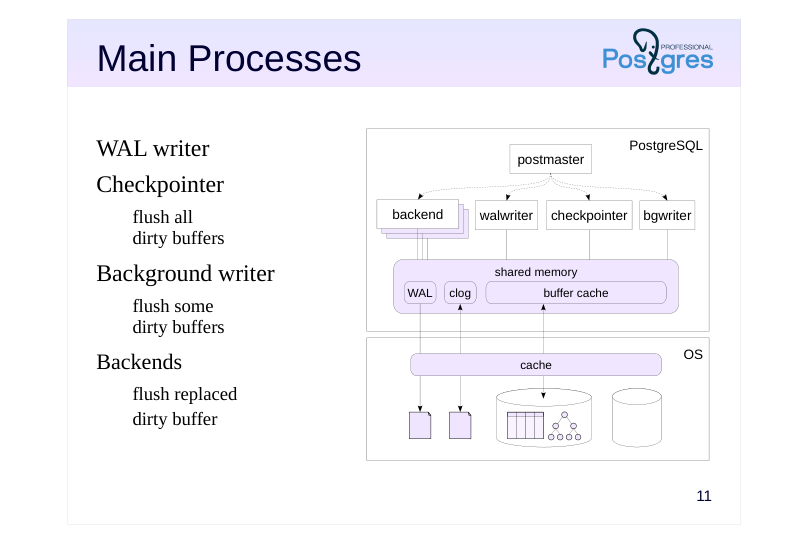 {#source-figure-012 caption=“Source slide page 12: Main Processes”}
WAL writer
- Checkpointer
- flush all
- dirty buffers
- Background writer
- flush some
- dirty buffers
- Backends
- flush replaced
- dirty buffer
Speaker notes
Let’s take a step back and look at the processes that maintain the buffer cache and the WAL.
First, there is walwriter. This process writes WAL records to disk in asynchronous mode. In synchronous mode, this job is handled by the backend that commits the transaction.
Second, checkpointer, the checkpoint process. It periodically flushes all dirty buffers to disk.
Third, bgwriter (or background writer). It operates similarly to checkpointer, but it only flushes some of the dirty buffers, specifically, those that are most likely to be replaced soon. It frees up buffer space so that when backend selects a buffer to put a new page in, it does not have to flush the old contents of the buffer to disk itself.
Fourth, there are backends that put data into the buffer cache. Whenever a buffer being replaced is still dirty (despite the efforts of checkpointer and bgwriter), the backend will flush it to disk.
Page 13: WAL Levels
Minimal
- guarantees crash recovery
- Replica (default)
- backup
- replication: transmit the WAL on another server and replay it there
- Logical
- logical replication: information about adding, changing,
- and deleting table rows
Speaker notes
WAL was developed as a data protection tool to mitigate the risk of data loss due to crashes.
However, the WAL mechanism turned out to have other applications, if it is supplemented with additional information.
The data stored in the WAL is controlled by the wal_level parameter.
● The minimal level is sufficient to recover after a crash, and nothing else.
● The replica level stores additional information that allows WAL to be used for backup and replication. During replication, WAL records are transmitted to another server and applied there, creating an exact copy (replica) of the original server.
● At the logical level, information is added to the WAL that allows decoding “physical” WAL records and forming “logical” records of adding, changing and deleting table rows. This enables logical replication (see corresponding lessons of DEV2 and DBA3 courses for details).
Page 14: Takeaways
Buffer cache increases performance by reducing the number of disk operations
- WAL ensures reliability
- WAL size is kept in check by checkpoints
- WAL has multiple uses:
- crash recovery
- backup
- replication
Page 15: Practice
- Using the OS tools, find the processes responsible for the buffer cache and the WAL. 2. Stop PostgreSQL in fast mode; start it again. Check the server message log. 3. Now stop PostgreSQL in immediate mode; start it again. Check the server message log and compare with the previous one.
Speaker notes
- To stop in fast mode, use the command
This makes the server abort all open connections and perform a checkpoint before shutting down, so that all data is flushed to disk and consistent. In this mode, the shutdown may take some time, but on startup the server will be good to go right away.
- To stop in immediate mode, use the command
The server will also abort open connections, but will not perform a checkpoint. Data on disk will be inconsistent, like after a crash. In this mode, the server shuts down quickly, but will have to restore data consistency using WAL on startup.
If your PostgreSQL is compiled from source code, the fast stop command will be
and the immediate stop command will be
Page 16: 1. Operating System Processes
First, get the postmaster process ID. It is stored in the first line of postmaster.pid. This file is located in the data directory and is created every time the server starts.
Now, find all the processes spawned by postmaster:
The processes that serve the buffer cache and the WAL include: checkpointer background writer walwriter
2. Stop in Fast Mode
To easily separate old messages from new ones, clear the message log before restarting the server. Do not do this on a real production server.
Server message log:
3. Stop in Immediate Mode
Page 17: Page 17
Server message log:
Before starting to accept connections, the DBMS performed an automatic recovery.