03 Lesson 03: Architecture / Isolation and MVCC
This page is extracted from the official PDF into native Markdown. Slide text, code and speaker notes are kept in reading order; the original PDF and HTML remain the layout references. HTML source: dev1_03_arch_mvcc_overview.html Archive: DEV1-handouts-16-en.zip PDF pages: 18
Page 1: Architecture / Isolation and MVCC
Copyright
© Postgres Professional, 2017–2025 Authors: Egor Rogov, Pavel Luzanov, Ilya Bashtanov, Igor Gnatyuk Translated by: Liudmila Mantrova, Alexander Meleshko, Elena Sharafutdinova Photo: Oleg Bartunov (Phu Monastery and Bhrikuti Peak, Nepal)
Use of Course Materials
Non-commercial use of course materials (presentations, demonstrations) is allowed without restrictions. Commercial use is possible only with the written permission of Postgres Professional. It is prohibited to make changes to the course materials.
Feedback
Please send your feedback, comments and suggestions to: edu@postgrespro.ru
Disclaimer
Postgres Professional assumes no responsibility for any damages and losses, including loss of income, caused by direct or indirect, intentional or accidental use of course materials. Postgres Professional company specifically disclaims any warranties on course materials. Course materials are provided “as is”, and Postgres Professional company has no obligations to provide maintenance, support, updates, enhancements, or modifications.
Page 2: Topics
- Multiversion Concurrency Control
- Data Snapshot
- Isolation Levels
- Vacuuming and its Horizon
- Locking
- Transaction Status
Page 3: MVCC
 {#source-figure-003 caption=“Source slide page 3: MVCC”}
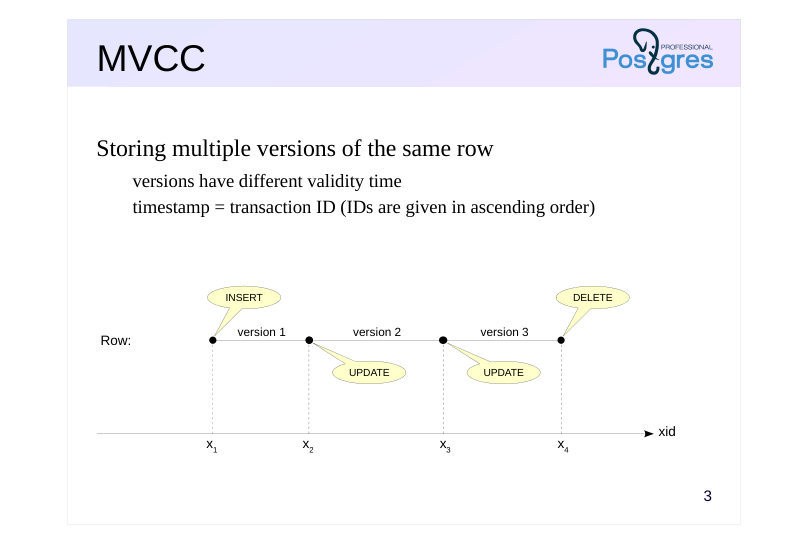
Storing multiple versions of the same row
- versions have different validity time
- timestamp = transaction ID (IDs are given in ascending order)
Speaker notes
When multiple sessions are running at the same time, two transactions may access the same row at the same time. If both transactions are just reading the row, there is no problem. If both transactions try to write, no problem either (in this case, they line up and make the changes one after the other). The tricky part is when one transaction wants to read a row and another one wants to change it at the same time.
There are two simple ways about it. You can let such transactions block each other, but then performance suffers. Otherwise, you can let the reading transaction immediately see the changes made by the writing transaction, even if they are not committed (this is called a “dirty read”). This is dangerous, because the changes can be rolled back.
PostgreSQL goes the hard way and utilizes what is known as Multiversion concurrency control. In essence, the system stores multiple versions of each row. So, a writing transaction operates on its own version, while a reading transaction sees its own version.
To distinguish between the versions, PostgreSQL marks each one with two timestamps, which together specify a version’s “validity time”.
The timestamps are essentially just transaction IDs, which always come in ascending order. (In reality, the whole thing is a bit more complicated, but not worth getting into right now.) Upon creation, a row version is marked with the ID of the transaction that executed the INSERT command. When deleted, the version is marked with the ID of the transaction that did the DELETE command (but is not physically deleted). An UPDATE command is a DELETE and an INSERT executed back to back.
https://postgrespro.com/docs/postgresql/16/mvcc-intro
Page 4: Data Snapshot
 {#source-figure-004 caption=“Source slide page 4: Data Snapshot”}
Representation of database data in a consistent state at a specific point in time
- transaction ID defines the point in time
- list of active transactions helps the system
- to exclude changes that have not been committed
Speaker notes
PostgreSQL uses snapshot-based transaction isolation.
A transaction accessing a table should see only one of the versions of each row (or none at all). To achieve this, PostgreSQL presents the transaction with a data snapshot created at a certain point in time. The snapshot includes the most recent versions of all committed rows but does not include any non-committed changes from active transactions. In other words, the snapshot takes the version of each row that corresponds to the moment when the snapshot was created.
A snapshot is not a physical copy of the data, but just a few numbers:
● the ID of the last committed transaction at the time of snapshot,
● list of active transactions at that point in time.
The list is needed in order to exclude from the snapshot any changes those transactions may have made but not yet committed.
With just these numbers, we can always tell which row version will be visible in the snapshot. Sometimes it will be the current (most recently committed) version, as with row 1 in the diagram. Sometimes not: row 2 has been deleted after the snapshot has been created (and the change has already been committed), but the transaction still continues to see it while working with the snapshot. This is the correct behavior, the snapshot gives a consistent representation of data at the selected point in time.
Some rows will not get into the snapshot at all: row 3 was deleted before the snapshot was made, so it is not included.
Page 5: Isolation Levels
Read Uncommitted
- not supported by PostgreSQL: works as Read Committed
- Read Committed (default)
- the snapshot is created as of the time a statement starts
- repeated query may return different data
- Repeatable Read
- the snapshot is created as of the time the first transaction statement starts
- a transaction may fail with a serialization error
- Serializable
- total isolation, but additional overhead
- a transaction may fail with a serialization error
Speaker notes
The SQL standard defines four isolation levels: the stricter the level, the less concurrent transactions affect each other. At the time when the standard was adopted, it was believed that the stricter the level, the more difficult it is to implement and the stronger its impact on performance (since then, these views have changed somewhat).
The most lax level of Read Uncommitted allows dirty reads. It is not supported by PostgreSQL, because it is of no practical value and does not give a performance gain.
The Read Committed level is the default isolation level in PostgreSQL. At this level, data snapshots are created at the beginning of each SQL statement execution. Thus, the statement works with an unchanged and consistent data snapshot, but two identical queries following one after the other may show different data.
At the Repeatable Read level, the snapshot is built at the beginning of a transaction (when executing the first statement). This makes all queries inside the same transaction see the same data. This level is convenient, for example, for generating reports from several queries.
The Serializable level guarantees total isolation. At this level, you can use any statements as if the transaction is running alone. The drawback is that some transactions will fail, and your application must be able to repeat such transactions.
https://postgrespro.com/docs/postgresql/16/transaction-iso
Page 6: Row Version Visibility
How do you verify that the same row can exist in multiple versions? Create a table:
And insert one row. Remember that if you do not explicitly start a transaction with BEGIN, psql executes the command and immediately commits the result:
Start the transaction and get its ID:
The transaction sees the first (and so far the only) version of the row:
Here, the hidden columns show the transaction IDs that limit the visibility of the row version: xmin is the ID of the previous transaction which created the version, and xmax=0 means that this version is current. Now start another transaction in another session:
The transaction sees the same and only version:
Now change the row from within the second transaction.
This is what we get:
Page 7: Page 7
What will the first transaction see?
Since the change is not yet committed, the first transaction continues to see the first version of the row.
Note the xmax value: it indicates that another transaction is currently changing the row. Generally speaking, such “peeping” violates isolation, so the xmin and xmax fields are hidden and should not be used in production. Now commit the changes.
What will the first transaction see now?
The first transaction also sees the second version of the string. After commit, the first version of the row is no longer visible in any transaction.
Page 8: Vacuuming and its Horizon
 {#source-figure-008 caption=“Source slide page 8: Vacuuming and its Horizon”}
There is a single horizon for each database
- Long-running transactions can hold back the horizon
- thereby blocking the vacuuming of outdated row versions
Speaker notes
MVCC makes it possible to effectively implement snapshot-based isolation, but as a result, old (“dead”) row versions (“dead tuples”) accumulate in table pages.
Historical versions are needed for some time so that transactions can work with their data snapshots and, in case of rollback, get back to old values. For each database, there is a transaction ID (xid), so that all historical versions deleted by transactions with lower xids are no longer visible in any snapshot. This xid is called vacuum horizon.
Vacuuming is performed by special background processes; but can also be executed manually using the VACUUM command.
Long-running transactions and queries can hold back the horizon, which prevents the removal of accumulated row versions. If you do not vacuum historical data in a timely manner, tables and indexes will bloat, consuming excessive disk space, and the search for current row versions will slow down.
https://postgrespro.com/docs/postgresql/16/routine-vacuuming
Page 9: Locking
Row locks
- reading never locks rows
- changing rows locks them for changes, but not for reads
- Table locks
- prohibit changing or deleting a table while it is being worked on
- prohibit reading the table when rebuilding or moving
- etc.
- Lock lifetime
- set as needed or manually
- released automatically upon transaction completion
Speaker notes
So what does MVCC provide? It allows the system to have only the most necessary minimum of locks, thereby increasing performance.
The main locks are set at the row level. Reading never blocks either reading or writing transactions. Changing a row does not lock it for reading. The only case when a transaction will wait for a lock to be released is if it tries to change a row that has already been changed by another transaction that has not been committed yet.
Locks can also be set at a higher level, particularly on tables. They are needed so that no one can delete the table while other transactions are reading data from it, or to prohibit access to the table being rebuilt. Such locks generally do not cause problems, since deleting or rebuilding tables is only done once in a while. However, some changes of table structure trigger implicit table rebuilding, completely blocking access to the table and its indexes. Locks are explained in detail in the Locking module of the DBA2 course.
All necessary locks are set automatically and automatically removed at the end of the transaction. However, if a lock was acquired after the savepoint was set, it will be released immediately when rolling back to that savepoint.
You can also set additional custom locks, but this is rarely necessary.
https://postgrespro.com/docs/postgresql/16/explicit-locking
Page 10: Locking
Repeat the experiment, but now let both transactions try to change the same row.
And in the second transaction:
The second transaction “hung up”: it cannot change the row until the first transaction releases the lock.
Now the second transaction can continue:
Both transactions have committed their changes. The first session reads the table again and sees the current row: this is the result committed by the second transaction:
Page 11: Transaction Status
Transaction status (clog)
- service information; two bits per transaction
- stored in files on disk
- cached in shared memory
- Commit
- the “transaction committed” bit is set
- Termination
- the “transaction aborted” bit is set
- performed as fast as commit (no data rollback needed)
Speaker notes
For multiversion concurrency control to work, the server needs to understand the status of transactions. A transaction can be active or finished. A transaction can end either in a commit or in an abort. Therefore, two bits are required to represent the state of each transaction.
Transaction statuses (commit log, clog) are stored in special service files in the PGDATA/pg_xact directory and worked upon in the server’s shared memory, as to avoid constantly accessing the disk.
At any transaction completion (either successful or not), it is enough to set the appropriate status bits. Both transaction commit and abort occur equally quickly.
If an aborted transaction managed to create new row versions, these versions are not destroyed (there is no “physical” rollback of data). Thanks to the status information, other transactions will see that the transaction that created or deleted the row versions was actually aborted, and will not take changes made by it into account.
Page 12: Takeaways
Multiple versions of each row can be stored in data files
- Transactions work with data snapshots, representations of database data in a consistent state at a specific point in time
- Isolation levels have different snapshot creation times
- Dead row versions beyond the vacuum horizon must be periodically vacuumed
- Writers do not block readers, readers do not block anyone
Page 13: Practice
- Create a table with one row. Begin a transaction at the Read Committed isolation level and query the table. In another session, delete the row and commit the changes. How many rows will the first transaction see after executing the same query again? Try and see. Complete the first transaction. 2. Repeat the same thing, but now let the transaction work at the isolation level Repeatable Read:
- BEGIN ISOLATION LEVEL REPEATABLE READ;
- Explain the differences.
Page 14: 1. Read Committed Isolation Level
Create a table:
Query from the first transaction (default isolation level is Read Committed):
Delete the row in the second transaction and commit the changes:
Repeat the query:
The first transaction sees the change: the row has been deleted.
2. Repeatable Read Isolation Level
Return the row:
Query from the first transaction:
Delete the row in the second transaction and commit the changes:
Repeat the query:
Page 15: Page 15
At this isolation level, the first transaction does not see any changes: the row still exists for it.
Page 16: Practice+
- Begin a transaction and create a new table with one row. Without completing the transaction, open a second session and query the table in it. Check what the transaction will return in the second session.
- Commit the transaction in the first session and repeat the query
- to the table in the second session.
- Repeat task 1, but roll back rather than commit the transaction in the first session. What has changed?
- In the first session, start a transaction and make a query to the previously created table. Will it be possible to delete this table in the second session before the transaction is completed? Try and see.
Page 17: 1. Transactions and DDL Commands: Commit
Start a transaction and create a new table:
In the second session, query the table:
Until the transaction that created the table is completed, all other transactions do not see the table. The table will be visible only after the completion of the transaction that created it:
2. Transactions and DDL Commands: Rollback
Start a transaction and create a new table:
The query in the second session sees no changes, as expected:
When the first transaction is rolled back, the table creation command is also rolled back:
In PostgreSQL, DDL commands are transactional.
3. Table Locks
Page 18: Page 18
Start a transaction, query the table:
The second transaction, which is trying to remove the table is locked: you cannot remove a table that is being used.
The table will be removed only after the first transaction is completed: