07 Lesson 07: Replication / Use Cases
This page is extracted from the official PDF into native Markdown. Slide text, code and speaker notes are kept in reading order; the original PDF and HTML remain the layout references. HTML source: No matching course-page link was captured in the source inventory. Archive: DBA3-handouts-16-en-20260917.zip PDF pages: 33
Page 1: Replication / Use Cases
Copyright
© Postgres Professional, 2017–2025 Authors: Egor Rogov, Pavel Luzanov, Ilya Bashtanov, Alexey Beresnev Photo: Oleg Bartunov (Phu Monastery and Bhrikuti Peak, Nepal)
Use of Course Materials
Non-commercial use of course materials (presentations, demonstrations) is allowed without restrictions. Commercial use is possible only with the written permission of Postgres Professional. It is prohibited to make changes to the course materials.
Feedback
Please send your feedback, comments and suggestions to: edu@postgrespro.ru
Disclaimer
Postgres Professional assumes no responsibility for any damages and losses, including loss of income, caused by direct or indirect, intentional or accidental use of course materials. Postgres Professional company specifically disclaims any warranties on course materials. Course materials are provided “as is,” and Postgres Professional company has no obligations to provide maintenance, support, updates, enhancements, or modifications.
Page 2: Topics
- Physical Replicaion Use Cases
- Logical Replication Use Cases
Page 3: Physical Replication
Hot Standby for High Availability
- Load Balancing for OLTP Workloads
- Replica for Reporting
- Multiple Replicas and Cascading Replication
- Delayed Replication
Page 4: Hot Standby for High Availability
 {#source-figure-004 caption=“Source slide page 4: Hot Standby for High Availability”}
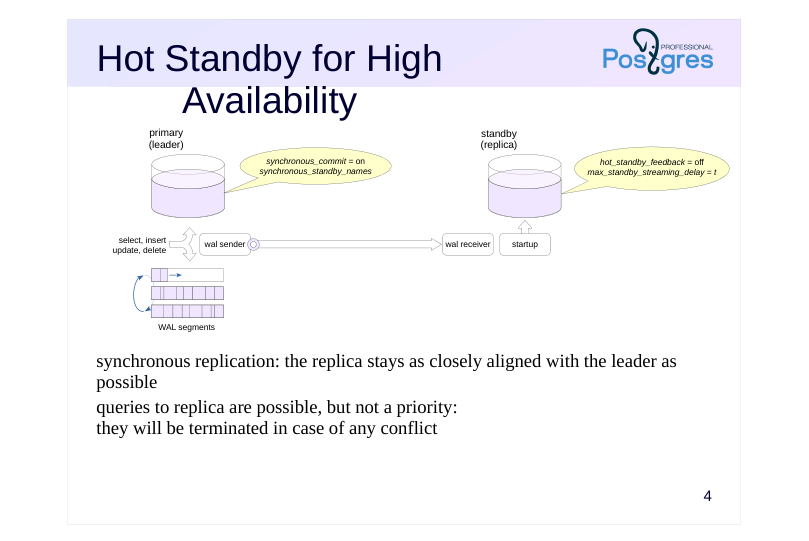
synchronous replication: the replica stays as closely aligned with the leader as possible queries to replica are possible, but not a priority: they will be terminated in case of any conflict
Speaker notes
A replica can be set up to serve different purposes, and its configuration depends on the intended use case.
One possible scenario is maintaining a hot standby for high availability purposes. This means that if the main server fails, we need to switch over to the replica as quickly as possible without losing any data.
Reliability is ensured by synchronous replication with synchronous_commit = on mode (write option does not guarantee reliability, apply may cause unnecessary delays).
For synchronous replication, the synchronous_standby_names configuration parameter must specify a list of standby servers (replicas).
To minimize the replica’s lag behind the primary server, WAL records should be applied immediately. We can set the max_standby_streaming_delay parameter to something small to achieve this.
To prevent queries on the replica from negatively impacting the primary server, we can disable feedback (hot_standby_feedback = off).
With these settings, queries on the replica are allowed, but they’ll be terminated if conflicts occur. If queries to the replica aren’t planned, you can set it up in warm standby mode with hot_standby = off.
Note that replication is a fundamental mechanism for ensuring high availability, but it’s just one of many features of HA systems. This is covered in more detail in the “Cluster Technologies” module.
Page 5: OLTP Load Balancing
 {#source-figure-005 caption=“Source slide page 5: OLTP Load Balancing”}
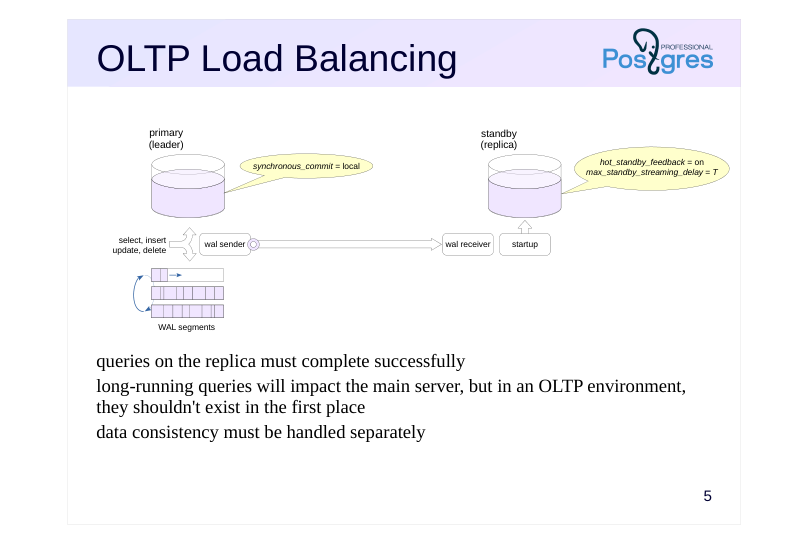
queries on the replica must complete successfully long-running queries will impact the main server, but in an OLTP environment, they shouldn’t exist in the first place data consistency must be handled separately
Speaker notes
A replica can also be used to balance OLTP read load.
OLTP loads have a lot of short-running queries. This keeps the replica closely synchronized with the main server to ensure queries won’t be interrupted by conflicts, while avoiding any negative impact on the main server.
We can enable feedback (hot_standby_feedback = on) and set a sufficiently large delay for applying conflicting records (max_standby_streaming_delay).
Synchronous replication likely isn’t needed in this configuration. It won’t guarantee consistency anyway: a change committed on the leader will not necessarily be noticed by the replica right away.
To ensure consistency, changes must commit on both servers simultaneously. The synchronous_commit = apply mode allows waiting for the WAL record to be applied on the replica (at the cost of significantly degraded primary server performance), but then you could see the changes on the replica before they appear on the leader. A reliable solution that’s transparent to applications can be achieved using specialized distributed transaction protocols (see the “Cluster Technologies” module).
Page 6: Replica for Reporting
 {#source-figure-006 caption=“Source slide page 6: Replica for Reporting”}
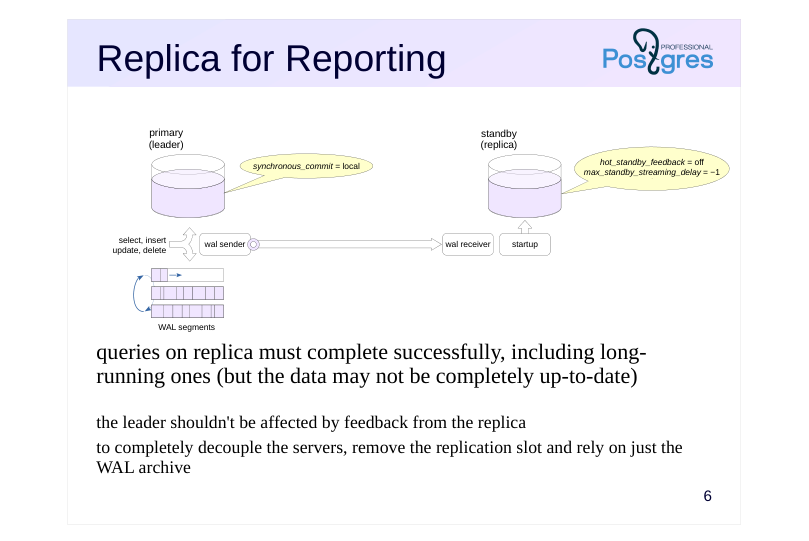
queries on replica must complete successfully, including long-running ones (but the data may not be completely up-to-date)
- the leader shouldn’t be affected by feedback from the replica to completely decouple the servers, remove the replication slot and rely on just the WAL archive
Speaker notes
Another option is to distribute different types of workload across separate servers. The main server can handle OLTP workloads, while long-running read queries (reports) can be offloaded to a replica.
Beyond distributing workload across servers, this approach also prevents long-running queries on the main server from delaying vacuum operations and causing table bloat.
Based on these considerations, the reporting replica should be kept as isolated as possible from the main server. Feedback should be disabled (hot_standby_feedback = off), but the delay for conflicting WAL records should be set very high, up to infinity (max_standby_streaming_delay = −1).
Since long-running reports don’t need up-to-the-minute data, you can forgo using a replication slot if an archive is available (just remember to adjust the max_standby_archive_delay parameter the same way as max_standby_streaming_delay). In that case, if the leader removes a WAL file before the replica can retrieve it, the replica will fetch it from the archive instead.
This replica can also be used for creating backups.
Of course, other viable parameter combinations exist. The key is to have a clear understanding of what problem needs solving and how different parameters affect the outcome.
Page 7: Multiple replicas
 {#source-figure-007 caption=“Source slide page 7: Multiple replicas”}
Speaker notes
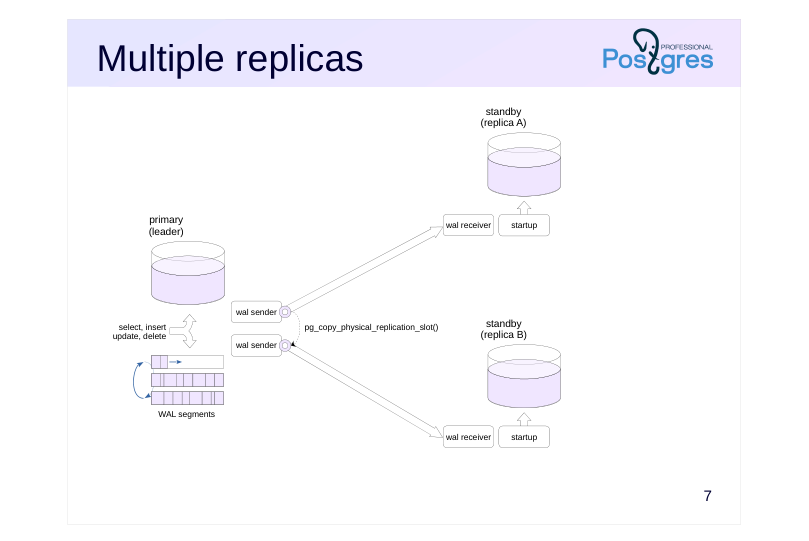
Multiple replicas can be connected to the main server. No special configuration is required for this, but keep in mind that each replica will have its own dedicated wal sender process and its own replication slot. During deployment, you can distribute a single base backup and clone the replication slot using the pg_copy_physical_replication_slot function.
https://postgrespro.com/docs/postgresql/16/functions-admin#FUNCTIONS-R EPLICATION
This setup is typically used for load distribution, but the actual distribution itself must be handled by external tools (see the “Cluster Technologies” module).
Page 8: Primary Server and Two Physical Replicas
Let’s set up a configuration with two replicas. Take a standalone backup of the first server while simultaneously creating a slot.
Since the third server will start applying WAL records from the same position as the second, we can duplicate the slot:
Deploy the standalone backup to the PG_DATA directories on the second and third servers:
In the third server’s configuration, set the gamma slot:
Start both replicas:
The slots have been initialized:
Test:
Page 9: Page 9
 {#source-figure-009 caption=“Source slide page 9: Page 9”}
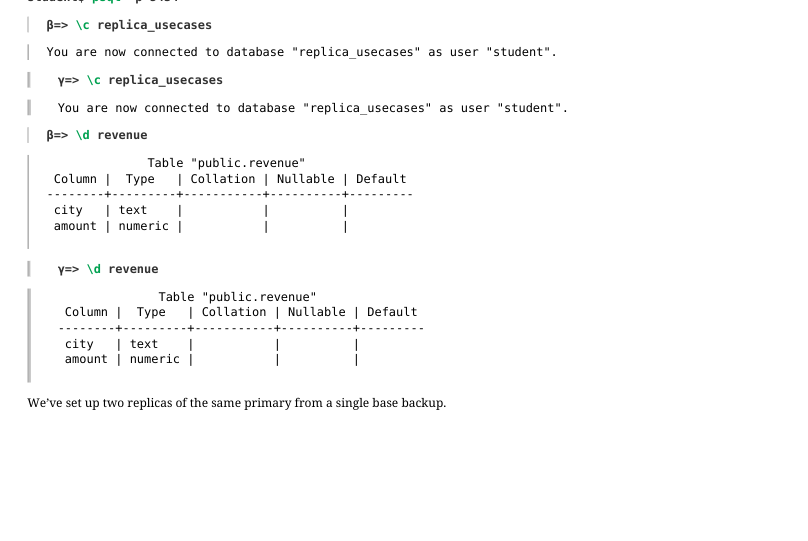
We’ve set up two replicas of the same primary from a single base backup.
Page 10: Cascading replication
 {#source-figure-010 caption=“Source slide page 10: Cascading replication”}
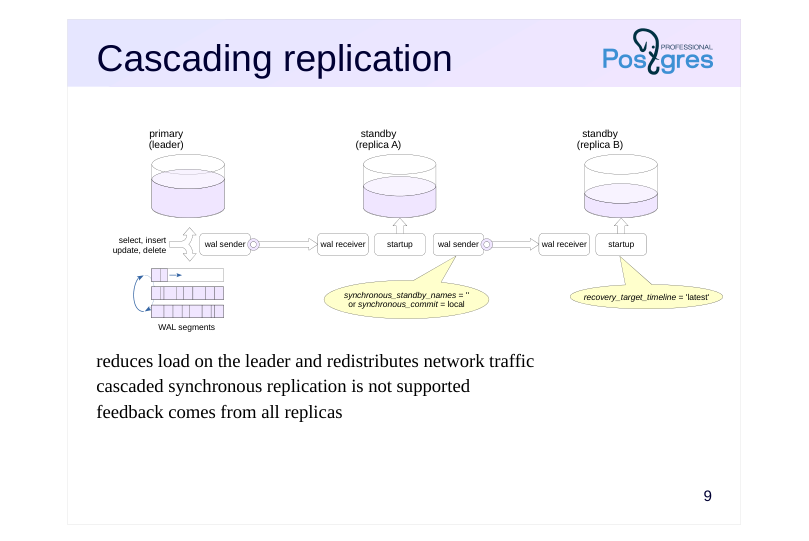
reduces load on the leader and redistributes network traffic cascaded synchronous replication is not supported feedback comes from all replicas
Speaker notes
Multiple replicas connected to a single primary server will generate additional load on it. Network load should also be considered when transmitting multiple copies of the WAL stream.
To reduce this load, replicas can be arranged in a cascade configuration, where servers relay WAL records to each other in a chain. The further downstream from the leader, the greater potential lag may accumulate in the replicated data. With this setup, the replication process has to be monitored at multiple servers at once, making monitoring more complicated.
When a switchover to a replica occurs (to the one closest to the primary server), its timeline ID increments. recovery_target_timeline = ’latest’ will direct the recovery to this new timeline (this is the default value).
Note that cascaded synchronous replication is not supported here – the leader can only synchronize with replicas directly connected to it. Therefore, on the first replica in the cascade, you need to set synchronous_standby_names = “or synchronous_commit = ’local'.
However, the leader collects feedback from all replicas in the cascade.
Page 11: Delayed Replication
 {#source-figure-011 caption=“Source slide page 11: Delayed Replication”}
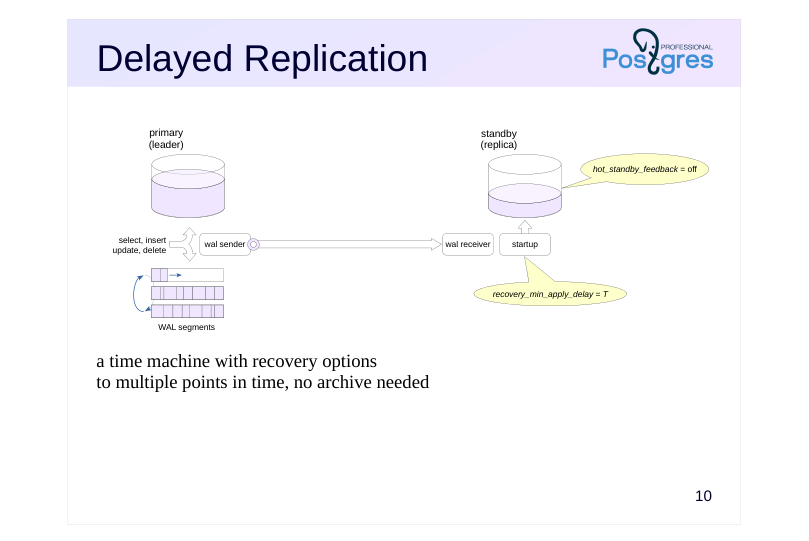
a time machine with recovery options to multiple points in time, no archive needed
Speaker notes
Case: have the ability to view data at and recover to an arbitrary point in time.
Point-in-time recovery from archive already does precisely this, but it takes a while, and has to be set up in advance.
Alternatively, you can create a replica that applies WAL records with a delay (recovery_min_apply_delay). This requires clock synchronization between servers.
Only commit records are delayed, not all WAL records. Records prior to commit may be applied “ahead of schedule,” but this poses no problem thanks to multiversion concurrency control. Feedback should be disabled to prevent table bloat on the leader.
A typical scenario: something goes wrong on the leader (for instance, critical data gets deleted). The replica still has the data because the corresponding records haven’t been applied yet. Further WAL replay is paused using the pg_wal_replay_pause function while the issue is being investigated. The pg_get_wal_replay_pause_state function allows you to check the pause status.
To resume, use thepg_wal_replay_resume function to lift the pause. If you decide to roll back to a point before the deletion occurred, set the recovery target using one of the recovery_target_* parameters and restart the replica.
Page 12: Logical Replication
Consolidation and Shared Reference Data
- Major Version Upgrade
- Leader-Leader
- Logical Decoding at Physical Replica
Page 13: Consolidation
 {#source-figure-013 caption=“Source slide page 13: Consolidation”}
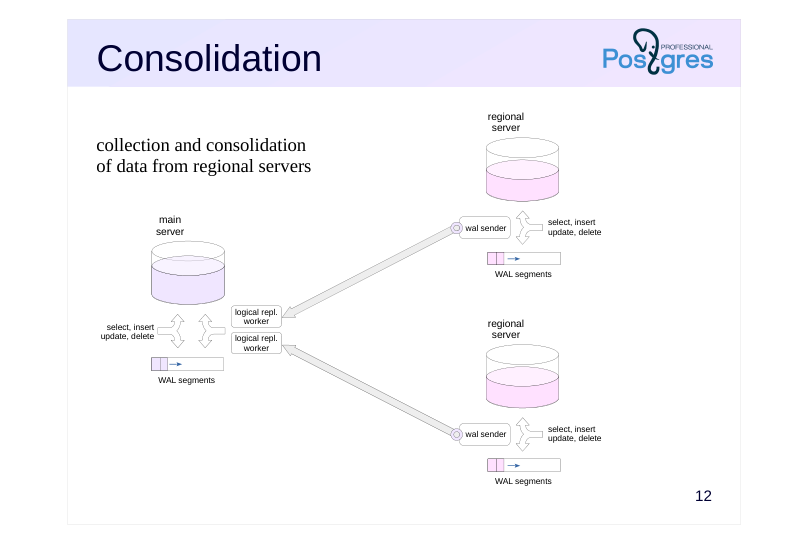
collection and consolidation of data from regional servers
Speaker notes
Suppose there are several regional branches, each of which runs on its own PostgreSQL server. The goal is to consolidate some of the data on the central server.
First, publications for the necessary data are created on regional servers. The central server subscribes to these publications. The received data can be processed on the central server using triggers: for example, to standardize it into a uniform format.
Since logical replication relies on streaming data through replication slots, the servers need a reasonably stable connection: otherwise, during connection outages, the regional servers will have to retain WAL files.
This approach has many nuances from a business logic perspective that require thorough examination. In some cases, it may be easier to transmit data in batches every now and again.
Page 14: Shared reference data
 {#source-figure-014 caption=“Source slide page 14: Shared reference data”}
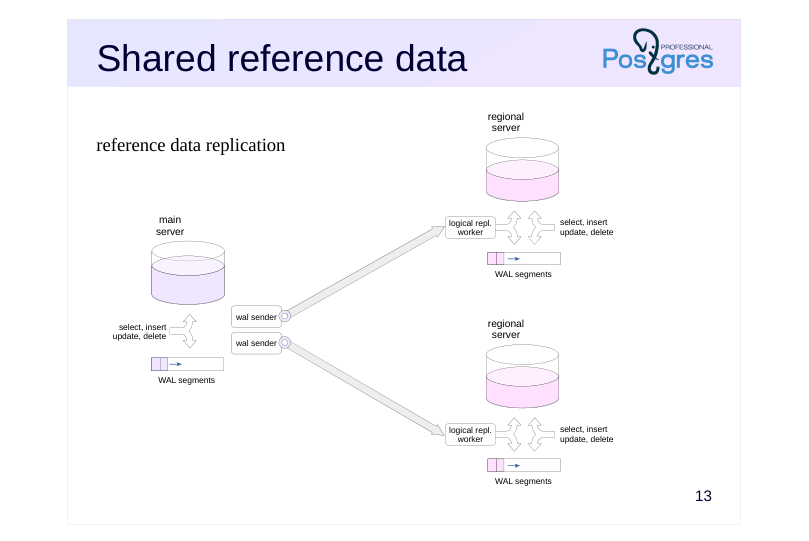
reference data replication
Speaker notes
Another use case: the main server maintains reference data that needs to be kept current across regional servers.
In this case, the setup is reversed: the main server publishes changes, and regional servers subscribe to receive those updates.
Page 15: Consolidation Using Logical Replication
 {#source-figure-015 caption=“Source slide page 15: Consolidation Using Logical Replication”}
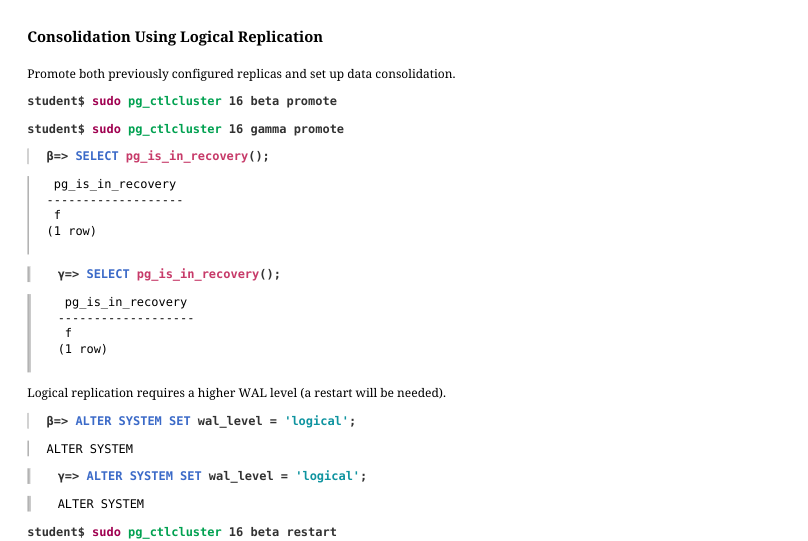
Promote both previously configured replicas and set up data consolidation.
Logical replication requires a higher WAL level (a restart will be needed).
Remove the replication slots on the alpha server:
Publish the table on the second and third servers:
The first server subscribes to both publications:
Page 16: Page 16
Work is in full swing at the branch offices:
And the central office sees the activity of the entire company (let’s wait a few seconds for replication to catch up):
Page 17: Server Upgrades
 {#source-figure-017 caption=“Source slide page 17: Server Upgrades”}
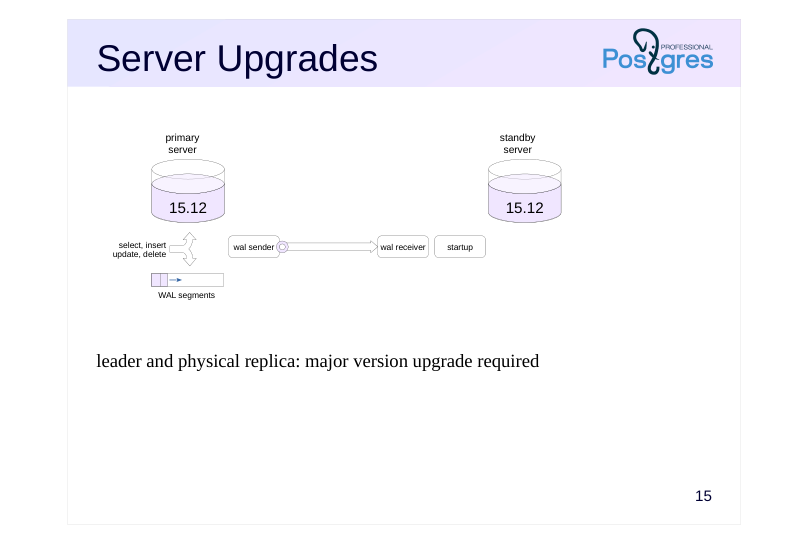
leader and physical replica: major version upgrade required
Speaker notes
Logical replication can be used to upgrade the server’s major version with zero or minimal downtime.
Let’s say we have a main server and a physical streaming replica.
Page 18: Server Upgrades
 {#source-figure-018 caption=“Source slide page 18: Server Upgrades”}
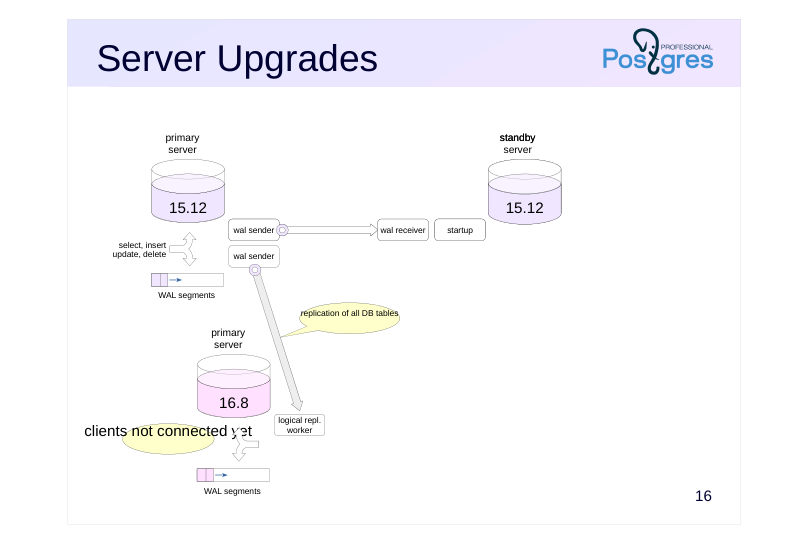
clients not connected yet
Speaker notes
We set up a new server running the required PostgreSQL version and migrate the table structure from the selected database to it.
On the primary server running the previous version, we publish changes for all database tables. Since schema changes are not replicated, they must be prohibited during the upgrade process.
Page 19: Server Upgrades
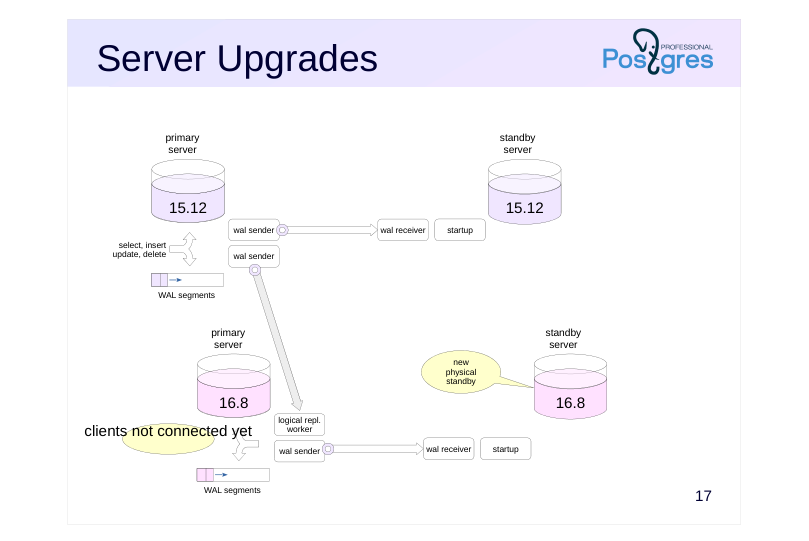 {#source-figure-019 caption=“Source slide page 19: Server Upgrades”}
clients not connected yet
Speaker notes
We create a physical replica that mirrors the replica from the previous server version.
We end up with a parallel server setup running the new PostgreSQL version. This setup mirrors the one we have for the old version.
Page 20: Server Upgrades
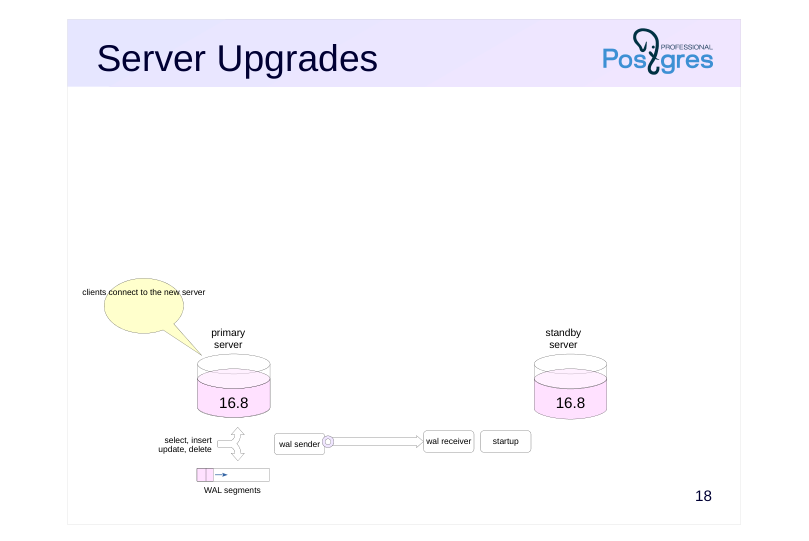 {#source-figure-020 caption=“Source slide page 20: Server Upgrades”}
clients connect to the new server
Speaker notes
After that, we switch clients over to the new servers and shut down the old ones. The service interruption will depend on how smoothly this switchover can be performed.
Keep in mind that this approach isn’t universally applicable: it comes with quite a few limitations and is significantly more complex than using the pg_upgrade utility, which can perform the upgrade in a short amount of time.
Page 21: Leader-Leader
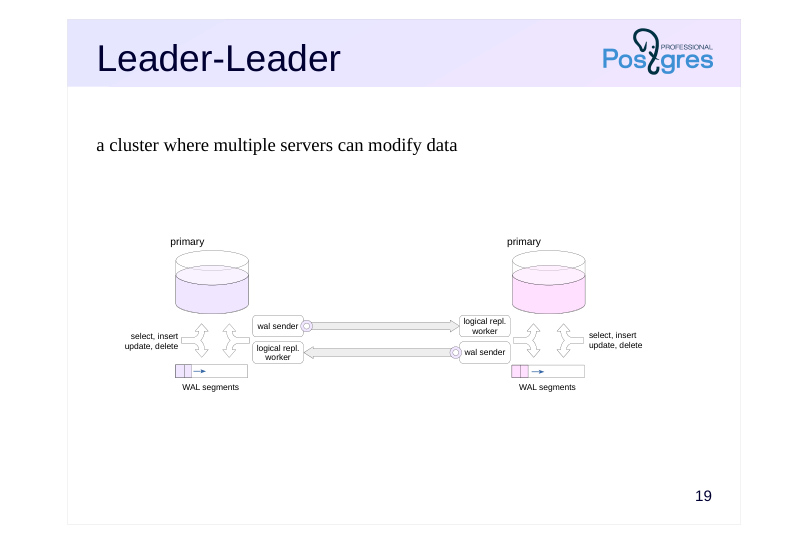 {#source-figure-021 caption=“Source slide page 21: Leader-Leader”}
a cluster where multiple servers can modify data
Speaker notes
Case: provide reliable data storage on multiple servers with the ability to write the data on any node (particularly useful for systems distributed across multiple locations).
This can be achieved through bidirectional logical replication, synchronizing changes for the same tables between servers in both directions (while limiting allowed replication origins, as was discussed in the “Logical Replication” module.
This requires that the applications working with the cluster are built with certain considerations in mind in order to avoid conflicts when modifying data in the same tables. For example, to use globally unique identifiers or to ensure that different servers work with different ranges of keys. You can also use the row filtering capabilities introduced in PostgreSQL 15.
Keep in mind that the leader-leader setup with logical replication will not support global distributed transactions by itself. With synchronous replication, reliability can be ensured, but consistency of data between servers cannot. In addition, PostgreSQL does not offer any tools for automatic failure processing, connecting or removing nodes from the cluster, etc. These tasks must be solved by external means.
Page 22: Decoding on Replica
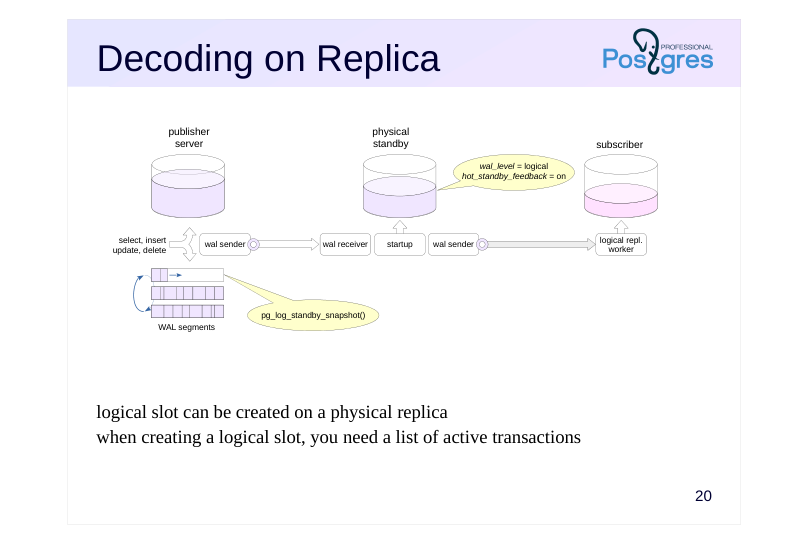 {#source-figure-022 caption=“Source slide page 22: Decoding on Replica”}
logical slot can be created on a physical replica when creating a logical slot, you need a list of active transactions
Speaker notes
Starting with PostgreSQL 16, the logical publication slot can be created on a physical replica, which removes some of the load from the leader.
On the replica, enable hot_standby_feedback so that the leader does not delete the tuples needed by the replica prematurely.
When creating a logical replication slot, you need to know the active transaction IDs. This information is collected from the bgwriter and checkpointer processes on the leader as a WAL record. If there is no activity on the leader, slot creation may be delayed. To avoid waiting, you can call the pg_log_standby_snapshot function on the leader.
https://postgrespro.com/docs/postgresql/16/logicaldecoding-explanation
https://postgrespro.com/docs/postgresql/16/functions-admin
Page 23: Takeaways
Physical replication is a fundamental mechanism for addressing a wide range of challenges
- ensuring high availability
- load balancing for uniform workloads
- separating different types of workloads
- etc.
- Logical replication extends these capabilities
Page 24: Practice
- Configure physical streaming replication between alpha and beta. 2. Configure cascade replication to gamma with a WAL record application delay of ten seconds. 3. Verify that replication is working and confirm that data appears on gamma with the configured delay. 4. Switch to beta after stopping the leader. 5. Confirm that gamma continues to operate as a replica.
Speaker notes
After completing the practice, remove the created database, the replication slot, and reset the configuration.
Page 25: 1. Configuring Replication Between Alpha and Beta
First, create a database.
Create a replication slot and take a standalone backup.
The postgresql.auto.conf and standby.signal files were created by pg_basebackup.
Start the replica:
2. Configuring Replication Between Beta and Gamma
Let’s create a standalone backup on beta to demonstrate that backups can be created from a replica. The slot is created by the utility.
The postgresql.auto.conf file was created by pg_basebackup. Now let’s add a replay delay:
Check the result:
Page 26: Page 26
Start the gamma server.
3. Testing the Setup
On alpha, create a table and verify that it appears on beta first, and then on gamma 10 seconds later.
Check gamma:
The table isn’t there yet. Wait 10 seconds…
The table has appeared.
4. Promoting beta
Current timeline on gamma:
When beta is promoted, the timeline number will increment by one, and gamma’s recovery process will follow the new timeline due to the default value:
Page 27: Page 27
 {#source-figure-027 caption=“Source slide page 27: Page 27”}
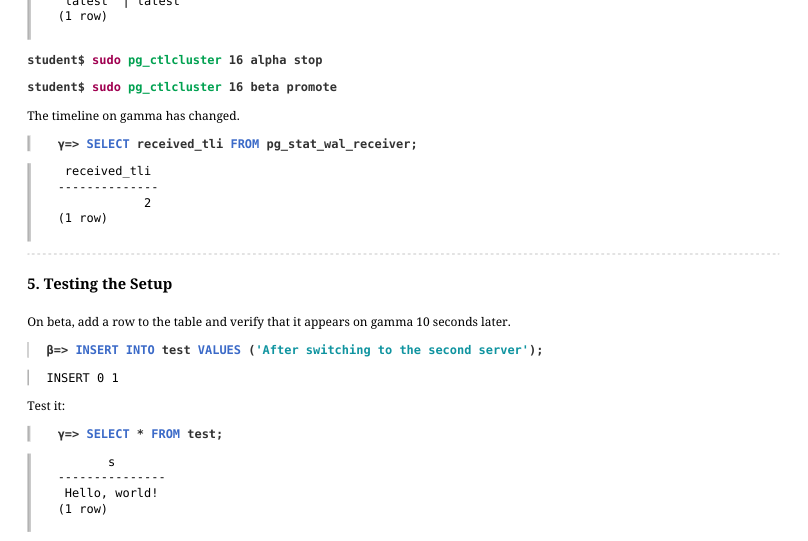
The timeline on gamma has changed.
5. Testing the Setup
On beta, add a row to the table and verify that it appears on gamma 10 seconds later.
Test it:
The second row isn’t there yet. Wait 10 seconds…
The row has appeared.
Cleanup
Delete the created databases and replication slots, reset the configuration.
Page 28: Page 28
Page 29: Practice+
1. Configure physical replication between alpha and beta with feedback. Note the WAL level required to configure logical replication, you will need it later. 2. Configure logical replication of a table from alpha to gamma by creating a replication slot on beta – a physical replica. To speed up slot creation on beta, use the pg\_log\_standby\_snapshot function.
Speaker notes
- Transfer the structure of the published table to gamma, for example, using pg_dump. Do not transfer any data.
The publication must be created on alpha, subscription on gamma, and beta set in the subscription connection string.
Reset the system: delete the new database and the replication slot and reset the configuration.
Page 30: 1. Physical Replication from Alpha to Beta
Enable feedback right away and set the WAL level required for logical replication:
Create a database and a table.
Create a standalone backup.
Verify that physical replication is working.
2. Logical Replication from Beta to Gamma
Copy the database and table structure from beta to gamma using pg_dump.
Page 31: Page 31
We copied only the table structure, not the data. Create a publication.
Subscribe to the changes in the test table published by the replica (beta).
The subscription is waiting for a slot to be created on the beta server. To speed things up, let’s ask alpha to write a record with active transaction IDs to the WAL:
Page 32: Page 32
 {#source-figure-032 caption=“Source slide page 32: Page 32”}
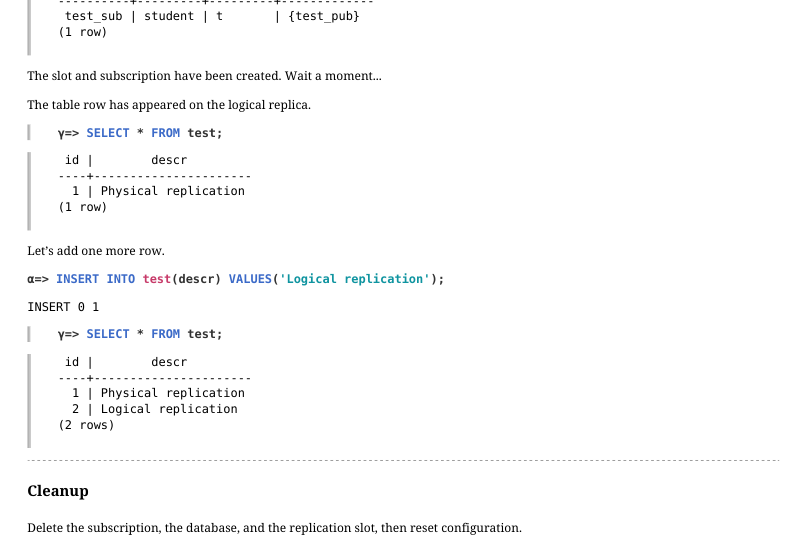
The slot and subscription have been created. Wait a moment… The table row has appeared on the logical replica.
Let’s add one more row.
Cleanup
Delete the subscription, the database, and the replication slot, then reset configuration.