06 Lesson 06: Replication / Logical Replication
This page is extracted from the official PDF into native Markdown. Slide text, code and speaker notes are kept in reading order; the original PDF and HTML remain the layout references. HTML source: No matching course-page link was captured in the source inventory. Archive: DBA3-handouts-16-en-20260917.zip PDF pages: 42
Page 1: Replication / Logical Replication
Copyright
© Postgres Professional, 2017–2025 Authors: Egor Rogov, Pavel Luzanov, Ilya Bashtanov, Alexey Beresnev Photo: Oleg Bartunov (Phu Monastery and Bhrikuti Peak, Nepal)
Use of Course Materials
Non-commercial use of course materials (presentations, demonstrations) is allowed without restrictions. Commercial use is possible only with the written permission of Postgres Professional. It is prohibited to make changes to the course materials.
Feedback
Please send your feedback, comments and suggestions to: edu@postgrespro.ru
Disclaimer
Postgres Professional assumes no responsibility for any damages and losses, including loss of income, caused by direct or indirect, intentional or accidental use of course materials. Postgres Professional company specifically disclaims any warranties on course materials. Course materials are provided “as is,” and Postgres Professional company has no obligations to provide maintenance, support, updates, enhancements, or modifications.
Page 2: Topics
- Logical vs Physical Replication
- Publications and Subscriptions
- Initial Synchronization
- Row Identification and Filtration
- Logical Decoding
- Large Transactions
- Conflicts
- Replication Sources
Page 3: Comparison
Physical
- leader-replica: data flow in one direction only
- stream WAL records or send WAL files
- binary server compatibility is required
- whole cluster replication only
- Logical
- publication-subscriptions: servers have no dedicated roles
- row-level changes are replicated
- protocol-level compatibility is required
- can replicate individual tables
Speaker notes
During physical replication, one server is assigned the leader role and others become replicas. The leader transfers WAL records to replicas to be applied to data files there. The replica does not “understand” the changes, just applies them mechanically without any interpretation of what the changes mean, so binary compatibility between servers is necessary (the same platforms and major PostgreSQL versions). Since the WAL is shared across the entire cluster, only the cluster as a whole can be replicated.
In logical replication, one server creates a publication that other servers can subscribe to. Servers don’t have fixed roles: the same server can both publish changes and subscribe to publications from other servers (or even its own).
By default, information about table row changes is transmitted to the subscription in a text format that’s platform-independent and doesn’t require binary compatibility.
https://postgrespro.com/docs/postgresql/16/logical-replication
Page 4: How It Works
 {#source-figure-004 caption=“Source slide page 4: How It Works”}
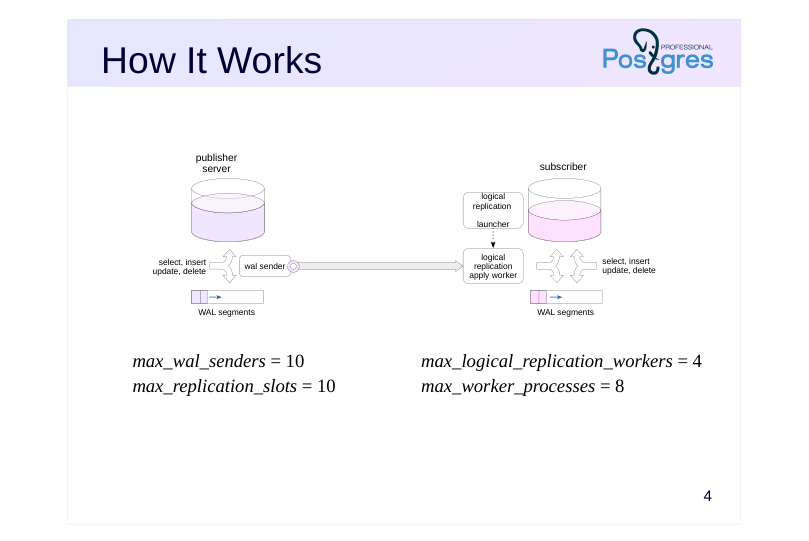
- max_wal_senders = 10
- max_logical_replication_workers = 4
- max_replication_slots = 10
- max_worker_processes = 8
Speaker notes
Logical replication uses the publish-subscribe pattern.
When the instance starts, the logical replication launcher background process starts with it, periodically checking the pg_subscription table in the system catalog for new subscriptions. As soon as a subscription appears, a background logical replication apply worker process is launched to handle it. It connects to the publishing server, which, like any replication connection, starts the wal sender process. This process reads the WAL, selects the necessary records and converts them to platform-independent protocol messages. A logical replication slot is always used for that.
On the subscription side, the worker receives messages and applies changes. Meanwhile, the subscriber server can receive normal read and write queries.
Note that the publishing server can run multiple wal sender processes, one for each subscription. Both max_wal_senders and max_replication_slots must be no less than the number of subscriptions.
On the subscriber server, you need to configure max_logical_replication_workers (for processes that receive subscription changes) and max_worker_processes in general (more by one at least, since there’s also the logical replication launcher process, though this pool is actually used for other purposes as well).
https://postgrespro.com/docs/postgresql/16/logical-replication-architecture
Page 5: Publication
Database object
- sends data changes row by row in the order they are committed in
- only for regular and partitioned tables
- wal_level = logical
- Published operations
- insert, update, delete, truncate
- Privileges
- creating a new publication – CREATE privilege for the database
- add table – owner or superuser
- add all tables for a schema or a database – superuser
Speaker notes
A publication is created on the server to collect changes from one or more tables (regular or partitioned) in the same database. To create a publication, you need the CREATE privilege on the database. To replicate from multiple databases, multiple publications must be created.
To include a table in a publication, you must be either a superuser or the owner of the table. To publish all tables belonging to a schema or a database, you must be a superuser.
For logical replication to work, the publishing server’s WAL must contain additional information (wal_level = logical).
Publishing includes row changes that occur in tables as a result of DML commands. The MERGE command executed on the publishing server is applied as INSERT, UPDATE, or DELETE.
By default, changes are not transferred immediately, but only when the transaction is committed.
https://postgrespro.com/docs/postgresql/16/logical-replication-publication
https://postgrespro.com/docs/postgresql/16/sql-createpublication
Page 6: Subscription
Database object
- receives messages from one or more publications
- binary subscription possible
- applies changes row by row
- Tables and columns are matched by full names
- Privileges
- create subscription – pg_create_subscription role or superuser
Speaker notes
By defining subscriptions to publications in a database, you can receive and apply changes. Basically, a subscription is a connection to the publishing server that serves for data replication.
Members of the pg_create_subscription role or superusers can create subscriptions.
Changes are always applied row by row. Although each individual change doesn’t require query parsing and planning, bulk changes will still apply more slowly because of this row-by-row approach.
Tables are identified by their full names (including the schema), and columns are identified by their names as well. This allows the subscription to use a different data schema (for example, having additional columns in the table).
When creating a subscription, you can specify the parameter binary to transfer the data in binary format. The binary format can speed up processing if binary receive and send functions are defined for the required data types. However, when using binary format, it’s important that the machine representation of data is compatible across different platforms.
https://postgrespro.com/docs/postgresql/16/logical-replication-subscription
Page 7: Publications and Subscriptions
 {#source-figure-007 caption=“Source slide page 7: Publications and Subscriptions”}
Speaker notes
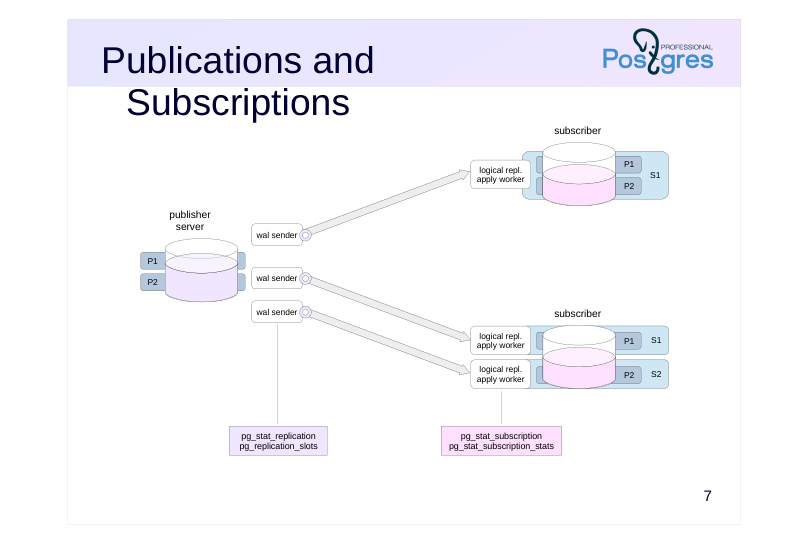
You can distribute objects to publications in any way on the publishing server. You can include all tables in one publication, you can split them between multiple publications – this does not affect performance.
However, each subscription creates a separate connection to the publishing server, creating unnecessary load. Several wal sender processes will run on the publishing server, each of which will independently read the WAL and perform logical decoding (more on that below) in its local memory. Therefore, if you need to subscribe to several publications, it is better to do it in one common subscription.
Remember that publications and subscriptions are database objects, so each database will require a separate connection.
Logical replication monitoring on the publishing server is identical to physical replication monitoring. Your most important tools here are the views pg_stat_replication and pg_replication_slots.
Subscription status information is stored in pg_subscription.
https://postgrespro.com/docs/postgresql/16/catalog-pg-subscription#CATAL OG-PG-SUBSCRIPTION
Information about applying changes is found in the pg_stat_subscription view.
https://postgrespro.com/docs/postgresql/16/monitoring-stats#MONITORING-PG-STAT-SUBSCRIPTION
Replication errors go to pg_stat_subscription_stats.
https://postgrespro.ru/docs/postgresql/16/monitoring-stats#MONITORING-P G-STAT-SUBSCRIPTION-STATS
Page 8: Logical Replication
We’re going to set up logical replication for the test table from the alpha server to the beta server. Let’s start by creating a database.
Logical replication requires another WAL level.
We’ll make the second database cluster a copy of the first one, so let’s back it up to the second server’s data directory.
Now let’s create a table on the first server and populate it with data.
The test table is not present on the second server. Since DDL commands are not replicated, we need to create this table manually. Its structure may be different, as long as all the published tables are present.
Create a publication on the first server.
Notice that the publication was created even though it doesn’t contain any tables yet. Typically, you create a publication by specifying: a list of tables, and in this case you can specify which columns to publish all tables in specified schemas (requires superuser privileges)
Page 9: Page 9
all tables in the database (requires superuser privileges) Let’s add the table to the publication.
On the second server, subscribe to the publication:
Check the subscription we created.
The values for id, descr and cluster_name columns are retrieved from the publication. Starting with PostgreSQL 15, you can publish only specific columns instead of all of them. Let’s modify the publication:
Check:
Notice that the cname column now has the default value (beta) on the subscriber.
Page 10: Page 10
The following view shows the state of the subscription:
received_lsn – the LSN up to which changes have been received latest_end_lsn – the LSN confirmed to the WAL sender process The logical replication worker process starts (you can see its ID in pg_stat_subscription.pid):
Page 11: Limitations
Not replicated
- sequences materialized views temporary and unlogged tables foreign tables large objects DDL TRUNCATE restriction
- tables sharing foreign keys must belong to the same subscription
Speaker notes
Only changes to the content of regular and partitioned tables caused by DML commands are replicated.
The contents of the rest of the objects, broadly defined as “relations”, are not replicated. This includes sequences, materialized views, temporary and unlogged tables, foreign tables. Large objects are not replicated.
DDL commands are also not replicated, so you must first create the necessary tables on the subscription side.
TRUNCATE replicates successfully only if all subscriber tables whose foreign keys reference the tables being truncated are included in the same subscription.
https://postgrespro.com/docs/postgresql/16/logical-replication-restrictions
Page 12: Initial Synchronization
 {#source-figure-012 caption=“Source slide page 12: Initial Synchronization”}
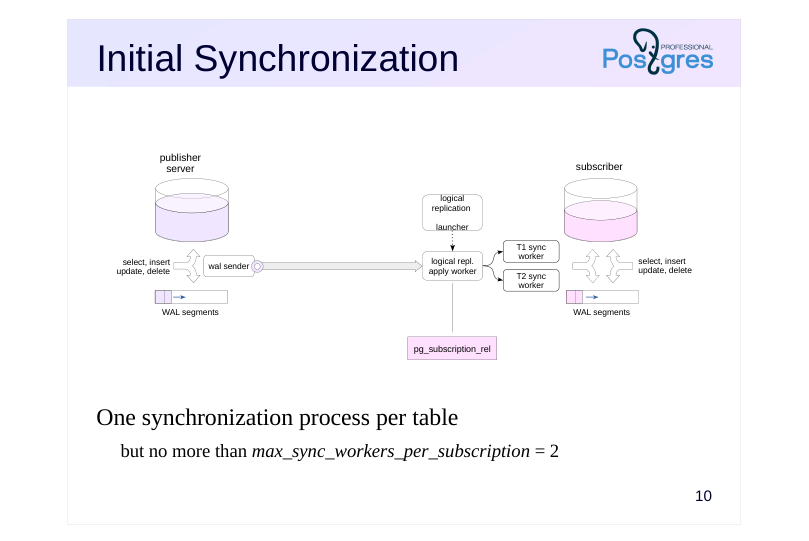
One synchronization process per table
- but no more than max_sync_workers_per_subscription = 2
Speaker notes
By default, if you do not specify a value for copy_data = false, initial table content synchronization occurs when a subscription is created. This happens seamlessly through the use of the snapshot export mechanism.
The initial synchronization should be completed as soon as possible so as not to delay the vacuuming horizon longer than necessary. Therefore, synchronization is usually done in parallel: the apply worker process looks at the list of replicated tables and starts additional workers that do the actual synchronization. One table is always synchronized by one process.
The maximum number of concurrent synchronization processes is limited by max_sync_workers_per_subscription (default is two).
The replication status for each table in the subscription is shown in the pg_subscription_rel view.
https://postgrespro.com/docs/postgresql/16/catalog-pg-subscription-rel#CAT ALOG-PG-SUBSCRIPTION-REL
If the subscription is flagged as binary, then not only replication will be performed in binary format, but also initial synchronization.
Page 13: Initial Synchronization
By default, the subscriber collects table contents first, and replication begins after that. This is seamless, and data retention is guaranteed. Create three tables with a huge number of rows, and a publication:
On the subscriber, create empty tables with identical structure:
Subscribe to the publication, then peek into the system table that tracks the replication state of each table, and into the process list.
Here, it says that the table test is being replicated (r), and that the three new tables are still synchronizing.
In the process list, we see a new process apply worker serving the new subscription, as well as two synchronization processes. There are three tables, but the number of concurrent processes is limited by the parameter:
Page 14: Page 14
 {#source-figure-014 caption=“Source slide page 14: Page 14”}
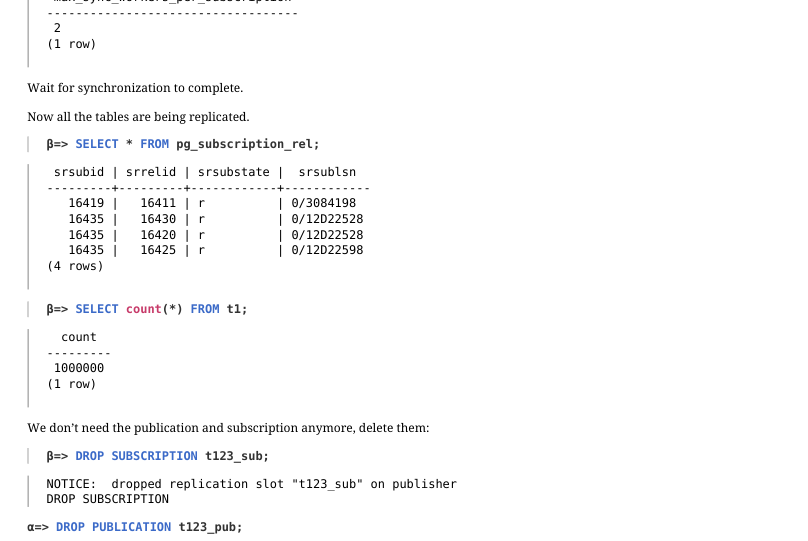
Wait for synchronization to complete. Now all the tables are being replicated.
We don’t need the publication and subscription anymore, delete them:
Page 15: Row Identification
There must be a suitable row for change and delete operations
- Logical row ID
- DEFAULT
- primary key columns (default)
- FULL
- all columns
- NOTHING
- no identification
- (default for the system catalog)
Speaker notes
New rows are inserted unambiguously on the subscription side. Changes and deletions are more complicated. You need to determine which row on the subscriber to apply the operation to. Therefore, a logical row ID is defined for each table. By default, rows are identified by primary key columns, but the identifier can be changed with ALTER TABLE … REPLICA IDENTITY.
Rows can be identified by another unique index, in which all columns have a NOT NULL constraint.
Another option is identification by all columns. In PostgreSQL 16 and higher, you can use full B-tree index lookup, where the first field is a column from the publication. PostgreSQL 17 and up can also use hash indexes. If there is no index available, a full scan is performed, which is extremely ineffective for large tables.
You can also completely disable replication support for certain tables (this is how system catalog tables are set up by default).
When changing or deleting, the column values of the tuple to be deleted do not get into the replica WAL – this is one of the reasons why the logical WAL level is required on the publishing server. At logical, it stores the old values of the columns included in the logical identifier. This is why with identification by all columns, the WAL size can be significantly larger compared to the replica level.
https://postgrespro.com/docs/postgresql/16/sql-altertable#SQL-ALTERTABL E-REPLICA-IDENTITY
Page 16: Row Filtering
Filter at publication
- Filtering possible
- insert
- for any published columns
- delete
- for logical ID columns
- update
- for logical ID columns
- this may transform into insert or delete
- truncate
- filter ignored
- Plain expressions only
Speaker notes
By default, the publishing server sends out all published table rows.
Since PostgreSQL 15, you can specify a filter expression. Rows that evaluate as false or NULL will not be published.
Filtering does not affect the truncate operation. For insert operations, any published columns can be included in the filter expression, and for update and delete, only the columns included in the logical row ID.
For update, the filter expression is evaluated for both the old and the new row version. If the filter expression is false or NULL for both, the row is not replicated. If the old row doesn’t match the filter but the new one does, the new row is inserted. If the opposite is true — the old one matches but the new one does not — the row is deleted. If both match, update goes through.
You can only filter using plain expressions: no user-defined functions, operators, types and collations, no referencing system columns, no calling built-in functions with volatile and stable variability.
https://postgrespro.com/docs/postgresql/16/logical-replication-row-filter.html
Page 17: Row Identification and Filtering
By default, the logical row ID is determined by the primary key columns:
d – default (primary key, if present) i – index f – all columns n – none Let’s say we need to replicate only rows where the cluster_name field has the value alpha. The cluster_name column is used in the filter expression, but it’s not published yet. Publish all the columns, without listing any specific ones.
Observe how change replication works.
The row with the value gamma was not replicated. Let’s try to modify the row.
For upgrade and delete, the filter expression accepts only columns contained in the logical row ID, but for insert, all colums are good. Let’s change the filter condition.
Page 18: Page 18
Now modify the row:
The row change has been replicated. The new filter condition works:
The row with id = 0 has not been published, so it wasn’t replicated.
Page 19: Logical Decoding
 {#source-figure-019 caption=“Source slide page 19: Logical Decoding”}
Speaker notes
During streaming physical replication, the wal sender process reads WAL records and passes them to the replica unchanged.
During logical replication, records are converted. The logical decoding module selects records that correspond to the published operations and tables, taking into account the columns and filter conditions. Selected records are converted to logical operations information, which is sent to the reorder buffer and stored there in accordance with the transaction IDs.
At the logical level, WAL additionally records the information required for logical decoding, in particular:
● for update – new values of all columns, not just changed ones,
● for update and delete – the old values of the columns in the logical ID,
● for commit – database OID.
The reorder buffer is in the local memory of the wal sender process. If the amount of data in it approaches the value of the logical_decoding_work_mem parameter, the largest transaction is sent to the replication slot (a file in PGDATA/pg_replslots/name).
When a transaction is committed, all its operations are sent to the output module, which converts them into replication protocol messages.
https://postgrespro.com/docs/postgresql/16/logicaldecoding
https://postgrespro.com/docs/postgresql/16/runtime-config-resource#GUC-L OGICAL-DECODING-WORK-MEM
Page 20: Slots and Logical Decoding
Let’s clear the table and check out logical decoding.
First, manually create a logical replication slot. The pgoutput plugin is used to send changes to the subscriber, but for observation purposes, the test_decoding plugin is more convenient:
Now there are two slots on the alpha server:
In a separate session, start a transaction and insert a row into the table:
The output plugin can request changes from the slot:
The transaction isn’t complete yet, so the output plugin hasn’t received anything. Let’s make another change and commit the transaction.
Page 21: Page 21
 {#source-figure-021 caption=“Source slide page 21: Page 21”}
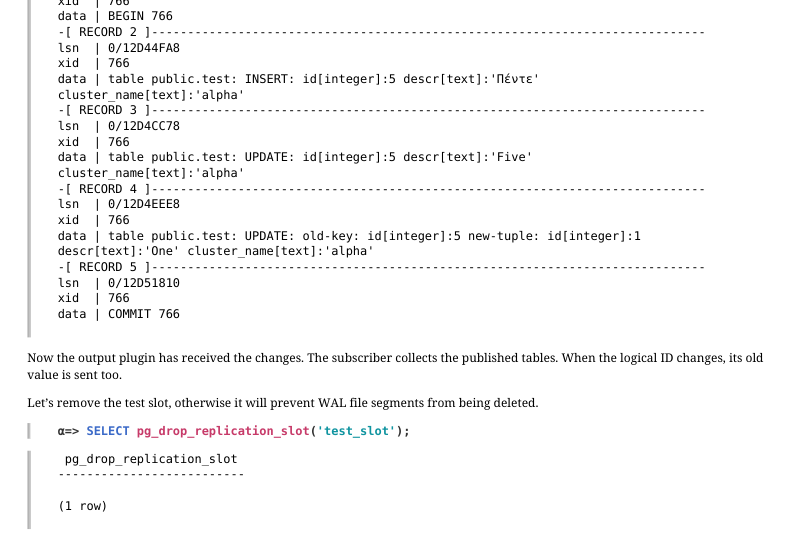
Now the output plugin has received the changes. The subscriber collects the published tables. When the logical ID changes, its old value is sent too. Let’s remove the test slot, otherwise it will prevent WAL file segments from being deleted.
Page 22: Large Transactions
 {#source-figure-022 caption=“Source slide page 22: Large Transactions”}
Speaker notes
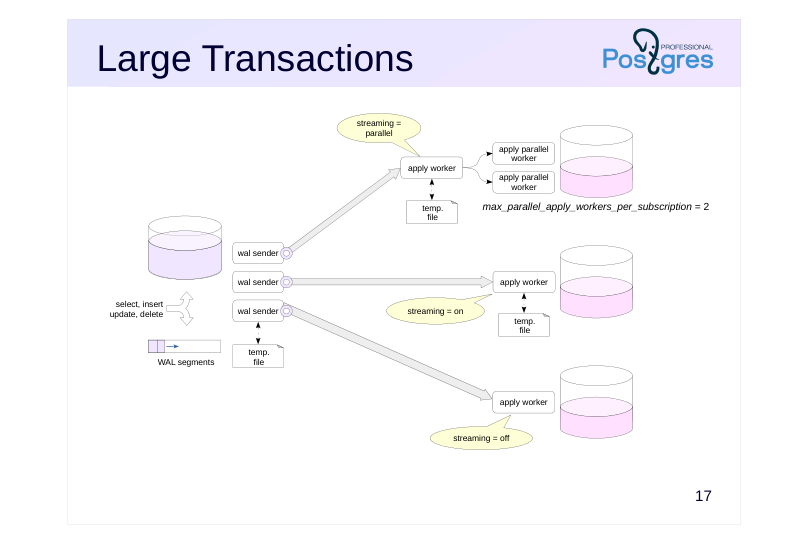
By default (subscription streaming = off), changes are accumulated in the reorder buffer and sent to the subscriber after the transaction is committed.
If a transaction changes a lot of data, problems can occur:
● wal sender’s reorder buffer memory costs,
● writing files when the reorder buffer exceeds (logical_decoding_work_mem) memory,
● replica lag. If you set streaming = on, the publishing server will pass data changes to the subscriber while the transaction is still running. When the total amount of changes exceeds the value of the logical_decoding_work_mem parameter, the accumulated changes of the largest transaction in terms of volume are not dumped into to a file, but are immediately sent to the output module.
The subscriber saves these changes in its temporary files and applies them when committing the transaction.
Starting with PostgreSQL 16, if streaming = parallel and there are workers available, changes are not saved at the subscriber, but are immediately applied by the free workers. The number of such processes per subscription is limited by the max_parallel_apply_workers_per_subscription parameter.
https://postgrespro.com/docs/postgresql/16/sql-createsubscription#SQL-CR EATESUBSCRIPTION-WITH-STREAMING
Page 23: Conflicts
Lead to errors
- constraint violations,
- insufficient rights to target table or row level security
- replication error,
- subscription with disable_on_error goes down
- you can manually correct subscription-side data
- or skip the conflicting transaction
- Ignored
- row being updated or deleted does not exist at the subscriber
- replication continues, but consistency may be compromised
Speaker notes
Because the tables on the publishing server and at the subscriber can change independently of each other, a subscription operation may conflict with existing data.
Often a conflict is a situation where an operation cannot be performed, usually due to a violation of an integrity constraint, or the lack of permissions on the target table, or row level security restrictions.
In this case, the operation fails. The subscriber periodically repeats attempts, but they will fail until the conflict is resolved. Conflicts can only be resolved manually, automatic resolution has not yet been implemented. There are two options: fix the data at the subscriber or skip the conflicting transaction. In the second case, you need to disable replication, call the pg_replication_origin_advance function or execute the ALTER SUBSCRIPTION … SKIP…, and enable replication again. You can also pre-configure automatic disabling of replication by specifying the disable_on_error subscription option.
If the row to be modified or deleted does not exist at the subscriber, the operation will fail. In this case, no error occurs, but such ignored conflicts indicate that the data consistency between the publishing server and the subscriber is compromised.
https://postgrespro.com/docs/postgresql/16/logical-replication-conflicts
Page 24: Conflicts
 {#source-figure-024 caption=“Source slide page 24: Conflicts”}
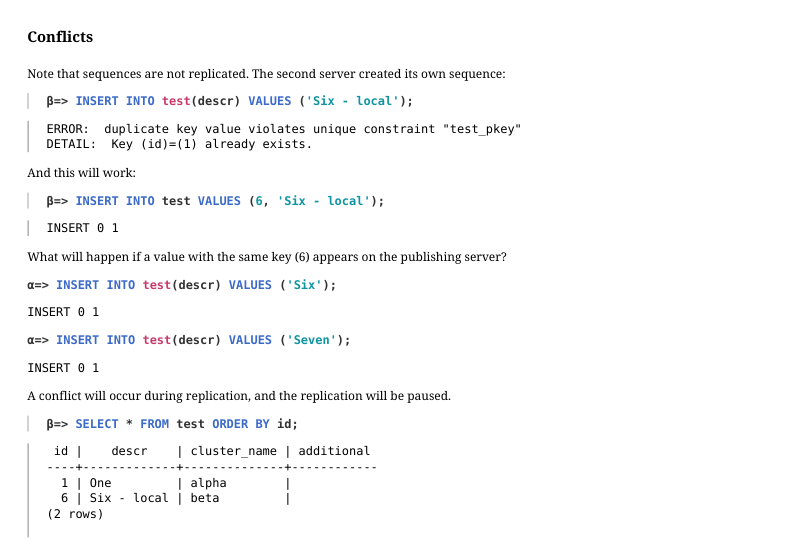
Note Note that sequences are not replicated. The second server created its own sequence:
And this will work:
What will happen if a value with the same key (6) appears on the publishing server?
A conflict will occur during replication, and the replication will be paused.
Technically, the logical replication apply worker process will continuously restart and check if the conflict is resolved. This resets the pg_stat_subscription information:
The log will contain records about constraint violations:
And the error counter in pg_stat_subscription_stats will increment with each restart:
(PostgreSQL 18 has introduced separate counters for each conflict type.) To resolve this conflict, delete the conflicting row from the table and wait a moment:
Page 25: Page 25
Check:
The data has appeared, replication has been restored.
Skipping a Conflicting Transaction
Another option is to skip the conflicting transaction entirely. The conflicting transaction:
The subscription has to be stoped before skipping the transaction:
Instead of stopping manually, you can set the disable_on_error subscription parameter. Subscription stopped:
Check the log:
The message contains the LSN of the conflicting transaction commit record. Skip the transaction:
A superuser could use the function pg_replication_origin_advance instead. Let’s enable replication.
Page 26: Page 26
Replication is working, but since we skipped the transaction, the data is now inconsistent:
Clear the table:
Triggers on the Subscriber
Triggers can execute on the subscriber, but by default a trigger will fire on local changes only and never on replication. This is useful when both servers have identical tables with the same set of triggers – in that case, the trigger has already fired on the publishing server and doesn’t need to run again on the subscriber. Let’s try it.
The trigger didn’t fire. You can alter the table so the trigger fires only during replication:
Page 27: Page 27
 {#source-figure-027 caption=“Source slide page 27: Page 27”}
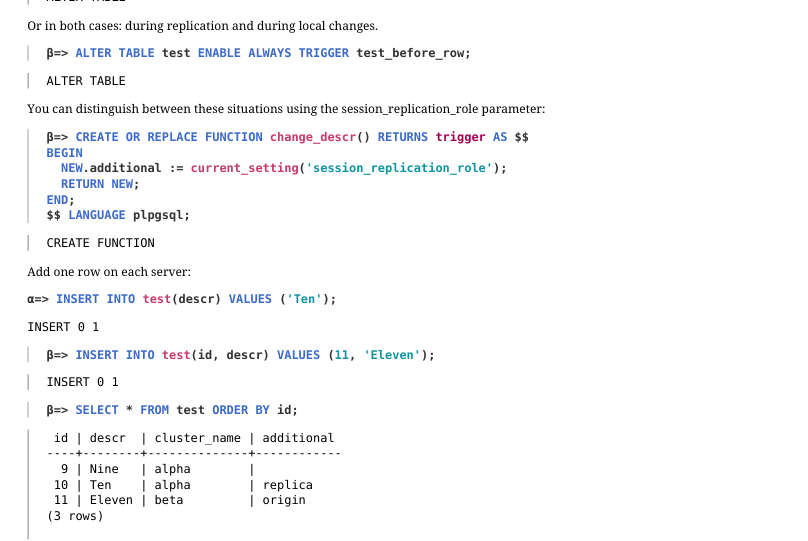
Or in both cases: during replication and during local changes.
You can distinguish between these situations using the session_replication_role parameter:
Add one row on each server:
The trigger fired in both cases.
Page 28: Replication origin
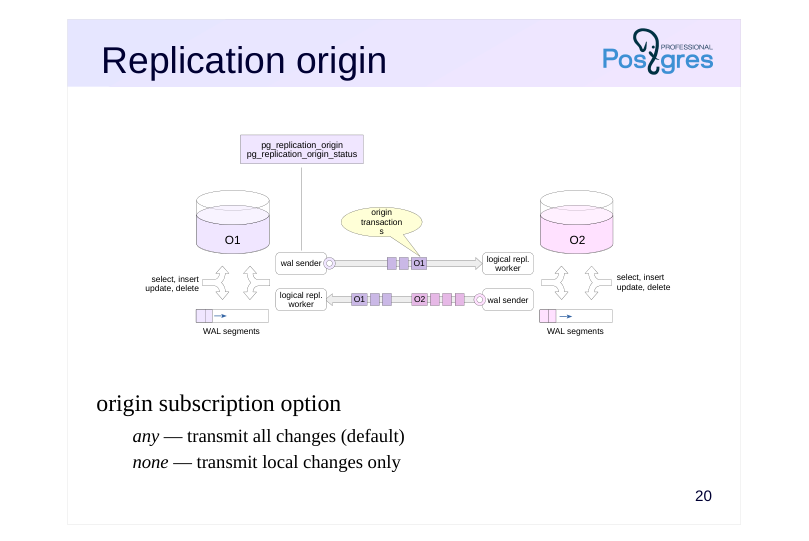 {#source-figure-028 caption=“Source slide page 28: Replication origin”}
origin subscription option
- any — transmit all changes (default)
- none — transmit local changes only
Speaker notes
If you define both a publication and a subscription on the same server and transfer all changes, the replicated changes will be replicated, and things will snowball.
Starting with PostgreSQL 16, when the publishing server starts a transaction that was initially received from another node, it sends a message about the origin of this transaction first. This is also important for cascading replication.
https://postgrespro.com/docs/postgresql/16/protocol-logical-replication#PRO TOCOL-LOGICAL-MESSAGES-FLOW
By default, the subscription starts with the origin = any parameter and the publication passes all transactions to it: both local and received from another node.
However, in topologies where loops can occur, such as with bidirectional replication, you should set origin = none. Then the publication will transfer only local changes.
https://postgrespro.com/docs/postgresql/16/sql-createsubscription#SQL-CR EATESUBSCRIPTION-WITH-STREAMING
Information about the origins is stored in the pg_replication_origin view.
https://postgrespro.com/docs/postgresql/16/catalog-pg-replication-origin#CA TALOG-PG-REPLICATION-ORIGIN
The current replay position for a specific replication origin is displayed in the pg_replication_origin_status view.
https://postgrespro.com/docs/postgresql/16/view-pg-replication-origin-status #VIEW-PG-REPLICATION-ORIGIN-STATUS
Page 29: Replication origin
Delete rows from the table:
Publish several columns from table test on server beta.
Now the publications exist on both servers. If you create a subscription of alpha, it will receive all changes from beta, including those sent by alpha’s publication. But alpha cannot apply these changes because of integrity constraints, so replication will stop. For beta to receive just the local changes from alpha, set the origin subscription parameter:
For the changes from replication, the origin will be non-empty, and the publication will not send them to the subscriber. Now let’s make alpha a subscriber to beta. Disable initial synchronization, as the table is empty. Use the subscription parameter origin to receive only the changes made on beta:
Now there are subscriptions on both servers.
Insert a row on alpha.
Check beta.
Insert a row on beta.
Check alpha.
Page 30: Page 30
Verify the changes.
If replication is no longer needed, the subscription must be dropped – otherwise, the replication slots will remain open on the publishing server.
Page 31: Takeaways
Logical replication uses the publish-subscribe pattern.
- Row-level changes are replicated
- Rows are matched using logical identifiers
- Data mismatch on different servers may cause conflicts
- Origin information forwarding helps track the progress of cascade replication and eliminate loops
Page 32: Practice
- Create two databases on a single server.
- In the first database, create a table with a primary key and insert a few rows into it. Set up logical replication for the table from the first database to the second, verify that replication is working, and then remove the subscription. 2. Configure logical replication of the table from alpha to beta. Execute a transaction that modifies a large amount of data, and before committing it, verify that the data has been written to disk. Repeat the same steps, but this time in streaming mode. Did the data get to disk?
Speaker notes
- Use the pg_dump tool with the –schema-only option.
If you try the regular way, the subscription creation command will hang because it needs to wait for all active transactions on the publishing server to complete, including itself. In this case, you must create a logical replication slot in advance, as described in the documentation: https://postgrespro.com/docs/postgresql/16/sql-createsubscription
- To prevent the publication from getting into the logical copy, use the –no-publications option.
Check the value of the logical_decoding_work_mem configuration parameter, which sets the maximum size of the reorder buffer. If this value is exceeded, data will be pushed to disk.
Page 33: 1. Logical Replication on a Single Server
Set the WAL level to logical first.
Databases:
Table in the first database:
Using logical backup to transfer a schema is especially convenient when there are many tables.
Transferring data with pg_dump makes no sense here, since the tables may change during the transfer.
Publication:
Page 34: Page 34
Since replication will be configured on the same server, a logical replication slot must be created first.
Then create the subscription:
Verify that replication is working:
Drop the subscription and the slot.
2. Logical Replication from Alpha to Beta
Start server beta and copy the DDL commands for the test table. Publication creation commands are not required on the subscriber.
Page 35: Page 35
Create a subscription on beta – the slot on alpha is created automatically.
Replication is working. Truncate the test table on the publication server (alpha):
The subscriber received the changes. Start a transaction that inserts a large number of rows into the table.
The logical_decoding_work_mem parameter defines the maximum size of the reordering buffer.
When this limit is exceeded, data is spilled to disk in the PGDATA/pg_replslot/slot-name directory. How much disk space does the directory take up?
Page 36: Page 36
By default, no data is sent to the subscriber until the transaction is committed.
Commit the transaction…
…and wait a moment: The subscriber received all the rows:
And the data spilled to disk has been removed:
Check pg_stat_replication_slots:
spill_txns – the number of transactions spilled to disk spill_count – the number of times data was spilled to disk due to exceeding logical_decoding_work_mem spill_bytes – the number of bytes spilled to disk Repeat the experiment in streaming mode. Reset the statistics and truncate the table again.
Now enable streaming mode for the subscription:
Run the large transaction again.
Page 37: Page 37
Now there’s much less data in the slot’s directory – some of it has already been sent to the subscriber:
Commit the transaction…
…and wait a moment:
Check pg_stat_replication_slots:
This time, when the allocated memory was exhausted, data was not spilled to disk but sent directly to the subscriber.
Cleanup
Drop the subscription, slot, and databases, and reset configuration.
Page 38: Practice+
1. Create and publish a table with a bytea column on alpha. Insert several million rows into the table. Compare the initial subscription synchronization time in normal and binary modes using the beta server. 2. Enable concurrent synchronization for the subscription. By adding rows to the table, examine the subscription workers.
Speaker notes
- You can estimate the initial synchronization time by monitoring the pg_subscription_rel table. You can set it up on the client side using the \watch metacommand or on the server side using a function written in, for example, PL/pgSQL.
https://postgrespro.com/docs/postgresql/16/catalog-pg-subscription-rel#CAT ALOG-PG-SUBSCRIPTION-REL
https://postgrespro.ru/docs/postgresql/16/plpgsql
- Set an appropriate value for the streaming subscription option. Use the pg_stat_subscription view to monitor subscription processes.
Page 39: 1. Initial Data Synchronization for Logical Replication
Create a database.
Change the WAL level and restart the server.
Create a table with a large number of rows.
Start the beta server and copy the database to it: with the table structure but without any data.
Create a publication on alpha.
Page 40: Page 40
 {#source-figure-040 caption=“Source slide page 40: Page 40”}
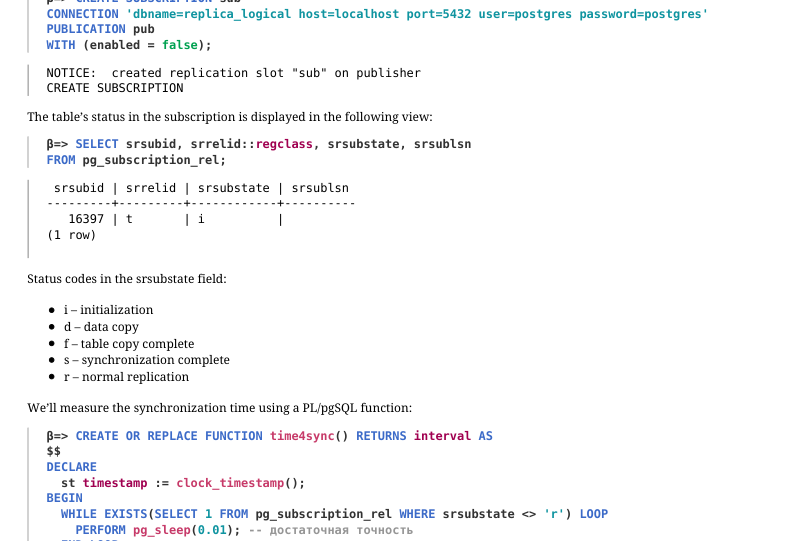
The subscription on beta will initially be inactive.
The table’s status in the subscription is displayed in the following view:
Status codes in the srsubstate field: i – initialization d – data copy f – table copy complete s – synchronization complete r – normal replication We’ll measure the synchronization time using a PL/pgSQL function:
Activate the subscription and measure the initial synchronization time.
Now let’s configure synchronization in binary mode. Drop the subscription, truncate the table, and create a new subscription with the binary parameter.
Enable the subscription and measure the synchronization time.
Page 41: Page 41
The initial synchronization is noticeably faster. The binary parameter also applies to subsequent synchronization. However, binary mode is not supported for all data types; portability across different architectures and major PostgreSQL versions must also be considered. Binary mode was introduced in PostgreSQL 14, and in versions prior to 16, initial synchronization always runs in text mode.
2. Parallel Application of Changes
Enable parallel mode for the subscription.
Processes serving the subscription:
Truncate the table, insert a large number of rows, and re-run the query against the system catalog views:
An additional process has appeared that applies changes without waiting for the transaction to complete on the publisher.
Row insertion is complete. Wait a little longer…
The subscriber has now received all the rows.
Cleanup
Delete the subscription.
Page 42: Page 42
Drop the databases.
Reset the configuration.
Restart the alpha server.
Stop the beta server.