05 Lesson 05: Replication / Switchover to Replica
This page is extracted from the official PDF into native Markdown. Slide text, code and speaker notes are kept in reading order; the original PDF and HTML remain the layout references. HTML source: No matching course-page link was captured in the source inventory. Archive: DBA3-handouts-16-en-20260917.zip PDF pages: 34
Page 1: Replication / Switchover to Replica
Copyright
© Postgres Professional, 2017–2025 Authors: Egor Rogov, Pavel Luzanov, Ilya Bashtanov, Alexey Beresnev Photo: Oleg Bartunov (Phu Monastery and Bhrikuti Peak, Nepal)
Use of Course Materials
Non-commercial use of course materials (presentations, demonstrations) is allowed without restrictions. Commercial use is possible only with the written permission of Postgres Professional. It is prohibited to make changes to the course materials.
Feedback
Please send your feedback, comments and suggestions to: edu@postgrespro.ru
Disclaimer
Postgres Professional assumes no responsibility for any damages and losses, including loss of income, caused by direct or indirect, intentional or accidental use of course materials. Postgres Professional company specifically disclaims any warranties on course materials. Course materials are provided “as is,” and Postgres Professional company has no obligations to provide maintenance, support, updates, enhancements, or modifications.
Page 2: Topics
- Switchover to Replica
- Failback on Former Leader
- Considerations for File-Based Archiving
Page 3: Switchover to Replica
Reasons
- planned switchover:
- scheduled maintenance
- emergency switchover (failover):
- switch to replica after a leader failure
- Procedure
- make sure the leader is stopped
- $ pg_ctl promote or
- pg_promote()
- automatic switchover: unavailable
- (third-party cluster management software required)
Speaker notes
You might need to switch to a standby server for maintenance work on the primary server. In this case, the switchover can be performed at a convenient time in a planned manner. In the event of a main server failure, you need to switch to the standby server as quickly as possible to minimize system downtime (failover).
A replica is promoted to independent mode by either executing the command pg_ctl promote from the OS or the function pg_promote from SQL. Switching with the trigger file (the promote_trigger_file option) is no longer supported in PostgreSQL 16 and higher.
Before promoting a replica, you must make sure that the original leader is stopped. If it continues to work and clients are still connected to it, data on different servers can disperse, and reconciling them afterwards is messy, non-automatable, and often resulting in some data being lost.
To switch to a standby server, you must redirect clients to it. This requires the use of third-party software (as discussed in the “Cluster Technologies” module), since PostgreSQL does not have its own tools for this.
https://postgrespro.com/docs/postgresql/16/warm-standby-failover
Page 4: Replica Promotion
Apply WAL records
- already received by the wal receiver but not yet applied by the startup
- process
- Terminate processes
- wal receiver
- startup
- Start processes
- wal writer
- autovacuum launcher
- archiver (if configured)
- Switch to a new timeline
Speaker notes
After receiving the signal, the replica gets promoted: it performs recovery and becomes a regular server.
The startup process applies log records that have already been received by the wal receiver process, but have not yet been applied. Then, the wal receiver and startup processes terminate since they are not needed on the leader.
On the other hand, the wal writer and autovacuum launcher processes are started up (archiver too, if configured.)
After completing recovery, the server switches to a new timeline.
Tiny details aside, the process is essentially just a recovery from backup.
Page 5: Streaming Replication Configuration
In this demo, we will run checkpoints manually and increase the scheduled interval.
Let’s enable the pg_walinspect extension. It will help us inspect checkpoint entries in the WAL. Superuser privileges are required.
We will be using the standalone backup multiple times, so we create it in tar format.
Let’s place the backup into the PGDATA directory on the beta server:
We will need the standby.signal file.
Configure the connection to the primary.
Create a replication slot on alpha and start the replica beta.
Check the replica:
Page 6: Page 6
Stopping the Primary and Creating the Checkpoint
Let’s add one more row to the table and gracefully stop the primary. A checkpoint will be performed in the process.
Checkpoint information has been written to the control file:
Did the replica receive this checkpoint record? Let’s examine the WAL on the replica, starting from the Log Sequence Number of the checkpoint record.
The record_length field shows the record length in bytes. The last position received by the replica is greater than the LSN of the checkpoint record:
The difference slightly exceeds the record length (114) due to WAL record alignment: on a 64-bit platform, record LSNs are multiples of eight bytes.
Replica Promotion
The beta server is currently a replica (it is in recovery mode):
Promote the replica. You can also use the pg_promote() function, which does the same thing.
There is another way to promote a replica: delete the standby.signal file and restart the standby server. This is not quite a “proper” way to do it, since the replica won’t recognize that recovery is complete and won’t switch to a new timeline.
Page 7: Page 7
The former replica beta is now a fully functional server instance.
Page 8: Failback
 {#source-figure-008 caption=“Source slide page 8: Failback”}
Speaker notes
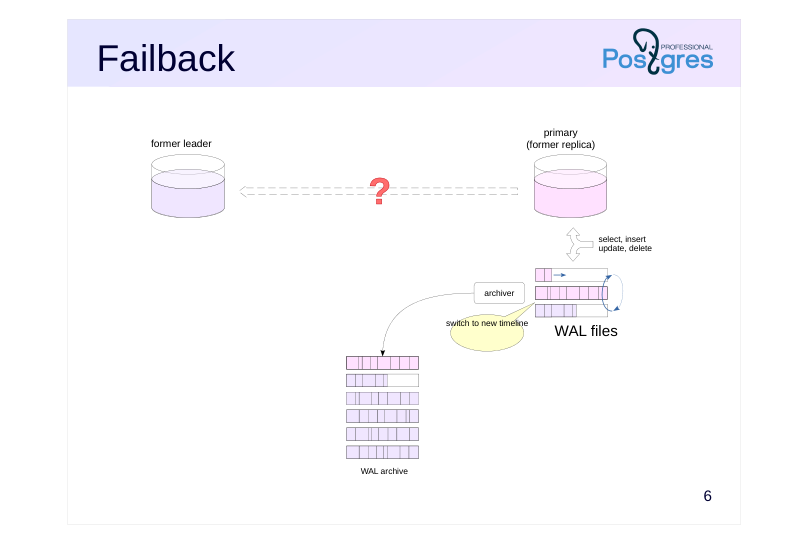
After promotion, the former replica acts as a standalone server. It processes client queries and generates its own WAL archive – within a new timeline.
If the switchover wasn’t caused by a serious server failure, you’ll need to perform a failback: quickly bring that server back online – this time as a replica.
Page 9: Simple Reconnect
 {#source-figure-009 caption=“Source slide page 9: Simple Reconnect”}
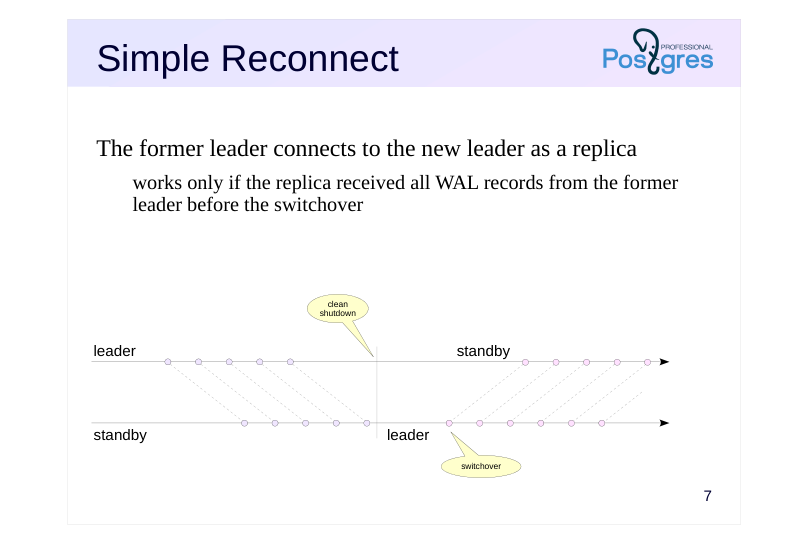
The former leader connects to the new leader as a replica
- works only if the replica received all WAL records from the former
- leader before the switchover
Speaker notes
When the leader is shut down cleanly (using the fast or the smart shutdown mode), all of its WAL records will most likely reach the replica, though this isn’t guaranteed. The shutdown procedure first terminates all backend processes, then performs a checkpoint, and only at the very end stops wal sender, giving the replica time to receive the checkpoint record.
You can check the leader’s position in WAL with pg_controldata (look for “latest checkpoint location”), while the replica’s position is shown by the pg_last_wal_receive_lsn function. This function returns the current position in WAL, so its value must be ahead of the latest checkpoint location by the size of the checkpoint record.
If all records were actually received, then the former leader can immediately connect to the new one just by adjusting the configuration accordingly.
If the leader is stopped without performing a checkpoint (due to a crash or shutdown in the immediate mode), such a connection will likely be impossible on a server with a current load. The server won’t be able to start, and an error will be logged.
Page 10: Rejoining the Cluster: Direct Connection
Bring the alpha server back online, but this time as a replica. Create the standby.signal file:
Configure the connection to the primary.
Start alpha and verify that it has become a replica.
On the beta server, we can modify data:
The alpha replica receives them.
Page 11: Backup
 {#source-figure-011 caption=“Source slide page 11: Backup”}
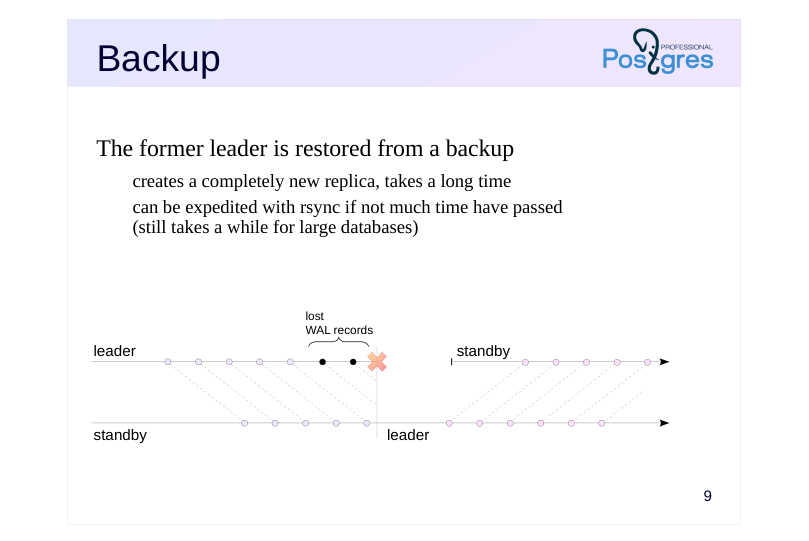
The former leader is restored from a backup
- creates a completely new replica, takes a long time
- can be expedited with rsync if not much time have passed
- (still takes a while for large databases)
Speaker notes
When a leader crashes, there’s a good chance that some WAL records don’t make it to the replica. You can’t just reconnect the former leader as a replica in this case.
The simplest and most reliable approach is to build a completely new replica by creating and deploying a fresh base backup. However, for large databases, this can take a long time.
A variation of this approach is to skip pg_basebackup and instead create the backup using the backup API and rsync. If you create the backup immediately after promoting the replica, most files won’t have changed yet, which can significantly speed up the process.
But naturally, this does complicate things.
Page 12: pg_rewind
 {#source-figure-012 caption=“Source slide page 12: pg_rewind”}
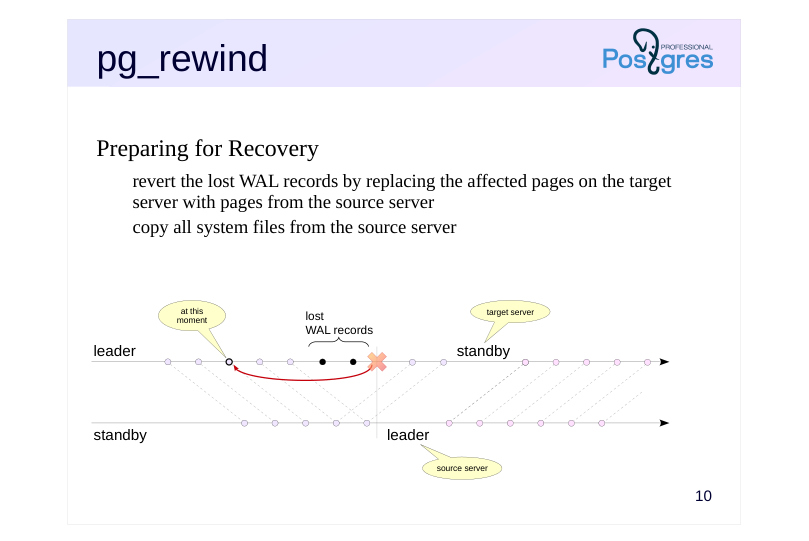
Preparing for Recovery
- revert the lost WAL records by replacing the affected pages on the target
- server with pages from the source server
- copy all system files from the source server
Speaker notes
An even faster approach is to use the stock tool pg_rewind.
It identifies where the two servers diverged, finds the nearest common checkpoint before that point, and by scanning the WAL, determines which pages have been modified since then.
These pages are then replaced with their counterparts from the source server (the new leader), and there shouldn’t be many of them. The utility also copies all system files from the source server.
The server then applies all necessary WAL records from the new leader. At this point, it’s no longer the pg_rewind doing the work, but rather the standard recovery process that runs when the server starts up. To ensure recovery starts from the correct point, the utility creates a backup_label control file.
https://postgrespro.com/docs/postgresql/16/app-pgrewind
Page 13: Considerations with pg_rewind
Target server (former leader)
- all necessary WAL files must be either in pg_wal or in the archive
- checksums must be enabled or wal_log_hints must be on
- the parameter full_page_writes must be on
- Source server (current leader)
- clinet-server connection:
- -source-server = connection string
- cleanly shut down server:
- -source-pgdata = directory
Speaker notes
For the source server, if it is running, the –source-server switch specifies the libpq client-server connection string (the utility does not use the replication protocol). The connecting role must have the privileges required to run pg_ls_dir, pg_stat_file, and pg_read_binary_file functions.
If the source server was shut down cleanly, you can just point to its data directory with the –source-pgdata switch.
Several specific requirements must be met for the tool to work:
● All WAL segments containing records from the last common checkpoint to the current moment must be either in the target server’s pg_wal directory or present and available from the WAL archive. In the second case, you need to set the restore_command parameter and the –restore-target-wal switch.
● Due to errors during writing, data mismatch within the pages is possible (the non-atomic writing problem, discussed in the “Base backup” module). This is solved by having the target server write each page’s full image to WAL after it is first changed since the checkpoint. This is enabled by full_page_writes = on. This mode does ignores “minor” page changes (hint bits), so the cluster also must either have page checksum calculation enabled or have wal_log_hints = on.
● If the target server was shut down incorrectly and without a checkpoint, the tool will start it in single-user mode and immediately perform a clean shutdown.
Page 14: Rejoining the Cluster: pg_rewind
Let’s now simulate a split-brain scenario – two writable servers resulting from a network partition (we cover this and other types of failures in detail in the “Cluster Technologies Overview” topic). Promote the alpha server out of replica mode without stopping the primary beta server.
Both alpha and beta can now accept write operations:
In practice, this situation must be avoided at all costs, since it’s no longer clear which server to trust. You’ll have to either discard all changes on one of the servers or figure out how to merge the data. We choose to discard the changes made on the beta server. Roll back the conflicting changes on beta – those that diverge from the changes made on alpha. To do this, we’ll use the pg_rewind utility – so let’s first verify that the required parameter values are set on the target server (beta):
Stop the target server ungracefully.
The pg_rewind utility requires you to specify the target server’s PGDATA directory and how to connect to the source server (alpha): either a connection string (if the server is running) or the path to its PGDATA directory (if it is stopped). In our case, the alpha server is running. Since the target server beta was not shut down properly, the utility will start it in single-user mode and stop it after performing a checkpoint. To start it, the configuration file location must be provided. The -R option ensures the target server starts as a replica once the utility finishes: after consistency is restored, it will remain in recovery mode.
Page 15: Page 15
As a result, pg_rewind “rolled back” the data pages to the last checkpoint before the point where the two servers diverged. The utility also created a backup_label file containing the WAL position from which recovery should begin. Let’s take a look inside:
By using the -R option, we instructed the utility to create the standby.signal file and set the connection string in the configuration file.
A replication slot has already been created on the alpha server – let’s make use of it.
Now beta will start up as a replica.
The replication slot has been initialized and is now in use:
Data modified on the new primary (alpha) has been received by the replica (beta):
Let’s add one more row:
Page 16: Page 16
Now the former primary (beta) is back into service as a replica.
Page 17: Switchover and Archiving
 {#source-figure-017 caption=“Source slide page 17: Switchover and Archiving”}
Speaker notes
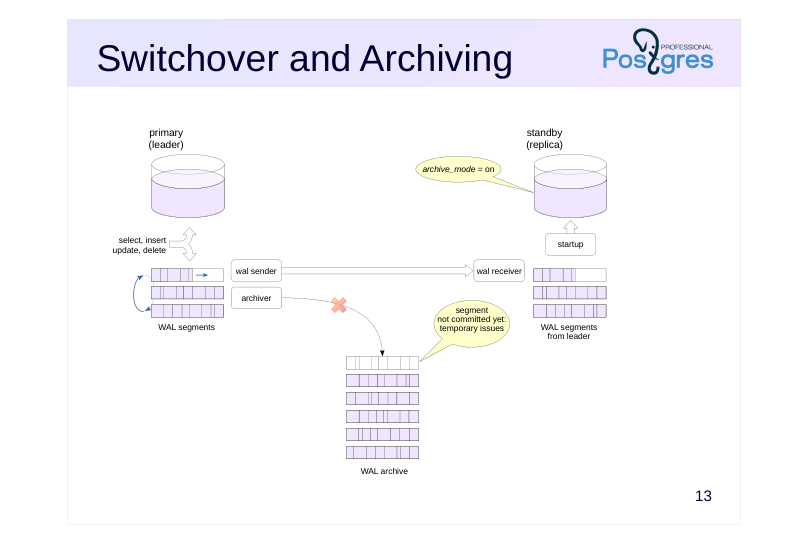
The write-ahead log archive, populated through continuous archiving, has an problem when it comes to streaming replication and switchover:
on a leader failure, some WAL segments may not make it into the archive. For example, if the disk runs out of space, archive_command willl return an error.
Page 18: Switchover and Archiving
 {#source-figure-018 caption=“Source slide page 18: Switchover and Archiving”}
Speaker notes
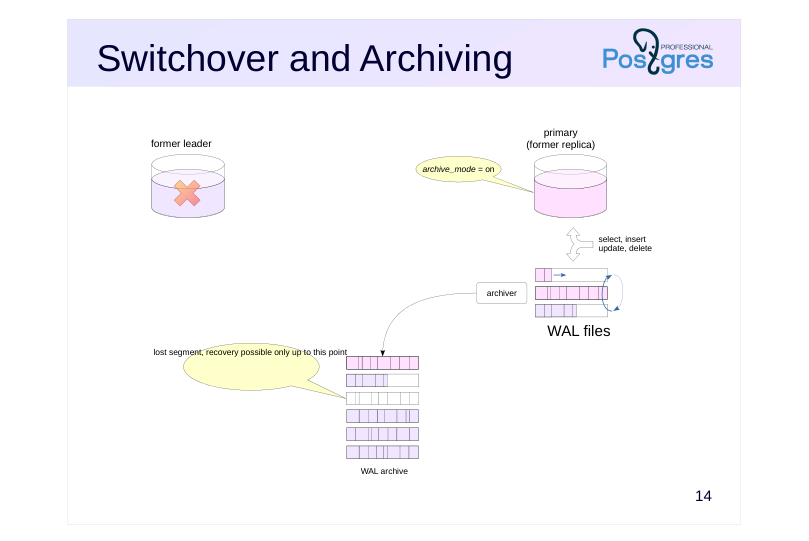
The replica is unaware of the archiving settings on the leader. When the former replica takes over as the leader, it won’t write the missing file segments to the archive (even though it could) because it assumes the archive was functioning properly all along. The archive will end up incomplete.
This means you can only restore the system from existing backups up to the point where this gap occurred. If this situation has occurred (and you detect it in time), you must take a backup immediately.
Stream archiving doesn’t have this problem because the pg_receivewal utility monitors the directory contents and requests any missing WAL records from the server. However, as mentioned in the “Backup” module, using this tool means maintaining additional infrastructure.
Page 19: File Archive Issues
Let’s restore the alpha and beta servers from a backup and configure file archiving to a shared archive on both.
WAL segment archive.
Identical archiving settings on both the alpha and beta servers.
On the replica (beta), let’s create the standby.signal file and configure the connection to the primary.
Start the primary (alpha) and create a replication slot.
Start the replica.
Current WAL segment:
Force a WAL segment switch. For the switch to occur, we need to ensure that both the current and next segments contain some records.
Page 20: Page 20
Now log entries are being written to the next segment, while the previous one has been archived:
Let’s say there is an issue with archiving. The cause could be something like a running out of space on disk, or network connectivity issues – we’ll simulate this by returning status 1 from the archive command.
Let’s force another WAL segment switch.
The segment is not being archived.
The archiver process will keep retrying, but without success.
The beta server wasn’t archiving while in replica mode, and after promotion it won’t archive the missed segment either. Stop alpha and promote beta.
Force another WAL segment switch, this time on beta.
Page 21: Page 21
How’s the archive doing?
Segment 000000010000000000000004 is missing – the archive is now unusable for recovery and replication.
Page 22: Switchover and Archiving
 {#source-figure-022 caption=“Source slide page 22: Switchover and Archiving”}
Speaker notes
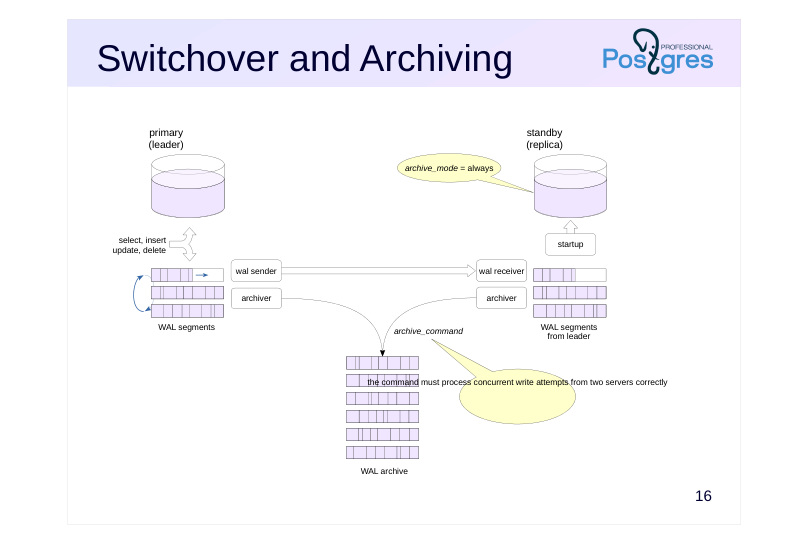
With archive_mode = always, the replica starts an archiver process that writes segments to the archive just like the leader server does. This means that the same file will be recorded twice, by two servers. This places two strict requirements on archive_command:
● it must not overwrite an existing file, but should report success if a file with identical content is already present in the archive;
● it must handle concurrent write attempts from both servers correctly.
With these requirements met, the segment won’t be lost because the replica will keep trying to write it even after the leader server stops.
Of course, you could configure archive_command so that the leader and the replica save WAL segments to separate archives, but that’s hardly practical.
Page 23: Archiving from a Replica
To keep the archive intact when failing over to a replica, the replica must have archive_mode = always. The archive command must correctly handle the case where both the primary and the replica write the same segment simultaneously. Let’s restore both alpha and beta from backup again and configure file-based archiving to a shared archive on both servers.
WAL segment archive.
Configuration of archiving on the primary (alpha). We replaced the logical operator in the archive command so that it immediately returns 0 if the file already exists.
Configuration of archiving on the replica (beta). Use the always mode and the same archive command.
The replica also needs a standby.signal file.
Start the primary and create a replication slot.
Start the replica.
Page 24: Page 24
Repeat the experiment. Switch the segment:
Checking the archiving status:
The completed segment has been archived. The alpha server is experiencing archiving issues – the command returns 1:
Alpha continues to generate WAL segments.
But the primary does not archive them:
However, archiving from the replica succeeds and the segment ends up in the archive:
Promote the replica.
Beta is now the primary server and is generating WAL files.
Page 25: Page 25
Let’s check the archive again:
The replica’s files have appeared in the archive, there are no gaps, and the problem is resolved.
Page 26: Takeaways
Switchover is used both during normal operation and in emergency situations
- After a switchover, the former leader must be brought back online
- Both procedures must be tried and tested in advance
- The write-ahead log archive requires extra attention
Page 27: Practice
1. Set up streaming replication from alpha to beta, with a replication slot, without continuous archiving.
- Simulate alpha server failure and switch over to beta. 3. Bring alpha back online as a replica by backing up from the new leader beta and adjusting the configuration.
- Verify that replication is functioning and using the slot. 4. Switch back to alpha so that the former leader becomes the main server again.
Speaker notes
To simulate a failure, you can stop the server in immediate mode:
pg_ctlcluster 16 cluster_name stop -m immediate –skip-systemctl-redirect
or terminate the main postgres process:
kill -QUIT номер_процесса
The process ID is the first line of the PGDATA/postmaster.pid file.
After completing the practice tasks, delete the slot and the created database, and reset the configuration.
Page 28: 1. Setting Up Replication Without an Archive
Set up replication. Stop the beta server and clear its data directory.
Create a standalone backup in the beta server’s data directory, first creating the replica slot.
Start the server in replica mode.
Check the configuration. Run several commands on the primary server:
Check the replica:
2. Primary Server Failure and Failover to Replica
Simulate a primary server crash.
Promote the replica.
Page 29: 3. Failback on Former Primary
Create a standalone backup of the beta server in the alpha server’s data directory. Before doing that, delete the configuration file – otherwise pg_basebackup will copy it and append parameters to it.
Clear the data directory on alpha.
Run the backup utility to create a replication slot and replication configuration.
Configuration parameters and the standby signal file have been set up:
The replication slot has been initialized and is now in use:
Check the replication:
4. Switching to a New Replica
Promote the replica.
Page 30: Page 30
The former primary is now primary again.
Cleanup
Delete the replication slot and database, and reset configuration.
Page 31: Practice+
- Configure the alpha server to retain two additional WAL segments after each checkpoint. Start physical replication from alpha to beta without a replication slot. 2. Crash alpha and promote beta. Restart alpha and modify some data on it. Verify that the data on alpha and beta do not match. 3. Stop alpha and start it as a replica of beta using pg_rewind.
Speaker notes
- Set up replication with the simplest settings and without a replication slot. To ensure that two additional WAL segments are retained, set a suitable wal_keep_size value.
After completing the practice tasks, delete the slot and the created database, and reset the configuration.
Page 32: 1. Replication
Since we are not using replication slots, we will retain two additional WAL file segments.
Stop the beta server and make it a replica of the alpha server.
Create a database and a table in it.
Changes have been replicated to beta.
Check the replication status.
On the replica, you can view the WAL receiver statistics:
Page 33: 2. Replication Break
The primary server has lost power.
Promote beta.
Make changes on the new primary.
Power has been restored to the alpha server.
The data on the two servers has diverged.
Stop alpha (former primary).
3. Failback on Former Primary
We want to bring the alpha server back up as a replica. To do this, we need to bring it back to a state compatible with beta. We can use the stock utility for that.
Write transactions are running on the beta server.
Data changed on the beta server has been received by the alpha server:
Page 34: Cleanup
 {#source-figure-034 caption=“Source slide page 34: Cleanup”}
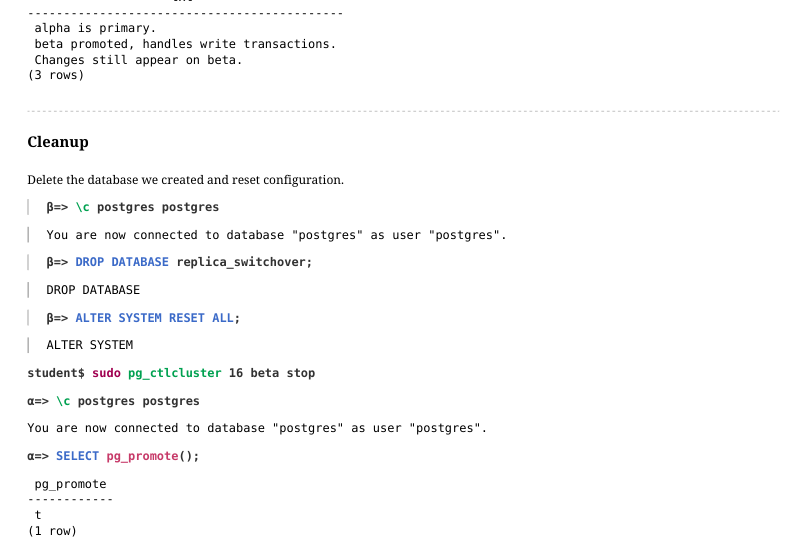
Delete the database we created and reset configuration.