04 Lesson 04: Replication / Physical Replication
This page is extracted from the official PDF into native Markdown. Slide text, code and speaker notes are kept in reading order; the original PDF and HTML remain the layout references. HTML source: No matching course-page link was captured in the source inventory. Archive: DBA3-handouts-16-en-20260917.zip PDF pages: 39
Page 1: Replication / Physical Replication
Copyright
© Postgres Professional, 2017–2025 Authors: Egor Rogov, Pavel Luzanov, Ilya Bashtanov, Alexey Beresnev Photo: Oleg Bartunov (Phu Monastery and Bhrikuti Peak, Nepal)
Use of Course Materials
Non-commercial use of course materials (presentations, demonstrations) is allowed without restrictions. Commercial use is possible only with the written permission of Postgres Professional. It is prohibited to make changes to the course materials.
Feedback
Please send your feedback, comments and suggestions to: edu@postgrespro.ru
Disclaimer
Postgres Professional assumes no responsibility for any damages and losses, including loss of income, caused by direct or indirect, intentional or accidental use of course materials. Postgres Professional company specifically disclaims any warranties on course materials. Course materials are provided “as is,” and Postgres Professional company has no obligations to provide maintenance, support, updates, enhancements, or modifications.
Page 2: Topics
- Replication Use Cases
- How Physical Replication Works
- WAL Record Delivery
- Limitations and Considerations
- Synchronous and Asynchronous Replication
- Replication Monitoring
- Common Issues and Troubleshooting
Page 3: Replication Use Cases
Replication
- the process of synchronizing multiple copies of a database cluster on
- different servers
- A fundamental mechanism serving multiple goals
- reliability
- when a failure occurs,
- the system must remain operational
- scalability
- load balancing across servers
Speaker notes
A single server managing databases may not meet the requirements of the system. There are two main challenges that require multiple servers to address.
First, reliability: one physical server is a possible point of failure. If the server fails, the system becomes unavailable.
Secondly, performance. One server may not be able to handle the load. Often, it’s preferable to scale horizontally rather than vertically, distributing the load across multiple servers. This can be due to both hardware costs and the need for different configurations tailored to different workload types (such as OLTP and reporting).
In PostgreSQL, distributed systems follow a “shared nothing” architecture: multiple servers operate independently without sharing memory or storage. Therefore, when servers need to work with the same data, that data must be kept synchronized between them. This synchronization mechanism is called replication.
Page 4: Leader→Replica
WAL entries are transmitted to the replica and applied there
- data flows in one direction only
- the entire cluster is replicated; selective replication is not supported
- The replica is an exact copy of the leader
- the same major server version
- fully compatible architectures and platforms
- Replica is read-only
Speaker notes
During physical replication, servers have assigned roles: one is the leader and others are replicas.
The leader sends write-ahead log records to the replica, which then applies them to its data files. The replica does not “understand” the changes, just applies them mechanically without any interpretation of what the changes mean, but it is faster than re-executing the original SQL statements. However, binary compatibility between servers is critical: they must run on the same hardware and software and use matching major versions of PostgreSQL.
https://postgrespro.com/docs/postgresql/16/hot-standby#HOT-STANDBY-AD MIN
Since the WAL is shared across the entire cluster, only the cluster as a whole can be replicated. There’s no way to filter which log entries get replicated.
Replica does not generate records, just applies them. Therefore, replicas are read-only: no data modification operations allowed.
Page 5: Streaming Replication
 {#source-figure-005 caption=“Source slide page 5: Streaming Replication”}
Speaker notes
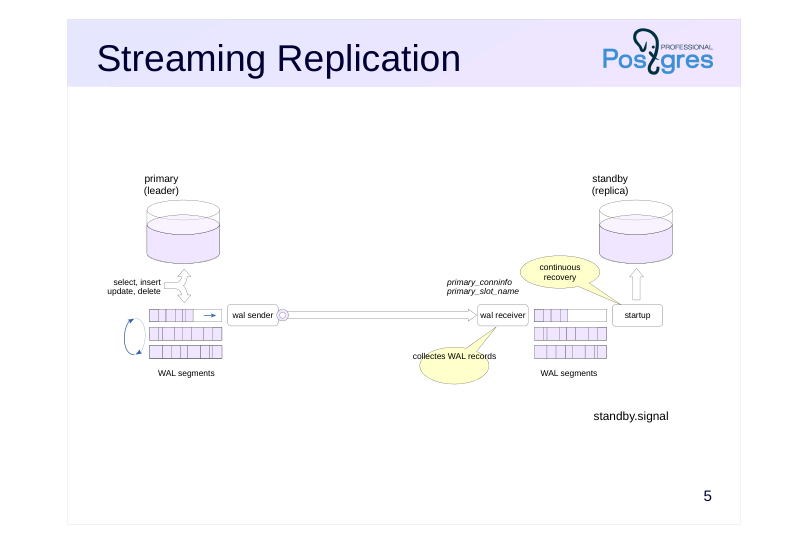
If there is a recovery.signal file, the server is restored from the backup: replays the WAL records, restores consistency and completes the recovery. Starting the replica is similar, but the recovery does not complete: the replica continues to read and apply records from the leader. The signal for this is the standby.signal file.
In the topic “Base Backup,” we considered two ways to deliver WAL records from the server to the client: streaming and file-based. Replication uses the same two mechanisms. Streaming replication is the most common approach by far.
The wal receiver process on the replica connects to the leader over the replication protocol, using the connection string from the primary_conninfo parameter, and reads the stream of WAL records. With streaming replication, the replica lag is minimal and can be reduced to zero if needed. The received records are written to disk as WAL segments, just as they are on the leader. Next, the startup process – the same one that handles crash recovery – applies records to data files, only now it works continuously.
The leader starts a wal sender process to handle this connection. Streaming replication can use a replication slot when necessary. The slot name is stored in the primary_slot_name parameter.
Page 6: Streaming Replication Configuration
Since our configuration will not include a WAL archive, it is essential to use a replication slot at every stage – otherwise, given sufficient delay, the primary may delete the required file segments before they are committed, forcing you to take a new backup and redo the entire setup. Create a slot:
Examine the slot we just created:
The slot is not initialized right away (restart_lsn and wal_status are empty). Take a standalone backup into the beta server’s data directory using the slot we created. When using the -R option, the tool adds the files needed to start the future replica to the backup.
Check the slot again:
Page 7: Page 7
Once the backup completes, the slot is initialized and the primary retains all WAL files starting from the beginning of the backup (restart_lsn, wal_status). Compare with the line in backup_label:
The postgresql.auto.conf file was generated by pg_basebackup because of the -R option. This file contains the connection information for the primary and the replication slot name:
By default, the replica will be a hot standby, meaning it can serve queries during recovery. If this is not necessary, the replica can be warm instead (hot_standby = off). The tool also created the standby.signal file. Its presence instructs the server to enter continuous recovery mode.
The WAL records needed to bring the replica to a consistent state will be read from the standalone base backup. Then it will enter continuous recovery mode and begin receiving and replaying the WAL stream.
Page 8: Replication with a WAL archive
 {#source-figure-008 caption=“Source slide page 8: Replication with a WAL archive”}
Speaker notes
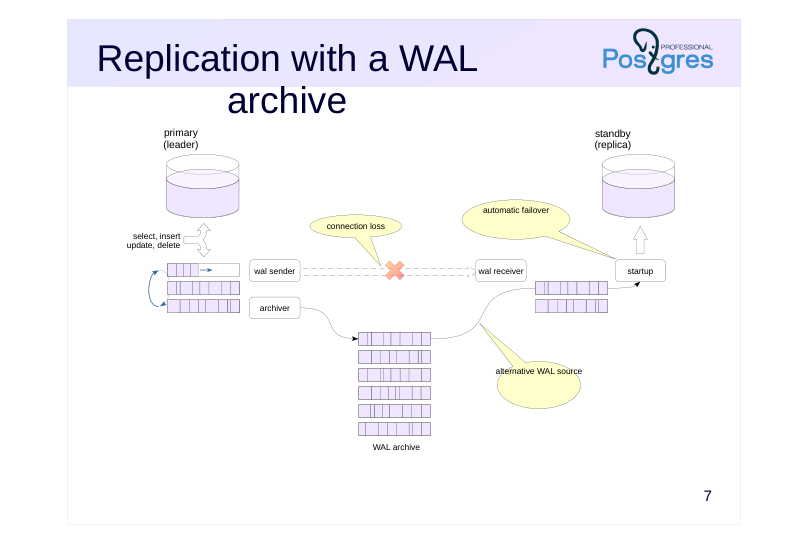
Another way to deliver WAL records is to give the replica access to the WAL archive, just as you would during regular recovery from archive (this mechanism is covered in the “Backup” module).
If the replica can’t retrieve the next WAL record via the replication protocol for any reason (such as a connection loss), it will attempt to read it from the archive using the command specified in the restore_command parameter. When the connection is restored, the replica will automatically switch back to streaming replication.
In fact, replication can work with just the archive, without streaming replication. But in this case:
● the replica is forced to lag behind the leader by the time it takes to fill the WAL segment;
● the leader has no awareness of the replica’s existence, which can lead to problems in certain situations.
Page 9: Processes
Leader Replica
- wal sender
- wal receiver
- startup
- archiver
- archiver
- (archive_mode = always)
- checkpointer
- checkpointer
- (checkpoints)
- (restartpoints)
- background writer
- background writer
- wal writer
- autovacuum
Speaker notes
Different sets of processes run on the leader and on the replica. Beyond the wal sender (on the leader) and wal receiver and startup processes (on the replica) we’ve already covered, there are others.
Common processes:
● background writer – writes dirty pages from the buffer cache to disk (on the replica, pages are read into the buffer cache in the same way to apply WAL records, then written either in the background or during page eviction).
● checkpointer – performs restartpoints (See “WAL Archive”). If a failure occurs during recovery, the replica can resume from the last restartpoint rather than starting over from the beginning.
Processes running only on the leader:
● wal writer – the replica doesn’t generate WAL records; it only receives them from the leader.
● autovacuum launcher/worker — the replica doesn’t perform vacuum operations; when vacuum runs on the primary, it’s propagated to the replica through WAL.
There is also a process that may or may not be present depending on the configuration:
● archiver — runs only on the leader when archive_mode = on, but runs on both the leader and replica when archive_mode = always (covered in more detail in the “Switchover to Replica” module).
Page 10: Replica Processes
Compare the processes on the primary:
And on the replica:
Page 11: Archive Cleanup
 {#source-figure-011 caption=“Source slide page 11: Archive Cleanup”}
Speaker notes
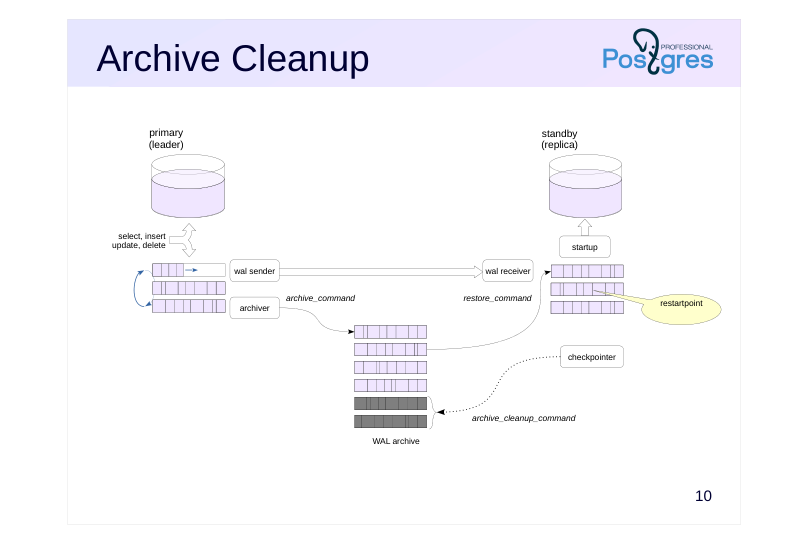
At restartpoints, the checkpointer process will delete unneeded WAL segments from the local pg_wal directory.
If the archive is used to synchronize just one replica, you can also clean it automatically. The archive_cleanup_command parameter specifies the command that will be executed at the end of each restartpoint. For example, you can set it to run the pg_archivecleanup utility (the server will set the restartpoint segment name as %r):
archive_cleanup_command = ‘pg_archivecleanup /path/to/archive %r’
https://postgrespro.com/docs/postgresql/16/runtime-config-wal#RUNTIME-C ONFIG-WAL-ARCHIVE-RECOVERY
https://postgrespro.com/docs/postgresql/16/pgarchivecleanup
Page 12: Replica usage
Allowed
- read-only queries (select, copy to, cursors)
- setting server parameters (set, reset)
- transaction management (begin, commit, rollback…)
- creating a backup (pg_basebackup)
- Not allowed
- any changes (insert, update, delete, truncate, nextval…)
- locks expecting changes (select for update…)
- DDL commands (create, drop…), including creating temporary tables
- maintenance commands (vacuum, analyze, reindex…)
- access control (grant, revoke…)
Speaker notes
We’ve already mentioned that replicas don’t allow any data modifications. More specifically, the following operations are not allowed:
● modifications to tables, materialized views, and sequences;
● locks (since these require modifying data pages);
● DDL commands, including creating temporary tables;
● commands such as VACUUM and ANALYZE;
● access control commands.
A replica can execute read queries when hot_standby = on. Setting server parameters and transaction management commands will also work. For example, you can start a (reading) transaction with a specific isolation level.
Additionally, replicas can be used for creating backups.
Page 13: Replica usage
Run several commands on the primary server:
Check the replica:
No changes can be done on replica directly:
In general, you can tell a replica apart from the primary using the function:
Page 14: Limitations
Isolation and MVCC
- large number of savepoints may slow down query execution
- Serializable isolation level is not supported
- Triggers and locks
- triggers and advisory locks do not work
- Creating backups on a replica
- the full_page_writes parameter must be enabled on the leader beforehand
- delays caused by waiting for checkpoints and segment switches
- Order of changes
- tablespace directories – create on replica first
- max_… parameter values – increase on replica first
Speaker notes
Replication has several limitations and considerations.
If the leader is running a transaction with more than 64 nested transactions (that is, it is actively using savepoints), snapshot creation on the replica will be suspended, preventing query execution for a while.
The Serializable isolation level is not supported on replicas.
Triggers won’t fire on the replica since they’ve already executed on the leader: only their results get replicated. Advisory locks won’t work either.
When performing backups from a replica, there’s no way to fully control the primary server – specifically, you can’t trigger checkpoints or enable the full_page_writes parameter. Therefore, you need to enable this parameter on the leader in advance, and then wait for a checkpoint to occur, which can significantly delay the process.
Tablespace creation is replicated, but if the OS user who started PostgreSQL does not have the privileges to create the required directory, an error will occur. The best approach is to first create the directories on the leader and all replicas, then execute the CREATE TABLESPACE command.
If you increase a resource allocation parameter on the leader, replication may stop. This affects max_connections, max_prepared_transactions, max_locks_per_transaction, max_wal_senders and max_worker_processes.
Page 15: Monitoring
 {#source-figure-015 caption=“Source slide page 15: Monitoring”}
Speaker notes
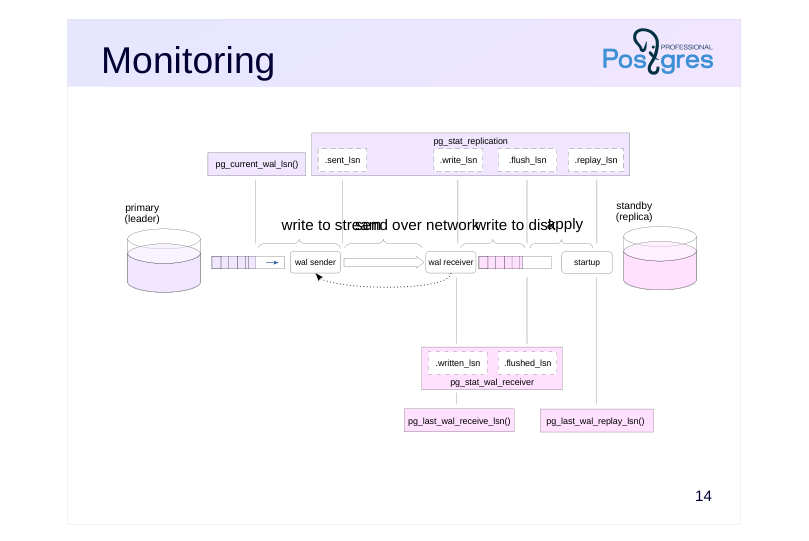
During replication, issues may arise that should be caught by properly configured monitoring. The key data is WAL positions. There are five main steps:
- record created on leader 2) record transmitted by wal sender 3) record received by wal receiver 4) record synchronised to disk (flush) 5) record applied by startup process
The leader usually tracks all five steps. The first one is tracked through the pg_current_wal_lsn function, while the others come from the pg_stat_replication view. The replica passes replication status to the leader each time it writes to disk, but at least once every wal_receiver_status_interval (default is 10 seconds).
Information about the replication slot can be found in the pg_replication_slots view.
Some of the replication progress information can also be obtained from the replica: in the pg_stat_wal_receiver view and via pg_last_wal_receive_lsn and pg_last_wal_replay_lsn functions.
Both functions pg_is_in_recovery and pg_get_wal_replay_pause_state return replication status information. The log_replication_commands parameter enables logging of replication protocol commands to the server log.
Page 16: Replication Monitoring
The replica is currently in recovery mode and applying WAL records:
The current max_connections value on the primary:
If the number of users has grown, we’ll want to increase this limit:
How’s the replica doing?
Replication has stopped. The reason is in the log:
Follow the recommendation and increase the value on the replica.
Check the replica:
Page 17: Page 17
Replication continues. To avoid replication stopping, limits should be increased on the replica first. The state of the replication can be checked on the primary server: To access this information, a user must be a member of the pg_read_all_stats group role or a superuser.
The pg_monitor role is a member of the pg_read_all_stats role and inherits its privileges.
Note Note the *_lsn and *_lag fields – they show the replica’s lag at different stages. All positions are currently in sync, with zero lag. Now let’s insert a large number of rows into the table to observe replication in action.
Page 18: Page 18
A small lag has appeared. Check the replica:
All rows have been delivered successfully. Check the replication status one more time:
All positions are now in sync.
Page 19: Replication Modes
Asynchronous
- synchronous_commit
- = off
- local
- Synchronous
- commit with callback from the synchronous replica
- provides reliability but not consistency
- synchronous_commit
- = remote_write
- = on
- remote_apply
- synchronous_standby_names =
- replica list
- FIRST N (replica list)
- ANY N (replica list)
Speaker notes
There are two transaction commit modes. The faster asynchronous mode carries a risk of losing already committed changes if a crash occurs. In synchronous mode, the COMMIT command doesn’t complete until the record reaches disk. If you have multiple servers, you can still improve reliability by waiting for the replica to confirm that it has commited a record. In this case, the data will not be lost even if the disk fails.
Synchronous replication is enabled using the same synchronous_commit parameter that controls synchronous commits. Different values of this parameter let you control the level of reliability. With remote_write, the leader waits for confirmation that the replica has received the record (though there’s still a chance of losing changes if the replica crashes before writing the data to disk).
With on, the leader waits for confirmation that the record has been written to the replica’s disk (this is the reliable mode; however, an application querying the replica might not yet see the changes).
Finally, the remote_apply value makes the primary wait until the replica has actually applied the record. Each next mode introduces progressively longer delays.
The leader can synchronize with one or multiple replicas. You can specify a list of replicas in priority order or set up quorum-based synchronization, where the leader waits for confirmation from any N of the available replicas.
Page 20: Segment Loss
The leader might delete a WAL file that the replica still needs
- if the replica didn’t collect it yet
- (i.e. because it was down for a while)
- Solution 1. Replication slot
- makes the leader depend on the replica, requires monitoring
- max_slot_wal_keep_size = −1
- Solution 2. WAL archive
- no slot required
Speaker notes
Several challenges can arise during replication, each with different possible solutions.
PostgreSQL periodically removes WAL files that are no longer needed for recovery. The leader might delete a file containing data that hasn’t yet been transmitted to the replica.
This isn’t an issue when a write-ahead log archive is available, since the replica can simply read the required data from the archive if streaming replication fails, then switch back to receiving data from the stream once it catches up with the leader.
Without the archive, the replica won’t be able to continue recovery and will need to be reconstructed from a backup. To prevent this, you can use a replication slot. However, this creates a dependency. If the replica stops collecting WAL records, they will accumulate on the leader, potentially flooding the file system. To prevent this, you can limit the accumulated volume by setting the max_slot_wal_keep_size. If this limit is exceeded, the slot will stop, and the server will be able to delete the WAL files again.
In any case, slots are yet another item you will have to monitor.
Page 21: Impact of the Replication Slot
Stop the replica.
Limit the WAL size to two segments.
The slot is inactive, but it retains the LSN of the last record received by the replica:
Let’s insert more rows into the table.
The LSN in the slot has not changed:
Create a checkpoint, which should clean up the WAL since its size exceeds the allowed limit.
What is the WAL size now?
The checkpoint did not remove the segments – they are being retained by the slot, even though the size limit has been exceeded. If a slot is left unattended, it can exhaust all available disk space. In most cases, keeping the main server running smoothly is more important than keeping the replica in sync. To prevent WAL from growing out of control, you can limit the amount retained by the slot:
Now the checkpoint cleans up the WAL:
Page 22: Page 22
But the slot no longer guarantees the availability of WAL records (wal_status=lost):
And the replica cannot synchronize:
In such cases, you can synchronize the replica using the archive by setting the restore_command parameter. If that’s not an option, you’ll need to reconfigure replication from scratch by creating a new base backup.
Page 23: Conflicts: a Problem
WAL records incompatible with queries on the replica
- vacuum removes tuples that are still needed by queries on the replica
- exclusive locks on objects
- buffer pinning
- Monitoring
- pg_stat_database_conflicts
Speaker notes
Another problem occurs when when the replica is used to run queries. The leader can perform an action that conflicts with a query running on the replica:
● Vacuum may remove a tuple that’s being queried, or it may need to acquire a lock that conflicts with the query.
● A WAL record may aquire an exclusive lock on an object (for example, when dropping a table).
● Buffer pinning may cause conflicts sometimes.
You can monitor such conflicts using the pg_stat_database_conflicts view.
Page 24: Conflicts: Solutions
Solution 0: Avoid conflicts
- avoid running commands that acquire locks
- disable file truncation at end of vacuuming: retention setting
- vacuum_truncate = off
- Solution 1: Delay applying conflicting records
- max_standby_streaming_delay
- max_standby_archive_delay
- except deadlocks, DROP TABLESPACE, DROP DATABASE
Speaker notes
One way to handle conflicts is to avoid operations on the leader that would result in exclusive locks. For example, you can avoid running commands like DROP TABLE, TRUNCATE, LOCK, DROP INDEX, DROP TRIGGER, and similar operations, or run them only when you know there are no active queries on the replica.
Some implicit locks can be avoided by disabling the corresponding functionality on the leader. For instance, if vacuum frees up pages at the end of a file, shrinking the file size requires an exclusive lock on the table. Then, you can disable file truncation by setting the table storage parameter vacuum_truncate = off. However, vacuum cannot be disabled or postponed indefinitely, so this approach won’t help avoid conflicts when vacuum removes tuples that are still needed by queries.
Another approach is to delay the application of conflicting records on the replica. This method works with both streaming replication and archive-based replication; it delays the application of records related to both vacuum operations and exclusive locks. You can set the maximum application delay (measured from when the record is received). If the conflicting query hasn’t finished by that time, it will be terminated.
However, conflicts caused by rare causes (database or tablespace deletion, deadlocks) are not delayed and are resolved immediately by terminating the query.
Page 25: Conflicts: Solutions
Solution 2: feedback via the replication protocol
- a snapshot on the replica will prevent tuple removal
- in the same manner as
- hot_standby_feedback = on
- only for vacuum conflicts with queries on the replica
- Monitoring
- pg_stat_replication.backend_xmin
- pg_replication_slots.xmin
Speaker notes
Another approach is to defer conflicting operations on the leader. To enable this, enable replication protocol feedback.
This method only works for vacuum operations (exclusive locks cannot be deferred) and only with streaming replication (if the replica switches to retrieving records from the archive, it essentially becomes invisible to the leader).
Each data snapshot includes a transaction horizon – a transaction ID value that marks the boundary between tuples that are no longer needed and those that must be retained. The minimum horizon across all snapshots on the replica determines what can be vacuumed. This topic is covered in detail in the “Data Snapshots” section of the DBA2 course.
With feedback enabled, the leader knows which tuples the replica needs. In this case, from the vacuum perspective, a query running on the replica is treated exactly the same as a query running on the leader itself.
Feedback allows you to track the vacuum horizon on the leader side. When a replication slot is not in use, the horizon can be monitored through the pg_stat_replication.backend_xmin field, while with a slot it appears in pg_replication_slots.xmin. Keep in mind that when feedback is enabled, even an inactive slot will prevent vacuum from proceeding, which can cause bloating. The practice assignments explore this effect.
Page 26: Takeaways
The replication mechanism works by streaming WAL records to the replica and applying them there
- primary mode: streaming replication
- can be supplemented with WAL archiving
- The replica is an exact copy of the leader
- does not generate its own WAL records and operates in read-only mode
- A complex mechanism that requires proper configuration and monitoring
- configurations vary significantly depending on your specific requirements
Page 27: Practice
- Configure streaming replication between two servers in synchronous mode, with a slot, without feedback. 2. Verify that replication works as intended. Make sure that when the replica is stopped, commits on the leader are not completed. 3. Simulate a scenario where a query running on the replica gets terminated because the leader has vacuumed tuples that the query still needs. 4. Disable deferral of conflicting changes and verify that queries are canceled immediately. 5. Enable feedback and verify that vacuum on the leader doesn’t interrupt query execution. 6. Stop the replica and verify that the replication slot prevents vacuum from removing tuples. Drop the slot to allow vacuum to resume.
Speaker notes
- For synchronous mode, set on the leader:
● synchronous_commit = on
● synchronous_standby_names = ‘“16/beta”’
- Start a transaction with Repeatable Read isolation level on the replica and periodically query the table. Meanwhile, on the leader, modify that table and run vacuum.
Keep in mind that the max_standby_streaming_delay parameter defaults to 30 seconds.
Set the max_standby_streaming_delay parameter to zero.
Enable the hot_standby_feedback parameter on the replica. The maximum notification interval is controlled by the wal_receiver_status_interval parameter (defaults to 10 seconds).
After completing the tasks, delete the database you created and reset the configuration.
Remember to disable the synchronous commit mode, otherwise a stopped replica will prevent transactions from committing. Don’t set synchronous_commit to off. Instead, set synchronous_commit = “local” or reset the synchronous_standby_names parameter.
Page 28: 1. Synchronous Physical Streaming Replication
Create and start the replica the same way as in the demonstration.
Backup:
For the main server to find the replica, the cluster_name parameter has already been set in the main configuration:
Another option is to add the application_name attribute to the connection string:
Now enable synchronous replication mode on the primary.
If all replicas are synchronous, you can set a value that matches any name:
However, the primary cannot distinguish a replica from, say, the pg_receivewal utility. With this configuration, it will attempt to synchronize with any client connected via the replication protocol, which can result in commits waiting indefinitely. It’s better to list names explicitly.
2. Physical Replication Verification
Page 29: Page 29
sync_state: sync means that replication is running in the synchronous mode: application_name: 16/beta – the name by which the primary finds the replica. Stop the replica.
The commit waits for the synchronous replica…
After the replica starts, the commit completes.
3. Query Cancellation Due to Vacuum on the Primary
When applying a WAL record on the replica is delayed beyond deadlock_timeout due to a conflict with a running query, we want a message to be written to the server log.
To do this, set the log_recovery_conflict_waits parameter.
Also reduce the maximum time streaming replication can be paused before a query on the replica is canceled.
Start a transaction with the Repeatable Read isolation level: the first statement will create a data snapshot that all statements in the transaction will use.
Page 30: Page 30
On the primary, update the only row and run vacuum. The first tuple will be removed in the process.
After 5 seconds, the query on the replica still completes – the replica is delaying the application of the conflicting WAL record:
And the server log already contains a message about waiting for the conflict to be resolved:
Five seconds later, the same query is aborted – the tuple from the snapshot no longer exists.
4. Disable the Delay of Conflicting WAL Record Application
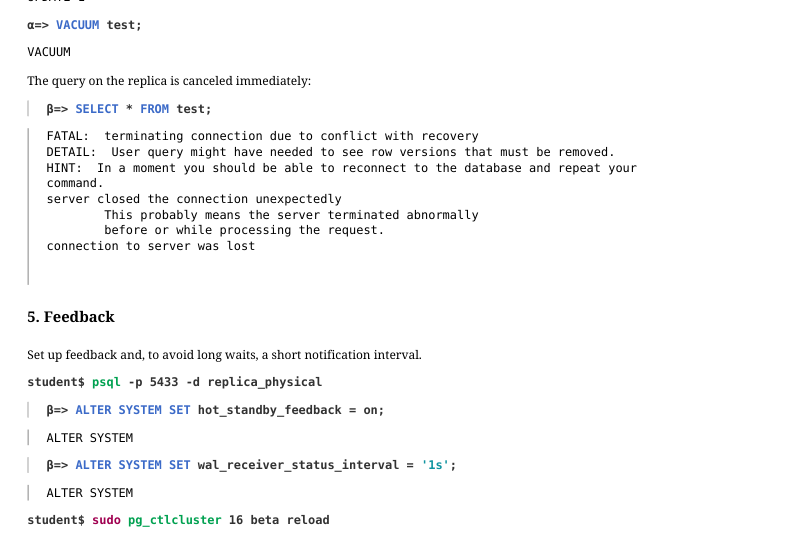
Set the delay for applying conflicting changes to zero.
Start a new transaction…
On the primary, update the row and run vacuum…
Page 31: Page 31
 {#source-figure-031 caption=“Source slide page 31: Page 31”}
The query on the replica is canceled immediately:
5. Feedback
Set up feedback and, to avoid long waits, a short notification interval.
Start a new transaction…
On the primary, update the row and run vacuum…
Thanks to feedback, vacuum cannot remove the old tuple (tuples: 0 removed, 2 remain, 1 are dead but not yet removable).
Page 32: Page 32
Once the transaction on the replica completes, the primary can run vacuum (tuples: 1 removed, 1 remain, 0 are dead but not yet removable). The WAL records are replicated, but they won’t cause any conflicts.
6. Effect of a Replication Slot on Vacuum When the Replica Is Stopped
Cancel synchronization and stop the replica:
Update the table row once more:
The slot is inactive, but it retains the minimum xmin of the replica’s data snapshots:
This xmin value is less than the minimum xmin of local data snapshots:
Therefore, the slot will hold back vacuum (tuples: 0 removed, 2 remain, 1 are dead but not yet removable).
Delete the slot.
Page 33: Page 33
Now vacuum will run successfully (tuples: 1 removed).
Cleanup
Drop the database and reset configuration.
Page 34: Practice+
1. Configure streaming physical replication together with WAL archiving, using the virtual machine’s network interface for the replication stream. 2. Verify that streaming replication is working through the interface. 3. Simulate a network failure by disabling the virtual machine’s network interface. 4. Ensure that streaming replication has stopped and the replica is receiving changes from the WAL archive, but with lag. 5. Restart the virtual machine’s network interface, verifying that streaming replication has automatically recovered.
Speaker notes
- You can check the status of network interfaces with the command: ip a
You can check the availability of the network address with the command: ping -c1
Edit the pg_hba.conf file to allow connections to the alpha server through any network interfaces, and configure it to listen on all network interfaces.
The wal_receiver process ends if there is no network connection within the wal_receiver_timeout time. Specify a small value.
Simulate network failure by turning off the network interface: sudo ip l set enp0s3 down
Verify that after switching to the next WAL segment, the replica receives the changes made before switching.
You can switch the network interface back on with the command: sudo ip l set enp0s3 up
After completing the exercises, drop the database you created and reset the configuration parameters to their defaults.
Page 35: 1. Physical Streaming Replication and WAL Archive
The primary virtual machine network interface is enp0s3:
Verify that the interface is accessible.
Allow connections to the alpha server from IPv4 addresses belonging to the server’s interface networks.
Enable the server to listen on all interfaces and configure WAL archiving.
Directory for the WAL archive.
Backup:
Prepare the configuration for the replica. The wal_receiver_timeout parameter defines how long the replica waits before terminating an idle connection. This allows the replica to detect a dropped network connection more quickly.
Page 36: 2. Replication Check
The replica receives WAL records via the stream…
…and reports received records to the primary without delay:
The table has been replicated:
Page 37: 3. Network Failure
Disable the network interface to simulate a network failure.
The network is unavailable.
The wal receiver process has stopped:
On the primary, insert a row…
…but the replica doesn’t receive it:
Streaming replication has stopped:
4. Archiving
Archiving on the primary, however, continues to function. Switch the WAL segment:
The segment has been archived:
Now the replica can apply the records from the new segment, and we will see the row that was inserted before the switch.
Page 38: 5. Network Recovery
Let’s insert another row into the table on the primary.
It doesn’t reach the replica.
Now restore the network interface: the outage has been resolved.
Streaming replication is working again:
On the primary, add another row.
The replica has received all the rows.
Page 39: Cleanup
 {#source-figure-039 caption=“Source slide page 39: Cleanup”}
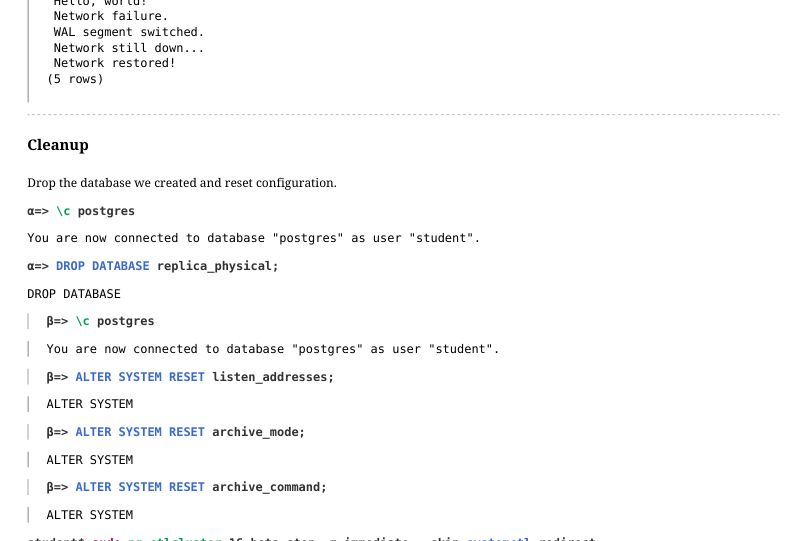
Drop the database we created and reset configuration.