03 Lesson 03: Backup / WAL Archive
This page is extracted from the official PDF into native Markdown. Slide text, code and speaker notes are kept in reading order; the original PDF and HTML remain the layout references. HTML source: No matching course-page link was captured in the source inventory. Archive: DBA3-handouts-16-en-20260917.zip PDF pages: 31
Page 1: Backup / WAL Archive
Copyright
© Postgres Professional, 2017–2025 Authors: Egor Rogov, Pavel Luzanov, Ilya Bashtanov, Alexey Beresnev Photo: Oleg Bartunov (Phu Monastery and Bhrikuti Peak, Nepal)
Use of Course Materials
Non-commercial use of course materials (presentations, demonstrations) is allowed without restrictions. Commercial use is possible only with the written permission of Postgres Professional. It is prohibited to make changes to the course materials.
Feedback
Please send your feedback, comments and suggestions to: edu@postgrespro.ru
Disclaimer
Postgres Professional assumes no responsibility for any damages and losses, including loss of income, caused by direct or indirect, intentional or accidental use of course materials. Postgres Professional company specifically disclaims any warranties on course materials. Course materials are provided “as is,” and Postgres Professional company has no obligations to provide maintenance, support, updates, enhancements, or modifications.
Page 2: Topics
- File-Based Archiving – Continuous Archiving
- Stream Archiving – pg_receivewal
- Recovery from Archive
- Archive Cleanup
Page 3: Continuous Archiving
 {#source-figure-003 caption=“Source slide page 3: Continuous Archiving”}
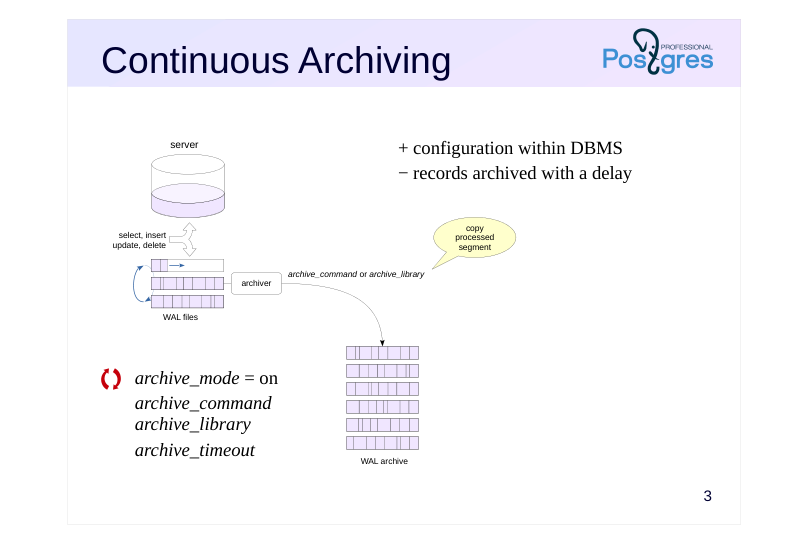
- archive_mode = on
- archive_command
- archive_library
- archive_timeout
Speaker notes
The base backup discussed in the previous topic contains all the WAL records needed to restore data consistency. The resulting backup is called standalone because it contains all the data necessary for recovery up to the point in time when the backup was created.
If you add new WAL files generated by the server to the standalone backup, you can restore the cluster to an arbitrary point in time. In practice, the WAL segments are not copied to the backup file itself, but to a separate archive. This is done by the archiver process (if archive_mode = on).
There are two ways to archive a WAL segment:
Use an OS command. When switching to the next WAL segment, the process executes the command stored in the archive_command parameter.
Use the archiving module functions (PostgreSQL 15 and up). The module name is set in the archive_library parameter. https://postgrespro.com/docs/postgresql/16/archive-modules
If the server load is light, the archive_timeout parameter is commonly used to set the maximum time that can pass before switching to a new WAL segment. Switching can also be done manually using the pg_switch_wal function.
https://postgrespro.com/docs/postgresql/16/continuous-archiving
Page 4: archive_command
An operating system command that archives completed WAL segments
- copies file%p to archive named%f,
- the archive structure can be organized in any way you choose.
- must return 0 only if successful
- must not overwrite files that already exist in the archive
- must ensure data is written to persistent storage
- conveniently supports custom scripts
- Monitoring
- pg_stat_archiver view shows current status
- can enable the message collector (logging_collector = on) and write messages to
- the server log
Speaker notes
The archive command must copy the specified file to an archive. The archive can be organized in any way you choose. For example, this could be a file system on a separate server.
The command must return a zero exit status only when it succeeds. In this case, the copied segment can be deleted by the checkpoint process. With a non-zero status, the segment that failed to copy and subsequent segments are not deleted, and the server periodically retries the archive command until it receives 0.
The command should never overwrite existing files, as this likely indicates an error, and overwriting a file could invalidate the archive.
To ensure reliability, the command must guarantee that the file is written to persistent storage; otherwise, if the archiving command fails, you could lose a file segment if the PostgreSQL server deletes it in the meantime.
The current archiving status is shown in the pg_stat_archiver view. The message collector process logging_collector can conveniently write error and other messages from archive_command execution to the server log.
If complex logic is required, it can be scripted in a separate file, and the archiving command can be set to run it.
https://postgrespro.com/docs/postgresql/16/runtime-config-wal#GUC-ARCHI VE-COMMAND
Page 5: Setting up continuous archiving
We will store the archive in the /var/lib/postgresql/archive directory. It must be accessible to the PostgreSQL owner user.
In practice, you can keep the archive on a separate server or disk system accessible over the network. Let’s enable archiving mode and set the command for copying completed WAL segments.
In archive_command, we first check whether a file with the specified name already exists in the archive and only copy it if it’s not there.
You can specify any command in archive_command, as long as it returns 0 only when successful. For example, you can set up compression of archived segments:
Ideally, the archiving command should perform a sync to ensure the file is safely written to persistent storage. Otherwise, in case of a failure, the file might be lost from the archive while the server has already deleted it from the pg_wal directory. It’s usually convenient to put all the necessary archiving logic in a separate script and call the entire script:
Changing archive_mode requires a server restart.
The archiver process now exists:
Let’s verify that archiving is working. Create a database and a table.
Here’s the WAL segment currently in use:
Page 6: Page 6
To fill out the file, we would need to perform a large number of operations. For testing purposes, it’s easier to force a segment switch:
The segment has switched:
The previous one should have made it to the archive. Check:
The current archiving status is shown in the pg_stat_archiver view:
File-based archiving is now configured and working.
Page 7: pg_receivewal
 {#source-figure-007 caption=“Source slide page 7: pg_receivewal”}
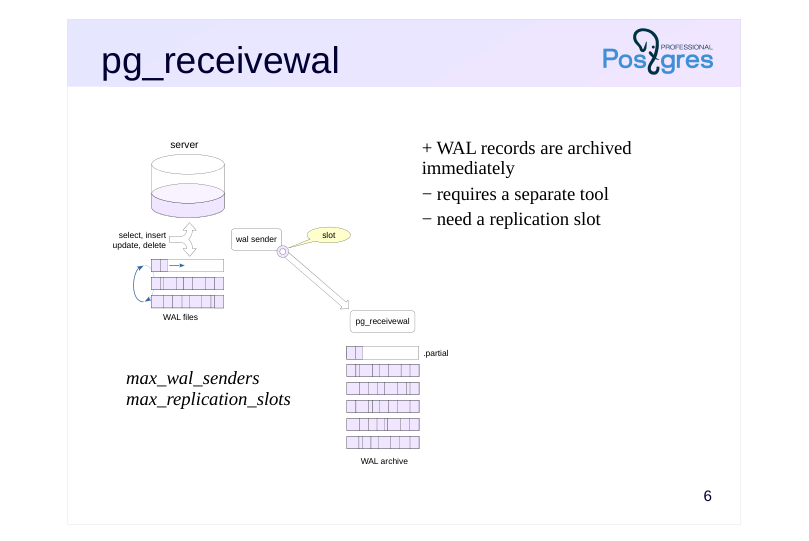
- max_wal_senders
- max_replication_slots
Speaker notes
Alternatively, you can populate the archive using the replication protocol and the pg_receivewal utility.
Typically, the utility runs on a separate server that stores the archive. It generates files in the same way as the main server itself, and writes them to the specified directory. Incomplete segments have the suffix .partial. Cache synchronization with the file system occurs only when the WAL segment is closed, but you can make it synchronous with the – synchronous parameter.
The utility can compress WAL segments. Use the parameter –compress with the algorithm (gzip or lz4) and the compression level as arguments.
When running the utility for the first time (when the archive is empty), archiving starts from the beginning of the current WAL segment. Otherwise, it starts from the beginning of the segment following the last completed segment in the archive. When using a replication slot, this ensures that there are no gaps in the archive, even if the utility was disabled for a while.
By default, the utility receives records indefinitely, but you can set it to terminate when receiving a record with a specific LSN: –endpos = lsn.
Note that the utility does not start automatically as a service and cannot be a daemon.
https://postgrespro.com/docs/postgresql/16/app-pgreceivewal
Page 8: Streaming Archive
To set up archive population via the streaming replication protocol, let’s first stop file-based archiving.
The current state of the archive.
First, let’s have the pg_receivewal utility create a slot to ensure all WAL records are received.
Start it in the background in archiving mode. Upon detecting existing files in the archive, the utility will request the next segment from the server to ensure there are no gaps in the archive.
Let’s add a ton of rows to the table and then delete them.
New files have appeared in the archive.
The last file most likely has a .partial suffix – it is currently being written to. Stream archiving is now configured and working.
Page 9: Base backup
 {#source-figure-009 caption=“Source slide page 9: Base backup”}
Speaker notes
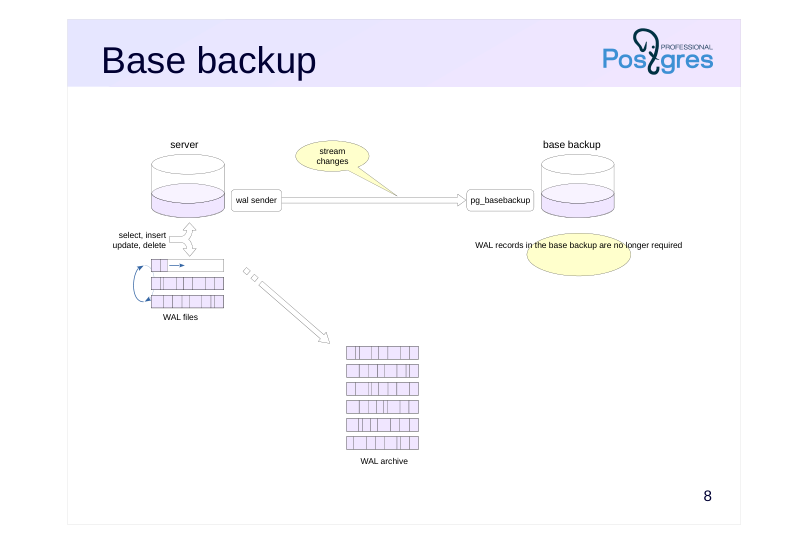
If we have a configured write-ahead log archive, then WAL files become optional in the base backup — since they can be retrieved from the archive during recovery.
Therefore, pg_basebackup can be run with –wal-method=none.
(But there is no harm in having WAL files in the base copy, except for the space they occupy. In fact, they enable system recovery if the archive becomes unavailable.)
Page 10: Base Backup
Since the archive is populated automatically, let’s instruct pg_basebackup not to include WAL files in the backup:
There are no WAL segments in the backup’s pg_wal directory:
The archive, however, has gained new files:
Page 11: Recovery
 {#source-figure-011 caption=“Source slide page 11: Recovery”}
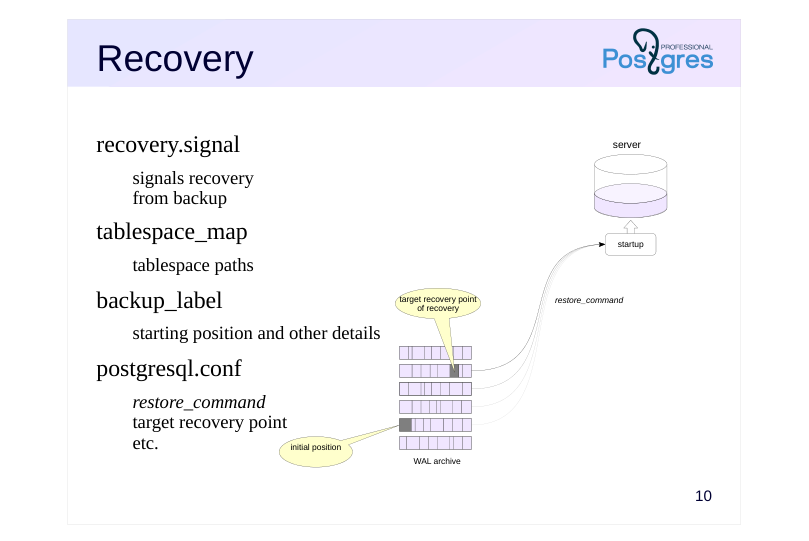
recovery.signal
- signals recovery from backup tablespace_map
- tablespace paths
- backup_label
- starting position and other details
- postgresql.conf
- restore_command
- target recovery point
- etc.
Speaker notes
The recovery process is controlled by three files and parameters.
The recovery.signal file is created manually. If it exists, the server starts in recovery mode. The file’s contents are ignored. If recovery.signal is missing, PostgreSQL assumes it’s performing automatic crash recovery. If the file exists, the server understands that a user-controlled restore from a backup is taking place, and checks two other files that are generated when a base backup is created:
● The tablespace_map file contains paths for table spaces. If the symlincs in pg_tblspc are missing (which is true for tar format), the server will create them at startup based on the information from tablespace_map.
We’ve already encountered this file in the “Base Backup” topic.
● The backup_label file stores the backup name, creation time, and, most importantly, the name of the WAL segment and the position in it to start recovery from.
During recovery, the startup process reads files from the archive using the command from restore_command and applies WAL records from the starting position specified in the label file up to the target recovery position.
Page 12: Recovery Configuration
Let’s start the recovery configuration by creating a signal file.
When the base backup was created, a backup_label file was generated.
The key piece of information in this file is the starting point for recovery (START WAL LOCATION). Theoretically, recovery can begin from an earlier position (but not a later one), though this will take more time. Since our cluster has no additional tablespaces, the tablespace_map file is not necessary. All that remains is to set a restore_command and other parameters in the configuration file.
Page 13: restore_command
OS command restoring WAL segment
- performs the reverse of archive_command
- must return 0 only if successful
- (can be called for non-existent files)
- Monitoring
- log_startup_progress_interval = 10s
- logging of
startupprocess status
Speaker notes
The restore_command parameter specifies the command to “reverse” the archive_command. This command must copy the file from the archive to the pg_wal directory and return a status of 0 only when successful. This is very important, since during the recovery process the server can execute a restore command for files that will not be in the archive – this is not an error, but the command must end with non-zero status.
Starting with version PostgreSQL 14, changing the restore_command parameter does not require a server restart.
https://postgrespro.com/docs/postgresql/16/runtime-config-wal#RUNTIME-C ONFIG-WAL-ARCHIVE-RECOVERY
In PostgreSQL 15 and higher, the status of the recovery process can be monitored in the server message log with the log_startup_progress_interval option enabled. It logs the progress every 10 seconds by default.
In earlier versions, information about the current recovery state was displayed only in the name of the startup unix process.
Page 14: Restartpoint
Checkpoint equivalent for recovery
- flush dirty buffers
- write to control file
- remove unnecessary WAL segments
- Performed when a control point record is applied
- if at least checkpoint_timeout has elapsed since the restartpoint
- or WAL volume approaching max_wal_size
- Monitoring
- log_checkpoints
- pg_stat_bgwriter
Speaker notes
When the startup process applies WAL records during recovery, the data in the server’s shared memory changes in the same way as in normal operation: dirty buffers appear. WAL recods must be retained in case a failure occurs and recovery must restart. To limit the amount of stored records and not start recovery from the very beginning, the server periodically performs restartpoints, resetting, as at a checkpoint, dirty buffers of shared memory structures: buffer cache, clog cache and others. If the restartpoint completes successfully, the server writes to the control file and deletes the WAL segments that entirely precede the restartpoint start.
The restartpoint is executed when the startup process encounters a checkpoint record in the WAL, if at least checkpoint_timeout time has passed since the last restartpoint, or if the WAL size approaches the max_wal_size value. In other words, the restartpoint is triggered by the checkpoint WAL record, but if none of the conditions are met, the record is skipped.
If log_checkpoints is enabled, all restartpoints will be recorded in the message log, and the pg_stat_bgwriter view will show accumulated statistics.
https://postgrespro.com/docs/postgresql/16/wal-configuration
Page 15: Recovery Target
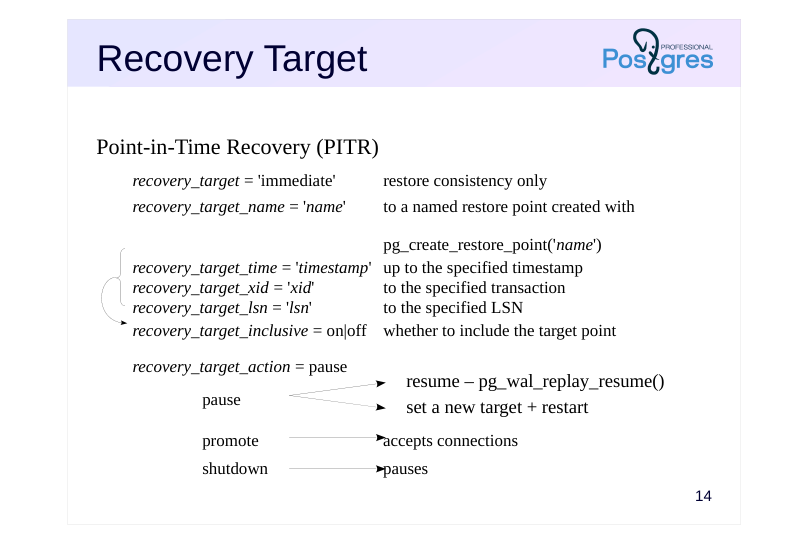 {#source-figure-015 caption=“Source slide page 15: Recovery Target”}
Point-in-Time Recovery (PITR)
- recovery_target = ‘immediate’
- restore consistency only
- recovery_target_name = ’name'
- to a named restore point created with
- pg_create_restore_point(’name')
- recovery_target_time = ’timestamp’ up to the specified timestamp
- recovery_target_xid = ‘xid’
- to the specified transaction
- recovery_target_lsn = ’lsn'
- to the specified LSN
- recovery_target_inclusive = on|off
- whether to include the target point
- recovery_target_action = pause
pause
- promote
- accepts connections
- shutdown
- pauses
Speaker notes
If the recovery target is not set, the cluster will be restored as close as possible to the time of failure. However, you can stop the recovery process at any other point by setting a recovery target.
● The recovery_target = ‘immediate’ parameter will stop recovery as soon as consistency is achieved. This is effectively the same as recovering from a base backup without using the archive.
● The recovery_target_name parameter lets you specify a named recovery point that was previously created using the pg_create_restore_point function.
● The recovery_target_time parameter allows you to specify any point in time (timestamp), recovery_target_xid allows you to specify any transaction, and recovery_target_lsn allows you to specify an LSN. The recovery_target_inclusive parameter lets you choose whether to include or exclude the target point itself.
The recovery_target_action option allows you to select a state in which the server will be on reaching the target point:
● pause suspends recovery. The administrator can query the data to verify whether the recovery target was chosen correctly, and then either complete the recovery by calling the pg_wal_replay_resume function, or set a new target, restart the server, and continue applying WAL records.
● With promote, the server will immediately be able to accept connection requests.
● shutdown will stop the server. In this case, the recovery.signal file is not removed.
Page 16: Completion of Recovery
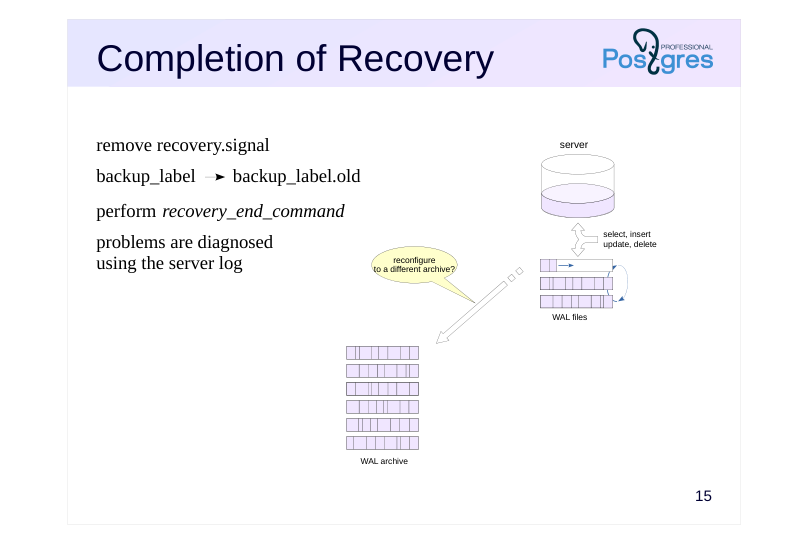 {#source-figure-016 caption=“Source slide page 16: Completion of Recovery”}
remove recovery.signal
- backup_label backup_label.old
- perform recovery_end_command
- problems are diagnosed using the server log
Speaker notes
Once recovery is complete, the startup process terminates, postmaster launches the remaining service processes needed for the server instance to operate, and the server begins running in normal mode. The recovery.signal file is deleted, and backup_label is renamed to backup_label.old.
In the recovery_end_command parameter, you can specify a command that will be executed at the end of recovery. These may be file system operations, archive cleanup, notifications, etc.
The server may fail to start. In this case, no processes will be running in the operating system (and the postmaster.pid file will be absent), while the recovery.signal file will remain in place. The reasons can be found in the server log (for example, invalid configuration parameters). Once the issue has been resolved, restart the server.
Important note: if continuous archiving was set up on the origin server, it must either be disabled on the restored server or redirected to a different archive location.
Page 17: Recovery from a Base Backup
Let’s configure recovery settings on beta. In the simplest case, all you need is a restore command that copies the specified WAL segment from the archive to the specified path:
If no recovery target is specified (via one of the recovery_target* parameters), WAL records from all files in the archive will be applied to the base backup. Place the backup in the beta server’s data directory and start it.
After a successful recovery, the recovery.signal file is removed and the label file is renamed to backup_label.old:
Since all WAL records have been applied, the beta server immediately starts accepting connections. Let’s verify what was restored in the table:
The server’s cumulative statistics contain information about restart points:
Page 18: Timelines
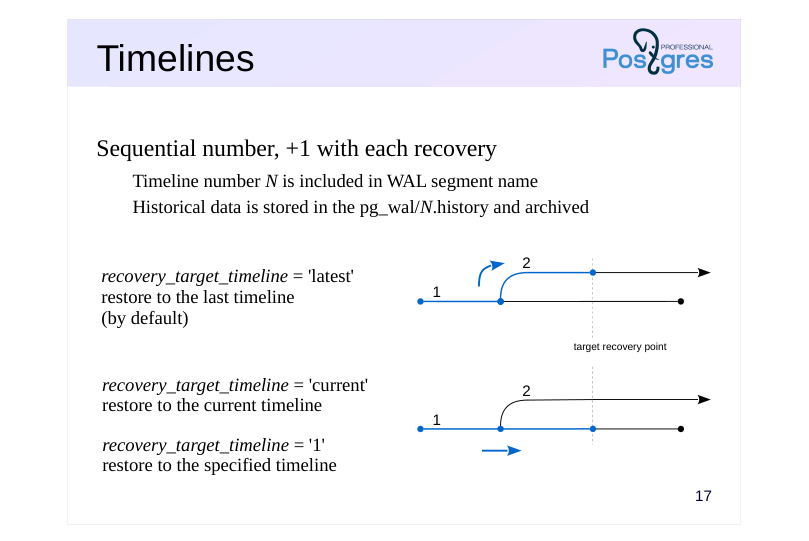 {#source-figure-018 caption=“Source slide page 18: Timelines”}
Sequential number, +1 with each recovery
- Timeline number N is included in WAL segment name
- Historical data is stored in the pg_wal/N.history and archived
- recovery_target_timeline = ’latest’ restore to the last timeline (by default)
- recovery_target_timeline = ‘current’ restore to the current timeline
- recovery_target_timeline = ‘1’ restore to the specified timeline
Speaker notes
After restoring to a point in the past, the server begins to generate new WAL records. The record IDs will repeat the record IDs “from the past.” To preserve these segments and maintain the ability to recover to different points in time, PostgreSQL introduces the concept of timelines. After each recovery using recovery.signal, the timeline number increments, and this number becomes part of the WAL segment numbering.
Timelines form a tree structure, as shown in the diagrams. Timeline 1 is the initial timeline. A recovery was performed to a point in the past, creating timeline 2.
When performing recovery with the recovery_target_timeline = ’latest’ parameter (the default), WAL replay will follow the second (newer) timeline once it reaches the branch point.
Settingrecovery_target_timeline = ‘1’ will continue recovery along timeline 1 (the specified timeline), while recovery_target_timeline = ‘current’ will follow the current timeline (which in this case is also timeline 1).
PostgreSQL retrieves branch point information from history files located at pg_wal/N.history. Therefore, these files should never be removed from the archive.
Page 19: Timelines
What happened to the timeline after recovery?
The number incremented by one. A history file corresponding to this branch has appeared in the pg_wal directory:
It contains information about the branch points through which we arrived at this timeline:
PostgreSQL uses these files when a timeline is specified in the recovery_target_timeline parameter. History files must be archived alongside WAL file segments and should not be removed from the archive.
Page 20: Archive Cleanup
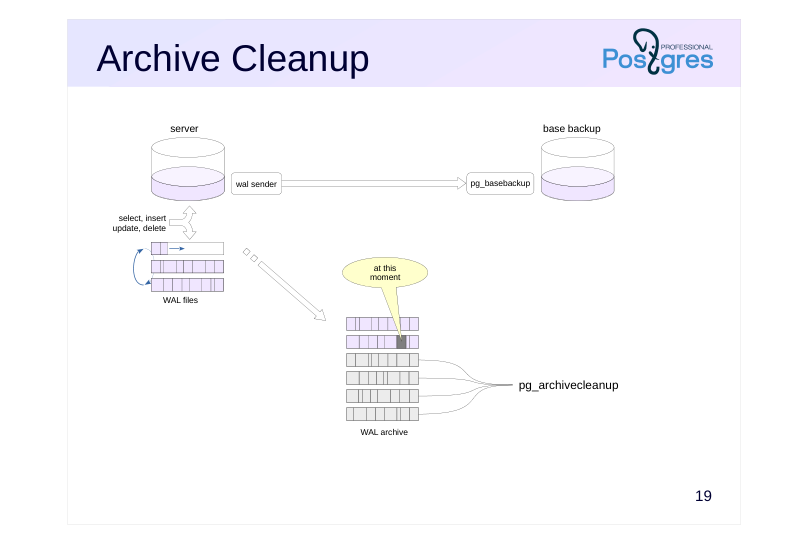 {#source-figure-020 caption=“Source slide page 20: Archive Cleanup”}
Speaker notes
The archive grows over time and needs to be cleaned of unnecessary files every now and then.
The pg_archivecleanup tool does just that. It takes a WAL segment name and deletes all preceding segments.
https://postgrespro.com/docs/postgresql/16/pgarchivecleanup
The question is which archive position to use as the cutoff point.
If you are only using the archive to restore from a single base backup, you can clean up as soon as you update the backup.
However, if the archive needs to support recovery from multiple base backups, you’ll need to either write a custom cleanup script or, better yet, use a third-party backup tool like pg_probackup that offers flexible backup retention policies.
Page 21: Archive Cleanup
The first server’s archive currently contains unnecessary files that were added before the base backup was created:
The pg_archivecleanup utility takes the archive path and the name of the last WAL segment to keep (which can be found in the backup_label file).
Let’s check which files remain in the archive:
The archive has been cleaned up. The utility can be called immediately after creating the base backup by placing both commands in a script.
Page 22: Takeaways
Physical backups: base backup + WAL archive
- Good for
- ongoing periodic backups
- crash recovery with minimal data loss
- point-in-time recovery
- backing up large volumes of data
- Not so good for
- long-term storage
- Not suitable for
- migration to a different platform
Page 23: Practice
1. On the alpha server, create a database and a data table. 2. Set up continuous archiving. 3. Make a copy of the cluster without log files. 4. Insert a few more rows into the table and verify that the current WAL segment has been archived.
- Restore the beta server from the backup, specifying only the restore command in the configuration.
- Restore the beta server again from the same backup, this time with
immediateas the recovery target.
- Restore the beta server again from the same backup, this time with
Speaker notes
After completing the practice tasks, delete the databases and reset the configuration.
Page 24: 1. Database and Table
2. Setting Up Continuous Archiving
3. Base Backup
Since we’ll need to restore from the same backup twice, let’s create it in compressed tar format.
4. Populating a Table With Rows
Switch the segment:
Check the archiving status:
5. Recovery from a Base Backup
Page 25: Page 25
To make it simple, disable continuous archiving on the standby server and set just the restore command:
Create recovery.signal.
Start the server.
All rows were restored. Since all available WAL records are applied by default, the server immediately switched to normal mode and is ready to accept write queries:
6. Recovery from Base Backup (immediate)
Create recovery.signal, and add the restore command and recovery target to the configuration file:
Start the server.
Only the first row was restored. This time, only the WAL records required to bring the data to a consistent state were applied. The server is already accepting read queries, and recovery can be continued if needed:
Page 26: Page 26
 {#source-figure-026 caption=“Source slide page 26: Page 26”}
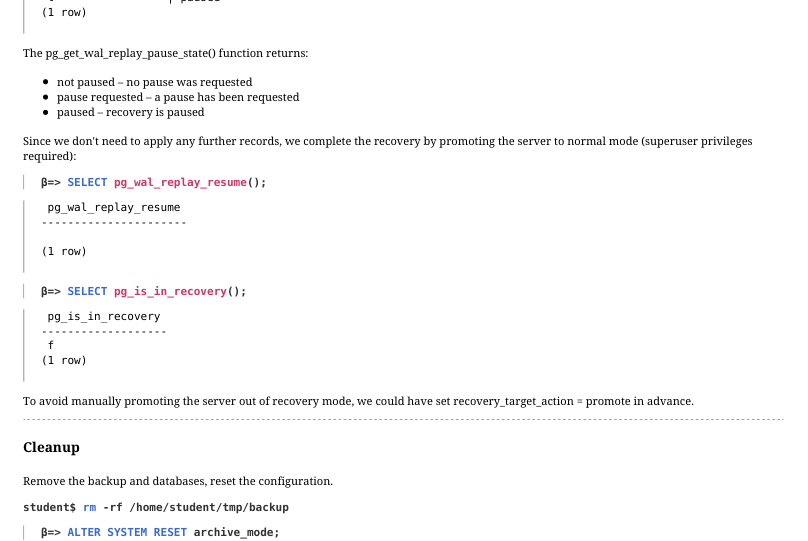
The pg_get_wal_replay_pause_state() function returns: not paused – no pause was requested pause requested – a pause has been requested paused – recovery is paused Since we don’t need to apply any further records, we complete the recovery by promoting the server to normal mode (superuser privileges required):
To avoid manually promoting the server out of recovery mode, we could have set recovery_target_action = promote in advance.
Cleanup
Remove the backup and databases, reset the configuration.
Page 27: Practice+
1. On the alpha server, create a table in which data will be periodically written. Create a physical backup and configure continuous WAL archiving. 2. Insert 100 rows into the prepared table three times (data for January, February and March), marking the time immediately after insertion. Delete some lines between inserts: simulate a situation in which the user accidentally deletes part of the data at an unknown moment, but the problem is not noticed immediately. 3. Recover the deleted data without stopping the alpha server. 3. Use the beta server as an auxiliary.
Page 28: 1. Table and Backup with WAL Archive
Let’s prepare the table:
After setting up the data structure, create a physical backup:
WAL segment archive:
Add the archiving parameters file to the supplementary configuration directory.
Restart the server.
2. Inserting Data into the Table
Our application inserts 100 rows into the table at the end of each month. Insert rows for January:
Save the timestamp after the insert completes:
A user accidentally deletes some of the data:
Insert rows for February:
Page 29: Page 29
Save the timestamp again after the transaction completes:
The user runs the same command again for some reason:
The error goes unnoticed for now. Insert another batch of rows:
Let’s record the timestamp once more:
The error has been discovered:
3. Recovery Using the Archive
Let’s try to recover the data without stopping the alpha server. Since the January and February data is missing, the recovery plan is as follows: Restore the beta server from the WAL archive to the point when the January rows finished committing Export a logical backup of the January data Restore the beta server again, this time to the point when the February rows finished committing Export a logical backup of the February data (the January data may be corrupted at this point) Load the recovered data into the application table on the alpha server Stop beta and place the physical backup into its data directory.
We will need a recovery.signal file:
The plan is to restore the server to a specific point in time – that is, perform point-in-time recovery (PITR). Set the restore command and specify the recovery target as the timestamp created right after the January data finished committing:
Before starting recovery, force a segment switch on alpha to ensure all WAL records make it into the archive. Archiving takes place when writing to the next segment begins.
Page 30: Page 30
Start the beta server.
Verify that the January data has been restored:
The beta server is in recovery mode:
This doesn’t prevent us from exporting a logical backup.
Now let’s move on to February. Set a new target time:
Restart beta to continue recovery.
Verify the recovered data:
The February rows are where they should be, but the January rows are already corrupted. Export the February data:
Restore the exported data for both months on alpha.
Page 31: Page 31
It worked:
In PostgreSQL 17 and later, you can skip the delete step and use the COPY command with the ON ERROR ignore parameter to quietly skip rows that already exist in the table.
Cleanup
Remove the databases and configuration changes.
Remove any unnecessary files.