02 Lesson 02: Backup / Base Backup
This page is extracted from the official PDF into native Markdown. Slide text, code and speaker notes are kept in reading order; the original PDF and HTML remain the layout references. HTML source: No matching course-page link was captured in the source inventory. Archive: DBA3-handouts-16-en-20260917.zip PDF pages: 26
Page 1: Backup / Base Backup
Copyright
© Postgres Professional, 2017–2025 Authors: Egor Rogov, Pavel Luzanov, Ilya Bashtanov, Alexey Beresnev Photo: Oleg Bartunov (Phu Monastery and Bhrikuti Peak, Nepal)
Use of Course Materials
Non-commercial use of course materials (presentations, demonstrations) is allowed without restrictions. Commercial use is possible only with the written permission of Postgres Professional. It is prohibited to make changes to the course materials.
Feedback
Please send your feedback, comments and suggestions to: edu@postgrespro.ru
Disclaimer
Postgres Professional assumes no responsibility for any damages and losses, including loss of income, caused by direct or indirect, intentional or accidental use of course materials. Postgres Professional company specifically disclaims any warranties on course materials. Course materials are provided “as is,” and Postgres Professional company has no obligations to provide maintenance, support, updates, enhancements, or modifications.
Page 2: Topics
- What is Physical Backup
- Cold and Рot Backup
- Replication Protocol and Replication Slots
- Cluster Cloning and Backup
- Integrity Verification
- Backup API
Page 3: Physical Backup
Physical base copy – copy of all cluster files
- faster than logical backup
- restores statistics
- can restore only to compatible systems
- − and major PostgreSQL versions
- − whole cluster backup only, no partial backups
Speaker notes
Physical backup involves copying all files related to the database cluster (both data and service files), that is, creating a full binary copy.
Copying files is faster than dumping all SQL commands, as you do for a logical backup. Likewise, starting a server from a physical backup is a matter of minutes, while recovery from a logical backup takes much longer. Statistical data is also restored from the physical copy, so you don’t need to rebuild it.
But there are shortcomings. A physical backup can be used to restore the system only on a compatible platform (that has the same OS, architecture, etc.) with the same PostgreSQL major version installed. Additionally, you cannot create a physical backup of individual databases within a cluster – only the entire cluster can be backed up.
Page 4: Cold Backup
Server is off
- if the checkpoint is completed, you can just copy the files
- the backup can be deployed on a different server, regardless of the PGDATA
- location
- simplicity
- − requires service interruption
- File system snapshot
- Similar to an unexpected shutdown: recovery required on startup, but the
- backup has all necessary WAL files
- all data, including tablespaces, must be captured in a single snapshot
- no server downtime required
- − file systems with snapshot support are generally slower
Speaker notes
A cold backup is made when the data on disk is in a consistent state: that is, all pages are stored on disk and are up to date. Restoring from such a backup is straightforward: just extract the files, start the server, and it’s good to go.
But to create such a backup, you must perform a checkpoint and a clean server shutdown first. This is a major drawback: shutdowns can take a while, especially with large volumes of data.
The downtime can be reduced by running rsync (or a similar tool) beforehand while the server is still running. After the server is shut down, rsync will only need to copy the changes (which should be relatively few). However, some downtime is still unavoidable.
Another option is to make an inconsistent copy, which will include pages saved at different times. This inconsistency is inevitable when the server is shut down incorrectly or when creating a snapshot of the file system. In the latter case, all cluster files should fall into one snapshot. This may not be possible if the files are on different file systems.
When recovering from inconsistent data, the server will need to restore consistency at startup. This is the standard automatic crash recovery procedure. This isn’t a problem since the necessary WAL files are guaranteed to be backed up, though the recovery process can take some time.
https://postgrespro.com/docs/postgresql/16/backup-file
Page 5: Cold File-Based Backup
You can copy the files of a stopped cluster and start a second server with them. It doesn’t matter whether the server was shut down cleanly or not. Create a database and a table.
Crash the server and copy the files to beta:
Beta starts and restores consistency:
Page 6: Hot Backup
Server is running
- pages are not consistent, as in case of incorrect shutdown
- pages may change while being copied
- (the non-atomic read and and write problem)
- restoring consistency requires all WAL records
- from the last checkpoint till the backup completion
- (some files may get deleted during backup)
- no service interruption
- − specialized tools required
Speaker notes
Hot backup is performed on a running server, so it will probably contain inconsistent pages.
In addition to that, during backup, data is read directly from files rather than through the buffer cache. The contents of the files on disk obviously may change while the backup process is running, and there may not be a guarantee of the atomicity of reading/writing PostgreSQL pages (this depends on the file system and hardware. See “WAL Configuration” section of the DBA2 course for more). As a result, the backup will contain corrupted pages that can’t be recovered even using WAL. This is the first challenge.
The second challenge is that copying data files can take a while. However, after completing a checkpoint, the server may delete some log files that are no longer needed for crash recovery but are still required for the backup.
Without proper safeguards, the resulting backup will be unusable for recovery. Hot backups therefore require specialized tools. PostgreSQL provides a low-level interface that enables reliable backup implementation. This interface is used by both the built-in pg_basebackup tool and various third-party backup solutions.
https://postgrespro.com/docs/postgresql/16/continuous-archiving#BACKUP-BASE-BACKUP
Page 7: Replication Protocol
Purposes
- backup and replication management
- specifically, receiving a stream of WAL records
- Handled by the wal_sender process
- max_wal_senders = 10
- wal_level = replica or logical, but not minimal
- Connection
- A role with the REPLICATION attribute or the SUPERUSER attribute
- permission to connect granted in pg_hba.conf
Speaker notes
PostgreSQL provides a specialized protocol for managing both backup and replication (covered in a dedicated module). Among other things, it facilitates receiving a stream of WAL records generated by the server.
On the server side, replication protocol connections are handled by the wal_sender process. It behaves like a regular backend process that starts when a client connects, but instead of SQL, it processes special replication commands. The number of concurrent processes (wal_sender) is limited by the max_wal_senders parameter (default is 10).
The WAL level must be set to replica or higher. On minimal WAL level, operations like CREATE TABLE AS SELECT, CREATE INDEX, and COPY FROM bypass WAL logging entirely: durability is ensured by writing data directly to disk rather than keeping it in RAM.
This is sufficient for crash recovery and recovery from a cold backup, but not for hot backup.
To use the replication protocol, the client must connect to the server using a role that has the REPLICATION attribute, or as a superuser. In pg_hba.conf, you need to allow this role to connect to the replication database (which is actually a keyword, not a database name). Moreover, the permission for all is not enough, the connection to replication must be allowed explicitly.
https://postgrespro.com/docs/postgresql/16/protocol-replication
Page 8: Replication slot
A server object that guarantees the retrieval of WAL records
- Tracks which record was last sent to the client
- The number of slots is limited bymax_replication_slots = 10
- Retains WAL segments until all records have been delivered to the client
- Allows the client to retrieve data at its own pace, including the ability
- to disconnect temporarily
- WAL files are accumulated on the server when the client is disconnected
- status monitoring: pg_replication_slots
Speaker notes
You can use replication slots to prevent the server from deleting WAL files prematurely while a checkpoint is being created. When streaming WAL records through a replication slot, the slot keeps track of what records were delivered to the client, and will not let the server remove the WAL file until the client has received all records from it.
Using a slot means the client doesn’t have to worry about the server deleting WAL files before they have been received properly. The client can even disconnect and then reconnect after some time to continue receiving WAL records from where it left off.
However, keep in mind that WAL files will accumulate on the server while the client is disconnected, so the server could run out of available disk space. Therefore, every created slot should be added to monitoring (the pg_replication_slots view) and slots that are no longer needed should be removed promptly.
The total number of slots that can be created is limited by the max_replication_slots configuration parameter (default is 10).
The use of slots is covered in more detail in the Replication module.
https://postgrespro.com/docs/postgresql/16/warm-standby#STREAMING-RE PLICATION-SLOTS
Page 9: Cluster Cloning
 {#source-figure-009 caption=“Source slide page 9: Cluster Cloning”}
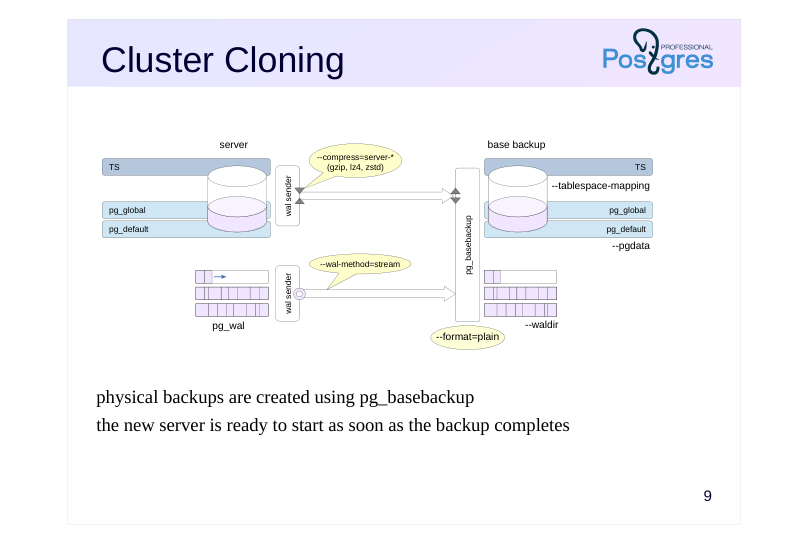
physical backups are created using pg_basebackup the new server is ready to start as soon as the backup completes
Speaker notes
To immediately deploy a new server from a backup, run pg_basebackup in plain format (–format=plain – by default) on the target server. It connects to the source server and copies files from it to the local directory specified by the –pgdata parameter.
Additional tablespaces are copied to the same absolute paths as on the source server. Paths can be reassigned by specifying matches in the – tablespace-mapping utility parameters. This is necessary if pg_basebackup runs on the source server.
With streaming delivery (–wal-method = stream – default), the utility establishes a second connection to stream WAL records generated by the running server to the local directory specified by the –waldir parameter.
By default, the second connection uses a temporary replication slot that is created on connection and deleted when pg_basebackup completes. However, you can also specify a permanent slot by name. The slot must exist at the time the utility is launched or be created by it.
In plain format, you can compress data on the server, reducing the network load. The transmitted data is then decompressed by the utility. But WAL records are not compressed in streaming mode.
https://postgrespro.com/docs/postgresql/16/app-pgbasebackup
Page 10: Cluster Cloning
Now let’s create a base backup of the running server alpha and use it to restore server beta.
Permission for local connection via the replication protocol is already present in pg_hba.conf:
For the pg_basebackup tool to connect to the server as the student role, this role must have the REPLICATION attribute:
Stop beta and delete its data directory.
Create a backup with a quick checkpoint. Data will be compressed on the server side and then unpacked with the tool. This speeds up network transfer, but has no effect if the connection is purely local. The option –pgdata points to the directory to save the backup to. The directory is created automatically. If it already exists, it must be empty.
The command runs with default values: –format=plain –wal-method=stream Write-ahead log files have been copied to the pg_wal subdirectory:
Page 11: Integrity Verification
Data file verification
- objective: to ensure that the backup receives consistent data
- pg_basebackup and pg_checksums utilities
- check relation file page checksums
- Backup verification
- objective: verify that the integrity of the data in the backup has not
- deteriorated over time
- manifest file backup_manifest
- pg_verifybackup utility checks files from the manifest list
Speaker notes
Data can be corrupted both when writing to disk and during storage It is imperative to verify the integrity of data as it is written, but also that this integrity is not compromised over time.
Relation file checksum calculation is enabled by default when a cluster is initialized (or when running pg_checksums utility). The checksum is stored in the page header and updates whenever the the page changes. The old checksum and the new one are compared:
● each time the page is read into the buffer cache;
● by pg_basebackup when creating a backup;
● by pg_checksums in verification mode.
pg_basebackup creates a file backup_manifest and puts it into the backup file with information about files (names, sizes, calculated checksums) and log records (WAL start and end positions, time line), as well as the checksum of the manifest itself.
https://postgrespro.com/docs/postgresql/16/backup-manifest-format
The utility pg_verifybackup checks the backup against the manifest: the presence of files, the correctness of checksums, the ability to read and parse WAL records necessary for recovery.
https://postgrespro.com/docs/postgresql/16/app-pgverifybackup
You should still deploy the backup to make sure it works and check the health of the server, because the coincidence of checksums does not guarantee that the data was not damaged.
Page 12: Integrity Verification
The backup includes a manifest file – here is its beginning and end:
Verify the backup integrity using the pg_verifybackup tool:
The tool uses the manifest to verify that all files are present and their checksums are correct, and that all WAL records required for recovery exist and are readable. Start the second server.
Now both servers run concurrently and independently. Check:
Page 13: WAL Streaming Delivery
 {#source-figure-013 caption=“Source slide page 13: WAL Streaming Delivery”}
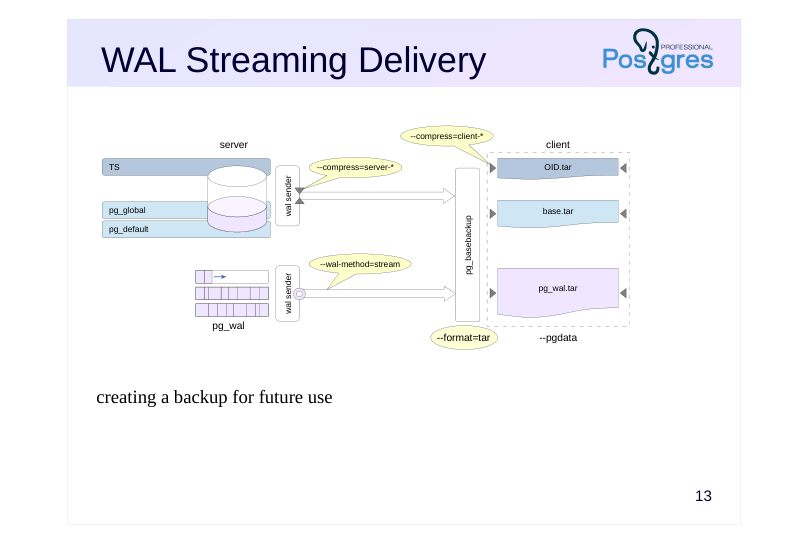
creating a backup for future use
Speaker notes
The tar format is used for archive backups. WAL streaming delivery is used by default ( wal-method=stream).
The cluster files will be saved as a base.tar file. Each additional tablespace is copied to a separate tar file with the same name as the tablespace OID. WAL segments are placed in a separate pg_wal.tar file.
The utility can perform compression both on the client side and on the server side (in the latter case, the pg_wal.tar file is not compressed). A suffix corresponding to the compression method will be added to the names of compressed tar archives. For example, when compressed using the gzip method, the main file will be called base.tar.gz.
To restore from such a backup, you’ll first need to extract the tar files to their proper locations. You can change the paths of tablespaces by editing the tablespace_map file before starting the server or using the –tablespace-mapping command line parameter.
Page 14: WAL File Delivery to Client
 {#source-figure-014 caption=“Source slide page 14: WAL File Delivery to Client”}
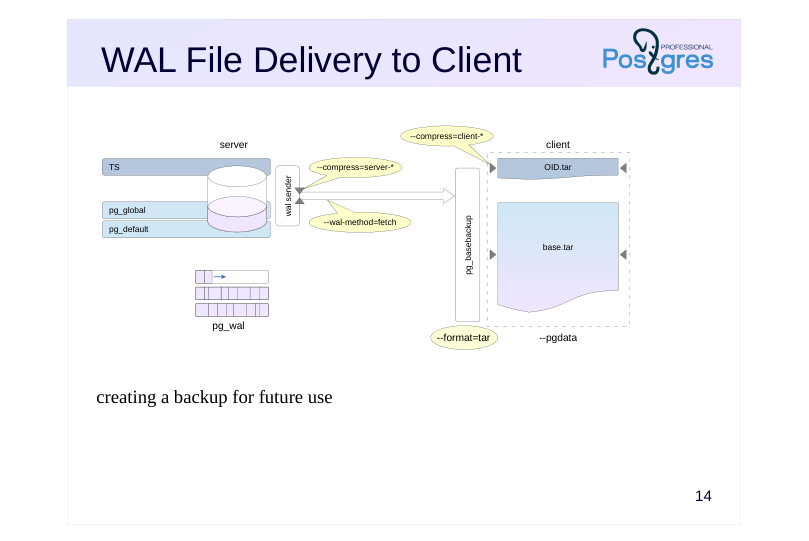
creating a backup for future use
Speaker notes
When creating a backup, you can use another mode – WAL file delivery (– wal-method = fetch).
In this case, no separate connection is created, and the WAL segments are copied and sent over the main connection. This happens after all cluster files have been backed up. During checkpoint creation, the server can delete WAL segments that are no longer needed for recovery. To prevent losing necessary files, set a sufficiently large value for the wal_keep_size parameter.
WAL segments are written to the base.tar file together with the rest of the cluster files.
- The fetch mode is almost never used on the client. It remains as a legacy,
- and the only viable use case for it now is sending WAL records compressed
- which is impossible in streaming mode.
Page 15: Client-Side Backup
We are going to create a client-side backup. Compression will also be performed on the client.
This command used streaming WAL delivery by default (–wal-method=stream). Let’s take a look at the resulting backup:
When streaming WAL records in tar format, a separate file is created for them:
Now let’s create another client-side backup, but this time using the fetch delivery mode. In this mode, WAL segments are transferred over the same connection as the data. Let the server handle the compression.
In the resulting backup, WAL segments are included in the base.tar.gz file.
Page 16: WAL File Delivery to Server
 {#source-figure-016 caption=“Source slide page 16: WAL File Delivery to Server”}
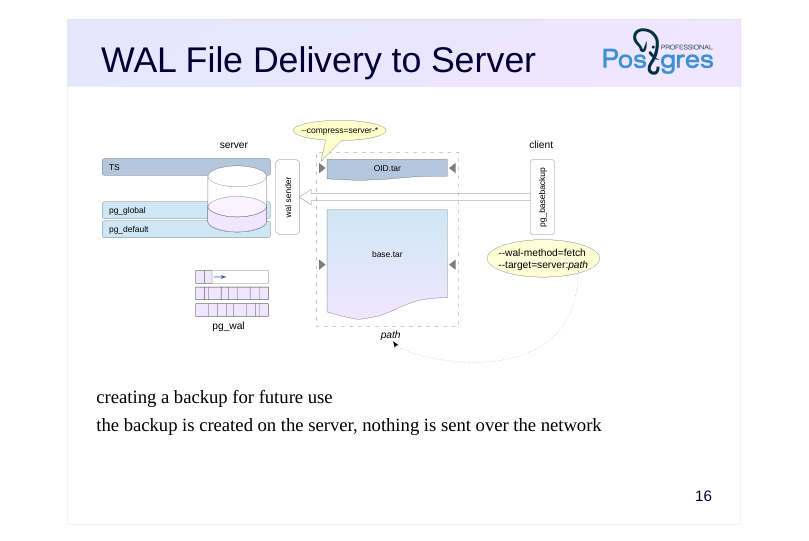
creating a backup for future use the backup is created on the server, nothing is sent over the network
Speaker notes
You can create a backup on the server by running pg_basebackup on the client. No data is transmitted over the network.
To create a backup on the server from a client, use the command line parameter pg_basebackup –target = server: path, where path is the directory path in the server file system (default is –target=client).
This mode supports compression, but only on the server side, naturally.
When creating a backup on the server, you cannot use WAL streaming delivery because no WAL records are sent to the client. Therefore, the fetch delivery mode is used, and the accumulated WAL segments are placed in the base.tar file along with the rest of the cluster files.
Page 17: Server-Side Backup
Run pg_basebackup on the client while saving the backup on the server. Here, we must use the fetch delivery mode, so set the wal_keep_size parameter (and hope the value will be sufficient):
Run pg_basebackup, specifying the directory on the server where the backup will be stored, and set compression mode to zstd.
We get a compressed backup in tar format (which is the default).
With the fetch delivery mode, the utility stores WAL segments in the main archive:
Delete the backup.
Page 18: Low-Level Perspective
 {#source-figure-018 caption=“Source slide page 18: Low-Level Perspective”}
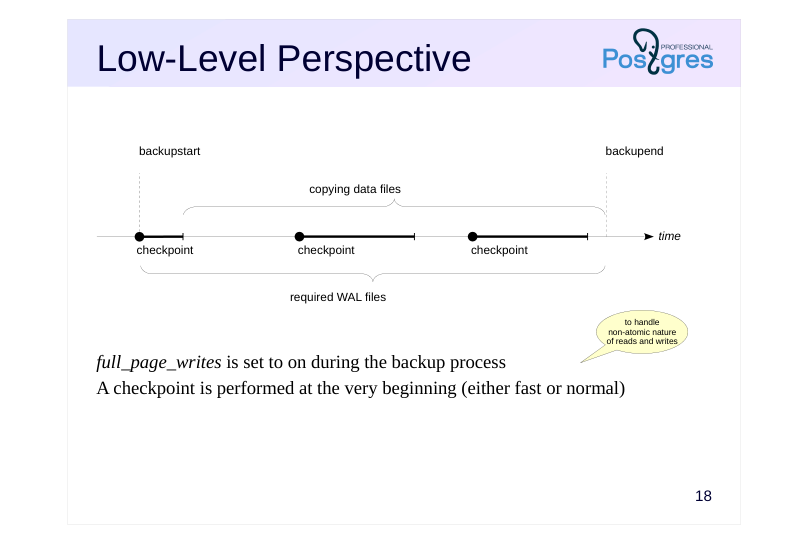
full_page_writes is set to on during the backup process A checkpoint is performed at the very beginning (either fast or normal)
Speaker notes
The low-level backup algorithm is the same whether you’re using pg_basebackup or any third-party tools (which may be necessary since pg_basebackup only provides the most basic functionality).
- You need to notify the server that a backup is starting.
During the backup process, the system first enables the full_page_writes parameter: whenever a page is modified for the first time after a checkpoint, its complete image is written to the WAL. During recovery, WAL records will be applied not to pages in the file (due to non-atomic I/O, parts of the page may be mismatched), but to the page images from WAL.
Second, a checkpoint is performed. There are two checkpoint modes: fast (which can cause the I/O load to peak) and spread (controlled by the checkpoint_completion_target parameter).
Once the checkpoint completes, you can copy the data files using any method that works for you.
Once you’ve copied everything, you need to let the server know that the backup is complete.
Additionally, you need to ensure that all WAL records generated from the start of the backup until its completion are included in the backup.
Page 19: Backup API
Backup start: pg\_backup\_start
- performs a checkpoint and sets full_page_writes
- returns the WAL starting position
- Backup end: pg_backup_stop
- returns the WAL ending position
- Copying files
- either the replication protocol or any OS tools
- Copying the WAL from the starting to ending position
- replication protocol + slot or OS tools + wal_keep_size
Speaker notes
You can use this backup algorithm to build your own custom backup utility.
The backup starts by calling the pg_backup_start function. It sets the full_page_writes parameter and performs a checkpoint, as discussed earlier. The function returns a specific position in the WAL. Records starting from that position must be included into the backup.
At the end of the backup, the pg_backup_stop function is called. It returns the final position in the WAL.
All WAL records between the starting and ending positions need to be included into the backup. Since the server may delete WAL files that aren’t needed for recovery during operation, you should either use the replication protocol with a replication slot to receive records during the backup process (like pg_basebackup does in –wal-method=stream mode), or alternatively — though less convenient — copy the files using OS tools after setting the wal_keep_size parameter.
You can copy files in parallel, use rsync, and so on.
https://postgrespro.com/docs/postgresql/16/continuous-archiving#BACKUP-LOWLEVEL-BASE-BACKUP
Page 20: Takeaways
A base backup is a complete copy of the database cluster, including tablespaces, along with the WAL needed to restore consistency
- Hot backup allows the server to remain running during the backup process
- Tools
- replication protocol
- replication slot
- low-level backup API
Page 21: Practice
1. In the first cluster, create a tablespace and a database containing a table within that tablespace.
- Create a compressed tar-format backup of the cluster using pg_basebackup. 3. Deploy a second cluster from this backup. Place the tablespace in a different directory by modifying the tablespace_map file. 4. Start the second server and verify that it’s working properly.
Speaker notes
After the practice is complete, delete the database and tablespace in both clusters.
Page 22: 1. Tablespace and Database
Only a superuser can create tablespaces:
2. Base Backup
Run pg_basebackup as the student with tar compression:
3. Recovery from a Base Backup
Clear the main data directory on the beta cluster. The directory must be accessible only by its owner.
The directory for the ts tablespace on the server that will be restored from the backup:
Deploy the backup:
Page 23: Page 23
The pg_tblspc directory is currently empty:
The symbolic link will be created when the server starts, based on the tablespace_map file (which was located inside base.tar):
Update the tablespace path in this file:
4. Startup and Verification
Start the server.
Cleanup
Delete the backup.
To delete the database, you must first disconnect from it.
And on the second server:
Page 24: Practice+
- Load the basebackup_to_shell module to create a base backup on the server using a user-defined command. This command should compress the tar backup using the bzip2 utility. 2. Back up the server in tar format. Make sure that the archive is compressed by bzip2. 3. Restore the beta cluster from the resulting compressed archive and verify that it works.
Speaker notes
- To load the module, add the library of the same name to the shared_preload_libraries parameter. With the basebackup_to_shell.command parameter, specify the command to run when backing up:
https://postgrespro.com/docs/postgresql/16/basebackup-to-shell
To load the module for backup, specify pg_basebackup –target=shell
To extract files from the tar archive compressed by the bzip2 utility, use the command:
After completing the practice, delete the created databases and the backup.
Page 25: 1. Loading the Module
Create a configuration for the basebackup_to_shell module in the configuration file.
Restart the server.
Check the configuration.
Create a database and a table in it.
2. Backup
Create a directory for the backup.
Perform the backup. Streaming mode is not available, so use the WAL fetch delivery mode.
3. Recovery from Backup
Delete the beta cluster files.
Page 26: Page 26
 {#source-figure-026 caption=“Source slide page 26: Page 26”}
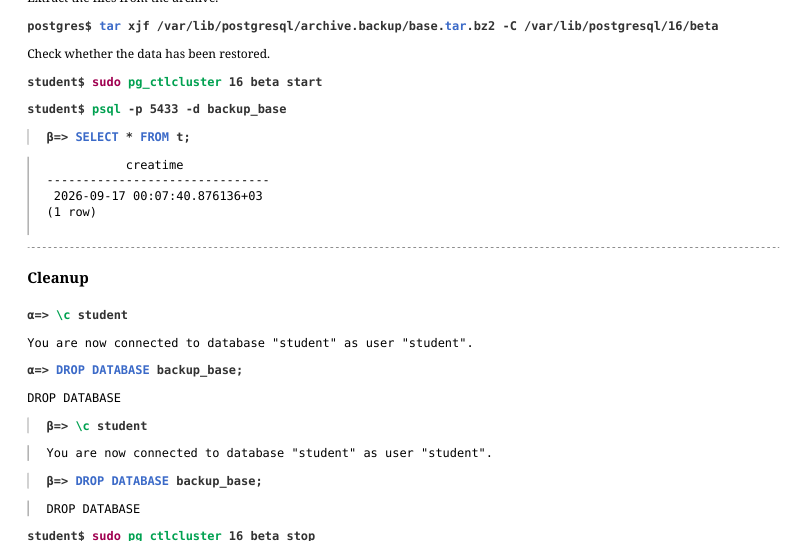
Extract the files from the archive.
Check whether the data has been restored.