01 Lesson 01: Backup / Logical Backup
This page is extracted from the official PDF into native Markdown. Slide text, code and speaker notes are kept in reading order; the original PDF and HTML remain the layout references. HTML source: No matching course-page link was captured in the source inventory. Archive: DBA3-handouts-16-en-20260917.zip PDF pages: 33
Page 1: Backup / Logical Backup
Copyright
© Postgres Professional, 2017–2025 Authors: Egor Rogov, Pavel Luzanov, Ilya Bashtanov, Alexey Beresnev Photo: Oleg Bartunov (Phu Monastery and Bhrikuti Peak, Nepal)
Use of Course Materials
Non-commercial use of course materials (presentations, demonstrations) is allowed without restrictions. Commercial use is possible only with the written permission of Postgres Professional. It is prohibited to make changes to the course materials.
Feedback
Please send your feedback, comments and suggestions to: edu@postgrespro.ru
Disclaimer
Postgres Professional assumes no responsibility for any damages and losses, including loss of income, caused by direct or indirect, intentional or accidental use of course materials. Postgres Professional company specifically disclaims any warranties on course materials. Course materials are provided “as is,” and Postgres Professional company has no obligations to provide maintenance, support, updates, enhancements, or modifications.
Page 2: Topics
- What is Logical Backup
- Backup and Restore of Individual Tables
- Backup and Restore of Databases
- Backup and Restore of the Whole Cluster
Page 3: Logical Backup
SQL commands that create objects and fill them with data
- can back up a separate object or database
- can be restored to a different version or architecture
- +(binary compatibility is not required)
- − modest operation speed
- − no point-in-time recovery
Speaker notes
A logical backup contains a set of SQL commands that can be used to restore a cluster, database, or specific tables. During the recovery process, the necessary objects are created from the logical backup and filled with data.
These commands can be run on a different server version or on a different platform or architecture (binary compatibility is not required).
In particular, a logical backup can be used for long-term storage: you can restore it even after upgrading the server to a higher version.
However, for a large database, these commands may take a while to execute. In addition to that, a logical backup can only restore your database to the point in time when the backup process was initiated.
https://postgrespro.com/docs/postgresql/16/backup-dump
Page 4: The SQL COPY command
 {#source-figure-004 caption=“Source slide page 4: The SQL COPY command”}
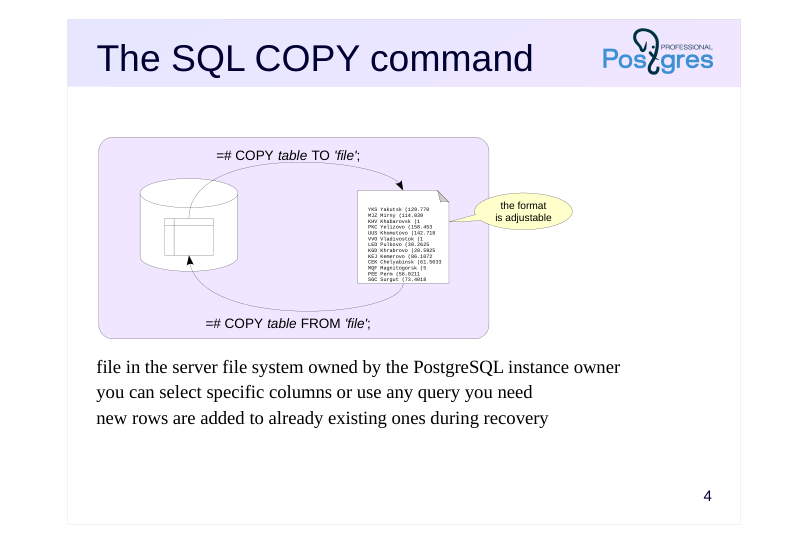
- file in the server file system owned by the PostgreSQL instance owner you can select specific columns or use any query you need new rows are added to already existing ones during recovery
Speaker notes
The COPY TO command writes the contents of a table or a query result to a file or an output stream. Rows of views or partitioned tables can be copied using a query.
COPY TO requires the pg_write_server_file role.
The COPY FROM command adds rows from a file or standard input stream to the table. It is significantly faster than similar INSERT commands. You can monitor the process in the pg_stat_progress_copy view.
COPY FROM requires the pg_read_server_files role (or read input stream pg_execute_server_program).
Note: the COPY FROM command ignores the defined rules, although integrity constraints and triggers are respected. If a table column should receive values generated by a sequence when inserted, but COPY fills that column explicitly, the sequence will not change its state (counter).
Both variants of the COPY command allow you to select the columns of the table and specify options such as:
● FORMAT – data format (text, CSV or binary);
● DELIMITER – field delimiter;
● NULL – NULL text representation;
● ENCODING – encoding;
● HEADER – header describing the columns. https://postgrespro.com/docs/postgresql/16/sql-copy
Page 5: The psql \copy Command
 {#source-figure-005 caption=“Source slide page 5: The psql \copy Command”}
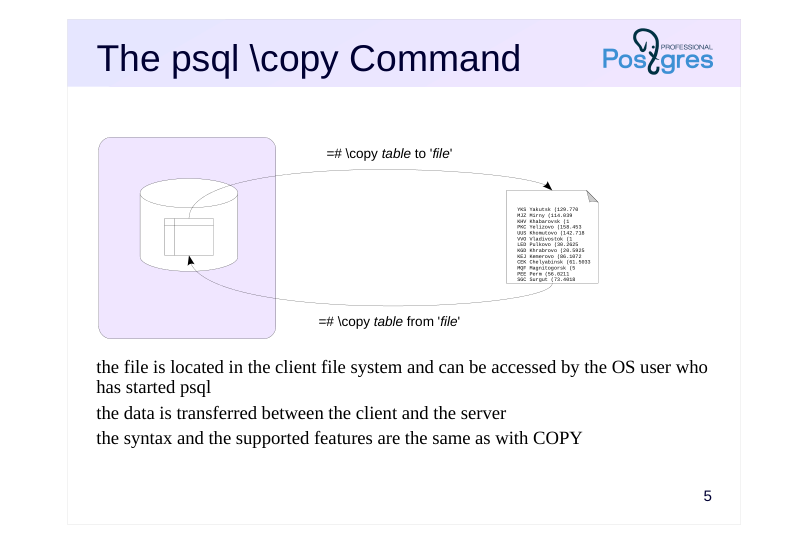
- the file is located in the client file system and can be accessed by the OS user who has started psql the data is transferred between the client and the server the syntax and the supported features are the same as with COPY
Speaker notes
There is a\copy meta command in psql – a variant of the COPY command with the same syntax – that you can run on the client side.
The file must be available to the OS user running psql. The file is accessed on the client, and only the content is sent to the server.
https://postgrespro.com/docs/postgresql/16/app-psql#APP-PSQL-META-CO MMANDS-COPY
Page 6: The COPY command
Create a database and a table.
Print the table contents:
You can see how empty rows are different from the NULL values. The output format can be configured quite flexibly. You can change the separator, the NULL display, etc. For example:
Note Note that the inline separator character has been escaped (the escape character is also configurable). Instead of a table, you can specify an arbitrary query.
This way, you can save query results, presentation data, etc. The command supports output in CSV format, which is supported almost universally.
Input from file or console works in a similar manner.
However, for input from console, the end of file character (a backslash and a period) is required. In order for the data to load, you must specify the same parameters during input as were specified during output. You can also add:
Page 7: Page 7
Here are the table contents (with NULL output configured in psql for clarity):
Load all the rows:
Page 8: Database Backup
 {#source-figure-008 caption=“Source slide page 8: Database Backup”}
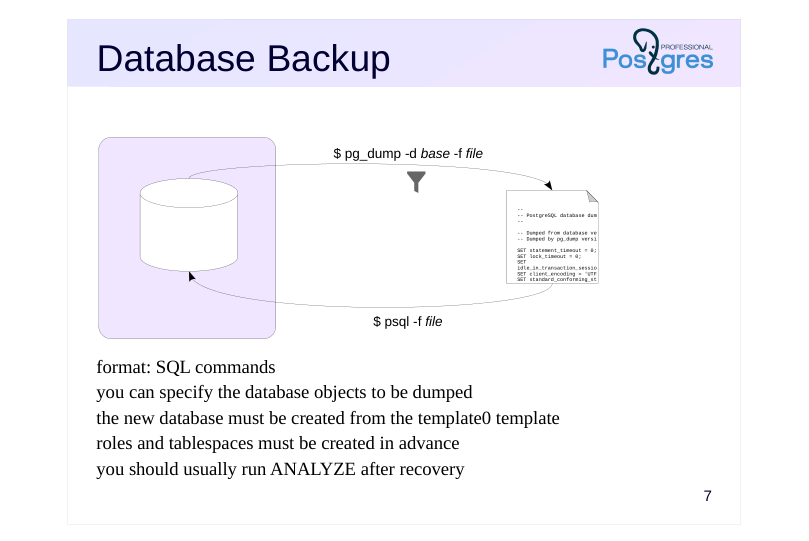
- format: SQL commands you can specify the database objects to be dumped the new database must be created from the template0 template roles and tablespaces must be created in advance you should usually run ANALYZE after recovery
Speaker notes
The pg_dump utility creates a full-scale database backup.
If you do not specify a file name (-f, –file), the utility will display the result to the standard output stream.
The produced output is a script to be run in psql; it contains the commands that will create the objects and fill them with data.
Additional keys can limit the set of objects: select specified tables or all objects in specified schemas, upload only object definitions or only data, etc.
Note that the database to be restored should be cloned from template0 since all the changes made in template1 will also make it into the backup.
Besides, all the required roles and tablespaces must be set up in advance. Since these objects do not belong to any particular database, they won’t be included into the dump.
Once the database is restored, it is a good idea to run the ANALYZE command: it will collect statistics that the optimizer requires for query planning.
https://postgrespro.com/docs/postgresql/16/app-pgdump
Page 9: pg_dumpall Utility
pg_dump, ran without additional parameters, issues SQL commands that create all objects in the current database: To get commands to recover to a system with a different set of roles, use the options: -O, –no-owner — do not generate commands to set the owner of objects; -x, –no-acl — do not generate commands to set privileges
Page 10: Page 10
Here, pg_dump has created the table t and populated it using the COPY command from before. The \--column-inserts\\ flag enables the use of INSERT commands, but the process will take significantly longer.
Logical backups in plain format may include malicious metacommands, for example, \gexec. To avoid such issues when running the script in psql, pg_dump prepends it with the \restrict metacommand with the key: This command switches on the restricted mode, making psql ignore all metacommands except for \unrestrict with the same key.
The keys are handy for dumping and uploading data in segments:
-s, –schema-only — back up only object definitions without data -a, –data-only — back up only data without creating objects
For recovering to a system already containing some data (or, on the other hand, to a completely clean system):
-c, –clean — generate DROP commands for created objects -C, –create — generate commands for creating a database and connecting to it
Important:
changes to the template1 database are dumped too. Therefore, you should recover to a database created from ’template0’. The \’–create\’ flag takes it into account automatically:
Some flags specify the objects to be dumped: -n, –schema — template for schema names -t, –table — template for table names Or, conversely, not to be, while dumping everything else: -N, –exclude-schema — template for schema names -T, –exclude-table — template for table names For example, recover the table ’t’ to another database on another server.
Page 11: Page 11
Page 12: The Custom Format
 {#source-figure-012 caption=“Source slide page 12: The Custom Format”}
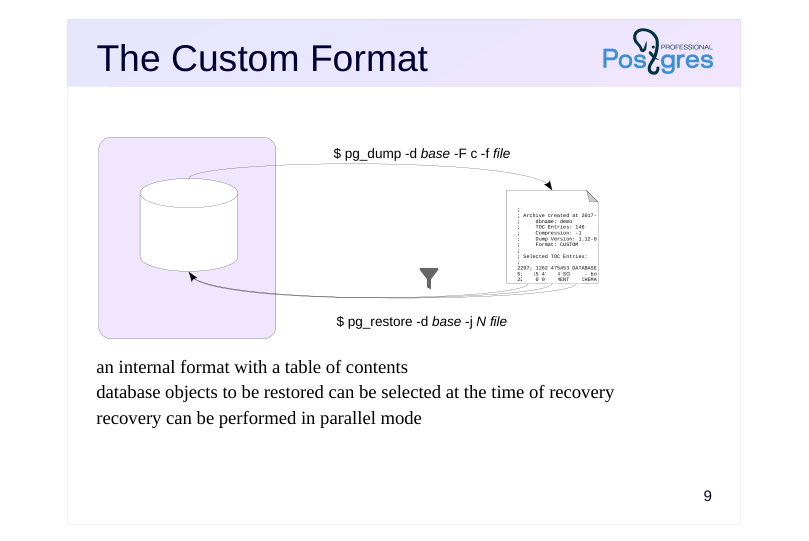
- an internal format with a table of contents database objects to be restored can be selected at the time of recovery recovery can be performed in parallel mode
Speaker notes
The pg_dump utility supports several backup formats. By default, the plain format is used; it provides pure psql commands.
The custom (-F c, –format = custom) format creates a backup in a special format containing not only objects, but also a table of contents. Having a TOC allows you to choose the objects to be restored right at the time of recovery, not while making the dump. By default, the the custom format output is compressed.
To restore the database, you need to run another utility: pg_restore. It reads the file and converts it to psql commands. If you do not explicitly provide the database name (in the -d option), all commands will be output to the standard output stream. If you do specify a database name, the utility will connect to that database and execute the commands directly, without using psql.
To restore only some of the objects, you can use one of the following approaches. The first one is to filter the objects to be restored, just like it is done in pg_dump. pg_restore actually supports many of the same options as pg_dump.
The second option is to use the TOC to retrieve the list of objects included into the backup (via the –list option). Then you can edit this list manually: delete the objects you do not need and pass the modified list to pg_restore (via the –use-list option).
Uploading can be performed in parallel by specifying the number of threads with the -j switch – this is another advantage of the custom format.
https://postgrespro.com/docs/postgresql/16/app-pgdump
Page 13: pg_dump: the \’custom\’ format
 {#source-figure-013 caption=“Source slide page 13: pg_dump: the \’custom\’ format”}
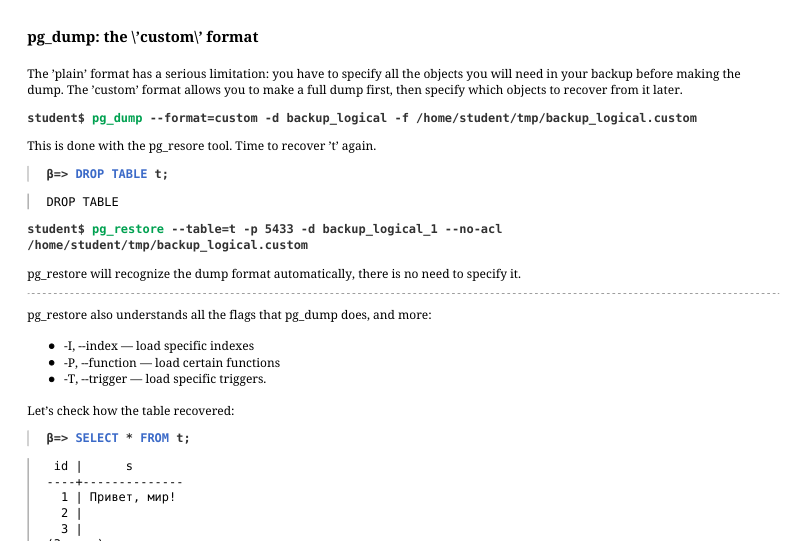
The ’plain’ format has a serious limitation: you have to specify all the objects you will need in your backup before making the dump. The ’custom’ format allows you to make a full dump first, then specify which objects to recover from it later.
This is done with the pg_resore tool. Time to recover ’t’ again.
pg_restore will recognize the dump format automatically, there is no need to specify it. pg_restore also understands all the flags that pg_dump does, and more: -I, –index — load specific indexes -P, –function — load certain functions -T, –trigger — load specific triggers. Let’s check how the table recovered:
Another example: restore the entire original backup_logical database to another server.
Here, we have specified the postgres database. If another database was specified, pg_restore would have created the necessary database and immediately switched to it.
Check:
Page 14: The Directory Format
 {#source-figure-014 caption=“Source slide page 14: The Directory Format”}
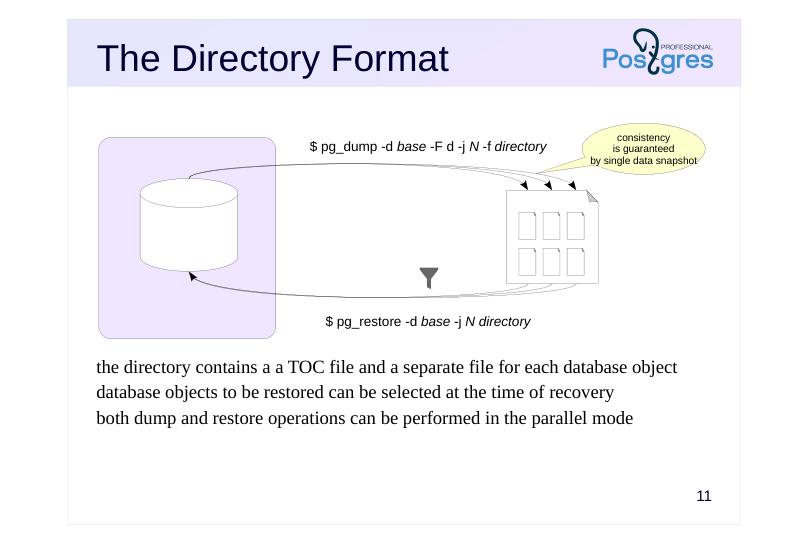
the directory contains a a TOC file and a separate file for each database object database objects to be restored can be selected at the time of recovery both dump and restore operations can be performed in the parallel mode
Speaker notes
Another backup format is Directry. Using this format, pg_dump produces a whole directory instead of a single file; it contains the backed up objects and the table of contents. By default, all files in the directory are compressed.
Its advantage over the custom format is that such a backup can be created concurrently using several processes (the number of processes is specified in option -j, –jobs).
Naturally, the backup will contain consistent data even though it has been created concurrently. Consistency is ensured by using a single data snapshot for all parallel processes.
https://postgrespro.com/docs/postgresql/16/functions-admin#FUNCTIONS-S NAPSHOT-SYNCHRONIZATION
Recovery, as with the custom format, supports parallel streaming.
Otherwise, working with the directory format offers the same capabilities as the formats discussed earlier: it supports the same options and approaches.
Page 15: pg_dump: the ’directory’ format
The \’direcotry\’ format, notably, supports dumping in parallel.
Consistency is guaranteed: all processes use the same snapshot. Take a look inside the directory:
There is a table of contents file, and a file for each dumped object (we have only one):
To restore from a backup, first disconnect from the backup_logical database:
The --clean key generates a command to delete the existing database:
Page 16: Format Comparison
plain custom directory tar
- utility for of recovery psql pg_restore
- compression gzip, lz4, or zstd
- partial restore possible possible possible
- parallel backup possible
- parallel restore possible possible
Speaker notes
This slide compares different features provided by different backup formats.
There is also a fourth format – tar. It was not discussed here, since it does not introduce anything new and does not provide advantages over other formats. In fact, this format is simply a tar-ed version of the directory format, but it does not support compression or parallel execution.
Page 17: Cluster Backup
 {#source-figure-017 caption=“Source slide page 17: Cluster Backup”}
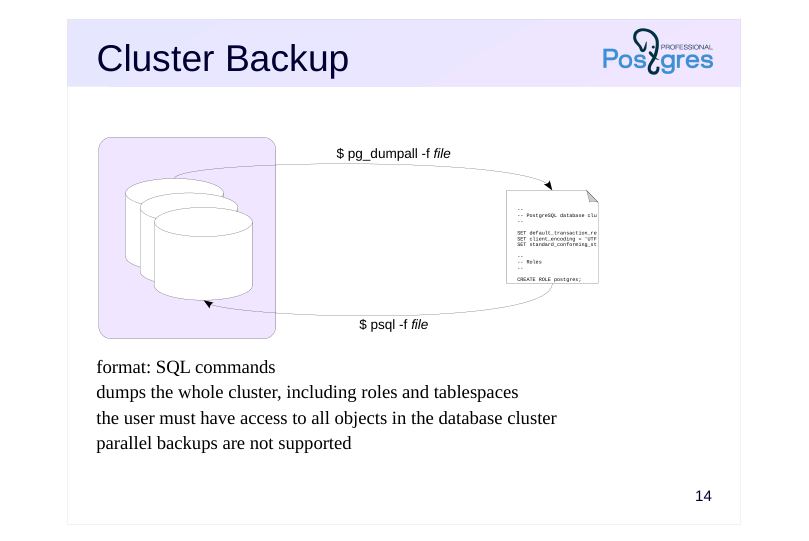
- format: SQL commands dumps the whole cluster, including roles and tablespaces the user must have access to all objects in the database cluster parallel backups are not supported
Speaker notes
pg_dumpall creates a backup of the entire cluster, including roles and tablespaces.
Since pg_dumpall requires access to all objects of all databases, it should be ran by the superuser. pg_dumpall connects to each database in the cluster one by one and backups them using pg_dump. In addition, it also stores data related to the cluster as a whole.
To start this process, pg_dumpall has to establish a connection with a database. By default, postgres or template1 is selected, but you can specify another one.
The result of pg_dumpall is a script for psql. Other formats are not supported. This means that pg_dumpall does not support parallel execution, which can be a problem for larger clusters. In this case, you can use the – globals-only key to backup only roles and table spaces, and unload the databases themselves separately using parallel pg_dump.
https://postgrespro.com/docs/postgresql/16/app-pg-dumpall
Page 18: The pg_dumpall Utility
The pg_dump utility is good for dumping a single database, but it never dumps shared database cluster objects such as roles and tablespaces. To create a full cluster backup, you need to use pg_dumpall. The pg_dumpall, pg_dump, and pg_restore utilities do not require any separate privileges, but the role performing them must have privileges to read (create) all affected objects. For example, pg_dump can be used by the database owner. But since it is necessary to have access to all databases to copy the cluster, we run pg_dumpall as the superuser.
The backup includes: commands that the pg_dump backs up for each database commands for shared cluster objects (roles and tablespaces) Commands for shared objects can be obtained separately:
Page 19: Page 19
Recovery is done via psql, there is no other way around it.
Page 20: Page 20
Page 21: Page 21
Page 22: Page 22
During recovery, errors related to irremovable objects or objects already existing may come up. These are normal and do not affect recovery in this case.
The impact of row level security
If some tables have row level security on (more on that in the Row Level Security topic in the DBS course), you could end up with incomplete data and not even notice. To avoid that, before running COPY, set row\_security to off. This way, when a row level security policy triggers, the process will throw an explicit error.
A simple example. Set up a policy that prohibits displaying empty rows, then enable it for the table owner.
Now COPY returns just two rows:
Page 23: Page 23
But when the parameter is set to off, we get an error:
Both pg_dump and pg_dumpall automatically set row\_security = off, no additional actions needed:
The tool attempts to COPY the rows and returns the error: unable to copy all rows from t. If you want to copy just the rows that are available, you can use –enable-row-security:
To bypass row level security, the user must have the BYPASSRLS attribute:
Now, all queries by student ignore RLS policies:
Page 24: Page 24
Page 25: Takeaways
You can make a logical backup of a whole cluster, a specific database or a database object
- Good for
- small amounts of data
- long-term storage during which the server can been upgraded
- migration to a different platform
- Not so good for
- crash recovery with minimal data loss
Page 26: Practice
1. Create two databases with tables and views, use pg\_dumpall to dump global cluster objects only, then create database backups using pg\_dump in parallel mode. Restore the entire cluster on a different server using the backups you created. 2. Create a table with two columns, one of which is the primary key containing a number sequence. Simulate a case when during uploading with the COPY command, new sequence values are not generated, leading to a unique constraint violation error when attempting to insert new rows.
Speaker notes
- Declare a column as GENERATED ALWAYS AS IDENTITY.
After completing the practice tasks, delete the created databases and logical backup files.
Page 27: 1. Logical Backup
Let’s create some databases, a couple of tables, and some views.
Back up the global objects.
Parallel logical database backups:
Now restore the cluster. Restore global objects first:
Page 28: Page 28
Then restore the two databases in parallel:
Check:
Drop the databases we created.
2. COPY with a Sequence-Based Table
A table with two columns:
Page 29: Page 29
A table and a sequence have been created:
Load rows without specifying values for the first column.
The table contents are as expected:
The sequence counter is correct:
Now insert another row:
When using INSERT, you cannot specify a value for a column declared as GENERATED ALWAYS. It must be generated by the sequence:
However, COPY allows this:
At first glance, everything looks fine…
Page 30: Page 30
But it is not:
The primary key violation occurred because COPY does not use the sequence:
Let’s fix this by updating the sequence state.
Now the insert will succeed:
Cleanup
Drop the database.
Page 31: Practice+
1. Create a table with multiple rows. Select such \\copy parameters so that when writing to a file, the correct data and NULL values are mixed up due to unsuccessful code selection. 2. Using \\copy, create a text file that denotes the missing values as N/A. Load rows from this file into a table where missing values are NULL. 3. Create a data table several MB in size and get the sizes of logical backups in the custom format with different compression methods. Also measure the time required for each compression method during the backup process.
Speaker notes
If you mistakenly choose a NULL code that matches actual data values in the table columns, the resulting backup will prevent proper data restoration.
A way to generate the data: SELECT (random()::numeric*(g.i))^(g.i) AS n FROM generate_series(1,2_500) AS g(i);
You can measure the time using this command: /usr/bin/time -f% e pg_dump…
After completing the practice tasks, delete the created databases and temporary files.
Page 32: 1. Breaking COPY
Create a database.
For this example, set the display of undefined values that match some data:
Set the null value representation to N:
The output of two different values now looks identical. Properly recovering data from such a copy is impossible.
Be careful when changing the default format!
2. Loading Data with Missing Values
Create a file where missing values are marked as N/A.
Create a table to load the data into.
Load the data from the file into the table. The N/A value should be loaded as NULL.
3. Compression in pg\_dump
Create a large enough table.
Page 33: Page 33
Measure the time it takes to dump data without compression (and warm up the cache in the process).
How long will the dump take with gzip compression (used by default)?
Now try lz4.
Now zstd.
Compare the file sizes:
Conclusions: gzip has the best compression ratio, but takes several times longer to run lz4 is the fastest, but offers very little compression benefit zstd strikes a good balance: its compression ratio is only slightly behind gzip, while its speed is comparable to lz4
Cleanup
Delete the databases and temporary files we created.