00 Lesson 00: Backup and Replication / PostgreSQL 16
This page is extracted from the official PDF into native Markdown. Slide text, code and speaker notes are kept in reading order; the original PDF and HTML remain the layout references. HTML source: No matching course-page link was captured in the source inventory. Archive: DBA3-handouts-16-en-20260917.zip PDF pages: 10
Page 1: Backup and Replication / PostgreSQL 16
Copyright © Postgres Professional, 2017–2026 Authors: Egor Rogov, Pavel Luzanov, Ilya Bashtanov, Alexey Beresnev Translated by: Liudmila Mantrova, Alexander Meleshko, Elena Sharafutdinova Photo: Oleg Bartunov (Phu Monastery and Bhrikuti Peak, Nepal)
Use of Course Materials
Non-commercial use of course materials (presentations, demonstrations) is allowed without restrictions. Commercial use is possible only with the written permission of Postgres Professional. It is prohibited to make changes to the course materials. Feedback Please send your feedback, comments and suggestions to: edu@postgrespro.com
Disclaimer
Postgres Professional assumes no responsibility for any damages and losses, including loss of income, caused by direct or indirect, intentional or accidental use of course materials. Postgres Professional company specifically disclaims any warranties on course materials. Course materials are provided “as is,” and Postgres Professional company has no obligations to provide maintenance, support, updates, enhancements, or modifications.
Page 2: For Administrators
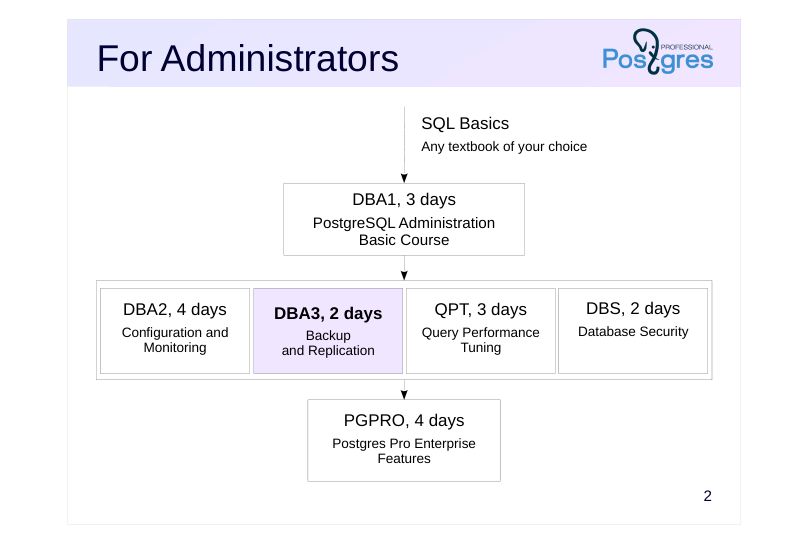 {#source-figure-002 caption=“Source slide page 2: For Administrators”}
- DBA2, 4 days
Speaker notes
Prior knowledge of the basics of the SQL language is required to complete all courses. While we don’t provide a dedicated SQL course, there are plenty of books and resources for self-study.
For administrators, we offer the following courses.
The DBA1 basic course provides information about the PostgreSQL architecture, installation process, server configuration and management. It covers the topics of access control, backup and replication, among others.
The DBA2 course focuses on determining appropriate configuration parameters based on an understanding of the internals of the server. It also talks about monitoring the server and using feedback for iterative parameter tweaking.
The DBA3 covers backups, as well as configuration and usage scenarios of physical and logical replication. It also provides an overview of the methods and pitfalls of designing highly accessible, scalable clusters.
The DBS course focuses on client-server connections and access control features within the database system itself.
The QPT course examines the mechanisms for scheduling and executing queries, the configuration of instance parameters related to performance, and the options for finding problematic queries and optimizing them.
The PGPRO course discusses additional features provided by the Postgres Pro Enterprise DBMS.
Page 3: For Backend Developers
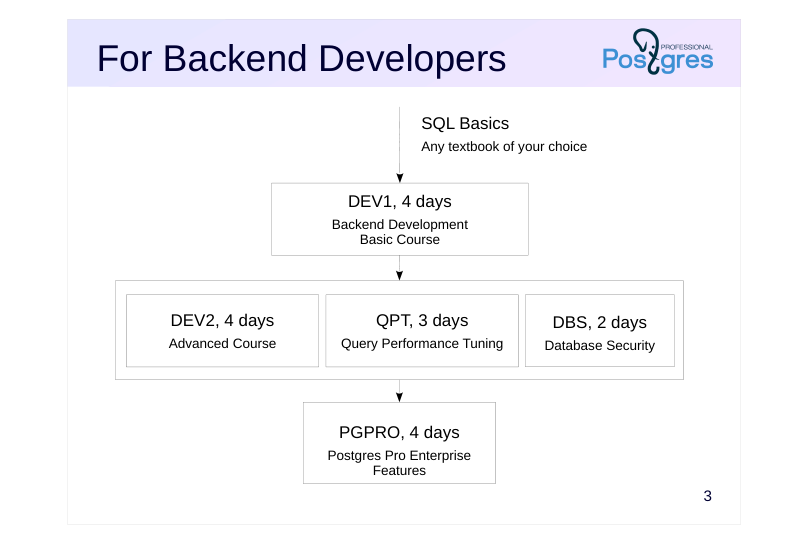 {#source-figure-003 caption=“Source slide page 3: For Backend Developers”}
- DEV2, 4 days
Speaker notes
For backend developers, we offer the following courses.
The basic course is the DEV1 course. It provides general information about the architecture of PostgreSQL and the use of basic database objects; server-side programming in SQL and PL/pgSQL languages using basic data types (including the composite type and arrays), as well as fronted interactions.
The DEV2 course examines the features of the server’s internal structure that affect the development of application code, and comprehensively discusses extensibility: the ability to extend server mechanisms with your own code, which allows you to use PostgreSQL to solve a wide variety of tasks.
The DBS, QPT, and PGPRO courses are intended for both developers and administrators.
Developers may also be interested in administration courses if there is a need to study the internal structure of PostgreSQL in more detail, as well as in the case when there is no dedicated administrator role on the project.
https://postgrespro.com/community/courses
Page 4: About DBA3 course
Duration: 2 days
- Prior knowledge requirements
- SQL fundamentals
- proficiency in Unix operating systems
- familiarity with PostgreSQL architecture as covered in the DBA1 course
- What skills will be acquired
- performing backups using various methods
- configuring servers for physical and logical replication
- understanding replication use cases
- understanding approaches to building clusters
Speaker notes
This course covers backup capabilities and strategies, as well as physical and logical replication mechanisms and their use cases. It also provides an overview of the methods and pitfalls of designing highly available, scalable clusters.
Page 5: Materials Used
Pre-configured virtual machine
- Xubuntu 24.04 OS
- PostgreSQL 16 (three database clusters)
- documentation in English
- Course Handouts
- presentations, demonstrations, practice assignments and assignment keys
- (in html and pdf)
Speaker notes
If you are taking the course on your own, start with the Student’s guide. Among other things, it shows where to download and how to use the virtual machine
and other materials. All course materials, including the Student’s Guide, are available at: https://postgrespro.com/community/courses/DBA3
Completing practical assignments is very important to gain the basic skills in working with PostgreSQL. Be sure to try to complete the assignments yourself first, and then review the provided keys, even if the assignment did not raise questions. Assignment keys may contain additional information that is not mentioned in presentations and demonstrations. After completing a task, make sure to remove any objects you created and reset any settings you changed, as they might interfere with later tasks.
Course handouts (presentations, demonstrations, practical assignments and keys) are available in two formats. The HTML is good for browsing and copying code snippets, while pdf is paginated and convenient for printing.
Page 6: Setup and Configuration
The course uses three PostgreSQL instances: alpha, beta, and gamma:
In the demonstrations, commands on different instances have different prompts.
All practice assignments are run as OS user student. A user and a database with the same name are already created in the PostgreSQL instances in order to allow you to run psql with no parameters.
The server aplha runs on the standard port 5432:
The server beta is on 5433. Just the port is enough to connect in psql:
The server gamma is on 5434.
While student is not a superuser, it can create databases and roles and can connect over the replication protocol. It also belongs to some predefined group roles:
In addition, student has privileges on some objects that are only available to superusers by default. Specifically, it can change parameters:
Page 7: Page 7
And can run system functions (permitted in template1 database and, as a result, in any database created with CREATE DATABASE, unless another template is specified):
Local connections for all users do not require a password:
Page 8: Course Outline and Schedule
Each training day is approximately 8 hours + lunch (1 hour)
- Each topic usually consists of
- presentation and demonstration: ~40-70 minutes
- practice: ~20-40 minutes, including a break
Page 9: Day 1
Backup
- Logical Backup
- Base Backup
- Write-Ahead Log Archive
- Replication
- Physical Replication
Page 10: Day 2
Replication (continued)
- Switchover to Replica 06. Logical Replication 07. Use Cases Clustering Technologies
- Overview