17 Lesson 17: Administration / Server Upgrade
This page is extracted from the official PDF into native Markdown. Slide text, code and speaker notes are kept in reading order; the original PDF and HTML remain the layout references. HTML source: dba2_17_admin_upgrade.html Archive: DBA2-handouts-16-en.zip PDF pages: 37
Page 1: Administration / Server Upgrade
Copyright
© Postgres Professional, 2016–2026 Authors: Egor Rogov, Pavel Luzanov, Ilya Bashtanov, Igor Gnatyuk Translated by: Elena Sharafutdinova Photo: Oleg Bartunov (Phu Monastery and Bhrikuti Peak, Nepal)
Use of Course Materials
Non-commercial use of course materials (presentations, demonstrations) is allowed without restrictions. Commercial use is possible only with the written permission of Postgres Professional. It is prohibited to make changes to the course materials.
Feedback
Please send your feedback, comments and suggestions to: edu@postgrespro.ru
Disclaimer
Postgres Professional assumes no responsibility for any damages and losses, including loss of income, caused by direct or indirect, intentional or accidental use of course materials. Postgres Professional company specifically disclaims any warranties on course materials. Course materials are provided “as is,” and Postgres Professional company has no obligations to provide maintenance, support, updates, enhancements, or modifications.
Page 2: Topics
- Version Numbering and General Considerations
- Minor Upgrade
- Major Upgrade
Page 3: Server Versions
Major versions (9.6, 10, 11, …)
- community support for 5 years
- functionality is added and modified
- new version is not binary compatible with the previous one
- upgrading always requires special procedures
- Minor releases (16.1, 16.2, …)
- bug and security fixes only
- binary compatibility is guaranteed
- in most cases replacing the executables is sufficient
Speaker notes
PostgreSQL version number consists of two components: the major version number and the minor release number. Before version 10, the major version number consisted of two digits (9.5, 9.6); starting with version 10, it switched to a single digit (10, 11). The minor release number is the last digit after the dot (for example, 2 in 16.2).
Minor releases serve exclusively to fix bugs found in the major version. They maintain binary compatibility (on the same platform). Therefore, upgrading to the next minor release is straightforward and is recommended as soon as it becomes available.
A new major version introduces functional changes: some features are added, modified, or, less frequently, removed. In this case, binary compatibility is not maintained. PostgreSQL will refuse to work with a database cluster if you try to connect a newer version of the executables to an older database cluster.
Upgrading a major version requires special steps. In addition to upgrading the database server, you may also need to update your application. The main reasons for upgrading to a new version are the introduction of new features and the end of support for the old version (5 years after release). Due to the complexity of the process, it is common to skip several versions, for example, upgrading directly from version 13 to 16, etc.
https://postgrespro.com/docs/postgresql/16/upgrading
Page 4: General Considerations
Release Notes
- study the Migration section of all intermediate versions
- Testing the upgrade in a stage environment
- identify potential issues in advance
- automate the process to reduce downtime
- Fallback plan
- in case issues arise during the upgrade of the production server
Speaker notes
Regardless of the type of upgrade being performed, it is important to pay attention to several key points.
Always carefully review the Release Notes appendix of the documentation. Its Migration section covers all incompatibilities and non-standard steps required for the upgrade.
For example, if you are planning to upgrade from version 15.4 to 16.13 (the latest minor release of the chosen major version as of the preparation of the course materials), you need to review all the release notes for versions 15.4 through 15.17 (the latest minor release for version 15), and 16.0 through 16.13.
The upgrade should be tested in a stage environment equivalent to production, followed by application testing. It helps identify potential issues and refine and automate the upgrade procedure.
This significantly reduces the risk of issues when upgrading the production server, though it does not eliminate it entirely. Therefore, it is always necessary to have a (tested) fallback plan in case of upgrade failure. Such a plan could be, for example, a standby or a backup, depending on your acceptable downtime requirements.
Page 5: Minor Upgrade
Minor upgrade
- Using physical standbys
Page 6: Minor Upgrade
16.3
- installing the new version packages (server, client, extensions)
- restarting the server
- updating extensions and performing additional steps if required
- 16.4
- simplicity – forced service interruption
Speaker notes
To upgrade the server to the next minor release, you need to do the following:
- Install the new executables.
If PostgreSQL was installed from packages, install new versions of the packages (server, client, extensions). Some package managers, particularly apt in Ubuntu, automatically restart the server, which is usually undesirable.
If PostgreSQL was built from source code, you need to run make install.
Restart the server. After the restart, the server will be running the new version. Client service is interrupted for the duration of the restart.
After the restart, you may need to update extensions (ALTER EXTENSION … UPDATE) and perform additional steps specified in the Release Notes. However, in most cases, it is not required.
Page 7: apt install
Upgrading with OS tools
- May restart the server automatically
- the needrestart utility
Speaker notes
If PostgreSQL was installed from a package, the OS can upgrade its version automatically. In Ubuntu, this is done using the following command
sudo apt-get install –only-upgrade package-name
or
sudo apt install package-name
During such an upgrade, the server is usually restarted automatically, which can be inconvenient. This behavior can be configured. Details are provided in the documentation of the needrestart utility:
https://github.com/liske/needrestart
Page 8: Reducing Downtime
Server restart process
- new connections are prohibited
- smart
- waits for all sessions to complete
- fast
- forcibly terminates all sessions (by default)
- a checkpoint is performed
- Checkpoint
- manually before restarting the server
- PgBouncer
- pauses during server restart
- open transactions continue to execute, while all new ones are suspended
Speaker notes
Service interruption can be reduced, and in some cases, eliminated entirely.
What happens during a server restart?
Firstly, PostgreSQL stops accepting new connections (clients receive a “shutdown in progress” error).
Secondly, depending on the shutdown mode, the server either waits for active sessions to complete or terminates them forcibly. The latter is implied by the management utility by default, but it is probably not the best choice for a production environment if the server primarily handles OLTP workloads (short queries).
Thirdly, a final shutdown checkpoint is performed to flush data from RAM buffers to disk (as discussed in the WAL module). When the buffer cache is large, this process can take significant time. Therefore, it might be advisable to first run a manual CHECKPOINT before restarting the server. In this case, the final checkpoint will still be performed, but much faster.
If PgBouncer (https://pgbouncer.org) is used, it makes sense to pause it during the restart. In this case (transaction mode is implied), active transactions continue executing while all new ones will be queued. Therefore, for an OLTP application, the restart appears as increased database response time.
Page 9: Replication
primary standby
- standby is
- upgraded first
- standby has caught up with the primary, switchover
- primary
- standby
- enables upgrades with zero or minimal service interruption
Speaker notes
If the system uses physical replication and has a mechanism for seamless user switchover between servers, the upgrade procedure can be performed without service interruption.
To achieve this, the standby is upgraded first. During its restart, the primary handles the entire load. Since the versions are binary compatible, replication continues to work between the upgraded standby and the primary that has not been upgraded yet. In the vast majority of cases, replication also works in the opposite direction (from the upgraded server to the server running the older release), but backward compatibility is not guaranteed. That’s why it is safer to upgrade the standby first.
After standby restart, it catches up with the primary, the primary is stopped, and a switchover to the standby is performed. Upon starting the former primary, it connects to the new primary as a standby (this may require running the pg_rewind utility; the entire procedure is covered in detail in the DBA3 course).
Page 10: Minor Upgrade
Check the current PostgreSQL version:
There is a more recent version in the repository:
Let’s upgrade to version 16.14 by updating the postgresql-16 package using the OS package manager:
Note Note that the postgresql-client-16 package was also updated and the server has been restarted.
Check the version number again:
Page 11: Major Upgrade
Logical backup with pg\_dumpall
- The pg_upgrade utility
- Logical replication
Page 12: pg_dumpall
- installing packages and initializing the cluster
- disconnecting users (read-only mode)
- logical backup (dump)
- restoring from a backup (psql)
- collecting statistics
- startup
- allows changing platform, bitness, database encoding, etc. – long upgrade time, requires significant disk space
Speaker notes
The simplest way to upgrade to a major version is to create a logical backup and restore it on another server running the new version. (A logical backup is a set of SQL commands that recreate the database; see the DBA3 course for details).
Firstly, install the new version and initialize the database cluster (some package managers perform initialization automatically during installation).
If you are deploying the new server on the same machine, make sure the data directories do not overlap. Packages are typically built to meet this requirement (for example, /var/lib/postgresql/15/ and /var/lib/postgresql/16/). Modify the configuration files of the new cluster by applying settings from the running server.
You can create a backup while the server is running, but all users must be disconnected (only read‐only access is allowed), since changes made after the backup procedure starts will not be included.
After that, start the new server and restore the prepared backup. Then you need to collect statistics; without it, the optimizer cannot build efficient query plans.
Once you have completed all necessary checks, the old server directories (executables, PGDATA contents, and custom tablespaces) can be removed.
Page 13: pg_dumpall
Speeding up data migration
- individually for each database
- Space optimization
- Statistics collection
- $ vacuumdb –analyze-in-stages
- dump_stat extension
- Quick validation
Speaker notes
Although pg_dumpall creates a backup of the entire cluster, it always runs in a single-threaded mode. Restoration uses psql, so it is also single-threaded.
If hardware resources allow, you can save the cluster’s global objects using pg_dumpall, and then back up each database individually in directory format using pg_dump in parallel mode. In this case, recovery can also be performed in parallel using the pg_restore utility. See the DBA3 course for details.
To optimize disk space, you can skip storing the dump file and simply pipe the output of pg_dumpall directly into psql.
To collect at least some statistics as quickly as possible, you can do it in three stages. You can try to start using the database after the second stage. Another option is to use the dump_stat extension:
https://postgrespro.com/docs/postgrespro/16/dump-stat
When testing the upgrade in a stage environment, you can first perform a schema-only migration (without data). This facilitates early detection of possible issues.
It is recommended to use the utilities from the new (already installed) version, as they may include improvements not available in the previous version.
Page 14: PostgreSQL 15 Cluster
 {#source-figure-014 caption=“Source slide page 14: PostgreSQL 15 Cluster”}
Stop the 16 main cluster to avoid accidental connections to it.
The data directory /var/lib/postgresql/15/prod contains a PostgreSQL 15 database cluster.
Create a tablespace and a database.
Create a table in the newly created tablespace:
Install the pgaudit extension:
Page 15: Page 15
The pg\_dumpall Utility
Create a logical backup of the entire cluster. The server must be running, but changes made after pg_dumpall starts will not be included in the backup.
The backup that we created is a text file containing SQL commands. It includes commands for creating databases:
And commands for creating tables:
It also includes commands for creating cluster-wide objects such as roles and tablespaces, for example:
We will not restore the backup on the PostgreSQL 16 server; you will perform this step in the practice.
Page 16: pg_upgrade
Applicability requirements
- in the new version, only the format of internal system data changes
- binary compatibility is maintained in all other aspects,
- including type representations and data files
- REG types are not used in the databases
- upgrade from version 8.4 or later
- upgrade to the version matching the utility
Speaker notes
The second and most common upgrade method is using the pg_upgrade utility, which can transform files of the cluster to a format compatible with the new major version.
https://postgrespro.com/docs/postgresql/16/pgupgrade
The utility can be used because major version upgrade typically changes the system catalog tables, while leaving data and index file formats unchanged. Therefore, only a small portion of the data needs to be modified, leaving the bulk of it untouched. The new cluster must be compatible with the old one in terms of bitness, encoding, and locale settings.
In some versions, the binary representation of data types changes, though this happens quite rarely. In such cases, the utility cannot perform the upgrade, but it will at least identify where the problematic type is used. This will help you resolve the issue manually before upgrading.
There are some additional limitations as well. For example, the utility cannot upgrade a cluster if any of the databases use REG types (except for regtype, regclass, and regrole).
When pg_upgrade runs, it checks that its own version and the versions of all executables involved in the upgrade process match the version of the new server. The utility supports upgrading from any version starting with 8.4 to the version that corresponds to the utility itself. Therefore, pg_upgrade version 16 can only upgrade an old server to version 16, not to version 15. Downgrading the server is not possible.
Page 17: pg_upgrade
 {#source-figure-017 caption=“Source slide page 17: pg_upgrade”}
- fast upgrade, typically no additional disk space required – limited applicability
Speaker notes
First, let’s look at the general (simplified) sequence of steps for an upgrade using pg_upgrade.
Install the new server and initialize (but do not start) the new cluster. This step is identical to the upgrading procedure using pg_dumpall.
Then stop the old server and run the pg_upgrade utility. Let’s outline what it does:
● The old server is started temporarily to create a logical backup of the cluster-wide objects and the schema of all databases. This is precisely the information for which binary compatibility is not maintained.
● The new server is started temporarily to perform necessary applicability checks and to restore the global objects and data schema from the backup.
● Data migration is performed: either by copying, hard linking, or cloning (for copy-on-write file systems).
Once the utility completes its work, the new cluster becomes an upgraded version of the old one. Finally, post-upgrade steps are performed, such as collecting statistics and updating extensions.
A huge advantage of pg_upgrade is its capability to perform extremely fast upgrades of clusters of any size, with no need for additional disk space (when using hard links). However, this utility is not always applicable.
Page 18: pg_upgrade
 {#source-figure-018 caption=“Source slide page 18: pg_upgrade”}
Speaker notes
Let’s take a closer look at what happens to the file systems of the old and new clusters during an upgrade.
Step 1. Packages for the new version are installed, and the new cluster is initialized. The new server is shut down and contains no user objects — only the standard databases and the system catalog.
The old server continues to run.
Note that the new cluster must be initialized using the same locale as the old one.
Page 19: PostgreSQL 16 Cluster
PostgreSQL 16 is already installed, and the cluster has been initialized in /var/lib/postgresql/16/prod directory. Check that the server is running and using the same locale as PostgreSQL 15, then stop it.
Stop the server.
Checking Upgrade Feasibility
Before performing the actual upgrade, it is a good idea to run pg_upgrade in check mode with the –check option. Since we plan to use hard links instead of copying data files, we also specify the –link option. We also need to specify the paths to the executables and data directories for both the old and new versions. Note that the program operates under the OS user postgres, since it needs access to the data directories. It is important that the versions of pg_upgrade and other server utilities (pg_controldata, initdb) match the versions of the client utilities they invoke (pg_dump, pg_dumpall, pg_restore, psql, vacuumdb). Otherwise, an error will occur. Since we updated both the server and client packages to version 16.14, this requirement is satisfied:
You should pay attention to the authentication settings. The utility needs local superuser access to both clusters since it starts and stops the servers during operation. We already have such access rights, but in general cases you may need to temporarily modify the pg_hba.conf file. The pg_upgrade utility also needs write access to create various temporary files in a dedicated working
Page 20: Page 20
directory pg_upgrade_output.d within the new cluster’s data directory. The servers are started sequentially on port 50432 to prevent accidental user connections; the port number can be specified explicitly if necessary.
The utility has detected an issue: the new cluster is missing some libraries. Let’s check the list:
This is the library of the extension we installed, which is required by an index in the admin_upgrade database. It must also be installed for the new version.
Don’t forget to configure the server to load the library into each backend process’s memory:
Check again.
Page 21: Page 21
Now the clusters are compatible.
Page 22: pg_upgrade
 {#source-figure-022 caption=“Source slide page 22: pg_upgrade”}
Speaker notes
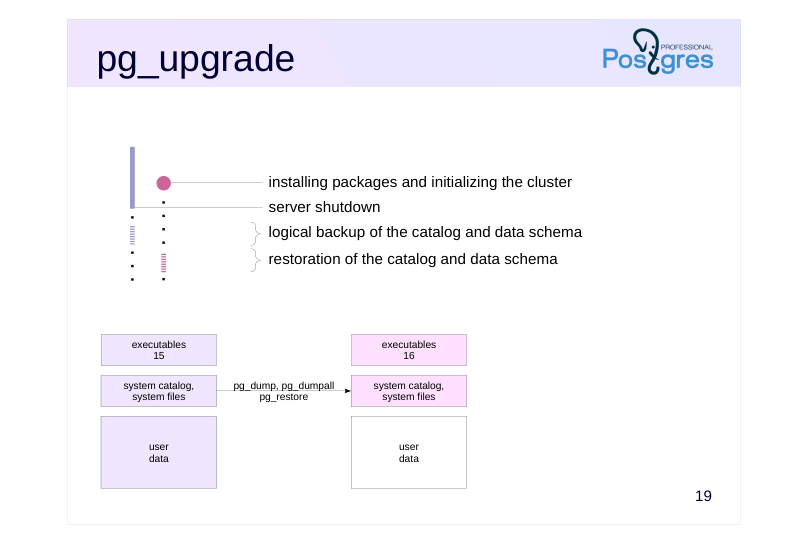
Step 2. The old server is stopped, and the pg_upgrade utility is started. It creates a backup of the catalog and schemas for all databases using the pg_dump and pg_dumpall utilities in a special –binary-upgrade mode, which preserves file numbering (this mode is not intended for regular use and is not officially supported):
pg_dumpall –globals-only –binary-upgrade pg_dump –schema-only –binary-upgrade
After that these objects are restored to the new server using pg_restore (these utilities are covered in detail in the DBA3 course). The directory names for databases and tablespaces, as well as the file names of the relations, remain unchanged after the upgrade.
All these steps are completed fairly quickly — the completion time does not depend on the amount of data in the cluster.
After this step, the system catalog of the new cluster will match that of the old cluster, except for changes in the data format (this is why a logical backup is used for it instead of a physical one). In fact, all databases and all objects within them will be created in the new cluster, but the system catalog will reference data files that do not exist yet.
The pg_upgrade utility performs many other quite complex operations. It freezes all transactions in the new cluster (to avoid dependency on IDs of transactions that were used there), copies the transaction status (CLOG), copies information about multixacts, and sets the transaction ID counter to the value retrieved from the old cluster.
Page 23: pg_upgrade
 {#source-figure-023 caption=“Source slide page 23: pg_upgrade”}
Speaker notes
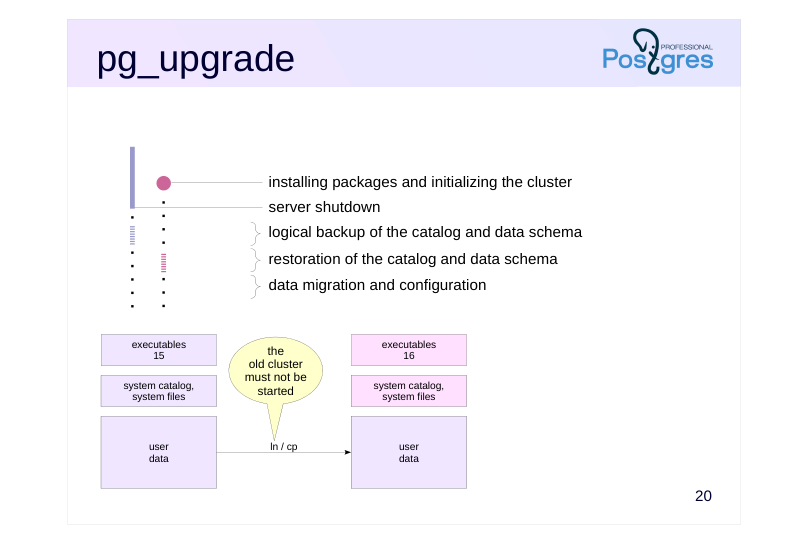
Step 3. The pg_upgrade utility performs the user data migration.
At this point, the data files of the new cluster are either copied from the files of the old one or linked to them via hard links.
Note that if data files are copied, the old cluster remains completely untouched by the upgrade. This means you can return to it at any time if something goes wrong during the process.
However, when hard links are used, the data files are shared between the clusters: identical file names in both clusters point to the same filesystem inodes. Therefore, once the new cluster is started for the first time, the old cluster can no longer be started safely. This upgrade mode requires a backup plan.
Copy-on-write filesystems offer a third option: cloning (–clone). It combines the advantages of both previous approaches: fast data migration and the ability to start both clusters.
After the user data has been migrated, the utility’s final task is to set the OID counter to the value from the old cluster (this is done via the pg_resetwal utility).
The administrator should update extensions, collect statistics, and set up routine backups for the upgraded cluster.
Page 24: The Upgrade
Perform the upgrade using hard links.
Page 25: Page 25
Before starting the server, you should transfer any configuration changes from the old server to the new one. We will skip this step since we are working with default settings. Check the results.
The upgrade has been successful: we have access to the contents of the old cluster.
Tablespaces
Look at the tablespace files:
A subdirectory is created within the tablespace directory for each version, preventing any file conflicts. As can be seen from the number in square brackets (inode), the files in the old and new version directories actually share the same content.
Post-Upgrade Tasks
When we install a new PostgreSQL version, the shared libraries for installed extensions are replaced, but at the database object level, the extension version remains unchanged:
The utility detected this and generated a script to update extensions in all databases:
Let’s run it.
Page 26: Page 26
In our case, the extension developers did not provide an upgrade script, so we have to delete and reinstall the extension.
The pg_upgrade utility generated another script to delete the old cluster files:
And it reminded us to gather statistics. The –analyze-in-stages option collects statistics in three stages, each time increasing accuracy, so the optimizer can start building plans as early as possible.
Page 27: pg_upgradecluster
Wrapper
- pg_dump + pg_restore
- -method=dump
- pg_upgradecluster
- pg_upgrade
- -method=upgrade
- old cluster is switched to a different port
- configuration files are copied
- pg_dump: allows changing the locale
- pg_upgrade: file copying or hard links
- Not applicable to tablespaces
Speaker notes
The pg_upgradecluster wrapper in Ubuntu simplifies cluster upgrades in straightforward scenarios. By default, it uses the logical backup method, but it also supports upgrades via pg_upgrade in both file copying and hard link modes.
The new cluster is configured to use the same port, while the old cluster is reconfigured to use a different (unused) port and manual startup. The utility copies the configuration files to the new cluster, so additional tuning of these files may be required afterward.
When upgrading via logical backup, you can change the locale or specific locale categories.
However, if the cluster contains custom tablespaces, the upgrade must be performed manually, as the utility does not support this configuration.
Page 28: Physical Replication
Standbys must be recreated
- upgrade is mandatory (to maintain binary compatibility)
- pg_upgrade cannot be used (due to non-deterministic behavior)
- Option 1 (pg_basebackup)
- deploy new standbys from a physical backup taken after upgrading the
- primary server
- reliable, but time-consuming
- Option 2 (rsync)
- leverage the fact that data files remain unchanged
- applicable only on Unix systems and only when using hard links
- fast, but complex
Speaker notes
When using physical replication, additional challenges arise. The case is that the primary and all its standbys must be upgraded simultaneously. Connecting a primary of one version to a standby of another version will most likely lead to data loss.
Another important point: a standby cannot be upgraded using pg_upgrade. Such an upgrade does not provide a 100% guarantee that two identical instances will remain identical after the upgrade.
The standard approach is to discard the existing standbys and create new ones from scratch. To do this, you need to take a base backup of the primary and deploy a new standby from it (this procedure is covered in detail in the DBA3 course). This can be quite a time-consuming process.
However, if you are using a Unix-based OS and the primary was upgraded using hard links, you can significantly speed up the deployment of new standbys. This results in time saving comparable to that achieved by pg_upgrade for the primary. To achieve this, you need to use the rsync utility correctly.
Page 29: Physical Replication
 {#source-figure-029 caption=“Source slide page 29: Physical Replication”}
Speaker notes
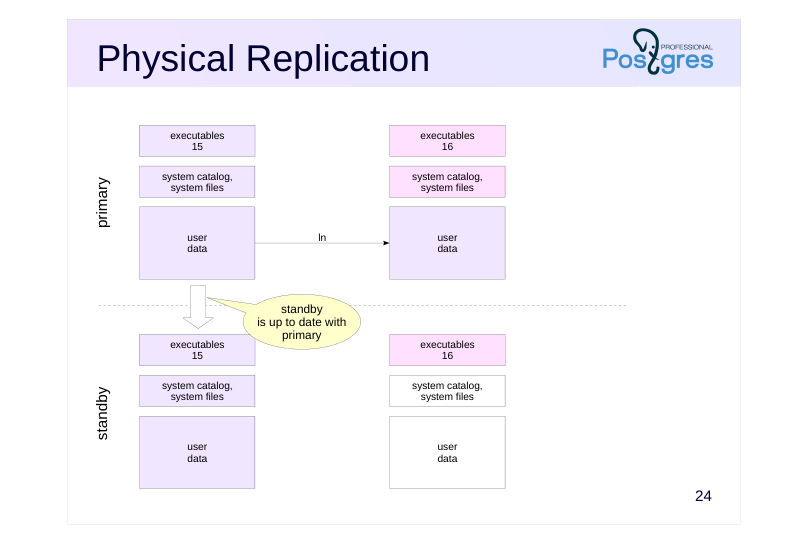
The primary has been upgraded, but the new server has not been started yet. The standby is shut down after it has fully caught up with the primary (so the data files are identical).
The new server version is installed on the standby, but the cluster is not initialized yet.
Page 30: Physical Replication
 {#source-figure-030 caption=“Source slide page 30: Physical Replication”}
Speaker notes
Next, rsync is run to copy both clusters from the primary to the standby in a single command.
In this mode, rsync recognizes that:
● The old and new clusters share common data files.
● The data files of the old cluster are identical on both the primary and standby (to avoid dependency on volume, only file sizes are compared not their contents).
● Therefore, there is no need to physically copy the data files to the standby; it is enough to create hard links.
As a result, rsync only needs to copy the files related to the system catalog, which are small in size.
This process is described in the pg_upgrade documentation (https://postgrespro.com/docs/postgresql/16/pgupgrade), including the exact commands to be executed. Unfortunately, the documentation does not explain why these specific commands are necessary. For a detailed understanding of this matter, check out the developer discussion:
https://www.postgresql.org/message-id/flat/54C95E66.1000309@agliodbs.c om
Page 31: Logical Replication
- creating the publication
- creating the data schema and subscribing to the publication
- data synchronization
- switchover
- enables upgrades with zero or minimal service interruption – complex setup, does not replicate the data schema and DDL commands, requires additional disk space, etc.
Speaker notes
It is possible to perform a major version upgrade with zero downtime (or minimal downtime) by using logical replication.
To do this, you need to install and properly configure a new server instance. Publications are created on the old server for all changes across all databases. Subscriptions to these publications are created on the new server with data synchronization. Once the data is synchronized, switch the users to the new server, remove the subscriptions, and stop the old server.
Built‐in logical replication has been introduced in PostgreSQL 10. While this feature is under active development, it is still far from ideal: data schemas, DDL commands, and sequence data are not replicated. These limitations make this approach more complex and less attractive than using pg_upgrade.
Page 32: Takeaways
Minor upgrade is simple replacement of executables
- physical replication can help avoid service interruption
- Major upgrade
- logical backup (pg_dumpall)
- upgrade utility (pg_upgrade)
- logical replication
- physical replication complicates the procedure
- immediately create a physical backup after the upgrade
Page 33: Practice
- In PostgreSQL 15 cluster, create a user with password authentication.
- As the new user, create a table with a column of uom type in the database.
- Upgrade the cluster from version 15 to version 16 using a logical backup. During the upgrade, ensure that all data is placed in a separate tablespace.
- Verify that the upgrade was successful: check server availability, user authentication, and table contents.
Speaker notes
- PostgreSQL 15 is already installed with a cluster initialized in the /var/postgresql/15/prod directory, and the server is running on port 5433. Local connections are trusted, and password authentication is configured for TCP/IP connections. The cluster has a single role called postgres with superuser privileges.
To initially connect to the cluster, use the following command:
psql -p 5433 -U postgres
We recommend stopping the main cluster to avoid accidental connecting to it during the practice.
When creating a new user, specify a password. Remember to update the authentication settings in pg_hba.conf for the new user.
The uom data type is available in the extension of the same name (see the Managing Extensions lesson).
PostgreSQL 16 is already installed with a cluster initialized in /var/postgresql/16/prod, similar to the prod cluster for version 15.
To place the data in a separate tablespace, first create the tablespace and then edit the backup file to set it as the default tablespace for the database.
To preserve authentication settings, apply the same changes to the pg_hba.conf file that were made in the old cluster.
Page 34: 1. User and Authentication in Cluster 15
Stop the main cluster to avoid accidental connections, and start the 15 prod cluster:
The dbuser user:
Add a rule for the new user at the beginning of pg_hba.conf:
Check the result:
Add the password to .pgpass to avoid typing it manually (though when working through this practice task, it is better to skip this step, otherwise it is not clear whether password authentication works or if it is just the trusted local access).
2. Table in Cluster 15
First, create a database:
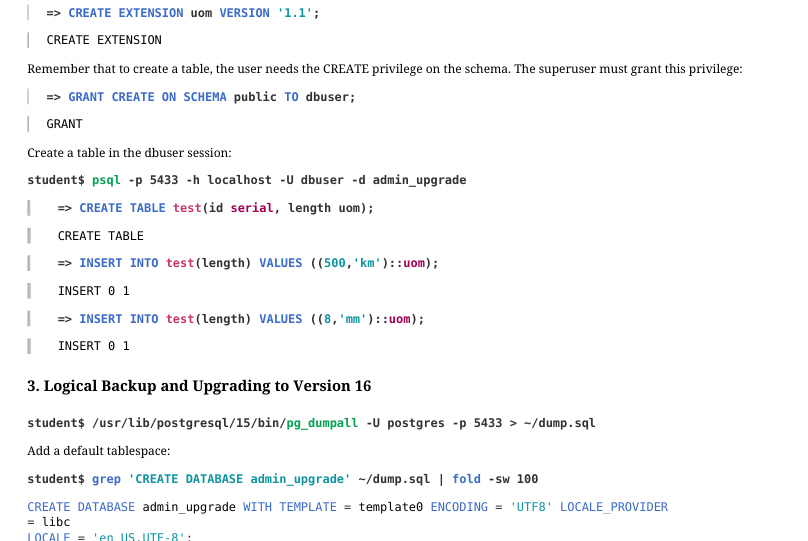
The uom data type is available in the uom extension. Install version 1.1:
Page 35: Page 35
 {#source-figure-035 caption=“Source slide page 35: Page 35”}
Remember that to create a table, the user needs the CREATE privilege on the schema. The superuser must grant this privilege:
Create a table in the dbuser session:
3. Logical Backup and Upgrading to Version 16
Add a default tablespace:
Let’s stop the server.
We do not transfer the postgresql.conf settings, although in production environments that would be necessary. Modify pg_hba.conf the same way we did for version 15:
Create the directory for the tablespace.
Start the cluster 16 and create the tablespace as the superuser.
Install the extension:
Page 36: Page 36
Restore the cluster from the backup:
Page 37: Page 37
You will get an error when creating the postgres role since it already exists; this is normal.