15 Lesson 15: Administration / Managing Extensions
This page is extracted from the official PDF into native Markdown. Slide text, code and speaker notes are kept in reading order; the original PDF and HTML remain the layout references. HTML source: dba2_15_admin_extensions.html Archive: DBA2-handouts-16-en.zip PDF pages: 19
Page 1: Administration / Managing Extensions
Copyright
© Postgres Professional, 2016–2026 Authors: Egor Rogov, Pavel Luzanov, Ilya Bashtanov, Igor Gnatyuk Translated by: Elena Sharafutdinova Photo: Oleg Bartunov (Phu Monastery and Bhrikuti Peak, Nepal)
Use of Course Materials
Non-commercial use of course materials (presentations, demonstrations) is allowed without restrictions. Commercial use is possible only with the written permission of Postgres Professional. It is prohibited to make changes to the course materials.
Feedback
Please send your feedback, comments and suggestions to: edu@postgrespro.ru
Disclaimer
Postgres Professional assumes no responsibility for any damages and losses, including loss of income, caused by direct or indirect, intentional or accidental use of course materials. Postgres Professional company specifically disclaims any warranties on course materials. Course materials are provided “as is,” and Postgres Professional company has no obligations to provide maintenance, support, updates, enhancements, or modifications.
Page 2: Topics
- Extensions in PostgreSQL
- Creation and Management of Extensions
- Update of Extensions
- Features of the pg_dump
Page 3: Extensibility of PostgreSQL
Features
- functions and programming languages
- data types, operators, access methods
- foreign data wrappers (FDW)
- Mechanisms
- modifiable system catalog
- API for external handlers
- loading and execution of user code
Speaker notes
Extensibility is the the core feature of PostgreSQL. It allows to add new functionality on the fly without changing the server code.
Thus, we can add programming languages and develop functions using them, define new types of data and operators to work with them, create new access methods for data types, develop foreign data wrappers to connect to external sources.
To make this possible, the PostgreSQL system catalog stores a large amount of information about database objects. This information is not hardcoded in the server source code. Users can modify the contents of the system catalog tables, thereby adding new objects and related functionality.
In addition, PostgreSQL source code has a large number of hooks and various APIs for connecting user functions. This enables the development of extensions such as pg_stat_statements, auto_explain, pldebugger, and many others.
The final key mechanism is the ability to load user code into server processes. For example, we can develop a shared library and incorporate it during operation.
https://postgrespro.com/docs/postgresql/16/extend-how
Note that the execution of poorly written user code by server processes can lead to catastrophic consequences. Only verified code from reliable sources should be trusted.
Page 4: Extensions
Group of related database objects
- creating all objects with a single command
- individual objects cannot be deleted
- pg_dump maintains relationships between objects
- tools for updating to a new version
- Sources
- core distribution (contrib)
- external extensions
- ability to create your own extensions
Speaker notes
There are situations when several database objects are logically related. For example, several data types, functions and operators, operator classes. Such a relationship can be made explicit using the extension mechanism.
This makes it easier to manage objects:
● All objects are created with a single command.
● Individual objects cannot be deleted, an extension can only be deleted completely.
● The relationships between objects are also maintained when creating a backup with the pg_dump utility.
● There are tools for managing extension versions.
PostgreSQL includes a significant number of useful extensions, some of which we have already used.
https://postgrespro.com/docs/postgresql/16/contrib
https://postgrespro.com/docs/postgresql/16/contrib-prog
Another source is PostgreSQL Extension Network (PGXN), an extension
network similar to CPAN for Perl: https://pgxn.org/
Extensions can also be distributed in other ways, including via package repositories of OS distributions.
Page 5: Creating an Extension
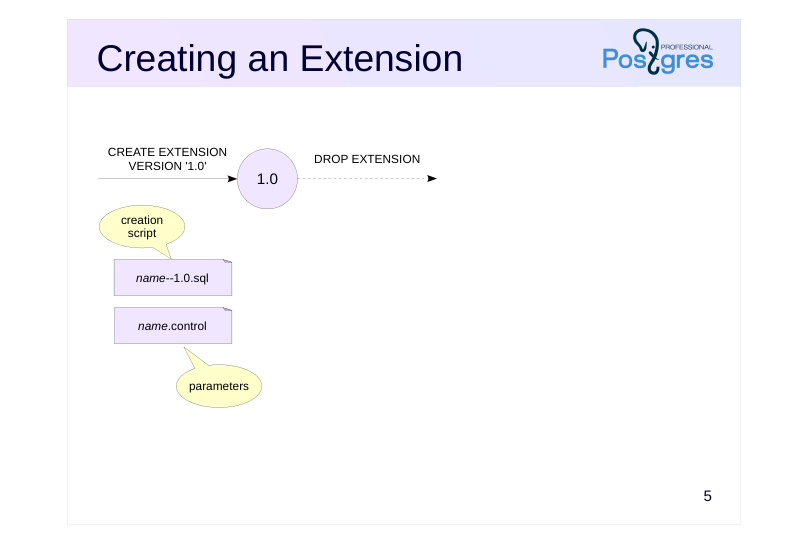 {#source-figure-005 caption=“Source slide page 5: Creating an Extension”}
Speaker notes
The extension is installed into the database using the CREATE EXTENSION command. This requires two files:
● Control file “name.control” with extension parameters
● Script for creating extension objects “name-version.sql”
The version is typically in the format “1.0,” “1.1,” etc., but this is not necessary: it can consist of any characters (but it should not contain “–” and begin or end with “-”).
The version is usually not specified in the CREATE EXTENSION command, since the current version is set in the control file (the default_version parameter) and is used by default.
Other parameters in the control file specify whether the extension’s objects can be relocated between schemas (relocatable), list dependencies on other extensions (requires), restrict installation to superusers only (superuser), etc.
https://postgrespro.com/docs/postgresql/16/extend-extensions
https://postgrespro.com/docs/postgresql/16/sql-createextension
The extension is removed by the DROP EXTENSION command. A separate script for deleting objects is not required.
https://postgrespro.com/docs/postgresql/16/sql-dropextension
Page 6: Installation of the Extension
The source code files for the UOM (Units of Measurement) training extension are located in the uom directory within the student home directory:
There is a control file with settings among the files:
default_version defines the default version; without this parameter, the version should be specified explicitly. relocatable indicates that the extension can be moved between schemas (we will discuss this later). encoding is required if non-ASCII characters are used. comment defines a comment for the extension. These are not all possible parameters, you can find the complete list in the documentation. Files shared across all database clusters of the same PostgreSQL version are located in the SHAREDIR directory:
In particular, files for installed extensions are stored in the SHAREDIR/extension directory. For example, the pg_buffercache extension files:
Extensions are typically installed using the make utility. If an extension requires compilation and PostgreSQL was installed from a package, you may also need to install a development package, which typically has dev in its name, such as postgresql-server-dev-16. The package includes everything necessary for building, including the PostgreSQL header files. Since our extension contains only SQL functions and does not require compilation or building, the Makefile only needs to copy the extension files to SHAREDIR/extension:
The EXTENSION variable specifies the extension name. The DATA variable lists the files to copy to SHAREDIR (excluding the control file). The last lines remain unchanged, they include the PGXS infrastructure for extension installation. The pg_config utility must be available, otherwise the PostgreSQL installation paths cannot be determined. Install the extension by running make install in its directory:
Page 7: Page 7
Extension installation is typically performed by a superuser whose environment may not include the PostgreSQL executable path. In this case, specify the pg_config location explicitly:
The list of extensions installed on the server and available for loading into the cluster databases is visible in the system catalog:
Standard databases have only the plpgsql extension installed. Here is the list of versions for our extension:
Page 8: Page 8
In PostgreSQL, extension versions are treated as names, not numbers. In other words, 1.1 and 1.2 are simply two different versions, their order is not defined. Let’s load version 1.0 of the uom extension into a new database:
The extension appears in the database. It contains a table and a function:
The objects are installed in the schema where they would be created by default, in this case, public. We could explicitly specify the schema when creating the extension:
The function converts length values between units:
The table stores a list of supported units of measurement:
The extension objects were created by the SQL script for version 1.0:
Page 9: Page 9
The first line prevents accidental manual execution of the script; the script should run only when CREATE EXTENSION is executed. When creating an extension, all commands run within a single transaction, which means that transaction control commands (as well as utility commands such as VACUUM) cannot be used here. The search_path will be set to the single schema where the extension objects are created. Objects belonging to an extension cannot be deleted directly:
However, the extension mechanism does not track changes made to the objects themselves. For example, adding a column to a table or altering a function will not cause an error. You should avoid making such changes to extension objects. The extension and its objects can be moved to another schema (relocatable=true):
Return it to public:
Page 10: Extension Update
 {#source-figure-010 caption=“Source slide page 10: Extension Update”}
Speaker notes
The extension version is updated using the ALTER EXTENSION UPDATE command. In this case, there must be an update script “name-old-version– new-version.sql” containing the commands necessary for updating.
We can also change the control file “name.control,” updating the current version and, possibly, other parameters.
If needed, there can also be a separate control file bound to the version. For example, if version 1.2 introduces a dependency on another extension, then it is better to indicate this dependency not in the main control file, but in an additional file for version 1.2. The parameters specified in the additional control file have priority over those in the main file.
The example on the slide shows update scripts 1.0→1.1 and 1.1→1.2. While a 1.0→1.2 script is possible, it is typically not required: the extension mechanism automatically determines the update path based on the available transitions between versions. For example, if version 1.0 is installed, it can be updated directly to version 1.2: the 1.0→1.1 script is automatically applied, followed by the 1.1→1.2 script.
Similar to creation, the target version is usually not specified during an update. In this case, the extension is updated to the latest version set in the main control file.
https://postgrespro.com/docs/postgresql/16/sql-alterextension
Page 11: Extension Versions and Update
Version 1.1 of the uom extension introduces a data type for length units, comparison operators for values of this type, and an operator class that enables indexing table columns of this type. The update file:
When creating a new version of an extension, two scenarios are possible: The database contains a previous version that needs to be updated. There is no previous version, so the later version needs to be created directly. Make sure that we can update from version 1.0 to 1.1. List available update paths:
Perform the update:
Page 12: Page 12
Now, let’s create version 1.1, first removing the extension, which deletes all its objects:
Create version 1.1 directly in a separate schema, ensuring object visibility:
To create version 1.1, the extension mechanism will first look for the uom–1.1.sql file, which does not exist. However, version 1.1 can be reached via a chain: first create version 1.0, then update to 1.1. This is the shortest path to version 1.1, and the only one in this case. Examine the uom data type. Comparison operators for length units are defined for it:
The new type can be used as a column data type:
Data in the table can be sorted:
Page 13: Page 13
You can create a B-tree index:
If we disable sequential scans for the planner, it will use the new index when executing the query:
pg\_dump Utility
The pg_dump utility exports only the CREATE EXTENSION command, not the commands that create the extension’s objects. Therefore, to restore from a backup, all extensions in use must be installed on the server. In the next version 1.2 of the extension a column named predefined is added to the table. This column is used to identify rows that were inserted into the table not by the extension script, but after the extension was created. Update file:
The script calls the pg_extension_config_dump function so that the utility exports only the table rows that meet the specified condition. We cannot simply delete and recreate the extension to update to version 1.2. The len column in table t prevents this:
If we are not willing to delete the table (or the len column), we should perform an update instead:
When no version is specified, the extension is updated to the default version set in the control file:
Page 14: Page 14
Now, besides CREATE EXTENSION, the logical backup file will also include data from the uom_ref table. If you back up the entire database, all installed extensions are included, which is usually acceptable. However, if you specify a schema during the export, extensions installed in that schema are not included:
Restoring the contents of the uom_ref table from such a backup will be impossible. To export specific extensions, specify their names using the –extension parameter. For this purpose, we should manage dependencies: if we export only the util schema in our case, the table public.t will not be included in the backup copy, despite its dependence on the extension:
When an extension is created, the privileges on its objects are stored in the system catalog. If privileges have changed by the time the export is performed, pg_dump will add commands to the backup to set up the new privileges.
Page 15: Takeaways
Extensibility is one of the most important features of PostgreSQL
- An extension is a package of related database objects
- The extension mechanism includes tools for version updates and pg_dump support
Page 16: Practice
- Install the uom extension and check if it appears in the list of available extensions.
- Create the uom extension without specifying a version. Check the version and the scripts that were executed.
- Add mile and yard to the reference table.
- Change access to the reference table: the SELECT privilege should be granted only to a specific role, not to all users.
- Check how the pg_dump exports extension objects: table, type, functions and operators, table contents, access privileges.
Speaker notes
Extension files are located in the uom subdirectory of the student home directory. The installation process is similar to the one used in the demonstration.
When adding the data, ensure that the value for new entries in the “predefined” column is set to false. Conversion factors:
1 mile = 1609.344 m 1 yard = 0.9144 m
Page 17: 1. Installation of the Extension
Let’s install the extension files:
Check that the extension is available for loading in the database:
2. Loading the Extension into the Database
Load the uom extension into a new database:
The extension version matches the default_version parameter value:
Since the uom–1.2.sql file exists for version 1.2, it is used to create the extension. For users updating from version 1.1 or 1.0, corresponding update paths are available.
3. Extending the Reference Table
Let’s add mile and yard. The predefined column is populated with the default value (false):
How many yards are in a mile?
Page 18: 4. Changing Access Privileges
Create a dedicated role to access the uom_ref table:
Only the new role can read from the table:
5. pg\_dump and Extension Objects
The list of tables to be exported by pg_dump is stored in pg_extension:
Run pg_dump:
Page 19: Page 19
Examine how pg_dump exports extension objects: The table, type, functions, and operators are not exported. They will be created by the CREATE EXTENSION command. The system where the restore is performed must have the same version of the extension that was during the export. The contents of newly added table rows are exported using a COPY command. Access privileges for the uom_ref table are generated as they were at the moment pg_dump was run. To properly export access privileges, the system catalog stores information about object privileges granted by extension creation scripts:
Without this information, it would be impossible to generate the REVOKE command.