13 Lesson 13: Locks / Row-Level Locks
This page is extracted from the official PDF into native Markdown. Slide text, code and speaker notes are kept in reading order; the original PDF and HTML remain the layout references. HTML source: dba2_13_locks_rows.html Archive: DBA2-handouts-16-en.zip PDF pages: 32
Page 1: Locks / Row-Level Locks
Copyright
© Postgres Professional, 2016–2026 Authors: Egor Rogov, Pavel Luzanov, Ilya Bashtanov, Igor Gnatyuk Translated by: Elena Sharafutdinova Photo: Oleg Bartunov (Phu Monastery and Bhrikuti Peak, Nepal)
Use of Course Materials
Non-commercial use of course materials (presentations, demonstrations) is allowed without restrictions. Commercial use is possible only with the written permission of Postgres Professional. It is prohibited to make changes to the course materials.
Feedback
Please send your feedback, comments and suggestions to: edu@postgrespro.ru
Disclaimer
Postgres Professional assumes no responsibility for any damages and losses, including loss of income, caused by direct or indirect, intentional or accidental use of course materials. Postgres Professional company specifically disclaims any warranties on course materials. Course materials are provided “as is,” and Postgres Professional company has no obligations to provide maintenance, support, updates, enhancements, or modifications.
Page 2: Topics
- Exclusive and Shared Row‐Level Locks
- Multitransactions and Freezing
- Implementation of the Wait Queue
- Deadlocks
Page 3: Row-Level Locks
 {#source-figure-003 caption=“Source slide page 3: Row-Level Locks”}
Speaker notes
Although information about row-level locks is stored in tuples on disk, the wait queue for exclusive row locks is organized using tuple object locks.
Page 4: Architecture
Information is stored only in data pages
- xmax field in the tuple header + information bits
- nothing is stored in RAM
- Unlimited number
- large number does not impact performance
- Infrastructure
- wait queue is organized using object locks
Speaker notes
Due to MVCC, row‐level locks are required only to change data (or to prevent changes), they are unnecessary for reads.
While object locks have a dedicated lock in RAM for each resource, this approach does not work for rows: a separate lock for every row (there could be millions or billions of them) would incur excessive overhead and consume enormous amounts of RAM.
One approach to this problem is lock escalation: if N rows in a table are already locked, attempting to lock one more row triggers a lock on the entire table, and all the row-level locks are released. However, this approach would impact throughput.
PostgreSQL takes a different approach. Information about a row being locked is stored exclusively in the tuple header inside the data page. This information is represented by the ID of the locking transaction (xmax) and additional information bits.
This architecture allows PostgreSQL to support an unlimited number of row-level locks without consuming additional resources or degrading system performance.
The drawback of this approach is the complexity of managing lock queues. For this purpose, PostgreSQL still relies on object-level locks, though a minimal number of them is required (proportional to the number of processes rather than the number of locked rows).
Page 5: Exclusive Modes
Update No Key Update
- row deletion
- change of any fields,
- or change of all fields
- except for key fields
- UPDATE
- UPDATE
- (with key field changes)
- (without key field changes)
Speaker notes
There are 4 modes for locking a row (the mode is set in the tuple using additional information bits).
Two of these modes represent exclusive locks, which can be held by only one transaction at a time. The Update mode implies a complete change (or deletion) of a row, while the No Key Update mode allows changes only of fields that are not part of unique indexes (in other words, all foreign keys remain unchanged during such a modification).
The UPDATE command automatically selects the least restrictive appropriate lock mode; rows are typically locked in No Key Update mode.
https://postgrespro.com/docs/postgresql/16/explicit-locking#LOCKING-ROW S
Page 6: Exclusive Modes
 {#source-figure-006 caption=“Source slide page 6: Exclusive Modes”}
Speaker notes
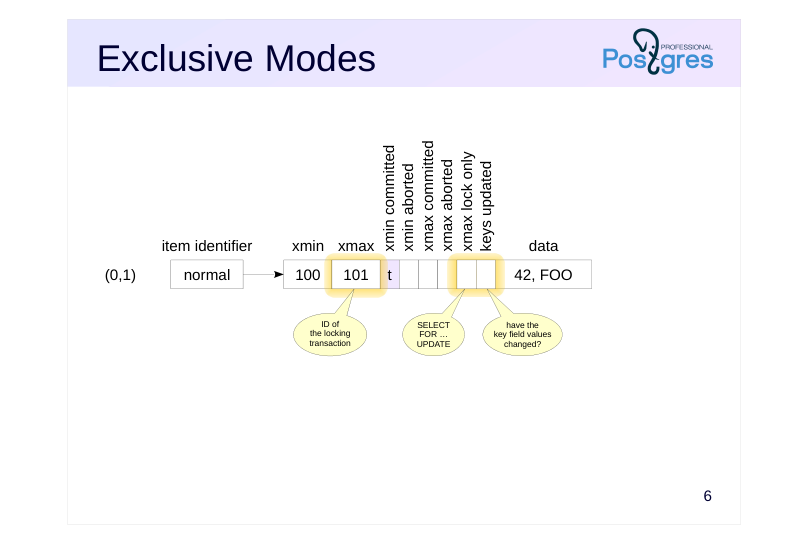
When a row is updated or deleted, the xmax field of the current tuple is set to the ID of the current transaction. This xmax value, corresponding to an active transaction serves as a lock.
The same mechanism is used when a row is explicitly locked with SELECT FOR UPDATE, with an additional information bit (xmax lock only) set to indicate that the tuple remains current, even though it is locked.
The lock mode is determined by another hint bit (keys updated).
(In practice, a greater number of bits are used with more complex conditions and checks to maintain compatibility with earlier versions. However, these details are not fundamental.)
If another transaction attempts to update or delete a locked row in an incompatible mode, it is forced to wait for the xmax transaction to complete.
Page 7: Shared modes
Share Key Share
- prevents modification of
- prevents modification of
- any fields of the row
- key fields of the row
- SELECT FOR SHARE
- SELECT FOR KEY SHARE
- and foreign key checks
- Mode Compatibility Matrix
- Key
- No Key
- Share
- Share
- Update
- Update
- Key Share × Share × × No Key Update × × × Update × × × ×
Speaker notes
Two other modes represent shared locks, which can be held by several transactions simultaneously.
The Share mode is used when we need to read a row while ensuring it cannot be changed by another transaction.
The Key Share mode allows a row to be modified, but only in non-key fields. PostgreSQL automatically uses this mode, for example, during foreign key constraint checks.
The overall compatibility matrix is shown at the bottom of the slide. The matrix shows that:
● Exclusive modes conflict with each other.
● Shared modes are compatible with each other.
● The Key Share mode is compatible with the exclusive No Key Update mode (i.e., we can update non-key fields while ensuring the key remains unchanged).
https://postgrespro.com/docs/postgresql/16/explicit-locking#LOCKING-ROW S
Page 8: Shared modes
 {#source-figure-008 caption=“Source slide page 8: Shared modes”}
Speaker notes
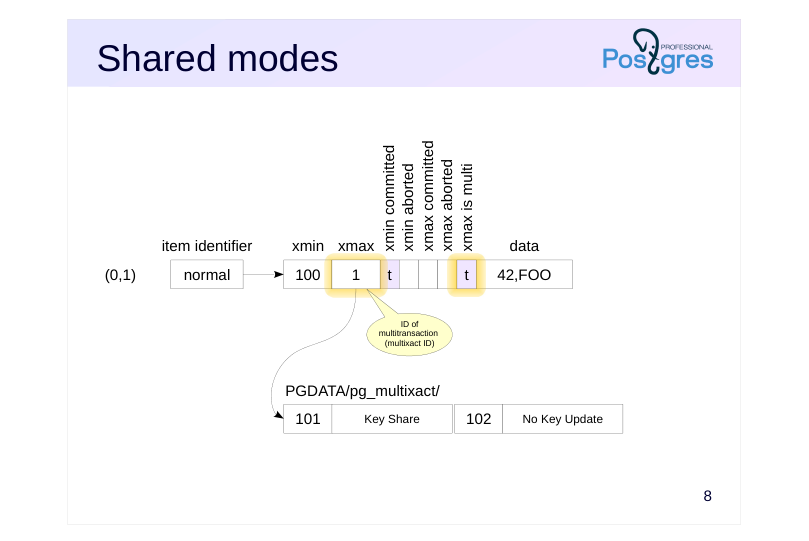
We discussed that a lock is represented by the ID of the locking transaction in the xmax field. Shared locks can be held by several transactions, but a single xmax field cannot store several IDs.
To handle shared locks, PostgreSQL uses multitransactions (MultiXact). They are assigned separate IDs that correspond to an entire group rather than a single transaction. To distinguish a multitransaction from a regular one, another information bit (xmax is multi) is used. Detailed information about the group members and the lock modes is stored in the PGDATA/ pg_multixact/ directory. The most recently accessed data is cached in the server’s shared memory buffers to speed up access.
Page 9: Freezing Configuration
Multitransaction Parameters
- vacuum_multixact_freeze_min_age
- = 5 000 000
- vacuum_multixact_freeze_table_age
- = 150 000 000
- autovacuum_multixact_freeze_max_age = 400 000 000
- vacuum_multixact_failsafe_age
- = 1 600 000 000
- Table Storage Parameters
- autovacuum_multixact_freeze_min_age
- toast.autovacuum_multixact_freeze_min_age
- autovacuum_multixact_freeze_table_age
- toast.autovacuum_multixact_freeze_table_age
- autovacuum_multixact_freeze_max_age
- toast.autovacuum_multixact_freeze_max_age
Speaker notes
Since multitransactions are assigned separate IDs that are written to the xmax field of tuples, the limited bitness of the counter creates the same challenges as with regular transaction IDs. This refers to the issue of wraparound, which was covered in the Freezing lesson of the MVCC module.
Therefore, IDs of multitransactions require a similar freezing process, i.e., old multixact IDs are replaced with new ones (or with ID of a regular transaction if the lock is currently held by only a single transaction).
Note that regular tuple freezing operates on the xmin field (if a tuple has a non-empty xmax field, it means either the tuple is already obsolete and will be cleaned up, or the xmax transaction was aborted and its ID is of no interest). For multitransactions, the problem lies in the xmax field of a current tuple that stays valid but can be repeatedly locked by different transactions in shared mode.
Multitransaction freezing is controlled by parameters similar to those used for regular freezing.
Page 10: Row-Level Locks
Row‐level locks is the most common type of locks. Let’s create a table of bank accounts as in the previous lesson.
Since row lock information is stored only in the tuples, we will use the familiar pageinspect extension.
Create a view that decodes the information bits we are interested in for the first three tuples.
Update the balance of the first account (key unchanged) and the number of the second account (key changed):
Check the view. Note that it shows only the first three (original) tuples.
The rows for the first and second accounts are locked, the xmax field contains the transaction ID of the locking transaction. The bits in the keys_upd column show that the rows are locked in different modes. Now in another session, request shared locks on the first and third accounts:
Page 11: Page 11
 {#source-figure-011 caption=“Source slide page 11: Page 11”}
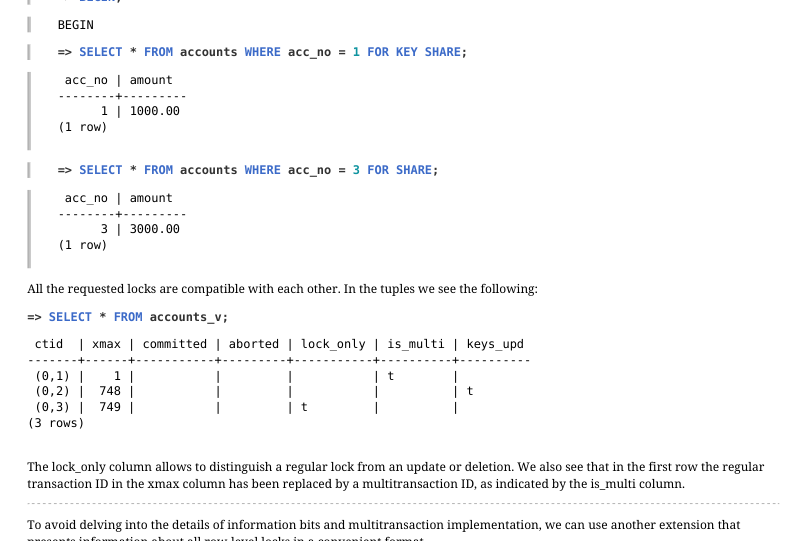
All the requested locks are compatible with each other. In the tuples we see the following:
The lock_only column allows to distinguish a regular lock from an update or deletion. We also see that in the first row the regular transaction ID in the xmax column has been replaced by a multitransaction ID, as indicated by the is_multi column. To avoid delving into the details of information bits and multitransaction implementation, we can use another extension that presents information about all row‐level locks in a convenient format.
The extension provides information about IDs of transactions, multitransactions, and modes of all locks.
Page 12: Wait Queue
 {#source-figure-012 caption=“Source slide page 12: Wait Queue”}
Speaker notes
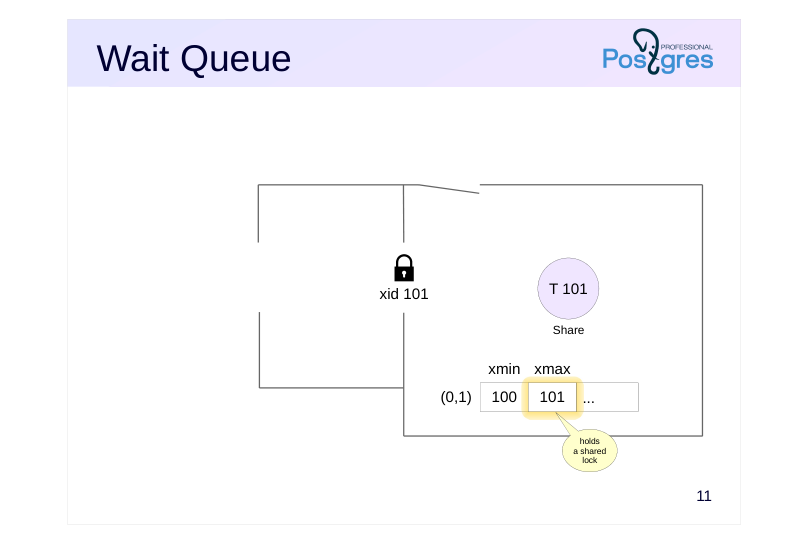
To organize the wait queue, an additional object‐lock mechanism is used, with the information stored in RAM and visible in pg_locks.
Let’s assume that transaction 101 (as shown in the slide) has successfully locked a row in Share mode. The lock information is recorded in the tuple header, the ID of the transaction appears in the xmax field.
Page 13: Wait Queue
 {#source-figure-013 caption=“Source slide page 13: Wait Queue”}
Speaker notes
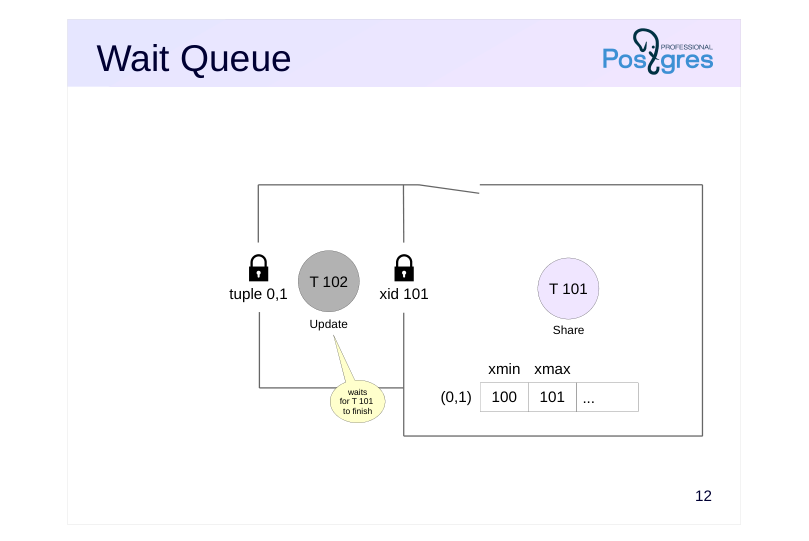
Another transaction 102 that wants to acquire a lock accesses the row and sees that it is locked. If the lock modes conflict, the transaction needs to enter a wait queue so the system can wake it up when the lock is released. However, row-level locks do not provide this capability, they are not represented in RAM at all. They are simply bytes inside a data page.
As we saw in the Object-Level Locks lesson, each transaction holds an exclusive lock on its own ID. Since transaction 102 needs to wait for transaction 101 to complete (as row locks are only released when a transaction completes), it requests a lock on ID 101.
When transaction 101 completes, the locked resource is released (or simply disappears if committed), transaction 102 is awakened and can lock the row (by setting xmax = 102 in the corresponding tuple).
Additionally, the waiting transaction holds a lock on a tuple resource, indicating that it is first in the queue.
Page 14: Wait Queue
 {#source-figure-014 caption=“Source slide page 14: Wait Queue”}
Speaker notes
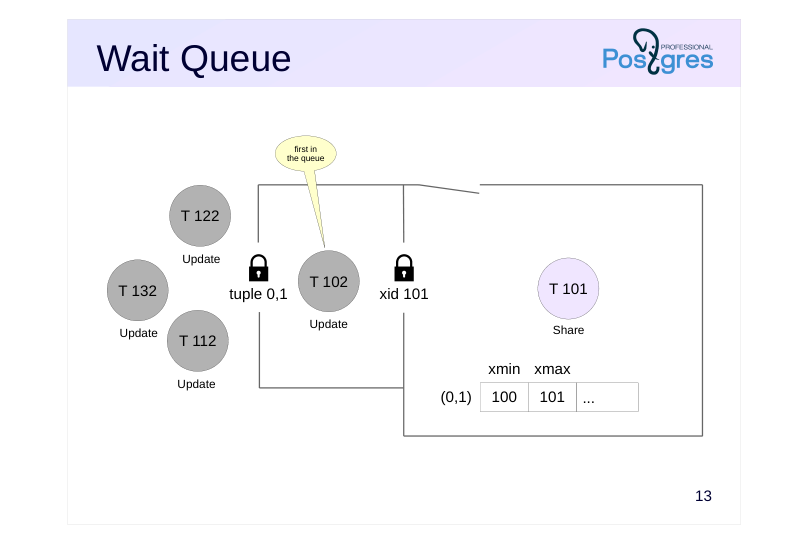
When other transactions appear that conflict with the existing tuple lock (in our example, these are 112, 122, and 132), they first attempt to acquire a tuple lock on that same tuple.
Since the tuple lock is already held by transaction 102, the other transactions wait for it to be released. This creates a queue where there is one transaction at the front and others waiting behind.
If all arriving transactions joined the queue directly behind transaction 101, a race condition would occur whenever the lock was released. In an unlucky timing scenario, transaction 102 could wait indefinitely for the lock. The two-level locking scheme helps manage this contention more effectively.
We should avoid design decisions that involve frequent updates of the same row. This creates a hot spot that can degrade performance under heavy load.
Page 15: Wait Queue
For convenience, create a view over pg_locks that rolls up identifiers of different lock types into a single field:
Let one transaction lock a row in shared mode…
..and let another one try to update it:
In the pg_locks view we can see that the second transaction is waiting for the first to finish (granted = f), while holding a lock on the tuple (locktype = tuple):
Instead of manually analyzing pg_locks to see which process is blocking another one, we can call a function that returns the blocking process ID(s):
Page 16: Page 16
 {#source-figure-016 caption=“Source slide page 16: Page 16”}
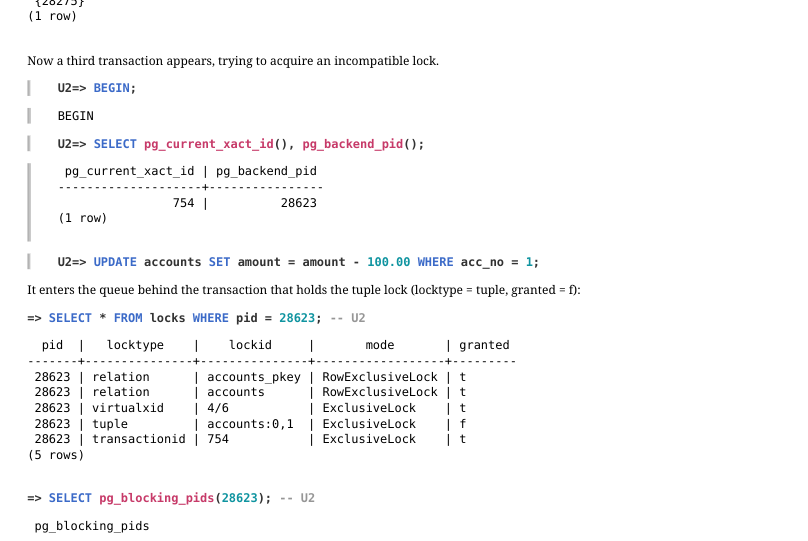
Now a third transaction appears, trying to acquire an incompatible lock.
It enters the queue behind the transaction that holds the tuple lock (locktype = tuple, granted = f):
Page 17: Wait Queue
 {#source-figure-017 caption=“Source slide page 17: Wait Queue”}
Speaker notes
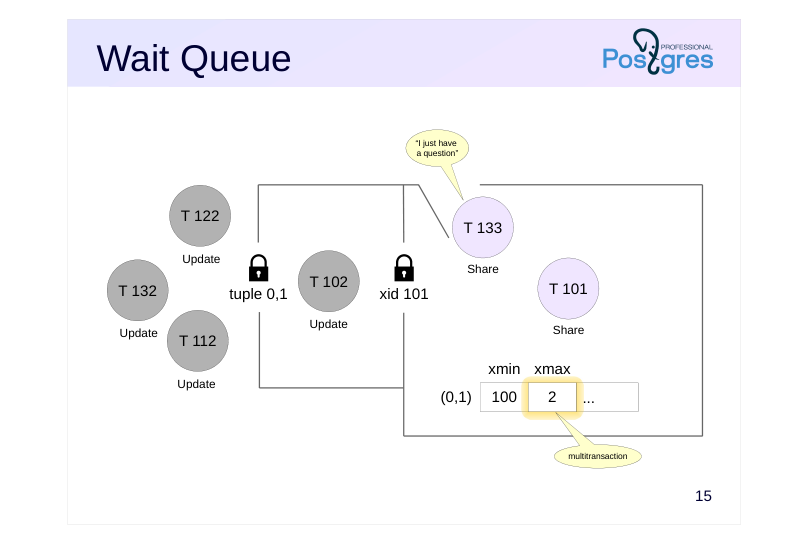
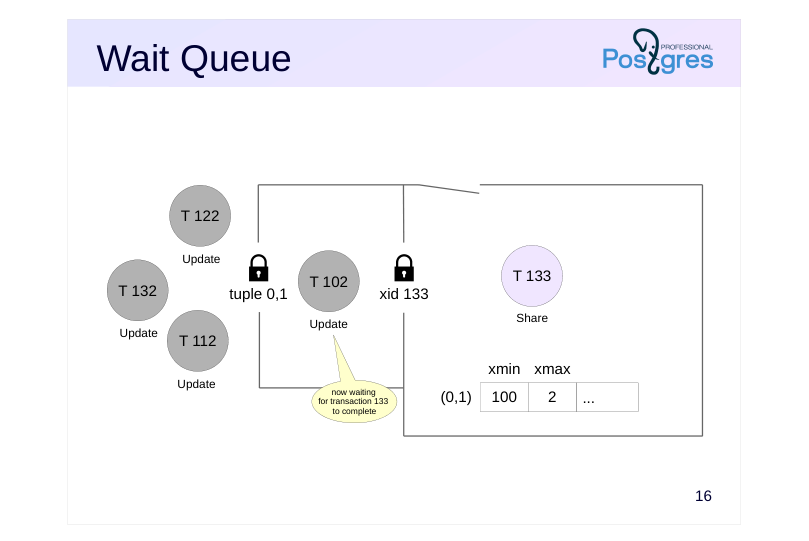
In our example, transaction 101 has locked the row in shared mode. While transaction 102 is waiting for transaction 101 to complete, transaction 133 might come along wishing to acquire a shared lock on the row, which is compatible with transaction 101’s current lock.
Such a transaction does not wait in the queue — it acquires the lock immediately. In this case, the list of blocking transaction IDs 101 and 133 is combined into a multi‐transaction 2, whose ID will be recorded in the xmax field of the tuple.
Page 18: Wait Queue
 {#source-figure-018 caption=“Source slide page 18: Wait Queue”}
Speaker notes
When transaction 101 completes, transaction 102 will be awakened, but it will not be able to acquire the row‐level lock because the row is still locked by transaction 133. Transaction 102 will be forced to go back to sleep.
Under a continuous stream of shared locks, a write transaction may wait indefinitely. This situation is called locker starvation.
Note that this problem does not occur with object‐level locks (such as relation locks). In this case, each resource has its own lock in random access memory, and all waiting processes form a fair queue.
https://git.postgresql.org/gitweb/?p=postgresql.git;f=src/backend/access/hea p/README.tuplock;hb=HEAD
Page 19: Wait Queue
 {#source-figure-019 caption=“Source slide page 19: Wait Queue”}
Speaker notes
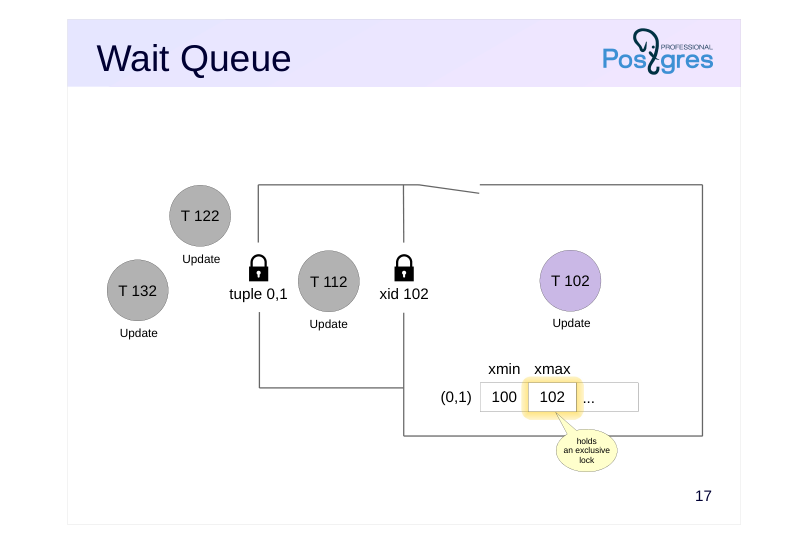
Once transaction 133 completes, transaction 102 will be the first to write its own ID into the xmax field, after which it will release the tuple lock. Then one random transaction from all the remaining ones will manage to acquire the tuple lock and become first in the queue.
Page 20: Page 20
 {#source-figure-020 caption=“Source slide page 20: Page 20”}
In our experiment, a transaction that tries to lock the row in shared mode proceeds without waiting.
The tuple now contains a multitransaction:
After one of the transactions holding the row in shared mode finishes, another one continues to hold the lock.
The transaction that is first in the queue now waits for the remaining transaction to finish.
Note Note that the xmax field still contains the ID of the multitransaction, even though one of its member transactions has already completed. This ID can be replaced by another one (ID of a new multitransaction or a regular transaction) during vacuuming.
Now the second transaction holding the shared lock also finishes.
The transaction that was first in the queue gains access to the tuple:
Page 21: Page 21
 {#source-figure-021 caption=“Source slide page 21: Page 21”}
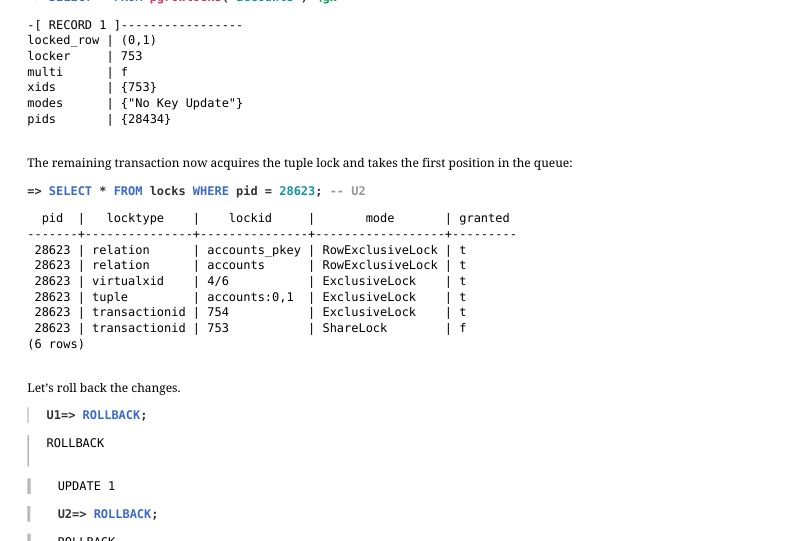
The remaining transaction now acquires the tuple lock and takes the first position in the queue:
Let’s roll back the changes.
How to Avoid Waiting for a Lock?
Sometimes it is more convenient to receive an error immediately when a resource is busy, rather than waiting for the lock to be released. The application can catch and handle such an error. For this purpose, several SQL commands (such as SELECT and some variants of ALTER) allow to specify the NOWAIT keyword. Lock the table by updating the first row:
The transaction receives an error immediately.
For advisory locks, there are functions that either acquire the lock immediately or return false in case of failure:
Page 22: Page 22
The UPDATE and DELETE commands do not support NOWAIT. You can first execute the command
and then, if the rows are locked successfully, modify or delete them. For example:
We get an error immediately without attempting to execute DELETE or UPDATE.
Another way to avoid waiting for row locks to be released is to use the SKIP LOCKED clause. Lock one row without specifying a particular account number:
In this case, the command skips the already locked first row and immediately acquires a lock on the second row.
For commands not related to row locking, NOWAIT cannot be used. In this case, we can set a short wait timeout. (By default, the timeout is zero, meaning endless waiting):
We get an error without a long wait for the resource to be released.
During vacuuming, we can specify that it should skip a table if it cannot acquire the lock immediately. This option becomes
Page 23: Page 23
particularly important when vacuuming the entire database:
Page 24: Deadlocks
 {#source-figure-024 caption=“Source slide page 24: Deadlocks”}
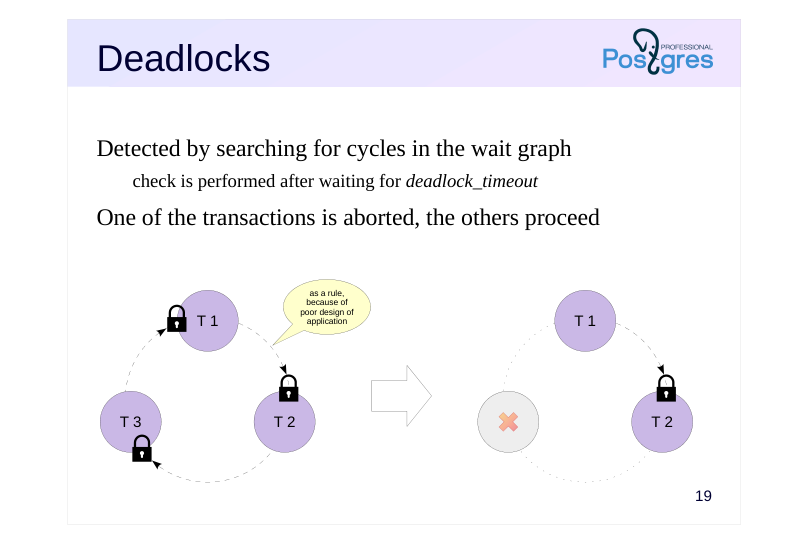
Detected by searching for cycles in the wait graph
- check is performed after waiting for deadlock_timeout
- One of the transactions is aborted, the others proceed
Speaker notes
A deadlock can occur when one transaction attempts to acquire a resource already held by another transaction, while that another transaction is simultaneously trying to acquire a resource held by the first one. A deadlock is also possible with several transactions; the slide shows an example involving three transactions.
A wait graph provides a clear visual representation of a deadlock. To create this graph, we remove specific resources and keep only transactions, marking their wait dependencies. If the graph contains a cycle (meaning that we can trace a path of arrows that leads back to the starting transaction) that is a deadlock.
Note that the locked resources are not necessarily rows; deadlock detection depends not on the resource type, but on the circular wait dependency among the transactions waiting for those resources to be released.
Once a deadlock has occurred, the involved transactions are trapped in an endless wait. Therefore, PostgreSQL automatically monitors for deadlocks. The check is performed when any transaction has been waiting for a resource longer than the time specified in the deadlock_timeout parameter. If a deadlock is detected, one of the transactions is forcibly aborted so that the others can proceed.
Deadlocks usually indicate that the application is poorly designed. Messages in the server log or a rising value of pg_stat_database.deadlocks are reasons to reconsider the causes.
https://postgrespro.com/docs/postgresql/16/explicit-locking#LOCKING-DEA DLOCKS
Page 25: Deadlocks
 {#source-figure-025 caption=“Source slide page 25: Deadlocks”}
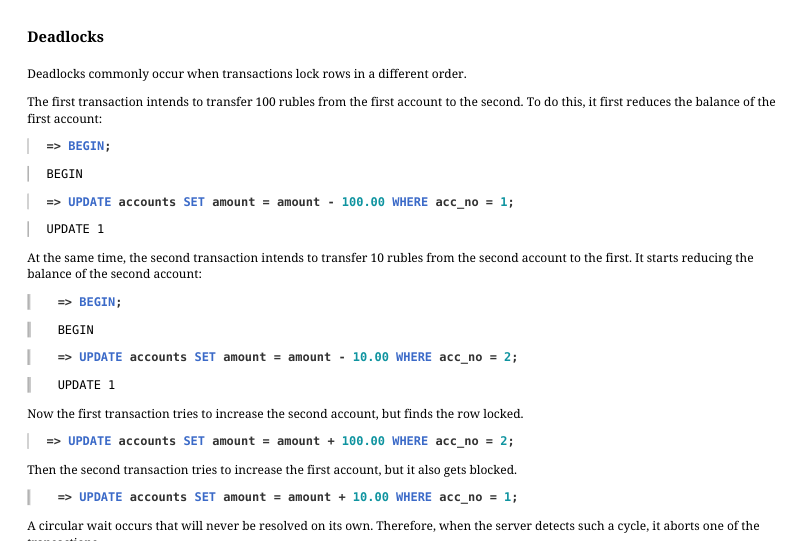
Deadlocks commonly occur when transactions lock rows in a different order. The first transaction intends to transfer 100 rubles from the first account to the second. To do this, it first reduces the balance of the first account:
At the same time, the second transaction intends to transfer 10 rubles from the second account to the first. It starts reducing the balance of the second account:
Now the first transaction tries to increase the second account, but finds the row locked.
Then the second transaction tries to increase the first account, but it also gets blocked.
A circular wait occurs that will never be resolved on its own. Therefore, when the server detects such a cycle, it aborts one of the transactions.
The right way to perform such operations is to lock resources in the same order. For example, in this case we can lock the accounts in ascending order by account number.
Page 26: Takeaways
Row locks are stored in data pages
- due to their potentially large number
- Wait queues and deadlock detection are provided by object-level locks
- complex locking schemes become necessary
Page 27: Practice
- Reproduce a scenario where the same row is updated by three UPDATE commands in different sessions. Examine the resulting locks in the pg_locks view and make sure that you understand all of them.
- Create a three-way deadlock. Can you analyze what happened by examining the log file afterward?
- Can two transactions, each executing a single UPDATE command on the same table, deadlock each other? Try to reproduce this scenario.
Page 28: 1. Row-Level Locks during Multiple Updates
For the sake of simplicity, let’s create a table without a primary key.
Create a view over pg_locks as in the demonstration:
The first transaction updates and thereby locks the row:
The second transaction does the same:
And the third one:
Page 29: Page 29
Locks for the first transaction:
Relation locks on pg_locks and locks in AccessShareLock mode are set on relations being read. A relation lock on the accounts in RowExclusiveLock mode is set when modifying the table. virtualxid and transactionid locks in ExclusiveLock mode are held by the transaction itself. Locks for the second transaction:
Compared to the first transaction: The locks on pg_locks and locks are absent because the second transaction has not accessed these relations. The transaction is waiting to acquire a transactionid lock for the first transaction in ShareLock mode. A tuple lock is held on the row being updated. Locks for the third transaction:
The transaction is waiting to acquire a tuple lock on the row being updated. You can see the overall picture of current waits in the pg_stat_activity view. For convenience, you can also include information about blocking processes:
Page 30: Page 30
 {#source-figure-030 caption=“Source slide page 30: Page 30”}
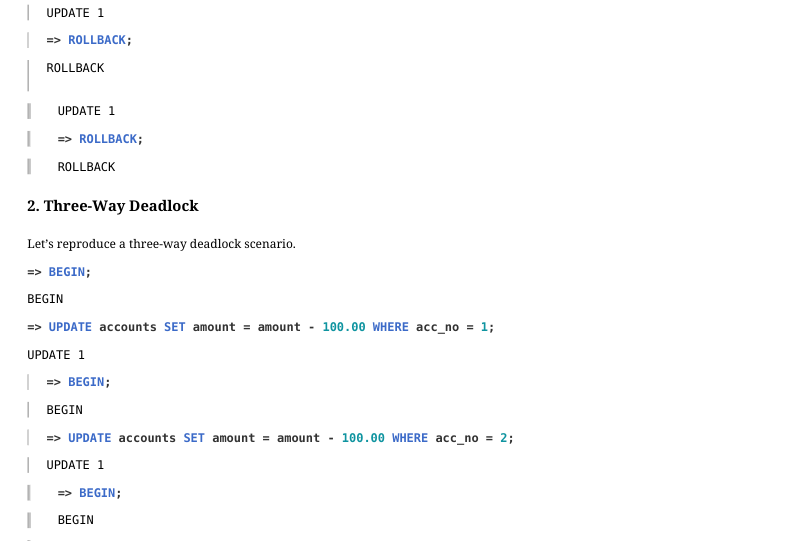
2. Three-Way Deadlock
Let’s reproduce a three-way deadlock scenario.
Here is the information about the deadlock you can find in the WAL:
Page 31: 3. Deadlock of Two UPDATE Statements
 {#source-figure-031 caption=“Source slide page 31: 3. Deadlock of Two UPDATE Statements”}
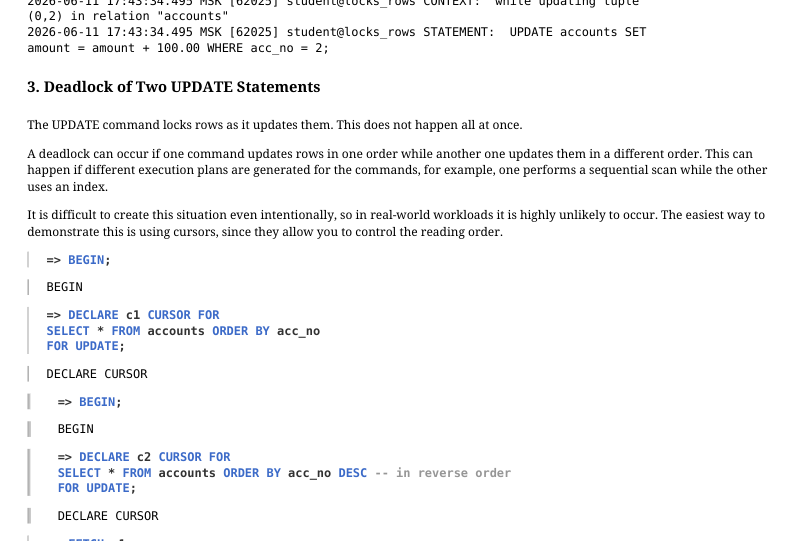
The UPDATE command locks rows as it updates them. This does not happen all at once. A deadlock can occur if one command updates rows in one order while another one updates them in a different order. This can happen if different execution plans are generated for the commands, for example, one performs a sequential scan while the other uses an index. It is difficult to create this situation even intentionally, so in real‐world workloads it is highly unlikely to occur. The easiest way to demonstrate this is using cursors, since they allow you to control the reading order.
The second command is waiting for a lock…
A deadlock has occurred. After a while: