12 Lesson 12: Locks / Object-Level Locks
This page is extracted from the official PDF into native Markdown. Slide text, code and speaker notes are kept in reading order; the original PDF and HTML remain the layout references. HTML source: dba2_12_locks_objects.html Archive: DBA2-handouts-16-en.zip PDF pages: 34
Page 1: Locks / Object-Level Locks
Copyright
© Postgres Professional, 2016–2026 Authors: Egor Rogov, Pavel Luzanov, Ilya Bashtanov, Igor Gnatyuk Translated by: Elena Sharafutdinova Photo: Oleg Bartunov (Phu Monastery and Bhrikuti Peak, Nepal)
Use of Course Materials
Non-commercial use of course materials (presentations, demonstrations) is allowed without restrictions. Commercial use is possible only with the written permission of Postgres Professional. It is prohibited to make changes to the course materials.
Feedback
Please send your feedback, comments and suggestions to: edu@postgrespro.ru
Disclaimer
Postgres Professional assumes no responsibility for any damages and losses, including loss of income, caused by direct or indirect, intentional or accidental use of course materials. Postgres Professional company specifically disclaims any warranties on course materials. Course materials are provided “as is,” and Postgres Professional company has no obligations to provide maintenance, support, updates, enhancements, or modifications.
Page 2: Topics
- General Information about Locks
- Relation-and Other Object-Level Locks
- Predicate Locks
Page 3: General Information
Lock Function and Mechanism
- Locked Resources
- Performance Factors
- Duration of Locks
Page 4: Locks
Function: coordinate concurrent access to shared resources
- Mechanism
- before accessing a resource, a process acquires a lock,
- and releases it after access
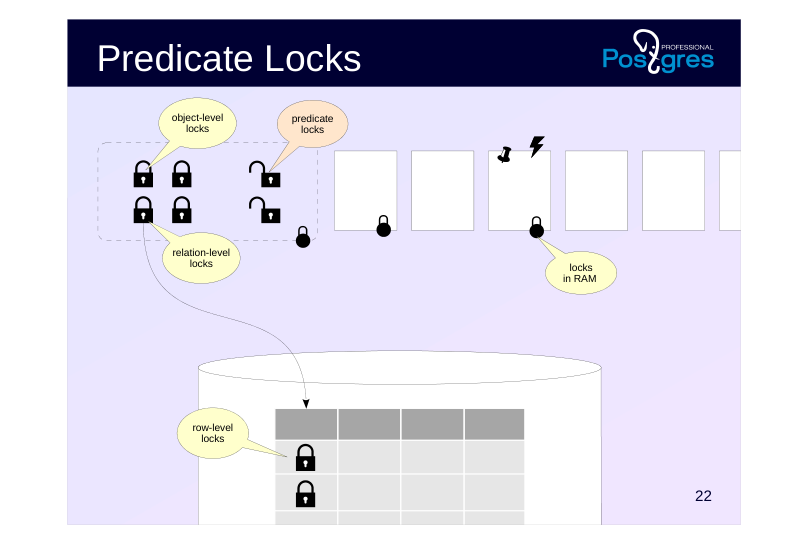
- locks lead to queues and waits
- Alternatives
- multiversion concurrency control — several data versions
- optimistic locking — processes are not locked,
- but an error occurs in case of a conflict
Speaker notes
Locks are used to coordinate concurrent access to shared resources.
Concurrent access means simultaneous access by several processes. These processes can run either in parallel (if the hardware allows) or sequentially in a time-sharing mode.
Locks are unnecessary if there is no concurrency (only one process accesses the data at a time) or if there is no shared resource (for example, a shared buffer cache requires locks, while a local one does not).
Before accessing a resource protected by a lock, a process must acquire that lock. When the process no longer needs the resource, it releases the lock so that other processes can use it.
Certainly, sometimes a lock cannot be acquired: the resource might already be in use by another process. Then the process either joins a wait queue or retries acquiring the lock after a certain interval. In any case, the process is forced to idle while waiting for the lock to be released.
Sometimes, other, non-blocking strategies can be used. For example, in the the MVCC module we discussed the MVCC mechanism. Another example is optimistic locking, which does not lock the process but results in an error if a conflict occurs.
Page 5: Resources
Resource
- anything that can be identified
- Examples of resources
- stored objects: pages, tables, tuples, etc.
- data structures in shared memory (hash tables, buffers, etc.)
- abstract resources (integers)
Speaker notes
In general, a lock can protect any resource, as long as the resource can be unambiguously identified.
For example, a DBMS object such as a data page (identified by the filename and offset), a table (identified by oid in the system catalog), or a tuple (identified by its page and offset).
A data structure in RAM such as a hash table, buffer, etc. (identified by a previously assigned number) can also be a resource.
Sometimes it is even convenient to use abstract resources that have no physical meaning (identified by an integer).
Page 6: Performance Factors
Lock granularity
- granularity, level in the resource hierarchy
- for example: table → page → rows, hash table → buckets
- higher granularity means greater potential for parallelism
- Lock modes
- mode compatibility is determined by a matrix
- more compatible modes provide greater opportunities for parallelism
Speaker notes
Locking performance depends on numerous factors. We will examine only a few of them.
Granularity (level of detail) is important when resources form a hierarchy. For example, a table consists of pages which contain rows. All these objects can serve as resources. If a process needs only a few rows, but a lock is set at the table level, other processes will be unable to work with the remaining rows.
Therefore, the higher the granularity, the greater the potential for parallelism. However, it also increases the number of locks, whose information must be stored somewhere.
Locks can be acquired in various modes. The names of lock modes can be arbitrary; what matters is compatibility between modes.
The mode that is incompatible with any other mode is called exclusive. When modes are compatible, several processes can acquire a lock simultaneously; such modes are called shared.
In general, the more compatible modes exist, the greater the potential for parallelism.
Page 7: Duration of Locks
Long-term locks
- usually acquired up to the end of the transaction and pertain to stored data
- numerous lock modes
- developed “heavyweight” infrastructure, monitoring
- Short-term locks
- usually acquired for fractions of a second and pertain to structures in RAM
- minimal number of lock modes
- “lightweight” infrastructure, monitoring may not be available
Speaker notes
Based on duration, locks can be divided into long-term and short-term.
Long-term locks are acquired for a potentially long time (usually up to the end of the transaction) and most often relate to such resources as tables (relations) and rows. As a rule, PostgreSQL controls such locks automatically, though a user still has certain control over this process.
A large number of modes is typical of long-term locks to enable as many concurrent data operations as possible.
Long-term locks are usually supported by extensive infrastructure (e.g., queue management and deadlock detection) and monitoring tools.
Short-term locks are acquired for a short time (from a few CPU cycles to fractions of seconds) and usually relate to data structures in the shared memory. PostgreSQL controls such locks in a fully automated manner, you only need to be aware of their existence.
The minimum of modes (exclusive and shared) and a simple infrastructure are typical of short-term locks. Monitoring may not be available.
Page 8: Types of Locks
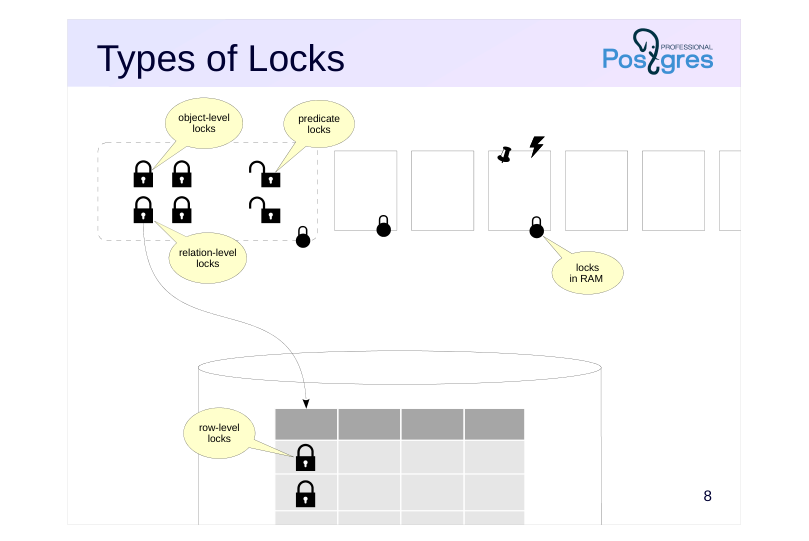 {#source-figure-008 caption=“Source slide page 8: Types of Locks”}
Speaker notes
PostgreSQL uses various types of locks.
Object-level locks pertain to long-term, “heavyweight” locks. Relations and other objects (e.g., schemas) serve as resources here.
Another class of locks (optimistic) is predicate locks.
Information about all these locks is stored uniformly in RAM. We will examine these types of locks in detail later in this lesson.
Among long-term locks, row-level locks are of particular interest. They are implemented differently from other long-term locks due to their potentially enormous number (imagine updating a million of rows in one transaction). We will cover these locks in the Row-Level Locks lesson.
Short-term locks include various locks on RAM structures. We will cover them in the Locks in RAM lesson.
Page 9: Object-Level Locks
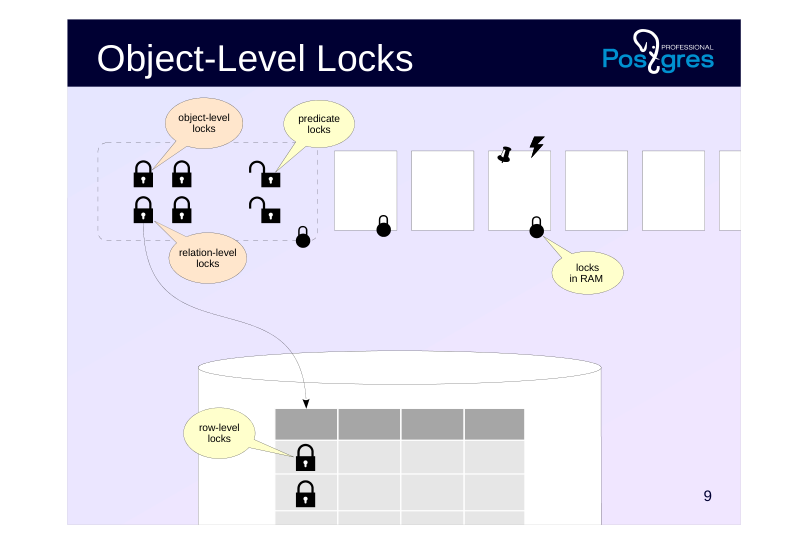 {#source-figure-009 caption=“Source slide page 9: Object-Level Locks”}
Page 10: Architecture
Information in the shared memory of the server
- pg_locks view:
- locktype — type of locked resource
- mode — lock mode
- Limited number
- max_locks_per_transaction × max_connections
- Infrastructure
- wait queue: waiting processes do not consume resources
- deadlock detection
Speaker notes
Let’s begin our study of locks with object-level locks, such as tables, indexes, pages, IDs of transactions, etc. These locks protect objects against change or use while an object is being modified, and serve a number of other needs.
Information about object-level locks is stored in the server’s shared memory. The number of locks is limited by the product of the values of two parameters: max_locks_per_transaction and max_connections (64 × 100 by default). The pool of locks is one for all transactions, that is, a transaction can acquire more locks than max_locks_per_transaction. The only important thing is that the total number of locks in the system does not exceed the set limit.
You can see all the locks in the pg_locks view.
When a resource is already locked and a transaction attempts to acquire a lock in an incompatible mode, it joins a wait queue and waits until the lock is released. Waiting transactions do not consume CPU resources: they fall asleep and wake up only when the resource is released. Several SQL commands allow to specify the NOWAIT keyword: in this case, trying to acquire a busy resource results in an error instead of waiting.
A deadlock situation is possible, where two or more transactions are waiting for each other. PostgreSQL automatically detects such deadlocks and aborts the endless wait.
Page 11: Relation Locks
Resource Type: Relation
- Modes
- Access Share
- SELECT
- Row Share
- SELECT FOR UPDATE/SHARE
- Row Exclusive
- UPDATE, DELETE, INSERT, MERGE
- Share Update Exclusive
- VACUUM, ANALYZE, ALTER TABLE,
- CREATE INDEX CONCURRENTLY
- Share
- CREATE INDEX
- Share Row Exclusive
- CREATE TRIGGER, ALTER TABLE
- Exclusive
- REFRESH MATERIALIZED VIEW
- CONCURRENTLY
- Access Exclusive
- DROP, TRUNCATE, REINDEX, VACUUM FULL,
- LOCK TABLE, ALTER TABLE,
- REFRESH MATERIALIZED VIEW
- allow
- concurrent
- change
- in the table
Speaker notes
A particularly important type of locks is relation (tables, indexes, sequences, etc.) locks. These locks are identified by the relation value in the pg_locks.locktype column.
They have 8 different modes as shown on the slide together with examples of SQL commands that use each mode. The compatibility matrix showing which locks can be acquired simultaneously is provided in the documentation.
Such a variety of lock modes is to allow as many operations as possible that refer to the same table (or index, etc.) to run concurrently.
The weakest mode is Access Share, which is acquired by the SELECT command. It is compatible with any modes except Access Exclusive, the strongest one. This means that a query does not interfere with other queries, data changes, or other operations, but prevents operations like dropping the table while data is being read from it.
Another example: Share mode (along with other stronger modes) is incompatible with commands that modify data. For example, the CREATE INDEX command blocks INSERT, UPDATE, and DELETE commands (and vice versa). Therefore, the CREATE INDEX CONCURRENTLY command exists, it uses Share Update Exclusive mode, which is compatible with such data changes (though the command takes longer to complete).
https://postgrespro.com/docs/postgresql/16/explicit-locking#LOCKING-TABL ES
Page 12: Wait Queue
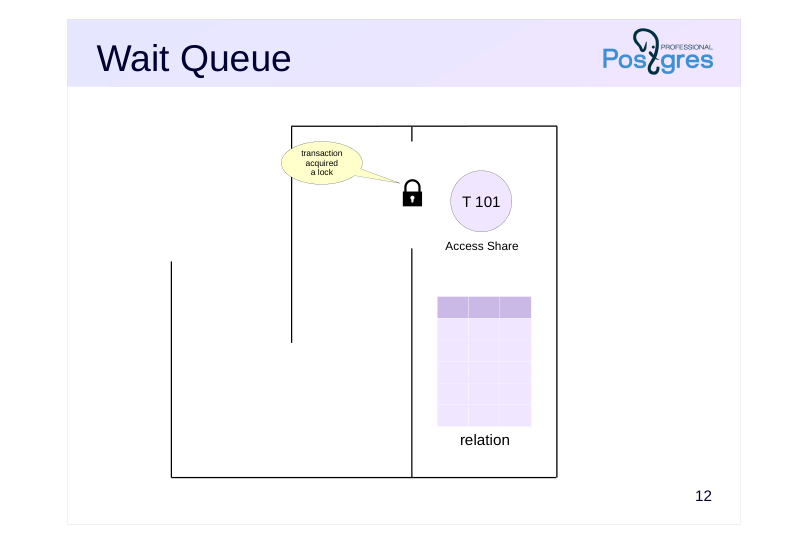 {#source-figure-012 caption=“Source slide page 12: Wait Queue”}
Speaker notes
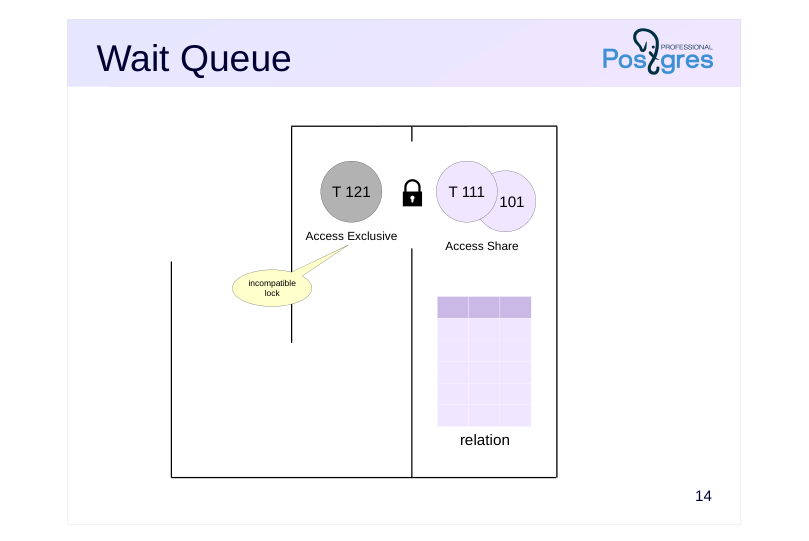
The following example illustrates the consequences of acquiring an incompatible lock.
Initially, the SELECT command is executed on the table. It requests and acquires an Access Share lock.
Page 13: Wait Queue
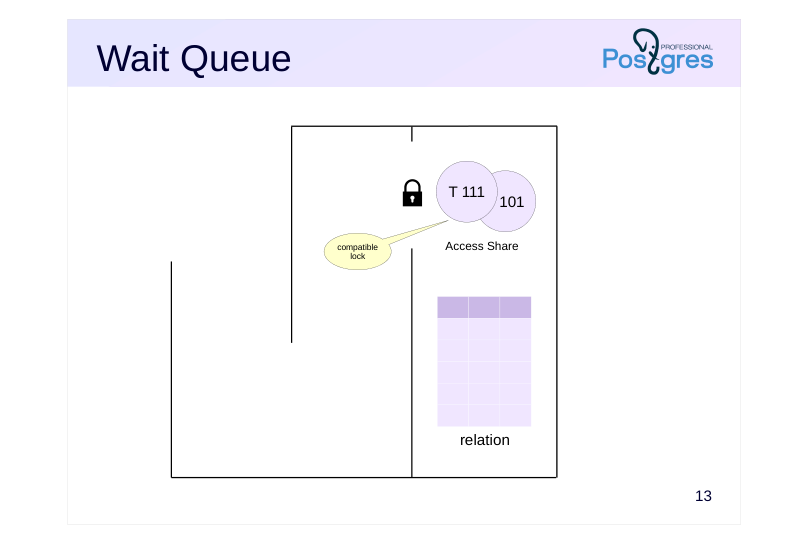 {#source-figure-013 caption=“Source slide page 13: Wait Queue”}
Speaker notes
Then another SELECT command requests an Access Share lock and acquires it, since the requested lock is compatible with the existing one.
Page 14: Wait Queue
 {#source-figure-014 caption=“Source slide page 14: Wait Queue”}
Speaker notes
After that the administrator runs the VACUUM FULL command, which requires an Access Exclusive lock that is incompatible with the existing Access Share locks. The transaction enters the wait queue.
Page 15: Wait Queue
 {#source-figure-015 caption=“Source slide page 15: Wait Queue”}
Speaker notes
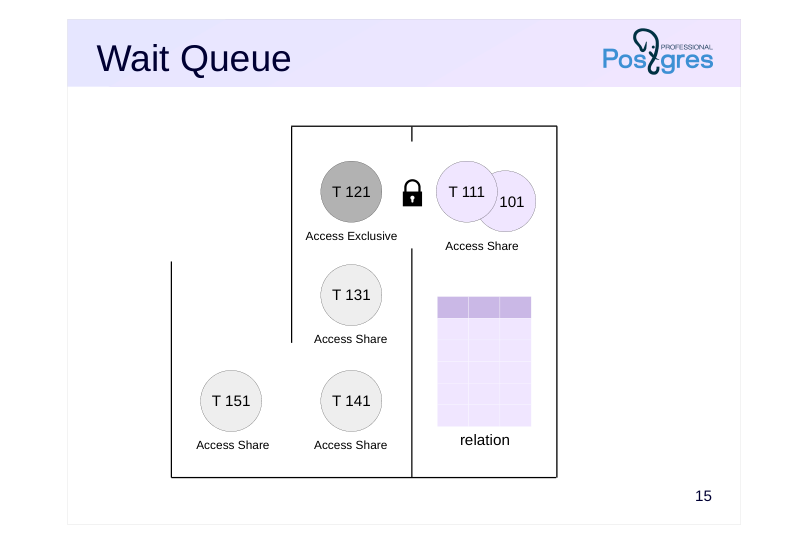
Several more SELECT commands then occur in the system. Hypothetically, some of them could skip ahead while VACUUM FULL is waiting, but they all dutifully take their place behind VACUUM FULL.
Page 16: Wait Queue
 {#source-figure-016 caption=“Source slide page 16: Wait Queue”}
Speaker notes
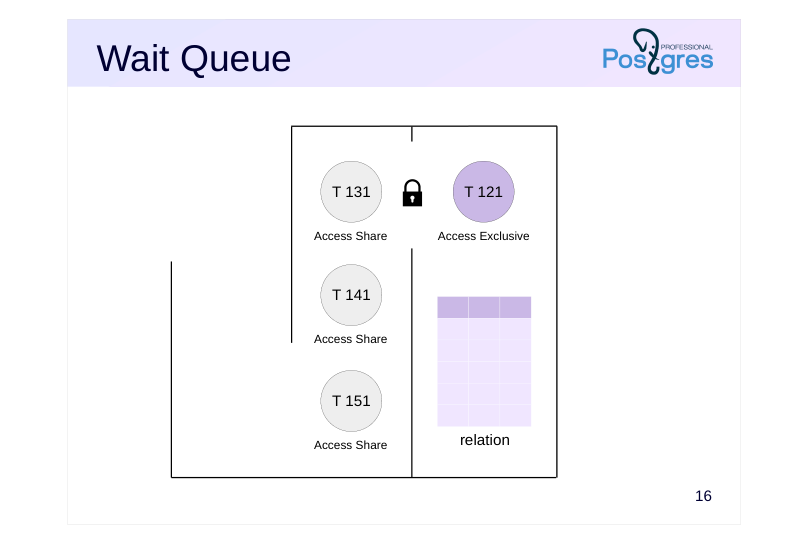
Once the first two transactions with SELECT commands complete and release their locks, VACUUM FULL command starts to run.
Only when VACUUM FULL completes and releases the lock, all the queued SELECT commands can acquire Access Share locks and start execution.
So, an improperly executed command can paralyze work of the system for the time interval that is way longer than it takes to execute the command itself.
Routine vacuuming (and autovacuuming) may also need an exclusive lock at the end of its operation to truncate the table, i.e., to cut off the empty tail of the data file and return the space to the operating system. Vacuum should avoid long waits, so if issues arise, the truncation step can be disabled using the vacuum_truncate storage parameter or by running vacuum with the VACUUM (truncate off) option.
Page 17: Other Resources
Types
- Extend (adding pages to a relation file)
- Object (non-relation objects such as databases, schemas, etc.)
- Page (data page, used by certain index types)
- Tuple
- Advisory (advisory lock)
- Transactionid
- Virtualxid
- Modes
- exclusive
- shared
Speaker notes
Besides relations, there are several other types of locked resources. Their locks are acquired either in exclusive mode only, or in both exclusive and shared modes. These include:
● Extend used when adding pages to a relation’s file.
● Object to lock an object that is not a relation (such as databases, schemas, subscriptions, etc.).
● Page to lock a page (a rare lock, used by certain index types).
● Tuple used in some cases to prioritize several transactions waiting for a lock on the same row (for details, see the Row-Level Locks lesson of this module).
● Advisory for advisory locks (covered in detail further).
Transactionid and Virtualxid resource types are of particular interest. Each transaction holds an exclusive lock on both its virtual and permanent IDs, if assigned. This provides a simple way to wait for a transaction to complete: just request a lock on its ID. This is covered in detail in the Row-Level Locks lesson.
Page 18: Monitoring Tools
Messages in the Server Log
- log_lock_waits parameter:
- outputs a message when wait exceeds deadlock_timeout
- Current Locks
- pg_locks view
- pg_blocking_pids function
Speaker notes
Locks that occur in the system are necessary for maintaining integrity and isolation, but they can lead to undesirable waits. Such waits can be monitored in order to identify their causes and eliminate them whenever possible (for example, by changing the algorithm of the application).
Another way is to turn the log_lock_waits parameter on. In this case, information will get into the server message log if a transaction waited longer than deadlock_timeout (although the parameter for deadlocks is used, ordinary waits are meant here).
The second approach is to query the pg_locks view when a long-running lock occurs (or on a regular basis), examine blocked and blocking transactions (using the pg_blocking_pids function) and decode them with the help of pg_stat_activity.
Page 19: Relation and Other Object Locks
Let’s create a table of bank accounts. We will store the account number and the balance.
Start a transaction in the second session. We will need the backend process ID.
Which locks does the newly started transaction hold?
Only a lock on its own virtual transaction ID. Update a row in the table. What changes do we see?
A relation lock in RowExclusiveLock mode (which corresponds to the UPDATE command) and an exclusive lock on the transaction’s own permanent ID have been added (which was assigned when the transaction started modifying data). Now let’s try creating an index on the table in another session.
Page 20: Page 20
The command does not complete, it is waiting for a lock to be released. Which one?
We can see that the transaction attempted to acquire a ShareLock on the table but failed (granted = f). The waitstart column in this case shows the time when the backend started waiting for the lock. We can find the ID of the blocking process (or several IDs in the general case)…
…and look at information about the sessions they belong to:
Once the transaction completes, the locks are released and the index is created.
Page 21: Advisory Locks
Set by the application
- Duration
- until the end of the session
- until the end of the transaction
- Modes
- exclusive
- shared
Speaker notes
Advisory locks can be used when you need locking logic that is inconvenient to implement using regular locks. Advisory locks are set only by the application; PostgreSQL never enforces them automatically.
Names of functions related to advisory locks start with pg_advisory and may include additional descriptive keywords.
An advisory lock can be acquired until the end of the session (pg_advisory_lock function) or until the end of the transaction (pg_advisory_xact_lock).
Session-level locks are not released automatically when a transaction ends, unlike transaction-level locks; they require explicit release using pg_advisory_unlock function. So, session-level locks break the normal transactional behavior: a lock acquired within a transaction will persist in the session even if that transaction is rolled back. Similarly, if we release a lock in the transaction and abort it later, the lock will remain in the released state.
By default, advisory locks are acquired in exclusive mode. To use shared mode append “shared” to the function name, for example, pg_advisory_lock_shared and pg_advisory_unlock_shared.
https://postgrespro.com/docs/postgresql/16/explicit-locking#ADVISORY-LOC KS
Page 22: Advisory Locks
 {#source-figure-022 caption=“Source slide page 22: Advisory Locks”}
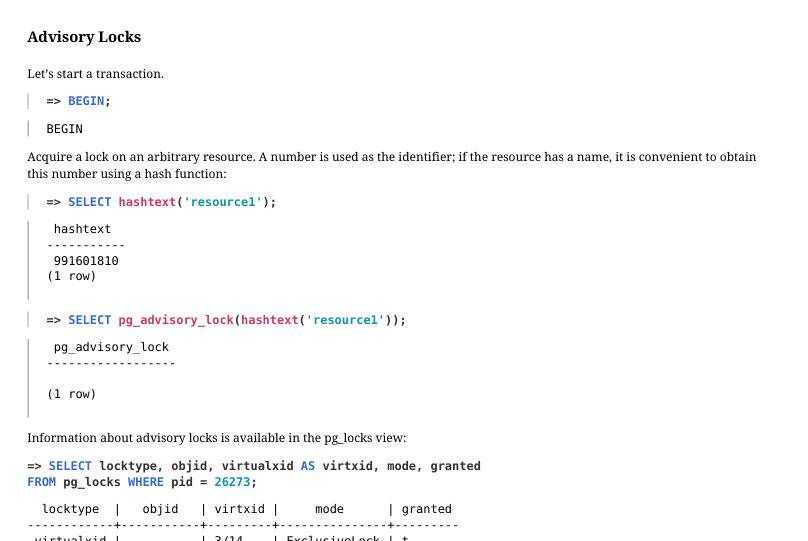
Let’s start a transaction.
Acquire a lock on an arbitrary resource. A number is used as the identifier; if the resource has a name, it is convenient to obtain this number using a hash function:
Information about advisory locks is available in the pg_locks view:
If another session attempts to acquire the same lock, it will wait until the lock is released:
In this example, the lock lasts until the end of the session, not the transaction, as is typically the case.
A session that has acquired the lock can reacquire it even when other sessions are waiting in the queue.
The lock can be explicitly released:
However, in our example the session acquired the lock twice, so we need to release it one more time:
Page 23: Page 23
There are other variants of functions that acquire advisory locks until the end of the transaction, shared locks, etc. Here is the complete list:
Page 24: Predicate Locks
 {#source-figure-024 caption=“Source slide page 24: Predicate Locks”}
Page 25: Predicate Locks
Task: implement Serializable isolation level
- used in addition to standard snapshot isolation
- optimistic locks, a historically established term
- Information in the shared memory of the server
- pg_locks view
- Limited number
- max_pred_locks_per_transaction × max_connections
Speaker notes
The predicate lock term dates back to time when early DBMSes made first attempts to implement Serializable isolation using locks. The idea was to lock not only specific rows, but also predicates. For example, when executing a query with the condition a > 10, you need to lock the a > 10 range to prevent phantom rows and other anomalies.
In PostgreSQL, the Serializable level is built on top of the existing snapshot mechanism, but the terminology has retained. In fact, these locks do not block anything; they are used to track data dependencies between transactions.
As with regular locks, information about predicate locks is shown in the pg_locks view, where they have a single special mode called SIRead (Serializable Isolation Read).
The number of predicate locks is limited by the product of the max_pred_locks_per_transaction and max_connections parameters (= 64 × 100).
Use of predicate locks imposes the requirement that all transactions should operate at the Serializable level to achieve full isolation. Dependency tracking only works for transactions that set predicate locks.
https://postgrespro.com/docs/postgresql/16/transaction-iso#XACT-SERIALIZ ABLE
https://wiki.postgresql.org/wiki/SSI
https://github.com/postgres/postgres/blob/REL\_16\_STABLE/src/backend/sto rage/lmgr/README-SSI
Page 26: Predicate Locks
Types of Resources
- Relation
- max_pred_locks_per_relation
- Page
- max_pred_locks_per_page
- Tuple
- escalation
- Mode
- SIRead
Speaker notes
Predicate locks are acquired at three levels.
During a full table scan, a lock is acquired at the table level.
During an index scan, locks are acquired on those index pages that match the access condition (predicate). In addition, locks are acquired at the level of individual tuples (which are not the same as the row-level locks discussed in the Row-Level Locks lesson).
As the number of predicate locks grows, automatic escalation occurs: instead of several fine‐grained locks, a single lock at a higher level is acquired.
When the number of tuple locks for a single page exceeds the max_pred_locks_per_page parameter value (default is 2), they are replaced by a single page-level lock.
When the number of page-or row-level locks for a single table (index) exceeds the max_pred_locks_per_relation parameter value, they are replaced by a single lock on the entire relation. The default value is −2; for negative numbers, the value is calculated as max_pred_locks_per_transaction / abs(max_pred_locks_per_relation).
Lock escalation can lead to false serialization failures, which reduces system throughput.
Page 27: Predicate Locks
Start a transaction at the Serializable isolation level and read one row using a sequential scan.
Check the locks:
A predicate lock has been placed on the entire accounts table, even though we are reading only one row.
Now let’s read one row using an index:
Locks:
When using an index scan, fine-grained predicate locks are acquired: locks on the index pages that were read; locks on the tuples that were read.
Page 28: Page 28
Page 29: Takeaways
Relation-level locks and other database object-level locks are used to coordinate concurrent access to shared resources
- wait queues and deadlock detection are supported
- advisory locks are used for resources not associated with stored objects
- Predicate locks are used to implement Serializable isolation
- do not block anything, track data dependencies between transactions
Page 30: Practice
- What locks does a transaction hold at the Read Committed isolation level after reading a single table row by its primary key? Run an experiment.
- Demonstrate automatic escalation of predicate lock granularity when reading table rows via an index. Show that this can lead to a false serialization failure.
- Configure the server to log information about lock waits that exceed 100 milliseconds. Reproduce a scenario that triggers such log messages.
Speaker notes
- In each of two transactions, read two rows from the table using an index and modify one of the read rows. Such transactions can be serialized. Set max_pred_locks_per_relation = 2 and repeat the experiment.
Page 31: 0. Preparation
 {#source-figure-031 caption=“Source slide page 31: 0. Preparation”}
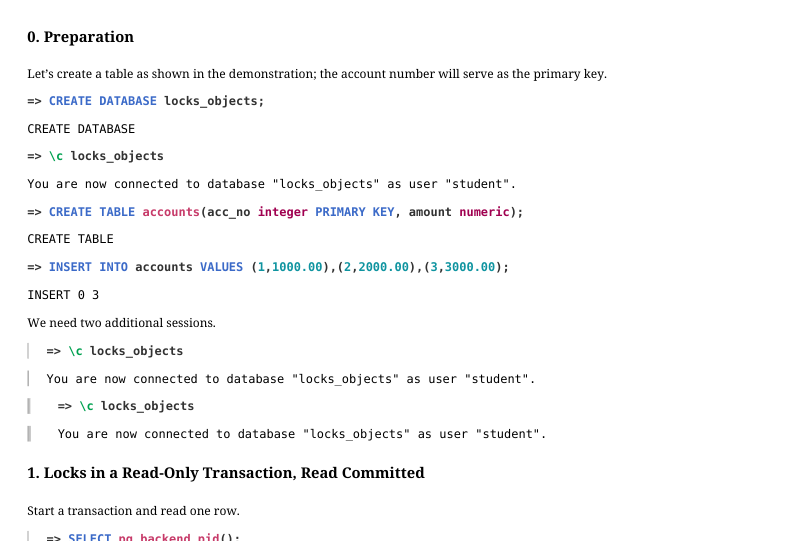
Let’s create a table as shown in the demonstration; the account number will serve as the primary key.
We need two additional sessions.
1. Locks in a Read‐Only Transaction, Read Committed
Start a transaction and read one row.
Locks:
Here we see the following: An AccessShareLock on the accounts table; An AccessShareLock on the accounts_pkey index created for the primary key; An exclusive lock on its own virtual transaction ID. If we query locks from inside the same transaction, an additional lock on the pg_locks view appears:
Page 32: Page 32
 {#source-figure-032 caption=“Source slide page 32: Page 32”}
2. Predicate Lock Escalation
Start transactions at the Serializable isolation level in two sessions.
In the first session, read rows for accounts 1 and 3; in the second session, read rows for accounts 2 and 3.
The index page and individual tuples are locked:
Change the balance of the first account in the first session, and the second account in the second session.
The transactions are serializable:
Now configure lock escalation so that locking two tuples results in locking the whole table.
Page 33: Page 33
 {#source-figure-033 caption=“Source slide page 33: Page 33”}
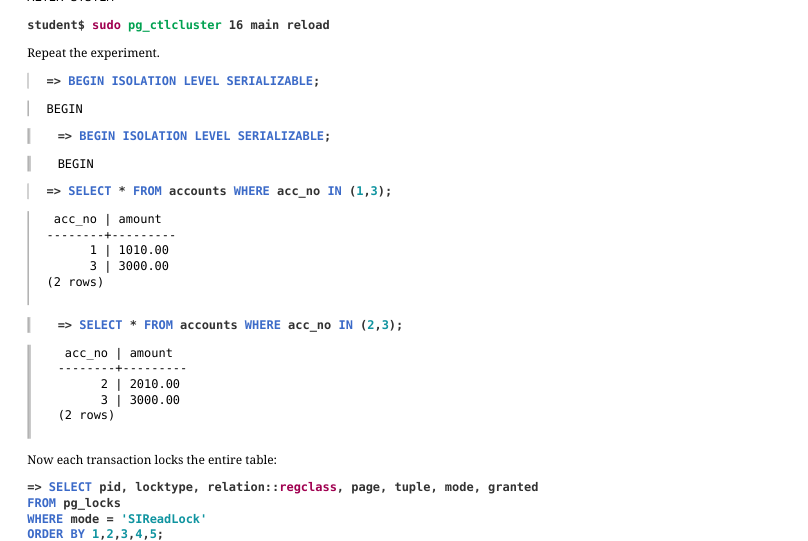
Repeat the experiment.
Now each transaction locks the entire table:
Change the balances…
…and commit the transactions.
Due to lock escalation, serialization is impossible.
3. Output into the Server Log
We need to change the following parameters:
Page 34: Page 34
Reproduce the lock.
In the first session add a delay and then finish the transaction.
Here is what appears in the log: