11 Lesson 11: WAL / WAL Tuning
This page is extracted from the official PDF into native Markdown. Slide text, code and speaker notes are kept in reading order; the original PDF and HTML remain the layout references. HTML source: dba2_11_wal_tuning.html Archive: DBA2-handouts-16-en.zip PDF pages: 22
Page 1: WAL / WAL Tuning
Copyright
© Postgres Professional, 2016–2026 Authors: Egor Rogov, Pavel Luzanov, Ilya Bashtanov, Igor Gnatyuk Translated by: Elena Sharafutdinova Photo: Oleg Bartunov (Phu Monastery and Bhrikuti Peak, Nepal)
Use of Course Materials
Non-commercial use of course materials (presentations, demonstrations) is allowed without restrictions. Commercial use is possible only with the written permission of Postgres Professional. It is prohibited to make changes to the course materials.
Feedback
Please send your feedback, comments and suggestions to: edu@postgrespro.ru
Disclaimer
Postgres Professional assumes no responsibility for any damages and losses, including loss of income, caused by direct or indirect, intentional or accidental use of course materials. Postgres Professional company specifically disclaims any warranties on course materials. Course materials are provided “as is,” and Postgres Professional company has no obligations to provide maintenance, support, updates, enhancements, or modifications.
Page 2: Topics
- WAL Levels and Use Cases
- Write Reliability
- Performance
Page 3: WAL Levels
Settings
- the higher the level,
- the more information
- wal_level = replica
- is in the WAL
- Minimal
- crash recovery
- Replica
- point-in-time recovery, physical replication
- bulk data operations, locks, IDs of running transactions
- Logical
- logical replication
- information for logical decoding
Speaker notes
Beyond its primary purpose of restoring consistency after a crash, the WAL can be used in other scenarios, if additional information is recorded. Several WAL levels are available, set by the wal_level parameter.
The minimal level contains information needed only for crash recovery. Bulk data operations (such as CREATE TABLE AS SELECT, CREATE INDEX, etc.) are not logged; durability of these operations is guaranteed by immediately flushing the data to disk.
The replica level (the default) enables system recovery from hot backups created with the pg_basebackup utility. To achieve this, all data changes are logged, including bulk operations. This level also enables physical replication, i.e. streaming WAL records to another server (these topics are covered in the DBA3 course). For this purpose, the WAL includes information about certain locks.
The logical level is used for logical replication and it must be enabled on the publisher. In this case, the WAL includes additional information that makes it possible to accurately decode the meaning of operations from the WAL records.
The higher the level, the more information is written to the WAL, consequently increasing its total size.
Page 4: WAL Levels
Let’s use a new database.
Set the WAL level to minimal (this also requires setting max_wal_senders to zero and restarting the server).
Examine how CREATE TABLE AS SELECT is logged.
WAL size:
No WAL records are related to the row inserts into the table:
At the minimal level, changes made by CREATE TABLE AS SELECT, CREATE INDEX, TRUNCATE and some other statements are not logged. These operators always perform their own synchronization to ensure durability. The WAL contains only records necessary for crash recovery.
Page 5: Page 5
Drop the table, restore the default level (replica) and repeat the experiment.
Let’s see how CREATE TABLE AS SELECT is logged now.
WAL size has increased:
In addition to system catalog changes, the WAL now includes the following records: CREATE — relation file creation INSERT+INIT — row insertion into the table COMMIT — transaction commit
Page 6: Page 6
At the replica level, the WAL contains all data changes, they can be applied to a physical backup or a replica.
Page 7: Write Reliability
Caching
- Data Corruption
- Non-Atomic Page Writes
Page 8: Caching
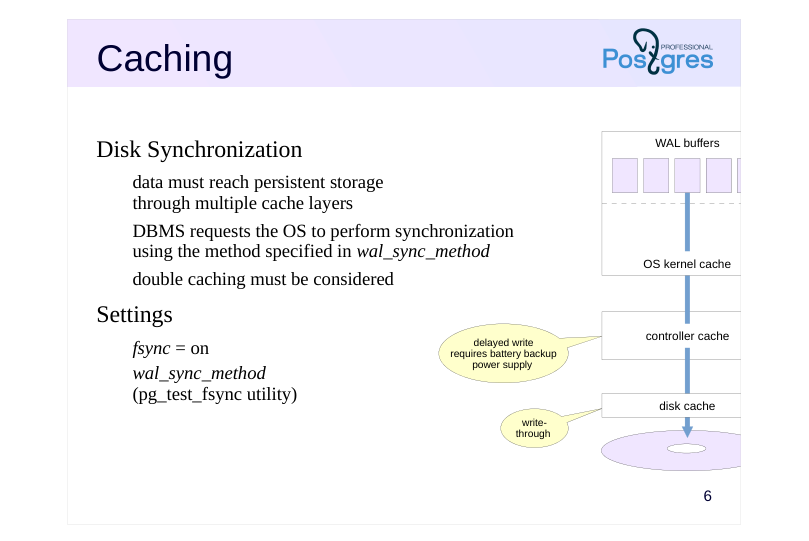 {#source-figure-008 caption=“Source slide page 8: Caching”}
Disk Synchronization
- data must reach persistent storage
- through multiple cache layers
- DBMS requests the OS to perform synchronization
- using the method specified in wal_sync_method
- double caching must be considered
- Settings
- fsync = on
- wal_sync_method
- (pg_test_fsync utility)
Speaker notes
Reliability is affected by several factors. Firstly, there are various cache layers between the database and persistent storage (such as a hard disk platter).
When durable writes are required, PostgreSQL uses the method specified in the wal_sync_method parameter. While there are several options, two main approaches exist: either issuing a sync command to the OS after writing (fsync, fdatasync), or opening/writing a file with a special flag that requests synchronization, and when applicable, direct I/O bypassing the OS cache. The pg_test_fsync tool helps determine the most suitable method for your specific OS and file system. Regardless of the method chosen, this operation incurs significant overhead.
The administrator should also ensure that data actually reaches the disk and is not delayed in controller or disk cache. If the controller cache defers writes, the controller should have a battery backup unit. For disks, write-through mode is recommended.
Technically, we can disable synchronization (using the fsync parameter), but this essentially eliminates any durability guarantees. The only reasonable scenario for disabling this parameter is temporarily boosting performance during operations where data can be easily restored (for example, initial data migration).
https://postgrespro.com/docs/postgresql/16/wal-reliability
Page 9: Data Corruption
WAL record checksums
- always enabled, CRC-32
- Page checksums
- should be enabled during cluster initialization
- overhead,
- increased
- WAL size
- Settings
- data_checksums
- ignore_checksum_failure = off
Speaker notes
Secondly, data can also be corrupted on storage media, when transmitted over interface cables, etc. Some of these errors are handled at the hardware level, but others are not.
For quick detection of an issue, checksums are always provided in WAL records.
Data pages can also be protected with checksums. While it is better to enable them during cluster initialization, they can also be activated later using the pg_checksums utility when the server is stopped. In a production environment, checksums must be enabled despite the overhead of their calculation and verification. This reduces the probability of undetected corruption.
We can check whether checksums are enabled using the data_checksums parameter (read-only). The ignore_checksum_failure parameter allows a transaction that read a corrupted page to continue without interruption, though it is not recommended to enable it in production environment.
Page 10: Non-Atomic Page Writes
Full page image
- page might be partially written if a crash occurs
- full page image (FPI) is written to the WAL
- upon its first modification after a checkpoint
- during recovery, WAL records are applied to the saved image
- Settings
- increases
- WAL size
- full_page_writes = on
- wal_compression = off
Speaker notes
Thirdly, there is an issue of atomicity of writing.
A data page is 8 KB in size (or larger: 16 KB, 32 KB), while at the low level, writing is done in blocks that are typically smaller (512 bytes, 4 KB, etc.). Therefore, in case of a power outage, a data page can be written partially. It is clear that during recovery, it makes no sense to apply regular WAL records to such a page.
To prevent this, PostgreSQL can write a full page image (FPI) to the WAL the first time a page is modified after a checkpoint. This feature is turned on/off by the full_page_writes parameter and should only be disabled if the file system and hardware themselves guarantee atomic writing.
When we encounter an FPI in the WAL during recovery, we definitely write it to disk (since it is more reliable, as it is protected by a checksum like all WAL records). Then we apply regular WAL records to this restored page.
Although PostgreSQL excludes unused space from FPIs, they still significantly increase WAL volume. If page checksums are enabled in the cluster, an additional WAL record is generated when hint bits are modified, reflecting the checksum change.
We can reduce WAL size by enabling FPI compression with the wal_compression parameter. Supported compression methods are pglz, lz4, and zstd. “On” selects the pglz method, “off” disables compression.
Page 11: Checksums
Create another table:
Here is the file containing the data:
Stop the server and change several bytes in the page (erase the LSN of the last WAL record from the header).
Stopping the server is not strictly necessary. This scenario requires the following: The page is written to disk and evicted from the buffer cache. Corruption occurs. The page is read from disk. Now start the server.
Let’s try to read the table:
The ignore_checksum_failure parameter allows us to try reading a table, despite the risk of getting corrupted data (e.g., if a backup is not available):
Page 12: Performance
I/O Pattern
- Synchronous Writing
- Asynchronous Writing
Page 13: I/O Pattern
Continuous writing
- sequential writes, no random access
- I/O pattern differs from the rest of the system
- under high load — placement on separate physical disks
- (symbolic link from PGDATA/pg_wal)
- Infrequent reading
- during recovery
- when walsender processes are running and the replica cannot keep up
- with receiving records
Speaker notes
During normal operation, WAL files are written continuously and sequentially. Since there is no random access, regular HDDs handle this I/O pattern perfectly well.
However, this I/O pattern differs significantly from how data files are accessed. Therefore, it is often more advisable to place the WAL on a separate physical disk (or disks) mounted to the server’s filesystem. Instead of the PGDATA/pg_wal directory, we should create a symbolic link pointing to the appropriate directory.
However, there is one situation where WAL files should to be read (besides the obvious case of crash recovery). It occurs when streaming replication is used and the replica cannot keep up with receiving WAL records while they are still cached in the primary server’s memory. In this case, the walsender process has to read the required data from disk. Interaction with replica is covered in detail in the Replication module of DBA3 course.
For monitoring and evaluating WAL performance, PostgreSQL version 14 introduced the pg_stat_wal view.
Page 14: Synchronous Writing
Algorithm
- when changes are committed, all accumulated WAL records are flushed,
- including the commit record
- waiting for commit_delay if at least commit_siblings transactions are active
- Properties
- durability is guaranteed
- response time increases
- Settings
- enable under
- heavy load of short
- synchronous_commit = on
- commit_delay
- = 0
- commit_siblings
- = 5
- transactions
Speaker notes
WAL records are written in one of two modes: synchronous (where transaction commit cannot proceed until all of the transaction’s WAL records are persisted to disk) and asynchronous (where the WAL is flushed by a background process at regular intervals).
Writing mode is set by the synchronous_commit parameter.
Since synchronization is time-consuming, it is advisable to perform it as infrequently as possible. To achieve this, the WAL writer process introduces a delay specified by the commit_delay parameter, but only when there are at least commit_siblings active transactions. This delay allows some transactions to complete, so their WAL records can be synchronized in a single operation.
The process then flushes WAL to disk up to the required LSN (or slightly higher if new records were added during the delay).
Synchronous writing guarantees durability: if a transaction is committed, all its WAL records are already on disk and will not be lost. The disadvantage of synchronous writing is that it increases response time (the COMMIT command does not return control until synchronization is completed) and reduces system performance.
Page 15: Asynchronous Writing
Algorithm
- write cycles every wal_writer_delay
- only completely filled pages are written;
- if no new full pages are available, the current one is written
- Properties
- consistency is guaranteed, but not durability
- committed changes can be lost (3 × wal_writer_delay)
- Settings
- can be
- changed at the
- transaction level
- synchronous_commit
- wal_writer_delay = 200ms
- wal_writer_flush_after = 1MB
Speaker notes
In asynchronous writing mode, the wal writer process flushes accumulated WAL records either after the wal_writer_delay time or when the wal_writer_flush_after size threshold is reached:
● If one or more pages in the buffers have been completely filled since the last flush, only those full pages (or part of them) are written. Note that the WAL cache operates as a ring buffer, only a continuous sequence of pages can be written at once. This approach prevents the same page from being synchronized several times under heavy write load.
● If no new full pages have appeared, the current (partially filled) page is written instead.
Asynchronous writing is more efficient than synchronous writing because a transaction commit does not wait for the write operation to complete. However, this comes at the cost of reduced reliability: committed data can be lost if a crash occurs within 3 × wal_writer_delay time after the commit.
The synchronous_commit parameter can be set per transaction. It allows to increase performance by trading off reliability of some transactions only.
https://postgrespro.com/docs/postgresql/16/wal-async-commit
In practice, both modes work together. WAL records of a long-running transaction are written asynchronously to free up WAL buffers. However, if a dirty data buffer needs to be flushed and its corresponding WAL record has not been written to disk yet, it will be immediately flushed in synchronous mode.
Page 16: Impact of Synchronous Commit on Performance
The default mode is synchronous commit.
Run a basic performance test using pgbench. First, initialize the required tables…
…and reset the WAL statistics:
Run the test for 10 seconds.
In the pgbench results, we focus on transaction count or throughput (tps); in the pg_stat_wal view, we analyze the number of write and sync operations.
Page 17: Page 17
Now let’s set asynchronous mode.
Reset accumulated statistics.
Run the test again.
In addition to the increased tps, we can see the source of the performance improvement: the number of WAL sync operations has decreased significantly. Obviously, the ratio may differ on a production system, but the performance is significantly higher in asynchronous mode.
Page 18: Takeaways
The WAL allows to restore consistency after a crash, but it can also be used for other purposes
- To ensure reliability, tuning is required not only at the DBMS level, but also at the OS, file system, and hardware levels
- Configuration allows a flexible trade-off between durability and performance
Page 19: Practice
- Examine how the full_page_writes parameter affects the size of WAL records.
- To do this, repeat a simple pgbench test given in the
- demonstration with different WAL settings. Before starting
- each test, perform a checkpoint.
- Explain the results.
- Calculate the compression ratio achieved by using wal_compression parameter.
Speaker notes
For a detailed analysis, you can use the pg_get_wal_stats function in the pg_walinspect extension.
Page 20: 1a. Full page writes = on
Let’s run the test for 10 seconds.
Examine WAL statistics:
Page 21: Page 21
Full page images (FPIs) make up a significant part of the overall WAL size.
1b. Full page writes = off
Let’s run the test for 10 seconds.
Examine WAL statistics:
WAL size decreased significantly since FPIs are no longer written to WAL.
Page 22: 2. Compression
Let’s run the test for 10 seconds.
Examine WAL statistics:
In this scenario, when the number of FPIs is still high, the WAL size decreases severalfold. Despite the additional CPU overhead, the benefits of compression are worthwhile when FPIs are enabled.