10 Lesson 10: WAL / Checkpoint
This page is extracted from the official PDF into native Markdown. Slide text, code and speaker notes are kept in reading order; the original PDF and HTML remain the layout references. HTML source: dba2_10_wal_checkpoint.html Archive: DBA2-handouts-16-en.zip PDF pages: 25
Page 1: WAL / Checkpoint
Copyright
© Postgres Professional, 2016–2026 Authors: Egor Rogov, Pavel Luzanov, Ilya Bashtanov, Igor Gnatyuk Translated by: Elena Sharafutdinova Photo: Oleg Bartunov (Phu Monastery and Bhrikuti Peak, Nepal)
Use of Course Materials
Non-commercial use of course materials (presentations, demonstrations) is allowed without restrictions. Commercial use is possible only with the written permission of Postgres Professional. It is prohibited to make changes to the course materials.
Feedback
Please send your feedback, comments and suggestions to: edu@postgrespro.ru
Disclaimer
Postgres Professional assumes no responsibility for any damages and losses, including loss of income, caused by direct or indirect, intentional or accidental use of course materials. Postgres Professional company specifically disclaims any warranties on course materials. Course materials are provided “as is,” and Postgres Professional company has no obligations to provide maintenance, support, updates, enhancements, or modifications.
Page 2: Topics
- Checkpointer Process
- Background Writer Process
- Monitoring
Page 3: Checkpoint
Why Checkpoint Is Required
- Checkpoint Procedure
- Crash Recovery Algorithm
- Tuning
Page 4: Why Checkpoint Is Required
Size of stored WAL records
- which WAL segment to start recovery from?
- actively used page may not be evicted from cache
- Recovery time
- how long does crash recovery take?
Speaker notes
If no special measures are taken, an actively used page, once loaded into the buffer cache, might never get evicted. This means that crash recovery procedure will have to scan all the WAL records created since the server was started.
In practice, it is indeed unacceptable for two main reasons. First, WAL files take up a lot of space, and all of them have to be stored on the server. Second, the recovery time could be extremely long as countless WAL records need to be processed.
To prevent this, the checkpoint procedure flushes all dirty pages to disk without evicting them from the cache. A dedicated background process called checkpointer periodically performs a checkpoint. Once a checkpoint is completed, WAL records that precede its start are no longer required for recovery.
Page 5: Checkpoint Procedure
 {#source-figure-005 caption=“Source slide page 5: Checkpoint Procedure”}
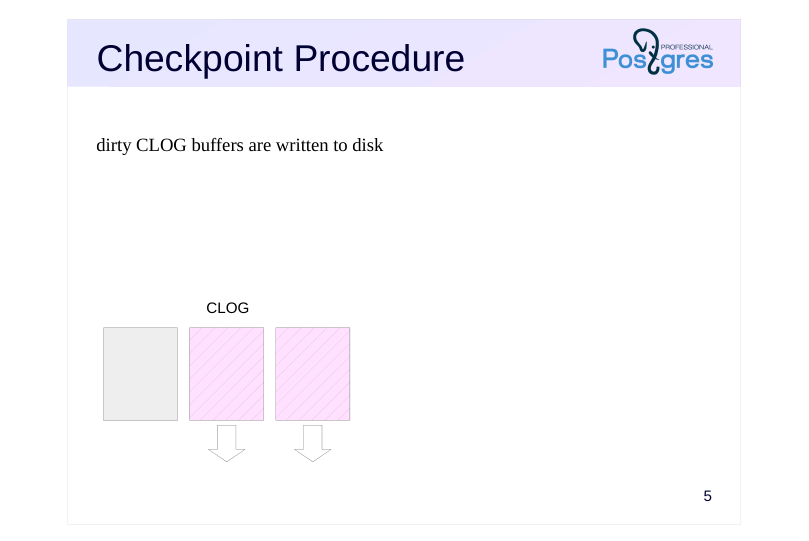
dirty CLOG buffers are written to disk
Speaker notes
Let’s examine in more detail what happens when a checkpoint is performed.
First, RAM contains structures other than the buffer cache whose contents must be persisted to disk.
In particular, the checkpoint flushes transaction status buffers (CLOG) to disk. Since the number of these buffers is small (only 128), they get written immediately.
Page 6: Checkpoint Procedure
 {#source-figure-006 caption=“Source slide page 6: Checkpoint Procedure”}
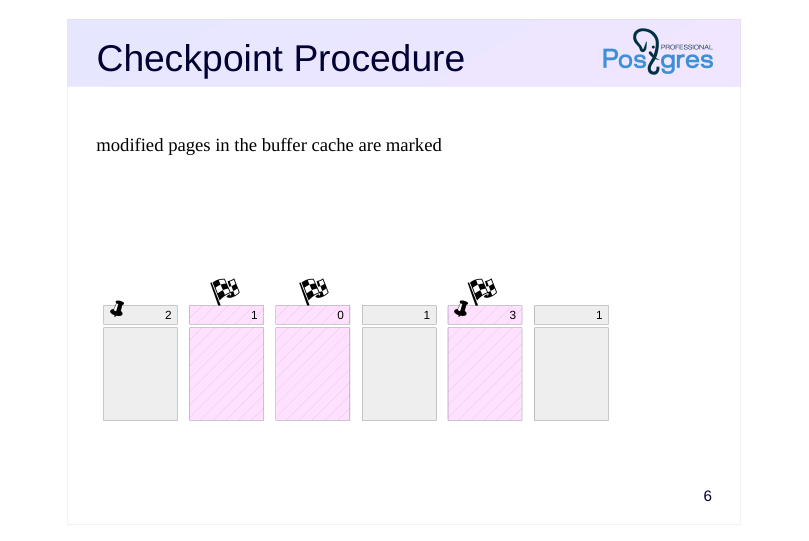
modified pages in the buffer cache are marked
Speaker notes
Second, the main function of a checkpoint is to flush all pages from the buffer cache that were dirty at the moment the checkpoint started.
Since the buffer cache can be very large, flushing all pages at once is problematic, as it would interrupt normal server operations and put excessive load on the I/O subsystem. Therefore, the checkpoint is spread out over time and turns from a point into an interval.
Initially, all pages modified up to this point are marked in the buffer header with a special flag…
Page 7: Checkpoint Procedure
 {#source-figure-007 caption=“Source slide page 7: Checkpoint Procedure”}
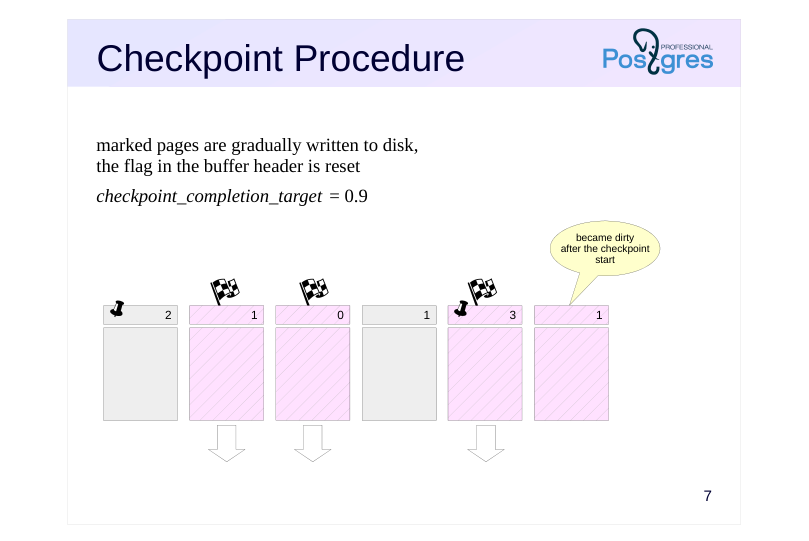
marked pages are gradually written to disk, the flag in the buffer header is reset
- checkpoint_completion_target = 0.9
Speaker notes
… and then the checkpoint gradually iterates through all the buffers and flushes the marked pages to disk. Note that the pages are only written to disk, but not evicted from the cache. Therefore, the checkpoint procedure ignores both the buffer’s usage count and pin count.
The marked buffers can also be written by backends, whichever reaches the buffer first. In any case, the flag is reset when the buffer is written, so the buffer will not be written twice.
Pages continue to change in the buffer cache during the checkpoint. However, newly dirty buffers are not processed by the checkpoint, as they were not dirty when it started.
The rate at which dirty buffers are written is controlled by the checkpoint_completion_target configuration parameter. It specifies the fraction of time between two adjacent checkpoints that should be used for writing pages. With the default value of 0.9, PostgreSQL should complete the checkpoint procedure shortly before the next scheduled one. Using values higher than the default 0.9 is not recommended, as the process may actually take a bit longer than specified by the parameter.
Page 8: Checkpoint Procedure
 {#source-figure-008 caption=“Source slide page 8: Checkpoint Procedure”}
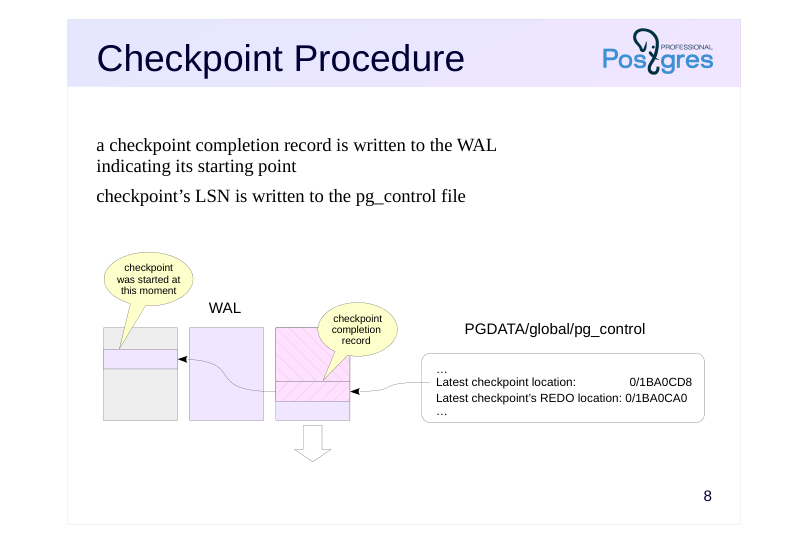
a checkpoint completion record is written to the WAL indicating its starting point
- checkpoint’s LSN is written to the pg_control file
Speaker notes
When completed, the checkpoint creates a WAL record marking the end of the checkpoint. This WAL record contains the LSN of the checkpoint’s start. Since the checkpoint does not write a WAL record when it starts, this LSN can reference any valid WAL record.
Besides, a reference to this WAL record is written to the PGDATA/global/ pg_control file. This allows the system to quickly identify the last completed checkpoint.
Page 9: Checkpoint
Examine /var/lib/postgresql/16/main/global/pg_control control file. This can be done using the pg_controldata utility.
We see a lot of reference information, with particular interest in the latest checkpoint data and cluster state “in production”. Let’s manually perform a checkpoint and see how this is reflected in the WAL and the control file.
Page 10: Page 10
A record is written to the WAL indicating the checkpoint completion (CHECKPOINT_ONLINE):
In the description of the record, the LSN of the checkpoint start (redo) is specified. Let’s compare with the control file data:
The LSN information is identical.
Page 11: Recovery
 {#source-figure-011 caption=“Source slide page 11: Recovery”}
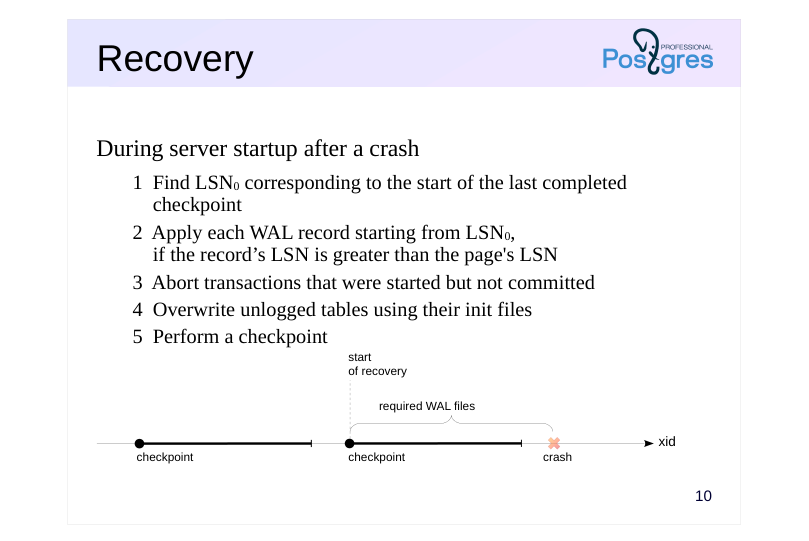
During server startup after a crash
- 1 Find LSN0 corresponding to the start of the last completed
- checkpoint
- 2 Apply each WAL record starting from LSN0,
- if the record’s LSN is greater than the page’s LSN
- 3 Abort transactions that were started but not committed
- 4 Overwrite unlogged tables using their init files
- 5 Perform a checkpoint
Speaker notes
If the server fails, at the subsequent start, the startup process detects this by looking into the pg_control file to find the status different from “shut down“. Automatic recovery is done in this case.
The process first reads the LSN of the last completed checkpoint record from that same pg_control file. From this record, the process determines LSN0, the starting position of that checkpoint.
(In case of recovery from a backup, the backup_label file is present, and the checkpoint record is read from that file instead. For more details, see the DBA3 course.)
Next, the startup process reads the WAL records one by one, starting from the determined position, sequentially applying records to pages, if necessary (the need is determined by comparing LSN of the on-disk page with LSN of the WAL record). Page modifications occur in the buffer cache, just as they do during normal operations.
Records related to CLOG pages restore the status of transactions. Transactions not committed by the end of the recovery are considered aborted; their changes are not visible in any data snapshots.
WAL records are applied to files in a similar way: for example, if it is clear from a record that the file should be created, but it does not exist, the file is created.
At the end of the process, all unlogged tables are overwritten using the templates stored in the init files. At this point, the startup process completes the recovery and performs a checkpoint.
Page 12: Crash Recovery
Now we simulate a crash by forcibly shutting down the server.
There are currently WAL records on disk, but table pages have not been flushed. Check the cluster state:
The state has not changed. Upon startup, PostgreSQL will detect the crash and initiate the recovery.
As we can see, the table and data have been recovered. Stop the instance correctly. When it is stopped, PostgreSQL performs a checkpoint to flush all data to disk.
Check the cluster state:
Now the state is “shut down,” which corresponds to a correct stop.
Page 13: Checkpoint frequency
 {#source-figure-013 caption=“Source slide page 13: Checkpoint frequency”}
↑
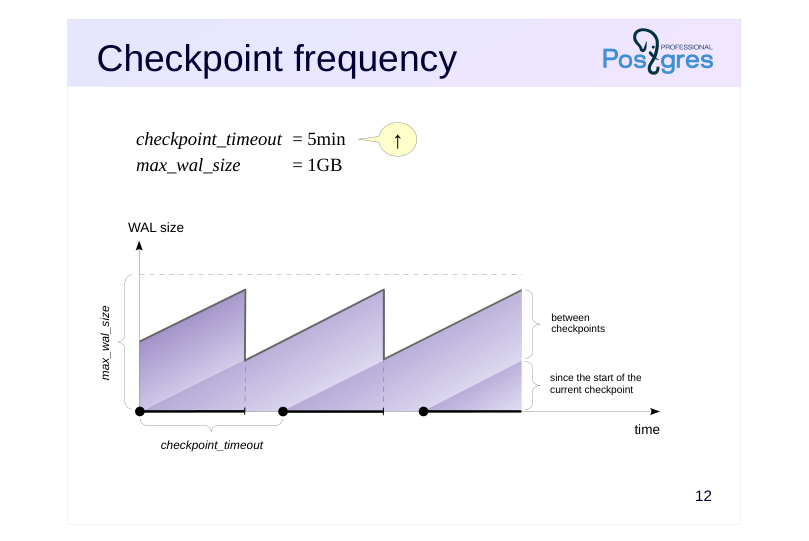
- checkpoint_timeout = 5min
- max_wal_size
- = 1GB
Speaker notes
Checkpoints are typically set up based on the following factors.
First, we need to determine an acceptable checkpoint frequency (based on the recovery time requirements and the size of WAL files generated during that period under normal load). The less frequently we need to run checkpoints, the better, as this reduces overhead.
The acceptable frequency is set using the checkpoint_timeout parameter (the default value of 5 minutes is too short, it is often increased up to 30 minutes).
However, the load may exceed our planned capacity and too many WAL records may be generated within the specified time. To prevent this, we specify the total permissible size of WAL records in the max_wal_size parameter.
For crash recovery, the server needs to keep WAL files from the start of the last completed checkpoint until the start of the current one (the size between checkpoints), plus WAL files that have accumulated during the current checkpoint. Therefore, the total WAL size can be estimated as:
(1 + checkpoint_completion_target) × size between checkpoints.
Thus, most checkpoints are performed on schedule, once every checkpoint_timeout. However, under high load, checkpoints are performed more frequently to manage not to exceed the max_wal_size limit.
Page 14: WAL File Size
Server stores WAL files
- required for recovery (typically < max_wal_size)
- not yet consumed by replication slots
- not yet archived, if continuous archiving is enabled
- not exceeding wal_keep_size limit
- not exceeding min_wal_size threshold (during recycling)
- Parameters
- max_wal_size
- = 1GB
- wal_keep_size
- = 0
- wal_recycle
- = on
- min_wal_size
- = 80MB
Speaker notes
Note that the size specified in the max_wal_size parameter can be exceeded. This is not a strict limit, but a target for the checkpointer, which regulates its intensity when flushing dirty buffers.
Moreover, the server cannot remove WAL files that have not been consumed by replication slots, and files that have not been archived during continuous archiving. This can lead to excessive disk space usage. So, when these features are used, continuous monitoring is essential.
In cases where a replica falls behind, we can use the wal_keep_size parameter to set a minimum amount of WAL files that will be kept after a checkpoint. While this does not guarantee that a specific WAL record will be kept until the replica needs it, it allows the replication to proceed without a replication slot.
By default, a certain number of WAL files are not deleted, instead they are renamed and reused. The min_wal_size parameter sets the minimum amount of WAL to keep. This avoids the overhead of repeatedly creating and deleting files. However, in copy-on-write filesystems, it is faster to create a new file, so it is recommended to disable recycling for them by setting wal_recycle=off.
https://postgrespro.com/docs/postgresql/16/wal-configuration
https://postgrespro.com/docs/postgresql/16/runtime-config-wal#RUNTIME-C ONFIG-WAL-CHECKPOINTS
Page 15: WAL Size
Start the instance again.
Set the minimum min_wal_size value and disable recycling so that no more than two segments remain after a checkpoint.
Insert rows into the table:
List of WAL files:
Let’s manually perform a checkpoint and examine the WAL again:
After the checkpoint, no more than two segments remain in WAL, including the one that was current at the start. And if there were any changes in the cluster after the start of the checkpoint, other segments could appear in the WAL.
Page 16: Background Writer
Background Writer Process
- Tuning
Page 17: Background Writer Process
 {#source-figure-017 caption=“Source slide page 17: Background Writer Process”}
Speaker notes
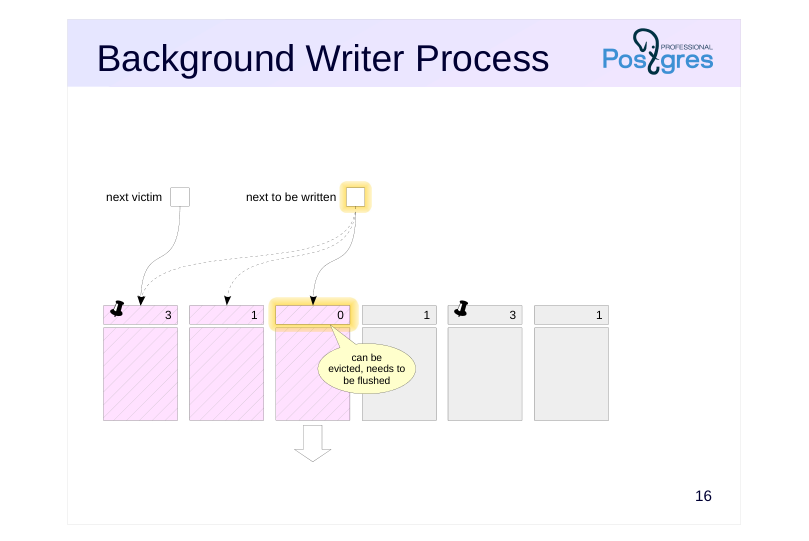
When a backend process needs to evict a page from the buffer cache, it may find that the buffer is dirty and will have to write its contents to disk. To reduce the frequency of such situations, there is also a background writer process (bgwriter) in addition to the checkpointer process.
The background writer uses the same buffer search algorithm as backends, but it operates its own pointer which can be ahead of the next victim pointer but never falls behind it.
The background writer flushes a buffer that meets all of the following criteria:
● Contain changed data (dirty)
● Not pinned (pin count = 0)
● Have usage count = 0
Thus, by running ahead, the background writer identifies buffers that are likely to be evicted soon. This strategy increases the probability that a victim buffer chosen by a backend is already clean.
Page 18: Background Writer Process
Algorithm
- sleep for bgwriter_delay
- if the average number of buffers requested per cycle is N, then write
- N × bgwriter_lru_multiplier ≤ bgwriter_lru_maxpages
- dirty buffers
- Parameters
- bgwriter_delay
- = 200ms
- bgwriter_lru_maxpages
- = 100
- bgwriter_lru_multiplier
- = 2.0
- bgwriter_flush_after
- = 512kB
Speaker notes
The background writer process operates in cycles of up to bgwriter_lru_maxpages, sleeping for bgwriter_delay between cycles.
(So, if bgwriter_lru_maxpages is set to zero, the background writer will be disabled.)
The exact number of buffers to write is determined by the average number of buffers recently requested by backends (using a moving average to smooth out variations between cycles while avoiding reliance on distant history). This calculated number of buffers is then multiplied by the bgwriter_lru_multiplier.
If the process does not find any dirty buffers (indicating no system activity), it enters a sleep state, from which it is awakened by a backend’s request for a buffer. After that, the process wakes up and resumes normal operation.
When large amounts of data need to be written, the server instructs the OS to perform an intermediate flush to storage (fsync) once the volume specified by the bgwriter_flush_after parameter is reached. This reduces transaction commit latency and the time needed for synchronization at the end of a checkpoint.
The background writer should be configured after checkpointer tuning is complete. Both processes together should keep up with writing dirty buffers before backends require them.
Page 19: Monitoring
Checkpoints
- checkpoint_warning = 30s
- log_checkpoints = on
- startup and checkpointer process statuses
- Dirty buffer writes by processes
- pg_stat_bgwriter and pg_stat_io views
Speaker notes
The checkpoint_warning parameter allows to issue a warning in the log if checkpoints are performed more often than defined by the value. If this occurs frequently, consider increasing max_wal_size or decreasing the checkpoint_timeout interval.
The log_checkpoints parameter, which is enabled by default, logs detailed information about each completed checkpoint.
When the server is in recovery mode, we can monitor the status of the startup and checkpointer processes using OS utilities, such as ps.
Statistics for processes writing dirty buffers (checkpoint, background writer, and backends), are displayed in the pg_stat_bgwriter view, and starting from version 16, in the pg_stat_io view.
In PostgreSQL version 17, a new pg_stat_checkpointer view will be introduced, which contains checkpointer process statistics currently found in pg_stat_bgwriter.
Page 20: Monitoring
The checkpoint_warning parameter issues a warning if checkpoints caused by exceeding the WAL size limit occur too frequently. Its default value is:
It should be adjusted to the checkpoint_timeout value. The log_checkpoints parameter allows us to log information about the checkpoints. It is enabled by default (starting from PostgreSQL 15):
Insert some data into the table and perform the checkpoint.
Here is the type of information available in the WAL:
Statistics for both the checkpointer and background writer are reflected in a single common view (originally both tasks were solved by one process; then their functions were separated, but the view remained).
checkpoints_timed — checkpoints on schedule (checkpoint_timeout) checkpoints_req — checkpoints by request (max_wal_size) and manual checkpoints buffers_checkpoint — pages flushed during checkpoints buffers_clean — pages flushed by the background writer buffers_backend — pages flushed by backends maxwritten_clean — number of stops upon reaching the bgwriter_lru_maxpages In a well-configured system, buffers_backend value should be significantly lower than the sum of buffers_checkpoint and buffers_clean. A high checkpoints_req value (compared to checkpoints_timed) indicates that checkpoints occur more frequently than intended.
Page 21: Page 21
However, the information about the amount of I/O provided by the pg_stat_bgwriter view is not quite accurate: the buffers_backend column reflects the results of not only client processes, but also some others (for example, autovacuuming). Relation file extend operations are added to the same column, although this is not a write from the buffer cache to disk. The pg_stat_io view we used earlier provides statistics in a more descriptive form:
writes — number of writes fsyncs — number of fsync calls extends — number of relation extend operations
Page 22: Takeaways
The checkpoint procedure limits the amount of stored WAL files and reduces recovery time
- The checkpointer and background writer processes flush dirty buffers to disk
- Backends can flush dirty buffers to disk, but as a last resort only
Page 23: Practice
1. Set up checkpoints to run every 30 seconds. Set both min\_wal\_size and max\_wal\_size parameters to 32 MB.
- Use the pgbench utility to generate a load of 100 transactions per second for several minutes.
- Get the WAL size generated during this period. 4. Review the statistics data and estimate the average size per checkpoint. Were all checkpoints executed on schedule? Explain the result.
- Reset the parameters to their default values.
Page 24: 1. Checkpoint Configuration
2. Load
Let’s initialize tables.
Reset statistics.
Note Note the current WAL position and start pgbench.
Page 25: 3. WAL File Size
4. Statistics
Number of scheduled and requested checkpoints:
Average WAL size per checkpoint:
Although the average WAL size per checkpoint does not exceed the set limit, some checkpoints were triggered off schedule. This indicates non-uniform streaming of WAL records (caused by autovacuum and other activity). Therefore, in production systems, measurements should be taken over sufficiently long time intervals.