09 Lesson 09: WAL / Write-Ahead Log
This page is extracted from the official PDF into native Markdown. Slide text, code and speaker notes are kept in reading order; the original PDF and HTML remain the layout references. HTML source: dba2_09_wal_log.html Archive: DBA2-handouts-16-en.zip PDF pages: 22
Page 1: WAL / Write-Ahead Log
Copyright
© Postgres Professional, 2016–2026 Authors: Egor Rogov, Pavel Luzanov, Ilya Bashtanov, Igor Gnatyuk Translated by: Elena Sharafutdinova Photo: Oleg Bartunov (Phu Monastery and Bhrikuti Peak, Nepal)
Use of Course Materials
Non-commercial use of course materials (presentations, demonstrations) is allowed without restrictions. Commercial use is possible only with the written permission of Postgres Professional. It is prohibited to make changes to the course materials.
Feedback
Please send your feedback, comments and suggestions to: edu@postgrespro.ru
Disclaimer
Postgres Professional assumes no responsibility for any damages and losses, including loss of income, caused by direct or indirect, intentional or accidental use of course materials. Postgres Professional company specifically disclaims any warranties on course materials. Course materials are provided “as is,” and Postgres Professional company has no obligations to provide maintenance, support, updates, enhancements, or modifications.
Page 2: Topics
- Write-Ahead Log (WAL)
- Logical and Physical Structure of the WAL
- Write-Ahead Logging and Recovery
Page 3: Write-Ahead Log
Primary function
- to restore data consistency after a crash
- Mechanism
- when data is modified, the operation is also written to WAL
- WAL record reaches the disk earlier than the modified data
- crash recovery is achieved by replaying the lost operations using WAL
- records
Speaker notes
The fundamental purpose of the WAL is to restore data consistency after a crash that results in the loss of RAM contents, including the buffer cache. This ensures the Durability property (letter D in the ACID transaction properties).
When data is modified, a WAL record is created simultaneously, containing sufficient information to replay that operation. The WAL record must be flushed to disk before the modified page, that is why it is named as Write-Ahead Log.
After a crash, the system can read the WAL and replay the operations that were already performed but whose results had not been written to disk by that time.
https://postgrespro.com/docs/postgresql/16/wal-intro
Page 4: WAL-logged Operations
Changes to any pages in the buffer cache
- including table and index pages
- except for unlogged and temporary tables
- Transaction commits and aborts — CLOG buffers
- File operations
- creation and deletion of files
- addition and removal of file pages
- creation and deletion of directories
Speaker notes
It is required to log all operations that can lead to incomplete write of changes in case of a failure.
In particular, the following operations are WAL-logged:
● Changes to pages in the buffer cache (typically table and index pages). This is necessary since a modified page is not written to disk immediately.
● Transaction commits and aborts. Similarly, the status change occurs in the CLOG buffer and it is not written to disk immediately.
● File operations (creating and deleting files and directories, e.g., when a table is created). These operations must be synchronized with data changes.
The following operations are not WAL-logged:
● Operations on unlogged tables, as the name implies.
● Operations on temporary tables, since the lifetime of such tables does not exceed the lifetime of the session that created them.
Page 5: Logical Structure
 {#source-figure-005 caption=“Source slide page 5: Logical Structure”}
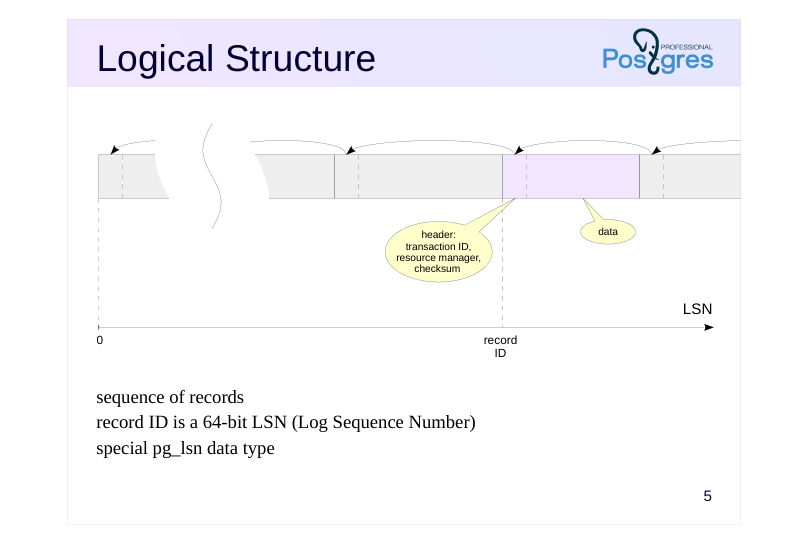
sequence of records record ID is a 64-bit LSN (Log Sequence Number) special pg_lsn data type
Speaker notes
Logically, we can describe WAL as a sequence of variable-length records. Each record contains data about a particular operation, preceded by a header. Among other things, the header includes:
● Transaction ID for the record.
● Resource manager, the system component responsible for this record that knows how to interpret the data in the record. There are separate managers for tables, various index types, transaction status, etc.
● Checksum (CRC).
Starting with version 16, extensions can create their own resource managers that use a custom format for their WAL records. This helps developers create extensions that implement new table and index access methods.
https://postgrespro.com/docs/postgresql/16/custom-rmgr
To refer to a particular record, the pg_lsn data type is used. It represents a 64-bit offset in bytes from the start of the WAL to the record.
The start of each record is aligned to a machine word boundary, which is one of the reasons for the binary incompatibility of WAL across different platforms.
https://postgrespro.com/docs/postgresql/16/datatype-pg-lsn
Page 6: Logical Structure
The list of resource managers will be shown by the pg_waldump utility:
LSN is displayed as two 32-bit hexadecimal numbers separated by a slash. Current WAL insert position:
Using the pg_waldump tool and the pg_walinspect extension, introduced in PostgreSQL 15, we can examine the contents of the WAL. Create a database and install the extension (to use the extension, the role must be a member of pg_read_server_files or be a superuser):
We need a small table:
Let’s get the current WAL position, then insert a row into the table:
Now the WAL position is as follows:
Page 7: Page 7
Examine the records written to the WAL:
The INSERT+INIT operation initializes a page and adds a tuple to it, the COMMIT operation commits the transaction. For the INSERT+INIT record, the WAL stores the data block containing field values of the inserted tuple. The extension allows us to see this data (in the block_data column, character codes of the inserted row can be identified):
Page 8: Physical Structure
 {#source-figure-008 caption=“Source slide page 8: Physical Structure”}
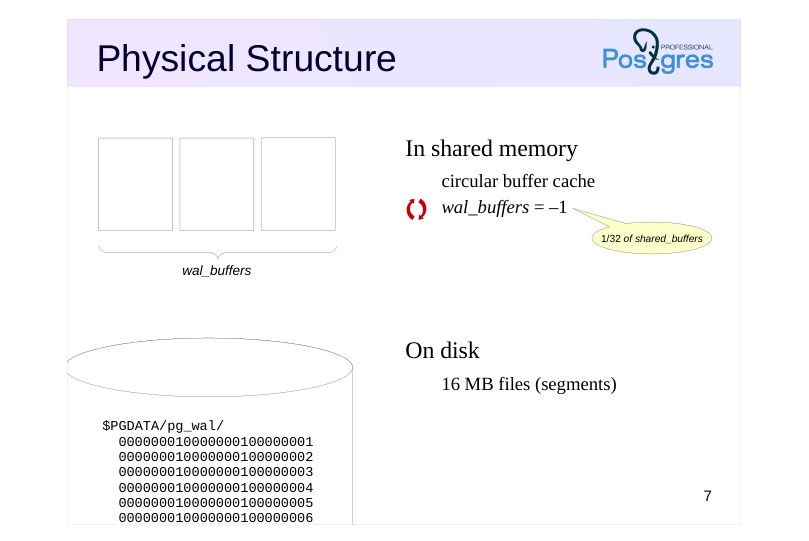
In shared memory
- On disk
Speaker notes
On disk, the WAL is stored as files (segments) in the PGDATA/pg_wal directory. Each file is 16 MB by default. The segment size can be set during cluster initialization.
WAL records are written to the current file. When it fills up, the system moves on to the next one.
In shared memory, special buffers are allocated for the WAL. The wal_buffers parameter specifies the size of the cache (the default value implies automatic setting: 1/32 of the buffer cache is allocated, but no less than 64 KB and no more than the size of one WAL segment).
The WAL cache is structured similarly to the buffer cache, but operates mainly as a circular buffer: records are added to the head, while they are flushed to disk from the tail.
Page 9: Physical Structure
Size of the WAL cache in shared memory:
All WAL files (segments) are located in the /var/lib/postgresql/16/main/pg_wal directory; they can also be listed using a special function:
File names consist of three numbers. The first is the timeline ID (used during archive recovery), and the next two are the high-order digits of the LSN. The file size can be set during cluster initialization; the default size is 16 MB. The INSERT+INIT record is located in this file:
Current WAL segment:
Page 10: Write-Ahead Logging
 {#source-figure-010 caption=“Source slide page 10: Write-Ahead Logging”}
- • •
Speaker notes
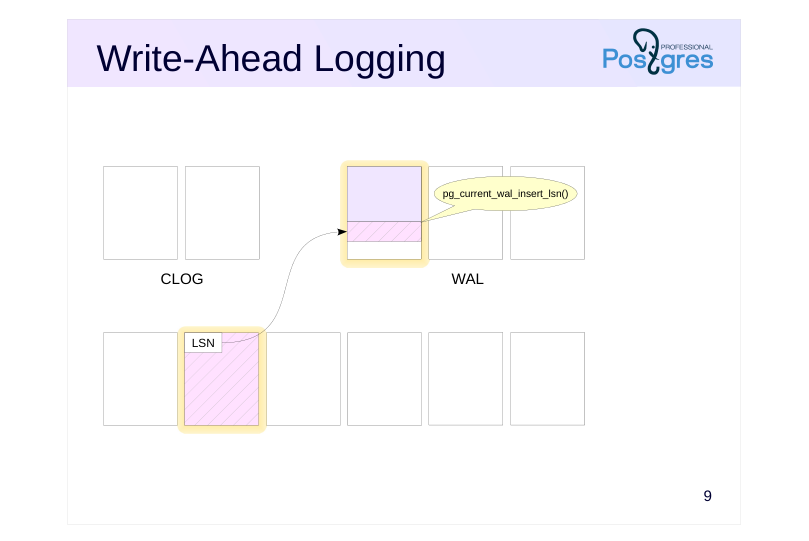
Let’s illustrate the concept of Write-Ahead Logging discussed earlier. The slide shows three important areas of the shared memory:
● Buffer cache (size set byshared_buffers)
● WAL buffer cache described above (size set by wal_buffers)
● Transaction status cache, also known as CLOG (size of 128 pages)
When a data page is modified in the buffer cache, a WAL record is created. This record is placed in a WAL page, and a reference to the record (more precisely, its LSN + its length, i.e., the LSN of the next record) is written to a special LSN field in the data page header.
The current recording position can be obtained using the pg_current_wal_insert_lsn() function.
Page 11: Write-Ahead Logging
 {#source-figure-011 caption=“Source slide page 11: Write-Ahead Logging”}
- • •
Speaker notes
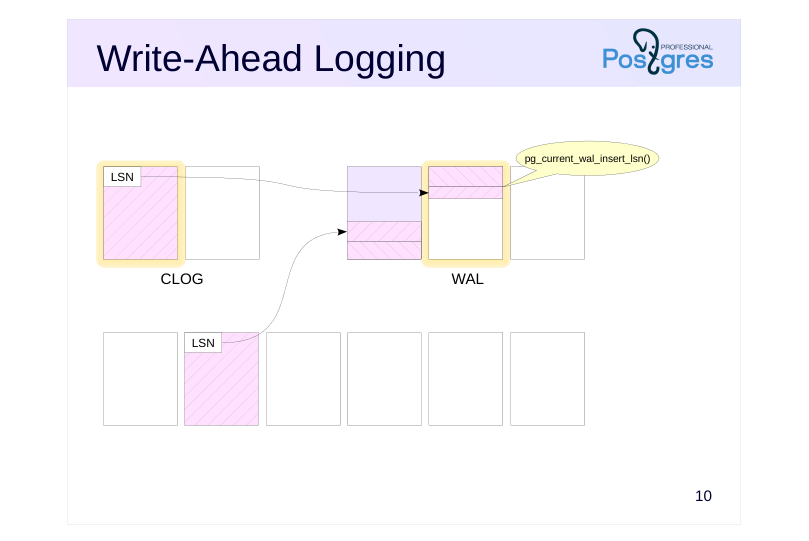
Let’s assume the transaction is committed. Another WAL record is generated, the status bit is changed in a CLOG page, and a reference to this record is placed in the LSN field of the modified page.
When the record is inserted, the pg_current_wal_insert_lsn pointer moves forward.
Note that WAL records belonging to one transaction can be interleaved with records from other transactions, which may belong to any database within the cluster. The WAL is shared across the entire cluster.
Page 12: Write-Ahead Logging
 {#source-figure-012 caption=“Source slide page 12: Write-Ahead Logging”}
- • •
Speaker notes
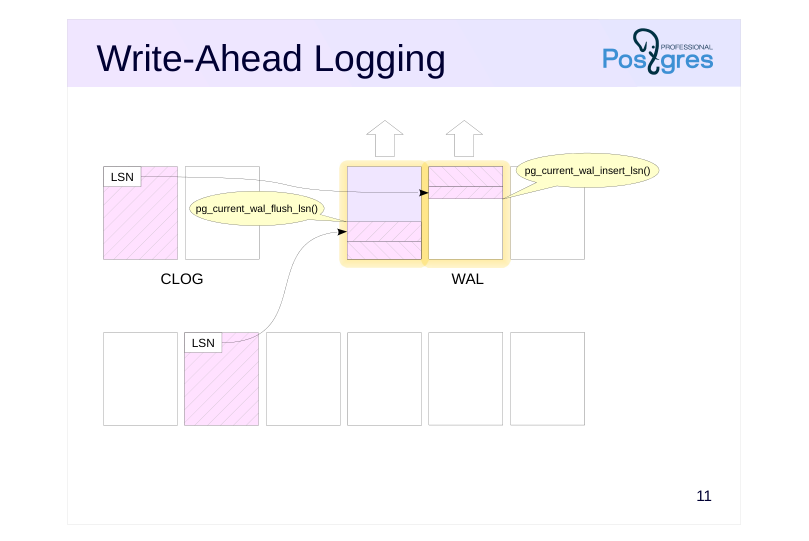
At some point (the specific point will be covered in the WAL Tuning lesson), the WAL records that have not yet been written to disk must be flushed.
The pg_current_wal_flush_lsn() function shows the last record that has already been written to disk.
Page 13: Write-Ahead Logging
 {#source-figure-013 caption=“Source slide page 13: Write-Ahead Logging”}
- • •
Speaker notes
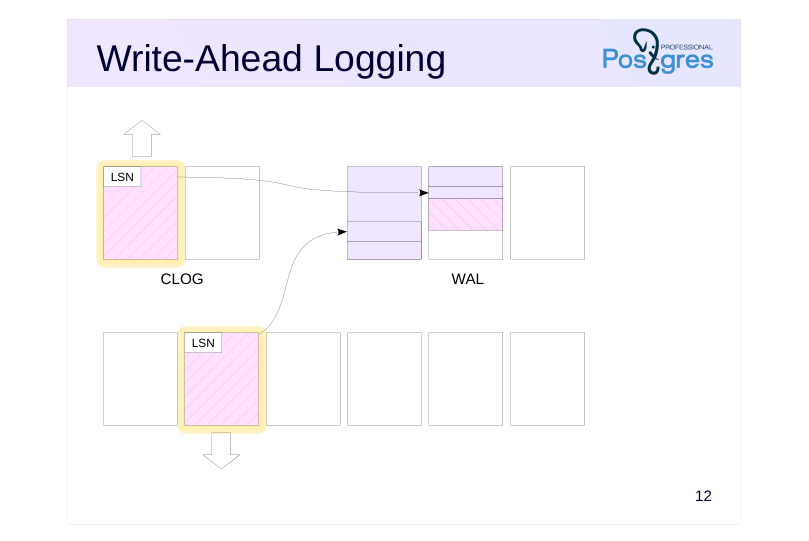
Modified data pages can only be written to disk after their corresponding WAL records have been flushed. This sequence is controlled by tracking the LSN of the last modification to the page and the value of pg_current_wal_flush_lsn(). Meanwhile, the operation continues, and new WAL records are constantly being generated. For the page to be written, it is important that the WAL record with the LSN of its last modification must already be on disk.
If a data page needs to be written to disk (for instance, during page eviction from the buffer cache) but its corresponding WAL record has not yet been flushed, the WAL buffers are forcibly flushed to disk first.
Page 14: Write-Ahead Logging
Let’s examine the table page header. To do this, we need the extension:
Start a transaction.
Current position and current WAL segment:
Update a row in the table:
The WAL position has changed:
We will find this LSN (or a lower one, if additional records were written to the WAL) in the header of the modified page:
Let’s commit the transaction.
The WAL position has changed again:
Size of the WAL records (in bytes) corresponding to our transaction:
Of course, the WAL contains information about all activities across the entire cluster, but in this case we assume that no other operations are running in the system. Here are the actual records:
Page 15: Page 15
Note Note that due to alignment, the record length is usually less than the space it occupies. We can also see the WAL contents using the pg_waldump utility. It can work with an LSN range (as in this example), select records for a specific relation and fork, as well as for a specific page or transaction. Unlike the pg_walinspect extension, this utility can be used on a stopped server, but it requires read access to WAL files. So, we will execute the command as a superuser:
We can see the WAL record headers: the HOT_UPDATE operation related to the modified page (rel+blk), COMMIT operation with a timestamp.
Page 16: Recovery
Algorithm (simplified)
- during server startup after a crash
- (the cluster state in pg_control is not “shut down”):
- 1 For each WAL record:
- 1.1 Identify the page this record relates to
- 1.2 Apply the record if its LSN is greater than the LSN stored in the page
- 2 Overwrite unlogged tables with init files
Speaker notes
The server crash is identified at the subsequent server start. If the startup process spawned by the postmaster at the very beginning checks the pg_control file and finds out a status other than “shut down”, automatic recovery will be performed.
The startup process will read the WAL sequentially and apply the records to pages, if necessary. The need can be determined by comparing LSN of the page on disk with LSN of the WAL record. During recovery, pages are changed in the buffer cache, as in normal operation. To do this, the postmaster launches the necessary background processes.
WAL records are applied to files in a similar way: for example, if it is clear from a record that the file must exist, but it does not, the file is created.
At the end of the process, all unlogged tables are overwritten using the forks stored in the init files.
Starting with PostgreSQL 15, the system can prefetch WAL data during recovery using the mechanism controlled by the recovery_prefetch parameter. Its default value is try (prefetching is used if supported by the OS). When prefetch is enabled, the wal_decode_buffer_size parameter determines how far ahead the server will look into the WAL to identify the required page numbers.
The algorithm described here is simplified. In particular, we have not mentioned where to start reading WAL records from (this will be covered in the Checkpoint lesson).
Page 17: Takeaways
The use of buffers in RAM requires the use of WAL
- The WAL contains information required to replay operations after a crash and restore database consistency
- The WAL is always written to disk before the corresponding modified data pages are written
Page 18: Practice
- Create a table with a primary key and insert several rows into it. How many bytes do the generated WAL records occupy?
- What accounts for a relatively large number of them? Examine the headers of these WAL records and verify your assumptions.
- Modify the rows you inserted into the table. Modify the rows again, but do not commit the transaction. Simulate a crash by terminating the postmaster process. Start the server and verify that the committed changes are still present, while the uncommitted transaction has been aborted. Find the information about the crash recovery in the server log.
Speaker notes
You can use the pg_waldump tool or the pg_walinspect extension.
Use the command $ sudo kill -QUIT process-id
You can find the process ID in the first line of the postmaster.pid file located in the server’s PGDATA directory.
Page 19: 1. Size of WAL Records
First, note the starting position in the WAL:
Create a table and insert rows:
Note the ending position:
Size of the WAL records:
2. WAL Contents
WAL file:
We need the pg_walinspect extension:
Let’s look at the WAL records:
Page 20: Page 20
Page 21: Page 21
Initially (before the first COMMIT operation), there was significant activity with tables and indexes of the system catalog. This is why the total size of the WAL records is substantially larger than in the demonstration.
3. Crash Recovery
Update the rows:
Terminate the main server process.
Start the server.
Page 22: Page 22
Check the changes:
WAL: