07 Lesson 07: MVCC / Freezing
This page is extracted from the official PDF into native Markdown. Slide text, code and speaker notes are kept in reading order; the original PDF and HTML remain the layout references. HTML source: dba2_07_mvcc_freeze.html Archive: DBA2-handouts-16-en.zip PDF pages: 23
Page 1: MVCC / Freezing
Copyright
© Postgres Professional, 2016–2026 Authors: Egor Rogov, Pavel Luzanov, Ilya Bashtanov, Igor Gnatyuk Translated by: Elena Sharafutdinova Photo: Oleg Bartunov (Phu Monastery and Bhrikuti Peak, Nepal)
Use of Course Materials
Non-commercial use of course materials (presentations, demonstrations) is allowed without restrictions. Commercial use is possible only with the written permission of Postgres Professional. It is prohibited to make changes to the course materials.
Feedback
Please send your feedback, comments and suggestions to: edu@postgrespro.ru
Disclaimer
Postgres Professional assumes no responsibility for any damages and losses, including loss of income, caused by direct or indirect, intentional or accidental use of course materials. Postgres Professional company specifically disclaims any warranties on course materials. Course materials are provided “as is,” and Postgres Professional company has no obligations to provide maintenance, support, updates, enhancements, or modifications.
Page 2: Topics
- Transaction ID Overflow Tuple Freezing and Visibility Rules
- Autovacuum Settings for Freezing Operations
- Manual Freezing
Page 3: Transaction ID Overflow
smaller numbers represent the past, greater numbers represent the future how to prevent overflow if the transaction ID is 32 bits?
- transaction 2
- started after
- transaction 1
- 1
- 2
- past
- future
Speaker notes
Besides freeing up space in pages, vacuuming also performs the task of preventing transaction ID overflow issues.
In PostgreSQL, a transaction ID takes 32 bits. While this is a large number (approximately 4 billion IDs), it can be exhausted under heavy server load. For example, with a workload of 1000 transactions per second, it will happen in about six weeks of continuous operation.
However, we have mentioned that MVCC relies on sequential numbering, which means that of two transactions, the one with a smaller number is considered to have started earlier. Obviously, we cannot just reset the counter and start numbering from scratch.
Why not use 64-bit transaction IDs to eliminate the issue? The thing is that the header of each tuple (as discussed in the Page Layout and Row Versions lesson) stores two transaction IDs: xmin and xmax. The header is already large, and increase of the bitness would entail the increase of the header by extra 8 bytes.
Page 4: xid Wraparound
 {#source-figure-004 caption=“Source slide page 4: xid Wraparound”}
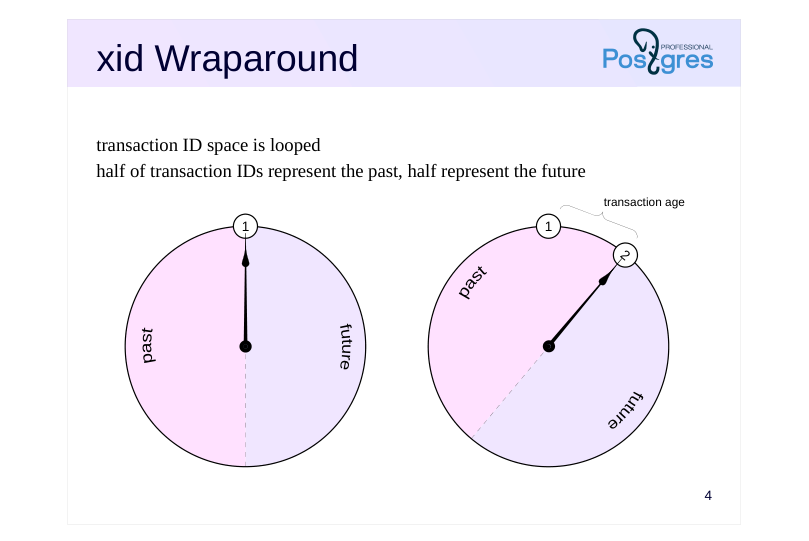
transaction ID space is looped half of transaction IDs represent the past, half represent the future
Speaker notes
Therefore, instead of a linear scheme, all transaction IDs are arranged in a circle. For any transaction, half of the counterclockwise IDs are considered to be in the past, and the other half are in the future.
The age of a transaction is the number of transactions that have run since the time when the transaction was created in the system (regardless of the transaction ID overflow).
Page 5: Visibility Issue
 {#source-figure-005 caption=“Source slide page 5: Visibility Issue”}
Speaker notes
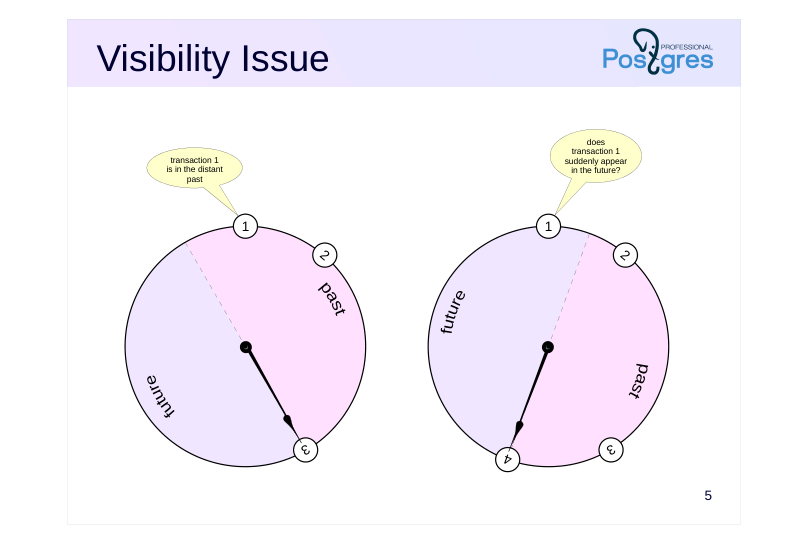
A critical problem arises in this looped arrangement: a transaction that was in the distant past (transaction 1 in the figure), some time later will get into the half of the circle pertinent to the future. This, certainly, breaks visibility rules and would cause issues.
Page 6: Tuple Freezing
 {#source-figure-006 caption=“Source slide page 6: Tuple Freezing”}
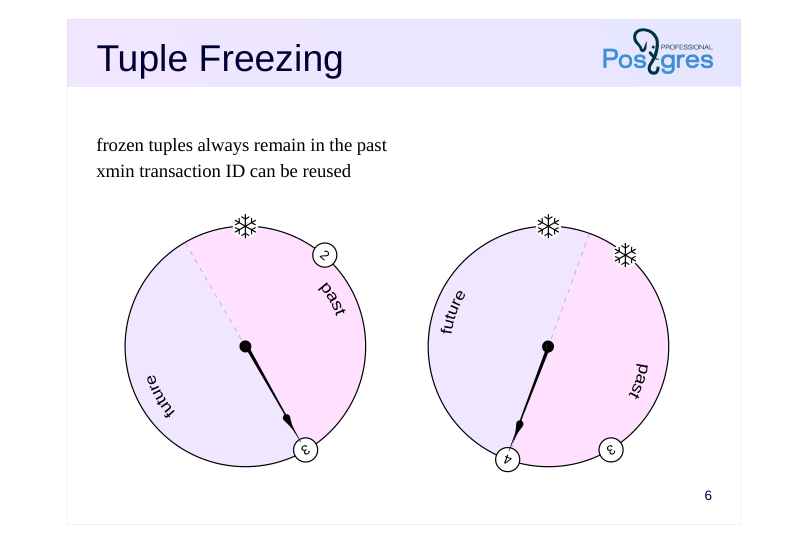
frozen tuples always remain in the past xmin transaction ID can be reused
Speaker notes
To prevent these time-travelling issues from past to future, vacuuming performs one more task. It finds quite old and “cold” tuples (which are visible in all snapshots and are unlikely to change) and marks them in a special way, that is, “freezes” them. A frozen tuple is considered older than any normal data and is always visible in all snapshots. There is no longer any need to check xmin transaction ID, and it can be safely reused. So, frozen tuples always remain in the past.
https://postgrespro.com/docs/postgresql/16/routine-vacuuming#VACUUM-F OR-WRAPAROUND
Page 7: Tuple Freezing
 {#source-figure-007 caption=“Source slide page 7: Tuple Freezing”}
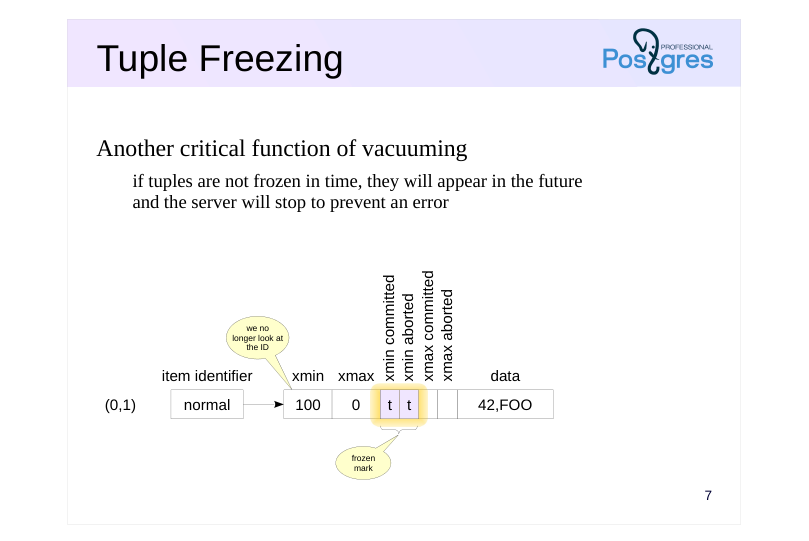
Another critical function of vacuuming
- if tuples are not frozen in time, they will appear in the future
- and the server will stop to prevent an error
Speaker notes
To mark the xmin transaction as frozen, both committed and aborted hint bits are set simultaneously.
Note that the xmax transaction ID does not need freezing. Its presence indicates that this tuple is not live. When it gets no longer visible in data snapshots, this tuple will be vacuumed.
Many sources (including documentation) mention a special FrozenTransactionId = 2, which was written in place of xmin in frozen versions. This technique was in place in PostgreSQL versions earlier than 9.4, but now it is replaced with hint bits. In this case the initial transaction ID is kept in a tuple, which is convenient for maintenance and debugging. However, we can still come across transactions with ID = 2 in old systems, even upgraded to latest versions.
It is important that tuples are frozen in time. In a scenario where an unfrozen transaction ID risks wrapping around into the future, PostgreSQL will initiate an emergency shutdown. This can happen in two cases: either the transaction is still active and therefore cannot be frozen, or vacuuming has failed.
During server startup, the transaction will be automatically canceled; the administrator must then manually perform vacuuming, after which the system can resume normal operation.
Page 8: Settings
 {#source-figure-008 caption=“Source slide page 8: Settings”}
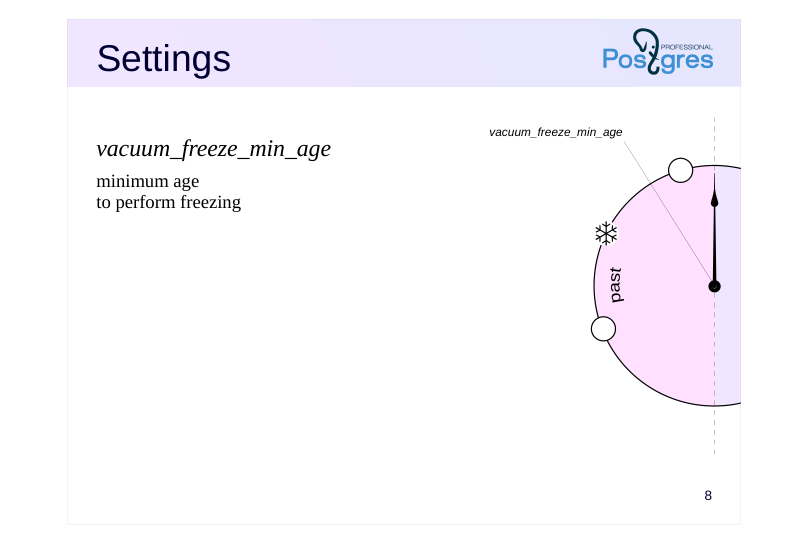
vacuum\_freeze\_min\_age
- minimum age to perform freezing
Speaker notes
There are four main parameters that control freezing.
Vacuum_freeze_min_age parameter defines the minimum age of the xmin transaction from which freezing begins.
The lower its value, the higher the overhead. If we deal with “hot”, actively changing data, freezing of new and newer tuples will go down the drain: already frozen tuples will be vacuumed, while new tuples need to be frozen again.
Therefore, newer tuples are frozen only when it does not add extra work, for example, if other (older) rows on the page already require freezing or during full vacuuming.
Note that vacuuming processes only those pages that are not marked in the visibility map. If a page contains only live tuples, vacuuming will not process such a page and will not freeze the tuples.
A table page’s header also contains a flag indicating that all tuples in it are visible; vacuuming uses this flag together with the corresponding mark in the visibility map.
Page 9: Settings
 {#source-figure-009 caption=“Source slide page 9: Settings”}
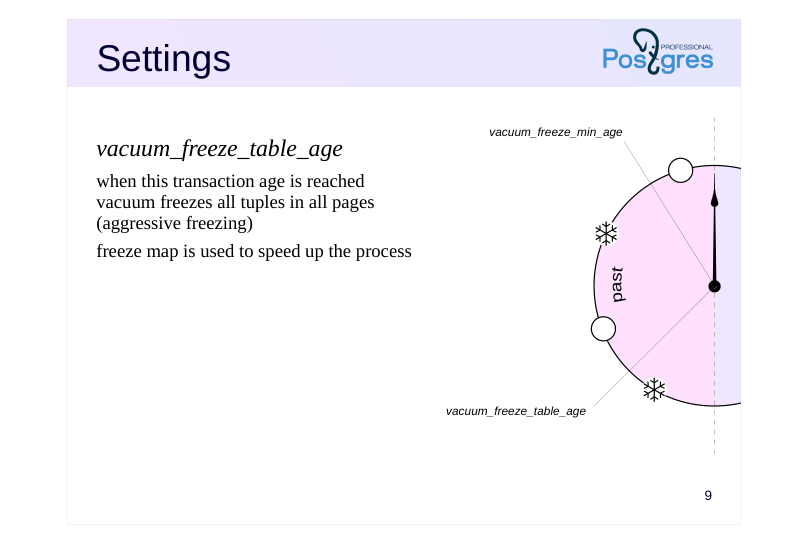
vacuum\_freeze\_table\_age
- when this transaction age is reached vacuum freezes all tuples in all pages (aggressive freezing) freeze map is used to speed up the process
Speaker notes
The vacuum_freeze_table_age parameter determines the age of the transaction at which all tuples in table’s pages must be frozen. Such freezing is called aggressive.
Each table stores a transaction ID (pg_class.relfrozenxid) which guarantees that all older transaction IDs in the table are frozen. The age of this transaction is compared to the parameter value.
In order not to scan the entire table, a freeze map is maintained along with the visibility map. The freeze map tracks pages where all tuples are already frozen. Such pages can be skipped during freezing.
Even in aggressive mode, all tuples with transaction IDs newer than vacuum_freeze_min_age are not frozen. As a result, after freezing, the new relfrozenxid transaction age will not be equal to zero, it will be equal to vacuum_freeze_min_age. Thus, all table pages get frozen once every (vacuum_freeze_table_age − vacuum_freeze_min_age) transactions.
We have already mentioned that a too low value of the vacuum_freeze_min_age parameter increases vacuuming overhead. However, with higher values, aggressive freezing will occur more frequently, which is also undesirable. Setting this parameter requires finding a balance.
Page 10: Settings
 {#source-figure-010 caption=“Source slide page 10: Settings”}
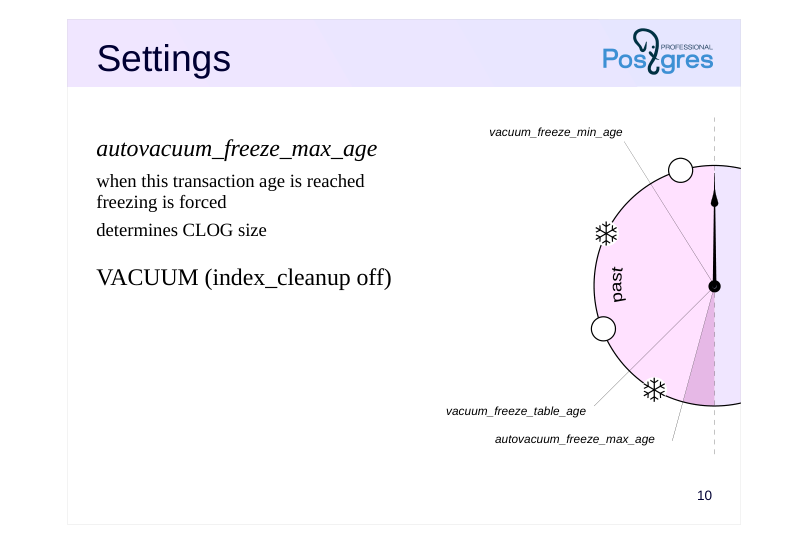
autovacuum\_freeze\_max\_age
- when this transaction age is reached freezing is forced determines CLOG size
- VACUUM (index_cleanup off)
Speaker notes
The autovacuum_freeze_max_age parameter determines the age of the transaction at which the freezing will be forcibly triggered. Autovacuuming will be launched in order to prevent transaction ID overflow consequences even if it is disabled by other parameters.
This parameter also determines the size of the CLOG structure: the status of older transactions will definitely never be needed, so some of the files from the PGDATA/pg_xact can be deleted.
If an administrator realizes that autovacuuming will not have time to freeze the tuples before transaction ID overflow, it is possible to perform manual vacuuming with the index_cleanup off parameter. In this case, indexes will not be cleaned, and tuples in tables will be frozen faster as a result.
Page 11: Settings
 {#source-figure-011 caption=“Source slide page 11: Settings”}
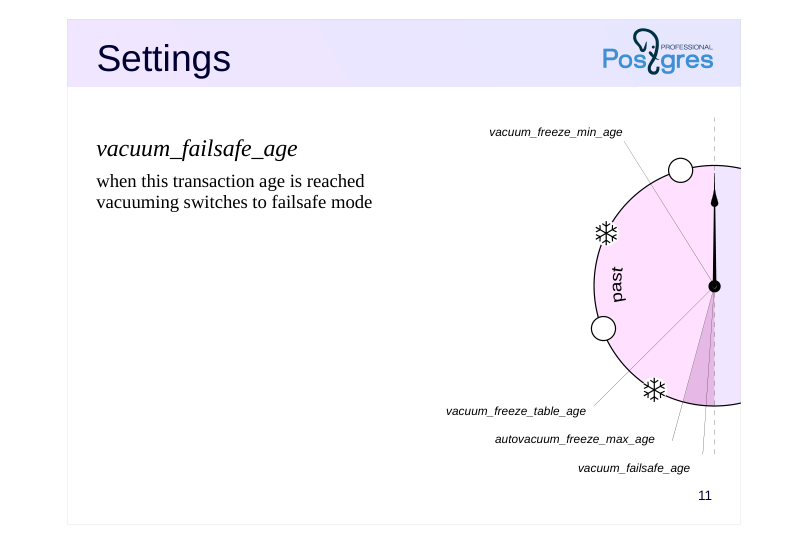
vacuum\_failsafe\_age
- when this transaction age is reached vacuuming switches to failsafe mode
Speaker notes
The vacuum_failsafe_age parameter controls the activation of wraparound failsafe mechanism to speed up freezing of transaction IDs.
In this mode, throttling controlled by autovacuum_vacuum_cost_delay and vacuum_cost_delay parameters will be disabled. Some optional operations (such as index cleanup) will also be skipped. Such measures allow vacuuming to quickly freeze old transactions and switch to normal operation.
Page 12: Settings
Configuration parameters
- vacuum_freeze_min_age
- = 0 50 000 000
- vacuum_freeze_table_age
- = 150 000 000
- autovacuum_freeze_max_age = 200 000 000
- vacuum_failsafe_age
- = 1 600 000 000
- ↑?
- Table storage parameters
- autovacuum_freeze_min_age
- toast.autovacuum_freeze_min_age
- autovacuum_freeze_table_age
- toast.autovacuum_freeze_table_age
- autovacuum_freeze_max_age
- toast.autovacuum_freeze_max_age
Speaker notes
The default values are quite conservative.
The limit for autovacuum_freeze_max_age is about 2 billion transactions, but the default value is ten times smaller. We can increase the vacuum_freeze_table_age and autovacuum_freeze_max_age values to reduce overhead, but it is important to understand that if autovacuum fails to complete freezing in time (for example, due to an active transaction), the administrator will have little time to take action. Note that changing the autovacuum_freeze_max_age parameter requires a server restart.
The default value of vacuum_failsafe_age is significantly larger than the autovacuum_freeze_max_age, and if there is little time left before the transaction ID exhaustion, the failsafe mechanism will accelerate freezing.
Note that the server can adjust the vacuum_freeze_min_age, vacuum_freeze_table_age and vacuum_failsafe_age parameter settings based on the autovacuum_freeze_max_age value.
Most of the parameters can also be set for individual tables using storage parameters. This should only be done in special cases where a table requires specific treatment. Note that the parameter names at the table level differ slightly from the configuration parameter names.
Multitransactions (multixacts) and additional freezing settings for them are discussed in the Locks module.
https://www.postgresql.org/docs/16/runtime-config-client.html
https://www.postgresql.org/docs/16/runtime-config-autovacuum.html
Page 13: Freezing
Let’s set freezing parameters for demonstration. Small transaction age:
Age after which all pages will be frozen:
Disable automatic vacuuming to run it manually when needed.
Create a table with data. Set the minimum fillfactor so that each page contains only two rows.
Create a view to monitor hint bits in the first two pages of the table. Currently we are interested only in xmin and its related bits, since tuples with non-zero xmax will be cleaned up. In addition, we display the age of the xmin transaction.
To look into the visibility and freeze maps, we will use another extension:
Page 14: Page 14
Insert data. Let’s run vacuuming immediately to initialize the visibility map.
After vacuuming, both pages are marked in the visibility map (all_visible bit):
What is the age of the transaction that created the rows?
The age is 1; tuples with this transaction ID will not be frozen yet. Update a row in page zero. The new tuple will go to the same page due to the small fillfactor value.
Now page zero will be processed by freezing: Transaction age exceeds the vacuum_freeze_min_age value. The page has been modified and excluded from the visibility map.
Let’s run vacuuming.
Vacuuming processed the modified page. One tuple has both bits set, this is a frozen mark. Another tuple is too young, but it was also frozen during page processing (this allowed marking page zero in the freeze map):
Page 15: Page 15
Now both pages are marked in the visibility map (all tuples in them are live). Vacuuming will no longer process any of these pages, and unfrozen tuples in page one will remain unfrozen.
This is exactly the case where the vacuum_freeze_table_age parameter is required, which determines when to check pages marked in the visibility map, if they are not marked in the freeze map. Each table retains the highest transaction ID for which all tuples with lower xmin values are guaranteed to be frozen. Its age is compared with the parameter value.
Let’s simulate another transaction so that the age of the table’s relfrozenxid reaches the value of the vacuum_freeze_table_age parameter.
Now, since the entire table has been guaranteed to be checked, the frozen transaction ID can be increased. We are sure no older unfrozen transactions remain in the pages.
Here is what we get in the pages:
Page 16: Page 16
Both pages are now marked in the freeze map.
The last frozen transaction ID is also stored at the entire database level:
It is set to the minimum value from relfrozenxid of all tables in this database. If the age of datfrozenxid exceeds the value of the autovacuum_freeze_max_age parameter, autovacuuming will be forced.
Page 17: Manual Freezing
VACUUM
- freezes tuples by age according to settings
- VACUUM FREEZE
- forces freezing of tuples with xmin of any age
- also applies to VACUUM FULL, CLUSTER
- COPY … WITH FREEZE
- forces immediate freezing after loading
- table must be created or truncated within the same transaction
- may violate transaction isolation rules
Speaker notes
Despite the fact that freezing is performed during autovacuuming when necessary, it can sometimes be useful to manage freezing manually.
The VACUUM command, like autovacuuming, performs freezing according to settings.
If we execute the VACUUM FREEZE command, all tuples will be frozen regardless of transaction age (as if the vacuum_freeze_min_age and vacuum_freeze_table_age parameters are set to zero). When rebuilding a table using VACUUM FULL or CLUSTER commands, all rows are also frozen.
https://postgrespro.com/docs/postgresql/16/sql-vacuum
We can also freeze data during initial loading using the COPY command with the FREEZE parameter. To do this, the table must be created (or emptied by the TRUNCATE command) within the same transaction as the COPY command. Since frozen rows follow their own visibility rules, such rows will be visible in snapshots of other transactions violating normal isolation rules (for Repeatable Read or Serializable transactions), but this usually does not pose an issue. A detailed examination of this case is provided in the practice.
https://postgrespro.com/docs/postgresql/16/sql-copy
The current implementation of this freezing operation for tables having an associated TOAST table forms a visibility map for the main part of the table but not for the TOAST part. This leads to an additional scan of all pages during subsequent vacuuming.
Page 18: Takeaways
Transaction ID space is looped
- Sufficiently old tuples are frozen by vacuuming
- Freeze map is used for optimization
Page 19: Practice
- Use the pageinspect extension to check that when using the COPY … WITH FREEZE command, tuples are indeed frozen.
- Make sure that even at the Repeatable Read isolation level, rows loaded by the COPY… WITH FREEZE command become visible in the snapshot.
- By reducing the value of the autovacuum_freeze_max_age parameter and disabling autovacuum, reproduce the scenario of forced autovacuum triggering by executing an appropriate number of transactions. Note that the operation will not be performed immediately, but during the manual vacuuming of any table (or at server restart).
Speaker notes
- In order for transactions to be allocated permanent (not virtual) IDs, data must be changed in the transaction.
You can organize a loop in bash that calls psql with an update command:
Another option is to use PL/pgSQL to organize the loop. To do this, you can create a procedure that performs transaction commits or use a block with exception handling. When an exception is caught, the transaction will roll back to the implicit savepoint: a new nested transaction will actually start (see the Page Layout and Row Versions lesson).
The third option is to use the pgbench utility:
https://postgrespro.com/docs/postgresql/16/pgbench
Page 20: 1. Freezing during COPY WITH FREEZE
Let’s create a table and load several rows within the same transaction:
Check row versions:
2. COPY WITH FREEZE and Isolation
In another session, start a transaction with the Repeatable Read isolation level.
Page 21: Page 21
Note Note that this transaction should not access table t. Let’s truncate the table and load new rows into it within one transaction. If a concurrent transaction had accessed table t, the TRUNCATE command would wait for that transaction to complete.
Now the concurrent transaction sees the new data, so this breaks the isolation level:
3. Triggering Emergency Autovacuum
First, freeze all transactions in all databases. To do this, it is convenient to use the vacuumdb command:
Maximum age of unfrozen transactions across all databases:
Disable autovacuuming.
Page 22: Page 22
Reduce parameter values:
Server restart is required.
There are many ways to generate a large number of transactions; for example, we can use the pgbench utility. The utility initializes tables and executes 100000 transactions.
Executing one hundred thousand transactions may take considerable time; the –protocol=prepared option slightly speeds up the process by using prepared statements:
It can be seen that the age of unfrozen transactions exceeds the set threshold (100,000):
Executing the VACUUM command on any table will now trigger the autovacuum process.
Autovacuum worker has appeared among other processes:
Page 23: Page 23
And after a while, transactions will be frozen: