05 Lesson 05: MVCC / Vacuuming
This page is extracted from the official PDF into native Markdown. Slide text, code and speaker notes are kept in reading order; the original PDF and HTML remain the layout references. HTML source: dba2_05_mvcc_vacuum.html Archive: DBA2-handouts-16-en.zip PDF pages: 25
Page 1: MVCC / Vacuuming
Copyright
© Postgres Professional, 2016–2026 Authors: Egor Rogov, Pavel Luzanov, Ilya Bashtanov, Igor Gnatyuk Translated by: Elena Sharafutdinova Photo: Oleg Bartunov (Phu Monastery and Bhrikuti Peak, Nepal)
Use of Course Materials
Non-commercial use of course materials (presentations, demonstrations) is allowed without restrictions. Commercial use is possible only with the written permission of Postgres Professional. It is prohibited to make changes to the course materials.
Feedback
Please send your feedback, comments and suggestions to: edu@postgrespro.ru
Disclaimer
Postgres Professional assumes no responsibility for any damages and losses, including loss of income, caused by direct or indirect, intentional or accidental use of course materials. Postgres Professional company specifically disclaims any warranties on course materials. Course materials are provided “as is,” and Postgres Professional company has no obligations to provide maintenance, support, updates, enhancements, or modifications.
Page 2: Topics
- Plain Vacuuming and its Operation
- Throttling Analysis
- Full Vacuuming and Analogues
Page 3: Plain Vacuuming
Performed by VACUUM command
- does not conflict with regular database activity
- Processes a table and all its indexes
- cleans dead tuples in heap pages
- (skipping pages marked in the visibility map)
- cleans index entries referencing vacuumed tuples
- releases item identifiers
- updates the free space map
- updates the visibility map
- main table and its TOAST table can be vacuumed separately
Speaker notes
Table pruning is done quickly, but it does not solve all issues. It works only within one table page and does not affect indexes.
The VACUUM command processes the entire table, including all indexes. It removes both dead row versions and their identifiers in the page headers.
During vacuuming, tables and indexes can be used in the usual manner, both for read and write operations. However, concurrent execution of some commands (e.g., CREATE INDEX, ALTER TABLE) is not possible.
Vacuuming skips table pages without dead tuples. To avoid scanning extra pages, PostgreSQL uses a visibility map, which marks pages that contain only live versions. The map also gets updated. If we want vacuuming to process all pages, we should enable the DISABLE_PAGE_SKIPPING option.
The operation also updates the free space map, which tracks available space in pages.
It is possible to skip vacuuming the main table or its TOAST table by disabling the PROCESS_MAIN or PROCESS_TOAST parameters (both are enabled by default).
https://postgrespro.com/docs/postgresql/16/sql-vacuum
https://postgrespro.com/docs/postgresql/16/routine-vacuuming
Page 4: Before Vacuuming
 {#source-figure-004 caption=“Source slide page 4: Before Vacuuming”}
Speaker notes
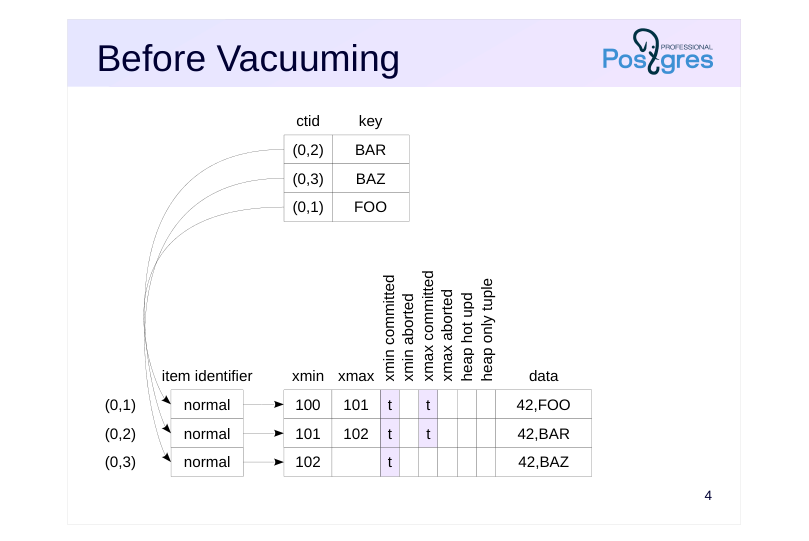
The figure shows the scenario before vacuuming. The table page has three versions of the same row. Two of them are dead, not visible in any snapshot and can be removed.
The index has three references to each of the row versions.
Page 5: 1. Heap Scan
 {#source-figure-005 caption=“Source slide page 5: 1. Heap Scan”}
Speaker notes
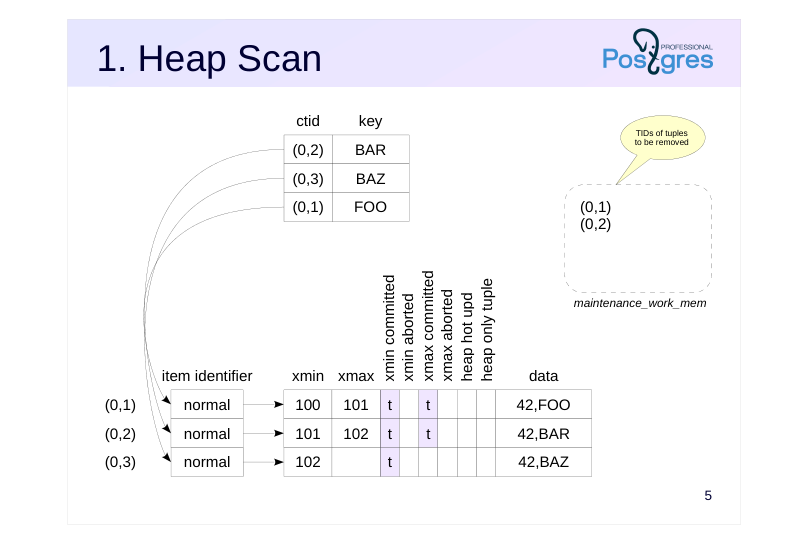
First, VACUUM scans the table (skipping pages that are marked in the visibility map).
In read pages, the process identifies dead tuples and stores their identifiers (TIDs) in a special array which resides in the local memory of the backend process. The memory chunk is allocated at once rather than on demand, and its size is limited by the maintenance_work_mem parameter. The default value for this parameter is 64 MB.
Page 6: 2. Index Vacuuming
 {#source-figure-006 caption=“Source slide page 6: 2. Index Vacuuming”}
Speaker notes
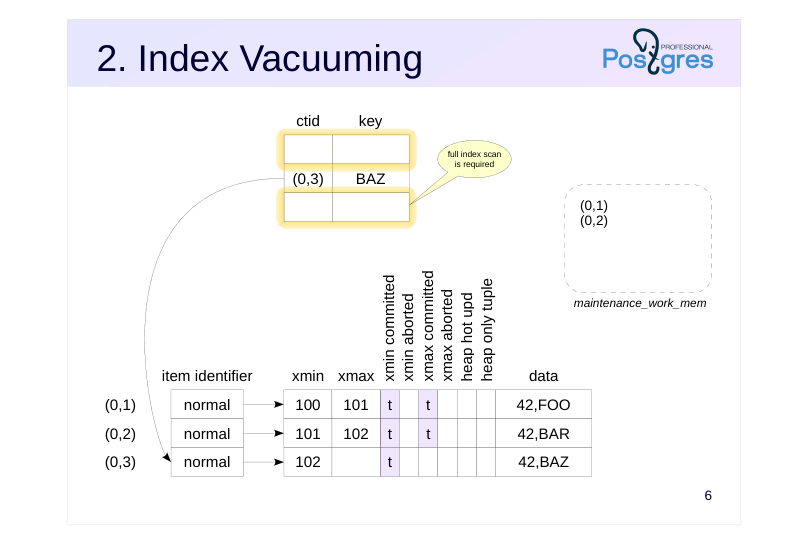
When the memory allocated for the array runs out (or if the end of the table is reached), index vacuuming begins.
To do this, each of the indexes created on the table is fully scanned to find all the entries that refer to the tuples registered in the tid array. These entries are removed from index pages.
Starting with PostgreSQL 14, vacuuming skips index scanning if it is ineffective (when the number of pages containing dead rows does not exceed 2% of the total number of table pages). However, if the INDEX_CLEANUP parameter is set to on, VACUUM will delete obsolete entries from the indexes.
Page 7: 3. Heap Vacuuming
 {#source-figure-007 caption=“Source slide page 7: 3. Heap Vacuuming”}
Speaker notes
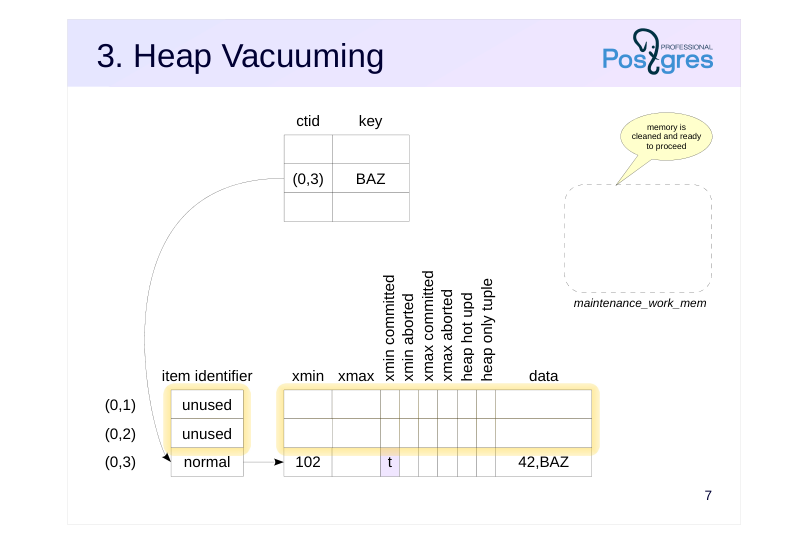
After that, the necessary table pages are read again to remove dead tuples and to free the item identifiers that are no longer referenced from indexes.
If the table was not fully scanned in the first pass, VACUUM cleans the tid array and continues its work from that point.
Thus, if vacuuming removes so many row versions that their TIDs exceed maintenance_work_mem, all indexes will be fully scanned several times. For large tables, it can be time-consuming and put a significant load on the system. In such cases, you can either distribute the load over time, by running VACUUM more frequently (so that each run processes a smaller number of row versions), or allocate more memory to prevent reprocessing of indexes.
Vacuuming ends with a truncation phase. If vacuuming produced a lot of pages at the end of the file, it can “bite off” this tail. This action requires an exclusive lock to be set. If such locking causes issues, you can disable truncation using vacuum_truncate storage parameter or explicitly: VACUUM (TRUNCATE off). For more details, see the Locks module.
Page 8: Monitoring
VACUUM VERBOSE
- pg_stat_progress_vacuum view
- total table size
- number of scanned pages and number of vacuumed pages
- number of index vacuum cycles already completed
- number of TIDs that fit into memory
- and current number of TIDs in memory
- current vacuum phase
Speaker notes
If vacuuming takes a long time, you may need to check its current status.
To do this, you can run VACUUM with the VERBOSE option. The console displays progress information.
In addition, the pg_stat_progress_vacuum view provides comprehensive information about currently running vacuum operations. You can track the progress of the table vacuuming by comparing the number of pages already vacuumed (heap_blks_vacuumed) with the total number of pages (heap_blks_total). The index vacuuming progress is not displayed in detail, it is more important to pay attention to the number of vacuum cycles (index_vacuum_count). If this value is greater than one, it means that the maintenance_work_mem was not enough to complete vacuuming in one pass.
https://postgrespro.com/docs/postgresql/16/progress-reporting
Page 9: Plain Vacuuming
Let’s create a table and an index.
As usual, use the pageinspect extension:
And also the view for the table page:
And the view for the index:
Insert a row into the table and update it:
Now, to remind ourselves about the concept of the horizon, let’s open another session with an active data snapshot.
Page 10: Page 10
The database horizon is determined by this snapshot:
Update the row again.
There are now three row versions in the table:
Run vacuuming.
How does the table page change?
Vacuuming removed one row version, but the second remained unchanged, since the parallel transaction is still incomplete and its snapshot is active. The index contains two references to the remaining versions:
We can request vacuuming to provide details about its operations:
Page 11: Page 11
Please note: tuples: 0 removed, 2 remain, 1 are dead but not yet removable index scan not needed removable cutoff shows the current horizon Now let’s complete the parallel transaction and run vacuuming again.
The horizon moved forward and allowed the vacuuming to remove the dead row — tuples: 1 removed. Now only the live row version remains in the page:
Only one entry remains in the index as well:
Page 12: Throttling
The process alternates between work and sleep modes
- approximately vacuum_cost_limit units of work,
- then sleeps for vacuum_cost_delay ms
- Settings
- vacuum_cost_limit = 200
- vacuum_cost_delay = 0 ms
- operation costs:
- vacuum_cost_page_hit = 1
- if a page is found in the buffer cache
- vacuum_cost_page_miss = 2
- if a page is read from disk
- vacuum_cost_page_dirty = 20
- if a clean page turned dirty
Speaker notes
Since vacuuming processes tables and indexes intensively, it may be necessary to distribute activities over time to smooth out load spikes. This can be achieved by performing the vacuuming in chunks, alternating between work and sleep modes.
The vacuum_cost_limit chunk size is specified in conventional units. The other three options on the slide determine the cost of processing one page in these units, depending on the performed actions. In the best-case scenario, the cost is vacuum_cost_page_hit (if the page was found in the cache and either has not changed, or is already dirty). In the worst-case scenario, the cost is vacuum_cost_page_miss + vacuum_cost_page_dirty (if the page was read from disk and was modified by vacuuming).
The default setting actually disables throttling because the delay time is set to zero. It is assumed that if administrators have to resort to manual vacuuming, they expect its completion as soon as possible.
https://postgrespro.com/docs/postgresql/16/runtime-config-resource#RUNTI ME-CONFIG-RESOURCE-VACUUM-COST
Page 13: Parallel Vacuuming
Scanning and vacuuming of a table is performed sequentially
- Index cleanup can be performed in parallel
- each index is processed by a single worker process
- index size must exceed min_parallel_index_scan_size
- the number of processes is limited by max_parallel_maintenance_workers
- and, if specified, by VACUUM (PARALLEL n) value
Speaker notes
The phases of scanning and vacuuming a table are always performed sequentially by one process.
However, the index cleanup phase can be performed in parallel. This occurs when the table has several (more than one) sufficiently large indexes: the size of an index must exceed the min_parallel_index_scan_size parameter (512 KB by default). A separate worker process is started for each appropriate index.
Each index is processed by a single worker process, that is, several processes cannot clean the same index concurrently.
The total number of worker processes is limited by the max_parallel_maintenance_workers parameter and can be further limited by explicitly specifying the level of parallelism in the VACUUM (PARALLEL n) command.
Page 14: Analysis
Performed by VACUUM ANALYZE or ANALYZE
- does not conflict with regular database activity
- Collects statistics for the planner
Speaker notes
Another task that is usually combined with vacuuming is analysis, that is, collecting statistics for the query planner. The number of rows in a table, the distribution of data within columns and other metrics are analyzed. Statistics collection is discussed in detail in the QPT course.
You can run the analysis manually using the ANALYZE (analysis only) or VACUUM ANALYZE (both vacuuming and analysis).
As with vacuuming, processing runs in the background and does not interfere with regular database activity.
https://postgrespro.com/docs/postgresql/16/sql-analyze
Page 15: Analysis
Create a table with a large number of identical rows and index it:
The planner does not know anything about the data and chooses index access, although the entire table has to be read:
During analysis, statistics are collected from a random sample of rows:
The statistics are saved in the system catalog. After that, the planner knows that all rows have the same value, and stops using the index:
Page 16: Full Vacuuming
Performed by the VACUUM FULL command
- incompatible with any table operations, including reading
- Completely rebuilds the table and all its indexes
- requires additional disk space for new files
- released space is returned to the operating system
- takes longer than plain vacuuming
Speaker notes
Plain vacuuming sometimes may still be not enough. If a table or an index has grown significantly in size, vacuuming will not reduce the number of pages (and therefore will not reduce the file size). Instead, it creates holes (free space) within existing pages that can be used for new inserts or updates. The only exception is completely cleaned pages at the end of the file, such pages are cut off and the free space is returned to the operating system.
If the file sizes have exceeded reasonable limits, you can perform full vacuuming. In this case, the table and all its indexes are rebuilt completely from scratch, and the data is packed as compactly as possible (taking into account the fillfactor).
During the rebuild, PostgreSQL first rebuilds the table, and then sequentially rebuilds each of the indexes. New files are created for them, and old ones are deleted. Note that additional disk space will be required during operation.
Full vacuuming is not intended for regular use, since it completely locks the table (including reads) for the entire runtime. This is often not viable on a heavily used system. In such cases, the pg_repack extension (https://github.com/reorg/pg\_repack) which is not included in the standard distribution, can serve as an alternative.
Page 17: Before Full Vacuuming
 {#source-figure-017 caption=“Source slide page 17: Before Full Vacuuming”}
Speaker notes
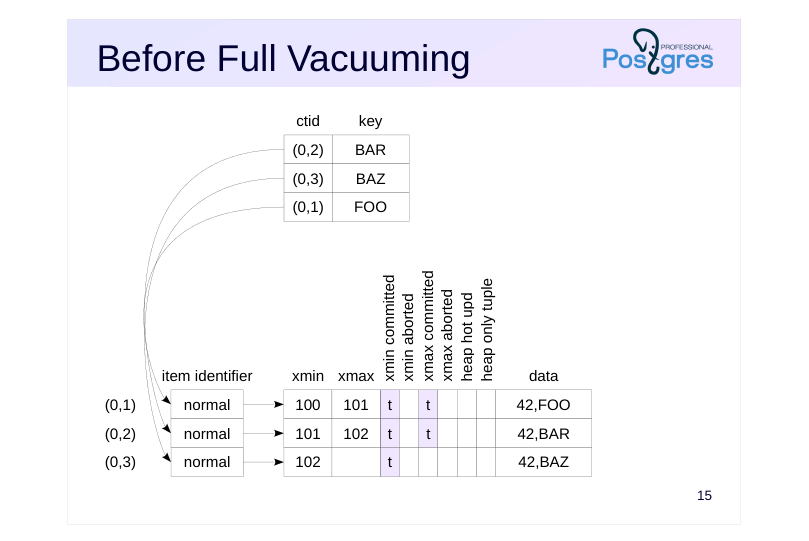
The figure shows the state before full vacuuming. The table page has three versions of the same row. Two of them are obsolete, not visible in any snapshot and can be removed.
The index has three references to each of the three row versions.
Page 18: After Full Vacuuming
 {#source-figure-018 caption=“Source slide page 18: After Full Vacuuming”}
Speaker notes
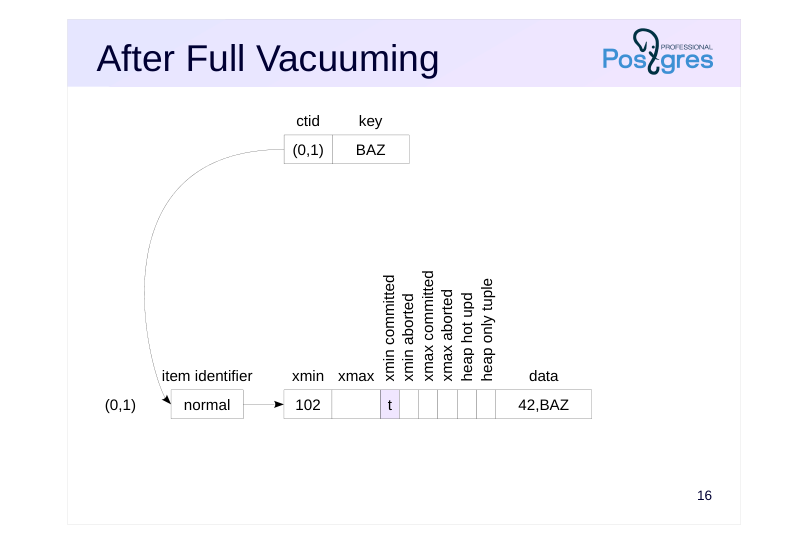
After full vacuuming, the contents of the table and its indexes are completely rebuilt and reside in physically different files. However, the OID of the table remains unchanged.
Page 19: Full Vacuuming
Files occupied by the table and index:
Let’s run full vacuuming.
The table and index are now completely rebuilt:
The file names have changed:
Page 20: Full Vacuuming Analogues
CLUSTER
- completely rebuilds the table and all its indexes
- physically reorders row versions
- according to one of the indexes
- REINDEX
- completely rebuilds indexes
- TRUNCATE
- empties the table
- Features
- all these commands completely lock the table
- all these commands create new data files
Speaker notes
There are several commands that operate using a similar mechanism. All the commands completely lock the table for operations, remove old data files and create new ones.
The CLUSTER command is functionally similar to VACUUM FULL, but it also physically arranges the row versions according to a specified index. This allows the planner to use index access more efficiently in some cases. However, this physical order is not maintained, subsequent data modifications will break it.
REINDEX rebuilds indexes without modifying the table data. In fact, VACUUM FULL uses this command to rebuild indexes. While reading the table is not formally prohibited during the operation, the planner will attempt to get a lock on the index being rebuilt in order to consider possible query plans. As a result, it is practically impossible to read the table until the operation completes. The command with CONCURRENTLY option lasts longer, but it neither locks the index nor interferes with reading and updating data.
The TRUNCATE command achieves the same result as DELETE by removing all rows from a table. However, as previously discussed, DELETE marks row versions as deleted, which requires subsequent vacuuming. TRUNCATE, by contrast, just creates a new, empty data file. This works faster, but it is important to note that TRUNCATE locks the table until the end of the transaction.
Page 21: Takeaways
Plain vacuuming frees up space in pages
- runs as a background process
- may require several index scans
- Analysis collects statistics for the planner
- runs as a background process can be combined with vacuuming Full vacuuming rebuilds the table and indexes
- locks the table for the entire runtime
Page 22: Practice
- Create a large table with an index. Temporarily reduce the maintenance_work_mem to force several index passes. Check by starting VACUUM VERBOSE.
- Remove 90% of random rows from large table and check how the space the table occupies on the disk has changed after plain vacuuming. 3. Repeat step 2, but use full vacuuming this time.
Speaker notes
- To prevent autovacuum (discussed in the next lesson), specify the autovacuum_enabled storage parameter, when creating a table: CREATE TABLE … WITH (autovacuum_enabled = off);
Page 23: 1. Index Scanning during Vacuuming
Let’s create a table and an index. The autovacuum_enabled parameter is off to prevent automatic vacuuming.
Reduce the memory allocated for the identifier array:
Update all rows:
Let’s run vacuuming. After a while check the pg_stat_progress_vacuum view in another session.
Page 24: Page 24
Restore the value of the changed parameter.
2. Vacuuming a Large Number of Rows
Current data file size:
Randomly delete 90% of rows. Random deletion guarantees that some rows remain on each page, vacuuming will not reduce the file size in this case.
Size after vacuuming:
The size has not changed.
3. Full Vacuuming of a Large Number of Rows
Let’s refill the table.
Current data file size:
Page 25: Page 25
Note Note that last time the size was about twice as large. The second half was occupied by row versions created by the UPDATE command. The size after deletion and full vacuuming:
The size reduced by 90%.