04 Lesson 04: MVCC / HOT Updates and Page Pruning
This page is extracted from the official PDF into native Markdown. Slide text, code and speaker notes are kept in reading order; the original PDF and HTML remain the layout references. HTML source: dba2_04_mvcc_hot.html Archive: DBA2-handouts-16-en.zip PDF pages: 26
Page 1: MVCC / HOT Updates and Page Pruning
Copyright
© Postgres Professional, 2016–2026 Authors: Egor Rogov, Pavel Luzanov, Ilya Bashtanov, Igor Gnatyuk Translated by: Elena Sharafutdinova Photo: Oleg Bartunov (Phu Monastery and Bhrikuti Peak, Nepal)
Use of Course Materials
Non-commercial use of course materials (presentations, demonstrations) is allowed without restrictions. Commercial use is possible only with the written permission of Postgres Professional. It is prohibited to make changes to the course materials.
Feedback
Please send your feedback, comments and suggestions to: edu@postgrespro.ru
Disclaimer
Postgres Professional assumes no responsibility for any damages and losses, including loss of income, caused by direct or indirect, intentional or accidental use of course materials. Postgres Professional company specifically disclaims any warranties on course materials. Course materials are provided “as is,” and Postgres Professional company has no obligations to provide maintenance, support, updates, enhancements, or modifications.
Page 2: Topics
- Why Vacuuming Is Not Enough
- HOT Updates
- Table Pruning
- Index Pruning
Page 3: Vacuuming Is Not Enough
Dead row versions
- lead to table and index bloat
- Index synchronization
- any change in a table row requires updating all indexes
- Splits of index pages
- reduce performance
- increase size
Speaker notes
The multiversion concurrency control generates outdated row versions. This leads to table and index bloating which in turn reduces query performance.
If a table has indexes, they need to be synchronized with table changes. This leads to a modification of a large number of pages and also reduces performance.
The problem is aggravated by the specific implementation of B-trees in PostgreSQL: if an index page does not have enough free space for a new record, the page is split into two, and the data is redistributed between them. Frequent splits reduce performance when inserting and updating rows.
Moreover, when records are deleted (or vacuumed), two index pages are not merged back into one. Because of this, the size of the index may not decrease even if a significant part of the data has been deleted.
Regular vacuuming solves the problem of table and index bloating, but it requires significant resources. Therefore, it is beneficial to remove outdated row versions and index entries even during normal page access that is not part of a vacuum process. Also, to prevent redundant index updates during table modifications, PostgreSQL combines row versions into HOT chains. We will study them in the next slides.
Page 4: Normal Update
 {#source-figure-004 caption=“Source slide page 4: Normal Update”}
Speaker notes
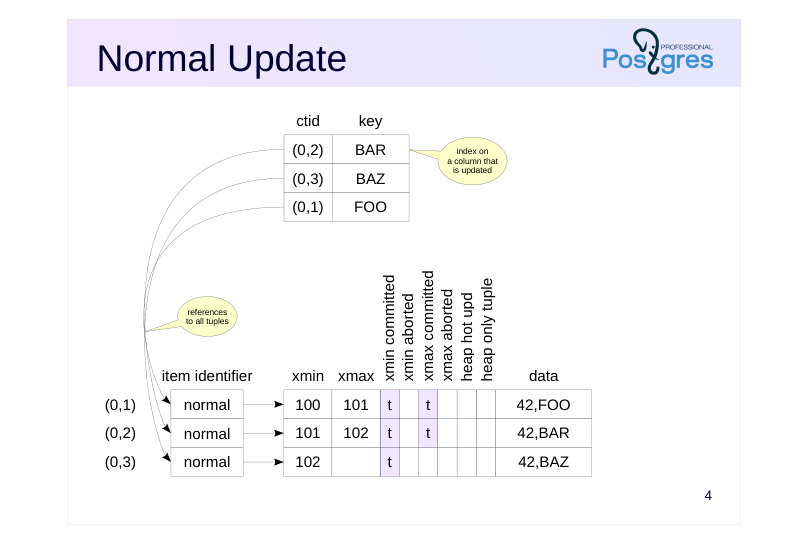
Note that during a normal update, an index creates references to all tuples in the table pages.
(The exception is BRIN index, which does not contain references to individual table rows. The structure of different index types is covered in detail in QPT course.)
Why is this approach inefficient?
Any change to a row requires updating every index created on the table (even if the modified fields are not part of the index). Therefore, the more indexes a table has, the greater the performance overhead.
Page 5: HOT Update
 {#source-figure-005 caption=“Source slide page 5: HOT Update”}
Speaker notes
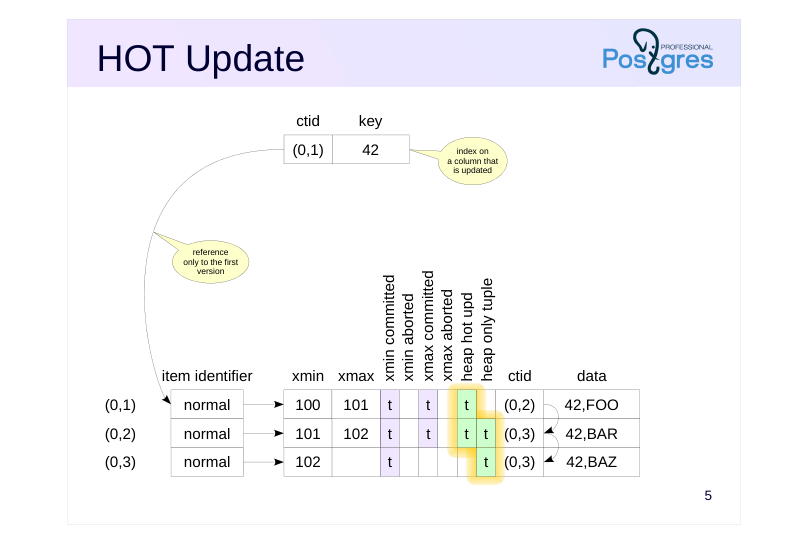
If an index is created on a field whose value has not changed as a result of updating the row, you can avoid creating an additional reference in the B-tree for the same key value. This is how optimization called Heap-Only Tuple Update works.
In this type of update, the index page contains only one reference to the first row version in the table page. A chain of row versions is then built within the table page:
● Rows that are modified and included in the chain are tagged with the Heap Hot Updated bit.
● Row versions that are not referenced from the index are tagged with the Heap Only Tuple bit.
● Row versions are chained together using the ctid field in the tuple header.
If an index scan accesses a heap page and finds a row version marked as Heap Hot Updated, it means that it should proceed further along the chain of row versions. (Of course, the visibility of all row versions obtained this way is checked before they are returned to the client.)
https://git.postgresql.org/gitweb/?p=postgresql.git;a=blob;f=src/backend/acc ess/heap/README.HOT;hb=HEAD
Page 6: HOT Update
Values of the indexed columns must not change
- otherwise you will have to add an index entry referencing the new row
- version, and the version cannot be tagged as heap only
- Update chain must remain within one page
- no need to access other pages,
- traversing the chain does not degrade performance
- if the table page does not have enough space for the new version,
- the chain is broken (as if the optimization does not work)
- space on the page can be reserved by reducing
- the fillfactor storage parameter of the table (100% → 10%)
Speaker notes
We emphasize that HOT updates work only if none of the values of the indexed columns are changed. Otherwise, a reference appears in an index directly to the new row version, which contradicts the idea of this optimization. Only the abovementioned BRIN index does not prevent HOT updates (it does not contain references to individual table rows).
HOT updates are also applied to tables that have no indexes at all. When any field in such a table is updated, a version chain is built.
This optimization is confined to one page. Therefore, traversing the chain does not require accessing other pages and does not degrade performance.
However, if the page does not have enough free space to place a new row version, the chain is broken. You have to make a reference from the index to the row version located on a different page.
Therefore, with frequent updates of non-indexed fields, it may be beneficial to reduce the fillfactor storage parameter. This parameter specifies the threshold percentage of space occupied on the page after which new rows cannot be inserted. The default value is 100%, it can be reduced to up to 10%. The remaining space is reserved for updates. In this case, a new row version can fit on the same page. (On the other hand, the higher the fillfactor, the more compact the records are and, accordingly, the table size is smaller.)
Page 7: HOT Update
Let’s create a table. For simplicity, we do not create an index: any update is a HOT update. Each table row consists of 2000 characters; if only Latin letters are used, then the row version will occupy 2000 bytes plus the header. We set the fillfactor parameter to 75% so that only three versions can be placed on the page and one is available for updating.
To examine the content of the page, we use the pageinspect extension.
For convenience, create a familiar view in a more compact form, supplemented with two fields:
Let’s insert a row and update it to create a new version:
Since the updated column is not included in any index (in our case, there are no indexes at all), a chain of row versions appears in the table page:
Page 8: Page 8
hhu (Heap Hot Updated) flag indicates that the ctid chain must be followed. hot (Heap Only Tuple) flag indicates that this tuple is not referenced from indexes. The chain will grow (within the page) with further changes:
Page 9: Table Pruning
Performed whenever the page is accessed
- if a previous update does not find space for a new row version
- on the same page
- if the page exceeds either the fillfactor or the 90% threshold
- Operates within one table page
- does not release item identifiers that can be referenced by indexes
- does not update the free space map
- does not update the visibility map
Speaker notes
When accessing a page, whether for an update or for a read, pruning can occur if PostgreSQL considers that the space on the page is running out. One of the following conditions must be met:
A previous update on this page could not find enough space to place a new row version here. It sets a flag in the page’s header, indicating that pruning should be triggered the next time the page is accessed.
If the page exceeds either the fillfactor or the 90% threshold, then pruning will trigger immediately.
Pruning removes row versions that are not visible in any snapshot (located beyond the database horizon), but it operates strictly within one table page. Item identifiers are not released, since they may be referenced by indexes which are stored in other pages that are not pruned.
The free space map is not updated for two reasons: to minimize overhead and because the freed space is prioritized for updates, not for inserts. The visibility map is also not updated.
The fact that a page can be pruned during reading operation means that a SELECT query can potentially change pages. This is another instance of such behavior, in addition to the updating of hint bits discussed in the Page Layout and Row Versions lesson.
Page 10: Before HOT Pruning
 {#source-figure-010 caption=“Source slide page 10: Before HOT Pruning”}
Speaker notes
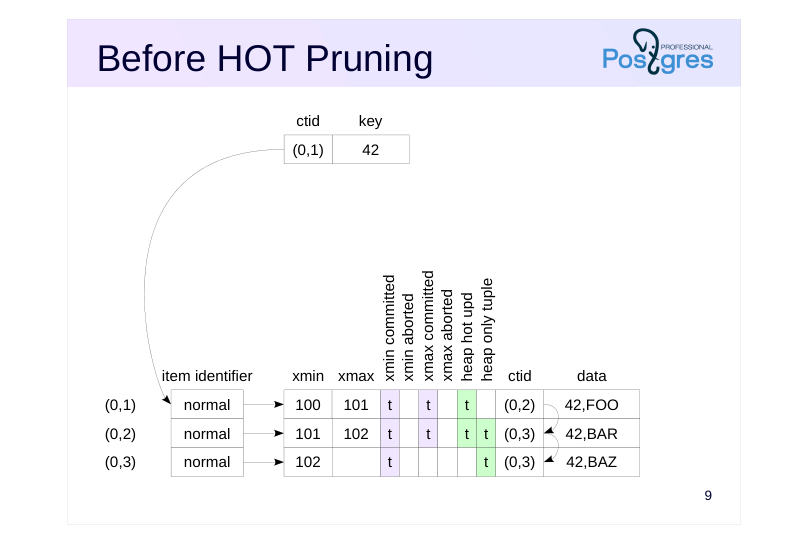
HOT pruning is a specific but important case of pruning.
The figure shows the state before pruning. There are three versions of the same row in the table. The first version (0,1) is referenced by an index, while the other two, (0,2) and (0,3), are marked as heap-only tuples.
Row versions (0,1) and (0,2) are dead, not visible in any snapshot, and can be removed.
Page 11: After HOT Pruning
 {#source-figure-011 caption=“Source slide page 11: After HOT Pruning”}
Speaker notes
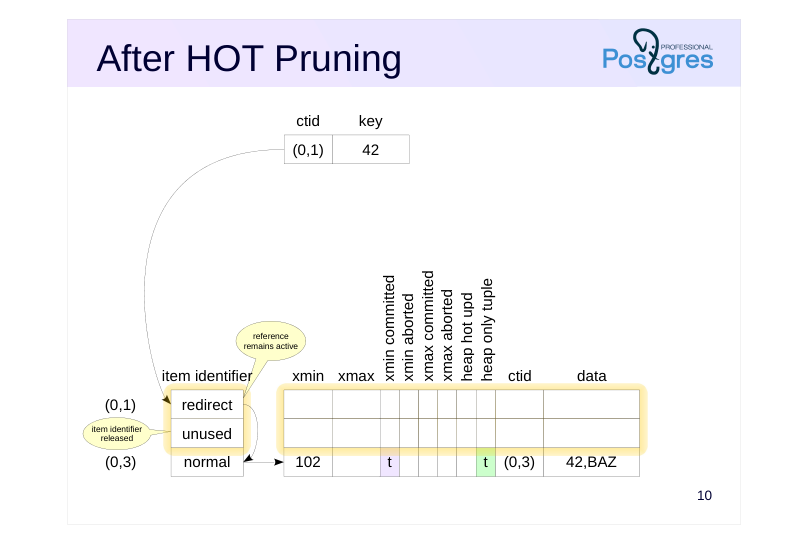
Pruning removes outdated row versions.
In HOT updates, an index can contain only one reference to the head of the HOT chain, which is maintained within a table page. As row versions change, the item identifier must remain in place and reference the head of the chain.
Therefore, a double addressing is used. For the item identifier referenced by the index, in this case (0,1), the status “redirect” is used, redirecting to the item identifier of the proper row version.
The item identifier of the second version (0,2) is no longer needed. It gets the “unused” status and will be used when inserting some new version.
All remaining row versions are shifted together so that the free space on the page is represented by one fragment. The offsets in the item identifiers change accordingly. This prevents issues with free space fragmentation within the page.
Page 12: HOT Pruning
Let’s check how pruning works with HOT updates. Let’s update the row again:
The page now has four row versions:
We’ve actually just exceeded the fillfactor threshold. 75% of the page size is 6144 bytes, and the difference between page size and upper is 8192-64=8128:
Check that the threshold is indeed exceeded. Update the row again:
What changes occurred in the page?
All outdated row versions (0,1), (0,2), and (0,3) were pruned. After that, the new row version was added into the freed space. Item identifiers of the pruned rows were freed (unused status). Meanwhile, the identifier of the first version remained in place but its status changed to redirect. Trace the references from this head version to the end of the HOT chain. Let’s perform the update a few more times:
Page 13: Page 13
The following update triggers pruning again:
Create an index on column s and create an auxiliary view to look into it:
When creating an index, data is not rebuilt in table pages, HOT chains remain in place:
The index entry refers to the item identifier of the chain head:
Page 14: Before Pruning
 {#source-figure-014 caption=“Source slide page 14: Before Pruning”}
Speaker notes
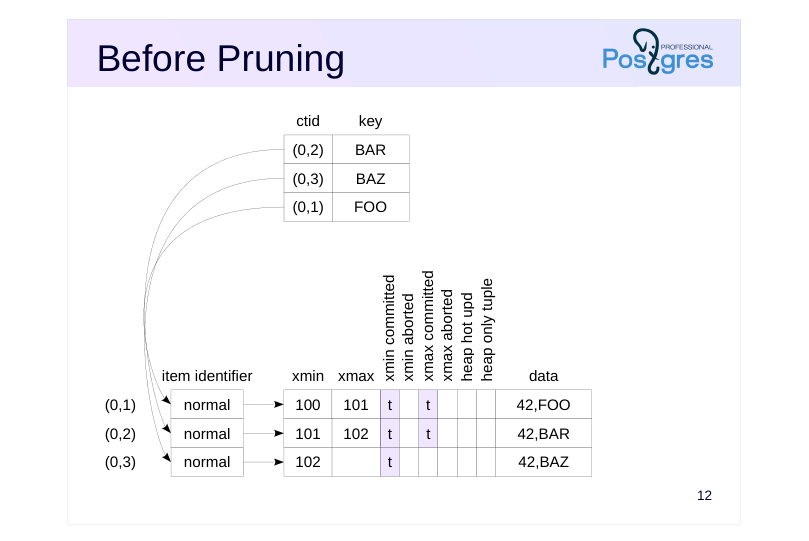
Of course, pruning also works for versions that appeared as a result of a regular (not HOT) update.
The figure shows the state before pruning. The table page has three versions of the same row. Two of them are dead, not visible in any snapshot and can be removed.
The index has three references to each of the three row versions.
Page 15: After Pruning
 {#source-figure-015 caption=“Source slide page 15: After Pruning”}
Speaker notes
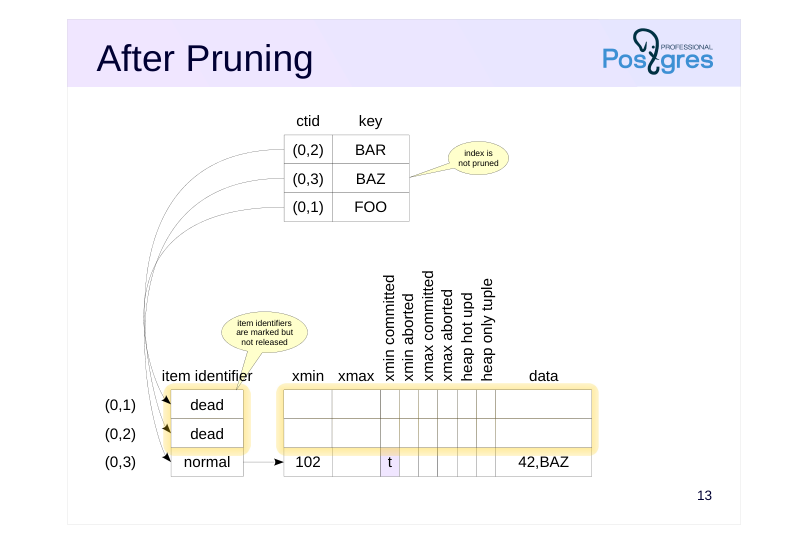
If the condition for pruning is met, it can remove two outdated row versions (0,1) and (0,2). Then item identifiers of removed versions get the dead status, and the free space can be used to insert new row versions.
Unlike the scenario with HOT updates, the item identifiers of the removed row versions cannot be released here, since they are referenced from the index page. With index access, PostgreSQL can get (0,1) or (0,2) as a row version identifier, and then try to follow this identifier of the table page. However, by the status of the item identifier it will detect that this version no longer exists.
The fundamental point is that table pruning works only within one page and does not clean index pages.
Page 16: Index Pruning
Obsolete index entries
- marked when executing queries
- deleted if there is not enough space on the page
- Bottom-up index deletion
- if there is still not enough space, the row versions are checked
Speaker notes
If a table has several indexes and the column being updated is included in at least one of them, HOT update becomes impossible. In this case, the values of the columns included in another index may not change, but you still have to add a reference to the new row version (the index is changed physically, but not logically). To avoid frequent index pruning or rebuilding, PostgreSQL can identify obsolete index entries in advance and remove them when there is not enough space in the index page. PostgreSQL has two mechanisms to facilitate this.
If a query finds that an index entry references a row version that no longer exists or is dead, that entry is marked as dead. If a new index entry cannot be placed into a page, these marked entries are the first to be removed.
If the above method fails to prevent a page split, the bottom-up deletion, introduced in PostgreSQL 14, is activated. For index entries with the same key value, the corresponding row versions are checked. If a version is found to be missing or dead, its index entry is deleted. Checking requires accessing a table, but this is more efficient than unnecessary splitting of the index page.
Page 17: Index Pruning
Let’s reduce the table row length, truncate the table, insert seven rows, and update them:
Examine the page-by-page statistics of the index using the function from the pageinspect extension:
The index now has only one leaf page (it is also the root), which has about 900 bytes of free space left. It contains 14 index entries:
These are the rows they reference:
Page 18: Page 18
Seven entries refer to current table row versions, the other seven refer to dead ones, but this information cannot be obtained from the index. Therefore, the next update will split the index page. But if a query accesses the table via the index, it will have to follow the references and check the status of the table rows:
Such a query marks obsolete index entries as dead…
… and if we perform an update after this,..
it doesn’t lead to page splitting because space can be freed up for new entries:
Page 19: Bottom-Up Deletion
Now let’s add a second text column to the table and create an index on it:
Truncate the table again and insert rows:
Now, since both columns are indexed, HOT chains are not built during updates. If we change only the first column, the index on it grows:
However, the keys of the second index are not changed logically, so if there is not enough space, the bottom-up deletion is triggered and the page of the second index is not split:
Page 20: Page 20
Page 21: Takeaways
If the column being modified is not part of any index and there is free space on the page, HOT update is applied
- If there is not enough space in the table or index page, pruning is performed automatically
Page 22: Practice
- Reproduce the pruning scenario without HOT updates. Check the contents of the table and index pages using the pageinspect extension.
- Reproduce the HOT update scenario on a table indexed by some fields.
- Reproduce a scenario of a HOT update where pruning does not free up enough space on the page and a new version is created on another page. How many records will be in the index in this case?
Speaker notes
- The query for the index page was shown in the demonstration for the Page Layout and Row Versions lesson of this module:
Page 23: 1. Non-HOT Pruning
Let’s create a table with two fields. Set the fillfactor parameter to 75% as in the demonstration.
Create an index on column s:
As usual, we use the pageinspect extension.
Insert a row and update column s several times:
An entry has been created in the index for each of the versions:
Page 24: Page 24
The presence of an index on the updated column prevented the use of HOT updates:
As in the demonstration, another row update triggers pruning:
All obsolete row versions (0,1), (0,2) and (0,3) have been erased. After that, a new row version (0,5) is added to the freed space. Table pruning does not affect the index:
For this reason, item identifiers of the erased tuples in the table are not freed but have a dead status.
2. HOT Update with Index
Remove the index on column s and add another one, on column id:
Truncate the table and repeat the commands that lead to pruning:
Page 25: Page 25
The index page contains only one reference to the table:
The table page contains row versions combined in a list:
An index on a column does not interfere with a HOT update if that column is not updated.
3. HOT Chain Break
In a new session, begin a transaction and create a snapshot:
Now perform updates in the first session:
Page 26: Page 26
The following update will no longer be able to free up space on the page:
We see a reference (1,1) to page 1. The pg_stat_all_tables view shows the number of updated rows (including those using HOT), as well as the number of updated rows that moved to a new table page. If this value is high enough during operations with a table, then consider reducing the fillfactor value.
Now there are two entries in the index, each pointing to the start of its own HOT chain: