03 Lesson 03: MVCC / Snapshots
This page is extracted from the official PDF into native Markdown. Slide text, code and speaker notes are kept in reading order; the original PDF and HTML remain the layout references. HTML source: dba2_03_mvcc_snapshots.html Archive: DBA2-handouts-16-en.zip PDF pages: 31
Page 1: MVCC / Snapshots
Copyright
© Postgres Professional, 2016–2026 Authors: Egor Rogov, Pavel Luzanov, Ilya Bashtanov, Igor Gnatyuk Translated by: Elena Sharafutdinova Photo: Oleg Bartunov (Phu Monastery and Bhrikuti Peak, Nepal)
Use of Course Materials
Non-commercial use of course materials (presentations, demonstrations) is allowed without restrictions. Commercial use is possible only with the written permission of Postgres Professional. It is prohibited to make changes to the course materials.
Feedback
Please send your feedback, comments and suggestions to: edu@postgrespro.ru
Disclaimer
Postgres Professional assumes no responsibility for any damages and losses, including loss of income, caused by direct or indirect, intentional or accidental use of course materials. Postgres Professional company specifically disclaims any warranties on course materials. Course materials are provided “as is,” and Postgres Professional company has no obligations to provide maintenance, support, updates, enhancements, or modifications.
Page 2: Topics
- Row Version Visibility
- Snapshot
- Virtual Transaction ID
- Transaction and Database Horizon
- Snapshot Export
Page 3: Snapshot
Captures a consistent view of data at a specific point in time
- only changes committed up to that moment are visible
- Created at:
snapshot
- Read Committed —
- start of each statement
- Repeatable Read, Serializable —
- start of the first statement
- xid
Speaker notes
In the previous Page Layout and Row Versions lesson, we saw that a data page can physically contain several versions of the same row.
Transactions work with a snapshot which determines the visibility of particular rows. This mechanism provides a consistent view of the data at a specific point in time (in the figure, the moment the snapshot was created is shown in blue).
A snapshot sees only the changes committed by the time it was taken, thus providing a consistent (ACID) view of the data at this specific point in time. This completely prevents dirty reads at any isolation level.
At the Read Committed isolation level, a snapshot is created at the start of each transaction statement. This snapshot is active while the statement is being executed. Thus, each statement sees a consistent data state. However, changes committed between two statements can cause non-repeatable reads and phantom reads.
At the Repeatable Read (and Serializable) isolation level, a snapshot is created once at the start of the transaction’s first statement. This snapshot remains active until the very end of the transaction. In this case, both non-repeatable reads and phantom reads are prevented.
Page 4: Row Version Visibility
Row version visibility is defined by xmin and xmax fields
- A tuple is included in a snapshot if:
- changes of xmin transaction are visible to the snapshot,
- changes of xmax transaction are not visible to the snapshot
- Transaction’s changes are visible if:
- it is the same transaction that created the snapshot or
- it committed before the snapshot was created
- Transaction’s own changes
- based on the operation sequence (cmin/cmax) of the transaction
Speaker notes
A snapshot is not a physical copy of tuples. Instead, certain visibility rules determine whether a tuple belongs to a snapshot.
Whether a given tuple is visible to a snapshot is defined by xmin and xmax fields of the tuple header, i.e., transaction IDs that perform insertion and deletion. Since xmin–xmax intervals do not intersect, each row is represented in any snapshot by one of its versions at most.
The exact visibility rules are quite complex, as they take into account a variety of different scenarios and corner cases. In general, we can describe them as follows: a tuple is visible in a snapshot if it sees the changes made by transaction xmin and does not see the changes made by transaction xmax. In other words, the tuple has already been created and has not been deleted yet (if deletion occurred).
In turn, transaction changes are visible to the snapshot if it is the transaction that created the snapshot (it sees its own changes), or if the transaction has been committed before the snapshot was created.
The visibility rules for a transaction’s own changes are more complex: in some cases, only part of such changes must be visible. For example, a cursor that was opened at a particular point in time must not see any changes that happened later, regardless of the isolation level. For this purpose, tuple headers contain a special field (cmin and cmax pseudocolumns) that indicates the sequence number of the operation within the transaction, and this number is also taken into account.
Page 5: Row Version Visibility
 {#source-figure-005 caption=“Source slide page 5: Row Version Visibility”}
Speaker notes
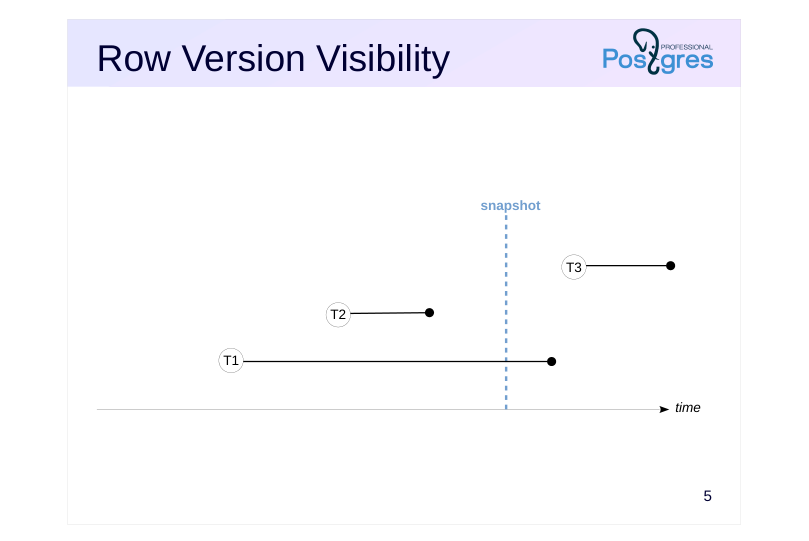
Let’s take a look at a simple example.
In the figure, the snapshot creation moment is shown in blue. The black lines show transactions from their start till commit time (aborted transactions are never taken into account by a snapshot).
In this case, T2 is the only transaction that was committed before the snapshot creation, so only its changes are visible.
T1 was active at the time of the snapshot creation, so its changes are not visible. T3 was started after the snapshot creation, so its changes are not visible either.
Page 6: Row Version Visibility
 {#source-figure-006 caption=“Source slide page 6: Row Version Visibility”}
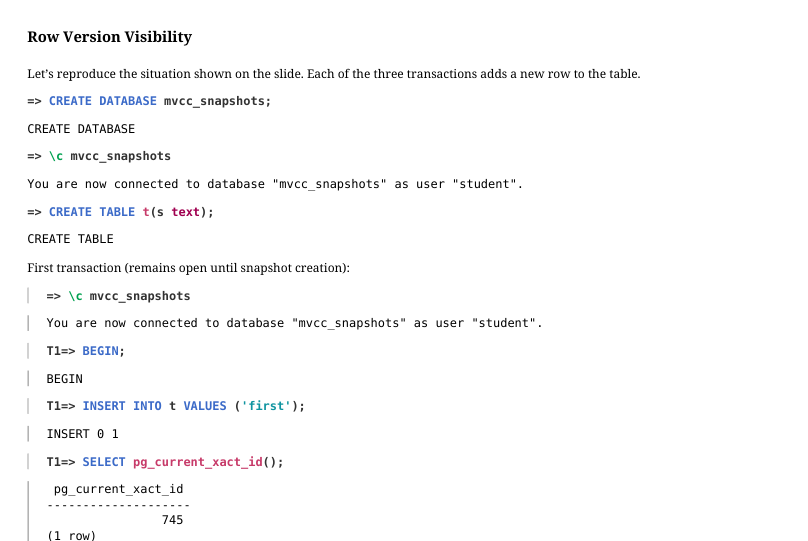
Let’s reproduce the situation shown on the slide. Each of the three transactions adds a new row to the table.
First transaction (remains open until snapshot creation):
Second transaction (committed immediately):
Next, create a snapshot in a transaction in a separate session.
Then, commit the first transaction after creating the snapshot:
Page 7: Page 7
 {#source-figure-007 caption=“Source slide page 7: Page 7”}
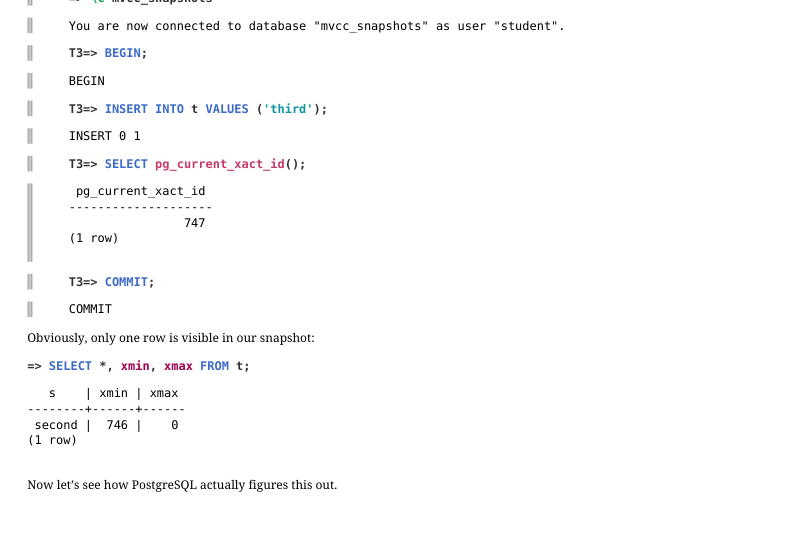
Third transaction starts when our snapshot is already in place:
Obviously, only one row is visible in our snapshot:
Now let’s see how PostgreSQL actually figures this out.
Page 8: Row Version Visibility
 {#source-figure-008 caption=“Source slide page 8: Row Version Visibility”}
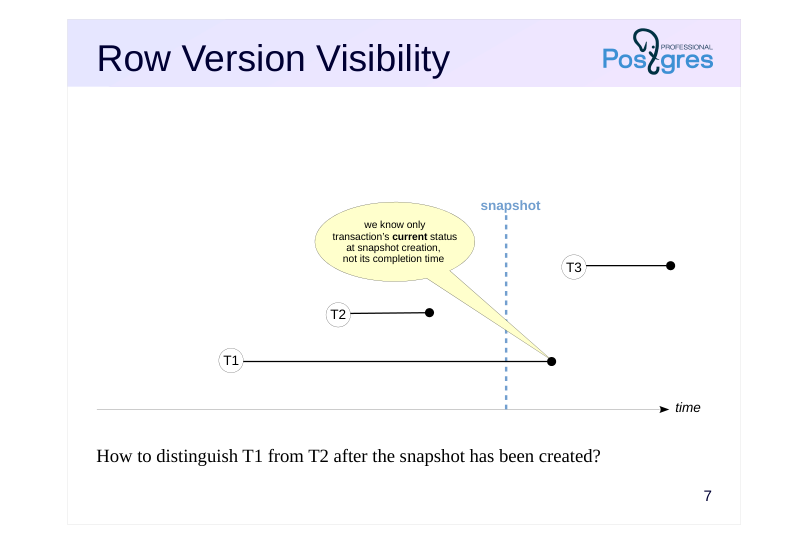
How to distinguish T1 from T2 after the snapshot has been created?
Speaker notes
The implementation challenge is that we know only a transaction’s start time, defined by its ID (xid), which can be compared to the xmin or xmax of a tuple. However, the transaction’s completion time is never recorded. All we can determine is the current status of transactions.
This means that once T1 was committed, it is impossible to differentiate it from T2: there is no way to determine that one of them was committed before the snapshot was created and the other one after.
Since the history of transaction activity is not stored, a snapshot can only capture the current state. For example, it is impossible to create a snapshot of the database’s consistent state from five minutes ago, even if all necessary row versions still exist in heap pages.
Page 9: Snapshot
 {#source-figure-009 caption=“Source slide page 9: Snapshot”}
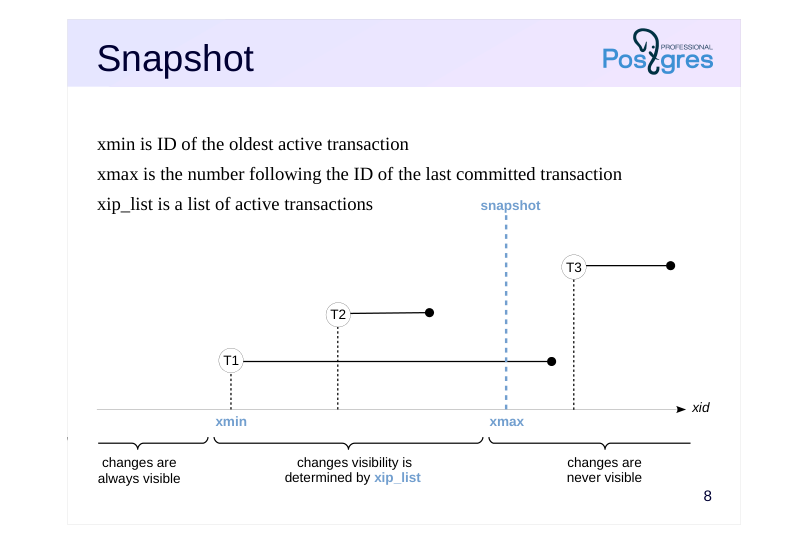
xmin is ID of the oldest active transaction
- xmax is the number following the ID of the last committed transaction
- xip_list is a list of active transactions
Speaker notes
When a snapshot is created, several values are stored in the local memory of the backend process, so these values define the snapshot:
● xmin is the snapshot’s lower boundary, which is represented by the ID of the oldest active transaction.
All transactions with lower IDs, if committed, have their changes visible to the snapshot; if aborted, their changes are ignored.
● xmax is the snapshot’s upper boundary, which is represented by the number following the ID of the last committed transaction. The upper boundary defines the moment when the snapshot was taken. Note that the timestamp is defined not by time (as was shown in previous slides), but by increasing transaction IDs.
All transactions with an ID greater than or equal to xmax were definitely not committed at the time of the snapshot: they were either active, aborted, or had not yet started. Consequently, their changes are not visible.
● xip_list (xid-in-progress list) is the list of IDs of all active transactions.
This list is used to exclude changes of the transactions that have been completed but were active at the snapshot creation time.
Use pg_current_snapshot() and other functions to get information about a snapshot.
https://postgrespro.com/docs/postgresql/16/functions-info
Page 10: Snapshot
 {#source-figure-010 caption=“Source slide page 10: Snapshot”}
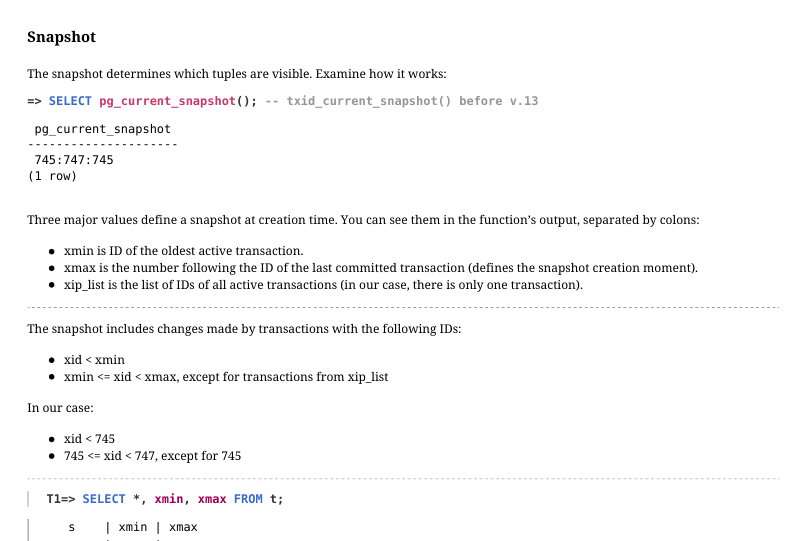
The snapshot determines which tuples are visible. Examine how it works:
Three major values define a snapshot at creation time. You can see them in the function’s output, separated by colons: xmin is ID of the oldest active transaction. xmax is the number following the ID of the last committed transaction (defines the snapshot creation moment). xip_list is the list of IDs of all active transactions (in our case, there is only one transaction). The snapshot includes changes made by transactions with the following IDs: xid < xmin xmin <= xid < xmax, except for transactions from xip_list In our case: xid < 745 745 <= xid < 747, except for 745
First row is not visible: it was created by transaction 745, which is in the active list. Second row is visible: it was created by transaction 746, which is in the snapshot range. Third row is not visible: it was created by transaction 747, which is outside the snapshot range.
Page 11: Virtual Transactions
A read-only transaction does not affect visibility
- backend process assigns a virtual ID
- virtual ID can be ignored by snapshots
- virtual ID is never stored in data pages
- permanent xid is assigned upon the first data modification
Speaker notes
To consume transaction IDs sparingly, PostgreSQL offers a special optimization.
If a transaction is read-only, it does not affect row version visibility and its ID can be ignored by snapshots.
That is why a transaction is at first given a virtual ID (vxid) that consists of an internal ID of the backend process and a sequential number.
Assigning a virtual ID does not require synchronization between all processes, so it happens very fast. We will explore another reason for using virtual IDs in the Freezing lesson of the current module.
This virtual ID must never be written to data pages, as it can become meaningless upon subsequent access to the page.
Once the transaction starts modifying data, it is immediately assigned a permanent ID (xid). This ID can appear in data pages within xmin and xmax fields of row versions.
Page 12: Virtual Transactions
Read-only transactions do not affect tuple visibility and they are ignored by snapshots. They do not have a permanent ID:
A permanent transaction ID is assigned at first modification made by the transaction, or when calling the pg_current_xact_id() function.
Page 13: Transaction Horizon
 {#source-figure-013 caption=“Source slide page 13: Transaction Horizon”}
Speaker notes
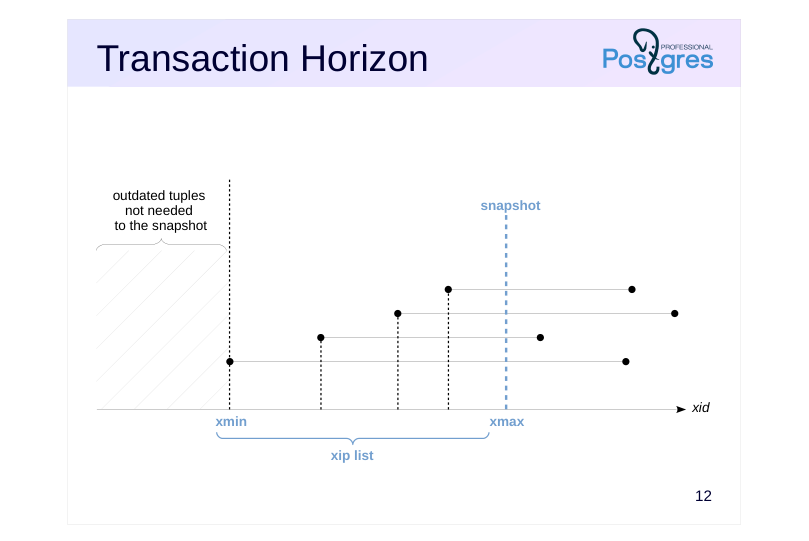
The ID of the oldest transaction (the snapshot’s xmin) is crucial since it defines the snapshot’s horizon.
In astrophysics, an event horizon is a boundary beyond which an observer cannot see any events. In our case, the snapshot horizon is a boundary beyond which a statement using the snapshot cannot see any outdated row versions.
A snapshot needs an outdated row version only if it was deleted (or replaced) by a transaction that was in progress. However, beyond that horizon, it is guaranteed that all such transactions have completed.
Page 14: Transaction Horizon
 {#source-figure-014 caption=“Source slide page 14: Transaction Horizon”}
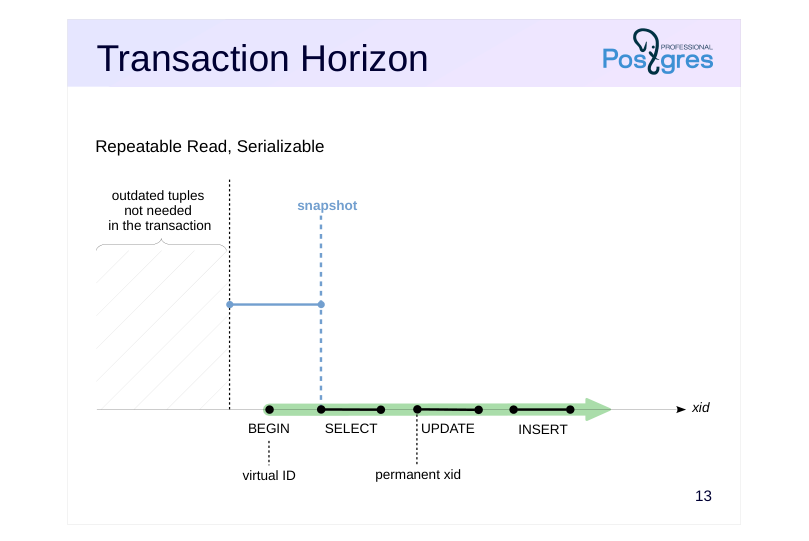
Repeatable Read, Serializable
Speaker notes
At different isolation levels, transactions use snapshots differently.
For the Repeatable Read and Serializable levels, a transaction creates a snapshot upon its first access to the server and uses it until its completion.
The snapshot’s left boundary (the beginning of the horizontal segment in the figure), which defines the transaction horizon, is equal to the ID of the oldest active transaction. Current transaction is active, so the horizon cannot be positioned to the right of the current transaction’s ID.
Page 15: Transaction Horizon
 {#source-figure-015 caption=“Source slide page 15: Transaction Horizon”}
Read Committed
Speaker notes
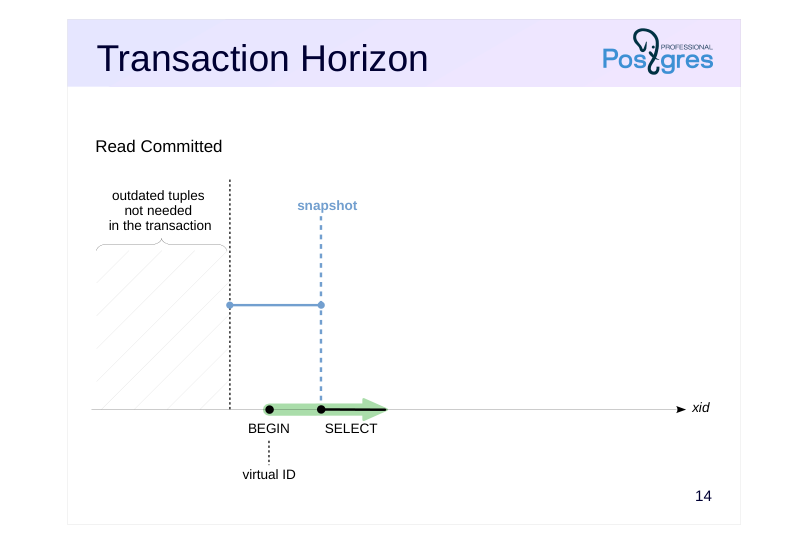
In case of the Read Committed isolation level, a transaction can use several snapshots.
First, the transaction is assigned a virtual ID, and a snapshot is created upon its first database access.
Page 16: Transaction Horizon
 {#source-figure-016 caption=“Source slide page 16: Transaction Horizon”}
Read Committed
Speaker notes
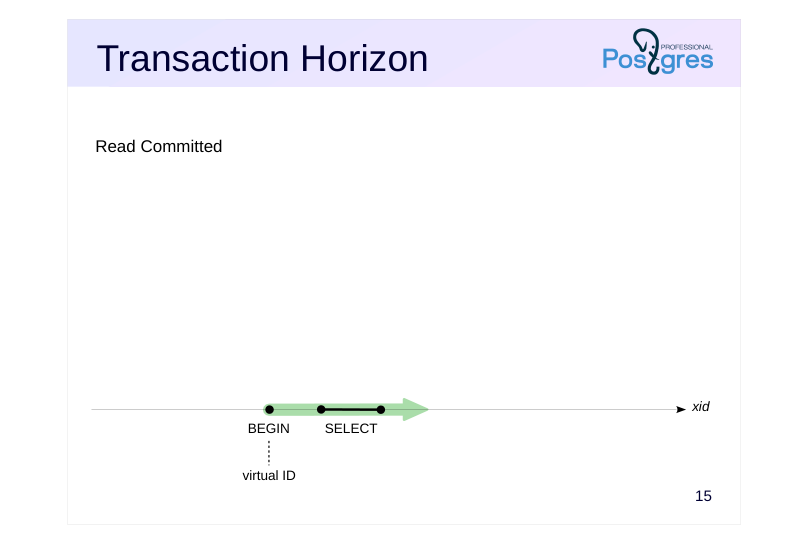
The snapshot is released when the query finishes. In our example, since the transaction’s first statement was read-only, the transaction has not yet been assigned a permanent xid. Therefore, it will not hold back the horizon until its next statement begins.
Page 17: Transaction Horizon
 {#source-figure-017 caption=“Source slide page 17: Transaction Horizon”}
Read Committed
Speaker notes
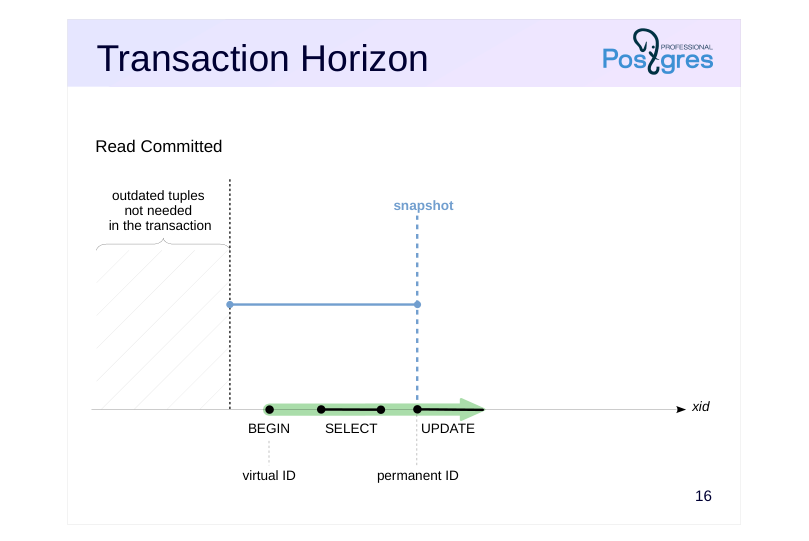
When a transaction first modifies data, it is assigned a permanent xid. At that same moment, a new snapshot is created. As always, this snapshot’s horizon (xmin) is set to the oldest active transaction ID.
As the current transaction is active, the horizon can never be positioned after this transaction’s ID.
Page 18: Transaction Horizon
 {#source-figure-018 caption=“Source slide page 18: Transaction Horizon”}
Read Committed
Speaker notes
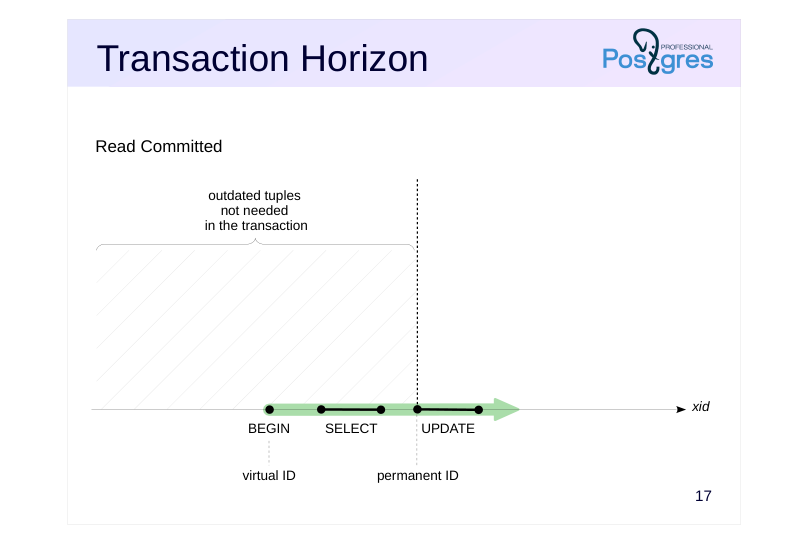
When a statement is completed, its snapshot is released. However, the transaction continues to hold the horizon at its ID to maintain the ability to roll back.
If a transaction remains in this state for a long time (idle in transaction) without executing any commands, the horizon remains in place.
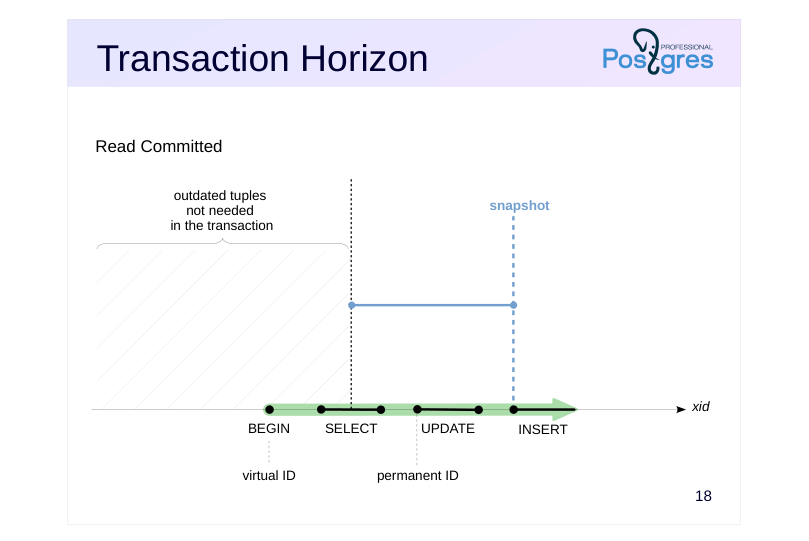
Page 19: Transaction Horizon
 {#source-figure-019 caption=“Source slide page 19: Transaction Horizon”}
Read Committed
Speaker notes
The next statement uses a new snapshot. The horizon of this snapshot is defined by considering all other active transactions. The current transaction itself remains active; therefore, the snapshot’s horizon (xmin) can never be greater than its own xid.
Page 20: Transaction Horizon
 {#source-figure-020 caption=“Source slide page 20: Transaction Horizon”}
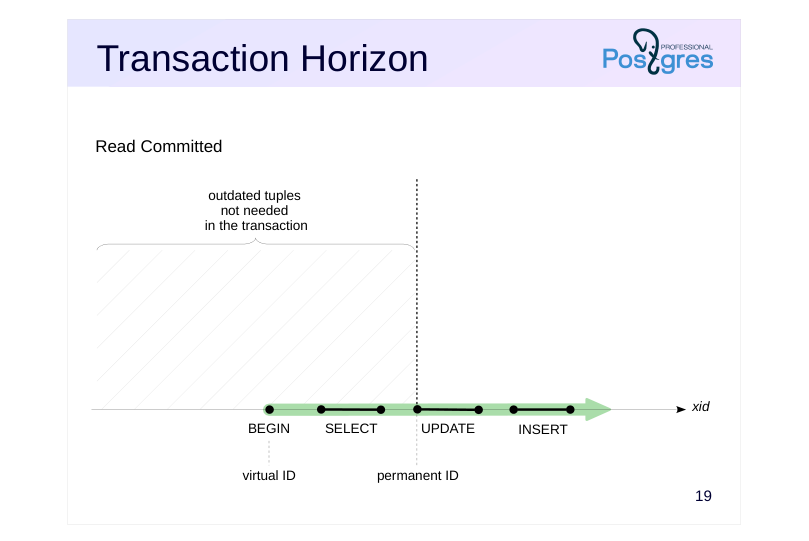
Read Committed
Speaker notes
Between statements, without an active snapshot, the horizon shifts towards the transaction ID. If the transaction has never obtained a permanent ID (i.e., it has not started modifying data), it will not hold back the horizon at all.
Page 21: Database Horizon
 {#source-figure-021 caption=“Source slide page 21: Database Horizon”}
Speaker notes
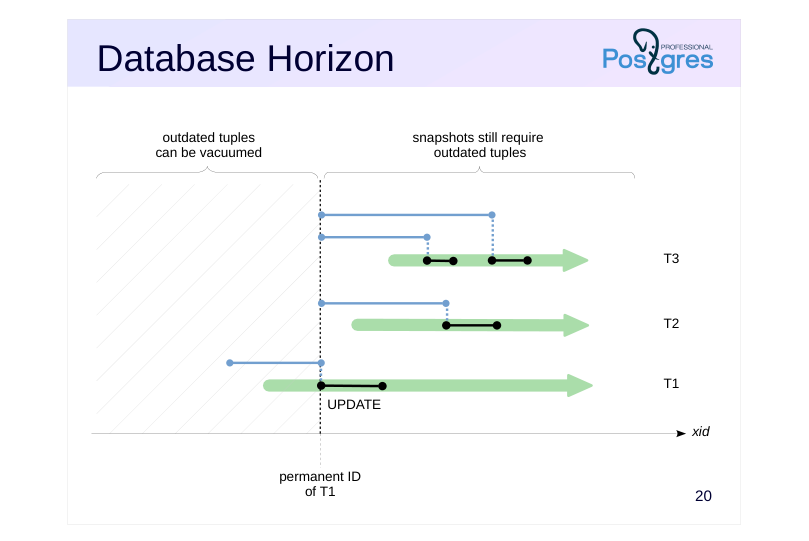
We can define the database horizon as the minimum of all horizons of transactions and snapshots. When a snapshot is released, the database horizon shifts forward, towards the horizon of the next active snapshot. Reverse movement is impossible since the xmin of newly created snapshots, which represents the minimum ID of an active transaction, can only shift to the right.
Outdated tuples behind the database horizon will never be required by any transaction. Such row versions can be safely vacuumed.
The slide shows an example of three transactions with Read Committed isolation level. A snapshot was created for the UPDATE statement in T1. When the statement is completed, the snapshot is deleted and no longer holds the horizon. However, T1 is still active, and therefore the snapshot horizons of Transactions 2 and 3 cannot move to the right past the ID of T1. Thus, any active transaction with a permanent ID holds the horizon merely by the fact of its existence.
This means that outdated tuples in this database cannot be cleaned up. This holds true even for a long-running transaction that does not interact with the same data as other transactions, since the database horizon is common for all transactions.
This is one of the key reasons why you should keep transactions no longer than absolutely necessary.
Page 22: Database Horizon
 {#source-figure-022 caption=“Source slide page 22: Database Horizon”}
Speaker notes
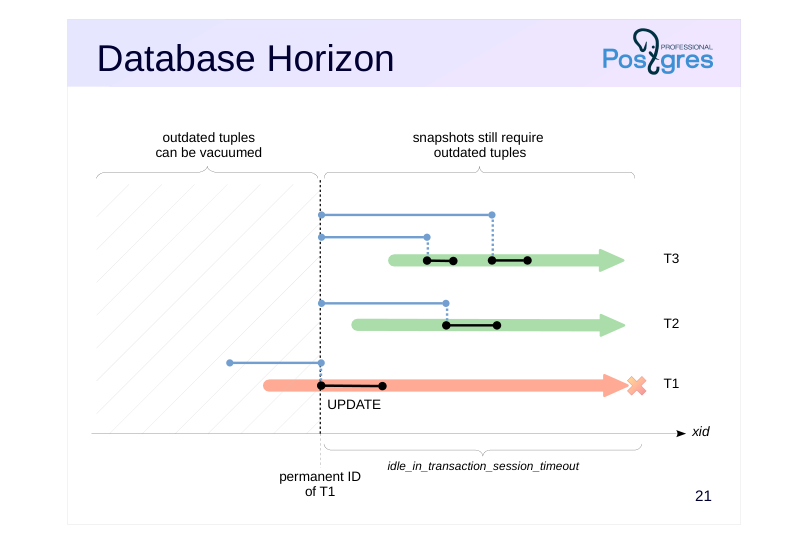
If this scenario creates operational problems that cannot be addressed in the application code, consider using the idle_in_transaction_session_timeout parameter. It limits the lifetime of an idle transaction. The transaction is aborted upon reaching this threshold.
Page 23: Transaction and Database Horizons
A transaction can check its horizon as follows:
Although our transaction is virtual and does not affect visibility of other transactions, it holds back the database horizon by accessing data via snapshot. After the transaction is completed, the horizon moves forward allowing to remove outdated tuples:
Page 24: Snapshot Export
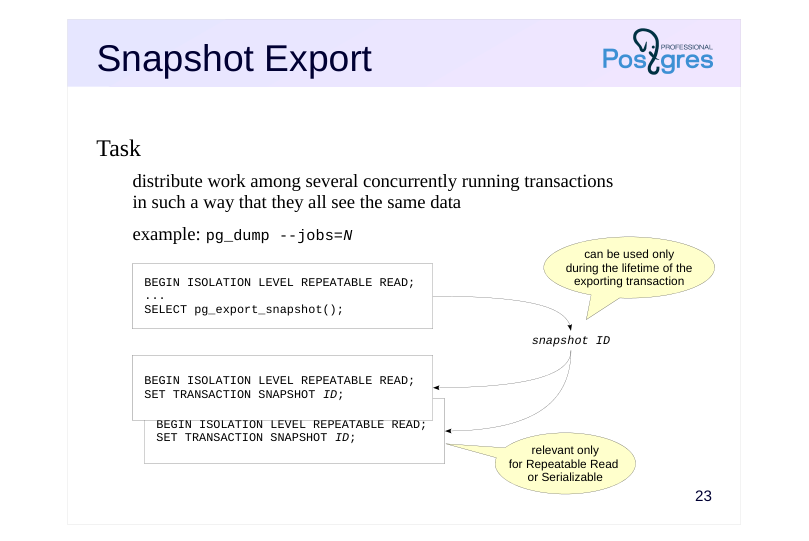 {#source-figure-024 caption=“Source slide page 24: Snapshot Export”}
Task
- distribute work among several concurrently running transactions
- in such a way that they all see the same data
Speaker notes
There are situations where several transactions must see the same data state. Of course, we cannot rely on snapshots being identical just because transactions were started “at the same time”. Snapshot export-import mechanism is used for this purpose.
The pg_export_snapshot() function saves snapshot information as a file in the PGDATA/pg_snapshots directory and returns the snapshot ID. This ID can be transferred (using means external to the DBMS) to another transaction.
https://postgrespro.com/docs/postgresql/16/functions-admin#FUNCTIONS-S NAPSHOT-SYNCHRONIZATION
The exported snapshot exists until the exporting transaction ends. Before executing the first statement, another transaction can import the snapshot by running the SET TRANSACTION SNAPSHOT command. Before that, the isolation level must be set to Repeatable Read or Serializable because statements use their own snapshots at the Read Committed level.
https://postgrespro.com/docs/postgresql/16/sql-set-transaction
Snapshot export is used, for example, by the pg_dump utility in parallel mode or by logical replication to obtain the initial state of tables included in a subscription (see the DBA3 course for more details).
Page 25: Takeaways
A snapshot contains information necessary to determine the visibility of row versions
- The time of a snapshot creation is determined by the isolation level
- A snapshot determines the transaction horizon, which affects the ability to clean up outdated versions
Page 26: Practice
- Reproduce a situation where one transaction still sees a deleted row, while another no longer does. Examine snapshots of these transactions, xmin and xmax values of the deleted row. Explain visibility based on this data.
- If a query calls a function that contains another query, which snapshot will be used for the nested query?
- Check Read Committed and Repeatable Read isolation levels as
- well as volatile and stable function categories.
- In one transaction, export a snapshot. Then, in another transaction, modify the data. Import the snapshot and check that it still shows the unmodified data.
Speaker notes
- Create a function using the template below, provided that a table t has been created:
You may also find the pg_sleep(n) function useful to pause execution for n seconds.
Page 27: 1. Snapshots of Two Transactions
Single row table:
The first transaction sees the row:
The second transaction in another session deletes the row:
Page 28: Page 28
The first transaction still sees the row:
The snapshots of both transactions are identical. According to visibility rules, both should see the row, since: Changes of xmin = 745 transaction are visible in the snapshot (745 < 746). Changes of xmax = 746 transaction are not visible in the snapshot (746 >= 746). However, the second transaction does not see the row because it deleted the row, which is an exception to the standard visibility rules.
2. Snapshot of a Nested Query
Inside a function that counts the number of rows in the table, we add a one-second delay for easier testing:
Now we start a transaction with Read Committed isolation level. In the query, we call the function several times while simultaneously counting the number of rows via a subquery.
Simultaneously, we execute another transaction that increases the number of rows in the table. If the main query and the nested query use different snapshots, we will find this by the difference in the result.
Page 29: Page 29
The value in the first column does not change, because the query uses the snapshot created at the start of its execution. However, the value in the second column changes, because queries inside the volatile function use their own snapshots. Repeat the experiment for the Repeatable Read isolation level:
Now let’s do the same for a function with the stable volatility category.
Read Committed level:
Page 30: Page 30
Repeatable Read level:
Conclusions: Queries in volatile functions at the Read Committed isolation level use their own snapshots and can see changes made during the statement execution. Such an opportunity is more problematic rather than practical. For any other combination of volatility category and isolation level, nested queries use a snapshot of the main query.
3. Exporting Snapshots
The pg_export_snapshot function returns the ID of a snapshot that can be passed to another transaction (by means external to the DBMS):
In another session, delete all rows from the table:
Then, the transaction imports the snapshot and sees the same data in it as the transaction that exported the snapshot: