02 Lesson 02: MVCC / Page Layout and Row Versions
This page is extracted from the official PDF into native Markdown. Slide text, code and speaker notes are kept in reading order; the original PDF and HTML remain the layout references. HTML source: dba2_02_mvcc_tuples.html Archive: DBA2-handouts-16-en.zip PDF pages: 27
Page 1: MVCC / Page Layout and Row Versions
Copyright
© Postgres Professional, 2016–2026 Authors: Egor Rogov, Pavel Luzanov, Ilya Bashtanov, Igor Gnatyuk Translated by: Elena Sharafutdinova Photo: Oleg Bartunov (Phu Monastery and Bhrikuti Peak, Nepal)
Use of Course Materials
Non-commercial use of course materials (presentations, demonstrations) is allowed without restrictions. Commercial use is possible only with the written permission of Postgres Professional. It is prohibited to make changes to the course materials.
Feedback
Please send your feedback, comments and suggestions to: edu@postgrespro.ru
Disclaimer
Postgres Professional assumes no responsibility for any damages and losses, including loss of income, caused by direct or indirect, intentional or accidental use of course materials. Postgres Professional company specifically disclaims any warranties on course materials. Course materials are provided “as is,” and Postgres Professional company has no obligations to provide maintenance, support, updates, enhancements, or modifications.
Page 2: Topics
- Page Layout and Row Versions
- How Data Operations Work
- Subtransactions
Page 3: Page Layout
 {#source-figure-003 caption=“Source slide page 3: Page Layout”}
Speaker notes
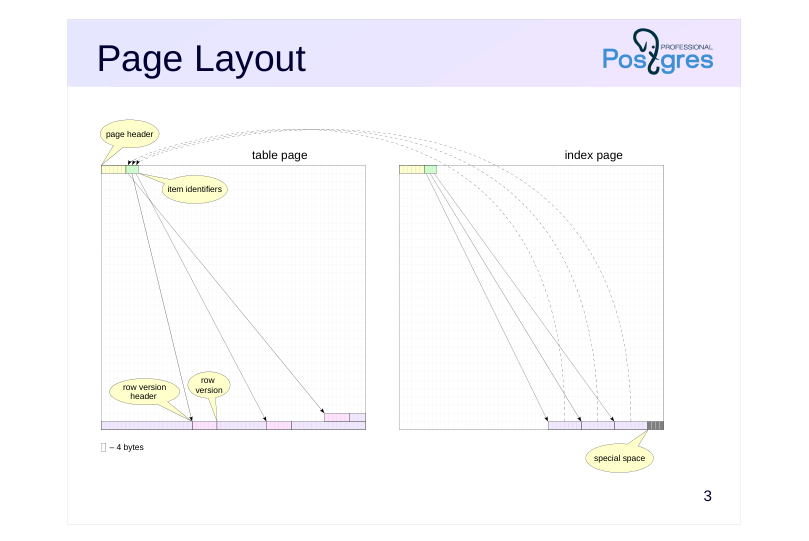
The page size is 8 kB. This value can be increased (up to 32 kB), but only during compilation. Tables, indexes and most other objects referred to in PostgreSQL by the term relation, use the same page layout to share a common buffer cache. A page header (24 bytes) is at the top of the page, it contains general information about the page and the size of its areas: item identifiers, free space, row versions and the special space.
Row versions contain the actual data we store in tables and other database objects, plus a header. We use the term tuple for row version, sometimes we simply call it a row.
Item identifiers have a fixed size (4 bytes) and form an array, where the position within the array defines the tuple identifier (tuple id, tid). Item identifiers reference the tuples, which are located at the end of the page. This indirect addressing is convenient for two main reasons: firstly, it allows to find a specific tuple without scanning the entire page’s content (since tuples have variable lengths), and secondly, it allows moving a tuple within the page without breaking references from indexes.
Free space is located between item identifiers and row versions.
Some index types require storing metadata; for this purpose, page zero is reserved as a metapage and the special space at the end of each page can be used.
https://postgrespro.com/docs/postgresql/16/storage-page-layout
Page 4: Data Format
 {#source-figure-004 caption=“Source slide page 4: Data Format”}
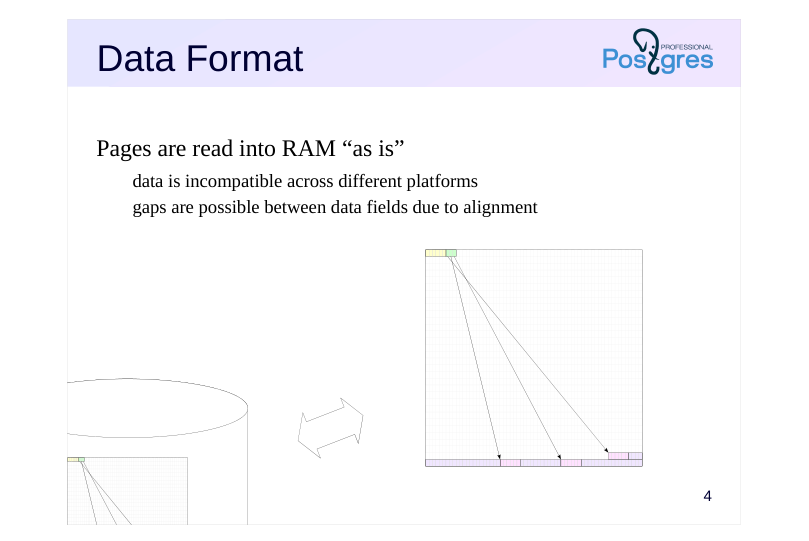
Pages are read into RAM “as is”
- data is incompatible across different platforms
- gaps are possible between data fields due to alignment
Speaker notes
The data format on disk is identical to the data representation in RAM. A page is written to the file and read into the buffer cache as is, without any transformations.
Consequently, data files are incompatible across different platforms (due to differences in bitness, byte order, etc.).
Besides, many architectures provide data alignment by machine word boundaries. For instance, in a 32-bit x86 system, integers (4 bytes) as well as double-precision floating-point numbers (8 bytes) are aligned by the boundary of 4-byte words. In a 64-bit system, however, double precision values are aligned by the boundary of 8-byte words.
Thereby, the size of a tuple depends on the order and data types of its fields. Usually, this effect is hardly noticeable, but in some cases it can lead to a significant increase in size. For example, if you interleave fields of boolean and integer types, this will typically result in a 3-byte alignment gap between them.
Page 5: Page Layout
The pageinspect extension is designed for analyzing the layout and content of pages.
The boundaries of page areas are recorded in its header. Let’s take page zero of one of the system catalog tables as an example:
The page layout is defined by the following boundaries: 0 — start of the page header and item identifiers lower — start of free space upper — start of data (tuples) special — start of special space (for indexes only) pagesize — end of the page
Page 6: Item Identifiers
 {#source-figure-006 caption=“Source slide page 6: Item Identifiers”}
Speaker notes
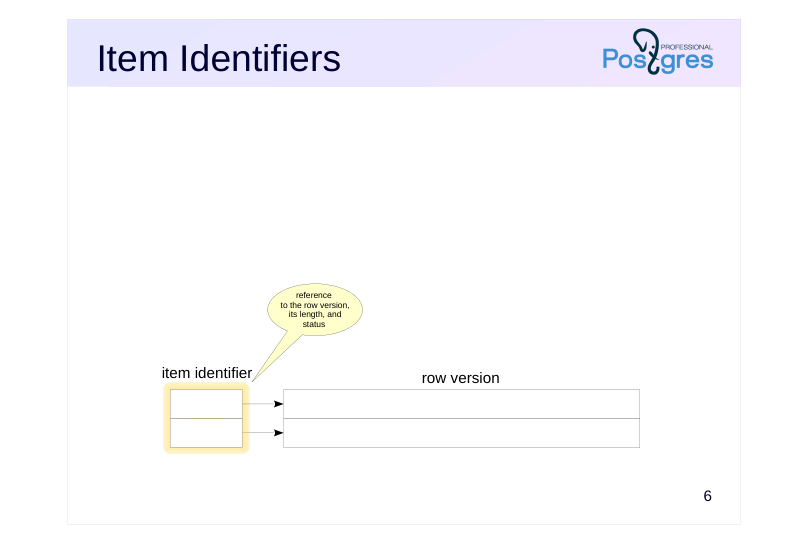
A page contains an array of item identifiers.
Each identifier (4 bytes) contains:
● Reference to the row version
● Length of this row version (for convenience)
● Several bits that define the status of the row version
Page 7: Row Versions
 {#source-figure-007 caption=“Source slide page 7: Row Versions”}
Speaker notes
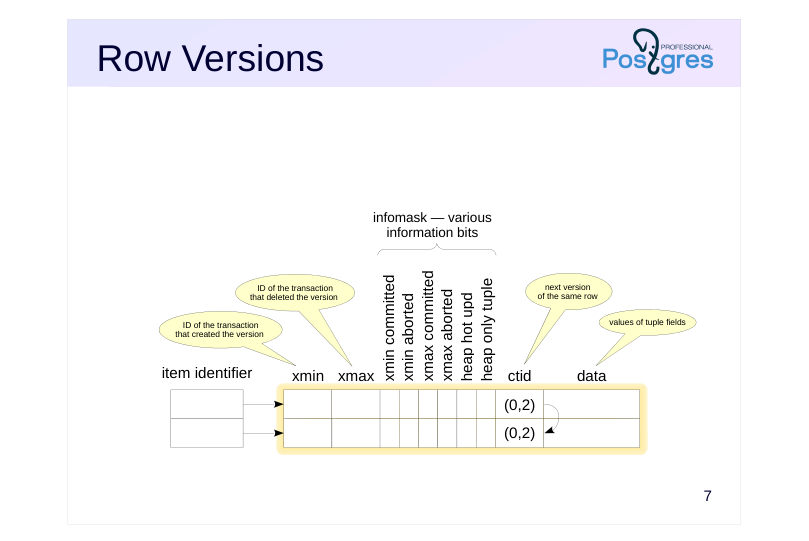
Row versions (tuples) within table (heap) pages have a header in addition to the actual data. This header contains the following important fields, among others:
Xmin and xmax define the visibility of this row version in terms of the
beginning and ending transaction IDs. Transaction IDs (or xid) are
sequentially assigned to transactions from a global counter used by all
databases within a PostgreSQL cluster.
Infomask contains a set of bits that define properties of this version. The
figure shows the main ones, but far from all. Some of the bits shown will
be covered in this lesson, and others will be covered in different lessons
of this module.
Ctid is a reference to the next, more recent version of the same row. Ctid
of the latest version refers to this very version. These references are not
always used. We will examine them in the HOT Updates and Page
Pruning lesson.
The row version header on a table page is 23 bytes long (or more because it can include a null bitmap).
Let us remind you that each row version must always fit entirely within a single page. If a row version is too large, PostgreSQL will attempt to compress some of its fields or move them to external TOAST storage (this is covered in the Data Organization module of the DBA1 course).
Page 8: ctid key Index Entries
 {#source-figure-008 caption=“Source slide page 8: ctid key Index Entries”}
Speaker notes
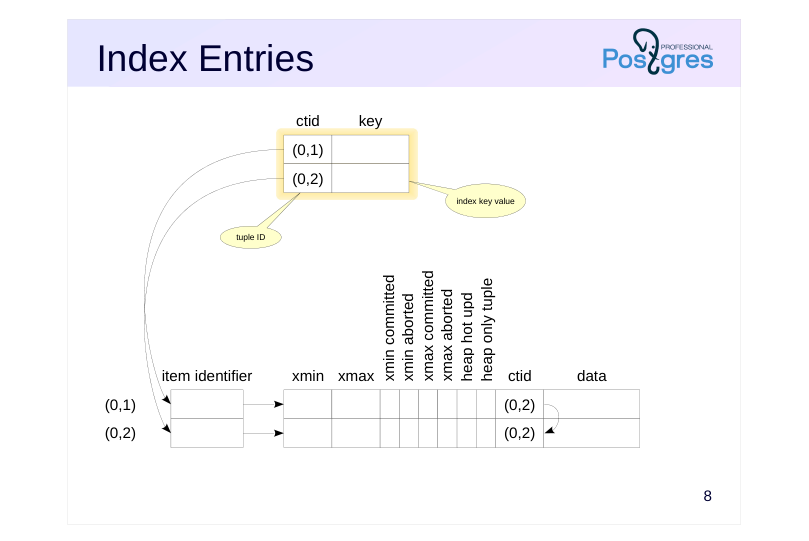
The information within an index page depends heavily on the index type. Even a single index type can have different kinds of pages. For example, a B-tree has a metadata page and regular pages.
However, a page usually contains an array of identifiers and items (like a table page). To avoid confusion, we will use the term entries for index items. Moreover, space for special data is allocated at the end of an index page.
The index entries themselves can also have vastly different structures depending on the index type. For instance, in a B-tree, the entries in leaf pages contain an index key value and an identifier (ctid) of the corresponding tuple (the structure of B-trees and other indexes is covered in detail in the QPT course).
The structure of other index types may vary, but typically, index pages still contain references to row versions.
ctids have the form (x,y), where x is the page number and y is the sequential number of the item identifier in the array. For convenience, we display them to the left of the identifiers.
No index contains versioning information (it does not have xmin and xmax fields). By reading only an index entry, it is impossible to determine the visibility of the tuple it references: either the table page or the visibility map has to be accessed.
The figure shows entries in leaf pages of a standard B-tree index. For the sake of simplicity, the item identifiers to these entries are omitted.
Page 9: Insert
 {#source-figure-009 caption=“Source slide page 9: Insert”}
Speaker notes
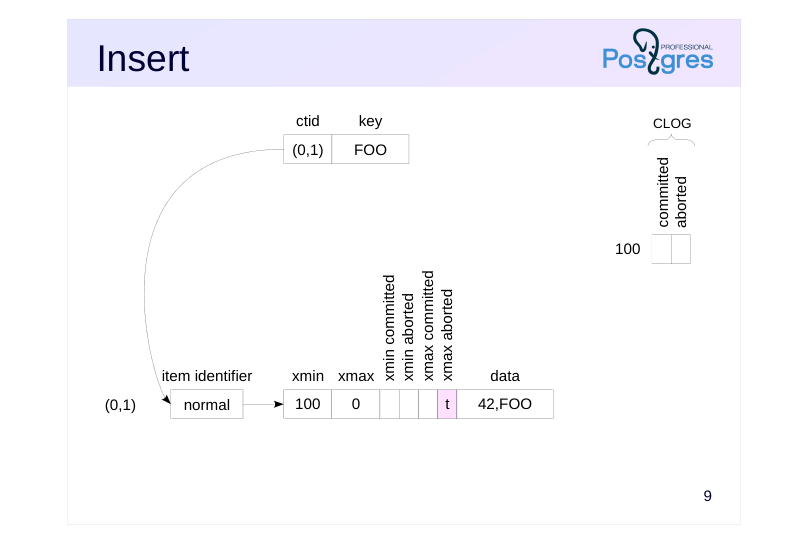
Let’s examine how row operations are performed at a low level, and we start with insert.
In our example, we create a table with two columns (integer and text); a B-tree index has been created on the text field.
When a row is inserted, an item identifier with number 1 will appear on the table page, pointing to the first and only row version. In the row version, the xmin field contains the ID of the current transaction (100 in our example).
The transaction status log (CLOG) stores the states of all transactions (starting from a certain point), with two bits allocated for each transaction. This data is stored in the PGDATA/pg_xact directory, and a few recent pages are cached in the server’s shared memory. Since in our example transaction 100 is still active, both bits are currently unset.
An index page also creates an item identifier with number 1, which points to an index entry. This index entry, in turn, points to the first row version in the table page. For the sake of simplicity, the item identifier in the index is not shown.
The xmax field contains the dummy number 0 since this tuple has not been deleted and is up-to-date. Transactions will ignore this number because the xmax aborted bit is set.
Page 10: Insert
Create a table and an index:
To examine tuples on page zero, create a view using the pageinspect extension:
Let’s also create a view to look inside the index. The page zero of an index contains metadata, so we will examine page 1 instead:
Insert a single row, first starting a transaction.
Here is the ID of our current transaction and its status:
Here is the contents of the table page:
Page 11: Page 11
We can obtain similar, but significantly less detailed information from the table itself using the system columns ctid, xmin, and xmax:
In the index page, we can see one reference to the single table row:
Page 12: Commit
 {#source-figure-012 caption=“Source slide page 12: Commit”}
Speaker notes
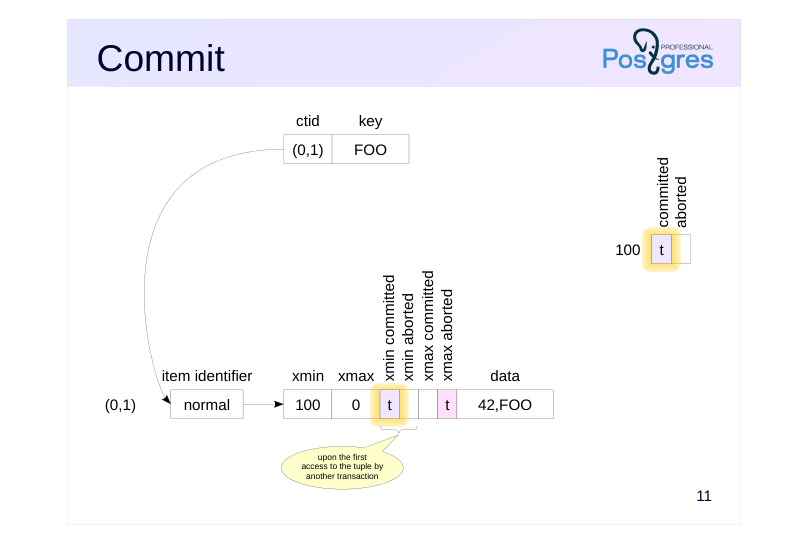
When changes are committed, a committed flag is set for this transaction in the CLOG. This is the only operation required, except for WAL.
When another transaction accesses this tuple, it will have to answer two questions:
Was transaction 100 completed? (This requires checking the list of active transactions maintained in the server’s shared memory.)
If it was completed, then was it committed or aborted? (This requires checking the CLOG.)
Since checking the CLOG every time is costly, the determined transaction status is recorded in hint bits: xmin committed and xmin aborted. If one of these bits is set, the status of the xmin transaction is considered known, and subsequent transactions will not need to access the CLOG.
Why are these bits not set by the inserting transaction? At the moment a transaction is committed or aborted, it is no longer clear which specific rows on which pages were modified by the transaction. Additionally, some of these pages may have already been evicted from the buffer cache to disk. Reading them back just to update the hint bits would significantly slow down the commit process.
The downside is that any transaction (even a simple read-only SELECT) can make data pages in the buffer cache dirty and generate new WAL records.
Page 13: Commit
Let’s commit the transaction:
What has changed on the page?
Nothing has changed, since the only operation performed during commit is recording the transaction status in the CLOG.
Information on transaction status is stored in the pg_xact subdirectory of the PGDATA directory and cached in shared memory. Starting with PostgreSQL 13, the pg_stat_slru view provides usage statistics for the caches, including the transaction status cache:
The first transaction that accesses the page determines the xmin transaction status and records it in the hint bits:
Page 14: Delete
 {#source-figure-014 caption=“Source slide page 14: Delete”}
Speaker notes
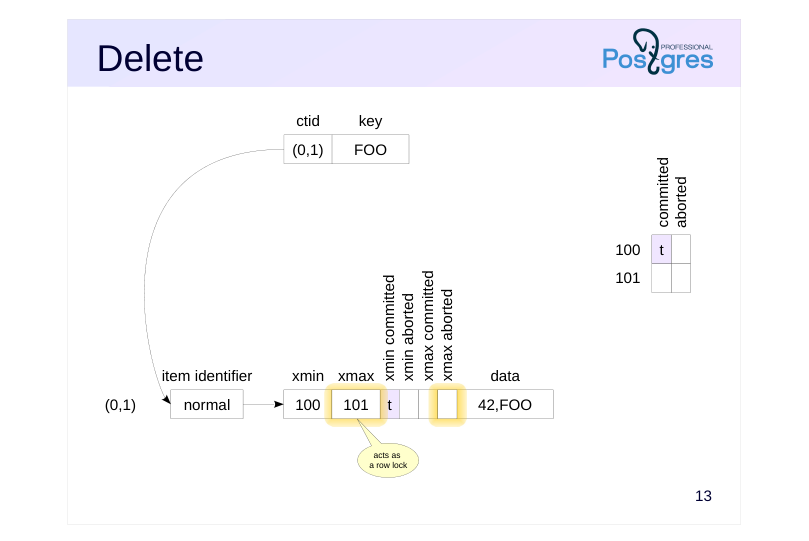
When a row is deleted, the ID of the deleting transaction is written to the xmax field of the current version and the xmax_aborted bit is reset. Nothing else happens.
Note that the value of xmax corresponding to the active transaction (as determined by other transactions from the active transactions list) works as a row lock. If another transaction is going to update or delete this row, it will have to wait until the xmax transaction is complete.
Locks are discussed in detail in the Locks module. For now, we will only note that the number of row locks is unlimited. They do not occupy space in RAM, and system performance is not affected by their number (except that the first process accessing the page will need to set the hint bits).
Page 15: Delete
Now let’s delete the row.
The transaction ID has been recorded to the xmax field:
Page 16: Abort
 {#source-figure-016 caption=“Source slide page 16: Abort”}
Speaker notes
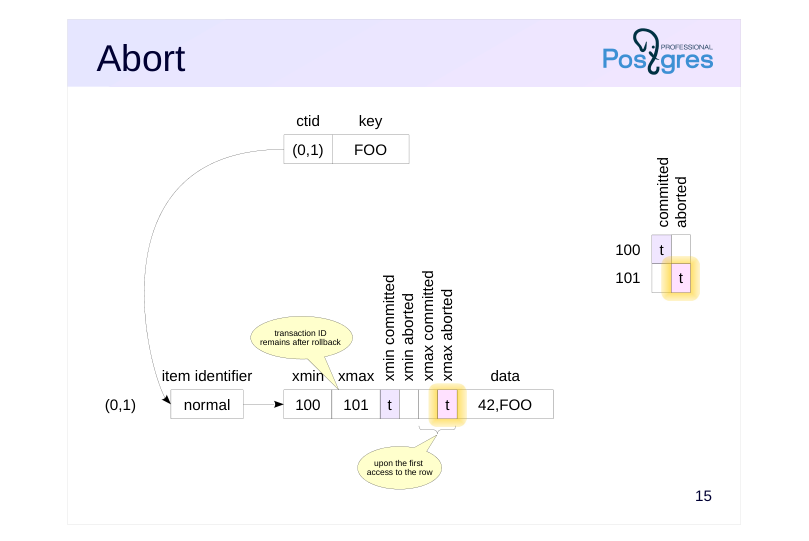
Abort works similarly to commit, except that the aborted bit is set in CLOG. Abort is done as fast as commit, there is no need to roll back the performed actions.
The ID of the aborted transaction remains in the xmax field. It could be cleared, but there is no point doing so. When the page is accessed, the transaction status will be determined, and the xmax_aborted hint bit will be set in the row version. This will indicate that the xmax field shall be ignored.
Page 17: Abort
When a transaction aborts, the xmax value remains in the header.
Upon the first access to the page, the corresponding hint bit is set:
Page 18: Update
 {#source-figure-018 caption=“Source slide page 18: Update”}
Speaker notes
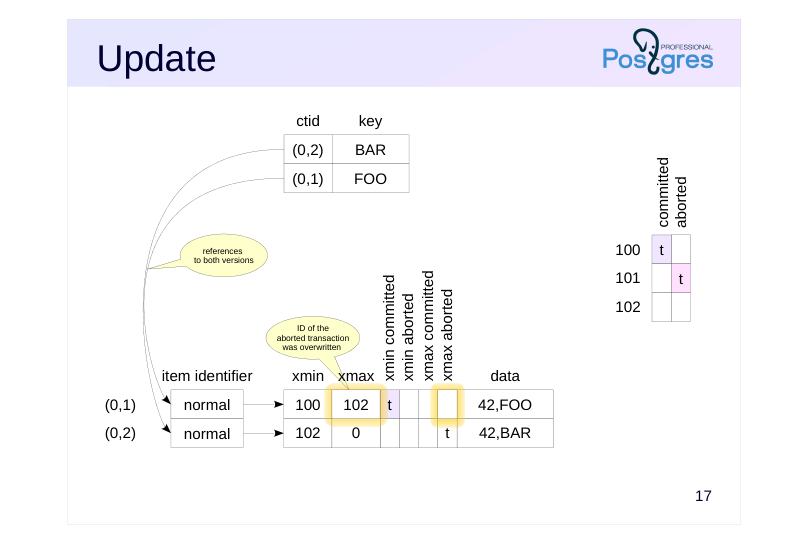
An update works as if the old row version is first deleted and then a new one is inserted.
The old version is marked with the ID of the current transaction in the xmax field. Note that the new value 102 has overwritten the old value 101 since transaction 101 was aborted. Moreover, the xmax_committed and xmax_aborted bits in the old row version are unset since the completion status of the current transaction is still unknown.
The index page now contains the second item identifier and second entry, which references the second version in the table page.
The same way as for delete, the value of xmax in the first version indicates that the row is locked.
Page 19: Update
Now check an update.
The query returns one row (the new version):
However, the page shows both versions. The new transaction ID has replaced the old one (since the old transaction was aborted).
Meanwhile, the index page contains references to both versions:
Index entries within the page are ordered by key value. So, the entry with BAR key (referring to version (0,2)) comes first, followed by the entry with FOO key (referring to version (0,1)).
Page 20: Savepoint
 {#source-figure-020 caption=“Source slide page 20: Savepoint”}
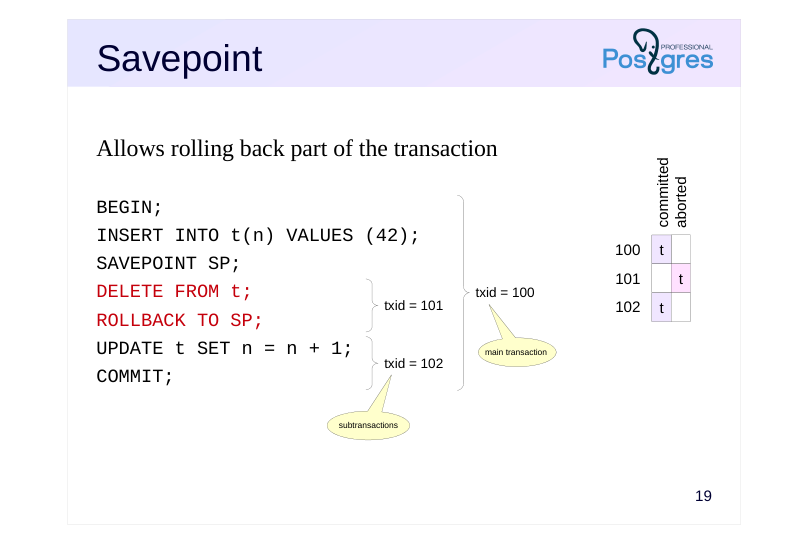
Allows rolling back part of the transaction
Speaker notes
The functionality of savepoints represents a subtle aspect, as they allow rolling back part of the current transaction. This is incompatible with the above model since no data changes are rolled back, the status of the entire transaction is changed instead.
For this reason, a transaction with a savepoint is split into several separate (not to be confused with autonomous!) subtransactions, so their status can be managed separately.
Page 21: Subtransactions
Separate ID and status in CLOG
- final status depends on the status of the main transaction
- Nesting information is stored on disk
- PGDATA/pg_subtrans directory
- cached in the shared memory buffers (similar to CLOG)
- Use cases
- SAVEPOINT
- PL/pgSQL exception handling (EXCEPTION)
- psql mode: ON_ERROR_ROLLBACK = on/interactive
Speaker notes
Subtransactions have their own IDs (which are higher than the ID of the main transaction). Their status is written to CLOG in the usual manner, but the final status depends on the status of the main transaction: if it is aborted, all subtransactions are aborted as well.
Information about transaction nesting is stored in the PGDATA/pg_subtrans directory. Its files are accessed through buffers in the server’s shared memory, which are structured the same way as CLOG buffers.
Note that SQL does not permit explicit use of subtransactions, that is, you cannot start a new transaction before you complete the current one. This mechanism gets implicitly involved when savepoints are used and also when handling PL/pgSQL exceptions.
It is worth noting that ON_ERROR_ROLLBACK mode in psql allows continuing the transaction after failure. Why is this mode not used by default? The reason is that an error might occur in the middle of a statement’s execution, so the atomicity would be broken. The only way to abort changes already made by that specific statement, without affecting other changes, is to use subtransactions. So, ON_ERROR_ROLLBACK mode places an implicit savepoint before each command, resulting in significant overhead.
Page 22: Savepoints and Subtransactions
Let’s truncate the table (this empties both the table and index files):
Start a transaction and insert a row.
Create a savepoint and delete the row.
Note: The pg_current_xact_id() function returns the ID of the main transaction, not the subtransaction ID:
Let’s roll back to the savepoint. The row versions remain on the page, but the subtransaction status changes:
Selecting from the table will show the row again, since its deletion was rolled back:
A new subtransaction is created for further changes. Its ID will be written to the xmax field of the first row version (replacing the rolled-back subtransaction ID 754) and to the xmin field of the new version:
Page 23: Page 23
Commit the changes. Again, the table page remains unchanged:
In the CLOG, the main transaction and all incomplete subtransactions are marked as committed:
Information about transaction nesting is stored in the pg_subtrans subdirectory of PGDATA. It is cached in shared memory, just like transaction status information:
Page 24: Takeaways
Table pages can store multiple versions of the same row, bounded by xmin and xmax transaction IDs
- Index entries do not contain versioning information
- Commit and rollback are performed equally fast
- Savepoints work through subtransactions
Page 25: Practice
- Create a table and insert one row into it. Then update this row twice and delete it. How many row versions are currently in the table? Check using the pageinspect extension. 2. Determine on which page the row of the pg_class table relating to the pg_class table is located. How many current row versions are on the same page? 3. Enable the ON_ERROR_ROLLBACK mode in psql and verify that this mode uses subtransactions.
Page 26: 1. Row Versions
Create the extension and a table.
Insert a row, update it, then delete it:
The table is empty:
Now let’s examine the row versions on the page:
2. Tuples on a Specific Page
The page number is the first component of the ctid value:
Although tid data type does not directly provide page number, you can convert it via the point type:
Page 27: Page 27
Number of rows on the same page:
3. ON\_ERROR\_ROLLBACK Mode
Set the mode:
Start a transaction and insert a row.
Insert another row.
Each command runs in its own subtransaction, as expected.
This setting remains active until the psql session ends. To avoid interfering with subsequent operations in this session, restore the default setting: