15 Lesson 15: Replication / Overview of Physical Replication
This page is extracted from the official PDF into native Markdown. Slide text, code and speaker notes are kept in reading order; the original PDF and HTML remain the layout references. HTML source: dba1_15_replica_overview_physical.html Archive: DBA1-handouts-16-en.zip PDF pages: 22
Page 1: Replication / Overview of Physical Replication
Copyright
© Postgres Professional, 2017–2025 Authors: Egor Rogov, Pavel Luzanov, Ilya Bashtanov, Igor Gnatyuk Translated by: Liudmila Mantrova, Alexander Meleshko, Elena Sharafutdinova Photo: Oleg Bartunov (Phu Monastery and Bhrikuti Peak, Nepal)
Use of Course Materials
Non-commercial use of course materials (presentations, demonstrations) is allowed without restrictions. Commercial use is possible only with the written permission of Postgres Professional. It is prohibited to make changes to the course materials.
Feedback
Please send your feedback, comments and suggestions to: edu@postgrespro.ru
Disclaimer
Postgres Professional assumes no responsibility for any damages and losses, including loss of income, caused by direct or indirect, intentional or accidental use of course materials. Postgres Professional company specifically disclaims any warranties on course materials. Course materials are provided “as is”, and Postgres Professional company has no obligations to provide maintenance, support, updates, enhancements, or modifications.
Page 2: Topics
- Replication Types
- Physical Replication
- Log Levels
- Replication Use Cases
- Switching to Standby
Page 3: Replication Types
Data synchronization between servers
- Purposes
- fault tolerance, high availability
- scalability
- Physical replication
- synchronization at the level of pages and row versions
- Logical replication
- synchronization at the level of table rows
Speaker notes
A single database server may not meet the requirements.
A single server is a potential point of failure. Two (or more) servers allow the system to maintain availability in case of a failure (fault tolerance) or, more broadly, in any scenario, such as during scheduled maintenance (high availability).
One server may not be able to handle the load. Scaling up (upgrading server resources) may be inefficient or even impossible. However, the workload can be distributed across multiple servers (scaling).
Database systems can access shared data.
The solution is to have multiple servers managing the same data. Replication refers to the process of synchronizing this data.
Depending on the level at which synchronization occurs, there are two types of replication: physical replication synchronizes changes at the data page level and transaction statuses and logical replication synchronizes changes at the table row level.
Page 4: Physical Replication
Mechanism
- one server transfers WAL records to another server, and the second server
- replays the received records
- Features
- primary-standby: data flow in one direction only
- binary server compatibility is required
- only the cluster as a whole can be replicated
Speaker notes
The idea of physical replication is that one server transfers WAL records to another server, and the second server replays the received records like in crash recovery.
During physical replication, servers have assigned roles: primary and standby. The primary transfers WAL records to standby (in the form of files or a stream of records). The standby applies these records to its data files. The WAL record application is purely mechanical, without “understanding the meaning” of the changes, so binary compatibility between servers is important (the same platform and major PostgreSQL version). Since the WAL is shared across the entire cluster, only the cluster as a whole can be replicated.
Page 5: Physical Replication
 {#source-figure-005 caption=“Source slide page 5: Physical Replication”}
Speaker notes
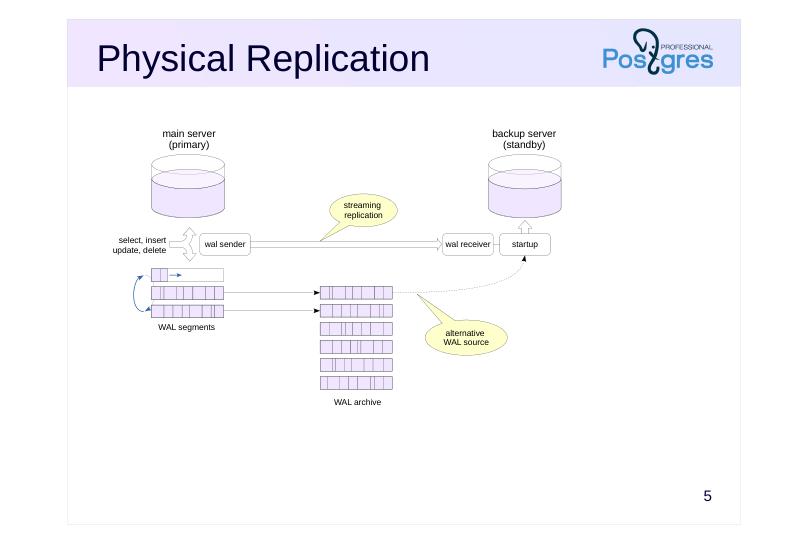
To set up replication between two servers, we create a replica from a physical backup of the primary server. Normally, restoring such a backup would create a new independent server. However, when replication is enabled, the standby server operates in continuous recovery mode: it constantly applies new WAL records received from the primary server (handled by the startup process). This way, the replica is constantly maintained in an almost up-to-date state.
There are two ways to deliver WALs from the primary to the standby. The one used more commonly in production is streaming replication.
In this case, the replica (walreceiver process) connects to the primary (walsender process) via the replication protocol and receives the WAL record stream. This minimizes the replica lag and can even eliminate it entirely (in synchronous mode).
If the system is set for continuous archiving, file-based replication is possible. In this case, the replica will lag noticeably as the file archive is updated only when a WAL segment is switched.
In practice, file-based replication is used in addition to streaming replication. If the replica cannot receive the next WAL entry via the replication protocol, it will try to read it from the archive.
https://postgrespro.com/docs/postgresql/16/high-availability
Page 6: WAL Levels
wal\_level parameter
- minimal < replica
- crash recovery crash recovery restore from backup, replication
Speaker notes
Since standby only receives the information contained in the WAL, all data necessary for synchronization shall be recorded into the WAL.
The amount of data stored in each WAL record is controlled by the wal_level parameter.
Prior to PostgreSQL 10 the default level was minimal, which guaranteed only crash recovery. Replication cannot function at this level because some changes are directly written to persistent storage for reliability, bypassing WAL.
In PostgreSQL 10+ the default level is replica. At this level all data changes are recorded into the WAL, that enables restoring the system from pg_basebackup hot backups, as well as physical streaming replication.
As backup and replication are highly-demanded features, the default level was switched to replica.
Page 7: Physical Replication Configuration
Setting up streaming replication between two servers. We will focus on the simplest configuration; replication is covered in detail in the DBA3 administrator course. Required configuration parameters to be checked:
Starting with PostgreSQL 10, default parameters already have appropriate values. Ensure pg_hba.conf allows replication protocol connections:
The necessary permissions are already in place. Let’s deploy a standby from a physical backup, for this we use the pg_basebackup tool. The target copy directory must be empty or non-existent:
The –checkpoint=fast option requests the utility to perform an immediate checkpoint (without delays), while -R adds standby configuration settings:
The utility creates a sample configuration file…
… and a signal file that instructs the standby to enter continuous recovery mode:
The cluster where we are deploying the standby has been pre-initialized. If the server is running, it must be stopped first:
The copy was placed in the home directory of student user, and now we transfer it to the cluster data directory and make postgres user the owner of the files:
Now we can start the server:
Page 8: Page 8
Let’s examine the standby processes.
The walreceiver process receives the WAL stream, and the startup process applies changes. Compare these with the primary processes.
The walsender process sends WAL records to the standby. The state of the replication can be checked on the primary server:
*_lsn values indicate which WAL records were sent to the standby, received by it, written to disk and applied. sync_state is synchronous or asynchronous replication (we will explain it in detail later).
Page 9: Standby Usage
Allowed
- read-only queries (SELECT, COPY TO, cursors)
- setting server parameters (SET, RESET)
- transaction management (BEGIN, COMMIT, ROLLBACK…)
- creating a backup (pg_basebackup)
- Not allowed
- any changes (INSERT, UPDATE, DELETE, TRUNCATE, nextval…)
- locks expecting changes (SELECT FOR UPDATE…)
- DDL commands (CREATE, DROP…), including creating temporary tables
- maintenance commands (VACUUM, ANALYZE, REINDEX…)
- access control (GRANT, REVOKE…)
- triggers and advisory locks do not work
Speaker notes
By default, the standby operates in the hot standby mode. In this mode, client connections are allowed but restricted to read-only operations. Setting server parameters and transaction management commands will also work. For example, you can start a (read-only) transaction with a specific isolation level.
In addition, the standby can also be used for making backups (taking into account the possible lag behind the primary).
In hot standby mode, no data changes (including sequences), locks, DDL commands, commands such as VACUUM, ANALYZE and REINDEX or access control commands are allowed on the standby. Basically, anything that changes the data in any way is not accepted.
If required, the standby can be run in warm standby mode by setting the parameter hot_standby = off. In this case, client connections will be completely disabled.
https://postgrespro.com/docs/postgresql/16/hot-standby
Page 10: Standby Usage
Run several commands on the primary server:
Check the standby:
Let’s insert a row into the table on the primary server:
So, replication is working correctly, and queries are executed successfully on the standby. No changes can be made on standby directly:
Page 11: Standby Usage
 {#source-figure-011 caption=“Source slide page 11: Standby Usage”}
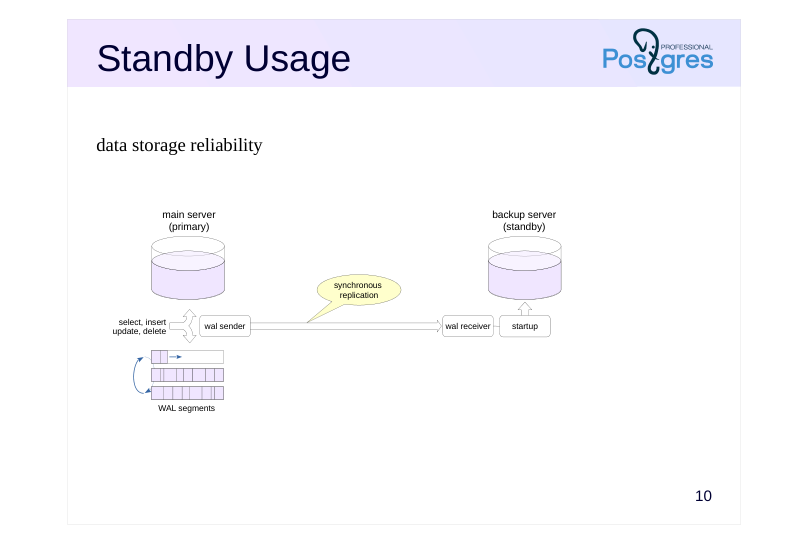
data storage reliability
Speaker notes
The replication mechanism offers flexible system design options for a variety of applications. Let’s consider several typical cases and possible solutions.
One of the key objectives is ensuring data storage reliability.
As a reminder, transaction commits can operate in synchronous or asynchronous modes. In synchronous mode, the commit is not completed until the data is safely written to persistent storage. In asynchronous mode, there is a risk of losing some committed data, but commits do not wait for disk writes, improving system performance.
A similar principle is applied to replication: in synchronous mode (synchronous_commit = on), when a standby is present, the commit waits not only for the WAL to be written to disk but also for confirmation that the WAL records have been received by the synchronous standby. This further enhances reliability (ensuring data is not lost even if the primary server fails) but also increases latency, slowing down the system.
There are also intermediate configuration options that do not provide absolute reliability guarantees but still reduce the risk of data loss.
Page 12: Standby Usage
 {#source-figure-012 caption=“Source slide page 12: Standby Usage”}
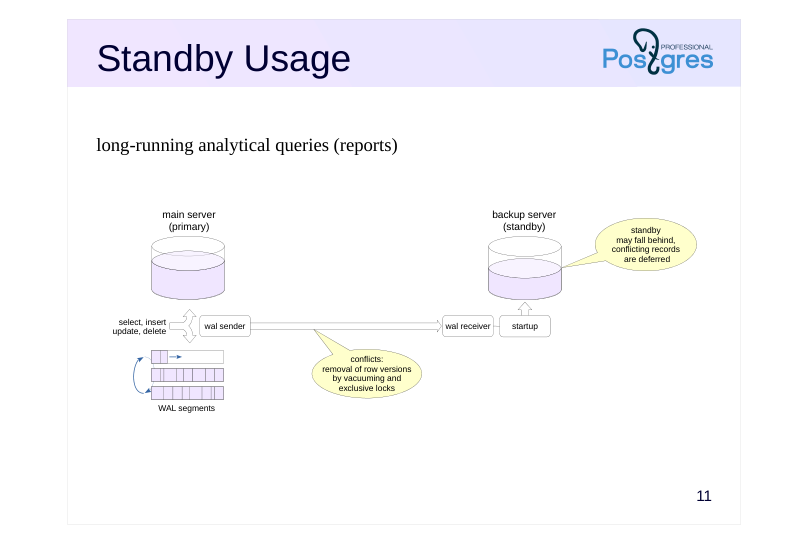
long-running analytical queries (reports)
Speaker notes
As mentioned earlier, long-running queries hold back the vacuum horizon, preventing the removal of obsolete row versions. If certain tables are being actively modified during this time, they can grow significantly in size. This is why standbys are often used for long-running analytical queries.
A subtle issue arises when WAL records from the primary server conflict with queries running on the standby. There are two main sources of such records:
The primary server removes row versions that are no longer needed there but are still required by queries on the standby.
Exclusive locks on the primary that are incompatible with queries on the standby.
So, standby for reports is typically configured to accept WAL records from the primary but delay their application if they conflict with running queries. This means the standby’s data may lag behind the primary, but for analytical workloads, this is acceptable.
Page 13: Multiple Stanbys
 {#source-figure-013 caption=“Source slide page 13: Multiple Stanbys”}
Speaker notes
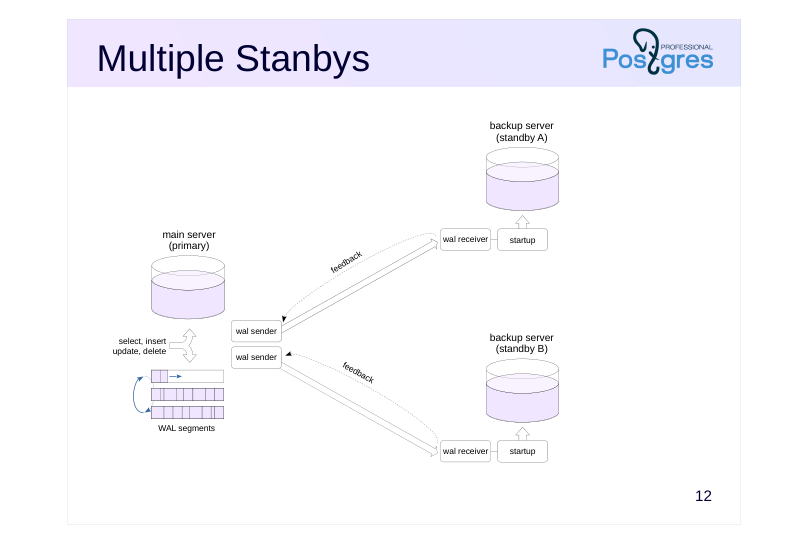
Multiple standbys can be connected to the primary server to distribute OLTP read workloads.
OLTP queries should not be long-running. This enables effective use of replication protocol feedback between standbys and the primary server. In this case, the primary server maintains awareness of the transaction horizon required by queries on standbys, preventing vacuum from removing needed row versions. Essentially, this feedback mechanism achieves the same result as if all queries were executing locally on the primary server.
However, replication provides only the basic mechanism. External tools (load balancers) are required for automatic workload distribution. It is important to note that data consistency between the primary and standbys is not guaranteed — even in synchronous replication. Applications reading from a single server will, of course, maintain consistency, but consistency is no longer guaranteed when reading from multiple servers simultaneously. Replicas may return either stale data or changes not yet visible on the primary. These topics are discussed in detail in the DBA3 Backup and Replication course.
Page 14: Cascading Replication
 {#source-figure-014 caption=“Source slide page 14: Cascading Replication”}
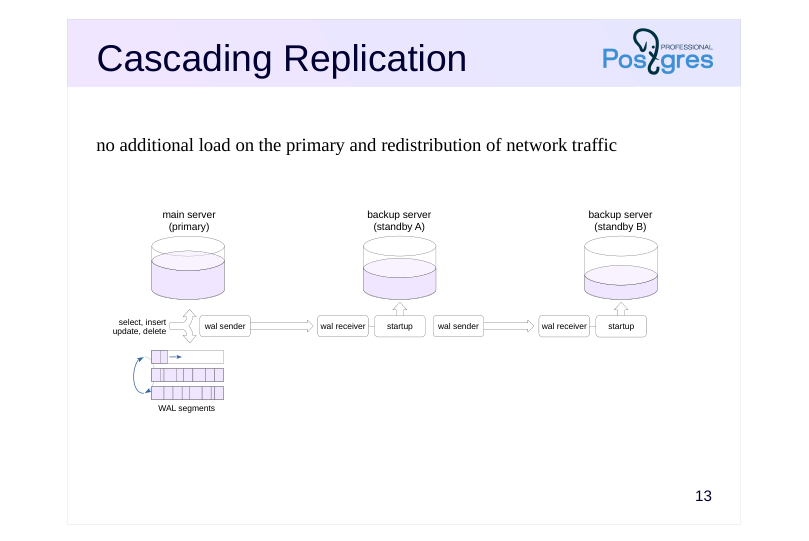
no additional load on the primary and redistribution of network traffic
Speaker notes
Multiple standbys connected to a single primary server will generate additional load on it. Network load should also be considered when transmitting multiple copies of the WAL stream.
To reduce this load, standbys can be arranged in a cascade configuration, where servers relay WAL records to each other in a chain. The further downstream from the primary, the greater potential lag may accumulate in the replicated data.
Note that cascaded synchronous replication is not supported — the primary can only synchronize with directly connected standbys. However, the primary collects feedback from all standbys in the cascade.
Page 15: Delayed Replication
 {#source-figure-015 caption=“Source slide page 15: Delayed Replication”}
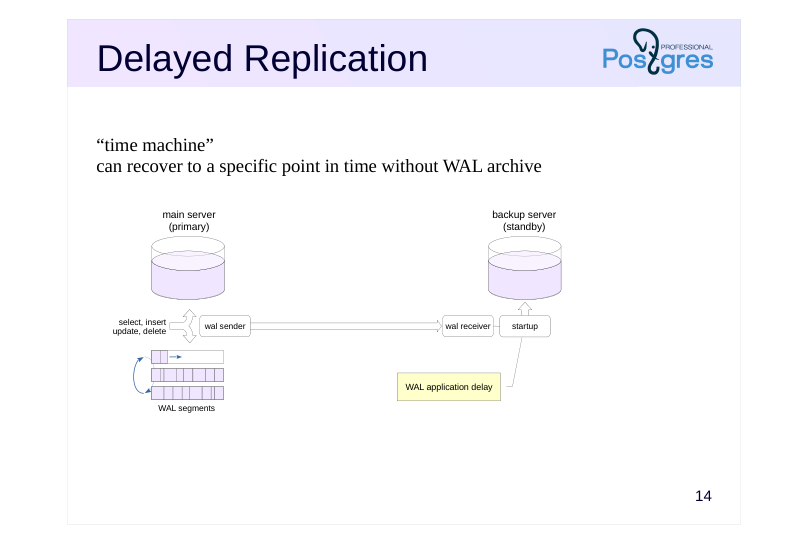
“time machine” can recover to a specific point in time without WAL archive
Speaker notes
A useful feature is the ability to view data at and recover to an arbitrary point in time. It is particularly useful for recovering from user errors where incorrect actions need to be rolled back.
The regular archive-based point-in-time recovery mechanism can work here, but it requires a lot of preparation and takes a lot of time. And PostgreSQL itself does not allow to make data snapshots for a given moment in the past.
The solution is to have a standby apply WAL records not immediately, but with a certain delay.
In this course, we do not cover the required configurations for each of the provided options. For detailed information, refer to the DBA3 Backup and Replication course.
Page 16: Switching to Standby
Scheduled switchover
- shutdown of the main server for maintenance without interruption of service
- manual mode
- Emergency switchover
- switch to a standby due to a primary server failure
- manual mode,
- but can be automated with external cluster software
Speaker notes
An existing standby can be used to replace the primary server.
There are different reasons for switchover to a backup server. If it is maintenance time on the primary, the switchover can be performed routinely at a convenient time. If it is the primary failure, on the other hand, the switchover has to be performed as quickly as possible to avoid service downtime.
Even in case of a failure, switchover is performed manually unless specialized cluster software is used to monitor server status and initiate the switchover automatically.
Page 17: Switching to a Standby
 {#source-figure-017 caption=“Source slide page 17: Switching to a Standby”}
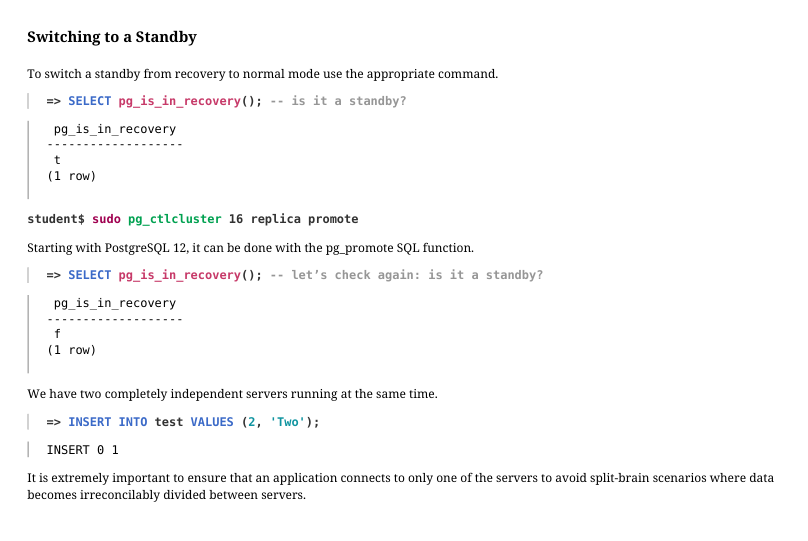
To switch a standby from recovery to normal mode use the appropriate command.
Starting with PostgreSQL 12, it can be done with the pg_promote SQL function.
We have two completely independent servers running at the same time.
It is extremely important to ensure that an application connects to only one of the servers to avoid split-brain scenarios where data becomes irreconcilably divided between servers.
Page 18: Takeaways
Physical replication mechanism works by delivering WAL records to the standby and applying them there
- streaming WAL records or transferring files
- Physical replication creates an exact copy of the entire cluster
- unidirectional, requires binary compatibility
- core mechanism for solving multiple use cases
Page 19: Practice
- Set up physical streaming replication between the two servers in synchronous mode. Verify that replication works as intended. Make sure that when the standby is stopped, commits on the primary are not completed. 2. By default, conflicting WAL records on the standby are delayed for up to 30 seconds. Disable the delay and verify that long-running queries on the standby are canceled if the primary deletes and vacuums required row versions. Then enable feedback and confirm that it prevents cancellations by delaying primary vacuums.
Speaker notes
- To do this, set the following parameters on the primary using ALTER SYSTEM:
● synchronous_commit = on
● synchronous_standby_names = ‘“16/replica”’
- The max_standby_streaming_delay parameter defines how long the standby will wait for conflicting queries to complete before canceling them. Set it to 0. Enable feedback by setting hot_standby_feedback = on. Apply both settings using ALTER SYSTEM and reload the configuration.
To simulate a long-running query on a small dataset, use pg_sleep() in queries.
Page 20: 1. Synchronous Replication
Deploy the standby as shown in the demonstration:
Starting the standby.
Let’s configure synchronous replication on the primary. By default, synchronous mode is enabled, but transaction commit records are only synchronized with the local file system:
The synchronization remains unconfigured:
There can be several standbys, and the primary must know which one to synchronize with. The standby is represented by the name specified in its cluster_name parameter:
The standby starts successfully.
Page 21: Page 21
Now stop the standby…
…and attempt to execute a transaction:
The operation hangs until the standby restarts and replication is restored:
2. Conflicting Records
We disable delayed conflict resolution:
Insert rows into the table:
Execute a long-running query on the standby…
…meanwhile, delete table rows and perform vacuuming on the primary:
Vacuuming removed all row versions (tuples: 10 removed). The standby query fails with an error:
Repeat the experiment with feedback enabled.
Page 22: Page 22
Now, the vacuum does not delete the row versions because it is aware of a query running on the standby (10 are dead but not yet removable) and the query is completed successfully:
Results: In the first case (max_standby_streaming_delay), application of WAL records on the standby is delayed. In the second case (hot_standby_feedback), the vacuuming on the primary is delayed. Disable synchronous replication.