14 Lesson 14: Backup / Overview
This page is extracted from the official PDF into native Markdown. Slide text, code and speaker notes are kept in reading order; the original PDF and HTML remain the layout references. HTML source: dba1_14_backup_overview.html Archive: DBA1-handouts-16-en.zip PDF pages: 36
Page 1: Backup / Overview
Copyright
© Postgres Professional, 2017–2025 Authors: Egor Rogov, Pavel Luzanov, Ilya Bashtanov, Aleksei Beresnev Translated by: Liudmila Mantrova, Alexander Meleshko, Elena Sharafutdinova Photo: Oleg Bartunov (Phu Monastery and Bhrikuti Peak, Nepal)
Use of Course Materials
Non-commercial use of course materials (presentations, demonstrations) is allowed without restrictions. Commercial use is possible only with the written permission of Postgres Professional. It is prohibited to make changes to the course materials.
Feedback
Please send your feedback, comments and suggestions to: edu@postgrespro.ru
Disclaimer
Postgres Professional assumes no responsibility for any damages and losses, including loss of income, caused by direct or indirect, intentional or accidental use of course materials. Postgres Professional company specifically disclaims any warranties on course materials. Course materials are provided “as is,” and Postgres Professional company has no obligations to provide maintenance, support, updates, enhancements, or modifications.
Page 2: Topics
- Logical Backup
- Physical Backup
Page 3: Logical Backup
What Is Logical Backup
- Table Backup
- Database Backup
- Cluster Backup
Page 4: Logical Backup
SQL commands to restore data from scratch
- can backup a separate object or database
- can recover on a cluster running different major version
- can recover on a different architecture
- − low speed
- − can restore to the moment of the backup only
Speaker notes
There are two types of backup: logical and physical.
Logical backup is a set of SQL commands that restores a cluster (or database, or a separate object) from scratch.
Such a backup is, in fact, a plain text file, which gives a certain flexibility. For example, you can make a copy of only those objects that are needed; you can edit the file by changing the names or data types, etc.
In addition, SQL commands can be executed on a different version of the DBMS or on a different architecture. Only compatibility at the command level is required, binary compatibility is not necessary.
However, for a large database, this mechanism is inefficient, since executing the commands (in particular, creation of indexes) will take a long time. Moreover, it is possible to restore the system from such a backup only to the moment at which the backup was made.
https://postgrespro.com/docs/postgresql/16/backup-dump
Page 5: COPY: Table Backup
Backup
- output of a table contents or a query results into a file, stream or program
- Restore
- insertion of rows from a file or input stream into an existing table
- Server variant Client variant
- SQL COPY command
- psql \COPY command
- the file must be accessible
- the file must be accessible
- to the postgres user
- to the user who has launched psql
- on the server
- on the client
Speaker notes
If you want to save only the contents of one table, you can use the COPY command.
The command writes a table (or the result of an arbitrary query) either to a file or to an output stream, or sends it as input to another program. You can specify options such as format (plain text, csv or binary), field separator, NULL string representaion, etc.
The opposite variant of the COPY command reads fields from a file or input stream and inserts them into a table. The table isn’t cleared, the new rows are simply appended to the existing ones.
The COPY command is significantly faster than similar INSERT commands, because the client does not need to access the server repeatedly, and the server does not have to analyze the commands multiple times.
https://postgrespro.com/docs/postgresql/16/sql-copy
In psql, there is a client version of the COPY command with a similar syntax. Unlike the server version, which is an SQL command, the client version is a psql command.
The file name in the SQL command corresponds to a file on the database server. The user running PostgreSQL (usually postgres) must have access to this file. In the client version, the file is accessed on the client, and only the content is transmitted to the server.
https://postgrespro.com/docs/postgresql/16/app-psql
Page 6: COPY
Create a database and a table in it.
Here is how the COPY command outputs the table:
Note Note that an empty string and NULL are different things, despite the output not telling us that. You can input the data in a similar way:
Let’s check:
Page 7: pg_dump: Database Backup
Backup
- outputs an SQL script or an archive
- in a special format with a TOC to a stream or file
- supports parallel execution
- can define what objects to backup
- (tables, schemas, only DML or only DDL, etc.)
- Restore
- SQL script via psql
- archive with TOC via pg_restore
- (can define what objects to restore and supports parallel execution)
- the new database must be created from template0
- roles and tablespaces must be created in advance
Speaker notes
The pg_dump utility creates a full-scale database backup. Depending on the options, it provides either an SQL script containing commands that create the required objects, or a file in a special format with a table of contents.
Restoring from an SQL script is as simple as executing it in psql.
https://postgrespro.com/docs/postgresql/16/app-pgdump
Restoring from an archive is done using the pg_restore tool. It reads the file and translates it into regular psql commands. The advantage is that it allows you to specify what objects to restore at the recovery stage, not just at the backup stage. Moreover, this type of backup and restore supports parallel execution.
https://postgrespro.com/docs/postgresql/16/app-pgrestore
The database for restore must be created from the database template0, since all changes made in template1 will also be backed up. In addition, the necessary roles and tablespaces must be created in advance, since these objects belong to the entire cluster. After restore, it is recommended to run the ANALYZE command to collect fresh statistics.
Page 8: pg_dumpall: Cluster Backup
Backup
- makes a backup of the entire cluster, including roles and tablespaces
- outputs an SQL script to the console or to a file
- parallel execution is not supported, but you can dump only the global objects
- and then use pg_dump
- Restore
- via psql
Speaker notes
pg_dumpall creates a backup of the entire cluster, including roles and tablespaces.
Since pg_dumpall requires access to all objects of all databases, it is usually run by the superuser. pg_dumpall connects to each database in the cluster one by one and backups them using pg_dump. In addition, it also stores data related to the cluster as a whole.
The result of pg_dumpall is a script for psql. Other formats are not supported. This means that pg_dumpall does not support parallel execution, which can be a problem for larger clusters. In this case, you can use the –globals-only option to backup only roles and tablespaces, and then backup all the databases using pg_dump.
https://postgrespro.com/docs/postgresql/16/app-pg-dumpall
Page 9: pg_dump Utility
Take a look at pg_dump output in a plain text format. Note the way data from the table is saved. If any changes were made to template1, they will make it into the backup, too. Therefore, when restoring a database, it is best to create one on the target from template0 (the –create option adds the necessary commands automatically).
Page 10: Page 10
As an example, let’s copy the table into another database.
Page 11: Physical Backup
What Is Physical Backup
- Cold and Hot Backups
- Replication Protocol
- Standalone Backup
- Continuous WAL Archiving
Page 12: Physical Backup
Crash recovery mechanism is used: copy of data and WAL
- restore speed
- can restore a cluster to a certain point in time
- − cannot restore a separate database, only the cluster as a whole
- − can restore only on the same architecture and major version
Speaker notes
Physical backup uses the crash recovery mechanism. This requires:
● base backup — a copy of cluster files (data files and system files),
● a set of write-ahead logs needed to restore consistency.
If the file system is already consistent (the backup was made when the server was stopped correctly), then the WALs are not required.
However, with the WAL archive, it is possible to get cluster state at any point in time. This way, the cluster can be restored to the state right before the crash (or at any moment before that, if needed).
High restore speed and the ability to create a backup on the fly without stopping the server make physical backup the main choice for routine backup needs.
https://postgrespro.com/docs/postgresql/16/backup-file
https://postgrespro.com/docs/postgresql/16/continuous-archiving
Page 13: Hot or Cold
- Cold backup
- Hot backup
- the server is off
- the server was shut
- the server is
- Cluster files are
- backed up when…
- down incorrectly
- running
- special means
- required
- WALs are…
- not required
- required since the
- required for the
- duration of the file
- last checkpoint
- copy
- stored in
- the file system
- server
- must not delete WALs
- too early
Speaker notes
Physical backup creates a copy of the database cluster files at some point.
If a backup is created while the server is stopped, it’s called “cold”. A cold backup either contains consistent data (if the server was shut down correctly), or contains all the logs necessary for recovery (for example, if the OS has done a data snapshot). This simplifies restore, but requires that the server is stopped.
If a backup is created while the server is running (which requires certain additional actions since you can’t copy files just like that), it is called “hot”. The procedure is more complicated, but can be performed without stopping the server.
For hot backup, the copy of the cluster files will be inconsistent. However, the crash recovery mechanism can also be successfully applied to restore from backup. This will require the WALs for at least the duration of the file copy.
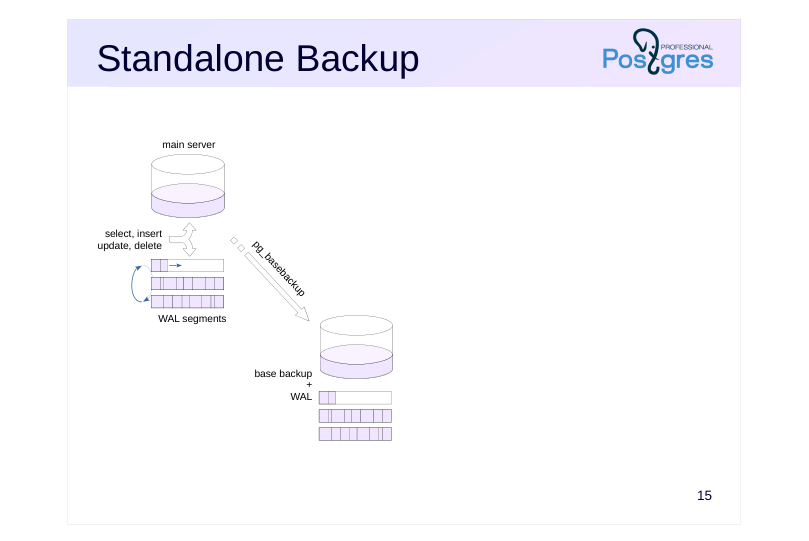
Page 14: Standalone Backup
Base copy + WAL
- Backup via pg_basebackup
- connects to the server over the replication protocol
- performs a checkpoint
- copies the database cluster files into a specified directory
- saves all WAL segments generated during the copying process
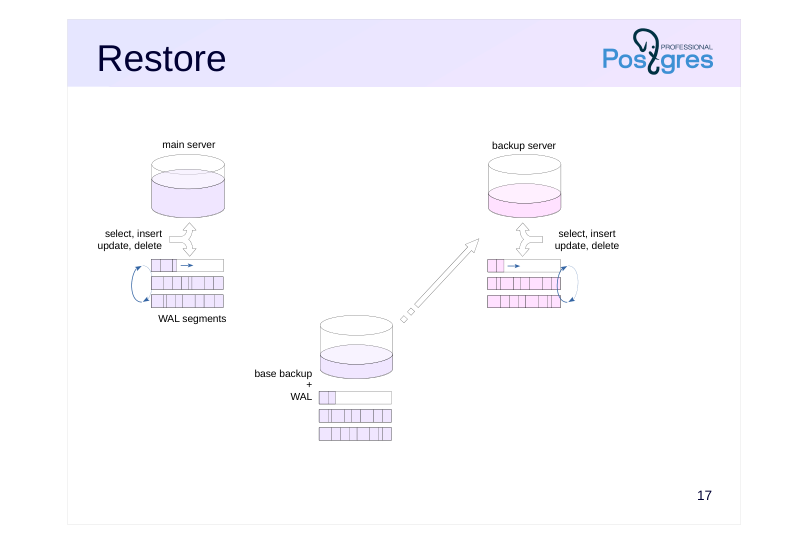
- Restore
- deploy the standalone backup
- start the server
Speaker notes
Hot backups are created with the pg_basebackup tool.
First, it performs a checkpoint. Then, the cluster files are copied.
All WAL files generated by the server during the time from the checkpoint to the end of file copying are also added to the backup. The resulting backup is called standalone because it contains all the data necessary for recovery.
All you need to restore using a standalone backup is to deploy the backup and start the server. It will use the WALs to restore consistency on startup if necessary, and will be ready to go.
https://postgrespro.com/docs/postgresql/16/app-pgbasebackup
Page 15: Replication Protocol
Protocol
- receiving the WAL stream
- backup and replication control commands
- Served by wal_sender process
- wal_level = replica
- Replication slot
- a server object for receiving WAL records
- remembers which record was read last
- WAL segment is not deleted until fully read through the slot
Speaker notes
The replication protocol allows the utility to connect to the server and collect all WAL files generated during file copying. Despite the name, the protocol is used not only for replication (which will be discussed in the next lesson), but also for backup. The protocol can stream WAL records while data files are being copied.
To prevent the server from deleting WAL files too early, the replication slot can be employed, which keeps track of the last WAL record received by the client.
Establishing a connection over the replication protocol requires a certain configuration.
First, the initiating role must have the REPLICATION attribute (or be a superuser). This role must also have the necessary permission in the pg_hba.conf configuration file.
Second, the max_wal_senders parameter must be set sufficiently high. This parameter limits the number of simultaneously running wal_sender processes serving replication protocol connections.
Third, the wal_level parameter, which determines the amount of information in the WAL, must be set to replica.
The default settings already satisfy all these requirements (for a local connection).
https://postgrespro.com/docs/postgresql/16/protocol-replication
Page 16: Standalone Backup
 {#source-figure-016 caption=“Source slide page 16: Standalone Backup”}
Speaker notes
The image on the left shows the main server. It processes incoming queries. At the same time, WAL records are formed and the state of the databases changes (first in the buffer cache, then on disk). WAL segments are cyclically overwritten (to be precise, old segments are deleted, since the file names are unique).
At the bottom of the picture is a backup copy (usually located on another server). It contains a base copy of the data and a set of WAL files.
Page 17: Standalone Backup
The default configuration is sufficient for replication protocol:
The local connection permission for the replication protocol is also on in pg_hba.conf by default (not for all package distributions):
Another database cluster, replica, has been initiated on the port 5433. Ubuntu package installs a tool we can use to verify that the cluster is stopped:
Create a backup. Use the default format (plain):
The pg_basebackup utility performs a checkpoint immediately upon connecting to the server. By default, dirty buffers are written gradually to avoid I/O peak loads (the process may take up to 4.5 minutes). When using –checkpoint=fast, buffers are written without delays.
Page 18: Restore
 {#source-figure-018 caption=“Source slide page 18: Restore”}
Speaker notes
During restore, the base backup, including the necessary WAL files, is deployed, for example, on another server (shown on the right).
After the startup, it restores consistency and is ready to go. The system is restored to the point in time when the backup was made. Of course, the main server can go far ahead in the meantime.
Page 19: Restore
Move the new backup into replica cluster directory (after making sure the cluster is stopped):
The cluster files must belong to the postgres user.
Verify the contents:
When started, the cluster will begin restore.
Now both servers run concurrently and independently. Main server:
Server restored from the backup:
Page 20: Page 20
Page 21: WAL Archive
File archive
- WAL segments are archived as they are switched
- controlled by the server
- archiving happens with a delay
- Streaming archive
- a stream of WAL records is continuously recorded into the archive
- external tools required
- delays are minimal
Speaker notes
The hot backup concept can be improved upon even further. Since we have a copy of the database cluster files and WALs, then by constantly saving new logs, we will be able to restore the system not only at the time of copying files, but also at any point in time after that.
There are two ways to go about it. The first is to archive old WAL files before deleting them. There are server settings for that. Unfortunately, with this option, a WAL file will not be archived until the server switches to writing to another WAL file.
The second way is to continuously read WAL entries using the replication protocol and write them into the same archive. This way, delays are minimal, but a separate tool has to be set up to receive the stream data and archive it.
Page 22: File WAL Archive
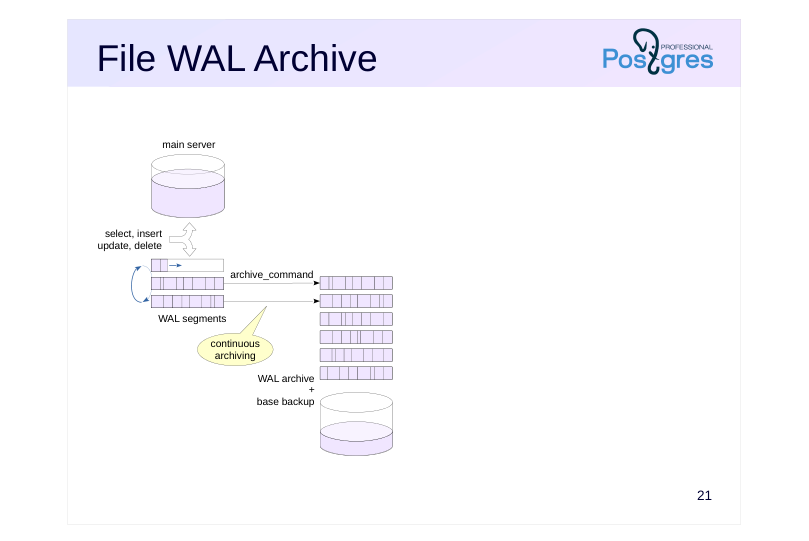
Archiver process
- Parameters
- archive_mode = on
- archive_command
- shell command to copy a WAL segment
- to a separate storage
- Algorithm
- when switching to a new WAL segment, the archive_command is called
- if the command is completed with the status 0, the segment is deleted
- if the command returns anything else (or if the command is not specified),
- the segment remains until the attempt is successful
Speaker notes
The file WAL archive is managed by the archiver background process.
An arbitrary shell command can be defined as the archive_command parameter to be used for copying. The mechanism itself is enabled by the archive_mode = on.
The algorithm goes as follows. When a WAL segment is filled, the copy command is called. If it is completed with a zero status, the segment can be deleted safely. Otherwise, the segment (and the ones following it) will not be deleted, and the server will periodically try to execute the command until it returns 0.
https://postgrespro.com/docs/postgresql/16/continuous-archiving
Page 23: File WAL Archive
 {#source-figure-023 caption=“Source slide page 23: File WAL Archive”}
Speaker notes
This figure shows the main server with continuous archiving set up. Filled WAL segments are copied to a separate archive using the command defined by the archive_command parameter. Usually, the archive is located on a separate server, and it also stores the base backup (or several, from multiple points in time).
Page 24: Streamed WAL Archive
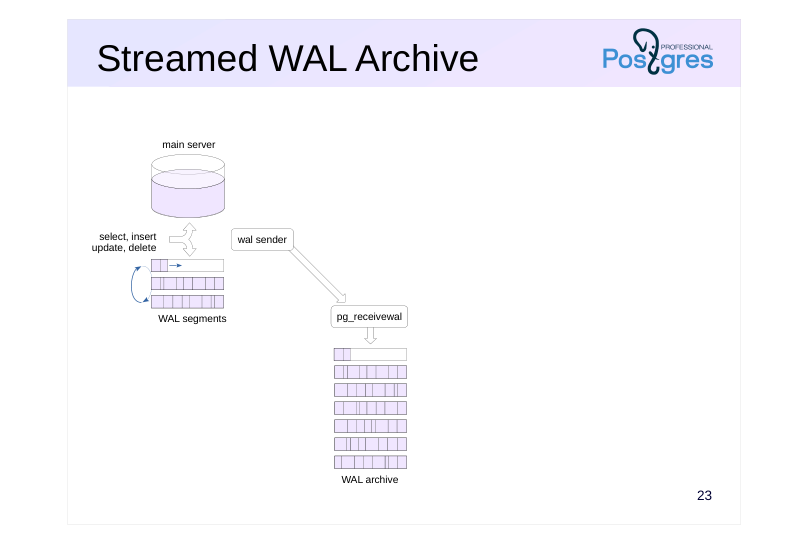
pg\_receivewal utility
- connects over the replication protocol (can use a replication slot)
- and stores WAL records stream in segment files
- the starting position is the beginning of the segment following the last filled
- segment in the directory,
- or the start of current segment, if the directory is empty
- unlike the file archive, records are written continuously
- parameters have to be reconfigured when changing servers
Speaker notes
Another solution is to use the pg_receivewal utility, which receives WAL records via the stream replication protocol and writes segments to the archive.
pg_receivewal usually runs on a separate “archive” server and connects to the main server with the parameters specified in the command line options. It can (and should) use a replication slot in order to ensure that records are not lost.
pg_receivewal generates files in the same way as the server does, and writes them to the specified directory. Segments that have not yet been filled in are written with the .partial suffix.
When launched, the utility starts archiving from the beginning of the segment, following the newest completed archive segment. If the archive is empty (first run), archiving starts from the beginning of the current segment.
When switching to a new server, pg_receivewal must be stopped and restarted with new parameters.
PostgreSQL does not include built-in tools to run the utility in the background (daemonization) or for automatic startup (as a service). To achieve this, you should use operating system features.
https://postgrespro.com/docs/postgresql/16/app-pgreceivewal
Page 25: Streamed WAL Archive
 {#source-figure-025 caption=“Source slide page 25: Streamed WAL Archive”}
Speaker notes
pg_receivewal connects to the server over the stream replication protocol. The connection is handled by a separate wal sender process (this must be taken into account when setting the max_wal_senders parameter).
pg_receivewal saves data without waiting for the entire segment to be received.
Page 26: Base Backup + Archive
Configured continuous WAL archiving
- Backup via pg_basebackup
- connects to the server over the replication protocol
- performs a checkpoint
- copies the cluster files into a specified directory
- WAL segments
- are not required
- Restore
- deploy the backup
- set configuration parameters
- (command to read WAL from the archive, target recovery point)
- create a recovery.signal file
- start the server
Speaker notes
To create a backup with continuous archiving configured, the same pg_basebackup tool is used, but with a different set of parameters. The difference is that the WAL files are not saved to the backup, since they are already in the archive.
Restore is more complicated in this case. In addition to deploying the base backup, some recovery settings must be specified:
● restore_command (inverse of archive_command, it copies files from the archive to the server);
● target restore point.
In addition, a recovery.signal file is needed. If present at server startup, the file tells the server to enter the managed recovery mode (the contents of the file is ignored).
Page 27: Restore
 {#source-figure-027 caption=“Source slide page 27: Restore”}
Speaker notes
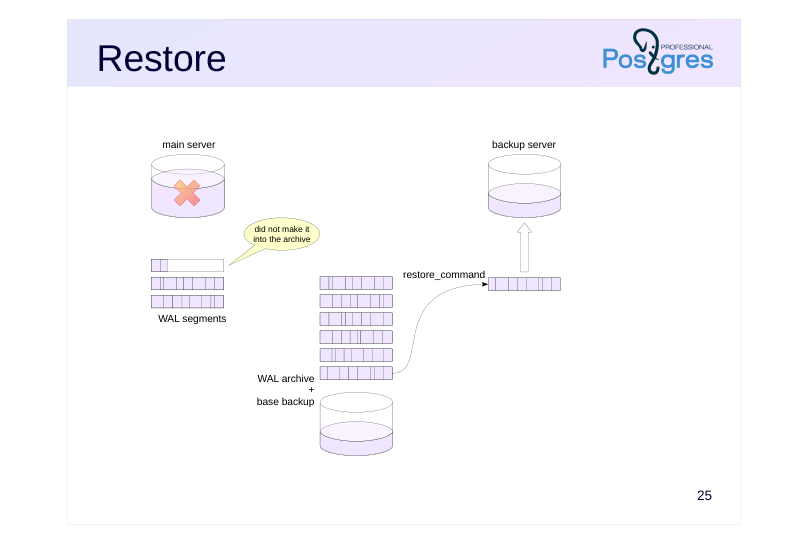
The restore procedure (for example, after main server crash) is performed as follows. A base backup is deployed on another (or the same) server and a recovery.signal file is created. The server starts up and starts reading WAL segments from the archive using restore_command and applying them.
Note that during file archiving, the last incomplete WAL segment at the main server will not be archived. However, the segment can be manually added to the pg_wal directory on the backup server, if this option is available. There may be several such segments in case of archiving failure.
Page 28: Restore
 {#source-figure-028 caption=“Source slide page 28: Restore”}
Speaker notes
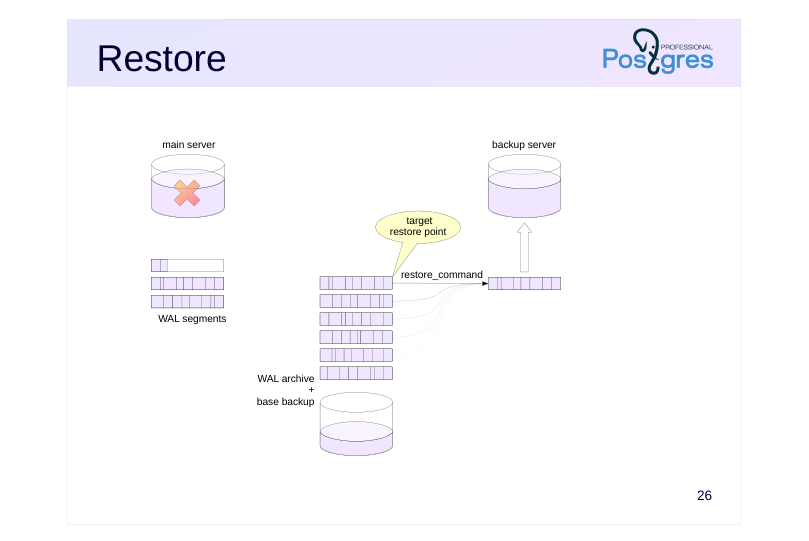
The backup server reads WAL segments from the pg_wal directory and applies them (in the absence of a segment, making an attempt to copy it from the archive), ultimately bringing the state of the databases up to date. The maximum possible loss is the last incomplete WAL segment that has not been archived, and only if it cannot be copied manually for some reason.
By default, all available log entries are applied. If a target restore point is specified, recovery will stop after reaching it.
Page 29: Restore
 {#source-figure-029 caption=“Source slide page 29: Restore”}
Speaker notes
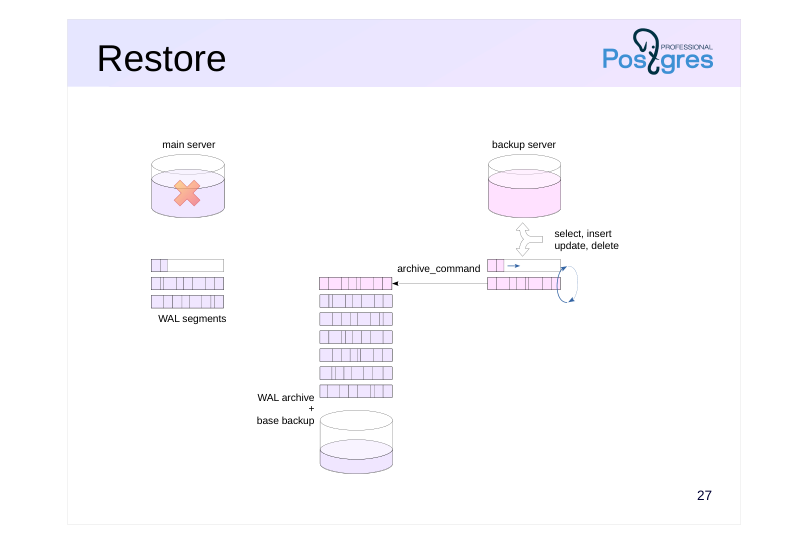
After that, the backup server goes into normal operation: processing incoming queries, archiving WAL segments, and so on.
The restored server can act as the primary server from now on, but in this case it should be deployed on sufficiently powerful hardware in the first place to avoid performance degradation.
Page 30: Takeaways
Logical backup creates SQL commands to restore the state of database objects
- copy command, pg_dump and pg_dumpall utilities
- Physical backup creates a copy of the cluster files + a set of WAL files
- pg_basebackup utility
- WAL archive
- file or stream
- can restore the system to an arbitrary point in time
Page 31: Practice
- Create a database and a table in it with several rows. 2. Make a logical backup of the database using pg_dump. Delete the database and restore it from the backup you made. 3. Make a standalone physical backup of the cluster using pg_basebackup. Modify the table. Restore into a new cluster from the backup you made and verify that the restored database does not contain any of the later changes.
Speaker notes
- replica cluster has already been created in the course VM on port 5433. Use this cluster to restore into.
The cluster data directory is /var/lib/postgresql/16/replica.
To connect to it, specify the port number: psql -p 5433
Page 32: 1. Database and Table
2. Logical Backup
Create a backup:
Delete the database and restore it from the backup:
Page 33: 3. Physical Standalone Backup
Creating a backup with a fast checkpoint:
Make sure the second server is stopped and deploy the backup:
Change the table:
Start the server from backup:
Page 34: Practice+
- Set up stream archiving on the main cluster using pg_receivewal. 2. Create a standalone backup of the main cluster (without WAL) using pg_basebackup. 3. In the main cluster, create a database and a table in it. 4. Restore the replica cluster from the base backup using the archive. Verify that the database and the table are also restored.
Speaker notes
The replica cluster catalog is /var/lib/postgresql/16/replica.
The current file being written by the pg_receivewal utility has a .partial suffix. Once writing is complete, the file is renamed. When recovering, use the partial file along with the usual segments.
To connect to the replica cluster, specify the port number: psql -p 5433
Page 35: 1. Streaming Archive
Note Note that some commands are executed as the postgres user, and some as student. Create a directory to store the WAL archive:
Create a slot to avoid gaps in the archive:
Run the pg_receivewal utility in background. To do that, execute the following command in a separate terminal (or add & at the end of the command in the same terminal).
2. Base Backup without WAL
3. New Database and Table
4. Recovery Configuration
Make sure the second server is stopped and push the backup:
Page 36: Page 36
Use the partial segment during recovery as well:
Start the server and see the result:
Archiving is no longer necessary. Stop the utility and delete the slot to prevent it from interfering with WAL cleanup.