13 Lesson 13: Access Control / Overview
This page is extracted from the official PDF into native Markdown. Slide text, code and speaker notes are kept in reading order; the original PDF and HTML remain the layout references. HTML source: dba1_13_access_overview.html Archive: DBA1-handouts-16-en.zip PDF pages: 30
Page 1: Access Control / Overview
Copyright
© Postgres Professional, 2017–2025 Authors: Egor Rogov, Pavel Luzanov, Ilya Bashtanov, Igor Gnatyuk Translated by: Liudmila Mantrova, Alexander Meleshko, Elena Sharafutdinova Photo: Oleg Bartunov (Phu Monastery and Bhrikuti Peak, Nepal)
Use of Course Materials
Non-commercial use of course materials (presentations, demonstrations) is allowed without restrictions. Commercial use is possible only with the written permission of Postgres Professional. It is prohibited to make changes to the course materials.
Feedback
Please send your feedback, comments and suggestions to: edu@postgrespro.ru
Disclaimer
Postgres Professional assumes no responsibility for any damages and losses, including loss of income, caused by direct or indirect, intentional or accidental use of course materials. Postgres Professional company specifically disclaims any warranties on course materials. Course materials are provided “as is,” and Postgres Professional company has no obligations to provide maintenance, support, updates, enhancements, or modifications.
Page 2: Topics
- Roles and Attributes
- Connecting to a Server
- Password Authentication
- Privileges and Privilege Management
- Role Categories
- Group and Predefined Roles
- Default Privileges
- Privileges and Routines
Page 3: Roles and Attributes
Role can be a DBMS user
- not associated with the OS user
- Roles can be included into other roles
- simplifies access setup
- Attributes define the properties of a role
- LOGIN
- can log in
- SUPERUSER
- superuser privileges
- CREATEDB
- can create databases
- CREATEROLE
- can create roles
- and others
Speaker notes
Roles in PostgreSQL are used for two purposes. Firstly, a role can be a DBMS user. Secondly, roles can be members of other roles — it is convenient when setting up access.
Formally, roles are not associated with operating system users in any way, but many programs imply it when choosing default values. For example, if psql is started on behalf of the student OS user, the connection is established on behalf of the database role with the same name, i.e., student (unless another role is explicitly specified in the psql options).
At the time of cluster initialization, an initial role is defined, which has superuser privileges (this role is usually called postgres). Later on, you can create, modify, and delete roles.
https://postgrespro.com/docs/postgresql/16/database-roles
A role has several attributes which define its general properties and rights (unrelated to particular objects).
Generally, attributes come in two opposite variations; for example, CREATEDB (can create databases) and NOCREATEDB (not allowed to create databases).
A role with the LOGIN attribute is considered a user role. A role with NOLOGIN cannot connect to the server and is typically used for grouping other roles.
The table lists only some of the possible attributes.
https://postgrespro.com/docs/postgresql/16/role-attributes
https://postgrespro.com/docs/postgresql/16/sql-createrole
Page 4: Roles and Attributes
Create a role for the user Alice. Two attributes are specified.
Note Note which role the commands are executed as. The name of the current role is in the prompt.
You can get the list of roles with the command:
Note Note that the student role is a superuser. This is why we did not have any access issues so far. Create a database:
Page 5: Connecting to a Server
1. The lines of pg\_hba.conf are searched from top to bottom
- The first line that corresponds to the provided connection settings (type, database, user, address) will be used
- local — socket all — any role host — TCP/IP role name
- listen_addresses
- all — any DB
- all — any IP
- database name
- IP/mask
- domain name
Speaker notes
For each new client, the server has to evaluate whether a database connection should be allowed. Connection settings are defined in the pg_hba.conf configuration file (hba stands for host-based authentication). As with the main configuration file (postgresql.conf), changes come into effect only after the server reloads this file, either via the pg_reload_conf() SQL function or the reload command of the management utility.
When a new client appears, the server reads the configuration file from top to bottom to find the line that matches the requested connection. The match is defined by four fields: connection type, database name, user name, and IP address.
Here we list only the main basic options.
Connection: local (unix sockets) or host (a TCP/IP connection).
Database: all (corresponds to any database) or the name of a particular database.
User: all or the name of a particular role.
Address: all, IP address range, or a domain name. The address is omitted for the local connection type. By default, PostgreSQL listens only for connections coming from localhost; the listen_addresses parameter is usually set to * (listen on all interfaces), while the access is controlled using pg_hba.conf settings.
https://postgrespro.com/docs/postgresql/16/client-authentication
Page 6: Connecting to a Server
3. The server performs authentication using the chosen method
- If successful, access is allowed; otherwise, it is forbidden (if no rows match the given parameters, access is forbidden)
- trust — allow
- reject — forbid
- scram-sha-256 и md5 — request a password
- peer — ask OS
Speaker notes
Once the server finds an appropriate line in the file, it performs client authentication using the method specified in this line, and checks for the LOGIN attribute and the CONNECT privilege. If everything is OK, the connection is allowed; otherwise, it is forbidden (other lines won’t be considered in this case).
If no appropriate line is found, the access is also forbidden.
Thus, more specific connection lines should precede more generic ones.
There are a lot of different authentication methods:
https://postgrespro.com/docs/postgresql/16/auth-methods
Here are some of the main ones.
The trust method allows connections unconditionally. If security is not a concern, you can specify the trust method and use all for all the other parameters; then all connections will be allowed.
The reject method, on the contrary, unconditionally forbids connections.
The scram-sha-256 method asks for a password and checks that the provided password matches the one stored in the system catalog of the database cluster. The md5 method is considered deprecated.
The peer method checks the name of the operating system user and allows connections on behalf of the database user with the same name (you can also define a different name mapping).
Page 7: Password Authentication
At the server side
- the password is set when the role is created and can be changed later
- a user that has no password won’t be able to connect
- the password is stored in the pg_authid system catalog
- Entering the password on the client
- manually
- using the PGPASSWORD environment variable
- using the ~/.pgpass file (lines format: node:port:database:role:password)
Speaker notes
If password authentication is used, there must be a reference password stored for the user; otherwise the connection will be rejected.
Password hashes are stored in the pg_authid table in the system catalog.
The user can either enter the password manually, or automate password input using one of the following options.
First, the password can be set in the PGPASSWORD environment variable (on the client). However, it is inconvenient if you have to connect to several databases, and it is not recommended for security reasons.
The second option to store passwords on the client is to use the ~/.pgpass file. The access to this file must be allowed to its owner only (chmod 600), otherwise PostgreSQL will ignore it.
Page 8: Connection
In order for a role to connect to the database, it must have both the LOGIN attribute and the permission in the file pg_hba.conf. You can usually find it right beside the main configuration file:
And you can read it directly from SQL:
(The contents may vary depending on the server build.) We will use a TCP/IP (host) connection to localhost. Such connection corresponds to the second string in the output, expecting password-based authentication. The role alice was created with a password right away, but the password can be changed at any time:
Attempt to connect using a connection string with all the info:
Success!
Page 9: Privileges
Privileges define access rights of roles to objects
- Tables and views
- SELECT
- read data
- INSERT
- insert rows
- can be set per column
- UPDATE
- change rows
- DELETE
- delete rows
Speaker notes
Privileges establish a relation between subjects (roles) and objects in the cluster. They determine the actions that roles can perform with these objects.
There are different privileges available for different object types. This slide and the following one list privileges for basic database objects.
The widest choice of privileges is available for tables and views. Some of these privileges can be set not only at the table level, but also at the column level.
https://postgrespro.com/docs/postgresql/16/ddl-priv
https://postgrespro.com/docs/postgresql/16/sql-grant
Page 10: Privileges
 {#source-figure-010 caption=“Source slide page 10: Privileges”}
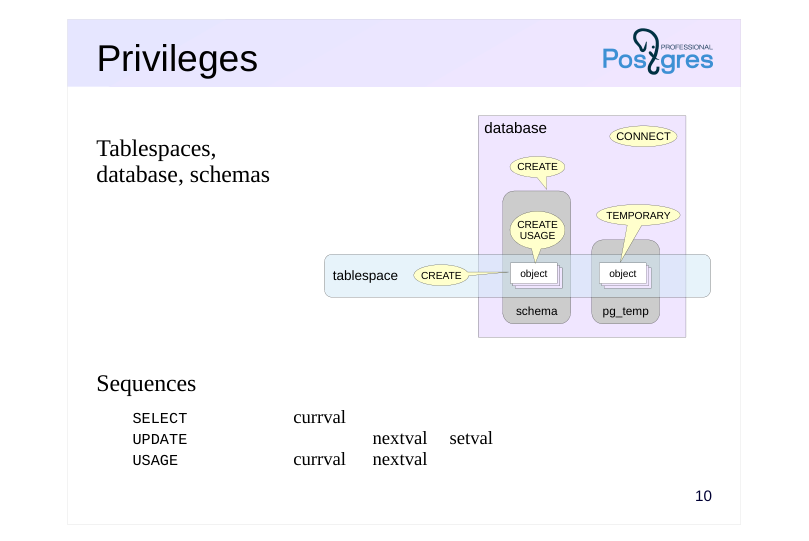
Tablespaces, database, schemas
- Sequences
- SELECT
- currval
- UPDATE
- nextval
- setval
- USAGE
- currval
- nextval
Speaker notes
Sequences have a somewhat unexpected set of privileges. They serve to allow or restrict access to the three control functions.
For tablespaces, there is a CREATE privilege that allows the creation of objects in this tablespace.
For databases, the CREATE privilege allows you to create schemas in this database, and for a schema, the CREATE privilege allows you to create objects in this schema.
Since the exact name of the schema for temporary objects is unknown in advance, the privilege to create temporary tables has been moved to the database level (TEMPORARY).
The USAGE schema privilege allows access to objects in this schema.
The CONNECT database privilege allows connection to this database.
Page 11: Role Categories
Superusers
- full access to all objects, no checks performed
- Owners
- initially, all privileges on the object (can be revoked)
- actions that are not regulated by privileges, such as deleting objects, granting
- and revoking privileges, etc.
- Other roles
- access within the granted privileges
Speaker notes
Generally speaking, a role’s ability to access an object is defined by the role’s privileges. But it makes sense to single out three categories of roles and discuss them separately.
Roles with the SUPERUSER attribute (superusers). These roles can do anything and ignore all access control checks.
Object owner. Initially, this is the role that created the object, although it can be changed later. It’s not just the object creator role that becomes the owner, but also any other role included in it. The object owner gets the full range of privileges on this object.
Technically, these privileges can be revoked, but the owner always retains inherent rights on the actions that are not regulated by any privileges. In particular, the owner can grant and revoke privileges (including to and from themselves), delete the object, etc.
- All other roles have access to the object only as far as the privileges granted to them allow it.
To check if a role has the necessary privilege with respect to some object, you can use the has_*_privilege functions:
https://postgrespro.com/docs/postgresql/16/functions-info
Page 12: Privilege Management
Granting privileges
- alice
- bob
- privileges
- on object
- Revoking privileges
Speaker notes
The right to grant and revoke privileges on an object belongs to the owner of that object (and the superuser).
The syntax of the GRANT and REVOKE commands is quite complex. You can specify both individual and all possible privileges, both individual objects and groups of objects included in certain schemas, etc.
https://postgrespro.com/docs/postgresql/16/sql-grant
https://postgrespro.com/docs/postgresql/16/sql-revoke
Page 13: Privileges
 {#source-figure-013 caption=“Source slide page 13: Privileges”}
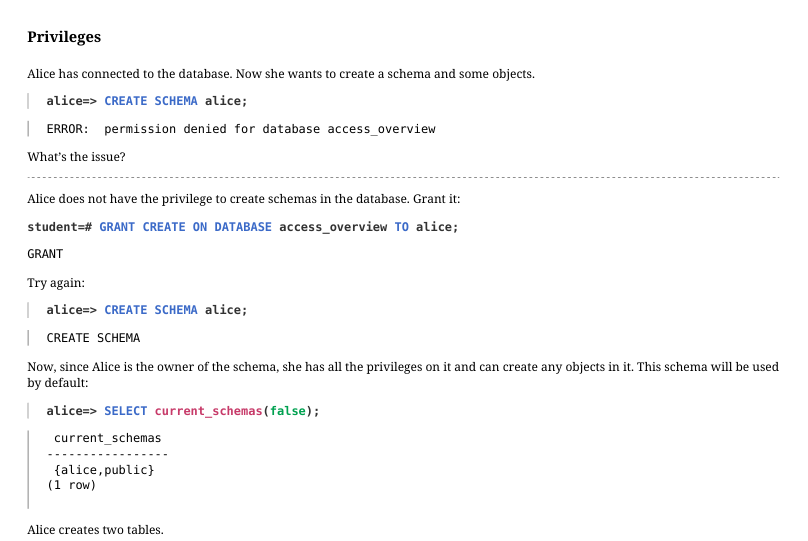
Alice has connected to the database. Now she wants to create a schema and some objects.
What’s the issue? Alice does not have the privilege to create schemas in the database. Grant it:
Try again:
Now, since Alice is the owner of the schema, she has all the privileges on it and can create any objects in it. This schema will be used by default:
Alice creates two tables.
The superuser creates another role for the user Bob, who will access objects belonging to Alice.
Bob attempts to access the table t1:
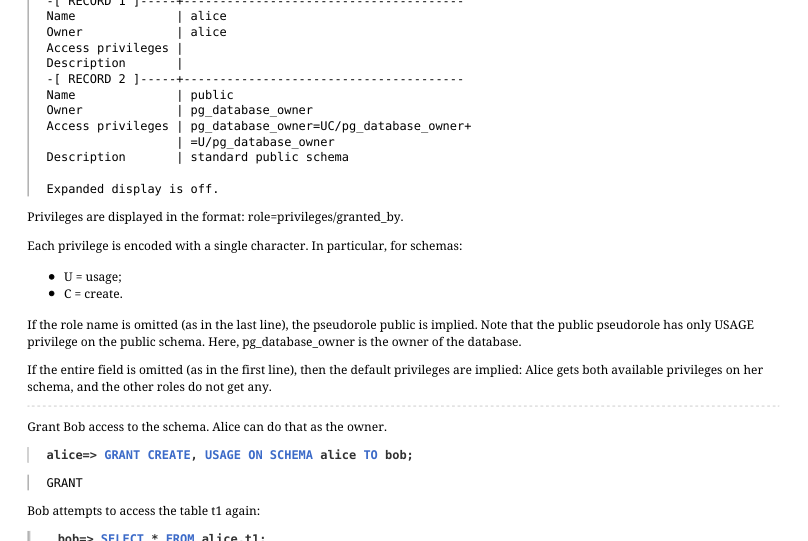
What happened? Bob is neither a superuser nor the owner of this schema, so access is denied. This command lists current access rights (Access privileges column):
Page 14: Page 14
 {#source-figure-014 caption=“Source slide page 14: Page 14”}
Privileges are displayed in the format: role=privileges/granted_by. Each privilege is encoded with a single character. In particular, for schemas: U = usage; C = create. If the role name is omitted (as in the last line), the pseudorole public is implied. Note that the public pseudorole has only USAGE privilege on the public schema. Here, pg_database_owner is the owner of the database. If the entire field is omitted (as in the first line), then the default privileges are implied: Alice gets both available privileges on her schema, and the other roles do not get any. Grant Bob access to the schema. Alice can do that as the owner.
Bob attempts to access the table t1 again:
Another error. What happened now? This time, Bob has access to the schema, but not to the table itself. This command shows who has access to the table:
The field is empty: only the owner, Alice, has access. Alice grants Bob read and update access:
And read and insert rights for one column in the second table:
The privileges have changed:
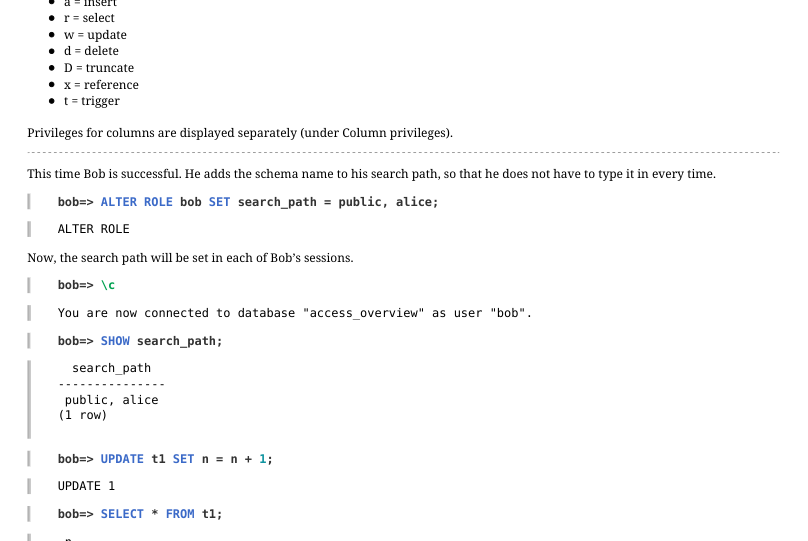
Now the empty field has “appeared” and contains a complete list of privileges. Below are the designations, not all of them are quite
Page 15: Page 15
 {#source-figure-015 caption=“Source slide page 15: Page 15”}
obvious: a = insert r = select w = update d = delete D = truncate x = reference t = trigger Privileges for columns are displayed separately (under Column privileges). This time Bob is successful. He adds the schema name to his search path, so that he does not have to type it in every time.
Now, the search path will be set in each of Bob’s sessions.
However, all other operations remain restricted.
And the second table:
Reading of the other column is not permitted:
Page 16: Granting Membership
 {#source-figure-016 caption=“Source slide page 16: Granting Membership”}
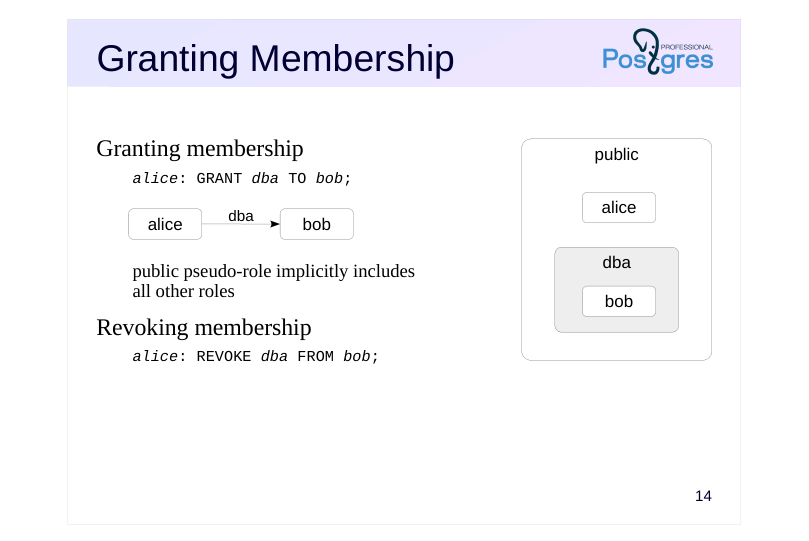
public Granting membership
- alice
- bob
- dba
- public pseudo-role implicitly includes
- all other roles
- Revoking membership
Speaker notes
Any role can include other roles as members. In this case, the role acts as a group. PostgreSQL does not have a separate “group” entity.
A role can be a member of multiple roles; in turn, a member role may include other roles, but circular dependencies are not permitted.
By default, a role inherits the privileges of any group roles it is a member of. This behavior can be changed by using the NOINHERIT attribute for the role. This makes the user have to explicitly switch to the group role using SET ROLE in order to use its privileges. Role attributes are not inherited, but it is possible to switch to a parent role to use its attributes.
Roles that include other roles typically have the NOLOGIN attribute and are referred to as “group roles”. We can think of a group role as a predefined set of privileges that can be granted to a role just like any regular privilege. This simplifies access control and administration.
There is also a pseudorole called public, which implicitly includes all the other roles. Any privilege granted to the public role is automatically granted to all the other roles as well.
https://postgrespro.com/docs/postgresql/16/role-membership
Page 17: Predefined Roles
pg_monitor
- pg_read_all_settings read all server parameters
- pg_read_all_stats access statistics pg_stat_scan_tables monitoring and locking tables
- pg_read_all_data read data in all tables pg_write_all_data change data in all tables
- pg_read_server_files read files on the server pg_write_server_files write to files on the server
- pg_execute_server_programs run programs on the server
- …
Speaker notes
PostgreSQL provides a number of predefined roles that have access to some frequently used, but privileged capabilities and data. Membership in these roles may be granted to users in order to facilitate administrative and maintenance tasks without providing them superuser capabilities.
The list of predefined roles increases with each PostgreSQL version. The full list of all the roles, including predefined ones, cat be seen by \duS command in psql.
https://postgrespro.com/docs/postgresql/16/predefined-roles
You can create your own administrative group roles, e.g. for managing backups.
Page 18: Group Roles
 {#source-figure-018 caption=“Source slide page 18: Group Roles”}
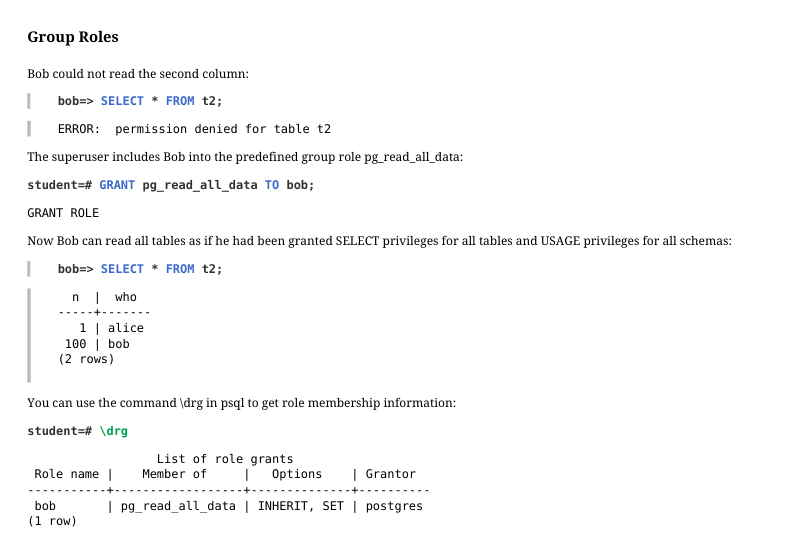
Bob could not read the second column:
The superuser includes Bob into the predefined group role pg_read_all_data:
Now Bob can read all tables as if he had been granted SELECT privileges for all tables and USAGE privileges for all schemas:
You can use the command \drg in psql to get role membership information:
The Options column shows attributes for the membership. For Bob as a member of pg_read_all_data, SET means the right to switch to the group role, and INHERIT means that Bob can use the group privileges without explicitly switching to the group. Exclude Bob from the group:
Page 19: Routines
The only privilege for functions and procedures
- EXECUTE
- execution
- Security modes
- SECURITY INVOKER
- executed with the privileges of the caller
- (by default)
- SECURITY DEFINER
- executed with the privileges of the owner
Speaker notes
The privilege EXECUTE, the only privilege for functions and procedures, allows them to execute.
The user on behalf of which the routine is executed is important. If a routine is declared as a SECURITY INVOKER (by default), it is executed with the rights of the user that runs it. In this case, the statements inside the routine can access only those objects that are accessible to the calling user.
On the other hand, if declared with the SECURITY DEFINER, the routine will use the rights of its owner. This is a way to allow certain users perform certain actions on objects they personally have no access to.
https://postgrespro.com/docs/postgresql/16/sql-createfunction
https://postgrespro.com/docs/postgresql/16/sql-createprocedure
Page 20: Default Privileges
Privileges of the public pseudo-role
- connect to any database
- access to the system catalog
- execution of any routines
- privileges are granted automatically on each new object
- Configurable default privileges
- the possibility to additionally grant or revoke privileges on a newly created
- object
Speaker notes
As we have already said, the public pseudo-role includes all other roles, so they inherit all the privileges granted to public.
And public has quite an extensive list of privileges by default. In particular:
● The right to connect to any database (that’s why the role alice could connect to the database although the CONNECT privilege had not been explicitly granted to this role)
● Access to the system catalog
● Execution of any routines
On the one hand, it enables seamless operation without having to deal with privileges; but on the other hand, it brings extra complications if access control is really required.
The public role automatically receives all the privileges listed above for all newly created objects. So it is not enough to simply revoke the EXECUTE privilege from public: once a new routine appears, public immediately gets the right to execute it.
There is a special mechanism of default privileges that enables you to automatically grant and revoke the required privileges on newly created objects. It can be also used to revoke the EXECUTE privilege from the public pseudo-role.
https://postgrespro.com/docs/postgresql/16/sql-alterdefaultprivileges
Page 21: Configurable Default Privileges
 {#source-figure-021 caption=“Source slide page 21: Configurable Default Privileges”}
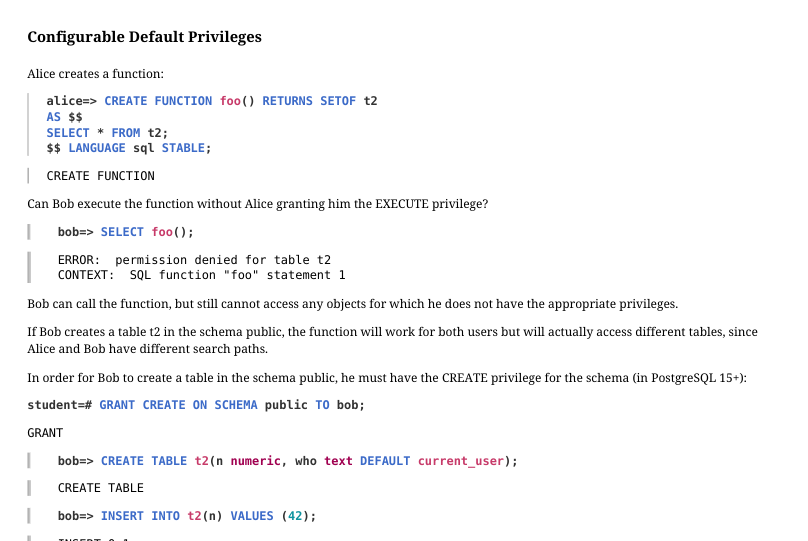
Alice creates a function:
Can Bob execute the function without Alice granting him the EXECUTE privilege?
Bob can call the function, but still cannot access any objects for which he does not have the appropriate privileges. If Bob creates a table t2 in the schema public, the function will work for both users but will actually access different tables, since Alice and Bob have different search paths. In order for Bob to create a table in the schema public, he must have the CREATE privilege for the schema (in PostgreSQL 15+):
Alternatively, the function can be declared as using the privileges of its owner:
In this case, the function will always be executed with the privileges Alice has, regardless of who actually calls it. Bob deletes his table…
…and gets access to the Alice’s table:
In this situation, Alice needs to keep an eye on the granted privileges. For one, she should revoke the EXECUTE privilege from the role public and explicitly grant it only to the roles that should have it.
Page 22: Page 22
 {#source-figure-022 caption=“Source slide page 22: Page 22”}
To make matters worse, for each new function, the EXECUTE privilege is always granted to public by default. You can configure default privileges so that specific users would get (or lose) specific privileges on newly created objects:
Now, Bob is immediately granted execute privileges on routines created by Alice, while other users will not have permission to run them.
Page 23: Takeaways
Roles, attributes and privileges together form a flexible mechanism that allows you to set up access control in different ways
- can grant all access widely
- can restrict access heavily if necessary
- When creating a new role, you need to ensure that it can connect to the server
Page 24: Practice
Set up privileges so that some users have full access to the tables, while others can only query, but not modify the data.
- Create a new database and two roles: writer and reader. 2. Revoke all privileges for the public schema from the public role, grant both privileges to the writer role, and only the usage privilege to the reader role. 3. Set up the default privileges so that the reader role gets read access to the tables owned by writer in the public schema. 4. Create user w1 as a member of the writer role, and user r1 as a member of the reader role. 5. As writer, create a table. 6. Verify that r1 has read-only access to the table, and w1 has full access to it, including the ability to remove it.
Page 25: 1. Databases and Roles
2. Privileges
3. Default Privileges
4. Users
Writing role:
The IN ROLE construct immediately includes the new role into the specified one. That is, this command is equivalent to these two:
Reading role:
5. Table
6. Verification
w1 can insert rows:
Page 26: Page 26
r1 can read the table:
But cannot modify it:
w1 can delete the table:
In PostgreSQL 14+, the predefined role pg_read_all_data was added, which automatically provides read access to all data. Only the database owner or a superuser can drop the database:
Page 27: Practice+
- Register the user roles alice and bob. 2. Modify the pg_hba.conf file to allow access without password only for the postgres and student users, ensuring that access for alice and bob remains restricted. 3. Enable peer authentication method for alice and bob. Check that connection attempts fail without OS user mapping. Create such mapping for alice. 4. Check the capability to use the same OS user mapping for different database roles.
Speaker notes
- Using a text editor, insert the new entry before the first uncommented directive in pg_hba.conf. local all postgres,student trust
Reload configuration.
- Modify the inserted directive in pg_hba.conf by replacing it with the following: local all postgres,student trust local all alice,bob peer
Append the following to the end of the pg_ident.conf file: stmap student alice
- For alice and bob roles to share a single mapping, the pg_ident.conf file shall be as follows: stmap student alice stmap student bob
Page 28: 1. Add Roles
Register roles with the permission to log in.
2. Limit the use of trust
Edit the contents of pg_hba.conf, allowing the trust method only for postgres and student.
This is what we get:
Reload the configuration.
Now, neither alice nor bob can connect.
3. Peer Authentication Method
Using a text editor, add another line with the peer authentication method to allow alice and bob to connect.
Contents of pg_hba.conf:
Page 29: Page 29
Reload the configuration.
The users still cannot log in, but the error message is now different.
The peer authentication method requires the user names in the OS and roles in PostgreSQL to match. Map the role alice to the OS user student by adding a line to pg_ident.conf. Do not set up the mapping for bob, though.
Add the parameter map to the line to set the mapping.
Contents of pg_hba.conf:
Reload the configuration.
Now alice can connect to the database and execute commands.
And bob cannot.
Page 30: 4. One Mapping for Multiple Roles
Allow bob to connect under the same conditions as alice.
Lines added to pg_ident.conf:
Reload the configuration.
Now both alice and bob can connect.