11 Lesson 11: Data Organization / Low Level
This page is extracted from the official PDF into native Markdown. Slide text, code and speaker notes are kept in reading order; the original PDF and HTML remain the layout references. HTML source: dba1_11_data_lowlevel.html Archive: DBA1-handouts-16-en.zip PDF pages: 20
Page 1: Data Organization / Low Level
Copyright
© Postgres Professional, 2017–2025 Authors: Egor Rogov, Pavel Luzanov, Ilya Bashtanov, Aleksei Beresnev Translated by: Liudmila Mantrova, Alexander Meleshko, Elena Sharafutdinova Photo: Oleg Bartunov (Phu Monastery and Bhrikuti Peak, Nepal)
Use of Course Materials
Non-commercial use of course materials (presentations, demonstrations) is allowed without restrictions. Commercial use is possible only with the written permission of Postgres Professional. It is prohibited to make changes to the course materials.
Feedback
Please send your feedback, comments and suggestions to: edu@postgrespro.ru
Disclaimer
Postgres Professional assumes no responsibility for any damages and losses, including loss of income, caused by direct or indirect, intentional or accidental use of course materials. Postgres Professional company specifically disclaims any warranties on course materials. Course materials are provided “as is,” and Postgres Professional company has no obligations to provide maintenance, support, updates, enhancements, or modifications.
Page 2: Topics
- Data Files
- Forks: Main, Visibility Map, Free Space Map
- Oversized Row Versions and TOAST
Page 3: Object Forks
 {#source-figure-003 caption=“Source slide page 3: Object Forks”}
Speaker notes
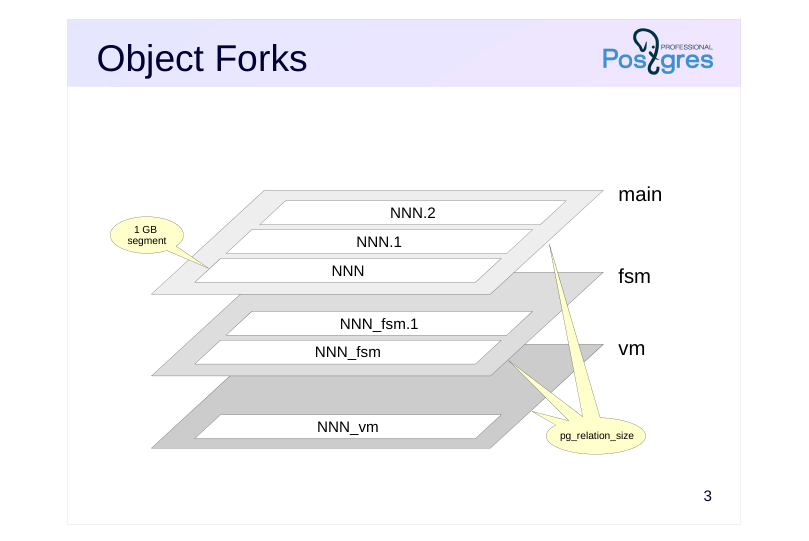
Usually, each database object that stores data (table, index, sequence, materialized view) has several corresponding forks. Each fork contains a specific type of data.
Initially, each fork contains a single file. The file name is a numeric identifier and may include a suffix derived from the fork name.
The file gradually increases in size until it reaches 1 GB, at which point the next file for the same fork is created. Such files are sometimes called segments.The segment sequence number is appended to the end of the file name. The pg_relation_size function displays the total size of a fork.
The 1 GB file size limit was established in the past to support file systems that cannot operate with larger file sizes. A different file size limit can be set during source code compilation with the –with-segsize option.
So, a single database object may consist of multiple files on disk. A small table will have three corresponding files on disk, and an index will have two. All object files belonging to the same tablespace and the same database are stored in the same directory. This may become an issue as some file systems may perform poorly on directories with a large number of files.
Page 4: Forks
Main fork
- actual data (row versions)
- exists for all objects
- Initialization fork (init)
- “template” of the main fork
- used in case of failure; exists only for unlogged tables
- Visibility map (vm)
- exists only for tables
- Free space map (fsm)
- exists for both tables and indexes
Speaker notes
There are several types of forks.
The main fork contains the data itself, namely table row versions and index records. The main fork file names match the identifier. All objects have a main fork.
The file names of the initialization fork end with the _init suffix. This fork exists only for unlogged tables (created with the UNLOGGED clause) and their indexes. Such objects do not differ from regular ones, except that actions performed on them are not logged in WAL. This makes operations on them faster, but their content cannot be recovered if a failure occurs. During a recovery PostgreSQL just removes all the forks of such objects and writes the initialization fork in place of the main fork. The result is an empty table.
https://postgrespro.com/docs/postgresql/16/storage-init
The vm (visibility map) fork’s filenames end in _vm. The fork exists only for tables, separate MVCC for indexes is not supported.
The fsm (free space map) fork’s filenames end in _fsm. This fork exists for both tables and indexes.
These two maps were discussed in the Architecture module.
https://postgrespro.com/docs/postgresql/16/storage-fsm
https://postgrespro.com/docs/postgresql/16/storage-vm
Page 5: File Locations
Create a table and look where its files are.
To form additional forks, we will execute vacuuming:
The path to the main file relative to PGDATA is shown with the following function:
Since the table is located in the pg_default tablespace, the path starts with “base”, followed by the database directory:
Then follows the file name. You can get it using the query:
But the pg_relation_filepath function is more convenient because it returns the full path so that you don’t need to run several queries on the system catalog. Let’s have a look at the files themselves. Only the OS user postgres has access to PGDATA, so run the ls on their behalf:
There are three forks: the main fork, the free space map (fsm) and the visibility map (vm). You can view the index files in a similar way:
Page 6: Page 6
And files for the sequence that has been created for the primary key:
For an index, the free space map is built only when empty pages exist, while a sequence has only a main fork. Temporary tables are stored in the same way as permanent tables.
A prefix matching the schema number is added to the filename for temporary objects.
The oid2name additional supplied extension lets you quickly and easily find out which database objects relate to which files. You can view all databases:
All objects in a database:
Page 7: Page 7
All tablespaces in a database:
Find the file name by table name:
Or the table name by file name:
Fork Sizes
You can get the size of the files that comprise a fork from the file system, but there is an easier way to get the size of each fork individually:
Page 8: TOAST
A row version must fit into one page
- some fields can be compressed
- some fields can be moved into a TOAST table
- fields can be both compressed and moved
- TOAST table
- located in the pg_toast (pg_toast_temp_N) schema
- supported by its own index
- contains chunks of oversized values, each chunk is smaller than a page
- retrieved only when the oversized field is accessed
- has its own row versions
- used transparently for the application
Speaker notes
Any row version in PostgreSQL must fit entirely into one page. Oversized row versions are stored using TOAST, The Oversized Attributes Storage Technique. TOAST comprises several approaches to storing oversized field values. Firstly, the value can be compressed so that the row version fits into the page. Secondly, the value can be moved from the row version to a separate service table. Both strategies can be applied to the same row versions: some values would be compressed, some moved, some compressed and moved.
Any table can have a separate TOAST table (with a dedicated index) created for it, if necessary. Such tables and indexes are located in a separate schema named pg_toast and, therefore, are usually not visible (for temporary tables, pg_toast_temp_N schema is used, similarly to the regular pg_temp_N).
The row versions in the TOAST table must also fit into one page each, so longer values are split into multiple chunks, and are transparently “glued together” by PostgreSQL when the application demands.
TOAST table is used only when oversized values are accessed. Besides that, TOAST tables have their own row versions. Whenever a data update in the main table does not affect the oversized value, the new row version will refer to the same TOAST value, saving disk space.
https://postgrespro.com/docs/postgresql/16/storage-toast
Page 9: TOAST
The table t has a numeric type column. This type can hold very large numbers. For example:
However, when inserted into the table, this humongous value does not change the table size:
Since the row version does not fit into a single page, the value of attribute n is stored in a separate TOAST table. TOAST tables and their indexes are created automatically for all tables that include potentially “oversized” data types and are used as needed. You can find the name and oid of the TOAST table:
And here are the TOAST table files:
When it comes to oversized values, there are several strategies that can be employed. The name of the current strategy is listed in the Storage column:
plain — TOAST is not used (type has a fixed length)
Page 10: Page 10
extended — both compression and out-of-line storage are used external — compression is not used, only out-of-line storage main — such fields are processed last and are moved to the toast table only if compression is not enough A storage strategy is assigned for each column when creating a table. It can be specified explicitly, and the default value depends on the data type. If necessary, the strategy can be modified later. For example, if you know that data in a column is already compressed, you can switch the strategy to external. For example:
This operation does not change the existing data, but defines the strategy to be used for new row versions.
Page 11: Table Size
 {#source-figure-011 caption=“Source slide page 11: Table Size”}
Speaker notes
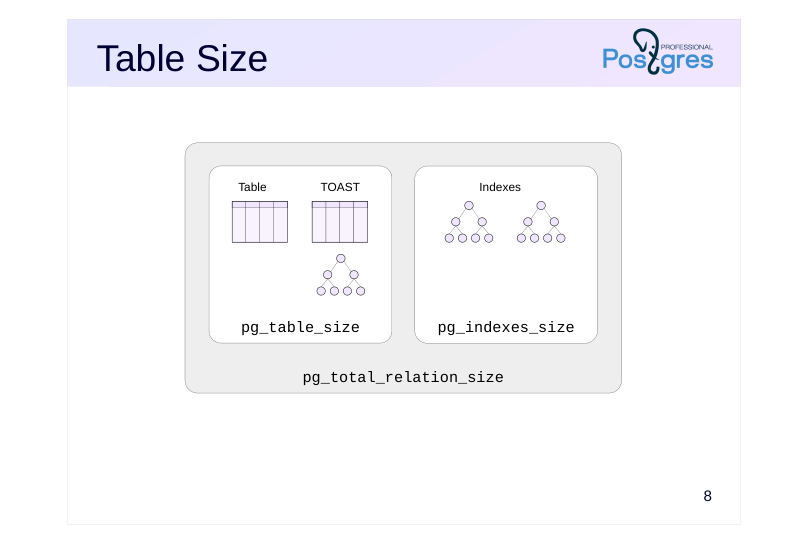
As already mentioned, the size of a single fork can be obtained by the pg_relation_size function. To get the total object size, other functions can be used:
● pg_table_size shows the size of the table and its TOAST part (the TOAST table and its index), but not the regular index sizes. The same function can be used to find the size of an individual index: both tables and indexes are relations, and despite the name, the function accepts any relation as an input.
● pg_indexes_size sums up the sizes of all table indexes except the TOAST table index.
● pg_total_relation_size shows the full size of the table, along with all its indexes.
Page 12: Table Size
The size of a table (including the TOAST table and its index):
Total size of all table indexes:
You can get the size of a single index by using the pg_table_size function. Indexes have no TOASTs, so the function only shows the size of all index forks (main, fsm). Currently, the table t has just the primary key index, so its size matches the size returned by pg_indexes_size:
Total table size, including TOAST and all indexes:
Page 13: Takeaways
An object comprises several forks
- A fork consists of one or more segment files
- Oversized row versions are stored using TOAST
Page 14: Practice
- Create an unlogged table in a custom tablespace and make sure that it has an init fork.
- Delete the created tablespace. 2. Create a table with a column of the text type. What storage strategy is used for this column?
- Change the strategy to external and insert a short and a long row
- into the table.
- Check if the rows are in the TOAST table by making a direct
- query to it. Explain why.
Page 15: 1. Unlogged Тable
Let’s look at the table files.
Note Note that the ls command is executed on behalf of the postgres user. You can open a second terminal window and switch to another user with the following command:
Now, in the same window, run:
Drop the created tablespace:
2. Table with a Text Column
Dy default, the extended strategy is used for text data.
Page 16: Page 16
Change the strategy to external:
Check the TOAST table:
The TOAST table is “hidden”, because it is located in a schema that is excluded from the search path. This is a good thing, because TOAST is intended to work transparently for the user. However, there still are ways to view the table:
Only the long string went into the TOAST table (two chunks, total size matches the string size). The short string wasn’t TOAST’ed: there is no need, as it fits into one page.
Page 17: Practice+
- Create a database.
- Compare the database size returned by the pg_database_size
- function with the total size of all tables in the database.
- Explain the result. 2. TOAST supports two compression methods: pglz and lz4. Use SQL to check whether PostgreSQL was compiled with these methods support. 3. Create a text file of at least 10 MB size. Load its contents into a table with a text field, first without compression, and then using each of the algorithms. Compare the final table size and the data loading time of all three options.
Speaker notes
You can get the list of database tables from the pg_class table.
Using the pg_config view, you can find out which options were set for the configure script when the server software was compiled. The string containing the list of options is long; you can extract the necessary options using the string_to_table function.
To obtain text for the experiment, you can take a sufficiently large binary file (for example, the postgres executable) and convert it to text. For the conversion, you can use the Base32 algorithm (the -w0 option disables line breaks): base32 -w0 < binary-file > text-file
Page 18: 1. Comparing the Size of a Database to the Total Size of its Tables
Even an empty database contains some system catalog tables. The list of all relations is stored in pg_class. Exclude from the calculation: Cluster-wide tables (they do not belong to the current database) Indexes and toast tables (they are automatically taken into account when calculating the size)
The size of the database is a bit larger:
This is because the pg_database_size function returns the size of the catalog in the file system, and the catalog contains some service files.
Note Note that the ls command is executed on behalf of the postgres user. You can open a second terminal window and switch to another user with the following command:
Now, in the same window, run:
pg_filenode.map — mapping oid of some tables to file names; pg_internal.init — system catalog cache; PG_VERSION — PostgreSQL version. As some functions operate on the database object level, and others on the file system level, it is sometimes hard to compare the results directly. The same goes for the pg_tablespace_size function.
2. TOAST Compression Methods Support
The pg_config view displays options passed to the configure script during PostgreSQL compilation.
Page 19: Page 19
Which TOAST compression method is used by default?
What methods are available?
3. Comparison of Compression Methods
Let’s compare compression methods using text data as an example. To obtain a large text volume, we take the postgres executable file and convert it to text using the Base32 algorithm (commonly used in email encoding).
The resulting text file is sufficiently large.
We create a table to load the text data. For the txt column, we set the external storage strategy, which allows out-of-line storage but prohibits compression.
Next, we load the data from the text file.
We check the table size, including TOAST storage.
After emptying the table, we activate compression using pglz.
Page 20: Page 20
Now, the extended strategy is applied, allowing both compression and out-of-line storage. We reload the data.
The table size is significantly reduced, but loading time has been increased noticeably. After clearing the table again, we set lz4 compression.
We reload the data once again and compare the results.
The lz4 algorithm provides slightly worse compression than pglz but operates much faster. Finally, we delete the text file.