10 Lesson 10: Data Organization / Tablespaces
This page is extracted from the official PDF into native Markdown. Slide text, code and speaker notes are kept in reading order; the original PDF and HTML remain the layout references. HTML source: dba1_10_data_tablespaces.html Archive: DBA1-handouts-16-en.zip PDF pages: 14
Page 1: Data Organization / Tablespaces
Copyright
© Postgres Professional, 2017–2025 Authors: Egor Rogov, Pavel Luzanov, Ilya Bashtanov, Aleksei Beresnev Translated by: Liudmila Mantrova, Alexander Meleshko, Elena Sharafutdinova Photo: Oleg Bartunov (Phu Monastery and Bhrikuti Peak, Nepal)
Use of Course Materials
Non-commercial use of course materials (presentations, demonstrations) is allowed without restrictions. Commercial use is possible only with the written permission of Postgres Professional. It is prohibited to make changes to the course materials.
Feedback
Please send your feedback, comments and suggestions to: edu@postgrespro.ru
Disclaimer
Postgres Professional assumes no responsibility for any damages and losses, including loss of income, caused by direct or indirect, intentional or accidental use of course materials. Postgres Professional company specifically disclaims any warranties on course materials. Course materials are provided “as is,” and Postgres Professional company has no obligations to provide maintenance, support, updates, enhancements, or modifications.
Page 2: Topics
- Tablespaces and Directories
- Creating, Modifying, and Deleting Tablespaces
- Storing Data in the File Hierarchy
- Moving Data
Page 3: Tablespaces
 {#source-figure-003 caption=“Source slide page 3: Tablespaces”}
Speaker notes
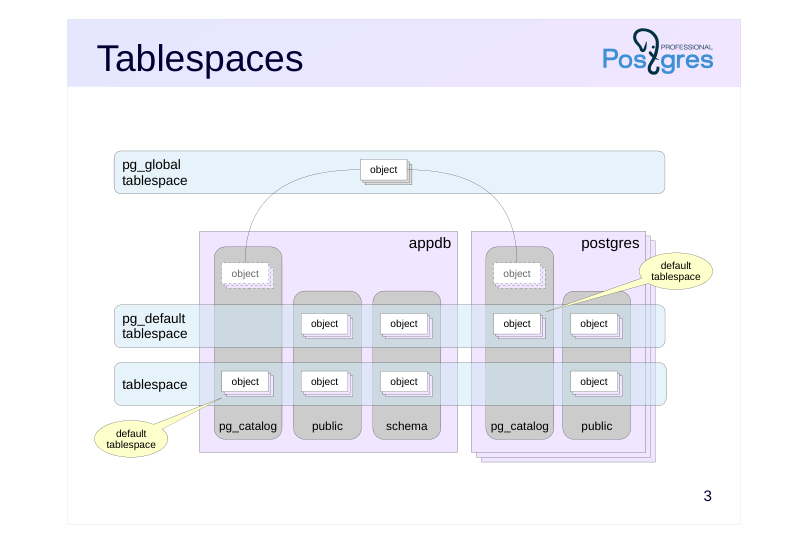
Tablespaces are used to organize the physical storage of data and determine the location of data in the file hierarchy.
For example, one tablespace can use slow disks for archived data, and another one can use fast disks with frequent activity.
On cluster initialization, two tablespaces are created: pg_default and pg_global.
A tablespace can be used by multiple databases, and a database can use multiple tablespaces at once.
Each database has a default tablespace where all database objects are created (unless specified otherwise). System catalog objects are also stored in the default tablespace. Databases will use the pg_default tablespace as their default, unless another one is set by the user.
The pg_global tablespace is special as it stores only those objects that are shared across the whole cluster.
https://postgrespro.com/docs/postgresql/16/manage-ag-tablespaces
Page 4: Directories
 {#source-figure-004 caption=“Source slide page 4: Directories”}
Speaker notes
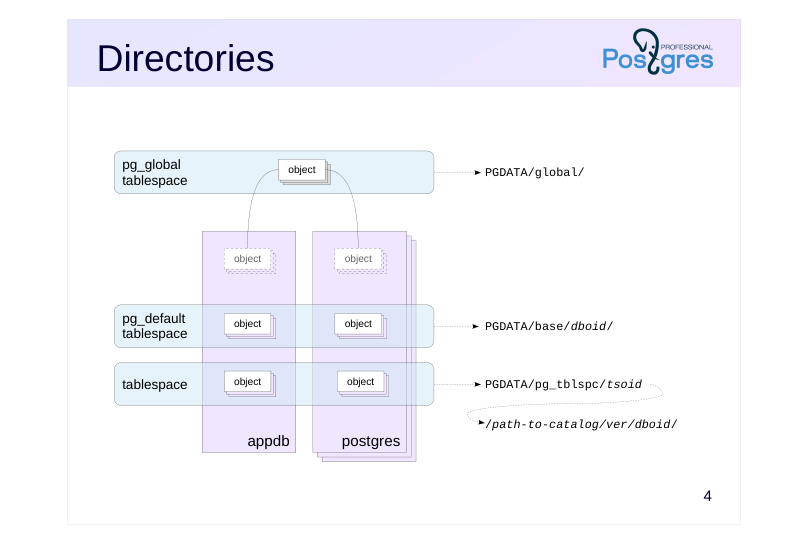
Essentially, a tablespace is a reference to the directory in which the data is located. The standard tablespaces pg_global and pg_default are always located in PGDATA/global/ and PGDATA/base/, respectively. When a custom tablespace is created, an arbitrary catalog can be specified. For its convenience, PostgreSQL also creates a symbolic link to the directory in PGDATA/pg_tblspc/.
The PGDATA/base/ directory comprises different directories for each database (unlike PGDATA/global/, which stores data referring to the whole cluster).
Inside a custom tablespace directory, there is another level for different PostgreSQL server versions. This is helpful during server upgrade.
Actual objects are stored in files in these directories, one or more files per object.
Page 5: System Tablespaces
Upon a cluster initialization, two tablespaces are created:
pg_global — shared cluster objects pg_default — default tablespace
Custom Tablespaces
A new tablespace needs an empty directory owned by the user postgres.
Now, a new tablespace can be created:
The following psql command returns a list of all tablespaces:
Each database has a “default” tablespace. Let’s create a database and assign ts as its default:
This makes all tables and indexes created within the database fall into ts, unless specified otherwise. Connect to the database:
Create a table:
When creating objects, you may explicitly specify a tablespace for it:
Page 6: Page 6
An empty tablespace field means that the default tablespace is used. The second table has this field filled in. You can also specify a tablespace for an index:
Another way to assign a tablespace without defining it at object creation is to preemptively set a value of default_tablespace parameter. A single tablespace may contain objects from multiple databases.
This database’s default tablespace will be pg_default.
For temporary tables and their indexes, you can specify a separate tablespace as the default:
The temp_tablespaces parameter accepts multiple tablespace names. When set, the server selects one randomly for each temporary object.
Managing Objects within Tablespaces
Tables (and other objects, such as indexes) can be moved between tablespaces.
Page 7: Page 7
Indexes can also be moved to a different tablespace during rebuild:
You can move all objects from one tablespace to another:
Keep in mind that moving objects between tablespaces (unlike moving between schemas) is a physical operation that involves moving actual files from one directory to another. Access to the objects being moved is completely blocked for the duration of the operation.
Tablespace Size
We already know how to get the size of a database. Now, we can learn how to get the size of objects in a tablespace:
Why is the size so large, despite the tablespace containing just a few empty tables? This is because ts is the default tablespace for the database appdb, so it is where the system catalog objects are stored. They take up space. You can get the size of the tablespaces by the psql command:
Dropping a Tablespace
You can only delete a tablespace that is empty:
Page 8: Page 8
Unlike with schemas, there is no CASCADE clause in the DROP TABLESPACE command. Objects within the tablespace may belong to multiple databases, while we are only connected to one. You can still figure out what databases contain dependent objects. This is where the system catalog comes in. First, find out and remember the tablespace ID:
Next, get a list of databases that have objects in the tablespace we are going to remove:
Then, connect to each of the databases and get a list of objects from pg_class:
The table is no longer needed, drop it.
Now, for the second database. Since ts is the default tablespace, the tablespace ID of the objects in pg_class equals zero. These are the system catalog objects, as we already know:
You can set another tablespace as default. This will physically move all the tables into the new one. You need to disconnect from the database first.
Finally, the tablespace can be deleted.
Page 9: Page 9
On behalf of the postgres user, we remove the directory created for the tablespace.
Page 10: Takeaways
Tablespaces organize physical data storage
- Logical (databases, schemas) and physical (tablespaces) forms of data organization are independent
Page 11: Practice
Why does pg_default become the default tablespace when creating a database without the TABLESPACE keyword?
- Create a new tablespace.
- Set it as the default tablespace for the template1 database.
- Create a new database. Check which default tablespace is set for the new database.
- Find the symbolic link to the tablespace directory in PGDATA.
- Delete the created tablespace.
Page 12: 1. New Tablespace
2. Default Tablespace for template1
3. New Database, Verification
The default tablespace is ts. Conclusion: the default tablespace is determined by the template from which the new database is cloned.
4. Symbolic Link
5. Dropping the Tablespace
Page 13: Practice+
- Set the random_page_cost parameter for the pg_default tablespace to 1.1.
Speaker notes
- Use the ALTER TABLESPACE … SET command:
https://postgrespro.com/docs/postgresql/16/sql-altertablespace
The seq_page_cost and random_page_cost parameters are used by the planner. They refer to the approximate cost of reading one page of data from disk with sequential and random access, respectively.
The lower the ratio between these parameters, the more often the planner will prefer index access over sequential table scanning.
The parameters *_cost and, more specifically, random_page_cost are discussed in more detail in the Query Optimization course (QPT).
Page 14: 1. Setting Random_page_cost for a Tablespace
The default seq_page_cost and random_page_cost values are suitable for slower HDD drives. It is assumed that random page access is four times as costly as sequential page access:
If you use drives with different properties, you can create different tablespaces with appropriate seq_page_cost and random_page_cost values for each. For example, quick SSD drives can have the random_page_cost value almost as low as seq_page_cost.
Configuration adjustments made using the ALTER TABLESPACE command are stored in the pg_tablespace table. You can view them in psql with the following command:
The *_cost parameters can also be set in postgresql.conf. This will apply them to all tablespaces.