Native Markdown source page: Data Organization / System Catalog
Note
This page is extracted from the official PDF into native Markdown. Slide text, code and speaker notes are kept in reading order; the original PDF and HTML remain the layout references.
HTML source:dba1_09_data_catalog.htmlArchive:DBA1-handouts-16-en.zipPDF pages: 18
Non-commercial use of course materials (presentations, demonstrations) is allowed without restrictions. Commercial use is possible only with the written permission of Postgres Professional. It is prohibited to make changes to the course materials.
Feedback
Please send your feedback, comments and suggestions to: edu@postgrespro.ru
Disclaimer
Postgres Professional assumes no responsibility for any damages and losses, including loss of income, caused by direct or indirect, intentional or accidental use of course materials. Postgres Professional company specifically disclaims any warranties on course materials. Course materials are provided “as is,” and Postgres Professional company has no obligations to provide maintenance, support, updates, enhancements, or modifications.
Page 2: Topics
What Is the System Catalog and how to Access It
System Catalog Objects and their Location
Object Naming Rules
Special Data Types
Page 3: System Catalog
A set of tables and views describing all objects in a database cluster
Schemas
primary schema: pg_catalog
alternative representation: information_schema (SQL standard)
Starting from version 14 of PostgreSQL, primary keys and unique constraints have been added for most system catalog tables.
You can access this metadata using regular SQL queries. SELECT commands can give you a description of an object, and DDL (Data Definition Language) commands let you add and modify objects.
All system catalog tables and views are located in the pg_catalog schema. There is another schema, as defined by the SQL standard: information_schema. It is more stable and portable than pg_catalog, but does not reflect specific features of PostgreSQL.
Client programs can read the contents of the system catalog and display it to the user in a convenient way. For example, GUI-based development and management environments usually come with a hierarchical object navigation tool.
The psql client also offers a number of convenient built-in commands specifically designed for working with the system catalog. Most of these commands start with \d (as in “describe”). For the full list of commands and their descriptions, see: https://postgrespro.com/docs/postgresql/16/app-psql#APP-PSQL-META-CO MMANDS
We will look at the most commonly used ones in the demo. The course materials also include the catalogs.pdf file that features a diagram of the main system catalog tables and related psql commands.
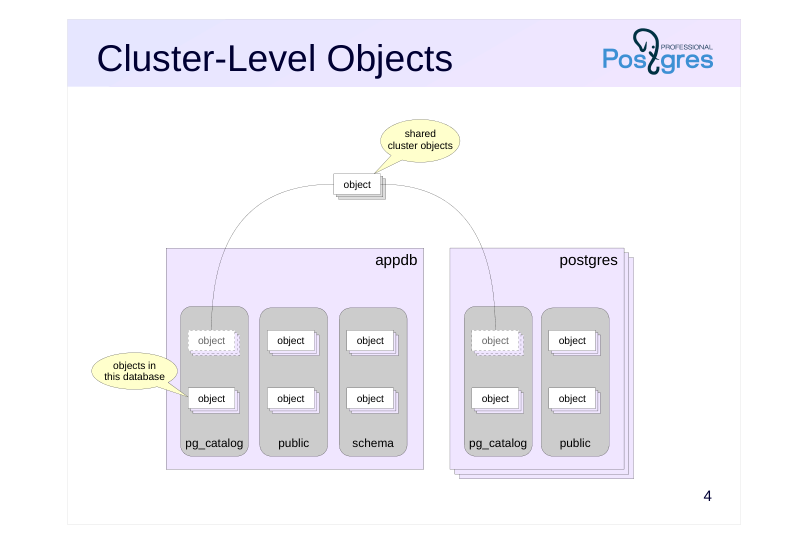
In a database cluster, each database has its own set of system catalog tables. However, there are several system catalog objects that are shared between all cluster databases. The most obvious example is the list of the databases themselves.
These tables are stored outside of any single database, but at the same time they are accessible from any database within the cluster.
Page 5: Naming Rules
Object (table, view) and column name prefixes
pg_database.datname
column prefix
(usually derived from
common prefix
for all objects
the object name)
Object names are always lowercase
Speaker notes
All system catalog tables and views begin with the prefix pg_. In order to avoid potential conflicts, it is not recommended to create your own objects starting with pg_.
Column names have a three-letter prefix, which is usually derived from the name of the table. There is no underscore after the prefix. There are some exceptions to this rule, such as the oid column and others.
Object names are always stored in lowercase.
Page 6: Specific pg_catalog Objects
Create a database and some test objects:
=>CREATEDATABASEdata_catalog;
CREATEDATABASE
=>\cdata_catalog
You are now connected to database "data_catalog" as user "student".
-[ RECORD 1 ]-----------------------------------------------------------
oid      | 2200
nspname  | public
nspowner | 6171
nspacl   | {pg_database_owner=UC/pg_database_owner,=U/pg_database_owner}
pg_class is an important table that stores descriptions for multiple types of objects: tables, views, indexes, sequences. All these objects in PostgreSQL are called relations, thus the prefix “rel” in the column names:
     relname      | relkind | relnamespace | relfilenode | relowner | relpersistence
------------------+---------+--------------+-------------+----------+----------------
 employees_id_seq | S       |         2200 |       16387 |    16384 | p
 employees        | r       |         2200 |       16388 |    16384 | p
 employees_pkey   | i       |         2200 |       16393 |    16384 | p
 top_managers     | v       |         2200 |           0 |    16384 | p
 emp_salaries     | r       |        16399 |       16401 |    16384 | t
(5 rows)
The object type is determined by the relkind column, while relpersistence distinguishes temporary objects from permanent ones.
When actively using temporary objects, the system catalog tables accumulate numerous obsolete row versions, which may degrade query performance at all query processing stages. In such cases, timely catalog table vacuuming becomes essential.
Naturally, only a subset of columns in pg_class are relevant for each object type. Moreover, examining object names (rather than identifiers like relnamespace, relowner, etc.) is more practical. For this purpose, there are specialized system views such as:
psql has a set of built-in commands for obtaining information from the system catalog. These short commands are more convenient than making direct queries to system tables and views.
A list of all tables is obtained with the command:
=>\dt
             List of relations
  Schema   |     Name     | Type  |  Owner
-----------+--------------+-------+---------
 pg_temp_4 | emp_salaries | table | student
 public    | employees    | table | student
(2 rows)
This command returns a list of all views in the public schema:
=> \dv public.*
           List of relations
 Schema |     Name     | Type |  Owner
--------+--------------+------+---------
 public | top_managers | view | student
(1 row)
List of tables, views, indexes, and sequences:
=> \dtvis
Page 8: Page 8
                       List of relations
  Schema   |       Name       |   Type   |  Owner  |   Table
-----------+------------------+----------+---------+-----------
 pg_temp_4 | emp_salaries     | table    | student |
 public    | employees        | table    | student |
 public    | employees_id_seq | sequence | student |
 public    | employees_pkey   | index    | student | employees
 public    | top_managers     | view     | student |
(5 rows)
Appended with the + modifier, these commands will return more detailed data:
You can use the command not only on relations, but other objects as well, such as schemas (\dn) and functions (\df).
The S modifier makes the command display system objects in addition to user ones. You can use wildcard patterns to filter the output:
=> \dfS pg*size
                                  List of functions
   Schema   |          Name          | Result data type | Argument data types | Type
------------+------------------------+------------------+---------------------+------
 pg_catalog | pg_column_size         | integer          | "any"               | func
 pg_catalog | pg_database_size       | bigint           | name                | func
 pg_catalog | pg_database_size       | bigint           | oid                 | func
 pg_catalog | pg_indexes_size        | bigint           | regclass            | func
 pg_catalog | pg_relation_size       | bigint           | regclass            | func
 pg_catalog | pg_relation_size       | bigint           | regclass, text      | func
 pg_catalog | pg_table_size          | bigint           | regclass            | func
 pg_catalog | pg_tablespace_size     | bigint           | name                | func
 pg_catalog | pg_tablespace_size     | bigint           | oid                 | func
 pg_catalog | pg_total_relation_size | bigint           | regclass            | func
(10 rows)
Usually, such psql commands have mnemonic names. For example, \df is describe function, \sf is show function:
You can get the full list of commands from the documentation or with the psql \? command.
All psql commands that describe objects query system catalog tables. To view these queries, set the psql variable ECHO_HIDDEN. For example, to examine the employees table structure:
          List of relations
 Schema |   Name    | Type  |  Owner
--------+-----------+-------+---------
 public | employees | table | student
(1 row)
=> \unset ECHO_HIDDEN
Most system catalog tables feature primary keys (typically the oid column) and uniqueness constraints. As an example, the pg_attribute table (containing relation attribute information) implements these constraints:
=>\dpg_attribute
Page 10: Page 10
               Table "pg_catalog.pg_attribute"
     Column     |   Type    | Collation | Nullable | Default
----------------+-----------+-----------+----------+---------
 attrelid       | oid       |           | not null |
 attname        | name      |           | not null |
 atttypid       | oid       |           | not null |
 attlen         | smallint  |           | not null |
 attnum         | smallint  |           | not null |
 attcacheoff    | integer   |           | not null |
 atttypmod      | integer   |           | not null |
 attndims       | smallint  |           | not null |
 attbyval       | boolean   |           | not null |
 attalign       | "char"    |           | not null |
 attstorage     | "char"    |           | not null |
 attcompression | "char"    |           | not null |
 attnotnull     | boolean   |           | not null |
 atthasdef      | boolean   |           | not null |
 atthasmissing  | boolean   |           | not null |
 attidentity    | "char"    |           | not null |
 attgenerated   | "char"    |           | not null |
 attisdropped   | boolean   |           | not null |
 attislocal     | boolean   |           | not null |
 attinhcount    | smallint  |           | not null |
 attstattarget  | smallint  |           | not null |
 attcollation   | oid       |           | not null |
 attacl         | aclitem[] |           |          |
 attoptions     | text[]    | C         |          |
 attfdwoptions  | text[]    | C         |          |
 attmissingval  | anyarray  |           |          |
Indexes:
    "pg_attribute_relid_attnum_index" PRIMARY KEY, btree (attrelid, attnum)
    "pg_attribute_relid_attnam_index" UNIQUE CONSTRAINT, btree (attrelid, attname)
Referential integrity is maintained through foreign-key-like constraints with additional complexity: the referencing column may be an array of elements, zero may represent undefined references. The pg_get_catalog_foreign_keys() function lists these pseudo-foreign keys. For instance, pg_attribute references:
   fktable    |     fkcols     |   pktable    | pkcols | is_array | is_opt
--------------+----------------+--------------+--------+----------+--------
 pg_attribute | {attrelid}     | pg_class     | {oid}  | f        | f
 pg_attribute | {atttypid}     | pg_type      | {oid}  | f        | t
 pg_attribute | {attcollation} | pg_collation | {oid}  | f        | t
(3 rows)
fktable, fkcols — referencing table and its columns pktable, pkcols — key referenced is_array — whether the referencing column is an array is_opt — whether the referencing column can contain 0
Page 11: Special Data Types
oid type – object identifier
oid column ensures object uniqueness in system catalog tables
integer with an auto increment
reg* types
oid aliases for some system catalog tables
(regclass for pg_class, etc.)
converting the text name of an object to the oid type and vice versa
Speaker notes
Most system catalog tables use a column with oid name and data type of the same name as a primary key.
The oid (Object Identifier) type is a 32 bit integer (about 4 billion possible values) with an auto increment.
There are several special data types (in fact, oid aliases) starting with reg that are used to convert object names to oids and back.
As shown before, table and view descriptions are stored in pg_class table, and column descriptions are in a separate pg_attribute table. So, to get a list of columns in a specific table, you need to join pg_class and pg_attribute:
You are now connected to database "data_catalog" as user "student".
=>CREATETEMPTABLEt(ninteger);
CREATETABLE
=> \dnS
            List of schemas
        Name        |       Owner
--------------------+-------------------
 information_schema | postgres
 pg_catalog         | postgres
 pg_temp_4          | postgres
 pg_toast           | postgres
 pg_toast_temp_4    | postgres
 public             | pg_database_owner
(6 rows)
Temporary tables are stored in schemas named pg_temp_N, where N is a number. Such schemas are created for each session where temporary objects appear, so there can be multiple schemas. To get the name of the schema for the current session, use the following system function:
 {#source-figure-004 caption=“Source slide page 4: Cluster-Level Objects”}