06 Lesson 06: Architecture / Vacuuming
This page is extracted from the official PDF into native Markdown. Slide text, code and speaker notes are kept in reading order; the original PDF and HTML remain the layout references. HTML source: dba1_06_arch_vacuum_overview.html Archive: DBA1-handouts-16-en.zip PDF pages: 21
Page 1: Architecture / Vacuuming
Copyright
© Postgres Professional, 2017–2025 Authors: Egor Rogov, Pavel Luzanov, Ilya Bashtanov, Aleksei Beresnev Translated by: Liudmila Mantrova, Alexander Meleshko, Elena Sharafutdinova Photo: Oleg Bartunov (Phu Monastery and Bhrikuti Peak, Nepal)
Use of Course Materials
Non-commercial use of course materials (presentations, demonstrations) is allowed without restrictions. Commercial use is possible only with the written permission of Postgres Professional. It is prohibited to make changes to the course materials.
Feedback
Please send your feedback, comments and suggestions to: edu@postgrespro.ru
Disclaimer
Postgres Professional assumes no responsibility for any damages and losses, including loss of income, caused by direct or indirect, intentional or accidental use of course materials. Postgres Professional company specifically disclaims any warranties on course materials. Course materials are provided “as is,” and Postgres Professional company has no obligations to provide maintenance, support, updates, enhancements, or modifications.
Page 2: Topics
- Routine Tasks
- Autovacuum
- Vacuum and Analysis
- Table and Index Bloating
- Full Vacuum and Rebuilding of Indexes
Page 3: Routine Tasks
Cleaning pages to remove MVCC historical data
- dead row versions are vacuumed out of tables
- index entries referencing dead versions are vacuumed from indexes
Speaker notes
MVCC makes it possible to effectively implement snapshot isolation, but as a result, old versions of rows accumulate in table pages, and references to these versions accumulate in index pages. Historical versions are needed for some time so that transactions can work with their data snapshots. But over time, a row version will no longer have any snapshot that needs it. Such a version is called “dead”.
The vacuum procedure cleans out dead row versions from table pages, as well as unnecessary index entries that reference such versions.
If historical data is not vacuumed in a timely manner, tables and indexes will bloat uncontrollably and the search for current row versions in them will slow down.
https://postgrespro.com/docs/postgresql/16/routine-vacuuming
Page 4: Routine Tasks
Updating the visibility map
- tracks pages where all row versions are visible in all snapshots
- used to optimize vacuuming and speed up index access
- exists only for tables
Speaker notes
In addition to this main task, vacuuming also performs other instance maintenance tasks. Vacuuming updates the visibility map and the free space map. This is service information that is stored alongside the main data.
The visibility map shows pages that contain only the current row versions visible in all data snapshots. In other words, these are pages that have not changed for long enough to be cleared out of outdated row versions.
The visibility map has several uses:
● Vacuuming optimization.
The marked pages cannot contain dead row versions, so they can be skipped during vacuuming.
● Index-Only access speedup.
Versioning information is stored only for tables, but not for indexes (that is why indexes do not have visibility maps). After getting a reference to a row version from an index, you usually need to read the table page to check its visibility. But if the index itself already has all the necessary columns, and at the same time the page is marked in the visibility map, then reading the table page can be skipped.
If the visibility map is not updated regularly, index access can slow down. This is described in more detail in the Query Performance Tuning (QPT) course.
Page 5: Routine Tasks
Updating the free space map
- tracks the free space in the pages after vacuuming
- used when inserting new row versions
- exists for both tables and indexes
Speaker notes
The free space map tracks available free space within pages. This space is constantly changing, decreasing when new row versions are added and increasing when they are removed.
When inserting new row versions, the map helps to quickly find a suitable page to record the data into. The free space map has a complex tree-like structure designed to improve search speed.
Indexes can have free space maps as well. However, since index entries are inserted into specific positions within an index, the map only tracks empty pages, which form when all index entries are deleted from them. These pages are excluded from the index and later can be included again into the proper part of the index.
Page 6: Routine Tasks
Updating statistics
- used by the query optimizer
- calculated based on a random sample
Speaker notes
The query optimizer requires statistical information about the data it is working with, such as the number of rows in tables and the distribution of data in columns. The process of collecting the statistics is called analysis.
For analysis, a random sample of data of a certain size is read from the table. This way, the system can quickly collect statistics even on very large tables. The result is not accurate, but it is not expected to be. The data constantly changes, so it is impossible to maintain absolutely accurate statistics all of the time anyway. It is sufficient to keep it relatively up-to-date and relatively accurate.
If statistics are not updated regularly, they will no longer represent the data accurately, leading to the optimizer proposing inefficient execution plans. Because of this, queries may start executing orders of magnitude slower than they could.
Page 7: Routine Tasks
 {#source-figure-007 caption=“Source slide page 7: Routine Tasks”}
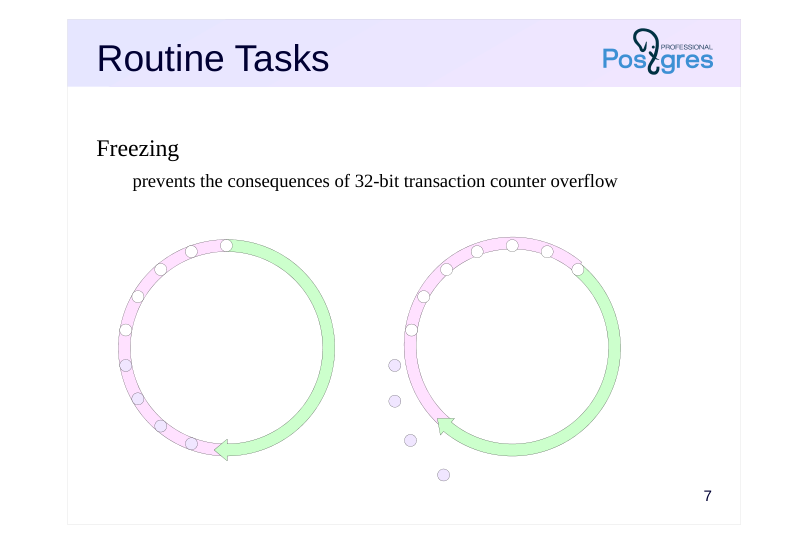
Freezing
- prevents the consequences of 32-bit transaction counter overflow
Speaker notes
As already mentioned, PostgreSQL orders events by transaction ID. The counter has 32 bits allocated for it, and sooner or later it will overflow.
This is why the transaction ID scope is looped. For each transaction, half of the IDs are considered to be in the future, half in the past.
But when the counter wraps around to zero, the order of transactions will be disrupted. To prevent this, sufficiently old row versions are marked as frozen. This means that they were created so far in the past that their transaction ID no longer means anything and can be reused. Frozen row versions are visible in all snapshots.
To avoid scanning extra pages, the visibility map has a bit that marks the pages where all row versions are frozen.
Without regular freezing, the server may end up with no available transaction IDs for new transactions. This is an emergency: the server stops, all active transactions are aborted, and the administrator has to manually start the server and perform the freezing.
Page 8: Autovacuum
 {#source-figure-008 caption=“Source slide page 8: Autovacuum”}
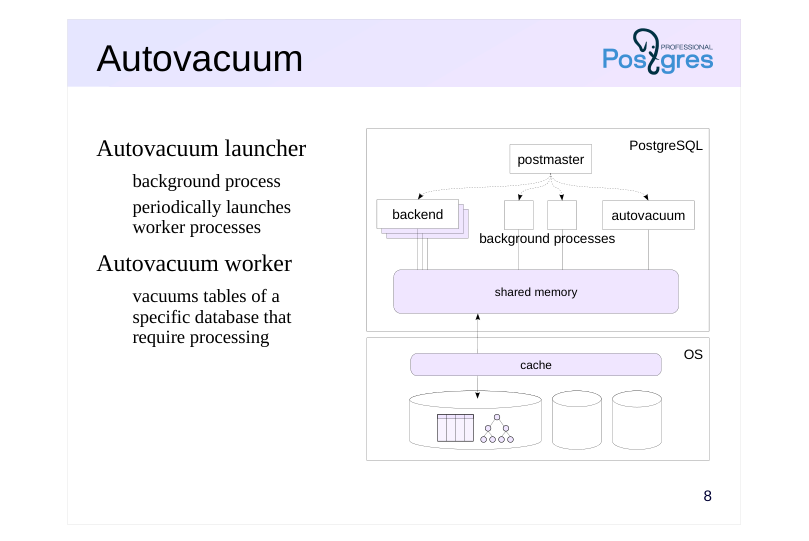
Autovacuum launcher
- background process
- periodically launches
- worker processes
- Autovacuum worker
- vacuums tables of a
- specific database that
- require processing
Speaker notes
All the maintenance tasks discussed above are taken care of by the autovacuum process. It dynamically reacts to the frequency of table updates, and the more active the changes, the more often the table will be vacuumed.
The autovacuum launcher process is permanently running in the background. It schedules the vacuuming work and launches the required number of autovacuum workers working in parallel.
Vacuuming works page-by-page, it does not block other transactions, though it still does require additional I/O resources.
Autovacuum will not work if either of the two parameters autovacuum or track_counts is switched off. It may seem that disabling autovacuum can increase system performance by eliminating “unnecessary” I/O operations, but it cannot. Failure to vacuum will lead to the consequences described above: uncontrolled bloating, slower query processing, and the risk of an emergency server shutdown. Ultimately, this will lead to a complete system paralysis.
Autovacuuming is absolutely necessary. There is a large number of configuration parameters that allow tweaking the autovacuum process. They are discussed in detail in the DBA2 Configuration and Monitoring course.
Page 9: Manual Vacuuming
Vacuuming
- VACUUM [table, …]
- vacuum specific tables
- VACUUM
- vacuum the entire database
- $ vacuumdb
- wrapper for the OS
- Analysis
- Vacuum and analysis
Speaker notes
If necessary, vacuuming and analysis can be started manually using the following commands:
VACUUM (vacuuming only), ANALYZE (analysis only), and VACUUM ANALYZE (both vacuuming and analysis).
Autovacuum is different from running scheduled vacuuming and analysis as it reacts to the frequency of data changes. Running vacuum on a schedule too often will create unnecessary load on the system. On the other hand, if you vacuum too rarely, and data is changed often, the files may have time to bloat significantly between vacuums.
https://postgrespro.com/docs/postgresql/16/sql-vacuum
https://postgrespro.com/docs/postgresql/16/sql-analyze
Page 10: Vacuuming
Let’s create a table and turn autovacuum off so that we can control the vacuuming manually in our experiments:
Fill the table with data and build an index:
Each table row has only one version, the last one. Now, let’s update some rows:
Run vacuum and have it tell us what it is doing:
The important lines are: Dead versions of rows have been removed from the table (tuples: 10000 removed…). References to them have been removed from the index (index scan needed… 10000 dead item identifiers removed).
Page 11: Bloating
Vacuuming does not reduce the size of tables and indexes
- the “holes” in the pages are used for new data,
- but the space is never returned to the operating system
- Causes of bloating
- incorrect autovacuum configuration
- massive changes of data
- long-running transactions
- Negative consequences
- inefficient disk space use
- slower sequential table scan
- less efficient index access
Speaker notes
Vacuuming cleans out outdated row versions from pages. This creates spots of free space in the pages, which is then used to store new data. But the free space is not returned to the operating system, so, from the point of view of the OS, the size of the data files does not decrease.
In the case of indexes (B-trees), it is complicated by the fact that if there is not enough space in the page to place an index entry, the page is split into two. The resulting pages are never merged again, even if all index entries are removed from them.
If autovacuuming is configured correctly, the data files grow by a certain constant amount due to updates between vacuumings. But if a large amount of data is being changed at the same time, or there are active long transactions (keeping old data snapshots active and not allowing you to vacuum out old row versions), vacuuming will not be able to free up the space in time. As a result, the tables and indexes may continue to grow in size.
File bloating leads not only to disk space overuse (including for backups), but also to a decrease in performance.
https://wiki.postgresql.org/wiki/Show\_database\_bloat
https://postgrespro.com/docs/postgresql/16/pgstattuple
Page 12: Table and Index Bloating
There are several ways to assess bloating and its impact: Queries to the system catalog Using the pgstattuple extension
The extension helps monitor the state of a table:
tuple_percent is the proportion of useful information (not 100% due to overhead). Same for an index:
leaf_pages is the number of leaf pages of the index. avg_leaf_density is storage density of leaf pages. leaf_fragmentation is characteristic of physical order of leaf pages (0 — order, 100 — disorder). Let’s update half the rows at once:
Check the table again:
The density went down. To avoid scanning the whole table, pgstattuple can display approximate information:
Page 13: Page 13
Check the index:
Leaf page density remained the same, but the number of pages has increased.
Page 14: Rebuilding Objects
Full vacuum
- completely rebuilds the contents of tables and indexes
- locks the table completely
- Rebuilding indexes
- rebuilds indexes
- locks the index completely
- and locks the associated table for write operations
Speaker notes
In order to reduce the physical size of bloated tables and indexes, a full vacuum is required.
The VACUUM FULL command completely rewrites the contents of the table and its indexes, minimizing the space occupied. However, this process requires an exclusive table lock and therefore cannot be executed in parallel with other transactions.
https://postgrespro.com/docs/postgresql/16/sql-vacuum
You can rebuild an index or several indexes without touching the table. This is done by the REINDEX command. It locks the table for writing (reading is still available), so transactions trying to change the table or plan a query on it will be blocked.
https://postgrespro.com/docs/postgresql/16/sql-reindex
If prolonged exclusive locking is undesirable, you can consider pg_repack, a third-party extension (https://github.com/reorg/pg\_repack) that allows you to rebuild tables and their indexes on the fly.
Page 15: Rebuilding Objects
Non-blocking index rebuilding
- rebuilds indexes without locking tables for writing
- takes longer and may fail
- not transactional
- does not work for system indexes
- does not work for indexes associated with exclusion constraints
Speaker notes
The REINDEX … CONCURRENTLY command can work without locking the table for writing. However, non-blocking rebuilding takes longer and may fail (due to deadlocks). In this case, the index will need to be rebuilt again.
Non-blocking index rebuilding has some limitations: it cannot be performed inside a transaction, and it cannot rebuild system indexes and indexes for exclusion constraints (EXCLUDE).
Page 16: Rebuilding Objects
You can rebuild an index using the REINDEX command with the CONCURRENTLY clause. It rebuilds the index without stopping the system.
Check the index again:
The page count and density have returned to their initial values. To rebuild a table together with its indexes, you can use VACUUM FULL. However, unlike REINDEX CONCURRENTLY, this operation fully blocks all access to the table.
The density has increased, the freed up space is returned to the operating system.
Page 17: Takeaways
Row versions are accumulated, so periodic vacuuming is necessary
- Vacuuming serves multiple goals:
- updating visibility maps and free space maps
- collecting statistics for the optimizer
- freezing old row versions
- Autovacuuming is necessary, but requires configuration
- Full vacuum may be necessary to combat bloating
Page 18: Practice
- Disable autovacuuming and make sure it does not work. 2. In a new database, create a table with one numeric column and an index for this table. Insert 100,000 random numbers into the table. 3. Change half of the table rows several times. Write down the size of the table and the index each time. 4. Run a full vacuum. 5. Repeat step 3, running a regular vacuum each time you change the values. Compare the results. 6. Turn autovacuuming back on.
Speaker notes
Set the autovacuum parameter to off and reload the configuration files.
Use pg_table_size(table-name) and pg_indexes_size(table-name) functions. For more information about calculating the sizes of various objects, see the Data organization module.
Set the autovacuum parameter back to on (or reset its value with the RESET command), then reload the configuration files.
Page 19: 1. Switching Autovacuum Off
Autovacuum is running for now:
We disable autovacuum and reload the configuration settings.
The autovacuum launcher process is no longer present.
2. Database, Table and Index
Create a database, a table and an index:
Insert rows:
3. Changing Rows without Vacuuming
Store a query to calculate the size of the table and the index as a psql variable so that we can use it later:
Page 20: Page 20
The table and index sizes keep growing.
4. Full Vacuum
The table size is almost back to where it was initially, and the index size decreased (building an index for a large data set is more efficient than adding data to the index row by row).
5. Changing Rows with Vacuuming
The size increased once and then stabilized. The example demonstrates that removing (or changing) large amount of data should be done in multiple transactions, if possible. This will allow autovacuum to clean up unneeded row versions in time, avoiding table bloating.