Skip to content

03 Lesson 03: Basic Tools / Server Configuration

Native Markdown source page: Basic Tools / Server Configuration
Note

This page is extracted from the official PDF into native Markdown. Slide text, code and speaker notes are kept in reading order; the original PDF and HTML remain the layout references. HTML source: dba1_03_tools_configuration.html Archive: DBA1-handouts-16-en.zip PDF pages: 22

Page 1: Basic Tools / Server Configuration

© Postgres Professional, 2017–2025 Authors: Egor Rogov, Pavel Luzanov, Ilya Bashtanov, Aleksei Beresnev Translated by: Liudmila Mantrova, Alexander Meleshko, Elena Sharafutdinova Photo: Oleg Bartunov (Phu Monastery and Bhrikuti Peak, Nepal)

Use of Course Materials

Non-commercial use of course materials (presentations, demonstrations) is allowed without restrictions. Commercial use is possible only with the written permission of Postgres Professional. It is prohibited to make changes to the course materials.

Feedback

Please send your feedback, comments and suggestions to: edu@postgrespro.ru

Disclaimer

Postgres Professional assumes no responsibility for any damages and losses, including loss of income, caused by direct or indirect, intentional or accidental use of course materials. Postgres Professional company specifically disclaims any warranties on course materials. Course materials are provided “as is,” and Postgres Professional company has no obligations to provide maintenance, support, updates, enhancements, or modifications.

Page 2: Topics

  • Configuration Parameters
  • Configuration Files
  • Parameter Management at the Instance and Session Levels

Page 3: Configuration Parameters

Purpose

  • managing DBMS operation and behavior
  • Setting parameters
    • for an instance via configuration files
    • for a separate database or user
    • for the current session

Speaker notes

There are multiple parameters in PostgreSQL that control the DBMS behavior. These parameters affect resource management, server processes, and much more.

For example, the max_connections parameter limits the number of concurrent connections to the server.

The full list of configuration parameters and their descriptions is available in the documentation: https://postgrespro.com/docs/postgresql/16/runtime-config

In this topic, we will not cover any specific configuration parameters, but rather discuss how to set their values.

Configuration parameters are generally managed in configuration files. The parameter values set in the configuration files affect the whole DBMS instance, unless explicitly configured otherwise.

Some parameters can be set for a specific database or for a specific user’s sessions. Such settings will overrule those declared in configuration files. These types of settings will be discussed in further lessons of the course.

Lastly, many parameters can be changed at the session level, during client operaton.

Page 4: postgresql.conf

Main configuration file

  • loaded when the server starts
  • option to load additional configuration files
  • located in the data directory (PGDATA) by default
/etc/postgresql/16/main
  • After any changes to the parameters, the file has to be reloaded
$ pg_ctl reload
$ pg_ctlcluster 16 main reload
  • => SELECT pg_reload_conf();
  • changes to some parameters require a server restart to apply

Speaker notes

The main configuration file is postgresql.conf.

The default file’s location is defined during initial PostgreSQL compilation. The server executable accepts -c config_file as a command line argument to set the configuration file path.

By default, the file is located in the data catalog (PGDATA), but package distributions usually place it somewhere else, depending on the OS-specific conventions.

This is a well-documented plaintext file which stores parameters in a key-value format.

Additional configuration files can be included. By default, PostgreSQL on Ubuntu automatically includes all .conf files from /etc/postgresql/16/main/conf.d.

If the same parameter is defined in the configuration files multiple times, only the most recently read value will be used.

For any changes to parameters to apply, the file must be reloaded. Some parameters require a server restart to apply.

Page 5: The postgresql.conf File and the pg_file_settings View

The configuration file name is a value of the read-only config_file parameter. The configuration file can be specified using a command-line switch when starting postgres.

=> SHOW config_file;
               config_file
-----------------------------------------
 /etc/postgresql/16/main/postgresql.conf
(1 row)

Take a look at a part of a config file.

=> SELECT pg_read_file('/etc/postgresql/16/main/postgresql.conf', 1516, 861) \g (tuples_only=on format=unaligned)
#------------------------------------------------------------------------------
# FILE LOCATIONS
#------------------------------------------------------------------------------
# The default values of these variables are driven from the -D command-line
# option or PGDATA environment variable, represented here as ConfigDir.
data_directory = '/var/lib/postgresql/16/main'
# use data in another directory
# (change requires restart)
hba_file = '/etc/postgresql/16/main/pg_hba.conf'
# host-based authentication file
# (change requires restart)
ident_file = '/etc/postgresql/16/main/pg_ident.conf'
# ident configuration file
# (change requires restart)
# If external_pid_file is not explicitly set, no extra PID file is written.
external_pid_file = '/var/run/postgresql/16-main.pid'
# write an extra
PID file
# (change requires restart)

The main configuration file postgresql.conf can include additional configuration files. Directives: include_dir is a directory with additional configuration files. include includes an additional configuration file. include_if_exists Includes an additional configuration file, if one exists. These directives are typically placed at the end of postgresql.conf:

student$ sudo grep -A3 ^include /etc/postgresql/16/main/postgresql.conf
include_dir = 'conf.d'
# include files ending in '.conf' from
# a directory, e.g., 'conf.d'
#include_if_exists = '...'
# include file only if it exists
#include = '...'
# include file

To see current settings in configuration files, query the pg_file_settings view:

=> SELECT sourceline, name, setting, applied, error FROM pg_file_settings;

Page 6: Page 6

 sourceline |            name            |                setting                 |
applied | error
------------+----------------------------+----------------------------------------+-------
--+-------
         42 | data_directory             | /var/lib/postgresql/16/main            | t
  |
         44 | hba_file                   | /etc/postgresql/16/main/pg_hba.conf    | t
  |
         46 | ident_file                 | /etc/postgresql/16/main/pg_ident.conf  | t
  |
         50 | external_pid_file          | /var/run/postgresql/16-main.pid        | t
  |
         64 | port                       | 5432                                   | t
  |
         65 | max_connections            | 100                                    | t
  |
         68 | unix_socket_directories    | /var/run/postgresql                    | t
  |
        108 | ssl                        | on                                     | t
  |
        110 | ssl_cert_file              | /etc/ssl/certs/ssl-cert-snakeoil.pem   | t
  |
        113 | ssl_key_file               | /etc/ssl/private/ssl-cert-snakeoil.key | t
  |
        130 | shared_buffers             | 128MB                                  | t
  |
        153 | dynamic_shared_memory_type | posix                                  | t
  |
        247 | max_wal_size               | 1GB                                    | t
  |
        248 | min_wal_size               | 80MB                                   | t
  |
        565 | log_line_prefix            | %m [%p] %q%u@%d                        | t
  |
        603 | log_timezone               | Europe/Moscow                          | t
  |
        607 | cluster_name               | 16/main                                | t
  |
        715 | datestyle                  | iso, mdy                               | t
  |
        717 | timezone                   | Europe/Moscow                          | t
  |
        731 | lc_messages                | en_US.UTF-8                            | t
  |
        733 | lc_monetary                | en_US.UTF-8                            | t
  |
        734 | lc_numeric                 | en_US.UTF-8                            | t
  |
        735 | lc_time                    | en_US.UTF-8                            | t
  |
        741 | default_text_search_config | pg_catalog.english                     | t
  |
(24 rows)

The view displays non-comment lines of configuration files. The applied column indicates whether the specified value will be applied upon reloading the configuration. Specifically, the column will show false if: The change requires a restart of the server. There is a line with the same parameter that will be read later. There is an error in one of the lines where the parameter is specified. The view also displays the configuration file name and line number, making it easy to locate errors.

The pg\_settings View

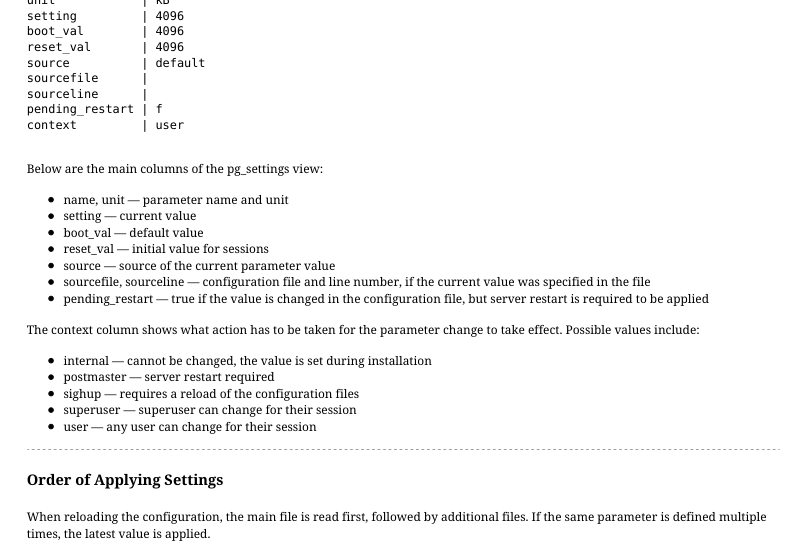
For example, let’s take the work_mem parameter. It defines how much memory is allocated for operations like sorting or hash join. The default value can be insufficient for some queries. To learn more about the work_mem parameter, check out our Query Performance Tuning course (QPT). Active configuration parameter values are shown in the pg_settings view. For example, here’s its output regarding the work_mem parameter:

=> SELECT name, unit, setting, boot_val, reset_val,
  source, sourcefile, sourceline, pending_restart, context
FROM pg_settings
WHERE name = 'work_mem' \gx

Page 7: Page 7

Source slide page 7: Page 7{#source-figure-007 caption=“Source slide page 7: Page 7”}

-[ RECORD 1 ]---+---------
name            | work_mem
unit            | kB
setting         | 4096
boot_val        | 4096
reset_val       | 4096
source          | default
sourcefile      |
sourceline      |
pending_restart | f
context         | user

Below are the main columns of the pg_settings view: name, unit — parameter name and unit setting — current value boot_val — default value reset_val — initial value for sessions source — source of the current parameter value sourcefile, sourceline — configuration file and line number, if the current value was specified in the file pending_restart — true if the value is changed in the configuration file, but server restart is required to be applied The context column shows what action has to be taken for the parameter change to take effect. Possible values include: internal — cannot be changed, the value is set during installation postmaster — server restart required sighup — requires a reload of the configuration files superuser — superuser can change for their session user — any user can change for their session

Order of Applying Settings

When reloading the configuration, the main file is read first, followed by additional files. If the same parameter is defined multiple times, the latest value is applied. For example, let’s specify the work_mem parameter twice in an additional configuration file:

student$ echo work_mem=12MB | sudo tee /etc/postgresql/16/main/conf.d/work_mem.conf
work_mem=12MB
student$ echo work_mem=8MB | sudo tee -a /etc/postgresql/16/main/conf.d/work_mem.conf
work_mem=8MB

Contents of the /etc/postgresql/16/main/conf.d/work_mem.conf file:

=> SELECT sourcefile, sourceline, name, setting, applied
FROM pg_file_settings WHERE sourcefile LIKE '%/work_mem.conf';
                  sourcefile                  | sourceline |   name   | setting | applied
----------------------------------------------+------------+----------+---------+---------
 /etc/postgresql/16/main/conf.d/work_mem.conf |          1 | work_mem | 12MB    | f
 /etc/postgresql/16/main/conf.d/work_mem.conf |          2 | work_mem | 8MB     | t
(2 rows)

The applied = f for the first line indicates that it will not be applied. The context field of the work_mem parameter says “user”. This means that the parameter can be changed by the user during their session. We will discuss how to do it in a bit. To change the value for all sessions, you just need to reload the configuration file:

=> SELECT pg_reload_conf();
 pg_reload_conf
----------------
 t
(1 row)

Verify that work_mem now has taken the value from the second line of the configuration file:

=> SELECT name, unit, setting, boot_val, reset_val,
  source, sourcefile, sourceline, pending_restart, context
FROM pg_settings
WHERE name = 'work_mem'\gx

Page 8: Page 8

-[ RECORD 1 ]---+---------------------------------------------
name            | work_mem
unit            | kB
setting         | 8192
boot_val        | 4096
reset_val       | 8192
source          | configuration file
sourcefile      | /etc/postgresql/16/main/conf.d/work_mem.conf
sourceline      | 2
pending_restart | f
context         | user

Page 9: postgresql.auto.conf

Configuration file managed by SQL commands

  • ALTER SYSTEM
  • adds or changes a line
  • SET parameter TO value;
  • ALTER SYSTEM RESET parameter;
  • deletes a line
  • ALTER SYSTEM RESET ALL;
  • deletes all lines
read after postgresql.conf
  • Location
    • always in the data directory (PGDATA)
  • Actions needed to apply
same as for postgresql.conf

Speaker notes

The file postgresql.auto.conf is always loaded last. This file is always located in the data catalog (PGDATA).

It should never be modified manually, but only with the ALTER SYSTEM command. ALTER SYSTEM is an SQL interface for managing configuration parameters.

For any changes made with ALTER SYSTEM to take place, the server must reload the configuration files, as it does with postgresql.conf.

The contents of both files (postgresql.conf and postgresql.auto.conf) can be checked using the pg_file_settings view, and the current parameter values are shown in the pg_settings view.

More about the ALTER SYSTEM command:

https://postgrespro.com/docs/postgresql/16/sql-altersystem

Page 10: The ALTER SYSTEM Command and the postgresql.auto.conf File

Let’s set a new value for the work_mem parameter:

=> ALTER SYSTEM SET work_mem TO '16mb';
ERROR:  invalid value for parameter "work_mem": "16mb"
HINT:  Valid units for this parameter are "B", "kB", "MB", "GB", and "TB".

What happened? ALTER SYSTEM checks if the provided value is valid.

=> ALTER SYSTEM SET work_mem TO '16MB';
ALTER SYSTEM

Now it works! The command saves the new value 16MB to a file named postgresql.auto.conf:

=> SELECT pg_read_file('postgresql.auto.conf')
\g (tuples_only=on format=unaligned)
# Do not edit this file manually!
# It will be overwritten by the ALTER SYSTEM command.
work_mem = '16MB'

However, the value has not been applied yet:

=> SHOW work_mem;
 work_mem
----------
 8MB
(1 row)

For the new work_mem setting to apply, reload the configuration file first:

=> SELECT pg_reload_conf();
 pg_reload_conf
----------------
 t
(1 row)
=> SELECT name, unit, setting, boot_val, reset_val,
  source, sourcefile, sourceline, pending_restart, context
FROM pg_settings
WHERE name = 'work_mem'\gx
-[ RECORD 1 ]---+-------------------------------------------------
name            | work_mem
unit            | kB
setting         | 16384
boot_val        | 4096
reset_val       | 16384
source          | configuration file
sourcefile      | /var/lib/postgresql/16/main/postgresql.auto.conf
sourceline      | 3
pending_restart | f
context         | user

Lines are removed from postgresql.auto.conf with the ALTER SYSTEM RESET command:

=> ALTER SYSTEM RESET work_mem;
ALTER SYSTEM
=> SELECT pg_read_file('postgresql.auto.conf')
\g (tuples_only=on format=unaligned)

Page 11: Page 11

# Do not edit this file manually!
# It will be overwritten by the ALTER SYSTEM command.

Reload the configuration file again. The old value from work_mem.conf is now applied:

=> SELECT pg_reload_conf();
 pg_reload_conf
----------------
 t
(1 row)
=> SELECT name, unit, setting, boot_val, reset_val,
  source, sourcefile, sourceline, pending_restart, context
FROM pg_settings
WHERE name = 'work_mem'\gx
-[ RECORD 1 ]---+---------------------------------------------
name            | work_mem
unit            | kB
setting         | 8192
boot_val        | 4096
reset_val       | 8192
source          | configuration file
sourcefile      | /etc/postgresql/16/main/conf.d/work_mem.conf
sourceline      | 2
pending_restart | f
context         | user

Page 12: Current Session

Source slide page 12: Current Session{#source-figure-012 caption=“Source slide page 12: Current Session”}

set until the end of the session or transaction

  • setting parameters is transactional
  • custom parameters are allowed

Speaker notes

Parameter values can be changed directly during the session with the SET command or the set_config function. The SHOW command or the current_setting function display the current parameter value.

By setting a new value, you can specify its expiration date: until the end of the session (by default) or until the end of the transaction (SET LOCAL).

In any case, setting parameters is transactional: if the current transaction is rolled back, any parameters modified within it will return to the state they were in at the start of the transaction.

In addition to the PostgreSQL system parameters, the same commands and functions can be used to create and get the values of custom parameters.

Page 13: Setting Parameters for the Current Session

The SET command is used to set parameter values for the duration of the current session:

=> SET work_mem TO '24MB';
SET

The set_config function also works:

=> SELECT set_config('work_mem', '32MB', false);
 set_config
------------
 32MB
(1 row)

The third parameter of the function defines if the parameter should be used for the duration of the current transaction (true) or until the end of the current session (false). This may be important when using a connection pool, when transactions by multiple users may be performed within the same session.

Checking Parameter Values During a Session

There are multiple ways to check the current parameter value:

=> SHOW work_mem;
 work_mem
----------
 32MB
(1 row)
=> \dconfig work_mem
List of configuration parameters
 Parameter | Value
-----------+-------
 work_mem  | 32MB
(1 row)
=> SELECT current_setting('work_mem');
 current_setting
-----------------
 32MB
(1 row)
=> SELECT name, setting, unit FROM pg_settings WHERE name = 'work_mem';
   name   | setting | unit
----------+---------+------
 work_mem | 32768   | kB
(1 row)

Reset the value to what was active at the start of the session:

=> RESET work_mem;
RESET

Setting Parameter Values within a Transaction

Open a transaction and set a new work_mem value:

=> BEGIN;
BEGIN
=> SET work_mem TO '64MB';
SET

Page 14: Page 14

=> SHOW work_mem;
 work_mem
----------
 64MB
(1 row)

If the transaction is rolled back, so is the new parameter value. If the transaction commits, however, the parameter remains changed.

=> ROLLBACK;
ROLLBACK
=> SHOW work_mem;
 work_mem
----------
 8MB
(1 row)

You can set a new parameter value just for the duration of the current transaction:

=> BEGIN;
BEGIN
=> SET LOCAL work_mem TO '64MB'; -- or set_config('work_mem','64MB',true);
SET
=> SHOW work_mem;
 work_mem
----------
 64MB
(1 row)
=> COMMIT;
COMMIT

When the transaction commits, the old value returns:

=> SHOW work_mem;
 work_mem
----------
 8MB
(1 row)

Custom Parameters

Custom parameters can be defined during session. You can also check if such a parameter is already defined. Custom parameter names must include the dot (.) in order to distinguish them from standard parameters.

=> SELECT CASE
  WHEN current_setting('myapp.currency_code', true) IS NULL
    THEN set_config('myapp.currency_code', 'RUB', false)
  ELSE
    current_setting('myapp.currency_code')
END;
 current_setting
-----------------
 RUB
(1 row)

Now myapp.currency_code can be used as a global variable during the session:

=> SELECT current_setting('myapp.currency_code');
 current_setting
-----------------
 RUB
(1 row)

Page 15: Page 15

Custom parameters can be defined in configuration files. This will make them initialize in all sessions.

Page 16: Takeaways

The main configuration file is postgresql.conf

  • ALTER SYSTEM is an SQL interface for managing configuration parameters stored in postgresql.auto.conf
  • When configuration files are modified, they have to be reloaded
  • Some parameters can be changed just for the current session
  • Changes to some parameters require a server restart to apply

Page 17: Practice

  1. Get a list of parameters that require a server restart to apply.
    1. In the additional included configuration file, make an error when changing the max_connections parameter.
    • Restart the server. Make sure that the server does not start and
    • check the message log.
    • Fix the error and start the server.

Speaker notes

  1. To get the location of the postgresql.conf file, check the value of the config_file parameter, as shown in the demonstration.

At the end of this file, you will find include_dir directive that loads additional configuration files.

Create a file named max_connections.conf in the directory specified by this directive. Edit this file either as the owner (the postgres user) or as a superuser.

To obtain the necessary privileges, use the sudo command.

Use your preferred text editor. For example: sudo nano /etc/postgresql/16/main/conf.d/max_connections.conf

To exit nano, use the Ctrl+X key combination.

Page 18: 1. Parameters that Require a Server Restart to Apply

=> SELECT name, setting, unit FROM pg_settings WHERE context = 'postmaster';
                name                 |                 setting                 | unit
-------------------------------------+-----------------------------------------+------
 archive_mode                        | off                                     |
 autovacuum_freeze_max_age           | 200000000                               |
 autovacuum_max_workers              | 3                                       |
 autovacuum_multixact_freeze_max_age | 400000000                               |
 bonjour                             | off                                     |
 bonjour_name                        |                                         |
 cluster_name                        | 16/main                                 |
 config_file                         | /etc/postgresql/16/main/postgresql.conf |
 data_directory                      | /var/lib/postgresql/16/main             |
 data_sync_retry                     | off                                     |
 debug_io_direct                     |                                         |
 dynamic_shared_memory_type          | posix                                   |
 event_source                        | PostgreSQL                              |
 external_pid_file                   | /var/run/postgresql/16-main.pid         |
 hba_file                            | /etc/postgresql/16/main/pg_hba.conf     |
 hot_standby                         | on                                      |
 huge_page_size                      | 0                                       | kB
 huge_pages                          | try                                     |
 ident_file                          | /etc/postgresql/16/main/pg_ident.conf   |
 ignore_invalid_pages                | off                                     |
 jit_provider                        | llvmjit                                 |
 listen_addresses                    | localhost                               |
 logging_collector                   | off                                     |
 max_connections                     | 100                                     |
 max_files_per_process               | 1000                                    |
 max_locks_per_transaction           | 64                                      |
 max_logical_replication_workers     | 4                                       |
 max_pred_locks_per_transaction      | 64                                      |
 max_prepared_transactions           | 0                                       |
 max_replication_slots               | 10                                      |
 max_wal_senders                     | 10                                      |
 max_worker_processes                | 8                                       |
 min_dynamic_shared_memory           | 0                                       | MB
 old_snapshot_threshold              | -1                                      | min
 port                                | 5432                                    |
 recovery_target                     |                                         |
 recovery_target_action              | pause                                   |
 recovery_target_inclusive           | on                                      |
 recovery_target_lsn                 |                                         |
 recovery_target_name                |                                         |
 recovery_target_time                |                                         |
 recovery_target_timeline            | latest                                  |
 recovery_target_xid                 |                                         |
 reserved_connections                | 0                                       |
 shared_buffers                      | 16384                                   | 8kB
 shared_memory_type                  | mmap                                    |
 shared_preload_libraries            |                                         |
 superuser_reserved_connections      | 3                                       |
 track_activity_query_size           | 1024                                    | B
 track_commit_timestamp              | off                                     |
 unix_socket_directories             | /var/run/postgresql                     |
 unix_socket_group                   |                                         |
 unix_socket_permissions             | 0777                                    |
 wal_buffers                         | 512                                     | 8kB
 wal_decode_buffer_size              | 524288                                  | B
 wal_level                           | replica                                 |
 wal_log_hints                       | off                                     |
(57 rows)

2. Setting the max\_connections Parameter

The current value of max_connections:

=> \dconfig max_conn*

Page 19: Page 19

List of configuration parameters
    Parameter    | Value
-----------------+-------
 max_connections | 100
(1 row)

Imagine we try to set it to 50, but mistype and enter the letter O instead of the zero:

student$ echo max_connections=5O | sudo tee /etc/postgresql/16/main/conf.d/max_connections.conf
max_connections=5O

The error can be discovered by looking at the pg_file_settings view:

=> SELECT * FROM pg_file_settings WHERE name = 'max_connections'\gx
-[ RECORD 1 ]---------------------------------------------------
sourcefile | /etc/postgresql/16/main/postgresql.conf
sourceline | 65
seqno      | 6
name       | max_connections
setting    | 100
applied    | f
error      |
-[ RECORD 2 ]---------------------------------------------------
sourcefile | /etc/postgresql/16/main/conf.d/max_connections.conf
sourceline | 1
seqno      | 25
name       | max_connections
setting    | 5O
applied    | f
error      | setting could not be applied

But here, we didn’t look at pg_file_settings and restarted the server right away:

=> \q
student$ sudo pg_ctlcluster 16 main restart
Job for postgresql@16-main.service failed because the service did not take the steps
required by its unit configuration.
See "systemctl status postgresql@16-main.service" and "journalctl -xeu
postgresql@16-main.service" for details.

The server does not start. The reason is recorded in the server log. Here is what it says:

student$ tail -n 5 /var/log/postgresql/postgresql-16-main.log
2025-11-27 13:56:17.124 MSK [31821] LOG:  database system is shut down
2025-11-27 13:56:17.380 MSK [32454] LOG:  invalid value for parameter "max_connections":
"5O"
2025-11-27 13:56:17.382 MSK [32454] FATAL:  configuration file
"/etc/postgresql/16/main/conf.d/max_connections.conf" contains errors
pg_ctl: could not start server
Examine the log output.

Let’s fix the error:

student$ echo max_connections=50 | sudo tee /etc/postgresql/16/main/conf.d/max_connections.conf
max_connections=50

The server is not running, so we’ll use an operating system command to verify.

student$ cat /etc/postgresql/16/main/conf.d/max_connections.conf
max_connections=50

Restart the server:

student$ sudo pg_ctlcluster 16 main start

The server starts. Check the max_connections value:

student$ psql
=> SHOW max_connections;
 max_connections
-----------------
 50
(1 row)

Page 20: Page 20

Page 21: Practice+

  1. Set the parameter work_mem = 32MB in the psql tool’s command line options. 2. In the Ubuntu package distribution, the postgresql.conf file is not located in the PGDATA directory. How does the server find this configuration file at startup?

Speaker notes

  1. Use either the options key in the connection string or the PGOPTIONS environment variable.

More on how connection strings are formed:

https://postgrespro.com/docs/postgresql/16/libpq-connect#LIBPQ-CONNST RING

  1. To see the location of the postgresql.conf file, check the config_file parameter.

To find where the parameter is set, run the ps command for the postgres main process. The process ID (PID) is the first line of the postmaster.pid file, which is located in the data directory (PGDATA).

Page 22: 1. Setting Parameters at Application Start

If the app uses the libpq library to connect to the server, there are two ways you can set parameters at application start. The first way is to add the options key to the connection string:

student$ psql "options='-c work_mem=32MB'" -c 'SHOW work_mem'
 work_mem
----------
 32MB
(1 row)

The second way is set the PGOPTIONS environment variable:

student$ export PGOPTIONS='-c work_mem=32MB'; psql -c 'SHOW work_mem'
 work_mem
----------
 32MB
(1 row)

2. The config\_file Variable

The file postgresql.conf isn’t located within the data catalog:

=> \dconfig (config_file|data_directory)
             List of configuration parameters
   Parameter    |                  Value
----------------+-----------------------------------------
 config_file    | /etc/postgresql/16/main/postgresql.conf
 data_directory | /var/lib/postgresql/16/main
(2 rows)

How does the server know where postgresql.conf is? In the Ubuntu package distribution, the config_file value is defined in the server startup command text. This allows the postgresql.conf file to be stored outside of PGDATA. To check the server’s startup command line, you can use the ps command. Find the PID of the main server process – it’s listed in the first line of the postmaster.pid file located in the PGDATA directory:

student$ sudo cat /var/lib/postgresql/16/main/postmaster.pid | head -n 1
32795

Now we can retrieve the postmaster process command line:

student$ ps -p 32795 -ho command
/usr/lib/postgresql/16/bin/postgres -D /var/lib/postgresql/16/main -c
config_file=/etc/postgresql/16/main/postgresql.conf