Query Performance Tuning
Query Performance Tuning
This course keeps the official topic order and exposes the English handout as readable, native Markdown for review and future editorial work.
Source status: 官方 PDF 已提取为原生 Markdown
Translation baseline: English baseline. The current English archive is the working baseline; the Russian edition is retained for chapter-level cross-checking.
Course scope
Query planning and execution, access methods, joins, statistics and practical query tuning.
Source status
| Language | Current package | Version | Topics | Course page |
|---|---|---|---|---|
| English | QPT-handouts-16-en-20251018.zip | 16-20251018 | 17 | HTTP 200 |
| Русский | QPT-handouts-16.zip | 16 | 17 | HTTP 200 |
Contents
Supplementary materials
demodb.pdfqpt_new_features.pdfqpt_student_guide.pdf
Editorial status
The available English handout is extracted from the official PDF. Where no current English archive was found, the route remains ready for a later source edition.
00 Lesson 00: Optimizing Queries
This page is extracted from the official PDF into native Markdown. Slide text, code and speaker notes are kept in reading order; the original PDF and HTML remain the layout references. HTML source: No matching course-page link was captured in the source inventory. Archive: QPT-handouts-16-en-20251018.zip PDF pages: 9
Page 1: Optimizing Queries
Copyright
© Postgres Professional, 2019–2024 Authors Authors: Egor Rogov, Pavel Luzanov, Ilya Bashtanov Photo by: Oleg Bartunov (Phu monastery, Bhrikuti summit, Nepal)
Use of course materials
Non-commercial use of course materials (presentations, demonstrations) is allowed without restrictions. Commercial use is possible only with the written permission of Postgres Professional. It is prohibited to make changes to the course materials.
Feedback
Please send your feedback, comments and suggestions to: edu@postgrespro.com
Disclaimer
In no event shall Postgres Professional company be liable for any damages or loss, including loss of profits, that arise from direct or indirect, special or incidental use of course materials. Postgres Professional company specifically disclaims any warranties on course materials. Course materials are provided “as is,” and Postgres Professional company has no obligations to provide maintenance, support, updates, enhancements, or modifications.
Page 2: Administrators
 {#source-figure-002 caption=“Source slide page 2: Administrators”}
- DBA2, 4 days
Speaker notes
To attend these courses, you need a basic understanding of the SQL language. Our curriculum doesn’t include a dedicated SQL course, but there are many books and other resources available to help you master SQL. We recommend the book “PostgreSQL. SQL basics” by Evgeny Morgunov
For administrators, we offer the following courses.
The DBA1 course covers PostgreSQL architecture, installation, basic configuration, and server management. The course covers the key administrative tasks. The course provides an overview of access management, backup, and replication.
The DBA2 course focuses on determining appropriate configuration parameters based on an understanding of the internals of the server. It also talks about monitoring the server and using feedback for iterative parameter tweaking. The course covers settings related to localization, extension management, and the server update process.
The DBA3 covers backups, as well as configuration and usage scenarios of physical and logical replication. It also provides a general overview of how to build scalable high-availability clusters and discusses the related challenges.
This QPT course provides an in-depth look at query planning and execution mechanisms, explores instance parameter configuration related to performance, and covers techniques for identifying and optimizing problematic queries.
Page 3: Developers
 {#source-figure-003 caption=“Source slide page 3: Developers”}
Speaker notes
For backend developers, we offer a special range of courses.
The basic course is the DEV1 course. It provides general information about the architecture of PostgreSQL and the use of basic database objects; server-side programming in SQL and PL/pgSQL languages using basic data types (including the composite type and arrays), as well as fronted interactions.
The DEV2 course examines the features of the server’s internal structure that affect the development of application code, and comprehensively discusses extensibility: the ability to extend server mechanisms with your own code, which allows you to use PostgreSQL to solve a wide variety of tasks.
The PGPRO course discusses additional features provided by the Postgres Pro Enterprise DBMS.
The QPT and PGPRO courses are intended for both developers and administrators.
DBA courses can be interesting to developers if they would like to deepen their knowledge of PostgreSQL internals, or if there is no separate administrator role in their project.
Page 4: About the QPT Course
Duration: 3 days
- Background knowledge required
- Familiarity with the Unix operating system
- Solid SQL skills (familiarity with PL/pgSQL is not required, but helpful)
- PostgreSQL as covered in the DBA1 or DEV1 course
- Knowledge and skills gained
- In-depth understanding of query planning and execution processes
- Configuring instance parameters related to performance
- Identifying and optimizing problematic queries
Page 5: Provided Resources
Pre-configured virtual machine
- Xubuntu 24.04 Operating System
- PostgreSQL 16 with Russian documentation
- Demo database “Air Transport”
- DBeaver
- Course handouts
- Student’s guide
- presentations, demonstrations, practical assignments and assignment keys
- (in html and pdf)
- Demonstration Database Schema
Speaker notes
If you are taking the course on your own, start with the Student’s guide. Among other things, it shows where to download and how to use the virtual machine and other materials. All course materials are available at:
https://postgrespro.com/docs/postgresql/16/sql-copy
Completing practical assignments is very important to gain the basic skills in working with PostgreSQL. Be sure to try to complete the assignments yourself first, and then review the provided keys, even if the assignment did not raise questions. Assignment keys may contain additional information that is not mentioned in presentations and demonstrations.
Course handouts (presentations, demonstrations, practical assignments and keys) are available in two formats. html is good for browsing and copying code snippets. pdf is divided into pages and is easy to print.
Additional reference materials will help you quickly find the information you need.
DBeaver is installed on the virtual machine. Although we use psql throughout the course, you can use this GUI tool if you like.
Page 6: Course outline and schedule
Each training day is approximately 8 academic hours + lunch (1 hour)
- Each topic usually consists of
- a presentation with demos: ~25-60 min
- practical assignments: ~20-30 min, including a break
Page 7: Day 1
Demonstration database
- Aviation
- Query execution
- Planning and execution
- Data Access
- Access Methods
- Parallel Data Access
Page 8: Day 2
Access Methods (Continued)
- Index Types
- Sorting and Grouping
- Sorting
- Grouping
- Join Methods
- Nested loop join
- Hash join
- Merge join
Page 9: Day 3
Statistics
- Basic statistics
- Advanced Statistics
- Query performance tuning
- Profiling
- Materialization
- Functions
- Configuration Approaches
01 Lesson 01: Demo database "Air Transport"
This page is extracted from the official PDF into native Markdown. Slide text, code and speaker notes are kept in reading order; the original PDF and HTML remain the layout references. HTML source: No matching course-page link was captured in the source inventory. Archive: QPT-handouts-16-en-20251018.zip PDF pages: 28
Page 1: Demo database “Air Transport”
Copyright
© Postgres Professional, 2019–2024 Authors Authors: Egor Rogov, Pavel Luzanov, Ilya Bashtanov Photo by: Oleg Bartunov (Phu monastery, Bhrikuti summit, Nepal)
Use of course materials
Non-commercial use of course materials (presentations, demonstrations) is allowed without restrictions. Commercial use is possible only with the written permission of Postgres Professional. It is prohibited to make changes to the course materials.
Feedback
Please send your feedback, comments and suggestions to: edu@postgrespro.com
Disclaimer
In no event shall Postgres Professional company be liable for any damages or loss, including loss of profits, that arise from direct or indirect, special or incidental use of course materials. Postgres Professional company specifically disclaims any warranties on course materials. Course materials are provided “as is,” and Postgres Professional company has no obligations to provide maintenance, support, updates, enhancements, or modifications.
Page 2: Topics
- Goals and Objectives
- Subject Area and General Schema of the Demonstration Database
- Detailed Object Descriptions
Page 3: Aviation
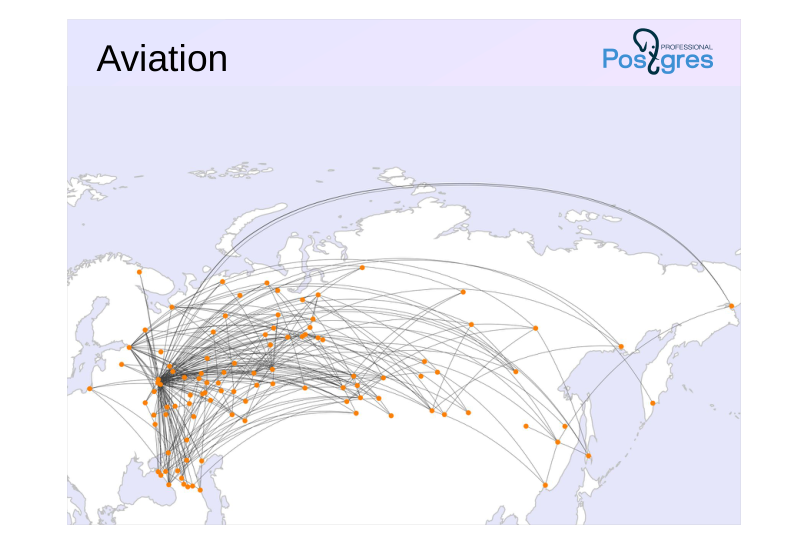 {#source-figure-003 caption=“Source slide page 3: Aviation”}
Speaker notes
The demonstration database was created for the following purposes:
● Self-directed study of the SQL query language
● Development of textbooks, guides, and training courses on SQL;
● Showcasing PostgreSQL features in articles and notes
When developing the demonstration database, we set out to achieve several objectives:
● The data schema should be simple enough to be understood without additional explanations.
● At the same time, the data schema should be sufficiently complex to enable the creation of meaningful queries;
● The database should be populated with realistic data that are engaging to work with.
The demonstration database is licensed under the PostgreSQL license.
The database is available in three versions with different sizes. For example, the large-volume database used in the query optimization course contains a year’s worth of flight data.
This topic covers the demo database version from 15.08.2017.
https://postgrespro.com/docs/postgresql/16/sql-copy
Page 4: Overview
 {#source-figure-004 caption=“Source slide page 4: Overview”}
Speaker notes
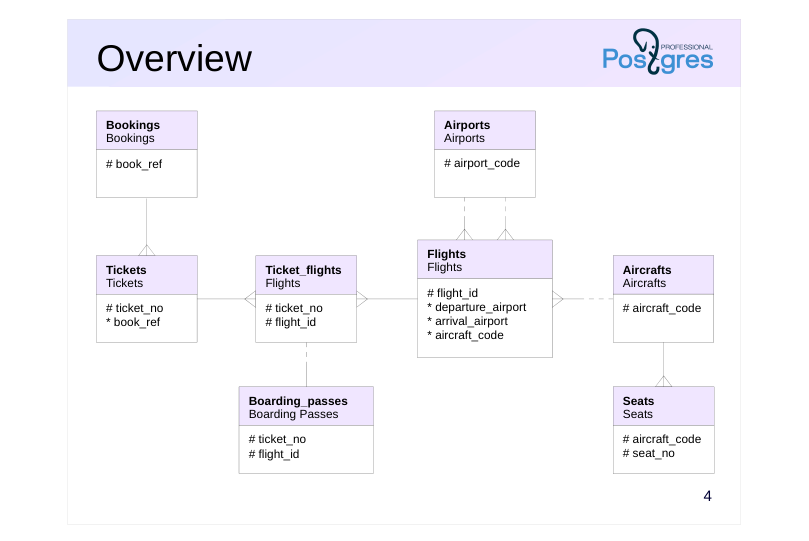
The primary entity is booking (bookings).
A booking can include multiple passengers, each receiving their own ticket (tickets).
A ticket may include one or more flights (ticket_flights). A ticket can include multiple flights when there’s no direct flight between the departure and destination (a connecting flight) or when it’s a round-trip ticket.
Each flight (flights) departs from one airport (airports) to another. Flights with the same number have identical departure and arrival locations but different departure dates.
When checking in for a flight, the passenger receives a boarding pass (boarding_passes) that specifies the seat on the plane. A passenger can only check in for the flight listed in their ticket Each flight and seat combination is unique.
The number of seats and their allocation across service classes in an aircraft depend on the specific aircraft model used for the flight. Each aircraft model is assumed to have only one cabin layout.
The schema highlights only the columns that correspond to primary and foreign keys. Next, we’ll take a closer look at the main objects in the demonstration database.
Page 5: Bookings
Bookings
- A passenger books a ticket a month in advance for themselves and possibly
- other passengers.
- Booking number (alphanumeric combination)
- Booking date
- Total amount of tickets included in the booking
Speaker notes
The passenger books a ticket for themselves and possibly others in advance, with the booking date (book_date) up to a month before the flight. Bookings are identified by a unique identifier (book_ref, a six-character alphanumeric code).
The total_amount field stores the total cost of all passengers’ flights included in the booking.
Page 6: Reservation
Let’s start with a reservation and pick any one:
We can see the reservation date and the total amount. The reservation was made quite a long time ago when compared to the current date:
However, in the demo database, the “current” date is a different one:
So, “in reality,” the tickets were booked 20 days ago:
Page 7: Tickets
Tickets
- A ticket is issued to a single passenger and may cover multiple flights.
- Neither the passenger ID nor the name is permanent; it is not possible to
- uniquely identify all tickets for the same passenger.
- Ticket No.
- Booking reference
- Passenger ID (Document Number)
- passenger_name | 16
- Passenger Contact Details
Speaker notes
The ticket contains a unique 13-digit number (ticket_no).
The ticket contains a passenger ID (passenger_id) — the passenger’s identity document number — along with their surname and name (passenger_name) and contact information (contact_data).
Neither the passenger ID nor the name is permanent (e.g., a passport can be replaced or a surname changed), making it impossible to uniquely identify all tickets for the same passenger.
Page 8: Tickets Ticket Details
Let’s check which tickets are included in the selected reservation.
Two passengers are traveling; each has an individual ticket containing their personal information.
Page 9: Flights
Ticket\_flights
- Flight connects tickets to flights
- Ticket No.
- Flight ID
- class of service
- Flight Cost
Speaker notes
A flight links a ticket to a flight, identified by the ticket and flight numbers.
For each flight, the cost (amount) and service class (fare_conditions) are specified.
Page 10: Flight Details
What route are the passengers traveling on? Let’s include the flights in the query.
Here, we’re only looking at one ticket – all routes in a booking always match. It appears that the ticket includes 6 flights, one in business class and the rest in economy class.
Page 11: Flights
Flights
- The flight operates on schedule between airports.
- Natural key: flight number and departure date, but a surrogate key is used.
- Flight ID
- flight number
- scheduled departure and arrival
- actual departure and arrival
- Departure and arrival airports
- Flight status
- filter: (aircraft_code = f.aircraft_code)
Speaker notes
A flight connects the departure and arrival airports. If there’s no direct flight, the ticket includes multiple flights.
Page 12: Flights Flight Details
Now let’s look into which flights are associated with the selected ones.
There are three outbound and three return flights. All outbound flights have already arrived (Arrived), while the passenger is currently on the return flight (Departed). The next flight is on time (On Time), and check-in hasn’t opened yet for the final flight (Scheduled). Let’s take a closer look at all the columns of one of the flights.
Actual time may vary from the scheduled time (typically by a small margin). All flights on the same route schedule share the same flight_no:
Page 13: Airports
Airports
- The city is not stored in a separate table
- Implementation: Multilingual view on airports_data
- airport code
- airport name
- city
- Airport coordinates (longitude and latitude)
- timezone
Speaker notes
The airport is identified by a three-letter code (airport_code) and is known as (airport_name).
Cities are not represented as a separate entity, but a “city” field has been introduced to help locate airports within the same city. This view also includes the airport’s coordinates (coordinates) and time zone (timezone).
The airport_name and city field values depend on the language set in the configuration parameter bookings.lang.
Page 14: Airports
A standard three-letter code serves as the identifier for airports. Let’s examine the complete details of an airport:
Besides the name and city, the airport’s coordinates and time zone are also stored. Now we can interpret the flight details:
To avoid having to write such a query repeatedly, there is a view called flights_v:
We can see the local time in the departure and arrival cities’ time zones, flight duration, and airport names here. Since the routes in the demo database remain unchanged over time, we can isolate data that’s independent of a specific departure date from the flights table. This data is organized in the routes view:
Page 15: Page 15
It’s clear that flights run daily (array days_of_week).
Page 16: Aircrafts
Aircrafts
- aircraft models operating flights
- Implementation: a multilingual view of aircrafts_data
- filter: (aircraft_code = f.aircraft_code)
- aircraft model
- Maximum flight range (km)
Speaker notes
Each aircraft model is uniquely identified by its three-digit code (aircraft_code). Additionally, the model (model) and maximum flight range in kilometers (range) are specified.
The model field’s value is determined by the selected language specified in the configuration parameter bookings.lang.
Page 17: Aircraft Aircraft
Aircraft models that service flights also use standard three-character codes as primary keys.
Page 18: Seats
Seats
- Seats determine the cabin layout
- All aircraft of the same model share the same cabin layout
- filter: (aircraft_code = f.aircraft_code)
- seat number
- class of service
Speaker notes
Seats determine the cabin layout for each model. Each seat is identified by its seat number (seat_no) and is assigned a class of service (fare_conditions) – Economy, Comfort, or Business.
Page 19: Seats
In the demo database, all aircraft of the same model share the same cabin configuration. Let’s look at the first row:
This is the business class section. Here’s the total number of seats across various service classes:
Page 20: Boarding Passes
Boarding\_passes
- The boarding pass is issued when checking in for the flight.
- Ticket No.
- Flight ID
- boarding pass number (in the order of registration)
- seat number
Speaker notes
Passengers can register for a flight up to a day in advance of the scheduled departure date, and they are then issued a boarding pass.
Boarding passes are assigned sequential numbers (boarding_no) according to the order in which passengers register for the flight. This number is unique only within the flight. The boarding pass includes the seat number (seat_no).
Page 21: Boarding Tickets Boarding Passes
Where was our passenger seated? To find out, you need to check the boarding pass issued during check-in for the flight:
The passenger hasn’t checked in for the two remaining flights yet.
Page 22: Multilingual Support
Configuration parameter
- bookings.lang
- Tables to store multilingual names
- airports_data
- aircrafts_data
Speaker notes
The language for displaying city, airport, and aircraft model names is set via the configuration parameter bookings.lang. The demo base contains names in Russian (ru) and English (en).
You can independently expand the language support by addingnames in any language to the rows of the airports_data and aircrafts_data tables.
Page 23: Multilingual Support
The demo database has the capability to translate the names of airports, cities, and aircraft into other languages. As we saw, by default, all names are displayed in Russian:
To change the language, simply set the configuration parameter.
The implementation uses a view on a base table containing JSON-formatted translations:
Page 24: Takeaways
The demo database’s schema is simple yet enables the creation of complex and intriguing queries.
- The data in the demo database is similar to real data.
- The demo database can be used for learning SQL, showcasing PostgreSQL features, and other purposes.
Page 25: Practice
Write a few queries against the demo database. 1. How many people are included in a single booking? 2. Which cities cannot be reached from Moscow without transfers? 3. Which airplane model operates the most flights, and which operates the fewest? 4. And which aircraft model carried the most passengers?
- The result will be two columns: Number of people per booking Booking count
Page 26: How many people are in each booking?
We’ll count the number of people in each booking and then determine how many bookings there are for each number of people.
2. Which cities cannot be reached from Moscow without transfers?
We’ll identify the cities that can be reached and list the remaining ones.
Page 27: Page 27
It’s interesting that you can’t get from Moscow to Moscow without transfers.
Which models have the highest and lowest number of flights?
Page 28: Page 28
The small Cessna is the most active, while one fleet model isn’t used for flights at all.
4. Which model carried the highest number of passengers?
The number of passengers on a flight can be determined using boarding passes.
02 Lesson 02: Query Execution / Planning and Execution
This page is extracted from the official PDF into native Markdown. Slide text, code and speaker notes are kept in reading order; the original PDF and HTML remain the layout references. HTML source: No matching course-page link was captured in the source inventory. Archive: QPT-handouts-16-en-20251018.zip PDF pages: 32
Page 1: Query Execution / Planning and Execution
Copyright
© Postgres Professional, 2019–2024 Authors Authors: Egor Rogov, Pavel Luzanov, Ilya Bashtanov Photo by: Oleg Bartunov (Phu monastery, Bhrikuti summit, Nepal)
Use of course materials
Non-commercial use of course materials (presentations, demonstrations) is allowed without restrictions. Commercial use is possible only with the written permission of Postgres Professional. It is prohibited to make changes to the course materials.
Feedback
Please send your feedback, comments and suggestions to: edu@postgrespro.com
Disclaimer
In no event shall Postgres Professional company be liable for any damages or loss, including loss of profits, that arise from direct or indirect, special or incidental use of course materials. Postgres Professional company specifically disclaims any warranties on course materials. Course materials are provided “as is,” and Postgres Professional company has no obligations to provide maintenance, support, updates, enhancements, or modifications.
Page 2: Topics
- Common Approaches to Optimization
- Simple Protocol and Query Processing Phases
- Extended Protocol
- More on planning
Page 3: Optimization Strategies
Parameter Configuration
- Tuning for the current workload
- Global impact on the entire system
- monitoring
- Query performance tuning
- Reducing workload
- Localized impact (a single query or multiple queries)
- Profiling
Speaker notes
This course focuses on query optimization. Generally speaking, optimization is a broad concept; it’s important to consider it during the system design and architecture selection stage. We will only discuss the tasks executed during the operation of an existing application.
Two main approaches can be identified. The first approach is about monitoring the system’s state and making sure it can handle the existing workload. To achieve this, you can tune DBMS parameters (the key ones covered in the DBA2 course and partially in this course) and also configure the operating system. If the settings don’t help, the only remaining option with this approach is to upgrade hardware (which doesn’t always work).
Another approach, which we will mainly discuss next, involves not adapting to the workload but rather reducing it. The “productive” workload consists of queries. If a bottleneck can be identified, you can attempt to influence the query’s execution in some way to achieve the same result with fewer resources. This approach is more targeted (affecting specific queries or a group of queries), but reducing the workload positively impacts the entire system’s performance.
We’ll begin by exploring query execution mechanisms in depth, then move on to discussing how to detect inefficient operations and practical approaches for optimization.
Page 4: Phases of Query Execution
Parsing
- Query Rewriting (Transformation)
- Query Planning (Optimization)
- Execution
Speaker notes
We’ll start by examining how a query is executed in a straightforward scenario—for instance, when you issue a SELECT command in psql.
Page 5: Parsing
- system
- catalog
- tree
- query
- parsing
- text
- query
- (parse)
Speaker notes
The processing of a regular query is carried out in multiple stages.
First, the query is parsed (parse).
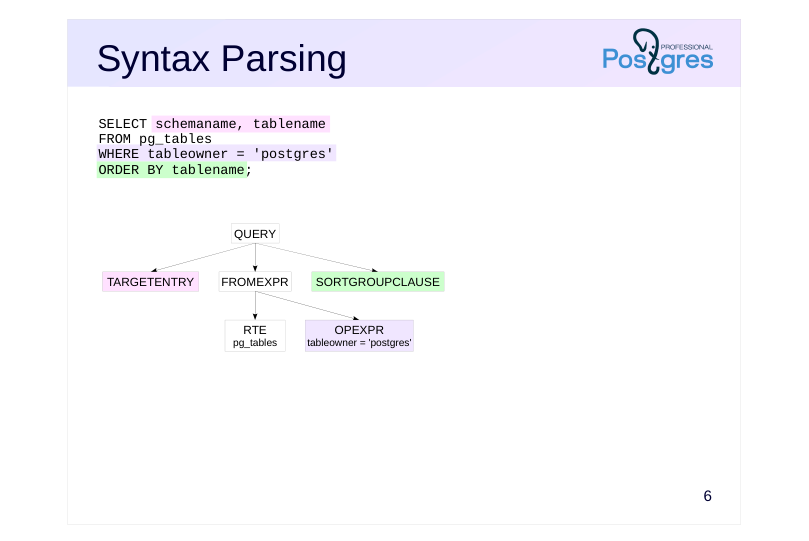
The first step is syntax analysis, where the query text is converted into a tree structure — this makes it easier to work with.
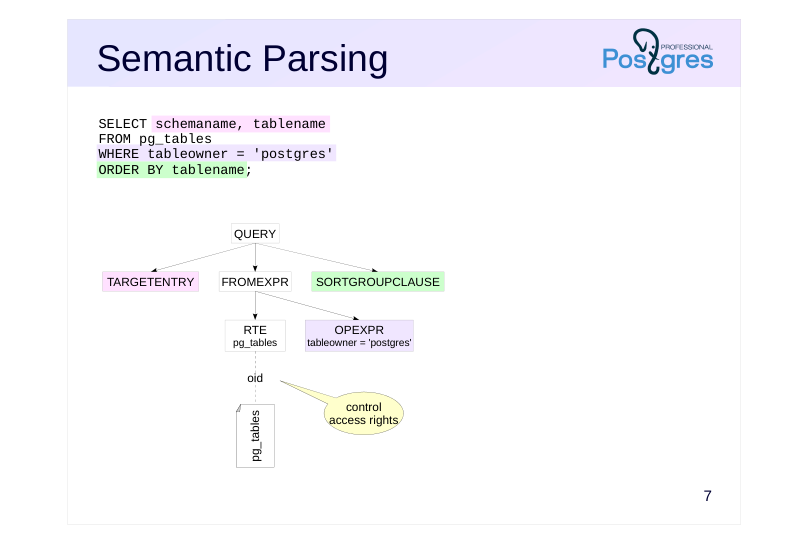
Next, semantic analysis (parse analysis) occurs, during which the query’s referenced database objects are identified, and the user’s access to them is verified (the parser consults the system catalog for this).
Page 6: Syntax Parsing
 {#source-figure-006 caption=“Source slide page 6: Syntax Parsing”}
Speaker notes
Let’s take a look at a simple example: the query shown on the slide.
During the parsing phase, a tree is constructed in the backend process’s memory, as illustrated in the simplified diagram below the query. Color indicates the approximate mapping between parts of the query text and tree nodes.
RTE is a non-obvious abbreviation for Range Table Entry. In PostgreSQL, this term refers to tables, subqueries, and join results — essentially sets of rows that SQL can manipulate.)
For those curious, the actual parse tree can be examined by setting the debug_print_parse parameter and checking the server log. There’s no practical value in this (unless, of course, you’re a PostgreSQL kernel developer).
Page 7: Semantic Parsing
 {#source-figure-007 caption=“Source slide page 7: Semantic Parsing”}
Speaker notes
During semantic analysis, the parser consults the system catalog to associate the name “pg_tables” with a view that has a specific object identifier (OID) within the system catalog. Access permissions for this view will be verified as well.
Page 8: Rewriting
 {#source-figure-008 caption=“Source slide page 8: Rewriting”}
Speaker notes
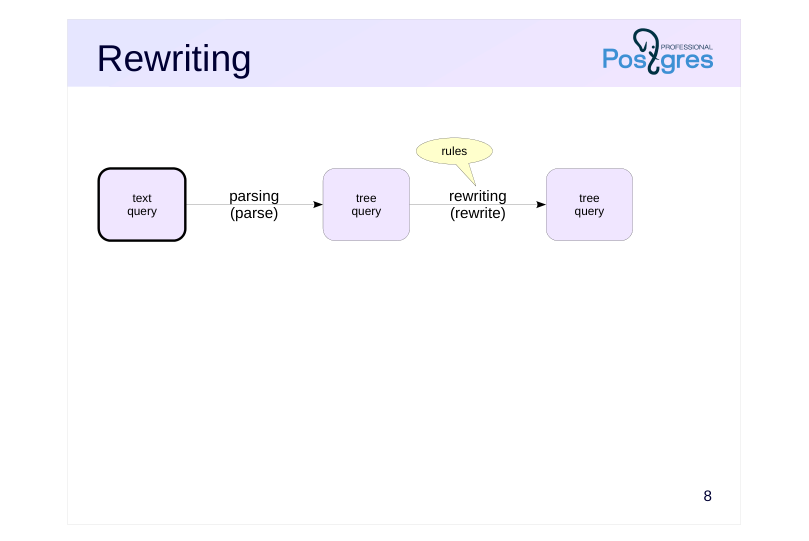
Secondly, the query is rewritten or transformed (rewrite) according to the rules>
An important special case of rewriting is substituting the query text in place of the view name. Keep in mind that the view text must be parsed again, so we simplify by stating that the first two stages follow each other.
Page 9: Rewriting
 {#source-figure-009 caption=“Source slide page 9: Rewriting”}
Speaker notes
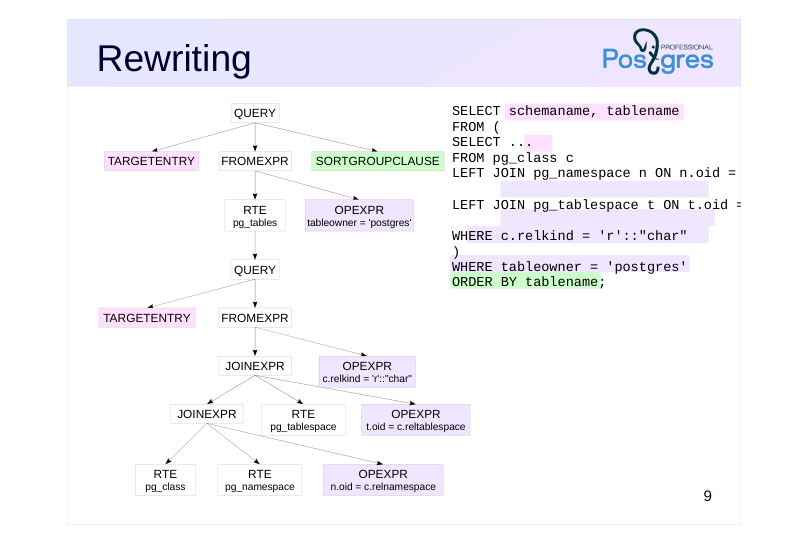
The slide presents a query with the view’s text included (this is an abstraction: the query in this form does not actually exist — all rewriting is performed on the query tree).
The parent node of the subtree associated with the subquery is the node that references this view. The figure clearly shows the tree structure of the query within this subtree.
The rewritten query tree can be seen in the server log by enabling the debug_print_rewritten parameter.
Page 10: Planning
 {#source-figure-010 caption=“Source slide page 10: Planning”}
Speaker notes
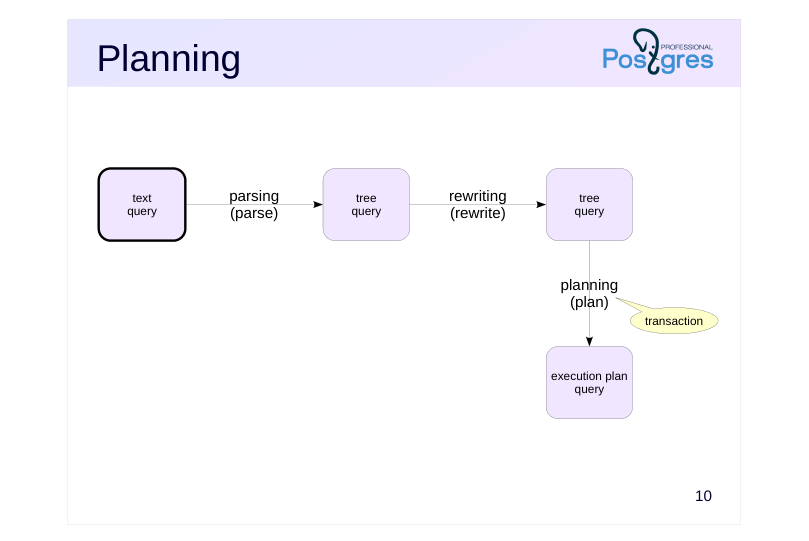
Thirdly, the query is optimized (plan).
SQL is a declarative language, so a single query can be executed in various ways. The planner (also known as the optimizer) considers different execution approaches and evaluates them. The evaluation is based on a mathematical model that uses statistics about the data being processed.
The execution approach with the lowest estimated cost is represented as an execution plan.
Page 11: Planning
 {#source-figure-011 caption=“Source slide page 11: Planning”}
Speaker notes
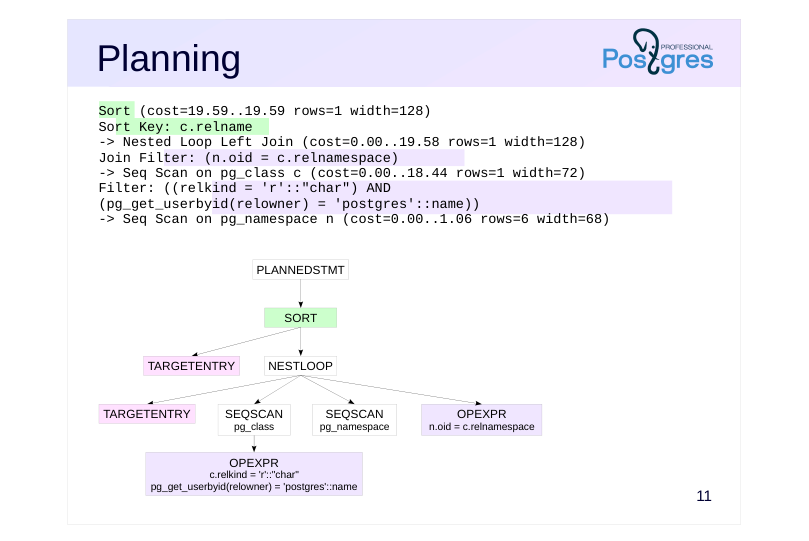
The slide shows an example of an execution plan, demonstrating how the query is executed.
Here, the Seq Scan steps involve reading the relevant tables, while the Nested Loop represents the method for joining two tables. The slide displays the execution plan in the format shown by the EXPLAIN command. We will discuss data access methods, join methods, and the EXPLAIN command in more detail in the next sections.
For now, it’s worth noting two key points:
● Out of the three tables, only two remain: the planner determined that one table wasn’t necessary for the result and could be safely removed from the execution plan.
● Each node in the tree includes information about the estimated number of rows (rows) and the cost (cost).
For those interested, the actual execution plan can be viewed by setting the debug_print_plan parameter.
Page 12: Execution
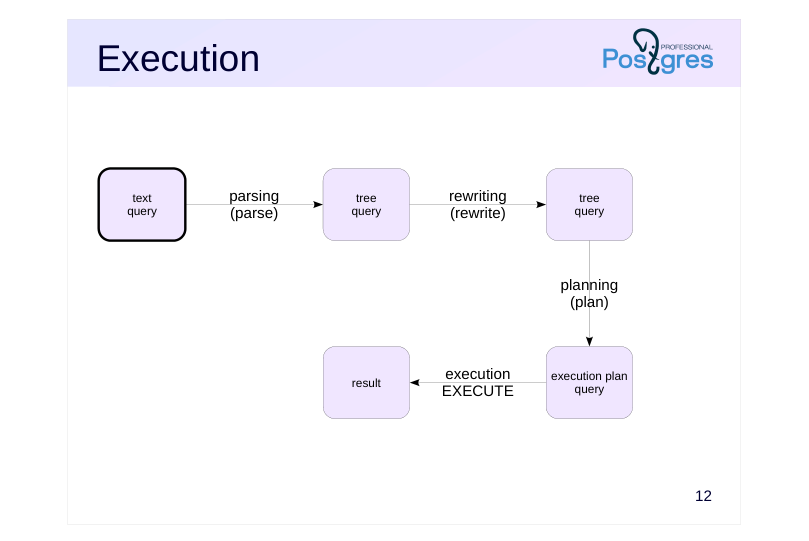 {#source-figure-012 caption=“Source slide page 12: Execution”}
Speaker notes
Fourthly, the query is executed (execute) according to the selected plan, with the result returned to the client.
Setting the log_parser_stats, log_planner_stats, and log_executor_stats parameters to ‘on’ enables detailed statistics for each stage to be logged. But in practice, it’s usually not required.
https://postgrespro.com/docs/postgresql/16/query-path
Page 13: Simple Protocol
The Simple Query Protocol is used when a command is sent to the server and, The Simple Query Protocol is used when a command is sent to the server, and if it’s a SELECT or a command with the RETURNING clause, we expect to receive all result rows.If it’s a SELECT or a command with the RETURNING clause, we expect to receive all result rows. For example:
The standard way to obtain an execution plan is the EXPLAIN command (cost output is currently disabled):
If the buffers parameter is specified, the Planning Buffers field will display the number of buffer cache pages read while building the plan. If you add the analyze parameter, the server will execute the query and show the execution plan with detailed information. Exercise caution with data-modifying queries!
The Buffers field displays the cache type (shared – buffer cache in shared memory) and the number of pages: hit – found in the buffer cache; read – pages not found in the cache and read from the operating system; written – pages written to files; dirtied – pages that have become dirty (i.e., modified for the first time in the cache) Now, let’s create a temporary table and insert the rows from the airports table into it.
The temporary table is cached in the session’s local memory (Buffers … local).
Warning: displaying the execution time for each step, as shown in this example, may significantly impact query performance on certain platforms. If this information isn’t needed, it’s recommended to use timing off.
Page 14: Page 14
Page 15: Execution
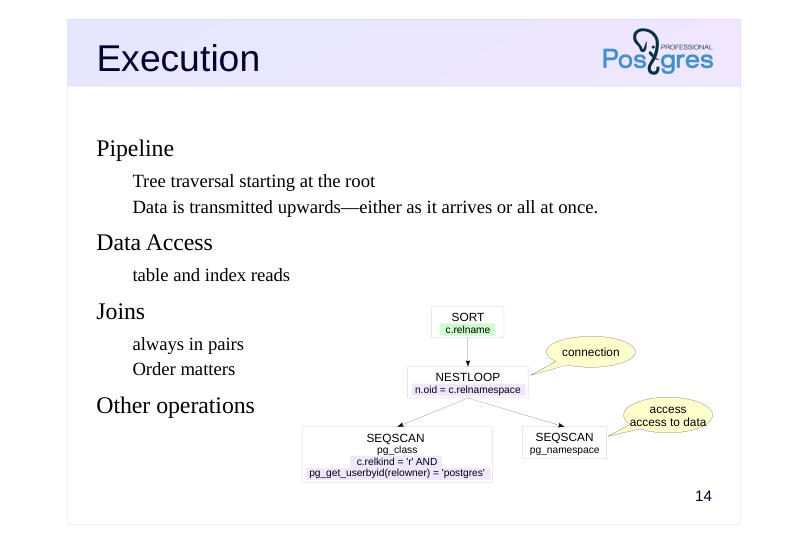 {#source-figure-015 caption=“Source slide page 15: Execution”}
Pipeline
- Tree traversal starting at the root
- Data is transmitted upwards—either as it arrives or all at once.
- Data Access
- table and index reads
- Joins
- always in pairs
- Order matters
- Other operations
Speaker notes
During the execution phase, the execution plan tree (as shown on the slide, it’s simplified to highlight the essentials) functions like a conveyor belt.
Execution starts at the root node. tree The root node (in our case, the SORT operation) retrieves data from the child node; once it receives the data, it performs the sorting operation and sends the results upward (i.e., to the client).
Some nodes (such as the NESTLOOP node) join data from different sources. Here, the node accesses two child nodes in sequence (the join is always performed pairwise) and, upon receiving rows from them, joins them and sends them upward to the sort node.
The two lower nodes represent table access for data retrieval. They read rows from the relevant tables and pass them up to the join node.
Some nodes can only return a result once they have received all data from their child nodes. Such nodes include sorting — it cannot process an incomplete sample. Other nodes can return data as it comes in. For example, table scan data access can return data as it is read (enabling quick retrieval of the initial portion of the result — such as for paginated display on a web page).
To get a handle on execution plans, you need to understand the available data access methods, the techniques for joining data, and examine some other operations.
Page 16: JIT Compilation
Compiling parts of queries into source code
- Evaluation of expressions in the WHERE clause
- Evaluation of expressions in the SELECT clause
- Aggregates and Projections
- Transformation of Tuple Versions
- Moving tuple versions from disk to an unrolled representation in memory
Speaker notes
JIT (just-in-time, “exactly at the right time”) dynamic compilation is used to compile code or its parts during program execution. This technology enables faster execution of interpreted code and is used in many systems.
In PostgreSQL, JIT compilation can compile parts of the code executed when processing SQL queries. PostgreSQL needs to be compiled with support for LLVM.
JIT compilation is more suitable for long-running, CPU-intensive analytical queries. For short OLTP queries, JIT compilation overhead can exceed the queries’ execution time.
JIT compilation can be influenced by configuration parameters. There are several JIT-related optimizations that are enabled only when the query cost exceeds the threshold value set in the relevant configuration parameters.
https://postgrespro.com/docs/postgresql/16/sql-copy
Page 17: JIT compilation Just-In-Time Compilation
By default, JIT compilation is enabled, though it’s disabled in the demo database:
Let’s run a query that computes the value of π. The query makes extensive use of calculations that JIT can optimize:
The EXPLAIN ANALYZE command will display detailed information on which JIT optimizations were applied:
Disable JIT compilation and rerun the query:
Page 18: Page 18
The query execution time is likely to increase slightly. Throughout the course, we’ll skip the details of JIT optimizations. To avoid cluttering query plans with JIT compilation messages, JIT is disabled in the demo database.
Page 19: Extended Protocol
Refining the Query Processing Schema
- Prepared Statements
- Cursors
Speaker notes
PostgreSQL also supports the Extended Query Protocol. In practice, this allows for the use of prepared statements and cursors.
Page 20: Simple Query Protocol
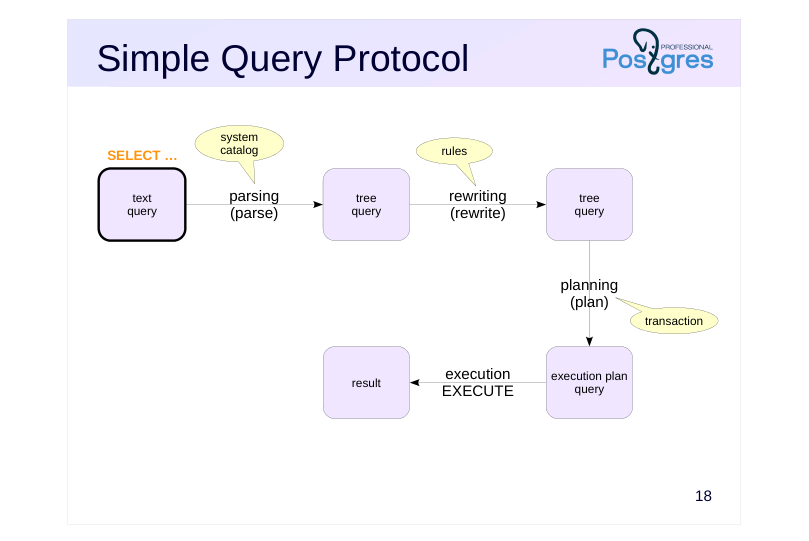 {#source-figure-020 caption=“Source slide page 20: Simple Query Protocol”}
Speaker notes
The slide revisits the complete query processing workflow via the simple protocol, which we have already discussed.
Page 21: Extended Protocol
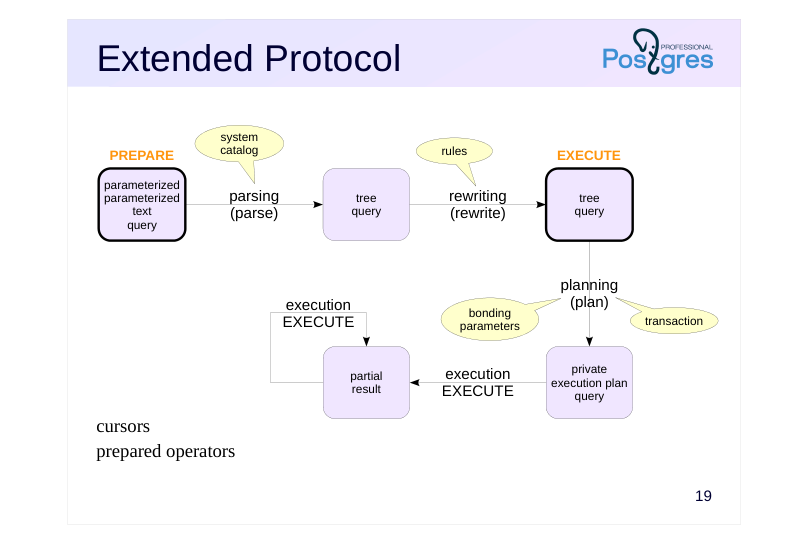 {#source-figure-021 caption=“Source slide page 21: Extended Protocol”}
cursors prepared operators
Speaker notes
The extended protocol provides finer-grained control over query processing.
First, the query can be prepared. To do this, the client sends a query to the server (possibly in a parameterized form), and the server parses and rewrites it, storing the prepared query plan in the backend process’s local memory.
To execute a prepared query, the client identifies it by name and provides specific parameter values. The server constructs a private query plan, considering the parameter values, and executes it.
Preparation helps avoid the need for repeated parsing and rewriting of the same query when executed multiple times within a single session.
Second, you can use cursors. The cursor mechanism allows retrieving query results row by row instead of all at once. The information about the open cursor is also kept in the backend process’s local memory.
https://postgrespro.com/docs/postgresql/16/sql-copy
Page 22: Extended Protocol
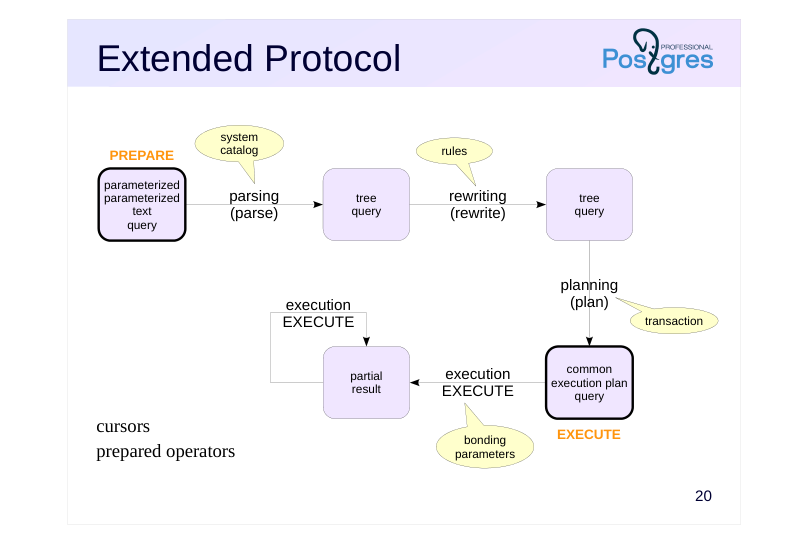 {#source-figure-022 caption=“Source slide page 22: Extended Protocol”}
bonding parameters cursors prepared operators
Speaker notes
If a query has no parameters, there’s no need for the server to re-plan it every time it’s executed. In this case, it immediately caches a generic execution plan. This helps save even more resources.
If the query includes parameters, the server can use a generic plan if it determines that, on average, it performs as well as or better than specific plans. For more information on when the switch occurs, see the “Basic Statistics” section.
Another reason to use prepared statements is to prevent SQL injection when the query’s input data originates from an untrusted source, such as input fields on a web form.
Page 23: Prepared Statements
Let’s create a prepared statement for a parameterized query:
Now we can invoke the statement by name:
All prepared statements are available in the view:
name — the name of the prepared statement statement — the command that generated it prepare_time — creation time parameter_types — parameter types (array), result_types — result column types (array), from_sql — indicates that the statement was created using the SQL PREPARE command (not via a driver function call), generic_plans — number of times the generic plan was used custom_plans — the number of times custom plans were created and used If a prepared statement is no longer required, you can remove it using the DEALLOCATE command. However, it will be automatically dropped when the session ends.
PREPARE, EXECUTE, and DEALLOCATE are SQL commands. Clients developed in other programming languages will use the operations defined in their respective drivers. However, any driver uses the same protocol for communication with the server. When executing a parameterized query in psql, the extended query protocol is used.In this case, you need to set the parameters in advance:
A prepared statement is created implicitly.
Page 24: Page 24
After executing the query, the prepared statement is automatically dropped:
Parameter values are cleared after execution, so they must be set before each query:
This approach can be used to debug query execution using the extended protocol.
Cursors
Cursors allow for row-by-row processing of results. They are commonly used in applications and include optimization features. In SQL, cursors can be demonstrated as follows: Declare a cursor (which is opened immediately) and fetch the first row:
Read the second result row and close the open cursor (the cursor will close automatically at the end of the transaction):
Page 25: More on planning
Planning Process
- Cardinality Estimation
- Cost estimation
- Selecting the Optimal Plan
Speaker notes
Query planning — a critical and complex process, so we’ll explore it in more detail.
Page 26: Planning Process
Statistics
- table size and data distribution statistics
- Cardinality Estimation
- Condition selectivity — the proportion of rows selected.
- Cardinality refers to the total number of rows
- Calculation requires statistics
- Cost estimation
- Mainly determined by the node type and the number of rows processed
- Optimizer’s plan evaluation
- the plan with the lowest cost is chosen
Speaker notes
The optimizer evaluates all possible execution plans and selects the one with the lowest cost.
When evaluating the cost of a plan node, the optimizer takes into account the node’s type (notably, the cost of reading data directly from a table differs from that of using an index) and the amount of data processed by the node. Other factors are regarded as less important.
Two key concepts are crucial for assessing data volume:
● cardinality — the total number of rows;
●
To evaluate selectivity and cardinality, you need to have information about the data, such as table sizes, value distribution in columns and other factors.
Ultimately, everything relies on statistics — data gathered and maintained through the auto-analyze process or the ANALYZE command.
If cardinality is correctly estimated, the cost is usually quite accurate. The optimizer’s primary issues stem from inaccurate cardinality estimation. This can occur due to insufficient statistics, the inability to use them, or flaws in the models underlying the optimizer. We’ll go into more detail about this.
Page 27: Cardinality Estimation
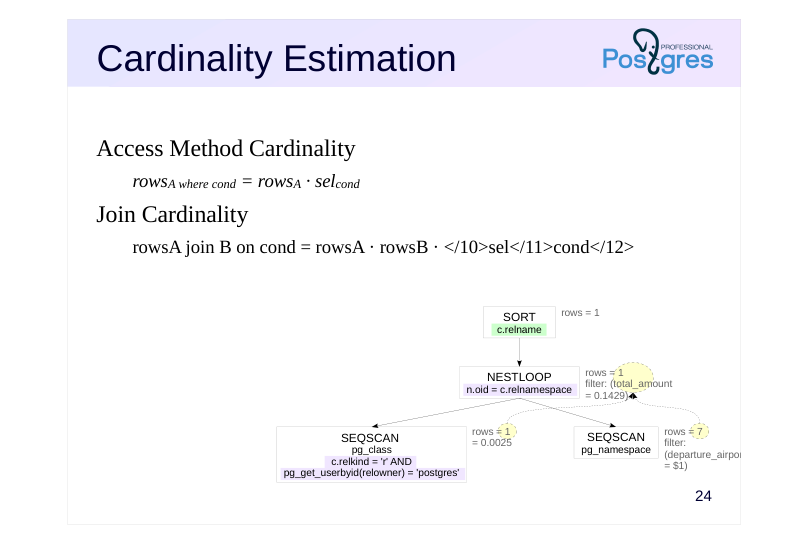 {#source-figure-027 caption=“Source slide page 27: Cardinality Estimation”}
Access Method Cardinality
- rowsA where cond = rowsA · selcond Join Cardinality
- rowsA join B on cond = rowsA · rowsB · </10>sel</11>cond</12>
Speaker notes
It is convenient to view cardinality estimation as a recursive process. To estimate the cardinality of a node, you first need to estimate the cardinalities of its child nodes, and then calculate its cardinality based on those values once you know the node’s type.
Therefore, the first step is to calculate the cardinalities of leaf nodes containing data access methods. To do this, we need to know the table’s size and the selectivity of the conditions applied to it. We’ll discuss how exactly this is done later.
We can note for now that it’s enough to estimate the selectivity of simple conditions, as the selectivity of conditions constructed with logical operations can be calculated with simple formulas:
selx and y = selx · sely ; selx or y = 1 – (1 – selx) (1 – sely)
Keep in mind that these formulas assume independence of the predicates. If they correlate, this estimate will be inaccurate. In the case of correlated predicates, this estimate will be inaccurate (it can be improved with extended statistics).
Next, you can calculate the join cardinalities. We already know the cardinalities of the joined data sets, but we still need to estimate the selectivity of the join conditions. Let’s just assume it’s possible for now.
Similarly, this approach can be applied to other nodes, such as sortings or aggregations.
Note that a cardinality calculation mistake in a lower node will propagate upward, resulting in inaccurate cost estimation and, ultimately, a sub-optimal plan.
Page 28: Cost estimation
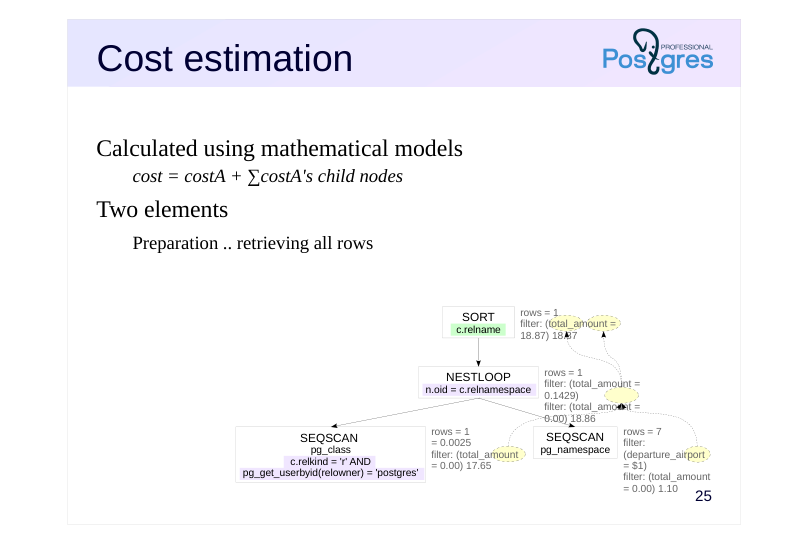 {#source-figure-028 caption=“Source slide page 28: Cost estimation”}
Calculated using mathematical models
- cost = costA + ∑costA’s child nodes Two elements
- Preparation .. retrieving all rows
Speaker notes
Now, let’s look at the overall process of cost estimation. It is also inherently recursive To calculate the cost of a subtree, you first need to compute the costs of the child nodes and sum them, then add the node’s own cost.
The cost of a node’s operation is calculated using the mathematical model built into the planner, taking into account the estimated number of rows processed (which has already been computed).
The cost consists of two components, each evaluated separately.The first component is the initial cost (initial cost), while the second represents the cost of retrieving all the rows in the result set (total cost).
Some operations don’t require any preparation; their initial cost is zero.
Conversely, other operations require preliminary steps. For example, the sorting operation in the example needs to first retrieve all data from the child node before it can begin. For these nodes, the initial cost will not be zero – this cost must be incurred regardless of how many result rows are required.
It’s important to recognize that the cost represents the planner’s estimate and might not align with the actual execution time. It’s often viewed as the cost being measured in hypothetical “units” that don’t carry any inherent meaning on their own. Cost is only used to allow the planner to compare different plans for the same query.
Page 29: Selecting the Optimal Plan
Exploring Plans
- Join order, join methods, access methods
- A full scan where possible; with numerous options, the search space is
- reduced.
- Simple Queries and Prepared Statements
- Optimizing retrieval of all rows
- Minimum total cost
- Cursors
- Optimizing retrieval of a portion of the first rows
- Minimum cost for cursor_tuple_fraction rows
Speaker notes
The optimizer tries to evaluate all possible query execution plans to choose the best one.
A dynamic programming algorithm is used to reduce the search space, but when the number of options is high—especially due to the number of tables being joined—finding an exact solution to the optimization problem becomes impractical within a reasonable time. In such cases, the planner reduces the number of plans it evaluates by either not considering all pairwise join options or switching to a genetic optimization algorithm (GEQO - Genetic Query Optimization). This could result in the optimizer choosing a suboptimal plan not because of evaluation errors, but merely because the best plan wasn’t considered.
https://postgrespro.com/docs/postgresql/16/sql-copy
What defines the “best plan”?
For typical queries, the optimal plan minimizes the resources needed to retrieve all rows, meaning it has the lowest total cost.
However, when using cursors, it’s important to retrieve the first rows as soon as possible. Therefore, there’s a parameter cursor_tuple_fractio (default 0.1) that determines the fraction of rows to be retrieved as quickly as possible. The lower the parameter value, the more the initial cost influences the plan selection instead of the total cost.
Page 30: Takeaways
Query processing involves multiple stages: parsing and rewriting, planning, and execution.
- There are two protocols for executing queries.
- Simple — direct execution and immediate result retrieval
- Extended: prepared statements and cursors
- Runtime depends on the quality of planning.
- The optimizer constructs the plan based on cost.
Page 31: Practice
- The Effect of Preparing a Long Statement on Its Execution Compute the average cost of a flight and determine the average run time of this query. Prepare the statement for this query and then recalculate the average run time. How many times faster did the execution become?
- The Impact of Preparing Short Statements on Their Execution Run the query for booking data with ID 0824C5 multiple times; then calculate the average execution time. Prepare the statement for this query and then recalculate the average run time. How many times faster did the execution become in this case?
Speaker notes
The execution time of the same query can vary significantly, especially during the first execution. To reduce the variation, average the execution time by running the query multiple times. It’s convenient to use PL/pgSQL, keeping in mind that:
● A dynamic query executed via the PL/pgSQL EXECUTE command (note: not to be confused with the SQL EXECUTE command) goes through all stages every time;
● An SQL query embedded in PL/pgSQL code is executed using prepared statements.
Example of the syntax for a regular operator command:
For the prepared statement (in this case, SELECT is replaced with PERFORM because the result is not needed):
Page 32: 1. A Long Query
Standard Statement:
Prepared Statement:
The time change is slight — most of the time is spent on query execution.
2. A Fast Query
Standard Statement:
Prepared Statement:
The time decreased significantly — parsing and planning account for most of the total time.
03 Lesson 03: Data Access / Access Methods
This page is extracted from the official PDF into native Markdown. Slide text, code and speaker notes are kept in reading order; the original PDF and HTML remain the layout references. HTML source: No matching course-page link was captured in the source inventory. Archive: QPT-handouts-16-en-20251018.zip PDF pages: 38
Page 1: Data Access / Access Methods
Copyright
© Postgres Professional, 2019–2024 Authors Authors: Egor Rogov, Pavel Luzanov, Ilya Bashtanov Photo by: Oleg Bartunov (Phu monastery, Bhrikuti summit, Nepal)
Use of course materials
Non-commercial use of course materials (presentations, demonstrations) is allowed without restrictions. Commercial use is possible only with the written permission of Postgres Professional. It is prohibited to make changes to the course materials.
Feedback
Please send your feedback, comments and suggestions to: edu@postgrespro.com
Disclaimer
In no event shall Postgres Professional company be liable for any damages or loss, including loss of profits, that arise from direct or indirect, special or incidental use of course materials. Postgres Professional company specifically disclaims any warranties on course materials. Course materials are provided “as is,” and Postgres Professional company has no obligations to provide maintenance, support, updates, enhancements, or modifications.
Page 2: Topics
- Sequential Scan (Seq Scan)
- Index Scan
- Bitmap Scan Bitmap Heap Scan
- Index Only Scan Index-Only Scan
- Comparing Access Method Efficiency
Page 3: Seq Scan
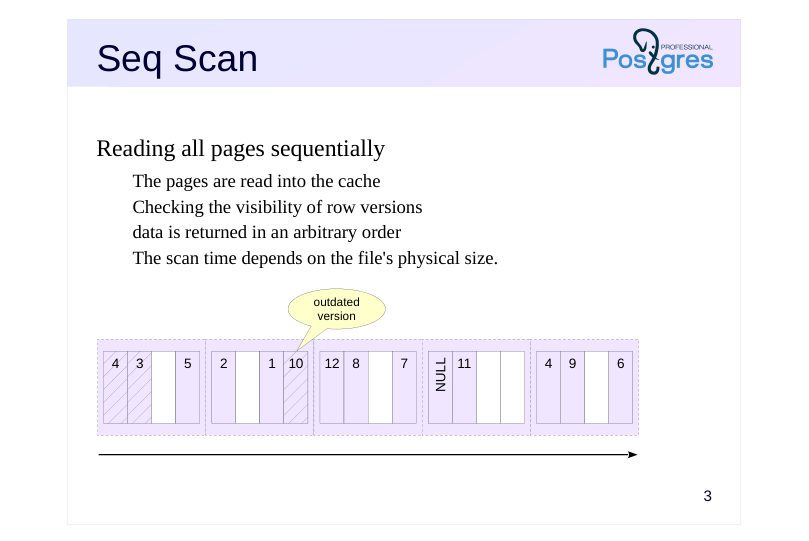 {#source-figure-003 caption=“Source slide page 3: Seq Scan”}
Reading all pages sequentially
- The pages are read into the cache
- Checking the visibility of row versions
- data is returned in an arbitrary order
- The scan time depends on the file’s physical size.
Speaker notes
The optimizer has several ways to access the data The simplest method is a sequential scan of the table. The table’s main data files are read in pages from beginning to end. Note that data is read through the buffer cache (for temporary tables, through the session-local cache).
Sequential file reading leverages the fact that the operating system typically reads data in larger portions than the page size — likely, several subsequent pages are already in the OS cache.
A sequential scan works well when reading the entire table or a significant portion of it (if the condition’s selectivity is low).
During a sequential scan, all row versions on each page are examined — including non-current (dead) versions that haven’t been removed by the cleanup (autovacuum) process yet. If the table’s files contain many dead row versions that haven’t been removed, this can cause a decrease in the performance of sequential scans.
Details on row versions, data snapshots, and cleaning up unnecessary row versions are covered in the DBA2 course.
https://postgrespro.com/docs/postgresql/16/sql-copy
https://postgrespro.com/docs/postgresql/16/sql-copy
Page 4: Sequential Scan
The query execution plan displays sequential scanning via the Seq Scan node:
The following key values are listed in parentheses: cost — cost estimate; rows — estimated number of rows returned by the operation; width — estimated average row size in bytes The cost is represented using arbitrary units and comprises two parts. The first number represents the startup cost for evaluating the node. For a sequential scan, this is zero — no setup is needed to begin returning data. The second number indicates the total cost of acquiring all the data. How is the total cost calculated? The PostgreSQL optimizer accounts for I/O and processor resources. The I/O cost is calculated by multiplying the number of table pages by the hypothetical cost of reading a single page:
The CPU cost component is calculated based on the processing cost per row:
Sequential Scans and Dead Row Versions
Create a copy of the flights table and disable autovacuum to prevent automatic removal of dead row versions:
Check the size of the created table:
Remove all rows from this table:
Page 5: Page 5
Dead row versions persist in the table file until the next cleanup, so the table size remains the same.
Obtain the query execution plan with analyze and buffers — pay attention to the number of pages in Buffers and the cost:
Over two thousand pages were read. Manually clean the table and check its size again:
Dead row versions have been removed, reducing the table size. Obtain the query execution plan again:
The table is empty — no row versions were read, and the plan’s cost is minimal. The time spent dealing with non-current row versions can be significant for larger tables.
Page 6: Bulk Page Replacement
 {#source-figure-006 caption=“Source slide page 6: Bulk Page Replacement”}
Speaker notes
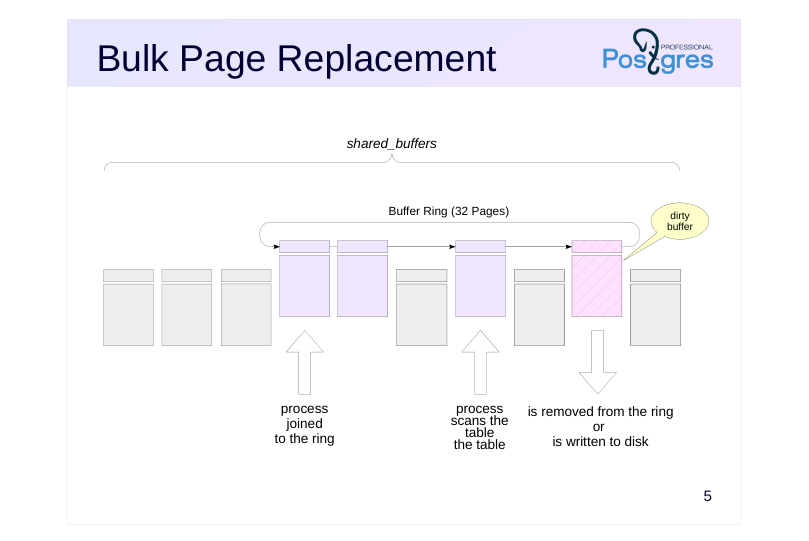
During a sequential scan of the buffer cache, a large number of pages containing “single-use” data are accessed, potentially evicting useful pages from the buffers. During a sequential scan of a large table (exceeding a quarter of the buffer cache size), only 32 pages from the entire cache are used, with eviction occurring within this subset. Meanwhile, the remaining data in the buffer remain unaffected.
If the hint bits or the actual data are modified during the read operation, a dirty buffer is generated. This buffer is removed from the ring and will be evicted normally, with a new buffer added to the ring. This strategy assumes that data is mainly read, not modified.
If another process needs the same table during a scan, it doesn’t start from the beginning but joins the existing buffer ring. After the scan completes, the process reads the “missed” beginning of the table.
When using temporary tables via the local cache, the buffer ring mechanism is not employed.
Page 7: Bulk Page Replacement
Clear the current I/O statistics:
Let’s read all rows from a table exceeding a quarter of shared_buffers:
A total of 49415 pages were read. The pg_stat_io view shows the cumulative statistics:
A total of 49415 pages were read (reads), with 49383 pages being loaded into the cache via replacement (reuses). Consequently, a buffer ring of size 49415 − 49383 = 32 pages was used for the scan. Reset the statistics and query the same table again:
Page 8: Page 8
We can now see that 32 pages were already in the cache from the previous read (hits), meaning the server had to read the remaining 49383 pages (reads). During this process, 49351 pages were evicted from the cache (reuses). The buffer ring size remains 49383 − 49351 = 32 buffers, but these now contain different pages than those used in the first scan.
Page 9: B-tree
Index
- Supporting structure in external memory
- maps keys to table row identifiers
- Structure: Search Tree
- Balanced
- Highly branched
- only sortable data types (using ‘greater than’ and ’less than’ operations)
- Search results are automatically sorted
- Using a composite type
- Improved access speed
- support for integrity constraints
Speaker notes
In this section, we will focus on one of the index types available in PostgreSQL: the B-tree (B-tree). B-tree (B-tree). This is the most commonly used index type in practice. Other types of indexes are covered later in this course within the “Types of Indexes” section.
Like all indexes in PostgreSQL, the B-tree is a secondary structure — it contains no information that isn’t already available from the table itself, but it does take up additional disk space. An index can be dropped and recreated. Indexes are used to accelerate operations that involve a small part of the table, such as retrieving a limited number of rows, and enforcing integrity constraints (primary and unique keys).
Indexes map the values of indexed fields (search keys) to table row identifiers. In the B-tree index, an ordered key tree is built, allowing quick lookup of the desired key along with item pointers to row versions. For example, numbers, strings, and dates can be indexed, but planar points cannot (other index types are available for them). When indexing text strings, you should take into account the specifics of sorting rules (for more details, see course DBA2, topic ‘Localization’).
The B-tree is characterized by its balanced structure (constant depth) and high branching factor. Although the tree’s size depends on the indexed columns, in practice, trees typically have a depth of no more than 4–5.
Page 10: B-tree
 {#source-figure-010 caption=“Source slide page 10: B-tree”}
Speaker notes
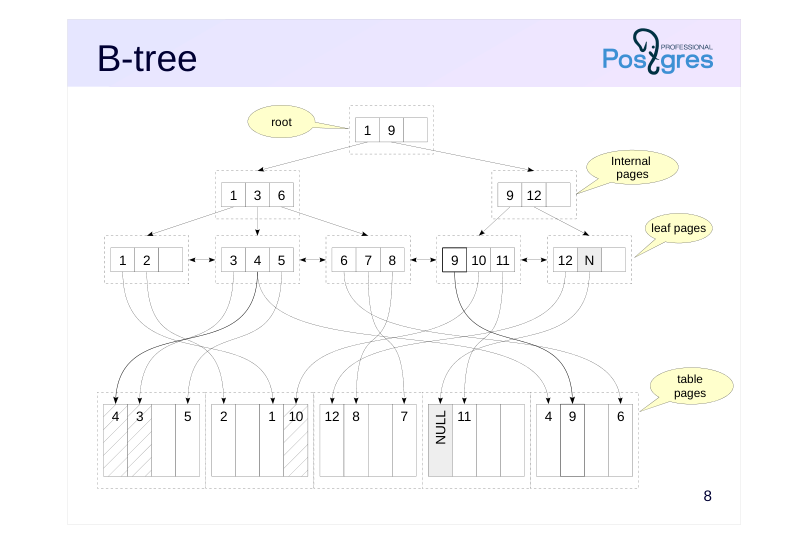
An example of a B-tree is shown at the top of the slide. Its pages are composed of index entries, each containing:
● The key represents the column values used to create the index (such columns are referred to as key columns);
● a pointer to another index page or pointers to tuple versions
The keys within a page are always sorted.
Leaf pages directly point to table tuple versions containing the index keys. These pages are linked in a bidirectional list to facilitate traversing keys in ascending or descending order.
Internal pages point to lower-level index pages, with key values defining the range of values accessible by following the link.
The root page of the tree, which has no parent pointers, is called root.
An index page may be only partially filled. Free space is used to insert new records into the index. If there’s not enough space on a page, it is split into two new pages. Split pages are never merged, which can lead to index growth in some cases.
By default, null values are treated as ‘greater than’ non-null values, so they are stored on the right side of the tree. This order can be adjusted when creating an index using the NULLS LAST and NULLS FIRST clauses.
Page 11: Index Scan: одно значение
 {#source-figure-011 caption=“Source slide page 11: Index Scan: одно значение”}
Speaker notes
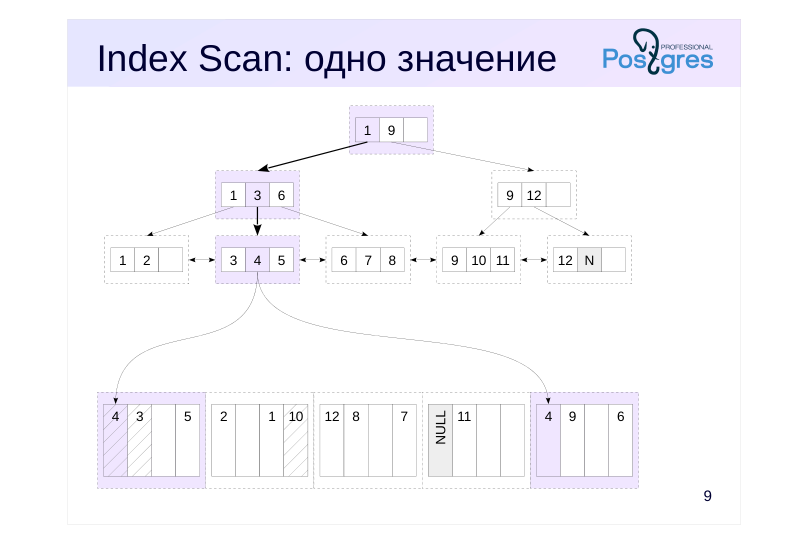
Let’s look at how searching for a single value using an index works. For example, we want to find a row in the table where the value of the indexed column is four.
We start at the tree’s root. The index entries on the root page specify the key value ranges for the lower-level pages: ‘1 to 9’ and ‘9 and above’. The ‘1 to 9’ range applies here, corresponding to a row with key 1. It’s worth noting that since the keys are stored in order, page-level searches are highly efficient.
The link in the found entry leads to the second-level page.In it, we find the ‘3 to 6’ range (key 3) and move to the third-level page.
This is a leaf page. In this page, we find the key value 4 and navigate to the table page.
Note that keys may be duplicated, even in a unique index, because the multiversion concurrency control mechanism can create different versions of the same row. To save space, keys are stored in the index page as a single instance.
Before returning the found row versions, check their visibility.
In the illustrations, the entries and pages that had to be read are color-coded.
Page 12: Index Scan
Let’s look at the bookings table:
The book_ref column serves as a primary key, and an index named bookings_pkey is automatically created for it. Let’s examine the query plan for a single value filter:
The Index Scan access method was chosen, and the name of the index used is shown. Access to both the index and the table is represented by a single plan node. The access condition is listed below. The initial cost of index access represents the estimated resources needed to reach the leaf node. This cost depends on the tree’s height. During estimation, it’s assumed that the required pages are already in the cache, so only CPU resources are considered, resulting in a low value. The full cost includes the estimated cost of reading the required leaf index pages and table pages. In this case, since the index is unique, the model assumes that one index page and one table page will be read. The cost of each read is estimated using the random_page_cost parameter:
Its value is typically higher than seq_page_cost because random access is more expensive (though this parameter should be considerably reduced for SSD drives). The total is 8, with a small additional cost for CPU time spent processing rows. The Index Cond line in the plan lists only the conditions used to access the index or that can be evaluated at the index level. Additional conditions that can only be evaluated using the table are shown in a separate Filter line:
Page 13: Index Scan: диапазон
 {#source-figure-013 caption=“Source slide page 13: Index Scan: диапазон”}
Speaker notes
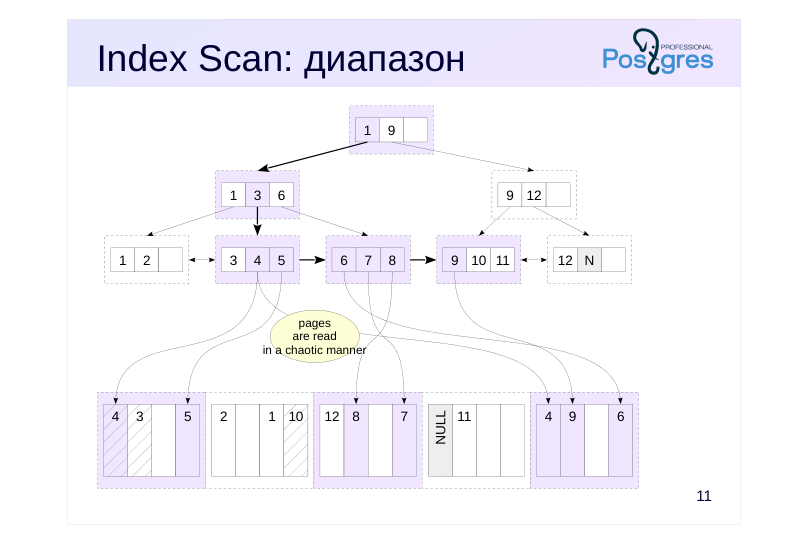
B-trees enable efficient searching for not just individual values, but also ranges of values, such as “less than,” “greater than,” “less than or equal to,” “greater than or equal to,” and “between.”
This is how it works. First, we search for the condition’s extreme key. For example, for the “between 4 and 9” condition, we can select 4 or 9, whereas for the “less than 9” condition, we use 9. Then, we proceed to the index’s leaf page as discussed in the previous example and retrieve the first value from the table.
Then, we proceed along the index’s leaf pages in the appropriate direction (right or left, depending on the condition), scanning the records until we encounter a key outside the specified range.
The slide demonstrates an example of searching for values using the condition “x BETWEEN4 AND 9” or, equivalently, “x >= 4 AND x <= 9”. Once we reach the value 4, we then scan the keys 5, 6, and so on until 9. When we encounter key 10, we stop the search.
Two properties are at work: the ordered arrangement of keys on all pages and the bidirectional linking of leaf pages. The search results are automatically sorted.
Note that we had to access the same table page multiple times. We accessed the first table page (value 4), then the last one (also 4), followed by the first page again (5), then the last page (6), and so on.
Page 14: Range Scan
We retrieve data by traversing the index from the root to the leftmost leaf node and moving through the leaf pages. This is because an index scan returns data in the order they are stored within the index structure, as defined during its creation:
The same index can also be used to retrieve rows in reverse order:
In this case, we navigate from the tree root to the rightmost leaf node and move through the leaf pages in reverse order. Note the number of pages (Buffers) that had to be read. Compare range scan with repeated searches for individual values. Achieve the same result using the IN clause and determine how many pages were read in this case:
The number of pages increased because, in this case, we have to traverse from the root to each individual value. In PostgreSQL 17, this query is as efficient as a range scan.
Page 15: Bitmap Index Scan
 {#source-figure-015 caption=“Source slide page 15: Bitmap Index Scan”}
Speaker notes
Repeatedly accessing the same table pages is extremely inefficient. Even in the best case, if the required page is in the buffer cache, it must be located and locked (see DBA2 course: “Buffer Cache” topic in the “Journaling” module), whereas in the worst case, you end up dealing with random disk reads.
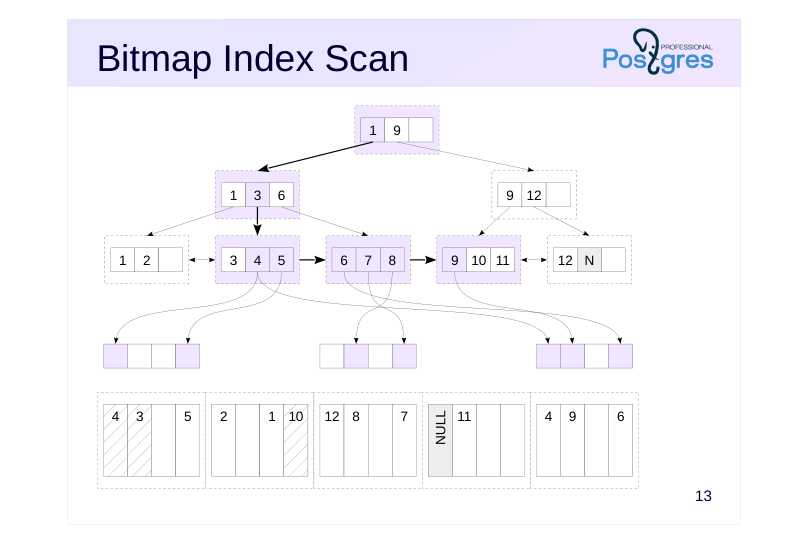
To avoid wasting resources on repeated access to table pages, a bitmap scan is used as an alternative access method. It’s similar to a standard index access, but it’s carried out in two stages.
First, the index (Bitmap Index Scan) is scanned, and a bitmap is constructed in the process’s local memory. The bitmap is divided into fragments. Fragments correspond to table pages, with each bit in a fragment representing a tuple on the page. When constructing a bitmap, the tuple versions that meet the condition and need to be read are marked within it.
By dividing the bitmap into fragments, the bitmap indicating only a few tuple versions will occupy minimal space.
Page 16: Bitmap Heap Scan
 {#source-figure-016 caption=“Source slide page 16: Bitmap Heap Scan”}
Speaker notes
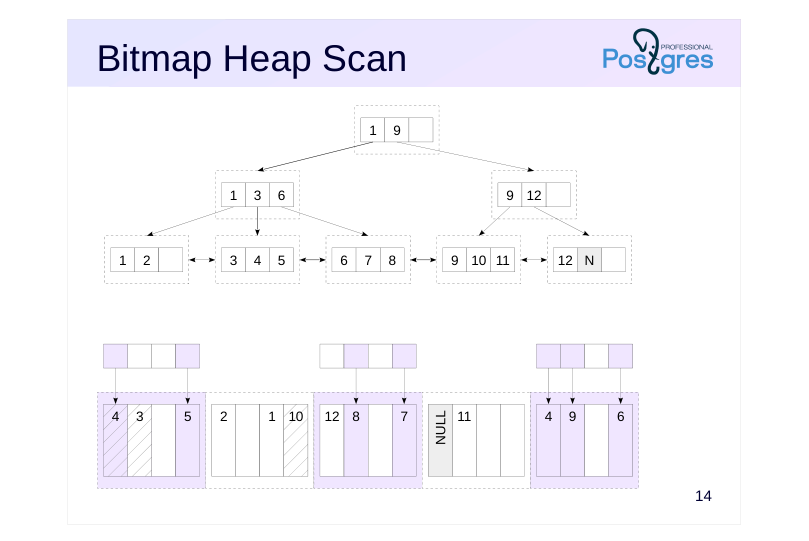
Once the index has been scanned and the bitmap is ready, the table scan starts (Bitmap Heap Scan). Meanwhile:
● A dedicated pre-fetching mechanism is employed, asynchronously reading effective_io_concurrency pages (the default is one);
● Multiple row versions can be checked on a single page, but each page is scanned exactly once.
Page 17: Bitmap Scan
We’ll be looking at the bookings table. Let’s create two additional indexes on it.
Let’s check which access method will be used for a range scan.
To efficiently scan a large number of pages, the planner opted for a bitmap scan. This approach involves two nodes: Bitmap Index Scan reads the index and constructs a bitmap; Bitmap Heap Scan reads the table pages using the constructed bitmap.
Note Note that the bitmap must be fully constructed before it can be used.
Combining Bitmaps
Moreover, a bitmap not only prevents repeated reads of table pages but also enables combining multiple conditions:
Here, two bitmaps were first constructed—one for each condition—and then combined using a bitwise ’OR’ operation. Similarly, various indexes can be utilized:
Page 18: Page 18
Page 19: Approximate fragments
Bitmap without accuracy loss
- As long as the map’s size is within work_mem,, the information is stored
- with row-version accuracy
- Bitmap with accuracy loss
- If memory is exhausted, part of the existing map is coarsened down to
- individual pages.
- Approximately 1 MB of memory is required per 64 GB of data; the
- work_mem limit may be exceeded
Speaker notes
The bitmap is stored in the local memory of the background process, and work_mem bytes are allocated for storing it. Temporary files are never used.
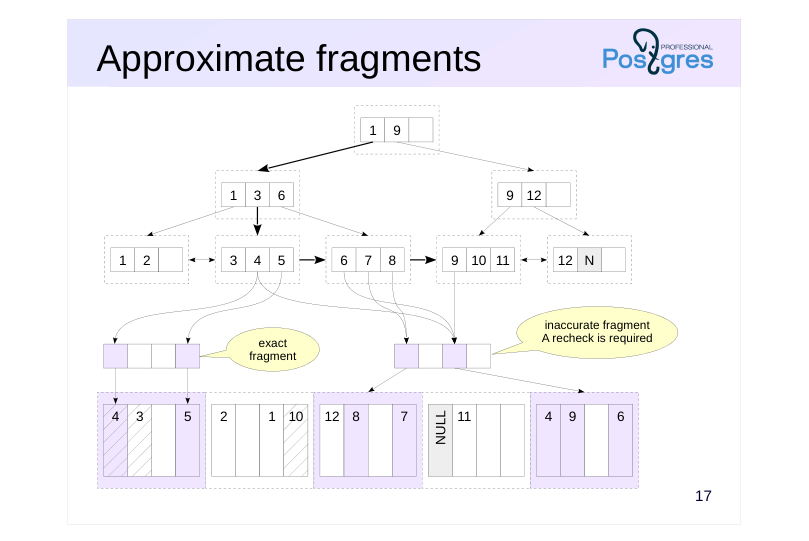
If the map exceeds the work_mem limit, some of its fragments are coarsened—each bit now corresponds to an entire page instead of an individual row version (lossy bitmap). The processing overhead for these fragments increases. The freed-up space is used to continue constructing the map.
Generally speaking, with heavily restricted work_mem and a large dataset, the bitmap may not fit in memory, even if no information remains at the row version level. In this case, the work_mem limit is exceeded — additional memory will be allocated for the bitmap as needed.
Page 20: Approximate fragments
 {#source-figure-020 caption=“Source slide page 20: Approximate fragments”}
Speaker notes
As shown in the figure, a bitmap consists of two fragments. The first fragment is precise, with each bit representing a single tuple. The second fragment is imprecise, with each bit representing an entire page.
Imprecise fragments require rechecking conditions for all tuple versions in a table page, which impacts performance. When combining two bitmaps, if at least one contains an imprecise fragment, the resulting fragment must also be imprecise. Therefore, the size work_mem is crucial for efficient bitmap scanning.
Page 21: Inexact Fragments
The Bitmap Heap Scan node indicates the recheck condition (Recheck Cond). The recheck is not always performed, but only when precision is lost, such as when the bitmap doesn’t fit into memory. Rerun the query with a modified condition: search for bookings with a sum of up to 5,000 RUB made in the last month.
The “Heap Blocks: exact” line indicates that all bitmap fragments are constructed with row-level precision — the recheck is skipped. Reduce the allocated memory size
Page 22: Page 22
Here, lossy bitmap fragments appeared — with page-level accuracy.It also shows how many rows were removed during the index recheck. Restore the parameter value. Reset the parameter value.
Page 23: Index Scan / Bitmap Scan
 {#source-figure-023 caption=“Source slide page 23: Index Scan / Bitmap Scan”}
Speaker notes
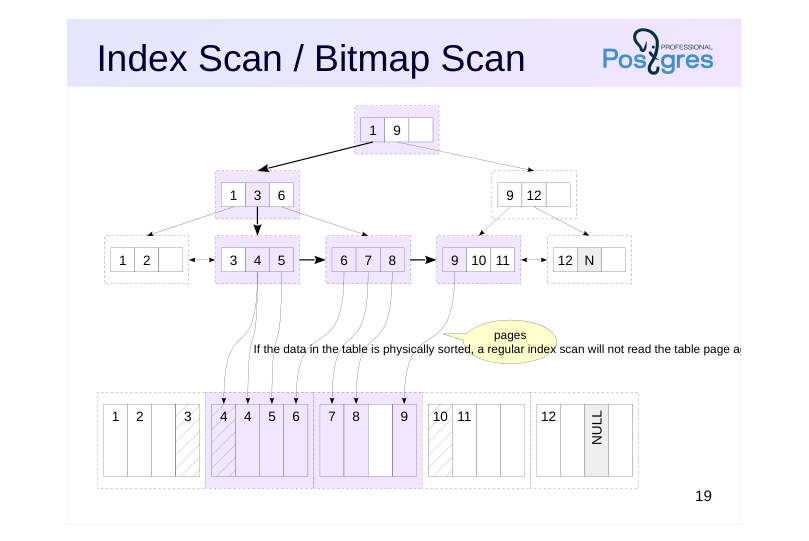
If the table’s data is physically sorted, a regular index scan won’t read the data page again. In such (rare in practice) cases, the bitmap scan method is outperformed by a regular index scan.
Naturally, the query planner also accounts for this (how exactly is covered in the “Basic Statistics” section).
Page 24: Clustering
If the table rows are ordered identically to the index, the bitmap is no longer necessary. We’ll demonstrate this using the CLUSTER command. The table rows are currently physically ordered by the booking number:
Let’s rearrange the rows based on the index for the total_amount column.
Note that during the process: The CLUSTER command acquires an exclusive lock as it fully rebuilds the table, similar to VACUUM FULL; Rows are ordered, but this order isn’t maintained — clustering degrades over time.
Verify that the rows are ordered by cost:
Before clustering, a bitmapped scan was used, but now a regular index scan is simpler and more efficient.
Page 25: Index-Only Scan
 {#source-figure-025 caption=“Source slide page 25: Index-Only Scan”}
Speaker notes
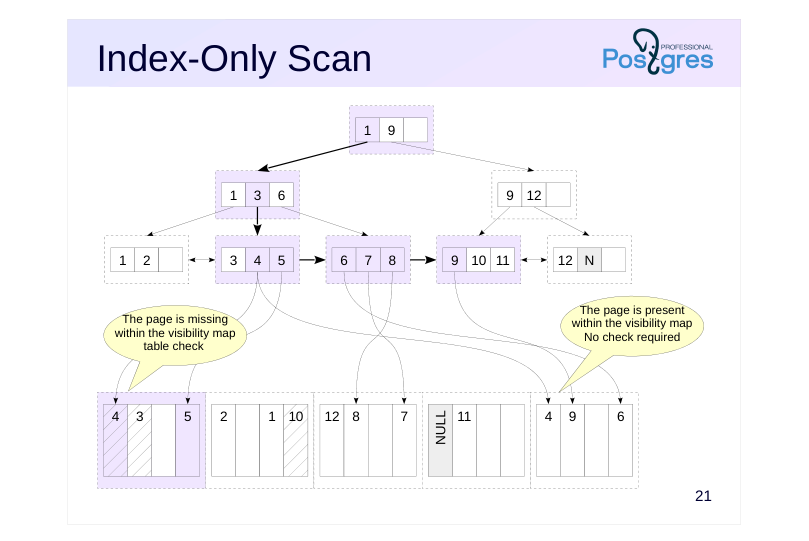
If a query only needs indexed data, that data is already available in the index, so there’s no need to access the table. Such an index is referred to as a covering index for the query.
This is a good optimization that eliminates the need to access table pages. Unfortunately, index pages don’t contain information about row visibility – to determine if the row found in the index should be displayed, we have to examine the table page, which undermines the optimization.
Therefore, the visibility map is crucial for the efficiency of index-only scans. If a table page contains data that’s definitely visible and this is indicated in the visibility map, you don’t need to access that table page. However, pages not marked in the visibility map still need to be accessed.
One reason to run vacuum frequently is that this process updates the visibility map.
The planner doesn’t know exactly how many table pages will need checking, but it considers the estimated number. If the planner’s estimate is poor, it may avoid using index-only scans.
During processing of each index entry in a leaf node, the visibility map is first checked for the presence of the table page, and if it’s not found, the table page itself is read.
https://postgrespro.com/docs/postgresql/16/sql-copy
Page 26: Index-only scan
If all the required information is in the index itself, there’s no need to access the table except when checking visibility:
Let’s examine the execution plan for this query using EXPLAIN ANALYZE:
The Heap Fetches statistic indicates how many row versions were examined via the table. Here, the visibility map contains current data, making table access unnecessary. Update the first row in the table:
How many row versions will need to be checked now?
All versions on the modified page had to be checked.
Page 27: Multi-column Index
 {#source-figure-027 caption=“Source slide page 27: Multi-column Index”}
Speaker notes
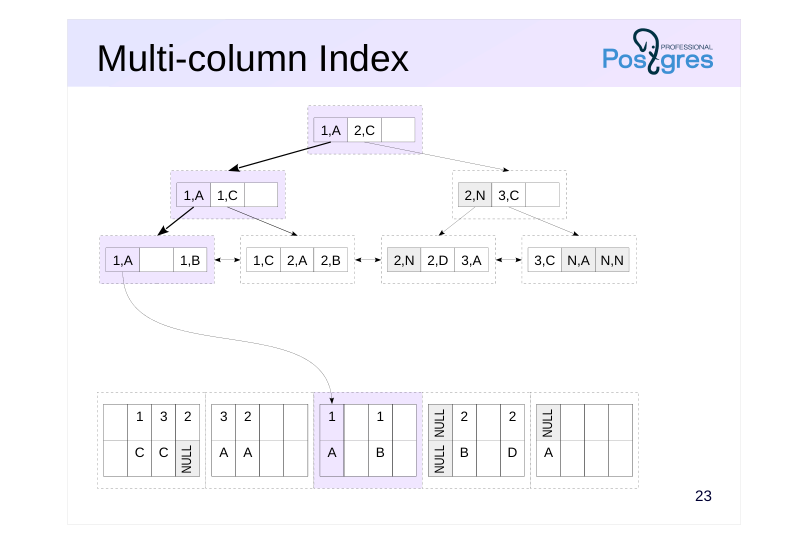
You can create an index on multiple columns. In this case, the order of the columns and the sort order matter.
The figure illustrates a multicolumn index created using two columns, both sorted in ascending order. This index improves query performance when the query involves conditions on one or more of the leading columns, as the index entries are sorted first by the first column, then the second, and so on.
In the example on the slide, the query involves the first and second columns; the index would also work for a condition that references only the first column.
Page 28: Multi-column Index
 {#source-figure-028 caption=“Source slide page 28: Multi-column Index”}
Speaker notes
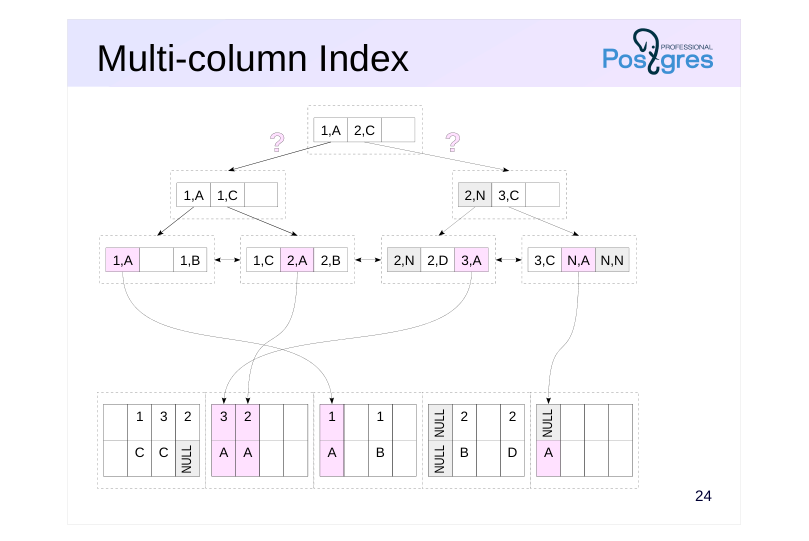
However, if the query contains a condition only on the second column, the index becomes ineffective. As illustrated on the slide, leaf entries where the second column is “A” can be found anywhere in the index — we don’t have a way to reach them from the root.
In such cases, the query planner may still opt for index-only scanning, but this results in a full index scan.
Similarly, the index cannot return records in a different order than the one specified during its creation. For example, the index depicted on the slide cannot return records ordered by the first column in ascending order and the second column in descending order.
Page 29: Multicolumn indexes
An index has been created on the ticket_flights table for columns ticket_no and flight_id. A query using both columns uses this index:
A query using only the ticket number also works:
But for a query by flight number, this index is not applicable:
Page 30: Indexes with an INCLUDE clause
Include indexes
- Non-key columns
- are not used in index searches
- are not subject to the unique constraint
- The values reside in the index entry and are retrieved without needing to
- access the table.
Speaker notes
A covering index typically improves query performance. To create a covering index, you might need to add columns, but this isn’t always feasible:
● Adding a column to a unique index would violate the unique constraint of the original columns;
● The added column’s data type might not be supported by the index.
In such cases, you can add non-key columns to the index by including them in the INCLUDE clause.
https://postgrespro.com/docs/postgresql/16/sql-copy
The values of such columns do not contribute to the index structure but are stored as supplementary data in leaf page index entries. Although queries on non-key columns aren’t supported, their values can be retrieved without accessing the table.
Currently, include indexes are only supported for B-tree, GiST, and SP-GiST indexes.
Include indexes are created to make the index covering, but these are not the same thing. An index can be covering for a query without using the INCLUDE clause.
Page 31: Include indexes Indexes with included columns
The tickets_pkey index is not a covering index for the given query because it requires returning not only the ticket_no column, which is included in the index, but also book_ref, which is not present in the index:
Buffers show the number of pages read (hit+read). Let’s create an include index by adding the non-key column book_ref, since the query requires it:
Re-run the query:
Now the optimizer chooses the Index Only Scan approach and utilizes the newly created index. The number of pages read has decreased. As the visibility map is current, the table didn’t need to be accessed (Heap Fetches: 0). Include indexes can include columns with data types not supported by B-tree, such as geometric types and XML.
Page 32: Efficiency Comparison
 {#source-figure-032 caption=“Source slide page 32: Efficiency Comparison”}
Speaker notes
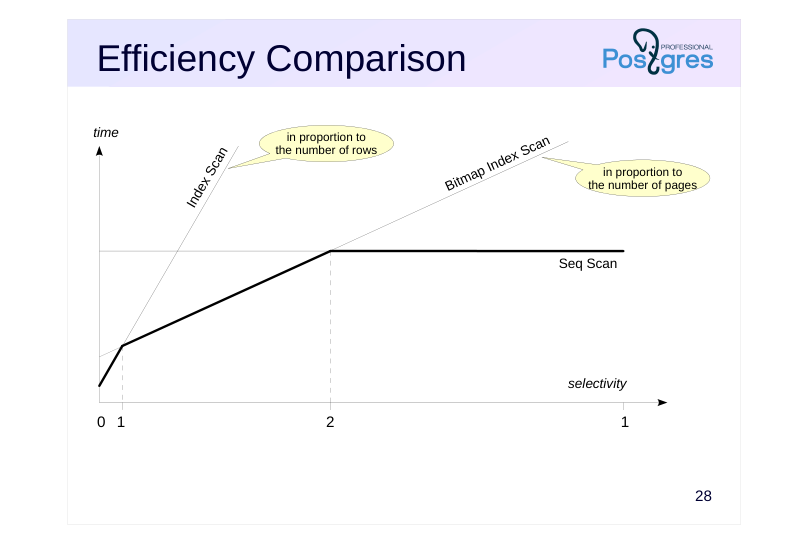
Index scans perform best under high selectivity, when a single or multiple values are retrieved using the index.
Bit map scans typically perform best at medium selectivity. Although this approach requires building a bit map first, it outperforms index scans by eliminating repeated reads of the same pages (unless the table data is physically ordered, which is uncommon). In the worst case, index scan performance scales with the number of selected rows, while bitmap scans scale with the number of pages.
At low selectivity, sequential scanning is most effective when selecting all or nearly all table rows, as accessing index pages adds unnecessary overhead. This effect is amplified when using rotating disks, as random read speeds are significantly lower than sequential read speeds.
The selectivity threshold at which switching to a different access method becomes beneficial varies significantly depending on the specific table and index. The planner considers multiple parameters to select the most suitable method.
Another observation: Index access returns results in sorted order, which can make it more attractive even at low selectivity.
Page 33: Efficiency Comparison
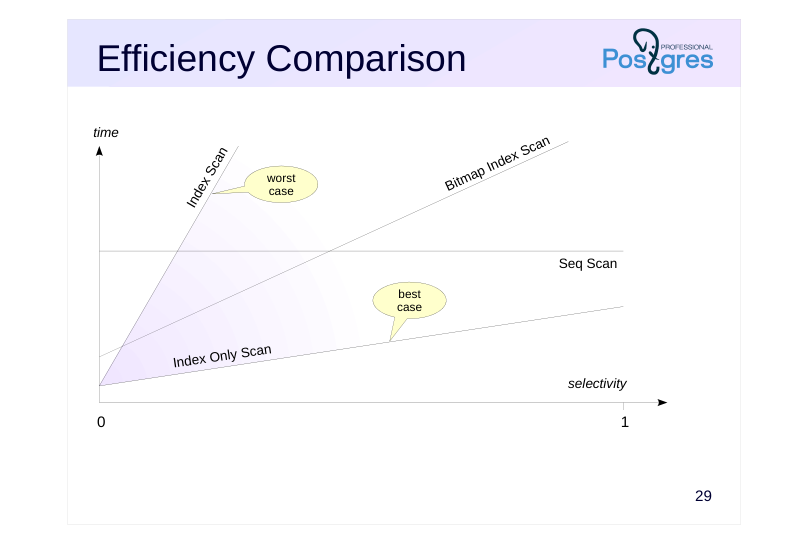 {#source-figure-033 caption=“Source slide page 33: Efficiency Comparison”}
Speaker notes
The effectiveness of index-only scanning is heavily dependent on the current state of the visibility map and the number of data pages that actually contain only up-to-date tuple versions.
In the best case, this access method can outperform sequential scanning even when selectivity is low, particularly when the index is smaller than the table, especially on SSDs.
In the worst-case scenario, when visibility for each row must be checked, the method reverts to a standard index scan.
Therefore, the planner must consider the visibility map’s state: if the forecast is unfavorable, index-only scans are avoided due to the risk of experiencing a slowdown instead of a speedup.
Page 34: Takeaways
The optimizer employs various access methods
- sequential scan
- index scan
- index-only scan
- bitmap scan
- The cost model considers numerous parameters
Page 35: Practice
- Make sure that when re-running the query that selects all rows from the flights table, it reads data from the DB cache. 2. An include index was created for the tickets table during the demo. Replace it with the primary key index. 3. Create an index for the amount column in the ticket_flights table. Identify flights costing more than 120,000 rubles (approximately 1% of the rows). Which access method was selected? 4. Repeat point 3 for costs under 4 rubles (approximately 90% of the rows).
Speaker notes
- Use the EXPLAIN command with the ANALYZE and BUFFERS options.
- Also try disabling the selected access method (parameter enable_seqscan) and compare the performance.
Page 36: 1. Querying all rows in the flights table
All pages were read from disk into shared memory (Buffers: shared read=2624). Some pages may have been fetched from the OS cache, though PostgreSQL isn’t aware of it. Let’s repeat the query
Since we’ve just accessed the table, its pages are still in the buffer cache. Therefore, the server reads data from the shared buffer cache (Buffers: shared hit=2624).
2. Include Index for the Primary Key
To ensure the changes are atomic, perform them within a transaction.
In the demonstration, this include index was created:
The tickets_pkey index is now redundant and can be replaced with a new one. To do this, we’ll remove the existing integrity constraint (which will also delete the old index) and add a new constraint using the name of the newly created index. Additionally, we need to account for the existing foreign key on the ticket_flights table, which will also need to be recreated:
Page 37: Page 37
Return to the original state
3. 1% of Rows
The bitmap scan was selected, as it fit into memory without losing accuracy. For small datasets, bitmap scans are more efficient than sequential scans.
4. 90% of Rows
Disable sequential scanning.
Page 38: Page 38
The exact bitmap doesn’t fit into memory, so all row versions had to be checked on many pages. For large datasets, a full scan is more efficient. To minimize the effect of random factors, it’s recommended to run queries multiple times and take an average of the results.
04 Lesson 04: Data Access / Parallel Data Access
This page is extracted from the official PDF into native Markdown. Slide text, code and speaker notes are kept in reading order; the original PDF and HTML remain the layout references. HTML source: No matching course-page link was captured in the source inventory. Archive: QPT-handouts-16-en-20251018.zip PDF pages: 28
Page 1: Data Access / Parallel Data Access
Copyright
© Postgres Professional, 2019–2024 Authors Authors: Egor Rogov, Pavel Luzanov, Ilya Bashtanov Photo by: Oleg Bartunov (Phu monastery, Bhrikuti summit, Nepal)
Use of course materials
Non-commercial use of course materials (presentations, demonstrations) is allowed without restrictions. Commercial use is possible only with the written permission of Postgres Professional. It is prohibited to make changes to the course materials.
Feedback
Please send your feedback, comments and suggestions to: edu@postgrespro.ru
Disclaimer
In no event shall Postgres Professional company be liable for any damages or loss, including loss of profits, that arise from direct or indirect, special or incidental use of course materials. Postgres Professional company specifically disclaims any warranties on course materials. Course materials are provided “as is,” and Postgres Professional company has no obligations to provide maintenance, support, updates, enhancements, or modifications.
Page 2: Topics
- Parallel Execution Plans
- Process Pool Size
- Parallel sequential scan
- Parallel Index Access
Page 3: Parallel Execution Plans
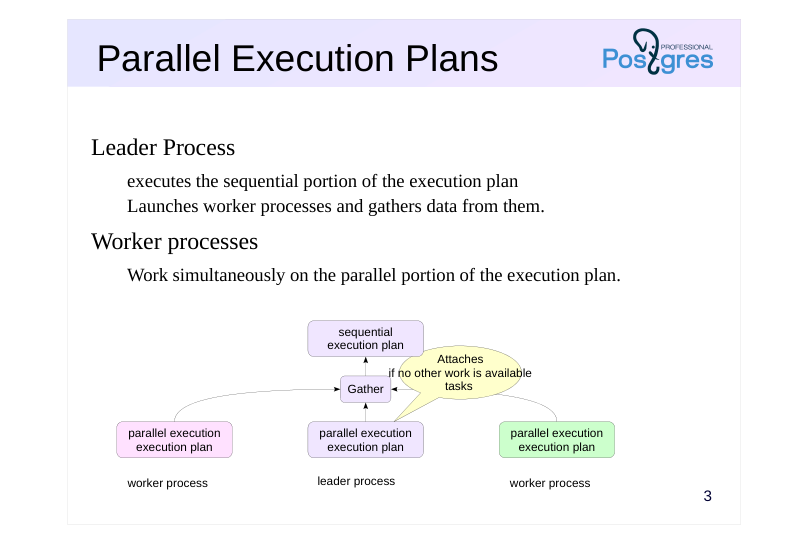 {#source-figure-003 caption=“Source slide page 3: Parallel Execution Plans”}
Leader Process
- executes the sequential portion of the execution plan
- Launches worker processes and gathers data from them.
- Worker processes
- Work simultaneously on the parallel portion of the execution plan.
Speaker notes
PostgreSQL supports parallel execution of queries. The main process executing the query spawns (via postmaster, naturally) multiple worker processes that simultaneously execute the same ‘parallel’ portion of the execution plan. The results are then gathered at the Gather node by the leader process.
If the worker processes can’t keep up with supplying data to the main process, the main process also joins the execution of the same parallel plan.
Of course, launching processes and data transfer require certain resources, so not every query runs in parallel.
Besides, there are operations that simply can’t be executed in parallel. Even with the parallel mode enabled, the leader process will still execute some of the steps alone, sequentially.
https://postgrespro.com/docs/postgresql/16/sql-copy
Note that PostgreSQL does not have another theoretically possible parallelization mode where multiple processes act as a pipeline for data processing (in other words, individual plan nodes are executed by separate processes). PostgreSQL developers considered this mode inefficient.
Page 4: Process Pool Size
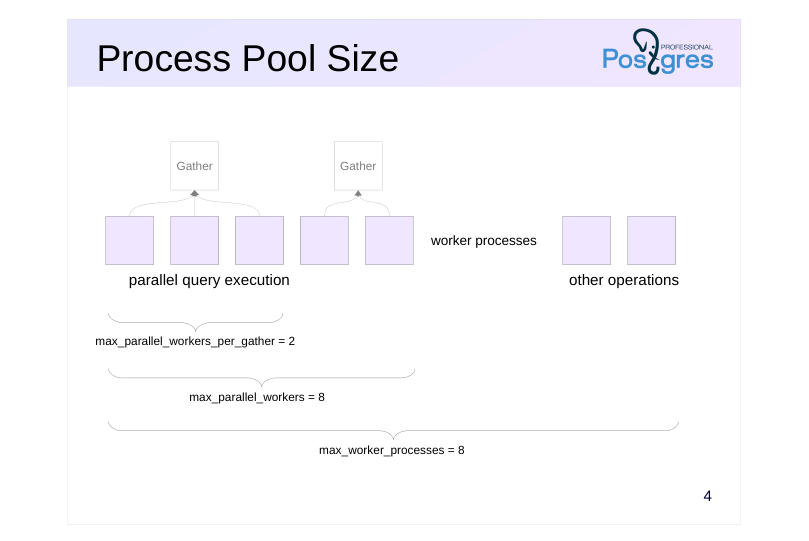 {#source-figure-004 caption=“Source slide page 4: Process Pool Size”}
Speaker notes
Several parameters govern parallel execution.
First, let’s look at the parameters that control the number of worker processes.
The worker process mechanism is not only used for parallel query execution. they are used by the logical replication mechanism and may be created by extensions. Worker processes can be used in application code (see the “Background Processes” topic in the DEV2 course for more details). The total number of concurrently running worker processes is controlled by the parameter max_worker_processes (default 8).
The number of concurrently running worker processes handling parallel plans is limited by the max_parallel_workers parameter (default 8).
The number of concurrently running worker processes handling a single leader process is limited by the max_parallel_workers_per_gather parameter (default 2).
You may choose to change these values based on several factors: these parameters should be adjusted based on hardware capabilities, data volume, and system load. For instance, even if the database contains large tables and queries could benefit from parallelization, but the system has no free cores, parallel execution would be pointless.
Page 5: Parallel Seq Scan
Parallel sequential scan
- aggregation
- Parallel Aggregation
- Number of worker processes
- Constraints
Page 6: Parallel Seq Scan
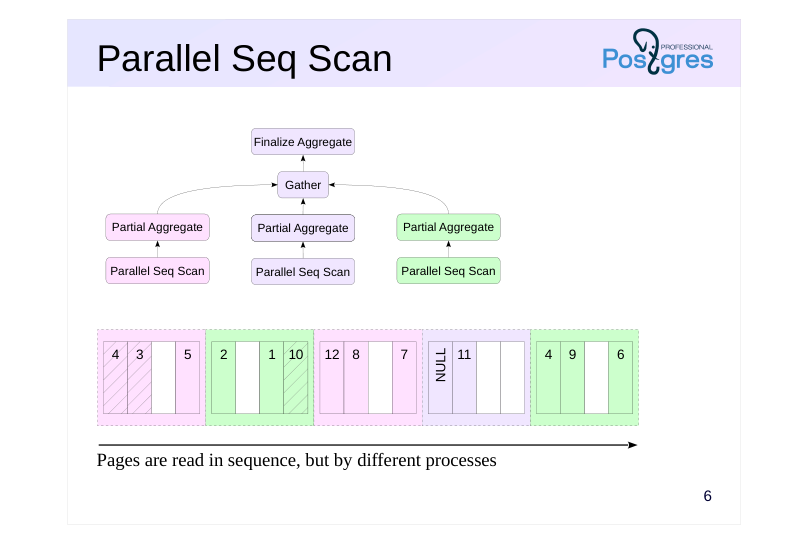 {#source-figure-006 caption=“Source slide page 6: Parallel Seq Scan”}
Pages are read in sequence, but by different processes
Speaker notes
An example of a node running in parallel mode is the Parallel Seq Scan — “parallel sequential scan”.
The name may seem contradictory, but it captures the essence of the operation. Table pages are read in the same order as they would be during a regular sequential scan. However, read requests are handled by several processes running in parallel. Processes synchronize with each other to ensure their requests are processed in the correct order.
The benefit of this approach is that parallel processes handle their pages simultaneously. In order for the benefit to outweigh the overhead associated with transferring data between processes, the processing must be sufficiently resource-intensive. A good example is data aggregation, because it demands significant CPU resources and only a single final number needs to be transferred. In such cases, parallel query execution can take significantly less time than sequential execution.
Page 7: Aggregation
Let’s examine a query with an aggregate function on a small table. This query is processed sequentially:
The execution plan consists of two nodes. The top Aggregate node, which performs the count calculation, receives data from the child Seq Scan node.
Note the Aggregate node: its startup cost is nearly equal to the total. This means the node cannot return a result (a single row) until it has processed all the data — which is logical. The difference between the Aggregate node’s estimate and the upper estimate for the Seq Scan is the cost of the Aggregate node’s processing. This cost is calculated based on the need to count each row produced by the Seq Scan node; each basic operation is valued at the cpu_operator_cost parameter.
Parallel Sequential Scan
Now let’s examine the same example, but with a large table. Here, in the query plan, we’ll observe a parallel sequential scan:
Everything below the Gather node constitutes the parallel part of the plan. It is executed by each worker process (with two worker processes planned) and potentially in the leader process as well. The Gather node and all nodes above it are executed exclusively by the leader process. This is the sequential part of the plan. Let’s start from the bottom up. The Parallel Seq Scan node represents parallel table scanning. The “rows” field shows an estimate of the number of rows processed by a single worker process. With two worker processes planned, the leader also handles part of the workload, so the total number of rows is divided by 2.4 (the leader’s share decreases as the number of worker processes increases).
By default, the leader process is involved in executing the parallel portion of the plan:
Page 8: Page 8
If the leader process becomes a bottleneck, you can offload it:
In this scenario, the total row count is split between the scheduled worker processes (2):
Reset the parallel_leader_participation parameter to its default value:
When evaluating the Parallel Seq Scan node, the I/O component is taken as a whole (the table will still need to be read page by page), while CPU resources are split between processes (2.4 in this case).
Let’s show the execution plan again:
Page 9: Page 9
The next node, Partial Aggregate, aggregates data from the worker process, effectively counting the number of rows in this case. The estimation follows the standard approach and is incorporated into the table scan estimate:
The next node is the Gather node, which is handled by the leader process. It manages the initiation of worker processes and collects data from them. The cost of starting processes and transmitting each data row is estimated as follows:
In this case, only one row is transmitted, and the main cost is due to the startup. Let’s take another look at the query plan:
The final node, Finalize Aggregate, aggregates the received partial aggregates. Since only three numbers need to be added, the cost is minimal.
Page 10: Number of worker processes
Zero (no parallel plan generated)
- If the table size is less than min_parallel_table_scan_size = 8MB
- Fixed
- If the ‘parallel_workers’ storage parameter is set for the table
- Calculated using the formula
- 1 plus the floor of log base 3 of (table size divided by
- min_parallel_table_scan_size)
- At most max_parallel_workers_per_gather
Speaker notes
How many worker processes will be used?
The planner will not consider parallel scans if the table’s physical size is below the min_parallel_table_scan_size parameter.
Below is the formula for calculating the number of planned worker processes.Possible combinations are listed on this slide. It means that when the table size triples, an additional process is added. For example, for the default value of min_parallel_table_scan_size = 8MB:
таблица процессы таблица процессы
8MB 1 216MB 4
24MB 2 648MB 5
72MB 3 1.9GB 6
The number of processes can be explicitly set via the table’s storage parameter parallel_workers.
However, the number of processes is capped at the value of the max_parallel_workers_per_gather parameter. If during query execution the available number of processes is fewer than planned, only the available ones will be used (up to sequential execution if the pool is exhausted).
Page 11: Number of worker processes during sequential scanning
The planner does not generate parallel plans for tables smaller than:
If you query a slightly larger table (flights, 19 MB), an additional process will be scheduled:
When querying data from a large table (bookings, 105 MB), the estimated number of worker processes is three.
However, only two processes are scheduled because the max_parallel_workers_per_gather parameter restricts the number of worker processes in the parallel plan, and the default value (2) is active.
By loosening the constraint, we’ll have a plan with three worker processes:
Page 12: Page 12
For a specific table, the storage parameter parallel_workers can be set to specify the recommended number of worker processes:
If the storage parameter is set to zero, the planner will always perform a sequential scan on this table. However, the number of worker processes will not exceed max_parallel_workers_per_gather, no matter the storage parameter setting. Reset the parameters to their original settings:
Page 13: Not parallelized
Write queries
- Additionally, queries with row-level locking
- Cursors
- such as queries in a FOR loop in PL/pgSQL
- Queries that use functions PARALLEL UNSAFE
- Queries within functions that are called from a parallelized query
Speaker notes
Not every query can be parallelized.
Queries that modify or lock data—such as UPDATE, DELETE, and SELECT FOR UPDATE—cannot be parallelized.
Queries whose execution can be paused are not parallelized—this includes queries in cursors, such as FOR PL/pgSQL loops.
Queries cannot be parallelized if they include functions marked as PARALLEL UNSAFE (parallelism notes are discussedin the ‘Functions’ section).
Queries within functions invoked by a parallelized query cannot be parallelized (to prevent recursive bloating).
Future PostgreSQL versions may remove some of these limitations.
https://postgrespro.com/docs/postgresql/16/sql-copy
Page 14: Only executed sequentially
Reading the results of common table expressions (CTE)
- Reading the results of subqueries not unrolled
- Accessing temporary tables
- Function callsPARALLEL RESTRICTED
- Functions that utilize nested transactions
Speaker notes
In general, the benefit of parallel planning depends mostly on how much of the plan is parallel-compatible. However, certain operations do not impede parallel execution but can only be executed sequentially in the main process.
These include:
● reading the results from common table expressions (subqueriesin the WITH clause);
● reading the results from other non-expandable subqueries (which appear in the plan as nodes, such as SubPlan);
● References to temporary tables (as they are accessible only to the backend process);
● function calls labeled as PARALLEL RESTRICTED
If a query invokes a function that uses subtransactions (such as a PL/pgSQL function with exception handling), it will result in an error. Such functions should be labeled as PARALLEL RESTRICTED. For more information on parallelism annotations, see the “Functions” topic.
https://postgrespro.com/docs/postgresql/16/sql-copy
Page 15: Only sequential operations Only operations executed sequentially
Some operations are always executed sequentially, such as accessing temporary tables. For example, let’s create a temporary table tmp_bookings, a copy of the bookings table:
Using the UNION ALL set operation (without removing duplicates), we combine the results of two queries: one for the main table and one for the temporary table:
Data from the bookings table is read in parallel (using two processes by default), whereas data from the temporary table tmp_bookings is read sequentially. If an operation isn’t executed in parallel, it doesn’t mean it’s inherently non-parallelizable—the scheduler might have determined that sequential execution is more efficient in this case. The debug_parallel_query parameter allows you to check if the operation can run in parallel. Without aggregation, accessing the bookings table is executed sequentially:
But with the parameter enabled, we can see that a parallel plan is theoretically possible:
The parameter is intended solely for debugging. It forces parallel execution planning, even when it’s not optimal, and always uses a single process.
Page 16: Parallel Index Scan
Parallel Index Scan
- Parallel Index-Only Scan
- Parallel Bit Map Scan
- Number of worker processes
Page 17: Parallel Index Scan
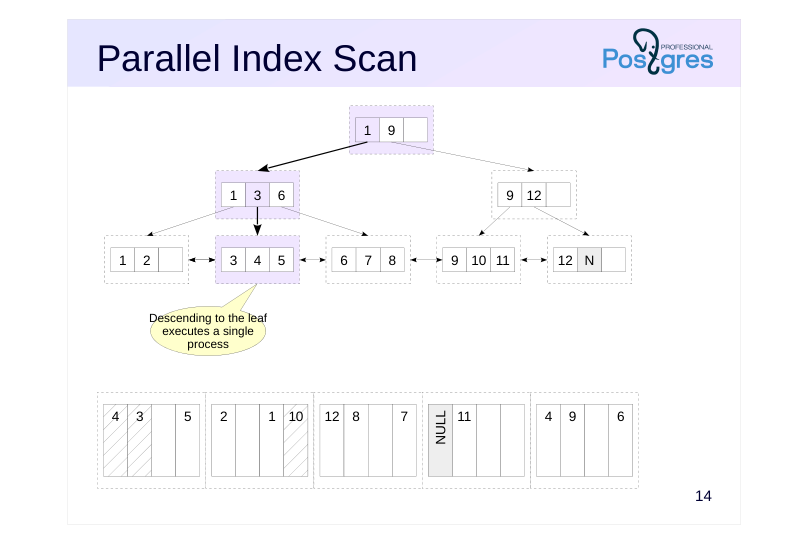 {#source-figure-017 caption=“Source slide page 17: Parallel Index Scan”}
Speaker notes
Index access can also be performed in parallel. This occurs in two steps. First, the main process traverses from the tree root to the leaf page.
Page 18: Parallel Index Scan
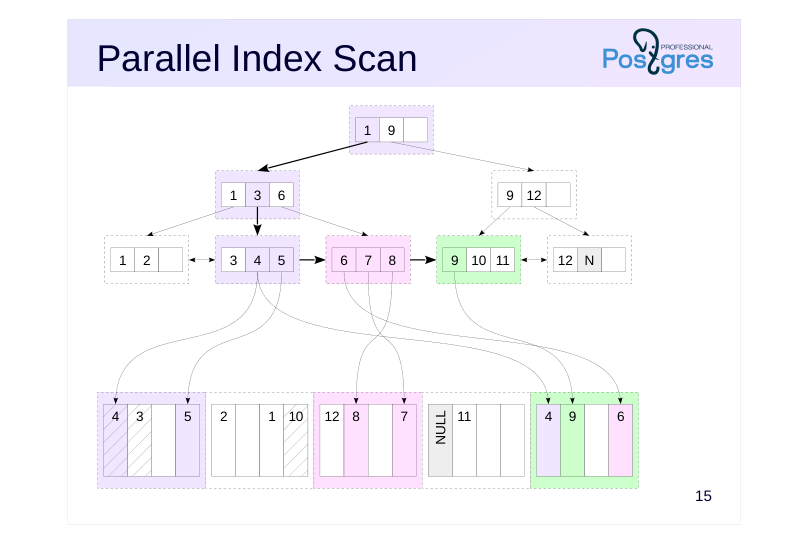 {#source-figure-018 caption=“Source slide page 18: Parallel Index Scan”}
Speaker notes
Then, worker processes perform parallel reads of the index’s leaf pages while traversing the list.
The process that read the index page also reads the required table pages. This could result in multiple processes reading the same table page (as shown on the slide: the last table page contains rows that are referenced by multiple index pages read by different processes). Of course, the page will be stored in the buffer cache as a single instance.
Page 19: Parallel Index Scan
As an example of parallel index scanning, we will calculate the total cost of all bookings with codes less than 400000 (approximately one-quarter of the total number):
This is similar to the plan we saw during parallel sequential scanning, but here, the data is read using the Parallel Index Scan index node. The total cost is made up of the costs of accessing the index and the table. The index access cost calculation is not shared across processes because the index is read sequentially page by page by the processes:
The cpu_operator_cost parameter estimates the cost of value comparison operations, such as “less than”. The cost of accessing 1/4 of the table pages (divided among processes) is calculated similarly to sequential scanning, as the rows are physically ordered by book_ref:
Page 20: Parallel Index Only Scan
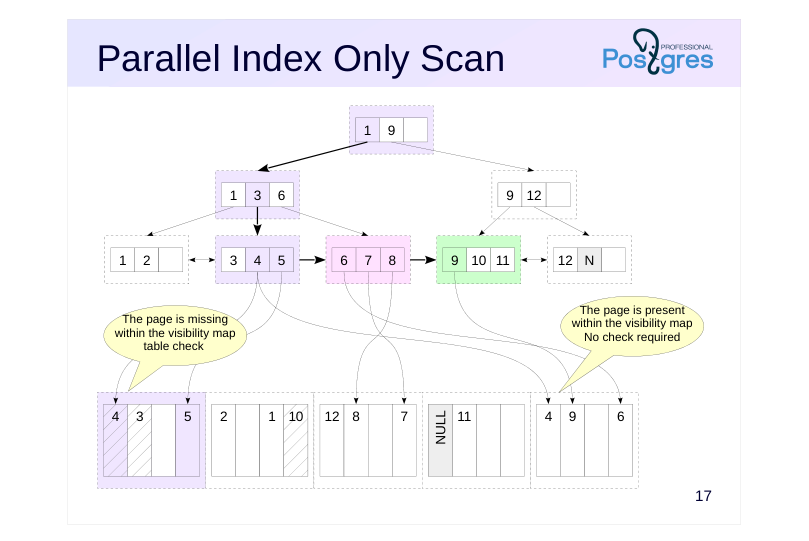 {#source-figure-020 caption=“Source slide page 20: Parallel Index Only Scan”}
Speaker notes
Index Only Scan sorting can be performed in parallel. This works the same way as a regular index scan: the coordinator process descends from the root to the leaf page, and then worker processes perform parallel scans of the index’s leaf pages, accessing the relevant table pages as needed to check visibility.
Page 21: Parallel Index-Only Scan
Let’s look at a similar example where index-only scanning is done in parallel.
The table access cost here accounts for row processing only, excluding I/O operations.
The impact of index access remains unchanged.
Page 22: Parallel Bitmap Heap Scan
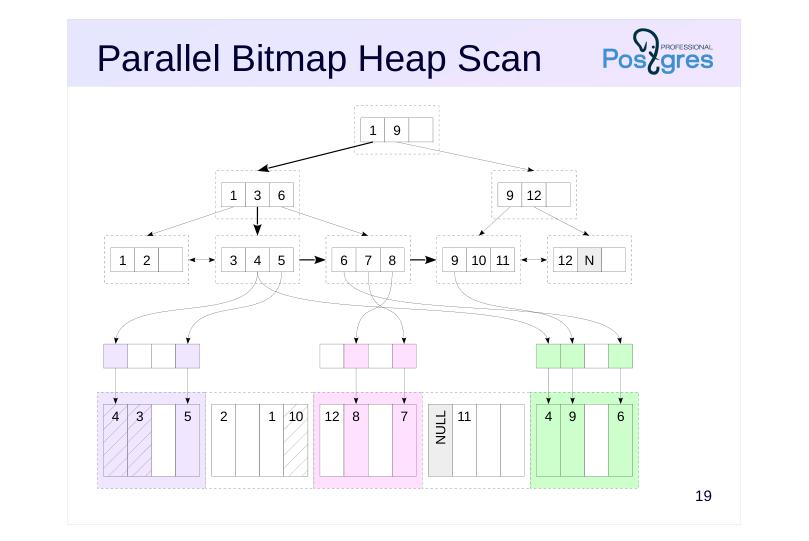 {#source-figure-022 caption=“Source slide page 22: Parallel Bitmap Heap Scan”}
Speaker notes
Bitmap Scan can run in parallel
The first stage—index scan and bitmap construction—is always executed sequentially by the leader process.
The second stage—table scan—is executed in parallel by worker processes. This works similarly to parallel sequential scanning.
Page 23: Parallel Bitmap Scan
To create a bitmap, we need a new index for the bookings table:
How many bookings were made in the last month for amounts up to 20,000 rubles?
The main process constructs a bitmap within the Bitmap Index Scan node. The table scan utilizing the constructed bitmap is executed in parallel within the Parallel Bitmap Heap Scan node.
Page 24: Number of worker processes
Zero (no parallel plan generated)
- If the sample size is less than 512kB, the min_parallel_index_scan_size is set
- to 512kB.
- Fixed
- If the ‘parallel_workers’ storage parameter is set for the table
- Calculated using the formula
- 1 + log3(sample size / min_parallel_index_scan_size)
- ⌊
- ⌋
- But not exceeding max_parallel_workers_per_gather
Speaker notes
The number of worker processes is determined similarly to sequential scanning. The data volume expected to be read from the index (determined by the number of index pages) is compared to the value of the min_parallel_index_scan_siz parameter (default 512kB).
In the case of a sequential table scan, the data volume is determined by the size of the entire table. However, with index access, the planner needs to estimate how many index pages will be read. The details of how this works are covered in the “Basic Statistics” section.
If the sample size is too small, the optimizer won’t consider a parallel plan. For example, accessing a single value will never be parallelized — there’s nothing to parallelize in this scenario.
If the sample size is large enough, the number of worker processes is calculated using a formula, unless it’s explicitly set in the table’s parallel_workers parameter (not the index).
The number of processes will not exceed the max_parallel_workers_per_gather parameter’s value.
Page 25: Takeaways
Parallel operations utilize CPU resources across multiple worker processes.
- PostgreSQL draws worker processes from a shared pool
- All access methods support parallel execution
Page 26: Practice
Execute a query that calculates the total number of bookings using different planner settings and compare the execution plans: 1. Using default settings 2. Disabling sequential scans 3. Also disabling index-only scan 4. Enabling all access methods while disabling parallelism
Speaker notes
- This refers to a query EXPLAIN (costs off) EXPLAIN (costs off)SELECT count(book_ref) FROM bookings;
- Disable the enable_seqscan parameter.
- Disable the enable_indexonlyscan parameter.
- Reset the parameters to their default values and set max_parallel_workers_per_gather to 0.
Page 27: 1. Query Plan with Default Settings
Parallel sequential scanning turns out to be the most advantageous.
2. Disabling Sequential Scanning
Disable Seq Scan and rerun the query:
Index access is slower than a table scan, but here, scanning just the index is sufficient.
3. Disabling Index Only Scan
Turn off Index Only Scan:
Other parallel data retrieval methods are not beneficial; it’s better to avoid using parallelism altogether.
4. Blocking Parallelism
Clear all settings and disable parallel query plans:
Page 28: Page 28
The planner selected sequential scanning as the most efficient method to retrieve all rows. By adjusting configuration parameters, you can observe how the optimizer behaves—such as identifying the alternative plans it evaluates.
05 Lesson 05: Data Access / Index Types
This page is extracted from the official PDF into native Markdown. Slide text, code and speaker notes are kept in reading order; the original PDF and HTML remain the layout references. HTML source: No matching course-page link was captured in the source inventory. Archive: QPT-handouts-16-en-20251018.zip PDF pages: 26
Page 1: Data Access / Index Types
Copyright
© Postgres Professional, 2019–2024 Authors Authors: Egor Rogov, Pavel Luzanov, Ilya Bashtanov Photo by: Oleg Bartunov (Phu monastery, Bhrikuti summit, Nepal)
Use of course materials
Non-commercial use of course materials (presentations, demonstrations) is allowed without restrictions. Commercial use is possible only with the written permission of Postgres Professional. It is prohibited to make changes to the course materials.
Feedback
Please send your feedback, comments and suggestions to: edu@postgrespro.ru
Disclaimer
In no event shall Postgres Professional company be liable for any damages or loss, including loss of profits, that arise from direct or indirect, special or incidental use of course materials. Postgres Professional company specifically disclaims any warranties on course materials. Course materials are provided “as is,” and Postgres Professional company has no obligations to provide maintenance, support, updates, enhancements, or modifications.
Page 2: Topics
- Hash Index
- GiST
- Operator Class
- SP-GiST
- or generalized inverted index
- BRIN
Page 3: Concept of Hashing
 {#source-figure-003 caption=“Source slide page 3: Concept of Hashing”}
Speaker notes
The concept of hashing is that values of any data type are evenly distributed across a limited number of buckets in a hash table using a hash function. If a hash table is large enough to ensure that, on average, each bucket contains only one value (hash code), then searching for a value in the hash table takes constant time. To achieve this:
The hash function is applied to the given value.
the bucket number is determined by several bits of the resulting hash code;
The bucket is scanned for the hash code.
When data is not evenly distributed, a large number of values can end up in a single bucket. In this case, search efficiency will decrease.
Essentially, a hash index is a hash table stored on disk.
https://postgrespro.com/docs/postgresql/16/sql-copy
Page 4: Hash Index
Stores only hash codes, not the original data.
- The index size is independent of the indexing key.
- Index-only scans are not possible.
- The index grows dynamically
- spiky growth
- Searches only support equality conditions
Speaker notes
A hash index stores only hash values and item pointers; the actual indexed value is not stored. Therefore, the hash index size is not affected by the indexing key size, but index-only scans are not possible — the value must be retrieved from the table.
The size of the hash index grows dynamically as new values are added. As the number of buckets doubles with each increase, the size grows in a spiky manner.
Unlike B-trees, hash indexes have several limitations, such as:
● The hash index only supports equality-based searches, as the hash function does not retain the order of the values;
● does not support unique constraints;
● You cannot create a multicolumn index or add additional include columns to an index.
Therefore, hash indexes haven’t become widely used. However, the hash index can be faster in some cases due to its smaller size and fixed search time compared to a B-tree index.
Page 5: Hash index
Let’s examine the query plan for a query that fetches a specific seat in all aircraft cabins:
Since there’s no suitable index, a sequential scan is performed. Let’s create a hash index on the seat_no column and re-run the query:
Now the query planner uses the hash index and generates a bitmap. Let’s change the equality condition to “greater than”:
Hash indexes cannot be used with inequalities.
Page 6: GiST Index Example
 {#source-figure-006 caption=“Source slide page 6: GiST Index Example”}
Speaker notes
GiST stands for Generalized Search Tree, also known as a generalized search tree.
We’ll explore how GiST indexes work using an example of points on a plane.
The plane is divided into several rectangles that together cover all the indexed points. These rectangles make up the top level of the tree.
As shown in the figure, rectangles may overlap (although thismay reduce search efficiency).
Page 7: GiST Index Example
 {#source-figure-007 caption=“Source slide page 7: GiST Index Example”}
Speaker notes
On the next level of the tree, each large rectangle splits into smaller rectangles.
Page 8: GiST Index Example
 {#source-figure-008 caption=“Source slide page 8: GiST Index Example”}
Speaker notes
On the last level of the tree, each bounding rectangle holds as many points as can fit on one index page.
The basic splitting condition is that the parent node’s rectangle encloses all rectangles within the corresponding subtree. This enables, for instance, efficient retrieval of points located within a specific region:
Locate rectangles intersecting the specified area,at the topmost level of the index;
We move down into the selected subtrees and repeat the search.
This indexing method is referred to as an R-tree.
Page 9: GiST Index
Balanced search tree
- Supports arbitrary data types
- Ordering is not required
- Commonly supported operations
- Inclusion within the area
- Determining left, right, top, and bottom positions relative to the area
- Nearest Neighbor Search
- The first k values nearest to the specified
Speaker notes
A B-tree is a balanced tree where the valuesare ordered according to the ‘greater than’and ’less than’ operations. The GiST Index also forms a balanced tree, but the values are organized differently, such asbased on the relative positioning of points on a plane.
This makes GiST suitable for data types where ‘greater than’ and ’less than’ operations lack inherent meaning, while enabling optimization of other crucial operations for these types. For example, the GiST index can speed up searching for a value that falls within a specific area or finding values located on a particular side of a specified area.
Another important feature of the GiST index — is its support for nearest neighbor searches. The index enables quick retrieval of several values closest to a given one.
https://postgrespro.com/docs/postgresql/16/sql-copy
Page 10: GiST index
To demonstrate how a GiST index works, we’ll use the airports_data table (which has a view named airports). The table includes a coordinates column of type point, which we’ll use to create the GiST index. But first, let’s run the following query: find all airports near Moscow:
Without an index, the query planner scans the entire table. Let’s create a GiST index:
Since the airports_data table is small, the planner will still use sequential scanning. Let’s temporarily disable this access method:
Run the query again:
Now the query planner retrieves the relevant rows by using the airports_gist_idx index. Let’s drop the created index:
Page 11: Operator Class
 {#source-figure-011 caption=“Source slide page 11: Operator Class”}
Bridge between the index method and data type
- Can encompass a substantial portion of the indexing logic
Speaker notes
To enable access methods to work with various data types (which can be dynamically loaded in PostgreSQL), there’s an intermediary called an operator class that contains the required operators and support functions.
B-trees and hash indexes, like other index types, rely on operator classes, though these classes are relatively simple, containing basic operators like “equal,” “greater than,” and “less than.”
Operator classes for GiST indexes contain a significant portion of the indexing logic and define the rules for adding values to the index and searching them. Therefore, GiST can accelerate different operations for various data types.
For instance, GiST can be used to index values of range types, such as int4range or tstzrange. This index enables you to find ranges contained within, overlapping, or adjacent to the specified range, and so on.
GiST can be viewed as a framework upon which custom indexing schemes (not just R-trees) are built, allowing for the implementation of operator classes as needed. This approach is far simpler than building a new index type from the ground up, a process that is highly complex and requires substantial developer expertise.
https://postgrespro.com/docs/postgresql/16/sql-copy
Page 12: SP-GiST Index Example
 {#source-figure-012 caption=“Source slide page 12: SP-GiST Index Example”}
Speaker notes
SP-GiST is short for space partitioning GiST. This is also a generalized search tree, but it is built by dividing the search space into non-overlapping regions.
Let’s look at an example of an SP-GiST index for points on a plane.
One of the options is a quadrant tree. The root node splits the plane into four quadrants relative to the selected centroid point.
Page 13: SP-GiST Index Example
 {#source-figure-013 caption=“Source slide page 13: SP-GiST Index Example”}
Speaker notes
Each of the four quadrants is further divided into sub-quadrants.
Page 14: SP-GiST Index Example
 {#source-figure-014 caption=“Source slide page 14: SP-GiST Index Example”}
Speaker notes
The splitting will continue until all points in the quadrant are contained within a single index page.
Page 15: SP-GiST Index
Unbalanced search tree
- A sparsely branching tree with significant depth
- Supports arbitrary data types
- The operations are similar to those in GiST
- Inclusion within the area
- Determining left, right, top, and bottom positions relative to the area
- Nearest neighbor search
Speaker notes
SP-GiST, similar to GiST, serves as a framework for building arbitrary indexing schemes through the implementation of operator classes. For example, the quadrant tree for points is implemented by the point_ops operator class. Another approach to dividing the plane is into two parts instead of four. This approach is known as a k-d tree, implemented by a different operator class — kd_point_ops.
Dividing the plane into non-overlapping regions results in unbalanced trees that typically exhibit limited branching and possess greater depth.
SP-GiST indexes typically support the same data types and operators as GiST. However, their different index structure can make them either more or less efficient than GiST.
https://postgrespro.com/docs/postgresql/16/sql-copy
Page 16: SP-GiST Index SP-GiST Index
Let’s create an SP-GiST index on the coordinates column in the airports_data table. There are two operator classes for points. By default, point_ops (quadrant tree) is used, but for our example, we’ll use kd_point_ops (k-dimensional tree):
Let’s try to find all airports located north of Nadym:
Now the table is scanned using a bitmap generated from the SP-GiST index airports_spgist_idx.
Page 17: The Concept of the GIN Index
 {#source-figure-017 caption=“Source slide page 17: The Concept of the GIN Index”}
Speaker notes
GIN — generalized inverted index, generalized inverted index.
The easiest way to understand this indexing method is by examining a subject index in a regular book. Terms appear on the book’s pages, while the subject index lists all terms in alphabetical order, along with the page numbers where they appear.
The GIN index is primarily used for document indexing to speed up full-text searches. Essentially, it’s a standard B-tree, but instead of storing the documents themselves, it stores the individual words that compose them. The GIN index is optimized for scenarios where each word may appear in multiple documents. If the “page list” is very large, it is stored in a separate B-tree instead of the index page itself.
https://postgrespro.com/docs/postgresql/16/sql-copy
Page 18: GIN index
Inverted List
- For data types where the values (documents) are composed of elements
- Elements are indexed, not the documents themselves.
- Commonly Supported Operation
- Check if a document matches a search query
- Check if an element is present in an array
- Search JSON documents by keys or values
Speaker notes
GIN is designed for data types where values consist of elements rather than being atomic. Rather than indexing the values themselves, the elements are indexed.
Like GiST and SP-GiST, GIN is a framework that can be configured not only for text (consisting of words) but also for other data types, such as arrays (composed of elements) and JSON documents (containing keys and values). To accomplish this, an operator class is created to break down the document into elements and verify if it matches the search query.
Page 19: GIN Index
The days_of_week column in the routes view contains an array of weekday numbers representing the days the flight operates on:
A view cannot have an index built on it, so we’ll store its rows in a separate table.
Now, let’s create a GIN index:
For example, a GIN index can be used to filter flights that operate exclusively on Wednesdays and Saturdays:
The created GIN index contains just seven elements: the integers 1 through 7, representing the days of the week. Each entry in the index holds pointers to flights operating on the corresponding day.
Page 20: BRIN Index Example
 {#source-figure-020 caption=“Source slide page 20: BRIN Index Example”}
Speaker notes
BRIN — block range index, «block range index». The table is divided into zones of a defined (configurable) length, each comprising a set of sequentially arranged pages. Each zone contains summary data, including the minimum and maximum values of the indexed column.
During query execution, you can skip all zones that are guaranteed not to satisfy the condition. As shown on the slide, only two zones could contain temperature values satisfying the condition.
Unlike other indexes, the BRIN index does not store row version identifiers, so all row versions in the selected zones must be examined. In a way, BRIN can be considered an accelerator for sequential scans.
https://postgrespro.com/docs/postgresql/16/sql-copy
Page 21: BRIN Index
List of Zones Containing Summary Information
- A zone spans a group of consecutive pages
- summary information: minimum, maximum, and so on
- Correlation with the physical location of rows is required.
- Does not maintain item pointers to tuple versions.
- Only a bit map scan
- Designed for very large tables
- compact size
- configurable size-accuracy ratio
Speaker notes
Using operator classes, you can select the summary data stored in the index for each zone. This can range from just minimum and maximum values to multiple value ranges, and for geometric data types, it can store an enclosing rectangle (as in GiST).
Regardless of the case, BRIN requires a correlation between column values and the physical row location to function effectively, ensuring that values with similar summary information are grouped into the same zone. Data updates can disrupt the correlation, potentially impacting the index’s efficiency.
Since BRIN does not store row version pointers, it returns an approximate bit map of the zone’s pages. Standard index scans (and index-only scans) are not possible.
However, the BRIN index has a very small size and can be adjusted by specifying the zone size. The larger the zone, the smaller the index, but the lower the accuracy. This makes BRIN a perfect fit for massive tables commonly found in data warehouses.
Page 22: BRIN Index BRIN Index
As an example, let’s create a BRIN index on the largest table:
BRIN indexes are most effective for very large tables. However, the query planner can leverage the built index by pruning regions that don’t contain the required values, using the minimum and maximum values from the summary data:
Since BRIN does not store pointers to row versions, the only viable access method is scanning using a lossy (non-precise) bitmap.
Page 23: Takeaways
Besides B-tree, there are other, more specialized index types.
- Hash index for equality queries
- GiST and SP-GiST for non-sortable data types
- GIN for documents
- BRIN for very large tables
Page 24: Practice
- Compare the size and build time of the hash index on columns with varying sizes (book_ref and contact_data) in the tickets table. Do the same for a B-tree index. 2. Use the GIN index and pg_trgm extension to find passengers whose phone numbers contain the digit sequence 1234. Can a B-tree help speed up this query?
Speaker notes
- To estimate the size of an index, use the pg_total_relation_size function with the index name as a parameter.
- Create a GIN index on the expression contact_data-»‘phone’ using the gin_trgm_ops operator class provided by the pg_trgm extension.
Documentation page: https://postgrespro.ru/docs/postgresql/16/pgtrgm
Page 25: 1. Comparing Index Size and Creation Time
Let’s take a look at the structure of the tickets table:
The book_ref field is a fixed-size field, whereas the contact_data field is of type jsonb. Let’s enable tracking of query execution time:
Let’s create hash indexes…
…and B-tree indexes:
The time required to create hash indexes is roughly similar, whereas the time needed for B-tree indexes depends on the size of the indexed field.
Now let’s check the sizes of the created indexes:
Hash indexes also have a similar size. In contrast, B-tree indexes (and the time needed to create them) vary in size based on the indexed field’s size, as they store the actual values.
Page 26: 2. pg_trgm Extension
Let’s run the query:
Note Note the number of read pages (Buffers) — nearly fifty thousand. Let’s add the pg_trgm extension:
Let’s create a GIN index using the gin_trgm_ops operator class:
Such an operator class speeds up pattern matching for strings starting with a percent sign, including regular expressions. B-tree indexes cannot perform this. Let’s run the query again:
The number of read pages dropped by more than an order of magnitude, and the query execution time significantly decreased.
06 Lesson 06: Sorting and Grouping / Sorting
This page is extracted from the official PDF into native Markdown. Slide text, code and speaker notes are kept in reading order; the original PDF and HTML remain the layout references. HTML source: No matching course-page link was captured in the source inventory. Archive: QPT-handouts-16-en-20251018.zip PDF pages: 22
Page 1: Sorting and Grouping / Sorting
Copyright
© Postgres Professional, 2019–2024 Authors Authors: Egor Rogov, Pavel Luzanov, Ilya Bashtanov Photo by: Oleg Bartunov (Phu monastery, Bhrikuti summit, Nepal)
Use of course materials
Non-commercial use of course materials (presentations, demonstrations) is allowed without restrictions. Commercial use is possible only with the written permission of Postgres Professional. It is prohibited to make changes to the course materials.
Feedback
Please send your feedback, comments and suggestions to: edu@postgrespro.ru
Disclaimer
In no event shall Postgres Professional company be liable for any damages or loss, including loss of profits, that arise from direct or indirect, special or incidental use of course materials. Postgres Professional company specifically disclaims any warranties on course materials. Course materials are provided “as is,” and Postgres Professional company has no obligations to provide maintenance, support, updates, enhancements, or modifications.
Page 2: Topics
- Retrieving Sorted Data
- In-memory sorting
- External sort
- Incremental sort
- Sorting in Parallel Execution Plans
- Sorting During Index Construction
- Window functions involving sorting
Page 3: Data Access
Index Access (B-Tree)
- returns a sorted row set
- Sequential Access (Seq Scan)
- returns an unordered set of rows
- An additional sorting step is required
Speaker notes
As previously stated, index access (using a B-tree) enables the immediate retrieval of a row set sorted by the indexing keys.
But how do you handle it when sorting is needed on fields without an index? In this case, the server must first retrieve the data from the table using a sequential scan and then perform an additional sorting step.
Page 4: Retrieving Sorted Data
Index access automatically returns rows sorted by the indexed column:
But if you ask the server to sort data by a column that lacks an index, it will require two separate steps: retrieving the data and sorting it.
Next, we’ll explore how sorting works within the Sort node.
Page 5: In-memory sorting
Quick sort (quicksort)
- Top-N heapsort Top-N Heap Sort (Partial Heapsort)
- when only a portion of the values is needed
Speaker notes
In an ideal scenario, the set of rows to be sorted entirely fits within the memory constrained by the work_mem parameter. In this case, all rows are sorted using the Quick sort (quicksort) algorithm, and the result is passed up to the parent node.
If you need to retrieve just the first few rows of a sorted set (when using the LIMIT clause), you don’t need to sort the entire set. In this case, the server can use partial heap sort (top-N heapsort), which operates in random access memory.
Page 6: In-Memory Sorting
The planner has several sorting methods. In the following example, quicksort is employed (Sort Method: quicksort). The memory used is shown in the same line:
To begin outputting data, the Sort node must fully sort the row set. This means the initial cost estimate for the node includes the full cost of reading the table. The time complexity of quicksort is generally O(M log M), where M represents the number of rows in the input set. If the number of rows is limited, the planner can switch to partial sorting—essentially, instead of fully sorting all rows, it retrieves the top 100 minimum values here.
Notice that the query’s cost decreased and sorting required less memory. Generally, the top-N heapsort algorithm has lower complexity than quicksort—O(M log N).
Page 7: External sort
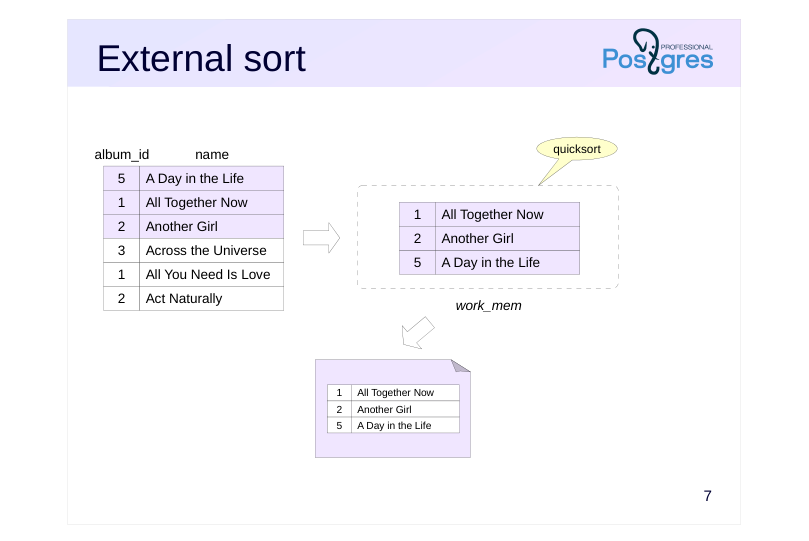 {#source-figure-007 caption=“Source slide page 7: External sort”}
Speaker notes
If the row set is too large, it won’t fit into memory all at once. In such cases, an external sort is used.
The row set is loaded into memory while there’s capacity, then sorted and written to a temporary file.
Page 8: External sort
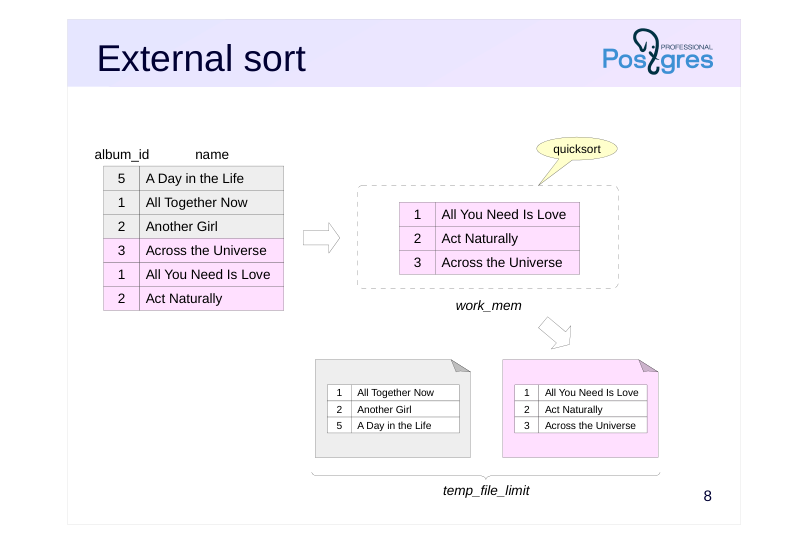 {#source-figure-008 caption=“Source slide page 8: External sort”}
Speaker notes
This procedure is repeated as needed to write all the data to files, each sorted separately.
Recall that the total size of session temporary files (excluding temporary tables) is constrained by the value of the temp_file_limit parameter.
Page 9: External sort
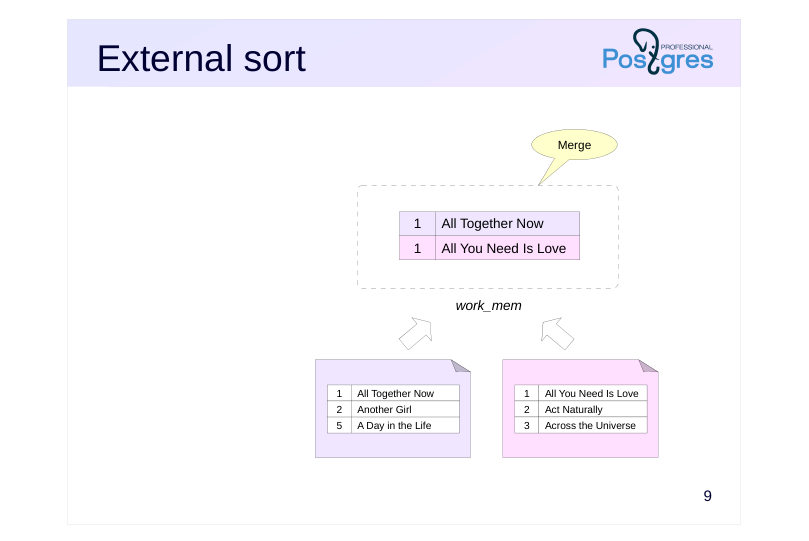 {#source-figure-009 caption=“Source slide page 9: External sort”}
Speaker notes
Subsequently, multiple files (two or more) are merged while maintaining the line order.
Merging doesn’t require much memory; you just need to keep one line from each file (as shown in the example on the slide). The minimum (maximum) is selected from these lines and returned as part of the output, with a new line read from the same file to replace it. In practice, lines are read in batches to speed up input/output, rather than one at a time.
When there isn’t enough RAM to merge all files at once, the process begins by merging a subset of files and saving the result to a temporary file. This is then merged with other temporary files, and the process continues iteratively.
We won’t go into all the details of the sorting implementation here; you can find them in the file src/backend/utils/sort/tuplesort.c.
The evolution of sorting techniques in PostgreSQL is thoroughly covered in Gregory Stark’s presentation «Sorting Through The Ages»: https://wiki.postgresql.org/images/5/59/Sorting\_through\_the\_ages.pdf with a synchronized Russian translation of the talk available at https://pgconf.ru/talk/1587768
Page 10: External Sorting External Sort
Example execution plan using external sorting (Sort Method: external merge):
Note Note that the Sort node reads and writes temporary data (temp reads and writes). Let’s raise the work_mem value:
Now that all rows fit in memory, the planner opted for a more efficient quicksort.
Page 11: Incremental Sort
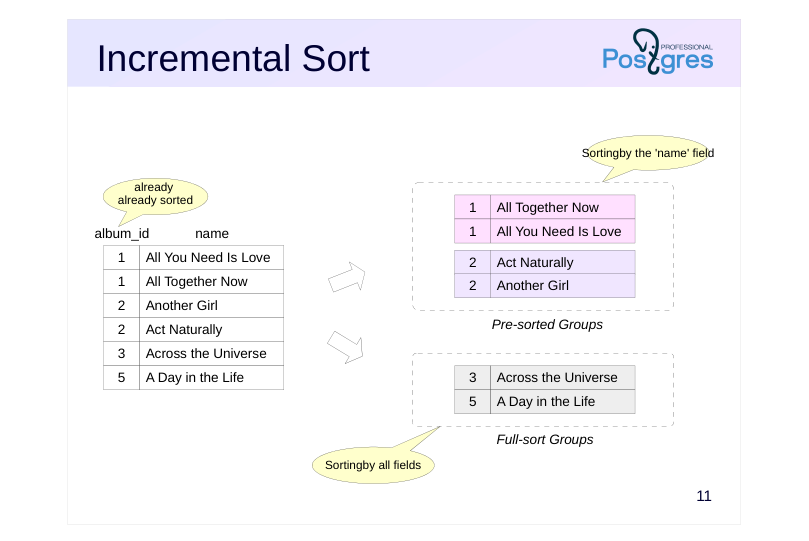 {#source-figure-011 caption=“Source slide page 11: Incremental Sort”}
Speaker notes
Let’s suppose you want to sort a set by keys K1 … Km … Kn, and it’s known that the set is already sorted by some of the first keys K1 … Km. Km … If the dataset is already sorted by the first m keys, there’s no need to re-sort the entire dataset. Instead, you can split the set into groups, with each group containing only rows with the same K1 … Km values (arranged consecutively) And then sort each group by the remaining keys Km+1 … Kn. This approach is referred to as incremental sorting .
The algorithm processes relatively large row groups separately while merging smaller groups and fully sorting them. As the data sets being sorted become smaller, the memory requirements also decrease. However, increasing the number of groups leads to higher overhead.
Sets can be handled either in RAM or on disk when there’s not enough work_mem available.
Incremental sorting enables delivering results as soon as the first group is processed, without waiting for the entire dataset to be sorted.
Disable incremental sorting by using the enable_incremental_sort parameter.
Page 12: Incremental Sorting Incremental Sort
Incremental Sorting can use both in-memory and external sorting. To illustrate, let’s create an index on the bookings table:
Let’s take a look at an example of Incremental Sorting:
Here, the data retrieved from the bookings table using the newly created bookings_total_amount_idx index is already sorted by the total_amount column (Presorted Key), so the remaining task is to sort the rows by the book_date column. The Pre-sorted Groups row refers to large groups that were partially sorted by the book_date column, while the Full-sort Groups row indicates small groups that were merged and fully sorted. In this example, all groups fit into the allocated memory, so quicksort was used. Let’s reduce work_mem and rerun the query:
Now, with insufficient memory, some large groups had to undergo external sorting using temporary files (Pre-sorted Groups … external merge).
Page 13: In parallel execution plans
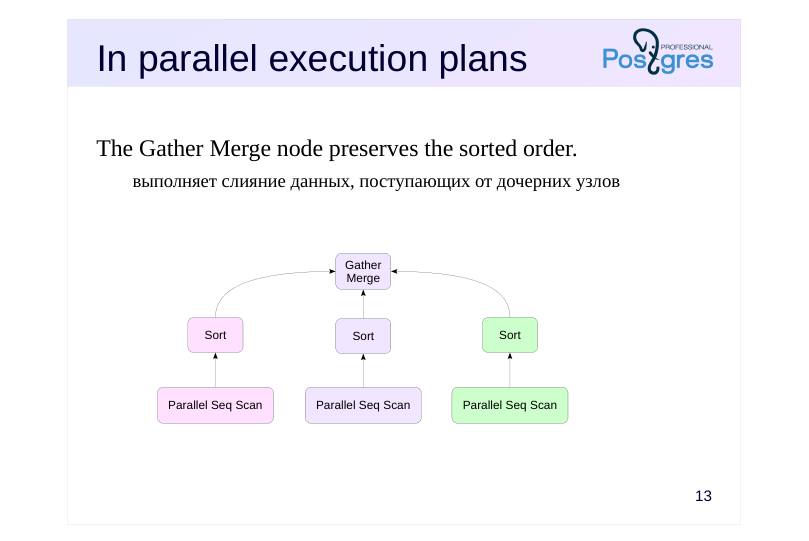 {#source-figure-013 caption=“Source slide page 13: In parallel execution plans”}
The Gather Merge node preserves the sorted order.
- выполняет слияние данных, поступающих от дочерних узлов
Speaker notes
Sorting can be part of parallel execution plans. Each worker process sorts its portion of the data and sends the sorted results to a parent node, which combines them into a single set.
But the Gather node isn’t suitable for this purpose because it outputs results in the order they are received from the worker processes.
Therefore, such plans use a Gather Merge node to maintain the sorted order of incoming rows. To achieve this, it uses a merge algorithm to combine multiple sorted sets into a single set.
Page 14: In parallel execution plans
A query that sorts a large table on an unindexed column can run in parallel:
Here, each process reads and sorts its portion of the table, and then the sorted data sets are combined when passed to the leader process, preserving the order.
Page 15: Building the B-Tree
Sorting is employed
- All rows are sorted first.
- Then the rows are gathered into leaf index pages
- The pointers are collected into next-level pages.
- and so on until the root is reached
- Can run in parallel
- max_parallel_maintenance_workers
- Constraint
- maintenance_work_mem, as the operation is not frequent
Speaker notes
When building an index (specifically a B-tree), the server would add records to an empty index one at a time, processing the table’s rows in sequence. However, this approach is highly inefficient.
Therefore, sorting is used when creating or rebuilding indexes: all table rows are sorted and then organized into leaf index pages. The upper levels of the tree, consisting of references to elements from lower-level pages, are then constructed until only one page remains — this becomes the root of the tree.
Sorting is done in the same way as described earlier. However, the memory limit is not determined by work_mem but by maintenance_work_mem, as the index creation process isn’t too frequent and it’s beneficial to allocate more memory for it.
Index building can be done in parallel. Number of worker processes the number of worker processes is determined similarly to parallel queries (depending on the table size), but is limited by the max_parallel_maintenance_worker parameter.
Page 16: Window functions
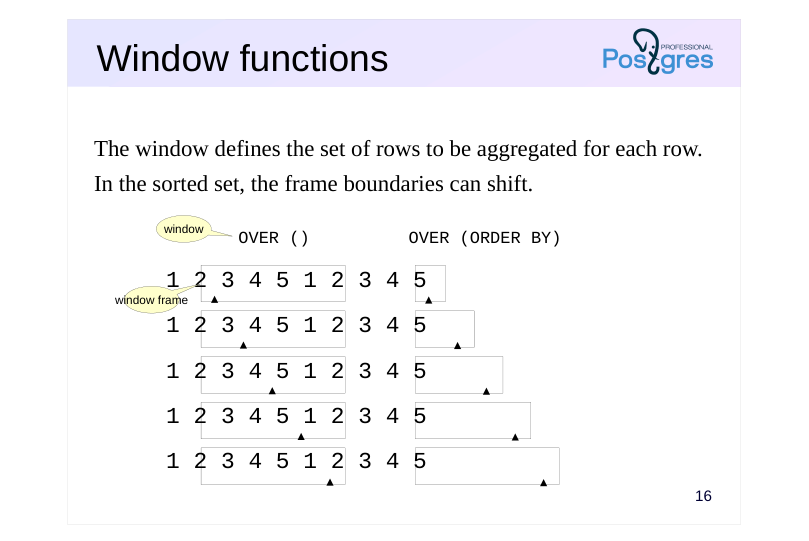 {#source-figure-016 caption=“Source slide page 16: Window functions”}
The window defines the set of rows to be aggregated for each row.
- In the sorted set, the frame boundaries can shift.
- OVER ()
- OVER (ORDER BY)
- window
Speaker notes
Using sorting in window functions has unique characteristics.
Unlike ordinary aggregate functions, window functions process every row in the set without altering its size. In the OVER clause, after the function name, a window is specified that defines the set of rows processed by the window function for each row in the dataset. Such a sample is referred to as a window frame.
If the window is specified as OVER(), the window frame is the same for each row and includes all rows in the dataset.
Page 17: Window Functions
Let’s examine the query plan for a query that computes the running total of bookings:
The window function is executed in the WindowAgg node, which receives sorted data from the Sort child node. Adding other window functions that use the same row order (not necessarily with a matching window) and the ORDER BY clause avoids unnecessary sorting:
Here, there are two WindowAgg nodes (each handling its own window) but a single Sort node. The query cost increased, but only marginally. Of course, window functions requiring different row orders force the server to re-sort the data:
In this example, the lower WindowAgg node (corresponding to the count function) receives an ordered set of rows through an index, while the upper WindowAgg node (corresponding to the sum function) has the Sort node re-sort the rows. Sorting in window functions can employ any of the methods discussed above. For example, quicksort:
Page 18: Page 18
Or a foreign key:
Page 19: Takeaways
Sorting is used during query execution and for building B-trees
- There are various ways to implement sorting
- in-memory
- external (uses temporary files)
- incremental
- Indexes can help avoid sorting
Page 20: Practice
- What execution plan will be selected for the following query? SELECT * FROM flights Will the execution plan change if we increase work_mem to 32 MB?
- Create an index on the passenger_name and passenger_id columns of the tickets table. Did this operation require a temporary file?
Speaker notes
- Turn on logging for temporary file usage by setting the log_temp_files parameter to zero.
Page 21: 1. Query Execution with Sorting
Let’s run the query with the default parameter values:
The server performed an external sort (Sort Method: external merge). Pay attention to the number of pages and I/O type (Buffers): the temp read and written values indicate that the server used temporary files. Run the query multiple times — you’ll notice that the server consistently runs out of memory. We’ll increase the work_mem parameter to 32 MB:
Increasing work_mem allows the server to use more random access memory for sorting. Run the query again and compare the execution plans
The server has switched to in-memory sorting (Sort Method: quicksort), with the temp read and written fields no longer appearing in the Buffers line.
2. Building an Index
Enable temporary file logging:
Current maintenance_work_mem setting:
Page 22: Page 22
Creating an Index:
A temporary file was required:
07 Lesson 07: Sorting and Grouping / Grouping
This page is extracted from the official PDF into native Markdown. Slide text, code and speaker notes are kept in reading order; the original PDF and HTML remain the layout references. HTML source: No matching course-page link was captured in the source inventory. Archive: QPT-handouts-16-en-20251018.zip PDF pages: 22
Page 1: Sorting and Grouping / Grouping
Copyright
© Postgres Professional, 2019–2024 Authors Authors: Egor Rogov, Pavel Luzanov, Ilya Bashtanov Photo by: Oleg Bartunov (Phu monastery, Bhrikuti summit, Nepal)
Use of course materials
Non-commercial use of course materials (presentations, demonstrations) is allowed without restrictions. Commercial use is possible only with the written permission of Postgres Professional. It is prohibited to make changes to the course materials.
Feedback
Please send your feedback, comments and suggestions to: edu@postgrespro.ru
Disclaimer
In no event shall Postgres Professional company be liable for any damages or loss, including loss of profits, that arise from direct or indirect, special or incidental use of course materials. Postgres Professional company specifically disclaims any warranties on course materials. Course materials are provided “as is,” and Postgres Professional company has no obligations to provide maintenance, support, updates, enhancements, or modifications.
Page 2: Topics
- Grouping Application
- Hash-based grouping
- Sorting-based grouping
- Hybrid grouping
- Grouping in Parallel Execution Plans
- Window functions
Page 3: Grouping Application
Explicit Indication
- GROUP BY
- Removing Duplicates
- DISTINCT
- UNION, INTERSECT, EXCEPT
Speaker notes
In a SQL query, you can group a set of rows using the GROUP BY clause, which is typically used with aggregate functions that process all rows in the group. The PARTITION BY clause provides a similar capability for window functions.
Grouping can occur implicitly when duplicates are removed in a query using the DISTINCT keyword or in set operations (UNION, INTERSECT, EXCEPT without the ALL keyword), which eliminate duplicates.
The server chooses one of the available grouping methods, considering factors such as resource availability, the ability to retrieve sorted data for the grouping key, and other factors.
Page 4: Grouping Application Applying Grouping
We will execute a query that explicitly groups the seats table’s rows by service classes:
Now, let’s retrieve all distinct service classes:
In the third (purely educational) example, we’ll retrieve all rows from the seats table twice and merge them using the UNION operator:
All three queries produce identical results, and each execution plan includes a HashAggregate node.
Page 5: Hash-based grouping
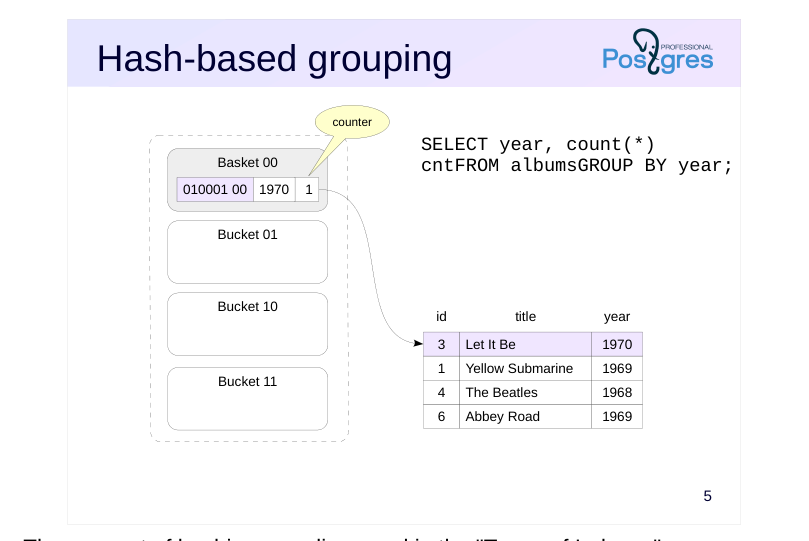 {#source-figure-005 caption=“Source slide page 5: Hash-based grouping”}
Speaker notes
The concept of hashing was discussed in the “Types of Indexes” section.When grouping values, a similar approach can be used.
The example on the slide demonstrates how the COUNT aggregate function’s value is calculated during grouping by the year column. The server receives and processes the table rows in turn.
The number of buckets is precomputed as a power of two, and the number of bits in the hash code that represent the bucket number is determined. In the example on the slide, the last two bits are used.
The hash function is computed for the row’s year value. The bucket number is determined by the hash code, and a record with the hash code is added to the hash table if it is not already present.
Since the count aggregate function’s value is calculated in our example, each hash table entry also stores a counter that increments as each row is processed.
In our example, the first row creates a new entry in bucket 00.
Page 6: Hash-based grouping
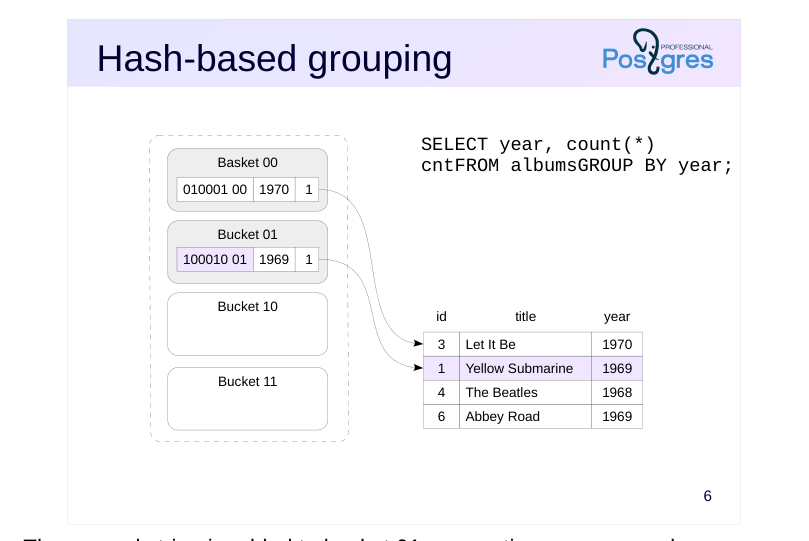 {#source-figure-006 caption=“Source slide page 6: Hash-based grouping”}
Speaker notes
The second string is added to bucket 01, generating a new record.
Page 7: Hash-based grouping
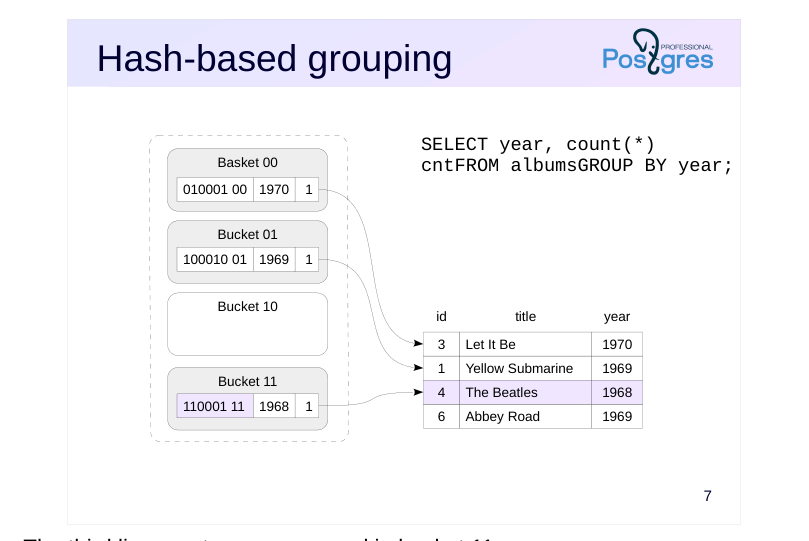 {#source-figure-007 caption=“Source slide page 7: Hash-based grouping”}
Speaker notes
The third line creates a new record in bucket 11.
Page 8: Hash-based grouping
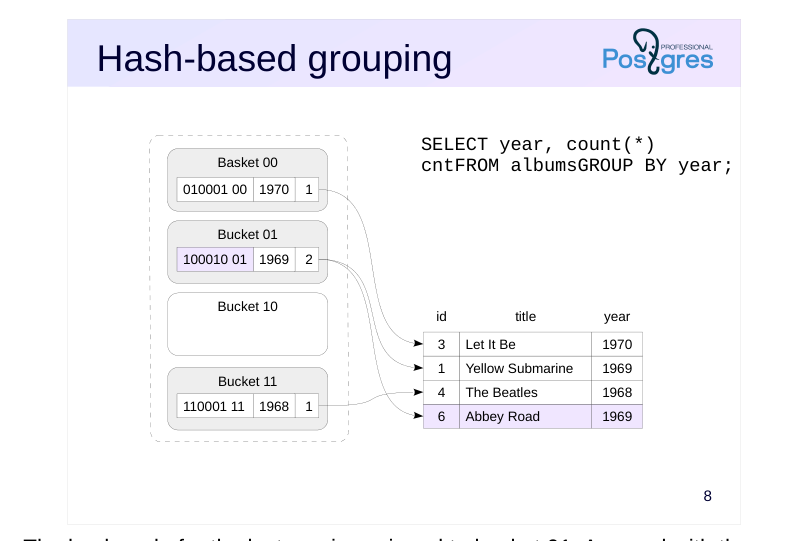 {#source-figure-008 caption=“Source slide page 8: Hash-based grouping”}
Speaker notes
The hash code for the last row is assigned to bucket 01. A record with the same key value already exists in the bucket, so the server increases its counter by one. The table processing is complete at this point: the hash table now contains all unique values. The algorithm returns the values and their counts.
The same algorithm, with minor modifications, is used both for retrieving unique records without an aggregate function and for computing other aggregate functions.
Page 9: Hash-based Grouping
The node responsible for hash aggregation is shown in the execution plan as HashAggregate:
Be aware that results are only returned after the hash table is built for all rows, which is reflected in the startup cost. Once the query is executed, you can observe the memory allocated to the hash table:
Page 10: Hash-Based Grouping and Packets
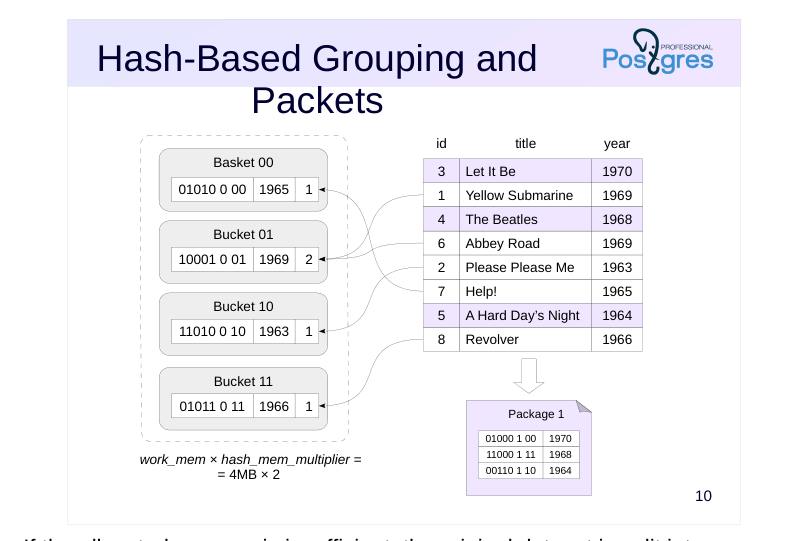 {#source-figure-010 caption=“Source slide page 10: Hash-Based Grouping and Packets”}
Speaker notes
If the allocated memory is insufficient, the original dataset is split into packets to ensure each packet’s hash table fits in random access memory. The expected number of packets is a power of 2; the hash code reserves the necessary number of bits to determine which packet a record belongs to (since there are two packets on the slide, one bit suffices). The hash table for packet 0 resides in random access memory, while the rows of other packets are stored in temporary files — each packet in its own file.
Using temporary files significantly reduces performance, and this effect is more pronounced in hashing than in other algorithms. Therefore, during hash-based grouping, [work_mem] × hash_mem_multiplie of random access memory is allocated — by default, twice the usual amount.
Page 11: Hash-Based Grouping and Packets
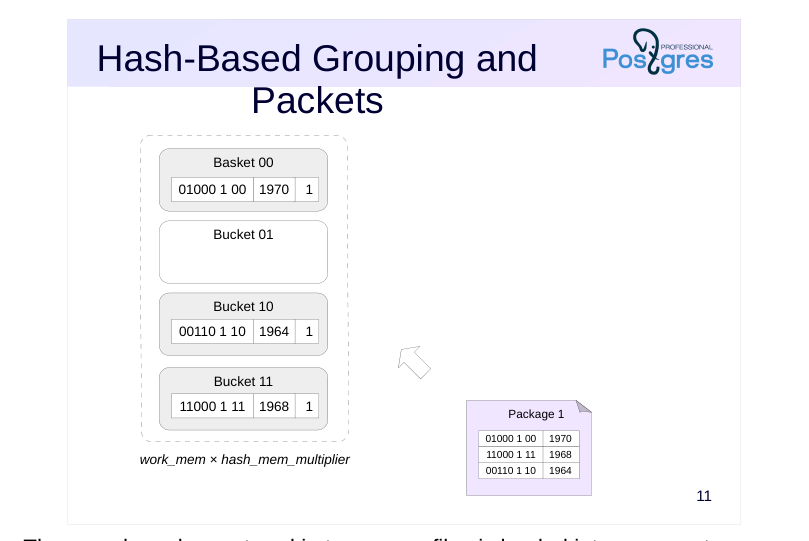 {#source-figure-011 caption=“Source slide page 11: Hash-Based Grouping and Packets”}
Speaker notes
Then, each package stored in temporary files is loaded into memory to create a new hash table.
Once all original rows and additional data chunks have been processed, the server may return partial results, with each group’s rows always contained within a single package.
Page 12: Hash Grouping and Partitions
Let’s look at the execution plan of another query that performs grouping on a large table:
The execution plan now includes a “Planned Partitions” section — the optimizer predicts that the hash table will not fit in the allocated memory, so it will be split into batches. Let’s execute the query:
During execution, the size of one batch was found to be too large, so it was split into two smaller batches. The total number of batches (Batches) exceeded the estimated number.
Page 13: Sorting-based grouping
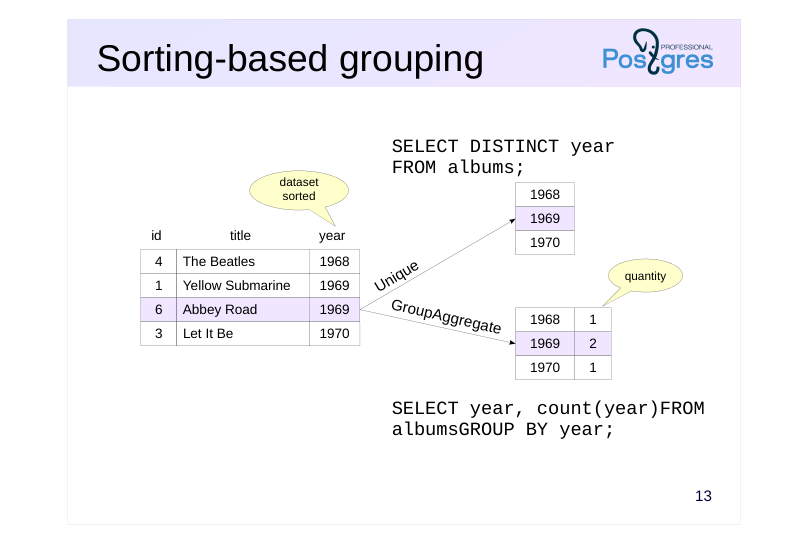 {#source-figure-013 caption=“Source slide page 13: Sorting-based grouping”}
Speaker notes
Duplicate elimination and grouping can be achieved not only via hashing but also through sorting. In this case, a dataset must be pre-sorted by the grouping fields.
The Unique node removes duplicates by appending the next value to the result when it differs from the previous one
The GroupAggregate node outputs aggregated data In the example on the slide, the node creates a list of unique year values and counts how often each value occurs in the dataset.
As discussed in the previous section, sorted rows can be obtained via index access or through sorting in the Sort node. In the first case, the Unique and GroupAggregate nodes are typically more efficient than HashAggregate because they run quickly and use less memory. However, in the second case, hash table construction is generally more efficient than sorting.
Unlike HashAggregate, both the Unique and GroupAggregate nodes return sorted data.
Page 14: Sort-Based Grouping
Example execution plan featuring a GroupAggregate node that performs grouping on a sorted dataset:
In this query, the dataset is sorted using index access. The DISTINCT query employs the Unique node to eliminate duplicates:
As the node returns results in the order required by the ORDER BY clause, no extra sorting is needed.
Hybrid Grouping
When grouping across multiple sets of fields (such as when using GROUPING SETS, CUBE, or ROLLUP in the GROUP BY clause), combining hash and sort-based grouping can be beneficial. The query plan displays this combined approach as a MixedAggregate node. Consider a query against the flights table that aggregates row counts for three distinct grouping scenarios:
The MixedAggregate node processes a dataset sorted by the fare_conditions column. At the first stage, grouping is applied to the fare_conditions column (Group Key) while processing the dataset. As rows are processed, they are sorted by the ticket_no column and simultaneously stored in a hash table using the amount key. In the second step, the previously sorted rows by the ticket_no column are scanned, and the data is grouped using the same column (Sort Key and nested Group Key). Finally, the hash table prepared in the first stage is processed, with values grouped by the amount column (Hash Key).
Page 15: In parallel execution plans
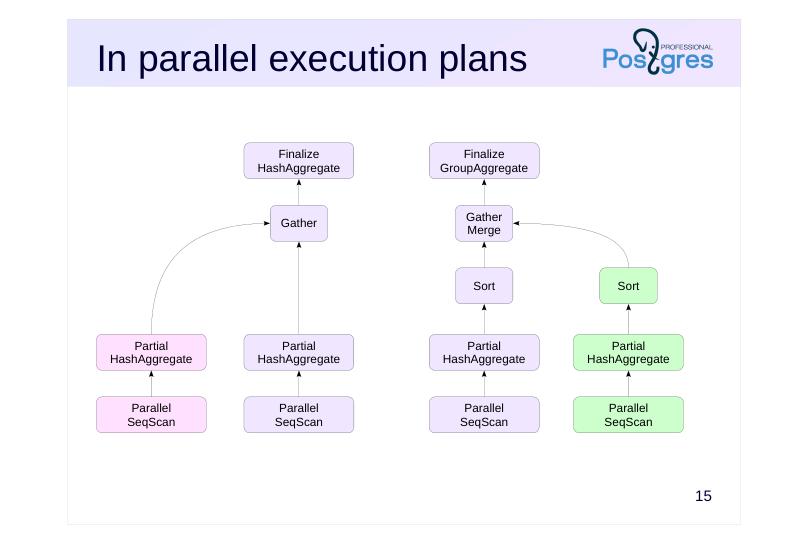 {#source-figure-015 caption=“Source slide page 15: In parallel execution plans”}
Speaker notes
Aggregation doesn’t have a dedicated parallel implementation, but can be executed in parallel execution plans. In this case, each worker process aggregates its portion of the data and passes the results to a Gather node, which combines all the data into a single set. The next node handles the aggregation of the combined dataset and computes the result of the aggregate function.
An example of this plan is shown on the left. This approach is typically more effective when there are a sufficiently large number of groups.
If there are only a few groups, sorting the grouped data within each worker process can be more efficient. Leverage the sorted data and perform a more efficient grouping via sorting at the final stage.
An example of this plan is shown on the right slide.
Page 16: In parallel execution plans
Let’s group the rows of the flights table by flight (there are obviously many of them):
In the Partial HashAggregate node, each process computes the aggregate function on its own data using its own hash table. The coordinating process, after collecting data in the Gather node, retrieves the final aggregate result by combining the groups in the Finalize HashAggregate node through hashing as well. Now, we’ll group the rows of the flights table by cost. The number of groups will be small:
How will this query be executed?
Since there are few groups, it’s more efficient to sort the results in each process (Sort), collect them in the coordinating process into a single sorted set (Gather Merge), and then merge the groups to compute the aggregate function (Finalize GroupAggregate).
Page 17: Page 17
Page 18: Window functions
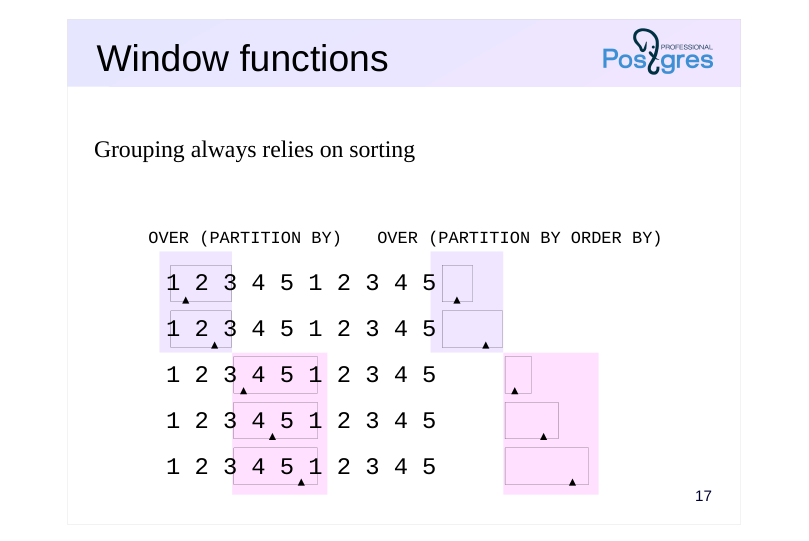 {#source-figure-018 caption=“Source slide page 18: Window functions”}
Grouping always relies on sorting
Speaker notes
Grouping is also used in window functions.
If the window definition includes the PARTITION BY clause, the window function operates on groups of rows, similar to GROUP BY grouping.
For each group of rows, the frame boundaries vary within their respective ranges. If no additional instructions are provided, the function will return the same value for all rows within a group.
Similar to the example in the “Sorting” section, the ORDER BY clause sorts the rows within each group; in this case, the frame is considered to include rows from the first to the current one.
Unlike standard GROUP BY grouping, window definition grouping always relies on sorting: the execution plan is designed to ensure that the WindowAgg node receives a set of rows sorted first by the PARTITION BY keys and then by the ORDER BY keys. Hashing is not used even without an ORDER BY clause.
Page 19: Takeaways
Grouping occurs not only during aggregation, but also during duplicate elimination.
- Performed using hashing or sorting
Page 20: Practice
- How does the query calculate the number of seats per category in the seats table?Try using the default parameter values, and then disable hash-based grouping. 2. Examine the query using a window function and the PARTITION BY clause: SELECT status, count(*) OVER (PARTITION BY status)FROM flightsWHERE flight_no = ‘PG0007’AND departure_airport = ‘VKO’AND flight_id BETWEEN 24104 AND 24115;
- Add a row_number function call using the same window and
- compare the results and execution plans.
Speaker notes
- Query GROUP BY fare_conditions;
To disable hash-based grouping, set the enable_hashagg parameter to off.
Page 21: 1. Different Grouping Methods
First, run the query with the default parameters:
The HashAggregate node is used for grouping. Disable hash-based grouping:
Run the query again and compare the execution plans:
Now, the only remaining option is the GroupAggregate node, which requires sorting data in the Sort node. Revert to default value:
2. Window Functions and the PARTITION BY Clause
The query returns the count of elements in each group:
In the execution plan, it’s clear that the same WindowAgg node handles grouping, as we saw when using the ORDER BY clause in the window definition:
Page 22: Page 22
Let’s add the current row’s number within its group using the row_number() function:
Adding a new function with a matching window does not introduce new nodes into the plan:
08 Lesson 08: Join Methods / Nested Loop Join
This page is extracted from the official PDF into native Markdown. Slide text, code and speaker notes are kept in reading order; the original PDF and HTML remain the layout references. HTML source: No matching course-page link was captured in the source inventory. Archive: QPT-handouts-16-en-20251018.zip PDF pages: 27
Page 1: Join Methods / Nested Loop Join
Copyright
© Postgres Professional, 2019–2024 Authors Authors: Egor Rogov, Pavel Luzanov, Ilya Bashtanov Photo by: Oleg Bartunov (Phu monastery, Bhrikuti summit, Nepal)
Use of course materials
Non-commercial use of course materials (presentations, demonstrations) is allowed without restrictions. Commercial use is possible only with the written permission of Postgres Professional. It is prohibited to make changes to the course materials.
Feedback
Please send your feedback, comments and suggestions to: edu@postgrespro.com
Disclaimer
In no event shall Postgres Professional company be liable for any damages or loss, including loss of profits, that arise from direct or indirect, special or incidental use of course materials. Postgres Professional company specifically disclaims any warranties on course materials. Course materials are provided “as is,” and Postgres Professional company has no obligations to provide maintenance, support, updates, enhancements, or modifications.
Page 2: Topics
- General Considerations on Joins
- Nested loop join
- Variations: left, semi-, and anti-joins
- Computational complexity
- Parallel Execution Plans with Nested Loops
Page 3: Joins
Join types are not SQL joins
- inner, left, right, full, and cross joins, along with ‘in’ and ’exists’ — logical
- operations
- Join types are the implementation mechanism
- It’s not tables that are joined, but sets of rows.
- may originate from any node in the execution plan tree
- Row sets are joined in pairs
- The order of joins is crucial for performance.
- The order within the pair is typically important.
Speaker notes
Simply retrieving data using the discussed access methods isn’t enough; you also need to know how to join them. PostgreSQL offers several methods for this.
Join methods are algorithms designed to combine two row sets. These methods also implement other SQL constructs, such as EXISTS. Avoid confusing the two: SQL joins are logical operations on two sets, whereas PostgreSQL’s join methods are the actual implementations that consider performance.
It’s common to hear that tables are joined. This is a convenient simplification, but in reality, row sets are what get joined. These sets can be directly retrieved from the table (via one of the access methods), but they can also, for instance, result from joining other row sets.
Finally, row sets are always joined pairwise. The order in which tables are joined typically doesn’t affect the query result (such as a join with b or b join with c), but it can greatly impact performance. As we’ll see later, the order in which two row sets are joined matters (e.g., a join b versus b join a).
Page 4: Nested Loop
 {#source-figure-004 caption=“Source slide page 4: Nested Loop”}
For each row in one set, we look for matching rows in the other set
Speaker notes
Let’s begin with the nested loop join, the simplest approach. The algorithm works by iterating through each row in one set and returning the corresponding rows from the second set. In essence, this is two nested loops, which is why it’s called the nested loop method.
Note that the second (inner) set is accessed as many times as there are rows in the first (outer) set. If there’s no efficient way to find the corresponding rows in the second set (i.e., an index on the table), you’ll have to scan many non-matching rows repeatedly. It’s clear that this isn’t the optimal choice, even for small datasets, where the algorithm can still be quite effective.
In the query plan, you’ll see a Nested Loop node with two child nodes (which can represent not just access methods, but also other operations like joins or aggregations).
Page 5: Nested Loop
 {#source-figure-005 caption=“Source slide page 5: Nested Loop”}
Speaker notes
The figures illustrate this connection method. In the figures: • Rows that had already been accessed are shown in gray. • Rows currently being accessed are highlighted in color; • Rows forming a pair that match the join condition are highlighted with an orange border (in this case, by equality of numeric identifiers).
First, we read the first row of the first set and find its corresponding row in the second set. A match was found, and the first result row is ready to be returned to the parent plan node: (‘Let It Be’, ‘Across the Universe’).
Page 6: Nested Loop
 {#source-figure-006 caption=“Source slide page 6: Nested Loop”}
Speaker notes
Read the second string from the first set.
We also go through the pairs from the second set for her. First, return (“Yellow Submarine”, “All Together Now”)…
Page 7: Nested Loop
 {#source-figure-007 caption=“Source slide page 7: Nested Loop”}
Speaker notes
…then the second set (“Yellow Submarine”, “All You Need Is Love”)
Page 8: Nested Loop
 {#source-figure-008 caption=“Source slide page 8: Nested Loop”}
Speaker notes
Proceed to the third row of the first set. No matches found for her.
Page 9: Nested Loop
 {#source-figure-009 caption=“Source slide page 9: Nested Loop”}
Speaker notes
The fourth row also has no matches. The connection ends here.
Some rows from the second set were not considered at all — as shown in the figure, they remained white.
(The algorithm’s source code is available in the file src/backend/executor/nodeNestloop.c.)
Page 10: Nested Loop Join
This is the execution plan for a nested loop join, which the optimizer typically prefers for small samples (looking at flights included in two tickets):
The planner employs a parametrized join. For each row in the outer set (Index Scan node on the tickets table), rows from the inner set (Index Scan node on the flights table) that satisfy the join condition are retrieved. During each iteration of the outer loop, the index access condition for the inner set is ticket_no = constant. The process repeats until the outer set runs out of rows. The EXPLAIN ANALYZE command provides details on how many times the nested loop ran (loops), the average number of rows selected (rows), and the time spent per iteration (time). It’s clear that the planner made a slight error — 8 rows were ultimately retrieved instead of 6:
Here’s another example of a nested loop join. In this case, we retrieve aircraft that can handle flights of a given distance:
This is a non-parametrized join: the entire inner set is scanned for each row in the outer set (the Materialize node will be discussed later; in this case, it simply refers to values from VALUES), and the Join Filter condition is evaluated for each resulting row pair. In essence, this represents a filtered Cartesian product of two row sets.
Note Note that a nested loop join can join rows using any condition, not just value equality.
Variants
Page 11: Page 11
There are several algorithm variants. For the left join:
This variant returns rows even if the left (a) set has no corresponding matches in the right (s) set. An antijoin returns the rows from one set that have no corresponding matches in the other set. This variant can be used to handle the NOT EXISTS predicate:
The same antijoin operation is used for a similar query expressed differently:
A semijoin can be used for the EXISTS predicate, returning the rows from one set that have at least one matching row in the other set:
Keep in mind that even though the query plan for table s indicates 149 rows, actually, retrieving a single row suffices to evaluate
Page 12: Page 12
the EXISTS predicate. PostgreSQL does just that (actual rows=1):
The nested loop algorithm does not have modifications for right (RIGHT) and full (FULL) joins. This is because a full scan of the second row set may not be executed.
Page 13: Memoization
 {#source-figure-013 caption=“Source slide page 13: Memoization”}
Caching repeated data in the inner relation
Speaker notes
If the internal set is scanned multiple times with repeated parameter values, caching the result can help avoid repeatedly reading the same data. This operation is known as memoization . It is performed in the Memoize node, which is placed between the Nested Loop and the data-providing node.
(If the planner’s calculations are incorrect, you can disable memoization by setting the enable_memoize parameter to off.)
Caching is implemented using a hash table. The hash key is a parameter or parameters used to access the internal set.
Page 14: Memoization
 {#source-figure-014 caption=“Source slide page 14: Memoization”}
album_id
Speaker notes
Consider the example in the demo. In contrast to the previous case, there are fewer songs than albums here; additionally, nearly all of them are from the same album.
If the required row isn’t in the hash table, the Memoize node fetches it from the inner dataset, caches it, and passes it to the parent node Nested Loop.
In general, a parameter value may match multiple rows from the inner dataset — all of these rows are cached. If all of them don’t fit into memory (limited to work_mem × hash_mem_multiplier), the parameter value is ignored because caching only part of the rows is pointless. In the query execution plan, the number of such situations is reported as overflow.
Page 15: Memoization
 {#source-figure-015 caption=“Source slide page 15: Memoization”}
album_id
Speaker notes
If the required row is already in the cache, the Memoize node immediately returns it to the Nested Loop node. The inner relation is not accessed.
Page 16: Memoization
 {#source-figure-016 caption=“Source slide page 16: Memoization”}
album_id
Speaker notes
As long as there’s space in the cache, new values keep getting cached. Meanwhile, the new value is added to the front of the cache.
Page 17: Memoization
 {#source-figure-017 caption=“Source slide page 17: Memoization”}
album_id
Speaker notes
The already cached value rises to the top when accessed, while the others sink down accordingly.
Page 18: Memoization
 {#source-figure-018 caption=“Source slide page 18: Memoization”}
album_id
Speaker notes
When memory runs out, the least recently used entries are evicted from the cache. Thus, the LRU replacement algorithm is implemented.
Page 19: Memoization
Let’s examine the query plan that joins the flights and aircraft models tables. The example is designed so that only one row is retrieved from the inner table (aircrafts_data) based on the key f.aircraft_code (Cache Key), and this row will be cached in the Memoize node:
Note Note that For the first time, a lookup is required to retrieve the desired row (Misses: 1); All repeated accesses are served by the cache (Hits: 112); one kilobyte of memory was sufficient for this. No cache evictions (Evictions: 0); The rows selected from the inner set consistently fit within the allocated memory (Overflows: 0).
Page 20: Computational complexity
~ N × M, где
- If N represents the number of rows in the external dataset and M represents
- the average number of rows in the internal dataset per iteration, the overall
- join complexity is proportional to the product of N and M.
- A join is effective only when dealing with a small number of rows.
Speaker notes
If N represents the number of rows in the external dataset and M represents the average number of rows in the internal dataset per iteration, the overall join complexity is proportional to the product of N and M.
In a non-parameterized join, M is exactly equal to the number of rows in the internal dataset; in a parameterized join, M can be much smaller.
The nested loop join is only effective when dealing with a small number of rows. In particular, this method (combined with index access) is typical for OLTP queries that require quickly returning a small number of rows.
Page 21: Nested Loop Join Cost
Let’s examine the cost of the following execution plan:
The first result is delivered immediately without any prior steps, which means the initial cost of the Nested Loop node equals the sum of the initial costs of its child Index Scan nodes. The total cost of the Nested Loop node comprises: the cost of accessing data from the outer relation (total cost of the Index Scan on tickets); data retrieval cost from the inner set (full cost of the Index Scan on flights), multiplied by the estimated number of rows in the outer set (2); CPU processing cost for rows In general, the formula is more complex, but the main conclusion is that the cost is proportional to N × M, where N is the number of rows in the outer dataset and M is the average number of rows from the inner set processed per iteration. In the worst case, this leads to quadratic cost.
Page 22: In parallel execution plans
 {#source-figure-022 caption=“Source slide page 22: In parallel execution plans”}
The external dataset is scanned in parallel, while the internal one is processed sequentially by each process.
Speaker notes
Nested loop join merge joins can be used in parallel execution plans.
The external row set is scanned in parallel by multiple worker processes. After obtaining a row from the external set, the process then sequentially iterates through the corresponding rows in the internal set.
Page 23: In parallel execution plans
 {#source-figure-023 caption=“Source slide page 23: In parallel execution plans”}
Speaker notes
To retrieve the next page from the outer set, processes synchronize. Each process accesses the inner data set independently.
Page 24: Nested Loop in Parallel Execution Plans
Find all passengers who purchased tickets for a specific flight:
At the highest level, a nested loop join is employed. The outer data set is comprised of a single row retrieved from the flights table using a unique index. A parallel execution plan is used to obtain the inner dataset. Each process processes its portion of the flights table (ticket_flights) and joins it with the tickets (tickets) table using another nested loop.
Page 25: Takeaways
A nested loop requires no preparatory actions
- Can deliver the join result without delay
- Effective for small samples
- The outer row set isn’t very large.
- The inner table can be accessed efficiently (typically through an index).
- It depends on the join order
- It’s usually better if the outer row set is smaller than the inner one.
- Supports joins on any condition
- Supports equijoins as well as any other
Speaker notes
The main advantage of the nested loop join is its simplicity: it requires no preparation, allowing results to be returned almost immediately.
The downside is that this approach is highly inefficient with large datasets. The same applies to indexes: the larger the data volume, the higher the overhead.
Therefore, a nested loop join is worth using when:
● one of the row sets is small
● Efficient access to the other dataset is available via the join condition.
● The result set contains a small number of rows.
This is a typical case for OLTP queries (e.g., user interface queries where a web page or form must load quickly without handling large data volumes).
Another important point to note is that nested loop joins can handle any join condition. It works for equijoins (such as the example given) as well as any other join condition.
Page 26: Practice
- Create an index on the departure_airport column of the flights table.Find all flights departing from Ulyanovsk and examine the query’s execution plan. 2. Create a distance table between all airports (with each pair appearing only once).
Speaker notes
- Use the <@> operator from the earthdistance extension.
Page 27: 1. Flights from Ulyanovsk
Index on the flights table:
Execution Plan:
The planner utilized a nested loop join.
Note Note that a join is necessary here because Ulyanovsk has two airports:
2. Distance Table Between Airports
To eliminate duplicate pairs, you can join the tables using the “greater than” condition:
A nested loop is the only method of joining in this case.
09 Lesson 09: Join Methods / Hash Join
This page is extracted from the official PDF into native Markdown. Slide text, code and speaker notes are kept in reading order; the original PDF and HTML remain the layout references. HTML source: No matching course-page link was captured in the source inventory. Archive: QPT-handouts-16-en-20251018.zip PDF pages: 36
Page 1: Join Methods / Hash Join
Copyright
© Postgres Professional, 2019–2024 Authors Authors: Egor Rogov, Pavel Luzanov, Ilya Bashtanov Photo by: Oleg Bartunov (Phu monastery, Bhrikuti summit, Nepal)
Use of course materials
Non-commercial use of course materials (presentations, demonstrations) is allowed without restrictions. Commercial use is possible only with the written permission of Postgres Professional. It is prohibited to make changes to the course materials.
Feedback
Please send your feedback, comments and suggestions to: edu@postgrespro.ru
Disclaimer
In no event shall Postgres Professional company be liable for any damages or loss, including loss of profits, that arise from direct or indirect, special or incidental use of course materials. Postgres Professional company specifically disclaims any warranties on course materials. Course materials are provided “as is,” and Postgres Professional company has no obligations to provide maintenance, support, updates, enhancements, or modifications.
Page 2: Topics
- Sequential hash join: single-and two-pass
- Computational complexity
- Parallel hash join:single-and two-pass
Page 3: Hash Join
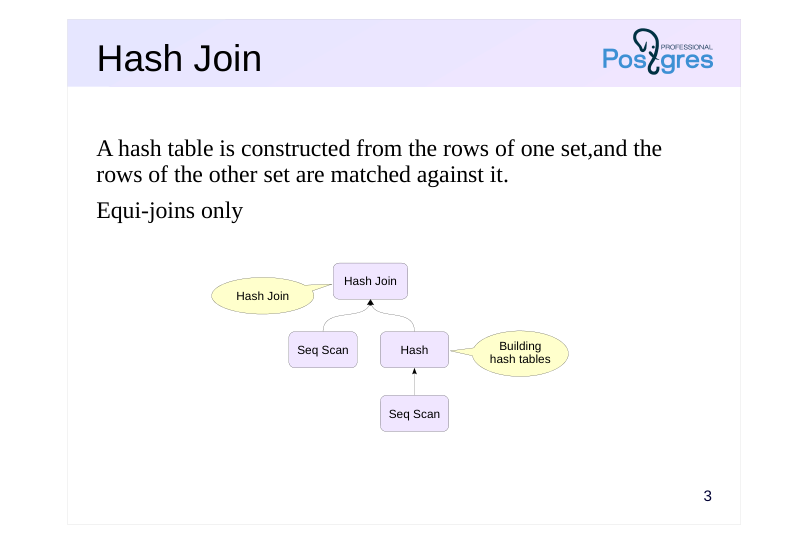 {#source-figure-003 caption=“Source slide page 3: Hash Join”}
A hash table is constructed from the rows of one set,and the rows of the other set are matched against it.
- Equi-joins only
Speaker notes
The main idea of hashing is discussed in the “Types of Indexes” and “Grouping” sections.
Hashing is used for joining as follows. Initially, a hash table is constructed based on one of the datasets within the Hash node. Then, in the Hash Join node, the rows from the other dataset are compared to the built table.
Similar to a hash index, a hash join can only function with an equality condition: the hash function does not maintain the order of values.
Let’s look at an example of how the join works.
Page 4: One-pass Join
Used when the hash table fits into available memory
Page 5: Building the Hash Table
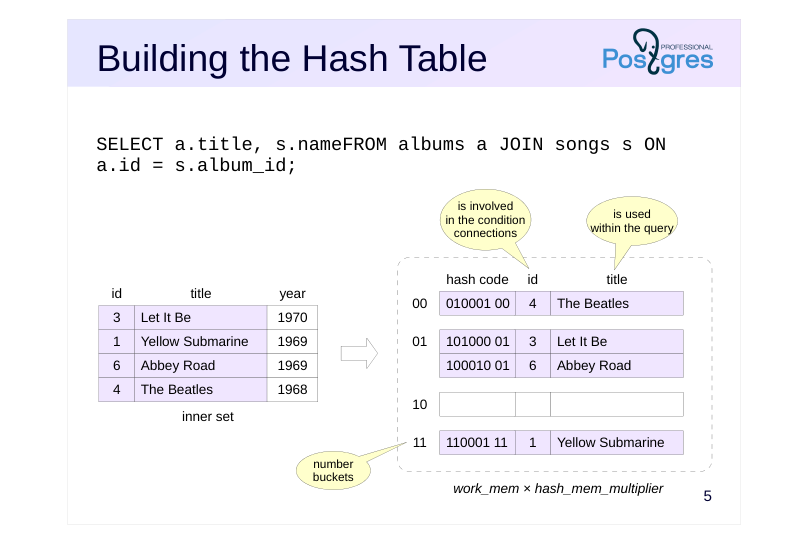 {#source-figure-005 caption=“Source slide page 5: Building the Hash Table”}
Speaker notes
The first step involves constructing a hash table in memory.
The rows of the first (inner) set are processed sequentially, with a hash function computed for each row based on the values of the fields involved in the join condition (in our example, these are numeric ID values).
The computed hash code and all fields involved in the join condition or used in the query are stored in the hash table bucket.
The size of the hash table in memory is constrained by work_mem × × hash_mem_multiplier. Optimal performance is achieved when the entire hash table fits within this memory allocation. Therefore, the planner typically selects the smaller of the two row sets as the inner one. It’s also a good idea to avoid including unnecessary fields in the query, such as the asterisk, to prevent the hash table from being overloaded with extra data.
Page 6: Row Matching
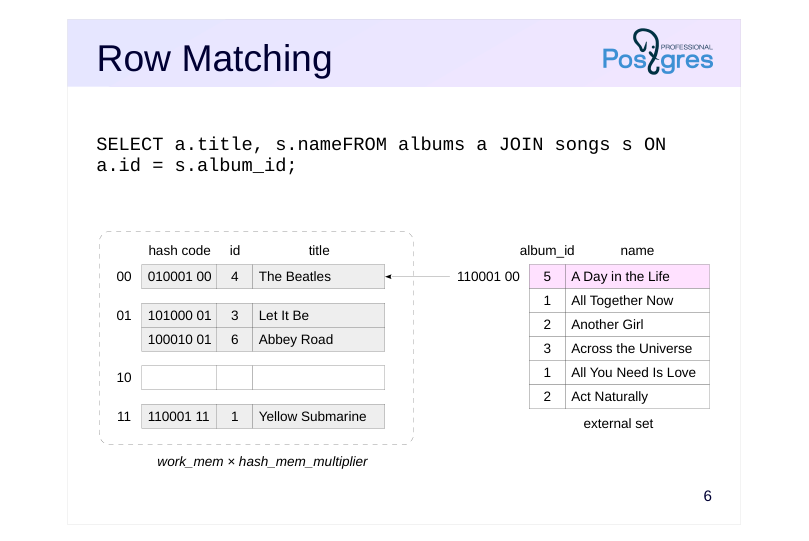 {#source-figure-006 caption=“Source slide page 6: Row Matching”}
Speaker notes
During the second phase, we read the second set of rows in sequence.While reading, we compute the hash function from the fields’ values involved in the join condition. If a row is found in the matching bucket of the hash table.
with a matching hash code
and with field values that satisfy the join condition
then we found a match
Simply checking the hash code isn’t enough. First, not all join conditions listed in the query are taken into account during a hash join operation (as only equijoins are supported). Secondly, collisions may occur where different values result in the same hash code (even though the probability is low, it still exists).
In our example, the first row has no match.
Page 7: Row Matching
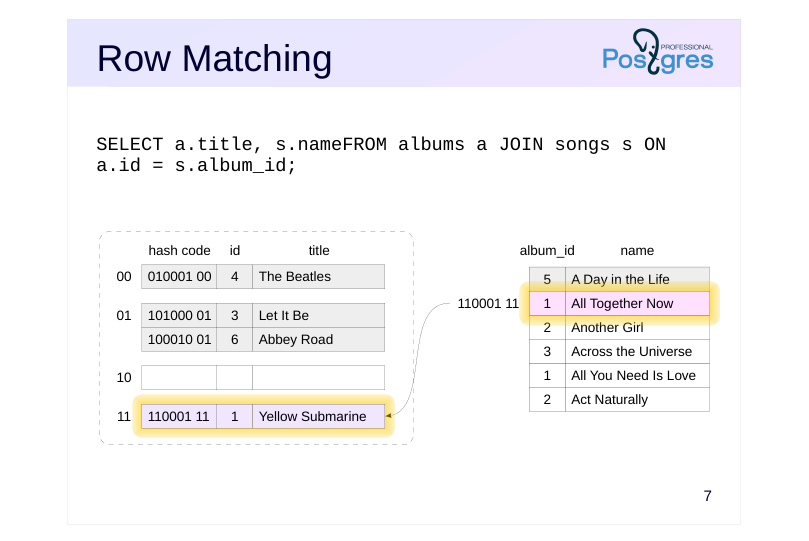 {#source-figure-007 caption=“Source slide page 7: Row Matching”}
Speaker notes
The second row of the second set yields a match that can be passed up to the higher-level node in the query plan: (‘Yellow Submarine’, ‘All Together Now’).
Page 8: Row Matching
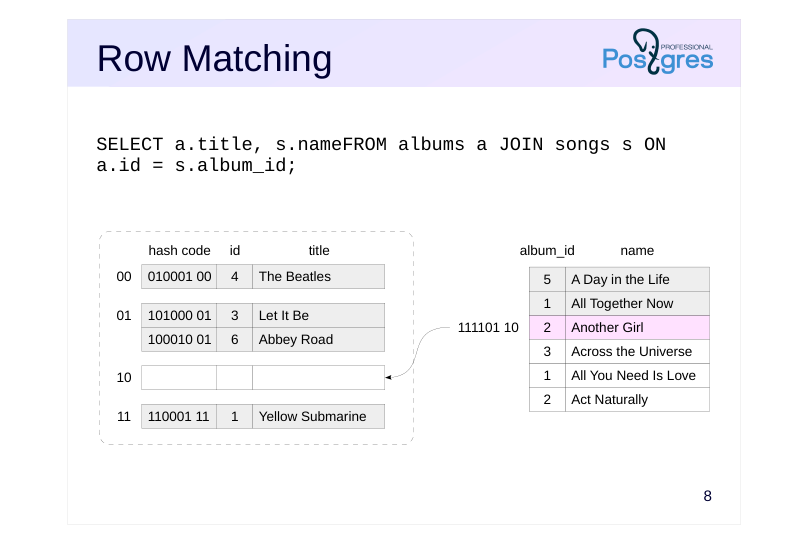 {#source-figure-008 caption=“Source slide page 8: Row Matching”}
Speaker notes
No match exists for the third row (the corresponding hash table bucket is empty)
Page 9: Row Matching
 {#source-figure-009 caption=“Source slide page 9: Row Matching”}
Speaker notes
The fourth match is (“Let It Be”, “Across the Universe”).
Note that the hash table bucket contains two rows from the first set, and both must be examined.
Page 10: Row Matching
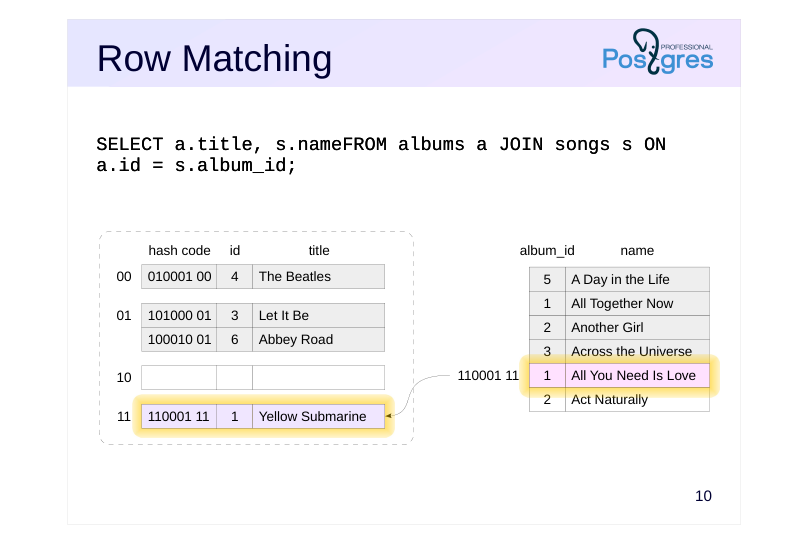 {#source-figure-010 caption=“Source slide page 10: Row Matching”}
Speaker notes
The fifth row corresponds to (“Yellow Submarine”, “All You Need Is Love”).
Page 11: Row Matching
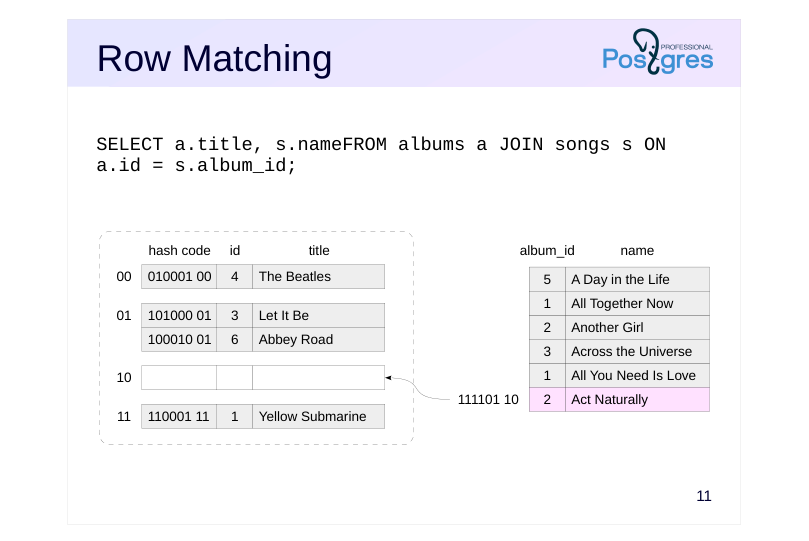 {#source-figure-011 caption=“Source slide page 11: Row Matching”}
Speaker notes
No match exists for the sixth row. The connection process is complete.
The algorithm’s source code is located in the file src/backend/executor/nodeHashjoin.c
Page 12: One-Pass Hash Join
When selectivity is low, the optimizer tends to choose a hash join:
The Hash Join node begins by accessing its Hash child node. This child node retrieves all rows from its own child (here, a Seq Scan) and builds a hash table. Then the Hash Join node accesses the second child node and joins the rows, gradually returning the results. Let’s see how this query is executed
The hash table was able to fit into memory (Batches: 1). The Buckets parameter indicates the number of buckets in the hash table, while Memory Usage shows the volume of used random access memory.
Note Note that the hash table was built from the smaller set of rows. Hash Join has several variations, including the previously mentioned Left, Semi, and Anti, as well as Right and Full for right and full joins respectively:
Page 13: Page 13
Note Note that the hash table is always built from the smaller set of rows, regardless of the order of the tables in the join.
Page 14: Two-pass Join
Used when the hash table cannot fit into main memory: data sets are divided into batches and joined sequentially.
Page 15: Building the Hash Table
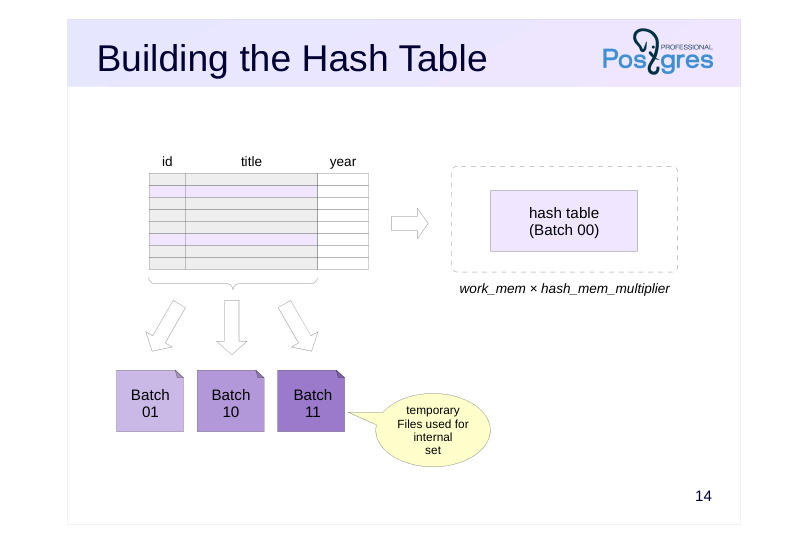 {#source-figure-015 caption=“Source slide page 15: Building the Hash Table”}
Speaker notes
If the hash table exceeds the memory limit set by work_mem × hash_mem_multiplier, the initial (internal) set of rows is divided into separate packages. A certain number of hash code bits are used to distribute the data into packages, so the number of packages is always a power of two. Ideally, each package would contain roughly the same number of rows, but if row values are repeated, skew can occur.
During query planning, the minimum number of packages required is calculated in advance to ensure that the hash table for each package fits into memory. This number remains unchanged even if the optimizer made errors in its estimates, but can be dynamically adjusted when necessary.
The hash table for the first package stays in memory, while rows belonging to other packages are written to disk as temporary files — each package in its own file.
The figure shows four packages.
Page 16: name album_id Join - Package 1
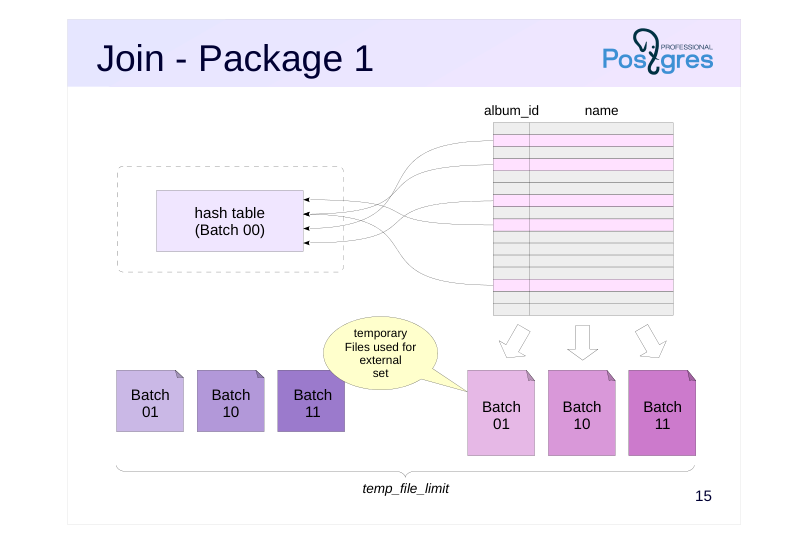 {#source-figure-016 caption=“Source slide page 16: name album_id Join - Package 1”}
Speaker notes
Next, the second (external) set of strings is processed. If the string belongs to the first Package, it is matched against the hash table that contains the first Package. There’s no need to match the string against other packages — they can’t contain a match, as the hash codes are guaranteed to differ.
If the string belongs to another package, it is written to disk — again, each package is stored in its own temporary file.
Therefore, with N packages, a total of 2(N–1) files are used.
Note that the use of temporary files on disk is limited by the temp_file_limit parameter, which sets the total disk space limit for the session. (Temporary table buffersare excluded from this limit.) (Буферы временных таблиц в это ограничение не входят.)
Page 17: Matching: Package 2
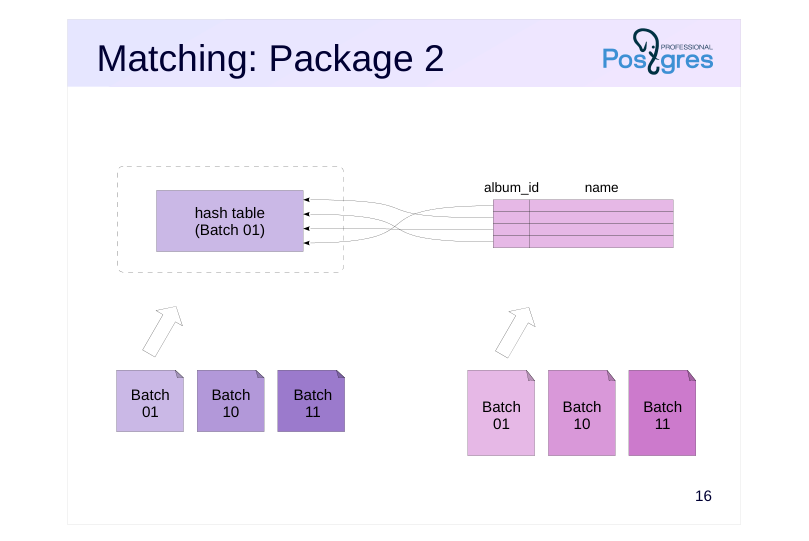 {#source-figure-017 caption=“Source slide page 17: Matching: Package 2”}
Speaker notes
Next, all packages are processed in turn, starting with the second.The internal set’s rows are loaded into a hash table from a temporary file, followed by reading the external set’s rows from another temporary file and matching them against the hash table.
The procedure is repeated for all remaining packages, which amount to N–1. The figure illustrates the connection for the second package (01).
Page 18: Join - Package 3
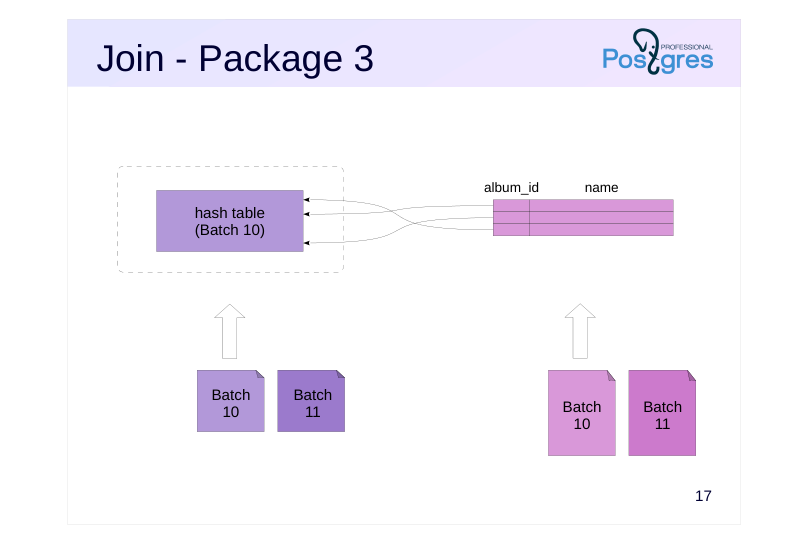 {#source-figure-018 caption=“Source slide page 18: Join - Package 3”}
Speaker notes
The figure illustrates the connection for the third package (10).
Page 19: Mapping: Package 4
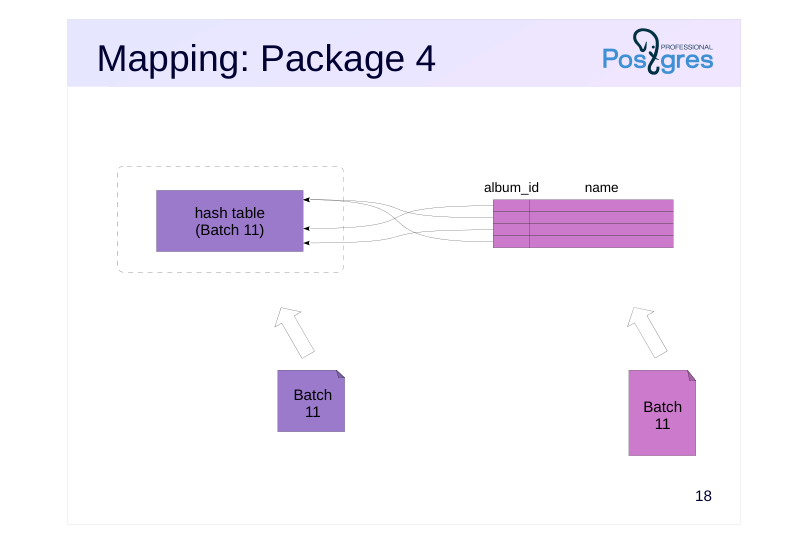 {#source-figure-019 caption=“Source slide page 19: Mapping: Package 4”}
Speaker notes
After processing the final package, the connection is closed and temporary files are freed.
Therefore, when insufficient RAM is available, the join algorithm operates in two passes: each packet (except the first) must be written to disk and then read back. Of course, this impacts the connection’s efficiency. To avoid the inefficiency, make sure that:
● Only the actually needed fields were included in the hash table (the query author’s responsibility).
● The hash table is built for the smaller set (responsibility of the planner).
Page 20: Two-Pass Hash Join
Now let’s use large tables and display the I/O statistics:
The hash table no longer fits into memory, so a Two-Pass Hash Join is used. This required 32 batches (Batches). As shown, the Hash node writes batches to temporary files (temp written), while the Hash Join node both reads and writes (temp read and written). Let’s compare it to the same query that selects only one field:
Memory usage dropped since the hash table now contains only one field (instead of three), and the number of batches halved.
Page 21: Computational complexity
~ N+M, где
- N and M represent the number of rows in the first and second data sets.
- Initial overhead for building a hash table
- Efficient for a large number of rows
Speaker notes
The overall complexity of a hash join is proportional to the combined number of rows in both data sets. Thus, hash joins are significantly more efficient than nested loops when handling large datasets.
However, since a hash table must be built to start the join, the nested loop is more efficient for small row counts.
Hash joins (combined with full table scans) are typically used in OLAP queries that require processing a large number of rows, where throughput is prioritized over response time.
Page 22: Hash Join Cost
The initial cost of the Hash Join node consists of the following costs: retrieving the entire first dataset (in this case, tickets); The hash table must be built before the join can begin. It’s worth noting that the Hash node does not account for the cost of building the hash table. The total cost includes the following additional costs in addition to the initial cost: fetching the full second data set (in this case, flights); hash table lookup; disk accesses when more than one batch is expected Key takeaway: The cost of a hash join scales with N + M, where N and M represent the number of rows in the data sets being joined. When N and M are large, this approach is much more efficient than the product of N and M in nested loop joins.
Page 23: Parallel algorithm
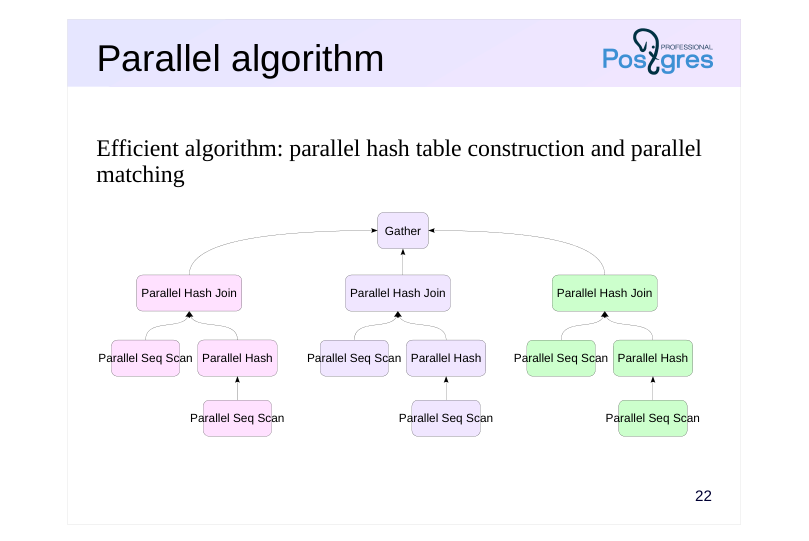 {#source-figure-023 caption=“Source slide page 23: Parallel algorithm”}
Efficient algorithm: parallel hash table construction and parallel matching
Speaker notes
Unlike other join methods, hash join not only supports parallel execution plans but also has a distinct efficient algorithm. This algorithm enables parallel execution of both join stages: building the hash table from the first (inner) row set and matching the second (outer) row set against it.
The parallel hash join capability is governed by the enable_parallel_hash parameter; by default, this parameter is enabled.
Similar to the sequential algorithm, the parallel version has two approaches: single-pass when sufficient random access memory is available and two-pass.
Let’s start with the single-pass approach.
Page 24: Parallel, single pass
Processes use a shared hash table
Page 25: Building the Hash Table
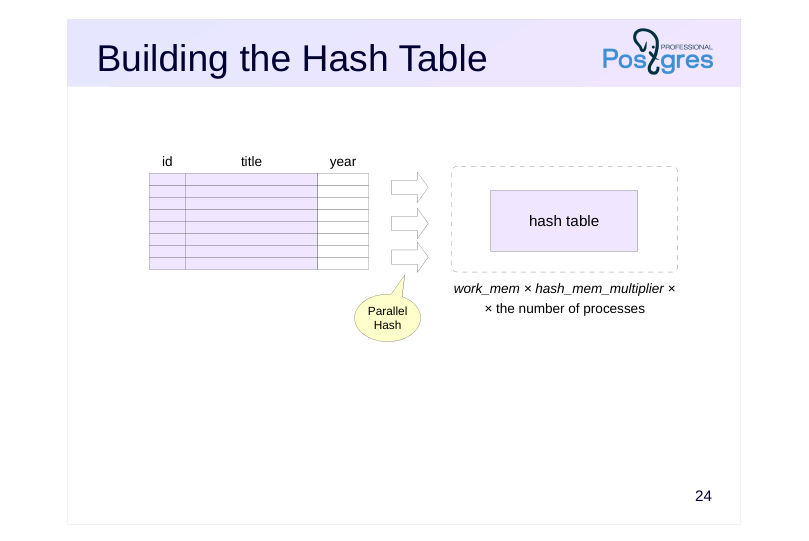 {#source-figure-025 caption=“Source slide page 25: Building the Hash Table”}
Speaker notes
The single-pass algorithm is employed when the hash table can fit into the total memory allocated to all processes involved in the join, which means the hash table’s size is constrained by work_mem × hash_mem_multiplier × the number of processes.
Processes read the first set of rows in parallel (e.g., using the Parallel Seq Scan node) and build a shared hash table in shared memory, which all processes can access.
Page 26: name album_id Row Matching
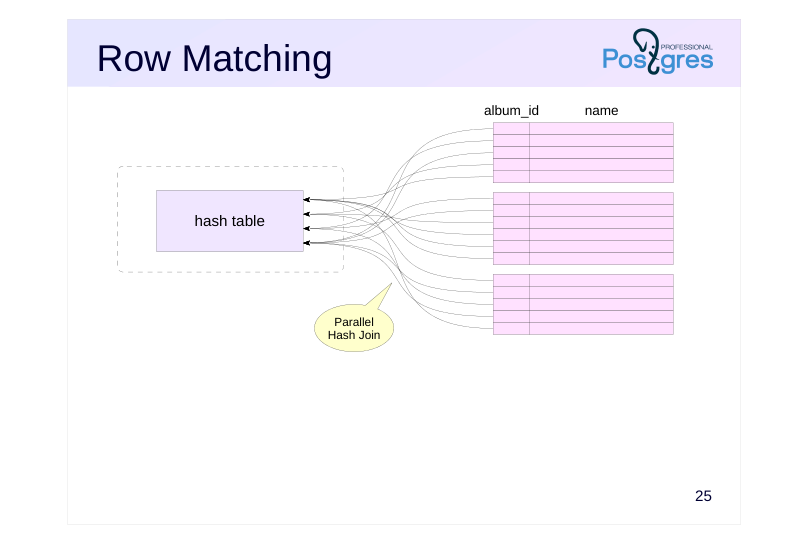 {#source-figure-026 caption=“Source slide page 26: name album_id Row Matching”}
Speaker notes
Once the hash table is fully built, worker processes begin parallel scanning of the second dataset, comparing the rows they read against the shared hash table. Each process only examines a subset of the data using the hash table.
Page 27: Single-Pass Parallel Hash Join
Increase the memory allocated to the process for building the hash table.
Let’s run the aggregation query:
Note the memory usage (Memory Usage): the amount exceeds the limit set for a single worker process (64MB = work_mem × hash_mem_multiplier), but the hash table fits into the shared memory of three processes. Therefore, a single-pass join is performed (Batches: 1).
Page 28: Two parallel passes
Row sets are split into batches that are then processed in parallel by worker processes.
Page 29: Splitting into Batches
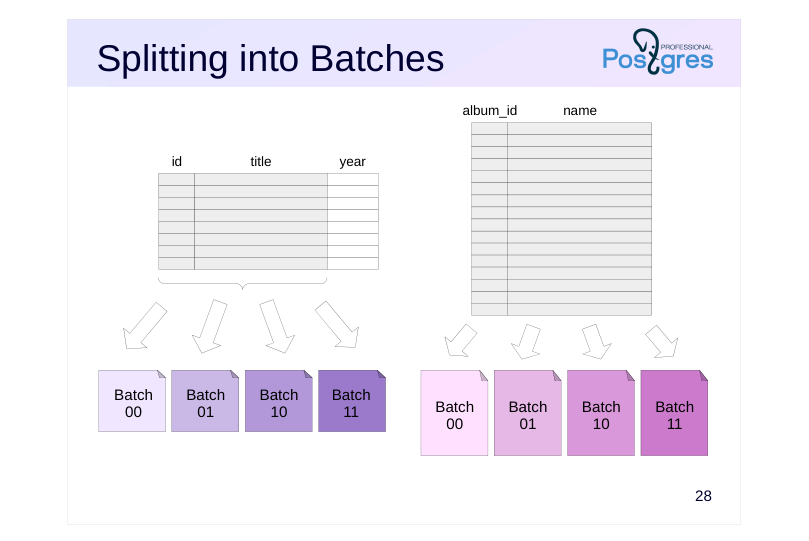 {#source-figure-029 caption=“Source slide page 29: Splitting into Batches”}
Speaker notes
A hash table may not fit within the memory limit determined by work_mem × hash_mem_multiplier × number of processes, and this may become apparent during the join execution. In this case, a two-pass algorithm is employed, which differs significantly from both the two-pass sequential and the single-pass parallel approaches.
First, worker processes read the first dataset in parallel, split it into batches, and write the batches to temporary files. The first batch is also written to the file; the hash table is not constructed in memory.
Note that each process writes rows to all temporary files, with the writes synchronized.
Next, worker processes read the second dataset in parallel, splitting it into batches and writing them to temporary files.
As a result, 2N files are written to disk when there are N batches.
Page 30: Row Matching
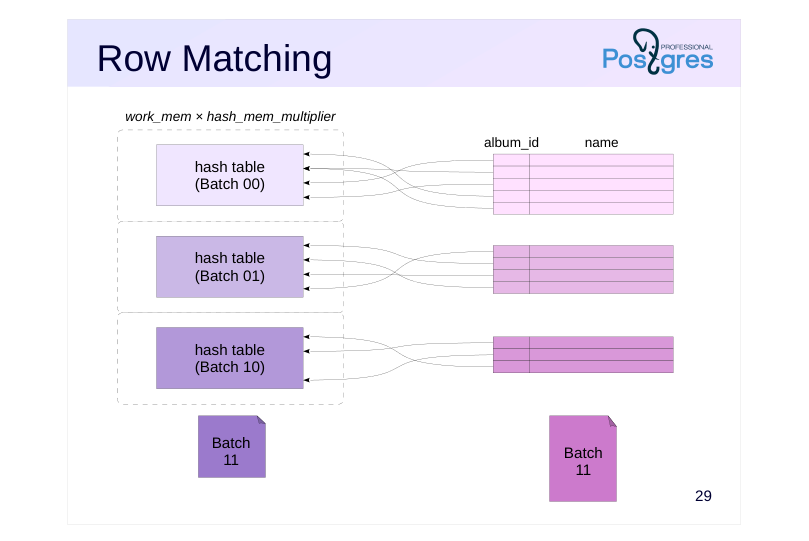 {#source-figure-030 caption=“Source slide page 30: Row Matching”}
Speaker notes
Each worker process then selects one batch.
The process loads the first dataset from the selected batch into the hash table in memory. In this algorithm, each process has its own hash table sized at work_mem × hash_mem_multiplie × r, but these tables are stored in shared memory, allowing all worker processes to access each table.
Once the hash table is populated, the process reads the second dataset from the selected batch and matches the rows.
Once a process finishes processing a batch, it selects the next unprocessed one.
Page 31: Row Matching
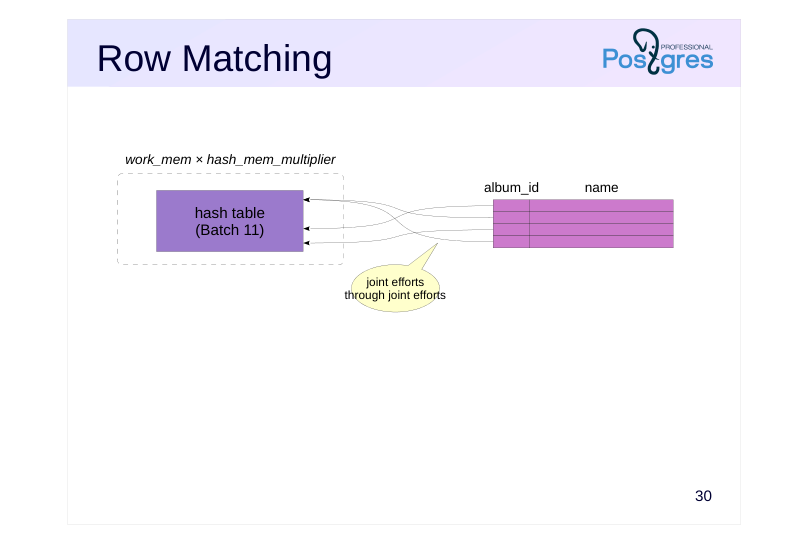 {#source-figure-031 caption=“Source slide page 31: Row Matching”}
Speaker notes
If there are no unprocessed batches left, the process teams up with another process to help it finish up its batch. They can do that because all the hash tables reside in shared memory.
Using multiple hash tables is more efficient than a single large one: it simplifies coordination and reduces synchronization overhead.
Page 32: Two-Pass Parallel Hash Join
Now, let’s decrease the memory allocation:
Let’s run the same aggregation query:
The join is now a two-pass join with four batches.
Page 33: Takeaways
Hash joins require preparation
- A hash table must be built
- Efficient for large samples
- It also supports parallel joins
- It depends on the join order
- The inner relation should be smaller than the outer relation, to reduce the
- hash table’s size.
- Only equijoins are supported.
- The ‘greater than’ and ’less than’ operators are not applicable to hash codes.
Speaker notes
Unlike nested loop joins, hash joins require setup, such as building a hash table. Until the hash table is built, no result rows can be produced.
Hash joins, however, are efficient with large data volumes. Both row sets are read sequentially and only once (twice if there’s insufficient RAM).
A limitation of hash joins is that they only support equijoins. The issue is that hash values can only be compared for equality, and the ‘greater than’ and ’less than’ operations are not applicable.
Page 34: Practice
- Write a query to show occupied seats in the cabin for all flights.Which join strategy did the planner select? Check whether there was sufficient RAM to allocate the hash tables. 2. Modify the query to display only the total count of occupied seats.How did the query plan change? Why didn’t the planner use the same plan for the previous query? 3. Examine the query plan to determine the order of operations.
Speaker notes
- To do this, simply join the flights table with the boarding_passes table.
- Such a query needs to join three tables: tickets (tickets), ticket_flights (ticket_flights), and flights (flights).
Page 35: 1. List of Used Data Pages
Hash join was used
The hash table couldn’t fit entirely in memory, requiring two chunks.
2. Number of Used Data Pages
The query planner opted for a parallel plan here. In the previous query, this wasn’t cost-effective due to the high data movement between processes, but in this case, only a single value is being transferred.
Page 36: Page 36
Note Note the loops column in the nodes above and below the Gather node — it reflects the actual number of processes involved in executing the query.
3. Passengers and Flight Numbers
The join between tickets and ticket_flights is performed first, with the hash table constructed from the tickets table. Then, flights are joined with the result of the first join, with the hash table built from the flights table.
10 Lesson 10: Join Methods / Merge Join
This page is extracted from the official PDF into native Markdown. Slide text, code and speaker notes are kept in reading order; the original PDF and HTML remain the layout references. HTML source: No matching course-page link was captured in the source inventory. Archive: QPT-handouts-16-en-20251018.zip PDF pages: 25
Page 1: Join Methods / Merge Join
Copyright
© Postgres Professional, 2019–2024 Authors Authors: Egor Rogov, Pavel Luzanov, Ilya Bashtanov Photo by: Oleg Bartunov (Phu monastery, Bhrikuti summit, Nepal)
Use of course materials
Non-commercial use of course materials (presentations, demonstrations) is allowed without restrictions. Commercial use is possible only with the written permission of Postgres Professional. It is prohibited to make changes to the course materials.
Feedback
Please send your feedback, comments and suggestions to: edu@postgrespro.ru
Disclaimer
In no event shall Postgres Professional company be liable for any damages or loss, including loss of profits, that arise from direct or indirect, special or incidental use of course materials. Postgres Professional company specifically disclaims any warranties on course materials. Course materials are provided “as is,” and Postgres Professional company has no obligations to provide maintenance, support, updates, enhancements, or modifications.
Page 2: Topics
- Merge Join Algorithm
- Computational complexity
- Merge Join in Parallel Execution Plans
Page 3: Merge join
 {#source-figure-003 caption=“Source slide page 3: Merge join”}
Merging Two Sorted Row Sets
- The result of the join is automatically sorted
Speaker notes
The third and final join method is the merge join.
The idea of this method is that two pre-sorted data sets can be easily merged into a single combined set that is sorted in the same way. The Gather Merge node operates similarly.
Before performing a merge join, both sets of rows need to be sorted. Сортировка — дорогая операция, она имеет сложность O(N log N).
But sometimes this phase can be skipped if the rows are already sorted by the required columns, for example, via indexed access to the table.
Page 4: Merge
 {#source-figure-004 caption=“Source slide page 4: Merge”}
Speaker notes
The merge is straightforward. First, we take the first strings from both sets and compare them. In this case, we immediately found a match and can output the first tuple of the result: («Yellow Submarine», «All Together Now»).
The algorithm goes as follows. the general algorithm works by reading the next row from the set with the smaller join field value (one set “catches up” to the other). If the values are equal, as in our example, we proceed to the next row in the second (inner) set.
Page 5: Merge
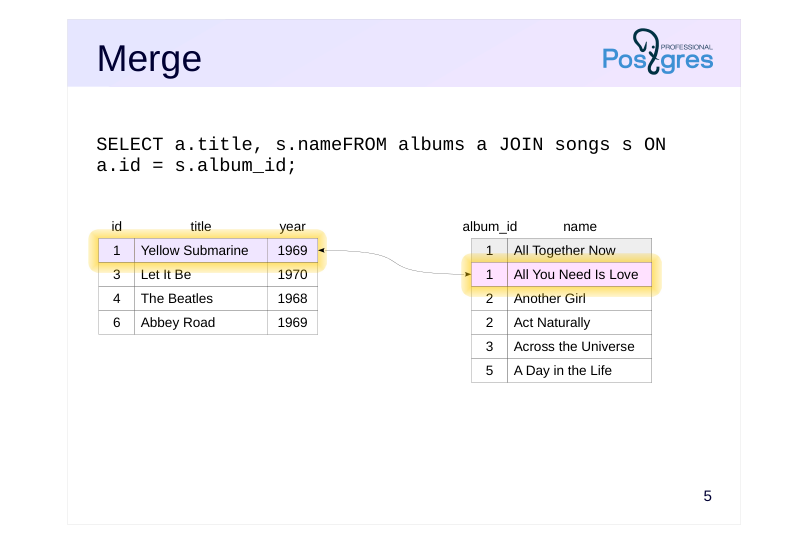 {#source-figure-005 caption=“Source slide page 5: Merge”}
Speaker notes
Once again, the match: (‘Yellow Submarine’, ‘All You Need Is Love’)
Once more, read the next row from the second dataset.
Page 6: Merge
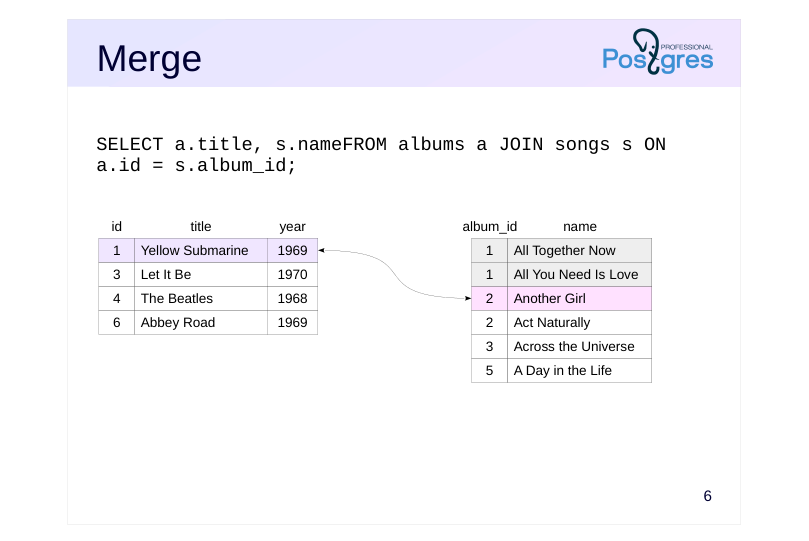 {#source-figure-006 caption=“Source slide page 6: Merge”}
Speaker notes
No match found in this case.
Since 1 < 2, we proceed to the next string in the first set.
Page 7: Merge
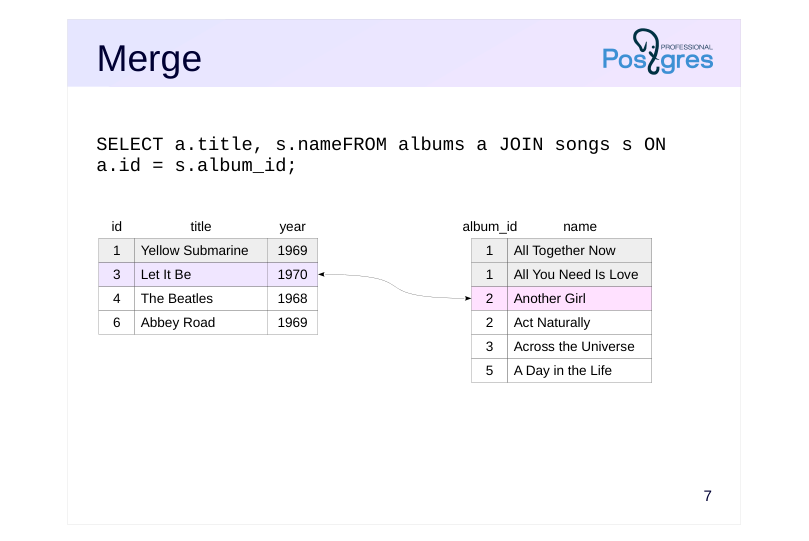 {#source-figure-007 caption=“Source slide page 7: Merge”}
Speaker notes
No match found.
Since 3 > 2, we proceed to the next row in the second set.
Page 8: Merge
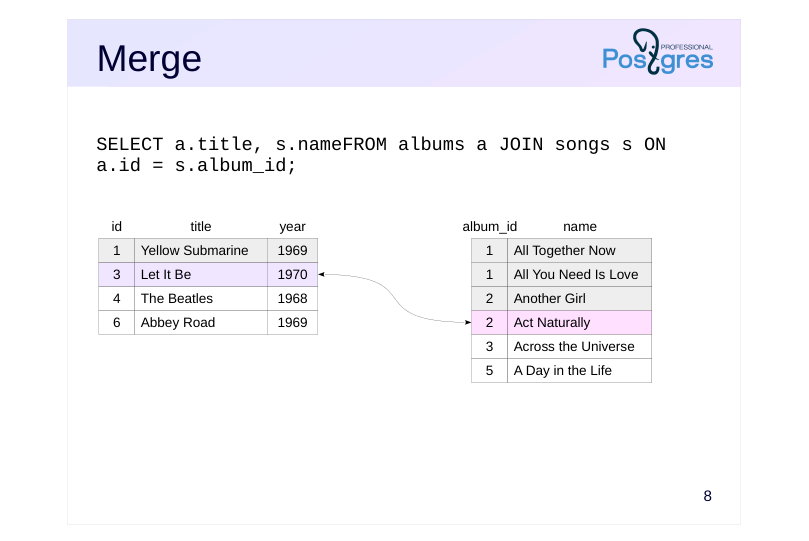 {#source-figure-008 caption=“Source slide page 8: Merge”}
Speaker notes
Once more, there’s no match, once more 3 > 2, we read the next row from the second set.
Page 9: Merge
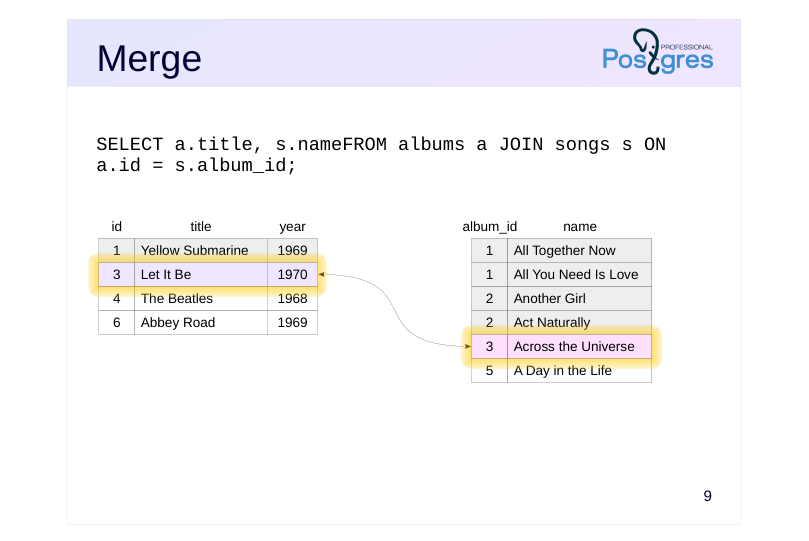 {#source-figure-009 caption=“Source slide page 9: Merge”}
Speaker notes
There is a match: ‘Let It Be’ and ‘Across the Universe’
3 = 3, proceed to the next line in the second set.
Page 10: Merge
 {#source-figure-010 caption=“Source slide page 10: Merge”}
No match found. 3 < 5, read the row from the first set.
Page 11: Merge
 {#source-figure-011 caption=“Source slide page 11: Merge”}
Speaker notes
No match found.
4 < 5, so read the row from the first set.
Page 12: Merge
 {#source-figure-012 caption=“Source slide page 12: Merge”}
Speaker notes
And the final step: no match again.
The merge join has concluded.
In reality, the algorithm is more complex — if the first (outer) row set has multiple identical values, it must be able to reread the rows of the second (inner) setusing the same join key.
The algorithm’s pseudocode can be found in the file src/backend/executor/nodeMergejoin.c.
Notably, the merge algorithm returns the join result in a sorted format. In particular, the resulting row set can be used for the next merge join without further sorting.
Page 13: Merge Join
If the result needs to be sorted, the optimizer might choose a merge join. This is especially the case when the data from the child nodes is already sorted — as shown in this example:
Here’s another example featuring two merge joins, where one Merge Join node receives a sorted dataset from another Merge Join node:
Here, ticket_flights and boarding_passes are joined, and the tickets (tickets) are joined using a set of rows that is already sorted by ticket numbers. Merge Join also supports Left, Right, Semi, Anti, and Full variations. Currently, merge joins support only equijoins. Joins based on ’greater than’ or ’less than’ operations are not implemented. Thus, the Full join is available only for hash and merge joins, and both types operate exclusively with equality conditions. If performance isn’t a concern, a full join can be implemented by combining the results of a left join and an anti-join—this method would be necessary when a full join with a different condition is required.
Page 14: Computational complexity
~ N+M, где
- N and M represent the number of rows in the first and second data sets.no
- joins required
- ~ N log N+M log M,
- if sorting is required
- Potential Initial Sorting Costs
- Efficient for a large number of rows
Speaker notes
In cases where data sorting isn’t required, the overall complexity of a merge join is proportional to the total number of rows in both data sets. However, unlike hash joins, there is no overhead involved in building a hash table here.
Therefore, merge joins can be effectively used in both OLTP-and OLAP-queries.
However, if sorting is required, the cost becomes proportional to the number of rows multiplied by the logarithm of that number. On large datasets, this approach is likely to be less efficient than a hash join.
Page 15: Computational Complexity
Let’s examine the cost of a merge join:
Startup cost includes: the sum of the startup costs of the child nodes (including the sorting cost if required); the cost of retrieving the first pair of matching rows The total cost includes the initial cost plus the total cost of acquiring both data sets the cost of comparing rows The overall conclusion is that the cost of a merge join is proportional to N + M (where N and M represent the number of rows being joined) when no separate sorting is required. Sorting a set of K rows adds at least K × log(K) to the estimate. In contrast to hash joins, merge joins without sorting are well suited for cases where quickly retrieving the initial rows is needed.
Also, note how the total cost has decreased.
Page 16: In parallel execution plans
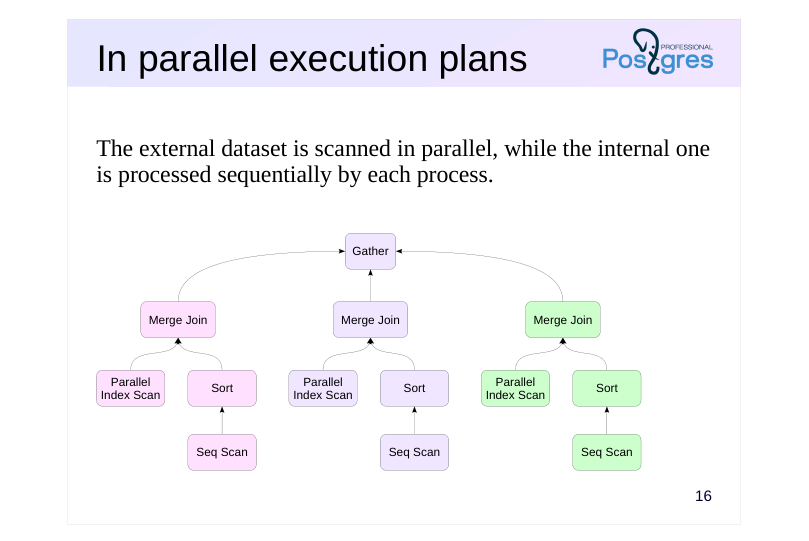 {#source-figure-016 caption=“Source slide page 16: In parallel execution plans”}
The external dataset is scanned in parallel, while the internal one is processed sequentially by each process.
Speaker notes
The merge join algorithm can be used in a parallelized plan.
Just like with a nested loop join, scanning one set of rows is executed in parallel by worker processes, but the other set of rows is read entirely by each worker process on its own. Therefore, hash joins are far more commonly used in parallel execution plans when dealing with large row sets, due to their efficient parallel algorithm.
Page 17: In parallel execution plans
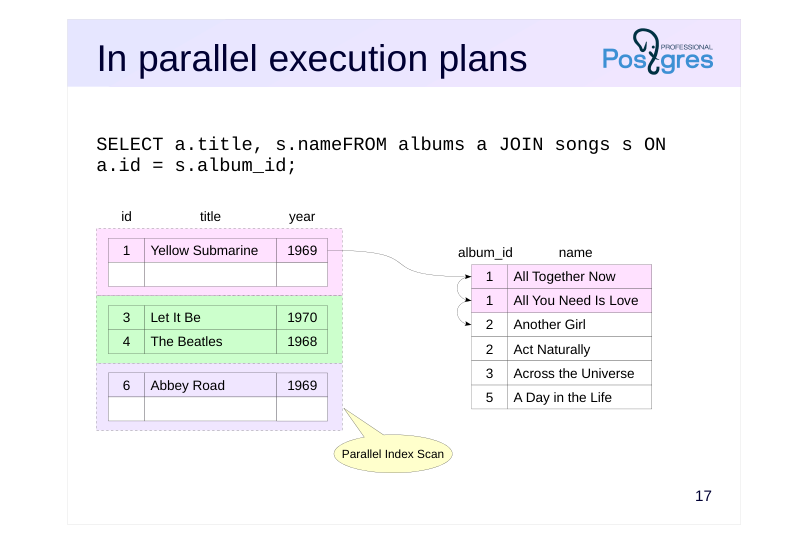 {#source-figure-017 caption=“Source slide page 17: In parallel execution plans”}
Speaker notes
Each worker process will scan the internal dataset from the start until no more matches are found.
This slide shows the rows processed by the first process.
Page 18: In parallel execution plans
 {#source-figure-018 caption=“Source slide page 18: In parallel execution plans”}
Speaker notes
The second process will scan through the full set and find a match.
Page 19: In parallel execution plans
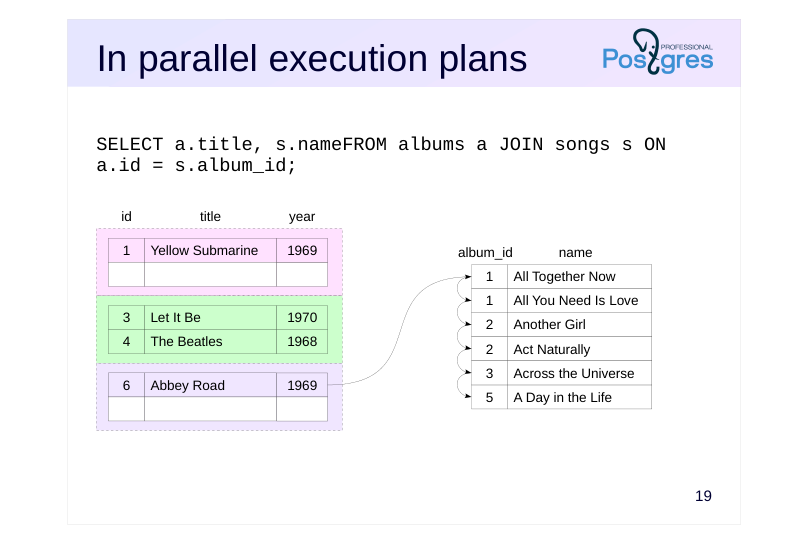 {#source-figure-019 caption=“Source slide page 19: In parallel execution plans”}
Speaker notes
However, the third process will find no matches.
Of course, all three processes examine the internal set at the same time, rather than sequentially.
Page 20: In parallel execution plans
We’ll need an index:
Here’s an example of a parallel execution plan utilizing a merge join:
Here, the bookings_pkey index on the bookings table is scanned in parallel, while the aggregation result from subquery t is processed entirely by each process.
Page 21: Takeaways
Merge join may require some preparation
- The row sets need to be sorted
- or have them pre-sorted
- Efficient for large samples
- It’s beneficial if the row sets are already sorted.
- It’s beneficial if a sorted result is required
- This method is independent of the join order
- Only equijoins are supported.
- Other join types are not implemented, but there are no fundamental
- restrictions
Speaker notes
To perform a merge join, both row sets must be sorted. It’s beneficial if the data is already in the correct order; otherwise, sorting is required.
Merge operations are highly efficient, even for large data sets. As a nice bonus, the output is also sorted, making this join method advantageous when higher-level plan nodes need sorting (e.g., a query with an ORDER BY clause or another merge sort).
Thus, the planner has three join methods: nested loop, hashing, and merge (excluding various modifications). Each method has scenarios where it outperforms the others. This allows the planner to select the method that is expected to be the most suitable for each specific scenario.
Page 22: Practice
- Check the query’s execution plan for the list of all seats in the cabins, ordered by aircraft code: SELECT * FROM aircrafts a JOIN seats s ON a.aircraft_code = s.aircraft_codeORDER BY a.aircraft_code; But present it as a cursor. Reduce the cursor_tuple_fraction parameter value by a factor of ten. How did the execution plan change? 2. An aircraft can be replaced with another if the capacity difference is no more than 20%. Generate a replacement table between Boeing and Airbus models using a full join. How does the query execute?
- The query to execute:
Page 23: 1. The cursor_tuple_fraction configuration parameter
Cursor Execution Plan:
Current cursor_tuple_fraction value:
Lower it:
Now the planner chooses a different plan because its initial cost is lower, even though the total cost is higher.
2. Full Join
Let’s try executing the query.
We encounter an error: full joins are only implemented for equality conditions because only nested loops support joins with
Page 24: Page 24
arbitrary conditions, but they don’t support full joins. The restriction can be bypassed by combining the results of a left outer join and an anti-join:
The execution plan indicates that joins are implemented using a nested loop:
Page 25: Page 25
11 Lesson 11: Statistics / Basic Statistics
This page is extracted from the official PDF into native Markdown. Slide text, code and speaker notes are kept in reading order; the original PDF and HTML remain the layout references. HTML source: No matching course-page link was captured in the source inventory. Archive: QPT-handouts-16-en-20251018.zip PDF pages: 27
Page 1: Statistics / Basic Statistics
Copyright
© Postgres Professional, 2019–2024 Authors Authors: Egor Rogov, Pavel Luzanov, Ilya Bashtanov Photo by: Oleg Bartunov (Phu monastery, Bhrikuti summit, Nepal)
Use of course materials
Non-commercial use of course materials (presentations, demonstrations) is allowed without restrictions. Commercial use is possible only with the written permission of Postgres Professional. It is prohibited to make changes to the course materials.
Feedback
Please send your feedback, comments and suggestions to: edu@postgrespro.ru
Disclaimer
In no event shall Postgres Professional company be liable for any damages or loss, including loss of profits, that arise from direct or indirect, special or incidental use of course materials. Postgres Professional company specifically disclaims any warranties on course materials. Course materials are provided “as is,” and Postgres Professional company has no obligations to provide maintenance, support, updates, enhancements, or modifications.
Page 2: Topics
- Basic statistics
- Most common values histogram
- Statistics for Elements of Composite Values
- Leveraging statistics to estimate cardinality and selectivity
- Private and Shared Execution Plans
- Partial Index and Expression Index
Page 3: Basic statistics
Table size
- rows (pg_class.reltuples) and pages (pg_class.relpages)
- Collected
- DDL operations
- vacuum
- through analysis
- Configuration
- default_statistics_target = 100
Speaker notes
Base statistics are collected at the table level and the column level.
Table statistics include data on the object’s size, such as reltuples and relpages in the pg_class table. Because this statistics is crucial, it is updated by certain DDL operations (CREATE INDEX, CREATE TABLE AS SELECT) and refined during vacuum and analyze.
Additionally, the planner adjusts the row count based on the difference between the actual data file size and the relpages value.
When analyzing, a random sample of rows is examined. Research has shown that the sample size ensuring accurate estimates is largely independent of the table size. The sample size is based on the statistical target defined by the parameter default_statistics_targe, multiplied by 300.
Keep in mind that the statistics doesn’t have to be perfectly accurate for the planner to select an acceptable plan; often, being in the right ballpark is sufficient.
https://postgrespro.com/docs/postgresql/16/sql-copy
Page 4: Basic statistics
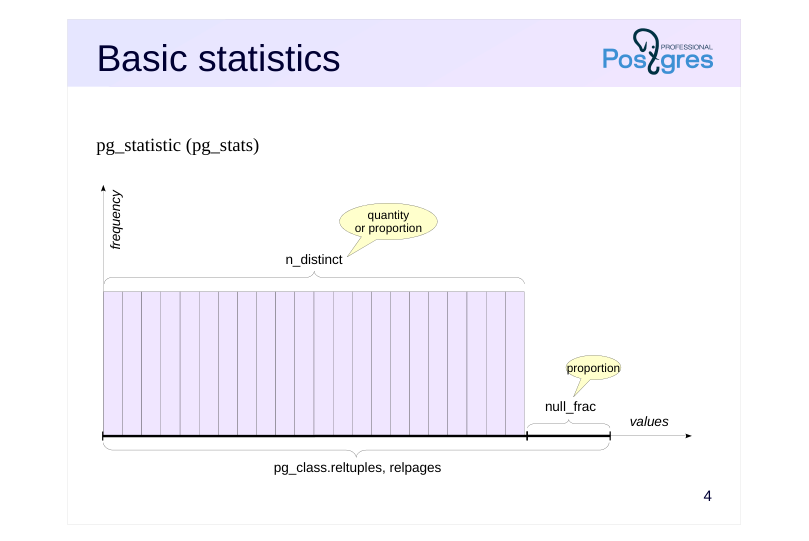 {#source-figure-004 caption=“Source slide page 4: Basic statistics”}
pg_statistic (pg_stats)
Speaker notes
During table analysis, all other statistics are collected separately for each column. This is typically handled by autoanalysis, with its configuration discussed in the DBA2 course.
The pg_statistic table stores column-level statistics.But the pg_stats view is easier to use, as it displays the information in a more convenient format.
The null_frac field indicates the proportion of rows with null values in the column (ranging from 0 to 1).
The n_distinct field contains the number of distinct values in the column. If n_distinct is negative, its absolute value represents the proportion of unique values. For example, -1 indicates that all values are unique (a typical case for a primary key).
https://postgrespro.com/docs/postgresql/16/sql-copy
Page 5: Row Count
Let’s start by estimating cardinality in a simple query without any conditions.
Exact value:
The optimizer retrieves the value from pg_class:
The parameter controlling the statistics target defaults to 100:
Because the analysis considers 300 × default_statistics_target rows, estimates for larger tables may not be entirely accurate.
Proportion of Null Values
Some flights have not yet departed, so their departure times are not yet determined:
Exact value:
The optimizer’s estimate is calculated as the total number of rows multiplied by the proportion of NULL values:
Page 6: Count of unique values
Let’s check the number of aircraft models in the flights table:
This is accurate:
What about the airplanes table?
A value of -1 here indicates that all values are unique. This makes sense since aircraft_code is the primary key in this table.
Join Cardinality
Join selectivity refers to the fraction of rows from the Cartesian product of two tables that remains after applying the join condition. Therefore, to calculate join cardinality, the optimizer estimates the cardinality of the Cartesian product and multiplies it by the join condition’s selectivity (and the selectivity of any filter conditions, if applicable). Consider an example:
Cardinality value:
The basic formula for calculating join selectivity (assuming uniform distribution) is the smaller of 1/nd1 and 1/nd2, where
Page 7: Page 7
nd1 - the count of distinct join key values in the first set of rows; nd2 - the number of unique join key values in the second row set. This gives us exactly what’s needed:
Page 8: Most common values
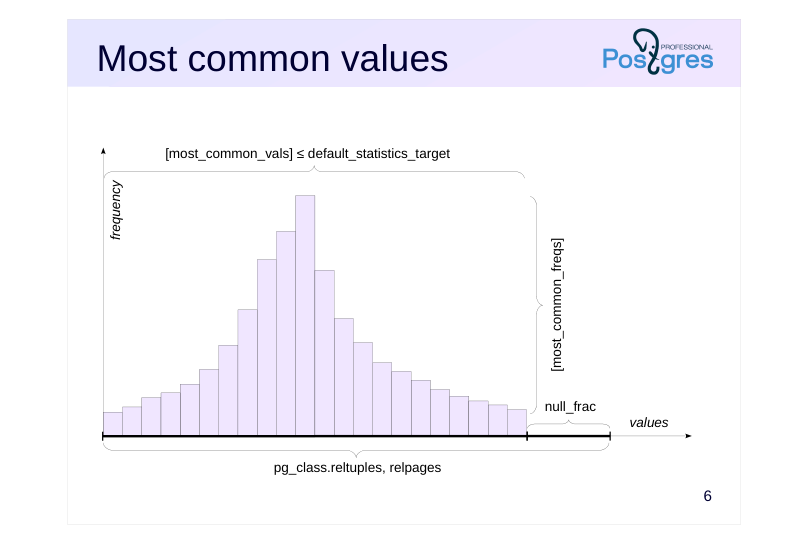 {#source-figure-008 caption=“Source slide page 8: Most common values”}
Speaker notes
Had the data been uniformly distributed—that is, if all values occurred with equal frequency—this information would have been nearly sufficient (minimum and maximum values would still be required).
However, non-uniform distributions are very common in practice. Therefore, the following information is also gathered.
● The most common values array — the most_common_vals field;
● The array of frequencies for these values is the most_common_freqs column.
The frequencies from these arrays directly serve as a selectivity estimate for querying a specific value.
This works well as long as the number of distinct values isn’t too large. The maximum size of each array is constrained by the default_statistics_target parameter. This value can be adjusted on a per-column basis; when doing so, the sample size is determined by the table’s maximum value.
The tricky part is “large” values. To prevent pg_statistic from growing and to avoid overloading the planner with unnecessary work, values exceeding 1 KB are excluded from statistics and analysis. In fact, if such large values are stored in the column, they’re likely unique and won’t be included in most_common_vals.
Page 9: Most Common Values
To experiment, limit the number of most frequent values (which is determined by the default_statistics_target parameter) at the column level:
If a value is among the most common values, its selectivity can be found directly in the statistics. Example (Sheremetyevo):
Exact value:
Here’s what the list of most common values and their frequencies looks like:
Cardinality is calculated by multiplying the number of rows by the value’s frequency:
The Most Common Values list can also be used to estimate the selectivity of inequalities. This involves identifying all values in most_common_vals that satisfy the inequality and summing the frequencies of the corresponding entries from most_common_freqs. If the specified value is not among the most frequent values, selectivity is calculated under the assumption that all other data (excluding the most frequent ones) are uniformly distributed. For example, Vladivostok is not among the most common values.
Page 10: Page 10
Exact value:
To estimate, sum the frequencies of the most common values:
The remaining rows account for less frequent values. Since we assume a uniform distribution of these values, the selectivity is calculated as 1/nd, where nd represents the number of unique values.
Given that 10 of these values are among the most frequent and no null values are present, the following estimate is obtained:
Page 11: Histogram
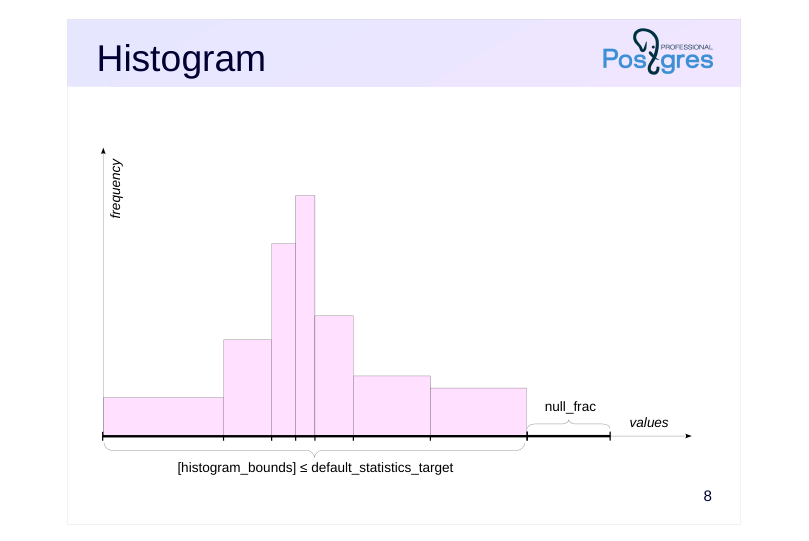 {#source-figure-011 caption=“Source slide page 11: Histogram”}
Speaker notes
When the number of distinct values grows too large to store them all in an array, the system applies the histogram representation. A histogram employs several buckets to store values in. The number of bins is limited by the same parameter, default_statistics_target.
The width of the bins is set to ensure each contains roughly the same number of values (as shown by equal rectangle areas in the figure).
With this setup, only the array of extreme values for each bin needs to be stored — the histogram_bounds field. The frequency of a bin is 1 divided by the number of bins.
To estimate the selectivity of the condition field < value, calculate N divided by the total number of bins, where N represents the number of bins located to the left of value. The estimate can be refined by including a portion of the bin that contains the value itself.
However, when estimating the selectivity of the condition field = value, the histogram cannot help, and you must rely on the assumption of a uniform distribution, taking 1/n_distinct as the estimate.
Page 12: Method Combination
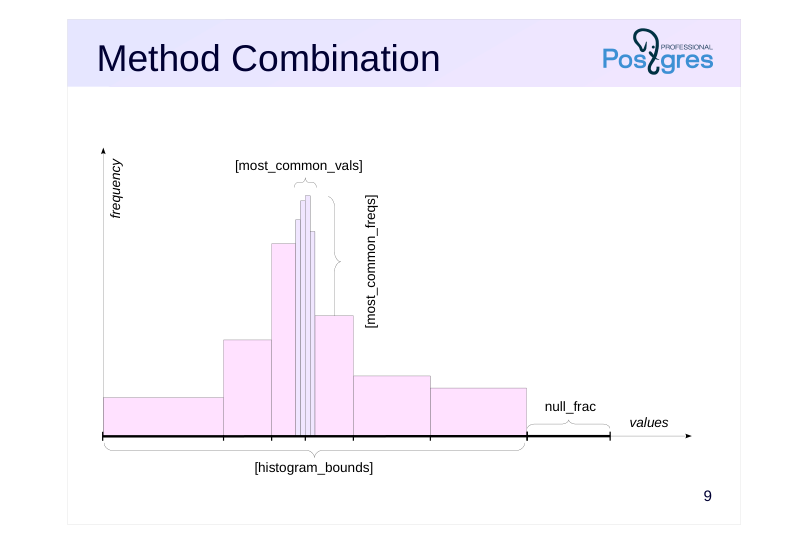 {#source-figure-012 caption=“Source slide page 12: Method Combination”}
Speaker notes
However, the two methods are typically integrated: a list of the most common values is created, with all remaining values represented in a histogram.
The histogram is constructed to exclude values that are already in the list. This helps improve the estimates.
Page 13: Histogram
Under “greater than” and “less than” conditions, the estimation process may utilize the most frequent values list, a histogram, or both. The histogram is constructed to exclude the most frequent values and NULLs:
The number of histogram bins is set by the default_statistics_target parameter, with boundaries chosen to ensure each bin contains roughly the same number of values. Consider the following example:
Exact value:
How is the estimate calculated? Consider the frequency of the most common values within the given range:
The specified interval covers exactly 2 out of 10 histogram bins, with no null values present in this column, leading to the following estimate:
In general, even partially filled bins are considered using linear approximation.
Join Cardinality
In the case of uneven data distribution in the join keys, the basic formula for calculating join selectivity (taking the minimum of 1/nd1 and 1/nd2) produces an incorrect result. For example, flights use different aircraft models with varying capacities, and joining flights with seats would result in:
Page 14: Page 14
However, the exact value is half:
However, the planner can account for lists of the most common values and histograms, leading to a nearly accurate estimate:
Unfortunately, the situation gets worse when joining multiple tables. For instance, adding the airplanes table to the previous query won’t affect the total number of rows in the sample:
However, the planner now makes an error:
The problem is that, when joining the first two tables, the planner doesn’t have detailed statistics on the resulting row set. In many cases, this is the main cause of poor estimates.
Page 15: Additional Fields
Ordering (Use a bit map?)
- pg_stats.correlation(1 = ascending, 0 = chaotic, –1 = descending)
- Visibility (Use index-only scan?)
- pg_class.relallvisible
- Average value size in bytes (memory estimate)
- pg_stats.avg_width
Speaker notes
The server maintains additional statistical metrics.
The pg_stats.correlation field records the physical ordering of the column’s values. If the values are stored in strictly ascending order, the value will be close to 1; if in descending order, close to -1. The more randomly the data is arranged on disk, the closer the value gets to zero. The optimizer uses this field when deciding between a bitmap scan and a regular index scan.
The pg_class.relallvisible field tracks the number of table pages containing only the latest tuple versions (this data is updated in conjunction with the visibility map). If the count is insufficient, the planner may prefer a bitmap scan over an index-only scan.
The pg_stats.avg_width field stores the average size of values in bytes for this column to estimate the memory needed for the operation.
https://postgrespro.com/docs/postgresql/16/sql-copy
Page 16: Composite Field Elements
Most Common Elements
- pg_stats.most_common_elems
- pg_stats.most_common_elem_freqs
- Element Count Histogram
- pg_stats.elem_count_histogram
Speaker notes
For composite types like arrays or tsvector, pg_stats stores not just the distribution of the values themselves, but also their elements:
● The most_common_elems and most_common_elem_freqs columns store the most frequent elements and their frequencies;
● elem_count_histogram contains an element count histogram within the value (such as, for an array, a histogram of array lengths)
This enables more accurate query planning for fields not in the first normal form.In particular, this information is crucial for GIN index method operator classes, as it enables distinguishing between frequent values (those appearing in many documents, representing low-selectivity conditions) and rare values (high-selectivity conditions).
Page 17: Composite Field Elements
As an example, let’s look at the pg_constraint table, which contains integrity constraints applied to tables. It also includes a conkey column that holds an array of column numbers forming the constraint:
For this field, we can retrieve the most common values and their frequencies. To make viewing the statistics easier, we’ll collect them with a lower target value:
In this case, the column contains arrays of elements. Such statistics cannot accurately estimate cardinality, especially for conditions checking if an element is present in the array. However, the planner’s estimation remains accurate:
For such conditions, per-element statistics are used:
Page 18: Page 18
At the end of the array, additional information (minimum, maximum, average) is available for frequencies and histograms, causing the number of values to exceed the target setting. The query planner uses the frequency of element 2 to generate an estimate:
Page 19: Private and General Plans
Private Plans
- May be beneficial in cases of uneven distribution, but the query is re-planned
- each time it’s executed.
- Seq Scan on tasks
- Index Scan on tasks
- Index Cond: status = ’todo'
- Filter: status = ‘done’
- is built
- with values
- parameters
- Common Plan
- Best suited for uniform distribution
- Cached within the session for prepared statements
- Index Scan on tasks
- Index Cond: id = $1
- is built
- without considering the values
- parameters
Speaker notes
With the simple query protocol (refer to the “Planningand Execution” section), each query is re-planned, taking into account the parameter values.
The extended protocol allows for the preparation of statements, which can have parameters. Preparation always involves parsing and query rewriting, with the parse tree stored in the backend process’s local memory.
When executing a prepared statement, there are options. The query is typically re-planned each time, taking into account the parameter values. Such plans are called custom and (custom)
It makes sense when there’s an uneven distribution, as optimal plans may vary depending on the values. For example, index access is more effective for highly selective conditions, while a sequential scan is preferable when the value is common.
But the query can be planned without considering parameter values. This allows not only saving the parse tree but also the plan itself, avoiding the need for re-planning. Such a plan is referred to as generic (generic).
A generic plan performs well in cases of uniform distribution, where the condition’s selectivity is not dependent on the specific value.But in the case of uneven distribution, a generic plan may perform well for some values but poorly for others.
Let’s see how the planner decides which option to use.
Page 20: Private and General Plans
Let’s prepare the query and create an index:
The query for canceled flights will use an index because the statistics show there are few such flights:
However, the query for arriving flights does not use the index, as there are many of them.
These plans are called private because they are generated based on specific parameter values. However, the planner also generates a general plan without considering specific parameter values. If at any point the cost of the general plan does not exceed the average cost of previously generated private plans, the planner switches to using the general plan, ceasing further planning. However, the first five times, private plans are used to accumulate statistics. Let’s run the statement three more times:
The number of executions for general and private plans can be found in the pg_prepared_statements view:
Page 21: Page 21
Next time, the planner will switch to a general plan. Instead of a specific value, the parameter number will be shown in the plan:
If you have a query with parameters displayed as numbers (e.g., from the server log), you can view the general execution plan for that query like this:
Switching to a general plan can be problematic in cases of uneven value distribution. The plan_cache_mode parameter allows you to disable private plans (or alternatively, use a general plan from the beginning):
Partial index Partial Index
The search for already arrived flights will be performed via a sequential scan of the flights table, so the index entries with the Arrived key are never used. However, they consume space and require resources to stay in sync with table row changes. We’ll check the size of the full index on the status column:
Page 22: Page 22
The index can only include row pointers that meet high-selectivity criteria. Replace the full index with a partial one:
The partial index is much smaller than the full index:
A partial index is used when it’s advantageous (for rare values):
…and for frequent values — sequential scan:
This way, you can save disk space and reduce the costs of maintaining the full index.
Expression Index Expression-Based Index
If the conditions involve functions instead of columns, the planner doesn’t consider the number of distinct values. For instance, flights in January would make up roughly 1/12 of the total:
However, the planner doesn’t recognize the purpose of the extract function and uses a fixed selectivity of 0.5%:
Page 23: Page 23
This situation can be addressed by building an expression index, since these expressions have their own statistics collected.
The estimate is now correct.
Expression index statistics are stored alongside the table’s basic column statistics:
An index can only be created using a deterministic expression, meaning that for the same column values, it must consistently return the same result. See the “Functions” section for more details.
Page 24: Takeaways
Data characteristics are collected as statistics.
- Statistics are used to estimate cardinality
- Cardinality is used to estimate cost.
- Cost is used to select the optimal plan
- The key to success lies in accurate statistics and proper cardinality.
Page 25: Practice
- Create an index on the tickets table (tickets) by the passenger name (passenger_name). 2. What statistics are available for this table? 3. Explain how cardinality is estimated and how the execution plan is selected for the following queries: a) selecting all tickets, b) selecting tickets by the name ALEKSANDR IVANOV, c) selecting tickets by the name ANNA VASILEVA, d) selecting a ticket by the identifier 0005432000284.
Page 26: Index
2. Availability of Statistics
Some key values:
No column contains null values. There are approximately half as many unique booking IDs as there are rows in the table (meaning each booking has on average two tickets). There are approximately 10,000 distinct names. All other columns have unique values. The arrays of most common values and histograms are sized to match the default_statistics_target parameter (100). Passenger names have most common values. For other columns, these values are not applicable because the maximum number of tickets (5) is found in 194 bookings, and the remaining columns are unique. Histograms exist for all columns and are used to evaluate inequality predicates. The table rows are physically sorted by ticket number. Data in other columns is arranged in a somewhat random order.
3. Query Execution Plans
Cardinality is equal to the number of rows in the table; a full scan was selected.
Page 27: Page 27
Selectivity was determined using the most common values list; a null bitmap scan was chosen.
Selectivity was estimated using a uniform distribution; a bitmap scan was chosen.
Cardinality is 1 because the column’s values are unique; an index scan was selected.
12 Lesson 12: Statistics / Extended Statistics
This page is extracted from the official PDF into native Markdown. Slide text, code and speaker notes are kept in reading order; the original PDF and HTML remain the layout references. HTML source: No matching course-page link was captured in the source inventory. Archive: QPT-handouts-16-en-20251018.zip PDF pages: 19
Page 1: Statistics / Extended Statistics
Copyright
© Postgres Professional, 2019–2024 Authors Authors: Egor Rogov, Pavel Luzanov, Ilya Bashtanov Photo by: Oleg Bartunov (Phu monastery, Bhrikuti summit, Nepal)
Use of course materials
Non-commercial use of course materials (presentations, demonstrations) is allowed without restrictions. Commercial use is possible only with the written permission of Postgres Professional. It is prohibited to make changes to the course materials.
Feedback
Please send your feedback, comments and suggestions to: edu@postgrespro.ru
Disclaimer
In no event shall Postgres Professional company be liable for any damages or loss, including loss of profits, that arise from direct or indirect, special or incidental use of course materials. Postgres Professional company specifically disclaims any warranties on course materials. Course materials are provided “as is,” and Postgres Professional company has no obligations to provide maintenance, support, updates, enhancements, or modifications.
Page 2: Topics
- Functional dependency
- Most frequent value combinations
- Count of unique value combinations
- Expression Statistics
Page 3: Advanced Statistics
Contains
- Multivariate statistics (across multiple columns)
- Expression Statistics
- A database objectDatabase object created manually
- resides in pg_statistic_ext and pg_statistic_ext_data
- the pg_stats_ext and pg_stats_ext_exprs views
- Once created, the statistics are automatically collected.
Speaker notes
The base statistics automatically collected may not be sufficient for accurate estimates of cardinality and selectivity.
PostgreSQL allows the database administrator to manually determine which additional, extended statistics are required. You can collect statistics that cover multiple columns (multivariate statistics) or statistics for arbitrary expressions.
Keep in mind that base statistics are automatically collected for tables and their columns, but not for indexes—except for expression indexes. Therefore, an index built on multiple columns does not automatically result in the generation of multivariate statistics.
Extended statistics can be created using the CREATE STATISTICS command. Once the object is created, the corresponding statistics are automatically collected in the background or via the ANALYZE command.
https://postgrespro.com/docs/postgresql/16/sql-copy
The collected information is stored in the tables pg_statistic_ext and pg_statistic_ext_data; the statistics accessible to users are displayed in the views pg_stats_ext and pg_stats_ext_exprs.
Page 4: Dependent Columns
 {#source-figure-004 caption=“Source slide page 4: Dependent Columns”}
Functional Dependency (Dependencies)
- The value of one column defines the value of another column.
- Statistics improves the estimation of condition selectivity.
Speaker notes
There are several types of multivariate statistics (i.e., statistics for multiple table columns) that can be specified when creating an extended statistics object.
Functional dependency between columns shows how much the data in one column is determined by the value of another column.
In the example on the slide, the postal code clearly defines the city, so the selectivity of the condition city = ‘Samara’ and index = ‘443000’ is determined by the selectivity of the index = ‘443000’ predicate. Such predicates, whose selectivity cannot be calculated independently of each other, are called correlated.
https://postgrespro.com/docs/postgresql/16/sql-copy
Page 5: Functional Dependencies
Let’s look at a query with two conditions
The estimate proves to be significantly underestimated:
The issue arises because the planner assumes predicate independence and calculates the final selectivity as the product of individual predicate selectivities. For example, in the provided plan, the estimate in the Bitmap Index Scan node (flight_no condition) is accurate, but after filtering in the Bitmap Heap Scan node (departure_airport condition), it’s significantly underestimated. However, we know that the flight number uniquely identifies the departure airport: essentially, the second condition is redundant (assuming the airport is correctly specified). This can be explained to the planner using functional dependency statistics:
The collected statistics are stored in the following format:
The attributes’ ordinal numbers come first, with the dependency coefficient following the colon.
Page 6: Page 6
The estimate has now improved. The \d command displays the extended statistics objects for a specific table:
The Statistics objects section lists the names, columns, and non-standard target values of the statistics objects.
Page 7: Most Frequent Combinations
 {#source-figure-007 caption=“Source slide page 7: Most Frequent Combinations”}
Most Common Value Combinations (MCV)
- Similar to pg_stats.most_common_vals/freqs, but for multiple columns.
- Statistics improves the estimation of condition selectivity.
Speaker notes
The list of the most common value combinations enables the storage of multiple value combinations and their frequencies.
The slide shows possible city-river pairs. It’s clear that the predicates with the city and river columns are correlated, but unlike the previous example, neither column determines the other — there’s a many-to-many relationship between cities and rivers. In this case, functional dependency statistics won’t help improve the estimates.
https://postgrespro.com/docs/postgresql/16/sql-copy
Page 8: Common Combinations
Columns may be correlated, but a direct functional dependency doesn’t always exist. Let’s run this query:
The planner’s estimates are off by several times. Accounting for functional dependencies isn’t enough to fix the situation:
In this case, you can add extended statistics for common combinations of values from multiple columns:
The estimate has now improved. The default_statistics_target parameter controls the number of most frequent values collected. You can configure it for individual statistics:
Page 9: Page 9
The cardinality estimate has improved slightly. However, this did not result in further plan improvements, so increasing the statistics target in this case is likely not justified. You can view the statistics for the most frequent combinations as follows:
Page 10: Unique Value Combinations
 {#source-figure-010 caption=“Source slide page 10: Unique Value Combinations”}
Count of Unique Value Combinations (ndistinct)
- Similar to pg_stats.ndistinct, but for multiple columns
- Statistics improves the estimation of cardinality for grouping.
Speaker notes
The number of unique value combinations enables more accurate cardinality estimates when grouping by multiple columns.
In the example on the slide, the number of possible combinations of all fields cannot be determined by simply multiplying the unique counts for each column.
https://postgrespro.com/docs/postgresql/16/sql-copy
Page 11: Unique Combinations
Another scenario where the planner miscalculates the estimate arises with grouping. The number of airport pairs connected by direct flights is limited:
But the planner isn’t aware of this:
Extended statistics can improve this estimate (if the type of statistics is not specified, all supported types will be included in the created object):
You can view the statistics for unique combinations as follows:
You can see the list of all extended statistics objects with the \dX command:
Page 12: Page 12
Statistics by type (Ndistinct, Dependencies, MCV) are displayed, with the actual values available in the pg_statistic_ext_data table.
Page 13: Expression statistics
 {#source-figure-013 caption=“Source slide page 13: Expression statistics”}
Extended expression statistics
- as if a generated column existed in the table
- Statistics enhances the estimation of selectivity for conditions using
- expressions.
Speaker notes
Extended Statistics on Expressions extended Statistics on Expression enables the collection of all basic statistics that would be gathered if a column computed using this expression existed in the table.
If the predicate uses an expression instead of a column name on either side of the operator, the planner uses a fixed selectivity estimate. Using expression-based statistics, this issue can be resolved.
Note that expressions can also be used instead of column names in any type of multivariate statistics.
Page 14: Expression Statistics
As discussed in the “Basic Statistics” section, if an expression is present in the condition, the planner, without selectivity information, defaults to a constant and frequently errs:
In the “Basic Statistics” section, we improved the situation by building an expression index, but this isn’t always feasible. Additionally, indexes require storage space and ongoing maintenance. Another approach is to add expression statistics:
The evaluation is now correct. Extended expression statistics are stored separately. Here are some columns:
Page 15: Takeaways
Extended statistics assist in complex scenarios
- Manually created and automatically maintained
- May increase the costs of analysis and planning
Page 16: Practice
- Using the commands from the demo, create statistics such as dependencies, mcv, and ndistinct for the flights table. Measure the execution time of the ANALYZE command. Remove the extended statistics, measure the execution time of the ANALYZE command once more, and compare it to the previous result. 2. Write a query to select all business class flights priced over 100,000 rubles. Will extended statistics help improve the cardinality estimate for the result? If so, which type of statistics is better to use?
Speaker notes
- Measure the execution time multiple times and average the results to smooth out irregularities.
Page 17: 1. Cost of Analysis
Let’s create extended statistics in the same way as demonstrated. Functional Dependency Statistics
Most frequent value combination lists:
Statistics on Unique Value Combinations:
Let’s measure the analysis run time.
The initial analysis run may take significantly longer than usual.
Remove the created extended statistics:
Let’s measure the run time again:
Page 18: 2. Using Extended Statistics
Only three extended statistics were generated, yet the analysis time before and after deletion varied significantly. As the number of collected extended statistics increases, the analysis time also increases, which can result in higher server load. Therefore, extended statistics should be used judiciously and only when needed. Business class flights priced over 100,000 RUB:
The optimizer is off by an order of magnitude. The reason is that ticket price and service class are correlated, so extended statistics should improve the estimate. Since there’s no direct functional dependency between the columns, we’ll add statistics for the most frequent values:
The estimate has improved slightly, but it still differs significantly from the exact value. You can see that the proportion of rows meeting the condition is just over 1%:
Because the default setting stores 100 most frequent pairs, it’s likely that only 1-2 of them will meet the condition, making the optimizer’s estimate inaccurate. To improve accuracy, let’s increase the statistics volume:
Page 19: Page 19
The estimate is now nearly accurate.
13 Lesson 13: Query Optimization / Profiling
This page is extracted from the official PDF into native Markdown. Slide text, code and speaker notes are kept in reading order; the original PDF and HTML remain the layout references. HTML source: No matching course-page link was captured in the source inventory. Archive: QPT-handouts-16-en-20251018.zip PDF pages: 20
Page 1: Query Optimization / Profiling
Copyright
© Postgres Professional, 2019–2024 Authors Authors: Egor Rogov, Pavel Luzanov, Ilya Bashtanov Photo by: Oleg Bartunov (Phu monastery, Bhrikuti summit, Nepal)
Use of course materials
Non-commercial use of course materials (presentations, demonstrations) is allowed without restrictions. Commercial use is possible only with the written permission of Postgres Professional. It is prohibited to make changes to the course materials.
Feedback
Please send your feedback, comments and suggestions to: edu@postgrespro.ru
Disclaimer
In no event shall Postgres Professional company be liable for any damages or loss, including loss of profits, that arise from direct or indirect, special or incidental use of course materials. Postgres Professional company specifically disclaims any warranties on course materials. Course materials are provided “as is,” and Postgres Professional company has no obligations to provide maintenance, support, updates, enhancements, or modifications.
Page 2: Topics
- Profiling as a tool for identifying bottlenecks
- Selecting a Subtask for Profiling
- Profiling Tools
Page 3: Tool
Profiling
- Selecting Subtasks
- Duration
- execution count
- What Should Be Optimized?
- The larger the subtask’s portion of the total execution time, the higher the
- potential gain.
- One must consider the costs of optimization.
- It’s beneficial to approach the task from a broader perspective.
Speaker notes
In previous sections, we’ve explored how queries work, the components of an execution plan, and the factors that influence the selection of a specific plan. This is the most challenging and crucial part. Once you understand the mechanisms, you can analyze any situation that arises using logic and common sense to assess whether the query is executing efficiently and identify ways to improve performance.
But how do you find the query that’s worth optimizing?
Generally, addressing any optimization task (not limited to DBMS contexts) begins with profiling, although this term is not always used explicitly. We should break down the task causing issues into subtasks and measure how much of the total time they take. It’s also useful to know how often each subtask is executed.
The larger the share of the subtask in the overall runtime, the more significant the performance improvement from optimizing it. In practice, you also have to account for the expected costs of optimization—getting the potential benefit can be challenging.
There are cases where a subtask is executed quickly but frequently (for example, common in queries generated by ORMs). It might be impossible to speed up individual queries, but consider whether the subtask needs to be executed so frequently? Such a question might lead to the need for architectural changes, which, while challenging, can ultimately yield substantial benefits.
Page 4: What to Profile
System activity in its entirety
- Beneficial for the administrator to identify resource-intensive tasks
- Monitoring and the pg_profile extension
- A specific task drawing criticism
- Helpful in addressing a specific issue
- The more precise, the better: broader coverage blurs the picture.
Speaker notes
An overall activity profile can provide valuable insights to a database administrator who is not focused on addressing a specific issue but rather identifying the most resource-intensive tasks, the optimization of which could significantly reduce system load.
The monitoring system should display such a profile.
Another option is to use the pg_profile extension. It is built upon PostgreSQL’s statistical views, with the data stored in the activity snapshots repository. By analyzing and comparing snapshots, you can identify issues and their underlying causes. The extension was created by Andrei Zubkoin(https://github.com/zubkov-andrei/pg\_profile).
Explaining in detail how to build a monitoring system, which tools to use, and which metrics to collect is outside the course’s scope, but we recommend Alexey Lesovskiy’s “PostgreSQL Monitoring” book:
https://postgrespro.ru/education/books/monitoring
To solve a specific problem, you need to build a profile that targets only the actions necessary to reproduce this issue. For instance, if a user reports that “the window opens for a full minute,” there’s no point in analyzing all database activity during that period—those metrics will include actions unrelated to the window opening.
Page 5: What to Measure
Execution Time
- It makes sense for the user
- Highly unstable metric
- Page I/O
- Unaffected by external factors
- Means little to users
Speaker notes
What units should be used to measure resources? The most meaningful metric for the end user is response time—the time between pressing a button and receiving a result.
However, from a technical perspective, time isn’t always the most practical metric to focus on. It is heavily influenced by numerous external factors, such as cache utilization and current server load. If the issue is analyzed on a test server with different characteristics instead of the main server, it introduces variations in hardware, configurations, and workload profiles.
In this regard, considering I/O—that is, the number of read and written pages—might be more practical. This metric is more stable. It is not affected by hardware specifications or server load, so it will produce consistent results across different servers with identical data and configuration settings.
Therefore, it’s crucial to diagnose issues using the full dataset. For example, you can use Database LabEngine — a tool developed by Postgres.ai for quickly creating thin clones: https://github.com/postgres-ai/database-lab-engine
I/O typically provides a good indication of the amount of work needed to execute a query, as most of the time is devoted to reading and processing data pages. Although this metric isn’t meaningful for the end user.
Page 6: Application Profile
Subtasks
- client-side
- application server
- database serverThe problem is often, but not always, right here.
- network
- How to Profile
- It’s technically challenging and requires various monitoring tools.
- It’s usually not difficult to confirm the assumption.
Speaker notes
Response time is meaningful to the user. This means that, generally speaking, the profile should encompass not just the DBMS, but also the client side, the application server, and network data transfer.
Performance problems often stem from the DBMS, as a single inadequately designed query plan can increase the time by orders of magnitude. But that’s not always true. The issue could be due to a slow client-server connection, the client application taking too long to process the received data, and other factors.
Unfortunately, obtaining such a comprehensive profile is quite challenging. To achieve this, all components of the information system need to be equipped with monitoring and tracing subsystems that take into account the specific characteristics of this system. However, it’s typically straightforward to measure the overall response time (even with a stopwatch) and compare it to the DBMS’s total runtime; ensure there are no significant network delays, among other factors. Without this, it’s entirely possible we’ll end up searching where the light is better, not where the keys were actually lost. The whole point of profiling is to identify what needs optimization.
We will proceed under the assumption that the problem lies specifically with the DBMS.
Page 7: PL/pgSQL Profiling
PL Profiler Extension
- Third-party extension
- Designed exclusively for PL/pgSQL functions
- Profiling a separate script or session
- Performance report in HTML format, including a flame graph
- The plpgsql_check extension
- Third-party extension
- Validates PL/pgSQL and embedded SQL
- Enables detection of compilation errors
- Identifying dependent objects within functions
- Support for automatic function profiling
Speaker notes
When a user performs an action, multiple queries are typically executed. How do you identify the query that’s worth optimizing? This requires a profile that breaks down to the query level.
However, the server-side component of the application, which runs within the DBMS, isn’t limited to SQL queries—it can also include procedural code. If the code is written in PL/pgSQL, you can use the external PL Profiler extension for profiling (primary developer: Yan Vik https://github.com/bigsql/plprofiler
The extension allows profiling of separately executed scripts and running sessions. It also includes a call graph in the form of a “flame graph” (flame graph).
- You can also recommend the plpgsql_check extension (primary developer
- Pavel Stéchule: https://github.com/okbob/plpgsql\_checkThis extension
- validates SQL identifiers used in PL/pgSQL code, identifies performance
- issues, and includes a built-in code profiler.
As the course focuses on SQL query optimization, we won’t be covering these extensions, but we mention them to provide a complete picture.
Page 8: Query Statistics
Server message log
- Enabled by configuration parameters:
- log_min_duration_statement = 0— Duration and text of all queries
- Identifying details
- Enabling it for a specific session can be challenging
- large volume; increasing the time threshold leads to loss of information
- Nested queries are not monitored(the auto_explain extension can be used)
- analysis using external tools, such as pgBadger
Speaker notes
PostgreSQL includes two primary built-in tools for profiling executed SQL queries: the server log and statistics.
In the log file, you can enable the logging of query information and their execution time using configuration parameters. The parameter log_min_duration_statement is typically used for this, though others exist.
How can you identify the queries in the log that correspondto user actions? It would be useful to enable or disable the parameter for a specific session, but there are no built-in tools for this. You can filter the overall message stream to isolate the relevant entries; this is conveniently achieved by configuring the log_line_prefix parameter to include additional identifying information. Connection pooling adds even more complexity to the situation.
To analyze nested queries—when a query invokes a function containing additional queries—the auto_explain module is required (https://postgrespro.ru/docs/postgresql/16/auto-explain
The next challenge is analyzing the log. This requires using external tools, with pgBadger being the de facto standard (https://github.com/darold/pgbadger
Of course, you can include your own messages in the log if they are helpful.
Page 9: Query Statistics
The pg\_stat\_statements extension
- Detailed query information in the view (including nested queries)
- storage size is limited
- Queries are considered the same “except for constants”, even if they have
- different execution plans
- Authentication is limited to the username and database.
- Unified Query Identifier (compute_query_id = auto)
Speaker notes
The second approach involves using statistics, specifically the pg_stat_statements extension (https://postgrespro.ru/docs/postgresql/16/pgstatstatements
The extension gathers detailed information about executed queries (including I/O page terms) and presents it in the pg_stat_statements view.
Since the number of distinct queries can be very high, the storage is constrained by a configuration parameter, retaining only the most frequently executed queries.
In this case, queries are considered identical if they have the same parse tree (up to constants). Keep in mind that these queries may have different execution plans and varying run times.
Unfortunately, there are challenges in identifying queries: they can be associated with a specific user and database, but not with a session.
When the compute_query_id configuration parameter is set to auto or on, the PostgreSQL core generates a unique query identifier. It can be logged by setting the log_line_prefix parameter, and also used to combine data from the kernel (the pg_stat_activity.query_id column), pg_stat_statements, and other extensions.
https://postgrespro.ru/docs/postgresql/16/runtime-config-statistics#GUC-COMPUTE-QUERY-ID
Page 10: The pg_stat_statements Extension
Enable the pg_stat_statements extension to profile queries:
Loading the shared library requires a restart.
Configure the extension to collect information about all queries, including subqueries:
Let’s create a view to review the collected statistics on operator execution:
For simplicity’s sake, we display only some fields and show the total cache page count.
Execution Profile
Let’s examine the problem. The goal is to create a report that generates a pivot table of passenger counts, with aircraft models as rows and service categories as columns. First, let’s create a function that returns the number of passengers for a specified model and service category:
Let’s create a function for the report that returns a set of rows.
Page 11: Page 11
Now, let’s examine the proposed implementation. Let’s reset the statistics:
The last statistics reset date is available in the pg_stat_statements_info view:
Run the report() function:
Let’s examine the statistics we’ve gathered:
Page 12: Page 12
The first is the main query, which is detailed below. Toplevel indicates that the query is executed at the top level. The second query, from the qty function, was executed 27 times. The third query is the one the loop operates on.
Note Note that the query identifier in pg_stat_statements matches the system identifier because of the compute_query_id setting:
Page 13: Single Query Profile
EXPLAIN ANALYZE
- subtasks correspond to plan nodes
- Duration – actual time or page I/O – buffers
- Execution count – loops
- Features
- Besides the most resource-intensive nodes, optimization candidates are those
- with a large cardinality estimation error.
- Any change may result in a complete overhaul of the execution plan
- Sometimes you have to settle for a basic EXPLAIN
Speaker notes
Either way, we identify the query to optimize from among the executed ones. How to Work with the Query Itself? The EXPLAIN ANALYZE command also provides a detailed execution profile.
The subtasks of this profile are the plan’s nodes (the plan isn’t a flat list but a tree). The execution duration of a node and the number of its repetitions will display the “time” and “loops” values from the actual section. Using the buffers parameter, you can get the I/O volume (and the time spent on I/O operations if the track_io_timin parameter is enabled).
The execution plan also contains critical information about the optimizer’s expected cardinality for each step. Typically, if there’s no significant error in the cardinality estimate, the plan will be appropriate (if not, you should adjust the global settings). Therefore, you should focus not only on the most resource-intensive nodes but also on those with a substantial (an order of magnitude or more) difference between the estimated “rows” and actual “rows”. Examine the most deeply nested problematic node, as the error will propagate upward through the tree from there.
There are cases where a query runs so long that EXPLAIN ANALYZE can’t be executed. In such cases, you’ll have to make do with a basic EXPLAIN and try to determine the cause of inefficiency without complete information.
Working with large execution plans in text format isn’t always convenient. For better clarity, consider using third-party tools, such as https://explain.tensor.ru/abou t.
Page 14: Single Query Profile
Let’s now generate the same report with a single query and analyze its execution using EXPLAIN with the analyze and buffers options, so the execution plan displays the actual number of data and temporary file pages read and written:
Page 15: Page 15
Notice how the query execution time was reduced and how many fewer pages were read as a result of removing redundant reads (top line in the Buffers section). You can calculate the total number of pages across all the tables involved:
This number can act as a rough estimate for queries requiring all rows: processing many more pages than expected may suggest that the data is being scanned multiple times. It’s clear that the plan is nearly optimal in this case. It can still be optimized, but not as drastically (a clear limitation is the lack of random access memory for hash joins).
Page 16: Takeaways
Profiling is used to identify queries needing optimization.
- The available profiling tools depend on the specific task
- server Message Log FROM pg_stat_statements
- EXPLAIN ANALYZE
Page 17: Practice
- Run the first version of the report displayed during the demonstration, and ensure that query text and execution time are recorded in the log file. 2. Check what information was recorded in the log file. 3. Repeat the previous steps by including the auto_explain extension with nested query output.
Page 18: 1. Report 1. Output
Include SQL statement output and their run time in the log:
2. Log Entries
Nested SQL statements are not output.
The auto\_explain Extension
Page 19: Page 19
Let’s display the last few lines of the message log:
Page 20: Page 20
Logs capture nested queries and execution plans — this is the extension’s primary function. In addition, with the specified settings, query parameters and the query identifier are included in the log entries.
14 Lesson 14: Query Optimization / Materialization
This page is extracted from the official PDF into native Markdown. Slide text, code and speaker notes are kept in reading order; the original PDF and HTML remain the layout references. HTML source: No matching course-page link was captured in the source inventory. Archive: QPT-handouts-16-en-20251018.zip PDF pages: 23
Page 1: Query Optimization / Materialization
Copyright
© Postgres Professional, 2019–2024 Authors Authors: Egor Rogov, Pavel Luzanov, Ilya Bashtanov Photo by: Oleg Bartunov (Phu monastery, Bhrikuti summit, Nepal)
Use of course materials
Non-commercial use of course materials (presentations, demonstrations) is allowed without restrictions. Commercial use is possible only with the written permission of Postgres Professional. It is prohibited to make changes to the course materials.
Feedback
Please send your feedback, comments and suggestions to: edu@postgrespro.ru
Disclaimer
In no event shall Postgres Professional company be liable for any damages or loss, including loss of profits, that arise from direct or indirect, special or incidental use of course materials. Postgres Professional company specifically disclaims any warranties on course materials. Course materials are provided “as is,” and Postgres Professional company has no obligations to provide maintenance, support, updates, enhancements, or modifications.
Page 2: Topics
- Query Materialization
- Temporary tables
- Managing Connection Order
- Materialized Views
Page 3: Materialize Node
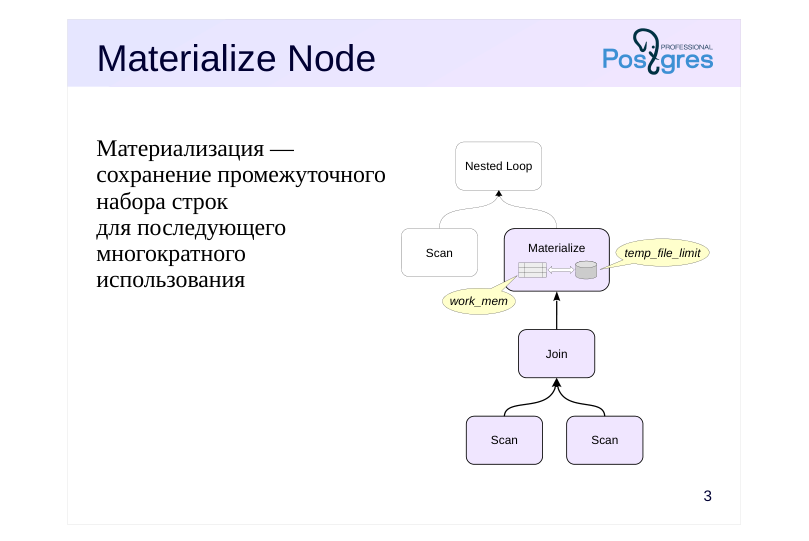 {#source-figure-003 caption=“Source slide page 3: Materialize Node”}
Материализация — сохранение промежуточного набора строк для последующего многократного использования
Speaker notes
Materialization refers to storing an intermediate set of rows for later reuse, often multiple times. The set can be stored at various levels: for a particular query, at the session level, or at the database level.
Query nodes typically exchange data using a pipeline model: when the algorithm in a plan node requires the next row from the dataset, the node requests the next batch from one of its child nodes. However, in some cases, it’s beneficial (and sometimes necessary) for the query executor to immediately retrieve all rows, store them, and have the ability to access the stored result again. This materialization is handled by the Materialize node.
Rows are stored in main memory as long as their size does not exceed the work_mem limit. When the limit is exceeded, all rows are written to a temporary file and read from it as needed. The total size of all temporary files per session is constrained by the temp_file_limit parameter value.
For example, the top Nested Loop node in the example executes a nested loop join, but there’s no efficient way to access the inner data set—it’s computed using another join. To avoid repeatedly executing the nested join, its result can be materialized.
Page 4: Materialize Node
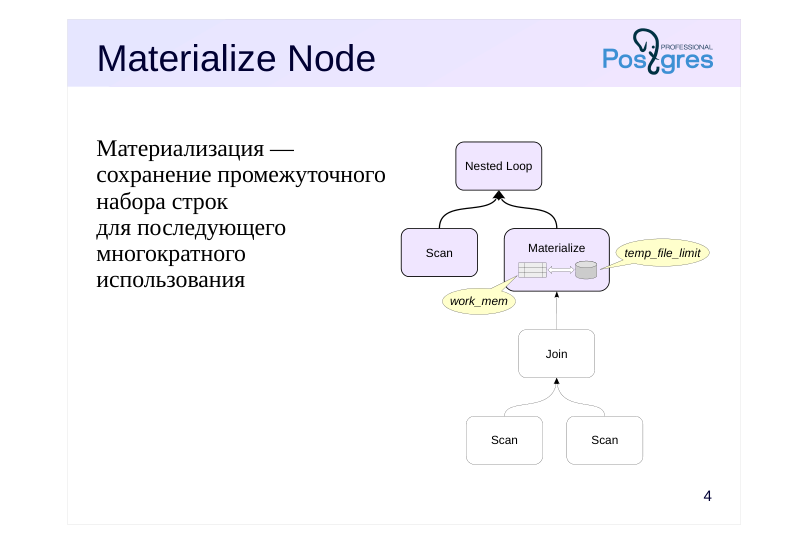 {#source-figure-004 caption=“Source slide page 4: Materialize Node”}
Материализация — сохранение промежуточного набора строк для последующего многократного использования
Speaker notes
Once the nested join’s result is materialized, the Nested Loop node accesses the already prepared row set.
Page 5: Materialize Node
If an operation requires significant resources and the result is accessed multiple times, the planner may opt for a plan with a Materialize node, which stores the retrieved rows for reuse:
Since there’s no suitable index for the inner row set’s predicate, the materialization plan becomes advantageous. In some cases, the planner employs materialization of the inner data set during a merge join to enable re-reading parts of the data when the outer set contains repeated values:
Page 6: CTE Materialization
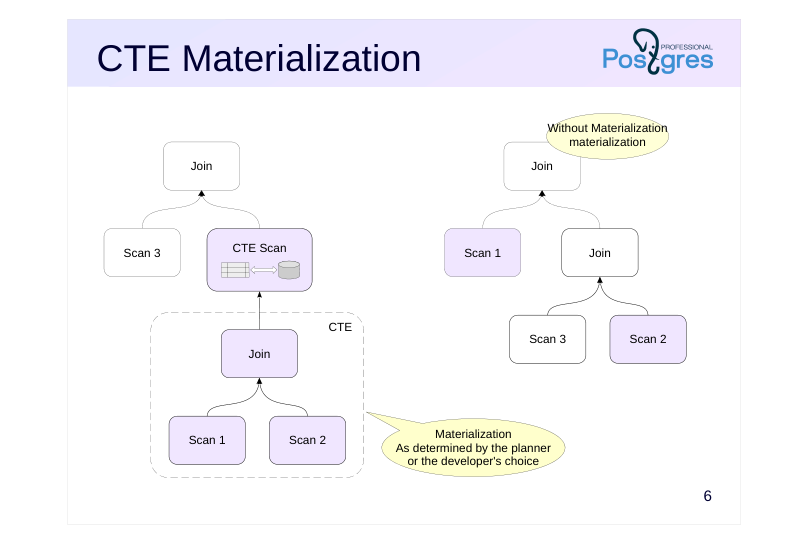 {#source-figure-006 caption=“Source slide page 6: CTE Materialization”}
Speaker notes
Common Table Expressions (CTE), also known as WITH subqueries, provide an effective way to structure a query and enhance its clarity. Unlike regular subqueries, CTEs avoid deep nesting.
The planner expands CTE subqueries (without materializing them) when possible. This allows it to select the optimal join order. By default, the subquery is materialized in the following cases:
● The main query accesses the subquery multiple times to avoid redundant calculations.
In such cases, materialization can be disabled by specifying the AS NOT MATERIALIZED clause.
● The subquery has side effects (modifies data) —so that the change occurs exactly once. (Side effects also include calls to volatile functions; see the «Functions» section.) (К побочным эффектам относится также обращение к изменчивым функциям, см. тему «Функции».)
Materialization cannot be disabled in this case.
You can always force materialization by specifying the AS MATERIALIZED clause.
https://postgrespro.ru/docs/postgresql/16/queries-with#QUERIES-WITH-CTE-MATERIALIZATION
Page 7: CTE Materialization
The optimizer avoids materializing subqueries in WITH unless necessary:
However, an explicit directive causes the optimizer to plan the subquery separately from the main query:
When a subquery is used multiple times in a query, the planner may choose to materialize it to avoid repeatedly executing the same operations:
Page 8: Page 8
This is typically justified, especially when the subquery involves costly operations. However, in some cases (such as this example), a materialization-free plan might be more efficient, so it can be avoided. Compare the buffers value to the previous version:
However, if the subquery modifies data, materialization will still be performed: the modification must occur only once.
Page 9: Recursive queries
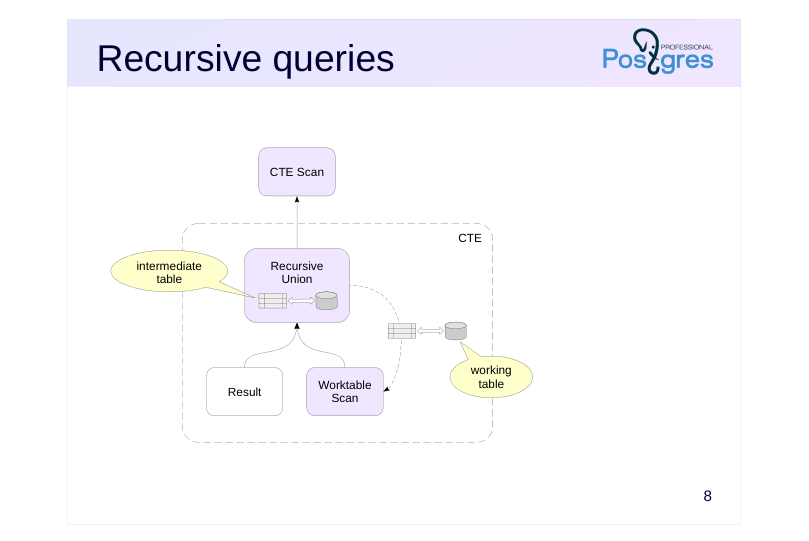 {#source-figure-009 caption=“Source slide page 9: Recursive queries”}
Speaker notes
Recursive queries are based on common table expressions.
The Recursive Union node relies on a working table and an intermediate table: the working table stores the rows generated during the current iteration, while the intermediate table builds up the result. The Worktable Scan node reads the content of the working table during the recursive part of the query.
Each of these two tables is materialized following the same rules: while the table’s content fits into work_mem, it is stored in memory, and then all rows are written to disk.
Once the recursive query completes, the intermediate table’s accumulated data is passed to the CTE Scan node, while the working table is discarded.
https://postgrespro.com/docs/postgresql/16/sql-copy
Page 10: Recursive Queries
Let’s confirm that the recursive query materializes intermediate data. To achieve this, we’ll intentionally structure it so that the working and intermediate tables don’t fit in memory:
Pay attention to the temp read/write entries in the WorkTable Scan and Recursive Union nodes, which are specific to recursive queries.
Page 11: Window functions
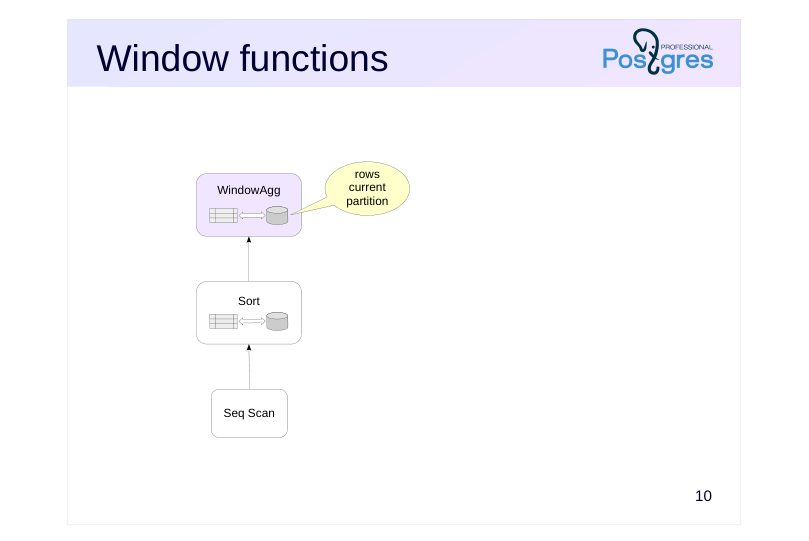 {#source-figure-011 caption=“Source slide page 11: Window functions”}
Speaker notes
When evaluating window functions in the WindowAgg node (see the “Sorting” section), materialization is also used: rows from the current partition (PARTITION BY) may be included multiple times in the window, and thus get materialized.
In this case, only the WindowAgg node uses the materialized rows; the parent node receives the computed result, not these intermediate data.
https://postgrespro.com/docs/postgresql/16/sql-copy
Page 12: Temporary tables
A table accessible during a single session
- is stored in the system catalog
- is not written to the log
- Files are written to disk
- Session-local memory caching (temp_buffers)
- Vacuum and analysis
- only performed manually
Speaker notes
Intermediate data can be obtained using a complex algorithm, such as one written in a procedural language. In such a scenario, the data cannot be processed in a CTE but can be stored in a temporary table and reused across multiple queries.
Temporary tables are more suitable for intermediate data than regular tables because they exist only within a session or transaction (depending on the mode specified during creation) and are automatically removed along with the data and dependent objects like views and indexes. Moreover, temporary tables are not logged and are cached in the local memory of the backend process handling the session, making them more efficient to use.
The process’s local memory is not accessible to autovacuum processes, so vacuuming and analyzing must be done manually. The cache memory is allocated on demand and restricted by the temp_buffer parameter for the session (once the temporary table is accessed for the first time, the limit cannot be modified).
https://postgrespro.com/docs/postgresql/16/sql-copy
However, temporary tables generate entries in the system catalog and are stored as disk files. As a result, bulk processing of temporary tables—such as in the 1C system—can lead to the system catalog growing and increased strain on the file system. Therefore, 1C uses specific patches to mitigate these unwanted side effects.
Page 13: Temporary Tables Temporary Tables
We’ll create a temporary table:
The temporary table is created in the pg_temp schema. By default, the table persists until the end of the session; you can choose to have the rows deleted (ON COMMIT DELETE ROWS) or the table dropped (ON COMMIT DROP) when the transaction completes. It’s often useful to analyze a recently filled temporary table before incorporating it into queries. Compare the cardinality estimates when querying a regular table versus a temporary one:
In the latter case, without statistics, the optimizer estimates the table occupies 10 pages containing 520 rows, resulting in an overestimated cost:
If the table is analyzed, the estimate becomes accurate:
Page 14: Join Order
The number of join combinations increases exponentially as the number of tables in the query increases.
- JOIN Operation
- Full enumeration when the number of joins does not exceed
- join_collapse_limit = 8
- Next, in groups of join_collapse_limit tables
- Comma-separated join
- Full enumeration when the number of joins is no more than geqo_threshold =
- 12
- Next, using a genetic algorithm
- Materialization – Planner Hint
Speaker notes
As the number of tables in a query increases, the number of join combinations—and thus the cost of choosing a plan—grows exponentially.
If the number of joins (using the JOIN syntax) exceeds join_collapse_limit (default 8), the planner evaluates potential join combinations in groups of join_collapse_limit tables and then merges these groups.
There’s a similar parameter for subqueries in the FROM clause — from_collapse_limit.
If tables are joined with commas (without the JOIN keyword), the planner evaluates all join combinations but switches to a genetic algorithm when the number of joins exceeds geqo_threshold (default 12).
This can result in suboptimal execution plans. Details can be found in Pavel Tolmachev’s article:https://habr.com/ru/company/postgrespro/blog/662021/
By manually managing materialization—either through CTE or by breaking down the query into parts and utilizing temporary tables—developers can group tables, allowing the optimizer to plan each separately. Typically, CTE is a more straightforward and efficient way, but the second option enables analyzing a temporary table, thereby giving the planner more information about the data.
https://postgrespro.com/docs/postgresql/16/sql-copy
Page 15: Managing Join Order
The default value of the join_collapse_limit parameter is chosen to ensure that join planning for that many tables doesn’t require excessive resources:
Let’s execute a query that explicitly joins tables using the JOIN keyword:
In the selected plan, the flights (flights) and ticket_flights tables are joined first, and the resulting set is then joined with the tickets (tickets) table. By setting the join_collapse_limit parameter to 1, you can enforce a specific join order:
Now, the tables are joined in the order they appear in the query, even though the query cost is higher. However, this approach places too much responsibility on the query author. The planner can only choose which set of rows to use as the outer or inner join.
It is recommended to familiarize yourself with the similar parameter from_collapse_limit in practice.
Page 16: Materialized views
Materializing the Query Result
- read-only
- It is possible to create indexes
- Data Update
- Manual synchronization
- Incremental Update: pg_ivm Extension
- Vacuum and analysis
- manually and automatically
Speaker notes
A materialized view is a named query result stored at the database level. A materialized view can be treated like a regular read-only table.
You can create indexes on a materialized view (but you can’t add integrity constraints — these must be enforced in the base tables). A materialized view collects the same statistics as regular tables.
Unlike regular views, the rows of a materialized view remain unchanged when the base tables are modified. Synchronization is done manually.
https://postgrespro.com/docs/postgresql/16/sql-copy
Full synchronization of a materialized view may be too expensive. Built-in incremental update (individual rows as base tables change) is not natively supported, but the pg_ivm extension enables this feature (author – Suguru Nagata, https://github.com/sraoss/pg\_ivm
Page 17: Materialized Views Materialized Views
Create a materialized view:
The pg_temp schema is prioritized in the search order, so you’ll need to access the materialized view using its full name. This is inconvenient; it’s better to remove the temporary table:
Materialized views support indexing:
During analysis and auto-analysis, materialized views gather the same statistics as tables. When the content of underlying tables changes, the rows in the materialized view remain unchanged:
Synchronization must be performed explicitly. The REFRESH command fully locks the materialized view during rebuilding, which may be undesirable. In this case, you can avoid this by using the CONCURRENTLY option, as a unique index exists on the materialized view:
Page 18: Page 18
Page 19: Takeaways
The optimizer can materialize rows from the plan nodes for reuse
- You can control materialization using CTEs, temporary tables, and materialized views.
- Materialization enables control over the join order
Page 20: Practice
- At the start of the demo, examples of two queries with a Materialize node were shown. Instruct the planner not to use this node and check whether it can avoid materialization in some cases and not in others. 2. Check the query execution plan with the from_collapse_limit parameter set to 8 (default) and 1:
Speaker notes
- Use the enable_material parameter enable_material: https://postgrespro.ru/docs/postgresql/16/runtime-config-query#GUC-ENABLE-MATERIAL
- See the documentation for details on the parameter:https://postgrespro.ru/docs/postgresql/16/explicit-joins
Page 21: 1. Disabling the Materialize Node
Let’s examine the execution plan for the first query in the demonstration:
Let’s request the planner to avoid using materialization:
The planner avoided materialization, but the plan’s cost increased. Let’s check the second query: Let’s look at the second query:
Page 22: Page 22
In this case, the planner must use materialization because a merge join requires not just moving forward through the dataset but also moving backward.
2. The from\_collapse\_limit Parameter
First, let’s see how the query behaves with the default from_collapse_limit setting:
The subquery joins two tables, but the optimizer unfolds it and determines the join order for all three tables. The initial joins here involve the ticket_flights and flights tables. Now lets set from_collapse_limit to 1 and examine the new query plan for the same query:
The query plan has changed — the subquery is no longer unfolded, and the first join involves two tables from it. If a JOIN construct is used in FROM instead of a list of tables, the optimizer first converts each such construct into a table list
Page 23: Page 23
(processing tables in groups of up to join_collapse_limit), then unfolds subqueries (to a depth of up to from_collapse_limit). Therefore, it’s advisable to set both parameters to the same value.
15 Lesson 15: Query Optimization / Functions
This page is extracted from the official PDF into native Markdown. Slide text, code and speaker notes are kept in reading order; the original PDF and HTML remain the layout references. HTML source: No matching course-page link was captured in the source inventory. Archive: QPT-handouts-16-en-20251018.zip PDF pages: 26
Page 1: Query Optimization / Functions
Copyright
© Postgres Professional, 2019–2024 Authors Authors: Egor Rogov, Pavel Luzanov, Ilya Bashtanov Photo by: Oleg Bartunov (Phu monastery, Bhrikuti summit, Nepal)
Use of course materials
Non-commercial use of course materials (presentations, demonstrations) is allowed without restrictions. Commercial use is possible only with the written permission of Postgres Professional. It is prohibited to make changes to the course materials.
Feedback
Please send your feedback, comments and suggestions to: edu@postgrespro.ru
Disclaimer
In no event shall Postgres Professional company be liable for any damages or loss, including loss of profits, that arise from direct or indirect, special or incidental use of course materials. Postgres Professional company specifically disclaims any warranties on course materials. Course materials are provided “as is,” and Postgres Professional company has no obligations to provide maintenance, support, updates, enhancements, or modifications.
Page 2: Topics
- Volatility сategories
- Inlining function code into the query
- Invoking Table Functions
- Settings for COST and ROWS
- Planner Helper Functions
- Configuration Parameters
Page 3: Volatility сategories
Volatile
- may return different values for the same input arguments
- is used by default
- Stable
- the value cannot change within a single SQL operator
- the function cannot change the database state
- Immutable
- the value cannot change, the function is deterministic
- the function cannot change the database state
Speaker notes
Each function is mapped to a particular volatility category, which defines the properties of the return value for the same input arguments.
The Volatile category indicates that the return value may vary arbitrarily. Such functions will be executed each time they are called. If the function is declared without a category specification, it is assumed to be volatile.
The Stable category is used for functions whose return value remains constant during a single SQL statement. In particular, such functions cannot change the state of the database. It could execute such a function only once during the query and then use the computed value.
The immutable category is even more strict: the return value always remains the same. Such a function could be executed at the planning stage, before the query is actually executed.
It does not mean that it happens so all the time, but the planner has the right to perform such optimizations.
https://postgrespro.com/docs/postgresql/16/xfunc-volatility
Page 4: Categories of Mutability and Optimization
Thanks to the additional information about a function’s behavior provided by the mutability category, the optimizer can reduce function calls. For testing, let’s create a function that generates a random number:
Let’s examine the execution plan for the following query:
In the execution plan, the Function Scan node calls the set-returning function generate_series. The result is filtered, and the scalar function random is invoked for each row in the filter. You can see this in action:
Page 5: Page 5
Here, we randomly select between 0 and 10 rows. A function with the Stable mutability category will be invoked just once — because we’ve effectively indicated that its value remains unchanged throughout the statement:
The Result node generates a sample row, and the One-Time Filter expression is evaluated once, resulting in either 0 or 10 rows being returned.
Page 6: Page 6
Finally, the Immutable category enables the function’s value to be computed during the planning phase, eliminating the need to evaluate the filter condition at runtime:
For Immutable, we get a random execution plan! The developer is responsible for providing knowingly false information.
Page 7: Inlining of Function Code
SQL Scalar Functions
- a single SELECT statement a SELECT statement without a FROM clause,
- returns a single value
- Called functions should not be more volatile than the calling function.
- etc.
- Set-Returning Functions
- a single SELECT statement
- Immutable or Stable category
- Non-strict function
- etc.
Speaker notes
The PostgreSQL optimizer can inline the function body into an SQL query. This applies to both scalar and set-returning functions.
In both cases, there are several limitations: the function must be written in SQL, use a single SELECT statement, and so on. Additionally, scalar functions must not access database tables or call functions with a less strict category, while set-returning functions must be stable or immutable.
A key benefit of inlining the function body into the query is that the function becomes transparent to the query planner. For instance, additional conditions in the main query can be applied to the query within the function’s body, enabling early filtering of unnecessary rows.
Page 8: Inline substitution of function code into the SQL query
The body of very simple SQL scalar functions can be inlined directly into the main SQL statement during query parsing. This eliminates function call overhead. We’ve already seen an example: our function rnd(). Let’s see what the query execution plan looks like when the volatility category of the function rnd (Stable) differs from that of the function random (Volatile):
The filter references the rnd() function. Let’s change the function’s volatility category to Volatile:
Now the filter references the random() function instead of rnd(). It will be called directly, bypassing the rnd() function’s “wrapper”. Table functions offer significantly more inlining opportunities. For example, they can reference tables.
During inlining, table functions behave like parameterized views. The query planner optimizes the entire query, with the function being transparent to it:
Page 9: Page 9
Page 10: Invoking Table Functions
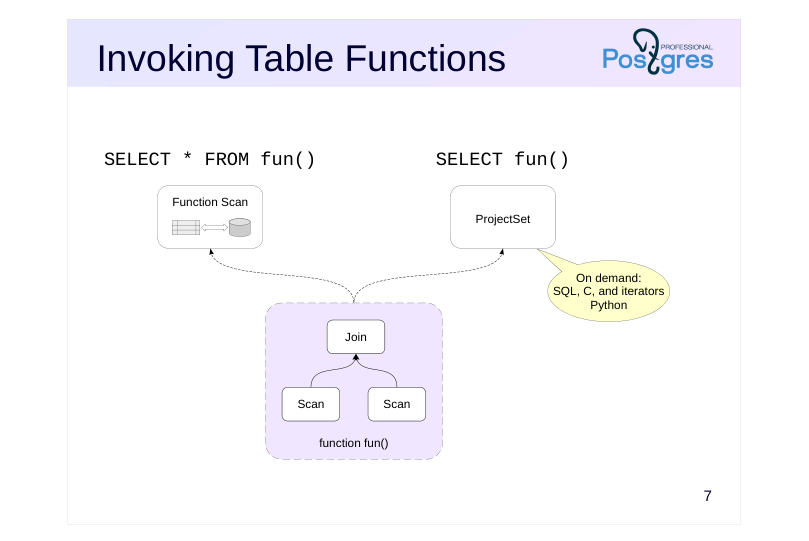 {#source-figure-010 caption=“Source slide page 10: Invoking Table Functions”}
Speaker notes
When a set-returning function is called in the FROM clause, the Function Scan node is responsible for its execution. In this case, the function’s returned rows are materialized first and then passed to the parent plan node. This is the current implementation limitation.
If the function is called in the SELECT clause, it is executed by the ProjectSet node in the query plan. In this case, the function can take advantage of the on-demand row return interface (value-per-call) without materialization.
SQL functions, most built-in functions (written in C), and PL/Python functions that return an iterator operate in this manner. Functions written in other programming languages can also use this interface if the feature is implemented.
Page 11: Set-Returning Functions Functions Returning Tables
Let’s call the generate_series function in the FROM clause with a row limit (LIMIT):
In the query plan, we see a Function Scan node — the function generated all rows first, and then the LIMIT was applied. Now let’s run the query again, but call the function from the SELECT clause:
Now, the query plan includes a ProjectSet node that produces ten sample rows — here, the optimizer was able to retrieve rows on demand. The query execution time decreased by orders of magnitude. The Result node here represents the omitted FROM clause in the query — it sends exactly one row to the parent node. However, not all functions can return rows one at a time. For example, invoking any PL/pgSQL function returns all result rows:
Let’s invoke the function within the SELECT clause:
The plan includes a ProjectSet node, but now the server must retrieve the function’s full result before applying the LIMIT. Execution time clearly demonstrates this. In the SELECT clause, you can have multiple set-returning function calls, and the functions can be nested within each other:
Page 12: Page 12
The bottom ProjectSet node creates a result set by executing two set-returning functions: generate_series(1,3) and unnest. This results in three rows. The top ProjectSet node generates the final result set by executing the outer generate_series call. Ignoring materialization, this query is equivalent to the following one, where functions are invoked in the FROM clause:
Page 13: Settings for COST and ROWS
CREATE FUNCTION fun( )
- Function Scan ( rows=1000 cost=100 )
- оценки
- by default
- CREATE FUNCTION fun( ) ROWS 12 COST 123
- Function Scan ( rows=12 cost=123 )
- ROWS
- COST
Speaker notes
Usually (when the function body cannot be integrated into the query), the optimizer can’t analyze the function code and treats it as a “black box”.
However, you can provide the optimizer with approximate information about the cost of calling the function and the number of rows it returns.
The COST parameter defines the cost of a user-defined function in units of cpu_operator_cost. By default, C functions are given a cost estimate of 1, whereas functions in other languages are estimated at 100.
The ROWS parameter specifies the approximate number of rows returned.
COST and ROWS can be set when creating a function or for existing functions.
https://postgrespro.com/docs/postgresql/16/sql-copy
Page 14: COST and ROWS Settings COST and ROWS Settings
We’ll create a set-returning function in PL/pgSQL that returns the days of the week:
Execution Plan:
The function execution cost is treated as constant, with user-defined functions defaulting to a cost of 100 operators:
But this value can be adjusted:
The initial cost in the execution plan has changed. The server estimates the cardinality of this function’s result as 1000, even though the actual value is seven. By specifying ROWS, you can provide the server with an estimate of how many rows the function will return:
Let’s repeat the query:
Page 15: Page 15
Now the server estimates that the function will return 10 rows, resulting in a lower total cost for the node:
Changed values are visible in the system catalog:
Alternatively, use the psql metacommand:
Page 16: Helper Functions
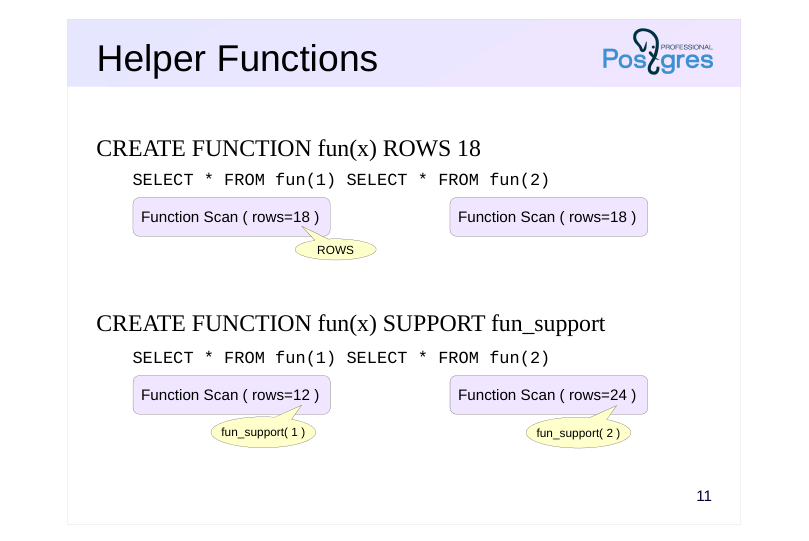 {#source-figure-016 caption=“Source slide page 16: Helper Functions”}
CREATE FUNCTION fun(x) ROWS 18
- CREATE FUNCTION fun(x) SUPPORT fun_support
Speaker notes
The COST and ROWS parameters enable you to specify the cost and the number of rows returned by the function as fixed values.But constants don’t always yield the intended result.
In PostgreSQL, a function can use a helper function that provides the planner with information based on the arguments of the main (target) function.
The helper function can provide information using the values of the target function’s arguments:
● cost estimation
● estimate of the number of rows returned
● an expression equivalent to the function call
Additionally, for functions returning boolean:
● selectivity estimate
● an equivalent predicate using an indexable operator
The auxiliary function must be implemented in C.
https://postgrespro.com/docs/postgresql/16/sql-copy
Page 17: Planner auxiliary functions
Let’s examine the execution plan when calling the generate_series function:
Unlike the days_of_week function, the optimizer correctly estimates the number of rows returned immediately. Moreover, this estimate depends on the function’s parameters:
The planner gains additional information via the auxiliary function (which can only be implemented in C), enabling it to determine the selectivity of conditions, the function’s cardinality, or its cost. You can check the pg_proc table to see if an auxiliary function exists:
As shown, auxiliary functions are not available for all overloaded versions of the generate_series function. Let’s examine the execution plan of the query that generates a date series:
Without an auxiliary function or specifying ROWS, the optimizer doesn’t know the number of rows in the result and defaults to 1000. New auxiliary functions are introduced with each PostgreSQL version.
Page 18: Parallelism Annotations
CREATE FUNCTION fun( ) PARALLEL …
- Parallel-safe
UNSAFE
- partially parallelizable
- RESTRICTED
- Parallel-safe
- SAFE
Speaker notes
The topic of “Parallel Processing” explained that not all queries can be run in parallel. Since the optimizer can’t analyze the function body, it uses parallelism annotations to determine if parallel processing is feasible.
When defining a function (or later), you can choose one of three annotations:
● UNSAFE — prohibits parallel execution plans when the query includes a function call;
● RESTRICTED — allows parallel execution plans, but prohibits function calls in the parallel section of the plan;
● SAFE — safe for parallel execution
The UNSAFE annotation is the default setting.
Parallelism annotations are also applied to user-defined aggregate functions.
https://postgrespro.com/docs/postgresql/16/sql-copy
Page 19: Parallelism annotations
Parallelism annotations are visible in the proparallel column of the pg_proc table (r=restricted, s=safe, u=unsafe):
All primary standard functions are safe. The \df+ command in psql also displays the parallelism annotations (Parallel column):
Let’s see how the parallelism annotation affects the query’s execution plan. Let’s write a function that calculates the ticket cost. It is marked as safe for parallel execution.
The query verifies that the total booking cost equals the total ticket cost:
Page 20: Page 20
The query plan is split into two parts: the subquery in the InitPlan 1 node aggregates tickets, and the subquery in the InitPlan 2 node aggregates bookings. Both subqueries are currently running in parallel. Let’s change the parallelism annotation to UNSAFE:
Now both subqueries run in sequence — the annotation prohibits parallel execution plans. Now let’s mark the function as restricted for parallelism (RESTRICTED):
The subquery containing the function runs sequentially on the primary process, while the second subquery employs a parallel execution plan.
Configuration parameters
In some cases, it may be beneficial to structure queries as stored routines (e.g., to grant the application access to them). In such scenarios, an added benefit is the ability to configure parameters for individual routines.
Page 21: Page 21
Let’s take the query as an example:
Suppose we want to use parallel execution plans, but this specific query is meant to run sequentially. In that case, we can configure the parameter at the function level:
We covered how to check the query plan for a query executing inside a function in the “Profiling” section. We’ll use the auto_explain extension:
Run the query:
Show the latest entries in the message log:
Page 22: Takeaways
A function is a black box for the planner if its body is not inlined into the query.
- The invocation of set-returning functions is typically materialized.
- The planner can be provided with additional information.
- function variability category
- Cardinality and cost
- parallelism flag
- Helper functions aid in optimizing invocations of built-in functions.
Page 23: Practice
- Disable the materialization of a common table expression that uses the random function. Provide an explanation for the result. 2. Write a SQL wrapper function for the querySELECT * FROM generate_series (1, 10_000_000). Consider three scenarios: the original query and function calls in the FROM and SELECT clauses. Compare the query execution plans and the use of temporary files. What changes when the volatility category is set to Stable? 3. What volatility category does the days_of_week function in the demonstration have? What is its actual volatility?
- Function Definition:
Page 24: Materializing Mutable Functions in CTEs
A Common Table Expression containing a mutable function is always materialized:
In this case, the NOT MATERIALIZED clause has no effect:
2. Wrapper Function 2. Function Wrapper
By default, the function is classified as volatile. Basic query:
Since the function is called in the FROM clause, materialization occurs. With insufficient work_mem, all rows are written to disk (temp written) and then read back (temp read). Invoking a function in the SELECT clause:
Page 25: Page 25
The ProjectSet node does not perform materialization, so the temporary disk write/read counts remained unchanged. However, the execution time increased significantly, as it involves transferring ten million rows between nodes one at a time. Calling a function in the FROM clause:
In the main query, an additional Function Scan node is added within the function, causing the number of temporary pages used to double. Let’s change the function’s mutability category:
Calling the function in the SELECT clause results in no changes:
Let’s invoke the function from the FROM clause:
Now the function’s body is inserted into the main query.
3. Days of the Week
The function was created using the following command:
If the mutability category isn’t specified, it defaults to Volatile. It may seem like a constant function (Immutable) since it has no parameters and the list of days of the week remains unchanged.
Page 26: Page 26
However, the names of the days of the week depend on the locale settings. Current value:
Let’s adjust the configuration:
Now the function returns the names of the days of the week in English, so the appropriate category is Stable:
16 Lesson 16: Query Optimization / Approaches to Configuration
This page is extracted from the official PDF into native Markdown. Slide text, code and speaker notes are kept in reading order; the original PDF and HTML remain the layout references. HTML source: No matching course-page link was captured in the source inventory. Archive: QPT-handouts-16-en-20251018.zip PDF pages: 35
Page 1: Query Optimization / Approaches to Configuration
Copyright
© Postgres Professional, 2019–2024 Authors Authors: Egor Rogov, Pavel Luzanov, Ilya Bashtanov Photo by: Oleg Bartunov (Phu monastery, Bhrikuti summit, Nepal)
Use of course materials
Non-commercial use of course materials (presentations, demonstrations) is allowed without restrictions. Commercial use is possible only with the written permission of Postgres Professional. It is prohibited to make changes to the course materials.
Feedback
Please send your feedback, comments and suggestions to: edu@postgrespro.ru
Disclaimer
In no event shall Postgres Professional company be liable for any damages or loss, including loss of profits, that arise from direct or indirect, special or incidental use of course materials. Postgres Professional company specifically disclaims any warranties on course materials. Course materials are provided “as is,” and Postgres Professional company has no obligations to provide maintenance, support, updates, enhancements, or modifications.
Page 2: Topics
- What Should Be Configured?
- Server Configuration
- Application Configuration
- Queries
Page 3: What Should Be Configured?
 {#source-figure-003 caption=“Source slide page 3: What Should Be Configured?”}
- queries
- application
Speaker notes
The performance of an information system is ensured at different levels.
We do not consider two important levels: hardware (which can be virtualized, thereby introducing an additional layer to the architecture) and the operating system. Specifically, the database management system (DBMS) interacts with the file system, and the efficiency and reliability of I/O operations rely on the disk subsystem. First and foremost, we need to ensure the necessary resources and configure the OS to maximize their utilization.
Database server is configured to ensure that administrative tasks don’t consume more resources than necessary and that most queries run efficiently. At this level, we can not only configure configuration parameters (a small portion of which will be discussed) but also manage data placement. Our goal is to ensure effective resource allocation and proper planner operation.
The next step is configuring individual queries. In the “Profiling” section, we discussed how developers typically focus on optimizing queries they are currently writing, while the administrator focuses on optimizing queries that have the greatest impact on the server as a whole. In this section, we’ll explore some query optimization techniques.
However, the queries that make up the workload are initiated by the application. Therefore, application configuration is just as important as database management system configuration.
Page 4: Server Configuration
Resource usage
- Physical Data Placement
- Optimizer Statistics and Configuration
Page 5: Resources: CPU and Input/Output
Background Worker Processes
- max_parallel_workers_per_gather = 2
- max_parallel_workers = 8
- max_worker_processes = 8
- Input/Output
- effective_io_concurrency = 1
- maintenance_io_concurrency = 10
Speaker notes
We’ll begin with the settings that determine which resources the DBMS can utilize.
PostgreSQL can utilize multiple CPU cores for parallel processing. This involves launching additional background worker processes. The detailed discussion of parallel query execution can be found in the “Parallel Access” section, while the use of background processes for application development is covered in the “Background Processes” section of the DEV2 course.
Among the input-output related settings, let’s highlight the parameter effective_io_concurrency.It tells the system how many individual disks are in the disk array. Actually, this parameter only affects the number of pages pre-fetched into the cache during a bitmap scan.
A similar parameter used for some maintenance operations is referred to as maintenance_io_concurrency.
Page 6: Memory Resources
Memory
- ↑
- work_mem
- filter: (departure_airport = $2)
- maintenance_work_mem
- ↑
- shared_buffers
- effective_io_concurrency = 4
Speaker notes
Several settings affect memory allocation and usage.
The work_mem parameter determines the amount of memory available for specific operations (discussed in related sections).
It also influences the selection of the plan. For example, with smaller values, sorting is preferred as it performs better with limited memory compared to hashing. Therefore, for nodes using hashing, the working memory size can be increased by adjusting the hash_mem_multiplie parameter.
The maintenance_work_mem parameter impacts the index building speed and the operation of maintenance processes.
The shared_buffers parameter determines the size of the buffer cache for the instance. The configuration of this parameter is discussed in the DBA2 course, but it’s clear that the default value is very small.
The effective_cache_size parameter tells PostgreSQL the total amount of cacheable data, including both the buffer cache and the OS cache. The higher its value, the more index access is preferred. This parameter does not impact the actual memory allocation.
Page 7: Physical Location
Tablespaces
- Distributing data across multiple physical devices
- ALTER TABLESPACE SET …
- Partitioning
- Partitioning a table into independently manageable parts to simplify
- administration and improve access speed
- Sharding
- Distributing partitions across multiple servers to scaleread and write
- workload
- Partitioning and extending PostgreSQL FDW or third-party solutions
Speaker notes
The physical organization of data can greatly impact performance.
Tablespaces allow you to control the placement of objects on physical I/O devices. For example, store frequently accessed data on SSDs and archival data on slower HDDs.
Some server parameters that depend on storage device characteristics (such as random_page_cost) can be set at the tablespace level.
Partitioning enables efficient handling of very large data volumes. The main performance benefit lies in replacing a full table scan with a scan of an individual partition. Note that partitions can also be stored in different tablespaces.
Another approach is to place partitions on different servers (sharding), enabling distributed queries. Standard PostgreSQL includes only the core features required for sharding: partitioning and the postgres-fdw extension. Sharding can be more effectively and fully implemented using external solutions. This topic is covered in the final section of the DBA3 course.
https://postgrespro.com/docs/postgresql/16/sql-copy
https://postgrespro.com/docs/postgresql/16/sql-copy
Page 8: Optimizer: Statistics
Relevance
- Autovacuum and Autoanalyze Settings
- autovacuum_max_workers, autovacuum_analyze_scale_factor, …
- Accuracy
- default_statistics_target = 100
- Expression Index, Extended Statistics
Speaker notes
The planner relies on statistics for its estimates, so frequent collection is essential. This is accomplished by adjusting the autovacuum and autoanalyze settings. The settings are discussed in detail in the DBA2 course.
Additionally, the statistics should be accurate enough. Absolute accuracy cannot be achieved (and isn’t necessary), but errors should not result in incorrect execution plans. A sign of outdated or inaccurate statistics is a significant discrepancy between the expected and actual row counts in the leaf-level nodes of the execution plan.
To enhance accuracy, you might need to adjust the default_statistics_target setting, either globally or for individual table columns. An expression index with its own statistics can sometimes be useful. In certain situations, extended statistics can be useful.
Page 9: Optimizer: Cost
Input/Output
- seq_page_cost
- random_page_cost
- ↓ for SSD
- CPU Time
- cpu_tuple_cost, cpu_index_tuple_cost, cpu_operator_cost
- User function cost
Speaker notes
There are numerous cost parameters for basic operations, from which, as we’ve already seen, the query plan’s cost is ultimately determined. It’s advisable to adjust these settings if queries, despite accurate cardinality estimation, are not performing efficiently.
The seq_page_cost and random_page_cost parameters relate to I/O and determine the relative cost of reading a page during sequential or random access.
The seq_page_cost parameter is set to one and shouldn’t be modified. A high value for the random_page_cost parameter reflects the realities of HDD disk operations. For SSD drives (as well as when all data is highly likely to be cached), this parameter should be significantly reduced, for example, to 1.1.
CPU time parameters determine the weights used to account for the cost of processing retrieved data. Usually, these parameters aren’t changed because it’s hard to predict the impact of changes.
But, as discussed in the “Functions” section, there are cases where defining the cost of a user-defined function in terms of cpu_operator_cost can be beneficial.
https://postgrespro.com/docs/postgresql/16/sql-copy
Page 10: Cost Settings
Example of a query with accurate cardinality estimation:
The planner selected a sequential scan, based on full information. Is this a good choice? Let’s test it by instructing the planner not to use sequential scanning if other methods are available:
Analogous enable parameters are available for other connection methods, access methods, and various other operations. These parameters significantly interfere with the planner’s functionality but are highly useful for debugging and experimentation.
The result is likely to favor an index scan since all data is cached, allowing for fast random access. This scenario is also possible with fast SSDs. Drawing conclusions based on a single query is incorrect, but a systematic error should prompt adjustments to global settings. In such a case, it’s advisable to either lower the random_page_cost value to prevent the planner from overestimating index access costs or increase effective_cache_size to make index scanning more appealing.
Page 11: Application Configuration
Clients and Connections
- Data schema
Page 12: Clients and Connections
Multiple Sessions
- connection pool
- Cursors
- if a portion of the sample is required
- cursor_tuple_fraction
- Multiple short queries
- prepared operators
- Moving logic to SQL
Speaker notes
If an application opens too many connections or establishes them too frequently for short durations, it may be necessary to implement connection pooling between the application and the DBMS. However, the pool places limitations on the application. This question is covered in detail in the DEV2 course.
Cursors should be used only when retrieving a small portion of a result set, and the size depends on user actions. In this case, the cursor_tuple_fraction parameter will guide the planner to optimize fetching the initial rows of the result set.
If the application executes too many small queries (each of which is efficient individually), the overall performance will be poor. This is commonly observed when using object-relational mapping (ORM) tools. In the “Profiling” topic, we discussed a similar example involving a function that was executed in a loop.
In such cases, the DBMS has virtually no optimization tools (except for prepared statements when queries are repeated). A proven approach is to eliminate procedural code in the application and move it to the database server as a small set of large SQL commands. This enables the query planner to utilize more efficient access and join methods, while reducing the frequent data transfers between the client and server. A proven approach is to eliminate procedural code in the application and move it to the database server as a small set of large SQL commands. This enables the query planner to utilize more efficient access and join methods, while reducing the frequent data transfers between the client and server.
Page 13: Data schema
Normalization - removal of data redundancy
- Simplifies queries and consistency checks
- Denormalization involves introducing redundancy
- may enhance performance, but requires synchronization
- indexes
- precomputed fields (such as generated columns or triggers)
- materialized views
- Caching application results
Speaker notes
At the logical level, a database should be normalized—informally, this means eliminating redundancy in the data. If that’s not the case, we’re dealing with a design flaw: data consistency checks will be challenging, and various anomalies can occur during data changes, and so on.
While data duplication at the storage level can significantly improve performance, this comes at the cost of maintaining synchronization between redundant data and primary data.
The most common method of denormalization is indexes—though they’re typically not considered in this context. Indexes are automatically updated.
You can duplicate some data (or calculated results based on this data) in table columns. You can use generated columns or keep the data in sync with triggers. Regardless of the approach, the database is responsible for denormalization.
Another example is materialized views. They must also be updated, for example, on a schedule or through other methods. This topic was thoroughly covered in the “Materialization” section.
Data can also be duplicated at the application level by caching query results. This is a common approach, but it’s often used due to the application’s improper interaction with the database (e.g., when using ORM). The application is responsible for timely cache updates, ensuring access controls for cache data, and other related tasks.
Page 14: Data schema
Data Types
- Selecting the right data types
- Using composite types, such as arrays and JSON, instead of separate tables.
- Data Integrity Constraints
- Beyond ensuring data integrity, the planner may take into account
- eliminating unnecessary joins, enhancing selectivity estimates, and
- performing other optimizations.
- A primary key enforces uniqueness through a unique index.
- foreign key
- Absence of null values
- CHECK constraint (constraint_exclusion)
Speaker notes
Choosing the right data types from the wide range of options PostgreSQL offers is crucial. For instance, representing date intervals using range types (daterange, tstzrange) instead of two separate columns enables the use of GiST and SP-GiST indexes for operations like interval intersections.
In certain situations, employing composite types like arrays or JSON instead of the traditional method of creating a separate table can yield benefits. This reduces the need for joins and avoids storing extensive metadata in row version headers. However, such a solution should be approached with caution, as it has its own drawbacks.
Integrity constraints are important in their own right, but the planner can sometimes leverage them for optimization.
● Primary key and unique constraints are enforced via unique indexes. This enables more accurate statistics and more efficient join operations.
● The presence of a foreign key and NOT NULL constraints allows for eliminating unnecessary joins (particularly important when using views) and also improves selectivity estimation when joining on multiple columns.
● A CHECK constraint using the constraint_exclusion parameter can avoid scanning tables (or partitions) when they are guaranteed to contain no relevant data.
Page 15: Data Schema
Referential integrity constraints are particularly important when dealing with composite keys. Example of accurate row estimation resulting from a join:
However, removing the foreign key results in an inaccurate estimate. This is another manifestation of the correlated predicates problem:
Page 16: Queries
Optimization Strategies
- Short queries
- Long-running queries
Page 17: Optimization Strategies
The goal of optimization is to achieve an effective plan.
- Addressing Inefficiencies
- somehow identify and fix the bottleneck
- It’s often hard to pinpoint the issue
- often leads to a conflict with the planner
- Accurate Cardinality Calculation
- Ensure accurate cardinality calculation in each node and rely on the planner
- If the plan is still inadequate, tune the global parameters
Speaker notes
The goal of query optimization is to achieve an adequate execution plan. There are various ways to achieve this goal.
You can examine the query plan, identify the cause of inefficient execution, and take steps to address the issue. Unfortunately, the problem isn’t always obvious, and fixing it often ends up being a battle with the optimizer.
If taking this approach, you’d want the option to fully or partially disable the planner and manually create the execution plan. This capability is referred to as hints and is not explicitly available in PostgreSQL.
Another approach involves ensuring accurate cardinality estimation at each node in the execution plan. While accurate statistics are certainly necessary, they’re often not enough.
If we take this approach, we’re not battling the planner but helping it make the right decision. Unfortunately, this often proves to be too complex a task.
If the planner still creates an inefficient plan despite accurate cardinality estimates, it’s time to adjust the global configuration parameters.
It’s usually worthwhile to use both approaches, based on the situation and applying common sense.
Page 18: Short queries
Read a small amount of data and return few rows.
- Typical of OLTP
- It’s important to get the answer quickly
- Key Features of the Plan
- high-selectivity conditions
- indexes
- nested loop joins
Speaker notes
Queries can be somewhat arbitrarily divided into two groups, each with distinct characteristics and requiring different optimization approaches: “short” and “long”.
The first group consists of queries typical of OLTP systems. Such queries retrieve limited data and return one or more rows. They can access large tables, but when they do, they employ high-selectivity conditions that allow only a small portion of the data to be retrieved.
Short queries typically handle the user interface, making it crucial that they run as fast as possible. Response time is prioritized.
This is achieved by reading the data needed for the queries either from very small tables (one or two pages) or using an index. Typically, joins are performed using a nested loop, which doesn’t need any setup (unlike hash joins) and doesn’t run into problems when joining a small number of rows.
Page 19: Short Queries
Let’s immediately disable parallel execution. It’s unnecessary for short queries, as parallel plans are harder to read.
Let’s look at a query that displays boarding passes issued for flights departing within a one-hour window:
This query is considered a short one: it requires a much smaller percentage of data from two large tables. However, the execution plan shows that the tables are being fully scanned. Additionally, there’s a significant discrepancy between the estimated and actual cardinality. Begin the optimization with the innermost node, the Seq Scan on the flights table. Why is the planner’s cardinality estimate off? The issue stems from the date_trunc function: since there’s no planner helper function for it, a fixed selectivity estimate of 0.5% is applied. In the “Basic Statistics” and “Advanced Statistics” sections, we resolved similar problems using expression indexes and extended statistics. However, in this scenario, simply rewriting the condition to place the table’s column on the left side of the operator is sufficient:
Now the estimate is more accurate, and the query also started using the index. Is that a good thing? Generally speaking, it’s a good approach, but the index is built on the flight_no and scheduled_departure columns, with the condition applying only to the second column. As discussed in the “Access Methods” section, the index would be fully scanned in this scenario, which isn’t an efficient data access method. Let’s create a new index: We’ll create a new index:
Page 20: Page 20
Check our query
Overall, we’ve reached our goal: the planner is using index access, and the data is being joined with a nested loop. Let’s also check how many pages were read:
A possible improvement would be to eliminate access to the flights table by performing an index-only scan. Let’s remove the previously created index and create a new one including the column required for the join:
Page 21: Page 21
We achieved an additional 20% in read operations. This could matter for frequently executed queries, but it’s probably not applicable in our case. Including all fields from the boarding_passes table in the index is likely unnecessary — the overhead would exceed the performance benefits. We’ll stick with our current results.
Page 22: Long-running queries
Read large tables in full
- Common to OLAP
- It’s important to avoid reading the same data multiple times
- Key Features of the Plan
- low selectivity conditions
- full table scan
- hash join
- aggregation
- parallel execution
Speaker notes
Long queries are common in OLAP systems. They involve reading a large amount of data to produce the result. The number of rows returned by the query is irrelevant—aggregation may leave even a single row.
Such queries often involve reading entire large tables, as their conditions typically have low selectivity. Therefore, sequential scanning becomes more efficient than index access, and hash joins replace nested loop joins. Especially because, for a long query, delivering the entire result within a reasonable time is more important than getting the first rows as soon as possible.
It’s very important to ensure that the same data isn’t read multiple times in the query. This can occur for various reasons (such as correlated subqueries or the use of functions, among others), which result in explicit or implicit nested loops.
Of course, a long query’s plan can involve index access (when high-selectivity conditions are present) and nested loop joins (when joining a small number of rows).
Since long queries handle large amounts of data and typically aggregate it (as users rarely need millions of rows), they can benefit from parallel execution.
Page 23: Long-running Queries
Task: Calculate the number of passengers on flights where both departure and arrival were delayed by between one minute and four hours. Here’s the query that addresses the task, but the run time isn’t acceptable.
Is this a short or long-running query? Determine the selectivity of the conditions:
The conditions filter about 80% of the rows, and all tables involved in the query are large. It’s evident that this is a long-running query. Check the plan:
Page 24: Page 24
Here we observe index access and nested loop joins — operations that are entirely inappropriate for a long-running query. What caused this? The issue stems from an error in estimating condition selectivity. The planner estimates that only five rows will be selected from the flights table. Let’s quickly test the idea that switching to a different join method will make a difference. Instruct the planner to avoid using a nested loop if possible:
Page 25: Page 25
Table accesses automatically switched to sequential reads. The query ran faster, requiring the reading of approximately 130,000 blocks. We didn’t examine the execution plan of the first version with the buffers parameter, but you should check it — it reads over 200 times more data.
We still need to clearly explain to the planner which plan to use. The most straightforward approach is to supply more accurate statistics. Expression-based statistics, as discussed in the “Advanced Statistics” section, will suffice here:
Check the plan:
Page 26: Page 26
The estimates are now accurate, aligning closely with actual values across all nodes. However, the planner selected a different plan than the one we observed: it abandoned the nested loop join but retained index access and used a merge join instead. If we had executed the query, we’d have seen the runtime decrease further, even though over two million pages were read. Is this considered a positive outcome? If we’re confident that the cache size is sufficient to hold the data of our large tables — it’s beneficial because the query runs faster. But we’ve already noted that time is an unreliable indicator, as real-world systems see data from multiple tables competing for cache space, and actual page access could end up being slower than anticipated. This could prompt us to revisit the database server settings using the random_page_cost and effective_cache_size parameters. However, we should ask ourselves: are we reading unnecessary data? Leveraging domain knowledge, we can conclude that the ticket_flights table is unnecessary in the query. The flights table can be directly joined with boarding_passes — foreign keys ensure data integrity but aren’t required for the join. Adding ticket_flights imposes no restrictions on the data (there’s no scenario where a boarding pass exists without a corresponding flight). Generally, reformulating the query is the most varied and flexible approach to influencing performance. While the planner can handle some equivalent transformations on its own, we can: rewrite the conditions to enable (or prevent) index usage Replace correlated subqueries—which are essentially nested loops—with joins; Eliminate unnecessary scans (such as in this example, or by using window functions); use transformations that the planner can’t handle, like converting OR conditions into UNION operations; and so forth Let’s simplify the query
Page 27: Page 27
Only 61,000 pages needed to be read. Let’s check the total number of pages in the tables:
Now we’re confident we’re not reading extra data. Is there anything else we can improve? The query plan shows that a two-pass hash join was used. Increasing the work_mem parameter can allow the hash join to complete in a single pass without relying on temporary files.
Page 28: Page 28
Earlier in this section, we turned off parallel plans. However, for long-running queries, parallel plans can be beneficial. Of course, if there are available CPU cores, as discussed in the “Parallel Access” section. Let’s take a look:
We see that the planner uses a parallel execution plan, but in a single-core virtual machine, it doesn’t offer any benefits.
Page 29: Optimizer Hints
Not explicitly present
- While there are ways to influence execution, such as configuration
- parameters, CTE materialization, and other techniques.
- Third-Party Extensions
- pg_hint_plan
Speaker notes
Another (traditional in other DBMS) way to influence—optimizer hints—is not present in PostgreSQL. This is a core decision made by the community:https://wiki.postgresql.org/wiki/OptimizerHintsDiscussionn.
Actually, some hints are still implicitly present in the form of configuration parameters and other mechanisms.
Additionally, there are specific extensions, such as https://postgrespro.ru/docs/enterprise/16/pg-hint-plan (author: Kyotaro Horiguchi). Don’t forget that using hints that severely restrict the planner’s flexibility can backfire if data distribution changes in the future.
Page 30: Takeaways
System configuration is handled at multiple levels
- There are a variety of ways to influence the query execution plan
- Different query types require different approaches
- Nothing can replace a sharp mind and good judgment
Page 31: Practice
- Optimize the query that retrieves contact information for passengers who bought business class tickets on flights delayed by more than 5 hours: SELECT t.*FROM tickets t JOIN ticket_flights tf ON tf.ticket_no = t.ticket_no JOIN flights f ON f.flight_id = tf.flight_idWHERE tf.fare_conditions = ‘Business’ AND f.actual_departure > f.scheduled_departure + interval ‘5 hour’;Optimize the query that retrieves contact information for passengers who bought business class tickets on flights delayed by more than 5 hours: SELECT t.*FROM tickets t JOIN ticket_flights tf ON tf.ticket_no = t.ticket_no JOIN flights f ON f.flight_id = tf.flight_idWHERE tf.fare_conditions = ‘Business’ AND f.actual_departure > f.scheduled_departure + interval ‘5 hour’; 2. Optimize the query that computes the average ticket price for flights operated by various aircraft types.Begin with the version proposed in the comment.
Page 32: 1. Optimizing a Short Query. Disable parallel execution. This is an OLTP query involving a small number of rows, where only a portion of the data needs to be retrieved. Therefore, the general optimization approach is to shift from full table scans and hash joins to indexes and nested loops. Note that there’s only one flight delayed by more than five hours, and the query planner is scanning the entire table. You can create an index on an expression based on the difference between two columns and slightly adjust the condition:
Turn off parallel execution.
This is an OLTP query involving a small number of rows, where only a portion of the data needs to be retrieved. Therefore, the general optimization approach is to shift from full table scans and hash joins to indexes and nested loops. Notice that only one flight is delayed by more than five hours, yet the query planner is scanning the entire table. You could create an index on an expression that calculates the difference between two columns and slightly modify the condition:
Page 33: Page 33
Now let’s focus on the ticket_flights table, which is also being fully scanned, even though only a small fraction of its rows are actually read. An index on fare_conditions could be beneficial, but a more effective approach would be to create an index on the flight_id column, enabling efficient nested loop joins with flights:
The execution time was reduced to milliseconds.
2. Optimizing Long-Running Queries
It’s clear that we’re dealing with a long-running query: it includes the large ’ticket_flights’ table, but no conditions are applied to any tables. Let’s execute the query and examine its execution plan:
Page 34: Page 34
It’s clear from the query plan that cardinality estimates are accurate across all nodes, large tables are scanned sequentially, and a hash join is used. However, the query ends up reading several times more pages than necessary:
The issue stems from a correlated subquery that runs once per each of the nine aircraft models, resulting in an implicit nested loop. To address this, rewrite the subquery by adding a grouping clause. It might be tempting to remove the aircrafts table, as the aircraft code can be directly obtained from the flights table. However, this would exclude the model with no flights from the results. Therefore, a left join is required. Additionally, it’s worth noting that during the demonstration, we increased work_mem to avoid a two-pass join.
Page 35: Page 35
The unnecessary page reads are gone, and the query has speeded up.