Basic Server-Side Application Development
Basic Server-Side Application Development
This course keeps the official topic order and exposes the English handout as readable, native Markdown for review and future editorial work.
Source status: 官方 PDF 已提取为原生 Markdown
Translation baseline: English baseline. The current English archive is the working baseline; the Russian edition is retained for chapter-level cross-checking.
Course scope
SQL and PL/pgSQL functions, procedures, triggers, dynamic commands and server-side logic.
Source status
| Language | Current package | Version | Topics | Course page |
|---|---|---|---|---|
| English | DEV1-handouts-16-en.zip | 16 | 21 | HTTP 200 |
| Русский | DEV1-handouts-16.zip | 16 | 21 | HTTP 200 |
Contents
Supplementary materials
catalogs.pdfdatatypes.pdfdev1_new_features.pdfdev1_student_guide.pdfunix_commands.pdf
Editorial status
The available English handout is extracted from the official PDF. Where no current English archive was found, the route remains ready for a later source edition.
00 Lesson 00: PostgreSQL Backend Development / Basic Course
This page is extracted from the official PDF into native Markdown. Slide text, code and speaker notes are kept in reading order; the original PDF and HTML remain the layout references. HTML source: dev1_00_introduction.html Archive: DEV1-handouts-16-en.zip PDF pages: 10
Page 1: PostgreSQL Backend Development / Basic Course
Copyright
© Postgres Professional, 2017–2025 Authors: Egor Rogov, Pavel Luzanov, Ilya Bashtanov, Igor Gnatyuk Translated by: Liudmila Mantrova, Alexander Meleshko, Elena Sharafutdinova Photo by: Oleg Bartunov (Phu monastery at Bhrikuti summit, Nepal)
Use of course materials
Non-commercial use of course materials (presentations, demonstrations) is allowed without restrictions. Commercial use is possible only with the written permission of Postgres Professional. It is prohibited to make changes to the course materials.
Feedback
Please send your feedback, comments and suggestions to: edu@postgrespro.ru
Disclaimer
In no event shall Postgres Professional company be liable for any damages or loss, including loss of profits, that arise from direct or indirect, special or incidental use of course materials. Postgres Professional company specifically disclaims any warranties on course materials. Course materials are provided “as is,” and Postgres Professional company has no obligations to provide maintenance, support, updates, enhancements, or modifications.
Page 2: Developers
 {#source-figure-002 caption=“Source slide page 2: Developers”}
Speaker notes
For backend developers, we offer a special range of courses. Prior knowledge of the basics of the SQL language is required to complete these courses. There is no course on the SQL language in our line of courses, but there are many books and other educational resources with which you can master SQL. DEV1 is a basic course for developers. The DEV2 course examines the features of the server’s internal structure that affect the development of application code, and comprehensively discusses extensibility: the ability to extend server mechanisms with your own code, which allows you to use PostgreSQL to solve a wide variety of tasks. The QPT course examines in detail the mechanisms for planning and executing queries, discusses the configuration parameters related to performance, and examines the options for finding problematic queries and optimizing them. The PGPRO course discusses additional features provided by the Postgres Pro Enterprise DBMS. https://postgrespro.com/community/courses
Page 3: Administrators
 {#source-figure-003 caption=“Source slide page 3: Administrators”}
- DBA2, 4 days
Speaker notes
For administrators, we offer the following courses. The DBA1 basic course provides general information about the PostgreSQL architecture, installation process, basic server configuration and management. It also considers basic administration tasks and access control issues. Lastly, it provides an overview of backup and replication mechanisms.
The DBA2 course focuses on determining appropriate values of configuration parameters based on an understanding of the internals of the server. It also talks about monitoring the server and using feedback for iterative parameter tweaking. Besides, it touches upon localization settings, extension management, and server upgrades.
The DBA3 covers backups, as well as configuration and usage scenarios of physical and logical replication. It also provides a general overview of how to build scalable high-availability clusters and discusses the related challenges. The QPT and PGPRO courses are intended for both developers and administrators. DBA courses can be interesting to developers if they would like to deepen their knowledge of PostgreSQL internals, or if there is no separate administrator role in their project.
Page 4: About the DEV1 Course
Duration: 4 days
- Background knowledge required
- SQL fundamentals
- experience with any procedural programming language
- basic knowledge of Unix OS
- Knowledge and skills gained
- general information about the PostgreSQL architecture
- working with the main database objects: tables, indexes, views
- programming in SQL and PL/pgSQL on the server side
- using the main data types, including records and arrays
- setting up client-server interface
Speaker notes
This basic course introduces backend application developers to PostgreSQL fundamentals and writing stored procedures and functions in SQL and PL/pgSQL.
Page 5: Provided Resources
Pre-configured virtual machine
- Xubuntu 24.04 OS
- PostgreSQL 16 with documentation in English
- a sample web application Bookstore
- DBeaver
- Course handouts
- Student’s Guide
- presentations, demonstrations, practical assignments and assignment keys
- (in html and pdf)
- reference materials: PostgreSQL functions and data types,
- a chart of the main system catalog tables with psql commands,
- some Unix commands
Speaker notes
If you are taking the course on your own, start with the Student’s Guide. Among other things, it shows where to download and how to use the virtual machine and other materials. All course materials are available at: https://postgrespro.com/community/courses/DEV1 Completing practical assignments is very important to gain the basic skills in working with PostgreSQL. Be sure to try to complete the assignments yourself first, and then review the provided keys, even if the assignment did not raise questions. Assignment keys may contain additional information that is not mentioned in presentations and demonstrations. Course handouts (presentations, demonstrations, practical assignments and keys) are available in two formats. HTML is good for browsing and copying code snippets. PDF is divided into pages and is easy to print. Additional reference materials will help you quickly find the information you need. The virtual machine comes with DBeaver pre-installed. Although we use psql throughout the course, you can use this GUI tool if you like.
Page 6: Outline and Schedule
Each training day is approximately 6 hours + lunch (1 hour)
- Each topic usually consists of
- a presentation with demos: ~25-60 min
- practical assignments: ~20-30 min, including a break
Page 7: Day 1
Basic Tools
- Installation and Management, psql
- Architecture
- PostgreSQL Fundamentals
- Isolation and MVCC
- Buffer Cache and WAL
- Data Organization
- Logical Structure
- Physical Structure
Speaker notes
In the first day, we mainly cover theoretical questions. We present PostgreSQL architecture fundamentals, which is indispensable for efficient use of database features. The gained knowledge will be applied to practice in the upcoming days.
Page 8: Day 2
 {#source-figure-008 caption=“Source slide page 8: Day 2”}
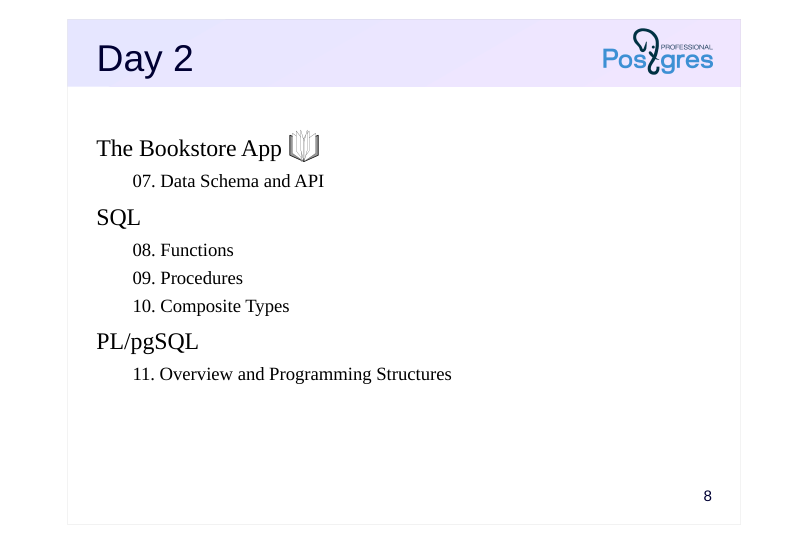
The Bookstore App
- Data Schema and API
- SQL
- Functions
- Procedures
- Composite Types
- PL/pgSQL
- Overview and Programming Structures
Speaker notes
Starting from the Bookstore app module on the second day, each topic contains two sets of practical assignments: the main ones related to the application itself (marked with a book icon) as well as supplemental assignments. It is impossible to complete all the practice within the allotted time (about 30 minutes). The supplemental assignments should be used for self-study.
Page 9: Day 3
PL/pgSQL (continued)
- Query Execution
- Cursors
- Dynamic Commands
- Arrays
- Error Handling
Page 10: Day 4
PL/pgSQL (continued)
- Triggers
- Debugging
- Access Control
- Overview
- Backup
- Logical Backup
01 Lesson 01: Basic Tools / Installation and Management, psql
This page is extracted from the official PDF into native Markdown. Slide text, code and speaker notes are kept in reading order; the original PDF and HTML remain the layout references. HTML source: dev1_01_tools_overview.html Archive: DEV1-handouts-16-en.zip PDF pages: 20
Page 1: Basic Tools / Installation and Management, psql
Copyright
© Postgres Professional, 2017–2025 Authors: Egor Rogov, Pavel Luzanov, Ilya Bashtanov, Igor Gnatyuk Translated by: Liudmila Mantrova, Alexander Meleshko, Elena Sharafutdinova Photo by: Oleg Bartunov (Phu monastery, Bhrikuti summit, Nepal)
Use of Course Materials
Non-commercial use of course materials (presentations, demonstrations) is allowed without restrictions. Commercial use is possible only with the written permission of Postgres Professional. It is prohibited to make changes to the course materials.
Feedback
Please send your feedback, comments and suggestions to: edu@postgrespro.ru
Disclaimer
Postgres Professional assumes no responsibility for any damages and losses, including loss of income, caused by direct or indirect, intentional or accidental use of course materials. Postgres Professional company specifically disclaims any warranties on course materials. Course materials are provided “as is,” and Postgres Professional company has no obligations to provide maintenance, support, updates, enhancements, or modifications.
Page 2: Topics
- PostgreSQL Installation Types
- Server Management
- Server Message Log
- Configuration Parameters
- Using psql
Page 3: Database Cluster
 {#source-figure-003 caption=“Source slide page 3: Database Cluster”}
- client
Speaker notes
Let’s start with the general concepts.
PostgreSQL is a program that belongs to the class of database management systems.
When this program is running, we call it a PostgreSQL server or a server instance. So far, the server seems to be a “black box” for us, but gradually we will get acquainted with how it works.
The data managed by PostgreSQL is stored in databases. One instance of PostgreSQL simultaneously manages several databases. This set of databases is called a database cluster. We will talk more about databases in the “Data organization. Logical structure” lesson.
The server interacts with clients. Clients are external applications that can connect to server databases and send queries for execution.
To summarize: a database cluster is the data in files; a server or a server instance is a program that manages the database cluster; a client is an application that “talks” to the server.
Page 4: Installation
Installation types
- pre-build packages (preferred)
- installation from source code
- without installation (cloud services)
- Extensions
- provide additional features
- installed separately
- shipped with the server as modules and programs (~50 extensions)
Speaker notes
The preferred option for installing PostgreSQL is via a package manager (such as apt or rpm) using pre-built packages. This gives you a comprehensive installation that is easy to support and upgrade. There are packages available for most operating systems.
Another option is to build PostgreSQL from source code. This may be necessary if you want to set up a non-standard configuration or deploy on an exotic platform.
Pre-built packages and source codes: http://www.postgresql.org/download/
Besides, you can work with cloud-based managed databases that do not require any installation at all. Such ready-to-use services are provided by all major cloud platforms (Amazon RDS, Google Cloud SQL, Microsoft Azure).
In this course, we are going to use a virtual machine with Xubuntu 24 OS; PostgreSQL 16 is installed from the package for this OS. In addition, the installation is set up to start and stop PostgreSQL when the OS starts and stops.
There are a lot of PostgreSQL extensions that add new database functionality “on the fly”, without modifying the system core. About 50 extensions are included into the PostgreSQL distribution itself.
https://postgrespro.com/docs/postgresql/16/contrib
https://postgrespro.com/docs/postgresql/16/contrib-prog
The list of available extensions and their installation status can be accessed using the pg_available_extensions view.
Page 5: Server Management
Management tools
- pg_ctlcluster
- pg_ctl
- Main operations
- start the server
- stop the server
- reload configuration parameters
Speaker notes
The main server management tasks are: initializing the database cluster, starting and stopping the server, reloading configuration parameters, and a few others. To perform these actions, use the pg_ctl utility, which comes together with PostgreSQL.
In the Ubuntu PostgreSQL package, pg_ctl is not run directly, but through a special wrapper pg_ctlcluster. The help information for pg_ctlcluster can be viewed using man:
$ man pg_ctlcluster
Information about existing clusters and their status can be obtained using the following commands:
$ pg_lsclusters
$ pg_ctlcluster status
For more details about server management for database administrators, see:
https://postgrespro.com/docs/postgresql/16/app-pg-ctl
https://postgrespro.com/docs/postgresql/16/runtime
Page 6: Installation and Management
PostgreSQL in the course VM is installed from packages. PostgreSQL installation directory:
The owner of the server software is the root user. The database cluster is automatically initialized when installed from a package and is located in the /var/lib/postgresql/16/main directory. This directory will be referred to as PGDATA in subsequent topics. The owner of the directory is postgres. Here is what the directory contains:
With the package installation, PostgreSQL is automatically added to the OS startup list, so there is no need to start it manually. Use the following commands to control the server as a privileged OS user with sudo: Stop the server:
Start the server:
Restart:
Reload configuration:
Get server information:
List of installed instances (works without sudo):
Page 7: Page 7
Page 8: Server Message Log
Server message log contains
- server messages
- user session messages
- application messages
- Log configuration
- log file location
- message format
- events to log
Speaker notes
Database operations are tracked in the server message log. The log keeps records about starting and stopping the server, as well as various signal messages, including messages about possible issues.
It can also store records of executed commands, their running time, locks that occur, etc. It can be used to trace user sessions.
Application developers can generate and log their own messages.
PostgreSQL allows you to flexibly configure which messages and in which format should be recorded into the log.
For example, the CSV and JSON output formats are convenient for automating log analysis.
https://postgrespro.com/docs/postgresql/16/runtime-config-logging
Page 9: Server Message Log
The server message log is located here:
Let’s look at the last messages:
Page 10: Configuration Parameters
For the entire instance
- the main configuration file is postgresql.conf
- For the current session
- View the current setting
Speaker notes
The PostgreSQL server configuration is governed by a variety of parameters that are used to manage resource consumption, tune system processes and user sessions, manage the server log, and handle many other tasks. It’s important to know how to check and update the parameter values.
Server configuration is usually stored in configuration files. The main configuration file is postgresql.conf, it has to be edited manually. The second configuration file is postgresql.auto.conf. Its contents are set using the ALTER SYSTEM command. The parameters set via ALTER SYSTEM take precedence over the parameters in postgresql.conf.
File and directory inclusion directives include and include_dir allow splitting large postgresql.conf into manageable parts. This may come in handy when managing multiple servers with similar configurations.
Most configuration parameters can be adjusted within a session with no server restart. You can define custom parameters and manage them in the same manner as with the system parameters.
Different ways of setting and updating parameters are described here:
https://postgrespro.com/docs/postgresql/16/config-setting
And the current parameter values are shown in the pg_settings view.
https://postgrespro.com/docs/postgresql/16/view-pg-settings
Page 11: Configuration Parameters
The main postgresql.conf configuration file is located in this directory:
Other configuration files are also stored here. Let’s check the value of the work_mem parameter:
The work_mem parameter specifies the amount of memory that will be used for internal sorting and hash table allocation operations before using temporary files on disk. 4MB is the default value and it is too small. Let’s say we want to increase it to 16MB for the entire instance. There are various ways to do this. First, you can uncomment and change the line in postgresql.conf where the parameter is defined:
Secondly, you can place the parameter definition in a file with the .conf suffix in the /etc/postgresql/16/main/conf.d directory or in a custom configuration file, the location of which should be set in the include directive of the main configuration file postgresql.conf. Thirdly, you can change the parameter value using an SQL command, and this is what we will do:
This change does not end up in postgresql.conf, but in postgresql.auto.conf, which is located in the PGDATA directory:
Reload the configuration files for the change to take effect. To do this, you can use pg_ctlcluster, or use the SQL function:
Verify that the new value is applied. Here is another way to check it:
To restore the default value of a parameter, you can use the RESET command instead of SET (and then reload the configuration, of course):
Page 12: Page 12
Most parameter values can be set for the current session live. For example, you can increase work_mem just for a single query that you expect to sort a large volume of data:
The new value will remain for the current session or even for the current transaction (with SET LOCAL). Yet another way to check a current value is to query the pg_settings view:
Lastly, there is the \dconfig command:
Page 13: The psql Client
Terminal client for working with PostgreSQL
- Comes with the DBMS
- Used by administrators and developers for interactive work and script execution
Speaker notes
There are other third-party tools available, but they are not considered in the scope of the course.
In the course, we will use the psql terminal client:
psql is the only client supplied with the DBMS.
The knowledge of psql will be useful to both developers and DB administrators, regardless of which tool they choose to work with at the end of the day.
For interactivity, psql provides built-in support for readline and pager programs (such as less and pspg), as well as the option to use external editing tools. Using psql, you can interact with the operating system, browse through the system catalog, and write scripts to automate routine tasks.
https://postgrespro.com/docs/postgresql/16/app-psql
Page 14: Connection
When starting psql, you need to specify the connection parameters. Required parameters include: database name, same as the user name by default user name (role), same as the OS user name by default host, local connection by default port, usually 5432 by default This is how you put them in:
The VM is set up to connect to PostgreSQL without specifying the parameters:
Check the connection:
The \connect command creates a new connection without leaving psql. You can use its short form: \c. From here on, the optional parts of commands will be shown in square brackets: \c[onnect].
Help and Documentation
You don’t need to open the documentation every time you need to check something. Instead, you can get the information from within the system directly. The command
displays the help information for psql. If PostgreSQL was installed with documentation, then you can get the reference manual with the command
psql can execute SQL commands and its own commands which start with a backslash, such as \conninfo. psql commands are always single-line, unlike SQL commands. Inside psql, you can get a list and a brief description of all psql commands: \? displays the list of psql commands \h[elp] provides a list of SQL commands that the server supports, as well as the syntax of an SQL command (if specified).
Formatting the Output
The psql client can return output in different formats: aligned format unaligned format extended format The aligned format is the default:
It sets each column’s width based on its contents. There’s also the header and the footer. psql commands to switch display modes: \a — mode switch: aligned/unaligned. \t — toggle the header and footer display. Let’s disable alignment, heading, and summary line:
Page 15: Page 15
This format is not the best for readability, but can be more suitable for automatic processing. The extended format is best for displaying multiple columns for one or several records. It is switched on for the current command with the \gx flag at the end in place of a semicolon:
Or you can toggle it on and off with the \x flag. The \pset command displays all formatting options.
Interacting with the OS and Executing Scripts
psql can run shell commands:
An SQL query can generate several other SQL queries and write them to a file using the \o[ut] command:
Nothing is printed to the screen (to the standard output). Check the file:
Revert to default output and formatting.
We can run the commands from the file using \i[nclude]:
There are other ways to execute commands, including from files. After executing the commands, the psql session will be terminated: psql < filename psql -f < filename psql -c ‘command’ (one command per call)
Page 16: psql Variables
Like shell, psql has its own variables. Set a variable:
To replace a variable with its value, use the colon in front of its name:
Unset a value:
Variables can be used, for example, to store the text of frequently used queries. Here is a query that returns a list of the five largest tables:
Now we can execute the query by just typing:
You can add the command to set the value of top5 to the .psqlrc starter file in the user’s home directory. Commands from .psqlrc are executed automatically every time psql starts. If used with no parameters, \set displays all currently set variables and their values, including the built-in ones. You can check the help for the built-in variables:
To exit psql, either use \q[uit], quit, or exit, or press Ctrl+D:
Page 17: Takeaways
Installing PostgreSQL from pre-built packages is the preferred installation type
- Pre-packaged distributions bring some OS specifics that you should be aware of:
- how to start and stop the server
- location of configuration files
- location of the server message log
- psql is a client application for working with PostgreSQL
Page 18: Practice
- Set the parameter work_mem to 8MB for all sessions. Reload the configuration and verify that the changes have taken effect. Restore the default value. 2. Put the command to create a table to the ddl.sql file. Put the commands to insert rows into this table to the populate.sql file. Run both scripts and verify that the table has been created and populated. 3. Find today’s records in the server message log.
Speaker notes
It is convenient to have separate databases for tasks that are related to different topics:
Use the ALTER SYSTEM command.
If the output does not fit into one terminal screen, psql forwards it to the tool called less for page-by-page output. To return to the prompt, press q.
Page 19: 1. Configuration Parameters
Connect to the database:
Set the parameters:
Reload the configuration:
Check the parameter value:
Reset to the default value:
Apply changes:
2. Executing Scripts in psql
Write a command into ’ddl.sql’ to create a table in PostgreSQL (you can use any text editor):
Write commands into ’populate.sql’ to populate the table:
Create a new database and connect to it:
Run the scripts and check the records in the table:
Page 20: Page 20
3. Viewing the Log
The log can be viewed in any text editor. Each log record starts with a date, contains the server process ID (with the packaged installation configuration), and may span several lines. The last records will be at the end of the file.
The database can now be disconnected and deleted (see the Data Organization module for more)
02 Lesson 02: Architecture / PostgreSQL Fundamentals
This page is extracted from the official PDF into native Markdown. Slide text, code and speaker notes are kept in reading order; the original PDF and HTML remain the layout references. HTML source: dev1_02_arch_general.html Archive: DEV1-handouts-16-en.zip PDF pages: 20
Page 1: Architecture / PostgreSQL Fundamentals
Copyright
© Postgres Professional, 2017–2025 Authors: Egor Rogov, Pavel Luzanov, Ilya Bashtanov, Igor Gnatyuk Translated by: Liudmila Mantrova, Alexander Meleshko, Elena Sharafutdinova Photo: Oleg Bartunov (Phu Monastery and Bhrikuti Peak, Nepal)
Use of Course Materials
Non-commercial use of course materials (presentations, demonstrations) is allowed without restrictions. Commercial use is possible only with the written permission of Postgres Professional. It is prohibited to make changes to the course materials.
Feedback
Please send your feedback, comments and suggestions to: edu@postgrespro.ru
Disclaimer
Postgres Professional assumes no responsibility for any damages and losses, including loss of income, caused by direct or indirect, intentional or accidental use of course materials. Postgres Professional company specifically disclaims any warranties on course materials. Course materials are provided “as is,” and Postgres Professional company has no obligations to provide maintenance, support, updates, enhancements, or modifications.
Page 2: Topics
- Client-Server Protocol
- Transactionality and its Implementation
- Query Processing and Execution
- Processes and Memory Structures
- Storing Data on Disk and Data Processing
- System Extensibility
Page 3: Client and Server
 {#source-figure-003 caption=“Source slide page 3: Client and Server”}
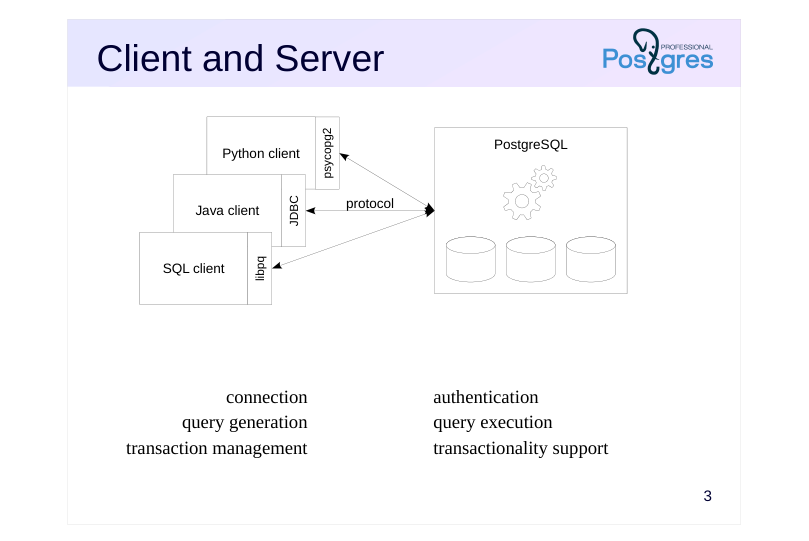
- connection
- authentication
- query generation
- query execution
- transaction management
- transactionality support
Speaker notes
A client application, such as psql or any other program written in any programming language, connects to the server and “communicates” with it. In order for the client and the server to understand each other, they must use the same communication protocol. Usually, the client uses a driver that implements the protocol and provides a set of functions to use in the program. Internally, the driver can use the standard protocol implementation (the libpq library), or can implement the protocol itself.
The language the client is written in is unimportant, as the functionality behind the syntax is defined by the protocol. As an example, we will use the SQL language and the psql client. Of course, no one really would program a client in SQL, but we will use it here purely for educational purposes. It should not be that difficult to substitute any of the SQL commands provided below with corresponding statements in your programming language of choice.
Generally speaking, a connection protocol allows the client to connect to a database in a cluster. The server performs authentication: decides if the client should be allowed to connect, i.e. by demanding a password.
Then, the client sends the server queries in the SQL language, the server executes the queries and sends back the results. A powerful and convenient query language is one of the fundamentals of relational databases.
Another one is the ability to maintain transaction support.
https://postgrespro.com/docs/postgresql/16/protocol
Page 4: Transactions
 {#source-figure-004 caption=“Source slide page 4: Transactions”}
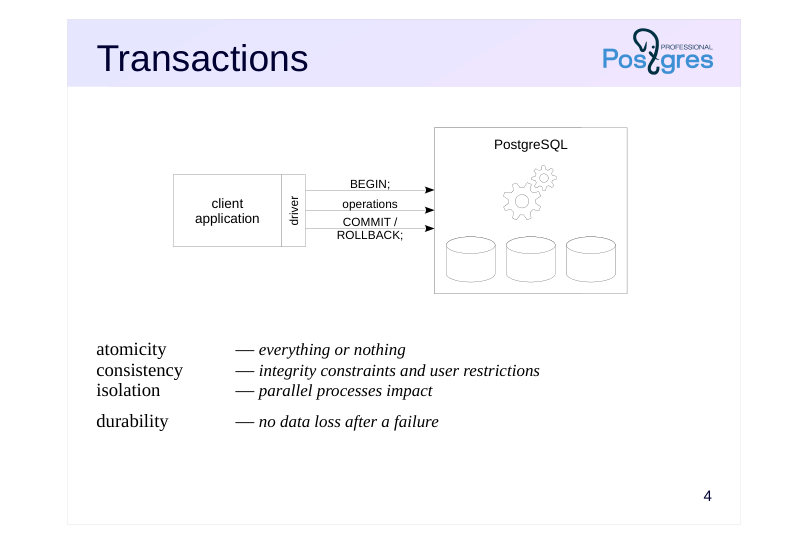
- atomicity — everything or nothing consistency — integrity constraints and user restrictions isolation — parallel processes impact
- durability — no data loss after a failure
Speaker notes
A transaction is a sequence of operations that preserves the consistency of data, provided that the operations are performed completely and without interference from other transactions.
Transactions must satisfy four properties collectively known as ACID:
● Atomicity. A transaction is either executed in full or not executed at all. To that end, the beginning of a transaction is marked with the BEGIN command, and the end with either COMMIT (commit changes) or ROLLBACK (undo changes).
● Consistency. Transactions move the database from one consistent state to another consistent one (consistency here means that certain restrictions are fulfilled).
● Isolation. Transactions running simultaneously should not affect the specific one.
● Durability. Once data is committed, it should not be lost even after a server failure.
In PostgreSQL, the client application is the side usually responsible for transaction management (that is, for determining what commands make up a transaction, and for committing or canceling the transaction). Transactions can be managed on the server side by stored procedures.
https://postgrespro.com/docs/postgresql/16/sql-begin
https://postgrespro.com/docs/postgresql/16/sql-savepoint
https://postgrespro.com/docs/postgresql/16/transactions
Page 5: Transaction Management
By default, psql runs in autocommit mode:
This means that any single command sent without explicitly opening the transaction is committed immediately. Check if this mode is enabled by default in the PostgreSQL driver for your favourite programming language. Create a table with one row:
Will another transaction see this table and row?
Yes. Compare the result:
What will the other transaction see now?
The changes are not yet committed so the other transaction does not see them.
What about now?
When autocommit is off, a transaction is implicitly opened upon command input. The command then must be committed manually.
What do we see now?
Page 6: Page 6
The changes are not there, as the transaction was opened implicitly.
Now, finally:
Turn the default autocommit mode back on.
Individual changes can be rolled back without interrupting the entire transaction (although this is rarely used).
Note Note how the transaction sees its own changes, even the uncommitted ones. Now, roll back to the save point. Rolling back to a save point does not imply a transfer of control (that is, it does not work as GOTO); only those changes to the database state that were made from the moment the point was set and up to the current moment are canceled.
Check the table:
The changes have been rolled back, but the transaction is still open:
Page 7: Page 7
Page 8: Query Processing
 {#source-figure-008 caption=“Source slide page 8: Query Processing”}
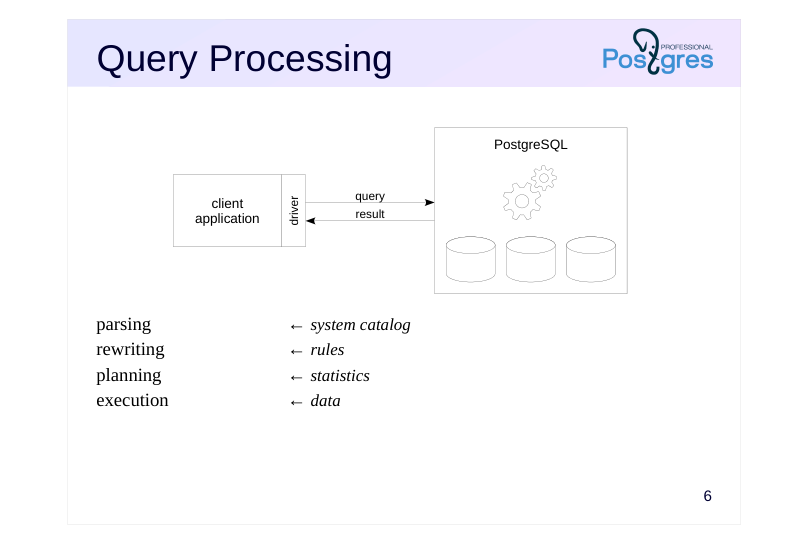
parsing ← system catalog rewriting ← rules planning ← statistics execution ← data
Speaker notes
Query execution is complicated. First, a query is sent from a client to the server as text. The server parses the text, analyzing its syntax (whether letters are formed into words, and words into commands) and semantics (whether there are tables and other objects in the database that the query refers to by name). To do that, the server needs data on what is actually stored in the database. This meta-data is called the system catalog and is stored in special tables in the same database.
A query can be rewritten (transformed). For example, a view name can be substituted with the query text. Users can implement their own transformations using the rule system.
SQL is a declarative language: a query defines what data to get, but not how to get it. It is at this point when the query (already parsed and presented in the form of a tree) is passed on to the planner, which develops an execution plan. For example, the planner can decide whether or not to use indexes to find the data for the query. To plan the execution efficiently, the planner needs certain information about the tables it is going to work with, such as the size of the tables and the distribution of data within them. Together, this information is called statistics.
When a plan is selected, the query is executed in accordance with it, and the result is returned to the client in its entirety.
https://postgrespro.com/docs/postgresql/16/query-path
This is convenient and simple when we are talking about just a row or two, provided by the simple mode of the protocol.
Page 9: Prepared Statements
 {#source-figure-009 caption=“Source slide page 9: Prepared Statements”}
parsing rewriting
- binding ← parameter values planning execution
Speaker notes
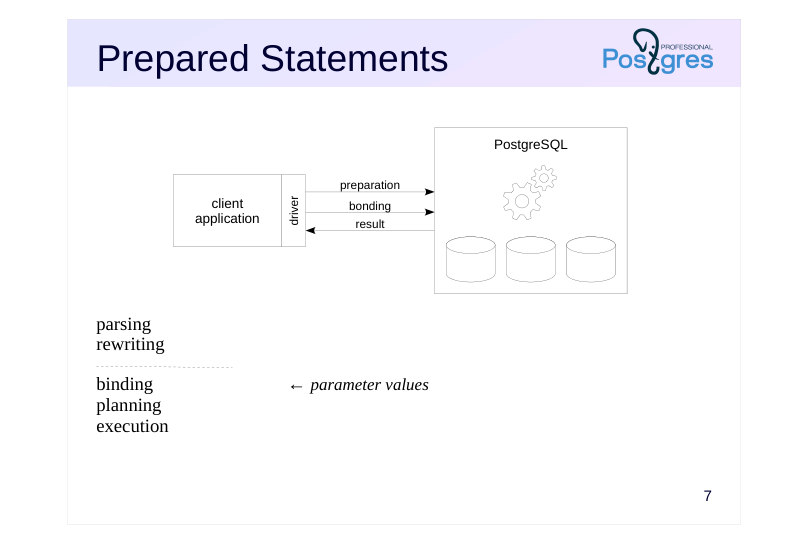
Each query goes through the steps listed above: parsing, rewriting, planning and execution. But if the same query (possibly with different parameters) is executed over and over again, there is no point in parsing it anew every time.
Therefore, in addition to the usual query execution process, the PostgreSQL protocol provides an extended mode that can control statement execution more precisely.
One of its features is the ability to prepare a statement. When a statement is prepared, it is parsed and rewritten as usual and its parse tree is saved.
When the statement is executed, specific parameter values are bound to it. If necessary, planning is redone (in some cases, PostgreSQL remembers the query plan and does not repeat this step). Then, the statement is executed.
Another advantage of prepared statements is that they are protected from possible SQL injections.
https://postgrespro.com/docs/postgresql/16/sql-prepare
https://postgrespro.com/docs/postgresql/16/sql-execute
Page 10: Prepared Statements
In SQL, you can prepare a statement by using the PREPARE command (it is a PostgreSQL extension not present in the SQL standard):
The statement is parsed and rewritten, and the parse tree is saved. A prepared statement can be called by its name using arbitrary parameters:
For non-parametric statements, an execution plan is saved as well. For queries with parameters, as in the example, the parameter values are taken into account at the planning stage. The planner may decide that the plan built without considering the parameters is good enough. In this case, it will not try to plan the query again. How do you prepare and execute a statement using your favourite programming language? Can you execute a statement WITHOUT preparing it? All prepared statements in the current session can be displayed with:
Page 11: Cursors
 {#source-figure-011 caption=“Source slide page 11: Cursors”}
parsing rewriting
- binding ← parameter values planning execution
- output
Speaker notes
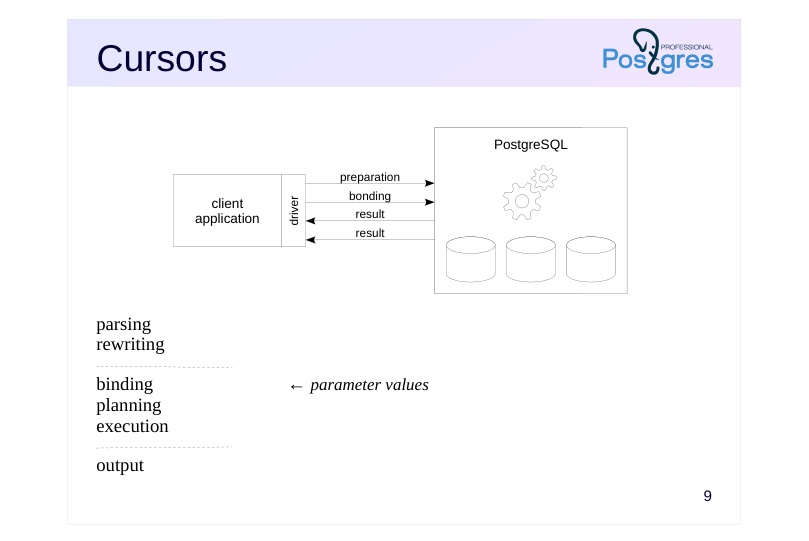
The client may not want to get all the output at once. There can be too much data, and not all of it may be needed.
This issue is solved by cursors, another feature of the extended mode. The protocol can open a cursor for any operator, and then receive the output row by row.
A cursor can be imagined as a sliding window that shows only a part of the output at a time. When an output row is received, the window shifts down. In other words, cursors allow you to work with relational data (that comes in sets) iteratively, row by row.
An open cursor is represented on the server by a so-called portal. This term is mentioned in the documentation, but in general, the words “cursor” and “portal” can be considered synonyms.
A statement used within a cursor is implicitly prepared (that is, its parsing tree and possibly execution plan are saved).
https://postgrespro.com/docs/postgresql/16/sql-declare
https://postgrespro.com/docs/postgresql/16/sql-fetch
Page 12: Cursors
When the SELECT command is executed, the server sends and the client receives all the rows at once:
Cursors let the client to retrieve data in batches of rows.
You can set the size of the batch:
The batch size is paramount for huge outputs, when processing them one row at a time is inefficient. What if we reach the end of the table?
FETCH will just stop returning rows. All regular programming languages have a way to check for this condition. How do you get data row by row using the cursor in your favorite programming language? Is it possible NOT to use the cursor and get all the rows at once? How is the cursor batch size set? You can close your cursor when done, freeing up some resources:
However, cursors are automatically closed when the transaction ends, so explicit closing is optional (except WITH HOLD cursors.)
Page 13: Page 13
Page 14: Processes and Memory
 {#source-figure-014 caption=“Source slide page 14: Processes and Memory”}
Speaker notes
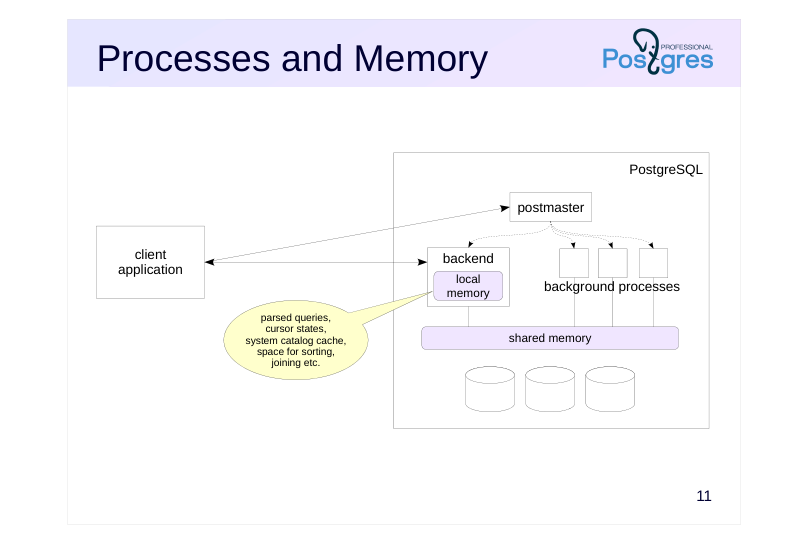
Between processing queries from clients, the server must store technical information, such as parsed queries and their plans and the status of open cursors (portals). Where is it stored and how?
Under the hood, a PostgreSQL server consists of several interacting processes. First of all, when the server starts, a process traditionally called postmaster is started. It starts all other processes (using the fork system call in Unix). It also “babysits” them: if any of the processes crashes, postmaster will restart it (or restart the entire server if it considers that the failed process could have damaged any of the shared data).
Operations of the server are maintained by a number of background processes. The main ones will be discussed in the following lessons.
In order for the processes to exchange information between them, postmaster allocates shared memory that all the processes can access. In addition to shared memory, each process has its own local memory, accessible only to itself.
Postmaster also listens for incoming connections. For each connecting client, postmaster generates a designated backend process for the client to communicate with on the server side, and each client gets its own process. The backend process performs authentication, among other things.
The space required to execute a client’s query (parsed queries and their plans, cursor states, system catalog cache, a place to sort data, etc.) is allocated in the local memory of the backend process of this client.
Page 15: Multiple Clients
 {#source-figure-015 caption=“Source slide page 15: Multiple Clients”}
Speaker notes
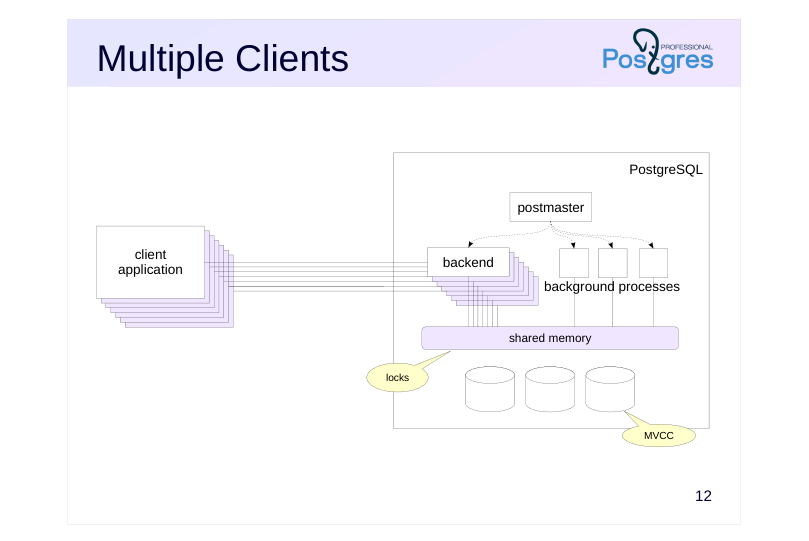
When multiple clients connect to a server, each one gets a backend process created for it. As long as there are not too many clients, RAM is sufficient, and connections do not occur too often, sustaining many connections at once is not a problem in itself.
However, when multiple processes try to access the same database object, things must be done to ensure that one process will not change the data while another is in the process of reading it.
For objects in shared memory, this is ensured by short-term locks. PostgreSQL does this carefully enough so that the system scales well with an increase in the number of processors (cores).
Tables are more complicated. Locks will have to be held until the end of transactions (that is, potentially for a long time), so scalability may suffer. To avoid that, PostgreSQL uses a multiversion concurrency control mechanism (MVCC) and snapshot isolation: multiple versions of the same data can exist simultaneously, and each process sees only its own (but always consistent) data snapshot. Now, only those processes that are trying to change data that has already been changed, but not yet committed by other processes, will be locked.
MVCC is the main mechanism that enables the first three properties of transactions (atomicity, consistency, and isolation). We will talk about it more in its dedicated lesson.
Page 16: Connection Pool
 {#source-figure-016 caption=“Source slide page 16: Connection Pool”}
Speaker notes
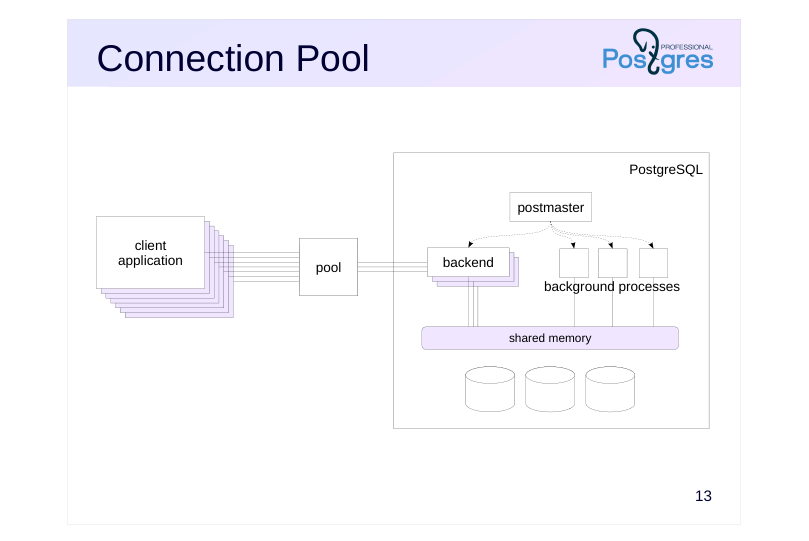
If there are too many clients, or connections are established and broken too often, using a connection pool may help. This functionality is usually provided by the application server or third-party pool managers (the most popular of which is pgBouncer).
With a connection pool in place, clients connect not to the PostgreSQL server directly, but to the pool manager. The manager keeps several connections to the database server open and uses free ones to fulfill client queries. From the server’s point of view, the number of clients remains constant regardless of how many clients access the pool manager.
The drawback is that multiple clients end up sharing the same backend process, which, as we remember, stores client-specific state in its local memory (such as parsed queries for prepared statements). Therefore, care should be taken when developing applications for such deployments.
One of pgBouncer’s features is the ability to temporarily pause client connections without disconnecting them. This pause can be used for server software updates or other operations that require a server restart.
The use of connection pools is discussed in greater detail in the DEV2 course.
Page 17: Data Storage
 {#source-figure-017 caption=“Source slide page 17: Data Storage”}
Speaker notes
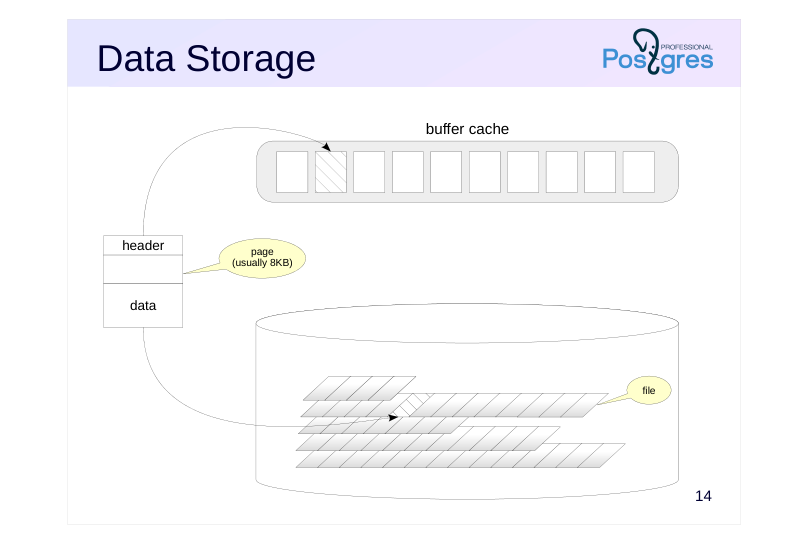
Data is stored as regular OS files on disks. How exactly the data is distributed among the files is discussed in one of following lessons.
Logically, the files are divided into pages (sometimes the term block is used). A page is usually 8KB in size. It can be changed within some limits (16 KB or 32 KB), but only during server compilation. A cluster that has been compiled and started up this way can work with pages of only one size.
Each page has a certain internal structure. It contains a header and actual data. There may be free space between them if the page is not fully occupied.
Since disks work much slower than RAM (especially HDD, but SSD too), data heading to disk is cached first. A buffer cache, a certain amount of space in RAM, is allocated for recently read pages. The idea is that the system may want to read the same pages multiple times, and keeping them on hand may save time compared to repeated disk scans. Any recently changed data is also cached for some time before being written on disk.
Page 18: Data Storage
 {#source-figure-018 caption=“Source slide page 18: Data Storage”}
Speaker notes
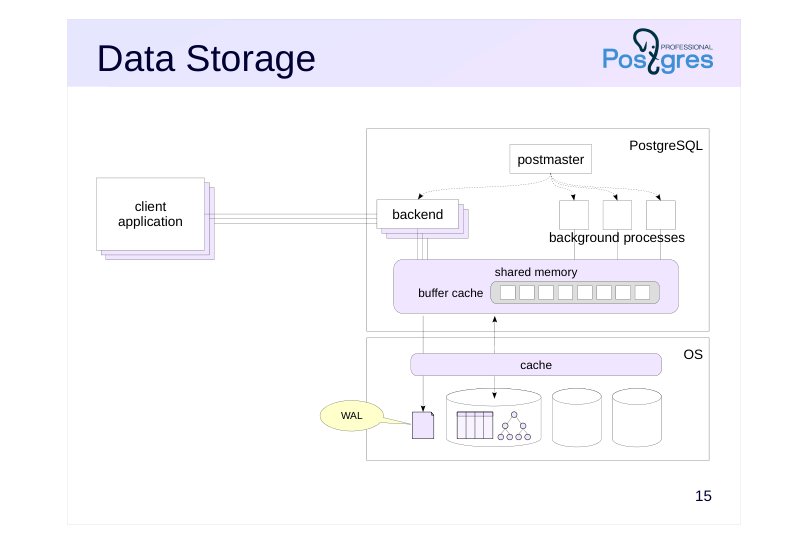
The PostgreSQL buffer cache is located in shared memory so that all processes have access to it.
PostgreSQL does not directly access disks storing its data. Instead, it relies on the operating system. The operating system also has its own data cache. Therefore, if a page is not found in the buffer cache, there is a chance that it is in the OS cache and access to the disk will be avoided.
In case of a failure (for example, power supply dies), the contents of the RAM are lost, and the data changed but not yet written to disk will be lost. This is unacceptable and breaks the durability property of transactions. To avoid that, PostgreSQL keeps a log that allows it to redo lost operations and restore data to a consistent state. We will talk about the buffer cache and the write-ahead log in the dedicated lesson later on.
Page 19: Extensibility
 {#source-figure-019 caption=“Source slide page 19: Extensibility”}
Speaker notes
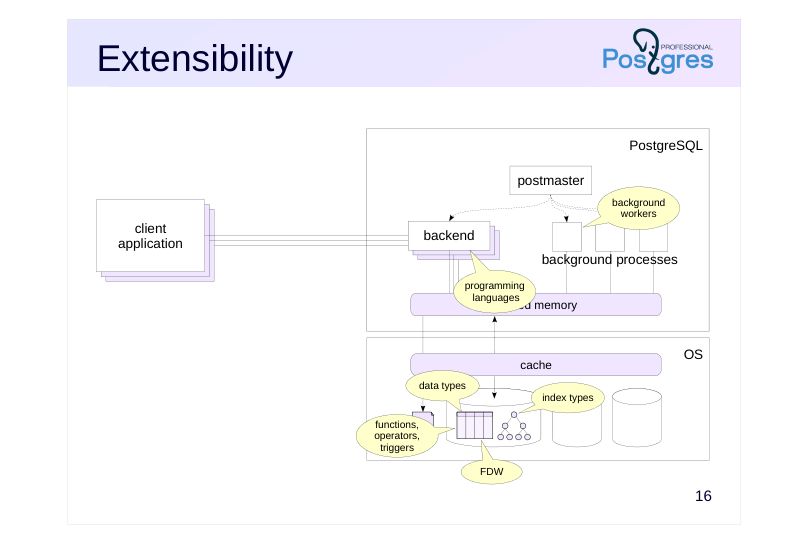
PostgreSQL is designed with extensibility in mind. It allows to create new data types based on existing ones, write stored procedures for data processing, and offers a convenient toolkit for administration, monitoring, and performance tuning.
You can always write an extension that adds the necessary functionality that you need. Most extensions can be installed “hot”, without stopping the server. Thanks to this architecture, there are plenty of existing extensions doing things such as:
● adding support for programming languages (in addition to standard SQL, PL/pgSQL, PL/Perl, PL/Python and PL/Tcl);
● introducing new data types and operators to work with them;
● creating new index types that work more efficiently with specific data types (in addition to standard B-trees, hash indexes, GiST, SP-GiST, GIN, BRIN);
● starting background workers to perform additional tasks;
● connecting to external data sources;
● collecting system load information, performing monitoring, and generating reports;
● exploring system data structures.
Extensibility is discussed in more detail in the DBA2 and DEV2 courses.
Page 20: Takeaways
A server manages a database cluster
- The protocol allows clients to connect to the server, transmit queries and manage transactions
- Each client is served by a dedicated backend process
- Data is stored in files and accessed via the operating system
- Data is cached both in local memory (system catalog, parsed queries) and in shared memory (buffer cache)
03 Lesson 03: Architecture / Isolation and MVCC
This page is extracted from the official PDF into native Markdown. Slide text, code and speaker notes are kept in reading order; the original PDF and HTML remain the layout references. HTML source: dev1_03_arch_mvcc_overview.html Archive: DEV1-handouts-16-en.zip PDF pages: 18
Page 1: Architecture / Isolation and MVCC
Copyright
© Postgres Professional, 2017–2025 Authors: Egor Rogov, Pavel Luzanov, Ilya Bashtanov, Igor Gnatyuk Translated by: Liudmila Mantrova, Alexander Meleshko, Elena Sharafutdinova Photo: Oleg Bartunov (Phu Monastery and Bhrikuti Peak, Nepal)
Use of Course Materials
Non-commercial use of course materials (presentations, demonstrations) is allowed without restrictions. Commercial use is possible only with the written permission of Postgres Professional. It is prohibited to make changes to the course materials.
Feedback
Please send your feedback, comments and suggestions to: edu@postgrespro.ru
Disclaimer
Postgres Professional assumes no responsibility for any damages and losses, including loss of income, caused by direct or indirect, intentional or accidental use of course materials. Postgres Professional company specifically disclaims any warranties on course materials. Course materials are provided “as is”, and Postgres Professional company has no obligations to provide maintenance, support, updates, enhancements, or modifications.
Page 2: Topics
- Multiversion Concurrency Control
- Data Snapshot
- Isolation Levels
- Vacuuming and its Horizon
- Locking
- Transaction Status
Page 3: MVCC
 {#source-figure-003 caption=“Source slide page 3: MVCC”}
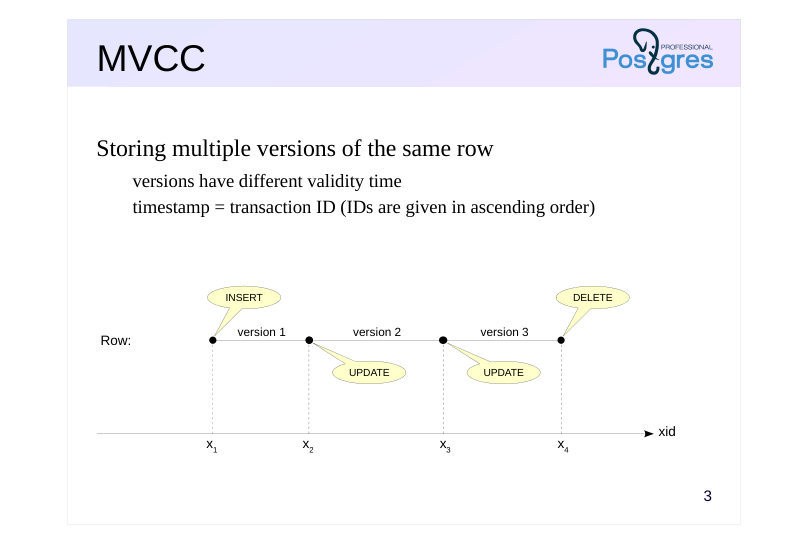
Storing multiple versions of the same row
- versions have different validity time
- timestamp = transaction ID (IDs are given in ascending order)
Speaker notes
When multiple sessions are running at the same time, two transactions may access the same row at the same time. If both transactions are just reading the row, there is no problem. If both transactions try to write, no problem either (in this case, they line up and make the changes one after the other). The tricky part is when one transaction wants to read a row and another one wants to change it at the same time.
There are two simple ways about it. You can let such transactions block each other, but then performance suffers. Otherwise, you can let the reading transaction immediately see the changes made by the writing transaction, even if they are not committed (this is called a “dirty read”). This is dangerous, because the changes can be rolled back.
PostgreSQL goes the hard way and utilizes what is known as Multiversion concurrency control. In essence, the system stores multiple versions of each row. So, a writing transaction operates on its own version, while a reading transaction sees its own version.
To distinguish between the versions, PostgreSQL marks each one with two timestamps, which together specify a version’s “validity time”.
The timestamps are essentially just transaction IDs, which always come in ascending order. (In reality, the whole thing is a bit more complicated, but not worth getting into right now.) Upon creation, a row version is marked with the ID of the transaction that executed the INSERT command. When deleted, the version is marked with the ID of the transaction that did the DELETE command (but is not physically deleted). An UPDATE command is a DELETE and an INSERT executed back to back.
https://postgrespro.com/docs/postgresql/16/mvcc-intro
Page 4: Data Snapshot
 {#source-figure-004 caption=“Source slide page 4: Data Snapshot”}
Representation of database data in a consistent state at a specific point in time
- transaction ID defines the point in time
- list of active transactions helps the system
- to exclude changes that have not been committed
Speaker notes
PostgreSQL uses snapshot-based transaction isolation.
A transaction accessing a table should see only one of the versions of each row (or none at all). To achieve this, PostgreSQL presents the transaction with a data snapshot created at a certain point in time. The snapshot includes the most recent versions of all committed rows but does not include any non-committed changes from active transactions. In other words, the snapshot takes the version of each row that corresponds to the moment when the snapshot was created.
A snapshot is not a physical copy of the data, but just a few numbers:
● the ID of the last committed transaction at the time of snapshot,
● list of active transactions at that point in time.
The list is needed in order to exclude from the snapshot any changes those transactions may have made but not yet committed.
With just these numbers, we can always tell which row version will be visible in the snapshot. Sometimes it will be the current (most recently committed) version, as with row 1 in the diagram. Sometimes not: row 2 has been deleted after the snapshot has been created (and the change has already been committed), but the transaction still continues to see it while working with the snapshot. This is the correct behavior, the snapshot gives a consistent representation of data at the selected point in time.
Some rows will not get into the snapshot at all: row 3 was deleted before the snapshot was made, so it is not included.
Page 5: Isolation Levels
Read Uncommitted
- not supported by PostgreSQL: works as Read Committed
- Read Committed (default)
- the snapshot is created as of the time a statement starts
- repeated query may return different data
- Repeatable Read
- the snapshot is created as of the time the first transaction statement starts
- a transaction may fail with a serialization error
- Serializable
- total isolation, but additional overhead
- a transaction may fail with a serialization error
Speaker notes
The SQL standard defines four isolation levels: the stricter the level, the less concurrent transactions affect each other. At the time when the standard was adopted, it was believed that the stricter the level, the more difficult it is to implement and the stronger its impact on performance (since then, these views have changed somewhat).
The most lax level of Read Uncommitted allows dirty reads. It is not supported by PostgreSQL, because it is of no practical value and does not give a performance gain.
The Read Committed level is the default isolation level in PostgreSQL. At this level, data snapshots are created at the beginning of each SQL statement execution. Thus, the statement works with an unchanged and consistent data snapshot, but two identical queries following one after the other may show different data.
At the Repeatable Read level, the snapshot is built at the beginning of a transaction (when executing the first statement). This makes all queries inside the same transaction see the same data. This level is convenient, for example, for generating reports from several queries.
The Serializable level guarantees total isolation. At this level, you can use any statements as if the transaction is running alone. The drawback is that some transactions will fail, and your application must be able to repeat such transactions.
https://postgrespro.com/docs/postgresql/16/transaction-iso
Page 6: Row Version Visibility
How do you verify that the same row can exist in multiple versions? Create a table:
And insert one row. Remember that if you do not explicitly start a transaction with BEGIN, psql executes the command and immediately commits the result:
Start the transaction and get its ID:
The transaction sees the first (and so far the only) version of the row:
Here, the hidden columns show the transaction IDs that limit the visibility of the row version: xmin is the ID of the previous transaction which created the version, and xmax=0 means that this version is current. Now start another transaction in another session:
The transaction sees the same and only version:
Now change the row from within the second transaction.
This is what we get:
Page 7: Page 7
What will the first transaction see?
Since the change is not yet committed, the first transaction continues to see the first version of the row.
Note the xmax value: it indicates that another transaction is currently changing the row. Generally speaking, such “peeping” violates isolation, so the xmin and xmax fields are hidden and should not be used in production. Now commit the changes.
What will the first transaction see now?
The first transaction also sees the second version of the string. After commit, the first version of the row is no longer visible in any transaction.
Page 8: Vacuuming and its Horizon
 {#source-figure-008 caption=“Source slide page 8: Vacuuming and its Horizon”}
There is a single horizon for each database
- Long-running transactions can hold back the horizon
- thereby blocking the vacuuming of outdated row versions
Speaker notes
MVCC makes it possible to effectively implement snapshot-based isolation, but as a result, old (“dead”) row versions (“dead tuples”) accumulate in table pages.
Historical versions are needed for some time so that transactions can work with their data snapshots and, in case of rollback, get back to old values. For each database, there is a transaction ID (xid), so that all historical versions deleted by transactions with lower xids are no longer visible in any snapshot. This xid is called vacuum horizon.
Vacuuming is performed by special background processes; but can also be executed manually using the VACUUM command.
Long-running transactions and queries can hold back the horizon, which prevents the removal of accumulated row versions. If you do not vacuum historical data in a timely manner, tables and indexes will bloat, consuming excessive disk space, and the search for current row versions will slow down.
https://postgrespro.com/docs/postgresql/16/routine-vacuuming
Page 9: Locking
Row locks
- reading never locks rows
- changing rows locks them for changes, but not for reads
- Table locks
- prohibit changing or deleting a table while it is being worked on
- prohibit reading the table when rebuilding or moving
- etc.
- Lock lifetime
- set as needed or manually
- released automatically upon transaction completion
Speaker notes
So what does MVCC provide? It allows the system to have only the most necessary minimum of locks, thereby increasing performance.
The main locks are set at the row level. Reading never blocks either reading or writing transactions. Changing a row does not lock it for reading. The only case when a transaction will wait for a lock to be released is if it tries to change a row that has already been changed by another transaction that has not been committed yet.
Locks can also be set at a higher level, particularly on tables. They are needed so that no one can delete the table while other transactions are reading data from it, or to prohibit access to the table being rebuilt. Such locks generally do not cause problems, since deleting or rebuilding tables is only done once in a while. However, some changes of table structure trigger implicit table rebuilding, completely blocking access to the table and its indexes. Locks are explained in detail in the Locking module of the DBA2 course.
All necessary locks are set automatically and automatically removed at the end of the transaction. However, if a lock was acquired after the savepoint was set, it will be released immediately when rolling back to that savepoint.
You can also set additional custom locks, but this is rarely necessary.
https://postgrespro.com/docs/postgresql/16/explicit-locking
Page 10: Locking
Repeat the experiment, but now let both transactions try to change the same row.
And in the second transaction:
The second transaction “hung up”: it cannot change the row until the first transaction releases the lock.
Now the second transaction can continue:
Both transactions have committed their changes. The first session reads the table again and sees the current row: this is the result committed by the second transaction:
Page 11: Transaction Status
Transaction status (clog)
- service information; two bits per transaction
- stored in files on disk
- cached in shared memory
- Commit
- the “transaction committed” bit is set
- Termination
- the “transaction aborted” bit is set
- performed as fast as commit (no data rollback needed)
Speaker notes
For multiversion concurrency control to work, the server needs to understand the status of transactions. A transaction can be active or finished. A transaction can end either in a commit or in an abort. Therefore, two bits are required to represent the state of each transaction.
Transaction statuses (commit log, clog) are stored in special service files in the PGDATA/pg_xact directory and worked upon in the server’s shared memory, as to avoid constantly accessing the disk.
At any transaction completion (either successful or not), it is enough to set the appropriate status bits. Both transaction commit and abort occur equally quickly.
If an aborted transaction managed to create new row versions, these versions are not destroyed (there is no “physical” rollback of data). Thanks to the status information, other transactions will see that the transaction that created or deleted the row versions was actually aborted, and will not take changes made by it into account.
Page 12: Takeaways
Multiple versions of each row can be stored in data files
- Transactions work with data snapshots, representations of database data in a consistent state at a specific point in time
- Isolation levels have different snapshot creation times
- Dead row versions beyond the vacuum horizon must be periodically vacuumed
- Writers do not block readers, readers do not block anyone
Page 13: Practice
- Create a table with one row. Begin a transaction at the Read Committed isolation level and query the table. In another session, delete the row and commit the changes. How many rows will the first transaction see after executing the same query again? Try and see. Complete the first transaction. 2. Repeat the same thing, but now let the transaction work at the isolation level Repeatable Read:
- BEGIN ISOLATION LEVEL REPEATABLE READ;
- Explain the differences.
Page 14: 1. Read Committed Isolation Level
Create a table:
Query from the first transaction (default isolation level is Read Committed):
Delete the row in the second transaction and commit the changes:
Repeat the query:
The first transaction sees the change: the row has been deleted.
2. Repeatable Read Isolation Level
Return the row:
Query from the first transaction:
Delete the row in the second transaction and commit the changes:
Repeat the query:
Page 15: Page 15
At this isolation level, the first transaction does not see any changes: the row still exists for it.
Page 16: Practice+
- Begin a transaction and create a new table with one row. Without completing the transaction, open a second session and query the table in it. Check what the transaction will return in the second session.
- Commit the transaction in the first session and repeat the query
- to the table in the second session.
- Repeat task 1, but roll back rather than commit the transaction in the first session. What has changed?
- In the first session, start a transaction and make a query to the previously created table. Will it be possible to delete this table in the second session before the transaction is completed? Try and see.
Page 17: 1. Transactions and DDL Commands: Commit
Start a transaction and create a new table:
In the second session, query the table:
Until the transaction that created the table is completed, all other transactions do not see the table. The table will be visible only after the completion of the transaction that created it:
2. Transactions and DDL Commands: Rollback
Start a transaction and create a new table:
The query in the second session sees no changes, as expected:
When the first transaction is rolled back, the table creation command is also rolled back:
In PostgreSQL, DDL commands are transactional.
3. Table Locks
Page 18: Page 18
Start a transaction, query the table:
The second transaction, which is trying to remove the table is locked: you cannot remove a table that is being used.
The table will be removed only after the first transaction is completed:
04 Lesson 04: Architecture / Buffer Cache and WAL
This page is extracted from the official PDF into native Markdown. Slide text, code and speaker notes are kept in reading order; the original PDF and HTML remain the layout references. HTML source: dev1_04_arch_wal_overview.html Archive: DEV1-handouts-16-en.zip PDF pages: 17
Page 1: Architecture / Buffer Cache and WAL
Copyright
© Postgres Professional, 2017–2025 Authors Egor Rogov, Pavel Luzanov, Ilya Bashtanov, Igor Gnatyuk Translated by: Liudmila Mantrova, Alexander Meleshko, Elena Sharafutdinova Photo by: Oleg Bartunov (Phu monastery, Bhrikuti Peak, Nepal)
Use of Course Materials
Non-commercial use of course materials (presentations, demonstrations) is allowed without restrictions. Commercial use is possible only with the written permission of Postgres Professional. It is prohibited to make changes to the course materials.
Feedback
Please send your feedback, comments and suggestions to: edu@postgrespro.ru
Disclaimer
Postgres Professional assumes no responsibility for any damages and losses, including loss of income, caused by direct or indirect, intentional or accidental use of course materials. Postgres Professional company specifically disclaims any warranties on course materials. Course materials are provided “as is,” and Postgres Professional company has no obligations to provide maintenance, support, updates, enhancements, or modifications.
Page 2: Topics
- Buffer Cache
- Replacement Algorithm
- Write-Ahead Log
- Checkpoint
- Processes Related to the Buffer Cache and WAL
Page 3: Buffer Cache
 {#source-figure-003 caption=“Source slide page 3: Buffer Cache”}
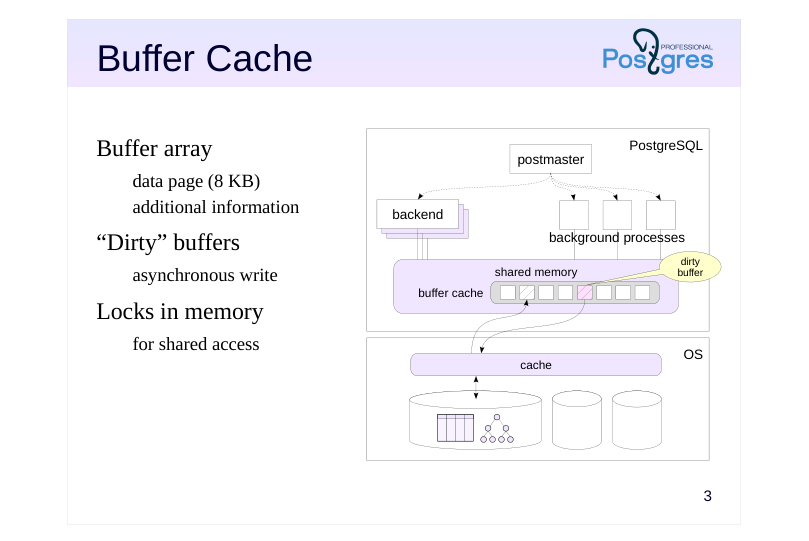
Buffer array
- data page (8 KB)
- additional information
- “Dirty” buffers
- asynchronous write
- Locks in memory
- for shared access
Speaker notes
The buffer cache is used to smooth out the difference between the RAM and disk speed. It consists of an array of buffers which contain data pages and some additional information (for example, the file name and the position of the page inside this file).
The page size is usually 8 KB; the size can only be changed when building PostgreSQL.
Any work with data pages goes through the buffer cache. If any process is going to work with the page, it first tries to find it in the cache. If the page does not exist, the process requests the operating system to read this page and places it in the buffer cache. (Note that the OS can read the page either from disk or from its own cache.)
After the page is written to the buffer cache, it can be accessed repeatedly without the overhead of operating system calls.
If a process has changed the data in the page, the corresponding buffer becomes “dirty”. The modified page must be written on disk, but for performance reasons, the recording occurs asynchronously and may be delayed.
The buffer cache, like other shared memory structures, is protected by locks to control concurrent access. Although locks are implemented effectively, access to the buffer cache is not nearly as fast as simply accessing RAM. Therefore, in general, the less data a query reads and modifies, the faster it will work.
Page 4: Replacement
 {#source-figure-004 caption=“Source slide page 4: Replacement”}
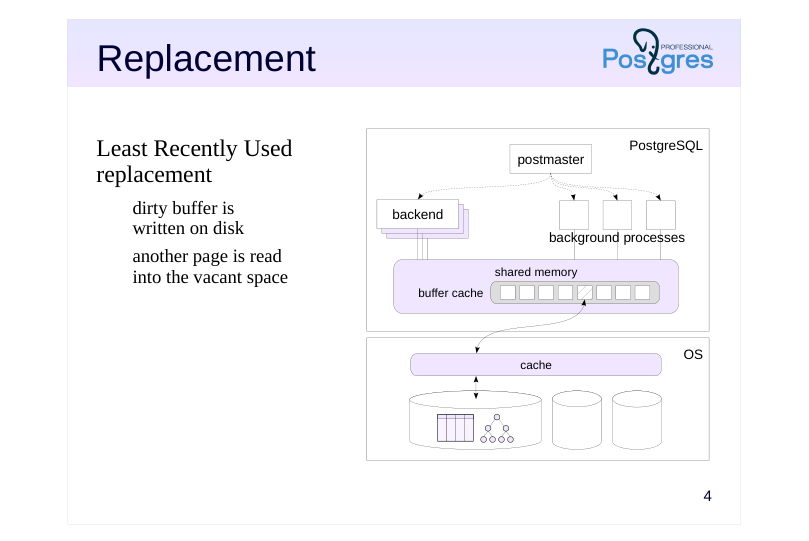
Least Recently Used replacement
- dirty buffer is
- written on disk
- another page is read
- into the vacant space
Speaker notes
The buffer cache size is usually not so large as to fit the entire database. It is limited by the available RAM. Also, the larger the buffer cache, the greater the overhead. Therefore, when reading the next page, sooner or later the buffer cache has to run out of space. In this case, page replacement happens.
The replacement algorithm selects a page in the cache that has been used less often than others. If the selected buffer is dirty, the page is written on disk first to store the changes made to it. Then, a new page is written into the buffer.
This replacement is called LRU (Least Recently Used). It keeps the most frequently accessed data in the cache. Such “hot” blocks of data are not very common, and this approach helps to significantly reduce the number of requests to OS (and disk operations), provided enough cache memory.
Page 5: The Impact of Buffer Cache on Query Execution
Creating a new database in the cluster and connecting to it (for more details about databases, see the Data Organization module):
Create a table:
Populate it with rows:
The shared_buffers parameter indicates the buffer cache size:
The default value is too low. In the real world, you should increase it immediately after server installation (it will be applied after restart). Restart the server to wipe the cache clean.
Now, let’s compare the behaviour of the system as we run a query once, and then the same query again. Query plans is not the topic of this course, but we will peek into them every now and again. The EXPLAIN ANALYZE command used below will execute the query as well as display the execution plan and some extra details:
The “Buffers: shared” line shows the buffer utilization. read — the number of buffers where pages had to be read from disk.
hit — the number of buffers where requested pages were found.
Page 6: Page 6
Note Note that on the second query execution, not only the execution time went down, but the planning time too (because system catalog pages are cached as well).
Page 7: Write-ahead Log (WAL)
Problem: when a crash occurs, data from RAM that is not written on disk is lost
- WAL
- stream of records of the actions being performed;
- can be used to redo the steps lost during the crash
- records are written to disk earlier than the changed data
- WAL tracks changes to
- pages in tables, indexes and other objects
- transaction status (clog)
- WAL does not track changes to
- temporary and unlogged tables
Speaker notes
Having a buffer cache (and other buffers in RAM) increases performance at the cost of reliability. When a crash happens, all buffer cache content is lost. If the crash occurs on the OS or hardware level, the content of OS buffers will also be lost (the OS may have its own failsafes for this).
To increase reliability, PostgreSQL uses the Write-ahead log. When performing any operation, the WAL records minimum necessary information about the operation to be able to perform it again. The record must be written into the disk (or another persistent storage) before the data modified by the operation is (that is why it is called Write-ahead log).
WAL files are located in the PGDATA/pg_wal directory.
All objects that are being worked on in RAM have their operations logged. These include tables, indexes and other objects, as well as transaction statuses. Operations with temporary tables (tables which exist only during the scope of a session or a transaction and are only available to the user who has created them) are not logged. You can also set a regular table to be explicitly unlogged. The table will be quicker to work with, but will be wiped on crash.
https://postgrespro.com/docs/postgresql/16/wal-intro
Page 8: Write-Ahead Log
The WAL can be considered as a continuous stream of records. Each record has a unique ID called an LSN (Log Sequence Number). This 64-bit number represents the record’s byte offset from the start of the WAL. The current WAL position can be seen with pg_current_wal_lsn function:
The position is displayed as two 32-bit numbers separated by a slash. Let’s save it for future reference. Now let’s perform some operations and see what’s changed.
It’s not the absolute values we’re interested in, but the distance between them, as it shows the size of generated WAL records in bytes:
The WAL is stored in files in a separate catalog (PGDATA/pg_wal). By default, the files are 16 MB each, but you can change that during cluster initialization. In addition to browsing the files by means of the OS, you can also display them by the following command:
Page 9: Checkpoint
 {#source-figure-009 caption=“Source slide page 9: Checkpoint”}
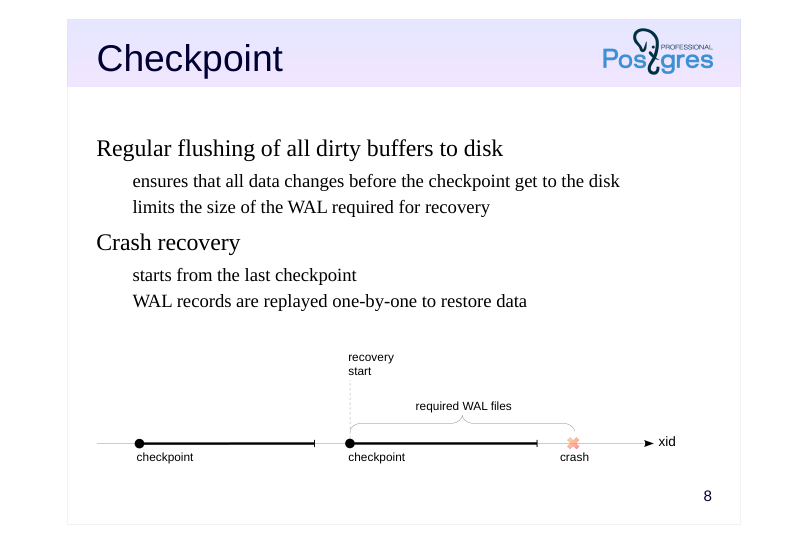
Regular flushing of all dirty buffers to disk
- ensures that all data changes before the checkpoint get to the disk
- limits the size of the WAL required for recovery
- Crash recovery
- starts from the last checkpoint
- WAL records are replayed one-by-one to restore data
Speaker notes
When PostgreSQL crashes, it enters the recovery mode on the next start. The data on disk at this point is inconsistent. Changes to hot pages were in the buffer cache, and are now lost, while some of the later changes have been flushed to disk already.
To restore consistency, PostgreSQL sequentially reads the WAL records, replaying the changes that did not make it to the disk. This way, the state of all transactions at the time of the crash is restored. Then, any transactions that have not been logged as committed are considered aborted.
However, logging all changes throughout a server’s lifetime and replaying everything from day one after each crash is impractical, if not impossible. Instead, PostgreSQL uses checkpoints. Every now and then, it forces all dirty buffers to disk (including clog buffers, which store transaction statuses).
A checkpoint is the moment in time when the flushing of all data to disk is started. However, you only have a valid checkpoint when the flushing of all such buffers is complete. It ensures that all data changes up to this point are safe in persistent memory.
In production environments with a large buffer cache, a checkpoint can flush many dirty buffers, so the server spreads this flushing over time to smooth out the I/O load.
When a crash occurs, recovery is started from the last completed checkpoint. Consequently, it is sufficient to store WAL files only as far back as the last completed checkpoint goes.
Page 10: Crash Recovery Using WAL
Modified table pages exist in the buffer cache but haven’t been written to disk yet. During normal shutdown, the server performs a checkpoint to flush all dirty pages to disk. However, we’ll simulate a system crash by sending a signal to the postmaster process.
When the server comes back up, it should begin the recovery. Let’s try:
All the changes have been recovered. After performing a checkpoint, PostgreSQL automatically deletes WAL files that are no longer necessary for recovery.
Page 11: Performance
 {#source-figure-011 caption=“Source slide page 11: Performance”}
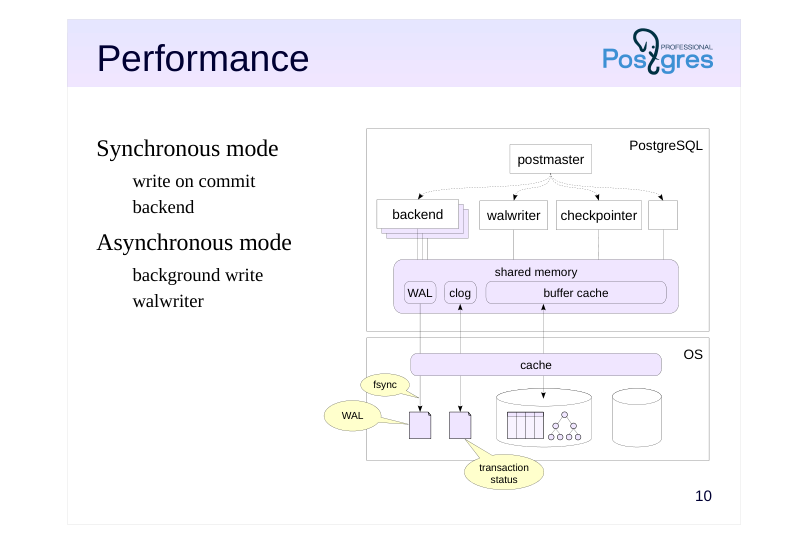
Synchronous mode
- write on commit
- backend
- Asynchronous mode
- background write
- walwriter
Speaker notes
The WAL approach is faster than working directly with disk without a buffer cache. Firstly, a WAL record is smaller than an entire page of data. Secondly, the WAL is written sequentially (and usually not read until a crash occurs), which is better for basic hard disk drives.
Performance can also be managed via configuration settings. If the records are stored to disk immediately (synchronous mode), this guarantees that the committed transaction will not be lost. But recording to disk is expensive and forces the committing backend process to wait in line. To prevent WAL records from getting “stuck” in the OS cache, PostgreSQL relies on call of the fsync function, which forces the data into persistent storage.
There is also asynchronous mode, which has a background process walwriter constantly flushing WAL records to disk, with a certain delay. It is more efficient at the cost of some reliability, but still ensures consistency after crash recovery.
In fact, both modes work together. WAL records of a long transaction are written asynchronously (to free up WAL buffers). And if a page is getting flushed to disk and the corresponding WAL record is not there yet, it will immediately be flushed in synchronous mode.
Page 12: Main Processes
 {#source-figure-012 caption=“Source slide page 12: Main Processes”}
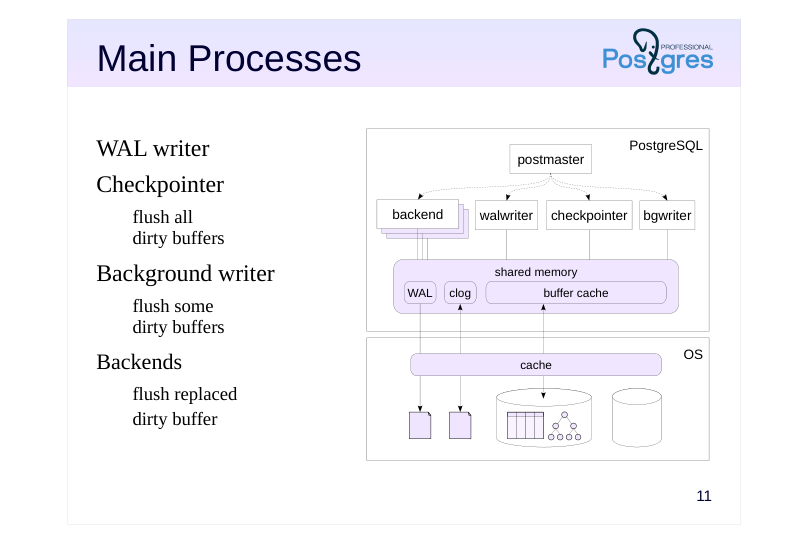
WAL writer
- Checkpointer
- flush all
- dirty buffers
- Background writer
- flush some
- dirty buffers
- Backends
- flush replaced
- dirty buffer
Speaker notes
Let’s take a step back and look at the processes that maintain the buffer cache and the WAL.
First, there is walwriter. This process writes WAL records to disk in asynchronous mode. In synchronous mode, this job is handled by the backend that commits the transaction.
Second, checkpointer, the checkpoint process. It periodically flushes all dirty buffers to disk.
Third, bgwriter (or background writer). It operates similarly to checkpointer, but it only flushes some of the dirty buffers, specifically, those that are most likely to be replaced soon. It frees up buffer space so that when backend selects a buffer to put a new page in, it does not have to flush the old contents of the buffer to disk itself.
Fourth, there are backends that put data into the buffer cache. Whenever a buffer being replaced is still dirty (despite the efforts of checkpointer and bgwriter), the backend will flush it to disk.
Page 13: WAL Levels
Minimal
- guarantees crash recovery
- Replica (default)
- backup
- replication: transmit the WAL on another server and replay it there
- Logical
- logical replication: information about adding, changing,
- and deleting table rows
Speaker notes
WAL was developed as a data protection tool to mitigate the risk of data loss due to crashes.
However, the WAL mechanism turned out to have other applications, if it is supplemented with additional information.
The data stored in the WAL is controlled by the wal_level parameter.
● The minimal level is sufficient to recover after a crash, and nothing else.
● The replica level stores additional information that allows WAL to be used for backup and replication. During replication, WAL records are transmitted to another server and applied there, creating an exact copy (replica) of the original server.
● At the logical level, information is added to the WAL that allows decoding “physical” WAL records and forming “logical” records of adding, changing and deleting table rows. This enables logical replication (see corresponding lessons of DEV2 and DBA3 courses for details).
Page 14: Takeaways
Buffer cache increases performance by reducing the number of disk operations
- WAL ensures reliability
- WAL size is kept in check by checkpoints
- WAL has multiple uses:
- crash recovery
- backup
- replication
Page 15: Practice
- Using the OS tools, find the processes responsible for the buffer cache and the WAL. 2. Stop PostgreSQL in fast mode; start it again. Check the server message log. 3. Now stop PostgreSQL in immediate mode; start it again. Check the server message log and compare with the previous one.
Speaker notes
- To stop in fast mode, use the command
This makes the server abort all open connections and perform a checkpoint before shutting down, so that all data is flushed to disk and consistent. In this mode, the shutdown may take some time, but on startup the server will be good to go right away.
- To stop in immediate mode, use the command
The server will also abort open connections, but will not perform a checkpoint. Data on disk will be inconsistent, like after a crash. In this mode, the server shuts down quickly, but will have to restore data consistency using WAL on startup.
If your PostgreSQL is compiled from source code, the fast stop command will be
and the immediate stop command will be
Page 16: 1. Operating System Processes
First, get the postmaster process ID. It is stored in the first line of postmaster.pid. This file is located in the data directory and is created every time the server starts.
Now, find all the processes spawned by postmaster:
The processes that serve the buffer cache and the WAL include: checkpointer background writer walwriter
2. Stop in Fast Mode
To easily separate old messages from new ones, clear the message log before restarting the server. Do not do this on a real production server.
Server message log:
3. Stop in Immediate Mode
Page 17: Page 17
Server message log:
Before starting to accept connections, the DBMS performed an automatic recovery.
05 Lesson 05: Data Organization / Logical Structure
This page is extracted from the official PDF into native Markdown. Slide text, code and speaker notes are kept in reading order; the original PDF and HTML remain the layout references. HTML source: dev1_05_data_logical.html Archive: DEV1-handouts-16-en.zip PDF pages: 19
Page 1: Data Organization / Logical Structure
Copyright
© Postgres Professional, 2017–2025 Authors: Egor Rogov, Pavel Luzanov, Ilya Bashtanov, Igor Gnatyuk Translated by: Liudmila Mantrova, Alexander Meleshko, Elena Sharafutdinova Photo by: Oleg Bartunov (Phu monastery, Bhrikuti summit, Nepal)
Use of Course Materials
Non-commercial use of course materials (presentations, demonstrations) is allowed without restrictions. Commercial use is possible only with the written permission of Postgres Professional. It is prohibited to make changes to the course materials.
Feedback
Please send your feedback, comments and suggestions to: edu@postgrespro.ru
Disclaimer
Postgres Professional assumes no responsibility for any damages and losses, including loss of income, caused by direct or indirect, intentional or accidental use of course materials. Postgres Professional company specifically disclaims any warranties on course materials. Course materials are provided “as is,” and Postgres Professional company has no obligations to provide maintenance, support, updates, enhancements, or modifications.
Page 2: Topics
- Databases and Templates
- Schemas and Search Path
- Special Schemas
- System Catalog
Page 3: Database Cluster
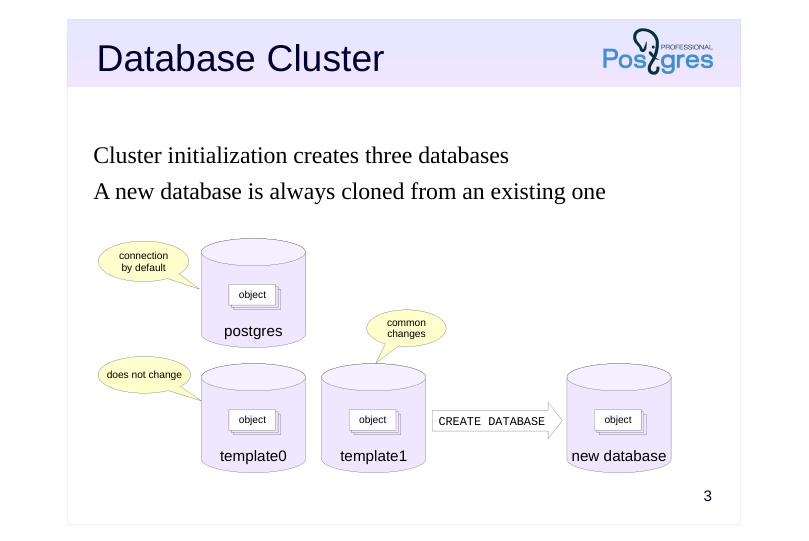 {#source-figure-003 caption=“Source slide page 3: Database Cluster”}
Cluster initialization creates three databases
- A new database is always cloned from an existing one
Speaker notes
A PostgreSQL instance manages multiple databases. This is known as a database cluster. During cluster initialization (which is performed either automatically during installation or manually using the initdb command), three identical databases are created. All other databases created by the user are cloned from an existing one.
By default, the template1 DB is used as the source for creating new databases. Any objects and extensions added to the template will be copied into any database created from it.
The template0 database must never be modified. It is required in at least two scenarios. First, to restore the database from a backup made by the pg_dump utility (this is discussed in the Logical Backup lesson). Secondly, it is used when creating a new database with an encoding different from the one specified during cluster initialization (this is discussed in the DBA2 course).
The postgres database is used to connect to by default by the postgres user. It is not a hard requirement to have it, but some utilities expect the postgres database to be there, so removing it is not a good idea, even if you never use the database directly.
https://postgrespro.com/docs/postgresql/16/manage-ag-templatedbs
Page 4: Databases
To obtain the list of databases, open psql and run:
The student database is there for the student user to connect to more easily. There are some columns in the output that are of no interest for us for now. When a database is created, the template1 template is used by default.
Page 5: Schemas
Namespaces for objects
- divide objects into logical groups
- prevent name conflicts between applications
- Schemas and users are different entities
- Special schemas
- public — all objects are created here by default
- pg_catalog — system catalog
- information_schema — an alternative variant of the system catalog
- pg_temp — a storage for temporary tables
- …
Speaker notes
Schemas are namespaces for database objects. They separate objects into groups for easier management and serve to prevent name conflicts when multiple users access the same database, or when multiple applications or extensions are installed.
In PostgreSQL, schema and user are different entities (although the default settings allow users to seamlessly operate schemas of the same name).
There are several special schemas usually present in any database.
The public schema is used by default for storing objects, unless intentionally configured otherwise.
The pg_catalog schema stores system catalog objects. The system catalog is a collection of tables containing metadata about objects belonging to the cluster. It is itself stored in the cluster. The information_schema is another one with an alternative representation of the system catalog (as defined in the SQL standard).
The pg_temp schema stores temporary tables. (In fact, temporary tables are created in schemas called pg_temp_1, pg_temp_2, and so on: each user has its own schema, but they are all referred to as pg_temp.)
There are other special schemas, more technical in nature.
https://postgrespro.com/docs/postgresql/16/ddl-schemas
Page 6: Cluster Databases and Schemas
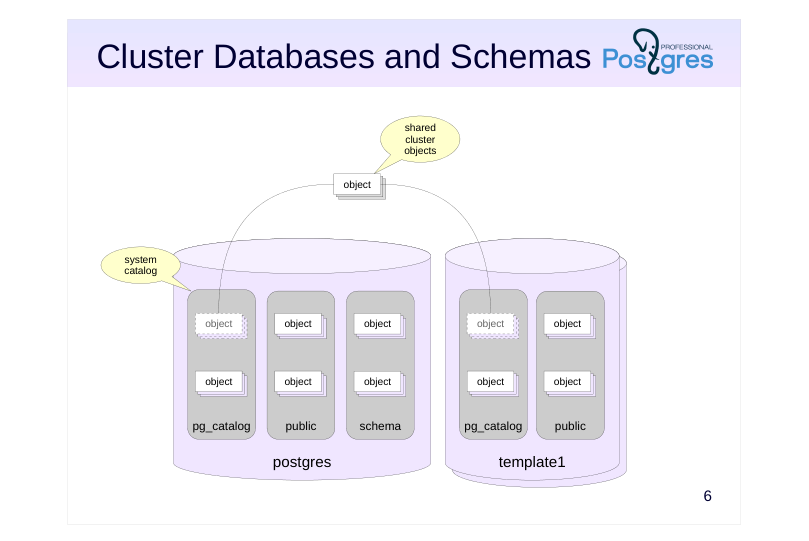 {#source-figure-006 caption=“Source slide page 6: Cluster Databases and Schemas”}
Speaker notes
Schemas belong to databases, and all database objects are distributed between schemas.
However, several system catalog tables store information that is shared by the entire cluster: the list of databases, the list of users, and some other data. These tables are stored outside of any single database, but at the same time they are accessible from any database within the cluster.
This way, a client connected to a database can see descriptions of not only objects that belong to the database but also of cluster-wide objects. Descriptions of objects in other databases, however, cannot be accessed without connecting to the databases first.
Page 7: Schemas
To display schemas in psql, use \dn command (= describe namespace):
It does not show any system schemas, though. To list them, add the ’S’ flag (it works for many other commands too):
We have already talked about some of these schemas (public, pg_catalog, information_schema); we will discuss the rest in other lectures. Another useful flag is the plus sign, which displays additional information:
Create a new schema:
Create a table:
By default, the table will be created in the public schema. To list all the tables in this schema, use the \dt command, specifying a template for schema and table names:
Page 8: Page 8
Tables (as well as other objects) can be moved between schemas. Since this is the logical level, the moving takes place only in the system catalog; physically, the data remains in place.
What will be left in the public schema?
Nothing. What about special?
The table has been moved. Now you can access it, as long as you specify the schema.
Without the schema name, no table is found.
Page 9: Search Path
Determining the object’s schema
- schema is explicitly defined by a qualified name (schema.name)
- name without a qualifier is looked up in the schemas specified in the
- search path
- Search path
- defined by the search_path parameter,
- the real value is shown by the current_schemas function
- non-existent and inaccessible schemas are excluded
- objects are created in the first schema explicitly specified in the path
- pg_temp and pg_catalog schemas are implicitly included first
- unless they are already specified in the search_path parameter
Speaker notes
When specifying an object, the schema it belongs to must be specified as well, since different schemas may contain objects with the same name.
If the object name is qualified by a schema, the explicitly specified schema is used. Otherwise, the schema is determined by the search_path configuration parameter. A search path is a list of schemas that is scanned sequentially from left to right, while excluding non-existent schemas and any schemas inaccessible to the current user.
When a new object is created with an unqualified name, the first viable schema from the search path is selected as the target schema for the object to be stored in. During object search, two schemas are implicitly added to the front of the search path:
● the pg_catalog schema for access to the system catalog,
● the pg_temp schema if the user has created any temporary objects.
The actual search path, including implicit schemas, can be obtained using the current_schemas(true) function.
The concept of search_path is similar to the PATH variable in operating systems.
https://postgrespro.com/docs/postgresql/16/runtime-config-client#GUC-SEA RCH-PATH
Page 10: Search Path
This is the default search path value:
“$user” stands for the schema with the same name as the current user (in our case, student). Since there is no student schema, it is ignored. Instead of guessing which schemas actually exist, which do not, and which are currently unavailable, you can use the function:
The logical parameter defines if the system schemas implicitly added to the path are displayed or not. Here, in addition to excluding the non-existent schema, PostgreSQL has implicitly included the system catalog schema at the top of the list:
We can define the search path, for example:
The table will now be found.
We have just set a configuration parameter at the session level. If we restart the session, it will have reverted to default. Setting the parameter at the cluster level is also ill-advised. Perhaps this path does not always work for everyone, and besides, different databases may have different sets of schemas. Thankfully, you can set the parameter for a specific database:
Now, it should apply for all connections to data_logical. Let’s try:
Page 11: System Catalog
Description of all cluster objects
- the list of tables in each database (the pg_catalog schema) and several
- cluster-wide objects
- several quality-of-life views
- Access
- SQL queries, special psql commands
- Conventions
- table names start with pg_
- column names contain a three-letter prefix
- the column oid of the oid type is used as the primary key
- object names are always lowercase
Speaker notes
The system catalog stores metadata about cluster objects. In each database, you can find a separate set of tables that describe the objects of this particular database, as well as several tables common to the whole cluster. There are several convenient views defined for these tables.
https://postgrespro.com/docs/postgresql/16/catalogs
You can access the system catalog using regular SQL queries. DDL commands can be used to modify data in the system catalog. In addition, psql offers a number of commands to browse the system catalog content.
https://postgrespro.com/docs/postgresql/16/app-psql
All system catalog table names start with pg_, for example, pg_database. Table columns start with a prefix, usually corresponding to the table name, for example, datname. Object names are always in lowercase, for example, postgres.
System catalog tables have primary keys. As a rule, these are columns with the name oid and of the oid type (object identifier, a 32-bit integer). These identifiers are also found in other columns as individual values or arrays, linking tables together logically. Foreign keys in the system catalog are not explicitly defined.
https://postgrespro.com/docs/postgresql/16/datatype-oid
Page 12: System Catalog
To display information about an object, psql (like other interactive user tools) accesses system catalog tables. For example, the \l command (list cluster databases) reads from pg_database table:
You can always check what queries a command performs:
This is one way to explore the system catalog. Disable extended command output.
The schema list is stored in the table:
Page 13: Page 13
You can get lists of objects such as tables or indexes like this:
All columns here start with rel (relation). relkind — object type (r - table, i - index, etc.) relnamespace — schema The relnamespace field is of the oid type; here is the corresponding row in the pg_namespace table:
To easily translate between text and oid formats, a special regnamespace type is used:
For example, let’s retrieve the list of objects from pg_catalog:
Similar reg types are defined for some other tables in the system catalog. They simplify queries and avoid unnecessary table joins.
Deleting Objects
Can you delete the special schema?
A schema cannot be deleted while there are any objects in it. You need to delete or move them elsewhere first. Or you can delete a schema along with all its objects:
Page 14: Page 14
What about deleting the entire database? Firstly, you cannot delete the database that you are currently connected to, so let’s disconnect.
Secondly, the database also cannot be deleted while there are any active connections to it. Let’s create a connection in a separate session and try to delete the database:
An expected error. However, there is the FORCE option that will try to forcibly terminate all database connections, and then proceed to delete it:
Page 15: Takeaways
On the logical level
- a cluster contains databases
- a database contains schemas
- a schema contains specific objects (tables, indexes etc.)
- New databases are created by cloning existing ones
- Object schemas are determined by the search path
- The system catalog stores a full description of the contents of the database cluster
Page 16: Practice
- In a new database, create a schema with the same name as the current user. Create a schema named app. Create several tables in both schemas. 2. Use psql to obtain descriptions of the schemas and a list of tables within them. 3. Modify the search path parameter so that when connecting to the database, tables from both schemas are accessible by an unqualified name. The “username” schema from task 1 should have priority. Verify that the new configuration works as intended.
Page 17: 1. Database, Schemas, Tables
Create a database:
Schemas:
Tables for the student schema:
Tables for the app schema:
2. Description of Schemas and Tables
Description of schemas:
Description of tables:
Page 18: Page 18
3. Search Path
The current search path settings show only the tables inside student:
Change the search path at the database level.
Tables from both schemas are visible now, with student taking precedence:
Page 19: Page 19
06 Lesson 06: Data Organization / Physical Structure
This page is extracted from the official PDF into native Markdown. Slide text, code and speaker notes are kept in reading order; the original PDF and HTML remain the layout references. HTML source: dev1_06_data_physical.html Archive: DEV1-handouts-16-en.zip PDF pages: 15
Page 1: Data Organization / Physical Structure
Copyright
© Postgres Professional, 2017–2025 Authors Egor Rogov, Pavel Luzanov, Ilya Bashtanov, Igor Gnatyuk Translated by Liudmila Mantrova, Alexander Meleshko, Elena Sharafutdinova Photo by: Oleg Bartunov (Phu monastery, Bhrikuti summit, Nepal)
Use of course materials
Non-commercial use of course materials (presentations, demonstrations) is allowed without restrictions. Commercial use is possible only with the written permission of Postgres Professional. It is prohibited to make changes to the course materials.
Feedback
Please send your feedback, comments and suggestions to: edu@postgrespro.ru
Disclaimer
Postgres Professional assumes no responsibility for any damages and losses, including loss of income, caused by direct or indirect, intentional or accidental use of course materials. Postgres Professional company specifically disclaims any warranties on course materials. Course materials are provided “as is,” and Postgres Professional company has no obligations to provide maintenance, support, updates, enhancements, or modifications.
Page 2: Topics
- Tablespaces and Catalogs
- Files and Pages
- Forks: Main, Visibility Map, Free Space Map
- TOAST
Page 3: Tablespaces
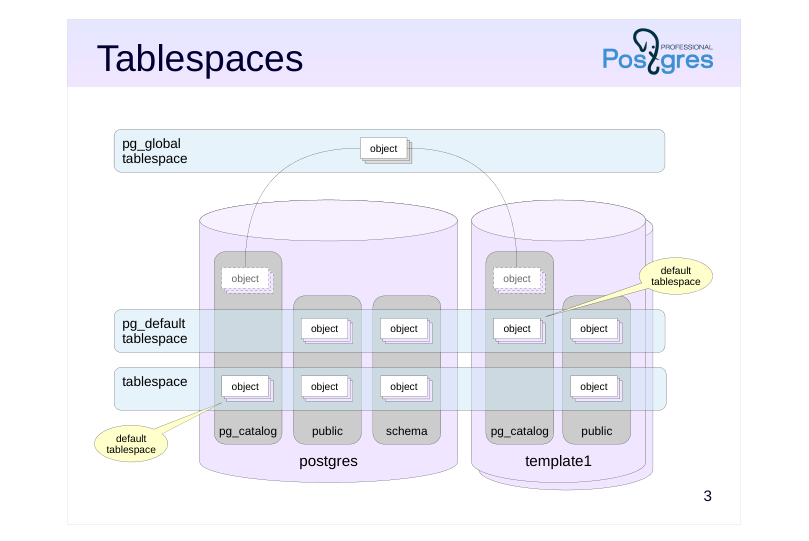 {#source-figure-003 caption=“Source slide page 3: Tablespaces”}
Speaker notes
Tablespaces are used to organize the physical storage of data and determine the location of data in the file system. For example, one tablespace can be mapped to slow disks for archived data, and another on fast disks with frequent activity.
On cluster initialization, two tablespaces are created: pg_default and pg_global.
A tablespace can be used by multiple databases, and a database can use multiple tablespaces at once.
Each database has a default tablespace where all database objects are created (unless explicitly set otherwise). System catalog objects are also stored there. Databases will use the pg_default tablespace as their default, unless another one is set by the user.
The pg_global tablespace is special as it stores only those objects that are shared by the whole cluster.
Page 4: Catalogs
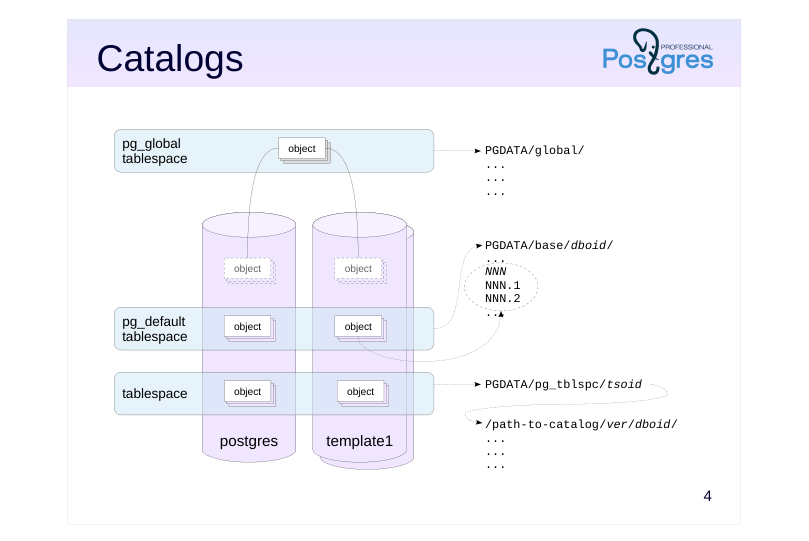 {#source-figure-004 caption=“Source slide page 4: Catalogs”}
Speaker notes
Essentially, a tablespace is a reference to the directory in which the data is located. The standard tablespaces pg_global and pg_default are always located in PGDATA/global/ and PGDATA/base/, respectively. When a custom tablespace is created, an arbitrary directory can be specified. For (internal) convenience, PostgreSQL also creates a symbolic link to the directory in PGDATA/pg_tblspc/.
The PGDATA/base/ directory comprises different subdirectories for each database (unlike PGDATA/global/, which stores data referring to the whole cluster).
Inside a custom tablespace directory, there is another level of subdirectories for different PostgreSQL server versions. This is helpful during server version upgrade.
Finally, these directories are where the actual objects are stored, one or more files per object.
Each such file, called a segment, takes up no more than 1GB by default (this size can be changed when building the server). This is also why several files can correspond to each object. It is necessary to take into account the impact of a potentially large number of files on the file system used.
https://postgrespro.com/docs/postgresql/16/storage-file-layout
Page 5: Using Tablespaces
Initially, a cluster contains two tablespaces. You can learn about them from the system catalog:
Naturally, this is one of the cluster’s global tables. A command in psql that does a similar thing:
A new tablespace needs an empty directory owned by the same OS user who has started the database server:
Change the directory owner:
The tablespace can be created now:
When creating a database, you can set a tablespace to be used by default:
All new database objects will be created in this tablespace by default.
Page 6: Forks and Files
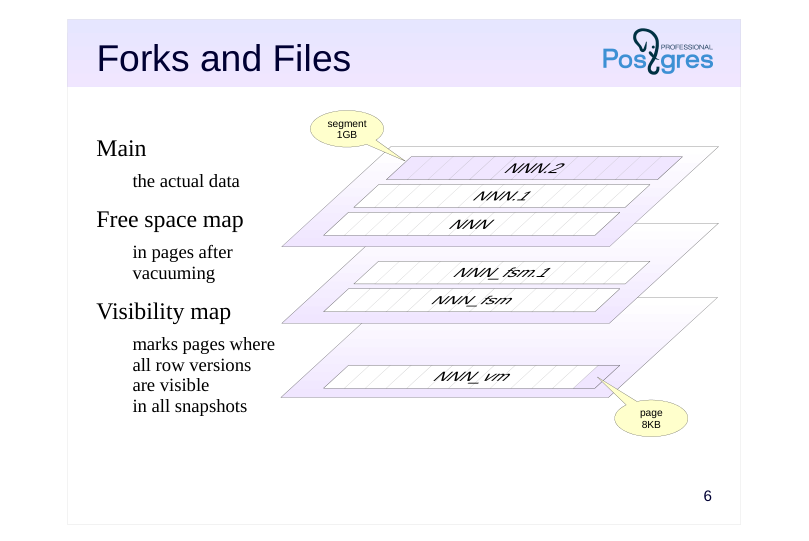 {#source-figure-006 caption=“Source slide page 6: Forks and Files”}
Main
- the actual data
- Free space map
- in pages after
- vacuuming
- Visibility map
- marks pages where
- all row versions
- are visible
- in all snapshots
Speaker notes
Usually, each object has several corresponding forks. Each fork is a set of segments (that is, one or more files). The segment files that make up the forks are logically divided into pages, usually 8KB each (this size can be set for the entire cluster only when building the server). The file pages of all forks are read from disk in a completely uniform way through a shared buffer cache mechanism. The forks themselves contain different information and have different internal page structure.
The main fork contains the actual data, such as table row versions and index records.
The vm fork is the visibility (bit)map. It marks pages containing only the current row versions visible in all data snapshots. In other words, these pages have not been changed for so long that they have been completely vacuumed of obsolete tuples.
The visibility map is used to optimize vacuuming (marked pages do not need to be vacuumed) and to speed up index access. Row versioning information exists only for tables, but not for indexes. Therefore, after getting a link to the required row version from an index, you first need to check its visibility by reading the corresponding table page. But if the index itself already contains all the necessary columns, and the page is marked in the visibility map, then reading the table page can be skipped.
The fsm fork is the free space map. It marks the available space inside the pages, which is created, for example, during vacuuming. This map is used when inserting new row versions in order to quickly find the appropriate page.
Page 7: Forks and Files
Run vacuum to ensure that all forks exist in the new table:
You can check where an object’s files are stored:
Let’s check the files (names and sizes in bytes):
The files represent the three forks: main, free space map, and visibility map. Objects can be moved between tablespaces, but (unlike with schemas) this involves physically moving the data around.
Size of Objects
There are several ways to find the size of a database and objects in it.
Prettify the number for readability:
Total table size (with all indexes):
Table size (separately):
Page 8: Page 8
Index size (separately):
You can get the size of each individual fork, for example:
Another function shows the size of a tablespace on the disk:
Page 9: TOAST
A row version must fit into one page
- some of the attributes can be compressed
- or moved into a separate TOAST table
- or both compressed and moved
- TOAST table
- pg_toast schema
- supported by its own index
- oversized attributes are divided into parts smaller than a page
- accessed by querying a corresponding oversized attribute
- native versioning
- works transparently for the application
Speaker notes
Any row version in PostgreSQL must fit entirely into one page. Oversized row versions are stored using TOAST, The Oversized Attributes Storage Technique. It implies several strategies. Firstly, the oversized attribute can be compressed so that the row version fits into the page. If this fails, the attribute can be moved into a separate service table. Both approaches can be applied at the same time.
Any primary table can have a separate TOAST table (with a dedicated index) created for it, if necessary. Such tables and indexes are located in a separate pg_toast schema and therefore are usually hidden.
The row versions in the TOAST table must also fit into one page each, so longer values are split into multiple chunks and transparently “glued” together by PostgreSQL when the application demands.
TOAST tables are used only when oversized values are accessed. The tables have their own row versioning. Whenever a data update in the main table does not modify the oversized value in the TOAST table, the new row version in the main table will refer to the same old TOAST value, saving disk space.
https://postgrespro.com/docs/postgresql/16/storage-toast
Page 10: TOAST
Add a very long string to the table:
Will the table size change?
Yes. What about the main fork size?
No. Since the tuple won’t fit into a single page, the value of s will be sliced and put into a toast table. You can find this table in the system catalog (using the regclass type to get the table name from its oid):
The character string is sliced, and PostgreSQL will reassemble it as needed:
Finally, remove the database.
Since there are no objects left in the tablespace, it too can be dropped:
Page 11: Page 11
Page 12: Takeaways
On the physical level
- data is distributed across tablespaces (directories)
- an object comprises several forks
- a fork consists of one or more segments
- Tablespaces are managed by the administrator
- Forks, files, and TOAST are all PostgreSQL internals
Page 13: Practice
- Create a new database and connect to it. Create a tablespace ts. Create a table t in the ts tablespace and add several rows to it. 2. Calculate the space occupied by the database, table, and tablespaces ts and pg_default. 3. Move the table to the pg_default tablespace. How has the space used by tablespaces changed? 4. Delete the tablespace ts.
Page 14: 1. Tablespaces and Tables
Create a database:
Tablespace:
Create a table:
2. Data Size
Database size:
Table size:
Tablespace size:
The size of the tablespace is larger than the size of the table by 4KB due to how Linux calculates the size of the directory contents.
3. Moving a Table
Move the table:
New size of tablespaces:
Page 15: 4. Removing a Tablespace
Remove the tablespace…
…and the directory where its data was stored:
07 Lesson 07: The Bookstore App / Data Schema and API
This page is extracted from the official PDF into native Markdown. Slide text, code and speaker notes are kept in reading order; the original PDF and HTML remain the layout references. HTML source: dev1_07_bstore_schema.html Archive: DEV1-handouts-16-en.zip PDF pages: 29
Page 1: The Bookstore App / Data Schema and API
Copyright
© Postgres Professional, 2017–2025 Authors: Egor Rogov, Pavel Luzanov, Ilya Bashtanov, Igor Gnatyuk Translated by: Liudmila Mantrova, Alexander Meleshko, Elena Sharafutdinova Photo by: Oleg Bartunov (Phu monastery, Bhrikuti summit, Nepal)
Use of Course Materials
Non-commercial use of course materials (presentations, demonstrations) is allowed without restrictions. Commercial use is possible only with the written permission of Postgres Professional. It is prohibited to make changes to the course materials.
Feedback
Please send your feedback, comments and suggestions to: edu@postgrespro.ru
Disclaimer
Postgres Professional assumes no responsibility for any damages and losses, including loss of income, caused by direct or indirect, intentional or accidental use of course materials. Postgres Professional company specifically disclaims any warranties on course materials. Course materials are provided “as is,” and Postgres Professional company has no obligations to provide maintenance, support, updates, enhancements, or modifications.
Page 2: Topics
- Bookstore App Overview
- Data Schema Design, Normalization
- Data Schema, the Final Version
- Setting Up the API
Page 3: The Application
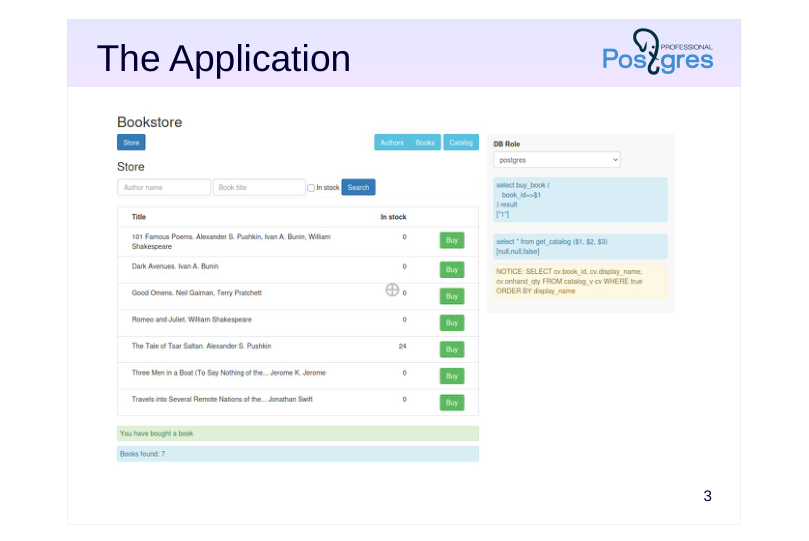 {#source-figure-003 caption=“Source slide page 3: The Application”}
Speaker notes
The application consists of several parts, which are provided as separate tabs.
“Store” is a customer UI for buying books online.
Other tabs represent the employee UI, which is available only to the bookstore staff (the admin panel).
“Catalog” is the storekeeper’s UI which is used for ordering books to the store and viewing arrivals and sales.
“Books” and “Authors” are the UI for librarians, where they can register arrivals.
For training purposes, all this functionality is exposed in a single web page. If any feature is unavailable because the required object (such as a table or a function) is missing, the application will report an error. It also displays the text of all queries sent to the server.
We will start with an empty database and will gradually implement all the required components by the end of the course.
The source code of the application frontend will not be discussed in this course, but is available for download: https://pubgit.postgrespro.ru/pub/dev1app.git
Page 4: Application Demonstration
This demo shows the Bookstore app as it would look like after completing all practice assignments. The app opens in a separate browser tab in the course VM: Opening http://localhost…
Page 5: Books
An ER model for high-level design
- entities — concepts of the application domain
- relationships — connections between entities
- attributes — properties of entities and relationships
- entity
Book
- attributes
- title
- authors
- quantity
- operations
Speaker notes
After taking a look at the application’s UI and functionality, we need to figure out its data schema. We will not go into details about database design: it is a separate branch of knowledge, which is beyond the scope of this course, but we cannot ignore this topic entirely.
High-level database design often uses the ER model (“Entity–Relationship”). It deals with entities (concepts of the subject area), their relationships, and attributes (the properties of entities and relationships). The model allows us to remain at the logical level, without getting down to data representation at the physical level (such as its table form).
The first approach to database design is creating a diagram as shown on this slide: a book is represented as a single big entity, and everything else becomes its attributes.
Page 6: Data Schema
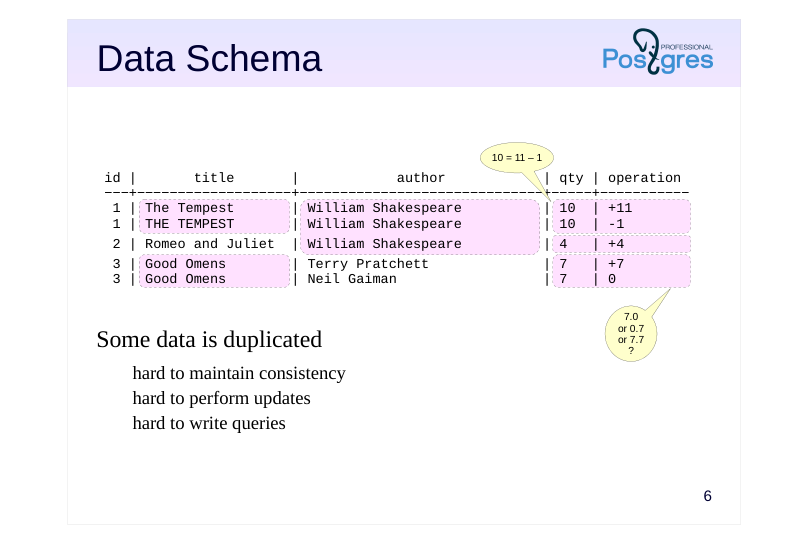 {#source-figure-006 caption=“Source slide page 6: Data Schema”}
- Some data is duplicated
- hard to maintain consistency
- hard to perform updates
- hard to write queries
Speaker notes
Clearly, this approach cannot be correct. It may be not quite obvious in the diagram itself, but let’s try to map this diagram onto database tables. There are several ways to do it. One of them is shown on the slide: the table corresponds to the entity, and table columns represent the attributes of this entity.
This diagram is a good illustration that some data ends up duplicated (as highlighted on the slide). Data duplication may lead to problems with consistency, the very thing a database system is supposed to ensure.
For example, each of the two rows related to book 3 must list the total quantity (7 items). How should purchases be recorded, then? Some rows will need to be added to record the purchase operations. And then the quantity in all the duplicated rows will need to be reduced from 7 to 6. But what if an error leads to data discrepancy between these rows? How can we define a constraint to make sure the values stay in sync?
Many queries will also become overcomplicated. How can we find the total number of books? Or get a list of distinct authors?
Thus, such a schema will not work well for relational databases.
Page 7: Data Schema (Variant)
- Schemaless design
- consistency is maintained at the application side
- hard to write queries
- low performance (multiple joins)
Speaker notes
Another way to represent an entity as a table is a so-called EAV schema (“entity–attribute–value”). It allows storing anything at all in a single table. Technically, we get a relational database, but it has virtually no schema, and the database system cannot guarantee data consistency. Consistency has to be maintained by the application alone, and sooner or later it is bound to be compromised.
With such a schema, it is hard to write queries (although they are quite easy to generate). As a result, handling any significant volume of data becomes a problem because of multiple self-joins.
However, this approach has some advantages. For example, such a “schema” is easy to build up: when adding a new entity or attribute, you simply add new rows to the table.
Still, in general, this is not a good approach.
Page 8: Data Schema (Variant)
- Schemaless design
- consistency is maintained at the application side
- hard to write queries (a dedicated language)
- has index support
Speaker notes
Another similar approach involves representing data in JSON format, NoSQL-style. All the previous considerations still apply here.
Besides, you can’t query such a structure using SQL. Instead, a special language is used. (Previously, jsQuery was the usual choice, until the SQL:2016 standard brought SQL/JSON Path Language capabilities into PostgreSQL 16.)
https://github.com/postgrespro/jsquery
https://postgrespro.com/docs/postgresql/16/functions-json#FUNCTIONS-SQ LJSON-PATH
Although PostgreSQL provides JSON index support, performance is still a concern.
Such a schema is best used when the database only needs to get JSON data by ID, and no serious data alteration within the JSON structure is expected. For us, this is not the case.
(Naturally, nothing is set in stone here. See the last practice assignment for details on this.)
Page 9: Books and Operations
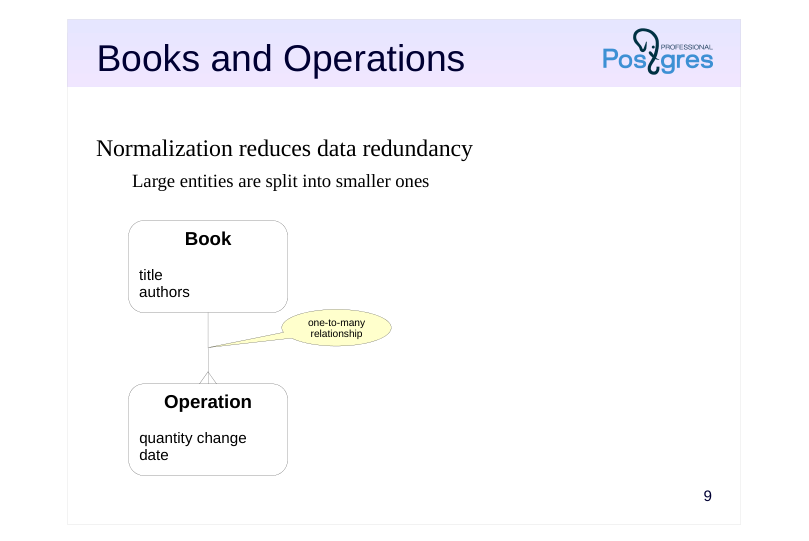 {#source-figure-009 caption=“Source slide page 9: Books and Operations”}
Normalization reduces data redundancy
- Large entities are split into smaller ones
Book
Operation
Speaker notes
To work with data in a relational database system properly, we need to eliminate redundancy. This process is called normalization.
You might be familiar with various normal form concepts (first, second, third, Boyce–Codd, etc.) We are not going to discuss them here; in essence, it is enough to understand that all this math pursues one and the same goal: eliminating redundancy.
The way to reduce redundancy is to split a larger entity into smaller ones. How exactly to split it should be prompted by common sense (which cannot be replaced by the knowledge of normal forms alone anyway).
In our case, everything is quite straightforward. Let’s start by separating books and operations. These two entities are connected by a one-to-many relationship: there can be several operations on each book, but each operation relates to only one book.
Page 10: Data Schema
Speaker notes
At the physical level, this can be represented by two tables: books and operations.
An operation changes the quantity of books (sell books if negative, order new books if positive). Note that the book entity has no quantity attribute anymore. Instead, you get the quantity by adding up all changes made by operations related to this book. Having an additional quantity attribute would only create data redundancy again.
This solution might raise some eyebrows at first. Is it really a good idea to have to calculate the amount every time instead of having a separate field to query? The answer is that we can simply create a view that shows the current amount of books in store. This will not lead to redundancy, because the view is just another query.
But what about performance? If summing up all changes brings too much overhead, we can resort to denormalization: add the quantity field to the books table and ensure its consistency with the operations table. Whether to do this or not is beyond the scope of this course (it is discussed in the QPT Query Performance Tuning course). Common sense suggests that it’s not required for our bare-bones app, but we will get back to denormalization when we get to the Triggers lecture.
Thus, moving all operations into a separate entity resolves most of the duplication issues, but not all of them.
Page 11: Books, Authors, Operations
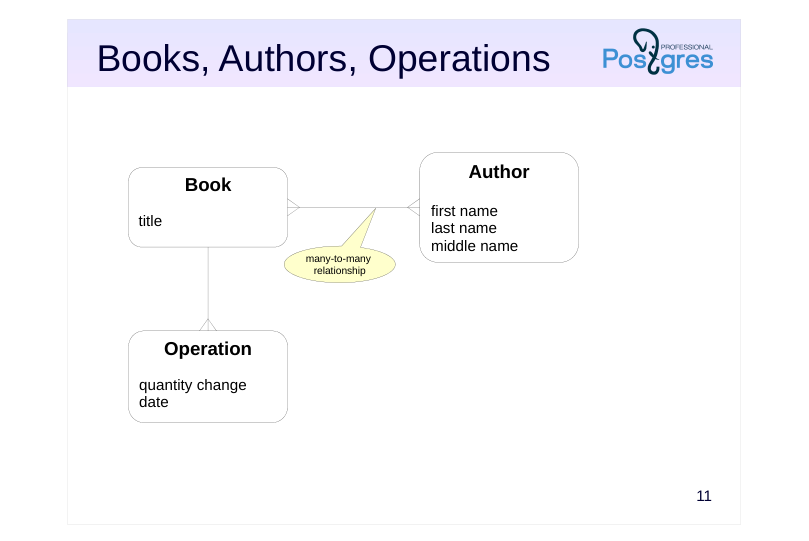 {#source-figure-011 caption=“Source slide page 11: Books, Authors, Operations”}
Book
Operation
Speaker notes
That’s why we have to go deeper: separate books from authors and tie them by a many-to-many relationship: a book can be written by several authors, and each author can have more than one book. At the table level, such relationship can be implemented using an additional intermediate table.
The author’s attributes will be their first, last and middle name. It makes sense because we may need to work with each of these attributes separately, for example, to display the author’s last name and initials.
Page 12: Application Schema
The application schema consists of four tables:
Books
We use the following data types here: integer; text, which is a text string of arbitrary length. We also use the PRIMARY KEY constraint. The GENERATED AS IDENTITY clause is used to automatically generate unique values. GENERATED AS IDENTITY columns take their values from special database objects called sequences. We can obtain the name of the used sequence as follows:
If required, you can also create sequences manually and query them directly:
A sequence is the most efficient way of generating unique IDs. But you should keep in mind that: there may be gaps in numbering (since the changes are not transactional); the numbers may not increase monotonically (if sessions cache values). Here is the data stored in the books table:
Page 13: Page 13
Note Note that book titles can be quite long. We use psql expanded display mode, and xheader_width parameter introduced in PostgreSQL 16 helps us cut out the header of the wide column:
Compare the output:
Authors
Page 14: Page 14
In this table, we also use the NOT NULL constraint, which means that undefined values are not allowed.
Note Note that the middle name might be missing (or defined by an empty string). The PRIMARY KEY constraint was mentioned in the \d output together with the terms “index” and “btree”. Btree is the main index type used in databases to speed up search and provide support for constraints (primary key and unique). Suppose that our bookstore sells books written by a million of different authors with the same name:
How long will it take to find an author in such a table?
If we ask the optimizer to display the query plan, we will see that Seq Scan is used; it means that the whole table is scanned sequentially using a Filter to find the required value:
And what if we perform the search by an indexed field?
Page 15: Page 15
The query time has been reduced by several orders of magnitude. And the query plan now contains an index:
We can also create an index by the last name (and analyze the table to gather up-to-date statistics):
However, the index is not a universal performance tuning tool. Having an index is usually very useful if the query needs to select only a small portion of all table rows. But if it is required to read a lot of data, the index will only add overhead, and the optimizer is smart enough to understand it:
Besides, you have to keep in mind that indexes take extra disk space, and index updates caused by table modifications bring extra overhead. Let’s cancel all our changes (including index creation):
Authorship
This table implements many-to-many relationship.
Page 16: Page 16
In addition to all the previously used constraints, this table also uses FOREIGN KEY, which is a referential integrity constraint. In fact, this table contains two foreign keys: one of them refers to the books table, and the other refers to the authors table. The seq_num column defines the order in which multiple authors of the same book should be listed.
Note Note that we have a composite primary key here.
Operations
This table uses one more data type: date, which defines a date without time of day. For the date_created column, the current date is specified as the default value (using the DEFAULT clause).
Apart from the data types used in application tables, we are going to come across the boolean type all the time. For example, the expressions in WHERE clauses are of the boolean type. It’s important to remember that, unlike traditional programming languages, SQL uses three-valued logic: in addition to true and false, there is also the NULL value (which can be interpreted as “the value is unknown”). You will see some other data types in the examples. Check the Basic Data Types and Functions handout (datatypes.pdf) for details. We will also cover some other types that are more complex: the composite type, which represents a record similar to a table row (in SQL. Composite Types);
Page 17: Page 17
arrays (in PL/pgSQL. Arrays).
Page 18: Designing the API
Tables and triggers
- reading data directly from tables (views)
- writing data directly to tables (views)
- using triggers for changing related tables
- the application must be aware of the data model
- this approach provides maximum flexibility
- hard to maintain consistency
- Functions
- reading data via table functions
- writing data by calling functions
- the application is separated from the data model and is limited by API
- lots of wrapper functions required
- potential performance issues
Speaker notes
There are several ways to set up an API.
The first option is to allow the application to access and modify database tables directly. In this case, the application must have the exact knowledge of the data model. This requirement can be relaxed to some extent by using views.
Another limitation of this approach is that the application has to follow certain rules; otherwise, it is very hard to maintain data consistency if you have to address all possible inappropriate operations at the database level. But this is the approach that provides the most flexibility.
Another option is to forbid direct table access from the application and allow only function calls. Reading data can be performed by table functions (which return a set of rows). Writing can be performed by calling other functions and passing the required data to them. In this case, all the necessary consistency checks can be implemented within functions: the database will be protected, but the application will be able to use only a limited set of features that we provide. It requires writing many wrapper functions and can lead to performance degradation.
You can also combine these two approaches. For example, you can allow the application to read data from tables directly, but perform modifications only by functions.
Page 19: Customer API
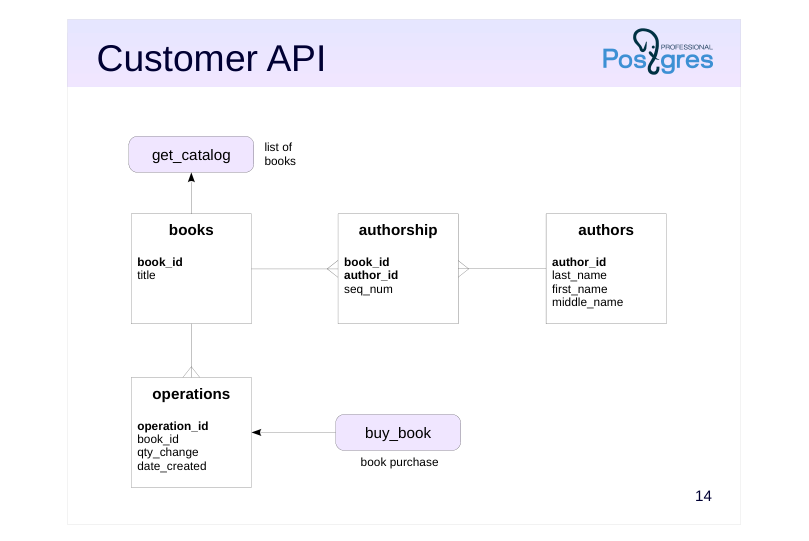 {#source-figure-019 caption=“Source slide page 19: Customer API”}
Speaker notes
In this application, we will try different ways of setting up the interface (although it’s usually better to stick to one approach when developing real applications).
The store will use API functions:
● get_catalog for looking up books (see SQL. Composite Types lesson)
● buy_book for making a purchase (see PL/pgSQL. Query Execution)
Page 20: Employee API
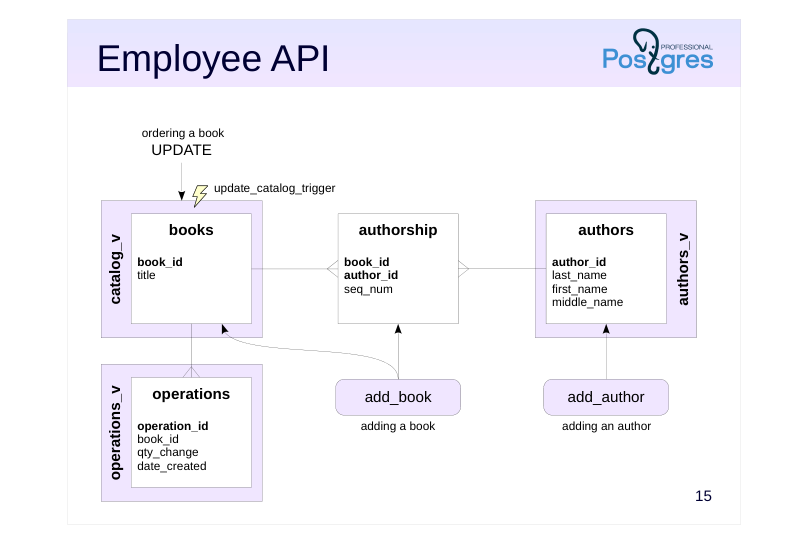 {#source-figure-020 caption=“Source slide page 20: Employee API”}
Speaker notes
The admin panel is going to retrieve data by accessing the following views (which we create as part of the practice for this lecture):
● catalog_v for the list of books,
● authors_v for the list of authors,
● operations_v for the list of operations.
Authors will be added using the add_author function (we will create it once we get to the PL/pgSQL. Query Execution lecture). For adding books, we will implement the add_book function (PL/pgSQL. Arrays lecture).
To enable book purchase, we will make the catalog_v view updatable (PL/pgSQL. Triggers lecture).
Page 21: Views
A view is a named query. For example, you can create a view that displays only those authors who do not have a middle name, as follows:
Now this view can be used in queries almost like a regular table:
In a simple case, other operations can also be applied to a view, for example:
In complex cases, you can use triggers to enable insert, update, and delete operations. We will explain it in the PL/pgSQL. Triggers lecture. At the planning stage, the view “unfolds”, revealing the base tables:
The application uses three views. They will be very simple at first, but later we’ll move some application logic into them. The authors view displays a concatenation of the first name, last name, and middle name (if available):
The catalog view displays only the book title for now:
Page 22: Page 22
The operations view specifies the operation type (arrival or sale):
Page 23: Takeaways
Database design is a separate complex topic
- theory is important, but it should not take precedence over common sense
- Normalized data simplifies the development and facilitates consistency support
- The API can use tables, views, functions, and triggers
Page 24: Practice
- Create bookstore database and the bookstore schema in it. Set up the search path to this schema at the database level. 2. In the bookstore schema, create books, authors, authorship, and operations tables with all the necessary constraints, exactly as shown in the demo. 3. Insert data about several books into the tables. Check the result by running some queries. 4. In the bookstore schema, create authors_v, catalog_v, and operations_v views, so that they look exactly like shown in the demo. Check that the application now shows the data in Books, Authors, and Catalog tabs.
Speaker notes
- Recall the contents of the Data Organization. Logical structure lesson.
You can use the data shown in the demo, or come up with your own data.
Try writing queries to the base tables that return the same results as the queries to views shown in the demo. Then save these queries as views.
After completing the assignments, make sure to compare your queries with those in the provided keys. Make corrections if necessary.
Page 25: 1. Schema and Search Path
2. Tables
Authors:
Books:
Authorship:
Operations:
3. Data
Authors:
Page 26: Page 26
Books:
Authorship:
Operations:
4. Views
Authors view:
Catalog View:
Operations View:
Page 27: Page 27
Page 28: Practice+
- What additional attributes can appear for these entities as the application evolves? 2. Suppose you have to store the information about the publisher. Extend the ER diagram accordingly and create the corresponding tables. 3. Some books can belong to a series (such as “The Adventure Collection”). How will it affect the schema? 4. Suppose our store started selling hardware equipment (motherboards, CPUs, memory, storage devices, monitors, etc.). What entities and attributes would you use to classify them? Keep in mind that new types of equipment with new specifications are released regularly.
Speaker notes
- Different publishers may have different book series with the same title.
Page 29: 1. Additional Attributes
Some examples: Authors: role (author, editor, translator, etc.); Books: summary; Operations: current status (paid, shipped, etc.).
2. Publishers
Add the Publisher entity with at least the Name attribute. Books are linked to publishers by a many-to-many relationship: a book can be published by different publishers. Therefore, at the physical level, you will need an intermediate Publications table with the publication year attribute. (Of course, this is a simplified model; it can be refined further if desired.)
3. Series
Add the Series entity. It is not the book itself that belongs to the series, but its specific publication, so it makes sense to bring the Publication table to the ER model level and associate it with the series in a one-to-many relationship (each publication belongs to one series, each series may include several publications). A series is also linked by a one-to-many relationship with a publisher (a publisher may have several series, and each series belongs to a specific publisher). But there are also off-series editions. These can be placed into a fictitious No series series, or by never specifying the foreign key for the publication.
4. Computer Parts
Considering each type of computer component, you can easily identify the necessary attributes. Some attributes will be shared (for example, the manufacturer and the model name), and some will make sense only for this specific type. For example: Processor: frequency; Monitor: diagonal, resolution; Hard drive: size, volume. The problem is that the computer parts market is very dynamic. Some time ago, hard drives were determined by the disk rotation speed and capacity, but now the type is important (solid-state, rotating, hybrid). In the days of CRT monitors, the refresh rate was important, but now it’s about the type of matrix. Nobody needs CD drives anymore, but flash drives are prevalent. And so on. Thus, either you will have to constantly change the data schema (and, therefore, constantly change the application that works with this data!), or look for a more universal model by abandoning rigid structure and consistency control. We discussed some universal models (for example, storing part of the data in JSON) in the presentation.
08 Lesson 08: SQL / Functions
This page is extracted from the official PDF into native Markdown. Slide text, code and speaker notes are kept in reading order; the original PDF and HTML remain the layout references. HTML source: dev1_08_sql_func.html Archive: DEV1-handouts-16-en.zip PDF pages: 23
Page 1: SQL / Functions
Copyright
© Postgres Professional, 2017–2025 Authors: Egor Rogov, Pavel Luzanov, Ilya Bashtanov, Igor Gnatyuk Translated by: Liudmila Mantrova, Alexander Meleshko, Elena Sharafutdinova Photo by: Oleg Bartunov (Phu monastery, Bhrikuti summit, Nepal)
Use of Course Materials
Non-commercial use of course materials (presentations, demonstrations) is allowed without restrictions. Commercial use is possible only with the written permission of Postgres Professional. It is prohibited to make changes to the course materials.
Feedback
Please send your feedback, comments and suggestions to: edu@postgrespro.ru
Disclaimer
Postgres Professional assumes no responsibility for any damages and losses, including loss of income, caused by direct or indirect, intentional or accidental use of course materials. Postgres Professional company specifically disclaims any warranties on course materials. Course materials are provided “as is,” and Postgres Professional company has no obligations to provide maintenance, support, updates, enhancements, or modifications.
Page 2: Topics
- Functions and their Specifics in Databases
- Parameters and Return Values
- Passing Arguments in a Function Call
- Volatility Categories and Query Planning
Page 3: Functions in Databases
The main goal is simplifying development tasks
- interface (parameters) and implementation (function body)
- abstracting from the main task when implementing a particular function
- Traditional languages
- PostgreSQL
- side global variables whole database effects (volatility categories)
- modules own interface namespaces, and implementation client and server
- challenges overhead hiding the query related to calls from the planner (inlining) (inlining, subqueries, views)
Speaker notes
The main goal of introducing functions in programming is simplifying development tasks by decomposing them into smaller subtasks. Such simplification is possible because you can abstract from the big picture when thinking of a function. For this purpose, the function provides a precise interface to the outside world (parameters and the return value). Its implementation (the function body) can change; the caller does not see these changes and does not depend on them. This ideal situation can be messed up by the global state (global variables), and you have to keep in mind that in the DB context the whole database constitutes such a state.
In traditional programming languages, functions are often grouped into modules (packages, classes for OOP, etc.), which have their own interface and implementation. This separation into modules can be more or less arbitrary. In PostgreSQL, there is a fixed boundary between the client and the server: the server code deals with the database, while the client code manages transactions. There are no modules (or packages), only namespaces.
The only disadvantage of extensive use of functions in traditional languages is function call overhead. It is sometimes overcome by inlining function code into the calling program. In databases, the consequences can be more serious: if some part of the query is moved into a function, the planner stops seeing the big picture and cannot build a good query plan. In some cases, PostgreSQL can also perform inlining; alternatively, subqueries or views can be used.
Page 4: Overview
A database object
- function declaration is stored in the system catalog
- The structure of function declaration
- name
- parameters
- return data type
- body
- Can be written in various languages, including SQL
- the code is stored as a string literal
- a function is interpreted when it is called
- Is called in the context of an expression
Speaker notes
Functions are regular database objects, just like tables or indexes. Function declarations are stored in the system catalog; that’s why database functions are called stored functions.
PostgreSQL provides a lot of standard functions. Some of them are listed in the Basic Data Types and Functions handout.
You can also write your own functions in various programming languages. The information provided in this lecture applies to functions in any programming language, but we will use SQL in all examples.
Predictably, a function declaration consists of a name, optional parameters, a return data type, and a body. What may seem unexpected is that the body is written as a string literal, which contains the code written in the programming language of your choice. It makes function declarations look the same regardless of the used programming language. The body string is stored in the system catalog and is interpreted each time the function is called. Since PostgreSQL 14, SQL code can be pre-parsed. In this case the parse result is stored in the system catalog instead of the code itself. Another way to avoid interpretation is to write a function in the C language, but we are not going to discuss this approach here.
A function is always called within the context of an expression: in the list of expressions of the SELECT statement, in the WHERE clause, in CHECK constraints, etc.
https://postgrespro.com/docs/postgresql/16/sql-createfunction
https://postgrespro.com/docs/postgresql/16/sql-syntax-calling-funcs
Page 5: Functions without Parameters
Here is a simple example of a function with no parameters:
It is convenient to write the body as a dollar-quoted string, as shown in the example above. Otherwise, you have to take care of escaping quotes, which are sure to appear in the function body. Compare the following strings:
If required, dollar quoting can be nested. It is achieved by using different text strings between dollars in each pair of quotes:
A function is called in the context of an expression. For example:
Let’s have a look at how the body of a function is stored in the system catalog.
The function body is stored as-is in a text string.
Let’s go the modern way and recreate the function in accordance with the SQL standard. Here, the body of the function will be just RETURN
Check the system catalog again: the function body is stored differently now.
Page 6: Page 6
This time, the source code is not stored here. You can get it with the \sf command:
If a function body contains multiple SQL statements, it will return the first row of the last operator’s output. For SQL functions with unquoted body, you will need to use the BEGIN ATOMIC … END construct to return the whole block of statements:
Let’s call the function:
Note Note how the syntax of SQL functions with unquoted body is different from the traditional text string style: no AS construct with the function code as a text, the new keyword RETURN can be used to return a value, LANGUAGE sql clause is optional, function code is parsed and the parse result is stored in pg_proc.prosqlbody, while the source code itself is not stored in pg_proc.prosrc, unlike with the traditional notation. Not only does this conform to the standard better, but also improves compatibility with other SQL implementations. Now, when a function is called, its commands don’t need to go through interpretation again, and the parsed function body is used. Not all SQL statements can be used in a function. The following ones are disallowed: transaction control commands (BEGIN, COMMIT, ROLLBACK, etc.); service commands (such as VACUUM or CREATE INDEX). Here is an example of an invalid function. We have used the void pseudotype, which indicates that the function returns nothing.
You can use procedures to manage transactions; we will cover this topic in the next lecture.
Functions with Input Parameters
Here is a function with a single parameter:
When calling this function, we have to specify the actual value that corresponds to the formal parameter:
Page 7: Page 7
When specifying parameter types, you can add a modifier (such as varchar(10)), but it will be ignored. You can define a function parameter without a name; then the function body will have to refer to it by its position number. Let’s delete this function and create a new one:
But this approach is inconvenient and should be avoided. Let’s delete and recreate the function again, now adding two more parameters: a greeting and the title of a person.
Here we have used an optional IN keyword, which means the input parameter. The DEFAULT clause is used to define the default parameter value:
Note Note that parameters with default values must be at the end of the list. When calling a function, an argument for an optional parameter can be omitted. In this case, all following optional parameters will also use their default values.
So far, we have provided function arguments as positional ones, in the order they were specified in the function declaration. In many standard functions, parameter names are not set, so it is the only way possible. But if the formal parameters are named, you can use these names when providing their actual values. In this case, parameters can be specified in any order:
Page 8: Page 8
This approach is convenient if the order of parameters is not quite obvious, especially if there are a lot of them. You can combine both conventions: provide some parameters by position (starting from the first one) and specify the rest by name:
If the function must return NULL when at least one of its input parameters is NULL, it can be declared STRICT. In this case, the function body will not be executed at all.
Page 9: Input and Output
Input values
- defined by parameters with IN or INOUT modes
- Output value
- defined either by the RETURNS clause
- or by parameters with OUT or INOUT modes
- if both forms are specified, they must correspond to each other
Speaker notes
Formal parameters that have IN or INOUT modes are input parameters. Their actual values must be specified in the function call (or the default values must be defined).
There are two ways to define the return value:
use the RETURNS clause to specify the return data type,
define output parameters using INOUT or OUT modes.
These two approaches are equivalent. For example, a function with the RETURNS integer clause and a function with the OUT integer parameter both return an integer number.
You can combine these two approaches. In this case, the function will also return one integer number. But note that the types of the output parameters and the RETURNS clause must not contradict each other.
Thus, unlike in many traditional programming languages, you cannot write a function that returns one value while passing another value into the OUT parameter.
Page 10: Functions with Output Parameters
An alternative way to return a value is to use an output parameter.
The result is the same. You can use the RETURNS clause and the OUT parameter together: the result will be the same anyway:
Or even use an INOUT parameter:
Note Note that the actual value passed to the SQL function in an INOUT parameter is not modified: we pass an input value, and the output value is returned as a result (SQL differs from many other programming languages in this respect). That’s why we can pass a constant, although other languages would require a variable. While the RETURNS clause can take only one value, there can be several output parameters. For example:
Page 11: Page 11
Here, the expression after RETURN has to be in parentheses.
Indeed, our function has returned not just one but several values at once. We will provide more details about this feature and composite types in the SQL. Composite Types lecture.
Page 12: Volatility Categories
Volatile
- may return different values for the same input arguments
- is used by default
- Stable
- the return value cannot change within a single SQL operator
- the function cannot change the database state
- Immutable
- the return value cannot change, the function is deterministic
- the function cannot change the database state
Speaker notes
Each function is mapped to a particular volatility category, which defines the properties of the return value for the same input arguments.
The volatile category means that the return value can change randomly. Such functions will be executed each time they are called. If the function is declared without a category specification, it is assumed to be volatile.
The stable category is used for functions that always return the same value within a single SQL operator. In particular, such functions cannot change the state of the database. PostgreSQL could execute such a function only once during the query and then use the computed value.
The immutable category is even more strict: the return value always remains the same. Such a function could be executed at the planning stage, before the query is actually executed.
It does not mean that it happens so all the time, but the planner has the right to perform such optimizations. In some (simple) cases, the planner makes its own assumptions about function volatility, regardless of the explicitly provided category.
https://postgrespro.com/docs/postgresql/16/xfunc-volatility
Page 13: Volatility Categories and Isolation
In general, using functions within queries does not violate the isolation level of the transaction, but there are two points worth knowing. First, volatile functions can cause data inconsistency within the query when used at the Read Committed level. Let’s create a function that returns the number of rows in a table:
Now let’s call it several times with a delay and insert a row into the table in a parallel session.
It won’t happen at stricter isolation levels, or if the function is stable or immutable.
Page 14: Page 14
Another point is the visibility of changes made by the same transaction. Volatile functions can see all the changes, even those made by the current SQL operator that has not been completed yet.
It is true for any isolation level. Stable and immutable functions see only the changes performed by an already completed operator.
Volatility Categories and Query Planning
Thanks to the volatility labels which provide additional information about the function behavior, the optimizer can spare some function calls. To try it out, let’s create a function that returns a random number:
Let’s check the execution plan of the following query:
The query plan shows that the random() function is honestly called several times; each result returned by the generate_series call is compared with a random number and filtered out, if required.
Page 15: Page 15
You can see it for yourself:
Here, we randomly get 0 to 10 rows. A stable function will be called only once, because we have virtually specified that its value cannot change within a single operator:
Page 16: Page 16
The output will be either 0 or 10 rows.
Finally, immutable functions are computed at the planning stage, so we do not need any filters during execution:
Page 17: Function Inlining
The plan for immutable is random! It is the developer’s responsibility to provide the correct information. In some (very simple) cases, a function can be inlined: the function body written in SQL can be inserted right into the main SQL operator while the query is being parsed. In this case, we can save some time on the function call. Roughly speaking, the following conditions should be met: The function body contains only one SELECT operator. The function does not access any tables. There are no subqueries, grouping operations, etc. There must be only one return value. The called functions must not violate the specified volatility category. We have already seen such an example: the rnd() function, which is declared volatile. Let’s take another look.
The Filter does not mention the rnd() function, only random() is present; it will be called directly, without using the rnd() wrapper.
Page 18: Takeaways
You can create your own functions
- Functions can be written in various languages, including SQL
- Volatility categories affect optimization opportunities
- An SQL function can sometimes be inlined
Page 19: Practice
- Create a function author_name to construct author names. The function takes three parameters (last_name, first_name, and middle_name) and returns the full name, with the middle name abbreviated to its initial.
- Use this function in the authors_v view. 2. Create a function book_name to construct book titles. The function takes two parameters (book ID and title) and returns a concatenation of the book title and the list of authors, ordered by seq_num. The name of each author is produced by the author_name function.
- Use this function in the catalog_v view. Check the changes in the application.
Speaker notes
Reminder: all the required functions are listed in Basic Data Types and Functions handout.
Stored functions can be edited directly. For example, psql provides the \ef command that opens the function source code in an editor and saves the changes in the database.
You should avoid using this capability (or at least do not overuse it). A properly set up development process requires that all the code is stored in files under version control. If a function has to be changed, the file is modified and executed (using psql or an IDE). Function modifications made directly in the database can be easily lost. (In fact, setting up development processes is much more complex, but we are not going to cover it in this course.)
Page 20: 1. The author_name Function
Volatility: immutable. The function always returns the same value given the same input arguments.
2. The book\_name Function
Volatility: stable. The function returns the same value given the same input arguments, but only within a single SQL query.
Page 21: Practice+
- Write a function that returns random timestamps, equally distributed within the specified time range. The lower bound of the range is set by a timestamptz value, while the upper bound is either a timestamptz or an interval. 2. Sometimes, phonewords are used as a mnemonic equivalent of telephone numbers, like 1-800-TAXICAB. A phoneword is constructed by replacing some digits with the corresponding letters, as seen on the keypad (even on modern phones). Write a function that returns number representation. 3. Write a function that solves a quadratic equation.
Speaker notes
In all tasks, make sure to pay attention to volatility categories of the functions.
- The correspondence between digits and letters is as follows: 2 – abc, 3 – def, 4 – ghi, 5 – jkl, 6 – mno, 7 – pqrs, 8 – tuv, 9 – wxyz
Note that a phoneword can be written in lowercase as well as in uppercase.
- For the equation y = ax2 + bx + c the discriminant is D = b2 – 4ac:
for D > 0, the two roots are x1,2 = (–b ± √D) / 2a
for D = 0, the only root is x = –b / 2a (null can be returned as x2)
when D < 0 there are no roots (both roots are null)
Page 22: 1. Random Timestamp
A function with two timestamps:
Volatility: volatile. The random function will return different values with the same input.
The second function (with the interval parameter) can be defined using the first one:
2. Phonewords
A function to convert a phoneword to number:
Volatility category: immutable. The function always returns the same value given the same input arguments.
Page 23: 3. The Roots of a Quadratic Equation
Volatility category: immutable. The function always returns the same value for the same input parameters.
09 Lesson 09: SQL / Procedures
This page is extracted from the official PDF into native Markdown. Slide text, code and speaker notes are kept in reading order; the original PDF and HTML remain the layout references. HTML source: dev1_09_sql_proc.html Archive: DEV1-handouts-16-en.zip PDF pages: 19
Page 1: SQL / Procedures
Copyright
© Postgres Professional, 2017–2025 Authors: Egor Rogov, Pavel Luzanov, Ilya Bashtanov, Igor Gnatyuk Translated by: Liudmila Mantrova, Alexander Meleshko, Elena Sharafutdinova Photo by: Oleg Bartunov (Phu monastery, Bhrikuti summit, Nepal)
Use of Course Materials
Non-commercial use of course materials (presentations, demonstrations) is allowed without restrictions. Commercial use is possible only with the written permission of Postgres Professional. It is prohibited to make changes to the course materials.
Feedback
Please send your feedback, comments and suggestions to: edu@postgrespro.ru
Disclaimer
Postgres Professional assumes no responsibility for any damages and losses, including loss of income, caused by direct or indirect, intentional or accidental use of course materials. Postgres Professional company specifically disclaims any warranties on course materials. Course materials are provided “as is,” and Postgres Professional company has no obligations to provide maintenance, support, updates, enhancements, or modifications.
Page 2: Topics
- Procedures and their Differences from Functions
- Input and Output Parameters
- Overloading and Polymorphism
Page 3: Routines
Functions
- called in the context of an expression
- cannot manage transactions
- return a result
- Procedures
- called using a CALL statement
- can manage transactions
- can return a result
Speaker notes
Procedures were first introduced in PostgreSQL 11. The main reason for their introduction was that functions cannot manage transactions. Functions are called in the context of some expression which is computed as part of an already started operator (such as SELECT) in an already started transaction. It is impossible to complete a transaction and then start a new one while the operator is being executed.
Procedures are always called by a special CALL statement. If this statement starts a new transaction (instead of being called from an already started one), then it is possible to use transaction management commands in the called procedure.
Unfortunately, procedures written in SQL cannot use COMMIT and ROLLBACK commands (although those with unquoted body may be able to in the future). Therefore, we won’t see an example of a procedure that manages transactions until we get to the PL/pgSQL. Query execution section.
Some say that the difference between functions and procedures is that a procedure does not return a result. But it is not true: procedures can also return a result, if required.
An umbrella term for both functions and procedures is routines. They share the common namespace.
https://postgrespro.com/docs/postgresql/16/sql-createprocedure
https://postgrespro.com/docs/postgresql/16/sql-call
Page 4: Procedures without Parameters
Let’s start with an example of a simple procedure with no parameters.
To call a procedure, you have to use a CALL statement:
Take a look at the result in the table:
Let’s define the procedure again, now with unquoted body:
Check if it works:
Try committing a transaction within the procedure:
Note Note that we get the invalid command error already at the procedure definition stage. Rename the table the procedure is working with:
Page 5: Page 5
The call below will not result in an error. In the procedure definition in the system catalog, the table is specified not by name but by ID, which was obtained at procedure creation.
Similar behavior can be achieved with a function which returns the output of its last operator. You can define the return type as void if the function does not return anything, or specify the actual result value type. Let’s give the table back its previous name and define the function:
In any case, a function is always called in the context of some expression:
Functions cannot manage transactions. But SQL procedures do not support it either (although procedures written in other languages do provide such support).
Procedures with Parameters
Let’s add an input parameter that defines the number of rows:
Just like functions, procedures allow passing arguments by position or by name:
Page 6: Page 6
Procedures can also have OUT and INOUT parameters that can be used to return a value.
Let’s try it out:
Page 7: Overloading
Several routines with the same name
- routine is uniquely identified by a signature:
- its name and input parameter types
- types of the return value and output parameters are ignored
- an appropriate routine is selected during execution based on the argument
- types
- CREATE OR REPLACE command
- for new combination of input parameter types,
- creates a new overloaded routine
- for existing combination of input parameter types,
- changes the corresponding routine, but not the type of the return value
Speaker notes
Overloading is the ability to use one and the same name for several routines (functions or procedures), which differ in types of IN and INOUT parameters.
In other words, a routine name and types of its input parameters form a routine signature. When calling a routine, PostgreSQL finds its version that corresponds to the passed arguments. If an appropriate routine cannot be determined unambiguously, a runtime error occurs.
A signature, however, does not include:
routine type (procedure or function),
OUT parameter types,
returned value type.
You have to take overloading into account when executing CREATE OR REPLACE (FUNCTION or PROCEDURE). If input parameter types differ from those used by already existing routines, a new overloaded routine will be created, otherwise a matching existing one will be replaced. Besides, when an existing routine is replaced with the CREATE OR REPLACE command, its type, OUT parameter types and return value type may not be changed, but other properties such as the language can be. In some cases, this means you must delete the routine and create it anew to replace it. However, doing so requires you to first delete all dependent objects, such as views, triggers, and other routines (DROP ROUTINE … CASCADE).
https://postgrespro.com/docs/postgresql/16/xfunc-overload
Page 8: Polymorphism
A routine that takes arguments of various types
- formal parameters use polymorphic pseudotypes
- (such as anyelement or anycompatible)
- the actual data type is selected during execution
- based on the type of the passed arguments
Speaker notes
Instead of having several overloaded routines for different types, it is sometimes more convenient to create a single routine that takes arguments of any (or almost any) type.
For this purpose, a special polymorphic pseudotype is used as the formal parameter type. For now, we will consider just two of them — anyelement and anycompatible — with more to follow in later sections.
A routine defined with polymorphic pseudotypes as input parameters may take any data type as input. The exact type to be used by the routine is selected at run time based on the type of the passed argument.
If a routine is defined with multiple polymorphic parameters of the anyelement type, all passed arguments will be implicitly converted to the type of the first parameter. On the other hand, if a routine is defined with multiple polymorphic parameters of the anycompatible type, all passed arguments will be converted to some common type.
If a function is declared with a polymorphic return value, it must have at least one polymorphic input parameter. The exact type of the return value is also defined by the actual type of the passed input argument. For SQL routines with unquoted body, there is no way to use polymorphic data types for arguments.
https://postgrespro.com/docs/postgresql/16/extend-type-system#EXTEND-T YPES-POLYMORPHIC
https://postgrespro.com/docs/postgresql/16/xfunc-sql#XFUNC-SQL-POLYM ORPHIC-FUNCTIONS
Page 9: Overloaded Routines
Overloading mechanism is the same for both functions and procedures. They have a common namespace. As an example, let’s create a function that compares two integer numbers and returns the largest value. (There is a similar SQL expression called greatest, but we’ll write our own function here.)
Let’s check:
Suppose we decided to create a similar function for three numbers. Thanks to overloading, we do not need to invent a new name:
Now we have two functions with the same name but a different number of parameters:
And both of them work:
The CREATE OR REPLACE command enables you to create a routine or replace an existing one without deleting it. Since a function with such a signature already exists, it will be replaced:
Let our function support not only integers but also real numbers. How can we implement it? We could define one more function as follows:
Page 10: Page 10
Now we have three functions with the same name:
Two of them have the same number of parameters that differ in types:
If a routine is overloaded multiple times, you can output information on specific overloads in \df by specifying parameter types:
Then we would have to define separate functions with exactly the same body for all other data types, and repeat it for three parameters.
Polymorphic Routines
We can use the polymorphic types anyelement and anycompatible. These are pseudotypes, and when a function is called and interpreted, they are substituted with actual argument types. Naturally, if a routine is defined with unquoted body, its code is parsed at creation, preventing the use of pseudotypes. Let’s delete all the three functions that we have created…
…and then create a new one:
This function should accept any data type (but will work only with those types for which the “greater than” operator is defined). Will it work?
Unfortunately not. In this case, string literals can be of the char, varchar, or text type; the exact type is unknown. But we can use explicit type casting:
Page 11: Page 11
Here is another example with a different type:
The type of the result value will always be the same as the parameter type. But we could go further and make polymorphic routines take not just the same types but compatible ones: those that can be implicitly converted into each other. This is where the polymorphic pseudotype anycompatible comes in. Let’s recreate our function:
Try the literals again:
It works! But if the types are neither the same nor compatible, we get an error:
In this example, such a requirement looks quite natural, but it may turn out to be inconvenient in some other cases. Now let’s create a function with three parameters, so that the third parameter is optional.
Page 12: Page 12
It works. And what about the following query?
A conflict occurs between two overloaded functions:
It’s impossible to understand whether we meant to run the function with two parameters, or simply omitted the third one. This conflict can be easily resolved: let’s delete the first function as it is no longer required.
Now everything works fine. Once we get to the PL/pgSQL. Arrays lecture, we will also learn how to define routines with an arbitrary number of parameters.
Page 13: Takeaways
You can create and use custom procedures
- Unlike functions, procedures are called using the CALL statement and can manage transactions
- Both procedures and functions support overloading and polymorphism
Page 14: Practice
- In the authors table, authors’ first, last and middle names must be unique, but this condition is not checked. Create a procedure that deletes possible duplicates. 2. To eliminate the need for such a procedure, create a constraint that will not allow entering duplicates in the future.
Speaker notes
- The feature for adding new authors won’t appear in the application until we get to the PL/pgSQL. Query execution section. For now, you can insert duplicates manually to check if your solution works.
Page 15: Task 1. Eliminating Duplicates
To test the solution, add another Pushkin:
There are several ways to eliminate duplicates. One example is:
Task 2. Using Constraints
We cannot define a suitable constraint because a middle name can be NULL. NULL values are considered to be different, so the constraint
will still allow you to add another Jonathan Swift without a middle name. The problem can be solved by creating a unique index:
Page 16: Page 16
Let’s check the result:
Page 17: Practice+
- Is it possible to create the following objects with the same name that belong to the same schema: 1) a procedure with one input parameter? 2) a function with one input parameter of the same type that returns some value? 3) a procedure with one input and one output parameter? Try and see. 2. A table stores real numbers (for example, measurements of some sort). Create a procedure that performs data normalization by multiplying all numbers by a certain factor, so that all values fit the interval between −1 and 1. The procedure must return the selected normalization factor.
Speaker notes
- Take the maximum absolute value from the table as the normalization factor.
Page 18: 1. Procedure and function overloading
This will not work, because the signature of a routine includes only the name and types of the input parameters (the return value is ignored), and the procedures and functions share a common namespace.
In some messages, as in this one, “function” is used instead of the word “procedure”, because they are similar in many ways.
This also doesn’t work, since there is already a procedure with the same signature, and it is also forbidden to change the output parameters (and their presence) for an existing routine. The routine must be deleted before recreating it.
2. Data Normalization
Table with test data:
Just a single SQL statement is enough:
Page 19: Page 19
10 Lesson 10: SQL / Composite Types
This page is extracted from the official PDF into native Markdown. Slide text, code and speaker notes are kept in reading order; the original PDF and HTML remain the layout references. HTML source: dev1_10_sql_row.html Archive: DEV1-handouts-16-en.zip PDF pages: 24
Page 1: SQL / Composite Types
Copyright
© Postgres Professional, 2017–2025 Authors: Egor Rogov, Pavel Luzanov, Ilya Bashtanov, Igor Gnatyuk Translated by: Liudmila Mantrova, Alexander Meleshko, Elena Sharafutdinova Photo by: Oleg Bartunov (Phu monastery, Bhrikuti summit, Nepal)
Use of Course Materials
Non-commercial use of course materials (presentations, demonstrations) is allowed without restrictions. Commercial use is possible only with the written permission of Postgres Professional. It is prohibited to make changes to the course materials.
Feedback
Please send your feedback, comments and suggestions to: edu@postgrespro.ru
Disclaimer
Postgres Professional assumes no responsibility for any damages and losses, including loss of income, caused by direct or indirect, intentional or accidental use of course materials. Postgres Professional company specifically disclaims any warranties on course materials. Course materials are provided “as is,” and Postgres Professional company has no obligations to provide maintenance, support, updates, enhancements, or modifications.
Page 2: Topics
- Composite Types and How to Use Them
- Composite Type Arguments
- Functions Returning a Single Row
- Functions Returning a Set of Rows
Page 3: Composite Types
Composite type
- set of named attributes (fields)
- same as a table row, but without constraints
- Creating a composite type
- explicit declaration of a new type
- implicitly when a table is created
- record: a placeholder composite type
- Using a composite type
- attributes as scalar values
- operations on composite type values: comparison, check for NULL,
- use with subqueries
Speaker notes
A composite type represents a set of attributes, with each attribute having its own name and type. A composite type is similar to a table row in many ways. It is often called a record (similar to a structure in C-like languages).
https://postgrespro.com/docs/postgresql/16/rowtypes
A composite type is a database object. When it is declared, a new type is registered in the system catalog, making it a full-fledged SQL type. A table creation automatically produces a composite type with the same name. This type represents a row of the table. An important difference is that composite types do not have constraints.
https://postgrespro.com/docs/postgresql/16/sql-createtype
Composite type attributes can be used as regular scalar values (although each attribute can also be of a composite type itself).
A composite type can be used just like any other SQL type; for example, you can create table columns of this type. Composite values can be compared, checked for NULL, used with subqueries in clauses like IN, ANY/SOME, ALL.
https://postgrespro.com/docs/postgresql/16/functions-comparisons
https://postgrespro.com/docs/postgresql/16/functions-subquery
Page 4: Explicit Declaration of a Composite Type
The first way to introduce a composite type is to explicitly declare it.
Such a type can be used just as any other SQL type. For example, we can create a table that has some columns of this type:
Whether it is a good idea is not an easy question: there are no universal solutions here. In some cases, it can be quite useful; in other situations it’s more convenient to follow the relational data model, i.e., move the entity represented by this type into a separate table and add references to this table. It enables you to avoid data redundancy (normalization) and simplify indexing (a composite type is likely to require an index on expression). In general, PostgreSQL offers quite a lot of built-in data types, so the need for a custom type is unlikely to arise too often.
Constructing Composite Type Values
Composite type values can be constructed in the form of a string, with all the attributes listed in brackets. Note that the attributes of the string type are enclosed in double quotes:
Another option is to use the ROW constructor:
If the composite type contains more than one field, you can omit the ROW keyword:
Using Composite Type Attributes as Separate Values
Accessing a separate attribute of a composite type is virtually the same operation as accessing a table column, since a table row actually represents a composite type:
Page 5: Page 5
In most cases, the composite value has to be enclosed into brackets, e.g., to distinguish between a type attribute and a table column:
Or if you are using an expression:
A composite value does not necessarily belong to a particular type, it can be a value of generic record pseudotype:
But can you access an attribute of such a value?
No, because attributes of such a type have no name.
An Implicit Composite Type for Tables
In practice, composite types are typically used to facilitate the use of functions for table processing. When a table is created, a composite type with same name is created implicitly. For example, seats in the cinema:
The \dT command hides such implicit types, but you can take a look at them in the pg_type table if you like:
Here c stands for a composite type.
Operations on Composite Values
Page 6: Page 6
Composite type values can be compared with each other. It is done element by element (similar to string comparison, which is performed symbol by symbol):
Beware multiple intricacies of using null values within records. PostgreSQL also supports IS [NOT] NULL and IS [NOT] DISTINCT FROM predicates for composite values. Composite types can be used in subqueries, which happens to be very convenient. Let’s add a table with tickets:
Now we can write the following query to search for seats in tickets for a today’s screening:
We would have to explicitly join tables if we could not use a subquery.
Page 7: Routine Arguments
A routine can take composite type arguments
- Implementing computed fields
- Other options
- views
- GENERATED ALWAYS columns
Speaker notes
Naturally, routines can take arguments of composite types.
It’s worth noting that apart from the usual table.column notation, you can access a table column using the functional form: column(table). It allows us to create computed fields by declaring a function that takes a composite value as an argument.
https://postgrespro.com/docs/postgresql/16/xfunc-sql
This approach is a bit odd because there is a more straightforward way to get the same outcome by using a view. The SQL standard also defines GENERATED ALWAYS columns, but their implementation in PostgreSQL does not fully comply with the standard yet: generated columns are STORED in a table instead of being generated on the fly. Such VIRTUAL columns are to be introduced in PostgreSQL 18.
https://postgrespro.com/docs/postgresql/16/ddl-generated-columns
Page 8: Composite Type Parameters
Let’s declare a function that takes a composite value as an input parameter and returns a string with a seat number.
Note Note that concatenation is stable in general, not immutable: casting some data types to a string can give different results depending on the current settings.
It comes in handy that such functions allow you to pass a table row as an argument:
We can also do without an asterisk:
The syntax allows calling a function as if it were a table column (and vice versa, you can access a column as if it were a function):
Using this syntax, you can use functions like table columns computed on the fly. What if the table contains a column with the same name? Previously, the column would always have priority; starting from version 11, the choice depends on the syntactic form. Clearly, you can get the same outcome by creating a view.
Page 9: Page 9
And starting from version 12, you can declare “true” computed columns as a part of a table. But instead of being computed on the fly as defined by the SQL standard, they are stored in the table:
If we later wish to define the value explicitly, we can just drop the expression:
The data is still in the column, but the column is no longer computed.
Page 10: Single Row Functions
Return a composite value
- Usually called in SELECT list
- When called within a FROM clause, return a one-row table
Speaker notes
Functions can both take arguments of a composite type and return composite type values.
Functions are usually called in SELECT lists, but it is possible to call a function within a FROM clause, as if it were a one-row table.
Page 11: Functions Returning One Row
Let’s create a function that constructs a table row from separate components and returns it. Such a function can be declared as RETURNS seats:
The returned result is of a composite type. It can be “unfolded” into a one-row table:
Column names and types are received from the definition of the seats composite type here. Apart from calling a function in the SELECT list or as part of an expression, you can also call it in the FROM clause, as if it were a table:
As a result, we are getting a one-row table again. By the way, can we use the same calling method for a function that returns a single (scalar) value?
Yes, it’s also possible: we get a single column with a single row. Another approach that we have already seen in the SQL. Functions lecture is to define output parameters.
Note Note that you do not have to manually construct the composite type from separate fields in the query; it will be done automatically:
Page 12: Page 12
We get the same outcome, but names and types of the columns are taken from the function input parameters, while the composite type itself remains anonymous. And one more approach is to declare a function that returns the record pseudotype, which denotes a composite type in general, without specifying its structure.
But you won’t be able to call such a function in the FROM clause not just because the return type is anonymous, but also because the number and types of the fields in the returned composite type are not known in advance (at the parsing stage):
In this case, you have to specify the exact structure of the composite type when calling a function:
You can use any of these three approaches when creating functions. But you should keep in mind the expected use cases from the very beginning: whether it will be convenient to use anonymous types and specify the structure of the type during function calls.
Page 13: Set Returning Functions
Declared as RETURNS SETOF or RETURNS TABLE
- Can return multiple rows
- Usually called in a FROM clause
- Can be used as a view with arguments
- very convenient when combined with function inlining
Speaker notes
We have tried calling functions in a FROM clause, but have only seen one-row outputs so far. However, there is nothing stopping us from declaring functions that would return a set of rows: the so-called table functions or set returning functions (SRF).
It’s only natural to call these functions in a FROM clause, turning them into a pseudo-views to some extent. (Technically, PostgreSQL allows calling such functions in SELECT lists as well, but it is not recommended.)
Like with regular functions, the planner can sometimes inline the function body into the main query. It allows creating “views with arguments” without additional overhead.
https://wiki.postgresql.org/wiki/Inlining\_of\_SQL\_functions
Page 14: Set Returning Functions
Let’s create a function that returns all seats in a rectangular cinema hall of the specified size.
The key difference is the SETOF usage. In this case, instead of returning the first row of the last query, as usual, the function returns all the rows of the last query.
Instead of SETOF seats you can also use SETOF record:
But as we have already seen, in this case you have to specify the structure of the composite type when calling a function:
Or we could declare a function with output parameters. But SETOF record would still be required to show that the function returns a set of rows, not a single row:
Page 15: Page 15
Another equivalent way to declare a set returning function (which is even defined by the SQL standard) is to use the TABLE keyword:
It is sometimes useful to enumerate the rows returned by the query, in the order they were received from the function. There is a special clause for that:
When a function is used in a FROM clause, the LATERAL keyword is assumed to implicitly precede it, which allows this function to access columns of the tables that were mentioned in the query to the left of the function. It can sometimes simplify query definitions. For example, let’s create a function that distributes seats in the cinema like in an amphitheatre, with front rows having fewer seats than back rows:
Page 16: Page 16
It’s interesting that you can call a function returning a set of rows as part of the SELECT list:
It seems logical in some cases, but occasionally the result can surprise you. For example, how many rows will be returned by the following query?
We get six rows, while prior to version 10 we would get the least common multiple of the number of rows returned by each function (12 in this case). What’s even worse is that the query can return fewer rows than expected if the function returns no rows when passed some particular parameters. So using this calling method is not recommended.
Functions as Views with Parameters
As we have already seen, a function can be used in the FROM clause, as if it were a table or a view. We can also pass additional parameters in this case, which is sometimes very convenient. The only issue with this approach is that when a function is called (Function Scan), the queries in it must be executed completely first, and additional conditions defined in the query can only be applied after that.
Page 17: Page 17
It could become a problem if the function performed a long and complex query. In some cases, a function body can be inlined, i.e., inserted into the calling query. The requirements for set returning functions are more relaxed. The main restrictions are: the function must be written in the SQL language the function itself must not be volatile and must not call other volatile functions the function must not be STRICT the function body must contain only one SELECT statement (although it can introduce a complex query) In this case, we did not specify the volatility category when creating the function, so it was implicitly declared volatile.
There is virtually no function call now, and the condition is inserted into the query itself, which is more efficient.
Page 18: Takeaways
Composite types combine values of other types
- Simplify and enrich function operations on tables
- Implement computed fields and views with parameters
- Functions can return multiple rows
Page 19: Practice
- Create a function onhand_qty to calculate books in stock. The function takes a composite type parameter (books) and returns an integer number.
- Use this function in the catalog_v view as a computed field.
- Verify that the application can now display the number of books. 2. Create a set returning function get_catalog for book search. The function takes values from the search fields (author, book title, in stock) and returns matching books in the catalog_v format.
- Verify that you can now search for books and browse in the Store
- tab.
Speaker notes
The obvious solution is to use the existing catalog_v view, just with some row filters. But this view displays book titles and authors in the same field, and authors’ names are abbreviated. Clearly, searching for “Reuel” in the “J. R. R. Tolkien” field will yield no results.
The get_catalog function could repeat the query from the catalog_v view, but it is code duplication, which is a bad practice. So you should extend the catalog_v view by adding the following fields: the book title and the full list of authors.
Verify that the empty fields in the form are handled correctly. When calling the get_catalog function, does the client pass empty strings or null values?
Page 20: Task 1. The onhand_qty Function
Task 2. The get\_catalog Function
Extend the catalog_v view by adding book titles and the full list of authors (the application ignores extra fields). This function returns the full list of authors:
Let’s use this function in the catalog_v view. The view already exists, but we will recreate it with a different column order and use a new query:
The get_catalog function now uses the extended view:
Page 21: Page 21
Page 22: Practice+
- Create a function that converts a string representation of a hexadecimal number into a regular integer number. For example: convert(‘FF’) → 255 2. Extend this function with an optional argument that defines the base of a numeral system (16 by default). For example: convert(‘0110’,2) → 6 3. The generate_series set returning function does not work with string types. Create your own function that generates string sequences of uppercase Latin letters.
Speaker notes
- For example:
To solve this problem, you can use a regexp_split_to_table set returning function, upper and reverse functions, and WITH ORDINALITY clause.
Another option is to use a recursive query.
You can check the implementation using hexadecimal constants:
- For example:
- Assume that the input strings have the same length. For example:
Page 23: 1. A Hexadecimal System Function
Define a function for a single digit first:
Now, the main function:
2. A Function for Any Base
Assume the base is from 2 to 36: a digit may be a number from 0 to 9 or a letter from A to Z. In this case, the changes are minimal.
Note Note that in PostgreSQL 16 and onwards, integer constants can be not only decimal, but also binary, hexadecimal, and octal. This feature comes from the modern SQL standard:
Page 24: 3. The generate_series Function for Strings
First, create two auxiliary functions that convert a string to a numeric representation and vice versa. The first one is very similar to the function from the previous assignment:
The inverse function will use a recursive query:
Now, create generate_series for strings using generate_series for integers.
11 Lesson 11: PL/pgSQL / Overview and Programming Structures
This page is extracted from the official PDF into native Markdown. Slide text, code and speaker notes are kept in reading order; the original PDF and HTML remain the layout references. HTML source: dev1_11_plpgsql_introduction.html Archive: DEV1-handouts-16-en.zip PDF pages: 25
Page 1: PL/pgSQL / Overview and Programming Structures
Copyright
© Postgres Professional, 2017–2025 Authors: Egor Rogov, Pavel Luzanov, Ilya Bashtanov, Igor Gnatyuk Translated by: Liudmila Mantrova, Alexander Meleshko, Elena Sharafutdinova Photo by: Oleg Bartunov (Phu monastery, Bhrikuti summit, Nepal)
Use of Course Materials
Non-commercial use of course materials (presentations, demonstrations) is allowed without restrictions. Commercial use is possible only with the written permission of Postgres Professional. It is prohibited to make changes to the course materials.
Feedback
Please send your feedback, comments and suggestions to: edu@postgrespro.ru
Disclaimer
Postgres Professional assumes no responsibility for any damages and losses, including loss of income, caused by direct or indirect, intentional or accidental use of course materials. Postgres Professional company specifically disclaims any warranties on course materials. Course materials are provided “as is,” and Postgres Professional company has no obligations to provide maintenance, support, updates, enhancements, or modifications.
Page 2: Topics
- PL/pgSQL History
- Block Structure and Declaration of Variables
- Anonymous Blocks
- Routines in PL/pgSQL
- Conditional Statements and Loops
- Expression Computing
Page 3: PL/pgSQL History
Introduced in PostgreSQL 6.4 in 1998
- comes out of the box since PostgreSQL 9.0
- Objectives
- create a simple language for custom functions and triggers
- add control structures to the SQL language
- keep the ability to use any custom types, functions, and statements
- Inspired by: Oracle PL/SQL, Ada
Speaker notes
PL/pgSQL is one of the first procedural languages for PostgreSQL. It first appeared in 1998 in PostgreSQL 6.4, and since 9.0, it has been installed by default when a database is created.
PL/pgSQL extends the SQL functionality, providing variables and cursors, conditional statements, loops, error handling, and other features commonly seen in procedural languages.
PL/pgSQL is based on the Oracle PL/SQL language, which, in turn, is derived from a subset of the Ada language, with its roots going back to Algol and Pascal. Most of the modern programming languages belong to another branch of the C-like languages, that’s why PL/pgSQL can at first seem unconventional and excessively verbose (its distinctive feature is using BEGIN and END keywords instead of curly brackets). However, this syntax goes perfectly with the SQL syntax.
https://postgrespro.com/docs/postgresql/16/plpgsql-overview
Page 4: Block Structure
Block label
- Variable declarations
- variable scope is a block
- the name can be overridden by a nested block,
- but a variable can still be qualified by a block label
- any SQL types and references to object types (%TYPE) are allowed
- Statements
- control structures
- SQL statements, except for the service ones
- nested blocks
- Exception handling
Speaker notes
PL/pgSQL statements are organized into blocks. A block structure comprises several components:
● An optional label that can be used to eliminate naming ambiguities.
● An optional section for declaration of local variables and cursors. Any types defined in SQL are allowed. You can also use the %TYPE construct to refer to the type of a table column or other object.
● The main execution section that contains statements.
● An optional section for handling exceptions.
You can use both PL/pgSQL commands and most of SQL commands as statements, so the two languages are integrated almost seamlessly. Exceptions are SQL service commands, such as VACUUM, which are not allowed, and transaction control commands, such as COMMIT and ROLLBACK, which are allowed only in procedures.
Another (nested) PL/pgSQL block can also be used as a statement.
https://postgrespro.com/docs/postgresql/16/plpgsql-structure
https://postgrespro.com/docs/postgresql/16/plpgsql-declarations#PLPGSQL -DECLARATION-TYPE
Page 5: Anonymous Blocks
Ad-hoc execution of procedures
- without creating a stored routine
- with no parameters
- with no return values
- The DO command in the SQL language
Speaker notes
You can use PL/pgSQL without creating routines. The PL/pgSQL code can be written as an anonymous block and executed using the SQL’s DO command.
This command can be used with various server languages, but if you do not specify the language explicitly, it will be assumed that PL/pgSQL is used.
The code of anonymous blocks is not saved on the server. Anonymous blocks do not take arguments or return any values (but there are ways to circumvent that: for example, by using tables).
https://postgrespro.com/docs/postgresql/16/sql-do
Page 6: Anonymous Blocks
A general structure of a PL/pgSQL block:
All sections except for the statements section are optional. The smallest block of PL/pgSQL code:
One of the implementations of “Hello, World!”:
There must be no semicolon after BEGIN! Variables can have modifiers: CONSTANT — once a variable is initialized, its value must not change; NOT NULL — undefined values are not allowed.
Here is an example of nested blocks. A variable in the inner block overrides the one declared in the outer block, but you can refer to any of them using labels:
Page 7: Page 7
Page 8: PL/pgSQL Routines
A routine header is language-agnostic
- name, input and output parameters
- for functions: the return value and volatility category
- LANGUAGE plpgsql clause
- Returning values
- RETURN statement
- assigning values to output parameters (INOUT, OUT)
Speaker notes
We have already learned about stored functions and procedures, using the SQL language as an example. Most of the information related to creation and management of routines applies to PL/pgSQL routines as well:
● Creating, modifying, and deleting routines
● Location in the system catalog (pg_proc)
● Parameters
● Return value and volatility categories (for functions)
● Overloading and polymorphism
● Etc.
While SQL routines return a value produced by the last SQL command, PL/pgSQL routines either have to assign return values to INOUT or OUT parameters, or use a special RETURN statement (which is available for functions).
Page 9: PL/pgSQL Routines
Here is an example of a function that returns a value using the RETURN statement:
Now let’s take a look at the same function with the OUT parameter. The return value is assigned to this parameter:
Here is the same function with the INOUT parameter. This parameter is used for both providing input values and returning the function value:
Page 10: Conditional Statements
IF
- a regular conditional statement
- CASE
- similar to CASE in the SQL language, but does not return a value
Note: three-valued logic!
- the condition must be true; false and NULL are ignored
Speaker notes
PL/pgSQL provides two conditional statements: IF and CASE.
The first one is the bread and butter statement available in all languages.
The second one is similar to the SQL CASE construct, but it is a statement and so it does not return a value. It is unlike the switch statements in C or Java.
Remember that boolean expressions in SQL (and, consequently, in PL/pgSQL) can take three values: true, false, and NULL. A condition is triggered only when it is true, and is not triggered when it is false or undefined. This is equally applicable to both WHERE conditions in SQL and conditional statements in PL/pgSQL.
https://postgrespro.com/docs/postgresql/16/plpgsql-control-structures#PLP GSQL-CONDITIONALS
Page 11: Conditional Statements
A generic form of the IF statement:
The ELSIF section can be used several times, or there can be no such section at all. There can be no ELSE section. The statements corresponding to the first true condition will be executed. If none of the conditions is true, the statements of the ELSE section are executed (if available). Consider an example of a function that uses a conditional statement for decoding an ISBN-10 number. The function returns three values:
A generic form of the CASE statement (by condition):
Page 12: Page 12
There can be several WHEN sections. There can be no ELSE section. The statements corresponding to the first true condition will be executed. If none of the conditions is true, ELSE statements are executed (it is an error to have no ELSE in this case). Usage example:
A generic form of the CASE statement (by expression):
There can be several WHEN sections. There can be no ELSE section. The statements corresponding to the first true condition “expression = value” will be executed. If none of the conditions is true, ELSE statements are executed (it is an error to have no ELSE in this case). If conditions are similar, this form of the CASE statement can turn out to be shorter:
Page 13: Loops
FOR loop over a range of integers
- WHILE loop with a precondition
- Infinite loop
- Loop can have its own label, just like any block
- Loop controls
- exit a loop (EXIT)
- begin a new iteration (CONTINUE)
Speaker notes
For repeated execution of a set of statements, PL/pgSQL offers several types of loops:
● A FOR loop over a range of integers
● A WHILE loop with a precondition
● An infinite loop
A loop is a type of a block; it can have its own label. You can additionally control loop execution by initiating a new iteration or exiting the loop.
https://postgrespro.com/docs/postgresql/16/plpgsql-control-structures#PLP GSQL-CONTROL-STRUCTURES-LOOPS
In addition to working with integer ranges, FOR loops can iterate through query results and arrays. Such FOR loops will be discussed later on.
Page 14: Loops
In PL/pgSQL, all loops have the same structure:
It can be extended by a header that defines the exit condition for the loop. A FOR loop over a range is executed while the loop counter goes over the values from bottom to top. Each iteration increases the counter by 1 (but the increment can be changed in the optional BY clause).
The variable used as a counter is declared implicitly and exists only within the LOOP — END LOOP block. If REVERSE is specified, the counter value is reduced with each iteration, and the top and bottom of the loop have to be swapped:
An example of using a FOR loop is a function that reverses a string:
As you might remember, a STRICT function returns NULL right away if at least one of the input parameters is undefined. The function body is not executed in this case. A WHILE loop is executed while the condition is true:
Here is the same function that reverses a string using a WHILE loop:
Page 15: Page 15
A LOOP without a header runs infinitely. To terminate it, use the EXIT statement.
The label is optional; if it is not specified, the innermost loop will be terminated. The WHEN condition is also optional; if it is not specified, the loop is exited unconditionally. LOOP usage example:
The function body is placed into an implicit block, with the function name used as the block label. So you can access parameters using the “function_name.parameter” notation. Let’s make sure that all functions work correctly:
Note: PostgreSQL has a built-in reverse function. It is sometimes useful to apply the CONTINUE statement, which starts a new iteration of the loop:
Page 16: Expression Computing
Any expression is computed in the context of SQL
- an expression is automatically converted into a query
- the query is prepared
- PL/pgSQL variables are substituted as parameters
- Features
- you can use all SQL capabilities, including subqueries
- the execution speed is lower
- although the parsed query (and sometimes the query plan) is cached
- naming ambiguities are an issue
Speaker notes
All expressions in PL/pgSQL code are computed as SQL database queries. The interpreter builds the query by composing a SELECT
While executing SQL queries impacts PL/pgSQL performance, it ensures close integration with SQL. In fact, expressions can leverage any SQL functionality without limitations, including calling built-in or custom functions, running subqueries, etc.
Starting with PostgreSQL 14, the execution of simple expressions (at least those that do not access any tables) has been optimized: such expressions are processed by the server’s parser directly, without using the planner at all.
https://postgrespro.com/docs/postgresql/16/plpgsql-expressions
Page 17: Computing Expressions
Any PL/pgSQL expression is computed using the SQL engine. Thus, PL/pgSQL provides exactly the same features as SQL. For example, since SQL allows using CASE, the same construct will also work in PL/pgSQL code (as an expression; it should not be confused with the CASE … END CASE statement, which is available only in PL/pgSQL):
You can also use subqueries in expressions:
Another PL/pgSQL expression computation example: how many string reverse functions did we have in total?
Page 18: Takeaways
PL/pgSQL is an easy-to-use language that comes with the system by default, integrated with SQL
- Managing routines in PL/pgSQL is similar to other languages
- DO is an SQL command for executing anonymous blocks
- PL/pgSQL variables can use any SQL types
- PL/pgSQL supports regular control structures, such as conditional statements and loops
Page 19: Practice
- Modify the book_name function, so that the length of the return value does not exceed 47 characters. If the book title gets truncated, it must be concluded with an ellipsis.
- Check your implementation in SQL and in the application. Add more books with long titles if required. 2. Modify the book_name function again, so that an excessively long title gets cut off at the end of a full word.
- Check the implementation.
Speaker notes
- For example:
Here are some cases that are worth checking for:
● The title length is less than 47 characters (should not change).
● The title length is exactly 47 characters (should not change).
● The title length is 48 characters (four characters have to be truncated because three dots will be added).
It is recommended to implement and debug a separate function for truncation, and then use it in book_name. It is useful for other reasons as well:
● It may come in handy somewhere else.
● Each function will perform exactly one task.
- For example:
Will your implementation work properly if the title consists of a single long word without spaces?
Page 20: 1. Truncating Book Titles
Let’s create a more general function that accepts the following parameters: the string to truncate, the maximum length, and the suffix to be used in case of truncation. This does not complicate the code and avoids magic numbers.
Check the result:
Let’s use the created function:
2. Truncating Book Titles by Full Words
Page 21: Page 21
Check the result:
Page 22: Practice+
- Create a PL/pgSQL function that returns a string of random characters of the specified length. 2. The Monty Hall problem.
- There are three doors. Behind one of the doors is a prize.
- The player selects one of the doors. The game host opens one
- of the two remaining doors that does not contain the prize, and
- gives the player an opportunity to change the choice — that is,
- to select the other door from the remaining two.
- Should the player switch the choice, or is it better to stick with
- the initial one?
- Task: using PL/pgSQL, calculate the probability of winning for
- both situations: keeping the initial choice and switching doors.
Speaker notes
You can first create the rnd_integer function that returns a random integer within the specified range. You can use the function for both problems.
- In addition to specifying the string length, you can also provide the list of allowed characters as an argument. By default, the list can be all Latin letters, digits, and common special characters. To select random characters from the list, you can use the rnd_integer function. The function declaration can look as follows:
- You can use an anonymous block for this one.
First, implement one round of the game and see which option won: the initial one or the modified one. You can use rnd_integer(1,3) for setting and guessing the winning door.
Then run the game in a loop for a thousand times or so, counting wins for each strategy. Finally, use RAISE NOTICE to display the counter values and determine the optimal choice (or lack thereof).
Page 23: 1. A Random String of a Given Size
First, define an auxiliary function to obtain a random integer within a given range. Such a function is trivial in pure SQL, but here is a PL/pgSQL version instead:
Test it:
The function ensures an even distribution of random values over the entire range, including boundaries:
Now, start working on a function to obtain a random string of a given size. We will use the rnd_integer function to get a random character from the list.
Page 24: Page 24
Test it:
2. The Monty Hall Problem
To set and guess the door, use rnd_integer(1,3).
Page 25: Page 25
Initially, we select 1 out of 3, so the chance to win is 1/3. If we switch, the probability switches to the opposite, 2/3. Therefore, the chance to win doubles when we switch.
12 Lesson 12: PL/pgSQL / Query Execution
This page is extracted from the official PDF into native Markdown. Slide text, code and speaker notes are kept in reading order; the original PDF and HTML remain the layout references. HTML source: dev1_12_plpgsql_queries.html Archive: DEV1-handouts-16-en.zip PDF pages: 24
Page 1: PL/pgSQL / Query Execution
Copyright
© Postgres Professional, 2017–2025 Authors: Egor Rogov, Pavel Luzanov, Ilya Bashtanov, Igor Gnatyuk Translated by: Liudmila Mantrova, Alexander Meleshko, Elena Sharafutdinova Photo by: Oleg Bartunov (Phu monastery, Bhrikuti summit, Nepal)
Use of Course Materials
Non-commercial use of course materials (presentations, demonstrations) is allowed without restrictions. Commercial use is possible only with the written permission of Postgres Professional. It is prohibited to make changes to the course materials.
Feedback
Please send your feedback, comments and suggestions to: edu@postgrespro.ru
Disclaimer
Postgres Professional assumes no responsibility for any damages and losses, including loss of income, caused by direct or indirect, intentional or accidental use of course materials. Postgres Professional company specifically disclaims any warranties on course materials. Course materials are provided “as is,” and Postgres Professional company has no obligations to provide maintenance, support, updates, enhancements, or modifications.
Page 2: Topics
- Using SQL Commands in PL/pgSQL Code
- Eliminating Naming Ambiguities
- Checking Command Status
- Set Returning Functions
Page 3: Returning Nothing
SQL commands are embedded into PL/pgSQL code
- same as in expressions:
- the statement is prepared, PL/pgSQL variables become parameters
- SELECT → PERFORM
- convenient for calling functions with side effects
- WITH queries should be wrapped into a SELECT
- INSERT, UPDATE, DELETE and other SQL commands
- except for service commands
- transaction management: only in procedures and anonymous blocks
Speaker notes
As we have already seen, PL/pgSQL is very closely integrated with SQL. In particular, all expressions are computed using prepared SQL statements. Besides, expressions can use PL/pgSQL variables and routine parameters: they will be implicitly converted to query parameters.
SQL statements can also be executed within PL/pgSQL code. To execute a statement that returns no result (INSERT, UPDATE, DELETE, CREATE, DROP, etc.), you just need to write an SQL command within the PL/pgSQL code as a separate statement.
Commands are prepared exactly like expressions, with PL/pgSQL variables used as parameters. It allows caching the parsed (or planned) query to avoid repeating this work.
In a similar manner, you can also execute a regular SELECT statement if its result is unimportant; simply replace the SELECT keyword with PERFORM. It makes sense for cases like calling functions with side effects. WITH queries have to be wrapped into a SELECT statement (so that it starts with PERFORM when executed).
Service commands like VACUUM, REINDEX and others are not allowed in routines.
COMMIT and ROLLBACK commands are allowed only in procedures and anonymous blocks (executed by the SQL command DO).
https://postgrespro.com/docs/postgresql/16/plpgsql-statements#PLPGSQLS TATEMENTS-GENERAL-SQL
Page 4: Returning Nothing
If the result of the query is not needed, replace SELECT with PERFORM:
Almost any SQL command that returns no rows can be used in PL/pgSQL without modification:
Transaction Control in Procedures
Procedures (and anonymous blocks) written in PL/pgSQL support transaction control commands:
There are certain limitations. First of all, in such cases, a procedure itself must start a new transaction, i.e., it must not be executed in the context of an already started transaction.
Page 5: Page 5
Second, the call stack of this procedure must contain only CALL statements. In other words, if a procedure calls a procedure … that calls a procedure that performs transaction control, everything works fine:
But should this stack include, say, a function call, the transaction would have to be completed somewhere in the middle of the statement which the context belongs to, i.e., SELECT. This is prohibited, so we get the error:
Page 6: Returning a Single Row
SELECT … INTO
- get the first returned row
- one variable of a composite type
- or an appropriate number of scalar variables
- INSERT, UPDATE, DELETE RETURNING … INTO
- get the inserted (updated, deleted) row
- one variable of a composite type
- or an appropriate number of scalar variables
Speaker notes
If the query result is important, you can use the INTO clause to save it into a single variable of a composite type or into several scalar variables. If the query returns several rows, only the first one makes it into the variable (you can set the output order with the ORDER BY clause). If the query returns no rows, the variables (or the attributes of the composite type variable) will be set to NULL.
In a similar manner, you can also use INSERT, UPDATE, and DELETE commands with the RETURNING clause. The difference is that these commands must not return more than one row: it will lead to an error as there is no way to specify which row is the first one.
https://postgrespro.com/docs/postgresql/16/plpgsql-statements#PLPGSQL-STATEMENTS-SQL-ONEROW
If a query returns several rows, but only one of them is used, it’s highly likely that this query is incorrect. PL/pgSQL can report such suspicious situations (and several others).
https://postgrespro.com/docs/postgresql/16/plpgsql-development-tips#PLPG SQL-EXTRA-CHECKS
More powerful debugging capabilities are provided by an external extension plpgsql_check (developed by Pavel Stehule).
https://github.com/okbob/plpgsql\_check
Page 7: Returning a Single Row
A SELECT command returning a single row is probably the most frequently used one in PL/pgSQL. Here is an example that displays one row, despite the query within the anonymous block returning two:
Note Note the construct in the PostgreSQL code that is very similar to SELECT INTO command from SQL. In the command, after INTO, there is the name of the new table, created and filled with the query output. In PL/pgSQL, the equivalent syntax would be CREATE TABLE … AS SELECT. INSERT, UPDATE, and DELETE commands can also return the result using the RETURNING clause. They can be used in PL/pgSQL with the INTO clause, just like SELECT:
Compile-Time and Run-Time Checks for Routines
In some suspicious cases, PL/pgSQL can issue warnings. Warnings can be enabled with the following parameter (set to none by default):
This is a warning about two variable declarations that override each other:
Page 8: Page 8
And here we can see two run-time warnings: the query has returned more than one row, and the INTO clause provides the wrong number of parameters (PL/pgSQL will assign NULL to the second one). There are no other checks available at the moment, but they can appear in the next PostgreSQL versions. The plpgsql.extra_warnings value can specify some particular checks. A similar parameter plpgsql.extra_errors enables throwing errors instead of warnings.
You can perform more extensive code checks using plpgsql_check, an external extension developed and supported by Pavel Stehule. This extension is already installed in the VM provided for this course.
Unused variables and an output parameter without an assigned value have been detected. The plpgsql_checks extension provides many debugging features, including run-time error detection. It also includes a profiler for tuning PL/pgSQL code.
Eliminating Naming Ambiguities
Will the following code be executed successfully?
No, because of the ambiguity in SELECT: id can mean both the name of the column and the name of the variable. Note that there is
Page 9: Page 9
no ambiguity in the INTO clause: it relates to PL/pgSQL only. By the way, the message shows that PL/pgSQL cuts off the INTO clause before passing the query to SQL. There are several approaches to eliminating such ambiguities. The first one is to prevent them. It can be achieved by prepending variable names with a prefix, which usually corresponds to the variable type, for example: p_ for parameters l_ or v_ for regular (local) variables c_ for constants It is a simple and effective method if you use it consistently and never add prefixes to column names. Its disadvantage is that it makes the code look sloppy and somewhat clumsy because of extra underscores. This is how it can look like in our example:
Another approach is to use qualified names, i.e., prepend the object name with a qualifier followed by a dot: A name or an alias of a table for columns A block label for variables A function name for parameters This approach is more straightforward than adding prefixes because it works for any column names. This is how our example will look like if we use qualifiers:
The third approach is to prioritize variables over columns, or vice versa. Such prioritization is managed by the plpgsql.variable_conflict configuration parameter. Its possible values are use_column, use_variable, error. In some cases, it facilitates conflict resolution, but it does not eliminate conflicts altogether. Besides, such an implicit rule (which can suddenly change, to make things worse) is sure to cause some code to be executed in a way unforeseen by the developer. Nevertheless, let’s see an example. Here variables have priority, so it is enough to add qualifiers to table columns only:
Page 10: Page 10
Which approach to follow is a matter of taste and experience. We recommend choosing either the first or the second one (prefixes or qualifiers); make sure not to use both in one project because consistency can greatly assist code comprehension. In this course, we are going to use qualifiers, but only where it’s absolutely necessary, so that examples don’t get too cluttered. However, in production code you should always take care of all possible ambiguities: there is no guarantee that a new column won’t have the same name as your variable.
Page 11: Checking Results
INTO STRICT
- guarantees that exactly one row is returned, no more and no less
- ROW_COUNT diagnostics
- the number of rows returned (processed) by the last SQL command
- FOUND variable
- after an SQL command: true if the command has returned (processed) a row
- after a loop: indicates that at least one iteration has been completed
Speaker notes
By adding the STRICT keyword to the INTO clause, we can guarantee that the command returns or processes exactly one row; otherwise, an error occurs.
Besides, we can check the status of the SQL command that has just been executed (unless it has completed with an error). There are two ways to go about it.
The first option is to use the GET DIAGNOSTICS clause to get the number of rows processed by the command.
The second option is to use the boolean variable FOUND, which shows whether the command has processed any data at all.
You can also use FOUND as an indicator that the loop body has been executed at least once.
https://postgrespro.com/docs/postgresql/16/plpgsql-statements#PLPGSQL-STATEMENTS-DIAGNOSTICS
Page 12: Exactly One Row
What will happen if the query returns several rows?
Only the first row will be written into the variable. Since we have not specified the ORDER BY clause, the order is virtually unpredictable:
INSERT, UPDATE, and DELETE commands do not allow specifying the order of the rows, so a command that affects several rows results in an error:
And what if the query returns no rows at all?
Variables will contain undefined values. It is also true for INSERT, UPDATE, and DELETE commands. For example:
Sometimes you may want to be sure that the query retrieves exactly one row, no more and no less. In this case, it is convenient to use the INTO STRICT clause:
Page 13: Page 13
As we have seen, INSERT, UPDATE, and DELETE commands that affect several rows result in an error. The STRICT keyword guarantees that there will be exactly one row (and not zero):
Explicit Checks of the Execution State
You can also check the state of the last SQL command executed: The GET DIAGNOSTICS command retrieves the number of processed rows (ROW_COUNT). A predefined boolean variable FOUND shows whether any row has been processed.
Page 14: Page 14
Note: such diagnostics does not detect that the query affects several rows. ROW_COUNT returns 1, since only one row from the output has been saved to the variable r.
Page 15: Set Returning Functions
Query rows
- One row
- RETURN NEXT expression;
- if there are no output parameters
- RETURN NEXT;
- if there are output parameters
- Features
- rows are added to the result, but function execution is not terminated
- commands can be executed several times
- the result is not returned until the function completes
Speaker notes
To create a table function in PL/pgSQL, you have to declare it with a clause RETURNS SETOF or RETURNS TABLE (just like in SQL).
Commands RETURN QUERY and RETURN NEXT assemble individual elements of the returning value in a special buffer. These commands do not interrupt execution. They can be called multiple times within a function body, each call adding elements to the final output. When a function finishes (by a RETURN call with no parameters or simply by reaching the end of the function body), the output that has been assembled in the buffer is returned.
If a function finishes after executing the RETURN QUERY query command once, the output will be identical to that of an SQL function running the query as its last. However, the query from an SQL function could be substituted into the main query, while with PL/pgSQL this is not the case.
The result can also be returned row by row using the RETURN NEXT construct. It is similar to an ordinary RETURN, but instead of stopping the function execution, it adds the return value as another row of the future result.
Thus, the RETURN NEXT and RETURN QUERY commands do not work as yield in the generator functions of modern languages.
https://postgrespro.com/docs/postgresql/16/plpgsql-control-structures#PLP GSQL-STATEMENTS-RETURNING
Page 16: Set Returning Functions
Here is an example of a set-returning function written in PL/pgSQL:
Another option is to return values row by row.
Why is this function declared STABLE, not IMMUTABLE? At first sight, it seems that repeat function calls will return the same value, it is still affected by the current locale:
The following example shows a mixed approach: create a function that returns a list of routines that belong to its schema. It uses PG_ROUTINE_OID diagnostics item to get its oid:
Page 17: Page 17
Run the function:
Page 18: Takeaways
PL/pgSQL is closely integrated with SQL
- procedural code can contain queries
- (provided as expressions or as separate commands)
- queries can include variables
- you can get query results and check query status
- Naming ambiguities are an issue
Page 19: Practice
- Create the add_author function for adding new authors. The function must take three parameters (last name, first name, middle name) and return the ID of the added author.
- Check that the application allows adding new authors. 2. Create the buy_book function for buying books. The function takes the book ID as a parameter and reduces the number of such books by one. There is no return value.
- Check that the Store tab now allows buying books.
Speaker notes
You can notice that the application allows selling more books than there are in store. If the total number of books were stored in a table column, adding a CHECK constraint would be a good and simple solution. But our implementation calculates the number of books, so we are not going to address this until we get to the Triggers lesson of the course.
Page 20: 1. The add_author Function
2. The buy\_book Function
Page 21: Practice+
Create a game in which the server tries to guess the animal chosen by the user by asking a series of clarifying questions that can be answered with a “yes” or a “no”. If the server suggests a wrong answer, it requests the user to provide the animal name, and then asks how is it different from its suggestion. This new information is registered for use in the next games. 1. Create a table for data representation. 2. Design an interface and implement all the necessary functions. 3. Check the implementation.
Speaker notes
A possible dialog (between humans):
- Is it a mammal?
- Yes.
- Is it an elephant?
- No.
- I give up. What is it?
- It’s a whale.
- How is it different from an elephant?
- It lives in water.
The data falls nicely into a binary tree structure. Inner nodes store questions, while leaf nodes store animal names. One of the child nodes corresponds to the answer “yes”, the other to the answer “no”.
Between the function calls, you need to pass the information about the last node of the tree the user gets to (the context of the dialog). For example, you could have the following functions:
● start the game (no input context): FUNCTION start_game(OUT context integer, OUT question text)
● continue the game (get the answer, ask the next question): FUNCTION continue_game( INOUT context integer, IN answer boolean, OUT you_win boolean, OUT question text)
● end the game (add information about another animal): FUNCTION end_game( IN context integer, IN name text, IN question text) RETURNS void
Page 22: 1. Table
The first row represents the root of the tree.
2. Functions
Page 23: Page 23
3. Example of a Game Session
Try the word “whale”.
Page 24: Page 24
This is the table now:
Try “whale” again.
13 Lesson 13: PL/pgSQL / Cursors
This page is extracted from the official PDF into native Markdown. Slide text, code and speaker notes are kept in reading order; the original PDF and HTML remain the layout references. HTML source: dev1_13_plpgsql_cursors.html Archive: DEV1-handouts-16-en.zip PDF pages: 19
Page 1: PL/pgSQL / Cursors
Copyright
© Postgres Professional, 2017–2025 Authors: Egor Rogov, Pavel Luzanov, Ilya Bashtanov, Igor Gnatyuk Translated by: Liudmila Mantrova, Alexander Meleshko, Elena Sharafutdinova Photo by: Oleg Bartunov (Phu monastery, Bhrikuti summit, Nepal)
Use of Course Materials
Non-commercial use of course materials (presentations, demonstrations) is allowed without restrictions. Commercial use is possible only with the written permission of Postgres Professional. It is prohibited to make changes to the course materials.
Feedback
Please send your feedback, comments and suggestions to: edu@postgrespro.ru
Disclaimer
Postgres Professional assumes no responsibility for any damages and losses, including loss of income, caused by direct or indirect, intentional or accidental use of course materials. Postgres Professional company specifically disclaims any warranties on course materials. Course materials are provided “as is,” and Postgres Professional company has no obligations to provide maintenance, support, updates, enhancements, or modifications.
Page 2: Topics
- What are Cursors
- Declaration and Opening
- Operations with Cursors
- Loops over Cursors and Query Results
- Passing a Cursor to Clients
Page 3: What are Cursors
A cursor implies iterative processing
- a full output takes too much memory
- only some part of the output is needed, but its size is unknown beforehand
- allows the client to control the output size
- you really need row-by-row processing (you usually don’t)
Speaker notes
We have already learned about the concept of cursors in the Architecture. PostgreSQL overview topic. In that topic, cursors were presented as a server feature, and we explained how to access them using SQL. Now let’s talk about how to use cursors in PL/pgSQL.
Why do we need cursors at all? SQL is a declarative language; first and foremost, it is designed to work with sets of rows, which is its strength and advantage. Being a procedural language, PL/pgSQL has to work with data row by row, using explicit loops. This can be achieved via cursors.
For example, a full SELECT result may take up too much memory, so it has to be processed piece by piece, or the required size of the output is unknown beforehand, for example, the query must be stopped at some point, or you need to let the client manage the output.
(Although row-by-row processing may be required from time to time, the same outcome can often be achieved using pure SQL, with simpler and more efficient code.)
Page 4: Declaration and Opening
Unbound cursor variables
- a variable of the refcursor type is declared
- the actual query is specified when the cursor is being opened
- Bound cursor variables
- Not supported in SQL
- the query is specified at declaration time (possibly with parameters)
- the arguments are passed when the cursor is opened
- Features
- the value of the cursor variable is the cursor name
- (can be specified explicitly or generated automatically)
- PL/pgSQL variables become implicit parameters of the query
- (their arguments are filled in when the cursor is opened)
- the query is prepared
Speaker notes
SQL uses a single DECLARE command that both declares and opens a cursor. In PL/pgSQL, these are two different steps. Besides, there are so-called cursor variables that are used for cursor access. These variables have the refcursor type and virtually contain the name of the cursor (if you do not provide this name explicitly, PL/pgSQL ensures that it is unique).
A cursor variable can be declared without being bound to a particular query. Then you have to specify the query when you open the cursor.
Alternatively, you can specify the query (including parameters) when declaring a variable. Then, you’ll only have to pass the arguments when opening the cursor.
These methods are equivalent; which one to use is a matter of taste. Both bound and unbound cursor variables are initialized only when the cursor is being opened. In both cases, a query can have implicit parameters, which are derived from PL/pgSQL variables.
A query opened with a cursor is prepared automatically.
https://postgrespro.com/docs/postgresql/16/plpgsql-cursors#PLPGSQL-CU RSOR-DECLARATIONS
https://postgrespro.com/docs/postgresql/16/plpgsql-cursors#PLPGSQL-CU RSOR-OPENING
Page 5: Declaration and Opening
Create a table:
Unbound variable:
Bound variable: the query is added during declaration. The variable cur is still of the refcursor type.
For bound variables, the query may be parameterized.
Note Note the name disambiguation in this example and the next one:
PL/pgSQL variables also serve as (implicit) cursor parameters.
You can use not only the SELECT command, but also any other command that returns a result (for example, INSERT, UPDATE, DELETE with the RETURNING keyword) as a query.
Page 6: Operations with Cursors
- in SQL
- the batch size
- is configurable
- Fetch
- row by row only
- Access the current row
- for simple queries only (one table, no grouping or sorting)
- Processing is usually performed in a loop
- a FOR loop over a cursor
- a FOR loop over a query without an explicitly declared cursor
- in SQL
- DECLARE
- WITH HOLD
- Close
- explicitly or automatically at transaction end
Speaker notes
PL/pgSQL allows fetching data from a cursor row by row only. It is done via the FETCH INTO command.
If the query is simple enough (it works with one table, without grouping or sorting), it is possible to access the current row of the cursor within commands such as UPDATE or DELETE.
Procedural processing implies looping through data. The rows returned by a cursor can be iterated through and processed using control commands that are already familiar to us. But since such loops are required quite often, PL/pgSQL offers a special flavor of the FOR command that implements them. We have already seen FOR working with integers in the PL/pgSQL. Overview and Programming Structures section; this one works with cursors. Moreover, there is one more flavor of the FOR loop that does not require cursor declaration at all: the query itself is specified within the command.
A cursor can be explicitly closed by the CLOSE command, but it will be closed anyway once the transaction is complete (in SQL, a cursor can remain open even after the transaction has finished if you have specified WITH HOLD).
https://postgrespro.com/docs/postgresql/16/plpgsql-cursors#PLPGSQL-CU RSOR-USING
https://postgrespro.com/docs/postgresql/16/plpgsql-cursors#PLPGSQL-CU RSOR-FOR-LOOP
Page 7: Operations with Cursors
The FETCH command reads the next row from the cursor position. To move to the next row without reading anything, use the MOVE command. What will this example return?
Usually, such data retrieval is done within a loop. For example:
PL/pgSQL offers a cursor FOR loop that does the same thing, but with much less code:
Moreover, you can forego explicit cursor commands altogether if the loop is all you really need. Parentheses around the query are optional, but convenient.
Page 8: Page 8
As with any loop, you can place a label here, which can be useful in nested loops. What will be output here?
After the loop is done, the FOUND variable will tell if at least one row got processed:
The current row of the cursor bound to a simple query (single table, no grouping or sorting) can be referenced with the CURRENT OF clause. One typical usecase for this is batch processing tasks and updating their status live.
Note Note that CURRENT OF does not work with FOR loops over queries, because they do not use the cursor explicitly. You can explicitly specify a unique table key (’WHERE id = rec.id’), of course, but CURRENT OF is faster and does not need an index. With all that said, a single SQL statement can do the job better and faster than a set of loops. Loops are often overused because of their familiar, procedural programming vibe. But databases are built different.
Page 9: Page 9
For example:
This loop is equivalent to one simple SQL command:
Page 10: Passing a Cursor to Clients
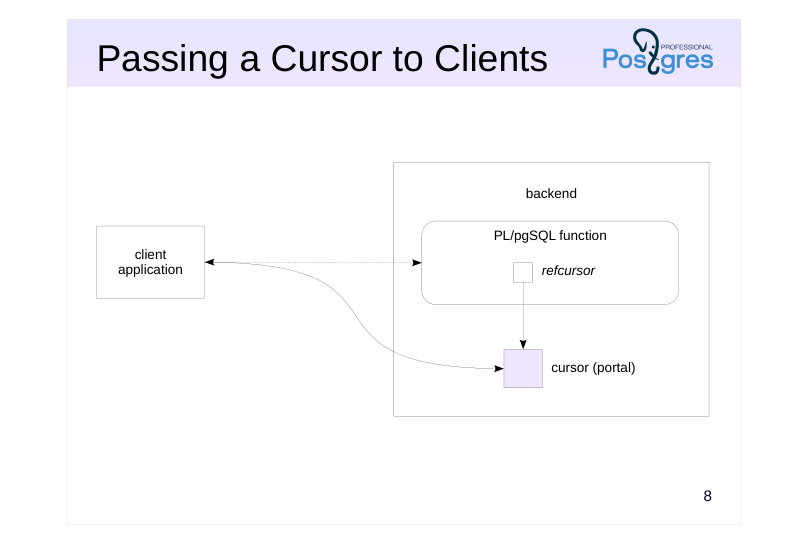 {#source-figure-010 caption=“Source slide page 10: Passing a Cursor to Clients”}
Speaker notes
A PL/pgSQL cursor variable (of the refcursor type) contains the name of an open SQL cursor. To denote the memory allocated in the backend for keeping the cursor state, the term portal is used.
This way, a PL/pgSQL function can open a cursor and return its name to the client. Then, the client will be able to work with the cursor as if it has been opened by this client, but will have access only to the provided data. It adds one more way of setting up the interface between the database and the application.
Page 11: Passing a Cursor to Clients
Open a cursor and print the value of the cursor variable:
This is the name of the cursor (portal) that was opened on the server. It was generated automatically. You can name it explicitly if you want (but it must be unique for the session):
With this, you can create a function that takes a cursor and returns its name:
The client starts a transaction…
…calls the function, gets the cursor name…
…and starts reading from it (the quotation marks are necessary because of the special characters in the name):
You can let the client set the cursor name:
Page 12: Page 12
The client code is simplified:
The function can also return several open cursors using OUT parameters. This makes it possible for the client to read data from multiple tables within one function call. An alternative is to bundle the data from different sources into a JSON or XML on the server and then return it. This is covered in the DEV2 course.
Page 13: Takeaways
A cursor allows fetching and processing data row by row
- A FOR loop can simplify cursor handling
- Processing data in loops is common for procedural languages, but should not be overused
Page 14: Practice
- Modify the book_name function: if the book has more than two authors, the title should include only the first two, while the rest are to be replaced with “et al.”
- Check that the function works fine in SQL and in the application. 2. Try rewriting the book_name function in SQL. Which implementation do you prefer: PL/pgSQL or SQL?
- For example:
Page 15: 1. book_name Function (Author Abbreviations)
A more universal function can be created that takes an additional parameter: the maximum number of authors in a book name. Since the function changes its signature (the number and/or types of input parameters), it must first be deleted and then recreated. In this case, the function has a dependent object, the catalog_v view, in which it is used. The view will also have to be recreated (in reality, all these actions must be performed in a single transaction for the changes to take effect atomically).
Also remember to recreate the get_catalog function which was deleted:
Page 16: Page 16
2. A Pure SQL Version
Page 17: Practice+
- Energy expenses must be distributed between different departments in proportion to their headcount (the list of departments is stored in a table). Create a function that takes the total energy cost as an argument and saves the distributed expenses in different table rows. The values are rounded to cents; the sum of expenses of all departments must exactly match the total cost. 2. Create a set returning function that simulates merge sort. The function should take two cursor variables; both cursors are already open and return sorted integers in non-decreasing order. It must return a single sorted sequence of integers from both sources.
Speaker notes
- We can use the following table:
A possible implementation:
If 100.00 is taken as an argument, the expected result is:
- A possible implementation:
For example, if the first cursor returns the sequence 1, 3, 5, and the second cursor returns the sequence 2, 3, 4, the expected result is as follows:
Page 18: 1. Expenses Distribution
Table:
Function:
Check:
Of course, other algorithms are also possible, for example, assigning all rounding errors to a single row, etc. The DEV2 course proposes another solution using custom aggregate functions.
2. Merging Sorted Sets
Page 19: Page 19
This implementation assumes that numbers cannot have undefined NULL values.
Test:
14 Lesson 14: PL/pgSQL / Dynamic Commands
This page is extracted from the official PDF into native Markdown. Slide text, code and speaker notes are kept in reading order; the original PDF and HTML remain the layout references. HTML source: dev1_14_plpgsql_dynamic.html Archive: DEV1-handouts-16-en.zip PDF pages: 16
Page 1: PL/pgSQL / Dynamic Commands
Copyright
© Postgres Professional, 2017–2025 Authors: Egor Rogov, Pavel Luzanov, Ilya Bashtanov, Igor Gnatyuk Translated by: Liudmila Mantrova, Alexander Meleshko, Elena Sharafutdinova Photo by: Oleg Bartunov (Phu monastery, Bhrikuti summit, Nepal)
Use of Course Materials
Non-commercial use of course materials (presentations, demonstrations) is allowed without restrictions. Commercial use is possible only with the written permission of Postgres Professional. It is prohibited to make changes to the course materials.
Feedback
Please send your feedback, comments and suggestions to: edu@postgrespro.ru
Disclaimer
Postgres Professional assumes no responsibility for any damages and losses, including loss of income, caused by direct or indirect, intentional or accidental use of course materials. Postgres Professional company specifically disclaims any warranties on course materials. Course materials are provided “as is,” and Postgres Professional company has no obligations to provide maintenance, support, updates, enhancements, or modifications.
Page 2: Topics
- Objectives
- Executing Dynamic Queries
- Constructing Dynamic Commands
Page 3: Dynamic SQL
The text of an SQL query is constructed at run time
- Objectives
- provide additional flexibility for the application
- construct several specific queries for optimization purposes
- instead of using a single query that covers all possible cases
- Trade-off
- statements are not prepared
- the risk of SQL injection rises
- maintenance gets more complicated
Speaker notes
An SQL command is considered dynamic if its text is constructed and then executed within PL/pgSQL routine blocks or in anonymous blocks.
In most cases, you can do without dynamic commands, but sometimes they can provide additional flexibility. For example, an application can have a built-in capability to execute commands provided via system settings. Instead of being hard-coded by developers, these settings can be tuned by the support team in production.
When creating reports with a large number of optional parameters, it is sometimes easier to construct the text of a query at run time for the provided arguments only, instead of creating a complex query that includes all possible parameter combinations while developing the application.
The price you pay for using dynamic commands is inability to take advantage of prepared statements, which are used in PL/pgSQL by default. Besides, you have to take care of dynamic commands’ security as they are vulnerable to SQL injection.
We should also mention that maintenance gets more complicated. In particular, it will be impossible to scan the source code quickly for executable commands with tools like grep.
Page 4: Query Execution
EXECUTE construct
- runs a text representation of an SQL query
- allows using parameters
- PL/pgSQL variables do not become implicit parameters
- Can be used instead of an SQL query
- independently
- when opening a cursor
- in a loop over a query
- in the RETURN QUERY statement
Speaker notes
To run dynamic commands, PL/pgSQL uses the EXECUTE construct which launches the SQL command provided as a text string.
A dynamic query can contain explicit parameters. In the command’s text representation, parameters are denoted by $1, $2, etc.; their actual values are provided in the USING clause. Parameters are handled in the same way as in prepared statements (which is covered in Architecture. PostgreSQL Fundamentals). However, PL/pgSQL variables do not become implicit parameters, as it happens in the case of regular (as opposed to dynamic) use of SQL in PL/pgSQL.
The EXECUTE construct can be used as an independent statement (it will simply execute a dynamic command). It can also be used in loops over queries, when opening a cursor, or in the RETURN QUERY statement: in all these cases, EXECUTE replaces the SQL statement.
https://postgrespro.com/docs/postgresql/16/plpgsql-statements#PLPGSQL-STATEMENTS-EXECUTING-DYN
Note that a procedure cannot perform transaction control if it is called by an EXECUTE construct.
Page 5: Executing Dynamic Queries
The EXECUTE statement runs SQL commands provided as text.
The INTO clause of the EXECUTE statement enables saving a single row of the result (the first returned row) into a variable of a composite type or into several scalar variables. As with static commands, you can check the result of a dynamic command using GET DIAGNOSTICS (but not the FOUND variable).
You can use STRICT to ensure that the command processes only one row. The result of a dynamic query can be processed in a FOR loop.
Here is the same example using a cursor:
Page 6: Page 6
The RETURN QUERY statement can also use dynamic queries to return rows from functions. Let’s create a function that retrieves all buildings constructed by a particular architect and up to the specified year. We will have to use parameters for this purpose:
Page 7: Constructing Commands
Parameter values binding
- USING clause
- guarantees protection against SQL injection
- Escaping values
- identifiers: format(’%I’), quote_ident
- literals: format(’%L’), quote_literal, quote_nullable
- SQL injection is impossible if implemented correctly
- Regular string functions
- concatenation, etc.
- risk of SQL injection!
Speaker notes
Using the EXECUTE construct makes sense if the command is constructed dynamically. The previous examples could also do without EXECUTE.
Since the command is represented by a text string, it can be constructed using regular string functions that perform such operations as concatenation, etc. This should be done with great care as there is a risk of SQL injection.
If the values are passed as parameters in the USING clause, SQL injection is technically impossible.
However, it is not always possible to use parameters: you may have to concatenate specific parts of the query or insert a table name into the query. In this case, you should escape the values received from an unreliable source to protect your application against injections.
Identifiers are generated by either the format function with the %l specifier or the quote_ident function. These functions ensure that identifiers have valid names by double-quoting them and escaping special characters, if required.
https://postgrespro.com/docs/postgresql/16/functions-string
Page 8: Dealing with SQL Injection
Let’s rewrite the function returning buildings and add one more parameter: the name of the city. The idea is to allow this function to access tables only if their names start with city_.
The function works fine if its parameter values are “correct”:
But a malicious user can pick a value that will change the syntactic structure of the query and enable unauthorized access to data:
When you are using prepared statements or dynamic commands with parameters, such a situation is technically impossible because the structure of the SQL query is locked while the statement is parsed. An expression will always remain an expression; it is impossible to convert it, say, into a table name.
Constructing a Dynamic Command
It is impossible to provide the names of objects (such as tables or columns) as parameters of the USING clause in a dynamic command. Such identifiers must be escaped, so that it is impossible to modify the query structure:
Page 9: Page 9
The following function does the same thing:
Here is an example of creating a table:
Instead of using parameters, you can insert literals into a string. It also requires escaping, but in a bit different way:
The quote_nullable function also does the same thing:
The quote_literal function is quite similar, but it does not convert NULL values into literals:
As an example, let’s rewrite the function that returns the list of buildings of a particular city, so that it does not use any parameters, but still remains safe.
Page 10: Page 10
Note Note that we perform two extra type casting operations: first, the integer parameter is converted into a string, and then it is cast back to integer at run time (this can be avoided with USING parameters):
An attempt to pass an invalid value will not succeed:
Page 11: Takeaways
Dynamic commands provide additional flexibility
- Constructing separate queries for different arguments can improve performance
- Dynamic commands are not suitable for short, frequent queries
- Maintenance gets more complicated
Page 12: Practice
- Modify the get_catalog function so that the query to the catalog_v view is constructed dynamically and takes into account only those fields that are filled out in the search form of the Store tab. Make sure that your implementation is protected against SQL injection. Check your function in the application.
Speaker notes
- Suppose we have to generate the following query if these conditions are met: the “In stock” option is selected in the search form, but “Book Title” and “Author” fields are empty.
You should keep in mind that this implementation will not necessarily speed up search, but it will certainly be harder to maintain. Avoid such solutions in production environments unless you have a solid reason to use this technique. To learn more about query performance tuning, check out the QPT course.
Page 13: 1. The get_catalog Function
Page 14: Practice+
- Create a function that returns a matrix report on functions available in the database.
- The columns must contain names of function owners, the rows
- must provide schema names, while the cells must display the
- number of functions that belong to a particular owner in a
- particular schema.
- What statement should you write to invoke this function?
Speaker notes
- Here is a possible output:
The number of columns returned by a query is unknown beforehand. You need to construct a query and then execute it dynamically. The query text can be as follows:
The highlighted lines are a dynamic part that has to be constructed by a separate query. The start and the end of the query are static.
The proowner column has the oid type. To get the name of the owner, you can use the following construct: proowner::regrole::text.
Page 15: Building a Matrix Report
A function for generating dynamic query text:
The resulting query text:
Now create a matrix report function:
Simply executing the query will result in an error, as the structure of the returned records is not specified:
Page 16: Page 16
This is an important limitation on using functions that return an arbitrary set of values. You need to know and specify the structure of the record to be returned as the function is being called. In general, the returned record structure may be unknown, but for our matrix report, we can run another query that will show you how to call the matrix function correctly. Prepare the query text:
Now we can use matrix_call to get a query that reflects the structure of the matrix report, and then execute this query and get the report (psql allows you to do all this with single \\gexec command):
The matrix report is generated correctly. Repeatable Read isolation level guarantees that the report will be generated, even if a function with a new owner will come up between two queries. The query returned by form_query could have been run manually. However, you still need to return the list of columns to the client. The matrix_call function demonstrates how to solve this with an extra query. Another solution is to return a set of strings of a semi-structured type (such as JSON or XML) instead of an arbitrary structured set. These types are covered in the DEV2 course.
15 Lesson 15: PL/pgSQL / Arrays
This page is extracted from the official PDF into native Markdown. Slide text, code and speaker notes are kept in reading order; the original PDF and HTML remain the layout references. HTML source: dev1_15_plpgsql_arrays.html Archive: DEV1-handouts-16-en.zip PDF pages: 24
Page 1: PL/pgSQL / Arrays
Copyright
© Postgres Professional, 2017–2025 Authors: Egor Rogov, Pavel Luzanov, Ilya Bashtanov, Igor Gnatyuk Translated by: Liudmila Mantrova, Alexander Meleshko, Elena Sharafutdinova Photo by: Oleg Bartunov (Phu monastery, Bhrikuti summit, Nepal)
Use of Course Materials
Non-commercial use of course materials (presentations, demonstrations) is allowed without restrictions. Commercial use is possible only with the written permission of Postgres Professional. It is prohibited to make changes to the course materials.
Feedback
Please send your feedback, comments and suggestions to: edu@postgrespro.ru
Disclaimer
Postgres Professional assumes no responsibility for any damages and losses, including loss of income, caused by direct or indirect, intentional or accidental use of course materials. Postgres Professional company specifically disclaims any warranties on course materials. Course materials are provided “as is,” and Postgres Professional company has no obligations to provide maintenance, support, updates, enhancements, or modifications.
Page 2: Topics
- Arrays and Their Usage in PL/pgSQL
- Loops over Array Elements
- Functions with a Variable Number of Arguments and Polymorphic Functions
- Array Usage in Tables
Page 3: Array Types
Array
- a set of numbered elements of the same type
- one-dimensional, multidimensional
- Initialization
- Usage
- elements as scalar values
- array slices
- operations on arrays: comparison, inclusion, intersection, concatenation,
- usage with ANY or ALL instead of a subquery, etc.
Speaker notes
Just like a composite type (a record), an array is not a scalar; it consists of several elements of another type. But unlike in records, a) all these elements are of the same type, and b) they are accessed by an integer index, not by name (here the term index is used in the mathematical sense of the word, not in the sense of a database index).
An array type does not have to be explicitly declared. When any type (or a table) is created, a new array type named _type is also declared. To declare an array variable, all you need is to append square brackets to the name of the element type.
An array is a full-fledged SQL type: you can create table columns of this type, pass arrays as function arguments, and so on. Array elements can be used as regular scalar values. Array slices can also be used.
Arrays can be compared and checked for NULL; you can search arrays for element inclusion and intersection with other arrays, perform concatenation, etc. Arrays can also be applied in ANY/SOME and ALL constructs, similar to subqueries.
https://postgrespro.com/docs/postgresql/16/arrays
You can find various array functions in course handouts.
Page 4: Initializing an Array and Referencing its Elements
Declaring a variable and initializing an array:
A one-dimensional array can be constructed element by element: it will be expanded automatically if required. If you omit some of the elements, they will receive NULL values. What will be displayed?
Since element numbering begins with a value other than one, the array itself is preceded by a range of element indexes. We can define a composite type and create an array of this type:
Another way to construct an array is to use a subquery:
Page 5: Page 5
You can also do the inverse operation: convert an array into a table:
Fun fact: the IN clause with a list of values is transformed into a search operation over the array:
A two-dimensional array is a rectangle matrix. Memory for the matrix is allocated at initialization. A literal looks like an array of arrays with the same number of elements. Here we have applied another initialization method that uses a string literal. Once initialized, a multidimensional array cannot be expanded.
Page 6: Arrays and Loops
A regular loop over element indexes
- array_lower
- array_upper
- A FOREACH loop over array elements
- this approach is easier, but it does not provide access to indexes
Speaker notes
To iterate through array elements, you can simply set up an integer FOR loop using functions that return the minimum and the maximum index of the array.
But there is also a specialized loop: FOREACH. In this case, a loop variable iterates through the elements, not their indexes. That’s why the variable must be of the same type as the array elements (as always, if the elements are records, you can replace a single composite variable with several scalar ones).
If a loop contains the SLICE clause, it will iterate through array slices. For example, the rows of a two-dimensional array will be treated as its one-dimensional slices.
https://postgrespro.com/docs/postgresql/16/plpgsql-control-structures#PLP GSQL-FOREACH-ARRAY
Page 7: Arrays and Loops
You can set up a loop that iterates through index values of array elements. The second parameter of the array_lower and array_upper functions defines the array dimension (1 denotes a one-dimensional array).
If you do not need to know index values, it’s easier to iterate directly though the elements:
Index iteration in a two-dimensional array:
You do not need a nested loop to iterate through the elements of a two-dimensional array:
Page 8: Page 8
You can also loop through slices, not just individual elements, in a similar way. The SLICE value must be an integer, no larger than the array size, and the variable to store the slices into must be an array itself. Here is a loop over one-dimensional slices as an example:
Page 9: Arrays and Routines
Routines with a variable number of arguments
- all optional arguments must be of the same type
- optional arguments are passed to the routine as an array
- the last parameter array is defined by the VARIADIC mode
- Polymorphic routines
- support arguments of various types;
- the actual type is defined at run time
- can use additional polymorphic pseudotypes anyarray, anynonarray,
- anycompatiblearray and anycompatiblenonarrray
- can have a variable number of arguments
Speaker notes
Using arrays, you can create routines (functions and procedures) with a variable number of arguments.
While parameters with default values have to be explicitly specified in routine declaration, optional arguments can be passed with no limit: they are provided as an array. Consequently, all of them must be of the same type (or a compatible one, if anycompatible or anycompatiblearray is used).
The last parameter in routine declaration must be marked as VARIADIC; it must be of an array type.
https://postgrespro.com/docs/postgresql/16/xfunc-sql#XFUNC-SQL-VARIAD IC-FUNCTIONS
We have already mentioned polymorphic routines which can accept arguments of various types. Routine declaration uses a special polymorphic pseudotype, while the actual type is defined at run time based on the types of the passed arguments.
There are special polymorphic types anyarray and anycompatiblearray (and anynonarray and anycompatiblenonarrray for non-arrays).
These types can be used when passing a variable number of arguments via a VARIADIC parameter.
https://postgrespro.com/docs/postgresql/16/xfunc-sql#XFUNC-SQL-POLYM ORPHIC-FUNCTIONS
Page 10: Arrays and Routines
When discussing polymorphism and overloading as part of the SQL. Procedures lecture, we created the maximum function to compare three numbers and find the greatest one. Now let’s generalize this function, so that it can be used with an arbitrary number of arguments. For this purpose, we’ll declare a single VARIADIC parameter:
Let’s try it out:
To complete this illustration, we can make this function polymorphic as well, so that it takes any data type (which supports comparison operators, of course).
Polymorphic types anycompatiblearray and anycompatible (also anyarray and anyelement) must match each other: anycompatiblearray = anycompatible[], anyarray = anyelement[]; We need a variable of the same type as an array element. But it cannot be declared as anycompatible: it must have an actual type. The %TYPE construct helps us out here.
Let’s check the result:
Page 11: Page 11
Now our function is almost completely analogous to the greatest expression provided in SQL.
Page 12: An Array or a Table?
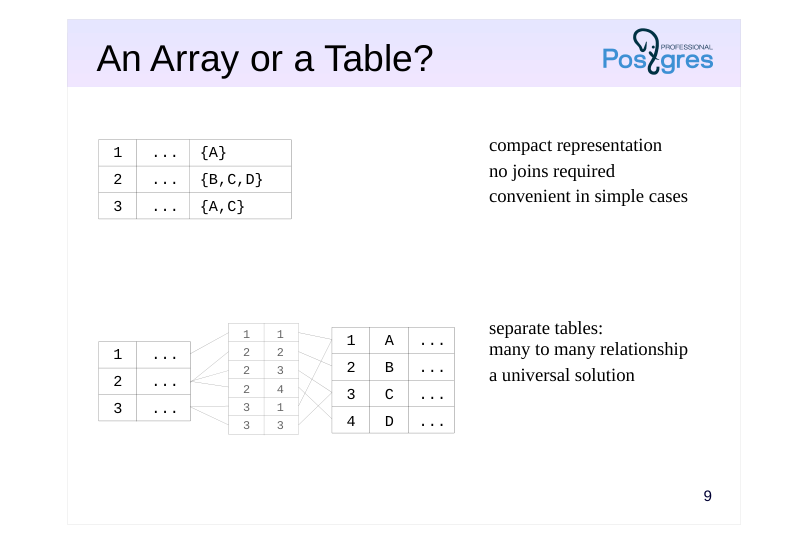 {#source-figure-012 caption=“Source slide page 12: An Array or a Table?”}
Speaker notes
A traditional relational approach assumes that a table stores atomic values (first normal form). The SQL language has no tools for peeking into composite values.
That’s why a traditional approach relies on creating an additional table connected to the main one by a many-to-many relationship.
Nevertheless, we can create a table with a column of an array type. PostgreSQL offers a rich set of array functions; the search for an array element can be sped up using special indexes (covered in the DEV2 course).
This approach can be convenient: we get a concise representation that does not require any joins. For example, arrays are extensively used in PostgreSQL system catalog.
The choice of approach depends on the goals and the operations required. Consider the example in the demo.
Page 13: An Array or a Table?
Imagine that we are designing a database for writing a blog. The blog contains some posts, and we would like to tag them. The traditional approach is to create a separate table for tags. For example:
Let’s connect posts and tags by a many-to-many relationship via an additional table:
Let’s fill our tables with text data:
Now we can display posts and tags:
Or we can do it a bit differently to get an array of tags. We are going to use an aggregate function for this purpose:
Page 14: Page 14
We can find all posts with a particular tag:
We may also need to find all the unique tags, and it is really easy:
Now let’s try another approach to this task. Suppose the tags are stored as a text array right inside the table with posts.
There are no tag IDs, but we don’t really need them.
Now it’s easier to display all posts:
It is also easy to find all posts with the same tag (using the intersection operator &&). This operation can be sped up using GIN index, and the query won’t require searching through the whole table of posts.
Page 15: Page 15
But it is quite hard to get the list of all tags. It requires unnesting all the tag arrays into a big table, and the search for unique values in this table is quite resource-intensive.
We can clearly see data duplication here. Thus, both approaches have the right to be applied. In simple cases, arrays look more straightforward and work well. In more complex scenarios (imagine that we would like to store the date of tag creation together with its name, or we need to use check constraints), the traditional approach becomes more preferable.
Page 16: Takeaways
An array consists of numbered elements of the same data type
- An array column is an alternative to a separate table: it offers convenient operations on arrays and index support
- Arrays enable you to create functions with a variable number of arguments
Page 17: Practice
- Create a function add_book for adding a new book.
- The function must take two arguments: the name of the book and
- an array of author IDs. It must return the ID of the added book.
- Check that the application now allows adding books.
Page 18: 1. The add_book Function
Page 19: Practice+
- Implement a function map that takes two arguments: array of real numbers and the name of an additional function that takes a single parameter of the real type.
- The map function must apply the additional function to each
- element of the array and return the result.
- Implement a function reduce that takes two arguments: an array of real numbers and the name of an additional function that takes two arguments of the real type.
- The function must return a real number calculated by
- sequentially folding the array from left to right.
- Make the functions map and reduce polymorphic.
Speaker notes
- For example:
- For example:
In this case, the value is calculated as follows:
Page 20: 1. The map Function
INTO a[i] doesn’t work, need a separate variable.
Another implementation with a FOREACH loop:
Page 21: 2. The reduce Function
greatest (as well as least) is not a function but a built-in conditional expression, and cannot be used directly due to escaping:
Instead, use the maximum function implemented in the demo.
The FOREACH option:
Page 22: Page 22
3. Polymorphic Function Variants
The map function.
A dummy parameter of the anyelement type is required to declare a variable of the same type inside the function.
Page 23: Page 23
Example with a different data type:
The reduce function.
Page 24: Page 24
16 Lesson 16: PL/pgSQL / Error Handling
This page is extracted from the official PDF into native Markdown. Slide text, code and speaker notes are kept in reading order; the original PDF and HTML remain the layout references. HTML source: dev1_16_plpgsql_exceptions.html Archive: DEV1-handouts-16-en.zip PDF pages: 27
Page 1: PL/pgSQL / Error Handling
Copyright
© Postgres Professional, 2017–2025 Authors: Egor Rogov, Pavel Luzanov, Ilya Bashtanov, Igor Gnatyuk Translated by: Liudmila Mantrova, Alexander Meleshko, Elena Sharafutdinova Photo by: Oleg Bartunov (Phu monastery, Bhrikuti summit, Nepal)
Use of Course Materials
Non-commercial use of course materials (presentations, demonstrations) is allowed without restrictions. Commercial use is possible only with the written permission of Postgres Professional. It is prohibited to make changes to the course materials.
Feedback
Please send your feedback, comments and suggestions to: edu@postgrespro.ru
Disclaimer
Postgres Professional assumes no responsibility for any damages and losses, including loss of income, caused by direct or indirect, intentional or accidental use of course materials. Postgres Professional company specifically disclaims any warranties on course materials. Course materials are provided “as is,” and Postgres Professional company has no obligations to provide maintenance, support, updates, enhancements, or modifications.
Page 2: Topics
- Error Handling in PL/pgSQL Blocks
- Error Names and Codes
- Choosing an Error Handler
- Error Handling Overhead
Page 3: Error Handling in a Block
Error handling is performed if there is an EXCEPTION section
- Changes roll back to the savepoint at the beginning of the block
- an implicit savepoint is set if the block contains an EXCEPTION section
- If there is a handler that matches the error
- error handler commands are executed
- the block completes successfully
- If there is no suitable handler
- the block completes with an error
Speaker notes
If a run-time error occurs within a block, the program (block, function) is usually aborted, and the current transaction enters the failure mode: it cannot be committed and can only be rolled back.
But an error can be caught and processed. It can be done by extending the block with an additional EXCEPTION section, which lists error conditions and provides statements to handle each of them.
In general, EXCEPTION is similar to the try-catch construct available in some programming languages (except for specifics related to transactions, or course).
A savepoint is implicitly set at the start of every block containing an EXCEPTION section. Before an error is processed, all changes are rolled back to the savepoint and all locks are removed.
Because of the savepoint, COMMIT and ROLLBACK commands cannot be used in procedures with EXCEPTION. But although SAVEPOINT and ROLLBACK TO SAVEPOINT commands are not supported by PL/pgSQL, you can still use savepoints and rollbacks to savepoints both in functions and procedures implicitly.
https://postgrespro.com/docs/postgresql/16/plpgsql-control-structures#PLP GSQL-ERROR-TRAPPING
Page 4: Handling Errors in a Block
Let’s take a look at a simple example.
If there are no errors, all statements in a block are executed as usual:
Now let’s insert a “redundant” row to trigger an error.
If there is no EXCEPTION section in a block, the statement execution is interrupted, and the whole block is considered to be completed with an error condition:
To catch an error, a block must have an EXCEPTION section, which defines one or more error handlers. This construct works similar to CASE: conditions are scanned from top to bottom, the first suitable code path is selected, and its statements are executed. What will be displayed?
The executed handler corresponds to the too_many_rows error. Note: if a handler is executed, the table contains two rows because of a rollback to an implicit savepoint at the beginning of the block.
Page 5: Page 5
Also note that the local variable keeps the value that was there when the error occurred.
Note the following subtlety: if an error occurs in the DECLARE section or within the EXCEPTION section of the handler itself, it will be impossible to catch it in this block.
Page 6: Error Names and Codes
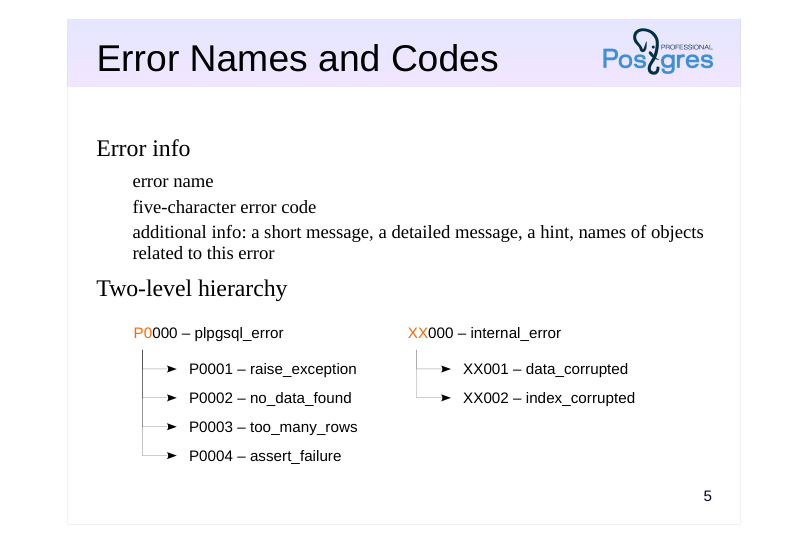 {#source-figure-006 caption=“Source slide page 6: Error Names and Codes”}
Error info
- error name
- five-character error code
- additional info: a short message, a detailed message, a hint, names of objects
- related to this error
- Two-level hierarchy
Speaker notes
Each possible error has a name and a code (a five-character string). WHEN clauses accept both error names and error codes.
All errors are classified into a two-level hierarchy of sorts. Each error class has a code that ends with three zeros; it corresponds to any error with the same first two characters in its code.
For example, the code 23000 defines the class that includes all errors dealing with violations of integrity constraints (such as 23502, which stands for NOT NULL constraint violation, or 23505, which indicates a UNIQUE constraint violation).
Thus, apart from regular errors, you can specify an error class by its name or code. Besides, you can use a special name OTHERS to catch any errors (except for the fatal ones).
Apart from the name and code, each error can provide additional debug information: a short error message, a detailed message, and a hint.
All errors are described in documentation in Appendix A:
https://postgrespro.com/docs/postgresql/16/errcodes-appendix
Errors can be not only trapped, but also raised programmatically.
https://postgrespro.com/docs/postgresql/16/plpgsql-errors-and-messages
Page 7: Error Names and Codes
We have already seen error names; error codes are specified using SQLSTATE. An error handler can return an error code and the corresponding message using the predefined variables SQLSTATE and SQLERRM (the variables are undefined outside of the EXCEPTION block).
Which error handler will be used?
The first applicable handler is selected, plpgsql_error in this case (remember: this is not a specific error, but an error category). We will never get to the last error handler. You can force an error using either its code or its name. Here we use a special name others, which corresponds to any error that can be trapped (except for assertion failures and cases when the execution is aborted by user — you can catch them separately, but you almost never need to).
If required, it is also possible to incorporate user-provided error codes that are not predefined, as well as pass some additional information (the example illustrates only some of the supported features):
Page 8: Page 8
Error handlers cannot get this information from variables; there is a special construct for analyzing such data in the code:
Page 9: Choosing a Handler
An unhandled error is sent one level up
- into the enclosing PL/pgSQL block, if available
- into the calling routine, if available
- The search path of a handler is determined by the call stack
- it is not defined statically, but depends on how the program executes
- An unhandled error is passed to the client
- the transaction enters the failure mode and has to be rolled back by the client
- the error is registered in the server log
Speaker notes
If none of the conditions listed in the EXCEPTION section is triggered, the error goes one level up.
If an error has occurred in the inner block of a nested structure, the server will search for a handler in the enclosing block. If there is no suitable handler either, the whole outer block will be treated as failed, while the error will be passed to the next nesting level, and so on.
If the error goes through the whole nested structure and does not find an appropriate handler, it goes further up to the level of the routine that has called the outermost block. Therefore, you have to analyze the call stack to determine the order in which different error handlers will be applied.
If none of the available error handlers is triggered:
● The error message usually gets into the server log (the exact behavior depends on the server settings; see PL/pgSQL. Debugging lesson).
● The error is reported to the client that has initiated this operation in the database. The client cannot do anything about the cause of the error at this point: the transaction enters the failure mode, and it can only be rolled back.
It is up to the client to choose how to handle the error from there. For example, psql will display the error message and all the debugging information available. An end-user client may display a generic message like “contact your system administrator”.
Page 10: Choosing a Handler
Let’s take a look at several examples of choosing a handler in nested blocks. What will be displayed?
An error is handled in the same block where it has occurred. The outer block is executed as if there has been no error at all. And now?
The handler in the inner block is not applicable; the block completes with an error that is handled in the outer block. Remember that the block containing an EXCEPTION section is rolled back to the implicit savepoint at the beginning of this block. In this case, all changes made in both blocks will be rolled back. And now?
None of the handlers is triggered, and the whole transaction is aborted.
Page 11: Page 11
There is usually no need to handle all possible errors in the server code. There is nothing wrong in passing an error to the client. In general, an error should be handled at the level where something meaningful can be done about it. So it makes sense to process an error within the database if it can be addressed on the server side (e.g., the operation can be repeated in case of a serialization failure). We’ll talk about logging error messages in PL/pgSQL. Debugging lesson. Now let’s take a look at an example that uses procedures.
What will happen if we call this procedure?
The error message displays the call stack: top to bottom means inside out.
Note Note that this message (like many others) uses the term “function” instead of “procedure”. An error handler can also provide access to the call stack, but it will be presented as a single string:
Let’s check the result:
Page 12: Page 12
Since a block with an EXCEPTION section creates an implicit savepoint, procedures cannot use COMMIT and ROLLBACK commands both in this block and in all the blocks up the call stack.
Page 13: Overhead
Any block with an EXCEPTION section is executed slower
- because of setting an implicit savepoint
- Additional costs are incurred in case of an error
- because of the rollback to the savepoint
- Error handling can and should be used, but not overused
- PL/pgSQL is an interpreted language that uses SQL to compute expressions
- anyway
- the speed is more than enough for most tasks
- performance issues are usually related to queries, not to PL/pgSQL code
Speaker notes
The mere inclusion of an EXCEPTION section already incurs overhead because it requires setting an implicit savepoint at the beginning of the block. If an error occurs, the rollback to the savepoint increases the overhead even more.
So if there is a simple way to avoid exception handling, it’s better to do without it; you should not base your application logic on “exception juggling”.
However, if error handing is really required, you should use it without doubt: errors can and must be handled regardless of the overhead.
First, the PL/pgSQL language itself is quite slow because of interpreting instructions and constantly calling SQL to compute expressions.
Second, its speed is usually still adequate. Yes, you can create a faster implementation in C, but what’s the point?
And third, the main performance issues are usually caused by bad query plans that affect query speed, not by the execution speed of procedural code (for details, see the QPT course that deals with query performance tuning).
But if there is an alternative that is both simpler and faster, it should certainly be preferred.
Page 14: Overhead
To estimate the overhead, let’s take a look at the following simple example. Suppose we have a table with a text field that stores arbitrary data inserted by users (although usually a sign of bad design, it may sometimes be required). We need to extract all numbers into a separate column of a numeric type.
Let’s solve this problem by handling errors that come up when converting text to integer:
Let’s check the result:
The following implementation of our function will check the format using a (slightly simplified) regular expression, without error handling:
Let’s check this implementation:
Page 15: Page 15
This implementation is significantly faster. In this example, the exception has occurred in 1% of cases only. The more often it occurs, the more overhead will be incurred by rollbacks to the savepoint.
In some cases (which are not infrequent), you can do without error handling if you choose other suitable means. Problem: return a row from a table or NULL, if there is no such row.
A function with error handling:
Let’s check that the function works as expected:
Page 16: Page 16
Can we make it simpler? Yes, we just need to remove STRICT or use a subquery:
It’s a good illustration that we do not need PL/pgSQL here at all: we can simply use SQL. Let’s check the result:
Problem: update a table row with the specified ID; if there is no such row, insert it. Here is the first approach. What is wrong with it?
Almost everything is bad here, starting from the fact that such a function will not work correctly at the Read Committed isolation level if there are several concurrent sessions. That’s because the data in the database can change between the executed SELECT statement and the next operation. It can be easily demonstrated by introducing a delay between the commands. For variety, let’s take a slightly different (but also incorrect) option:
Page 17: Page 17
Now let’s run this function in two different sessions, almost simultaneously:
A correct solution can be implemented using error handling:
Let’s check the result.
Page 18: Page 18
Yes, now everything is correct. But there is an easier way: you can use a special flavor of the INSERT command that attempts to insert a row and performs an update if a conflict occurs. Again, all you need is pure SQL.
Problem: make sure that the data is processed by one transaction at a time (at the Read Committed isolation level). Using the same table, let’s assume that the category sometimes requires a special single-threaded processing. The function can be declared as follows:
Let’s check that everything is correct:
But this problem can also be solved without error handling if we use advisory locks:
Let’s check the result:
Page 19: Page 19
Let’s see an example where we cannot do without error handling. Problem: process a set of documents; a processing error of a particular document should not result in a general failure.
A procedure that processes a single document can sometimes result in an error:
Now let’s create a procedure that processes all documents. It loops through the documents to process them one by one and catches an error if required.
Note Note that transactions are committed outside of the block that contains the EXCEPTION section.
Page 20: Page 20
You can set up a similar processing using a function, but then all documents will be handled within a single common transaction, which can be a problem if processing takes a long time. This question is discussed at length in the DEV2 course. Let’s check the result:
As you can see, some of the documents have not been processed, but it has not affected the processing of the others. It is convenient that the information about the occurred errors is stored in the table itself:
Please note once again that if an error occurs, the changes are rolled back to the savepoint at the beginning of the block; that’s why documents with the ERROR status still have version 1.
Page 21: Takeaways
The search for an error handler is performed “inside out” according to block nesting and routine call stack An implicit savepoint is set at the beginning of the block that contains EXCEPTION; if an error occurs, a rollback to this savepoint is performed
- An unhandled error aborts the transaction; the error message is passed to the client and registered in the server log
- Error handling incurs overhead
Page 22: Practice
- An attempt to put in the same author several times when adding a book causes an error. Modify the add_book function: catch the unique constraint violation error and produce an error with a meaningful message instead.
- Try it out in the application.
Speaker notes
- To determine the name of the error that has to be caught, catch all errors (WHEN OTHERS) and display the required information (by raising another error with the corresponding text).
Then remember to replace WITH OTHERS with a specific error: let all other error types be handled at a higher level if there is no opportunity to do anything useful in this particular position in the code.
(In a real environment, unique constraint violations should not be handled either: it is better to forbid entering the same author twice at the application level.)
Page 23: 1. Handling Duplicate Author Names When Adding Books
Page 24: Practice+
- Some languages use the construct try … catch … finally …, where try corresponds to BEGIN, catch corresponds to EXCEPTION, and the statements located in the finally block are always triggered regardless of whether an exception has occurred and whether it has been processed by the catch block. Find a way to achieve a similar behavior in PL/pgSQL. 2. Compare the call stacks returned by GET STACKED DIAGNOSTICS with pg_exception_context and GET [CURRENT] DIAGNOSTICS with pg_context. 3. Create a function getstack that returns the current call stack as a string array. The getstack function itself must not be a part of the stack.
Speaker notes
The easiest way to do it is to simply repeat the finally statements in several places. But you should try to come up with a solution that avoids code duplication.
First, refer to the documentation:
https://postgrespro.com/docs/postgresql/16/plpgsql-statements#PLPGSQL-STATEMENTS-DIAGNOSTICS
https://postgrespro.com/docs/postgresql/16/plpgsql-control-structures#PLPG SQL-EXCEPTION-DIAGNOSTICS
Page 25: 1. Try-catch-finally
The tricky part is the ’finally’ statements. They must always execute, even if there is an exception catch (in the EXCEPTION block). The solution can use two nested blocks and a dummy exception that is thrown when the inner block is executed as expected. This makes it possible to put finally statements in one place: the external block error handler.
Page 26: Page 26
But in the proposed solution, all changes made in the block are always rolled back, so it is not suitable for commands that change the database state. Also, don’t forget about the exception handling overhead. This task is just an exercise.
2. GET DIAGNOSTICS
GET STACKED DIAGNOSTICS provides the stack of calls that resulted in the error. GET CURRENT DIAGNOSTICS provides the current stack of calls.
3. Call Stack as an Array
The function itself:
To test it, create several functions that call each other:
Page 27: Page 27
17 Lesson 17: PL/pgSQL / Triggers
This page is extracted from the official PDF into native Markdown. Slide text, code and speaker notes are kept in reading order; the original PDF and HTML remain the layout references. HTML source: dev1_17_plpgsql_triggers.html Archive: DEV1-handouts-16-en.zip PDF pages: 28
Page 1: PL/pgSQL / Triggers
Copyright
© Postgres Professional, 2017–2025 Authors: Egor Rogov, Pavel Luzanov, Ilya Bashtanov, Igor Gnatyuk Translated by: Liudmila Mantrova, Alexander Meleshko, Elena Sharafutdinova Photo by: Oleg Bartunov (Phu monastery, Bhrikuti summit, Nepal)
Use of Course Materials
Non-commercial use of course materials (presentations, demonstrations) is allowed without restrictions. Commercial use is possible only with the written permission of Postgres Professional. It is prohibited to make changes to the course materials.
Feedback
Please send your feedback, comments and suggestions to: edu@postgrespro.ru
Disclaimer
Postgres Professional assumes no responsibility for any damages and losses, including loss of income, caused by direct or indirect, intentional or accidental use of course materials. Postgres Professional company specifically disclaims any warranties on course materials. Course materials are provided “as is,” and Postgres Professional company has no obligations to provide maintenance, support, updates, enhancements, or modifications.
Page 2: Topics
- Triggers and Trigger Functions
- Triggering
- Execution Context of a Trigger Function
- Return Values
- Do’s and Don’ts
- Event Triggers
Page 3: Triggers and Functions
Trigger
- a database object: a list of events to process
- once an event occurs, the trigger function is called,
- and the call context is passed to the function
- Trigger function
- a database object: event processing code
- executed in the same transaction as the main operation
- convention: the function does not take any parameters,
- returns a value of the trigger pseudotype (which is virtually record)
- can be reused with multiple triggers
Speaker notes
Triggers are used to set off particular actions in response to particular events. A trigger consists of two parts: the trigger itself (which defines the events) and a trigger function (which defines the actions). Both the trigger and the function are independent database objects.
When an event occurs which the trigger is waiting for, the trigger function is called. It receives the context of the call, which defines the exact trigger that has called the function and the exact conditions that have led to this call.
A trigger function is a regular function that follows some conventions:
● It can be written in any language except pure SQL.
● It must have no parameters.
● Its return value is of the trigger type (which is actually a pseudotype; a record corresponding to a table row is returned instead).
The trigger function is executed in the same transaction as the main operation. Thus, if a trigger function results in an error, the whole transaction is aborted.
https://postgrespro.com/docs/postgresql/16/trigger-definition
Page 4: Events
INSERT, UPDATE, DELETE
- tables
- before/after statement
- before/after row
- views
- before/after statement
- instead of
- row
- TRUNCATE
- tables
- before/after statement
- WHEN condition
- sets an additional filter
Speaker notes
Triggers can fire for INSERT, UPDATE, or DELETE operations performed on tables or views, as well as for the TRUNCATE operation on tables.
A trigger can fire before the specified action (BEFORE), after the action (AFTER), or instead of the action (INSTEAD OF).
A trigger can fire once for the whole operation (FOR EACH STATEMENT) or for each affected row (FOR EACH ROW).
There are some combinations of these conditions that are not supported. For example, INSTEAD OF triggers can be defined only for views at the row level, while TRUNCATE triggers can be defined only for tables and only at the statement level. Possible combinations are listed on this slide.
Besides, you can limit the scope controlled by the trigger by specifying the WHEN condition: if this condition is not true, the trigger does not fire.
https://postgrespro.com/docs/postgresql/16/sql-createtrigger
Page 5: Before Statement
Triggers
- BEFORE STATEMENT
- before the operation
- Return value
- operation execution
- is ignored
- Context
- TG variables
Speaker notes
Let’s take a closer look at different trigger types.
The BEFORE STATEMENT trigger fires only once per operation, regardless of the number of affected rows (even if there are none). It happens before the start of the operation.
The return value of the trigger function is ignored. If there is an error in the trigger, the operation is canceled. Since the trigger function has no parameters, the call context in PL/pgSQL is passed via predefined TG variables, such as:
● TG_WHEN = BEFORE
● TG_LEVEL = STATEMENT
● TG_OP = INSERT/UPDATE/DELETE/TRUNCATE
etc. You can also pass a user-defined context (which is analogous to the absent parameters) via the TG_ARGV variable, although it is usually advisable to create several specialized functions instead of a single generic one.
https://postgrespro.com/docs/postgresql/16/plpgsql-trigger
Page 6: Before Row
Triggers
- BEFORE STATEMENT
- before the action on the row is taken
- during the statement execution
- operation execution
- Return value
- BEFORE ROW
- a row (possibly modified)
- null cancels the action
- Context
- OLD
- update, delete
- NEW
- insert, update
- TG variables
Speaker notes
BEFORE ROW triggers fire each time an operation is about to process a row. It happens right during the operation execution.
Trigger functions get the context via variables, such as:
● OLD — an old state of the row (undefined for insertion)
● NEW — an updated state of the row (undefined for deletion)
● TG_WHEN = BEFORE
● TG_LEVEL = ROW
● TG_OP = INSERT/UPDATE/DELETE
etc.
The NULL return value is interpreted as cancellation of the action for the current row. The execution of the operation itself will continue, but the current row won’t be processed, and other triggers won’t fire for this row.
To avoid interfering with the operation, the trigger must return the received row without any modifications, so it must always return NEW for insert and update operations. For delete operations, it can return any value except NULL (usually OLD is used).
But the trigger function can also change the NEW value to affect the result of the operation; this trigger is often defined exactly for this purpose.
Page 7: Instead of Row
Triggers
- BEFORE STATEMENT
- instead of the action on the row
- for views
- operation execution
- Return value
- BEFORE ROW
- INSTEAD OF ROW
- a row (possibly modified)
- is shown in RETURNING
- null cancels the action
- Context
- OLD
- update, delete
- NEW
- insert, update
- TG variables
Speaker notes
INSTEAD OF triggers are very similar to BEFORE triggers, but they can be defined only for views and fire instead of the specified operation, not before it.
Such triggers usually perform operations on the base tables for views. The trigger can also return a modified NEW value: this value will be available when performing an operation with the RETURNING clause.
Page 8: After Row
Triggers
- BEFORE STATEMENT
- after operation execution
- queue of rows satisfying the WHEN condition
- operation execution
- Return value
- BEFORE ROW
- INSTEAD OF ROW
- is ignored
- Context
- OLD, OLD TABLE
- update, delete
- NEW, NEW TABLE insert, update
- TG variables
- AFTER ROW
Speaker notes
Just as BEFORE ROW, AFTER ROW triggers fire for each affected row; but it happens only after the whole operation is complete, not immediately after processing the row. This ensures that when these triggers access the table being modified, the result does not depend on the order of row processing. For this purpose, all events are placed in a queue and processed after the operation has finished. The fewer events get queued, the smaller overhead will be incurred; that’s why it is recommended to use the WHEN clause in this case, which can filter out the rows that we definitely won’t need.
The return value of AFTER ROW triggers is ignored (because the operation is already complete).
The context of the trigger function is constituted by the following variables:
OLD — an old state of the row (undefined for insertion)
NEW — an updated value of the row (undefined for deletion)
Apart from these variables, the trigger function can access special transition tables. The table specified as OLD TABLE when creating the trigger contains the old values of the rows processed by the trigger, and the NEW TABLE contains the new values of the same rows.
Regular TG variables are also available, including the following ones:
● TG_WHEN = AFTER
● TG_LEVEL = ROW
● TG_OP = INSERT/UPDATE/DELETE
Page 9: After Statement
Triggers
- BEFORE STATEMENT
- after the operation
- (even if none of the rows are affected)
- operation execution
- BEFORE ROW
- INSTEAD OF ROW
- Return value
- is ignored
- Context
- OLD TABLE
- update, delete
- NEW TABLE
- insert, update
- TG variables
- AFTER ROW
- AFTER STATEMENT
Speaker notes
The AFTER STATEMENT trigger fires after the operation has completed (including all the AFTER ROW triggers, if any). This trigger fires only once regardless of the number of the affected rows.
The return value of the trigger function is ignored.
The call context is passed using transition tables. The trigger function can access these tables to analyze all the affected rows. Transition tables are usually used with AFTER STATEMENT, not with AFTER ROW triggers.
Besides, regular TG variables are defined, such as:
● TG_WHEN = AFTER
● TG_LEVEL = STATEMENT
● TG_OP = INSERT/UPDATE/DELETE/TRUNCATE
etc.
Page 10: Trigger Firing Order
Let’s create a “universal” trigger function that describes the context in which it is called. The context is passed in various TG variables. We are going to define triggers for various events and observe the order in which the triggers are fired during execution.
A table:
Triggers at the statement level:
Triggers at the row level:
Let’s perform an INSERT:
Page 11: Page 11
Now run an UPDATE:
Statement-level triggers will fire even if the command has not processed any rows at all:
Here is a subtle point: the INSERT statement with the ON CONFLICT clause activates BEFORE triggers both on insert and update:
And finally, let’s try out a DELETE:
There is no dedicated trigger type for the MERGE statement (introduced in PostgreSQL 15), use regular triggers for UPDATE, INSERT, DELETE:
Transition Tables
Let’s create a trigger function that shows the contents of transition tables. Here we use old_table and new_table names: they will be declared as part of the trigger definition. Transition tables look just like regular ones, but they are not included into the system catalog and are located in RAM (although
Page 12: Page 12
they can be flushed to disk if they get too large).
Let’s create a new table:
To create transition tables for an operation, you have to specify their names in the trigger definition:
Let’s check the result:
Transition tables contain only those rows that have been affected by the operation. In addition to updates, transition tables are also supported for INSERT and DELETE operations, although only one table will be available at a time: OLD TABLE is unavailable for inserts, while NEW TABLE is unavailable for deletes. Since AFTER ROW triggers fire after the whole operation is completed, they can also use transition tables. But there is usually no point in it.
Page 13: Possible Use Cases
- operation applicability checks
- BEFORE STATEMENT
- validation,
- row modifications
- operation execution
- BEFORE ROW
- changing the base tables for views
- INSTEAD OF ROW
- consistency checks,
- including table-level checks;
- logging operations for audit purposes;
- cascading table updates
- (denormalization, asynchronous
- processing…)
- AFTER ROW
- AFTER STATEMENT
Speaker notes
What are triggers actually used for?
BEFORE triggers can be used to check if the operation is valid and to raise errors if required.
BEFORE ROW triggers can be used to modify a row (for example, fill an empty field with the required value). It is convenient to use such triggers to avoid repeating the logic of filling out “technical” fields in each operation, as well as tweak the application behavior if its code cannot be modified.
INSTEAD OF ROW triggers are used to translate operations on views into the corresponding operations on the underlying base tables.
AFTER ROW and AFTER STATEMENT triggers can be useful for getting the exact state after the operation (BEFORE triggers may affect the result, so the state is not yet clear at this stage):
● To check consistency of the operation.
● To perform audit operations, i.e., logging all changes in a separate storage.
● To cascade changes to other tables (for example, to update denormalized data if the base tables have changed, or queue changes for subsequent processing outside of the current transaction).
If the operation affects multiple rows, it may be more efficient to use AFTER STATEMENT on transition tables instead of AFTER ROW as it can process changes in a batch.
Page 14: Challenges
The code is called implicitly
- the execution logic is hard to track
- Visibility rules for volatile trigger functions
- the result of BEFORE ROW and INSTEAD OF ROW triggers is visible
- The order of calling triggers for one and the same event
- triggers fire in the alphabetical order
- Infinite looping can occur
- a trigger can activate other triggers
- Integrity constraints can be broken
- for example, by excluding rows that have to be deleted
Speaker notes
Triggers should not be overused. As they fire implicitly, the logic of the application becomes obscure, thus making its maintenance hugely complicated. Attempts to use triggers for implementing complex logic are usually quite unfortunate.
In some cases, you can use generated columns instead of triggers (GENERATED ALWAYS AS … STORED). If applicable, this solution is sure to be more transparent and easier to implement.
There is a number of subtle points related to using triggers; we consciously skip their detailed discussion here:
● Visibility rules of volatile functions in BEFORE ROW and INSTEAD OF ROW triggers (do not rely on the order of triggers when accessing a table)
● The order of calling several triggers on one and the same event (do not aggravate implicit firing of triggers by relying on their exact processing sequence)
● A possibility of infinite looping if cascade firing of triggers leads to another activation of the first trigger
● A risk of integrity constraint violation (for example, referential integrity can be compromised when skipping a row deleted by the ON DELETE CASCADE condition)
If you see that these subtleties are important for your application, you should seriously consider redesigning it.
Page 15: Examples of Using Triggers
Example 1: saving the history of row changes. Suppose we have a table that contains the current data. The task is to save the main table’s history of all row changes into a separate table. Historical table support could be delegated to the application, but chances are high that some part of the history won’t be saved if an error occurs. That’s why we are going to solve this problem using triggers. As an example, we will create two tables: one with actual, up-to-date data, and the other with historical data tracking all changes made to the first table. The main table will store various British coins and the materials they are made of:
Page 16: Event Triggers
Event trigger
- is similar to a regular trigger defined on a table, but is a separate object
- Trigger function
- convention: a function does not take any parameters,
- returns a value of the event_trigger pseudotype
- the call context is retrieved using special functions
- Events
- DDL_COMMAND_START
- before command execution
- DDL_COMMAND_END
- after command execution
- TABLE_REWRITE
- before rewriting the table
- SQL_DROP
- after deleting objects
Speaker notes
Event triggers are virtually the same as regular triggers, but instead of firing on DML operations, they fire on DDL operations (CREATE, ALTER, DROP, COMMENT, GRANT, REVOKE).
Such triggers are not an application development tool; they are mainly used for database administration purposes. We only mention them here to give you a complete picture, so we’ll provide a very basic example.
https://postgrespro.com/docs/postgresql/16/event-trigger-definition
https://postgrespro.com/docs/postgresql/16/event-trigger-matrix
https://postgrespro.com/docs/postgresql/16/sql-createeventtrigger
https://postgrespro.com/docs/postgresql/16/functions-event-triggers
Page 17: Page 17
Page 18: Takeaways
A trigger is a way to address a particular event
- Using triggers, you can cancel an operation, modify its outcome, or perform additional actions
- Triggers are executed as part of the main transaction; an error in a trigger aborts this transaction
- Using AFTER ROW triggers and transition tables makes processing more expensive
- Everything is good in moderation: complex logic is hard to debug because of implicit trigger execution
Page 19: Practice
- Create a trigger that handles updates of the onhand_qty field in the catalog_v view.
- Check that the Catalog tab now allows ordering books. 2. Make sure that the following consistency requirement is met: the amount of available books cannot be negative (it is impossible to buy a book if it is not in stock).
- Check your implementation carefully, keeping in mind that the
- application can be accessed by several users simultaneously.
Speaker notes
- It may seem that it’s enough to define the AFTER trigger on the operations table to calculate the qty_change sum. However, at the READ COMMITTED isolation level used in the Bookstore application, we will have to acquire an exclusive lock on this table: otherwise, the check may not function properly in some scenarios.
Here is a better approach: extend the books table with the onhand_qty column and create a trigger that will be modifying onhand_qty values when the operations table is changed (i.e., you should virtually perform data denormalization). You can now define the CHECK constraint on the onhand_qty field to ensure data consistency. The onhand_qty() function created earlier is no longer required.
You should pay special attention to setting the initial value, keeping in mind that the database system may be serving some users while we apply these changes.
Page 20: 1. Using a Trigger to Update the Catalog
2. Checking the Quantity of Books
Let’s extend the table with the column that will store the quantity of available books.
The trigger function for the AFTER trigger, which is fired on insertion to update the quantity of available books (we assume that the onhand_qty field cannot be empty):
The remaining operations are performed within a single transaction.
Locking the table for the duration of the transaction:
Providing the initial value:
Defining constraints now that the field is non-empty:
Page 21: Page 21
Creating a trigger:
Done.
Now the books.onhand_qty column is being updated, but the catalog_v view still calls a function to calculate the number of books. Although the syntax used for function access in the initial query is the same as that for the field access, the query has been stored in a different form:
Let’s replace the view:
Now the function can be deleted.
Let’s run a small check:
Page 22: Page 22
Invalid operations are rejected:
Page 23: Practice+
- Create a trigger that increments the counter (the version field) by 1 each time a row is updated. If a new row is inserted, the corresponding counter must be set to 1. Check the implementation. 2. There are two tables: orders (to store orders) and lines (to keep order lines). Denormalization is required here: automatically update the total cost of the order in the orders table once the corresponding lines have changed.
- Create the required triggers using transition tables to minimize
- the number of update operations.
Speaker notes
- Use the following commands to create tables:
The orders.total_amount column must be calculated automatically as the sum of lines.amount values for all rows related to the corresponding order.
Page 24: 1. Version Counter
Table:
Trigger function:
Trigger:
Test it:
Attempting to set version directly is ignored.
Update:
Page 25: Page 25
This attempt is also ignored.
2. Calculating the Total of Orders Automatically
Create tables with a structure simple enough for the demonstration:
Create a trigger function and a trigger to handle inserts:
The FROM clause in the UPDATE command joins orders to a subquery in a transition table and use the columns of the subquery to calculate the value.
A function and a trigger for processing updates:
Page 26: Page 26
The HAVING clause skips changes that do not affect the total amount.
A function and a trigger for handling deletion:
Only TRUNCATE is left out, since its trigger cannot use transition tables. However, we know that after a TRUNCATE, the lines table will no longer contain any lines, so the order total can be wiped.
Page 27: Page 27
Additionally, total_amount must not be changed manually, but this cannot be solved with triggers. Test it. Add two new orders with no lines:
Add lines to orders:
Double the amounts in all lines in all orders:
Remove the first line of the first order:
Clear the lines table:
Page 28: Page 28
18 Lesson 18: PL/pgSQL / Debugging
This page is extracted from the official PDF into native Markdown. Slide text, code and speaker notes are kept in reading order; the original PDF and HTML remain the layout references. HTML source: dev1_18_plpgsql_debug.html Archive: DEV1-handouts-16-en.zip PDF pages: 28
Page 1: PL/pgSQL / Debugging
Copyright
© Postgres Professional, 2017–2025 Authors: Egor Rogov, Pavel Luzanov, Ilya Bashtanov, Igor Gnatyuk Translated by: Liudmila Mantrova, Alexander Meleshko, Elena Sharafutdinova Photo by: Oleg Bartunov (Phu monastery, Bhrikuti summit, Nepal)
Use of Course Materials
Non-commercial use of course materials (presentations, demonstrations) is allowed without restrictions. Commercial use is possible only with the written permission of Postgres Professional. It is prohibited to make changes to the course materials.
Feedback
Please send your feedback, comments and suggestions to: edu@postgrespro.ru
Disclaimer
In no event shall Postgres Professional company be liable for any damages or loss, including loss of profits, that arise from direct or indirect, special or incidental use of course materials. Postgres Professional company specifically disclaims any warranties on course materials. Course materials are provided “as is,” and Postgres Professional company has no obligations to provide maintenance, support, updates, enhancements, or modifications.
Page 2: Topics
- Correctness Checks
- PL/pgSQL Debugger
- Debug Messages and their Implementations
- Session Tracing
Page 3: Correctness Checks
Сompile-time and runtime checks
- plpgsql.extra_warnings
- plpgsql.extra_errors
- additional checks provided by the plpgsql_check extension
- Built-in checks
- ASSERT statement
- Testing
Speaker notes
Debugging implies executing a program and analyzing the occurred issues, typically by running a debugger or by displaying debug messages.
But you can also avoid some particular error classes if you enable compile-time and runtime verification of source code. It is controlled by plpgsql.extra_warnings and plpgsql.extra_errors parameters, as explained in the PL/pgSQL. Query execution lesson.
https://postgrespro.com/docs/postgresql/16/plpgsql-development-tips#PLPG SQL-EXTRA-CHECKS
The extension plpgsql_check, mentioned earlier in the course, offers a wider range of checks.
Another way to make your code more secure is to check for conditions that must always hold true (the so-called sanity checks). A convenient way to do it is to use the ASSERT statement.
https://postgrespro.com/docs/postgresql/16/plpgsql-errors-and-messages#P LPGSQL-STATEMENTS-ASSERT
We must also mention the importance of testing the code. Apart from making sure from the very beginning that the code works as expected, testing also facilitates further maintenance: it ensures that the existing functionality is not broken by the introduced changes. We will not expand on this topic; but it’s worth noting that testing the code that accesses a database can turn out to be quite tricky as you have to prepare test cases.
Page 4: Correctness Checks
The ASSERT statement specifies conditions that, when violated, raise an error. These are somewhat similar to database integrity constraints. Example: a function that takes an apartment number in a block and returns the entrance number:
Let’s test the function by providing some sample values:
But with some invalid input values, the function will return invalid output. This output may then get forwarded to other programs, possibly breaking them too. Testing only the function code here will not suffice.
For additional safety, let’s add a check:
Now, a call with incorrect parameters will immediately return an error.
Page 5: PL/pgSQL Debugger
Interface
- the API is provided as an extension (pldbgapi)
- built-in support is available in some GUIs
- Features
- setting breakpoints
- step-by-step execution
- checking and setting variable values
- no need to modify the code
- debugging applications on the fly
Speaker notes
As its name suggests, PL/pgSQL Debugger is a debugging tool for PL/pgSQL. It is delivered as the pldbgapi extension, which is officially supported by PostgreSQL developers.
The pldbgapi extension is a collection of interface functions for the PostgreSQL server that enable you to set breakpoints, execute the application code step-by-step, check and set variable values.
There is no need to modify the source code of the application to debug, so debugging can be performed on the fly. In other words, you do not have to restart the process with an attached debugger, you can simply connect to the current session and start debugging it.
It is inconvenient to use these functions directly; they are mainly targeted for IDEs with graphical user interface. Some of these IDEs (including DBeaver) have a convenient built-in debugging user interface. But in order to use it, you still have to install the pldbgapi extension into the corresponding database first.
The source code of pldbgapi is available at:
https://github.com/EnterpriseDB/pldebugger
Page 6: Debugging with PL/pgSQL Debugger
Let’s debug one of the functions of our application. The VM comes with the debugger support package postgresql-16-pldebugger already installed. The debugger needs its shared library to be loaded. Add it to the list and restart the server:
Install the debugger extension into the bookstore database:
We will use DBeaver, a GUI tool, for debugging.
Page 7: Debug Messages
Not only debugging
- monitoring of long-running processes
- application logging
- Implementation strategies
- monitoring long-running processes
- writing messages to a table or a file
- passing information to other processes
Speaker notes
Another debugging approach consists in adding debug messages to the key parts of the code to provide the current context. As you analyze these messages, you can understand what exactly has gone wrong.
Apart from the debugging itself, debug messages can also perform other functions. Messages help to track down what stage the process is currently in. Similar to a database log, an application can write its own log. Having such a log with important data (for example, report-related data: the name of the report, the user who has collected it, date, arguments, etc.) can greatly facilitate technical support.
We can single out several strategies of implementing debug messages in PL/pgSQL. Apart from using the already familiar RAISE command, which can display messages in the terminal (or save them into the server log), it is also possible to send messages to another process, as well as write them into a table or into a file.
When choosing the approach to use, you have to take a lot of different aspects into account. Are messages transactional (are they sent before the end of the transaction or only after it has been committed)? Can you send them from several sessions simultaneously? How can you set up access to the log file and clean up old log entries? How does logging affect performance? Do you have to modify the source code?
Page 8: RAISE Statement
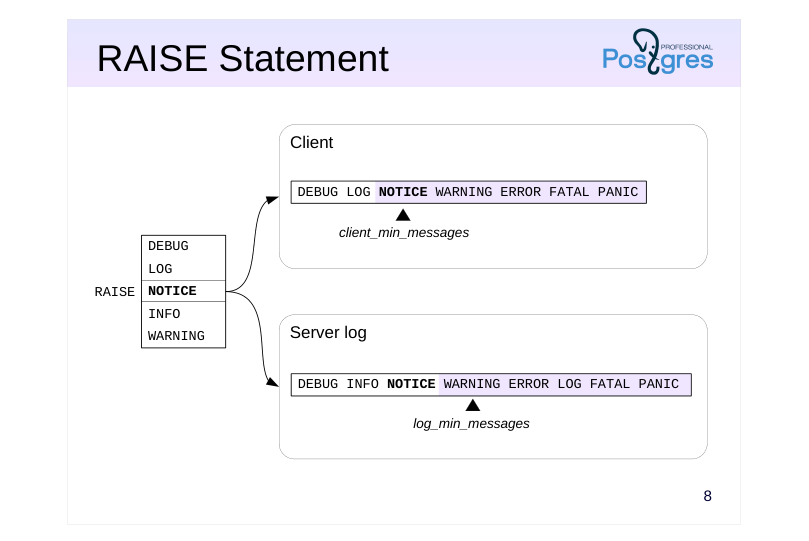 {#source-figure-008 caption=“Source slide page 8: RAISE Statement”}
Speaker notes
We are already familiar with the RAISE statement. It can be used both to raise exceptions (which is discussed in detail in the PL/pgSQL. Error Handling lesson) and to emit messages. Such messages can not only be sent to the client, but also written to the server log.
In a simple debugging case, you have to add RAISE NOTICE calls to the function code, start the function execution (for example, in a psql session), and analyze the received messages as the execution progresses. RAISE messages are non-transactional: they are emitted asynchronously and do not depend on the transaction status.
Message delivery is controlled by message levels (DEBUG, LOG, NOTICE, INFO, WARNING) and server parameters. Parameter values determine whether a message will be sent to the client (client_min_messages) and/or written to the server log (log_min_messages). A message will be sent if the RAISE message level is not lower than the value of the corresponding parameter (is shown to the right of the parameter value on this slide).
In the default configuration, NOTICE messages are only sent to the client, LOG messages are only written to the log file, and WARNING messages are both sent to the client and written to the log file.
INFO messages are always sent to the client; they cannot be trapped using the client_min_messages parameter.
https://postgrespro.com/docs/postgresql/16/plpgsql-errors-and-messages
Page 9: RAISE Statement
Let’s create a function that takes a table name as input and returns the number of rows in that table.
For dynamic execution, it is better to save the command text to a variable. In case of an error, you can analyze the variable value.
The string starting with “NOTICE” is our debug information. RAISE can be used to track the progress of a long query. Let’s consider a piece of code that has three distinct stages. As the code executes, we want to understand which stage we are at. To do this, we will call this procedure at each stage:
Upon completing each stage, the main procedure calls debug_message:
The RAISE statement issues messages immediately, rather than at the end of the main procedure:
This approach works fine when you call a function within a session. If, however, the function is called by an application, writing to and then reading from the server message log is much more convenient.
Page 10: Page 10
Let’s make debug_message emit a message with a specific level. The level will be defined by a custom parameter app.raise_level:
For this example, set it just for the current session:
This way, the procedure will not post any debug messages during “production” (app.raise_level = NONE):
Starting the function in a separate session, we can get debug messages by setting the app.raise_level to NOTICE:
To enable both debugging in the application and logging, set the message level to LOG:
Check the server log:
By adjusting app.raise_level, log_min_messages, and client_min_messages, you can achieve different debug message output behavior. Very importantly, all this is done without tampering with the application code.
Page 11: Process→Process (IPC)
NOTIFY → LISTEN
- SQL commands
- transactional execution is inconvenient for debugging
- Session status
- the application_name parameter
- is visible in the pg_stat_activity view and in the output of the ps command
- can be used in log messages
Speaker notes
In PostgreSQL, server processes can communicate between each other.
Among the built-in solutions, the following are worth noting.
● Sending messages via the NOTIFY command in one process and getting them via LISTEN in another. But since these commands are transactional, it is inconvenient to use them for debugging: 1. Messages are sent only at commit time, not right after the NOTIFY command execution, so it is impossible to track the execution progress. 2. If the transaction fails, messages won’t be sent at all.
● Using the application_name parameter. A session with a long-running process can periodically write its execution status into the application_name parameter. In a separate session, a DBA can poll the pg_stat_activity view, which contains detailed information about all active sessions. The application_name value is usually also visible in the output of the ps command. The application_name value can also be written to the server log (if you set up the log_line_prefix parameter). As a result, relevant log entries will be easier to find.
https://postgrespro.com/docs/postgresql/16/runtime-config-logging#RUNTIM E-CONFIG-LOGGING-WHAT
Page 12: Session Status
application_name is a useful parameter for debugging. The first session changes its value, the second session checks the pg_stat_activity view in a loop.
New version of the procedure:
In the first session:
In the second session, read the value from pg_stat_activity every two seconds:
Page 13: Process→Table
The dblink extension
- is part of the server
- incurs additional costs for opening a new connection
- Autonomous transactions
- Postgres Pro Enterprise
Speaker notes
Another way to save debug messages is to write them into a database table.
One of the advantages of this approach is that log access and concurrent execution are managed by the database system itself.
But you have to make sure that insertion operations on this table are non-transactional. It can be done using the dblink extension, which is provided as part of the PostgreSQL server. This extension enables you to open another connection to the same database, so insertion is performed in a separate transaction.
As for the disadvantages, opening a new connection takes additional server resources.
We cover dblink usage in more detail in the DEV2 course.
https://postgrespro.com/docs/postgresql/16/dblink
Postgres Pro Enterprise implements autonomous transactions with lower overhead than dblink usage (See the PGPRO course about Postgres Pro Enterprise features).
Page 14: Writing to a Table: the dblink Extension
Install the extension:
Create a table to write into. It makes sense to store information about the user and the time of record. The id column is there to make sure that the table is sorted in the order in which the rows are added.
Now, rewrite the procedure to add records to the table. The procedure opens a new session, performs an insert in a separate transaction, and closes the session.
Let’s test it: run our long_running procedure in a separate transaction, then roll it back.
Check if the table has all the debug_message records. The timestamps in ts tell us how much time has passed between the calls.
Page 15: Process→File
The adminpack extension
- is part of the server
- among other things, allows writing text files
- Untrusted languages
- for example, PL/Perl
Speaker notes
You can also write debug messages into an OS file.
It can be done using the adminpack extension, which allows writing data to any file that can be accessed by the postgres OS user.
Another option is to create a function in an untrusted language (such as PL/Perl — plperlu) that will perform the same task. Various server-side programming languages are covered in the DEV2 course.
https://postgrespro.com/docs/postgresql/16/adminpack
Page 16: Writing to a File: pg_file_write
Install the extension:
Rewrite debug_message again, now making it write debug information to a file. The postgres OS user who started the DBMS instance must be allowed write to this file. Let’s place it in the user’s home directory.
The function writes a separate line to the log file: the message passed by the parameter, the user responsible, and the timestamp. Test it: run long_running in a separate transaction, then roll it back.
Check the file contents. To access the file as student, you need to use sudo:
Page 17: Tracing SQL
Standard tracing into the log file
- logging overhead
- large log file
- profiling tools are required
- access to the log is required (security)
- Settings
- long-running statements
- log_min_duration_statement
- the statements to log
- log_statement
- message context
- log_line_prefix
- …
Speaker notes
In some cases, it may be useful to trace everything that happens in the code. Using the built-in functionality, you can save the executed SQL queries into the server log file. Make sure to take into account the following specifics:
● A high-load application can execute a huge number of queries. Writing them into a file can affect performance of the I/O subsystem.
● In most cases, you have to use special tools to analyze such data sets. A de-facto standard is pgBadger. https://github.com/darold/pgbadger
● Application developers may have no access to the log file on the server. Besides, in production systems, log files may contain commands with confidential information.
PostgreSQL provides several parameters to configure tracing; the main ones are listed on the slide. The full list is available here:
https://postgrespro.com/docs/postgresql/16/runtime-config-logging
You do not have to set configuration parameters for the whole cluster. Their scope can be limited to particular sessions using SET, ALTER DATABASE, and ALTER ROLE commands (as explained in Basic Tools. Installation and Management, psql and Data Organization. Logical Structure lessons).
Page 18: Tracing SQL
The auto\_explain extension
- logging execution plans
- tracing nested statements
- Settings
- plans of long-running commands
- auto_explain.log_min_duration
- nested statements
- auto_explain.log_nested_statements
- …
Speaker notes
When tracing is enabled, SQL commands make it into the log in their exact form that has been sent to the server. If a PL/pgSQL routine was called, the log will contain only this top-level call (for example, SELECT or CALL statement), but not the commands executed within the routine.
To log nested queries in addition to top-level commands, you have to use the auto_explain extension.
As suggested by its name, the main objective of this extension is to log both the text of the command and its execution plan. It can turn out to be useful, although it is not exactly tracing, but rather query optimization (which is covered in the QPT course).
https://postgrespro.com/docs/postgresql/16/auto-explain
Page 19: Tracing PL/pgSQL
The plpgsql\_check extension
- overhead incurred by logging
- loads of output data
- The main settings
- enabling tracing
- plpgsql_check.enable_tracer
- plpgsql_check.tracer
- message levels
- plpgsql_check.tracer_errlevel
Speaker notes
To figure out which code has been executed as you are looking at the log, you have to match SQL queries with PL/pgSQL routines, and it may be not that easy. There are no built-in tools for tracing PL/pgSQL code, but you can do it with the help of the plpgsql_check extension developed by Pavel Stehule (we have already mentioned this extension in PL/pgSQL. Executing Queries lesson).
Such tracing causes significant overhead and should only be used for debugging, not in production operations.
https://github.com/okbob/plpgsql\_check
Page 20: Session Tracing
One simple way to enable tracing is to set the log_statement parameter to ’all’ (write all commands, including DDL, data modification, and queries).
Run any query:
Disable tracing:
Information about the executed commands will appear in the server log:
Only the top level command is logged, not the query from within get_count. This is where the auto_explain extension comes in. This extension does not need to be installed, but must be loaded into memory. You can either set it up to load for the whole instance with shared_preload_libraries parameter, or just load it for the current session:
Enable tracing for all commands, regardless of execution time.
Enable tracing for nested queries:
The messages are raised the same way as with the RAISE statement. The LOG level is used by default, usually implying that the messages are recorded to the server log. You can change the log level to output tracing messages directly to the screen:
Try the query again:
Page 21: Page 21
Now we see not only the function call, but also the nested query and the execution plans.
Page 22: Takeaways
PL/pgSQL Debugger is a debugger API used in graphical development environments
- Debugging output can be displayed in the terminal, written into the server log, a table, or a file; it can also be sent to other processes
- Sessions can be traced
Page 23: Practice
- Modify the get_catalog function, so that the dynamically constructed text of the query is written into the server log.
- In the application, perform search several times by filling out different fields; make sure that SQL commands are constructed correctly. 2. Enable tracing of SQL statements at the server level.
- Perform some actions in the application and check which
- commands are logged.
- Disable tracing.
Speaker notes
- To enable tracing, set the log_min_duration_statement parameter to 0 and reload the configuration. All commands will be logged, together with their execution time.
The easiest way to do it is to use the ALTER SYSTEM SET command. Other ways of setting parameters are covered in Basic Tools. Installation and Management, psql lesson. Remember to reload the server configuration file.
After having a look at the log file, you should reset log_min_duration_statement to the default value (-1) to disable tracing. It is convenient to use ALTER SYSTEM RESET for this purpose.
Page 24: 1. The get_catalog Function
The text of a dynamic query is stored in a separate variable, which is saved to the server log before executing. Include parameter values in the message for clarity. Debug strings are marked with the “DEBUG get_catalog” substring in the log. After debugging, the RAISE LOG command can be removed or commented out.
2. Enabling and Disabling SQL Query Tracing
To enable tracing of all queries at the server level, run:
To disable:
Page 25: Page 25
The last two commands got into the message log:
Page 26: Practice+
1. Enable tracing of the PL/pgSQL code using the plpgsql\_check extension; check how it works on the example of several routines that call each other. 2. When getting debug messages from the PL/pgSQL code, it is convenient to know the exact routine they are related to. In the demo, the function name was entered manually. Implement the functionality that automatically adds the name of the current function or procedure to the message.
Speaker notes
To enable tracing, load the plpgsql_check extension into the session memory using the LOAD command, and then set both the plpgsql_check.enable_tracer and plpgsql_check.tracer parameters to on at the session level.
You can get the routine name by parsing the call stack. Use the results of Task 3 that you have completed as part of the practice for the Error Handling lesson.
Page 27: 1. Tracing with plpgsql_check
Download the extension (no need to install it with the CREATE EXTENSION command in this case):
Enabling tracing:
Multiple functions calling each other:
Example:
Not only the start and end events of the functions are displayed, but also the parameter values, as well as the time spent on execution (the extension can also do profiling, but we will not get into that here). Disable tracing:
Page 28: 2. Function Names in the Debug Log
Create a procedure that returns the top of the call stack (with the exception of the tracing procedure itself). The message is displayed with indentation proportional to the depth of the stack.
Example:
19 Lesson 19: Access Control / Overview
This page is extracted from the official PDF into native Markdown. Slide text, code and speaker notes are kept in reading order; the original PDF and HTML remain the layout references. HTML source: dev1_19_access_overview.html Archive: DEV1-handouts-16-en.zip PDF pages: 30
Page 1: Access Control / Overview
Copyright
© Postgres Professional, 2017–2025 Authors: Egor Rogov, Pavel Luzanov, Ilya Bashtanov, Igor Gnatyuk Translated by: Liudmila Mantrova, Alexander Meleshko, Elena Sharafutdinova Photo: Oleg Bartunov (Phu Monastery and Bhrikuti Peak, Nepal)
Use of Course Materials
Non-commercial use of course materials (presentations, demonstrations) is allowed without restrictions. Commercial use is possible only with the written permission of Postgres Professional. It is prohibited to make changes to the course materials.
Feedback
Please send your feedback, comments and suggestions to: edu@postgrespro.ru
Disclaimer
Postgres Professional assumes no responsibility for any damages and losses, including loss of income, caused by direct or indirect, intentional or accidental use of course materials. Postgres Professional company specifically disclaims any warranties on course materials. Course materials are provided “as is,” and Postgres Professional company has no obligations to provide maintenance, support, updates, enhancements, or modifications.
Page 2: Topics
- Roles and Attributes
- Connecting to a Server
- Password Authentication
- Privileges and Privilege Management
- Role Categories
- Group and Predefined Roles
- Default Privileges
- Privileges and Routines
Page 3: Roles and Attributes
Role can be a DBMS user
- not associated with the OS user
- Roles can be included into other roles
- simplifies access setup
- Attributes define the properties of a role
- LOGIN
- can log in
- SUPERUSER
- superuser privileges
- CREATEDB
- can create databases
- CREATEROLE
- can create roles
- and others
Speaker notes
Roles in PostgreSQL are used for two purposes. Firstly, a role can be a DBMS user. Secondly, roles can be members of other roles — it is convenient when setting up access.
Formally, roles are not associated with operating system users in any way, but many programs imply it when choosing default values. For example, if psql is started on behalf of the student OS user, the connection is established on behalf of the database role with the same name, i.e., student (unless another role is explicitly specified in the psql options).
At the time of cluster initialization, an initial role is defined, which has superuser privileges (this role is usually called postgres). Later on, you can create, modify, and delete roles.
https://postgrespro.com/docs/postgresql/16/database-roles
A role has several attributes which define its general properties and rights (unrelated to particular objects).
Generally, attributes come in two opposite variations; for example, CREATEDB (can create databases) and NOCREATEDB (not allowed to create databases).
A role with the LOGIN attribute is considered a user role. A role with NOLOGIN cannot connect to the server and is typically used for grouping other roles.
The table lists only some of the possible attributes.
https://postgrespro.com/docs/postgresql/16/role-attributes
https://postgrespro.com/docs/postgresql/16/sql-createrole
Page 4: Roles and Attributes
Create a role for the user Alice. Two attributes are specified.
Note Note which role the commands are executed as. The name of the current role is in the prompt.
You can get the list of roles with the command:
Note Note that the student role is a superuser. This is why we did not have any access issues so far. Create a database:
Page 5: Connecting to a Server
1. The lines of pg\_hba.conf are searched from top to bottom
- The first line that corresponds to the provided connection settings (type, database, user, address) will be used
- local — socket all — any role host — TCP/IP role name
- listen_addresses
- all — any DB
- all — any IP
- database name
- IP/mask
- domain name
Speaker notes
For each new client, the server has to evaluate whether a database connection should be allowed. Connection settings are defined in the pg_hba.conf configuration file (hba stands for host-based authentication). As with the main configuration file (postgresql.conf), changes come into effect only after the server reloads this file, either via the pg_reload_conf() SQL function or the reload command of the management utility.
When a new client appears, the server reads the configuration file from top to bottom to find the line that matches the requested connection. The match is defined by four fields: connection type, database name, user name, and IP address.
Here we list only the main basic options.
Connection: local (unix sockets) or host (a TCP/IP connection).
Database: all (corresponds to any database) or the name of a particular database.
User: all or the name of a particular role.
Address: all, IP address range, or a domain name. The address is omitted for the local connection type. By default, PostgreSQL listens only for connections coming from localhost; the listen_addresses parameter is usually set to * (listen on all interfaces), while the access is controlled using pg_hba.conf settings.
https://postgrespro.com/docs/postgresql/16/client-authentication
Page 6: Connecting to a Server
3. The server performs authentication using the chosen method
- If successful, access is allowed; otherwise, it is forbidden (if no rows match the given parameters, access is forbidden)
- trust — allow
- reject — forbid
- scram-sha-256 и md5 — request a password
- peer — ask OS
Speaker notes
Once the server finds an appropriate line in the file, it performs client authentication using the method specified in this line, and checks for the LOGIN attribute and the CONNECT privilege. If everything is OK, the connection is allowed; otherwise, it is forbidden (other lines won’t be considered in this case).
If no appropriate line is found, the access is also forbidden.
Thus, more specific connection lines should precede more generic ones.
There are a lot of different authentication methods:
https://postgrespro.com/docs/postgresql/16/auth-methods
Here are some of the main ones.
The trust method allows connections unconditionally. If security is not a concern, you can specify the trust method and use all for all the other parameters; then all connections will be allowed.
The reject method, on the contrary, unconditionally forbids connections.
The scram-sha-256 method asks for a password and checks that the provided password matches the one stored in the system catalog of the database cluster. The md5 method is considered deprecated.
The peer method checks the name of the operating system user and allows connections on behalf of the database user with the same name (you can also define a different name mapping).
Page 7: Password Authentication
At the server side
- the password is set when the role is created and can be changed later
- a user that has no password won’t be able to connect
- the password is stored in the pg_authid system catalog
- Entering the password on the client
- manually
- using the PGPASSWORD environment variable
- using the ~/.pgpass file (lines format: node:port:database:role:password)
Speaker notes
If password authentication is used, there must be a reference password stored for the user; otherwise the connection will be rejected.
Password hashes are stored in the pg_authid table in the system catalog.
The user can either enter the password manually, or automate password input using one of the following options.
First, the password can be set in the PGPASSWORD environment variable (on the client). However, it is inconvenient if you have to connect to several databases, and it is not recommended for security reasons.
The second option to store passwords on the client is to use the ~/.pgpass file. The access to this file must be allowed to its owner only (chmod 600), otherwise PostgreSQL will ignore it.
Page 8: Connection
In order for a role to connect to the database, it must have both the LOGIN attribute and the permission in the file pg_hba.conf. You can usually find it right beside the main configuration file:
And you can read it directly from SQL:
(The contents may vary depending on the server build.) We will use a TCP/IP (host) connection to localhost. Such connection corresponds to the second string in the output, expecting password-based authentication. The role alice was created with a password right away, but the password can be changed at any time:
Attempt to connect using a connection string with all the info:
Success!
Page 9: Privileges
Privileges define access rights of roles to objects
- Tables and views
- SELECT
- read data
- INSERT
- insert rows
- can be set per column
- UPDATE
- change rows
- DELETE
- delete rows
Speaker notes
Privileges establish a relation between subjects (roles) and objects in the cluster. They determine the actions that roles can perform with these objects.
There are different privileges available for different object types. This slide and the following one list privileges for basic database objects.
The widest choice of privileges is available for tables and views. Some of these privileges can be set not only at the table level, but also at the column level.
https://postgrespro.com/docs/postgresql/16/ddl-priv
https://postgrespro.com/docs/postgresql/16/sql-grant
Page 10: Privileges
 {#source-figure-010 caption=“Source slide page 10: Privileges”}
Tablespaces, database, schemas
- Sequences
- SELECT
- currval
- UPDATE
- nextval
- setval
- USAGE
- currval
- nextval
Speaker notes
Sequences have a somewhat unexpected set of privileges. They serve to allow or restrict access to the three control functions.
For tablespaces, there is a CREATE privilege that allows the creation of objects in this tablespace.
For databases, the CREATE privilege allows you to create schemas in this database, and for a schema, the CREATE privilege allows you to create objects in this schema.
Since the exact name of the schema for temporary objects is unknown in advance, the privilege to create temporary tables has been moved to the database level (TEMPORARY).
The USAGE schema privilege allows access to objects in this schema.
The CONNECT database privilege allows connection to this database.
Page 11: Role Categories
Superusers
- full access to all objects, no checks performed
- Owners
- initially, all privileges on the object (can be revoked)
- actions that are not regulated by privileges, such as deleting objects, granting
- and revoking privileges, etc.
- Other roles
- access within the granted privileges
Speaker notes
Generally speaking, a role’s ability to access an object is defined by the role’s privileges. But it makes sense to single out three categories of roles and discuss them separately.
Roles with the SUPERUSER attribute (superusers). These roles can do anything and ignore all access control checks.
Object owner. Initially, this is the role that created the object, although it can be changed later. It’s not just the object creator role that becomes the owner, but also any other role included in it. The object owner gets the full range of privileges on this object.
Technically, these privileges can be revoked, but the owner always retains inherent rights on the actions that are not regulated by any privileges. In particular, the owner can grant and revoke privileges (including to and from themselves), delete the object, etc.
- All other roles have access to the object only as far as the privileges granted to them allow it.
To check if a role has the necessary privilege with respect to some object, you can use the has_*_privilege functions:
https://postgrespro.com/docs/postgresql/16/functions-info
Page 12: Privilege Management
Granting privileges
- alice
- bob
- privileges
- on object
- Revoking privileges
Speaker notes
The right to grant and revoke privileges on an object belongs to the owner of that object (and the superuser).
The syntax of the GRANT and REVOKE commands is quite complex. You can specify both individual and all possible privileges, both individual objects and groups of objects included in certain schemas, etc.
https://postgrespro.com/docs/postgresql/16/sql-grant
https://postgrespro.com/docs/postgresql/16/sql-revoke
Page 13: Privileges
 {#source-figure-013 caption=“Source slide page 13: Privileges”}
Alice has connected to the database. Now she wants to create a schema and some objects.
What’s the issue? Alice does not have the privilege to create schemas in the database. Grant it:
Try again:
Now, since Alice is the owner of the schema, she has all the privileges on it and can create any objects in it. This schema will be used by default:
Alice creates two tables.
The superuser creates another role for the user Bob, who will access objects belonging to Alice.
Bob attempts to access the table t1:
What happened? Bob is neither a superuser nor the owner of this schema, so access is denied. This command lists current access rights (Access privileges column):
Page 14: Page 14
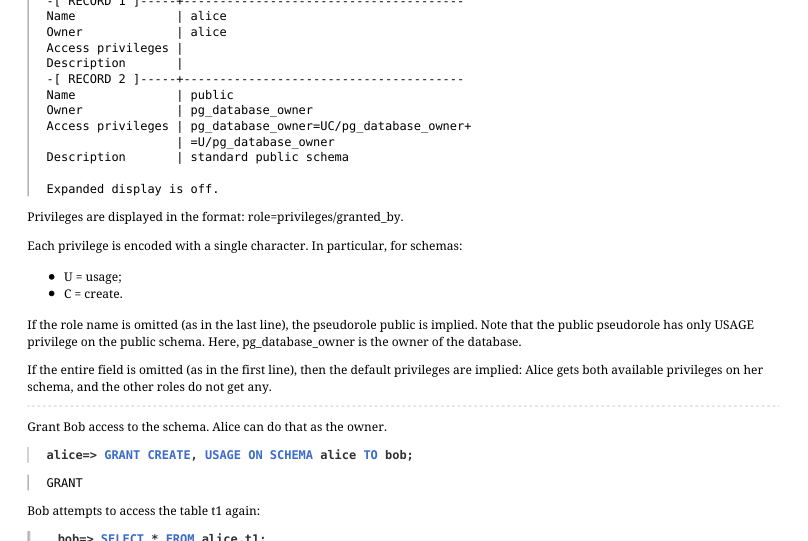 {#source-figure-014 caption=“Source slide page 14: Page 14”}
Privileges are displayed in the format: role=privileges/granted_by. Each privilege is encoded with a single character. In particular, for schemas: U = usage; C = create. If the role name is omitted (as in the last line), the pseudorole public is implied. Note that the public pseudorole has only USAGE privilege on the public schema. Here, pg_database_owner is the owner of the database. If the entire field is omitted (as in the first line), then the default privileges are implied: Alice gets both available privileges on her schema, and the other roles do not get any. Grant Bob access to the schema. Alice can do that as the owner.
Bob attempts to access the table t1 again:
Another error. What happened now? This time, Bob has access to the schema, but not to the table itself. This command shows who has access to the table:
The field is empty: only the owner, Alice, has access. Alice grants Bob read and update access:
And read and insert rights for one column in the second table:
The privileges have changed:
Now the empty field has “appeared” and contains a complete list of privileges. Below are the designations, not all of them are quite
Page 15: Page 15
 {#source-figure-015 caption=“Source slide page 15: Page 15”}
obvious: a = insert r = select w = update d = delete D = truncate x = reference t = trigger Privileges for columns are displayed separately (under Column privileges). This time Bob is successful. He adds the schema name to his search path, so that he does not have to type it in every time.
Now, the search path will be set in each of Bob’s sessions.
However, all other operations remain restricted.
And the second table:
Reading of the other column is not permitted:
Page 16: Granting Membership
 {#source-figure-016 caption=“Source slide page 16: Granting Membership”}
public Granting membership
- alice
- bob
- dba
- public pseudo-role implicitly includes
- all other roles
- Revoking membership
Speaker notes
Any role can include other roles as members. In this case, the role acts as a group. PostgreSQL does not have a separate “group” entity.
A role can be a member of multiple roles; in turn, a member role may include other roles, but circular dependencies are not permitted.
By default, a role inherits the privileges of any group roles it is a member of. This behavior can be changed by using the NOINHERIT attribute for the role. This makes the user have to explicitly switch to the group role using SET ROLE in order to use its privileges. Role attributes are not inherited, but it is possible to switch to a parent role to use its attributes.
Roles that include other roles typically have the NOLOGIN attribute and are referred to as “group roles”. We can think of a group role as a predefined set of privileges that can be granted to a role just like any regular privilege. This simplifies access control and administration.
There is also a pseudorole called public, which implicitly includes all the other roles. Any privilege granted to the public role is automatically granted to all the other roles as well.
https://postgrespro.com/docs/postgresql/16/role-membership
Page 17: Predefined Roles
pg_monitor
- pg_read_all_settings read all server parameters
- pg_read_all_stats access statistics pg_stat_scan_tables monitoring and locking tables
- pg_read_all_data read data in all tables pg_write_all_data change data in all tables
- pg_read_server_files read files on the server pg_write_server_files write to files on the server
- pg_execute_server_programs run programs on the server
- …
Speaker notes
PostgreSQL provides a number of predefined roles that have access to some frequently used, but privileged capabilities and data. Membership in these roles may be granted to users in order to facilitate administrative and maintenance tasks without providing them superuser capabilities.
The list of predefined roles increases with each PostgreSQL version. The full list of all the roles, including predefined ones, cat be seen by \duS command in psql.
https://postgrespro.com/docs/postgresql/16/predefined-roles
You can create your own administrative group roles, e.g. for managing backups.
Page 18: Group Roles
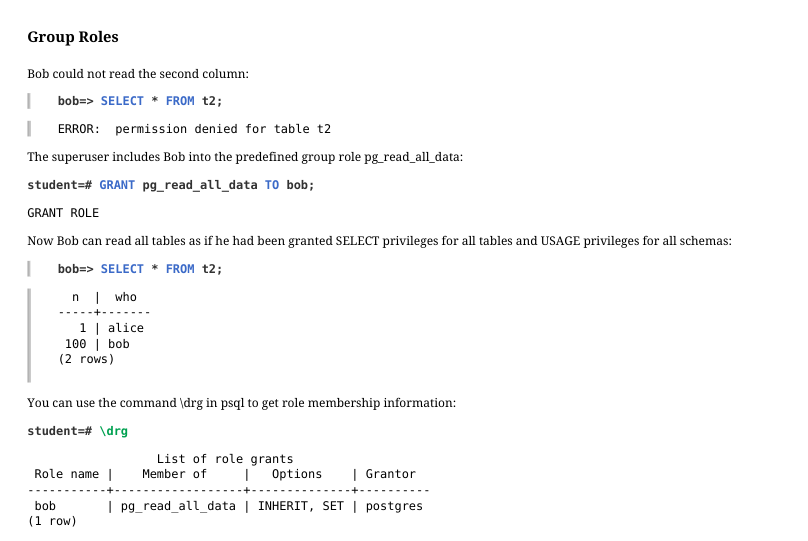 {#source-figure-018 caption=“Source slide page 18: Group Roles”}
Bob could not read the second column:
The superuser includes Bob into the predefined group role pg_read_all_data:
Now Bob can read all tables as if he had been granted SELECT privileges for all tables and USAGE privileges for all schemas:
You can use the command \drg in psql to get role membership information:
The Options column shows attributes for the membership. For Bob as a member of pg_read_all_data, SET means the right to switch to the group role, and INHERIT means that Bob can use the group privileges without explicitly switching to the group. Exclude Bob from the group:
Page 19: Routines
The only privilege for functions and procedures
- EXECUTE
- execution
- Security modes
- SECURITY INVOKER
- executed with the privileges of the caller
- (by default)
- SECURITY DEFINER
- executed with the privileges of the owner
Speaker notes
The privilege EXECUTE, the only privilege for functions and procedures, allows them to execute.
The user on behalf of which the routine is executed is important. If a routine is declared as a SECURITY INVOKER (by default), it is executed with the rights of the user that runs it. In this case, the statements inside the routine can access only those objects that are accessible to the calling user.
On the other hand, if declared with the SECURITY DEFINER, the routine will use the rights of its owner. This is a way to allow certain users perform certain actions on objects they personally have no access to.
https://postgrespro.com/docs/postgresql/16/sql-createfunction
https://postgrespro.com/docs/postgresql/16/sql-createprocedure
Page 20: Default Privileges
Privileges of the public pseudo-role
- connect to any database
- access to the system catalog
- execution of any routines
- privileges are granted automatically on each new object
- Configurable default privileges
- the possibility to additionally grant or revoke privileges on a newly created
- object
Speaker notes
As we have already said, the public pseudo-role includes all other roles, so they inherit all the privileges granted to public.
And public has quite an extensive list of privileges by default. In particular:
● The right to connect to any database (that’s why the role alice could connect to the database although the CONNECT privilege had not been explicitly granted to this role)
● Access to the system catalog
● Execution of any routines
On the one hand, it enables seamless operation without having to deal with privileges; but on the other hand, it brings extra complications if access control is really required.
The public role automatically receives all the privileges listed above for all newly created objects. So it is not enough to simply revoke the EXECUTE privilege from public: once a new routine appears, public immediately gets the right to execute it.
There is a special mechanism of default privileges that enables you to automatically grant and revoke the required privileges on newly created objects. It can be also used to revoke the EXECUTE privilege from the public pseudo-role.
https://postgrespro.com/docs/postgresql/16/sql-alterdefaultprivileges
Page 21: Configurable Default Privileges
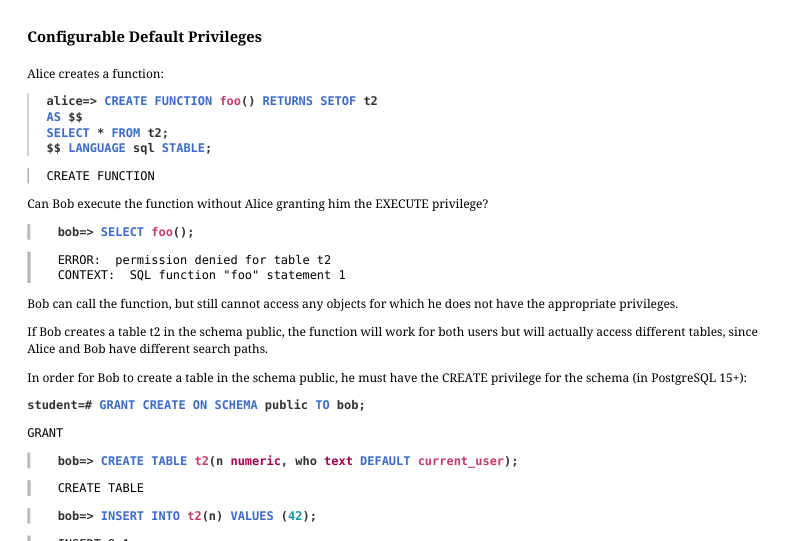 {#source-figure-021 caption=“Source slide page 21: Configurable Default Privileges”}
Alice creates a function:
Can Bob execute the function without Alice granting him the EXECUTE privilege?
Bob can call the function, but still cannot access any objects for which he does not have the appropriate privileges. If Bob creates a table t2 in the schema public, the function will work for both users but will actually access different tables, since Alice and Bob have different search paths. In order for Bob to create a table in the schema public, he must have the CREATE privilege for the schema (in PostgreSQL 15+):
Alternatively, the function can be declared as using the privileges of its owner:
In this case, the function will always be executed with the privileges Alice has, regardless of who actually calls it. Bob deletes his table…
…and gets access to the Alice’s table:
In this situation, Alice needs to keep an eye on the granted privileges. For one, she should revoke the EXECUTE privilege from the role public and explicitly grant it only to the roles that should have it.
Page 22: Page 22
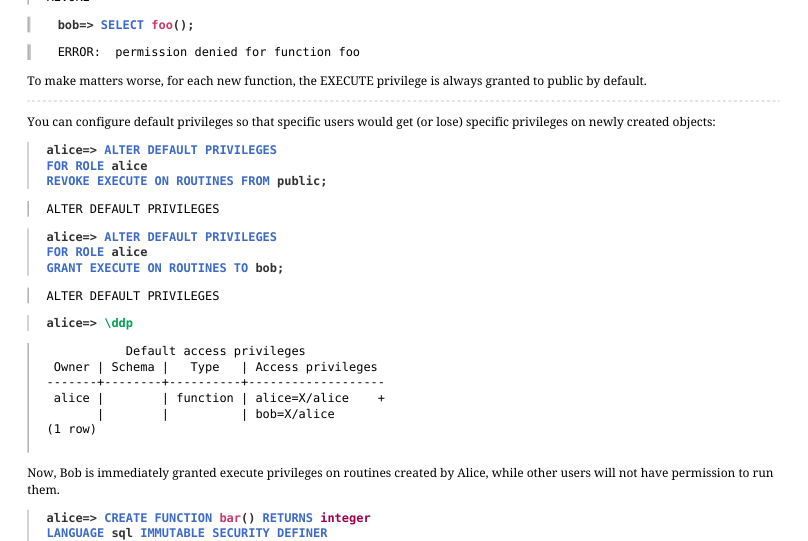 {#source-figure-022 caption=“Source slide page 22: Page 22”}
To make matters worse, for each new function, the EXECUTE privilege is always granted to public by default. You can configure default privileges so that specific users would get (or lose) specific privileges on newly created objects:
Now, Bob is immediately granted execute privileges on routines created by Alice, while other users will not have permission to run them.
Page 23: Takeaways
Roles, attributes and privileges together form a flexible mechanism that allows you to set up access control in different ways
- can grant all access widely
- can restrict access heavily if necessary
- When creating a new role, you need to ensure that it can connect to the server
Page 24: Practice
- Create two roles (the password must match the name): – employee — store employee, – buyer — customer.
- Make sure that the created roles can connect to the database. 2. Revoke the rights of the role public to perform all functions and connect to the database. 3. Delimit access in such a way that: – the employee could only order books and add authors and books, – the buyer could only purchase books. Check the changes in the application.
Speaker notes
- The employee is an internal user of the application, authentication is performed at the database level.
The buyer is an external user. In a real online store, the management of such users falls to the application, and all queries come to the database from one “generalized” role (buyer). The identifier of a specific customer can be passed as a parameter (but we do not do this in our application).
- Generally speaking, access control should be embedded in the application. In our educational application, it is not implemented on purpose: instead, on the web page, you can explicitly select the role on behalf of which the query will be sent to the database. This allows you to see how the server side will behave if the application is not working correctly.
So, users need to get:
● The right to connect to the bookstore database and access the bookstore schema.
● Access to views that are accessed directly.
● Access to functions that are called as part of the API. If you leave the SECURITY INVOKER functions in, you will have to grant access to all the “underlying” objects (tables, other functions). However, it is more convenient to simply declare API functions as SECURITY DEFINER.
Of course, roles need to be granted privileges only on those objects that they should have access to.
Page 25: 1. Create roles
The default settings allow local connections by password. This works for us.
2. Privileges of “public”
Revoke extra privileges from the role “public”.
3. Access control
Functions executed with the creator’s privileges.
Buyer privileges: the buyer can search for and purchase books.
Employee privileges: the employee must have access to view and add books and authors, as well as to the catalog for ordering more books.
Page 26: Page 26
Page 27: Practice+
- Register the user roles alice and bob. 2. Modify the pg_hba.conf file to allow access without password only for the postgres and student users, ensuring that access for alice and bob remains restricted. 3. Enable peer authentication method for alice and bob. Check that connection attempts fail without OS user mapping. Create such mapping for alice. 4. Check the capability to use the same OS user mapping for different database roles.
Speaker notes
- Using a text editor, insert the new entry before the first uncommented directive in pg_hba.conf. local all postgres,student trust
Reload configuration.
- Modify the inserted directive in pg_hba.conf by replacing it with the following: local all postgres,student trust local all alice,bob peer
Append the following to the end of the pg_ident.conf file: stmap student alice
- For alice and bob roles to share a single mapping, the pg_ident.conf file shall be as follows: stmap student alice stmap student bob
Page 28: 1. Add Roles
Register roles with the permission to log in.
2. Limit the use of trust
Edit the contents of pg_hba.conf, allowing the trust method only for postgres and student.
This is what we get:
Reload the configuration.
Now, neither alice nor bob can connect.
3. Peer Authentication Method
Using a text editor, add another line with the peer authentication method to allow alice and bob to connect.
Contents of pg_hba.conf:
Page 29: Page 29
Reload the configuration.
The users still cannot log in, but the error message is now different.
The peer authentication method requires the user names in the OS and roles in PostgreSQL to match. Map the role alice to the OS user student by adding a line to pg_ident.conf. Do not set up the mapping for bob, though.
Add the parameter map to the line to set the mapping.
Contents of pg_hba.conf:
Reload the configuration.
Now alice can connect to the database and execute commands.
And bob cannot.
Page 30: 4. One Mapping for Multiple Roles
Allow bob to connect under the same conditions as alice.
Lines added to pg_ident.conf:
Reload the configuration.
Now both alice and bob can connect.
20 Lesson 20: Backup / Logical Backup
This page is extracted from the official PDF into native Markdown. Slide text, code and speaker notes are kept in reading order; the original PDF and HTML remain the layout references. HTML source: dev1_20_backup_logical.html Archive: DEV1-handouts-16-en.zip PDF pages: 24
Page 1: Backup / Logical Backup
Copyright
© Postgres Professional, 2017–2025 Authors: Egor Rogov, Pavel Luzanov, Ilya Bashtanov, Igor Gnatyuk Translated by: Liudmila Mantrova, Alexander Meleshko, Elena Sharafutdinova Photo by: Oleg Bartunov (Phu monastery, Bhrikuti summit, Nepal)
Use of Course Materials
Non-commercial use of course materials (presentations, demonstrations) is allowed without restrictions. Commercial use is possible only with the written permission of Postgres Professional. It is prohibited to make changes to the course materials.
Feedback
Please send your feedback, comments and suggestions to: edu@postgrespro.ru
Disclaimer
Postgres Professional assumes no responsibility for any damages and losses, including loss of income, caused by direct or indirect, intentional or accidental use of course materials. Postgres Professional company specifically disclaims any warranties on course materials. Course materials are provided “as is,” and Postgres Professional company has no obligations to provide maintenance, support, updates, enhancements, or modifications.
Page 2: Topics
- Logical and Physical Backup
- Backup and Restore of a Table
- Backup and Restore of a Database
- Backup and Restore of the Whole Cluster
Page 3: Logical Backup
SQL commands to create objects and fill them with data
- backup of a particular object or a database
- restore to a different architecture or PostgreSQL version
- (binary compatibility is not required)
- ease of use
- − modest operation speed
- − no point-in-time recovery
Speaker notes
A logical backup is a set of SQL commands that can restore the database cluster (or a particular database or table) from scratch: it creates all the required objects and fills them with data.
These commands can be run on a different server version (if it provides compatibility at the command level) or on a different platform or architecture (binary compatibility is not required).
In particular, a logical backup can be used for long-term storage: you can restore it even after upgrading the server to a higher version.
The process of creating a logical backup is relatively easy. It is usually enough to run a single command or launch a single utility.
But for large databases, the execution of these commands can take a very long time. Using a logical backup, you can restore your database system only to its state exactly to the point in time when the backup process was initiated.
https://postgrespro.com/docs/postgresql/16/backup-dump
Page 4: Physical Backup
A copy of the database cluster’s file system
- faster than logical backup
- statistics are restored
- − restore is only possible on a compatible system, with the same PostgreSQL
- major version installed
- − partial backup is impossible, the whole cluster is copied
- WAL archive
- point-in-time recovery is available
Speaker notes
A physical backup implies creating a copy of all files related to the database cluster: in other words, creating its full binary copy.
It is faster to copy files than dump SQL commands; besides, unlike restoring a logical backup, starting a server using a physical copy is a matter of several minutes. Another advantage is that you do not have to rebuild statistical data: it is also restored from the physical copy.
But this approach has its own shortcomings. A physical backup can be used to restore the system only on a compatible platform (that has the same OS, architecture, etc.) with the same major PostgreSQL version installed. Besides, it is impossible to create a physical copy of a specific database: you can only back up the whole database cluster.
Physical backups are usually used together with WAL archives. It enables system recovery not only at the time of backup creation, but also at an arbitrary point in time.
https://postgrespro.com/docs/postgresql/16/backup-file
https://postgrespro.com/docs/postgresql/16/continuous-archiving
Creating physical backups for any important production systems is a common practice. It is the responsibility of a DBA to take such backups.
Page 5: Making a Table Copy in SQL
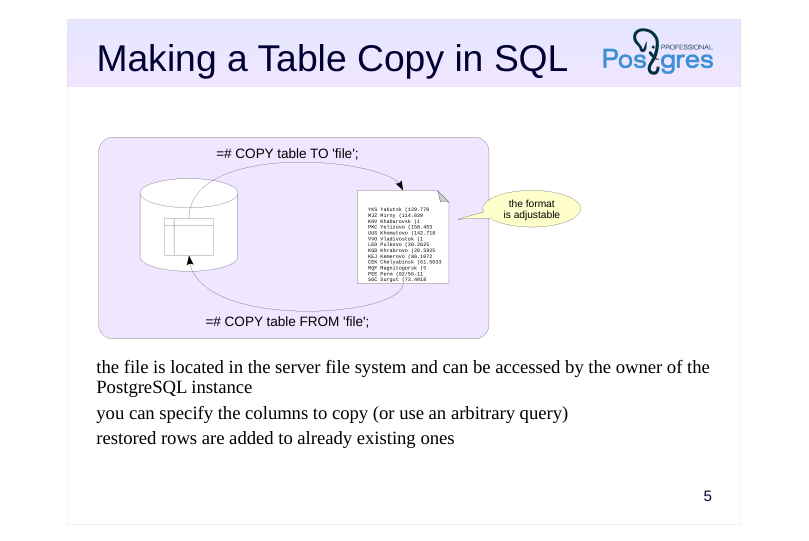 {#source-figure-005 caption=“Source slide page 5: Making a Table Copy in SQL”}
- the file is located in the server file system and can be accessed by the owner of the PostgreSQL instance you can specify the columns to copy (or use an arbitrary query) restored rows are added to already existing ones
Speaker notes
If you want to save only the contents of one table, you can use the COPY command.
The COPY TO flavor of this command enables you to save the table (or some of its columns, or even the result of an arbitrary query) into a file, display it in the terminal, or provide it as input to an application. You can specify parameters such as format (plain text, CSV or binary), field separators, NULL representation, and more.
The alternative variant of the COPY command reads fields from a file or the console and inserts them into a table. The table isn’t cleared, the new rows are simply appended to the existing ones.
The COPY command is significantly faster than similar INSERT commands, because the client does not need to access the server repeatedly, and the server does not have to analyze the commands multiple times.
Notably, the COPY FROM command ignores the defined rules, although integrity constraints and triggers are respected.
https://postgrespro.com/docs/postgresql/16/sql-copy
Page 6: Making a Table Copy in psql
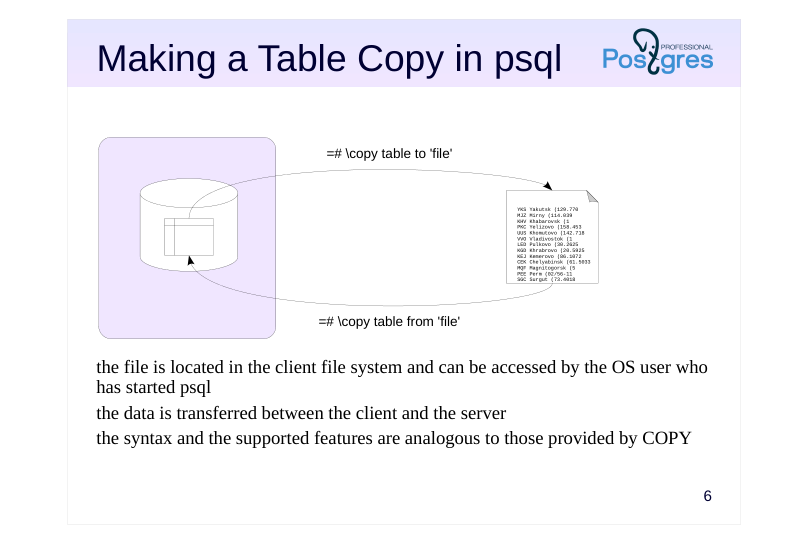 {#source-figure-006 caption=“Source slide page 6: Making a Table Copy in psql”}
- the file is located in the client file system and can be accessed by the OS user who has started psql the data is transferred between the client and the server the syntax and the supported features are analogous to those provided by COPY
Speaker notes
In psql, there is a client version of the COPY command with a similar syntax.
The file name in the SQL command corresponds to a file on the database server. The user running PostgreSQL (usually postgres) must have access to this file.
The client implementation of this command refers to the file located on the client, which allows keeping a local copy of data even if there is no access to the server file system. The table contents is automatically transferred between the client and the server.
https://postgrespro.com/docs/postgresql/16/app-psql
Page 7: The COPY Command
Create a database and a table.
This is what the COPY command shows (output to the console, not to a file):
You can see how empty rows are different from the NULL values. The output format can be configured quite flexibly. You can change the separator, the NULL display, add a line with column names, etc. For example:
Note Note that the inline separator character has been escaped (the escape character is also configurable). Instead of a table, you can specify an arbitrary query.
This way, you can save query results, presentation data, etc. The command can work with CSV, a popular format supported by many programs.
Input from file or console works in a similar manner. For input from console, the end of file marker (a backslash and a period) is required. For input from file, it is there implicitly. All input parameters must match those specified during output.
Page 8: Page 8
If the input contains a header row with column names, those can be verified against the target table column names.
A mismatch throws an error:
Another attempt to add a row to the table:
This error occurred because the last COPY command, while successful, did not advance the value of the sequence serving the id column. This is easily fixed:
Here are the table contents (with NULL output configured in psql for clarity):
Page 9: Database Backup
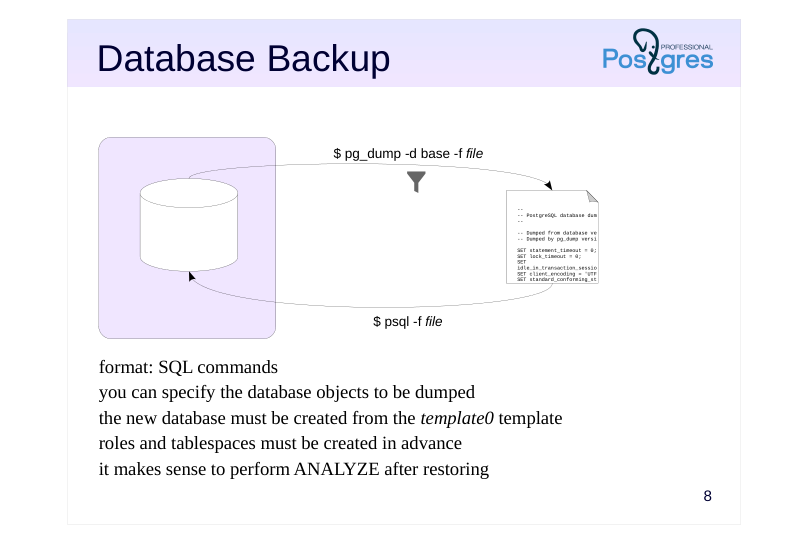 {#source-figure-009 caption=“Source slide page 9: Database Backup”}
- format: SQL commands you can specify the database objects to be dumped the new database must be created from the template0 template roles and tablespaces must be created in advance it makes sense to perform ANALYZE after restoring
Speaker notes
The pg_dump utility creates a full-scale database backup.
If you omit the file name (-f, –file), the utility’s output will be displayed in the terminal. The produced output is a script to be run in psql; it contains the commands that will create the required objects and fill them with data.
You can use optional parameters to limit the set of backed up objects: for example, you can choose to back up only particular tables, objects in particular schemas, or use other filters.
To restore the objects from the backup, just run the generated script in psql.
Note that the database to be restored should be cloned from template0, since all the changes made to template1 will also make it into the backup.
Besides, all the required roles and tablespaces must be set up in advance. Since these objects do not belong to any particular database, they won’t be included into the dump.
Once the database is restored, it makes sense to run the ANALYZE command: it will collect statistics that the optimizer requires for query planning.
https://postgrespro.com/docs/postgresql/16/app-pgdump
Page 10: The custom Format
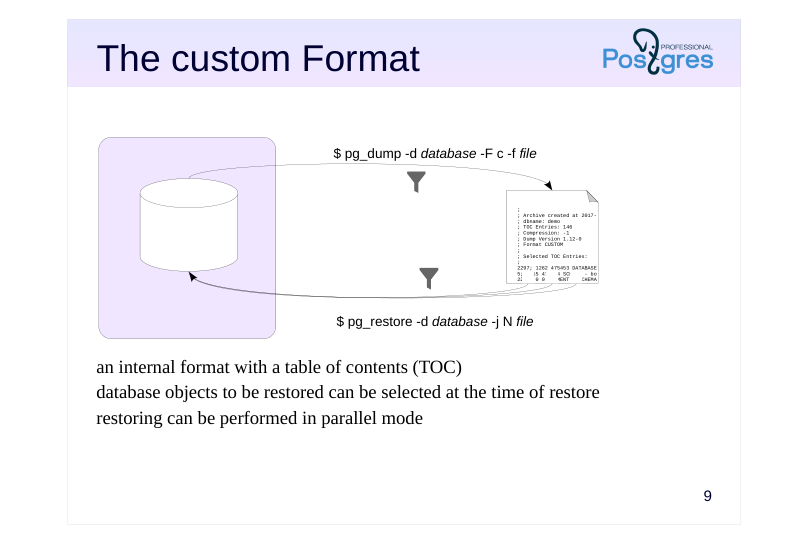 {#source-figure-010 caption=“Source slide page 10: The custom Format”}
- an internal format with a table of contents (TOC) database objects to be restored can be selected at the time of restore restoring can be performed in parallel mode
Speaker notes
The pg_dump utility allows you to specify the backup format. By default, the plain format is used; it provides pure psql commands.
The custom format (-F c, –format=custom) creates a backup in a special format that contains not only the backed up objects, but also a table of contents (TOC). Having a TOC allows you to choose the objects right at the time of restore, not while making the dump.
By default, the output of the custom format is compressed.
To restore the database, you need to run another utility: pg_restore. It reads the file and converts it to psql commands. If you do not explicitly provide the database name (with the -d option), all commands will be output to the terminal. If the database is specified, pg_restore will connect to this database and execute the commands; you won’t have to start psql.
To restore only some of the objects, you can use one of the following approaches. The first one is to filter the objects to be restored, just like it is done in pg_dump. In fact, pg_restore shares many parameters with pg_dump.
The second option is to use the TOC to retrieve the list of objects included into the backup (via the –list option). Then you can edit this list manually: delete the objects you do not need and pass the modified list to pg_restore (via the –use-list option).
https://postgrespro.com/docs/postgresql/16/app-pgrestore.html
Page 11: The directory Format
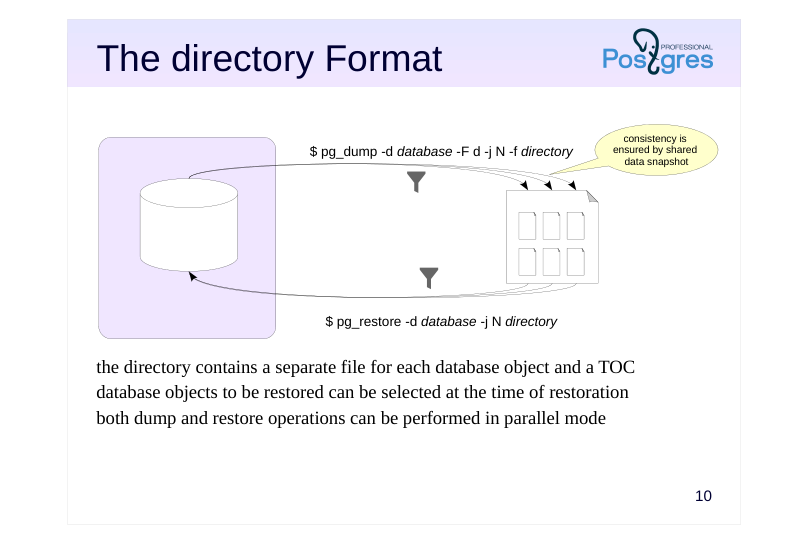 {#source-figure-011 caption=“Source slide page 11: The directory Format”}
the directory contains a separate file for each database object and a TOC database objects to be restored can be selected at the time of restoration both dump and restore operations can be performed in parallel mode
Speaker notes
You can also create backups in the directory format. In this case, pg_dump produces a whole directory instead of a single file; it contains the backed up objects and the table of contents. By default, all files in the directory are compressed.
Its advantage over the custom format is that such a backup can be created concurrently using several processes (the number of processes is specified in option -j, –jobs).
Naturally, the backup will contain consistent data even though it has been created concurrently. Consistency is ensured by using a single data snapshot for all the parallel processes.
https://postgrespro.com/docs/postgresql/16/functions-admin.html#FUNCTIO NS-SNAPSHOT-SYNCHRONIZATION
Data restoration can also be performed in parallel mode (it is also supported for the custom format).
Other capabilities are quite similar to those provided by the previously discussed formats: the directory format supports the same options and approaches.
Page 12: Format Comparison
plain custom directory tar
- restoration utility psql pg_restore
- compression zlib
- partial restore yes yes yes
- parallel backup yes
- parallel restore yes yes
Speaker notes
This slide compares different features provided by different backup formats.
Note that there is also one more format available: tar. We do not cover it here as it does not bring anything new and has no advantages as compared to other formats. In fact, this format is simply a version of the directory format in a tar archive, but it does not support compression or parallel execution.
Page 13: pg_dump Utility
pg_dump, ran without additional parameters, issues SQL commands that create all objects in the database:
Page 14: Page 14
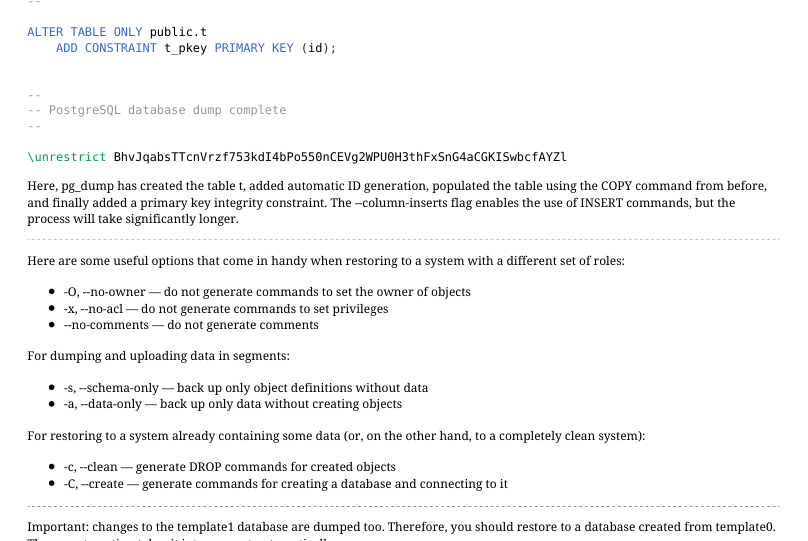 {#source-figure-014 caption=“Source slide page 14: Page 14”}
Here, pg_dump has created the table t, added automatic ID generation, populated the table using the COPY command from before, and finally added a primary key integrity constraint. The –column-inserts flag enables the use of INSERT commands, but the process will take significantly longer. Here are some useful options that come in handy when restoring to a system with a different set of roles: -O, –no-owner — do not generate commands to set the owner of objects -x, –no-acl — do not generate commands to set privileges –no-comments — do not generate comments For dumping and uploading data in segments: -s, –schema-only — back up only object definitions without data -a, –data-only — back up only data without creating objects For restoring to a system already containing some data (or, on the other hand, to a completely clean system): -c, –clean — generate DROP commands for created objects -C, –create — generate commands for creating a database and connecting to it
Important: changes to the template1 database are dumped too. Therefore, you should restore to a database created from template0. The –create option takes it into account automatically:
No command to create the public schema is generated, but if its permissions or owner were changed at some point, corresponding commands will appear in pg_dump output:
Some options specify the objects to be dumped: -n, –schema — template for schema names -t, –table — template for table names Or, conversely, not to be, while dumping everything else: -N, –exclude-schema — template for schema names -T, –exclude-table — template for table names For example, restore the table t to another database.
Page 15: Page 15
Connect to backup_logical_dev_2 and verify:
pg\_dump: custom Format
The plain format has a serious limitation: you have to specify all the objects you will need in your backup before making the dump. The custom format allows you to make a full dump first, then specify which objects to restore from it later.
This is done with the pg_restore tool. Time to restore t again.
pg_restore will recognize the dump format automatically, there is no need to specify it. pg_restore also understands all the flags that pg_dump does, and more: -I, –index — restore specific indexes -P, –function — restore certain functions -T, –trigger — restore specific triggers
Another example: restore the entire original backup_logical_dev_1.
-d lets us select any existing database, –create creates the database specified in the dump and connects to it.
Page 16: Page 16
Let’s try:
A plain backup can be modified in any text editor, if necessary. A custom backup is binary, but it still supports wider filtering capabilities, in addition to the previously mentioned flags. pg_restore can generate a list of objects, the table of contents of the backup:
You can save it to a file, adjust it, and then use it during restore (–use-list).
pg\_dump: directory Format
The directory format, notably, supports dumping in parallel. Consistency is guaranteed: all processes use the same snapshot.
Take a look inside the directory:
There is a table of contents file, and a file for each dumped object (we have only one):
Let’s restore backup_logical_dev_1 database from backup in two streams. The –clean option generates a command to remove the existing database, since backup_logical_dev_1 already exists. We also need to disconnect from backup_logical_dev_1:
Page 17: Page 17
Page 18: Cluster Backup
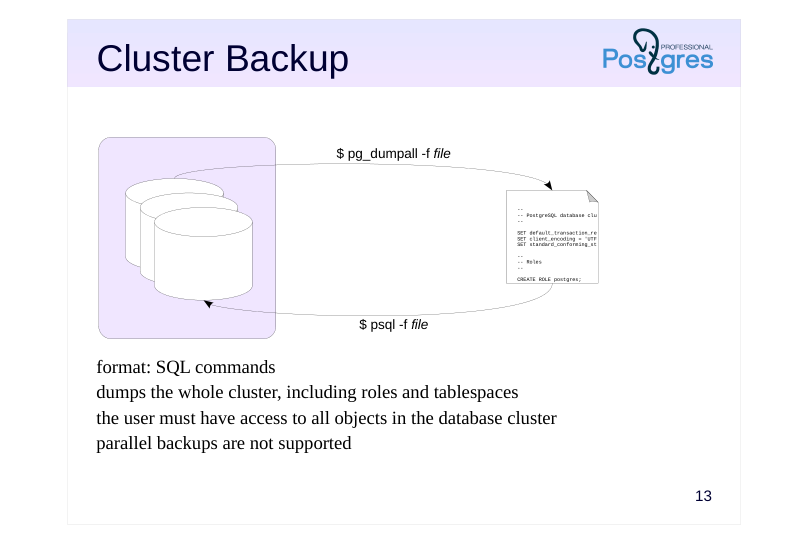 {#source-figure-018 caption=“Source slide page 18: Cluster Backup”}
- format: SQL commands dumps the whole cluster, including roles and tablespaces the user must have access to all objects in the database cluster parallel backups are not supported
Speaker notes
pg_dumpall creates a backup of the entire cluster, including roles and tablespaces.
Since pg_dumpall requires access to all objects of all databases, it should be run by a superuser or a user with the pre-defined role pg_read_all_data. pg_dumpall connects to each database in the cluster one by one and backups them using pg_dump. In addition, it also stores data related to the cluster as a whole.
To start this process, pg_dumpall has to establish a connection with any available database. By default, postgres or template1 is selected, but you can specify another one.
The result of pg_dumpall is a script for psql. Other formats are not supported. This means that pg_dumpall does not support parallel execution, which can be a problem for larger clusters. In this case, you can use the –globals-only option to dump only roles and tablespaces, and dump the databases separately using pg_dump in parallel mode.
https://postgrespro.com/docs/postgresql/16/app-pg-dumpall
Page 19: pg_dumpall Utility
The pg_dump utility is good for dumping a single database, but it never dumps shared database cluster objects such as roles and tablespaces. To create a full cluster backup, you need to use pg_dumpall. All these tools do not require any specific privileges, but the role executing them must be allowed to read (create) all affected objects. For example, pg_dump can be used by the database owner. But, since pg_dumpall needs access to all databases, we will use a superuser role.
A cluster backup includes some additional commands:
Restoring is done via psql, there is no other way around it. The command to restore (we will not run it):
During restoring, errors related to objects already existing may come up. These are normal and do not affect the restoration, but it is a good practice to keep an eye on all error messages nevertheless.
Page 20: Takeaways
You can make a logical backup of a whole cluster, a specific database or specific database objects
- Good for
- small amounts of data
- long-term storage during which the server can been upgraded
- migration to a different platform
- Not so good for
- crash recovery with minimal data loss
Page 21: Practice
- As an employee, back up the bookstore database in the custom format.
- “Accidentally” empty the authorship table. Check that the
- application has stopped displaying book titles in Bookstore,
- Books, and Catalog tabs.
- Use the backup to restore the lost data.
- Verify that normal operation of the bookstore is restored.
Speaker notes
- Include the user into the pre-defined role pg_read_all_data. Use the –data-only option for the restore operation, as an attempt to create the table will result in an error.
Page 22: 1. Restoring the Lost Data
Include the employee user into pg_read_all_data pre-defined role and create logical backup on their behalf:
Delete the rows:
The employee user would be unable to restore because they lack the privilege to insert rows into the table, hence we do it as student:
Page 23: Practice+
- The psql \copy command lets you pass the output as input to an arbitrary application. Use this capability to open the result of some query in LibreOffice Calc.
Speaker notes
- The command must save the result into a file and then start libreoffice with this file passed as a parameter. The file must be saved in the CSV format.
Naturally, this approach is platform-dependent and will require modifications, say, on Windows.
Page 24: 1. Open Query Results in LibreOffice
Create the table.
Dump the table contents into CSV file:
If we use COPY SQL command instead of \copy, the utility runs on the server, it would be incorrect. Opening /home/student/t.csv…