Backup and Replication
Backup and Replication
This course keeps the official topic order and exposes the English handout as readable, native Markdown for review and future editorial work.
Source status: 官方 PDF 已提取为原生 Markdown
Translation baseline: English baseline. The current English archive is the working baseline; the Russian edition is retained for chapter-level cross-checking.
Course scope
Logical and physical backup, WAL archiving, physical and logical replication, and cluster architectures.
Source status
| Language | Current package | Version | Topics | Course page |
|---|---|---|---|---|
| English | DBA3-handouts-16-en-20260917.zip | 16-20260917 | 9 | HTTP 404 |
| Русский | DBA3-handouts-16.zip | 16 | 9 | HTTP 200 |
Contents
Supplementary materials
dba3_new_features.pdfdba3_student_guide.pdf
Editorial status
The available English handout is extracted from the official PDF. Where no current English archive was found, the route remains ready for a later source edition.
00 Lesson 00: Backup and Replication / PostgreSQL 16
This page is extracted from the official PDF into native Markdown. Slide text, code and speaker notes are kept in reading order; the original PDF and HTML remain the layout references. HTML source: No matching course-page link was captured in the source inventory. Archive: DBA3-handouts-16-en-20260917.zip PDF pages: 10
Page 1: Backup and Replication / PostgreSQL 16
Copyright © Postgres Professional, 2017–2026 Authors: Egor Rogov, Pavel Luzanov, Ilya Bashtanov, Alexey Beresnev Translated by: Liudmila Mantrova, Alexander Meleshko, Elena Sharafutdinova Photo: Oleg Bartunov (Phu Monastery and Bhrikuti Peak, Nepal)
Use of Course Materials
Non-commercial use of course materials (presentations, demonstrations) is allowed without restrictions. Commercial use is possible only with the written permission of Postgres Professional. It is prohibited to make changes to the course materials. Feedback Please send your feedback, comments and suggestions to: edu@postgrespro.com
Disclaimer
Postgres Professional assumes no responsibility for any damages and losses, including loss of income, caused by direct or indirect, intentional or accidental use of course materials. Postgres Professional company specifically disclaims any warranties on course materials. Course materials are provided “as is,” and Postgres Professional company has no obligations to provide maintenance, support, updates, enhancements, or modifications.
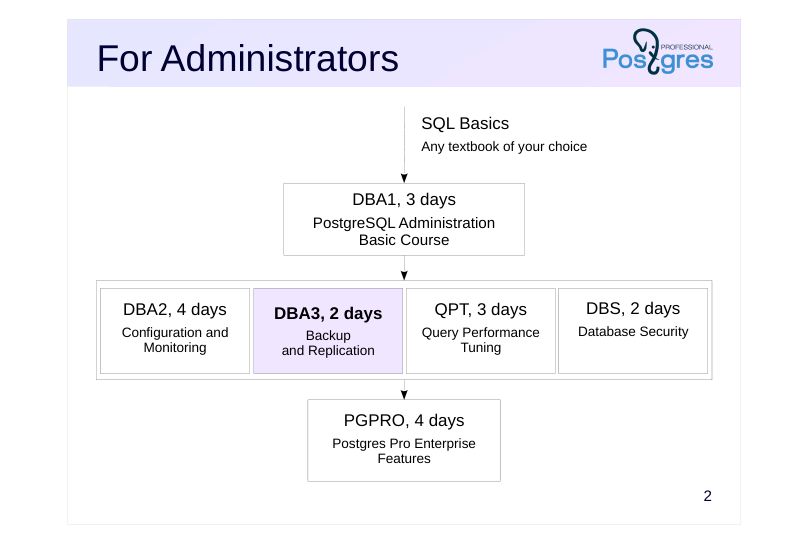
Page 2: For Administrators
 {#source-figure-002 caption=“Source slide page 2: For Administrators”}
- DBA2, 4 days
Speaker notes
Prior knowledge of the basics of the SQL language is required to complete all courses. While we don’t provide a dedicated SQL course, there are plenty of books and resources for self-study.
For administrators, we offer the following courses.
The DBA1 basic course provides information about the PostgreSQL architecture, installation process, server configuration and management. It covers the topics of access control, backup and replication, among others.
The DBA2 course focuses on determining appropriate configuration parameters based on an understanding of the internals of the server. It also talks about monitoring the server and using feedback for iterative parameter tweaking.
The DBA3 covers backups, as well as configuration and usage scenarios of physical and logical replication. It also provides an overview of the methods and pitfalls of designing highly accessible, scalable clusters.
The DBS course focuses on client-server connections and access control features within the database system itself.
The QPT course examines the mechanisms for scheduling and executing queries, the configuration of instance parameters related to performance, and the options for finding problematic queries and optimizing them.
The PGPRO course discusses additional features provided by the Postgres Pro Enterprise DBMS.
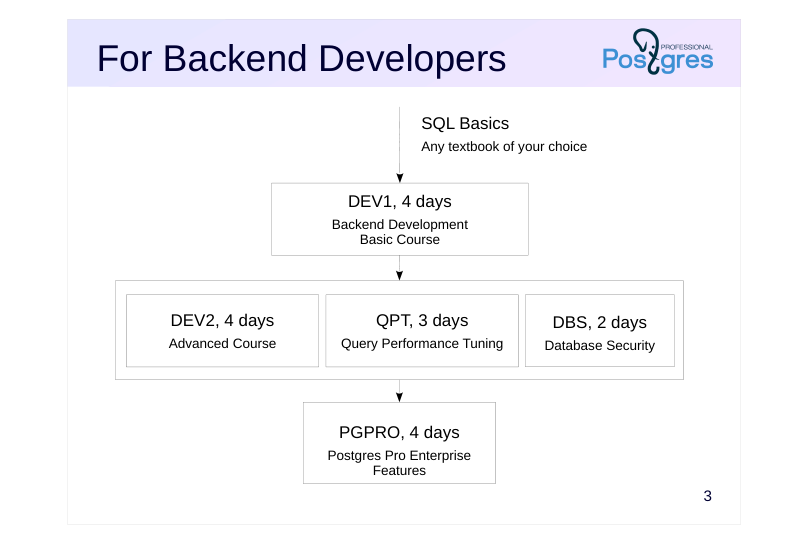
Page 3: For Backend Developers
 {#source-figure-003 caption=“Source slide page 3: For Backend Developers”}
- DEV2, 4 days
Speaker notes
For backend developers, we offer the following courses.
The basic course is the DEV1 course. It provides general information about the architecture of PostgreSQL and the use of basic database objects; server-side programming in SQL and PL/pgSQL languages using basic data types (including the composite type and arrays), as well as fronted interactions.
The DEV2 course examines the features of the server’s internal structure that affect the development of application code, and comprehensively discusses extensibility: the ability to extend server mechanisms with your own code, which allows you to use PostgreSQL to solve a wide variety of tasks.
The DBS, QPT, and PGPRO courses are intended for both developers and administrators.
Developers may also be interested in administration courses if there is a need to study the internal structure of PostgreSQL in more detail, as well as in the case when there is no dedicated administrator role on the project.
https://postgrespro.com/community/courses
Page 4: About DBA3 course
Duration: 2 days
- Prior knowledge requirements
- SQL fundamentals
- proficiency in Unix operating systems
- familiarity with PostgreSQL architecture as covered in the DBA1 course
- What skills will be acquired
- performing backups using various methods
- configuring servers for physical and logical replication
- understanding replication use cases
- understanding approaches to building clusters
Speaker notes
This course covers backup capabilities and strategies, as well as physical and logical replication mechanisms and their use cases. It also provides an overview of the methods and pitfalls of designing highly available, scalable clusters.
Page 5: Materials Used
Pre-configured virtual machine
- Xubuntu 24.04 OS
- PostgreSQL 16 (three database clusters)
- documentation in English
- Course Handouts
- presentations, demonstrations, practice assignments and assignment keys
- (in html and pdf)
Speaker notes
If you are taking the course on your own, start with the Student’s guide. Among other things, it shows where to download and how to use the virtual machine
and other materials. All course materials, including the Student’s Guide, are available at: https://postgrespro.com/community/courses/DBA3
Completing practical assignments is very important to gain the basic skills in working with PostgreSQL. Be sure to try to complete the assignments yourself first, and then review the provided keys, even if the assignment did not raise questions. Assignment keys may contain additional information that is not mentioned in presentations and demonstrations. After completing a task, make sure to remove any objects you created and reset any settings you changed, as they might interfere with later tasks.
Course handouts (presentations, demonstrations, practical assignments and keys) are available in two formats. The HTML is good for browsing and copying code snippets, while pdf is paginated and convenient for printing.
Page 6: Setup and Configuration
The course uses three PostgreSQL instances: alpha, beta, and gamma:
In the demonstrations, commands on different instances have different prompts.
All practice assignments are run as OS user student. A user and a database with the same name are already created in the PostgreSQL instances in order to allow you to run psql with no parameters.
The server aplha runs on the standard port 5432:
The server beta is on 5433. Just the port is enough to connect in psql:
The server gamma is on 5434.
While student is not a superuser, it can create databases and roles and can connect over the replication protocol. It also belongs to some predefined group roles:
In addition, student has privileges on some objects that are only available to superusers by default. Specifically, it can change parameters:
Page 7: Page 7
And can run system functions (permitted in template1 database and, as a result, in any database created with CREATE DATABASE, unless another template is specified):
Local connections for all users do not require a password:
Page 8: Course Outline and Schedule
Each training day is approximately 8 hours + lunch (1 hour)
- Each topic usually consists of
- presentation and demonstration: ~40-70 minutes
- practice: ~20-40 minutes, including a break
Page 9: Day 1
Backup
- Logical Backup
- Base Backup
- Write-Ahead Log Archive
- Replication
- Physical Replication
Page 10: Day 2
Replication (continued)
- Switchover to Replica 06. Logical Replication 07. Use Cases Clustering Technologies
- Overview
01 Lesson 01: Backup / Logical Backup
This page is extracted from the official PDF into native Markdown. Slide text, code and speaker notes are kept in reading order; the original PDF and HTML remain the layout references. HTML source: No matching course-page link was captured in the source inventory. Archive: DBA3-handouts-16-en-20260917.zip PDF pages: 33
Page 1: Backup / Logical Backup
Copyright
© Postgres Professional, 2017–2025 Authors: Egor Rogov, Pavel Luzanov, Ilya Bashtanov, Alexey Beresnev Photo: Oleg Bartunov (Phu Monastery and Bhrikuti Peak, Nepal)
Use of Course Materials
Non-commercial use of course materials (presentations, demonstrations) is allowed without restrictions. Commercial use is possible only with the written permission of Postgres Professional. It is prohibited to make changes to the course materials.
Feedback
Please send your feedback, comments and suggestions to: edu@postgrespro.ru
Disclaimer
Postgres Professional assumes no responsibility for any damages and losses, including loss of income, caused by direct or indirect, intentional or accidental use of course materials. Postgres Professional company specifically disclaims any warranties on course materials. Course materials are provided “as is,” and Postgres Professional company has no obligations to provide maintenance, support, updates, enhancements, or modifications.
Page 2: Topics
- What is Logical Backup
- Backup and Restore of Individual Tables
- Backup and Restore of Databases
- Backup and Restore of the Whole Cluster
Page 3: Logical Backup
SQL commands that create objects and fill them with data
- can back up a separate object or database
- can be restored to a different version or architecture
- +(binary compatibility is not required)
- − modest operation speed
- − no point-in-time recovery
Speaker notes
A logical backup contains a set of SQL commands that can be used to restore a cluster, database, or specific tables. During the recovery process, the necessary objects are created from the logical backup and filled with data.
These commands can be run on a different server version or on a different platform or architecture (binary compatibility is not required).
In particular, a logical backup can be used for long-term storage: you can restore it even after upgrading the server to a higher version.
However, for a large database, these commands may take a while to execute. In addition to that, a logical backup can only restore your database to the point in time when the backup process was initiated.
https://postgrespro.com/docs/postgresql/16/backup-dump
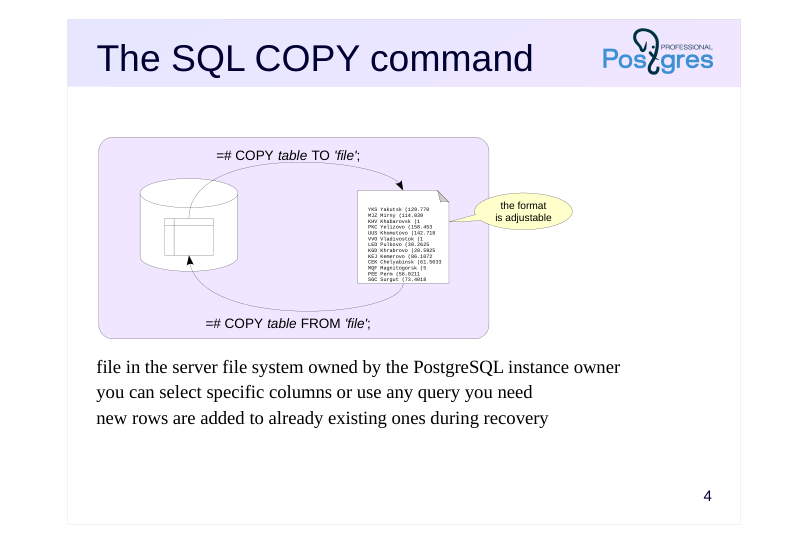
Page 4: The SQL COPY command
 {#source-figure-004 caption=“Source slide page 4: The SQL COPY command”}
- file in the server file system owned by the PostgreSQL instance owner you can select specific columns or use any query you need new rows are added to already existing ones during recovery
Speaker notes
The COPY TO command writes the contents of a table or a query result to a file or an output stream. Rows of views or partitioned tables can be copied using a query.
COPY TO requires the pg_write_server_file role.
The COPY FROM command adds rows from a file or standard input stream to the table. It is significantly faster than similar INSERT commands. You can monitor the process in the pg_stat_progress_copy view.
COPY FROM requires the pg_read_server_files role (or read input stream pg_execute_server_program).
Note: the COPY FROM command ignores the defined rules, although integrity constraints and triggers are respected. If a table column should receive values generated by a sequence when inserted, but COPY fills that column explicitly, the sequence will not change its state (counter).
Both variants of the COPY command allow you to select the columns of the table and specify options such as:
● FORMAT – data format (text, CSV or binary);
● DELIMITER – field delimiter;
● NULL – NULL text representation;
● ENCODING – encoding;
● HEADER – header describing the columns. https://postgrespro.com/docs/postgresql/16/sql-copy
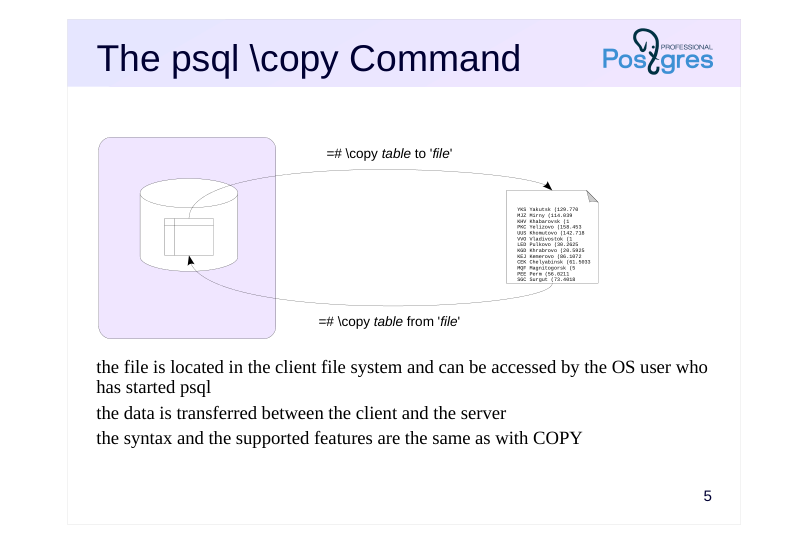
Page 5: The psql \copy Command
 {#source-figure-005 caption=“Source slide page 5: The psql \copy Command”}
- the file is located in the client file system and can be accessed by the OS user who has started psql the data is transferred between the client and the server the syntax and the supported features are the same as with COPY
Speaker notes
There is a\copy meta command in psql – a variant of the COPY command with the same syntax – that you can run on the client side.
The file must be available to the OS user running psql. The file is accessed on the client, and only the content is sent to the server.
https://postgrespro.com/docs/postgresql/16/app-psql#APP-PSQL-META-CO MMANDS-COPY
Page 6: The COPY command
Create a database and a table.
Print the table contents:
You can see how empty rows are different from the NULL values. The output format can be configured quite flexibly. You can change the separator, the NULL display, etc. For example:
Note Note that the inline separator character has been escaped (the escape character is also configurable). Instead of a table, you can specify an arbitrary query.
This way, you can save query results, presentation data, etc. The command supports output in CSV format, which is supported almost universally.
Input from file or console works in a similar manner.
However, for input from console, the end of file character (a backslash and a period) is required. In order for the data to load, you must specify the same parameters during input as were specified during output. You can also add:
Page 7: Page 7
Here are the table contents (with NULL output configured in psql for clarity):
Load all the rows:
Page 8: Database Backup
 {#source-figure-008 caption=“Source slide page 8: Database Backup”}
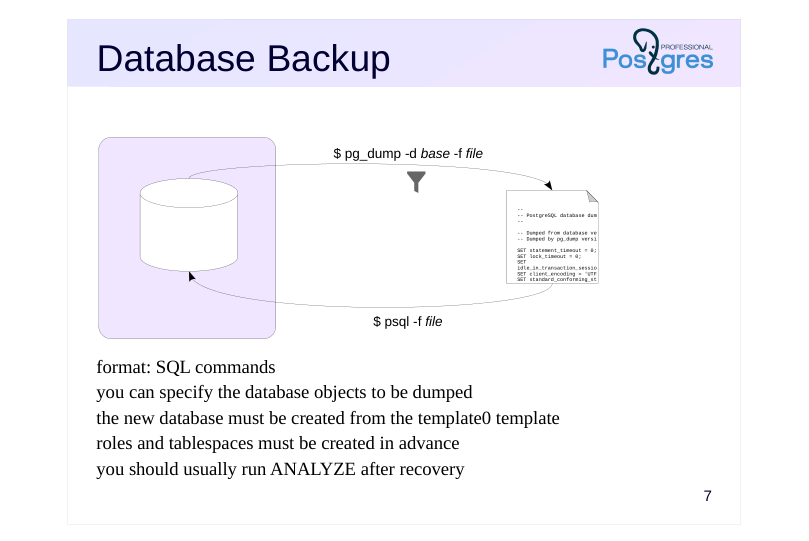
- format: SQL commands you can specify the database objects to be dumped the new database must be created from the template0 template roles and tablespaces must be created in advance you should usually run ANALYZE after recovery
Speaker notes
The pg_dump utility creates a full-scale database backup.
If you do not specify a file name (-f, –file), the utility will display the result to the standard output stream.
The produced output is a script to be run in psql; it contains the commands that will create the objects and fill them with data.
Additional keys can limit the set of objects: select specified tables or all objects in specified schemas, upload only object definitions or only data, etc.
Note that the database to be restored should be cloned from template0 since all the changes made in template1 will also make it into the backup.
Besides, all the required roles and tablespaces must be set up in advance. Since these objects do not belong to any particular database, they won’t be included into the dump.
Once the database is restored, it is a good idea to run the ANALYZE command: it will collect statistics that the optimizer requires for query planning.
https://postgrespro.com/docs/postgresql/16/app-pgdump
Page 9: pg_dumpall Utility
pg_dump, ran without additional parameters, issues SQL commands that create all objects in the current database: To get commands to recover to a system with a different set of roles, use the options: -O, –no-owner — do not generate commands to set the owner of objects; -x, –no-acl — do not generate commands to set privileges
Page 10: Page 10
Here, pg_dump has created the table t and populated it using the COPY command from before. The \--column-inserts\\ flag enables the use of INSERT commands, but the process will take significantly longer.
Logical backups in plain format may include malicious metacommands, for example, \gexec. To avoid such issues when running the script in psql, pg_dump prepends it with the \restrict metacommand with the key: This command switches on the restricted mode, making psql ignore all metacommands except for \unrestrict with the same key.
The keys are handy for dumping and uploading data in segments:
-s, –schema-only — back up only object definitions without data -a, –data-only — back up only data without creating objects
For recovering to a system already containing some data (or, on the other hand, to a completely clean system):
-c, –clean — generate DROP commands for created objects -C, –create — generate commands for creating a database and connecting to it
Important:
changes to the template1 database are dumped too. Therefore, you should recover to a database created from ’template0’. The \’–create\’ flag takes it into account automatically:
Some flags specify the objects to be dumped: -n, –schema — template for schema names -t, –table — template for table names Or, conversely, not to be, while dumping everything else: -N, –exclude-schema — template for schema names -T, –exclude-table — template for table names For example, recover the table ’t’ to another database on another server.
Page 11: Page 11
Page 12: The Custom Format
 {#source-figure-012 caption=“Source slide page 12: The Custom Format”}
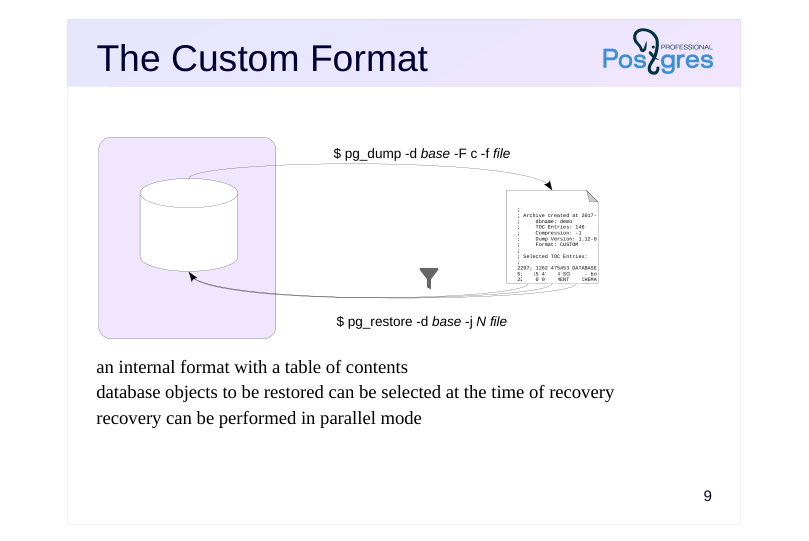
- an internal format with a table of contents database objects to be restored can be selected at the time of recovery recovery can be performed in parallel mode
Speaker notes
The pg_dump utility supports several backup formats. By default, the plain format is used; it provides pure psql commands.
The custom (-F c, –format = custom) format creates a backup in a special format containing not only objects, but also a table of contents. Having a TOC allows you to choose the objects to be restored right at the time of recovery, not while making the dump. By default, the the custom format output is compressed.
To restore the database, you need to run another utility: pg_restore. It reads the file and converts it to psql commands. If you do not explicitly provide the database name (in the -d option), all commands will be output to the standard output stream. If you do specify a database name, the utility will connect to that database and execute the commands directly, without using psql.
To restore only some of the objects, you can use one of the following approaches. The first one is to filter the objects to be restored, just like it is done in pg_dump. pg_restore actually supports many of the same options as pg_dump.
The second option is to use the TOC to retrieve the list of objects included into the backup (via the –list option). Then you can edit this list manually: delete the objects you do not need and pass the modified list to pg_restore (via the –use-list option).
Uploading can be performed in parallel by specifying the number of threads with the -j switch – this is another advantage of the custom format.
https://postgrespro.com/docs/postgresql/16/app-pgdump
Page 13: pg_dump: the \’custom\’ format
 {#source-figure-013 caption=“Source slide page 13: pg_dump: the \’custom\’ format”}
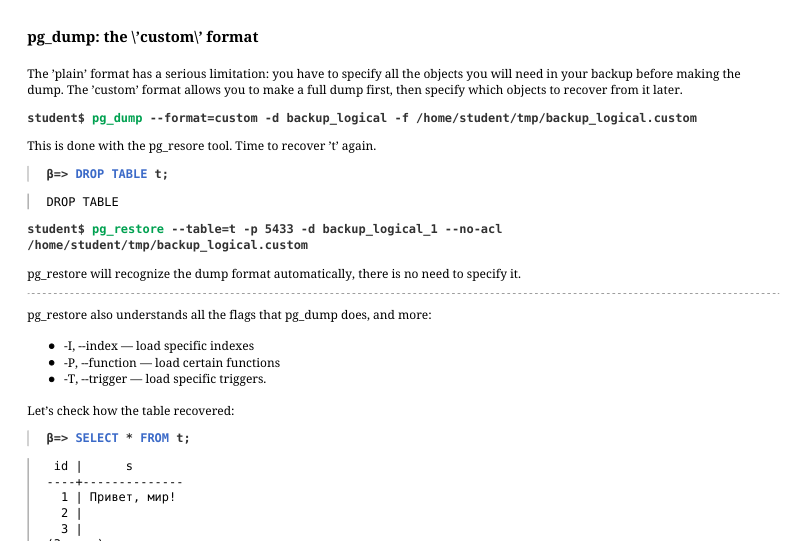
The ’plain’ format has a serious limitation: you have to specify all the objects you will need in your backup before making the dump. The ’custom’ format allows you to make a full dump first, then specify which objects to recover from it later.
This is done with the pg_resore tool. Time to recover ’t’ again.
pg_restore will recognize the dump format automatically, there is no need to specify it. pg_restore also understands all the flags that pg_dump does, and more: -I, –index — load specific indexes -P, –function — load certain functions -T, –trigger — load specific triggers. Let’s check how the table recovered:
Another example: restore the entire original backup_logical database to another server.
Here, we have specified the postgres database. If another database was specified, pg_restore would have created the necessary database and immediately switched to it.
Check:
Page 14: The Directory Format
 {#source-figure-014 caption=“Source slide page 14: The Directory Format”}
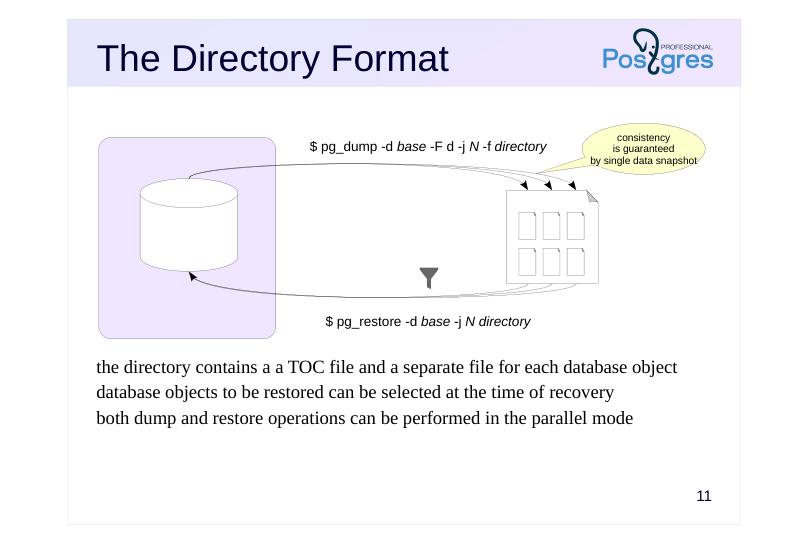
the directory contains a a TOC file and a separate file for each database object database objects to be restored can be selected at the time of recovery both dump and restore operations can be performed in the parallel mode
Speaker notes
Another backup format is Directry. Using this format, pg_dump produces a whole directory instead of a single file; it contains the backed up objects and the table of contents. By default, all files in the directory are compressed.
Its advantage over the custom format is that such a backup can be created concurrently using several processes (the number of processes is specified in option -j, –jobs).
Naturally, the backup will contain consistent data even though it has been created concurrently. Consistency is ensured by using a single data snapshot for all parallel processes.
https://postgrespro.com/docs/postgresql/16/functions-admin#FUNCTIONS-S NAPSHOT-SYNCHRONIZATION
Recovery, as with the custom format, supports parallel streaming.
Otherwise, working with the directory format offers the same capabilities as the formats discussed earlier: it supports the same options and approaches.
Page 15: pg_dump: the ’directory’ format
The \’direcotry\’ format, notably, supports dumping in parallel.
Consistency is guaranteed: all processes use the same snapshot. Take a look inside the directory:
There is a table of contents file, and a file for each dumped object (we have only one):
To restore from a backup, first disconnect from the backup_logical database:
The --clean key generates a command to delete the existing database:
Page 16: Format Comparison
plain custom directory tar
- utility for of recovery psql pg_restore
- compression gzip, lz4, or zstd
- partial restore possible possible possible
- parallel backup possible
- parallel restore possible possible
Speaker notes
This slide compares different features provided by different backup formats.
There is also a fourth format – tar. It was not discussed here, since it does not introduce anything new and does not provide advantages over other formats. In fact, this format is simply a tar-ed version of the directory format, but it does not support compression or parallel execution.
Page 17: Cluster Backup
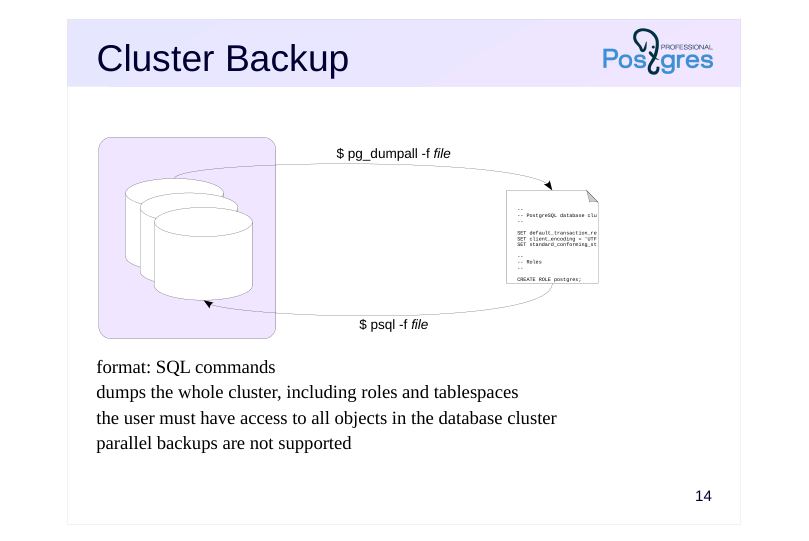 {#source-figure-017 caption=“Source slide page 17: Cluster Backup”}
- format: SQL commands dumps the whole cluster, including roles and tablespaces the user must have access to all objects in the database cluster parallel backups are not supported
Speaker notes
pg_dumpall creates a backup of the entire cluster, including roles and tablespaces.
Since pg_dumpall requires access to all objects of all databases, it should be ran by the superuser. pg_dumpall connects to each database in the cluster one by one and backups them using pg_dump. In addition, it also stores data related to the cluster as a whole.
To start this process, pg_dumpall has to establish a connection with a database. By default, postgres or template1 is selected, but you can specify another one.
The result of pg_dumpall is a script for psql. Other formats are not supported. This means that pg_dumpall does not support parallel execution, which can be a problem for larger clusters. In this case, you can use the – globals-only key to backup only roles and table spaces, and unload the databases themselves separately using parallel pg_dump.
https://postgrespro.com/docs/postgresql/16/app-pg-dumpall
Page 18: The pg_dumpall Utility
The pg_dump utility is good for dumping a single database, but it never dumps shared database cluster objects such as roles and tablespaces. To create a full cluster backup, you need to use pg_dumpall. The pg_dumpall, pg_dump, and pg_restore utilities do not require any separate privileges, but the role performing them must have privileges to read (create) all affected objects. For example, pg_dump can be used by the database owner. But since it is necessary to have access to all databases to copy the cluster, we run pg_dumpall as the superuser.
The backup includes: commands that the pg_dump backs up for each database commands for shared cluster objects (roles and tablespaces) Commands for shared objects can be obtained separately:
Page 19: Page 19
Recovery is done via psql, there is no other way around it.
Page 20: Page 20
Page 21: Page 21
Page 22: Page 22
During recovery, errors related to irremovable objects or objects already existing may come up. These are normal and do not affect recovery in this case.
The impact of row level security
If some tables have row level security on (more on that in the Row Level Security topic in the DBS course), you could end up with incomplete data and not even notice. To avoid that, before running COPY, set row\_security to off. This way, when a row level security policy triggers, the process will throw an explicit error.
A simple example. Set up a policy that prohibits displaying empty rows, then enable it for the table owner.
Now COPY returns just two rows:
Page 23: Page 23
But when the parameter is set to off, we get an error:
Both pg_dump and pg_dumpall automatically set row\_security = off, no additional actions needed:
The tool attempts to COPY the rows and returns the error: unable to copy all rows from t. If you want to copy just the rows that are available, you can use –enable-row-security:
To bypass row level security, the user must have the BYPASSRLS attribute:
Now, all queries by student ignore RLS policies:
Page 24: Page 24
Page 25: Takeaways
You can make a logical backup of a whole cluster, a specific database or a database object
- Good for
- small amounts of data
- long-term storage during which the server can been upgraded
- migration to a different platform
- Not so good for
- crash recovery with minimal data loss
Page 26: Practice
1. Create two databases with tables and views, use pg\_dumpall to dump global cluster objects only, then create database backups using pg\_dump in parallel mode. Restore the entire cluster on a different server using the backups you created. 2. Create a table with two columns, one of which is the primary key containing a number sequence. Simulate a case when during uploading with the COPY command, new sequence values are not generated, leading to a unique constraint violation error when attempting to insert new rows.
Speaker notes
- Declare a column as GENERATED ALWAYS AS IDENTITY.
After completing the practice tasks, delete the created databases and logical backup files.
Page 27: 1. Logical Backup
Let’s create some databases, a couple of tables, and some views.
Back up the global objects.
Parallel logical database backups:
Now restore the cluster. Restore global objects first:
Page 28: Page 28
Then restore the two databases in parallel:
Check:
Drop the databases we created.
2. COPY with a Sequence-Based Table
A table with two columns:
Page 29: Page 29
A table and a sequence have been created:
Load rows without specifying values for the first column.
The table contents are as expected:
The sequence counter is correct:
Now insert another row:
When using INSERT, you cannot specify a value for a column declared as GENERATED ALWAYS. It must be generated by the sequence:
However, COPY allows this:
At first glance, everything looks fine…
Page 30: Page 30
But it is not:
The primary key violation occurred because COPY does not use the sequence:
Let’s fix this by updating the sequence state.
Now the insert will succeed:
Cleanup
Drop the database.
Page 31: Practice+
1. Create a table with multiple rows. Select such \\copy parameters so that when writing to a file, the correct data and NULL values are mixed up due to unsuccessful code selection. 2. Using \\copy, create a text file that denotes the missing values as N/A. Load rows from this file into a table where missing values are NULL. 3. Create a data table several MB in size and get the sizes of logical backups in the custom format with different compression methods. Also measure the time required for each compression method during the backup process.
Speaker notes
If you mistakenly choose a NULL code that matches actual data values in the table columns, the resulting backup will prevent proper data restoration.
A way to generate the data: SELECT (random()::numeric*(g.i))^(g.i) AS n FROM generate_series(1,2_500) AS g(i);
You can measure the time using this command: /usr/bin/time -f% e pg_dump…
After completing the practice tasks, delete the created databases and temporary files.
Page 32: 1. Breaking COPY
Create a database.
For this example, set the display of undefined values that match some data:
Set the null value representation to N:
The output of two different values now looks identical. Properly recovering data from such a copy is impossible.
Be careful when changing the default format!
2. Loading Data with Missing Values
Create a file where missing values are marked as N/A.
Create a table to load the data into.
Load the data from the file into the table. The N/A value should be loaded as NULL.
3. Compression in pg\_dump
Create a large enough table.
Page 33: Page 33
Measure the time it takes to dump data without compression (and warm up the cache in the process).
How long will the dump take with gzip compression (used by default)?
Now try lz4.
Now zstd.
Compare the file sizes:
Conclusions: gzip has the best compression ratio, but takes several times longer to run lz4 is the fastest, but offers very little compression benefit zstd strikes a good balance: its compression ratio is only slightly behind gzip, while its speed is comparable to lz4
Cleanup
Delete the databases and temporary files we created.
02 Lesson 02: Backup / Base Backup
This page is extracted from the official PDF into native Markdown. Slide text, code and speaker notes are kept in reading order; the original PDF and HTML remain the layout references. HTML source: No matching course-page link was captured in the source inventory. Archive: DBA3-handouts-16-en-20260917.zip PDF pages: 26
Page 1: Backup / Base Backup
Copyright
© Postgres Professional, 2017–2025 Authors: Egor Rogov, Pavel Luzanov, Ilya Bashtanov, Alexey Beresnev Photo: Oleg Bartunov (Phu Monastery and Bhrikuti Peak, Nepal)
Use of Course Materials
Non-commercial use of course materials (presentations, demonstrations) is allowed without restrictions. Commercial use is possible only with the written permission of Postgres Professional. It is prohibited to make changes to the course materials.
Feedback
Please send your feedback, comments and suggestions to: edu@postgrespro.ru
Disclaimer
Postgres Professional assumes no responsibility for any damages and losses, including loss of income, caused by direct or indirect, intentional or accidental use of course materials. Postgres Professional company specifically disclaims any warranties on course materials. Course materials are provided “as is,” and Postgres Professional company has no obligations to provide maintenance, support, updates, enhancements, or modifications.
Page 2: Topics
- What is Physical Backup
- Cold and Рot Backup
- Replication Protocol and Replication Slots
- Cluster Cloning and Backup
- Integrity Verification
- Backup API
Page 3: Physical Backup
Physical base copy – copy of all cluster files
- faster than logical backup
- restores statistics
- can restore only to compatible systems
- − and major PostgreSQL versions
- − whole cluster backup only, no partial backups
Speaker notes
Physical backup involves copying all files related to the database cluster (both data and service files), that is, creating a full binary copy.
Copying files is faster than dumping all SQL commands, as you do for a logical backup. Likewise, starting a server from a physical backup is a matter of minutes, while recovery from a logical backup takes much longer. Statistical data is also restored from the physical copy, so you don’t need to rebuild it.
But there are shortcomings. A physical backup can be used to restore the system only on a compatible platform (that has the same OS, architecture, etc.) with the same PostgreSQL major version installed. Additionally, you cannot create a physical backup of individual databases within a cluster – only the entire cluster can be backed up.
Page 4: Cold Backup
Server is off
- if the checkpoint is completed, you can just copy the files
- the backup can be deployed on a different server, regardless of the PGDATA
- location
- simplicity
- − requires service interruption
- File system snapshot
- Similar to an unexpected shutdown: recovery required on startup, but the
- backup has all necessary WAL files
- all data, including tablespaces, must be captured in a single snapshot
- no server downtime required
- − file systems with snapshot support are generally slower
Speaker notes
A cold backup is made when the data on disk is in a consistent state: that is, all pages are stored on disk and are up to date. Restoring from such a backup is straightforward: just extract the files, start the server, and it’s good to go.
But to create such a backup, you must perform a checkpoint and a clean server shutdown first. This is a major drawback: shutdowns can take a while, especially with large volumes of data.
The downtime can be reduced by running rsync (or a similar tool) beforehand while the server is still running. After the server is shut down, rsync will only need to copy the changes (which should be relatively few). However, some downtime is still unavoidable.
Another option is to make an inconsistent copy, which will include pages saved at different times. This inconsistency is inevitable when the server is shut down incorrectly or when creating a snapshot of the file system. In the latter case, all cluster files should fall into one snapshot. This may not be possible if the files are on different file systems.
When recovering from inconsistent data, the server will need to restore consistency at startup. This is the standard automatic crash recovery procedure. This isn’t a problem since the necessary WAL files are guaranteed to be backed up, though the recovery process can take some time.
https://postgrespro.com/docs/postgresql/16/backup-file
Page 5: Cold File-Based Backup
You can copy the files of a stopped cluster and start a second server with them. It doesn’t matter whether the server was shut down cleanly or not. Create a database and a table.
Crash the server and copy the files to beta:
Beta starts and restores consistency:
Page 6: Hot Backup
Server is running
- pages are not consistent, as in case of incorrect shutdown
- pages may change while being copied
- (the non-atomic read and and write problem)
- restoring consistency requires all WAL records
- from the last checkpoint till the backup completion
- (some files may get deleted during backup)
- no service interruption
- − specialized tools required
Speaker notes
Hot backup is performed on a running server, so it will probably contain inconsistent pages.
In addition to that, during backup, data is read directly from files rather than through the buffer cache. The contents of the files on disk obviously may change while the backup process is running, and there may not be a guarantee of the atomicity of reading/writing PostgreSQL pages (this depends on the file system and hardware. See “WAL Configuration” section of the DBA2 course for more). As a result, the backup will contain corrupted pages that can’t be recovered even using WAL. This is the first challenge.
The second challenge is that copying data files can take a while. However, after completing a checkpoint, the server may delete some log files that are no longer needed for crash recovery but are still required for the backup.
Without proper safeguards, the resulting backup will be unusable for recovery. Hot backups therefore require specialized tools. PostgreSQL provides a low-level interface that enables reliable backup implementation. This interface is used by both the built-in pg_basebackup tool and various third-party backup solutions.
https://postgrespro.com/docs/postgresql/16/continuous-archiving#BACKUP-BASE-BACKUP
Page 7: Replication Protocol
Purposes
- backup and replication management
- specifically, receiving a stream of WAL records
- Handled by the wal_sender process
- max_wal_senders = 10
- wal_level = replica or logical, but not minimal
- Connection
- A role with the REPLICATION attribute or the SUPERUSER attribute
- permission to connect granted in pg_hba.conf
Speaker notes
PostgreSQL provides a specialized protocol for managing both backup and replication (covered in a dedicated module). Among other things, it facilitates receiving a stream of WAL records generated by the server.
On the server side, replication protocol connections are handled by the wal_sender process. It behaves like a regular backend process that starts when a client connects, but instead of SQL, it processes special replication commands. The number of concurrent processes (wal_sender) is limited by the max_wal_senders parameter (default is 10).
The WAL level must be set to replica or higher. On minimal WAL level, operations like CREATE TABLE AS SELECT, CREATE INDEX, and COPY FROM bypass WAL logging entirely: durability is ensured by writing data directly to disk rather than keeping it in RAM.
This is sufficient for crash recovery and recovery from a cold backup, but not for hot backup.
To use the replication protocol, the client must connect to the server using a role that has the REPLICATION attribute, or as a superuser. In pg_hba.conf, you need to allow this role to connect to the replication database (which is actually a keyword, not a database name). Moreover, the permission for all is not enough, the connection to replication must be allowed explicitly.
https://postgrespro.com/docs/postgresql/16/protocol-replication
Page 8: Replication slot
A server object that guarantees the retrieval of WAL records
- Tracks which record was last sent to the client
- The number of slots is limited bymax_replication_slots = 10
- Retains WAL segments until all records have been delivered to the client
- Allows the client to retrieve data at its own pace, including the ability
- to disconnect temporarily
- WAL files are accumulated on the server when the client is disconnected
- status monitoring: pg_replication_slots
Speaker notes
You can use replication slots to prevent the server from deleting WAL files prematurely while a checkpoint is being created. When streaming WAL records through a replication slot, the slot keeps track of what records were delivered to the client, and will not let the server remove the WAL file until the client has received all records from it.
Using a slot means the client doesn’t have to worry about the server deleting WAL files before they have been received properly. The client can even disconnect and then reconnect after some time to continue receiving WAL records from where it left off.
However, keep in mind that WAL files will accumulate on the server while the client is disconnected, so the server could run out of available disk space. Therefore, every created slot should be added to monitoring (the pg_replication_slots view) and slots that are no longer needed should be removed promptly.
The total number of slots that can be created is limited by the max_replication_slots configuration parameter (default is 10).
The use of slots is covered in more detail in the Replication module.
https://postgrespro.com/docs/postgresql/16/warm-standby#STREAMING-RE PLICATION-SLOTS
Page 9: Cluster Cloning
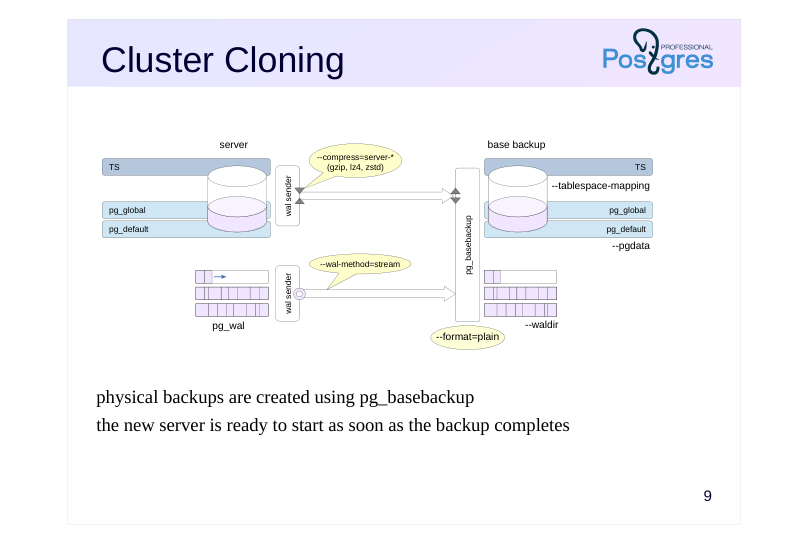 {#source-figure-009 caption=“Source slide page 9: Cluster Cloning”}
physical backups are created using pg_basebackup the new server is ready to start as soon as the backup completes
Speaker notes
To immediately deploy a new server from a backup, run pg_basebackup in plain format (–format=plain – by default) on the target server. It connects to the source server and copies files from it to the local directory specified by the –pgdata parameter.
Additional tablespaces are copied to the same absolute paths as on the source server. Paths can be reassigned by specifying matches in the – tablespace-mapping utility parameters. This is necessary if pg_basebackup runs on the source server.
With streaming delivery (–wal-method = stream – default), the utility establishes a second connection to stream WAL records generated by the running server to the local directory specified by the –waldir parameter.
By default, the second connection uses a temporary replication slot that is created on connection and deleted when pg_basebackup completes. However, you can also specify a permanent slot by name. The slot must exist at the time the utility is launched or be created by it.
In plain format, you can compress data on the server, reducing the network load. The transmitted data is then decompressed by the utility. But WAL records are not compressed in streaming mode.
https://postgrespro.com/docs/postgresql/16/app-pgbasebackup
Page 10: Cluster Cloning
Now let’s create a base backup of the running server alpha and use it to restore server beta.
Permission for local connection via the replication protocol is already present in pg_hba.conf:
For the pg_basebackup tool to connect to the server as the student role, this role must have the REPLICATION attribute:
Stop beta and delete its data directory.
Create a backup with a quick checkpoint. Data will be compressed on the server side and then unpacked with the tool. This speeds up network transfer, but has no effect if the connection is purely local. The option –pgdata points to the directory to save the backup to. The directory is created automatically. If it already exists, it must be empty.
The command runs with default values: –format=plain –wal-method=stream Write-ahead log files have been copied to the pg_wal subdirectory:
Page 11: Integrity Verification
Data file verification
- objective: to ensure that the backup receives consistent data
- pg_basebackup and pg_checksums utilities
- check relation file page checksums
- Backup verification
- objective: verify that the integrity of the data in the backup has not
- deteriorated over time
- manifest file backup_manifest
- pg_verifybackup utility checks files from the manifest list
Speaker notes
Data can be corrupted both when writing to disk and during storage It is imperative to verify the integrity of data as it is written, but also that this integrity is not compromised over time.
Relation file checksum calculation is enabled by default when a cluster is initialized (or when running pg_checksums utility). The checksum is stored in the page header and updates whenever the the page changes. The old checksum and the new one are compared:
● each time the page is read into the buffer cache;
● by pg_basebackup when creating a backup;
● by pg_checksums in verification mode.
pg_basebackup creates a file backup_manifest and puts it into the backup file with information about files (names, sizes, calculated checksums) and log records (WAL start and end positions, time line), as well as the checksum of the manifest itself.
https://postgrespro.com/docs/postgresql/16/backup-manifest-format
The utility pg_verifybackup checks the backup against the manifest: the presence of files, the correctness of checksums, the ability to read and parse WAL records necessary for recovery.
https://postgrespro.com/docs/postgresql/16/app-pgverifybackup
You should still deploy the backup to make sure it works and check the health of the server, because the coincidence of checksums does not guarantee that the data was not damaged.
Page 12: Integrity Verification
The backup includes a manifest file – here is its beginning and end:
Verify the backup integrity using the pg_verifybackup tool:
The tool uses the manifest to verify that all files are present and their checksums are correct, and that all WAL records required for recovery exist and are readable. Start the second server.
Now both servers run concurrently and independently. Check:
Page 13: WAL Streaming Delivery
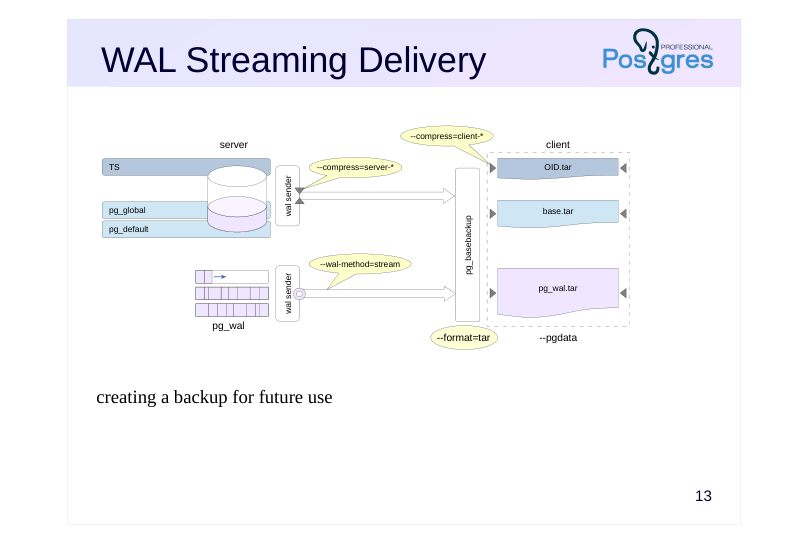 {#source-figure-013 caption=“Source slide page 13: WAL Streaming Delivery”}
creating a backup for future use
Speaker notes
The tar format is used for archive backups. WAL streaming delivery is used by default ( wal-method=stream).
The cluster files will be saved as a base.tar file. Each additional tablespace is copied to a separate tar file with the same name as the tablespace OID. WAL segments are placed in a separate pg_wal.tar file.
The utility can perform compression both on the client side and on the server side (in the latter case, the pg_wal.tar file is not compressed). A suffix corresponding to the compression method will be added to the names of compressed tar archives. For example, when compressed using the gzip method, the main file will be called base.tar.gz.
To restore from such a backup, you’ll first need to extract the tar files to their proper locations. You can change the paths of tablespaces by editing the tablespace_map file before starting the server or using the –tablespace-mapping command line parameter.
Page 14: WAL File Delivery to Client
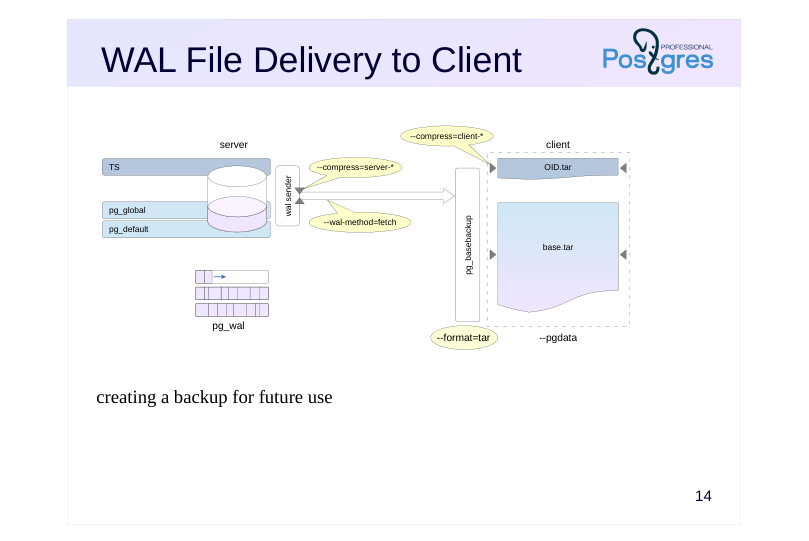 {#source-figure-014 caption=“Source slide page 14: WAL File Delivery to Client”}
creating a backup for future use
Speaker notes
When creating a backup, you can use another mode – WAL file delivery (– wal-method = fetch).
In this case, no separate connection is created, and the WAL segments are copied and sent over the main connection. This happens after all cluster files have been backed up. During checkpoint creation, the server can delete WAL segments that are no longer needed for recovery. To prevent losing necessary files, set a sufficiently large value for the wal_keep_size parameter.
WAL segments are written to the base.tar file together with the rest of the cluster files.
- The fetch mode is almost never used on the client. It remains as a legacy,
- and the only viable use case for it now is sending WAL records compressed
- which is impossible in streaming mode.
Page 15: Client-Side Backup
We are going to create a client-side backup. Compression will also be performed on the client.
This command used streaming WAL delivery by default (–wal-method=stream). Let’s take a look at the resulting backup:
When streaming WAL records in tar format, a separate file is created for them:
Now let’s create another client-side backup, but this time using the fetch delivery mode. In this mode, WAL segments are transferred over the same connection as the data. Let the server handle the compression.
In the resulting backup, WAL segments are included in the base.tar.gz file.
Page 16: WAL File Delivery to Server
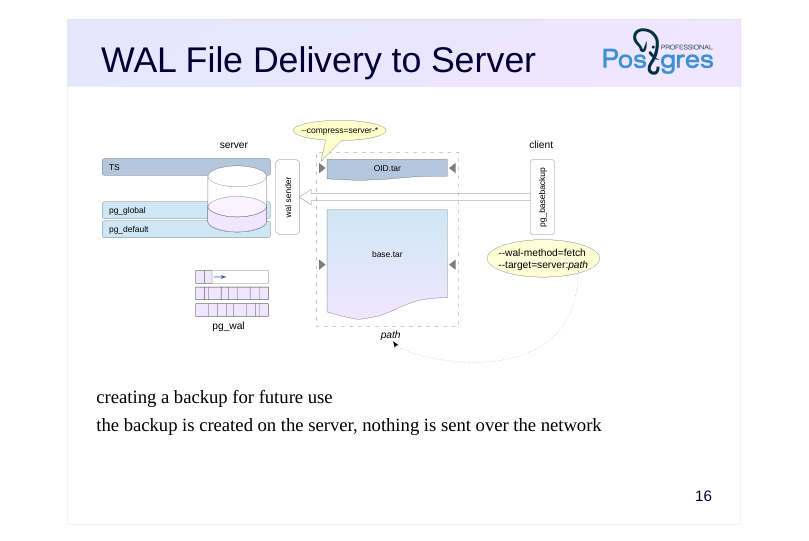 {#source-figure-016 caption=“Source slide page 16: WAL File Delivery to Server”}
creating a backup for future use the backup is created on the server, nothing is sent over the network
Speaker notes
You can create a backup on the server by running pg_basebackup on the client. No data is transmitted over the network.
To create a backup on the server from a client, use the command line parameter pg_basebackup –target = server: path, where path is the directory path in the server file system (default is –target=client).
This mode supports compression, but only on the server side, naturally.
When creating a backup on the server, you cannot use WAL streaming delivery because no WAL records are sent to the client. Therefore, the fetch delivery mode is used, and the accumulated WAL segments are placed in the base.tar file along with the rest of the cluster files.
Page 17: Server-Side Backup
Run pg_basebackup on the client while saving the backup on the server. Here, we must use the fetch delivery mode, so set the wal_keep_size parameter (and hope the value will be sufficient):
Run pg_basebackup, specifying the directory on the server where the backup will be stored, and set compression mode to zstd.
We get a compressed backup in tar format (which is the default).
With the fetch delivery mode, the utility stores WAL segments in the main archive:
Delete the backup.
Page 18: Low-Level Perspective
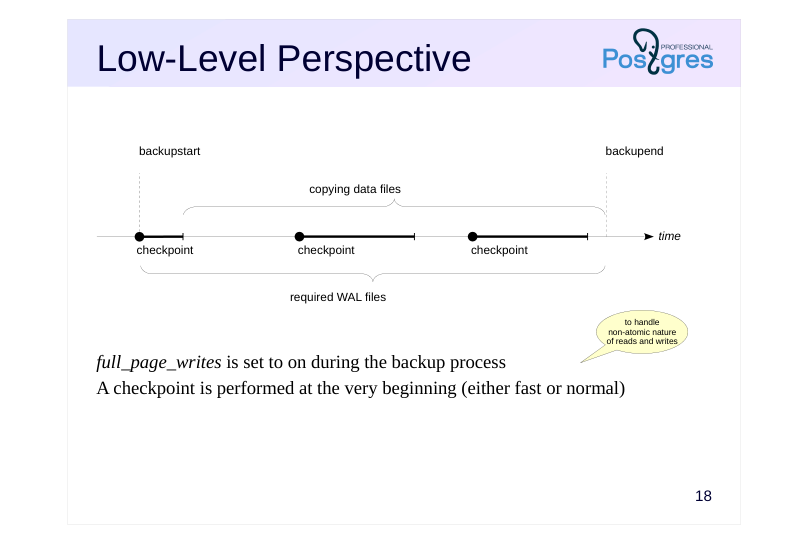 {#source-figure-018 caption=“Source slide page 18: Low-Level Perspective”}
full_page_writes is set to on during the backup process A checkpoint is performed at the very beginning (either fast or normal)
Speaker notes
The low-level backup algorithm is the same whether you’re using pg_basebackup or any third-party tools (which may be necessary since pg_basebackup only provides the most basic functionality).
- You need to notify the server that a backup is starting.
During the backup process, the system first enables the full_page_writes parameter: whenever a page is modified for the first time after a checkpoint, its complete image is written to the WAL. During recovery, WAL records will be applied not to pages in the file (due to non-atomic I/O, parts of the page may be mismatched), but to the page images from WAL.
Second, a checkpoint is performed. There are two checkpoint modes: fast (which can cause the I/O load to peak) and spread (controlled by the checkpoint_completion_target parameter).
Once the checkpoint completes, you can copy the data files using any method that works for you.
Once you’ve copied everything, you need to let the server know that the backup is complete.
Additionally, you need to ensure that all WAL records generated from the start of the backup until its completion are included in the backup.
Page 19: Backup API
Backup start: pg\_backup\_start
- performs a checkpoint and sets full_page_writes
- returns the WAL starting position
- Backup end: pg_backup_stop
- returns the WAL ending position
- Copying files
- either the replication protocol or any OS tools
- Copying the WAL from the starting to ending position
- replication protocol + slot or OS tools + wal_keep_size
Speaker notes
You can use this backup algorithm to build your own custom backup utility.
The backup starts by calling the pg_backup_start function. It sets the full_page_writes parameter and performs a checkpoint, as discussed earlier. The function returns a specific position in the WAL. Records starting from that position must be included into the backup.
At the end of the backup, the pg_backup_stop function is called. It returns the final position in the WAL.
All WAL records between the starting and ending positions need to be included into the backup. Since the server may delete WAL files that aren’t needed for recovery during operation, you should either use the replication protocol with a replication slot to receive records during the backup process (like pg_basebackup does in –wal-method=stream mode), or alternatively — though less convenient — copy the files using OS tools after setting the wal_keep_size parameter.
You can copy files in parallel, use rsync, and so on.
https://postgrespro.com/docs/postgresql/16/continuous-archiving#BACKUP-LOWLEVEL-BASE-BACKUP
Page 20: Takeaways
A base backup is a complete copy of the database cluster, including tablespaces, along with the WAL needed to restore consistency
- Hot backup allows the server to remain running during the backup process
- Tools
- replication protocol
- replication slot
- low-level backup API
Page 21: Practice
1. In the first cluster, create a tablespace and a database containing a table within that tablespace.
- Create a compressed tar-format backup of the cluster using pg_basebackup. 3. Deploy a second cluster from this backup. Place the tablespace in a different directory by modifying the tablespace_map file. 4. Start the second server and verify that it’s working properly.
Speaker notes
After the practice is complete, delete the database and tablespace in both clusters.
Page 22: 1. Tablespace and Database
Only a superuser can create tablespaces:
2. Base Backup
Run pg_basebackup as the student with tar compression:
3. Recovery from a Base Backup
Clear the main data directory on the beta cluster. The directory must be accessible only by its owner.
The directory for the ts tablespace on the server that will be restored from the backup:
Deploy the backup:
Page 23: Page 23
The pg_tblspc directory is currently empty:
The symbolic link will be created when the server starts, based on the tablespace_map file (which was located inside base.tar):
Update the tablespace path in this file:
4. Startup and Verification
Start the server.
Cleanup
Delete the backup.
To delete the database, you must first disconnect from it.
And on the second server:
Page 24: Practice+
- Load the basebackup_to_shell module to create a base backup on the server using a user-defined command. This command should compress the tar backup using the bzip2 utility. 2. Back up the server in tar format. Make sure that the archive is compressed by bzip2. 3. Restore the beta cluster from the resulting compressed archive and verify that it works.
Speaker notes
- To load the module, add the library of the same name to the shared_preload_libraries parameter. With the basebackup_to_shell.command parameter, specify the command to run when backing up:
https://postgrespro.com/docs/postgresql/16/basebackup-to-shell
To load the module for backup, specify pg_basebackup –target=shell
To extract files from the tar archive compressed by the bzip2 utility, use the command:
After completing the practice, delete the created databases and the backup.
Page 25: 1. Loading the Module
Create a configuration for the basebackup_to_shell module in the configuration file.
Restart the server.
Check the configuration.
Create a database and a table in it.
2. Backup
Create a directory for the backup.
Perform the backup. Streaming mode is not available, so use the WAL fetch delivery mode.
3. Recovery from Backup
Delete the beta cluster files.
Page 26: Page 26
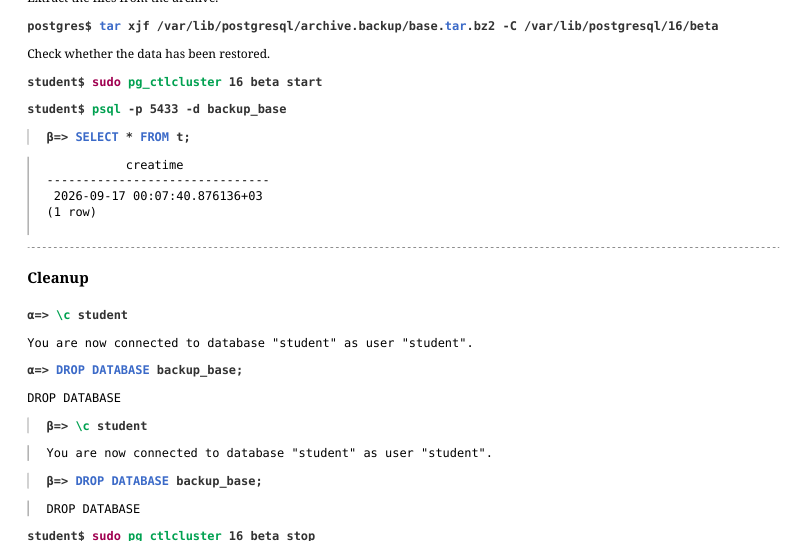 {#source-figure-026 caption=“Source slide page 26: Page 26”}
Extract the files from the archive.
Check whether the data has been restored.
Cleanup
03 Lesson 03: Backup / WAL Archive
This page is extracted from the official PDF into native Markdown. Slide text, code and speaker notes are kept in reading order; the original PDF and HTML remain the layout references. HTML source: No matching course-page link was captured in the source inventory. Archive: DBA3-handouts-16-en-20260917.zip PDF pages: 31
Page 1: Backup / WAL Archive
Copyright
© Postgres Professional, 2017–2025 Authors: Egor Rogov, Pavel Luzanov, Ilya Bashtanov, Alexey Beresnev Photo: Oleg Bartunov (Phu Monastery and Bhrikuti Peak, Nepal)
Use of Course Materials
Non-commercial use of course materials (presentations, demonstrations) is allowed without restrictions. Commercial use is possible only with the written permission of Postgres Professional. It is prohibited to make changes to the course materials.
Feedback
Please send your feedback, comments and suggestions to: edu@postgrespro.ru
Disclaimer
Postgres Professional assumes no responsibility for any damages and losses, including loss of income, caused by direct or indirect, intentional or accidental use of course materials. Postgres Professional company specifically disclaims any warranties on course materials. Course materials are provided “as is,” and Postgres Professional company has no obligations to provide maintenance, support, updates, enhancements, or modifications.
Page 2: Topics
- File-Based Archiving – Continuous Archiving
- Stream Archiving – pg_receivewal
- Recovery from Archive
- Archive Cleanup
Page 3: Continuous Archiving
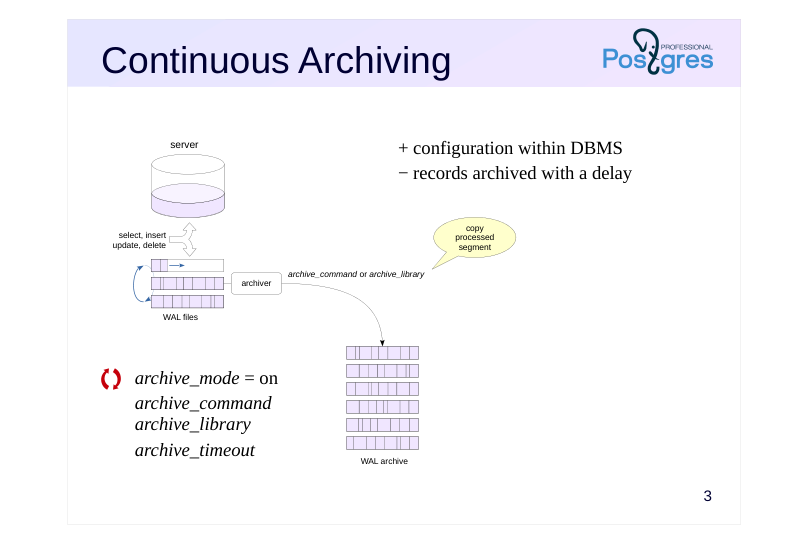 {#source-figure-003 caption=“Source slide page 3: Continuous Archiving”}
- archive_mode = on
- archive_command
- archive_library
- archive_timeout
Speaker notes
The base backup discussed in the previous topic contains all the WAL records needed to restore data consistency. The resulting backup is called standalone because it contains all the data necessary for recovery up to the point in time when the backup was created.
If you add new WAL files generated by the server to the standalone backup, you can restore the cluster to an arbitrary point in time. In practice, the WAL segments are not copied to the backup file itself, but to a separate archive. This is done by the archiver process (if archive_mode = on).
There are two ways to archive a WAL segment:
Use an OS command. When switching to the next WAL segment, the process executes the command stored in the archive_command parameter.
Use the archiving module functions (PostgreSQL 15 and up). The module name is set in the archive_library parameter. https://postgrespro.com/docs/postgresql/16/archive-modules
If the server load is light, the archive_timeout parameter is commonly used to set the maximum time that can pass before switching to a new WAL segment. Switching can also be done manually using the pg_switch_wal function.
https://postgrespro.com/docs/postgresql/16/continuous-archiving
Page 4: archive_command
An operating system command that archives completed WAL segments
- copies file%p to archive named%f,
- the archive structure can be organized in any way you choose.
- must return 0 only if successful
- must not overwrite files that already exist in the archive
- must ensure data is written to persistent storage
- conveniently supports custom scripts
- Monitoring
- pg_stat_archiver view shows current status
- can enable the message collector (logging_collector = on) and write messages to
- the server log
Speaker notes
The archive command must copy the specified file to an archive. The archive can be organized in any way you choose. For example, this could be a file system on a separate server.
The command must return a zero exit status only when it succeeds. In this case, the copied segment can be deleted by the checkpoint process. With a non-zero status, the segment that failed to copy and subsequent segments are not deleted, and the server periodically retries the archive command until it receives 0.
The command should never overwrite existing files, as this likely indicates an error, and overwriting a file could invalidate the archive.
To ensure reliability, the command must guarantee that the file is written to persistent storage; otherwise, if the archiving command fails, you could lose a file segment if the PostgreSQL server deletes it in the meantime.
The current archiving status is shown in the pg_stat_archiver view. The message collector process logging_collector can conveniently write error and other messages from archive_command execution to the server log.
If complex logic is required, it can be scripted in a separate file, and the archiving command can be set to run it.
https://postgrespro.com/docs/postgresql/16/runtime-config-wal#GUC-ARCHI VE-COMMAND
Page 5: Setting up continuous archiving
We will store the archive in the /var/lib/postgresql/archive directory. It must be accessible to the PostgreSQL owner user.
In practice, you can keep the archive on a separate server or disk system accessible over the network. Let’s enable archiving mode and set the command for copying completed WAL segments.
In archive_command, we first check whether a file with the specified name already exists in the archive and only copy it if it’s not there.
You can specify any command in archive_command, as long as it returns 0 only when successful. For example, you can set up compression of archived segments:
Ideally, the archiving command should perform a sync to ensure the file is safely written to persistent storage. Otherwise, in case of a failure, the file might be lost from the archive while the server has already deleted it from the pg_wal directory. It’s usually convenient to put all the necessary archiving logic in a separate script and call the entire script:
Changing archive_mode requires a server restart.
The archiver process now exists:
Let’s verify that archiving is working. Create a database and a table.
Here’s the WAL segment currently in use:
Page 6: Page 6
To fill out the file, we would need to perform a large number of operations. For testing purposes, it’s easier to force a segment switch:
The segment has switched:
The previous one should have made it to the archive. Check:
The current archiving status is shown in the pg_stat_archiver view:
File-based archiving is now configured and working.
Page 7: pg_receivewal
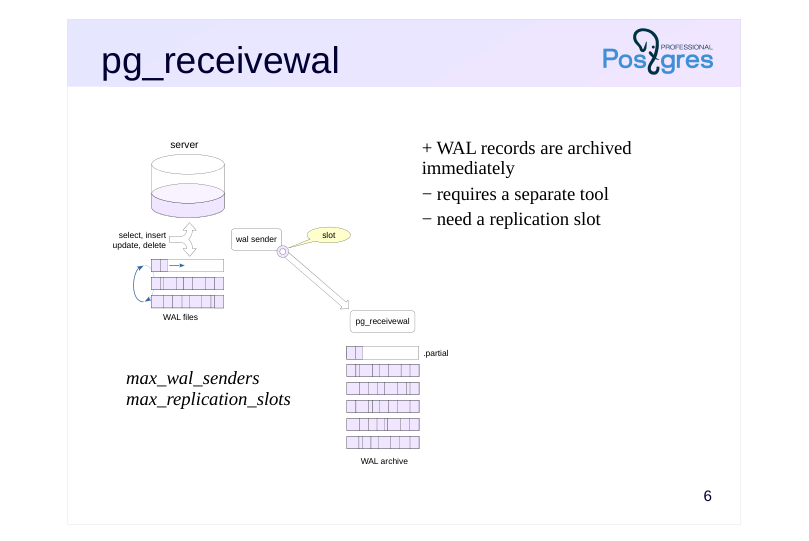 {#source-figure-007 caption=“Source slide page 7: pg_receivewal”}
- max_wal_senders
- max_replication_slots
Speaker notes
Alternatively, you can populate the archive using the replication protocol and the pg_receivewal utility.
Typically, the utility runs on a separate server that stores the archive. It generates files in the same way as the main server itself, and writes them to the specified directory. Incomplete segments have the suffix .partial. Cache synchronization with the file system occurs only when the WAL segment is closed, but you can make it synchronous with the – synchronous parameter.
The utility can compress WAL segments. Use the parameter –compress with the algorithm (gzip or lz4) and the compression level as arguments.
When running the utility for the first time (when the archive is empty), archiving starts from the beginning of the current WAL segment. Otherwise, it starts from the beginning of the segment following the last completed segment in the archive. When using a replication slot, this ensures that there are no gaps in the archive, even if the utility was disabled for a while.
By default, the utility receives records indefinitely, but you can set it to terminate when receiving a record with a specific LSN: –endpos = lsn.
Note that the utility does not start automatically as a service and cannot be a daemon.
https://postgrespro.com/docs/postgresql/16/app-pgreceivewal
Page 8: Streaming Archive
To set up archive population via the streaming replication protocol, let’s first stop file-based archiving.
The current state of the archive.
First, let’s have the pg_receivewal utility create a slot to ensure all WAL records are received.
Start it in the background in archiving mode. Upon detecting existing files in the archive, the utility will request the next segment from the server to ensure there are no gaps in the archive.
Let’s add a ton of rows to the table and then delete them.
New files have appeared in the archive.
The last file most likely has a .partial suffix – it is currently being written to. Stream archiving is now configured and working.
Page 9: Base backup
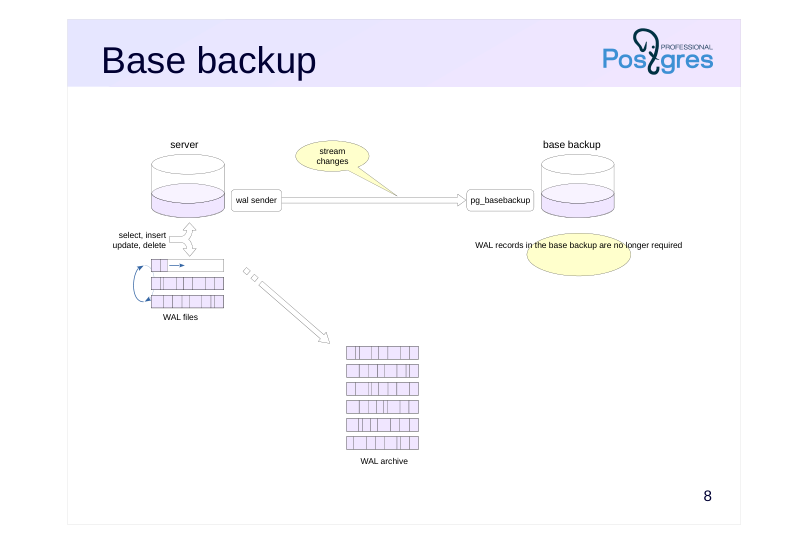 {#source-figure-009 caption=“Source slide page 9: Base backup”}
Speaker notes
If we have a configured write-ahead log archive, then WAL files become optional in the base backup — since they can be retrieved from the archive during recovery.
Therefore, pg_basebackup can be run with –wal-method=none.
(But there is no harm in having WAL files in the base copy, except for the space they occupy. In fact, they enable system recovery if the archive becomes unavailable.)
Page 10: Base Backup
Since the archive is populated automatically, let’s instruct pg_basebackup not to include WAL files in the backup:
There are no WAL segments in the backup’s pg_wal directory:
The archive, however, has gained new files:
Page 11: Recovery
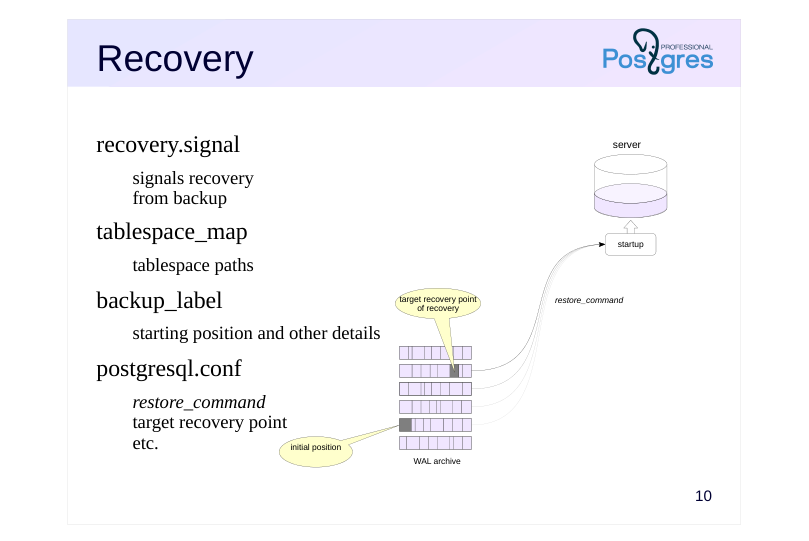 {#source-figure-011 caption=“Source slide page 11: Recovery”}
recovery.signal
- signals recovery from backup tablespace_map
- tablespace paths
- backup_label
- starting position and other details
- postgresql.conf
- restore_command
- target recovery point
- etc.
Speaker notes
The recovery process is controlled by three files and parameters.
The recovery.signal file is created manually. If it exists, the server starts in recovery mode. The file’s contents are ignored. If recovery.signal is missing, PostgreSQL assumes it’s performing automatic crash recovery. If the file exists, the server understands that a user-controlled restore from a backup is taking place, and checks two other files that are generated when a base backup is created:
● The tablespace_map file contains paths for table spaces. If the symlincs in pg_tblspc are missing (which is true for tar format), the server will create them at startup based on the information from tablespace_map.
We’ve already encountered this file in the “Base Backup” topic.
● The backup_label file stores the backup name, creation time, and, most importantly, the name of the WAL segment and the position in it to start recovery from.
During recovery, the startup process reads files from the archive using the command from restore_command and applies WAL records from the starting position specified in the label file up to the target recovery position.
Page 12: Recovery Configuration
Let’s start the recovery configuration by creating a signal file.
When the base backup was created, a backup_label file was generated.
The key piece of information in this file is the starting point for recovery (START WAL LOCATION). Theoretically, recovery can begin from an earlier position (but not a later one), though this will take more time. Since our cluster has no additional tablespaces, the tablespace_map file is not necessary. All that remains is to set a restore_command and other parameters in the configuration file.
Page 13: restore_command
OS command restoring WAL segment
- performs the reverse of archive_command
- must return 0 only if successful
- (can be called for non-existent files)
- Monitoring
- log_startup_progress_interval = 10s
- logging of
startupprocess status
Speaker notes
The restore_command parameter specifies the command to “reverse” the archive_command. This command must copy the file from the archive to the pg_wal directory and return a status of 0 only when successful. This is very important, since during the recovery process the server can execute a restore command for files that will not be in the archive – this is not an error, but the command must end with non-zero status.
Starting with version PostgreSQL 14, changing the restore_command parameter does not require a server restart.
https://postgrespro.com/docs/postgresql/16/runtime-config-wal#RUNTIME-C ONFIG-WAL-ARCHIVE-RECOVERY
In PostgreSQL 15 and higher, the status of the recovery process can be monitored in the server message log with the log_startup_progress_interval option enabled. It logs the progress every 10 seconds by default.
In earlier versions, information about the current recovery state was displayed only in the name of the startup unix process.
Page 14: Restartpoint
Checkpoint equivalent for recovery
- flush dirty buffers
- write to control file
- remove unnecessary WAL segments
- Performed when a control point record is applied
- if at least checkpoint_timeout has elapsed since the restartpoint
- or WAL volume approaching max_wal_size
- Monitoring
- log_checkpoints
- pg_stat_bgwriter
Speaker notes
When the startup process applies WAL records during recovery, the data in the server’s shared memory changes in the same way as in normal operation: dirty buffers appear. WAL recods must be retained in case a failure occurs and recovery must restart. To limit the amount of stored records and not start recovery from the very beginning, the server periodically performs restartpoints, resetting, as at a checkpoint, dirty buffers of shared memory structures: buffer cache, clog cache and others. If the restartpoint completes successfully, the server writes to the control file and deletes the WAL segments that entirely precede the restartpoint start.
The restartpoint is executed when the startup process encounters a checkpoint record in the WAL, if at least checkpoint_timeout time has passed since the last restartpoint, or if the WAL size approaches the max_wal_size value. In other words, the restartpoint is triggered by the checkpoint WAL record, but if none of the conditions are met, the record is skipped.
If log_checkpoints is enabled, all restartpoints will be recorded in the message log, and the pg_stat_bgwriter view will show accumulated statistics.
https://postgrespro.com/docs/postgresql/16/wal-configuration
Page 15: Recovery Target
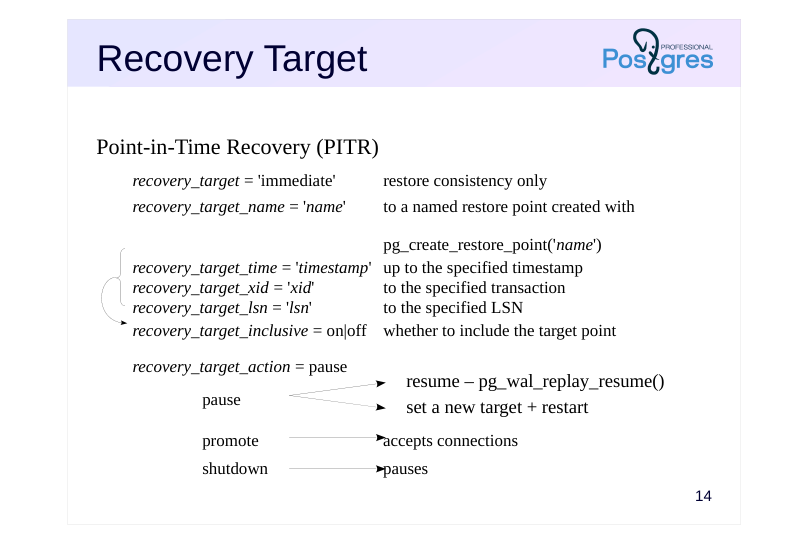 {#source-figure-015 caption=“Source slide page 15: Recovery Target”}
Point-in-Time Recovery (PITR)
- recovery_target = ‘immediate’
- restore consistency only
- recovery_target_name = ’name'
- to a named restore point created with
- pg_create_restore_point(’name')
- recovery_target_time = ’timestamp’ up to the specified timestamp
- recovery_target_xid = ‘xid’
- to the specified transaction
- recovery_target_lsn = ’lsn'
- to the specified LSN
- recovery_target_inclusive = on|off
- whether to include the target point
- recovery_target_action = pause
pause
- promote
- accepts connections
- shutdown
- pauses
Speaker notes
If the recovery target is not set, the cluster will be restored as close as possible to the time of failure. However, you can stop the recovery process at any other point by setting a recovery target.
● The recovery_target = ‘immediate’ parameter will stop recovery as soon as consistency is achieved. This is effectively the same as recovering from a base backup without using the archive.
● The recovery_target_name parameter lets you specify a named recovery point that was previously created using the pg_create_restore_point function.
● The recovery_target_time parameter allows you to specify any point in time (timestamp), recovery_target_xid allows you to specify any transaction, and recovery_target_lsn allows you to specify an LSN. The recovery_target_inclusive parameter lets you choose whether to include or exclude the target point itself.
The recovery_target_action option allows you to select a state in which the server will be on reaching the target point:
● pause suspends recovery. The administrator can query the data to verify whether the recovery target was chosen correctly, and then either complete the recovery by calling the pg_wal_replay_resume function, or set a new target, restart the server, and continue applying WAL records.
● With promote, the server will immediately be able to accept connection requests.
● shutdown will stop the server. In this case, the recovery.signal file is not removed.
Page 16: Completion of Recovery
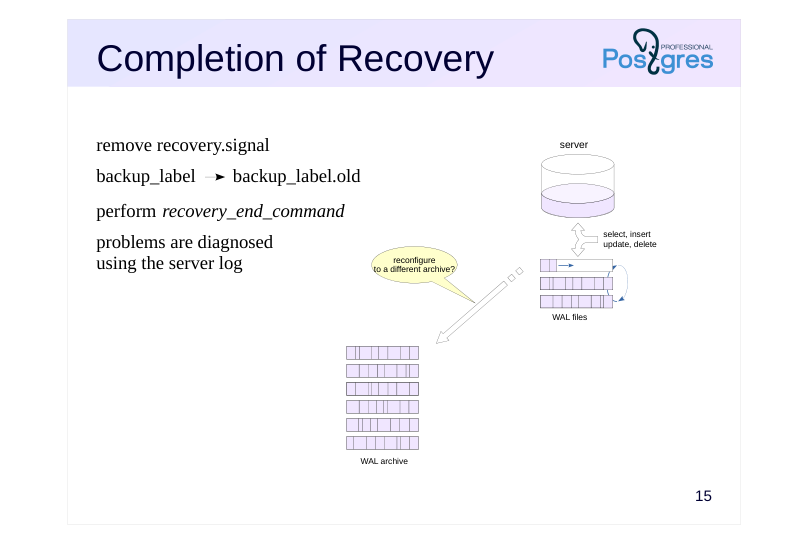 {#source-figure-016 caption=“Source slide page 16: Completion of Recovery”}
remove recovery.signal
- backup_label backup_label.old
- perform recovery_end_command
- problems are diagnosed using the server log
Speaker notes
Once recovery is complete, the startup process terminates, postmaster launches the remaining service processes needed for the server instance to operate, and the server begins running in normal mode. The recovery.signal file is deleted, and backup_label is renamed to backup_label.old.
In the recovery_end_command parameter, you can specify a command that will be executed at the end of recovery. These may be file system operations, archive cleanup, notifications, etc.
The server may fail to start. In this case, no processes will be running in the operating system (and the postmaster.pid file will be absent), while the recovery.signal file will remain in place. The reasons can be found in the server log (for example, invalid configuration parameters). Once the issue has been resolved, restart the server.
Important note: if continuous archiving was set up on the origin server, it must either be disabled on the restored server or redirected to a different archive location.
Page 17: Recovery from a Base Backup
Let’s configure recovery settings on beta. In the simplest case, all you need is a restore command that copies the specified WAL segment from the archive to the specified path:
If no recovery target is specified (via one of the recovery_target* parameters), WAL records from all files in the archive will be applied to the base backup. Place the backup in the beta server’s data directory and start it.
After a successful recovery, the recovery.signal file is removed and the label file is renamed to backup_label.old:
Since all WAL records have been applied, the beta server immediately starts accepting connections. Let’s verify what was restored in the table:
The server’s cumulative statistics contain information about restart points:
Page 18: Timelines
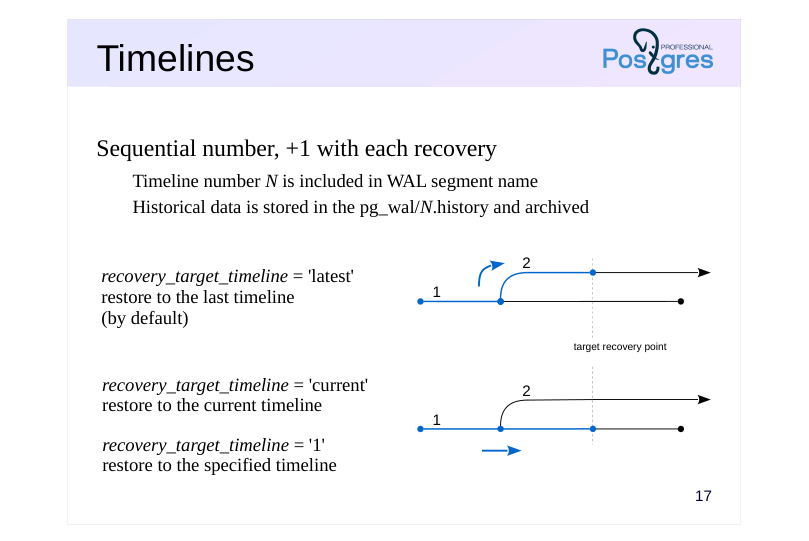 {#source-figure-018 caption=“Source slide page 18: Timelines”}
Sequential number, +1 with each recovery
- Timeline number N is included in WAL segment name
- Historical data is stored in the pg_wal/N.history and archived
- recovery_target_timeline = ’latest’ restore to the last timeline (by default)
- recovery_target_timeline = ‘current’ restore to the current timeline
- recovery_target_timeline = ‘1’ restore to the specified timeline
Speaker notes
After restoring to a point in the past, the server begins to generate new WAL records. The record IDs will repeat the record IDs “from the past.” To preserve these segments and maintain the ability to recover to different points in time, PostgreSQL introduces the concept of timelines. After each recovery using recovery.signal, the timeline number increments, and this number becomes part of the WAL segment numbering.
Timelines form a tree structure, as shown in the diagrams. Timeline 1 is the initial timeline. A recovery was performed to a point in the past, creating timeline 2.
When performing recovery with the recovery_target_timeline = ’latest’ parameter (the default), WAL replay will follow the second (newer) timeline once it reaches the branch point.
Settingrecovery_target_timeline = ‘1’ will continue recovery along timeline 1 (the specified timeline), while recovery_target_timeline = ‘current’ will follow the current timeline (which in this case is also timeline 1).
PostgreSQL retrieves branch point information from history files located at pg_wal/N.history. Therefore, these files should never be removed from the archive.
Page 19: Timelines
What happened to the timeline after recovery?
The number incremented by one. A history file corresponding to this branch has appeared in the pg_wal directory:
It contains information about the branch points through which we arrived at this timeline:
PostgreSQL uses these files when a timeline is specified in the recovery_target_timeline parameter. History files must be archived alongside WAL file segments and should not be removed from the archive.
Page 20: Archive Cleanup
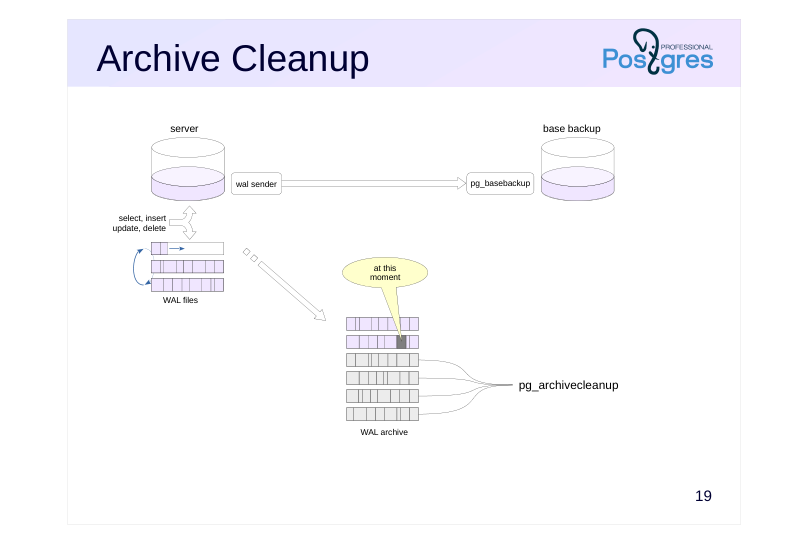 {#source-figure-020 caption=“Source slide page 20: Archive Cleanup”}
Speaker notes
The archive grows over time and needs to be cleaned of unnecessary files every now and then.
The pg_archivecleanup tool does just that. It takes a WAL segment name and deletes all preceding segments.
https://postgrespro.com/docs/postgresql/16/pgarchivecleanup
The question is which archive position to use as the cutoff point.
If you are only using the archive to restore from a single base backup, you can clean up as soon as you update the backup.
However, if the archive needs to support recovery from multiple base backups, you’ll need to either write a custom cleanup script or, better yet, use a third-party backup tool like pg_probackup that offers flexible backup retention policies.
Page 21: Archive Cleanup
The first server’s archive currently contains unnecessary files that were added before the base backup was created:
The pg_archivecleanup utility takes the archive path and the name of the last WAL segment to keep (which can be found in the backup_label file).
Let’s check which files remain in the archive:
The archive has been cleaned up. The utility can be called immediately after creating the base backup by placing both commands in a script.
Page 22: Takeaways
Physical backups: base backup + WAL archive
- Good for
- ongoing periodic backups
- crash recovery with minimal data loss
- point-in-time recovery
- backing up large volumes of data
- Not so good for
- long-term storage
- Not suitable for
- migration to a different platform
Page 23: Practice
1. On the alpha server, create a database and a data table. 2. Set up continuous archiving. 3. Make a copy of the cluster without log files. 4. Insert a few more rows into the table and verify that the current WAL segment has been archived.
- Restore the beta server from the backup, specifying only the restore command in the configuration.
- Restore the beta server again from the same backup, this time with
immediateas the recovery target.
- Restore the beta server again from the same backup, this time with
Speaker notes
After completing the practice tasks, delete the databases and reset the configuration.
Page 24: 1. Database and Table
2. Setting Up Continuous Archiving
3. Base Backup
Since we’ll need to restore from the same backup twice, let’s create it in compressed tar format.
4. Populating a Table With Rows
Switch the segment:
Check the archiving status:
5. Recovery from a Base Backup
Page 25: Page 25
To make it simple, disable continuous archiving on the standby server and set just the restore command:
Create recovery.signal.
Start the server.
All rows were restored. Since all available WAL records are applied by default, the server immediately switched to normal mode and is ready to accept write queries:
6. Recovery from Base Backup (immediate)
Create recovery.signal, and add the restore command and recovery target to the configuration file:
Start the server.
Only the first row was restored. This time, only the WAL records required to bring the data to a consistent state were applied. The server is already accepting read queries, and recovery can be continued if needed:
Page 26: Page 26
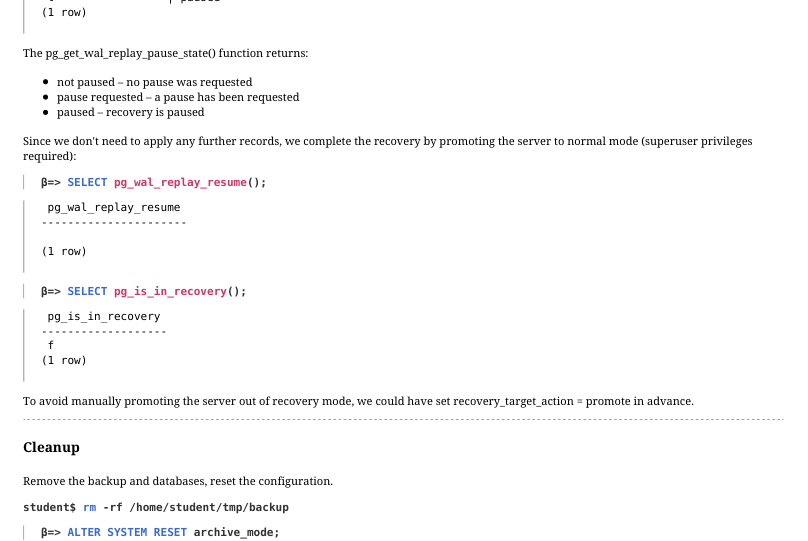 {#source-figure-026 caption=“Source slide page 26: Page 26”}
The pg_get_wal_replay_pause_state() function returns: not paused – no pause was requested pause requested – a pause has been requested paused – recovery is paused Since we don’t need to apply any further records, we complete the recovery by promoting the server to normal mode (superuser privileges required):
To avoid manually promoting the server out of recovery mode, we could have set recovery_target_action = promote in advance.
Cleanup
Remove the backup and databases, reset the configuration.
Page 27: Practice+
1. On the alpha server, create a table in which data will be periodically written. Create a physical backup and configure continuous WAL archiving. 2. Insert 100 rows into the prepared table three times (data for January, February and March), marking the time immediately after insertion. Delete some lines between inserts: simulate a situation in which the user accidentally deletes part of the data at an unknown moment, but the problem is not noticed immediately. 3. Recover the deleted data without stopping the alpha server. 3. Use the beta server as an auxiliary.
Page 28: 1. Table and Backup with WAL Archive
Let’s prepare the table:
After setting up the data structure, create a physical backup:
WAL segment archive:
Add the archiving parameters file to the supplementary configuration directory.
Restart the server.
2. Inserting Data into the Table
Our application inserts 100 rows into the table at the end of each month. Insert rows for January:
Save the timestamp after the insert completes:
A user accidentally deletes some of the data:
Insert rows for February:
Page 29: Page 29
Save the timestamp again after the transaction completes:
The user runs the same command again for some reason:
The error goes unnoticed for now. Insert another batch of rows:
Let’s record the timestamp once more:
The error has been discovered:
3. Recovery Using the Archive
Let’s try to recover the data without stopping the alpha server. Since the January and February data is missing, the recovery plan is as follows: Restore the beta server from the WAL archive to the point when the January rows finished committing Export a logical backup of the January data Restore the beta server again, this time to the point when the February rows finished committing Export a logical backup of the February data (the January data may be corrupted at this point) Load the recovered data into the application table on the alpha server Stop beta and place the physical backup into its data directory.
We will need a recovery.signal file:
The plan is to restore the server to a specific point in time – that is, perform point-in-time recovery (PITR). Set the restore command and specify the recovery target as the timestamp created right after the January data finished committing:
Before starting recovery, force a segment switch on alpha to ensure all WAL records make it into the archive. Archiving takes place when writing to the next segment begins.
Page 30: Page 30
Start the beta server.
Verify that the January data has been restored:
The beta server is in recovery mode:
This doesn’t prevent us from exporting a logical backup.
Now let’s move on to February. Set a new target time:
Restart beta to continue recovery.
Verify the recovered data:
The February rows are where they should be, but the January rows are already corrupted. Export the February data:
Restore the exported data for both months on alpha.
Page 31: Page 31
It worked:
In PostgreSQL 17 and later, you can skip the delete step and use the COPY command with the ON ERROR ignore parameter to quietly skip rows that already exist in the table.
Cleanup
Remove the databases and configuration changes.
Remove any unnecessary files.
04 Lesson 04: Replication / Physical Replication
This page is extracted from the official PDF into native Markdown. Slide text, code and speaker notes are kept in reading order; the original PDF and HTML remain the layout references. HTML source: No matching course-page link was captured in the source inventory. Archive: DBA3-handouts-16-en-20260917.zip PDF pages: 39
Page 1: Replication / Physical Replication
Copyright
© Postgres Professional, 2017–2025 Authors: Egor Rogov, Pavel Luzanov, Ilya Bashtanov, Alexey Beresnev Photo: Oleg Bartunov (Phu Monastery and Bhrikuti Peak, Nepal)
Use of Course Materials
Non-commercial use of course materials (presentations, demonstrations) is allowed without restrictions. Commercial use is possible only with the written permission of Postgres Professional. It is prohibited to make changes to the course materials.
Feedback
Please send your feedback, comments and suggestions to: edu@postgrespro.ru
Disclaimer
Postgres Professional assumes no responsibility for any damages and losses, including loss of income, caused by direct or indirect, intentional or accidental use of course materials. Postgres Professional company specifically disclaims any warranties on course materials. Course materials are provided “as is,” and Postgres Professional company has no obligations to provide maintenance, support, updates, enhancements, or modifications.
Page 2: Topics
- Replication Use Cases
- How Physical Replication Works
- WAL Record Delivery
- Limitations and Considerations
- Synchronous and Asynchronous Replication
- Replication Monitoring
- Common Issues and Troubleshooting
Page 3: Replication Use Cases
Replication
- the process of synchronizing multiple copies of a database cluster on
- different servers
- A fundamental mechanism serving multiple goals
- reliability
- when a failure occurs,
- the system must remain operational
- scalability
- load balancing across servers
Speaker notes
A single server managing databases may not meet the requirements of the system. There are two main challenges that require multiple servers to address.
First, reliability: one physical server is a possible point of failure. If the server fails, the system becomes unavailable.
Secondly, performance. One server may not be able to handle the load. Often, it’s preferable to scale horizontally rather than vertically, distributing the load across multiple servers. This can be due to both hardware costs and the need for different configurations tailored to different workload types (such as OLTP and reporting).
In PostgreSQL, distributed systems follow a “shared nothing” architecture: multiple servers operate independently without sharing memory or storage. Therefore, when servers need to work with the same data, that data must be kept synchronized between them. This synchronization mechanism is called replication.
Page 4: Leader→Replica
WAL entries are transmitted to the replica and applied there
- data flows in one direction only
- the entire cluster is replicated; selective replication is not supported
- The replica is an exact copy of the leader
- the same major server version
- fully compatible architectures and platforms
- Replica is read-only
Speaker notes
During physical replication, servers have assigned roles: one is the leader and others are replicas.
The leader sends write-ahead log records to the replica, which then applies them to its data files. The replica does not “understand” the changes, just applies them mechanically without any interpretation of what the changes mean, but it is faster than re-executing the original SQL statements. However, binary compatibility between servers is critical: they must run on the same hardware and software and use matching major versions of PostgreSQL.
https://postgrespro.com/docs/postgresql/16/hot-standby#HOT-STANDBY-AD MIN
Since the WAL is shared across the entire cluster, only the cluster as a whole can be replicated. There’s no way to filter which log entries get replicated.
Replica does not generate records, just applies them. Therefore, replicas are read-only: no data modification operations allowed.
Page 5: Streaming Replication
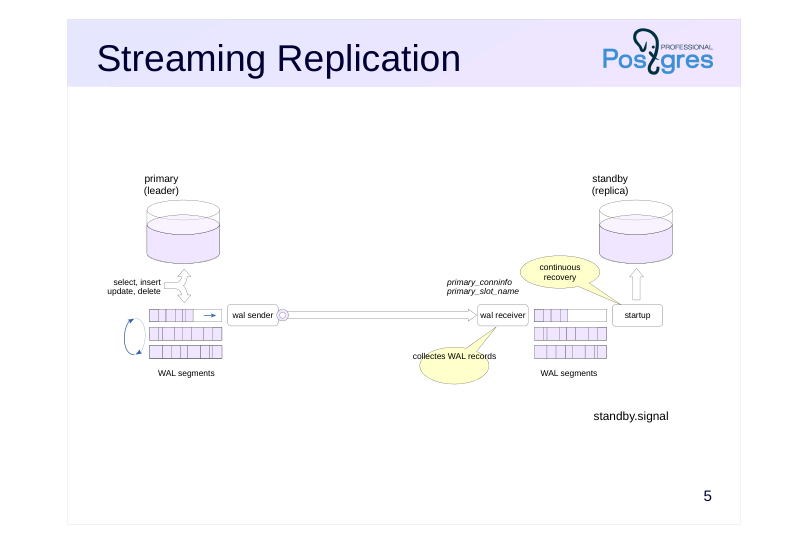 {#source-figure-005 caption=“Source slide page 5: Streaming Replication”}
Speaker notes
If there is a recovery.signal file, the server is restored from the backup: replays the WAL records, restores consistency and completes the recovery. Starting the replica is similar, but the recovery does not complete: the replica continues to read and apply records from the leader. The signal for this is the standby.signal file.
In the topic “Base Backup,” we considered two ways to deliver WAL records from the server to the client: streaming and file-based. Replication uses the same two mechanisms. Streaming replication is the most common approach by far.
The wal receiver process on the replica connects to the leader over the replication protocol, using the connection string from the primary_conninfo parameter, and reads the stream of WAL records. With streaming replication, the replica lag is minimal and can be reduced to zero if needed. The received records are written to disk as WAL segments, just as they are on the leader. Next, the startup process – the same one that handles crash recovery – applies records to data files, only now it works continuously.
The leader starts a wal sender process to handle this connection. Streaming replication can use a replication slot when necessary. The slot name is stored in the primary_slot_name parameter.
Page 6: Streaming Replication Configuration
Since our configuration will not include a WAL archive, it is essential to use a replication slot at every stage – otherwise, given sufficient delay, the primary may delete the required file segments before they are committed, forcing you to take a new backup and redo the entire setup. Create a slot:
Examine the slot we just created:
The slot is not initialized right away (restart_lsn and wal_status are empty). Take a standalone backup into the beta server’s data directory using the slot we created. When using the -R option, the tool adds the files needed to start the future replica to the backup.
Check the slot again:
Page 7: Page 7
Once the backup completes, the slot is initialized and the primary retains all WAL files starting from the beginning of the backup (restart_lsn, wal_status). Compare with the line in backup_label:
The postgresql.auto.conf file was generated by pg_basebackup because of the -R option. This file contains the connection information for the primary and the replication slot name:
By default, the replica will be a hot standby, meaning it can serve queries during recovery. If this is not necessary, the replica can be warm instead (hot_standby = off). The tool also created the standby.signal file. Its presence instructs the server to enter continuous recovery mode.
The WAL records needed to bring the replica to a consistent state will be read from the standalone base backup. Then it will enter continuous recovery mode and begin receiving and replaying the WAL stream.
Page 8: Replication with a WAL archive
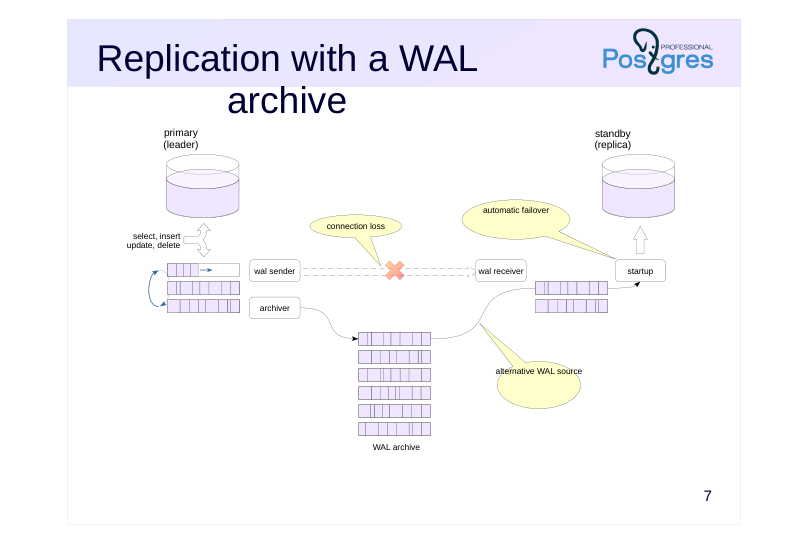 {#source-figure-008 caption=“Source slide page 8: Replication with a WAL archive”}
Speaker notes
Another way to deliver WAL records is to give the replica access to the WAL archive, just as you would during regular recovery from archive (this mechanism is covered in the “Backup” module).
If the replica can’t retrieve the next WAL record via the replication protocol for any reason (such as a connection loss), it will attempt to read it from the archive using the command specified in the restore_command parameter. When the connection is restored, the replica will automatically switch back to streaming replication.
In fact, replication can work with just the archive, without streaming replication. But in this case:
● the replica is forced to lag behind the leader by the time it takes to fill the WAL segment;
● the leader has no awareness of the replica’s existence, which can lead to problems in certain situations.
Page 9: Processes
Leader Replica
- wal sender
- wal receiver
- startup
- archiver
- archiver
- (archive_mode = always)
- checkpointer
- checkpointer
- (checkpoints)
- (restartpoints)
- background writer
- background writer
- wal writer
- autovacuum
Speaker notes
Different sets of processes run on the leader and on the replica. Beyond the wal sender (on the leader) and wal receiver and startup processes (on the replica) we’ve already covered, there are others.
Common processes:
● background writer – writes dirty pages from the buffer cache to disk (on the replica, pages are read into the buffer cache in the same way to apply WAL records, then written either in the background or during page eviction).
● checkpointer – performs restartpoints (See “WAL Archive”). If a failure occurs during recovery, the replica can resume from the last restartpoint rather than starting over from the beginning.
Processes running only on the leader:
● wal writer – the replica doesn’t generate WAL records; it only receives them from the leader.
● autovacuum launcher/worker — the replica doesn’t perform vacuum operations; when vacuum runs on the primary, it’s propagated to the replica through WAL.
There is also a process that may or may not be present depending on the configuration:
● archiver — runs only on the leader when archive_mode = on, but runs on both the leader and replica when archive_mode = always (covered in more detail in the “Switchover to Replica” module).
Page 10: Replica Processes
Compare the processes on the primary:
And on the replica:
Page 11: Archive Cleanup
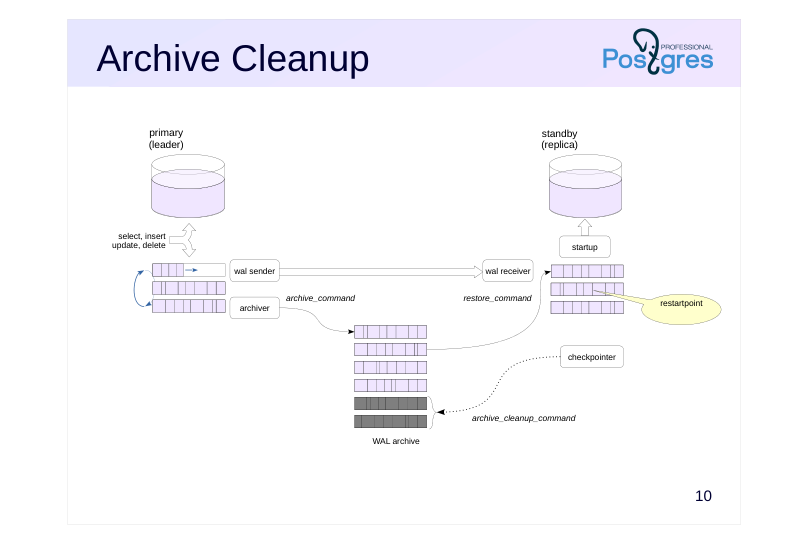 {#source-figure-011 caption=“Source slide page 11: Archive Cleanup”}
Speaker notes
At restartpoints, the checkpointer process will delete unneeded WAL segments from the local pg_wal directory.
If the archive is used to synchronize just one replica, you can also clean it automatically. The archive_cleanup_command parameter specifies the command that will be executed at the end of each restartpoint. For example, you can set it to run the pg_archivecleanup utility (the server will set the restartpoint segment name as %r):
archive_cleanup_command = ‘pg_archivecleanup /path/to/archive %r’
https://postgrespro.com/docs/postgresql/16/runtime-config-wal#RUNTIME-C ONFIG-WAL-ARCHIVE-RECOVERY
https://postgrespro.com/docs/postgresql/16/pgarchivecleanup
Page 12: Replica usage
Allowed
- read-only queries (select, copy to, cursors)
- setting server parameters (set, reset)
- transaction management (begin, commit, rollback…)
- creating a backup (pg_basebackup)
- Not allowed
- any changes (insert, update, delete, truncate, nextval…)
- locks expecting changes (select for update…)
- DDL commands (create, drop…), including creating temporary tables
- maintenance commands (vacuum, analyze, reindex…)
- access control (grant, revoke…)
Speaker notes
We’ve already mentioned that replicas don’t allow any data modifications. More specifically, the following operations are not allowed:
● modifications to tables, materialized views, and sequences;
● locks (since these require modifying data pages);
● DDL commands, including creating temporary tables;
● commands such as VACUUM and ANALYZE;
● access control commands.
A replica can execute read queries when hot_standby = on. Setting server parameters and transaction management commands will also work. For example, you can start a (reading) transaction with a specific isolation level.
Additionally, replicas can be used for creating backups.
Page 13: Replica usage
Run several commands on the primary server:
Check the replica:
No changes can be done on replica directly:
In general, you can tell a replica apart from the primary using the function:
Page 14: Limitations
Isolation and MVCC
- large number of savepoints may slow down query execution
- Serializable isolation level is not supported
- Triggers and locks
- triggers and advisory locks do not work
- Creating backups on a replica
- the full_page_writes parameter must be enabled on the leader beforehand
- delays caused by waiting for checkpoints and segment switches
- Order of changes
- tablespace directories – create on replica first
- max_… parameter values – increase on replica first
Speaker notes
Replication has several limitations and considerations.
If the leader is running a transaction with more than 64 nested transactions (that is, it is actively using savepoints), snapshot creation on the replica will be suspended, preventing query execution for a while.
The Serializable isolation level is not supported on replicas.
Triggers won’t fire on the replica since they’ve already executed on the leader: only their results get replicated. Advisory locks won’t work either.
When performing backups from a replica, there’s no way to fully control the primary server – specifically, you can’t trigger checkpoints or enable the full_page_writes parameter. Therefore, you need to enable this parameter on the leader in advance, and then wait for a checkpoint to occur, which can significantly delay the process.
Tablespace creation is replicated, but if the OS user who started PostgreSQL does not have the privileges to create the required directory, an error will occur. The best approach is to first create the directories on the leader and all replicas, then execute the CREATE TABLESPACE command.
If you increase a resource allocation parameter on the leader, replication may stop. This affects max_connections, max_prepared_transactions, max_locks_per_transaction, max_wal_senders and max_worker_processes.
Page 15: Monitoring
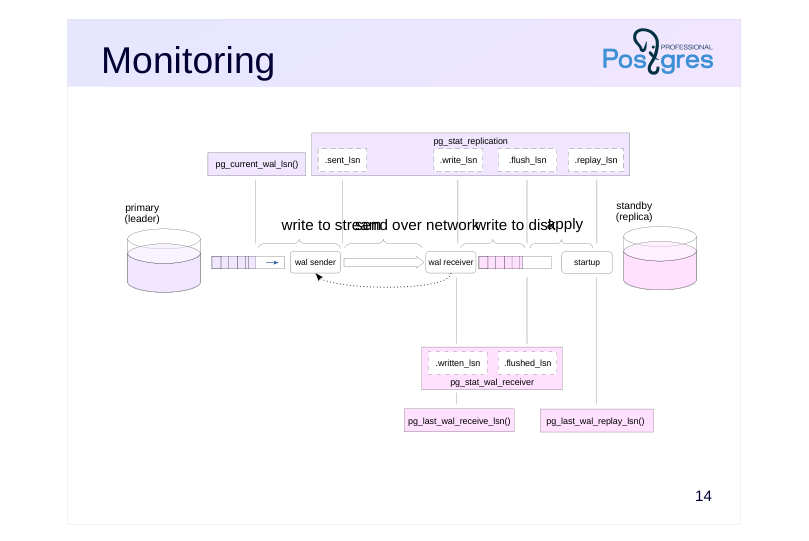 {#source-figure-015 caption=“Source slide page 15: Monitoring”}
Speaker notes
During replication, issues may arise that should be caught by properly configured monitoring. The key data is WAL positions. There are five main steps:
- record created on leader 2) record transmitted by wal sender 3) record received by wal receiver 4) record synchronised to disk (flush) 5) record applied by startup process
The leader usually tracks all five steps. The first one is tracked through the pg_current_wal_lsn function, while the others come from the pg_stat_replication view. The replica passes replication status to the leader each time it writes to disk, but at least once every wal_receiver_status_interval (default is 10 seconds).
Information about the replication slot can be found in the pg_replication_slots view.
Some of the replication progress information can also be obtained from the replica: in the pg_stat_wal_receiver view and via pg_last_wal_receive_lsn and pg_last_wal_replay_lsn functions.
Both functions pg_is_in_recovery and pg_get_wal_replay_pause_state return replication status information. The log_replication_commands parameter enables logging of replication protocol commands to the server log.
Page 16: Replication Monitoring
The replica is currently in recovery mode and applying WAL records:
The current max_connections value on the primary:
If the number of users has grown, we’ll want to increase this limit:
How’s the replica doing?
Replication has stopped. The reason is in the log:
Follow the recommendation and increase the value on the replica.
Check the replica:
Page 17: Page 17
Replication continues. To avoid replication stopping, limits should be increased on the replica first. The state of the replication can be checked on the primary server: To access this information, a user must be a member of the pg_read_all_stats group role or a superuser.
The pg_monitor role is a member of the pg_read_all_stats role and inherits its privileges.
Note Note the *_lsn and *_lag fields – they show the replica’s lag at different stages. All positions are currently in sync, with zero lag. Now let’s insert a large number of rows into the table to observe replication in action.
Page 18: Page 18
A small lag has appeared. Check the replica:
All rows have been delivered successfully. Check the replication status one more time:
All positions are now in sync.
Page 19: Replication Modes
Asynchronous
- synchronous_commit
- = off
- local
- Synchronous
- commit with callback from the synchronous replica
- provides reliability but not consistency
- synchronous_commit
- = remote_write
- = on
- remote_apply
- synchronous_standby_names =
- replica list
- FIRST N (replica list)
- ANY N (replica list)
Speaker notes
There are two transaction commit modes. The faster asynchronous mode carries a risk of losing already committed changes if a crash occurs. In synchronous mode, the COMMIT command doesn’t complete until the record reaches disk. If you have multiple servers, you can still improve reliability by waiting for the replica to confirm that it has commited a record. In this case, the data will not be lost even if the disk fails.
Synchronous replication is enabled using the same synchronous_commit parameter that controls synchronous commits. Different values of this parameter let you control the level of reliability. With remote_write, the leader waits for confirmation that the replica has received the record (though there’s still a chance of losing changes if the replica crashes before writing the data to disk).
With on, the leader waits for confirmation that the record has been written to the replica’s disk (this is the reliable mode; however, an application querying the replica might not yet see the changes).
Finally, the remote_apply value makes the primary wait until the replica has actually applied the record. Each next mode introduces progressively longer delays.
The leader can synchronize with one or multiple replicas. You can specify a list of replicas in priority order or set up quorum-based synchronization, where the leader waits for confirmation from any N of the available replicas.
Page 20: Segment Loss
The leader might delete a WAL file that the replica still needs
- if the replica didn’t collect it yet
- (i.e. because it was down for a while)
- Solution 1. Replication slot
- makes the leader depend on the replica, requires monitoring
- max_slot_wal_keep_size = −1
- Solution 2. WAL archive
- no slot required
Speaker notes
Several challenges can arise during replication, each with different possible solutions.
PostgreSQL periodically removes WAL files that are no longer needed for recovery. The leader might delete a file containing data that hasn’t yet been transmitted to the replica.
This isn’t an issue when a write-ahead log archive is available, since the replica can simply read the required data from the archive if streaming replication fails, then switch back to receiving data from the stream once it catches up with the leader.
Without the archive, the replica won’t be able to continue recovery and will need to be reconstructed from a backup. To prevent this, you can use a replication slot. However, this creates a dependency. If the replica stops collecting WAL records, they will accumulate on the leader, potentially flooding the file system. To prevent this, you can limit the accumulated volume by setting the max_slot_wal_keep_size. If this limit is exceeded, the slot will stop, and the server will be able to delete the WAL files again.
In any case, slots are yet another item you will have to monitor.
Page 21: Impact of the Replication Slot
Stop the replica.
Limit the WAL size to two segments.
The slot is inactive, but it retains the LSN of the last record received by the replica:
Let’s insert more rows into the table.
The LSN in the slot has not changed:
Create a checkpoint, which should clean up the WAL since its size exceeds the allowed limit.
What is the WAL size now?
The checkpoint did not remove the segments – they are being retained by the slot, even though the size limit has been exceeded. If a slot is left unattended, it can exhaust all available disk space. In most cases, keeping the main server running smoothly is more important than keeping the replica in sync. To prevent WAL from growing out of control, you can limit the amount retained by the slot:
Now the checkpoint cleans up the WAL:
Page 22: Page 22
But the slot no longer guarantees the availability of WAL records (wal_status=lost):
And the replica cannot synchronize:
In such cases, you can synchronize the replica using the archive by setting the restore_command parameter. If that’s not an option, you’ll need to reconfigure replication from scratch by creating a new base backup.
Page 23: Conflicts: a Problem
WAL records incompatible with queries on the replica
- vacuum removes tuples that are still needed by queries on the replica
- exclusive locks on objects
- buffer pinning
- Monitoring
- pg_stat_database_conflicts
Speaker notes
Another problem occurs when when the replica is used to run queries. The leader can perform an action that conflicts with a query running on the replica:
● Vacuum may remove a tuple that’s being queried, or it may need to acquire a lock that conflicts with the query.
● A WAL record may aquire an exclusive lock on an object (for example, when dropping a table).
● Buffer pinning may cause conflicts sometimes.
You can monitor such conflicts using the pg_stat_database_conflicts view.
Page 24: Conflicts: Solutions
Solution 0: Avoid conflicts
- avoid running commands that acquire locks
- disable file truncation at end of vacuuming: retention setting
- vacuum_truncate = off
- Solution 1: Delay applying conflicting records
- max_standby_streaming_delay
- max_standby_archive_delay
- except deadlocks, DROP TABLESPACE, DROP DATABASE
Speaker notes
One way to handle conflicts is to avoid operations on the leader that would result in exclusive locks. For example, you can avoid running commands like DROP TABLE, TRUNCATE, LOCK, DROP INDEX, DROP TRIGGER, and similar operations, or run them only when you know there are no active queries on the replica.
Some implicit locks can be avoided by disabling the corresponding functionality on the leader. For instance, if vacuum frees up pages at the end of a file, shrinking the file size requires an exclusive lock on the table. Then, you can disable file truncation by setting the table storage parameter vacuum_truncate = off. However, vacuum cannot be disabled or postponed indefinitely, so this approach won’t help avoid conflicts when vacuum removes tuples that are still needed by queries.
Another approach is to delay the application of conflicting records on the replica. This method works with both streaming replication and archive-based replication; it delays the application of records related to both vacuum operations and exclusive locks. You can set the maximum application delay (measured from when the record is received). If the conflicting query hasn’t finished by that time, it will be terminated.
However, conflicts caused by rare causes (database or tablespace deletion, deadlocks) are not delayed and are resolved immediately by terminating the query.
Page 25: Conflicts: Solutions
Solution 2: feedback via the replication protocol
- a snapshot on the replica will prevent tuple removal
- in the same manner as
- hot_standby_feedback = on
- only for vacuum conflicts with queries on the replica
- Monitoring
- pg_stat_replication.backend_xmin
- pg_replication_slots.xmin
Speaker notes
Another approach is to defer conflicting operations on the leader. To enable this, enable replication protocol feedback.
This method only works for vacuum operations (exclusive locks cannot be deferred) and only with streaming replication (if the replica switches to retrieving records from the archive, it essentially becomes invisible to the leader).
Each data snapshot includes a transaction horizon – a transaction ID value that marks the boundary between tuples that are no longer needed and those that must be retained. The minimum horizon across all snapshots on the replica determines what can be vacuumed. This topic is covered in detail in the “Data Snapshots” section of the DBA2 course.
With feedback enabled, the leader knows which tuples the replica needs. In this case, from the vacuum perspective, a query running on the replica is treated exactly the same as a query running on the leader itself.
Feedback allows you to track the vacuum horizon on the leader side. When a replication slot is not in use, the horizon can be monitored through the pg_stat_replication.backend_xmin field, while with a slot it appears in pg_replication_slots.xmin. Keep in mind that when feedback is enabled, even an inactive slot will prevent vacuum from proceeding, which can cause bloating. The practice assignments explore this effect.
Page 26: Takeaways
The replication mechanism works by streaming WAL records to the replica and applying them there
- primary mode: streaming replication
- can be supplemented with WAL archiving
- The replica is an exact copy of the leader
- does not generate its own WAL records and operates in read-only mode
- A complex mechanism that requires proper configuration and monitoring
- configurations vary significantly depending on your specific requirements
Page 27: Practice
- Configure streaming replication between two servers in synchronous mode, with a slot, without feedback. 2. Verify that replication works as intended. Make sure that when the replica is stopped, commits on the leader are not completed. 3. Simulate a scenario where a query running on the replica gets terminated because the leader has vacuumed tuples that the query still needs. 4. Disable deferral of conflicting changes and verify that queries are canceled immediately. 5. Enable feedback and verify that vacuum on the leader doesn’t interrupt query execution. 6. Stop the replica and verify that the replication slot prevents vacuum from removing tuples. Drop the slot to allow vacuum to resume.
Speaker notes
- For synchronous mode, set on the leader:
● synchronous_commit = on
● synchronous_standby_names = ‘“16/beta”’
- Start a transaction with Repeatable Read isolation level on the replica and periodically query the table. Meanwhile, on the leader, modify that table and run vacuum.
Keep in mind that the max_standby_streaming_delay parameter defaults to 30 seconds.
Set the max_standby_streaming_delay parameter to zero.
Enable the hot_standby_feedback parameter on the replica. The maximum notification interval is controlled by the wal_receiver_status_interval parameter (defaults to 10 seconds).
After completing the tasks, delete the database you created and reset the configuration.
Remember to disable the synchronous commit mode, otherwise a stopped replica will prevent transactions from committing. Don’t set synchronous_commit to off. Instead, set synchronous_commit = “local” or reset the synchronous_standby_names parameter.
Page 28: 1. Synchronous Physical Streaming Replication
Create and start the replica the same way as in the demonstration.
Backup:
For the main server to find the replica, the cluster_name parameter has already been set in the main configuration:
Another option is to add the application_name attribute to the connection string:
Now enable synchronous replication mode on the primary.
If all replicas are synchronous, you can set a value that matches any name:
However, the primary cannot distinguish a replica from, say, the pg_receivewal utility. With this configuration, it will attempt to synchronize with any client connected via the replication protocol, which can result in commits waiting indefinitely. It’s better to list names explicitly.
2. Physical Replication Verification
Page 29: Page 29
sync_state: sync means that replication is running in the synchronous mode: application_name: 16/beta – the name by which the primary finds the replica. Stop the replica.
The commit waits for the synchronous replica…
After the replica starts, the commit completes.
3. Query Cancellation Due to Vacuum on the Primary
When applying a WAL record on the replica is delayed beyond deadlock_timeout due to a conflict with a running query, we want a message to be written to the server log.
To do this, set the log_recovery_conflict_waits parameter.
Also reduce the maximum time streaming replication can be paused before a query on the replica is canceled.
Start a transaction with the Repeatable Read isolation level: the first statement will create a data snapshot that all statements in the transaction will use.
Page 30: Page 30
On the primary, update the only row and run vacuum. The first tuple will be removed in the process.
After 5 seconds, the query on the replica still completes – the replica is delaying the application of the conflicting WAL record:
And the server log already contains a message about waiting for the conflict to be resolved:
Five seconds later, the same query is aborted – the tuple from the snapshot no longer exists.
4. Disable the Delay of Conflicting WAL Record Application
Set the delay for applying conflicting changes to zero.
Start a new transaction…
On the primary, update the row and run vacuum…
Page 31: Page 31
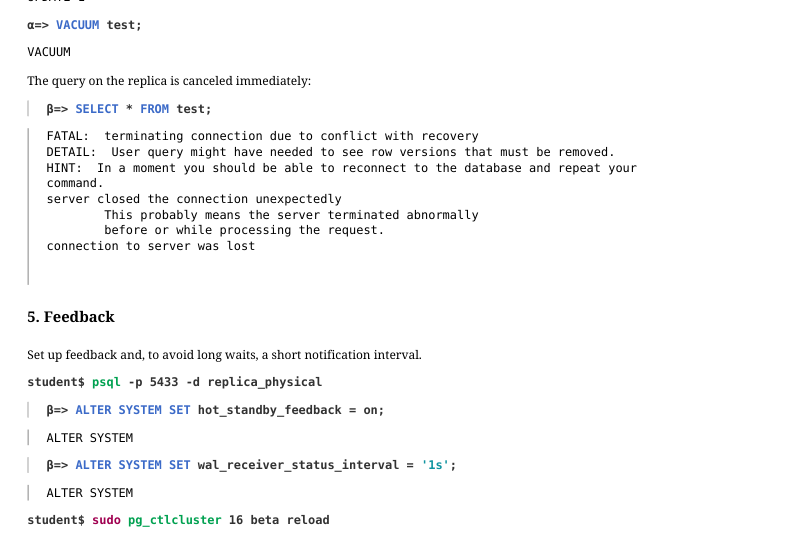 {#source-figure-031 caption=“Source slide page 31: Page 31”}
The query on the replica is canceled immediately:
5. Feedback
Set up feedback and, to avoid long waits, a short notification interval.
Start a new transaction…
On the primary, update the row and run vacuum…
Thanks to feedback, vacuum cannot remove the old tuple (tuples: 0 removed, 2 remain, 1 are dead but not yet removable).
Page 32: Page 32
Once the transaction on the replica completes, the primary can run vacuum (tuples: 1 removed, 1 remain, 0 are dead but not yet removable). The WAL records are replicated, but they won’t cause any conflicts.
6. Effect of a Replication Slot on Vacuum When the Replica Is Stopped
Cancel synchronization and stop the replica:
Update the table row once more:
The slot is inactive, but it retains the minimum xmin of the replica’s data snapshots:
This xmin value is less than the minimum xmin of local data snapshots:
Therefore, the slot will hold back vacuum (tuples: 0 removed, 2 remain, 1 are dead but not yet removable).
Delete the slot.
Page 33: Page 33
Now vacuum will run successfully (tuples: 1 removed).
Cleanup
Drop the database and reset configuration.
Page 34: Practice+
1. Configure streaming physical replication together with WAL archiving, using the virtual machine’s network interface for the replication stream. 2. Verify that streaming replication is working through the interface. 3. Simulate a network failure by disabling the virtual machine’s network interface. 4. Ensure that streaming replication has stopped and the replica is receiving changes from the WAL archive, but with lag. 5. Restart the virtual machine’s network interface, verifying that streaming replication has automatically recovered.
Speaker notes
- You can check the status of network interfaces with the command: ip a
You can check the availability of the network address with the command: ping -c1
Edit the pg_hba.conf file to allow connections to the alpha server through any network interfaces, and configure it to listen on all network interfaces.
The wal_receiver process ends if there is no network connection within the wal_receiver_timeout time. Specify a small value.
Simulate network failure by turning off the network interface: sudo ip l set enp0s3 down
Verify that after switching to the next WAL segment, the replica receives the changes made before switching.
You can switch the network interface back on with the command: sudo ip l set enp0s3 up
After completing the exercises, drop the database you created and reset the configuration parameters to their defaults.
Page 35: 1. Physical Streaming Replication and WAL Archive
The primary virtual machine network interface is enp0s3:
Verify that the interface is accessible.
Allow connections to the alpha server from IPv4 addresses belonging to the server’s interface networks.
Enable the server to listen on all interfaces and configure WAL archiving.
Directory for the WAL archive.
Backup:
Prepare the configuration for the replica. The wal_receiver_timeout parameter defines how long the replica waits before terminating an idle connection. This allows the replica to detect a dropped network connection more quickly.
Page 36: 2. Replication Check
The replica receives WAL records via the stream…
…and reports received records to the primary without delay:
The table has been replicated:
Page 37: 3. Network Failure
Disable the network interface to simulate a network failure.
The network is unavailable.
The wal receiver process has stopped:
On the primary, insert a row…
…but the replica doesn’t receive it:
Streaming replication has stopped:
4. Archiving
Archiving on the primary, however, continues to function. Switch the WAL segment:
The segment has been archived:
Now the replica can apply the records from the new segment, and we will see the row that was inserted before the switch.
Page 38: 5. Network Recovery
Let’s insert another row into the table on the primary.
It doesn’t reach the replica.
Now restore the network interface: the outage has been resolved.
Streaming replication is working again:
On the primary, add another row.
The replica has received all the rows.
Page 39: Cleanup
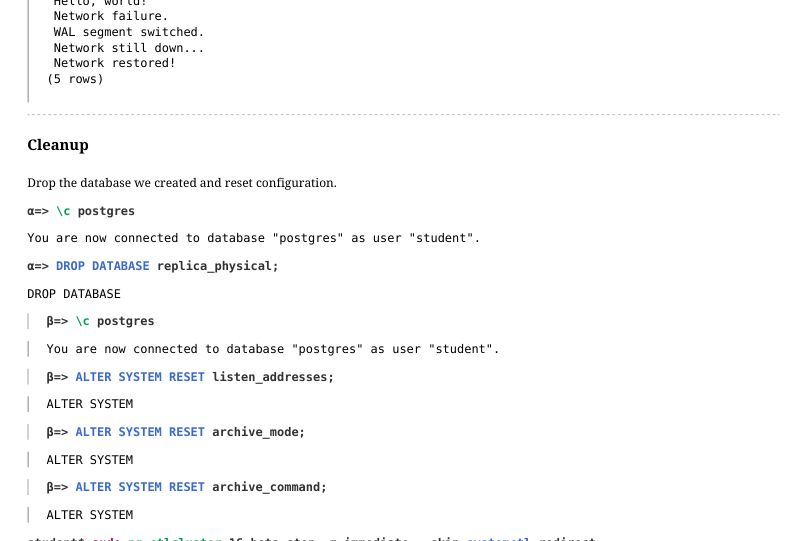 {#source-figure-039 caption=“Source slide page 39: Cleanup”}
Drop the database we created and reset configuration.
05 Lesson 05: Replication / Switchover to Replica
This page is extracted from the official PDF into native Markdown. Slide text, code and speaker notes are kept in reading order; the original PDF and HTML remain the layout references. HTML source: No matching course-page link was captured in the source inventory. Archive: DBA3-handouts-16-en-20260917.zip PDF pages: 34
Page 1: Replication / Switchover to Replica
Copyright
© Postgres Professional, 2017–2025 Authors: Egor Rogov, Pavel Luzanov, Ilya Bashtanov, Alexey Beresnev Photo: Oleg Bartunov (Phu Monastery and Bhrikuti Peak, Nepal)
Use of Course Materials
Non-commercial use of course materials (presentations, demonstrations) is allowed without restrictions. Commercial use is possible only with the written permission of Postgres Professional. It is prohibited to make changes to the course materials.
Feedback
Please send your feedback, comments and suggestions to: edu@postgrespro.ru
Disclaimer
Postgres Professional assumes no responsibility for any damages and losses, including loss of income, caused by direct or indirect, intentional or accidental use of course materials. Postgres Professional company specifically disclaims any warranties on course materials. Course materials are provided “as is,” and Postgres Professional company has no obligations to provide maintenance, support, updates, enhancements, or modifications.
Page 2: Topics
- Switchover to Replica
- Failback on Former Leader
- Considerations for File-Based Archiving
Page 3: Switchover to Replica
Reasons
- planned switchover:
- scheduled maintenance
- emergency switchover (failover):
- switch to replica after a leader failure
- Procedure
- make sure the leader is stopped
- $ pg_ctl promote or
- pg_promote()
- automatic switchover: unavailable
- (third-party cluster management software required)
Speaker notes
You might need to switch to a standby server for maintenance work on the primary server. In this case, the switchover can be performed at a convenient time in a planned manner. In the event of a main server failure, you need to switch to the standby server as quickly as possible to minimize system downtime (failover).
A replica is promoted to independent mode by either executing the command pg_ctl promote from the OS or the function pg_promote from SQL. Switching with the trigger file (the promote_trigger_file option) is no longer supported in PostgreSQL 16 and higher.
Before promoting a replica, you must make sure that the original leader is stopped. If it continues to work and clients are still connected to it, data on different servers can disperse, and reconciling them afterwards is messy, non-automatable, and often resulting in some data being lost.
To switch to a standby server, you must redirect clients to it. This requires the use of third-party software (as discussed in the “Cluster Technologies” module), since PostgreSQL does not have its own tools for this.
https://postgrespro.com/docs/postgresql/16/warm-standby-failover
Page 4: Replica Promotion
Apply WAL records
- already received by the wal receiver but not yet applied by the startup
- process
- Terminate processes
- wal receiver
- startup
- Start processes
- wal writer
- autovacuum launcher
- archiver (if configured)
- Switch to a new timeline
Speaker notes
After receiving the signal, the replica gets promoted: it performs recovery and becomes a regular server.
The startup process applies log records that have already been received by the wal receiver process, but have not yet been applied. Then, the wal receiver and startup processes terminate since they are not needed on the leader.
On the other hand, the wal writer and autovacuum launcher processes are started up (archiver too, if configured.)
After completing recovery, the server switches to a new timeline.
Tiny details aside, the process is essentially just a recovery from backup.
Page 5: Streaming Replication Configuration
In this demo, we will run checkpoints manually and increase the scheduled interval.
Let’s enable the pg_walinspect extension. It will help us inspect checkpoint entries in the WAL. Superuser privileges are required.
We will be using the standalone backup multiple times, so we create it in tar format.
Let’s place the backup into the PGDATA directory on the beta server:
We will need the standby.signal file.
Configure the connection to the primary.
Create a replication slot on alpha and start the replica beta.
Check the replica:
Page 6: Page 6
Stopping the Primary and Creating the Checkpoint
Let’s add one more row to the table and gracefully stop the primary. A checkpoint will be performed in the process.
Checkpoint information has been written to the control file:
Did the replica receive this checkpoint record? Let’s examine the WAL on the replica, starting from the Log Sequence Number of the checkpoint record.
The record_length field shows the record length in bytes. The last position received by the replica is greater than the LSN of the checkpoint record:
The difference slightly exceeds the record length (114) due to WAL record alignment: on a 64-bit platform, record LSNs are multiples of eight bytes.
Replica Promotion
The beta server is currently a replica (it is in recovery mode):
Promote the replica. You can also use the pg_promote() function, which does the same thing.
There is another way to promote a replica: delete the standby.signal file and restart the standby server. This is not quite a “proper” way to do it, since the replica won’t recognize that recovery is complete and won’t switch to a new timeline.
Page 7: Page 7
The former replica beta is now a fully functional server instance.
Page 8: Failback
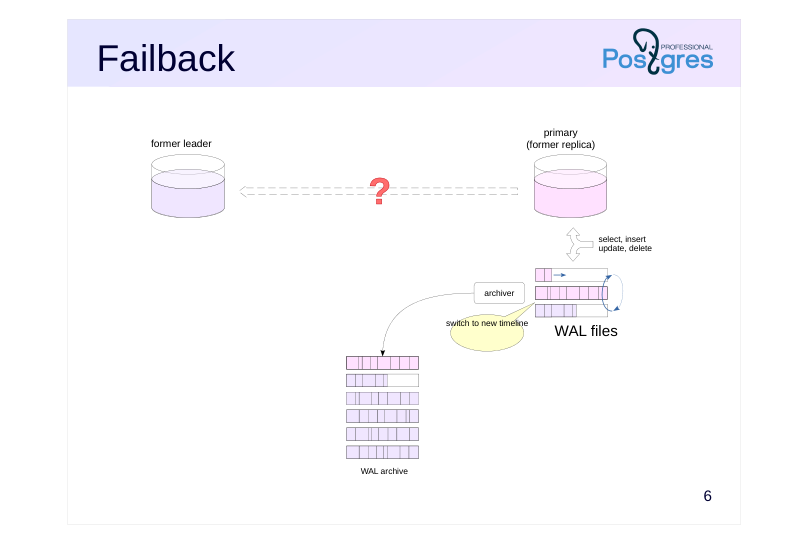 {#source-figure-008 caption=“Source slide page 8: Failback”}
Speaker notes
After promotion, the former replica acts as a standalone server. It processes client queries and generates its own WAL archive – within a new timeline.
If the switchover wasn’t caused by a serious server failure, you’ll need to perform a failback: quickly bring that server back online – this time as a replica.
Page 9: Simple Reconnect
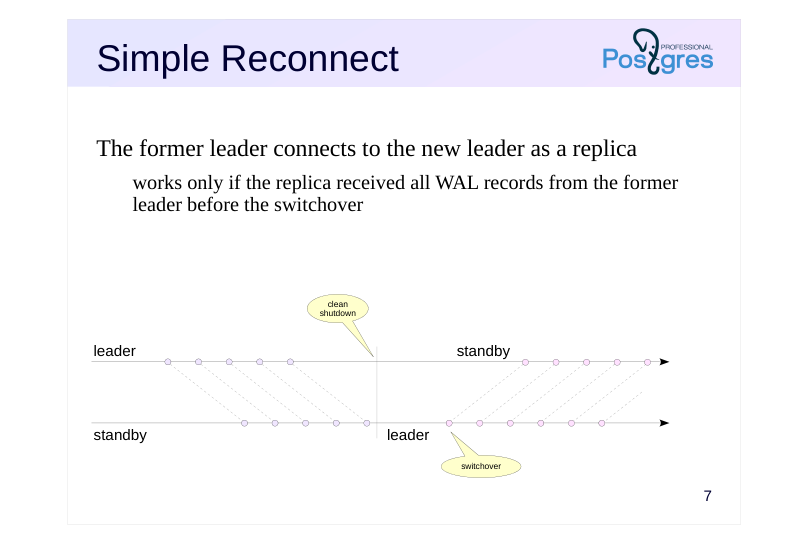 {#source-figure-009 caption=“Source slide page 9: Simple Reconnect”}
The former leader connects to the new leader as a replica
- works only if the replica received all WAL records from the former
- leader before the switchover
Speaker notes
When the leader is shut down cleanly (using the fast or the smart shutdown mode), all of its WAL records will most likely reach the replica, though this isn’t guaranteed. The shutdown procedure first terminates all backend processes, then performs a checkpoint, and only at the very end stops wal sender, giving the replica time to receive the checkpoint record.
You can check the leader’s position in WAL with pg_controldata (look for “latest checkpoint location”), while the replica’s position is shown by the pg_last_wal_receive_lsn function. This function returns the current position in WAL, so its value must be ahead of the latest checkpoint location by the size of the checkpoint record.
If all records were actually received, then the former leader can immediately connect to the new one just by adjusting the configuration accordingly.
If the leader is stopped without performing a checkpoint (due to a crash or shutdown in the immediate mode), such a connection will likely be impossible on a server with a current load. The server won’t be able to start, and an error will be logged.
Page 10: Rejoining the Cluster: Direct Connection
Bring the alpha server back online, but this time as a replica. Create the standby.signal file:
Configure the connection to the primary.
Start alpha and verify that it has become a replica.
On the beta server, we can modify data:
The alpha replica receives them.
Page 11: Backup
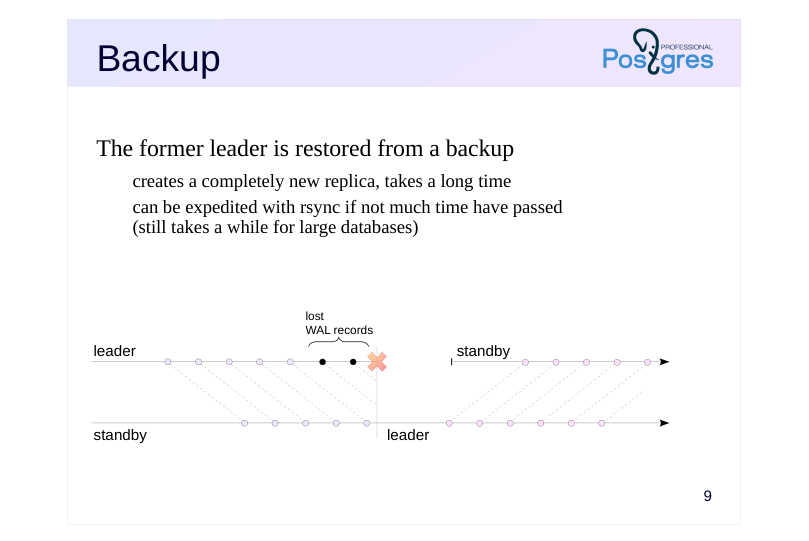 {#source-figure-011 caption=“Source slide page 11: Backup”}
The former leader is restored from a backup
- creates a completely new replica, takes a long time
- can be expedited with rsync if not much time have passed
- (still takes a while for large databases)
Speaker notes
When a leader crashes, there’s a good chance that some WAL records don’t make it to the replica. You can’t just reconnect the former leader as a replica in this case.
The simplest and most reliable approach is to build a completely new replica by creating and deploying a fresh base backup. However, for large databases, this can take a long time.
A variation of this approach is to skip pg_basebackup and instead create the backup using the backup API and rsync. If you create the backup immediately after promoting the replica, most files won’t have changed yet, which can significantly speed up the process.
But naturally, this does complicate things.
Page 12: pg_rewind
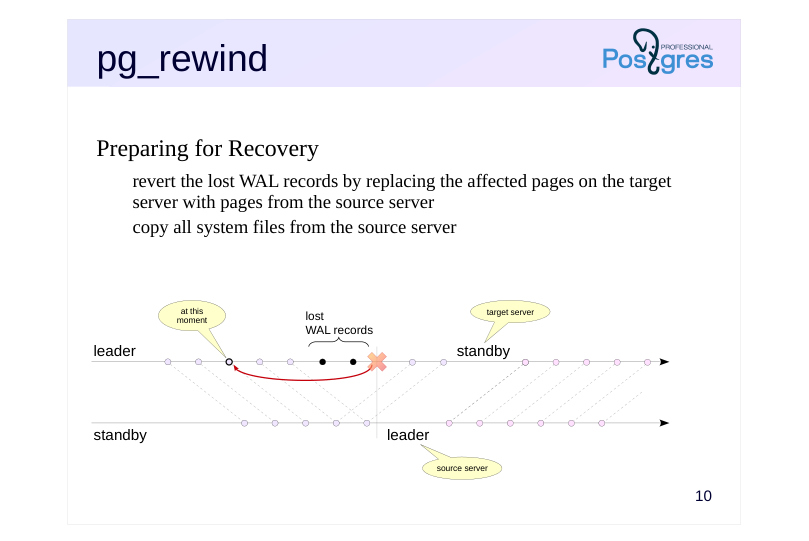 {#source-figure-012 caption=“Source slide page 12: pg_rewind”}
Preparing for Recovery
- revert the lost WAL records by replacing the affected pages on the target
- server with pages from the source server
- copy all system files from the source server
Speaker notes
An even faster approach is to use the stock tool pg_rewind.
It identifies where the two servers diverged, finds the nearest common checkpoint before that point, and by scanning the WAL, determines which pages have been modified since then.
These pages are then replaced with their counterparts from the source server (the new leader), and there shouldn’t be many of them. The utility also copies all system files from the source server.
The server then applies all necessary WAL records from the new leader. At this point, it’s no longer the pg_rewind doing the work, but rather the standard recovery process that runs when the server starts up. To ensure recovery starts from the correct point, the utility creates a backup_label control file.
https://postgrespro.com/docs/postgresql/16/app-pgrewind
Page 13: Considerations with pg_rewind
Target server (former leader)
- all necessary WAL files must be either in pg_wal or in the archive
- checksums must be enabled or wal_log_hints must be on
- the parameter full_page_writes must be on
- Source server (current leader)
- clinet-server connection:
- -source-server = connection string
- cleanly shut down server:
- -source-pgdata = directory
Speaker notes
For the source server, if it is running, the –source-server switch specifies the libpq client-server connection string (the utility does not use the replication protocol). The connecting role must have the privileges required to run pg_ls_dir, pg_stat_file, and pg_read_binary_file functions.
If the source server was shut down cleanly, you can just point to its data directory with the –source-pgdata switch.
Several specific requirements must be met for the tool to work:
● All WAL segments containing records from the last common checkpoint to the current moment must be either in the target server’s pg_wal directory or present and available from the WAL archive. In the second case, you need to set the restore_command parameter and the –restore-target-wal switch.
● Due to errors during writing, data mismatch within the pages is possible (the non-atomic writing problem, discussed in the “Base backup” module). This is solved by having the target server write each page’s full image to WAL after it is first changed since the checkpoint. This is enabled by full_page_writes = on. This mode does ignores “minor” page changes (hint bits), so the cluster also must either have page checksum calculation enabled or have wal_log_hints = on.
● If the target server was shut down incorrectly and without a checkpoint, the tool will start it in single-user mode and immediately perform a clean shutdown.
Page 14: Rejoining the Cluster: pg_rewind
Let’s now simulate a split-brain scenario – two writable servers resulting from a network partition (we cover this and other types of failures in detail in the “Cluster Technologies Overview” topic). Promote the alpha server out of replica mode without stopping the primary beta server.
Both alpha and beta can now accept write operations:
In practice, this situation must be avoided at all costs, since it’s no longer clear which server to trust. You’ll have to either discard all changes on one of the servers or figure out how to merge the data. We choose to discard the changes made on the beta server. Roll back the conflicting changes on beta – those that diverge from the changes made on alpha. To do this, we’ll use the pg_rewind utility – so let’s first verify that the required parameter values are set on the target server (beta):
Stop the target server ungracefully.
The pg_rewind utility requires you to specify the target server’s PGDATA directory and how to connect to the source server (alpha): either a connection string (if the server is running) or the path to its PGDATA directory (if it is stopped). In our case, the alpha server is running. Since the target server beta was not shut down properly, the utility will start it in single-user mode and stop it after performing a checkpoint. To start it, the configuration file location must be provided. The -R option ensures the target server starts as a replica once the utility finishes: after consistency is restored, it will remain in recovery mode.
Page 15: Page 15
As a result, pg_rewind “rolled back” the data pages to the last checkpoint before the point where the two servers diverged. The utility also created a backup_label file containing the WAL position from which recovery should begin. Let’s take a look inside:
By using the -R option, we instructed the utility to create the standby.signal file and set the connection string in the configuration file.
A replication slot has already been created on the alpha server – let’s make use of it.
Now beta will start up as a replica.
The replication slot has been initialized and is now in use:
Data modified on the new primary (alpha) has been received by the replica (beta):
Let’s add one more row:
Page 16: Page 16
Now the former primary (beta) is back into service as a replica.
Page 17: Switchover and Archiving
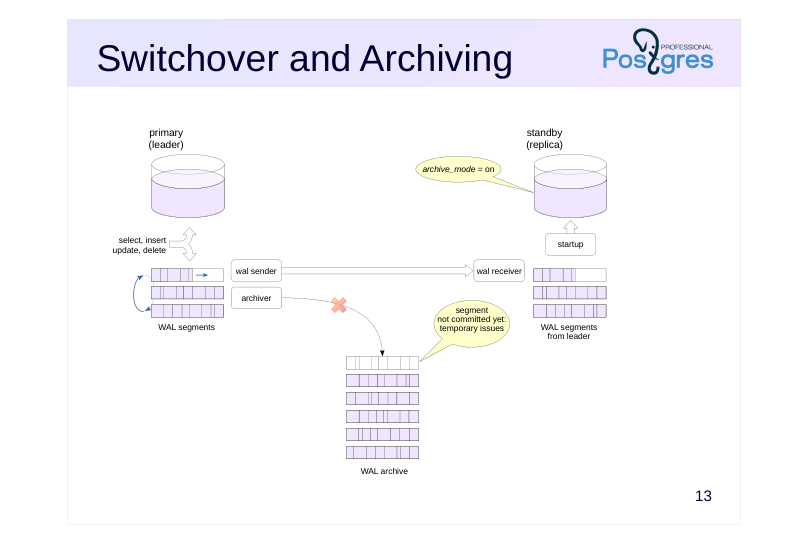 {#source-figure-017 caption=“Source slide page 17: Switchover and Archiving”}
Speaker notes
The write-ahead log archive, populated through continuous archiving, has an problem when it comes to streaming replication and switchover:
on a leader failure, some WAL segments may not make it into the archive. For example, if the disk runs out of space, archive_command willl return an error.
Page 18: Switchover and Archiving
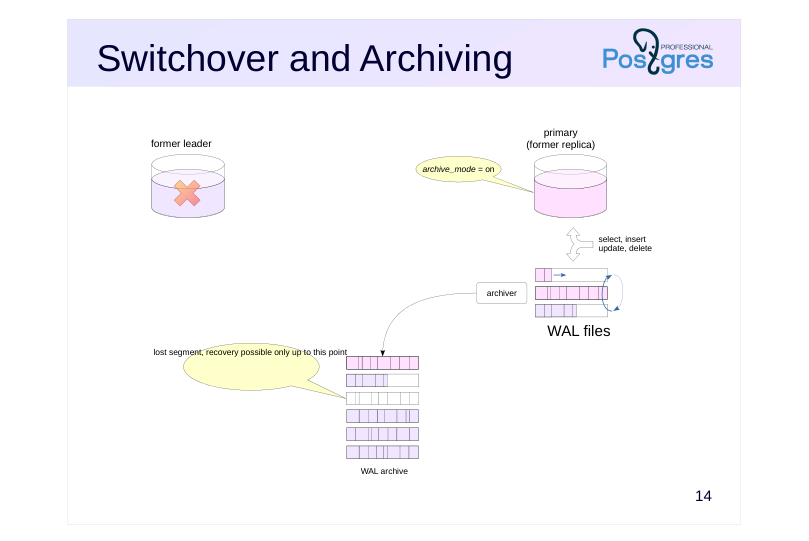 {#source-figure-018 caption=“Source slide page 18: Switchover and Archiving”}
Speaker notes
The replica is unaware of the archiving settings on the leader. When the former replica takes over as the leader, it won’t write the missing file segments to the archive (even though it could) because it assumes the archive was functioning properly all along. The archive will end up incomplete.
This means you can only restore the system from existing backups up to the point where this gap occurred. If this situation has occurred (and you detect it in time), you must take a backup immediately.
Stream archiving doesn’t have this problem because the pg_receivewal utility monitors the directory contents and requests any missing WAL records from the server. However, as mentioned in the “Backup” module, using this tool means maintaining additional infrastructure.
Page 19: File Archive Issues
Let’s restore the alpha and beta servers from a backup and configure file archiving to a shared archive on both.
WAL segment archive.
Identical archiving settings on both the alpha and beta servers.
On the replica (beta), let’s create the standby.signal file and configure the connection to the primary.
Start the primary (alpha) and create a replication slot.
Start the replica.
Current WAL segment:
Force a WAL segment switch. For the switch to occur, we need to ensure that both the current and next segments contain some records.
Page 20: Page 20
Now log entries are being written to the next segment, while the previous one has been archived:
Let’s say there is an issue with archiving. The cause could be something like a running out of space on disk, or network connectivity issues – we’ll simulate this by returning status 1 from the archive command.
Let’s force another WAL segment switch.
The segment is not being archived.
The archiver process will keep retrying, but without success.
The beta server wasn’t archiving while in replica mode, and after promotion it won’t archive the missed segment either. Stop alpha and promote beta.
Force another WAL segment switch, this time on beta.
Page 21: Page 21
How’s the archive doing?
Segment 000000010000000000000004 is missing – the archive is now unusable for recovery and replication.
Page 22: Switchover and Archiving
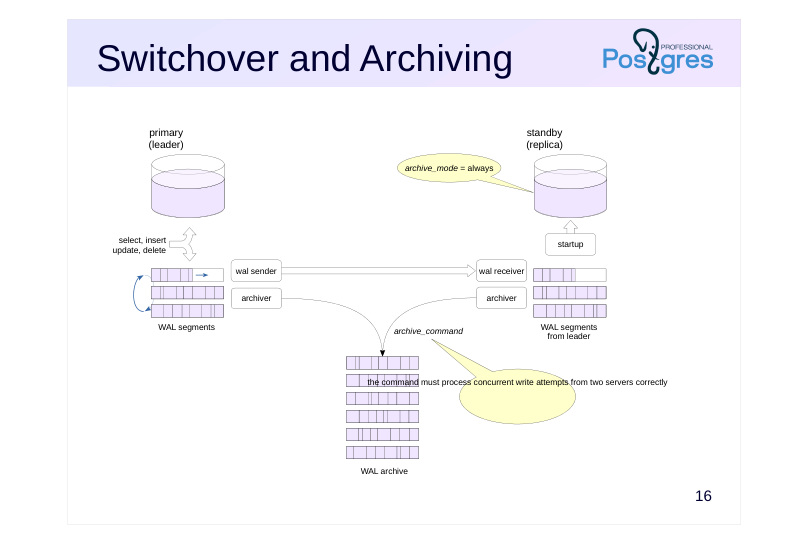 {#source-figure-022 caption=“Source slide page 22: Switchover and Archiving”}
Speaker notes
With archive_mode = always, the replica starts an archiver process that writes segments to the archive just like the leader server does. This means that the same file will be recorded twice, by two servers. This places two strict requirements on archive_command:
● it must not overwrite an existing file, but should report success if a file with identical content is already present in the archive;
● it must handle concurrent write attempts from both servers correctly.
With these requirements met, the segment won’t be lost because the replica will keep trying to write it even after the leader server stops.
Of course, you could configure archive_command so that the leader and the replica save WAL segments to separate archives, but that’s hardly practical.
Page 23: Archiving from a Replica
To keep the archive intact when failing over to a replica, the replica must have archive_mode = always. The archive command must correctly handle the case where both the primary and the replica write the same segment simultaneously. Let’s restore both alpha and beta from backup again and configure file-based archiving to a shared archive on both servers.
WAL segment archive.
Configuration of archiving on the primary (alpha). We replaced the logical operator in the archive command so that it immediately returns 0 if the file already exists.
Configuration of archiving on the replica (beta). Use the always mode and the same archive command.
The replica also needs a standby.signal file.
Start the primary and create a replication slot.
Start the replica.
Page 24: Page 24
Repeat the experiment. Switch the segment:
Checking the archiving status:
The completed segment has been archived. The alpha server is experiencing archiving issues – the command returns 1:
Alpha continues to generate WAL segments.
But the primary does not archive them:
However, archiving from the replica succeeds and the segment ends up in the archive:
Promote the replica.
Beta is now the primary server and is generating WAL files.
Page 25: Page 25
Let’s check the archive again:
The replica’s files have appeared in the archive, there are no gaps, and the problem is resolved.
Page 26: Takeaways
Switchover is used both during normal operation and in emergency situations
- After a switchover, the former leader must be brought back online
- Both procedures must be tried and tested in advance
- The write-ahead log archive requires extra attention
Page 27: Practice
1. Set up streaming replication from alpha to beta, with a replication slot, without continuous archiving.
- Simulate alpha server failure and switch over to beta. 3. Bring alpha back online as a replica by backing up from the new leader beta and adjusting the configuration.
- Verify that replication is functioning and using the slot. 4. Switch back to alpha so that the former leader becomes the main server again.
Speaker notes
To simulate a failure, you can stop the server in immediate mode:
pg_ctlcluster 16 cluster_name stop -m immediate –skip-systemctl-redirect
or terminate the main postgres process:
kill -QUIT номер_процесса
The process ID is the first line of the PGDATA/postmaster.pid file.
After completing the practice tasks, delete the slot and the created database, and reset the configuration.
Page 28: 1. Setting Up Replication Without an Archive
Set up replication. Stop the beta server and clear its data directory.
Create a standalone backup in the beta server’s data directory, first creating the replica slot.
Start the server in replica mode.
Check the configuration. Run several commands on the primary server:
Check the replica:
2. Primary Server Failure and Failover to Replica
Simulate a primary server crash.
Promote the replica.
Page 29: 3. Failback on Former Primary
Create a standalone backup of the beta server in the alpha server’s data directory. Before doing that, delete the configuration file – otherwise pg_basebackup will copy it and append parameters to it.
Clear the data directory on alpha.
Run the backup utility to create a replication slot and replication configuration.
Configuration parameters and the standby signal file have been set up:
The replication slot has been initialized and is now in use:
Check the replication:
4. Switching to a New Replica
Promote the replica.
Page 30: Page 30
The former primary is now primary again.
Cleanup
Delete the replication slot and database, and reset configuration.
Page 31: Practice+
- Configure the alpha server to retain two additional WAL segments after each checkpoint. Start physical replication from alpha to beta without a replication slot. 2. Crash alpha and promote beta. Restart alpha and modify some data on it. Verify that the data on alpha and beta do not match. 3. Stop alpha and start it as a replica of beta using pg_rewind.
Speaker notes
- Set up replication with the simplest settings and without a replication slot. To ensure that two additional WAL segments are retained, set a suitable wal_keep_size value.
After completing the practice tasks, delete the slot and the created database, and reset the configuration.
Page 32: 1. Replication
Since we are not using replication slots, we will retain two additional WAL file segments.
Stop the beta server and make it a replica of the alpha server.
Create a database and a table in it.
Changes have been replicated to beta.
Check the replication status.
On the replica, you can view the WAL receiver statistics:
Page 33: 2. Replication Break
The primary server has lost power.
Promote beta.
Make changes on the new primary.
Power has been restored to the alpha server.
The data on the two servers has diverged.
Stop alpha (former primary).
3. Failback on Former Primary
We want to bring the alpha server back up as a replica. To do this, we need to bring it back to a state compatible with beta. We can use the stock utility for that.
Write transactions are running on the beta server.
Data changed on the beta server has been received by the alpha server:
Page 34: Cleanup
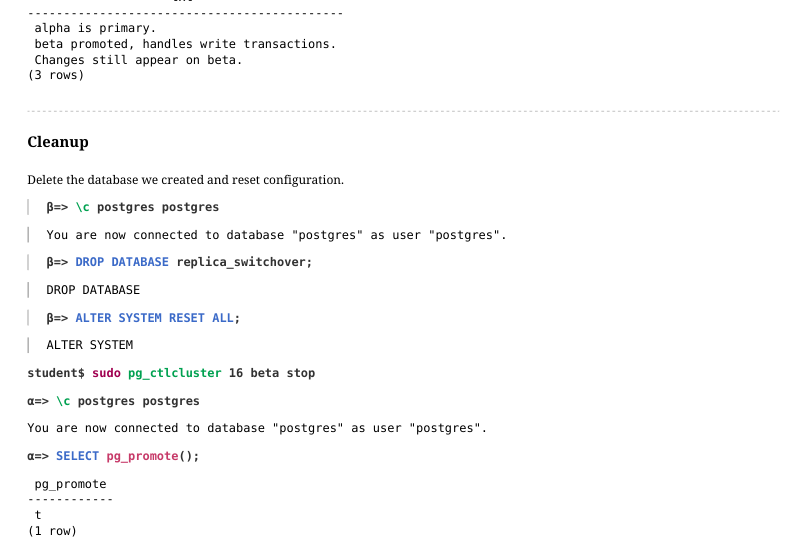 {#source-figure-034 caption=“Source slide page 34: Cleanup”}
Delete the database we created and reset configuration.
06 Lesson 06: Replication / Logical Replication
This page is extracted from the official PDF into native Markdown. Slide text, code and speaker notes are kept in reading order; the original PDF and HTML remain the layout references. HTML source: No matching course-page link was captured in the source inventory. Archive: DBA3-handouts-16-en-20260917.zip PDF pages: 42
Page 1: Replication / Logical Replication
Copyright
© Postgres Professional, 2017–2025 Authors: Egor Rogov, Pavel Luzanov, Ilya Bashtanov, Alexey Beresnev Photo: Oleg Bartunov (Phu Monastery and Bhrikuti Peak, Nepal)
Use of Course Materials
Non-commercial use of course materials (presentations, demonstrations) is allowed without restrictions. Commercial use is possible only with the written permission of Postgres Professional. It is prohibited to make changes to the course materials.
Feedback
Please send your feedback, comments and suggestions to: edu@postgrespro.ru
Disclaimer
Postgres Professional assumes no responsibility for any damages and losses, including loss of income, caused by direct or indirect, intentional or accidental use of course materials. Postgres Professional company specifically disclaims any warranties on course materials. Course materials are provided “as is,” and Postgres Professional company has no obligations to provide maintenance, support, updates, enhancements, or modifications.
Page 2: Topics
- Logical vs Physical Replication
- Publications and Subscriptions
- Initial Synchronization
- Row Identification and Filtration
- Logical Decoding
- Large Transactions
- Conflicts
- Replication Sources
Page 3: Comparison
Physical
- leader-replica: data flow in one direction only
- stream WAL records or send WAL files
- binary server compatibility is required
- whole cluster replication only
- Logical
- publication-subscriptions: servers have no dedicated roles
- row-level changes are replicated
- protocol-level compatibility is required
- can replicate individual tables
Speaker notes
During physical replication, one server is assigned the leader role and others become replicas. The leader transfers WAL records to replicas to be applied to data files there. The replica does not “understand” the changes, just applies them mechanically without any interpretation of what the changes mean, so binary compatibility between servers is necessary (the same platforms and major PostgreSQL versions). Since the WAL is shared across the entire cluster, only the cluster as a whole can be replicated.
In logical replication, one server creates a publication that other servers can subscribe to. Servers don’t have fixed roles: the same server can both publish changes and subscribe to publications from other servers (or even its own).
By default, information about table row changes is transmitted to the subscription in a text format that’s platform-independent and doesn’t require binary compatibility.
https://postgrespro.com/docs/postgresql/16/logical-replication
Page 4: How It Works
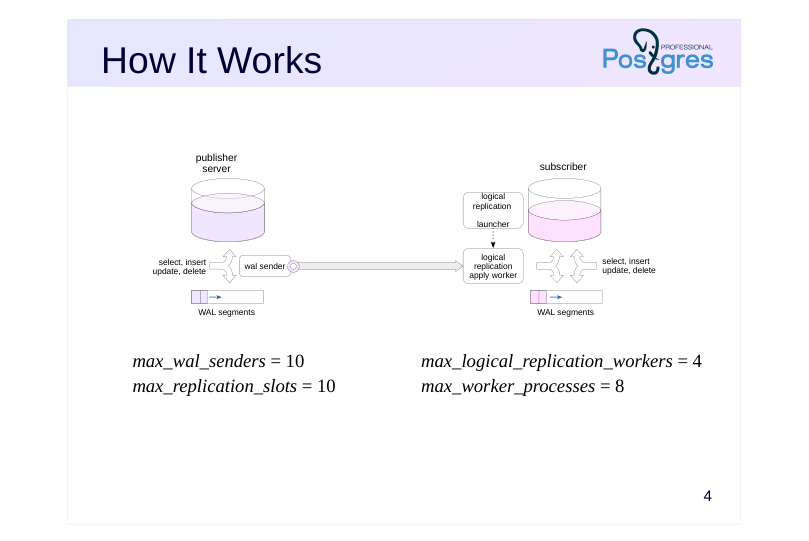 {#source-figure-004 caption=“Source slide page 4: How It Works”}
- max_wal_senders = 10
- max_logical_replication_workers = 4
- max_replication_slots = 10
- max_worker_processes = 8
Speaker notes
Logical replication uses the publish-subscribe pattern.
When the instance starts, the logical replication launcher background process starts with it, periodically checking the pg_subscription table in the system catalog for new subscriptions. As soon as a subscription appears, a background logical replication apply worker process is launched to handle it. It connects to the publishing server, which, like any replication connection, starts the wal sender process. This process reads the WAL, selects the necessary records and converts them to platform-independent protocol messages. A logical replication slot is always used for that.
On the subscription side, the worker receives messages and applies changes. Meanwhile, the subscriber server can receive normal read and write queries.
Note that the publishing server can run multiple wal sender processes, one for each subscription. Both max_wal_senders and max_replication_slots must be no less than the number of subscriptions.
On the subscriber server, you need to configure max_logical_replication_workers (for processes that receive subscription changes) and max_worker_processes in general (more by one at least, since there’s also the logical replication launcher process, though this pool is actually used for other purposes as well).
https://postgrespro.com/docs/postgresql/16/logical-replication-architecture
Page 5: Publication
Database object
- sends data changes row by row in the order they are committed in
- only for regular and partitioned tables
- wal_level = logical
- Published operations
- insert, update, delete, truncate
- Privileges
- creating a new publication – CREATE privilege for the database
- add table – owner or superuser
- add all tables for a schema or a database – superuser
Speaker notes
A publication is created on the server to collect changes from one or more tables (regular or partitioned) in the same database. To create a publication, you need the CREATE privilege on the database. To replicate from multiple databases, multiple publications must be created.
To include a table in a publication, you must be either a superuser or the owner of the table. To publish all tables belonging to a schema or a database, you must be a superuser.
For logical replication to work, the publishing server’s WAL must contain additional information (wal_level = logical).
Publishing includes row changes that occur in tables as a result of DML commands. The MERGE command executed on the publishing server is applied as INSERT, UPDATE, or DELETE.
By default, changes are not transferred immediately, but only when the transaction is committed.
https://postgrespro.com/docs/postgresql/16/logical-replication-publication
https://postgrespro.com/docs/postgresql/16/sql-createpublication
Page 6: Subscription
Database object
- receives messages from one or more publications
- binary subscription possible
- applies changes row by row
- Tables and columns are matched by full names
- Privileges
- create subscription – pg_create_subscription role or superuser
Speaker notes
By defining subscriptions to publications in a database, you can receive and apply changes. Basically, a subscription is a connection to the publishing server that serves for data replication.
Members of the pg_create_subscription role or superusers can create subscriptions.
Changes are always applied row by row. Although each individual change doesn’t require query parsing and planning, bulk changes will still apply more slowly because of this row-by-row approach.
Tables are identified by their full names (including the schema), and columns are identified by their names as well. This allows the subscription to use a different data schema (for example, having additional columns in the table).
When creating a subscription, you can specify the parameter binary to transfer the data in binary format. The binary format can speed up processing if binary receive and send functions are defined for the required data types. However, when using binary format, it’s important that the machine representation of data is compatible across different platforms.
https://postgrespro.com/docs/postgresql/16/logical-replication-subscription
Page 7: Publications and Subscriptions
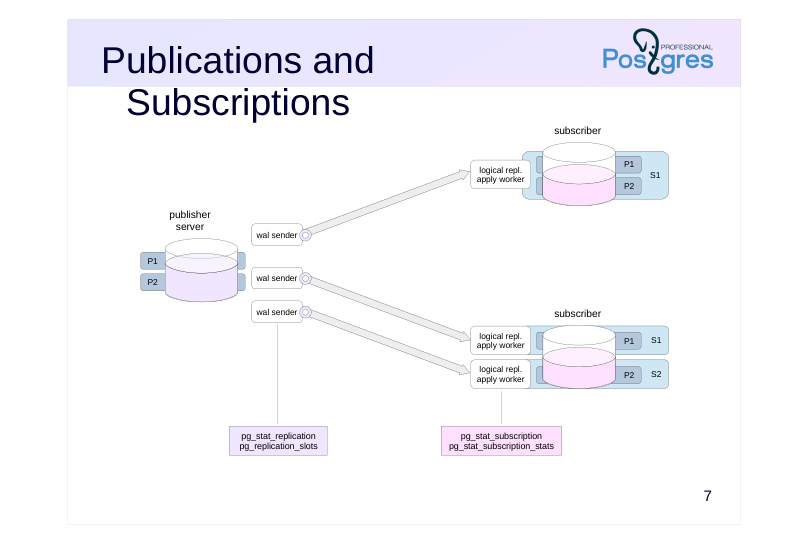 {#source-figure-007 caption=“Source slide page 7: Publications and Subscriptions”}
Speaker notes
You can distribute objects to publications in any way on the publishing server. You can include all tables in one publication, you can split them between multiple publications – this does not affect performance.
However, each subscription creates a separate connection to the publishing server, creating unnecessary load. Several wal sender processes will run on the publishing server, each of which will independently read the WAL and perform logical decoding (more on that below) in its local memory. Therefore, if you need to subscribe to several publications, it is better to do it in one common subscription.
Remember that publications and subscriptions are database objects, so each database will require a separate connection.
Logical replication monitoring on the publishing server is identical to physical replication monitoring. Your most important tools here are the views pg_stat_replication and pg_replication_slots.
Subscription status information is stored in pg_subscription.
https://postgrespro.com/docs/postgresql/16/catalog-pg-subscription#CATAL OG-PG-SUBSCRIPTION
Information about applying changes is found in the pg_stat_subscription view.
https://postgrespro.com/docs/postgresql/16/monitoring-stats#MONITORING-PG-STAT-SUBSCRIPTION
Replication errors go to pg_stat_subscription_stats.
https://postgrespro.ru/docs/postgresql/16/monitoring-stats#MONITORING-P G-STAT-SUBSCRIPTION-STATS
Page 8: Logical Replication
We’re going to set up logical replication for the test table from the alpha server to the beta server. Let’s start by creating a database.
Logical replication requires another WAL level.
We’ll make the second database cluster a copy of the first one, so let’s back it up to the second server’s data directory.
Now let’s create a table on the first server and populate it with data.
The test table is not present on the second server. Since DDL commands are not replicated, we need to create this table manually. Its structure may be different, as long as all the published tables are present.
Create a publication on the first server.
Notice that the publication was created even though it doesn’t contain any tables yet. Typically, you create a publication by specifying: a list of tables, and in this case you can specify which columns to publish all tables in specified schemas (requires superuser privileges)
Page 9: Page 9
all tables in the database (requires superuser privileges) Let’s add the table to the publication.
On the second server, subscribe to the publication:
Check the subscription we created.
The values for id, descr and cluster_name columns are retrieved from the publication. Starting with PostgreSQL 15, you can publish only specific columns instead of all of them. Let’s modify the publication:
Check:
Notice that the cname column now has the default value (beta) on the subscriber.
Page 10: Page 10
The following view shows the state of the subscription:
received_lsn – the LSN up to which changes have been received latest_end_lsn – the LSN confirmed to the WAL sender process The logical replication worker process starts (you can see its ID in pg_stat_subscription.pid):
Page 11: Limitations
Not replicated
- sequences materialized views temporary and unlogged tables foreign tables large objects DDL TRUNCATE restriction
- tables sharing foreign keys must belong to the same subscription
Speaker notes
Only changes to the content of regular and partitioned tables caused by DML commands are replicated.
The contents of the rest of the objects, broadly defined as “relations”, are not replicated. This includes sequences, materialized views, temporary and unlogged tables, foreign tables. Large objects are not replicated.
DDL commands are also not replicated, so you must first create the necessary tables on the subscription side.
TRUNCATE replicates successfully only if all subscriber tables whose foreign keys reference the tables being truncated are included in the same subscription.
https://postgrespro.com/docs/postgresql/16/logical-replication-restrictions
Page 12: Initial Synchronization
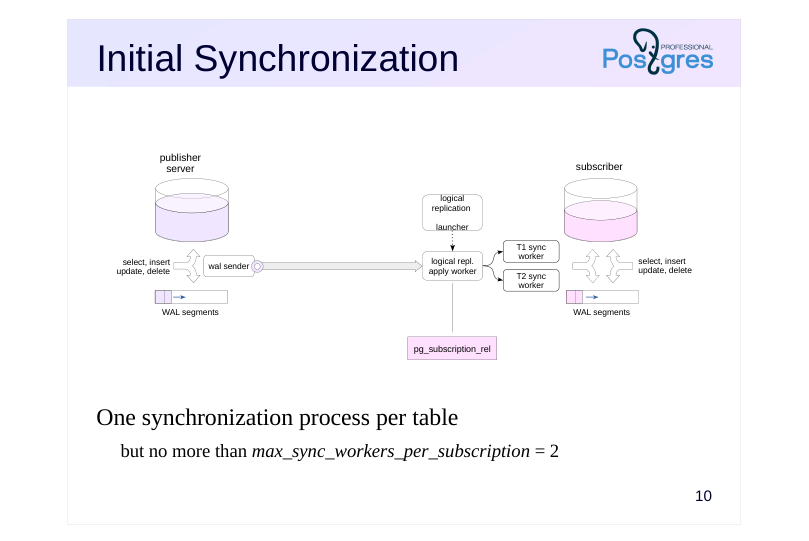 {#source-figure-012 caption=“Source slide page 12: Initial Synchronization”}
One synchronization process per table
- but no more than max_sync_workers_per_subscription = 2
Speaker notes
By default, if you do not specify a value for copy_data = false, initial table content synchronization occurs when a subscription is created. This happens seamlessly through the use of the snapshot export mechanism.
The initial synchronization should be completed as soon as possible so as not to delay the vacuuming horizon longer than necessary. Therefore, synchronization is usually done in parallel: the apply worker process looks at the list of replicated tables and starts additional workers that do the actual synchronization. One table is always synchronized by one process.
The maximum number of concurrent synchronization processes is limited by max_sync_workers_per_subscription (default is two).
The replication status for each table in the subscription is shown in the pg_subscription_rel view.
https://postgrespro.com/docs/postgresql/16/catalog-pg-subscription-rel#CAT ALOG-PG-SUBSCRIPTION-REL
If the subscription is flagged as binary, then not only replication will be performed in binary format, but also initial synchronization.
Page 13: Initial Synchronization
By default, the subscriber collects table contents first, and replication begins after that. This is seamless, and data retention is guaranteed. Create three tables with a huge number of rows, and a publication:
On the subscriber, create empty tables with identical structure:
Subscribe to the publication, then peek into the system table that tracks the replication state of each table, and into the process list.
Here, it says that the table test is being replicated (r), and that the three new tables are still synchronizing.
In the process list, we see a new process apply worker serving the new subscription, as well as two synchronization processes. There are three tables, but the number of concurrent processes is limited by the parameter:
Page 14: Page 14
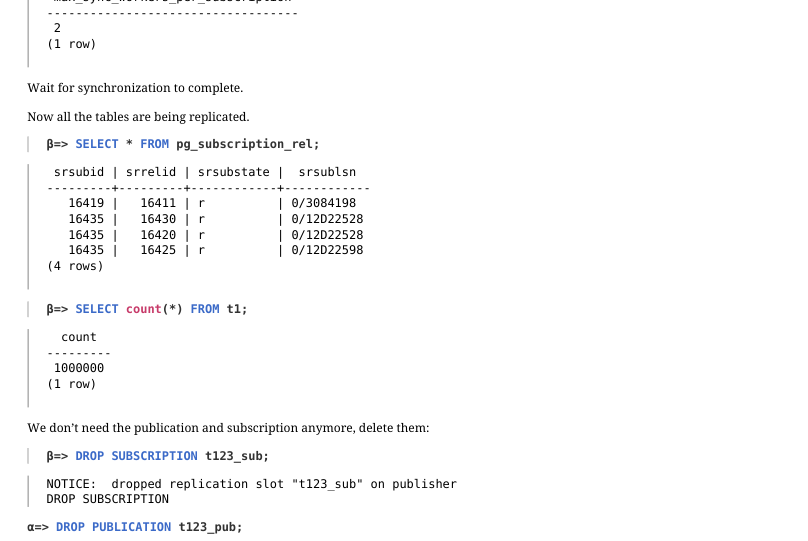 {#source-figure-014 caption=“Source slide page 14: Page 14”}
Wait for synchronization to complete. Now all the tables are being replicated.
We don’t need the publication and subscription anymore, delete them:
Page 15: Row Identification
There must be a suitable row for change and delete operations
- Logical row ID
- DEFAULT
- primary key columns (default)
- FULL
- all columns
- NOTHING
- no identification
- (default for the system catalog)
Speaker notes
New rows are inserted unambiguously on the subscription side. Changes and deletions are more complicated. You need to determine which row on the subscriber to apply the operation to. Therefore, a logical row ID is defined for each table. By default, rows are identified by primary key columns, but the identifier can be changed with ALTER TABLE … REPLICA IDENTITY.
Rows can be identified by another unique index, in which all columns have a NOT NULL constraint.
Another option is identification by all columns. In PostgreSQL 16 and higher, you can use full B-tree index lookup, where the first field is a column from the publication. PostgreSQL 17 and up can also use hash indexes. If there is no index available, a full scan is performed, which is extremely ineffective for large tables.
You can also completely disable replication support for certain tables (this is how system catalog tables are set up by default).
When changing or deleting, the column values of the tuple to be deleted do not get into the replica WAL – this is one of the reasons why the logical WAL level is required on the publishing server. At logical, it stores the old values of the columns included in the logical identifier. This is why with identification by all columns, the WAL size can be significantly larger compared to the replica level.
https://postgrespro.com/docs/postgresql/16/sql-altertable#SQL-ALTERTABL E-REPLICA-IDENTITY
Page 16: Row Filtering
Filter at publication
- Filtering possible
- insert
- for any published columns
- delete
- for logical ID columns
- update
- for logical ID columns
- this may transform into insert or delete
- truncate
- filter ignored
- Plain expressions only
Speaker notes
By default, the publishing server sends out all published table rows.
Since PostgreSQL 15, you can specify a filter expression. Rows that evaluate as false or NULL will not be published.
Filtering does not affect the truncate operation. For insert operations, any published columns can be included in the filter expression, and for update and delete, only the columns included in the logical row ID.
For update, the filter expression is evaluated for both the old and the new row version. If the filter expression is false or NULL for both, the row is not replicated. If the old row doesn’t match the filter but the new one does, the new row is inserted. If the opposite is true — the old one matches but the new one does not — the row is deleted. If both match, update goes through.
You can only filter using plain expressions: no user-defined functions, operators, types and collations, no referencing system columns, no calling built-in functions with volatile and stable variability.
https://postgrespro.com/docs/postgresql/16/logical-replication-row-filter.html
Page 17: Row Identification and Filtering
By default, the logical row ID is determined by the primary key columns:
d – default (primary key, if present) i – index f – all columns n – none Let’s say we need to replicate only rows where the cluster_name field has the value alpha. The cluster_name column is used in the filter expression, but it’s not published yet. Publish all the columns, without listing any specific ones.
Observe how change replication works.
The row with the value gamma was not replicated. Let’s try to modify the row.
For upgrade and delete, the filter expression accepts only columns contained in the logical row ID, but for insert, all colums are good. Let’s change the filter condition.
Page 18: Page 18
Now modify the row:
The row change has been replicated. The new filter condition works:
The row with id = 0 has not been published, so it wasn’t replicated.
Page 19: Logical Decoding
 {#source-figure-019 caption=“Source slide page 19: Logical Decoding”}
Speaker notes
During streaming physical replication, the wal sender process reads WAL records and passes them to the replica unchanged.
During logical replication, records are converted. The logical decoding module selects records that correspond to the published operations and tables, taking into account the columns and filter conditions. Selected records are converted to logical operations information, which is sent to the reorder buffer and stored there in accordance with the transaction IDs.
At the logical level, WAL additionally records the information required for logical decoding, in particular:
● for update – new values of all columns, not just changed ones,
● for update and delete – the old values of the columns in the logical ID,
● for commit – database OID.
The reorder buffer is in the local memory of the wal sender process. If the amount of data in it approaches the value of the logical_decoding_work_mem parameter, the largest transaction is sent to the replication slot (a file in PGDATA/pg_replslots/name).
When a transaction is committed, all its operations are sent to the output module, which converts them into replication protocol messages.
https://postgrespro.com/docs/postgresql/16/logicaldecoding
https://postgrespro.com/docs/postgresql/16/runtime-config-resource#GUC-L OGICAL-DECODING-WORK-MEM
Page 20: Slots and Logical Decoding
Let’s clear the table and check out logical decoding.
First, manually create a logical replication slot. The pgoutput plugin is used to send changes to the subscriber, but for observation purposes, the test_decoding plugin is more convenient:
Now there are two slots on the alpha server:
In a separate session, start a transaction and insert a row into the table:
The output plugin can request changes from the slot:
The transaction isn’t complete yet, so the output plugin hasn’t received anything. Let’s make another change and commit the transaction.
Page 21: Page 21
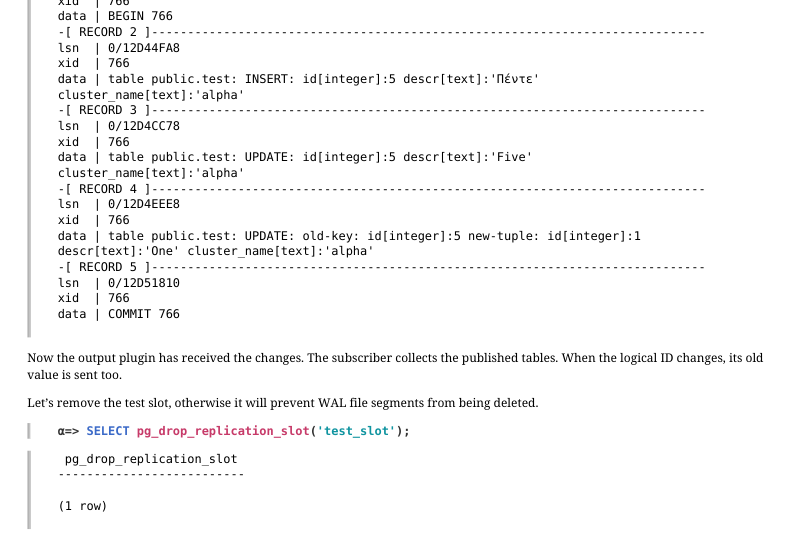 {#source-figure-021 caption=“Source slide page 21: Page 21”}
Now the output plugin has received the changes. The subscriber collects the published tables. When the logical ID changes, its old value is sent too. Let’s remove the test slot, otherwise it will prevent WAL file segments from being deleted.
Page 22: Large Transactions
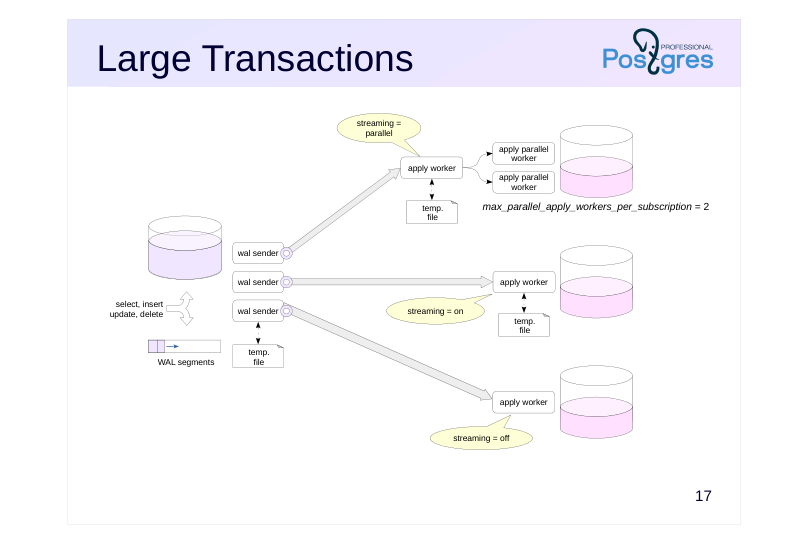 {#source-figure-022 caption=“Source slide page 22: Large Transactions”}
Speaker notes
By default (subscription streaming = off), changes are accumulated in the reorder buffer and sent to the subscriber after the transaction is committed.
If a transaction changes a lot of data, problems can occur:
● wal sender’s reorder buffer memory costs,
● writing files when the reorder buffer exceeds (logical_decoding_work_mem) memory,
● replica lag. If you set streaming = on, the publishing server will pass data changes to the subscriber while the transaction is still running. When the total amount of changes exceeds the value of the logical_decoding_work_mem parameter, the accumulated changes of the largest transaction in terms of volume are not dumped into to a file, but are immediately sent to the output module.
The subscriber saves these changes in its temporary files and applies them when committing the transaction.
Starting with PostgreSQL 16, if streaming = parallel and there are workers available, changes are not saved at the subscriber, but are immediately applied by the free workers. The number of such processes per subscription is limited by the max_parallel_apply_workers_per_subscription parameter.
https://postgrespro.com/docs/postgresql/16/sql-createsubscription#SQL-CR EATESUBSCRIPTION-WITH-STREAMING
Page 23: Conflicts
Lead to errors
- constraint violations,
- insufficient rights to target table or row level security
- replication error,
- subscription with disable_on_error goes down
- you can manually correct subscription-side data
- or skip the conflicting transaction
- Ignored
- row being updated or deleted does not exist at the subscriber
- replication continues, but consistency may be compromised
Speaker notes
Because the tables on the publishing server and at the subscriber can change independently of each other, a subscription operation may conflict with existing data.
Often a conflict is a situation where an operation cannot be performed, usually due to a violation of an integrity constraint, or the lack of permissions on the target table, or row level security restrictions.
In this case, the operation fails. The subscriber periodically repeats attempts, but they will fail until the conflict is resolved. Conflicts can only be resolved manually, automatic resolution has not yet been implemented. There are two options: fix the data at the subscriber or skip the conflicting transaction. In the second case, you need to disable replication, call the pg_replication_origin_advance function or execute the ALTER SUBSCRIPTION … SKIP…, and enable replication again. You can also pre-configure automatic disabling of replication by specifying the disable_on_error subscription option.
If the row to be modified or deleted does not exist at the subscriber, the operation will fail. In this case, no error occurs, but such ignored conflicts indicate that the data consistency between the publishing server and the subscriber is compromised.
https://postgrespro.com/docs/postgresql/16/logical-replication-conflicts
Page 24: Conflicts
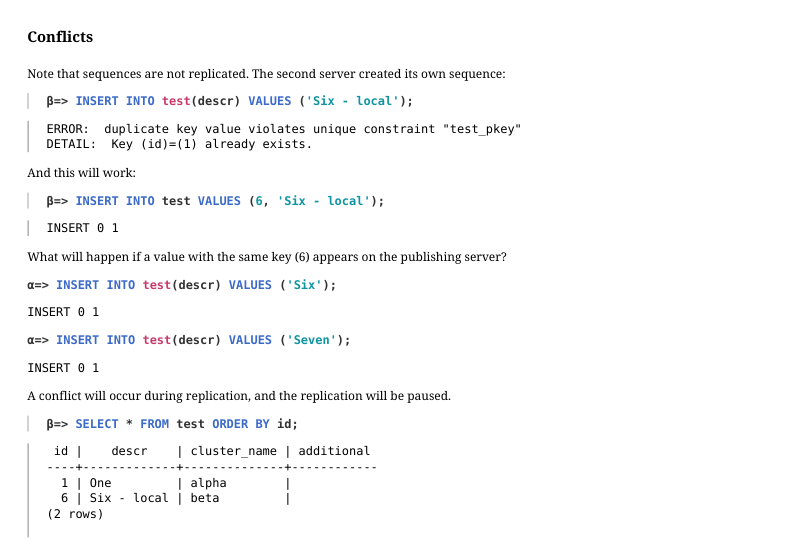 {#source-figure-024 caption=“Source slide page 24: Conflicts”}
Note Note that sequences are not replicated. The second server created its own sequence:
And this will work:
What will happen if a value with the same key (6) appears on the publishing server?
A conflict will occur during replication, and the replication will be paused.
Technically, the logical replication apply worker process will continuously restart and check if the conflict is resolved. This resets the pg_stat_subscription information:
The log will contain records about constraint violations:
And the error counter in pg_stat_subscription_stats will increment with each restart:
(PostgreSQL 18 has introduced separate counters for each conflict type.) To resolve this conflict, delete the conflicting row from the table and wait a moment:
Page 25: Page 25
Check:
The data has appeared, replication has been restored.
Skipping a Conflicting Transaction
Another option is to skip the conflicting transaction entirely. The conflicting transaction:
The subscription has to be stoped before skipping the transaction:
Instead of stopping manually, you can set the disable_on_error subscription parameter. Subscription stopped:
Check the log:
The message contains the LSN of the conflicting transaction commit record. Skip the transaction:
A superuser could use the function pg_replication_origin_advance instead. Let’s enable replication.
Page 26: Page 26
Replication is working, but since we skipped the transaction, the data is now inconsistent:
Clear the table:
Triggers on the Subscriber
Triggers can execute on the subscriber, but by default a trigger will fire on local changes only and never on replication. This is useful when both servers have identical tables with the same set of triggers – in that case, the trigger has already fired on the publishing server and doesn’t need to run again on the subscriber. Let’s try it.
The trigger didn’t fire. You can alter the table so the trigger fires only during replication:
Page 27: Page 27
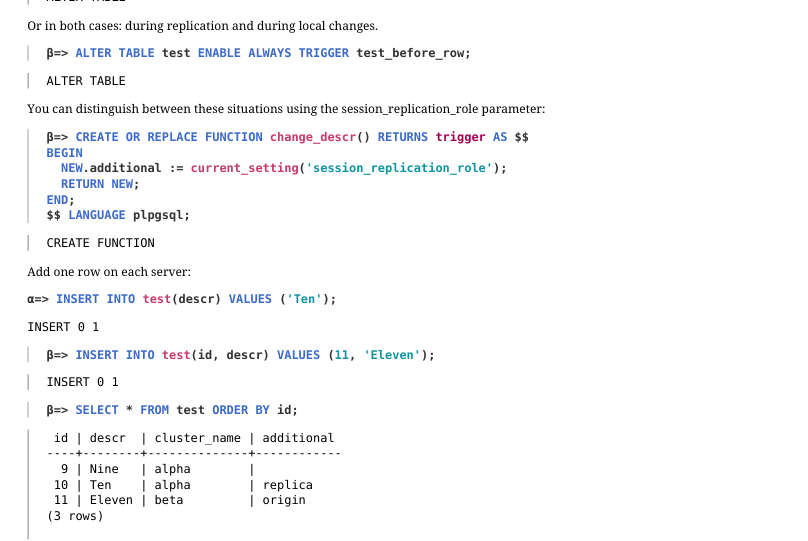 {#source-figure-027 caption=“Source slide page 27: Page 27”}
Or in both cases: during replication and during local changes.
You can distinguish between these situations using the session_replication_role parameter:
Add one row on each server:
The trigger fired in both cases.
Page 28: Replication origin
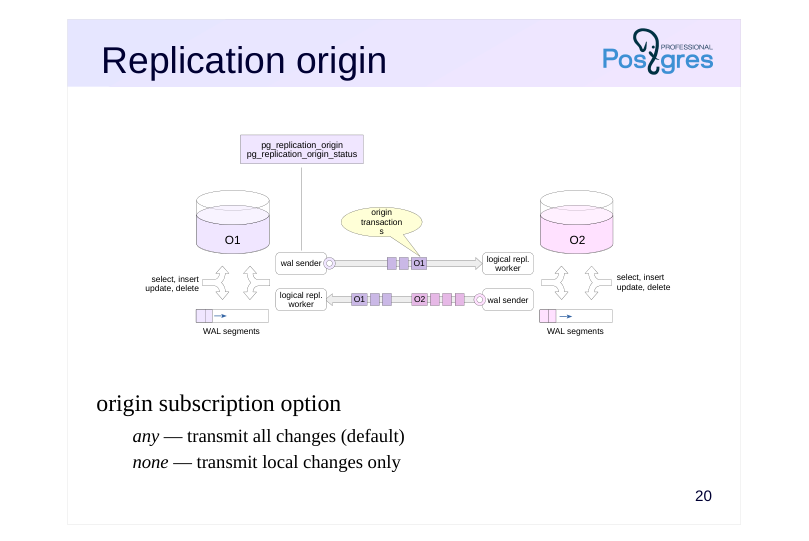 {#source-figure-028 caption=“Source slide page 28: Replication origin”}
origin subscription option
- any — transmit all changes (default)
- none — transmit local changes only
Speaker notes
If you define both a publication and a subscription on the same server and transfer all changes, the replicated changes will be replicated, and things will snowball.
Starting with PostgreSQL 16, when the publishing server starts a transaction that was initially received from another node, it sends a message about the origin of this transaction first. This is also important for cascading replication.
https://postgrespro.com/docs/postgresql/16/protocol-logical-replication#PRO TOCOL-LOGICAL-MESSAGES-FLOW
By default, the subscription starts with the origin = any parameter and the publication passes all transactions to it: both local and received from another node.
However, in topologies where loops can occur, such as with bidirectional replication, you should set origin = none. Then the publication will transfer only local changes.
https://postgrespro.com/docs/postgresql/16/sql-createsubscription#SQL-CR EATESUBSCRIPTION-WITH-STREAMING
Information about the origins is stored in the pg_replication_origin view.
https://postgrespro.com/docs/postgresql/16/catalog-pg-replication-origin#CA TALOG-PG-REPLICATION-ORIGIN
The current replay position for a specific replication origin is displayed in the pg_replication_origin_status view.
https://postgrespro.com/docs/postgresql/16/view-pg-replication-origin-status #VIEW-PG-REPLICATION-ORIGIN-STATUS
Page 29: Replication origin
Delete rows from the table:
Publish several columns from table test on server beta.
Now the publications exist on both servers. If you create a subscription of alpha, it will receive all changes from beta, including those sent by alpha’s publication. But alpha cannot apply these changes because of integrity constraints, so replication will stop. For beta to receive just the local changes from alpha, set the origin subscription parameter:
For the changes from replication, the origin will be non-empty, and the publication will not send them to the subscriber. Now let’s make alpha a subscriber to beta. Disable initial synchronization, as the table is empty. Use the subscription parameter origin to receive only the changes made on beta:
Now there are subscriptions on both servers.
Insert a row on alpha.
Check beta.
Insert a row on beta.
Check alpha.
Page 30: Page 30
Verify the changes.
If replication is no longer needed, the subscription must be dropped – otherwise, the replication slots will remain open on the publishing server.
Page 31: Takeaways
Logical replication uses the publish-subscribe pattern.
- Row-level changes are replicated
- Rows are matched using logical identifiers
- Data mismatch on different servers may cause conflicts
- Origin information forwarding helps track the progress of cascade replication and eliminate loops
Page 32: Practice
- Create two databases on a single server.
- In the first database, create a table with a primary key and insert a few rows into it. Set up logical replication for the table from the first database to the second, verify that replication is working, and then remove the subscription. 2. Configure logical replication of the table from alpha to beta. Execute a transaction that modifies a large amount of data, and before committing it, verify that the data has been written to disk. Repeat the same steps, but this time in streaming mode. Did the data get to disk?
Speaker notes
- Use the pg_dump tool with the –schema-only option.
If you try the regular way, the subscription creation command will hang because it needs to wait for all active transactions on the publishing server to complete, including itself. In this case, you must create a logical replication slot in advance, as described in the documentation: https://postgrespro.com/docs/postgresql/16/sql-createsubscription
- To prevent the publication from getting into the logical copy, use the –no-publications option.
Check the value of the logical_decoding_work_mem configuration parameter, which sets the maximum size of the reorder buffer. If this value is exceeded, data will be pushed to disk.
Page 33: 1. Logical Replication on a Single Server
Set the WAL level to logical first.
Databases:
Table in the first database:
Using logical backup to transfer a schema is especially convenient when there are many tables.
Transferring data with pg_dump makes no sense here, since the tables may change during the transfer.
Publication:
Page 34: Page 34
Since replication will be configured on the same server, a logical replication slot must be created first.
Then create the subscription:
Verify that replication is working:
Drop the subscription and the slot.
2. Logical Replication from Alpha to Beta
Start server beta and copy the DDL commands for the test table. Publication creation commands are not required on the subscriber.
Page 35: Page 35
Create a subscription on beta – the slot on alpha is created automatically.
Replication is working. Truncate the test table on the publication server (alpha):
The subscriber received the changes. Start a transaction that inserts a large number of rows into the table.
The logical_decoding_work_mem parameter defines the maximum size of the reordering buffer.
When this limit is exceeded, data is spilled to disk in the PGDATA/pg_replslot/slot-name directory. How much disk space does the directory take up?
Page 36: Page 36
By default, no data is sent to the subscriber until the transaction is committed.
Commit the transaction…
…and wait a moment: The subscriber received all the rows:
And the data spilled to disk has been removed:
Check pg_stat_replication_slots:
spill_txns – the number of transactions spilled to disk spill_count – the number of times data was spilled to disk due to exceeding logical_decoding_work_mem spill_bytes – the number of bytes spilled to disk Repeat the experiment in streaming mode. Reset the statistics and truncate the table again.
Now enable streaming mode for the subscription:
Run the large transaction again.
Page 37: Page 37
Now there’s much less data in the slot’s directory – some of it has already been sent to the subscriber:
Commit the transaction…
…and wait a moment:
Check pg_stat_replication_slots:
This time, when the allocated memory was exhausted, data was not spilled to disk but sent directly to the subscriber.
Cleanup
Drop the subscription, slot, and databases, and reset configuration.
Page 38: Practice+
1. Create and publish a table with a bytea column on alpha. Insert several million rows into the table. Compare the initial subscription synchronization time in normal and binary modes using the beta server. 2. Enable concurrent synchronization for the subscription. By adding rows to the table, examine the subscription workers.
Speaker notes
- You can estimate the initial synchronization time by monitoring the pg_subscription_rel table. You can set it up on the client side using the \watch metacommand or on the server side using a function written in, for example, PL/pgSQL.
https://postgrespro.com/docs/postgresql/16/catalog-pg-subscription-rel#CAT ALOG-PG-SUBSCRIPTION-REL
https://postgrespro.ru/docs/postgresql/16/plpgsql
- Set an appropriate value for the streaming subscription option. Use the pg_stat_subscription view to monitor subscription processes.
Page 39: 1. Initial Data Synchronization for Logical Replication
Create a database.
Change the WAL level and restart the server.
Create a table with a large number of rows.
Start the beta server and copy the database to it: with the table structure but without any data.
Create a publication on alpha.
Page 40: Page 40
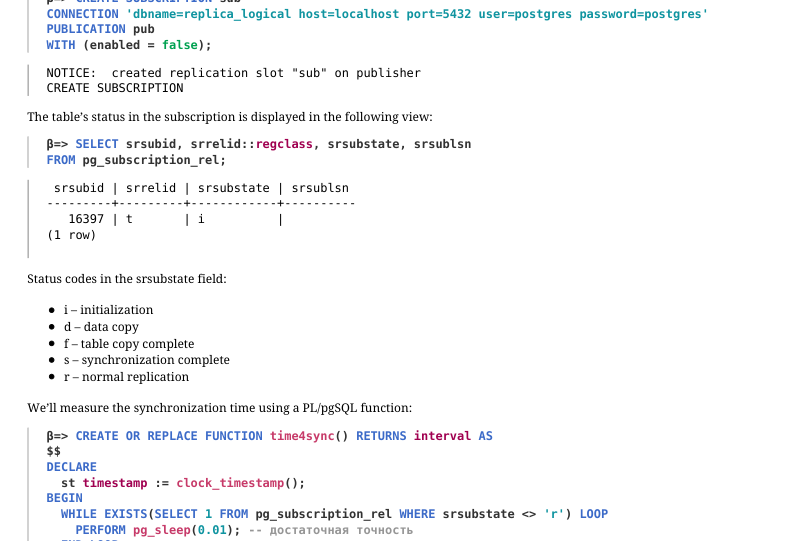 {#source-figure-040 caption=“Source slide page 40: Page 40”}
The subscription on beta will initially be inactive.
The table’s status in the subscription is displayed in the following view:
Status codes in the srsubstate field: i – initialization d – data copy f – table copy complete s – synchronization complete r – normal replication We’ll measure the synchronization time using a PL/pgSQL function:
Activate the subscription and measure the initial synchronization time.
Now let’s configure synchronization in binary mode. Drop the subscription, truncate the table, and create a new subscription with the binary parameter.
Enable the subscription and measure the synchronization time.
Page 41: Page 41
The initial synchronization is noticeably faster. The binary parameter also applies to subsequent synchronization. However, binary mode is not supported for all data types; portability across different architectures and major PostgreSQL versions must also be considered. Binary mode was introduced in PostgreSQL 14, and in versions prior to 16, initial synchronization always runs in text mode.
2. Parallel Application of Changes
Enable parallel mode for the subscription.
Processes serving the subscription:
Truncate the table, insert a large number of rows, and re-run the query against the system catalog views:
An additional process has appeared that applies changes without waiting for the transaction to complete on the publisher.
Row insertion is complete. Wait a little longer…
The subscriber has now received all the rows.
Cleanup
Delete the subscription.
Page 42: Page 42
Drop the databases.
Reset the configuration.
Restart the alpha server.
Stop the beta server.
07 Lesson 07: Replication / Use Cases
This page is extracted from the official PDF into native Markdown. Slide text, code and speaker notes are kept in reading order; the original PDF and HTML remain the layout references. HTML source: No matching course-page link was captured in the source inventory. Archive: DBA3-handouts-16-en-20260917.zip PDF pages: 33
Page 1: Replication / Use Cases
Copyright
© Postgres Professional, 2017–2025 Authors: Egor Rogov, Pavel Luzanov, Ilya Bashtanov, Alexey Beresnev Photo: Oleg Bartunov (Phu Monastery and Bhrikuti Peak, Nepal)
Use of Course Materials
Non-commercial use of course materials (presentations, demonstrations) is allowed without restrictions. Commercial use is possible only with the written permission of Postgres Professional. It is prohibited to make changes to the course materials.
Feedback
Please send your feedback, comments and suggestions to: edu@postgrespro.ru
Disclaimer
Postgres Professional assumes no responsibility for any damages and losses, including loss of income, caused by direct or indirect, intentional or accidental use of course materials. Postgres Professional company specifically disclaims any warranties on course materials. Course materials are provided “as is,” and Postgres Professional company has no obligations to provide maintenance, support, updates, enhancements, or modifications.
Page 2: Topics
- Physical Replicaion Use Cases
- Logical Replication Use Cases
Page 3: Physical Replication
Hot Standby for High Availability
- Load Balancing for OLTP Workloads
- Replica for Reporting
- Multiple Replicas and Cascading Replication
- Delayed Replication
Page 4: Hot Standby for High Availability
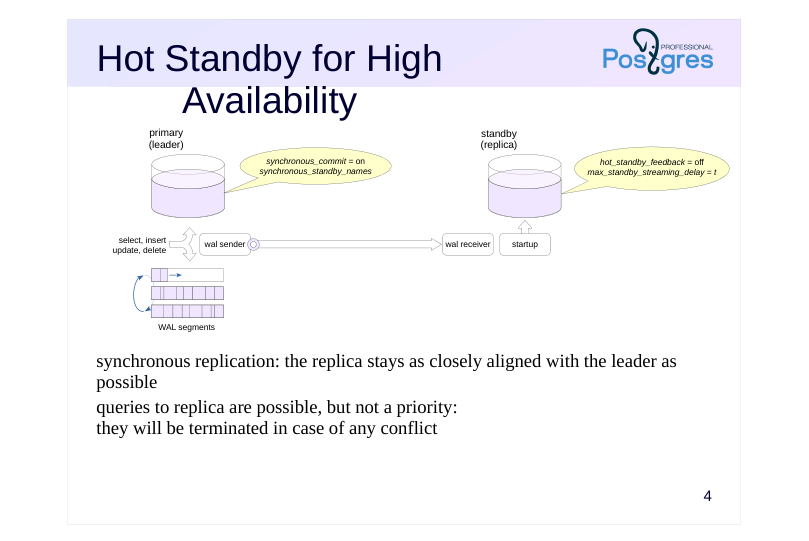 {#source-figure-004 caption=“Source slide page 4: Hot Standby for High Availability”}
synchronous replication: the replica stays as closely aligned with the leader as possible queries to replica are possible, but not a priority: they will be terminated in case of any conflict
Speaker notes
A replica can be set up to serve different purposes, and its configuration depends on the intended use case.
One possible scenario is maintaining a hot standby for high availability purposes. This means that if the main server fails, we need to switch over to the replica as quickly as possible without losing any data.
Reliability is ensured by synchronous replication with synchronous_commit = on mode (write option does not guarantee reliability, apply may cause unnecessary delays).
For synchronous replication, the synchronous_standby_names configuration parameter must specify a list of standby servers (replicas).
To minimize the replica’s lag behind the primary server, WAL records should be applied immediately. We can set the max_standby_streaming_delay parameter to something small to achieve this.
To prevent queries on the replica from negatively impacting the primary server, we can disable feedback (hot_standby_feedback = off).
With these settings, queries on the replica are allowed, but they’ll be terminated if conflicts occur. If queries to the replica aren’t planned, you can set it up in warm standby mode with hot_standby = off.
Note that replication is a fundamental mechanism for ensuring high availability, but it’s just one of many features of HA systems. This is covered in more detail in the “Cluster Technologies” module.
Page 5: OLTP Load Balancing
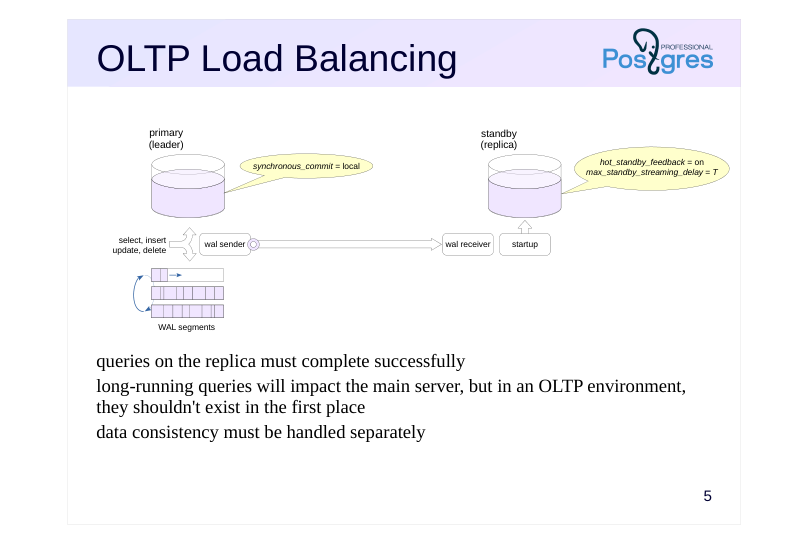 {#source-figure-005 caption=“Source slide page 5: OLTP Load Balancing”}
queries on the replica must complete successfully long-running queries will impact the main server, but in an OLTP environment, they shouldn’t exist in the first place data consistency must be handled separately
Speaker notes
A replica can also be used to balance OLTP read load.
OLTP loads have a lot of short-running queries. This keeps the replica closely synchronized with the main server to ensure queries won’t be interrupted by conflicts, while avoiding any negative impact on the main server.
We can enable feedback (hot_standby_feedback = on) and set a sufficiently large delay for applying conflicting records (max_standby_streaming_delay).
Synchronous replication likely isn’t needed in this configuration. It won’t guarantee consistency anyway: a change committed on the leader will not necessarily be noticed by the replica right away.
To ensure consistency, changes must commit on both servers simultaneously. The synchronous_commit = apply mode allows waiting for the WAL record to be applied on the replica (at the cost of significantly degraded primary server performance), but then you could see the changes on the replica before they appear on the leader. A reliable solution that’s transparent to applications can be achieved using specialized distributed transaction protocols (see the “Cluster Technologies” module).
Page 6: Replica for Reporting
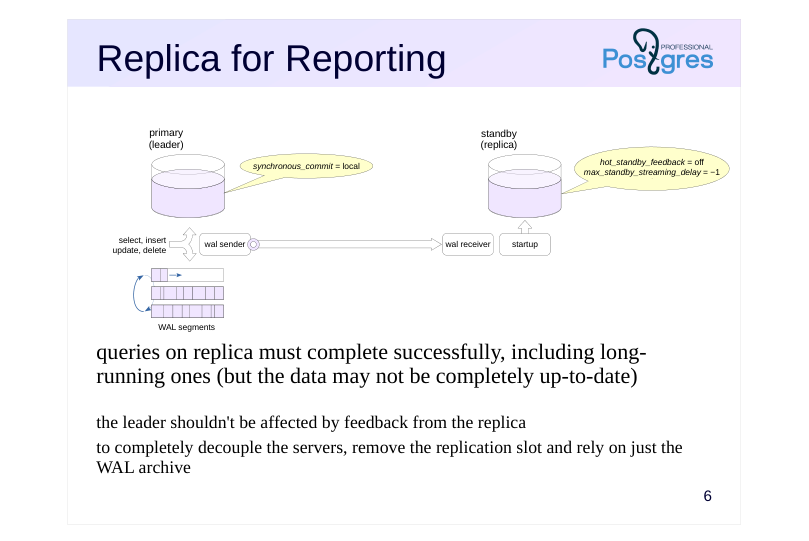 {#source-figure-006 caption=“Source slide page 6: Replica for Reporting”}
queries on replica must complete successfully, including long-running ones (but the data may not be completely up-to-date)
- the leader shouldn’t be affected by feedback from the replica to completely decouple the servers, remove the replication slot and rely on just the WAL archive
Speaker notes
Another option is to distribute different types of workload across separate servers. The main server can handle OLTP workloads, while long-running read queries (reports) can be offloaded to a replica.
Beyond distributing workload across servers, this approach also prevents long-running queries on the main server from delaying vacuum operations and causing table bloat.
Based on these considerations, the reporting replica should be kept as isolated as possible from the main server. Feedback should be disabled (hot_standby_feedback = off), but the delay for conflicting WAL records should be set very high, up to infinity (max_standby_streaming_delay = −1).
Since long-running reports don’t need up-to-the-minute data, you can forgo using a replication slot if an archive is available (just remember to adjust the max_standby_archive_delay parameter the same way as max_standby_streaming_delay). In that case, if the leader removes a WAL file before the replica can retrieve it, the replica will fetch it from the archive instead.
This replica can also be used for creating backups.
Of course, other viable parameter combinations exist. The key is to have a clear understanding of what problem needs solving and how different parameters affect the outcome.
Page 7: Multiple replicas
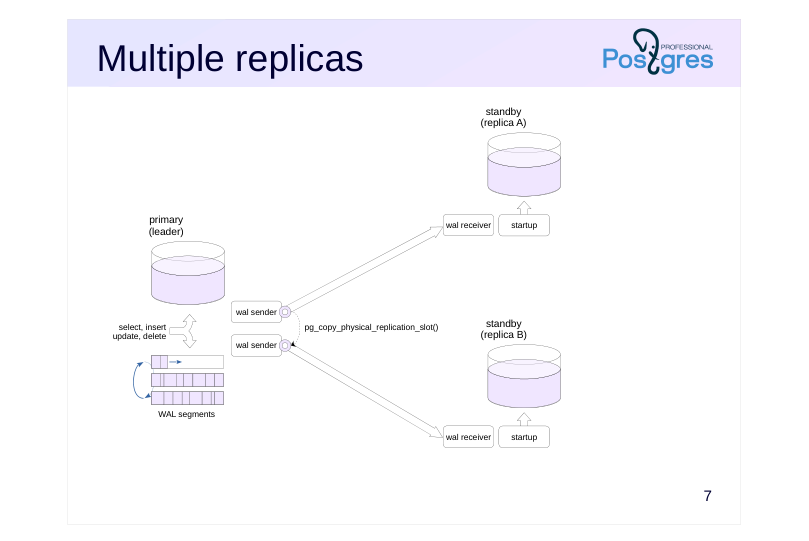 {#source-figure-007 caption=“Source slide page 7: Multiple replicas”}
Speaker notes
Multiple replicas can be connected to the main server. No special configuration is required for this, but keep in mind that each replica will have its own dedicated wal sender process and its own replication slot. During deployment, you can distribute a single base backup and clone the replication slot using the pg_copy_physical_replication_slot function.
https://postgrespro.com/docs/postgresql/16/functions-admin#FUNCTIONS-R EPLICATION
This setup is typically used for load distribution, but the actual distribution itself must be handled by external tools (see the “Cluster Technologies” module).
Page 8: Primary Server and Two Physical Replicas
Let’s set up a configuration with two replicas. Take a standalone backup of the first server while simultaneously creating a slot.
Since the third server will start applying WAL records from the same position as the second, we can duplicate the slot:
Deploy the standalone backup to the PG_DATA directories on the second and third servers:
In the third server’s configuration, set the gamma slot:
Start both replicas:
The slots have been initialized:
Test:
Page 9: Page 9
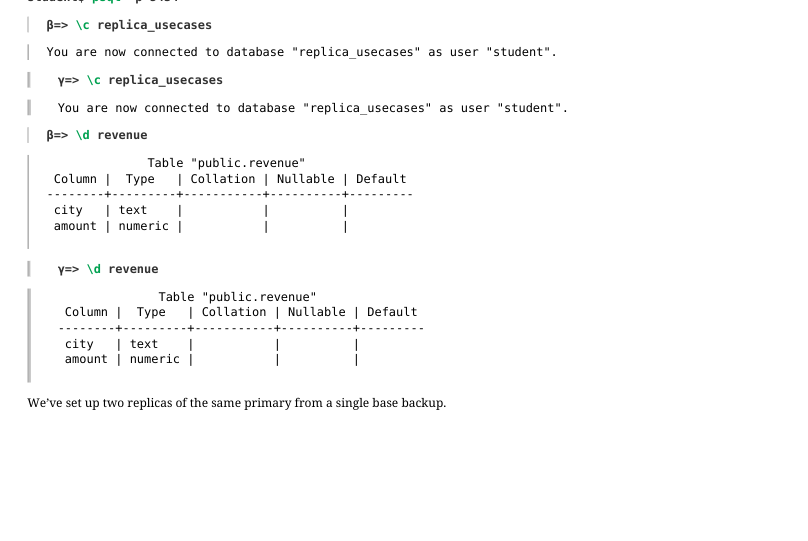 {#source-figure-009 caption=“Source slide page 9: Page 9”}
We’ve set up two replicas of the same primary from a single base backup.
Page 10: Cascading replication
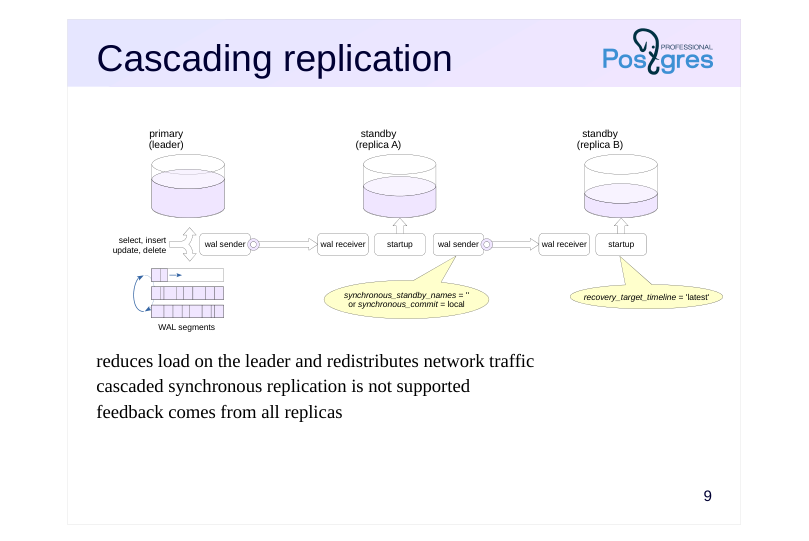 {#source-figure-010 caption=“Source slide page 10: Cascading replication”}
reduces load on the leader and redistributes network traffic cascaded synchronous replication is not supported feedback comes from all replicas
Speaker notes
Multiple replicas connected to a single primary server will generate additional load on it. Network load should also be considered when transmitting multiple copies of the WAL stream.
To reduce this load, replicas can be arranged in a cascade configuration, where servers relay WAL records to each other in a chain. The further downstream from the leader, the greater potential lag may accumulate in the replicated data. With this setup, the replication process has to be monitored at multiple servers at once, making monitoring more complicated.
When a switchover to a replica occurs (to the one closest to the primary server), its timeline ID increments. recovery_target_timeline = ’latest’ will direct the recovery to this new timeline (this is the default value).
Note that cascaded synchronous replication is not supported here – the leader can only synchronize with replicas directly connected to it. Therefore, on the first replica in the cascade, you need to set synchronous_standby_names = “or synchronous_commit = ’local'.
However, the leader collects feedback from all replicas in the cascade.
Page 11: Delayed Replication
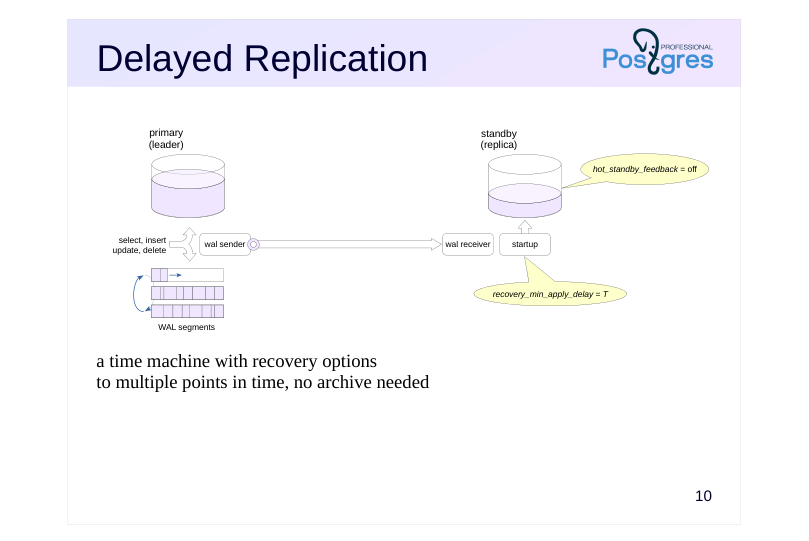 {#source-figure-011 caption=“Source slide page 11: Delayed Replication”}
a time machine with recovery options to multiple points in time, no archive needed
Speaker notes
Case: have the ability to view data at and recover to an arbitrary point in time.
Point-in-time recovery from archive already does precisely this, but it takes a while, and has to be set up in advance.
Alternatively, you can create a replica that applies WAL records with a delay (recovery_min_apply_delay). This requires clock synchronization between servers.
Only commit records are delayed, not all WAL records. Records prior to commit may be applied “ahead of schedule,” but this poses no problem thanks to multiversion concurrency control. Feedback should be disabled to prevent table bloat on the leader.
A typical scenario: something goes wrong on the leader (for instance, critical data gets deleted). The replica still has the data because the corresponding records haven’t been applied yet. Further WAL replay is paused using the pg_wal_replay_pause function while the issue is being investigated. The pg_get_wal_replay_pause_state function allows you to check the pause status.
To resume, use thepg_wal_replay_resume function to lift the pause. If you decide to roll back to a point before the deletion occurred, set the recovery target using one of the recovery_target_* parameters and restart the replica.
Page 12: Logical Replication
Consolidation and Shared Reference Data
- Major Version Upgrade
- Leader-Leader
- Logical Decoding at Physical Replica
Page 13: Consolidation
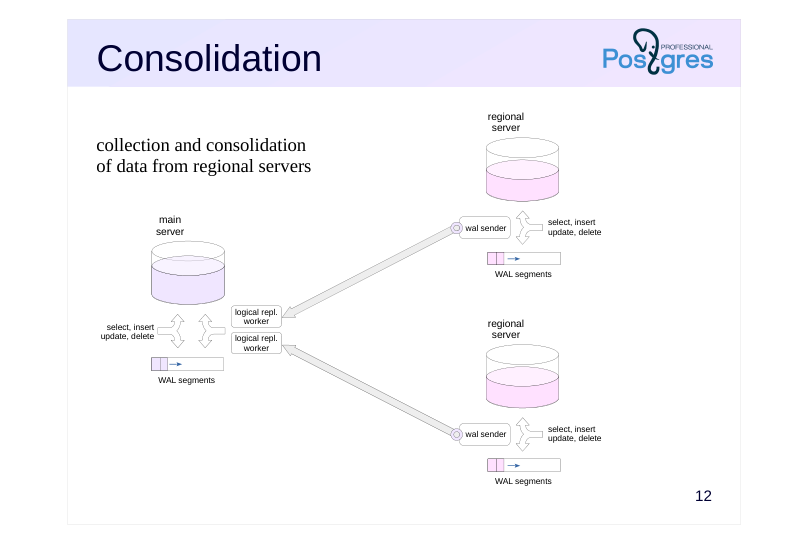 {#source-figure-013 caption=“Source slide page 13: Consolidation”}
collection and consolidation of data from regional servers
Speaker notes
Suppose there are several regional branches, each of which runs on its own PostgreSQL server. The goal is to consolidate some of the data on the central server.
First, publications for the necessary data are created on regional servers. The central server subscribes to these publications. The received data can be processed on the central server using triggers: for example, to standardize it into a uniform format.
Since logical replication relies on streaming data through replication slots, the servers need a reasonably stable connection: otherwise, during connection outages, the regional servers will have to retain WAL files.
This approach has many nuances from a business logic perspective that require thorough examination. In some cases, it may be easier to transmit data in batches every now and again.
Page 14: Shared reference data
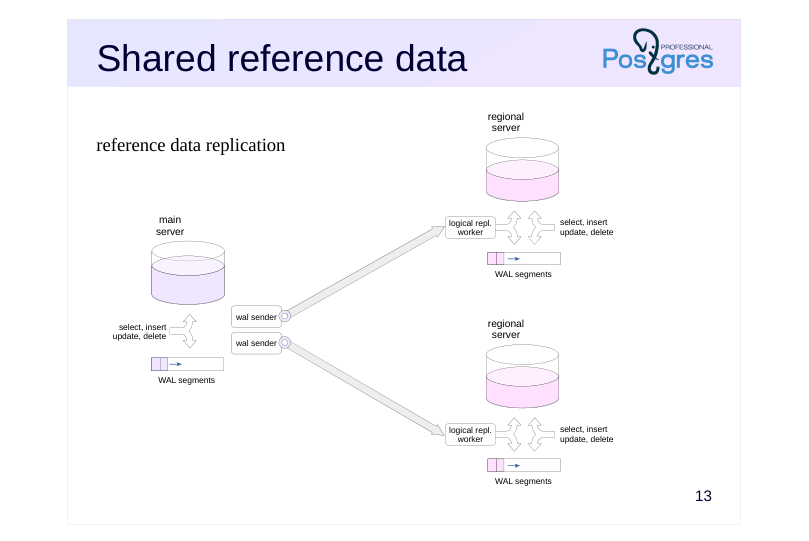 {#source-figure-014 caption=“Source slide page 14: Shared reference data”}
reference data replication
Speaker notes
Another use case: the main server maintains reference data that needs to be kept current across regional servers.
In this case, the setup is reversed: the main server publishes changes, and regional servers subscribe to receive those updates.
Page 15: Consolidation Using Logical Replication
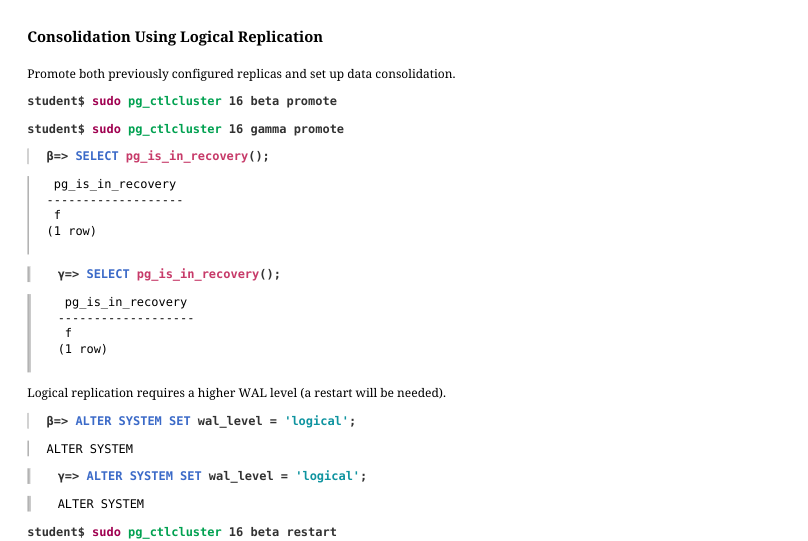 {#source-figure-015 caption=“Source slide page 15: Consolidation Using Logical Replication”}
Promote both previously configured replicas and set up data consolidation.
Logical replication requires a higher WAL level (a restart will be needed).
Remove the replication slots on the alpha server:
Publish the table on the second and third servers:
The first server subscribes to both publications:
Page 16: Page 16
Work is in full swing at the branch offices:
And the central office sees the activity of the entire company (let’s wait a few seconds for replication to catch up):
Page 17: Server Upgrades
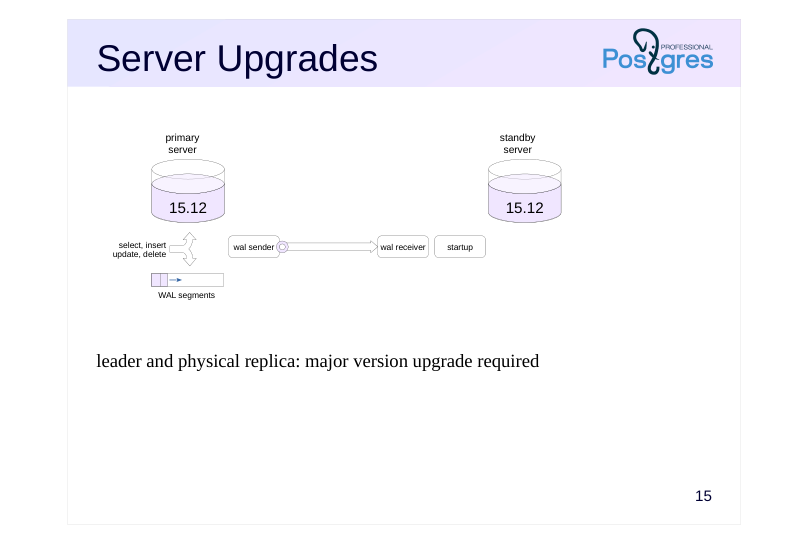 {#source-figure-017 caption=“Source slide page 17: Server Upgrades”}
leader and physical replica: major version upgrade required
Speaker notes
Logical replication can be used to upgrade the server’s major version with zero or minimal downtime.
Let’s say we have a main server and a physical streaming replica.
Page 18: Server Upgrades
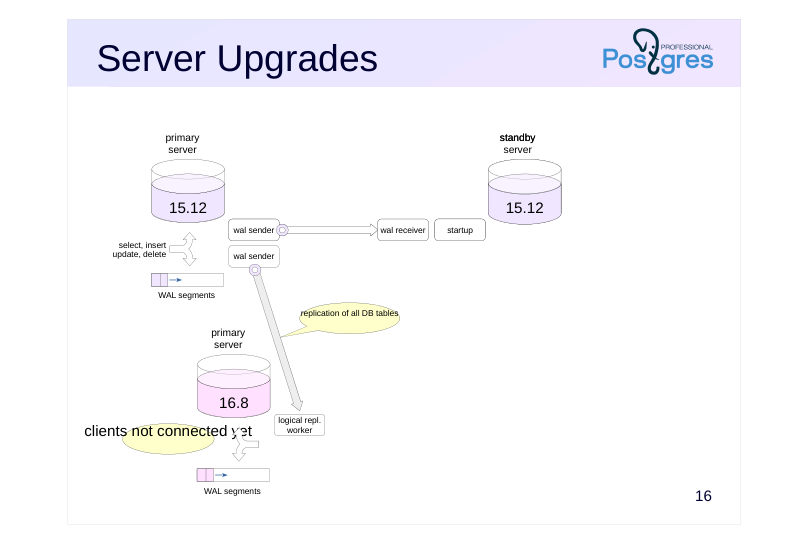 {#source-figure-018 caption=“Source slide page 18: Server Upgrades”}
clients not connected yet
Speaker notes
We set up a new server running the required PostgreSQL version and migrate the table structure from the selected database to it.
On the primary server running the previous version, we publish changes for all database tables. Since schema changes are not replicated, they must be prohibited during the upgrade process.
Page 19: Server Upgrades
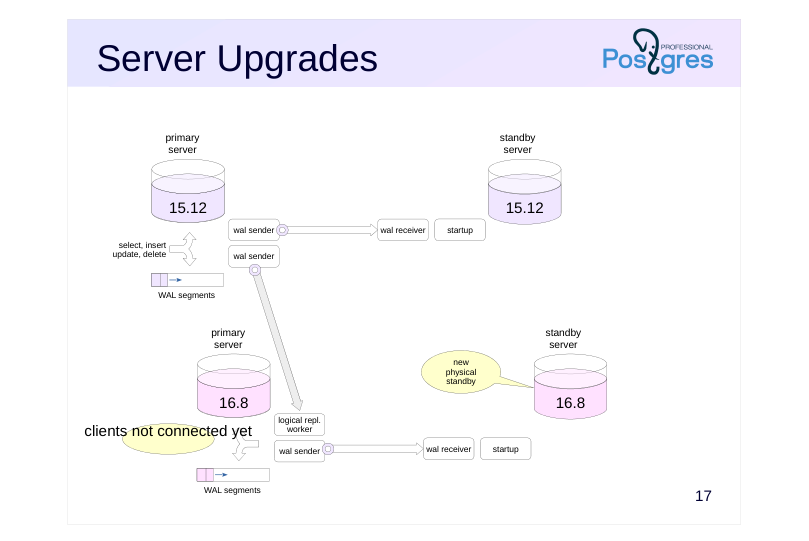 {#source-figure-019 caption=“Source slide page 19: Server Upgrades”}
clients not connected yet
Speaker notes
We create a physical replica that mirrors the replica from the previous server version.
We end up with a parallel server setup running the new PostgreSQL version. This setup mirrors the one we have for the old version.
Page 20: Server Upgrades
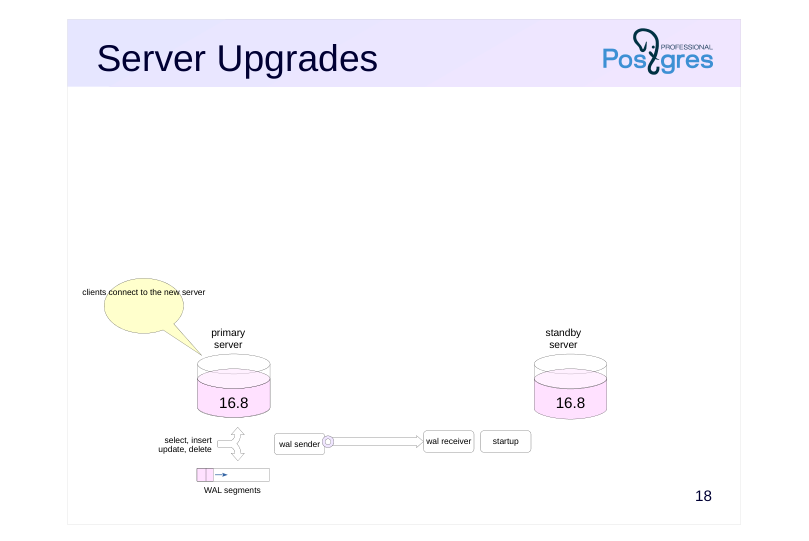 {#source-figure-020 caption=“Source slide page 20: Server Upgrades”}
clients connect to the new server
Speaker notes
After that, we switch clients over to the new servers and shut down the old ones. The service interruption will depend on how smoothly this switchover can be performed.
Keep in mind that this approach isn’t universally applicable: it comes with quite a few limitations and is significantly more complex than using the pg_upgrade utility, which can perform the upgrade in a short amount of time.
Page 21: Leader-Leader
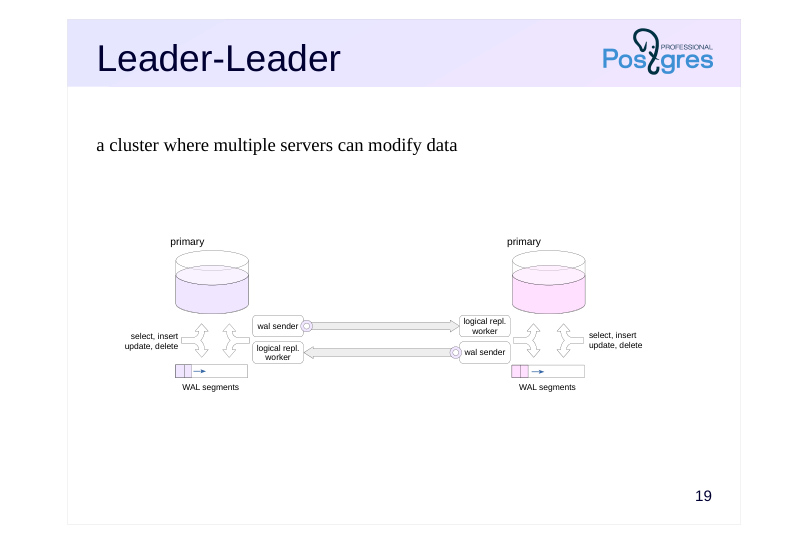 {#source-figure-021 caption=“Source slide page 21: Leader-Leader”}
a cluster where multiple servers can modify data
Speaker notes
Case: provide reliable data storage on multiple servers with the ability to write the data on any node (particularly useful for systems distributed across multiple locations).
This can be achieved through bidirectional logical replication, synchronizing changes for the same tables between servers in both directions (while limiting allowed replication origins, as was discussed in the “Logical Replication” module.
This requires that the applications working with the cluster are built with certain considerations in mind in order to avoid conflicts when modifying data in the same tables. For example, to use globally unique identifiers or to ensure that different servers work with different ranges of keys. You can also use the row filtering capabilities introduced in PostgreSQL 15.
Keep in mind that the leader-leader setup with logical replication will not support global distributed transactions by itself. With synchronous replication, reliability can be ensured, but consistency of data between servers cannot. In addition, PostgreSQL does not offer any tools for automatic failure processing, connecting or removing nodes from the cluster, etc. These tasks must be solved by external means.
Page 22: Decoding on Replica
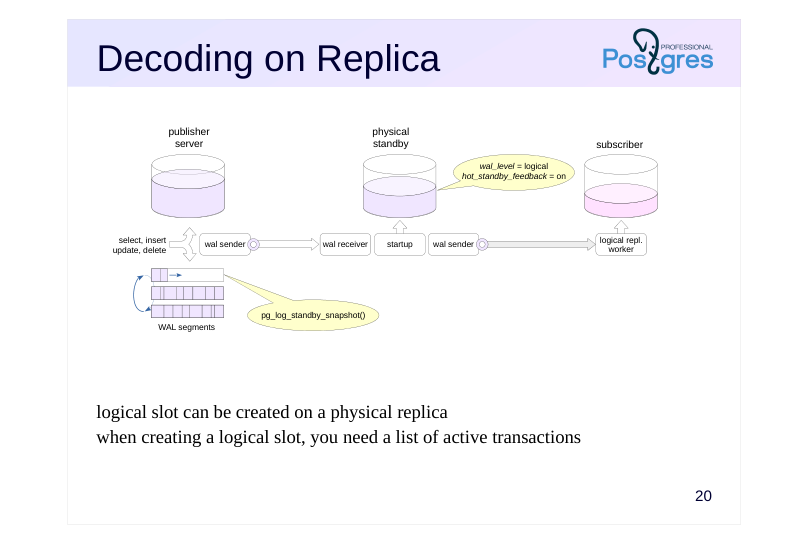 {#source-figure-022 caption=“Source slide page 22: Decoding on Replica”}
logical slot can be created on a physical replica when creating a logical slot, you need a list of active transactions
Speaker notes
Starting with PostgreSQL 16, the logical publication slot can be created on a physical replica, which removes some of the load from the leader.
On the replica, enable hot_standby_feedback so that the leader does not delete the tuples needed by the replica prematurely.
When creating a logical replication slot, you need to know the active transaction IDs. This information is collected from the bgwriter and checkpointer processes on the leader as a WAL record. If there is no activity on the leader, slot creation may be delayed. To avoid waiting, you can call the pg_log_standby_snapshot function on the leader.
https://postgrespro.com/docs/postgresql/16/logicaldecoding-explanation
https://postgrespro.com/docs/postgresql/16/functions-admin
Page 23: Takeaways
Physical replication is a fundamental mechanism for addressing a wide range of challenges
- ensuring high availability
- load balancing for uniform workloads
- separating different types of workloads
- etc.
- Logical replication extends these capabilities
Page 24: Practice
- Configure physical streaming replication between alpha and beta. 2. Configure cascade replication to gamma with a WAL record application delay of ten seconds. 3. Verify that replication is working and confirm that data appears on gamma with the configured delay. 4. Switch to beta after stopping the leader. 5. Confirm that gamma continues to operate as a replica.
Speaker notes
After completing the practice, remove the created database, the replication slot, and reset the configuration.
Page 25: 1. Configuring Replication Between Alpha and Beta
First, create a database.
Create a replication slot and take a standalone backup.
The postgresql.auto.conf and standby.signal files were created by pg_basebackup.
Start the replica:
2. Configuring Replication Between Beta and Gamma
Let’s create a standalone backup on beta to demonstrate that backups can be created from a replica. The slot is created by the utility.
The postgresql.auto.conf file was created by pg_basebackup. Now let’s add a replay delay:
Check the result:
Page 26: Page 26
Start the gamma server.
3. Testing the Setup
On alpha, create a table and verify that it appears on beta first, and then on gamma 10 seconds later.
Check gamma:
The table isn’t there yet. Wait 10 seconds…
The table has appeared.
4. Promoting beta
Current timeline on gamma:
When beta is promoted, the timeline number will increment by one, and gamma’s recovery process will follow the new timeline due to the default value:
Page 27: Page 27
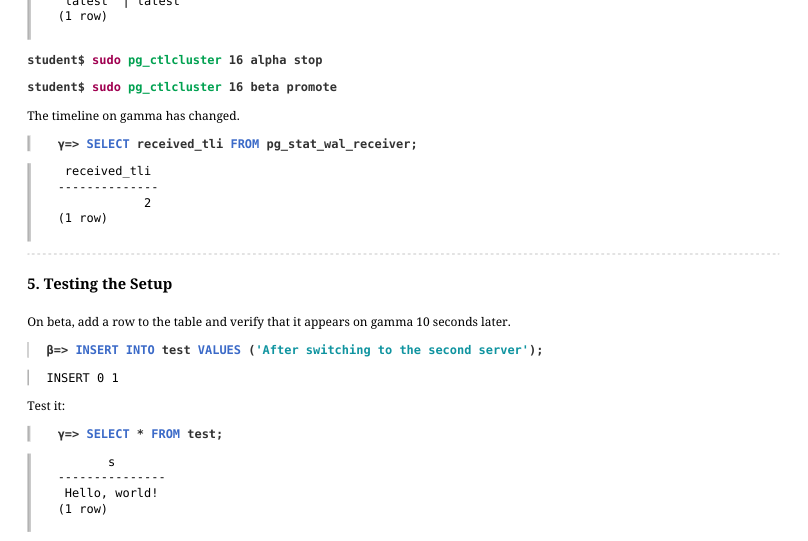 {#source-figure-027 caption=“Source slide page 27: Page 27”}
The timeline on gamma has changed.
5. Testing the Setup
On beta, add a row to the table and verify that it appears on gamma 10 seconds later.
Test it:
The second row isn’t there yet. Wait 10 seconds…
The row has appeared.
Cleanup
Delete the created databases and replication slots, reset the configuration.
Page 28: Page 28
Page 29: Practice+
1. Configure physical replication between alpha and beta with feedback. Note the WAL level required to configure logical replication, you will need it later. 2. Configure logical replication of a table from alpha to gamma by creating a replication slot on beta – a physical replica. To speed up slot creation on beta, use the pg\_log\_standby\_snapshot function.
Speaker notes
- Transfer the structure of the published table to gamma, for example, using pg_dump. Do not transfer any data.
The publication must be created on alpha, subscription on gamma, and beta set in the subscription connection string.
Reset the system: delete the new database and the replication slot and reset the configuration.
Page 30: 1. Physical Replication from Alpha to Beta
Enable feedback right away and set the WAL level required for logical replication:
Create a database and a table.
Create a standalone backup.
Verify that physical replication is working.
2. Logical Replication from Beta to Gamma
Copy the database and table structure from beta to gamma using pg_dump.
Page 31: Page 31
We copied only the table structure, not the data. Create a publication.
Subscribe to the changes in the test table published by the replica (beta).
The subscription is waiting for a slot to be created on the beta server. To speed things up, let’s ask alpha to write a record with active transaction IDs to the WAL:
Page 32: Page 32
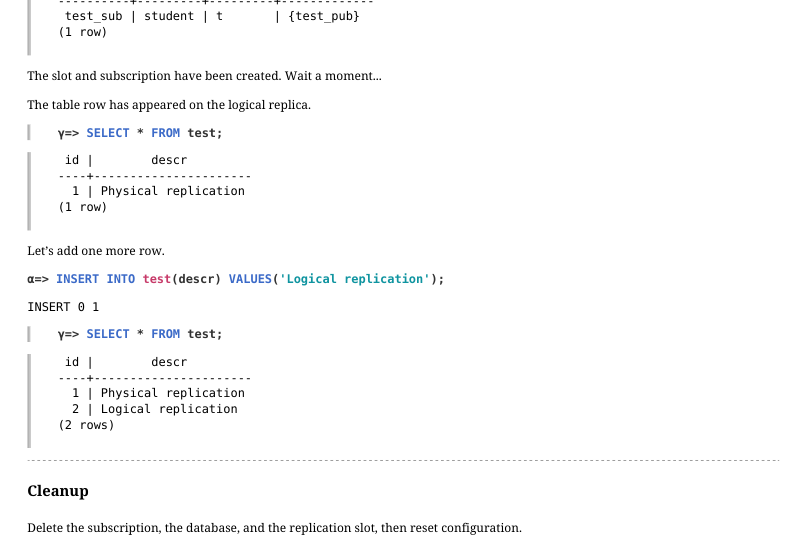 {#source-figure-032 caption=“Source slide page 32: Page 32”}
The slot and subscription have been created. Wait a moment… The table row has appeared on the logical replica.
Let’s add one more row.
Cleanup
Delete the subscription, the database, and the replication slot, then reset configuration.
Page 33: Page 33
08 Lesson 08: Clustering Technologies / Overview
This page is extracted from the official PDF into native Markdown. Slide text, code and speaker notes are kept in reading order; the original PDF and HTML remain the layout references. HTML source: No matching course-page link was captured in the source inventory. Archive: DBA3-handouts-16-en-20260917.zip PDF pages: 28
Page 1: Clustering Technologies / Overview
Copyright
© Postgres Professional, 2017–2025 Authors: Egor Rogov, Pavel Luzanov, Ilya Bashtanov, Alexey Beresnev Photo: Oleg Bartunov (Phu Monastery and Bhrikuti Peak, Nepal)
Use of Course Materials
Non-commercial use of course materials (presentations, demonstrations) is allowed without restrictions. Commercial use is possible only with the written permission of Postgres Professional. It is prohibited to make changes to the course materials.
Feedback
Please send your feedback, comments and suggestions to: edu@postgrespro.ru
Disclaimer
Postgres Professional assumes no responsibility for any damages and losses, including loss of income, caused by direct or indirect, intentional or accidental use of course materials. Postgres Professional company specifically disclaims any warranties on course materials. Course materials are provided “as is,” and Postgres Professional company has no obligations to provide maintenance, support, updates, enhancements, or modifications.
Page 2: Topics
- Performance Expectations
- Enablers
- Building Blocks
- System Examples
Page 3: Performance Expectations
High system availability
- and reliability
- Scalability
- Data consistency
Page 4: High Availability
Minimizing system downtime
- caused by both failures and scheduled maintenance
- Some metrics
- system uptime ratio
- → 100 %
- MTBF – Mean Time Between Failures
- → ∞
- RTO – Recovery Time Objective
- → 0
- RPO – Recovery Point Objective
- → 0
- and others
Speaker notes
System availability is the ratio of time the system remains accessible to its total operational time.
Availability is a broader concept than reliability, as downtime can result not only from failures but also from scheduled maintenance.
Availability is often expressed in percentages:
● “one nine” 90% – 36.5 days of downtime per year,
● “two nines” 99% – 3.65 days of downtime per year,
● “three nines” 99.9% – 8.76 hours of downtime per year,
● “four nines” 99.99% – 52.56 minutes of downtime per year,
● “five nines” 99.999% – 5.26 minutes of downtime per year, and so on.
High availability means getting close to 100%.
For example, managed PostgreSQL database service in Yandex Cloud guarantees 99.99% availability for read nodes and 99.95% for write nodes. (https://yandex.cloud/en/services/managed-postgresql).
Some other availability metrics:
● Mean Time Between Failures (MTBF);
● Recovery Time Objective (RTO): the time it takes for the system to recover;
● Recovery Point Objective (RPO) — the maximum amount of data that can be lost during a failure, and so on.
Page 5: Scalability
Scalability
- The system’s ability to handle higher load with proportionally more resources
- provided
- ideal response time scalability —
- response time should remain constant
- ideal throughput scalability —
- the number of processed requests should increase linearly
- Speedup
- the ratio of response time on a single node to response time in a cluster with
- N nodes
Speaker notes
A key concept for clusters is scalability: it describes how various target metrics react as the number of nodes, data volume, and workload handled by the system increase. The workload increases both as a result of more queries processed in the same amount of time and because of higher volumes of data overall. Resources in this context usually refer to the number of nodes.
Response time scalability reflects how response time (the time it takes to process a query and respond with a result) changes with increased load and more cluster nodes. This is paramount for OLTP systems. Ideally, response time should remain constant at scale.
Speedup is a derivative metric that demonstrates how response time changes with increased number of nodes, but at a constant load.
Throughput scalability measures how the number of processed requests per second changes as data volume and the number of nodes grow. This is the most important metric for OLAP systems. Ideally, throughput should scale linearly with the number of nodes added.
Perfect scalability (unfortunately unattainable in practice) would let you handle growth simply by adding more nodes to the cluster.
Page 6: Consistency
Local transactions
- virtually no guarantees when switching between nodes
- applications must handle consistency concerns
- Global (distributed) transactions
- ACID consistency
- transaction atomicity is necessary
Speaker notes
The stronger the data consistency guarantees a cluster provides, the more it behaves like a single unified system, making it easier to work with and requiring less special handling in application code. However, this comes at a cost of performance.
In a master-replica cluster with a single write node where transactions execute locally, consistency guarantees can be quite weak. For instance, one node may have already applied the transaction commit and made its results available to clients, while another node has not yet done so. In this scenario, a client may end up reading stale data from one node after having already read the updated value from another node. Applications must be designed with these situations in mind and be able to handle this configuration.
For a cluster providing global (distributed) transactions, there is consistency in the traditional ACID sense: a global transaction must move the database from one consistent state to another (C), provided the transaction completes fully across all nodes (A) and is isolated from other concurrent transactions (I).
This requires ensuring transaction atomicity: all cluster nodes must take the same action — either commit or roll back the transaction. PostgreSQL offers a relatively straightforward two-phase commit protocol (2PC) for this purpose, though it is not entirely immune to faults.
Page 7: Enablers
High Availability
- Data Synchronization between Nodes
- Failure Types and Detection
- Distributed Consensus Protocols
- Scalability
Page 8: High Availability
Scheduled maintenance without service interruption
- using PostgreSQL stock tools
- temporary node removal from the cluster
- Redundant components to eliminate single points of failure
- PostgreSQL servers (and other required systems)
- network hardware
- power supply
- Failure detection and recovery management
Speaker notes
Downtime can result not only from unexpected failures but also from scheduled maintenance that cannot be performed without interrupting service. Each new PostgreSQL release reduces the number of operations that require a server restart. Additionally, the cluster must be able to handle planned shutdown of a node with minimal impact on users.
One of the pillars of fault tolerance is redundancy across all system components: not only database servers but also network equipment, power supply systems, and other infrastructure.
But simply duplicating system components isn’t enough. First, you have to set up data synchronization between nodes. Then, you need failure detection and handling – proper failover to standby nodes and recovery after resolving the failures.
Vanilla PostgreSQL provides limited, if any, native support for setting these up. Generally speaking, the higher the system’s target availability, the more complex its architecture.
Page 9: Synchronization
Shared nothing
- physical replication
- logical replication
- foreign tables, postgres_fdw
- Shared disk
- no synchronization, but needs a fault-tolerant storage
- no stock shared disk support
Speaker notes
If you want a cluster of vanilla PostgreSQL servers, your only bet is the shared nothing architecture: each server has its own storage and memory, and they talk to each other over the network. Data is synchronized by means of replication, which we explored previously.
Physical replication, unidirectional as it is, lends itself to setups with one leader and multiple replicas.
Logical replication, the more flexible of the two, supports bidirectional synchronization setups as well as selective replication, down to specific tables and rows. It enables geographically distributed clusters with multiple servers running independently, but sharing any changes.
Selective replication can also be achieved by other means, such as external tables with the postgres_fdw utility.
The shared disk architecture requires modifications to the PostgreSQL core, but offers some exciting new opportunities. With a shared disk, synchronization is unnecessary (the storage itself might use block-level replication for redundancy, but it appears as a single device to PostgreSQL). Since compute nodes are stateless, they can be started and stopped at any time. This approach is a natural fit for dynamic workloads and is ideal for cloud environments.
Page 10: Node Failure
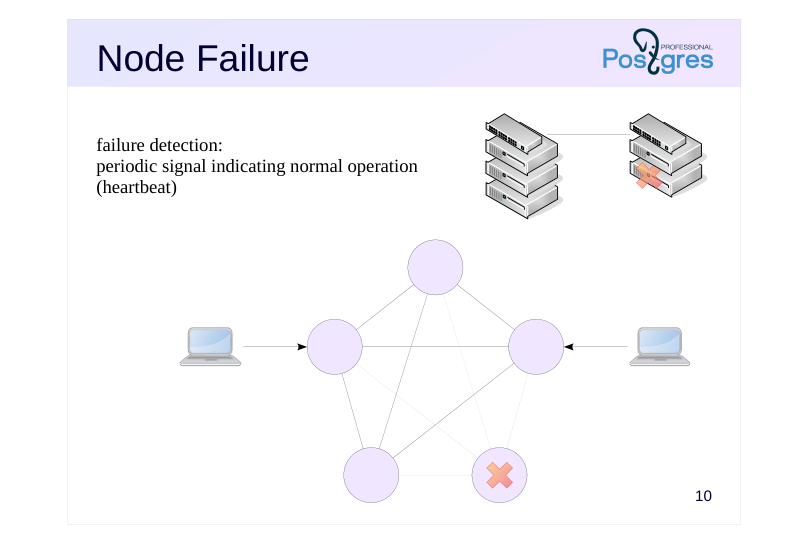 {#source-figure-010 caption=“Source slide page 10: Node Failure”}
failure detection: periodic signal indicating normal operation (heartbeat)
Speaker notes
Before discussing failure detection and management, we need to define what constitutes a failure. From a cluster software perspective, there are typically two types of failures: node failure and network partitioning.
When a node fails, it stops operating as part of the cluster. A failure can result from a database process stop or crash, an operating system crash, server shutdown, or similar issues.
To detect failures, cluster nodes periodically exchange brief heartbeat messages. When a node fails to respond in time, the system registers the failure and initiates the appropriate recovery procedures.
The failure recovery procedure depends on the cluster architecture. In a leader-replica cluster, for example, if the leader fails, one of the replicas must take over its role through a failover.
Page 11: Network Partition
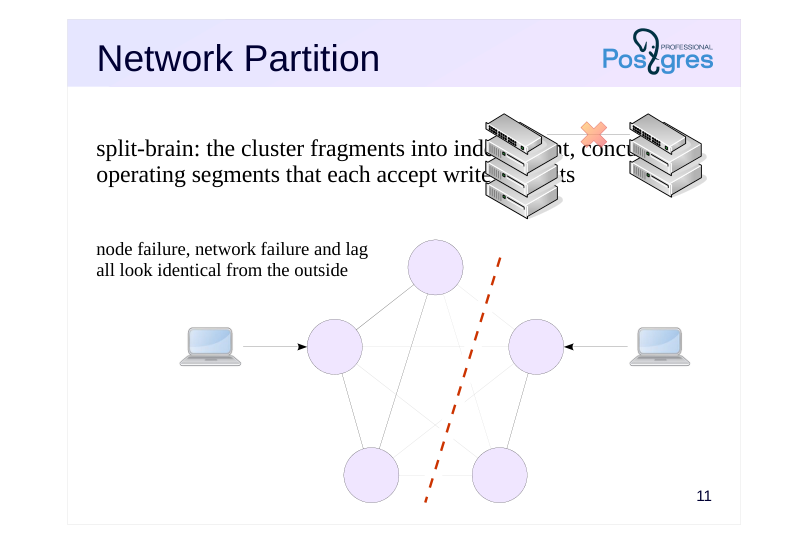 {#source-figure-011 caption=“Source slide page 11: Network Partition”}
split-brain: the cluster fragments into independent, concurrently operating segments that each accept write requests
- node failure, network failure and lag all look identical from the outside
Speaker notes
A network partition occurs when network equipment fails. When this happens, all nodes may remain operational, but one group of nodes loses connectivity with the other.
The worst case is when both groups maintain connectivity with clients. This can lead to a split-brain: the cluster splits into two segments, each operating independently and continuing to accept write requests. This leads to data divergence, and when recovery takes place, one group’s data will inevitably be lost.
Note that a network can fail completely, or it may experience temporary latency or packet loss. (Additionally, in some operating systems, factors such as CPU load can cause network delays). From the cluster’s perspective, all these scenarios are indistinguishable from a node failure: if a node doesn’t send an heartbeat in time, the cluster must consider it downed. A node may or may not still be functioning, but there’s no way to tell without any connection to it.
Many systems will operate unreliably when network connectivity is unstable. To reduce the likelihood of false positives, you can increase the threshold value, but this will also increase the time it takes to detect an actual failure, which in turn reduces availability. For example, a popular distributed key-value store etcd suggests setting the threshold to ten times the regular node response time.
https://github.com/etcd-io/etcd
Page 12: The Consensus Problem
Cluster nodes must be able to reach consensus
- each node sees the same current state of the whole cluster
- atomic commits of global transactions
- Consensus through messages
- no shared memory (shared nothing)
- dedicated distributed protocols that account for potential failures at every
- stage of voting
- Designing, proving correctness, and testing the implementation are all
- challenging tasks!
Speaker notes
A cluster made up of independent nodes must operate as a single system, in a sense. To handle failures, nodes must share a common understanding of each other’s states. To commit a global transaction, all cluster nodes must agree that it does not break anything, and then execute the commit atomically.
Since the nodes have no shared storage (we’re looking at shared-nothing systems here), the only way to reach agreement is through a distributed consensus protocol. The protocol specifies what messages nodes need to exchange – and in what order – to reach consensus.
Distributed algorithms are extremely complex because they must account for numerous edge cases. For example, they must function correctly even when a failure occurs at any stage of the voting process. Proving the correctness of such algorithms and testing their implementations is equally challenging. You shouldn’t attempt to create your own or trust unproven ones.
Page 13: 2PC and 3PC Protocols
Two-phase commit
- prepare:
- the coordinator holds a vote
- commit:
- if every node votes yes, the coordinator signals to commit
- supported by PostgreSQL (PREPARE TRANSACTION + COMMIT)
- Three-phase commit
- prepare:
- the coordinator holds a vote
- precommit: if every node votes yes, the coordinator notifies all participants
- of the intent to commit
- commit:
- if all nodes acknowledge, the coordinator signals to commit
- Properties
- there are situations (such as network partition) where a transaction cannot be
- resolved until the failure is fixed
Speaker notes
PostgreSQL comes with a straightforward two-phase commit (2PC) protocol that handles global commits. The node executing the transaction acts as the coordinator. During the prepare phase, the coordinator informs the other nodes about the transaction commit and waits for them to confirm that that they’re ready to commit (if at least one node isn’t ready, the transaction is aborted). During the commit phase, the coordinator orders all nodes to commit the transaction. Once the coordinator receives commit confirmation from all nodes, it commits the transaction as well.
This protocol requires minimal message exchange but isn’t fault-tolerant. If the coordinator fails after the prepare phase, the remaining nodes have no way of knowing whether to commit or abort the transaction. They’ll have to wait until the failure is resolved.
A more sophisticated protocol called three-phase commit (3PC) addresses this limitation. It introduces an additional precommit phase where the coordinator informs all nodes of its *decision* to commit the transaction. After that, if the coordinator fails, the remaining nodes can proceed to commit the transaction on their own (or abort it independently if the failure occurs before the precommit phase).
However, both algorithms break down in network partition scenarios.
Page 14: Consensus protocols
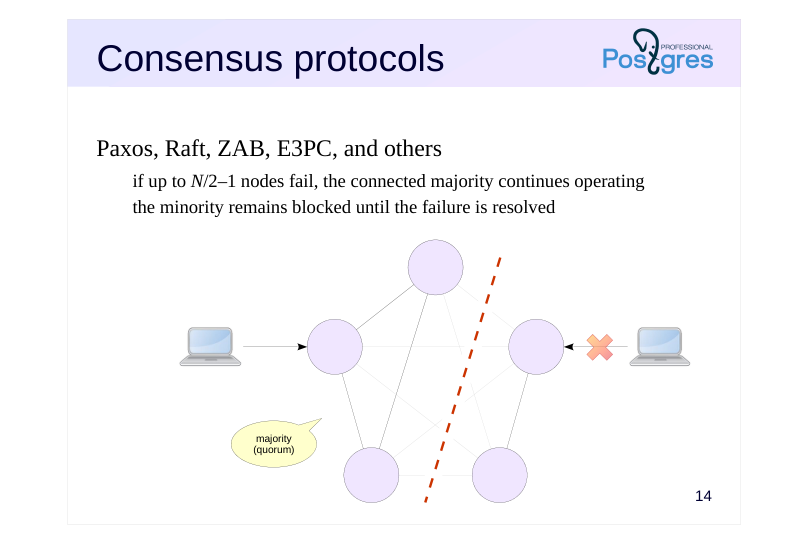 {#source-figure-014 caption=“Source slide page 14: Consensus protocols”}
Paxos, Raft, ZAB, E3PC, and others
- if up to N/2–1 nodes fail, the connected majority continues operating
- the minority remains blocked until the failure is resolved
Speaker notes
Consensus (majority voting) algorithms enable nodes that maintain connectivity with each other and form a quorum to continue operating during network partitions. With equal voting weight across all nodes, N/2+1 out of N nodes can remain operational.
Nodes in the minority must wait for the failure to be resolved before they can commit or roll back their open transactions. These nodes can either stop serving clients entirely or at least refuse write requests to prevent split-brain.
Several mathematically proven algorithms exist with battle-tested implementations.
● Paxos was published in 1998, though it actually originated in the late 1980s. There’s an entire family of these algorithms designed for different scenarios.
● Raft was designed as an algorithm equivalent to Paxos but easier to comprehend. In Raft, one node is elected as the leader with write privileges, while the remaining nodes are read-only. It became the basis for distributed key-value storage systems like etcd and Consul.
● ZAB is the algorithm used by ZooKeeper.
● Enhanced 3PC (E3PC) improves upon the three-phase commit algorithm by allowing transaction commits with a majority vote rather than requiring unanimous agreement.
Other approaches exist for solving the consensus problem, such as Virtual Synchrony, which is used by the Corosync system.
Page 15: Scalability
Read throughput
- load distribution across cluster nodes
- Write throughput
- cannot be achieved with full data replication to all nodes
- sharding (distributing table rows across different nodes) depends heavily on
- the nature of the data being stored
- Response time
- parallel computation across multiple nodes
Speaker notes
Read throughput is the easiest to scale: just distribute read transactions more or less evenly across the cluster nodes.
Scaling write throughput is typically more challenging: in leader-leader configurations, nodes must exchange messages and data with each other, which means the overall system load actually increases as more nodes are added. However, this becomes feasible when data is distributed across nodes rather than being fully replicated to each one.
Sharding – distributon of data at table row level – is one approach that is used often. You can think of it as partitioning where the partitions are located on different cluster nodes.
Note that specific sharding schemes are heavily dependent on the data logic; there’s no one-size-fits-all solution here.
Sharding also enables response time scalability. To achieve this, the cluster needs to be able to parallelize queries by executing them simultaneously across multiple nodes that hold the required data. This is similar to parallel query execution in standard PostgreSQL, except the parallel processes run across different nodes instead of within a single server. Of course, this increases the overhead of data transfer between processes, such as when passing partial aggregation results.
Page 16: Load Balancing
PostgreSQL-specific tools
- libpq library
- PgBouncer – connection pool manager
- Pgpool-II – load balancer and connection pool manager
- Odyssey – multithreaded connection pool manager
- …
- Other tools
- virtual IP address
- HAProxy – TCP/HTTP load balancer
- round-robin DNS
- …
Speaker notes
There are plenty of ready-made solutions available for load distribution; typically, these tools are not part of the database cluster itself.
● The libpq connection string supports multiple hosts. The order of connections is defined by the load_balance_hosts parameter, and target_session_attrs lets you set session attributes, such as read-only connections.
● PgBouncer is a lightweight connection pooling manager for PostgreSQL.
● Pgpool-II is a connection pooling manager and load balancer that can route write traffic to the leader and read traffic to replicas.
● Odyssey is a multithreaded connection pooling manager with full SSL/TLS support and LDAP and PAM authentication capabilities.
Some general-purpose tools not specific to PostgreSQL:
● Virtual IP address – an IP controlled by the cluster that points the clients to specific nodes.
● HAProxy is a load balancer and proxy server that operates at the TCP and HTTP layers. Node lists can be kept up to date with tools like confd, or you can use HAProxy’s own health check tools to keep track of healthy nodes and kick faulty ones from the balancing pool.
● Some systems (like Consul) provide round-robin DNS: node selection and load balancing can happen at the name resolution stage (though caching negates the benefits of this approach).
There are other tools available as well, and many of them work well together.
Page 17: Components and examples
Required Third-Party Components
- System Examples
Page 18: Reliability
Agent
- manages a single PostgreSQL instance
- Control node
- cluster-wide management logic
- Consensus
- external system managed by a consensus protocol
- shared state support for control nodes
- Entry point
- a mechanism to route clients to the appropriate cluster node
Speaker notes
If what you really want from your cluster above else is high availability and reliability, the obvious route is setting up several instances of baseline PostgreSQL and linking them together with some other software. Data synchronization, then, will be achieved by physical replication, meaning that the cluster will have one leader and several replicas.
Since PostgreSQL cannot configure, restart, or stop itself, a dedicated program is needed to handle these operations. This role is performed by an agent.
The cluster management logic is handled by control nodes. At this level, decisions are made about which nodes should be considered failed, which replica should be promoted to the new leader when the old one fails, and so on.
To maintain a shared view of the cluster state, the control nodes rely on a system that implements one of the distributed consensus protocols discussed earlier.
Finally, clients need a single entry point that routes them to the appropriate cluster node or nodes.
Different clustering systems may use different names for these components, and some may be combined into a single entity. If certain components are missing, the cluster must be supplemented with third-party solutions.
Page 19: Fencing
Isolating a node in an unknown state from clients
- a network partition can lead to split-brain
- must not only isolate the node but also prevent failover to a replica during
- this time
- Mechanisms
- power cutoff
- network port cutoff
- client connection termination and redirection
Speaker notes
Since PostgreSQL servers in this approach are unaware they’re operating within a cluster, it’s essential to be able to fence off a failed node (which may still be running but has lost connectivity to the cluster) from the outside world. This procedure is called fencing.
Without proper fencing, a leader that ends up in the minority partition during a network split could continue operating, leading to split-brain. You cannot rely on the control nodes to stop the PostgreSQL server on their own when they detect a failure: they might lose connection with the agent, the agent itself could fail, and so on.
The procedure cannot depend on the node being reachable over the network. Cutoff must be set up differently: For example:
● programmatically power off the server (using IPMI or PDU interfaces);
● programmatically disable the network port on the switch;
● if connections go through a specialized component, clients can be forcibly disconnected from the failed node at that component’s level.
While fencing reduces the scope of the problem, it doesn’t completely solve it on its own. You must also ensure that failover to a replica cannot occur until the failed leader has been fenced. After all, making the fencing decision takes time, during which the node may continue operating, meaning some committed data could be lost during recovery (zero RPO cannot be achieved).
Page 20: Example: Patroni
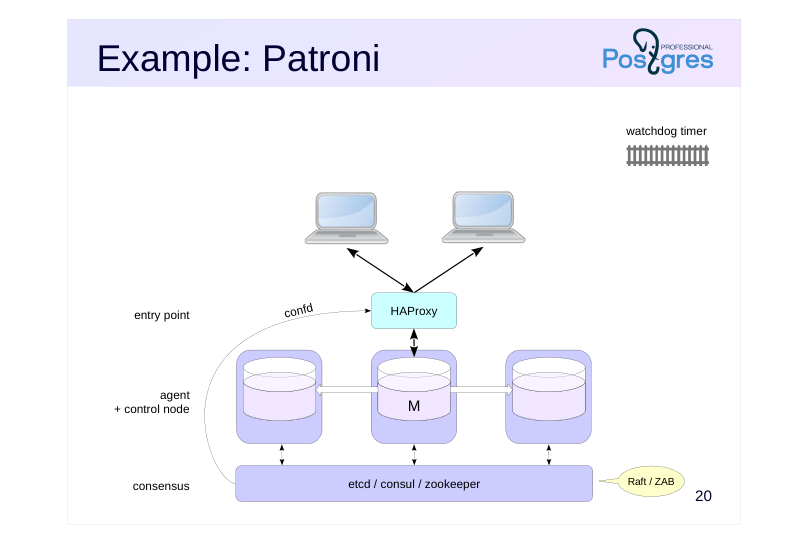 {#source-figure-020 caption=“Source slide page 20: Example: Patroni”}
Speaker notes
Patroni (https://github.com/patroni/patroni ) is an open-source clustering solution designed for use in both cloud and dedicated server environments.
Here, the agent and control functions are combined in a single component. Consensus is achieved using a key-value store provided by etcd (Raft), Consul (Raft), or ZooKeeper (ZAB).
A separate solution is needed to provide the entry point. The typical recommendation is to use HAProxy together with confd, which periodically updates the HAProxy configuration based on information from the consensus layer. The standard configuration routes all clients to the node serving as the leader.
- To prevent HAProxy from becoming a single point of failure, you need
- multiple HAProxy servers and a virtual IP address for client connections.
- However, this means that configurations across different HAProxy servers
- must be updated synchronously, bringing us back to the clustering problem
- just at a different level.
Node fencing can be implemented using the Linux kernel’s watchdog timer mechanism. If the node, while serving as the leader, cannot contact the consensus layer for a certain period, the timer triggers an operating system reboot.
Page 21: Example: The ClusterLabs Stack
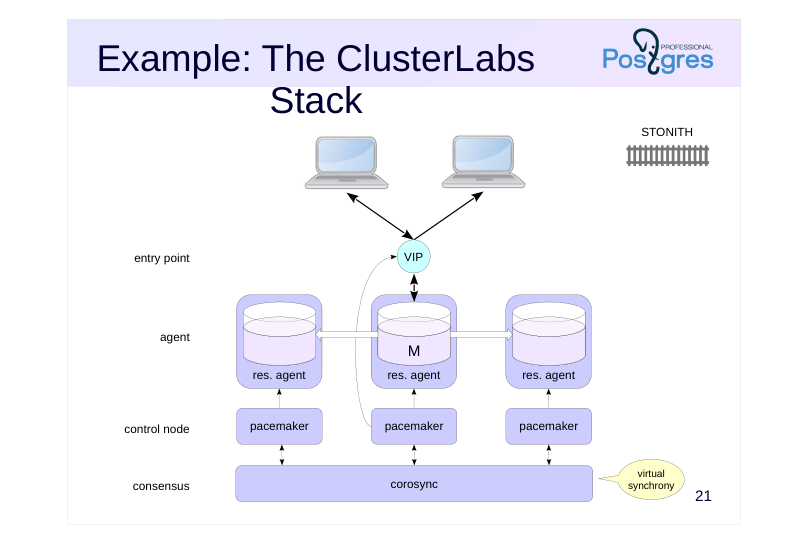 {#source-figure-021 caption=“Source slide page 21: Example: The ClusterLabs Stack”}
Speaker notes
ClusterLabs (https://clusterlabs.org/) provides an open source component stack for building clusters from virtually any systems.
The agent (referred to as a resource agent in this framework) treats each specific system as a standardized resource by implementing operations like stop, start, replica promotion, and so on. This component needs to be implemented separately for each system.
Pacemaker, the controller component, interacts with resources through their agents. Corosync (Virtual Synchrony) handles cluster-wide state management and failure detection.
This architecture focuses heavily on node fencing. This approach uses the STONITH technology (Shoot The Other Node In The Head), which reliably isolates a failed node from both the cluster and clients by remotely cutting power or disabling its switch port.
The client entry point is typically a virtual IP address that the controller node assigns to whichever node is currently serving as the leader.
If needed, you can also distribute read workload across replicas using tools like HAProxy, PgBouncer, and similar solutions.
For PostgreSQL specifically, there’s an open-source solution PAF (PostgreSQL Automatic Failover): http://clusterlabs.github.io/PAF/
Page 22: Example: BiHA
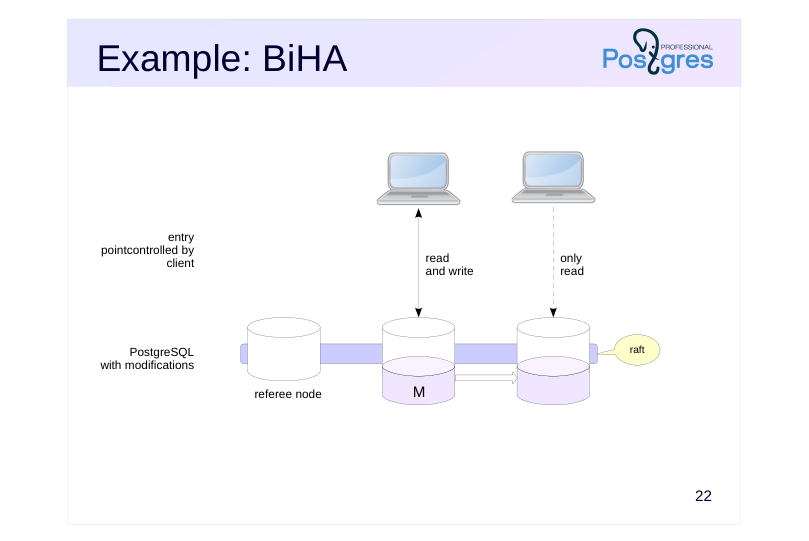 {#source-figure-022 caption=“Source slide page 22: Example: BiHA”}
Speaker notes
A large number of external components clearly complicates cluster deployment and maintenance. To simplify these tasks, all necessary components can be built directly into PostgreSQL itself. This complex challenge has been addressed in the BiHA (Built-in High Availability) cluster, which is an integral part of Postgres Pro Enterprise.
From the outside, this cluster appears as regular nodes connected by physical replication, but in reality, each Postgres Pro Enterprise node implements failure detection, split-brain prevention, a consensus layer (using the Raft protocol), management logic, and an agent.
Consensus requires at least three nodes, though it’s not necessary to store data on all of them. You can deploy a cluster where the third node serves as a referee: it participates in the quorum but doesn’t take part in replication. A less powerful server can be used for this type of node.
No additional software is needed for the entry point: the cluster relies on the client’s ability to determine on its own whether it’s connected to the leader (which handles both read and write operations) or to a replica. Such capabilities are available in libpq, among other tools.
https://postgrespro.com/docs/enterprise/16/biha-solution
Page 23: Consistency
Global Transaction Manager
- requires modifications to the PostgreSQL core
- can be built in or implemented as a separate component
Speaker notes
In the previous examples, we added components to PostgreSQL that enable fault tolerance: agents, control nodes (including failure detection systems), and a consensus layer for controlling the state of the cluster. These components could exist either outside the PostgreSQL nodes or be integrated directly into PostgreSQL itself.
To create a cluster that provides clients with a unified, consistent view of data, you need a Global Transaction Manager that implements a distributed consensus protocol to ensure atomic commits for transactions spanning multiple nodes.
The ability to work with global transactions cannot be achieved through external means alone, it must be built into PostgreSQL by modifying the core. Even when global transaction management is implemented as a separate cluster component, PostgreSQL must still be aware that it needs to communicate with this component.
Typically, fault tolerance is required in addition to consistency. The cluster must then include all the components we discussed earlier. If the Global Transaction Manager is implemented as a separate component, you’ll also need to ensure its fault tolerance, which adds another layer of complexity to the system.
Page 24: Example: multimaster
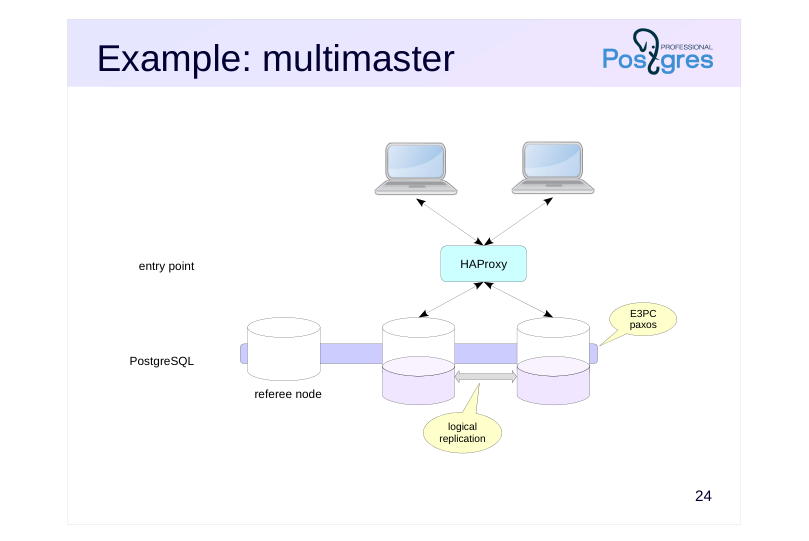 {#source-figure-024 caption=“Source slide page 24: Example: multimaster”}
Speaker notes
The Postgres Pro Enterprise multimaster extension is an example of such a system. It’s a Global Transaction Manager integrated into the database system that extends the existing two-phase commit protocol (2PC) to E3PC. To accomplish this, arbiter processes are launched on the nodes to handle additional communication. The system uses the Paxos consensus algorithm.
https://postgrespro.com/docs/enterprise/16/multimaster
Any node in the multimaster cluster (except the referee node, if one is configured) can accept both read and write queries. Read-only transactions are executed locally. Write transactions are distributed; the node that commits the transaction acts as the coordinator.
Data replication between cluster nodes relies on logical replication, while DDL changes are replicated using a proprietary algorithm.
To distribute load effectively, it makes sense to balance connections across cluster nodes. For example, you can assign different connection strings to different clients, or use HAProxy for load balancing.
An application running on a single server can be deployed on a multimaster cluster without any additional concerns about data consistency. The supported isolation levels are read committed and repeatable read. However, due to current implementation limitations, applications need to account for certain nuances.
Beyond implementing distributed transactions, the cluster also provides fault tolerance.
Page 25: Scalability
Large number of nodes
- shared storage or replication
- sharding
- parallel processing
Speaker notes
When scalability becomes the primary concern, you can set up a relatively straightforward cluster built from standard PostgreSQL instances without the typical clustering infrastructure. This type of cluster enables load distribution across different nodes, though it won’t provide fault tolerance or consistency guarantees.
Data can be fully replicated across nodes (enabling read scalability) or partially replicated (for example, through sharding—which also enables write scalability). Systems designed for cloud infrastructure with dynamic resource scaling can use a shared storage approach where nodes are separated into compute and storage tiers.
Distributing data across a large number of nodes also enables parallel query execution.
Page 26: Example: Citus
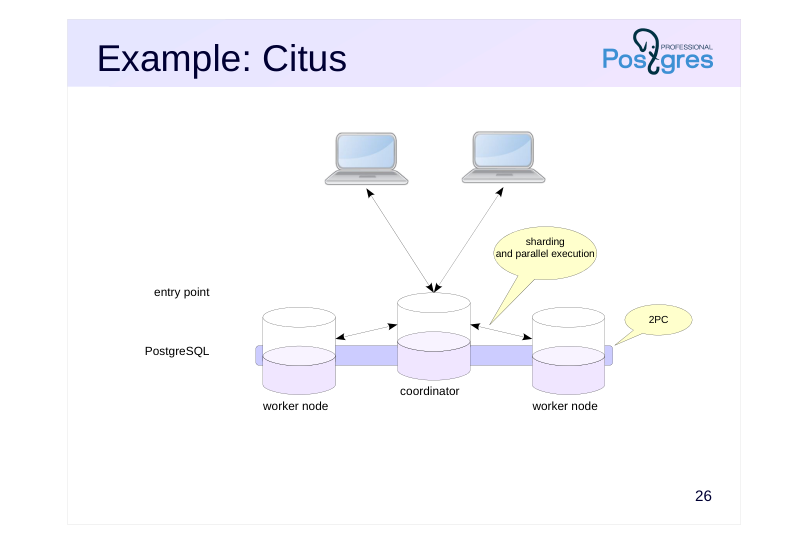 {#source-figure-026 caption=“Source slide page 26: Example: Citus”}
Speaker notes
Citus (https://github.com/citusdata/citus ) is a PostgreSQL extension that distributes data and queries across cluster nodes.
Citus is an example of a system where data isn’t fully replicated but instead distributed across worker nodes through sharding. One node is designated as the coordinator and contains metadata about data location.
The extension includes a specialized query optimizer that generates parallel execution plans and an executor that runs queries by distributing them across the appropriate nodes. This approach enables a Citus cluster to scale both in terms of response time and write throughput.
Citus ensures atomic changes across all cluster nodes using global transactions with the two-phase commit (2PC) protocol.
Data rebalancing across worker nodes (when adding new nodes or removing old ones) relies on logical replication.
In this configuration, the cluster doesn’t provide high availability: if any node fails, some data will be lost. To address this, both the coordinator and worker nodes can be replaced with individual mini-clusters of three nodes each (one primary and two replicas) to ensure fault tolerance.
Page 27: Example: Neon
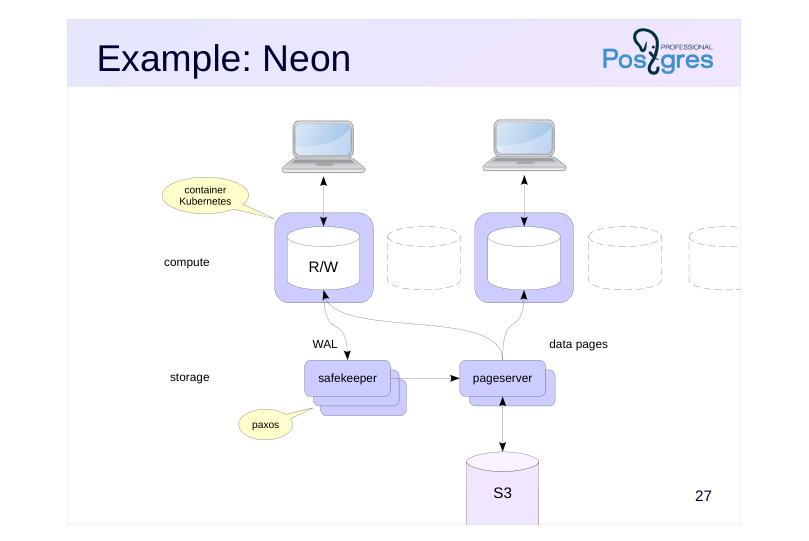 {#source-figure-027 caption=“Source slide page 27: Example: Neon”}
Speaker notes
Neon is an open-source solution for cloud-based serverless computing. The concept involves splitting the database management system into separate stateless nodes while leveraging large, inexpensive, yet slower data storage.
Compute nodes (essentially PostgreSQL instances stripped of their logging and disk operations) are launched within Kubernetes-managed containers. Since these nodes are stateless, containers can be spun up and shut down at any time based on client activity, eliminating costs for unused resources.
To persist data, the write instance (only one is allowed) sends WAL records to the safekeeper component. The records from committed transactions must be stored reliably; to achieve this, safekeeper components form a separate fault-tolerant cluster that operates using the Paxos protocol.
WAL records are asynchronously forwarded from the safekeeper to the pageserver component, which applies them to the data pages. The pageserver retrieves pages on demand from clients, flushing them to bottomless S3 object storage and reading them back as needed. In this way, the pageserver acts as a cache for actively used data, functioning as the equivalent of a buffer cache.
Neon scales for read operations and automatically adjusts to workload demands, though it inevitably performs slower than traditional systems.
https://github.com/neondatabase/neon
Page 28: Takeaways
Building a cluster requires tools that aren’t included in standard PostgreSQL
- There are numerous approaches to building a cluster
- different objectives: high availability, scalability, and consistency
- solutions involving external components or kernel modifications
- solutions with global transaction support
- The higher the requirements, the more complex the system becomes and the higher the cost