Configuration and Monitoring of PostgreSQL
Configuration and Monitoring of PostgreSQL
This course keeps the official topic order and exposes the English handout as readable, native Markdown for review and future editorial work.
Source status: 官方 PDF 已提取为原生 Markdown
Translation baseline: English baseline. The current English archive is the working baseline; the Russian edition is retained for chapter-level cross-checking.
Course scope
MVCC, WAL, locks, extensions, localization, monitoring and upgrades.
Source status
| Language | Current package | Version | Topics | Course page |
|---|---|---|---|---|
| English | DBA2-handouts-16-en.zip | 16 | 18 | HTTP 200 |
| Русский | DBA2-handouts-16.zip | 16 | 18 | HTTP 200 |
Contents
Supplementary materials
dba2_new_features.pdfdba2_student_guide.pdf
Editorial status
The available English handout is extracted from the official PDF. Where no current English archive was found, the route remains ready for a later source edition.
00 Lesson 00: Configuration and Monitoring / PostgreSQL 16
This page is extracted from the official PDF into native Markdown. Slide text, code and speaker notes are kept in reading order; the original PDF and HTML remain the layout references. HTML source: dba2_00_introduction.html Archive: DBA2-handouts-16-en.zip PDF pages: 11
Page 1: Configuration and Monitoring / PostgreSQL 16
Copyright
© Postgres Professional, 2017–2026 Authors: Egor Rogov, Pavel Luzanov, Ilya Bashtanov, Igor Gnatyuk Translated by: Elena Sharafutdinova Photo: Oleg Bartunov (Phu Monastery and Bhrikuti Peak, Nepal)
Use of Course Materials
Non-commercial use of course materials (presentations, demonstrations) is allowed without restrictions. Commercial use is possible only with the written permission of Postgres Professional. It is prohibited to make changes to the course materials.
Feedback
Please send your feedback, comments and suggestions to: edu@postgrespro.ru
Disclaimer
Postgres Professional assumes no responsibility for any damages and losses, including loss of income, caused by direct or indirect, intentional or accidental use of course materials. Postgres Professional company specifically disclaims any warranties on course materials. Course materials are provided “as is”, and Postgres Professional company has no obligations to provide maintenance, support, updates, enhancements, or modifications.
Page 2: For Administrators
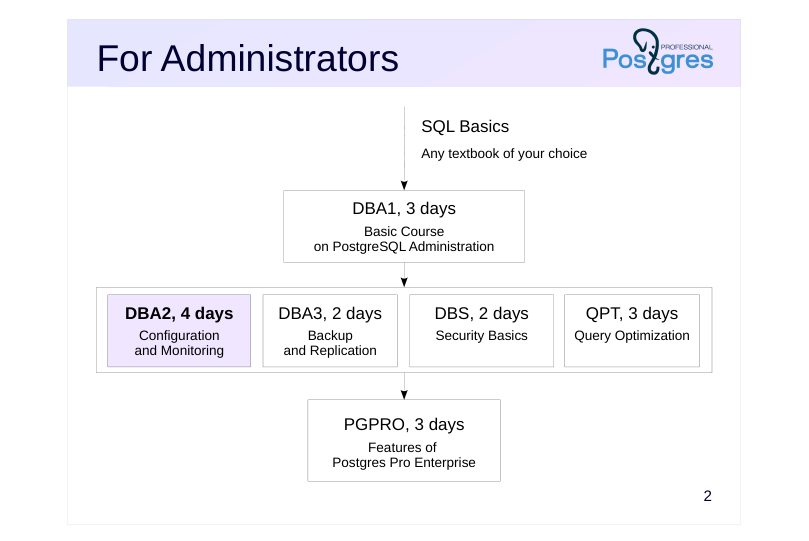 {#source-figure-002 caption=“Source slide page 2: For Administrators”}
DBA2, 4 days
Speaker notes
Prior knowledge of the basics of the SQL language is required to complete all courses. There is no course on the SQL language in our line of courses, but there are many books and other educational resources that can help you master SQL.
For administrators, we offer the following courses.
The DBA1 basic course provides general information about the PostgreSQL architecture, installation, server configuration and management. It also contains overview of access control, backup and replication mechanisms.
The DBA2 course focuses on setting up configuration parameters based on an understanding of the internals of the server. It also talks about monitoring the server and using feedback for iterative parameter tweaking.
The DBA3 course is devoted to backup, as well as physical and logical replication configuration and scenarios for their use. It also provides an overview of the methods and difficulties of building highly available, scalable clusters.
The DBS course discusses the setup of client connections and access control in the DBMS.
The QPT course examines in detail the mechanisms for planning and executing queries, discusses the configuration of instance parameters related to performance, and examines the options for finding problematic queries and optimizing them.
The PGPRO course discusses additional features provided by the Postgres Pro Enterprise DBMS.
Page 3: For Backend Developers
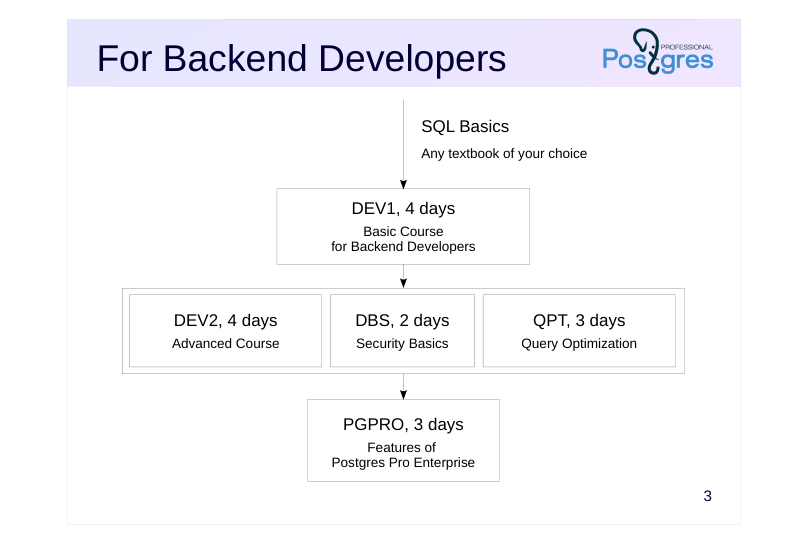 {#source-figure-003 caption=“Source slide page 3: For Backend Developers”}
- DEV2, 4 days
Speaker notes
For backend developers, we offer the following courses.
The DEV1 course is the basic course. It provides general information about the architecture of PostgreSQL and the use of basic database objects; server-side programming in SQL and PL/pgSQL languages using basic data types (including the composite type and arrays), as well as client-side interactions.
The DEV2 course examines the features of the server’s internal structure that affect the development of application code, and comprehensively discusses extensibility: the ability to extend server mechanisms with your own code, which allows you to use PostgreSQL to solve a wide variety of tasks.
The DBS, QPT, and PGPRO courses are intended for both developers and administrators.
Developers may also be interested in administration courses if there is a need to study the internal structure of PostgreSQL in more detail, as well as in the case when there is no dedicated administrator role on the project.
https://postgrespro.com/community/courses
Page 4: About DBA2 Course
Duration: 4 days
- Prior knowledge requirements
- experience with Unix
- familiarity with PostgreSQL equivalent to the DBA1 course
- What competences will be acquired
- setting configuration parameters based on server internal architecture
- server monitoring using feedback for iterative parameter tuning
- setting localization related parameters
- extension management and introduction to server upgrade
Speaker notes
The goal of this course is to provide a thorough understanding of PostgreSQL internal architecture. This knowledge is essential for setting parameters and use of monitoring to refine initial settings.
These topics are covered in detail in the book PostgreSQL Internals by Egor Rogov:
https://postgrespro.com/community/books/internals
This course also covers a range of other administration topics not included in the DBA1 course.
Page 5: Materials Used
Pre-configured virtual machine
- Xubuntu 24.04 OS
- PostgreSQL 16
- documentation in English
- Course handouts
- Student’s Guide
- presentations, demonstrations, practice tasks and practice keys
- (in html and pdf)
Speaker notes
If you are taking the course on your own, start with the Student’s Guide. Among other things, it shows where to download and how to use the virtual machine and other materials. All course materials, including the Student’s Guide, are available at: https://postgrespro.com/community/courses/DBA2
Completing practice tasks is very important to gain the basic skills in working with PostgreSQL. Try to complete the practice tasks yourself first, and then review the provided keys, even if the practice task did not raise questions. Practice keys may contain additional information that is not mentioned in presentations and demonstrations.
Course handouts (presentations, demonstrations, practice tasks and keys) are available in two formats. Html is good for browsing and copying code snippets. Pdf is split in pages and is more convenient for printing.
Page 6: PostgreSQL Clusters
In the course VM, PostgreSQL 16 is installed from a package with a standard main cluster, which starts at OS boot and is used in almost all course lessons. For the Server Upgrade lesson, two prod clusters are configured for versions 15 and 16 on the same port 5433. Additionally, Locks in RAM lesson uses the slow cluster on the standard port 5432. All additional clusters are stopped and started manually. All practice tasks are performed under the OS user student. In the main cluster, a superuser and a database with the same name are created, so that psql can be run without parameters.
In all clusters, all users can connect locally without authentication, and over the network with a password:
Page 7: Course Outline and Schedule
Each training day is approximately 6 hours + lunch
- Each lesson usually consists of
- presentation and demonstration: ~30–60 minutes
- practice: ~30–40 minutes, including a break
Page 8: Day 1
MVCC
- Isolation
- Page Layout and Row Versions
- Snapshots
- HOT Updates and Page Pruning
Page 9: Day 2
MVCC (Continued)
- Vacuuming
- Autovacuuming
- Freezing
- WAL
- Buffer Cache
- Write-Ahead Log
Page 10: Day 3
WAL (Continued)
- Checkpoint
- WAL Tuning
- Locks
- Object-Level Locks
- Row-Level Locks
Page 11: Day 4
Locks (Continued)
- Locks in RAM
- Administration
- Managing Extensions
- Localization
- Server Upgrade
01 Lesson 01: MVCC / Isolation
This page is extracted from the official PDF into native Markdown. Slide text, code and speaker notes are kept in reading order; the original PDF and HTML remain the layout references. HTML source: dba2_01_mvcc_isolation.html Archive: DBA2-handouts-16-en.zip PDF pages: 21
Page 1: MVCC / Isolation
Copyright
© Postgres Professional, 2017–2026 Authors: Egor Rogov, Pavel Luzanov, Ilya Bashtanov, Igor Gnatyuk Translated by: Elena Sharafutdinova Photo: Oleg Bartunov (Phu Monastery and Bhrikuti Peak, Nepal)
Use of Course Materials
Non-commercial use of course materials (presentations, demonstrations) is allowed without restrictions. Commercial use is possible only with the written permission of Postgres Professional. It is prohibited to make changes to the course materials.
Feedback
Please send your feedback, comments and suggestions to: edu@postgrespro.ru
Disclaimer
Postgres Professional assumes no responsibility for any damages and losses, including loss of income, caused by direct or indirect, intentional or accidental use of course materials. Postgres Professional company specifically disclaims any warranties on course materials. Course materials are provided “as is,” and Postgres Professional company has no obligations to provide maintenance, support, updates, enhancements, or modifications.
Page 2: Topics
- Transactions and their Properties
- Isolation Levels in SQL Standard
- Implementation in PostgreSQL
Page 3: Transactions and their Properties
Transaction is a sequence of operations
- that transitions the database from one consistent state to another,
- Consistency
- provided that the transaction is completed successfully,
- Atomicity
- without interference from other transactions
- Isolation
- atomicity guarantees that either all operations within the transaction succeed,
- or none of them make any visible changes
- consistency is defined by integrity constraints and application semantics
- incomplete isolation leads to correctness violations (anomalies)
- during concurrent transaction execution
Speaker notes
A transaction is a sequence of operations performed by an application that transitions the database from one consistent state to another (consistency), provided that the transaction is completed successfully (atomicity), without interference from other transactions (isolation).
A correct (consistent) state is defined both by integrity constraints set in the database and by application semantics.
Full isolation guarantees that application operations are not affected by any other concurrent transactions. However, when weaker isolation is applied, a transaction that operates correctly alone may produce incorrect results in the presence of concurrent transactions, since statements from different transactions can be interleaved during execution. Such incorrect situations are called anomalies.
Full isolation is difficult to implement and it often results in lower system throughput. Since relaxed isolation is standard practice, it is important to understand its potential implications.
We will cover the fourth ACID property (durability) in Write-Ahead Log lesson.
Page 4: Read Uncommitted
Should prevent anomalies
- lost update:
- a transaction can overwrite updates made by other transactions
- that were committed after it started
- Not implemented in PostgreSQL
- functions as Read Committed
Speaker notes
The SQL standard defines four levels of transaction isolation in terms of anomalies that may occur during concurrent transaction execution.
The weakest level is Read Uncommitted, which, as the name implies, allows reading even uncommitted data.
According to the standard, this level should prevent only one anomaly:
● Lost update. If T1 has started, and then another T2 modifies and commits rows, T1 might overwrite those changes.
This level was designed for minimal overhead, but PostgreSQL can operate at a stricter level with no loss of performance. Therefore, Read Uncommitted is not implemented in PostgreSQL, and we will not discuss it further.
Page 5: Read Committed
Should prevent anomalies
- lost update
- dirty read:
- a query sees uncommitted changes made by other transactions
- Implementation in PostgreSQL
- used by default
Speaker notes
Each subsequent isolation level is stricter than the previous one. Therefore, the Read Committed level must prevent not only lost updates, but another anomaly as well:
● Dirty read. T1 can read rows that have been modified by T2 but not yet committed. If T2 rolls back its changes, T1 will have read data that never actually existed.
There are many other anomalies that are allowed at the Read Committed level. The developer should be always aware of potential issues and manually apply locks when necessary.
In PostgreSQL (as in many other DBMSes), this isolation level is used by default as a compromise between isolation strictness and performance.
Note that in PostgreSQL, the Read Committed level can lead to lost updates, an example will be provided in demonstration.
Page 6: Isolation Level Control
For demonstration purposes, we will use a separate database for each lesson.
We examine isolation levels using a table representing a traffic light:
It is a pedestrian traffic light with two lamps:
One way to set the isolation level is with the SET TRANSACTION command at the start of a transaction:
To see the current level, check the parameter value:
Alternatively, we can specify the level directly in the BEGIN command:
The Read Committed level is used by default:
Page 7: Page 7
So if this parameter has not been changed, we do not need to specify the level explicitly.
Read Committed and Dirty Reads
Let’s try to read dirty data. In the first transaction, we turn off the red lamp:
Start a second session.
Here, open another transaction with the same Read Committed level.
The second transaction does not see uncommitted changes. Roll back the change.
Read Committed and Committed Changes
We have checked that a transaction does not see uncommitted changes. Let’s see what happens upon commit.
Page 8: Page 8
Not visible yet.
Let’s check again.
So, at Read Committed level, statements in one transaction see committed changes in other transactions.
Note Note that repeating the same query within the same transaction can return different results. Can we see changes committed during the execution of a statement? Let’s check it. Currently both lamps are off. Run a long query and, while it’s running, turn on the lights in the second session:
So, if another transaction commits changes during a statement’s execution, those changes are not visible. The statement sees data as it existed at the start of its execution. However, if a query calls a volatile function that itself executes a query, then the internal query may return data inconsistent with the main query’s snapshot.
Repeat the experiment, but now the query uses the function:
The right option here is to declare the function as stable.
Page 9: Page 9
Key takeaway: pay close attention to function volatility categories at the Read Committed isolation level. Using default values can easily lead to inconsistent data.
Read Committed and Lost Updates
What happens when two transactions try to change the same row? Currently both lights are on. The first transaction turns off the red light, but is not completed yet.
The second transaction sees that both lights are on…
… it changes the state of each light…
… but hangs, waiting for the first to complete.
When the first transaction is committed, the second proceeds with its update, and we expect that both lights will be off in the second session. Let’s check it.
Why did it happen? The UPDATE command in the second transaction locks the tuples one by one. First, it locks the green light and changes its state, then waits for the first transaction to release the lock on the red light. At the same time, the command in the second transaction should not see changes made after it started. On the other hand, it should not lose changes committed by other transactions. Therefore, after the lock is released, it rereads the row it is trying to update.
Page 10: Page 10
So, the first transaction turned off the red light, and the second turned it back on. As a result, the second transaction managed to succeed because it saw inconsistent data: some for one point in time, some for another. But if a change is not made in a single SQL command, the update is lost.
The first transaction sets the red light into blinking mode. At the same time, the row is blocked:
In the second transaction, the client sees that the red light is on…
… and turns it off:
The second transaction waits for the first to complete.
The first session expects to see the red lamp blinking. Let’s check it:
In this case, the second transaction wrote its changes over the changes of the first transaction. At the Read Committed level, the server cannot prevent this, as the UPDATE command actually contains a predefined constant.
Page 11: Repeatable Read
Should prevent anomalies
- lost update
- dirty read
- non-repeatable read:
- reading the same row again returns different data
- if it was modified and committed by another transaction
- Implementation in PostgreSQL
- also prevents phantom read:
- when a transaction re-executes a query, the returned set of rows can change
- if another transaction has inserted and committed new rows that satisfy the same
- condition
- to prevent anomalies, transactions may be aborted
Speaker notes
According to the standard, in addition to lost update and dirty read, the Repeatable Read isolation level should also prevent the anomaly we observed at the Read Committed level:
● Non-Repeatable Read. After T1 reads a row, T2 modifies or deletes that row and commits the changes. When T1 reads the same row again, it sees that the row has been modified or deleted.
PostgreSQL’s implementation is stricter than the standard requires and it also prevents the anomaly.
● Phantom Read. T1 reads a set of rows that satisfy a certain condition. T2 then inserts rows that also satisfy this condition. If T1 repeats the query, it will receive a different set of rows.
In reality, there are other anomalies (not covered in the standard) that are allowed in PostgreSQL at the Repeatable Read level.
Another key difference from Read Committed is that this level may abort a transaction to prevent an anomaly (such a transaction must be retried). This never happens at the Read Committed level: when there is a choice between correctness and performance, performance is always prioritized over correctness.
Page 12: Repeatable Read and Non-Repeatable Reads
Make sure there are no non-repeatable read anomalies.
What is the value in the first transaction now?
At Repeatable Read level, rereading the modified row returns its original value.
Repeatable Read and Phantom Reads
Phantom rows should also be invisible. Let’s check it:
Indeed, the transaction does not see the inserted row which satisfies the original condition. PostgreSQL’s Repeatable Read isolation level is stricter than required by the SQL standard.
Page 13: Repeatable Read and Lost Updates
Let’s remove the yellow lamp.
The transaction should always see the same data as it sees at the start, so it cannot reread the changed row during an update. Let’s reproduce the same experiment as we made at the Read Committed isolation level. Currently the red lamp is on.
The client queries the state of the red lamp…
… and then changes it on the server:
The second transaction waits for the first to complete.
In the second transaction, we get an error. The row was changed; it is impossible to update an outdated version (this would be a lost update, which is not allowed), and it is also impossible to see the current version (this would violate isolation level).
Thus, a lost update is not allowed at the Repeatable Read level.
Repeatable Read and Other Anomalies
Can we be sure that the following command will turn on all the lamps?
Can we be sure that the following command will turn off all the lamps?
If one transaction turns lamps on and another turns them off, what is the state of the table after executing both transactions concurrently?
Page 14: Page 14
Let’s turn the red lamp on and check.
Initial state:
The first transaction turned on the green lamp; so within this transaction all lights are now on.
The second transaction does not see these uncommitted changes and considers the green light to be off. Therefore, it turns off the red light; so within this transaction all lights are now off.
Now both transactions commit their changes…
And it turns out that…
… one light is on and the other is off. This is an example of a concurrency anomaly known as write skew, which is possible even if there are no dirty, non-repeatable, and phantom reads.
Page 15: Serializable
Should prevent any anomalies
- the result of concurrent execution matches the result of executing transactions in some
- serial order
- Implementation in PostgreSQL
- to prevent anomalies, transactions may be aborted
- for correct operation, the Serializable level must be used by all transactions
- the level does not work on standbys
Speaker notes
Complete elimination of all anomalies is achieved when commands executed in concurrent transactions produce the same result as if the transactions were run sequentially (one finishes, the next begins) in some order.
In PostgreSQL, this level is implemented and works correctly if all transactions in the system use the Serializable isolation level.
However, it is important to note that this implementation has certain limitations:
● Queries cannot be executed on standbys.
● Transactions may be aborted more frequently than strictly necessary (thereby reducing performance as they must be retried).
Page 16: Serializable
Serializable is the highest isolation level, designed to prevent all concurrency anomalies.
The first transaction turned on the red lamp; so within this transaction all lights are now on.
The second transaction does not see uncommitted changes: within this transaction the red light is still off, and it turns off the green light.
For the second transaction, both lamps are off:
Now both transactions commit their changes…
And the second transaction gets an error. Indeed, if these transactions were executed serially, the following two results are possible: If the first transaction is executed first, and then the second, all lamps will be off. If the second transaction is executed first, and then the first, all lamps will be on. The intermediate state cannot be obtained, so one of the transactions fails.
Important notice: if Serializable isolation is used, all transactions must use this level. If you mix transactions of different levels, Serializable will behave like Repeatable Read.
Page 17: Takeaways: SQL Standard
- Non-
- Repeatable
- Phantom
- Other
- Anomalies
- Lost Update
- Dirty Read
- Read
- Read
- Read Uncommitted ― possible possible possible possible
- Read Committed ― ― possible possible possible
- Repeatable Read ― ― ― possible possible
- Serializable ― ― ― ― ―
Speaker notes
Let’s summarize the information.
The SQL standard defines four transaction isolation levels: Read Uncommitted, Read Committed, Repeatable Read, Serializable (by default).
The table shows which anomalies can occur at each isolation level.
Note that eliminating three anomalies defined in the standard is not sufficient to guarantee the Serializable isolation level.
Page 18: Takeaways: PostgreSQL
- Non-
- Repeatable
- Phantom
- Other
- Anomalies
- Lost Update
- Dirty Read
- Read
- Read
- Read Uncommitted
- Read Committed * ― possible possible possible
- Repeatable Read ― ― ― ― possible
- Serializable ― ― ― ― ―
- * not always prevented
Speaker notes
In practice, DBMSes, including PostgreSQL, do not implement the standard requirements literally (they were formulated when isolation theory was not yet thoroughly studied by researchers). The isolation level names have remained, but their implementation is stricter than the standard requires.
PostgreSQL uses snapshot isolation combined with MVCC. This results in the following characteristics:
● Dirty reads are completely prevented, with no loss of performance.
● The Read Committed level is used by default and is applied in most systems. It often requires manual locking to ensure correctness.
● The Repeatable Read level prevents not only non-repeatable reads but also phantom reads (though it does not guarantee full isolation). This level is convenient for reporting, as it allows multiple queries to see consistent data, and read‐only transactions are never aborted.
● The Serializable level is also fully implemented, but it has certain limitations.
https://postgrespro.com/docs/postgresql/16/transaction-iso
Page 19: Practice
- Create an empty table. Make sure phantom read anomaly is not prevented at the Read Committed isolation level.
- Open a transaction at the Repeatable Read isolation level (and do not execute any commands in it yet). In another session, delete a row from the table. Is the deleted row visible in the open transaction? Will the deleted row be visible if, after opening the transaction, you execute a database query without accessing any tables?
- Check that the DROP TABLE command is transactional.
Page 20: 1. Phantom Read at the Read Committed Level
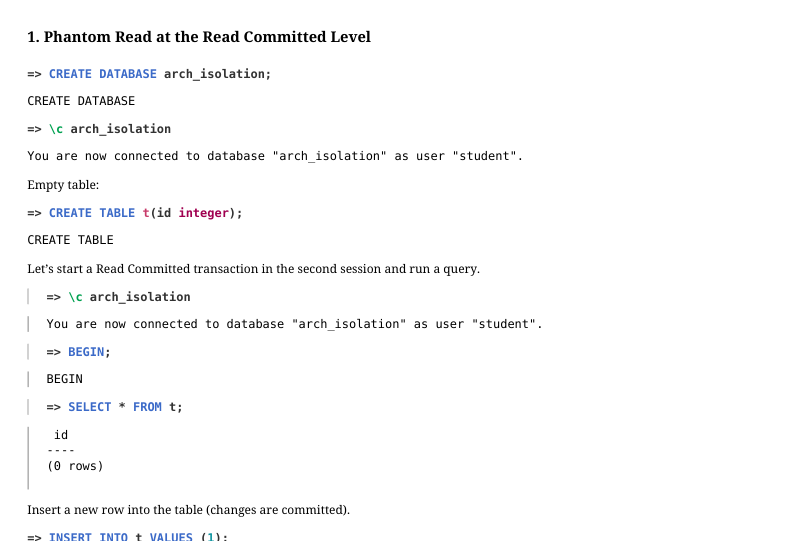 {#source-figure-020 caption=“Source slide page 20: 1. Phantom Read at the Read Committed Level”}
Empty table:
Let’s start a Read Committed transaction in the second session and run a query.
Insert a new row into the table (changes are committed).
The Read Committed transaction sees the newly added row. The difference from a non-repeatable read anomaly (where a transaction sees committed changes in already existing rows) is that here the transaction sees rows that did not exist before.
2. At What Point in Time are the Data Visible?
Let’s open a Repeatable Read transaction:
Insert a new row into the table (changes are committed):
Check the table content in the open transaction:
Page 21: Page 21
Why are both rows visible? This is because Repeatable Read (and Serializable) transactions see the data as of the start of the first command, not when BEGIN command was executed. If we now insert more rows to the table, the result of a repeated query will no longer change.
3. Transactional DDL
Open a transaction and remove table t.
The table is deleted. Now roll back the transaction:
The deletion is rolled back, and the table is restored.
02 Lesson 02: MVCC / Page Layout and Row Versions
This page is extracted from the official PDF into native Markdown. Slide text, code and speaker notes are kept in reading order; the original PDF and HTML remain the layout references. HTML source: dba2_02_mvcc_tuples.html Archive: DBA2-handouts-16-en.zip PDF pages: 27
Page 1: MVCC / Page Layout and Row Versions
Copyright
© Postgres Professional, 2016–2026 Authors: Egor Rogov, Pavel Luzanov, Ilya Bashtanov, Igor Gnatyuk Translated by: Elena Sharafutdinova Photo: Oleg Bartunov (Phu Monastery and Bhrikuti Peak, Nepal)
Use of Course Materials
Non-commercial use of course materials (presentations, demonstrations) is allowed without restrictions. Commercial use is possible only with the written permission of Postgres Professional. It is prohibited to make changes to the course materials.
Feedback
Please send your feedback, comments and suggestions to: edu@postgrespro.ru
Disclaimer
Postgres Professional assumes no responsibility for any damages and losses, including loss of income, caused by direct or indirect, intentional or accidental use of course materials. Postgres Professional company specifically disclaims any warranties on course materials. Course materials are provided “as is,” and Postgres Professional company has no obligations to provide maintenance, support, updates, enhancements, or modifications.
Page 2: Topics
- Page Layout and Row Versions
- How Data Operations Work
- Subtransactions
Page 3: Page Layout
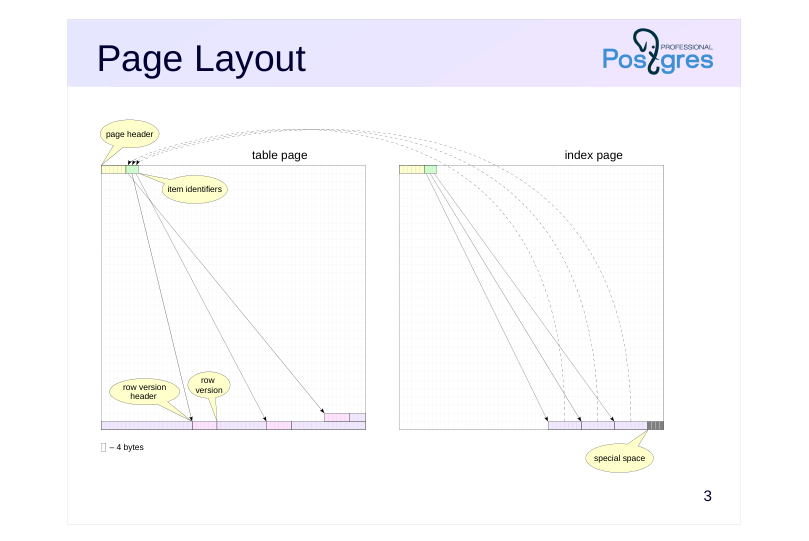 {#source-figure-003 caption=“Source slide page 3: Page Layout”}
Speaker notes
The page size is 8 kB. This value can be increased (up to 32 kB), but only during compilation. Tables, indexes and most other objects referred to in PostgreSQL by the term relation, use the same page layout to share a common buffer cache. A page header (24 bytes) is at the top of the page, it contains general information about the page and the size of its areas: item identifiers, free space, row versions and the special space.
Row versions contain the actual data we store in tables and other database objects, plus a header. We use the term tuple for row version, sometimes we simply call it a row.
Item identifiers have a fixed size (4 bytes) and form an array, where the position within the array defines the tuple identifier (tuple id, tid). Item identifiers reference the tuples, which are located at the end of the page. This indirect addressing is convenient for two main reasons: firstly, it allows to find a specific tuple without scanning the entire page’s content (since tuples have variable lengths), and secondly, it allows moving a tuple within the page without breaking references from indexes.
Free space is located between item identifiers and row versions.
Some index types require storing metadata; for this purpose, page zero is reserved as a metapage and the special space at the end of each page can be used.
https://postgrespro.com/docs/postgresql/16/storage-page-layout
Page 4: Data Format
 {#source-figure-004 caption=“Source slide page 4: Data Format”}
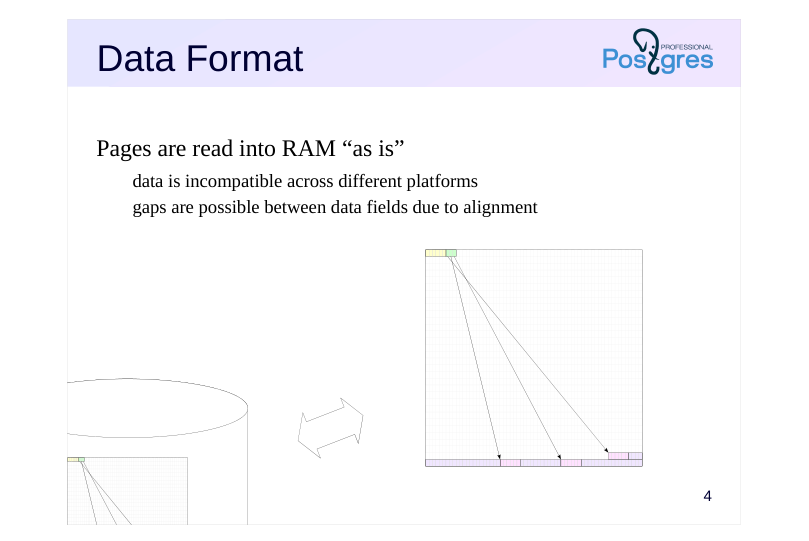
Pages are read into RAM “as is”
- data is incompatible across different platforms
- gaps are possible between data fields due to alignment
Speaker notes
The data format on disk is identical to the data representation in RAM. A page is written to the file and read into the buffer cache as is, without any transformations.
Consequently, data files are incompatible across different platforms (due to differences in bitness, byte order, etc.).
Besides, many architectures provide data alignment by machine word boundaries. For instance, in a 32-bit x86 system, integers (4 bytes) as well as double-precision floating-point numbers (8 bytes) are aligned by the boundary of 4-byte words. In a 64-bit system, however, double precision values are aligned by the boundary of 8-byte words.
Thereby, the size of a tuple depends on the order and data types of its fields. Usually, this effect is hardly noticeable, but in some cases it can lead to a significant increase in size. For example, if you interleave fields of boolean and integer types, this will typically result in a 3-byte alignment gap between them.
Page 5: Page Layout
The pageinspect extension is designed for analyzing the layout and content of pages.
The boundaries of page areas are recorded in its header. Let’s take page zero of one of the system catalog tables as an example:
The page layout is defined by the following boundaries: 0 — start of the page header and item identifiers lower — start of free space upper — start of data (tuples) special — start of special space (for indexes only) pagesize — end of the page
Page 6: Item Identifiers
 {#source-figure-006 caption=“Source slide page 6: Item Identifiers”}
Speaker notes
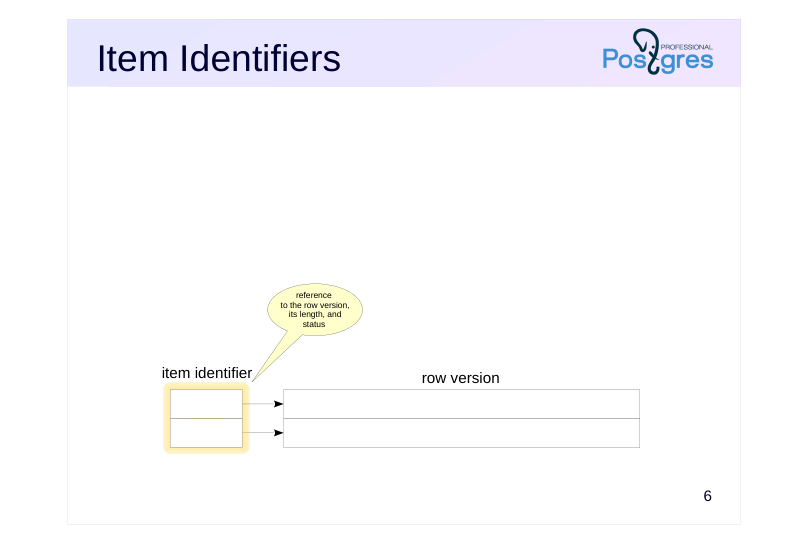
A page contains an array of item identifiers.
Each identifier (4 bytes) contains:
● Reference to the row version
● Length of this row version (for convenience)
● Several bits that define the status of the row version
Page 7: Row Versions
 {#source-figure-007 caption=“Source slide page 7: Row Versions”}
Speaker notes
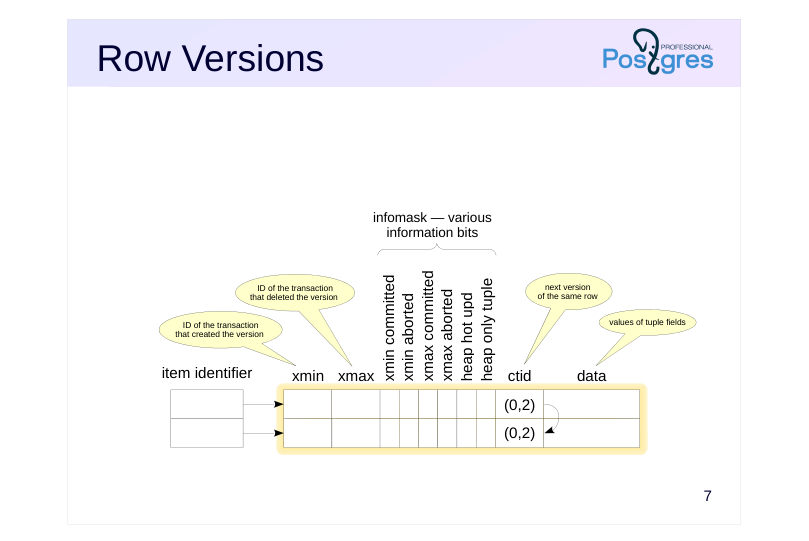
Row versions (tuples) within table (heap) pages have a header in addition to the actual data. This header contains the following important fields, among others:
Xmin and xmax define the visibility of this row version in terms of the
beginning and ending transaction IDs. Transaction IDs (or xid) are
sequentially assigned to transactions from a global counter used by all
databases within a PostgreSQL cluster.
Infomask contains a set of bits that define properties of this version. The
figure shows the main ones, but far from all. Some of the bits shown will
be covered in this lesson, and others will be covered in different lessons
of this module.
Ctid is a reference to the next, more recent version of the same row. Ctid
of the latest version refers to this very version. These references are not
always used. We will examine them in the HOT Updates and Page
Pruning lesson.
The row version header on a table page is 23 bytes long (or more because it can include a null bitmap).
Let us remind you that each row version must always fit entirely within a single page. If a row version is too large, PostgreSQL will attempt to compress some of its fields or move them to external TOAST storage (this is covered in the Data Organization module of the DBA1 course).
Page 8: ctid key Index Entries
 {#source-figure-008 caption=“Source slide page 8: ctid key Index Entries”}
Speaker notes
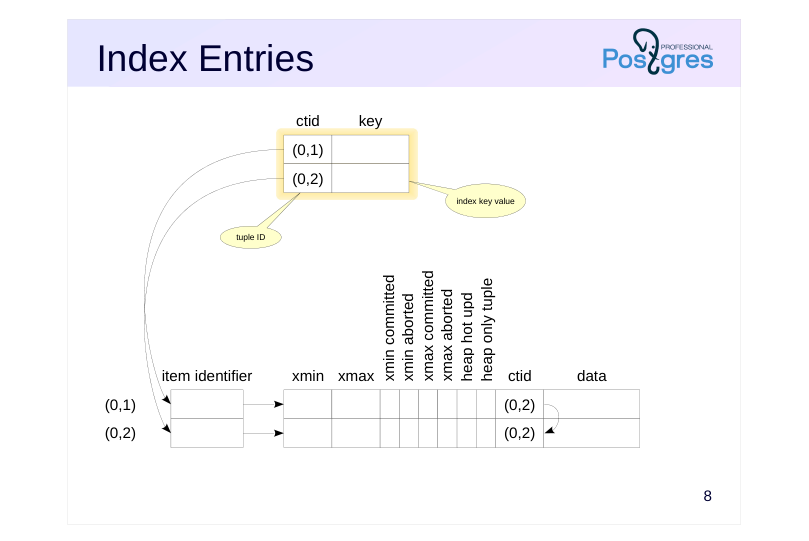
The information within an index page depends heavily on the index type. Even a single index type can have different kinds of pages. For example, a B-tree has a metadata page and regular pages.
However, a page usually contains an array of identifiers and items (like a table page). To avoid confusion, we will use the term entries for index items. Moreover, space for special data is allocated at the end of an index page.
The index entries themselves can also have vastly different structures depending on the index type. For instance, in a B-tree, the entries in leaf pages contain an index key value and an identifier (ctid) of the corresponding tuple (the structure of B-trees and other indexes is covered in detail in the QPT course).
The structure of other index types may vary, but typically, index pages still contain references to row versions.
ctids have the form (x,y), where x is the page number and y is the sequential number of the item identifier in the array. For convenience, we display them to the left of the identifiers.
No index contains versioning information (it does not have xmin and xmax fields). By reading only an index entry, it is impossible to determine the visibility of the tuple it references: either the table page or the visibility map has to be accessed.
The figure shows entries in leaf pages of a standard B-tree index. For the sake of simplicity, the item identifiers to these entries are omitted.
Page 9: Insert
 {#source-figure-009 caption=“Source slide page 9: Insert”}
Speaker notes
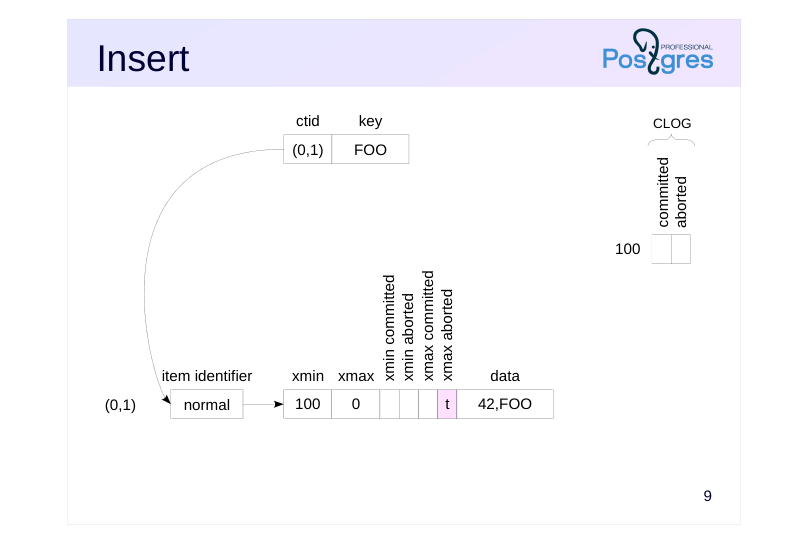
Let’s examine how row operations are performed at a low level, and we start with insert.
In our example, we create a table with two columns (integer and text); a B-tree index has been created on the text field.
When a row is inserted, an item identifier with number 1 will appear on the table page, pointing to the first and only row version. In the row version, the xmin field contains the ID of the current transaction (100 in our example).
The transaction status log (CLOG) stores the states of all transactions (starting from a certain point), with two bits allocated for each transaction. This data is stored in the PGDATA/pg_xact directory, and a few recent pages are cached in the server’s shared memory. Since in our example transaction 100 is still active, both bits are currently unset.
An index page also creates an item identifier with number 1, which points to an index entry. This index entry, in turn, points to the first row version in the table page. For the sake of simplicity, the item identifier in the index is not shown.
The xmax field contains the dummy number 0 since this tuple has not been deleted and is up-to-date. Transactions will ignore this number because the xmax aborted bit is set.
Page 10: Insert
Create a table and an index:
To examine tuples on page zero, create a view using the pageinspect extension:
Let’s also create a view to look inside the index. The page zero of an index contains metadata, so we will examine page 1 instead:
Insert a single row, first starting a transaction.
Here is the ID of our current transaction and its status:
Here is the contents of the table page:
Page 11: Page 11
We can obtain similar, but significantly less detailed information from the table itself using the system columns ctid, xmin, and xmax:
In the index page, we can see one reference to the single table row:
Page 12: Commit
 {#source-figure-012 caption=“Source slide page 12: Commit”}
Speaker notes
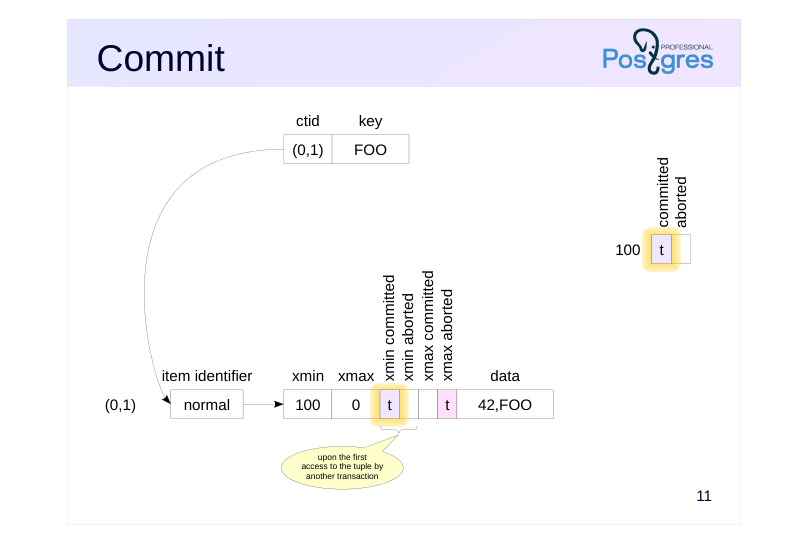
When changes are committed, a committed flag is set for this transaction in the CLOG. This is the only operation required, except for WAL.
When another transaction accesses this tuple, it will have to answer two questions:
Was transaction 100 completed? (This requires checking the list of active transactions maintained in the server’s shared memory.)
If it was completed, then was it committed or aborted? (This requires checking the CLOG.)
Since checking the CLOG every time is costly, the determined transaction status is recorded in hint bits: xmin committed and xmin aborted. If one of these bits is set, the status of the xmin transaction is considered known, and subsequent transactions will not need to access the CLOG.
Why are these bits not set by the inserting transaction? At the moment a transaction is committed or aborted, it is no longer clear which specific rows on which pages were modified by the transaction. Additionally, some of these pages may have already been evicted from the buffer cache to disk. Reading them back just to update the hint bits would significantly slow down the commit process.
The downside is that any transaction (even a simple read-only SELECT) can make data pages in the buffer cache dirty and generate new WAL records.
Page 13: Commit
Let’s commit the transaction:
What has changed on the page?
Nothing has changed, since the only operation performed during commit is recording the transaction status in the CLOG.
Information on transaction status is stored in the pg_xact subdirectory of the PGDATA directory and cached in shared memory. Starting with PostgreSQL 13, the pg_stat_slru view provides usage statistics for the caches, including the transaction status cache:
The first transaction that accesses the page determines the xmin transaction status and records it in the hint bits:
Page 14: Delete
 {#source-figure-014 caption=“Source slide page 14: Delete”}
Speaker notes
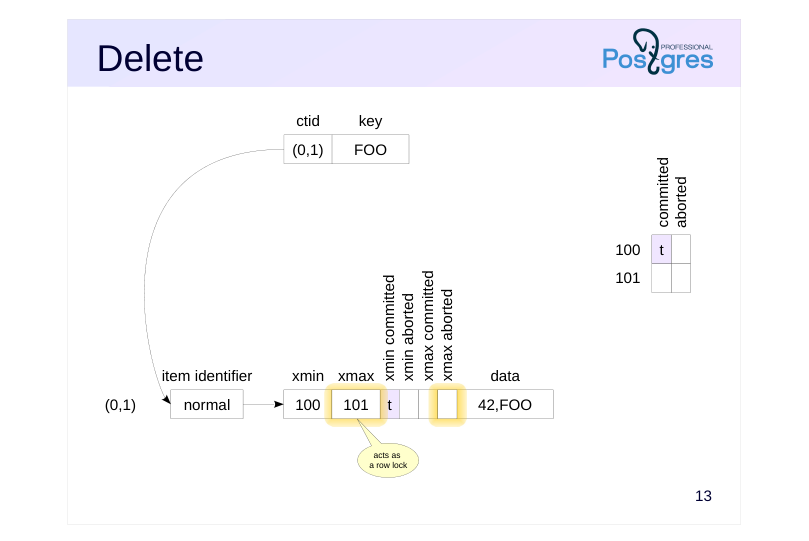
When a row is deleted, the ID of the deleting transaction is written to the xmax field of the current version and the xmax_aborted bit is reset. Nothing else happens.
Note that the value of xmax corresponding to the active transaction (as determined by other transactions from the active transactions list) works as a row lock. If another transaction is going to update or delete this row, it will have to wait until the xmax transaction is complete.
Locks are discussed in detail in the Locks module. For now, we will only note that the number of row locks is unlimited. They do not occupy space in RAM, and system performance is not affected by their number (except that the first process accessing the page will need to set the hint bits).
Page 15: Delete
Now let’s delete the row.
The transaction ID has been recorded to the xmax field:
Page 16: Abort
 {#source-figure-016 caption=“Source slide page 16: Abort”}
Speaker notes
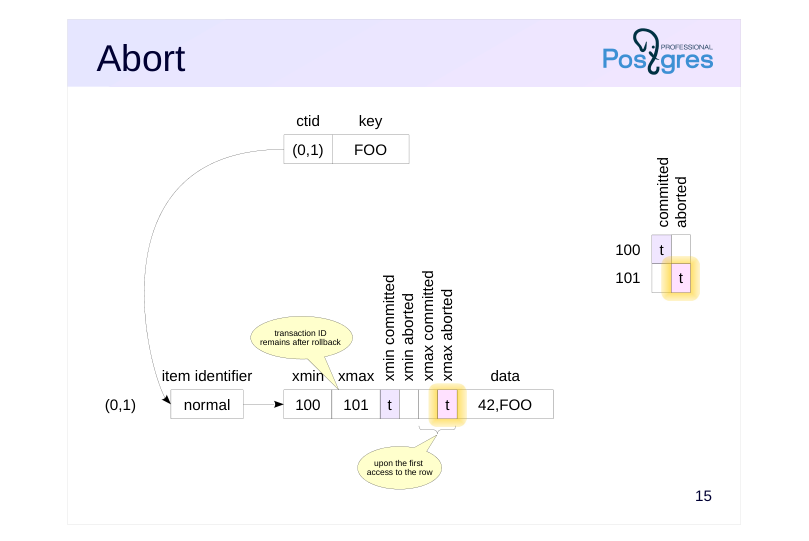
Abort works similarly to commit, except that the aborted bit is set in CLOG. Abort is done as fast as commit, there is no need to roll back the performed actions.
The ID of the aborted transaction remains in the xmax field. It could be cleared, but there is no point doing so. When the page is accessed, the transaction status will be determined, and the xmax_aborted hint bit will be set in the row version. This will indicate that the xmax field shall be ignored.
Page 17: Abort
When a transaction aborts, the xmax value remains in the header.
Upon the first access to the page, the corresponding hint bit is set:
Page 18: Update
 {#source-figure-018 caption=“Source slide page 18: Update”}
Speaker notes
An update works as if the old row version is first deleted and then a new one is inserted.
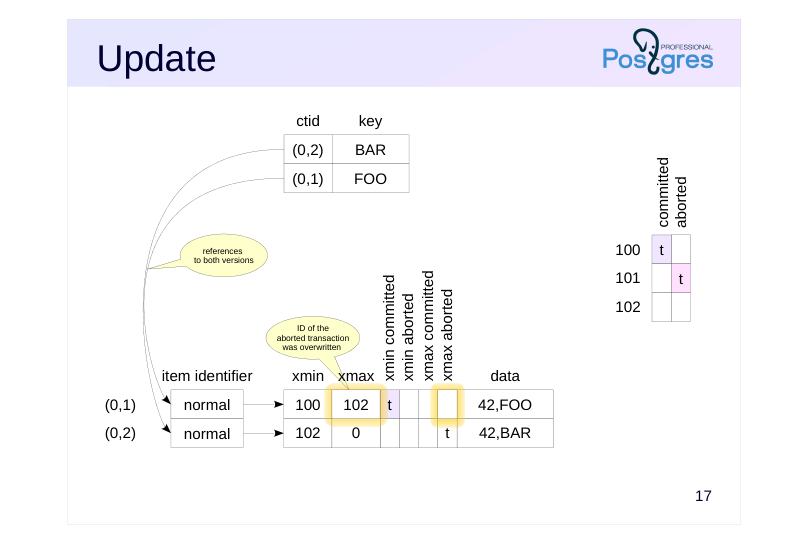
The old version is marked with the ID of the current transaction in the xmax field. Note that the new value 102 has overwritten the old value 101 since transaction 101 was aborted. Moreover, the xmax_committed and xmax_aborted bits in the old row version are unset since the completion status of the current transaction is still unknown.
The index page now contains the second item identifier and second entry, which references the second version in the table page.
The same way as for delete, the value of xmax in the first version indicates that the row is locked.
Page 19: Update
Now check an update.
The query returns one row (the new version):
However, the page shows both versions. The new transaction ID has replaced the old one (since the old transaction was aborted).
Meanwhile, the index page contains references to both versions:
Index entries within the page are ordered by key value. So, the entry with BAR key (referring to version (0,2)) comes first, followed by the entry with FOO key (referring to version (0,1)).
Page 20: Savepoint
 {#source-figure-020 caption=“Source slide page 20: Savepoint”}
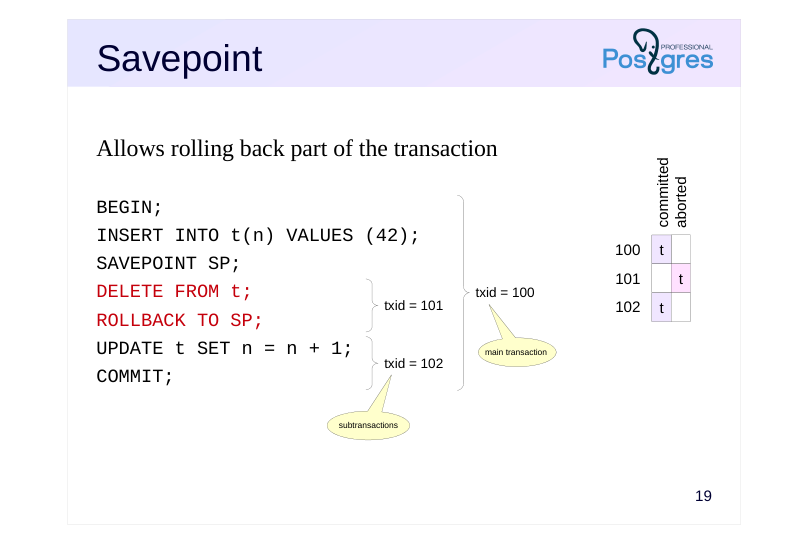
Allows rolling back part of the transaction
Speaker notes
The functionality of savepoints represents a subtle aspect, as they allow rolling back part of the current transaction. This is incompatible with the above model since no data changes are rolled back, the status of the entire transaction is changed instead.
For this reason, a transaction with a savepoint is split into several separate (not to be confused with autonomous!) subtransactions, so their status can be managed separately.
Page 21: Subtransactions
Separate ID and status in CLOG
- final status depends on the status of the main transaction
- Nesting information is stored on disk
- PGDATA/pg_subtrans directory
- cached in the shared memory buffers (similar to CLOG)
- Use cases
- SAVEPOINT
- PL/pgSQL exception handling (EXCEPTION)
- psql mode: ON_ERROR_ROLLBACK = on/interactive
Speaker notes
Subtransactions have their own IDs (which are higher than the ID of the main transaction). Their status is written to CLOG in the usual manner, but the final status depends on the status of the main transaction: if it is aborted, all subtransactions are aborted as well.
Information about transaction nesting is stored in the PGDATA/pg_subtrans directory. Its files are accessed through buffers in the server’s shared memory, which are structured the same way as CLOG buffers.
Note that SQL does not permit explicit use of subtransactions, that is, you cannot start a new transaction before you complete the current one. This mechanism gets implicitly involved when savepoints are used and also when handling PL/pgSQL exceptions.
It is worth noting that ON_ERROR_ROLLBACK mode in psql allows continuing the transaction after failure. Why is this mode not used by default? The reason is that an error might occur in the middle of a statement’s execution, so the atomicity would be broken. The only way to abort changes already made by that specific statement, without affecting other changes, is to use subtransactions. So, ON_ERROR_ROLLBACK mode places an implicit savepoint before each command, resulting in significant overhead.
Page 22: Savepoints and Subtransactions
Let’s truncate the table (this empties both the table and index files):
Start a transaction and insert a row.
Create a savepoint and delete the row.
Note: The pg_current_xact_id() function returns the ID of the main transaction, not the subtransaction ID:
Let’s roll back to the savepoint. The row versions remain on the page, but the subtransaction status changes:
Selecting from the table will show the row again, since its deletion was rolled back:
A new subtransaction is created for further changes. Its ID will be written to the xmax field of the first row version (replacing the rolled-back subtransaction ID 754) and to the xmin field of the new version:
Page 23: Page 23
Commit the changes. Again, the table page remains unchanged:
In the CLOG, the main transaction and all incomplete subtransactions are marked as committed:
Information about transaction nesting is stored in the pg_subtrans subdirectory of PGDATA. It is cached in shared memory, just like transaction status information:
Page 24: Takeaways
Table pages can store multiple versions of the same row, bounded by xmin and xmax transaction IDs
- Index entries do not contain versioning information
- Commit and rollback are performed equally fast
- Savepoints work through subtransactions
Page 25: Practice
- Create a table and insert one row into it. Then update this row twice and delete it. How many row versions are currently in the table? Check using the pageinspect extension. 2. Determine on which page the row of the pg_class table relating to the pg_class table is located. How many current row versions are on the same page? 3. Enable the ON_ERROR_ROLLBACK mode in psql and verify that this mode uses subtransactions.
Page 26: 1. Row Versions
Create the extension and a table.
Insert a row, update it, then delete it:
The table is empty:
Now let’s examine the row versions on the page:
2. Tuples on a Specific Page
The page number is the first component of the ctid value:
Although tid data type does not directly provide page number, you can convert it via the point type:
Page 27: Page 27
Number of rows on the same page:
3. ON\_ERROR\_ROLLBACK Mode
Set the mode:
Start a transaction and insert a row.
Insert another row.
Each command runs in its own subtransaction, as expected.
This setting remains active until the psql session ends. To avoid interfering with subsequent operations in this session, restore the default setting:
03 Lesson 03: MVCC / Snapshots
This page is extracted from the official PDF into native Markdown. Slide text, code and speaker notes are kept in reading order; the original PDF and HTML remain the layout references. HTML source: dba2_03_mvcc_snapshots.html Archive: DBA2-handouts-16-en.zip PDF pages: 31
Page 1: MVCC / Snapshots
Copyright
© Postgres Professional, 2016–2026 Authors: Egor Rogov, Pavel Luzanov, Ilya Bashtanov, Igor Gnatyuk Translated by: Elena Sharafutdinova Photo: Oleg Bartunov (Phu Monastery and Bhrikuti Peak, Nepal)
Use of Course Materials
Non-commercial use of course materials (presentations, demonstrations) is allowed without restrictions. Commercial use is possible only with the written permission of Postgres Professional. It is prohibited to make changes to the course materials.
Feedback
Please send your feedback, comments and suggestions to: edu@postgrespro.ru
Disclaimer
Postgres Professional assumes no responsibility for any damages and losses, including loss of income, caused by direct or indirect, intentional or accidental use of course materials. Postgres Professional company specifically disclaims any warranties on course materials. Course materials are provided “as is,” and Postgres Professional company has no obligations to provide maintenance, support, updates, enhancements, or modifications.
Page 2: Topics
- Row Version Visibility
- Snapshot
- Virtual Transaction ID
- Transaction and Database Horizon
- Snapshot Export
Page 3: Snapshot
Captures a consistent view of data at a specific point in time
- only changes committed up to that moment are visible
- Created at:
snapshot
- Read Committed —
- start of each statement
- Repeatable Read, Serializable —
- start of the first statement
- xid
Speaker notes
In the previous Page Layout and Row Versions lesson, we saw that a data page can physically contain several versions of the same row.
Transactions work with a snapshot which determines the visibility of particular rows. This mechanism provides a consistent view of the data at a specific point in time (in the figure, the moment the snapshot was created is shown in blue).
A snapshot sees only the changes committed by the time it was taken, thus providing a consistent (ACID) view of the data at this specific point in time. This completely prevents dirty reads at any isolation level.
At the Read Committed isolation level, a snapshot is created at the start of each transaction statement. This snapshot is active while the statement is being executed. Thus, each statement sees a consistent data state. However, changes committed between two statements can cause non-repeatable reads and phantom reads.
At the Repeatable Read (and Serializable) isolation level, a snapshot is created once at the start of the transaction’s first statement. This snapshot remains active until the very end of the transaction. In this case, both non-repeatable reads and phantom reads are prevented.
Page 4: Row Version Visibility
Row version visibility is defined by xmin and xmax fields
- A tuple is included in a snapshot if:
- changes of xmin transaction are visible to the snapshot,
- changes of xmax transaction are not visible to the snapshot
- Transaction’s changes are visible if:
- it is the same transaction that created the snapshot or
- it committed before the snapshot was created
- Transaction’s own changes
- based on the operation sequence (cmin/cmax) of the transaction
Speaker notes
A snapshot is not a physical copy of tuples. Instead, certain visibility rules determine whether a tuple belongs to a snapshot.
Whether a given tuple is visible to a snapshot is defined by xmin and xmax fields of the tuple header, i.e., transaction IDs that perform insertion and deletion. Since xmin–xmax intervals do not intersect, each row is represented in any snapshot by one of its versions at most.
The exact visibility rules are quite complex, as they take into account a variety of different scenarios and corner cases. In general, we can describe them as follows: a tuple is visible in a snapshot if it sees the changes made by transaction xmin and does not see the changes made by transaction xmax. In other words, the tuple has already been created and has not been deleted yet (if deletion occurred).
In turn, transaction changes are visible to the snapshot if it is the transaction that created the snapshot (it sees its own changes), or if the transaction has been committed before the snapshot was created.
The visibility rules for a transaction’s own changes are more complex: in some cases, only part of such changes must be visible. For example, a cursor that was opened at a particular point in time must not see any changes that happened later, regardless of the isolation level. For this purpose, tuple headers contain a special field (cmin and cmax pseudocolumns) that indicates the sequence number of the operation within the transaction, and this number is also taken into account.
Page 5: Row Version Visibility
 {#source-figure-005 caption=“Source slide page 5: Row Version Visibility”}
Speaker notes
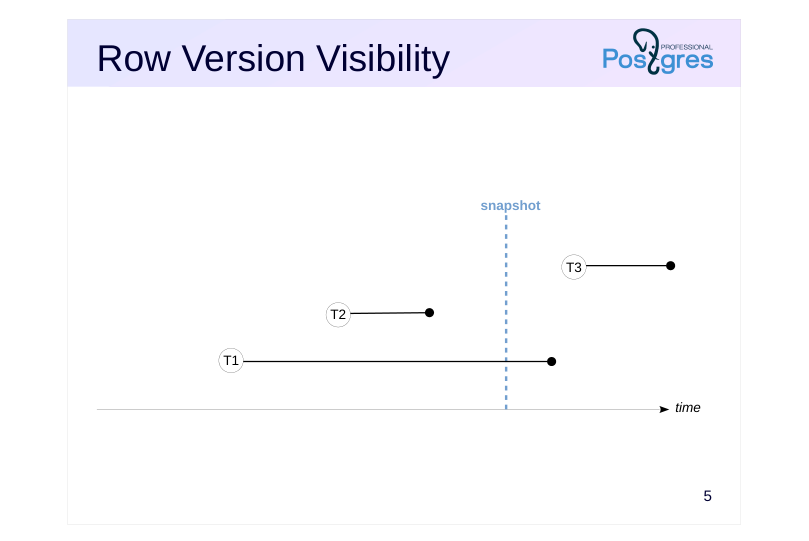
Let’s take a look at a simple example.
In the figure, the snapshot creation moment is shown in blue. The black lines show transactions from their start till commit time (aborted transactions are never taken into account by a snapshot).
In this case, T2 is the only transaction that was committed before the snapshot creation, so only its changes are visible.
T1 was active at the time of the snapshot creation, so its changes are not visible. T3 was started after the snapshot creation, so its changes are not visible either.
Page 6: Row Version Visibility
 {#source-figure-006 caption=“Source slide page 6: Row Version Visibility”}
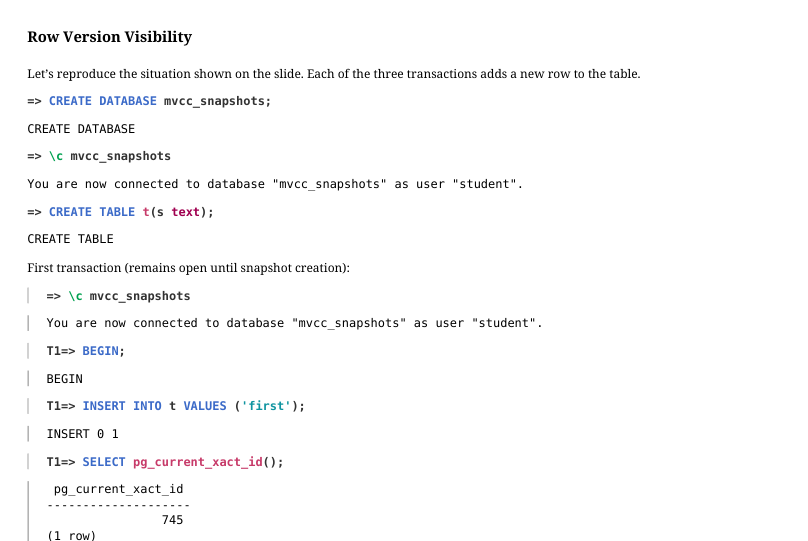
Let’s reproduce the situation shown on the slide. Each of the three transactions adds a new row to the table.
First transaction (remains open until snapshot creation):
Second transaction (committed immediately):
Next, create a snapshot in a transaction in a separate session.
Then, commit the first transaction after creating the snapshot:
Page 7: Page 7
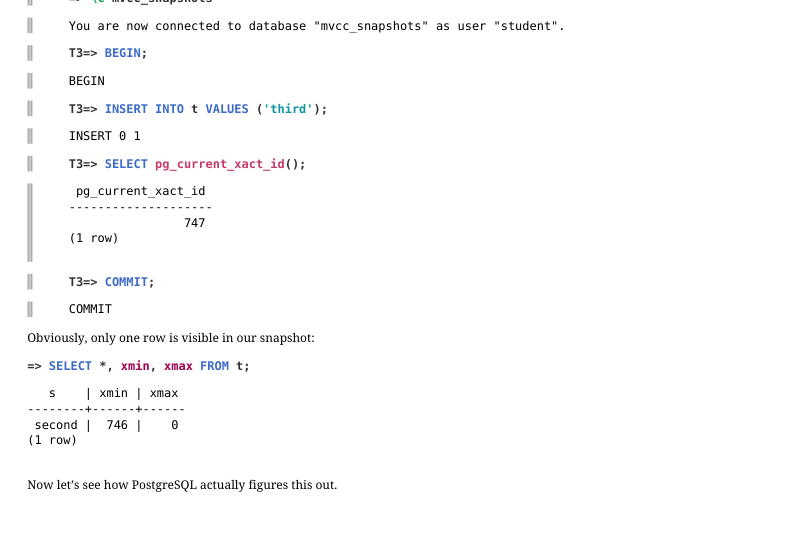 {#source-figure-007 caption=“Source slide page 7: Page 7”}
Third transaction starts when our snapshot is already in place:
Obviously, only one row is visible in our snapshot:
Now let’s see how PostgreSQL actually figures this out.
Page 8: Row Version Visibility
 {#source-figure-008 caption=“Source slide page 8: Row Version Visibility”}
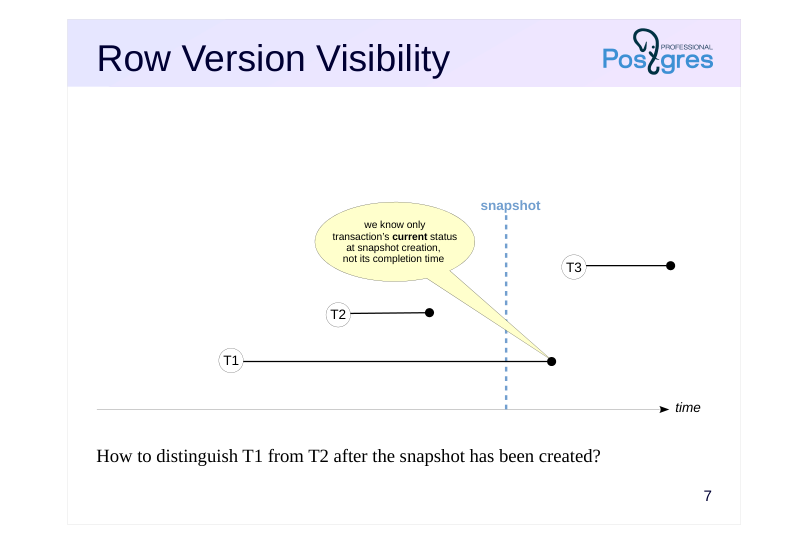
How to distinguish T1 from T2 after the snapshot has been created?
Speaker notes
The implementation challenge is that we know only a transaction’s start time, defined by its ID (xid), which can be compared to the xmin or xmax of a tuple. However, the transaction’s completion time is never recorded. All we can determine is the current status of transactions.
This means that once T1 was committed, it is impossible to differentiate it from T2: there is no way to determine that one of them was committed before the snapshot was created and the other one after.
Since the history of transaction activity is not stored, a snapshot can only capture the current state. For example, it is impossible to create a snapshot of the database’s consistent state from five minutes ago, even if all necessary row versions still exist in heap pages.
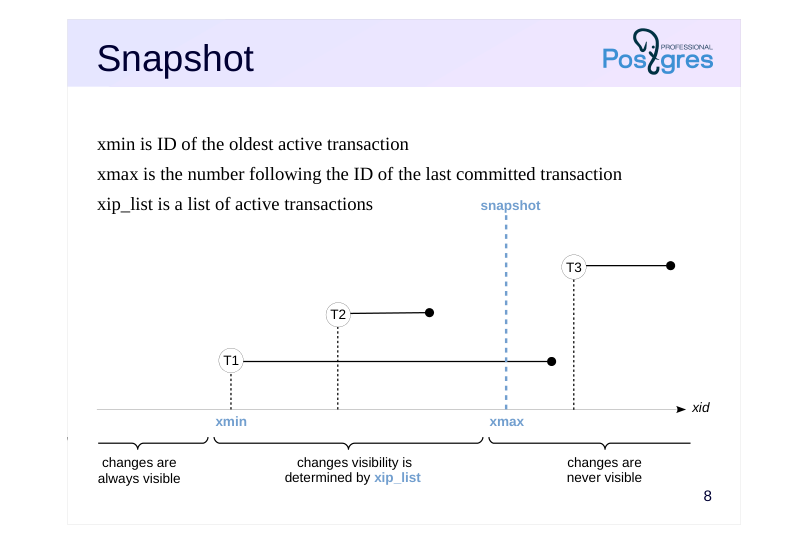
Page 9: Snapshot
 {#source-figure-009 caption=“Source slide page 9: Snapshot”}
xmin is ID of the oldest active transaction
- xmax is the number following the ID of the last committed transaction
- xip_list is a list of active transactions
Speaker notes
When a snapshot is created, several values are stored in the local memory of the backend process, so these values define the snapshot:
● xmin is the snapshot’s lower boundary, which is represented by the ID of the oldest active transaction.
All transactions with lower IDs, if committed, have their changes visible to the snapshot; if aborted, their changes are ignored.
● xmax is the snapshot’s upper boundary, which is represented by the number following the ID of the last committed transaction. The upper boundary defines the moment when the snapshot was taken. Note that the timestamp is defined not by time (as was shown in previous slides), but by increasing transaction IDs.
All transactions with an ID greater than or equal to xmax were definitely not committed at the time of the snapshot: they were either active, aborted, or had not yet started. Consequently, their changes are not visible.
● xip_list (xid-in-progress list) is the list of IDs of all active transactions.
This list is used to exclude changes of the transactions that have been completed but were active at the snapshot creation time.
Use pg_current_snapshot() and other functions to get information about a snapshot.
https://postgrespro.com/docs/postgresql/16/functions-info
Page 10: Snapshot
 {#source-figure-010 caption=“Source slide page 10: Snapshot”}
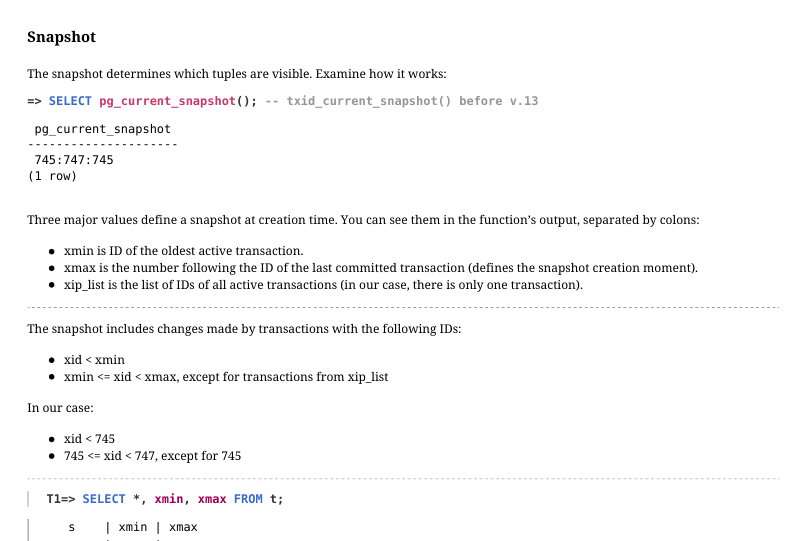
The snapshot determines which tuples are visible. Examine how it works:
Three major values define a snapshot at creation time. You can see them in the function’s output, separated by colons: xmin is ID of the oldest active transaction. xmax is the number following the ID of the last committed transaction (defines the snapshot creation moment). xip_list is the list of IDs of all active transactions (in our case, there is only one transaction). The snapshot includes changes made by transactions with the following IDs: xid < xmin xmin <= xid < xmax, except for transactions from xip_list In our case: xid < 745 745 <= xid < 747, except for 745
First row is not visible: it was created by transaction 745, which is in the active list. Second row is visible: it was created by transaction 746, which is in the snapshot range. Third row is not visible: it was created by transaction 747, which is outside the snapshot range.
Page 11: Virtual Transactions
A read-only transaction does not affect visibility
- backend process assigns a virtual ID
- virtual ID can be ignored by snapshots
- virtual ID is never stored in data pages
- permanent xid is assigned upon the first data modification
Speaker notes
To consume transaction IDs sparingly, PostgreSQL offers a special optimization.
If a transaction is read-only, it does not affect row version visibility and its ID can be ignored by snapshots.
That is why a transaction is at first given a virtual ID (vxid) that consists of an internal ID of the backend process and a sequential number.
Assigning a virtual ID does not require synchronization between all processes, so it happens very fast. We will explore another reason for using virtual IDs in the Freezing lesson of the current module.
This virtual ID must never be written to data pages, as it can become meaningless upon subsequent access to the page.
Once the transaction starts modifying data, it is immediately assigned a permanent ID (xid). This ID can appear in data pages within xmin and xmax fields of row versions.
Page 12: Virtual Transactions
Read-only transactions do not affect tuple visibility and they are ignored by snapshots. They do not have a permanent ID:
A permanent transaction ID is assigned at first modification made by the transaction, or when calling the pg_current_xact_id() function.
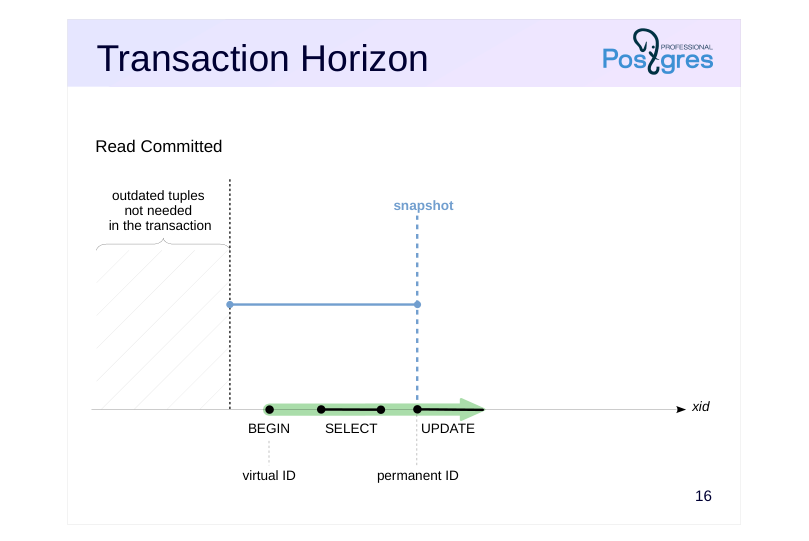
Page 13: Transaction Horizon
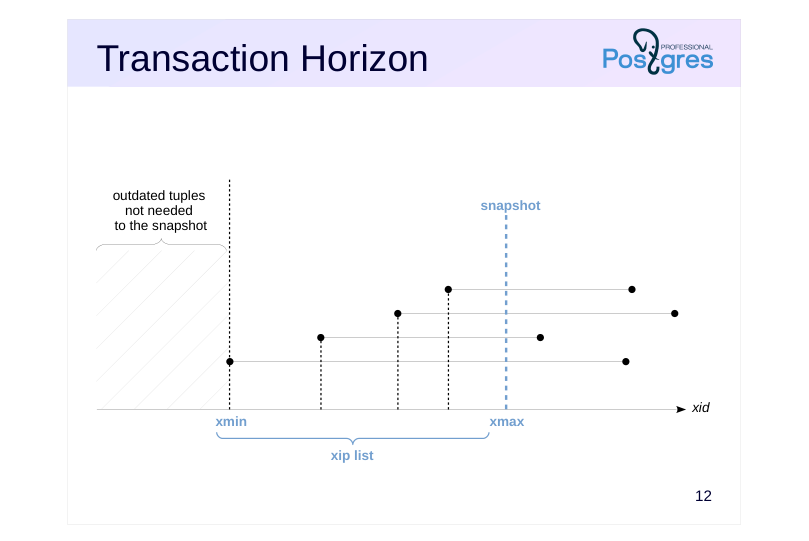 {#source-figure-013 caption=“Source slide page 13: Transaction Horizon”}
Speaker notes
The ID of the oldest transaction (the snapshot’s xmin) is crucial since it defines the snapshot’s horizon.
In astrophysics, an event horizon is a boundary beyond which an observer cannot see any events. In our case, the snapshot horizon is a boundary beyond which a statement using the snapshot cannot see any outdated row versions.
A snapshot needs an outdated row version only if it was deleted (or replaced) by a transaction that was in progress. However, beyond that horizon, it is guaranteed that all such transactions have completed.
Page 14: Transaction Horizon
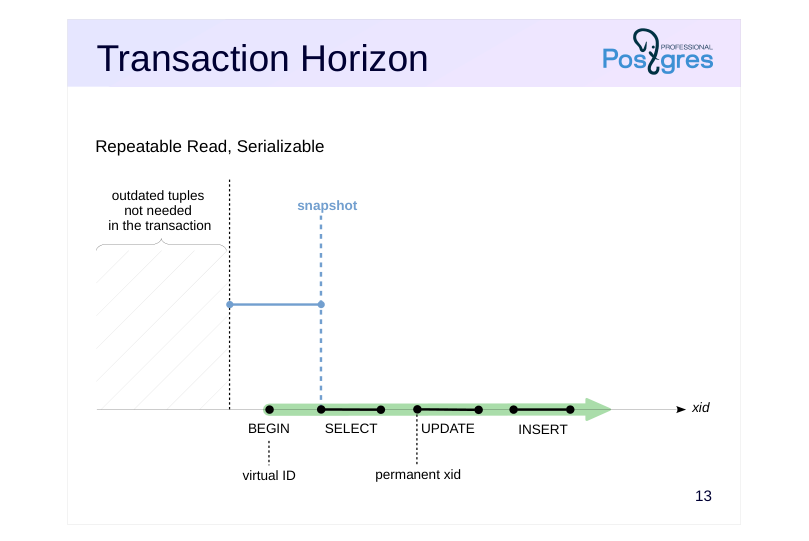 {#source-figure-014 caption=“Source slide page 14: Transaction Horizon”}
Repeatable Read, Serializable
Speaker notes
At different isolation levels, transactions use snapshots differently.
For the Repeatable Read and Serializable levels, a transaction creates a snapshot upon its first access to the server and uses it until its completion.
The snapshot’s left boundary (the beginning of the horizontal segment in the figure), which defines the transaction horizon, is equal to the ID of the oldest active transaction. Current transaction is active, so the horizon cannot be positioned to the right of the current transaction’s ID.
Page 15: Transaction Horizon
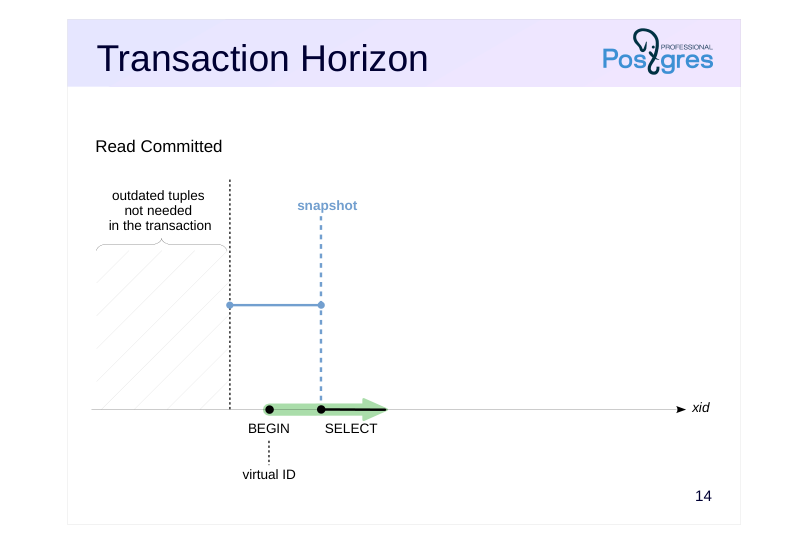 {#source-figure-015 caption=“Source slide page 15: Transaction Horizon”}
Read Committed
Speaker notes
In case of the Read Committed isolation level, a transaction can use several snapshots.
First, the transaction is assigned a virtual ID, and a snapshot is created upon its first database access.
Page 16: Transaction Horizon
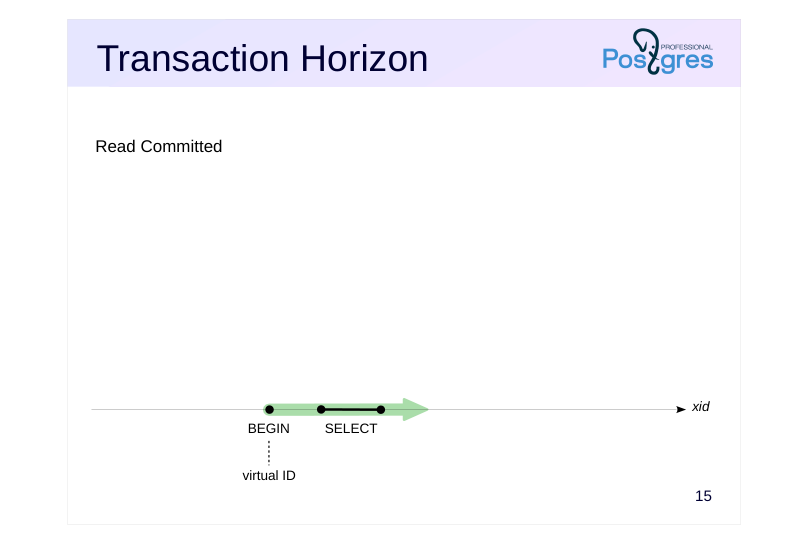 {#source-figure-016 caption=“Source slide page 16: Transaction Horizon”}
Read Committed
Speaker notes
The snapshot is released when the query finishes. In our example, since the transaction’s first statement was read-only, the transaction has not yet been assigned a permanent xid. Therefore, it will not hold back the horizon until its next statement begins.
Page 17: Transaction Horizon
 {#source-figure-017 caption=“Source slide page 17: Transaction Horizon”}
Read Committed
Speaker notes
When a transaction first modifies data, it is assigned a permanent xid. At that same moment, a new snapshot is created. As always, this snapshot’s horizon (xmin) is set to the oldest active transaction ID.
As the current transaction is active, the horizon can never be positioned after this transaction’s ID.
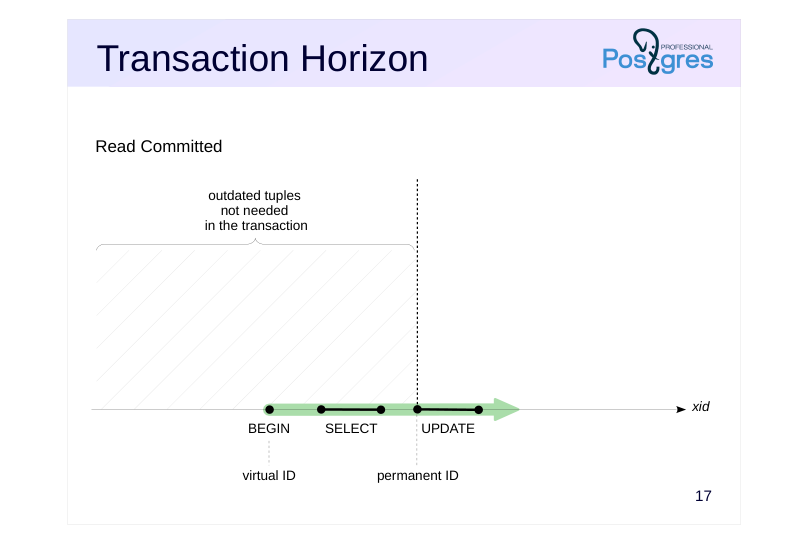
Page 18: Transaction Horizon
 {#source-figure-018 caption=“Source slide page 18: Transaction Horizon”}
Read Committed
Speaker notes
When a statement is completed, its snapshot is released. However, the transaction continues to hold the horizon at its ID to maintain the ability to roll back.
If a transaction remains in this state for a long time (idle in transaction) without executing any commands, the horizon remains in place.
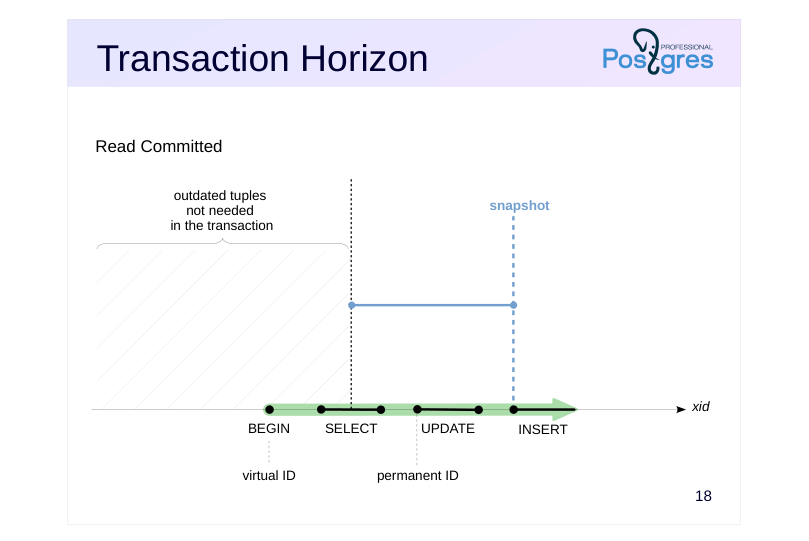
Page 19: Transaction Horizon
 {#source-figure-019 caption=“Source slide page 19: Transaction Horizon”}
Read Committed
Speaker notes
The next statement uses a new snapshot. The horizon of this snapshot is defined by considering all other active transactions. The current transaction itself remains active; therefore, the snapshot’s horizon (xmin) can never be greater than its own xid.
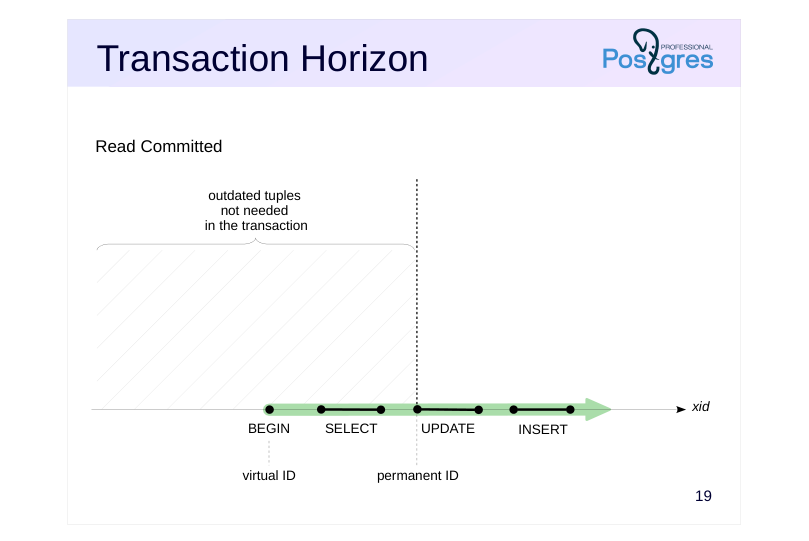
Page 20: Transaction Horizon
 {#source-figure-020 caption=“Source slide page 20: Transaction Horizon”}
Read Committed
Speaker notes
Between statements, without an active snapshot, the horizon shifts towards the transaction ID. If the transaction has never obtained a permanent ID (i.e., it has not started modifying data), it will not hold back the horizon at all.
Page 21: Database Horizon
 {#source-figure-021 caption=“Source slide page 21: Database Horizon”}
Speaker notes
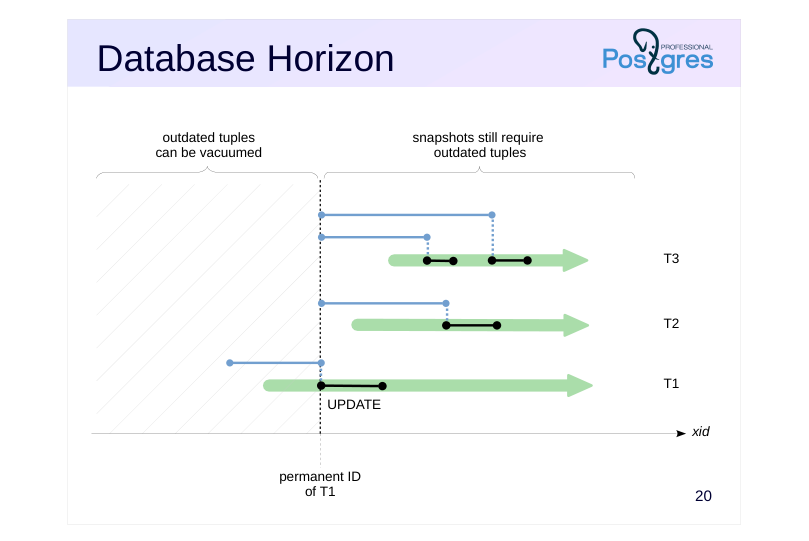
We can define the database horizon as the minimum of all horizons of transactions and snapshots. When a snapshot is released, the database horizon shifts forward, towards the horizon of the next active snapshot. Reverse movement is impossible since the xmin of newly created snapshots, which represents the minimum ID of an active transaction, can only shift to the right.
Outdated tuples behind the database horizon will never be required by any transaction. Such row versions can be safely vacuumed.
The slide shows an example of three transactions with Read Committed isolation level. A snapshot was created for the UPDATE statement in T1. When the statement is completed, the snapshot is deleted and no longer holds the horizon. However, T1 is still active, and therefore the snapshot horizons of Transactions 2 and 3 cannot move to the right past the ID of T1. Thus, any active transaction with a permanent ID holds the horizon merely by the fact of its existence.
This means that outdated tuples in this database cannot be cleaned up. This holds true even for a long-running transaction that does not interact with the same data as other transactions, since the database horizon is common for all transactions.
This is one of the key reasons why you should keep transactions no longer than absolutely necessary.
Page 22: Database Horizon
 {#source-figure-022 caption=“Source slide page 22: Database Horizon”}
Speaker notes
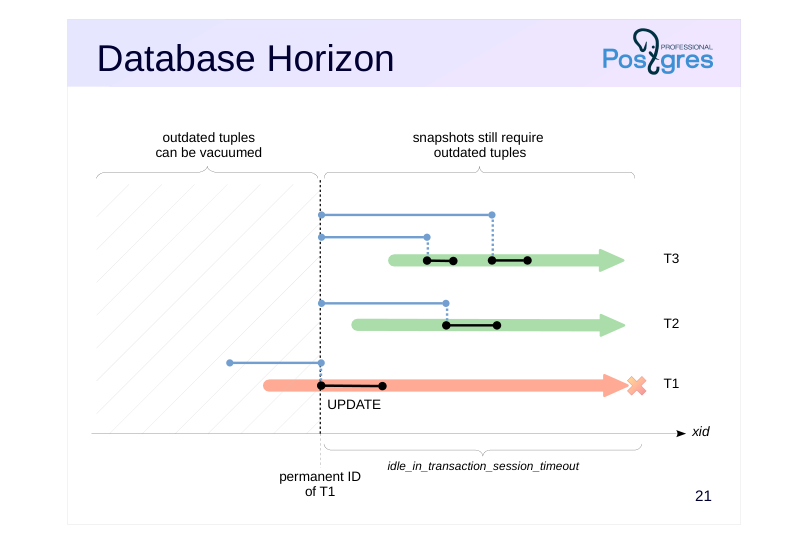
If this scenario creates operational problems that cannot be addressed in the application code, consider using the idle_in_transaction_session_timeout parameter. It limits the lifetime of an idle transaction. The transaction is aborted upon reaching this threshold.
Page 23: Transaction and Database Horizons
A transaction can check its horizon as follows:
Although our transaction is virtual and does not affect visibility of other transactions, it holds back the database horizon by accessing data via snapshot. After the transaction is completed, the horizon moves forward allowing to remove outdated tuples:
Page 24: Snapshot Export
 {#source-figure-024 caption=“Source slide page 24: Snapshot Export”}
Task
- distribute work among several concurrently running transactions
- in such a way that they all see the same data
Speaker notes
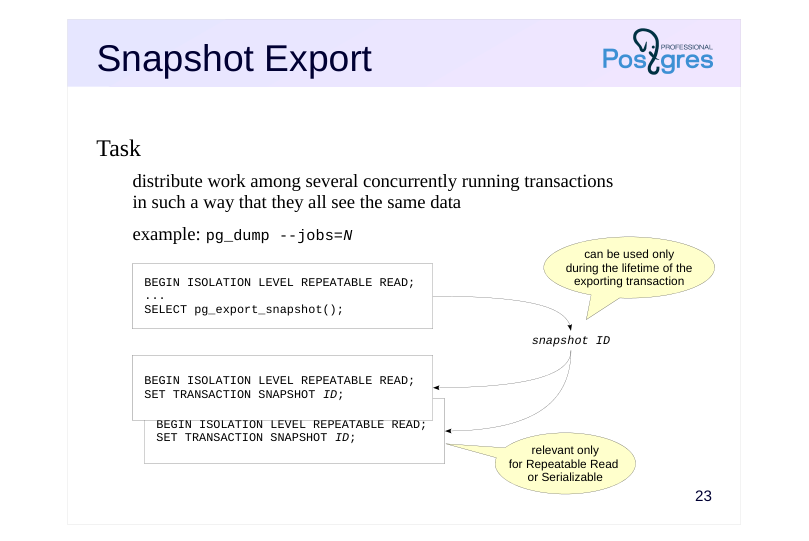
There are situations where several transactions must see the same data state. Of course, we cannot rely on snapshots being identical just because transactions were started “at the same time”. Snapshot export-import mechanism is used for this purpose.
The pg_export_snapshot() function saves snapshot information as a file in the PGDATA/pg_snapshots directory and returns the snapshot ID. This ID can be transferred (using means external to the DBMS) to another transaction.
https://postgrespro.com/docs/postgresql/16/functions-admin#FUNCTIONS-S NAPSHOT-SYNCHRONIZATION
The exported snapshot exists until the exporting transaction ends. Before executing the first statement, another transaction can import the snapshot by running the SET TRANSACTION SNAPSHOT command. Before that, the isolation level must be set to Repeatable Read or Serializable because statements use their own snapshots at the Read Committed level.
https://postgrespro.com/docs/postgresql/16/sql-set-transaction
Snapshot export is used, for example, by the pg_dump utility in parallel mode or by logical replication to obtain the initial state of tables included in a subscription (see the DBA3 course for more details).
Page 25: Takeaways
A snapshot contains information necessary to determine the visibility of row versions
- The time of a snapshot creation is determined by the isolation level
- A snapshot determines the transaction horizon, which affects the ability to clean up outdated versions
Page 26: Practice
- Reproduce a situation where one transaction still sees a deleted row, while another no longer does. Examine snapshots of these transactions, xmin and xmax values of the deleted row. Explain visibility based on this data.
- If a query calls a function that contains another query, which snapshot will be used for the nested query?
- Check Read Committed and Repeatable Read isolation levels as
- well as volatile and stable function categories.
- In one transaction, export a snapshot. Then, in another transaction, modify the data. Import the snapshot and check that it still shows the unmodified data.
Speaker notes
- Create a function using the template below, provided that a table t has been created:
You may also find the pg_sleep(n) function useful to pause execution for n seconds.
Page 27: 1. Snapshots of Two Transactions
Single row table:
The first transaction sees the row:
The second transaction in another session deletes the row:
Page 28: Page 28
The first transaction still sees the row:
The snapshots of both transactions are identical. According to visibility rules, both should see the row, since: Changes of xmin = 745 transaction are visible in the snapshot (745 < 746). Changes of xmax = 746 transaction are not visible in the snapshot (746 >= 746). However, the second transaction does not see the row because it deleted the row, which is an exception to the standard visibility rules.
2. Snapshot of a Nested Query
Inside a function that counts the number of rows in the table, we add a one-second delay for easier testing:
Now we start a transaction with Read Committed isolation level. In the query, we call the function several times while simultaneously counting the number of rows via a subquery.
Simultaneously, we execute another transaction that increases the number of rows in the table. If the main query and the nested query use different snapshots, we will find this by the difference in the result.
Page 29: Page 29
The value in the first column does not change, because the query uses the snapshot created at the start of its execution. However, the value in the second column changes, because queries inside the volatile function use their own snapshots. Repeat the experiment for the Repeatable Read isolation level:
Now let’s do the same for a function with the stable volatility category.
Read Committed level:
Page 30: Page 30
Repeatable Read level:
Conclusions: Queries in volatile functions at the Read Committed isolation level use their own snapshots and can see changes made during the statement execution. Such an opportunity is more problematic rather than practical. For any other combination of volatility category and isolation level, nested queries use a snapshot of the main query.
3. Exporting Snapshots
The pg_export_snapshot function returns the ID of a snapshot that can be passed to another transaction (by means external to the DBMS):
In another session, delete all rows from the table:
Then, the transaction imports the snapshot and sees the same data in it as the transaction that exported the snapshot:
Page 31: Page 31
04 Lesson 04: MVCC / HOT Updates and Page Pruning
This page is extracted from the official PDF into native Markdown. Slide text, code and speaker notes are kept in reading order; the original PDF and HTML remain the layout references. HTML source: dba2_04_mvcc_hot.html Archive: DBA2-handouts-16-en.zip PDF pages: 26
Page 1: MVCC / HOT Updates and Page Pruning
Copyright
© Postgres Professional, 2016–2026 Authors: Egor Rogov, Pavel Luzanov, Ilya Bashtanov, Igor Gnatyuk Translated by: Elena Sharafutdinova Photo: Oleg Bartunov (Phu Monastery and Bhrikuti Peak, Nepal)
Use of Course Materials
Non-commercial use of course materials (presentations, demonstrations) is allowed without restrictions. Commercial use is possible only with the written permission of Postgres Professional. It is prohibited to make changes to the course materials.
Feedback
Please send your feedback, comments and suggestions to: edu@postgrespro.ru
Disclaimer
Postgres Professional assumes no responsibility for any damages and losses, including loss of income, caused by direct or indirect, intentional or accidental use of course materials. Postgres Professional company specifically disclaims any warranties on course materials. Course materials are provided “as is,” and Postgres Professional company has no obligations to provide maintenance, support, updates, enhancements, or modifications.
Page 2: Topics
- Why Vacuuming Is Not Enough
- HOT Updates
- Table Pruning
- Index Pruning
Page 3: Vacuuming Is Not Enough
Dead row versions
- lead to table and index bloat
- Index synchronization
- any change in a table row requires updating all indexes
- Splits of index pages
- reduce performance
- increase size
Speaker notes
The multiversion concurrency control generates outdated row versions. This leads to table and index bloating which in turn reduces query performance.
If a table has indexes, they need to be synchronized with table changes. This leads to a modification of a large number of pages and also reduces performance.
The problem is aggravated by the specific implementation of B-trees in PostgreSQL: if an index page does not have enough free space for a new record, the page is split into two, and the data is redistributed between them. Frequent splits reduce performance when inserting and updating rows.
Moreover, when records are deleted (or vacuumed), two index pages are not merged back into one. Because of this, the size of the index may not decrease even if a significant part of the data has been deleted.
Regular vacuuming solves the problem of table and index bloating, but it requires significant resources. Therefore, it is beneficial to remove outdated row versions and index entries even during normal page access that is not part of a vacuum process. Also, to prevent redundant index updates during table modifications, PostgreSQL combines row versions into HOT chains. We will study them in the next slides.
Page 4: Normal Update
 {#source-figure-004 caption=“Source slide page 4: Normal Update”}
Speaker notes
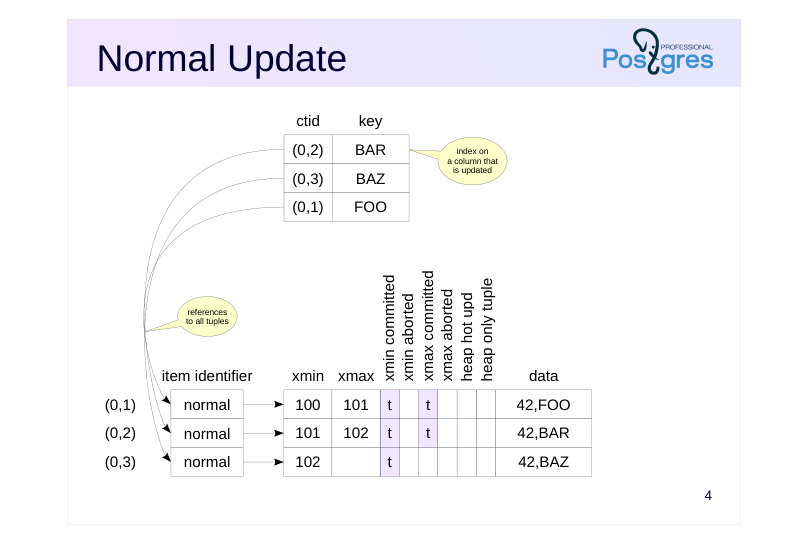
Note that during a normal update, an index creates references to all tuples in the table pages.
(The exception is BRIN index, which does not contain references to individual table rows. The structure of different index types is covered in detail in QPT course.)
Why is this approach inefficient?
Any change to a row requires updating every index created on the table (even if the modified fields are not part of the index). Therefore, the more indexes a table has, the greater the performance overhead.
Page 5: HOT Update
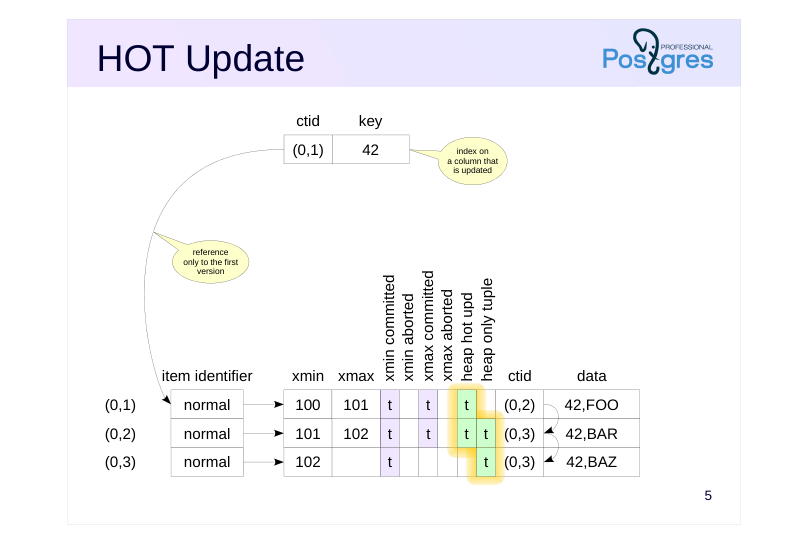 {#source-figure-005 caption=“Source slide page 5: HOT Update”}
Speaker notes
If an index is created on a field whose value has not changed as a result of updating the row, you can avoid creating an additional reference in the B-tree for the same key value. This is how optimization called Heap-Only Tuple Update works.
In this type of update, the index page contains only one reference to the first row version in the table page. A chain of row versions is then built within the table page:
● Rows that are modified and included in the chain are tagged with the Heap Hot Updated bit.
● Row versions that are not referenced from the index are tagged with the Heap Only Tuple bit.
● Row versions are chained together using the ctid field in the tuple header.
If an index scan accesses a heap page and finds a row version marked as Heap Hot Updated, it means that it should proceed further along the chain of row versions. (Of course, the visibility of all row versions obtained this way is checked before they are returned to the client.)
https://git.postgresql.org/gitweb/?p=postgresql.git;a=blob;f=src/backend/acc ess/heap/README.HOT;hb=HEAD
Page 6: HOT Update
Values of the indexed columns must not change
- otherwise you will have to add an index entry referencing the new row
- version, and the version cannot be tagged as heap only
- Update chain must remain within one page
- no need to access other pages,
- traversing the chain does not degrade performance
- if the table page does not have enough space for the new version,
- the chain is broken (as if the optimization does not work)
- space on the page can be reserved by reducing
- the fillfactor storage parameter of the table (100% → 10%)
Speaker notes
We emphasize that HOT updates work only if none of the values of the indexed columns are changed. Otherwise, a reference appears in an index directly to the new row version, which contradicts the idea of this optimization. Only the abovementioned BRIN index does not prevent HOT updates (it does not contain references to individual table rows).
HOT updates are also applied to tables that have no indexes at all. When any field in such a table is updated, a version chain is built.
This optimization is confined to one page. Therefore, traversing the chain does not require accessing other pages and does not degrade performance.
However, if the page does not have enough free space to place a new row version, the chain is broken. You have to make a reference from the index to the row version located on a different page.
Therefore, with frequent updates of non-indexed fields, it may be beneficial to reduce the fillfactor storage parameter. This parameter specifies the threshold percentage of space occupied on the page after which new rows cannot be inserted. The default value is 100%, it can be reduced to up to 10%. The remaining space is reserved for updates. In this case, a new row version can fit on the same page. (On the other hand, the higher the fillfactor, the more compact the records are and, accordingly, the table size is smaller.)
Page 7: HOT Update
Let’s create a table. For simplicity, we do not create an index: any update is a HOT update. Each table row consists of 2000 characters; if only Latin letters are used, then the row version will occupy 2000 bytes plus the header. We set the fillfactor parameter to 75% so that only three versions can be placed on the page and one is available for updating.
To examine the content of the page, we use the pageinspect extension.
For convenience, create a familiar view in a more compact form, supplemented with two fields:
Let’s insert a row and update it to create a new version:
Since the updated column is not included in any index (in our case, there are no indexes at all), a chain of row versions appears in the table page:
Page 8: Page 8
hhu (Heap Hot Updated) flag indicates that the ctid chain must be followed. hot (Heap Only Tuple) flag indicates that this tuple is not referenced from indexes. The chain will grow (within the page) with further changes:
Page 9: Table Pruning
Performed whenever the page is accessed
- if a previous update does not find space for a new row version
- on the same page
- if the page exceeds either the fillfactor or the 90% threshold
- Operates within one table page
- does not release item identifiers that can be referenced by indexes
- does not update the free space map
- does not update the visibility map
Speaker notes
When accessing a page, whether for an update or for a read, pruning can occur if PostgreSQL considers that the space on the page is running out. One of the following conditions must be met:
A previous update on this page could not find enough space to place a new row version here. It sets a flag in the page’s header, indicating that pruning should be triggered the next time the page is accessed.
If the page exceeds either the fillfactor or the 90% threshold, then pruning will trigger immediately.
Pruning removes row versions that are not visible in any snapshot (located beyond the database horizon), but it operates strictly within one table page. Item identifiers are not released, since they may be referenced by indexes which are stored in other pages that are not pruned.
The free space map is not updated for two reasons: to minimize overhead and because the freed space is prioritized for updates, not for inserts. The visibility map is also not updated.
The fact that a page can be pruned during reading operation means that a SELECT query can potentially change pages. This is another instance of such behavior, in addition to the updating of hint bits discussed in the Page Layout and Row Versions lesson.
Page 10: Before HOT Pruning
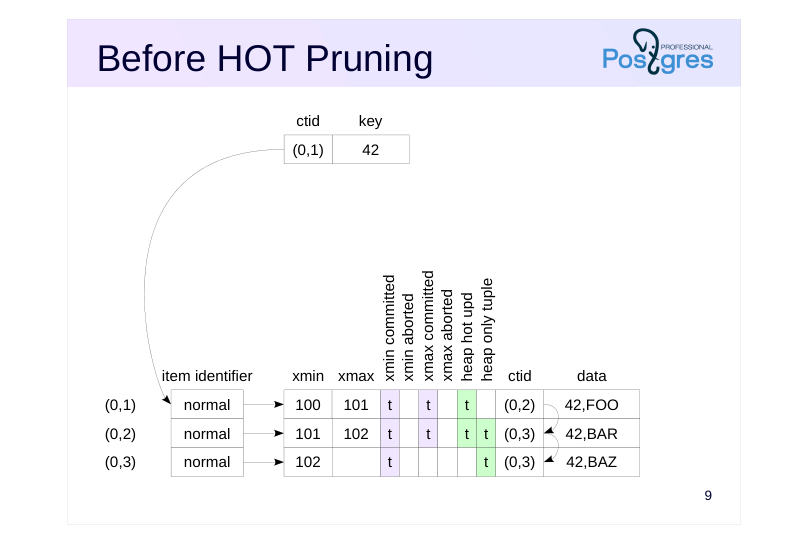 {#source-figure-010 caption=“Source slide page 10: Before HOT Pruning”}
Speaker notes
HOT pruning is a specific but important case of pruning.
The figure shows the state before pruning. There are three versions of the same row in the table. The first version (0,1) is referenced by an index, while the other two, (0,2) and (0,3), are marked as heap-only tuples.
Row versions (0,1) and (0,2) are dead, not visible in any snapshot, and can be removed.
Page 11: After HOT Pruning
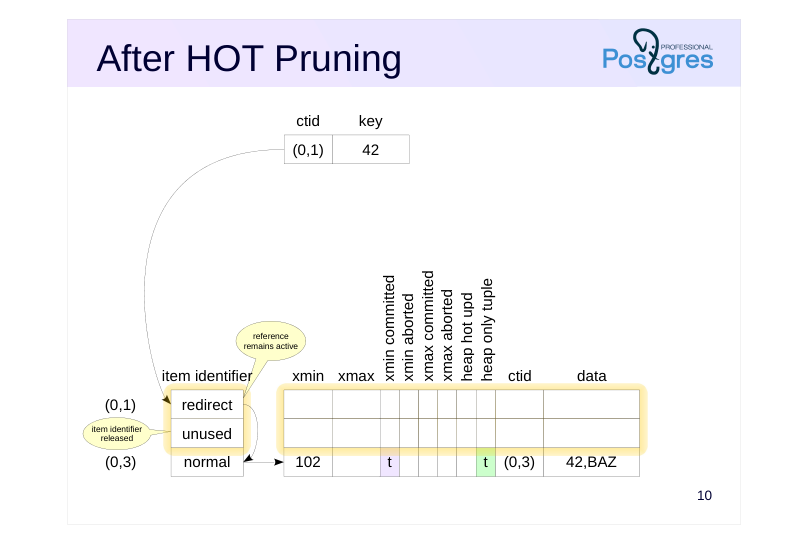 {#source-figure-011 caption=“Source slide page 11: After HOT Pruning”}
Speaker notes
Pruning removes outdated row versions.
In HOT updates, an index can contain only one reference to the head of the HOT chain, which is maintained within a table page. As row versions change, the item identifier must remain in place and reference the head of the chain.
Therefore, a double addressing is used. For the item identifier referenced by the index, in this case (0,1), the status “redirect” is used, redirecting to the item identifier of the proper row version.
The item identifier of the second version (0,2) is no longer needed. It gets the “unused” status and will be used when inserting some new version.
All remaining row versions are shifted together so that the free space on the page is represented by one fragment. The offsets in the item identifiers change accordingly. This prevents issues with free space fragmentation within the page.
Page 12: HOT Pruning
Let’s check how pruning works with HOT updates. Let’s update the row again:
The page now has four row versions:
We’ve actually just exceeded the fillfactor threshold. 75% of the page size is 6144 bytes, and the difference between page size and upper is 8192-64=8128:
Check that the threshold is indeed exceeded. Update the row again:
What changes occurred in the page?
All outdated row versions (0,1), (0,2), and (0,3) were pruned. After that, the new row version was added into the freed space. Item identifiers of the pruned rows were freed (unused status). Meanwhile, the identifier of the first version remained in place but its status changed to redirect. Trace the references from this head version to the end of the HOT chain. Let’s perform the update a few more times:
Page 13: Page 13
The following update triggers pruning again:
Create an index on column s and create an auxiliary view to look into it:
When creating an index, data is not rebuilt in table pages, HOT chains remain in place:
The index entry refers to the item identifier of the chain head:
Page 14: Before Pruning
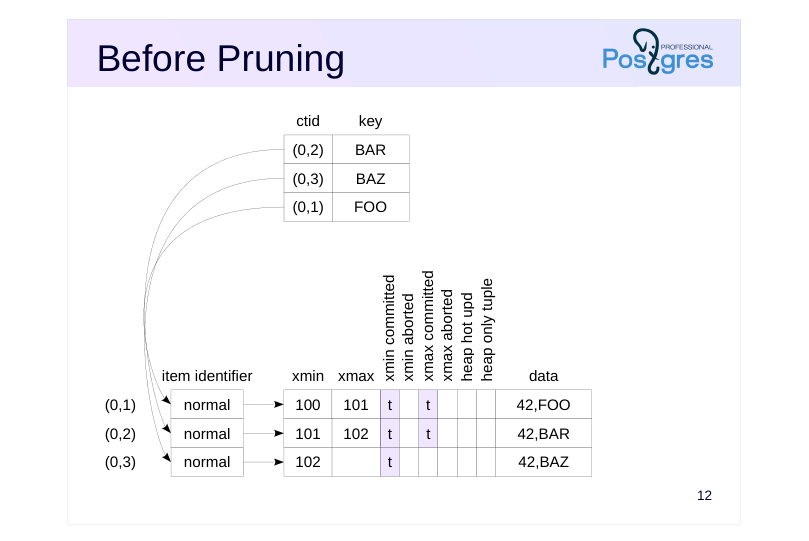 {#source-figure-014 caption=“Source slide page 14: Before Pruning”}
Speaker notes
Of course, pruning also works for versions that appeared as a result of a regular (not HOT) update.
The figure shows the state before pruning. The table page has three versions of the same row. Two of them are dead, not visible in any snapshot and can be removed.
The index has three references to each of the three row versions.
Page 15: After Pruning
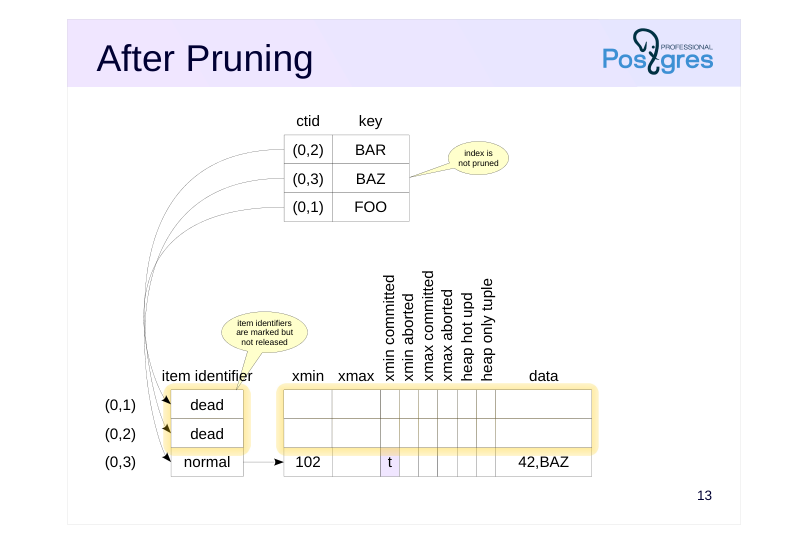 {#source-figure-015 caption=“Source slide page 15: After Pruning”}
Speaker notes
If the condition for pruning is met, it can remove two outdated row versions (0,1) and (0,2). Then item identifiers of removed versions get the dead status, and the free space can be used to insert new row versions.
Unlike the scenario with HOT updates, the item identifiers of the removed row versions cannot be released here, since they are referenced from the index page. With index access, PostgreSQL can get (0,1) or (0,2) as a row version identifier, and then try to follow this identifier of the table page. However, by the status of the item identifier it will detect that this version no longer exists.
The fundamental point is that table pruning works only within one page and does not clean index pages.
Page 16: Index Pruning
Obsolete index entries
- marked when executing queries
- deleted if there is not enough space on the page
- Bottom-up index deletion
- if there is still not enough space, the row versions are checked
Speaker notes
If a table has several indexes and the column being updated is included in at least one of them, HOT update becomes impossible. In this case, the values of the columns included in another index may not change, but you still have to add a reference to the new row version (the index is changed physically, but not logically). To avoid frequent index pruning or rebuilding, PostgreSQL can identify obsolete index entries in advance and remove them when there is not enough space in the index page. PostgreSQL has two mechanisms to facilitate this.
If a query finds that an index entry references a row version that no longer exists or is dead, that entry is marked as dead. If a new index entry cannot be placed into a page, these marked entries are the first to be removed.
If the above method fails to prevent a page split, the bottom-up deletion, introduced in PostgreSQL 14, is activated. For index entries with the same key value, the corresponding row versions are checked. If a version is found to be missing or dead, its index entry is deleted. Checking requires accessing a table, but this is more efficient than unnecessary splitting of the index page.
Page 17: Index Pruning
Let’s reduce the table row length, truncate the table, insert seven rows, and update them:
Examine the page-by-page statistics of the index using the function from the pageinspect extension:
The index now has only one leaf page (it is also the root), which has about 900 bytes of free space left. It contains 14 index entries:
These are the rows they reference:
Page 18: Page 18
Seven entries refer to current table row versions, the other seven refer to dead ones, but this information cannot be obtained from the index. Therefore, the next update will split the index page. But if a query accesses the table via the index, it will have to follow the references and check the status of the table rows:
Such a query marks obsolete index entries as dead…
… and if we perform an update after this,..
it doesn’t lead to page splitting because space can be freed up for new entries:
Page 19: Bottom-Up Deletion
Now let’s add a second text column to the table and create an index on it:
Truncate the table again and insert rows:
Now, since both columns are indexed, HOT chains are not built during updates. If we change only the first column, the index on it grows:
However, the keys of the second index are not changed logically, so if there is not enough space, the bottom-up deletion is triggered and the page of the second index is not split:
Page 20: Page 20
Page 21: Takeaways
If the column being modified is not part of any index and there is free space on the page, HOT update is applied
- If there is not enough space in the table or index page, pruning is performed automatically
Page 22: Practice
- Reproduce the pruning scenario without HOT updates. Check the contents of the table and index pages using the pageinspect extension.
- Reproduce the HOT update scenario on a table indexed by some fields.
- Reproduce a scenario of a HOT update where pruning does not free up enough space on the page and a new version is created on another page. How many records will be in the index in this case?
Speaker notes
- The query for the index page was shown in the demonstration for the Page Layout and Row Versions lesson of this module:
Page 23: 1. Non-HOT Pruning
Let’s create a table with two fields. Set the fillfactor parameter to 75% as in the demonstration.
Create an index on column s:
As usual, we use the pageinspect extension.
Insert a row and update column s several times:
An entry has been created in the index for each of the versions:
Page 24: Page 24
The presence of an index on the updated column prevented the use of HOT updates:
As in the demonstration, another row update triggers pruning:
All obsolete row versions (0,1), (0,2) and (0,3) have been erased. After that, a new row version (0,5) is added to the freed space. Table pruning does not affect the index:
For this reason, item identifiers of the erased tuples in the table are not freed but have a dead status.
2. HOT Update with Index
Remove the index on column s and add another one, on column id:
Truncate the table and repeat the commands that lead to pruning:
Page 25: Page 25
The index page contains only one reference to the table:
The table page contains row versions combined in a list:
An index on a column does not interfere with a HOT update if that column is not updated.
3. HOT Chain Break
In a new session, begin a transaction and create a snapshot:
Now perform updates in the first session:
Page 26: Page 26
The following update will no longer be able to free up space on the page:
We see a reference (1,1) to page 1. The pg_stat_all_tables view shows the number of updated rows (including those using HOT), as well as the number of updated rows that moved to a new table page. If this value is high enough during operations with a table, then consider reducing the fillfactor value.
Now there are two entries in the index, each pointing to the start of its own HOT chain:
05 Lesson 05: MVCC / Vacuuming
This page is extracted from the official PDF into native Markdown. Slide text, code and speaker notes are kept in reading order; the original PDF and HTML remain the layout references. HTML source: dba2_05_mvcc_vacuum.html Archive: DBA2-handouts-16-en.zip PDF pages: 25
Page 1: MVCC / Vacuuming
Copyright
© Postgres Professional, 2016–2026 Authors: Egor Rogov, Pavel Luzanov, Ilya Bashtanov, Igor Gnatyuk Translated by: Elena Sharafutdinova Photo: Oleg Bartunov (Phu Monastery and Bhrikuti Peak, Nepal)
Use of Course Materials
Non-commercial use of course materials (presentations, demonstrations) is allowed without restrictions. Commercial use is possible only with the written permission of Postgres Professional. It is prohibited to make changes to the course materials.
Feedback
Please send your feedback, comments and suggestions to: edu@postgrespro.ru
Disclaimer
Postgres Professional assumes no responsibility for any damages and losses, including loss of income, caused by direct or indirect, intentional or accidental use of course materials. Postgres Professional company specifically disclaims any warranties on course materials. Course materials are provided “as is,” and Postgres Professional company has no obligations to provide maintenance, support, updates, enhancements, or modifications.
Page 2: Topics
- Plain Vacuuming and its Operation
- Throttling Analysis
- Full Vacuuming and Analogues
Page 3: Plain Vacuuming
Performed by VACUUM command
- does not conflict with regular database activity
- Processes a table and all its indexes
- cleans dead tuples in heap pages
- (skipping pages marked in the visibility map)
- cleans index entries referencing vacuumed tuples
- releases item identifiers
- updates the free space map
- updates the visibility map
- main table and its TOAST table can be vacuumed separately
Speaker notes
Table pruning is done quickly, but it does not solve all issues. It works only within one table page and does not affect indexes.
The VACUUM command processes the entire table, including all indexes. It removes both dead row versions and their identifiers in the page headers.
During vacuuming, tables and indexes can be used in the usual manner, both for read and write operations. However, concurrent execution of some commands (e.g., CREATE INDEX, ALTER TABLE) is not possible.
Vacuuming skips table pages without dead tuples. To avoid scanning extra pages, PostgreSQL uses a visibility map, which marks pages that contain only live versions. The map also gets updated. If we want vacuuming to process all pages, we should enable the DISABLE_PAGE_SKIPPING option.
The operation also updates the free space map, which tracks available space in pages.
It is possible to skip vacuuming the main table or its TOAST table by disabling the PROCESS_MAIN or PROCESS_TOAST parameters (both are enabled by default).
https://postgrespro.com/docs/postgresql/16/sql-vacuum
https://postgrespro.com/docs/postgresql/16/routine-vacuuming
Page 4: Before Vacuuming
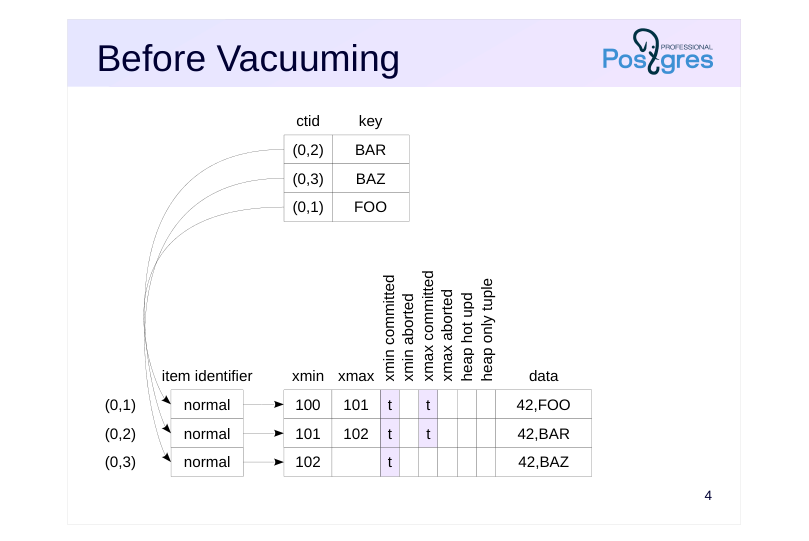 {#source-figure-004 caption=“Source slide page 4: Before Vacuuming”}
Speaker notes
The figure shows the scenario before vacuuming. The table page has three versions of the same row. Two of them are dead, not visible in any snapshot and can be removed.
The index has three references to each of the row versions.
Page 5: 1. Heap Scan
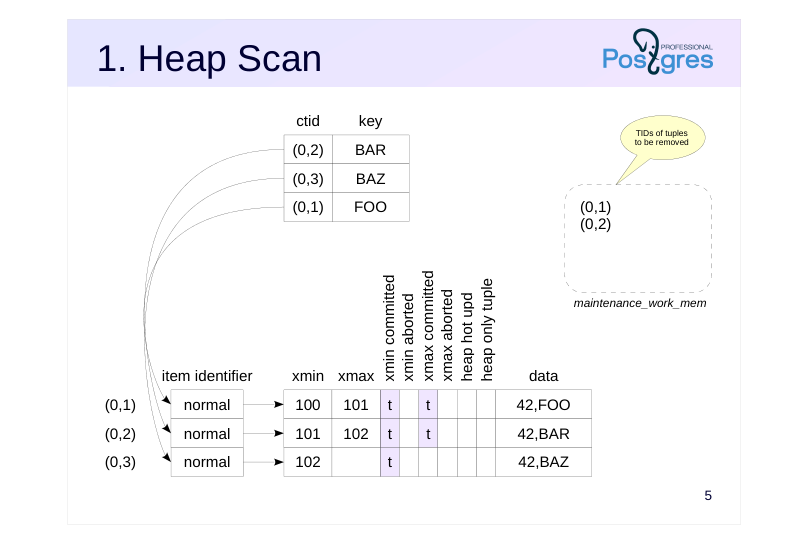 {#source-figure-005 caption=“Source slide page 5: 1. Heap Scan”}
Speaker notes
First, VACUUM scans the table (skipping pages that are marked in the visibility map).
In read pages, the process identifies dead tuples and stores their identifiers (TIDs) in a special array which resides in the local memory of the backend process. The memory chunk is allocated at once rather than on demand, and its size is limited by the maintenance_work_mem parameter. The default value for this parameter is 64 MB.
Page 6: 2. Index Vacuuming
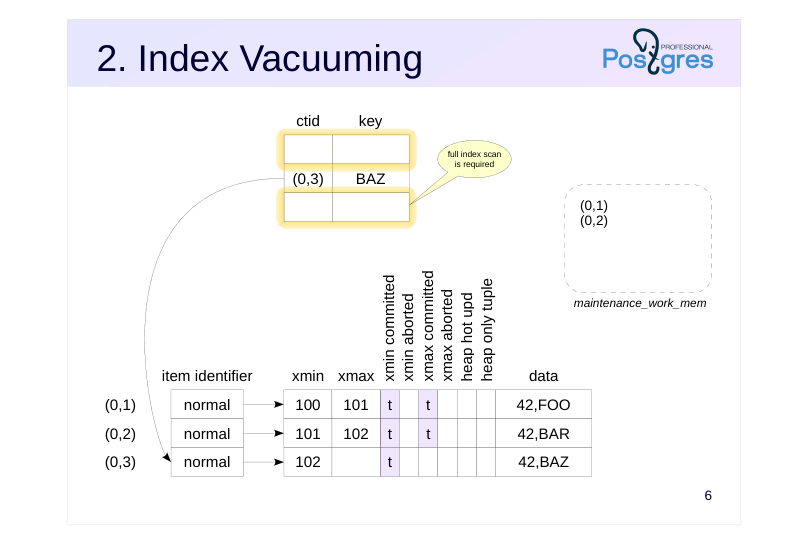 {#source-figure-006 caption=“Source slide page 6: 2. Index Vacuuming”}
Speaker notes
When the memory allocated for the array runs out (or if the end of the table is reached), index vacuuming begins.
To do this, each of the indexes created on the table is fully scanned to find all the entries that refer to the tuples registered in the tid array. These entries are removed from index pages.
Starting with PostgreSQL 14, vacuuming skips index scanning if it is ineffective (when the number of pages containing dead rows does not exceed 2% of the total number of table pages). However, if the INDEX_CLEANUP parameter is set to on, VACUUM will delete obsolete entries from the indexes.
Page 7: 3. Heap Vacuuming
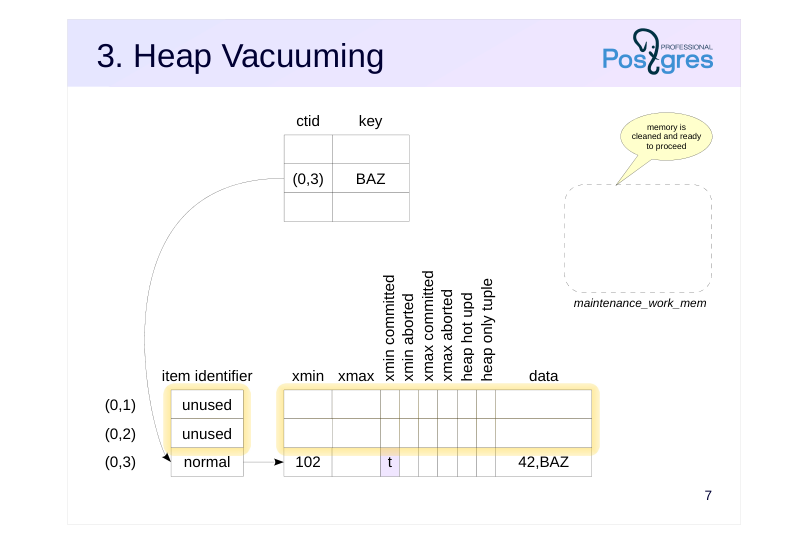 {#source-figure-007 caption=“Source slide page 7: 3. Heap Vacuuming”}
Speaker notes
After that, the necessary table pages are read again to remove dead tuples and to free the item identifiers that are no longer referenced from indexes.
If the table was not fully scanned in the first pass, VACUUM cleans the tid array and continues its work from that point.
Thus, if vacuuming removes so many row versions that their TIDs exceed maintenance_work_mem, all indexes will be fully scanned several times. For large tables, it can be time-consuming and put a significant load on the system. In such cases, you can either distribute the load over time, by running VACUUM more frequently (so that each run processes a smaller number of row versions), or allocate more memory to prevent reprocessing of indexes.
Vacuuming ends with a truncation phase. If vacuuming produced a lot of pages at the end of the file, it can “bite off” this tail. This action requires an exclusive lock to be set. If such locking causes issues, you can disable truncation using vacuum_truncate storage parameter or explicitly: VACUUM (TRUNCATE off). For more details, see the Locks module.
Page 8: Monitoring
VACUUM VERBOSE
- pg_stat_progress_vacuum view
- total table size
- number of scanned pages and number of vacuumed pages
- number of index vacuum cycles already completed
- number of TIDs that fit into memory
- and current number of TIDs in memory
- current vacuum phase
Speaker notes
If vacuuming takes a long time, you may need to check its current status.
To do this, you can run VACUUM with the VERBOSE option. The console displays progress information.
In addition, the pg_stat_progress_vacuum view provides comprehensive information about currently running vacuum operations. You can track the progress of the table vacuuming by comparing the number of pages already vacuumed (heap_blks_vacuumed) with the total number of pages (heap_blks_total). The index vacuuming progress is not displayed in detail, it is more important to pay attention to the number of vacuum cycles (index_vacuum_count). If this value is greater than one, it means that the maintenance_work_mem was not enough to complete vacuuming in one pass.
https://postgrespro.com/docs/postgresql/16/progress-reporting
Page 9: Plain Vacuuming
Let’s create a table and an index.
As usual, use the pageinspect extension:
And also the view for the table page:
And the view for the index:
Insert a row into the table and update it:
Now, to remind ourselves about the concept of the horizon, let’s open another session with an active data snapshot.
Page 10: Page 10
The database horizon is determined by this snapshot:
Update the row again.
There are now three row versions in the table:
Run vacuuming.
How does the table page change?
Vacuuming removed one row version, but the second remained unchanged, since the parallel transaction is still incomplete and its snapshot is active. The index contains two references to the remaining versions:
We can request vacuuming to provide details about its operations:
Page 11: Page 11
Please note: tuples: 0 removed, 2 remain, 1 are dead but not yet removable index scan not needed removable cutoff shows the current horizon Now let’s complete the parallel transaction and run vacuuming again.
The horizon moved forward and allowed the vacuuming to remove the dead row — tuples: 1 removed. Now only the live row version remains in the page:
Only one entry remains in the index as well:
Page 12: Throttling
The process alternates between work and sleep modes
- approximately vacuum_cost_limit units of work,
- then sleeps for vacuum_cost_delay ms
- Settings
- vacuum_cost_limit = 200
- vacuum_cost_delay = 0 ms
- operation costs:
- vacuum_cost_page_hit = 1
- if a page is found in the buffer cache
- vacuum_cost_page_miss = 2
- if a page is read from disk
- vacuum_cost_page_dirty = 20
- if a clean page turned dirty
Speaker notes
Since vacuuming processes tables and indexes intensively, it may be necessary to distribute activities over time to smooth out load spikes. This can be achieved by performing the vacuuming in chunks, alternating between work and sleep modes.
The vacuum_cost_limit chunk size is specified in conventional units. The other three options on the slide determine the cost of processing one page in these units, depending on the performed actions. In the best-case scenario, the cost is vacuum_cost_page_hit (if the page was found in the cache and either has not changed, or is already dirty). In the worst-case scenario, the cost is vacuum_cost_page_miss + vacuum_cost_page_dirty (if the page was read from disk and was modified by vacuuming).
The default setting actually disables throttling because the delay time is set to zero. It is assumed that if administrators have to resort to manual vacuuming, they expect its completion as soon as possible.
https://postgrespro.com/docs/postgresql/16/runtime-config-resource#RUNTI ME-CONFIG-RESOURCE-VACUUM-COST
Page 13: Parallel Vacuuming
Scanning and vacuuming of a table is performed sequentially
- Index cleanup can be performed in parallel
- each index is processed by a single worker process
- index size must exceed min_parallel_index_scan_size
- the number of processes is limited by max_parallel_maintenance_workers
- and, if specified, by VACUUM (PARALLEL n) value
Speaker notes
The phases of scanning and vacuuming a table are always performed sequentially by one process.
However, the index cleanup phase can be performed in parallel. This occurs when the table has several (more than one) sufficiently large indexes: the size of an index must exceed the min_parallel_index_scan_size parameter (512 KB by default). A separate worker process is started for each appropriate index.
Each index is processed by a single worker process, that is, several processes cannot clean the same index concurrently.
The total number of worker processes is limited by the max_parallel_maintenance_workers parameter and can be further limited by explicitly specifying the level of parallelism in the VACUUM (PARALLEL n) command.
Page 14: Analysis
Performed by VACUUM ANALYZE or ANALYZE
- does not conflict with regular database activity
- Collects statistics for the planner
Speaker notes
Another task that is usually combined with vacuuming is analysis, that is, collecting statistics for the query planner. The number of rows in a table, the distribution of data within columns and other metrics are analyzed. Statistics collection is discussed in detail in the QPT course.
You can run the analysis manually using the ANALYZE (analysis only) or VACUUM ANALYZE (both vacuuming and analysis).
As with vacuuming, processing runs in the background and does not interfere with regular database activity.
https://postgrespro.com/docs/postgresql/16/sql-analyze
Page 15: Analysis
Create a table with a large number of identical rows and index it:
The planner does not know anything about the data and chooses index access, although the entire table has to be read:
During analysis, statistics are collected from a random sample of rows:
The statistics are saved in the system catalog. After that, the planner knows that all rows have the same value, and stops using the index:
Page 16: Full Vacuuming
Performed by the VACUUM FULL command
- incompatible with any table operations, including reading
- Completely rebuilds the table and all its indexes
- requires additional disk space for new files
- released space is returned to the operating system
- takes longer than plain vacuuming
Speaker notes
Plain vacuuming sometimes may still be not enough. If a table or an index has grown significantly in size, vacuuming will not reduce the number of pages (and therefore will not reduce the file size). Instead, it creates holes (free space) within existing pages that can be used for new inserts or updates. The only exception is completely cleaned pages at the end of the file, such pages are cut off and the free space is returned to the operating system.
If the file sizes have exceeded reasonable limits, you can perform full vacuuming. In this case, the table and all its indexes are rebuilt completely from scratch, and the data is packed as compactly as possible (taking into account the fillfactor).
During the rebuild, PostgreSQL first rebuilds the table, and then sequentially rebuilds each of the indexes. New files are created for them, and old ones are deleted. Note that additional disk space will be required during operation.
Full vacuuming is not intended for regular use, since it completely locks the table (including reads) for the entire runtime. This is often not viable on a heavily used system. In such cases, the pg_repack extension (https://github.com/reorg/pg\_repack) which is not included in the standard distribution, can serve as an alternative.
Page 17: Before Full Vacuuming
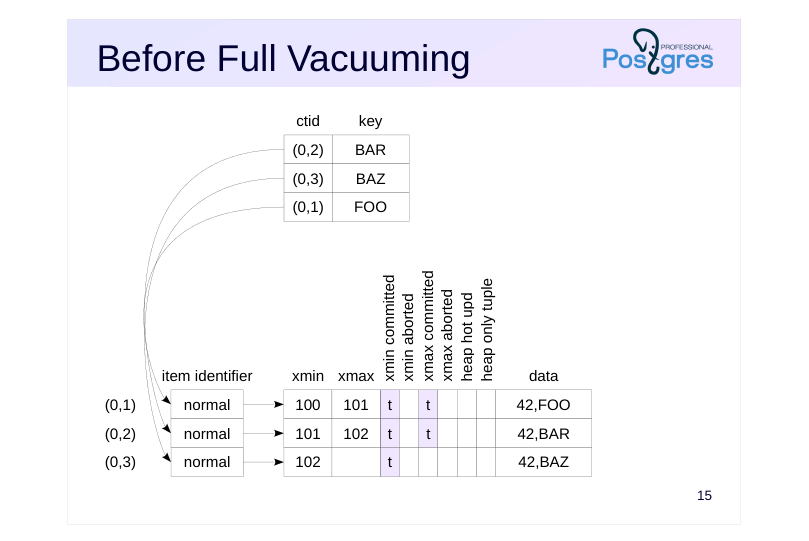 {#source-figure-017 caption=“Source slide page 17: Before Full Vacuuming”}
Speaker notes
The figure shows the state before full vacuuming. The table page has three versions of the same row. Two of them are obsolete, not visible in any snapshot and can be removed.
The index has three references to each of the three row versions.
Page 18: After Full Vacuuming
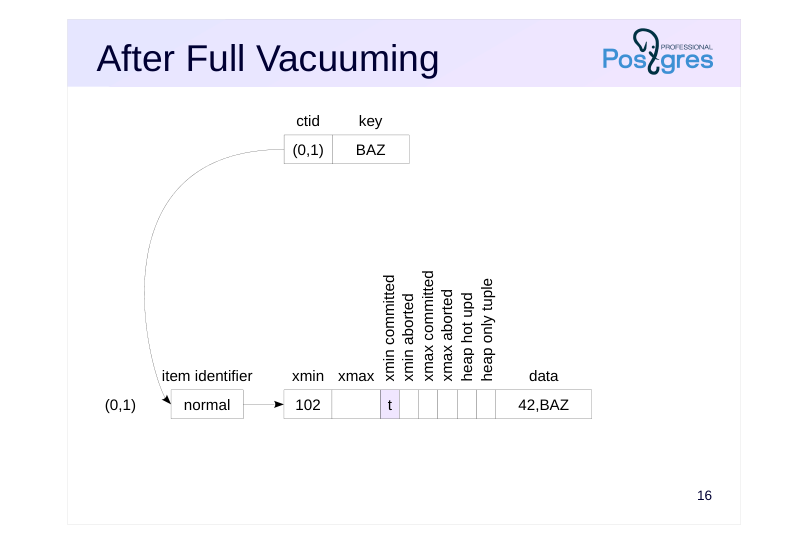 {#source-figure-018 caption=“Source slide page 18: After Full Vacuuming”}
Speaker notes
After full vacuuming, the contents of the table and its indexes are completely rebuilt and reside in physically different files. However, the OID of the table remains unchanged.
Page 19: Full Vacuuming
Files occupied by the table and index:
Let’s run full vacuuming.
The table and index are now completely rebuilt:
The file names have changed:
Page 20: Full Vacuuming Analogues
CLUSTER
- completely rebuilds the table and all its indexes
- physically reorders row versions
- according to one of the indexes
- REINDEX
- completely rebuilds indexes
- TRUNCATE
- empties the table
- Features
- all these commands completely lock the table
- all these commands create new data files
Speaker notes
There are several commands that operate using a similar mechanism. All the commands completely lock the table for operations, remove old data files and create new ones.
The CLUSTER command is functionally similar to VACUUM FULL, but it also physically arranges the row versions according to a specified index. This allows the planner to use index access more efficiently in some cases. However, this physical order is not maintained, subsequent data modifications will break it.
REINDEX rebuilds indexes without modifying the table data. In fact, VACUUM FULL uses this command to rebuild indexes. While reading the table is not formally prohibited during the operation, the planner will attempt to get a lock on the index being rebuilt in order to consider possible query plans. As a result, it is practically impossible to read the table until the operation completes. The command with CONCURRENTLY option lasts longer, but it neither locks the index nor interferes with reading and updating data.
The TRUNCATE command achieves the same result as DELETE by removing all rows from a table. However, as previously discussed, DELETE marks row versions as deleted, which requires subsequent vacuuming. TRUNCATE, by contrast, just creates a new, empty data file. This works faster, but it is important to note that TRUNCATE locks the table until the end of the transaction.
Page 21: Takeaways
Plain vacuuming frees up space in pages
- runs as a background process
- may require several index scans
- Analysis collects statistics for the planner
- runs as a background process can be combined with vacuuming Full vacuuming rebuilds the table and indexes
- locks the table for the entire runtime
Page 22: Practice
- Create a large table with an index. Temporarily reduce the maintenance_work_mem to force several index passes. Check by starting VACUUM VERBOSE.
- Remove 90% of random rows from large table and check how the space the table occupies on the disk has changed after plain vacuuming. 3. Repeat step 2, but use full vacuuming this time.
Speaker notes
- To prevent autovacuum (discussed in the next lesson), specify the autovacuum_enabled storage parameter, when creating a table: CREATE TABLE … WITH (autovacuum_enabled = off);
Page 23: 1. Index Scanning during Vacuuming
Let’s create a table and an index. The autovacuum_enabled parameter is off to prevent automatic vacuuming.
Reduce the memory allocated for the identifier array:
Update all rows:
Let’s run vacuuming. After a while check the pg_stat_progress_vacuum view in another session.
Page 24: Page 24
Restore the value of the changed parameter.
2. Vacuuming a Large Number of Rows
Current data file size:
Randomly delete 90% of rows. Random deletion guarantees that some rows remain on each page, vacuuming will not reduce the file size in this case.
Size after vacuuming:
The size has not changed.
3. Full Vacuuming of a Large Number of Rows
Let’s refill the table.
Current data file size:
Page 25: Page 25
Note Note that last time the size was about twice as large. The second half was occupied by row versions created by the UPDATE command. The size after deletion and full vacuuming:
The size reduced by 90%.
06 Lesson 06: MVCC / Autovacuuming
This page is extracted from the official PDF into native Markdown. Slide text, code and speaker notes are kept in reading order; the original PDF and HTML remain the layout references. HTML source: dba2_06_mvcc_autovacuum.html Archive: DBA2-handouts-16-en.zip PDF pages: 20
Page 1: MVCC / Autovacuuming
Copyright
© Postgres Professional, 2016–2026 Authors: Egor Rogov, Pavel Luzanov, Ilya Bashtanov, Igor Gnatyuk Translated by: Elena Sharafutdinova Photo: Oleg Bartunov (Phu Monastery and Bhrikuti Peak, Nepal)
Use of Course Materials
Non-commercial use of course materials (presentations, demonstrations) is allowed without restrictions. Commercial use is possible only with the written permission of Postgres Professional. It is prohibited to make changes to the course materials.
Feedback
Please send your feedback, comments and suggestions to: edu@postgrespro.ru
Disclaimer
Postgres Professional assumes no responsibility for any damages and losses, including loss of income, caused by direct or indirect, intentional or accidental use of course materials. Postgres Professional company specifically disclaims any warranties on course materials. Course materials are provided “as is,” and Postgres Professional company has no obligations to provide maintenance, support, updates, enhancements, or modifications.
Page 2: Topics
- Autovacuuming
- Autoanalysis
- Autovacuuming Setup
Page 3: Autovacuuming
Operates similarly to plain vacuuming
- Performed periodically
- for tables with a certain number of changes
- including toast tables
- Autovacuum launcher process
- always running
- controls launch of worker processes
- Autovacuum worker processes
- started by the postmaster process at the request of the autovacuum launcher
- connect to a given database, iterate through and clean tables
Speaker notes
Autovacuuming is a mechanism that allows to start plain vacuuming at certain points in time, based on the number of changes in tables. This process is more convenient and efficient than cron-based scheduling, as it dynamically adapts to system activity.
When autovacuuming is enabled, the system continuously runs an autovacuum launcher, which is responsible for starting worker processes. The actual vacuuming is performed by autovacuum worker processes, several instances of which can run in parallel.
Autovacuum worker processes are started by the postmaster process upon request from the autovacuum launcher (since the postmaster is responsible for spawning all new processes).
https://postgrespro.com/docs/postgresql/16/routine-vacuuming#AUTOVACU UM
Page 4: Autovacuum Launcher
Periodically launches a worker process into each active database
- once in autovacuum_naptime
- several processes can operate on the same database
- total number of worker processes ≤ autovacuum_max_workers
- Settings
- autovacuum = on
- track_counts = on
- autovacuum_naptime = 60 s
- autovacuum_max_workers = 3
- both should be enabled
- ?
Speaker notes
The autovacuum launcher process makes a list of databases with recorded activity (specifically, databases with usage statistics being collected).
A new worker process is launched once per autovacuum_naptime for each database from the list (that is, if there are N databases, processes will be spawned N times more frequently). If a worker process has not cleaned up the entire database during the autovacuum_naptime, another worker process will be assigned to the same database, and they will run concurrently. The total number of worker processes is limited by the autovacuum_max_workers parameter.
For autovacuuming to function the autovacuum and track_counts parameters must be enabled. The latter turns on the collection of usage statistics.
Page 5: Autovacuum Worker
Makes a list of database objects for vacuuming
- number of dead row versions exceeds
- autovacuum_vacuum_threshold +
- autovacuum_vacuum_scale_factor × number of rows in the table
- number of inserted rows exceeds
- autovacuum_vacuum_insert_threshold +
- autovacuum_vacuum_insert_scale_factor × number of rows in the table
- regular tables and toast tables, materialized views are included
- temporary tables are not included
Speaker notes
The worker process connects to the specified database and makes a list of all tables, materialized views, and toast tables that require vacuuming.
Objects require vacuuming when they have accumulated a significant number of obsolete (dead) row versions.
Objects where a significant number of new rows have been inserted since the last vacuum are also processed. It is important for insert-only tables: they also require vacuuming to update the visibility map and freeze old row versions (discussed in the Freezing lesson).
The exact formulas are shown on the slide. Each formula uses two parameters: one (*_threshold) defines an absolute value, while the other (*_scale_factor) specifies a fraction of rows.
The number of rows is determined approximately, according to statistics:
● Total rows: pg_class.reltuples
● Dead rows: pg_stat_all_tables.n_dead_tup
● Inserted rows: pg_stat_all_tables.n_ins_since_vacuum
Page 6: Autovacuum Worker
Makes a list of database objects for analysis
- the number of modified rows exceeds
- autovacuum_analyze_threshold +
- autovacuum_analyze_scale_factor × number of rows in the table
- includes regular tables and materialized views
- does not include toast tables and temporary tables
- Sequentially cleans up and/or analyzes selected objects
- several processes can run simultaneously in the same database
- no parallel execution occurs at the table level
Speaker notes
It also makes a list of all tables and materialized views that require analysis. Toast tables are not analyzed.
Analysis is triggered for objects where a significant number of rows have changed since the previous analysis. It is determined by statistics: pg_stat_all_tables.n_mod_since_analyze.
After making both lists, the worker process sequentially performs vacuuming and/or analysis on the selected objects and terminates upon completion.
Several processes can run simultaneously in one database, processing different tables in parallel. There is no parallel execution at the table level.
Page 7: Autovacuum Worker
Autovacuuming settings
- autovacuum_vacuum_threshold = 50
- autovacuum_vacuum_scale_factor = 0.2
- ↓
- autovacuum_vacuum_insert_threshold = 1000
- autovacuum_vacuum_insert_scale_factor = 0.2
- ↓?
- Table storage parameters
- autovacuum_enabled
- toast.autovacuum_enabled
- and configuration parameters with identical names
Speaker notes
The default settings trigger autovacuum when 20% of the table’s rows are modified or when 20% of new rows are inserted. It represents a relatively high threshold: autovacuum will run less frequently but it will take longer to complete, particularly for large tables. In most scenarios, these percentages should be reduced.
If necessary, these settings can be overridden for individual tables by changing table storage parameters:
CREATE TABLE … WITH (parameter=value)
Moreover, the parameters can be configured separately for toast tables.
Additionally, autovacuum can be disabled for individual tables.
https://postgrespro.com/docs/postgresql/16/runtime-config-autovacuum
https://postgrespro.com/docs/postgresql/16/sql-createtable
Page 8: Autovacuum Worker
Autoanalysis settings
- autovacuum_analyze_threshold = 50
- autovacuum_analyze_scale_factor = 0.1
- ?
- Table storage parameters
- autovacuum_analyze_threshold
- autovacuum_analyze_scale_factor
- no analysis for toast tables
Speaker notes
The default settings trigger autovacuum when the table changes by 10%.
If necessary, these parameters can be configured for individual tables using storage parameters.
Toast tables are not analyzed, so there are no corresponding parameters for them.
Page 9: Autovacuum Worker
Settings for throttling
- common limit
- for all worker
- autovacuum_vacuum_cost_limit = −1
- (−1 means vacuum_cost_limit = 200)
- processes
- ↑
- autovacuum_vacuum_cost_delay = 2ms
- (−1 means vacuum_cost_delay = 0)
- vacuum_cost_page_hit, vacuum_cost_page_miss, vacuum_cost_page_dirty
- Table storage parameters
- autovacuum_vacuum_cost_limit
- toast.autovacuum_vacuum_cost_limit
- autovacuum_vacuum_cost_delay
- toast.autovacuum_vacuum_cost_delay
Speaker notes
Autovacuum throttling is identical to vacuum throttling. However, there are additional parameters autovacuum_vacuum_cost_limit and autovacuum_vacuum_cost_delay. When not set to −1, they override the vacuum_cost_limit and vacuum_cost_delay parameters.
To improve autovacuum performance, we can increase the autovacuum_vacuum_cost_limit. However, note that the limit set by this parameter is shared across all worker processes. Therefore, when increasing autovacuum_max_workers, we should also increase autovacuum_vacuum_cost_limit.
These parameters can also be specified for individual tables using storage parameters.
https://postgrespro.com/docs/postgresql/16/runtime-config-resource#RUNTI ME-CONFIG-RESOURCE-VACUUM-COST
Page 10: Autovacuum Worker
Memory settings
- autovacuum_work_mem = −1
- (−1 means maintenance_work_mem = 64MB)
- settings are applied to each worker process,
- memory is allocated in full immediately
- more memory reduces overprocessing of index pages
- Monitoring
- log_autovacuum_min_duration = 10min
- pg_stat_progress_vacuum
Speaker notes
In addition to settings that determine when and how autovacuum operates, we can adjust the memory allocated to autovacuum worker processes.
By default, the memory is limited by the maintenance_work_mem parameter, which affects not only autovacuum, but also all other maintenance operations. Usually this parameter can be set to a sufficiently high value, since there are not so many background processes. However, the number of autovacuum worker processes (controlled by the autovacuum_max_workers parameter) can be large, and memory is allocated immediately (not by demand). For this reason, we can set a separate limit for autovacuum worker processes using the autovacuum_work_mem parameter.
As discussed in the Vacuuming lesson, the vacuum procedure can operate with minimal memory. However, if a table has indexes, insufficient value can lead to repeated scans of the same index pages, significantly slowing down autovacuum. The goal is to determine a minimal amount of memory that prevents repeated index scans.
For monitoring, we use log_autovacuum_min_duration parameter (autovacuum operations that last longer than its value will be registered in the server log), and the pg_stat_progress_vacuum view, which provides real-time progress information.
It is important to note that increasing memory is often less effective than lowering the vacuum threshold to reduce the amount of data processed per operation.
Page 11: Autovacuuming
Create a table with 1000 rows:
Set autovacuum parameters. Short nap time to see results immediately:
One percent of rows:
Zero threshold:
Set autoanalysis parameters as well. Two percent of rows:
Zero threshold:
Reload the configuration:
Let’s wait a little for autoanalysis to trigger. Create a view showing whether our table needs vacuuming. Here we consider only dead tuples, but condition for inserted rows can be added similarly.
Page 12: Page 12
Currently the table does not require vacuuming (there are no dead tuples) and it has not been vacuumed yet:
We can create a similar view for the analysis:
The view shows that the table does not require analysis; autoanalysis has already been performed:
Let’s disable autovacuum at table level and update 11 rows (more than 1%):
Check the views:
Page 13: Page 13
As we can see, the table requires autovacuum. Enable autovacuum for the table and wait a few seconds…
Autovacuum has processed the table. The number of obsolete versions is again zero. At the same time, autoanalysis was not performed. Update 11 more rows:
Now both autovacuum and autoanalysis should trigger. Let’s check it:
Wait for a few seconds…
Page 14: Page 14
Everything is correct, both operations have completed. The created views can be used for monitoring tables waiting for vacuum and analysis by removing the table name condition. For completeness, they should account for the storage parameters of individual tables.
Page 15: Tuning Approach
Balance between bloating and overhead
- iterative process
- Key parameters
- autovacuum_vacuum_scale_factor
- processing frequency
- autovacuum_max_workers
- parallel execution
- autovacuum_vacuum_cost_limit
- processing speed
- individual tuning of critical tables using storage parameters
- Monitoring
- bloating
- queued tables awaiting vacuuming
- I/O load during vacuuming
Speaker notes
Autovacuuming is controlled by a large number of interdependent parameters. In a well-tuned system, autovacuuming prevents tables from excessive bloating while avoiding unnecessary overhead.
Finding the balance is an iterative process. We need to set reasonable initial values based on the size and nature of the use of tables, conduct continuous monitoring and make adjustments accordingly.
Increasing threshold/scale_factor values leads to greater bloating, but vacuuming is performed less frequently and in large chunks (spiky loads are possible). Total overhead is lower. Reducing the parameters leads to more frequent processing in small chunks. Total overhead increases, but bloating is reduced. The cost_limit/cost_delay parameters help mitigate spiky loads by intentionally throttling the speed of vacuuming.
The value set by the threshold/scale_factor parameters determines only the desired trigger point for vacuuming. With a large number of heavily modified tables, the vacuuming may take considerable time to complete the pass and will not start processing the next table immediately. In such case, it is necessary either to increase vacuum speed (if it was reduced by the cost_limit/cost_delay parameters), or to increase the number of parallel workers by the max_workers parameter (which will lead to an increase in overhead).
Starting with version 16, autovacuum processes apply parameter changes during the processing of a relation. Therefore, we can speed up an already running vacuuming of a large table on the fly.
Page 16: Takeaways
Autovacuuming triggers table vacuuming and analysis, dynamically responding to data changes
- Autovacuuming allows fine tuning both at the system level and for individual tables
- The goal of autovacuum tuning is to find a balance, which typically requires an iterative approach
Page 17: Practice
- Set autovacuum to trigger when 10% of rows change, autovacuum_naptime is 1 second.
- Create a table containing a large number of rows.
- Update 5–6% of random rows twenty times with a few seconds delay between updates. Perform each update in a separate transaction.
- How many times did autovacuum run? How much did the table bloat? Do the results match expectation? How can you explain them?
Page 18: 1. Autovacuuming Setup
We configure autovacuum to trigger when 10% of rows are changed.
We set the worker processes to be launched once per second:
2. Table
3. Data Update
Initial table size:
We update the table with delays of several seconds between commands.
Page 19: Page 19
4. Bloat Estimate
Table statistics (autovacuum_count shows how many times autovacuum was performed):
Page 20: Page 20
Let’s see the change in table size:
In total, about 110,000 rows have changed, which is 110% of the table size. Consequently, we would expect autovacuum to trigger 10–11 times. However, autovacuum ran approximately half as frequently, since a significant part of the updates was optimized by pruning (in our case, HOT update: n_tup_hot_upd field). The table didn’t double in size; it grew only by about a third. In theory, 5–6% would be enough, but: The free space map is not updated during HOT update, and autovacuum triggers only at the second pass. HOT updates create additional redirect item identifiers on pages, with small tuple sizes like in our example, this effect becomes noticeable. The free space map stores approximate rather than precise information.
07 Lesson 07: MVCC / Freezing
This page is extracted from the official PDF into native Markdown. Slide text, code and speaker notes are kept in reading order; the original PDF and HTML remain the layout references. HTML source: dba2_07_mvcc_freeze.html Archive: DBA2-handouts-16-en.zip PDF pages: 23
Page 1: MVCC / Freezing
Copyright
© Postgres Professional, 2016–2026 Authors: Egor Rogov, Pavel Luzanov, Ilya Bashtanov, Igor Gnatyuk Translated by: Elena Sharafutdinova Photo: Oleg Bartunov (Phu Monastery and Bhrikuti Peak, Nepal)
Use of Course Materials
Non-commercial use of course materials (presentations, demonstrations) is allowed without restrictions. Commercial use is possible only with the written permission of Postgres Professional. It is prohibited to make changes to the course materials.
Feedback
Please send your feedback, comments and suggestions to: edu@postgrespro.ru
Disclaimer
Postgres Professional assumes no responsibility for any damages and losses, including loss of income, caused by direct or indirect, intentional or accidental use of course materials. Postgres Professional company specifically disclaims any warranties on course materials. Course materials are provided “as is,” and Postgres Professional company has no obligations to provide maintenance, support, updates, enhancements, or modifications.
Page 2: Topics
- Transaction ID Overflow Tuple Freezing and Visibility Rules
- Autovacuum Settings for Freezing Operations
- Manual Freezing
Page 3: Transaction ID Overflow
smaller numbers represent the past, greater numbers represent the future how to prevent overflow if the transaction ID is 32 bits?
- transaction 2
- started after
- transaction 1
- 1
- 2
- past
- future
Speaker notes
Besides freeing up space in pages, vacuuming also performs the task of preventing transaction ID overflow issues.
In PostgreSQL, a transaction ID takes 32 bits. While this is a large number (approximately 4 billion IDs), it can be exhausted under heavy server load. For example, with a workload of 1000 transactions per second, it will happen in about six weeks of continuous operation.
However, we have mentioned that MVCC relies on sequential numbering, which means that of two transactions, the one with a smaller number is considered to have started earlier. Obviously, we cannot just reset the counter and start numbering from scratch.
Why not use 64-bit transaction IDs to eliminate the issue? The thing is that the header of each tuple (as discussed in the Page Layout and Row Versions lesson) stores two transaction IDs: xmin and xmax. The header is already large, and increase of the bitness would entail the increase of the header by extra 8 bytes.
Page 4: xid Wraparound
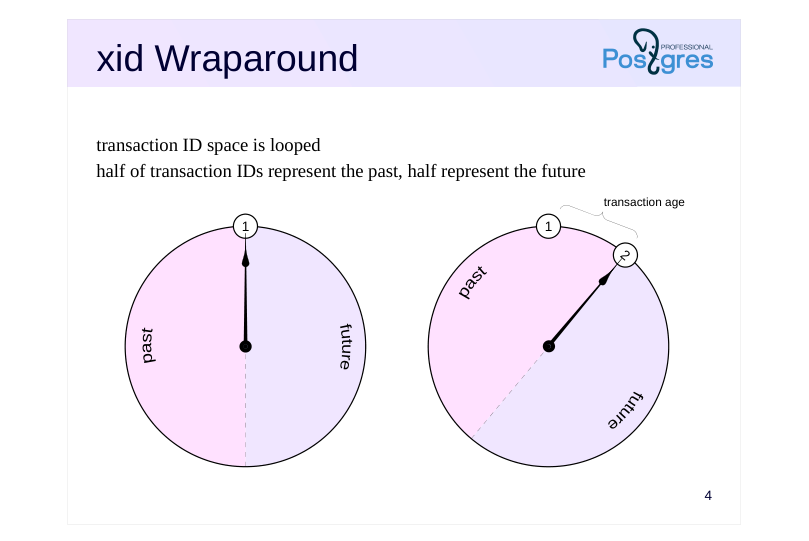 {#source-figure-004 caption=“Source slide page 4: xid Wraparound”}
transaction ID space is looped half of transaction IDs represent the past, half represent the future
Speaker notes
Therefore, instead of a linear scheme, all transaction IDs are arranged in a circle. For any transaction, half of the counterclockwise IDs are considered to be in the past, and the other half are in the future.
The age of a transaction is the number of transactions that have run since the time when the transaction was created in the system (regardless of the transaction ID overflow).
Page 5: Visibility Issue
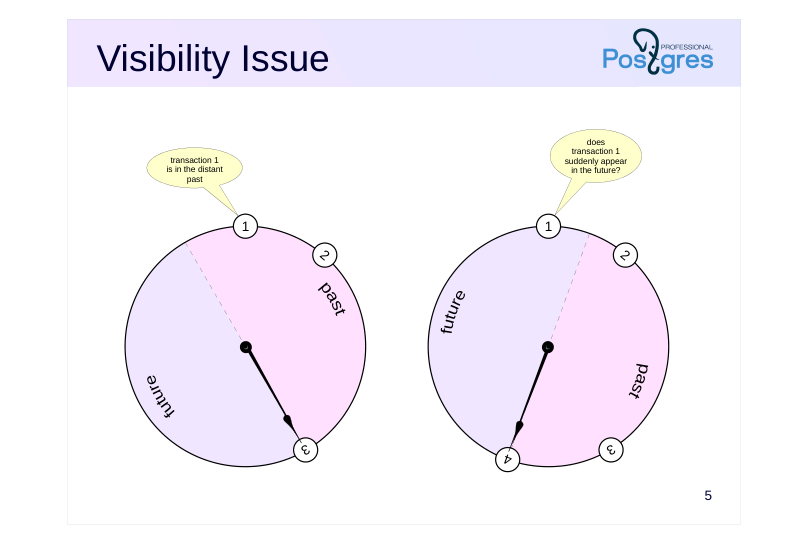 {#source-figure-005 caption=“Source slide page 5: Visibility Issue”}
Speaker notes
A critical problem arises in this looped arrangement: a transaction that was in the distant past (transaction 1 in the figure), some time later will get into the half of the circle pertinent to the future. This, certainly, breaks visibility rules and would cause issues.
Page 6: Tuple Freezing
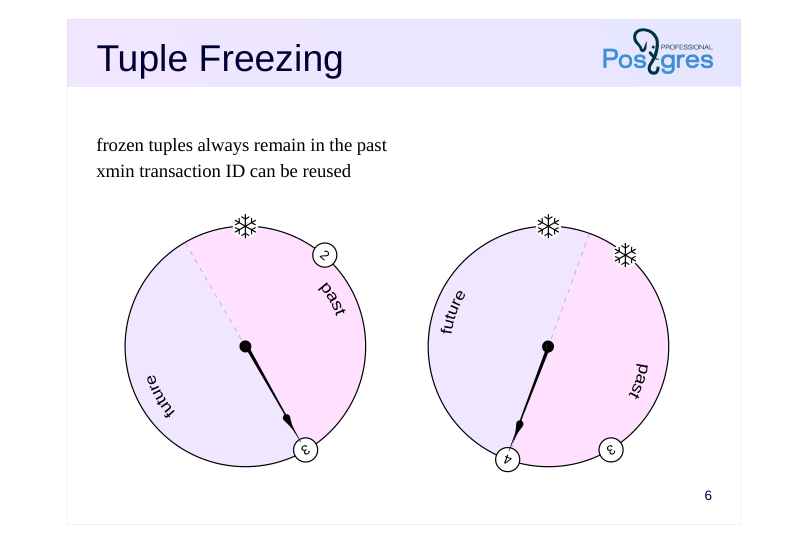 {#source-figure-006 caption=“Source slide page 6: Tuple Freezing”}
frozen tuples always remain in the past xmin transaction ID can be reused
Speaker notes
To prevent these time-travelling issues from past to future, vacuuming performs one more task. It finds quite old and “cold” tuples (which are visible in all snapshots and are unlikely to change) and marks them in a special way, that is, “freezes” them. A frozen tuple is considered older than any normal data and is always visible in all snapshots. There is no longer any need to check xmin transaction ID, and it can be safely reused. So, frozen tuples always remain in the past.
https://postgrespro.com/docs/postgresql/16/routine-vacuuming#VACUUM-F OR-WRAPAROUND
Page 7: Tuple Freezing
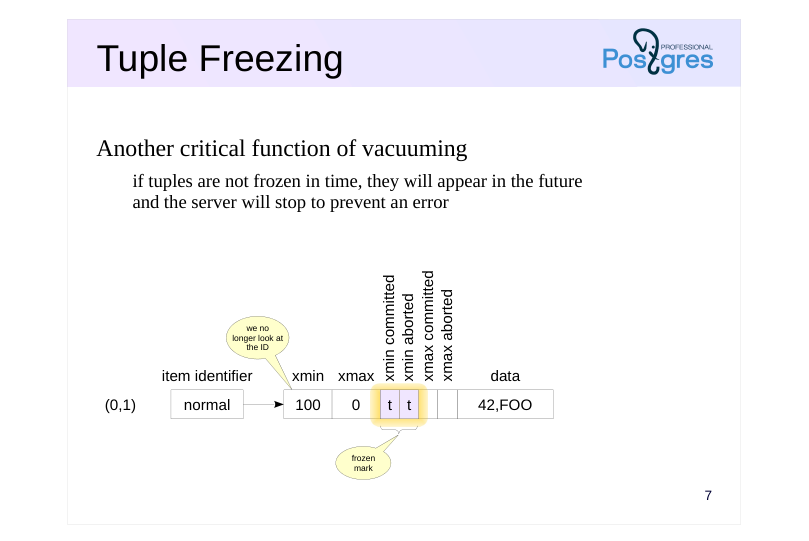 {#source-figure-007 caption=“Source slide page 7: Tuple Freezing”}
Another critical function of vacuuming
- if tuples are not frozen in time, they will appear in the future
- and the server will stop to prevent an error
Speaker notes
To mark the xmin transaction as frozen, both committed and aborted hint bits are set simultaneously.
Note that the xmax transaction ID does not need freezing. Its presence indicates that this tuple is not live. When it gets no longer visible in data snapshots, this tuple will be vacuumed.
Many sources (including documentation) mention a special FrozenTransactionId = 2, which was written in place of xmin in frozen versions. This technique was in place in PostgreSQL versions earlier than 9.4, but now it is replaced with hint bits. In this case the initial transaction ID is kept in a tuple, which is convenient for maintenance and debugging. However, we can still come across transactions with ID = 2 in old systems, even upgraded to latest versions.
It is important that tuples are frozen in time. In a scenario where an unfrozen transaction ID risks wrapping around into the future, PostgreSQL will initiate an emergency shutdown. This can happen in two cases: either the transaction is still active and therefore cannot be frozen, or vacuuming has failed.
During server startup, the transaction will be automatically canceled; the administrator must then manually perform vacuuming, after which the system can resume normal operation.
Page 8: Settings
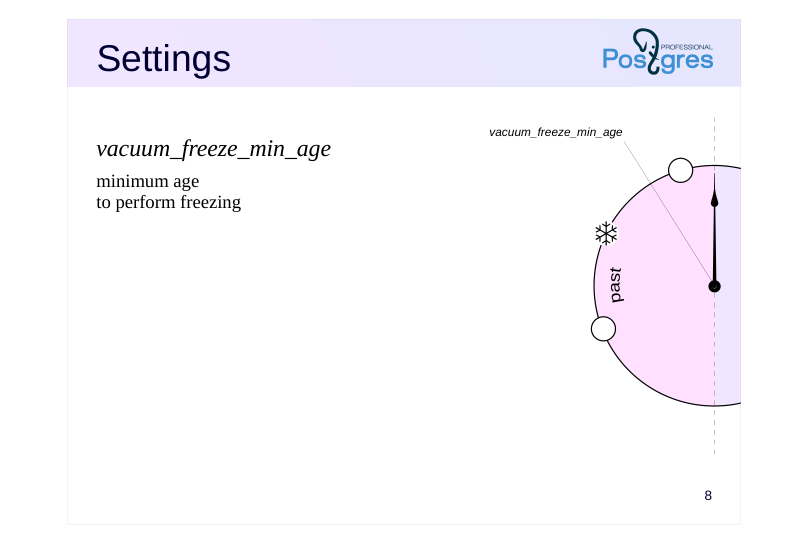 {#source-figure-008 caption=“Source slide page 8: Settings”}
vacuum\_freeze\_min\_age
- minimum age to perform freezing
Speaker notes
There are four main parameters that control freezing.
Vacuum_freeze_min_age parameter defines the minimum age of the xmin transaction from which freezing begins.
The lower its value, the higher the overhead. If we deal with “hot”, actively changing data, freezing of new and newer tuples will go down the drain: already frozen tuples will be vacuumed, while new tuples need to be frozen again.
Therefore, newer tuples are frozen only when it does not add extra work, for example, if other (older) rows on the page already require freezing or during full vacuuming.
Note that vacuuming processes only those pages that are not marked in the visibility map. If a page contains only live tuples, vacuuming will not process such a page and will not freeze the tuples.
A table page’s header also contains a flag indicating that all tuples in it are visible; vacuuming uses this flag together with the corresponding mark in the visibility map.
Page 9: Settings
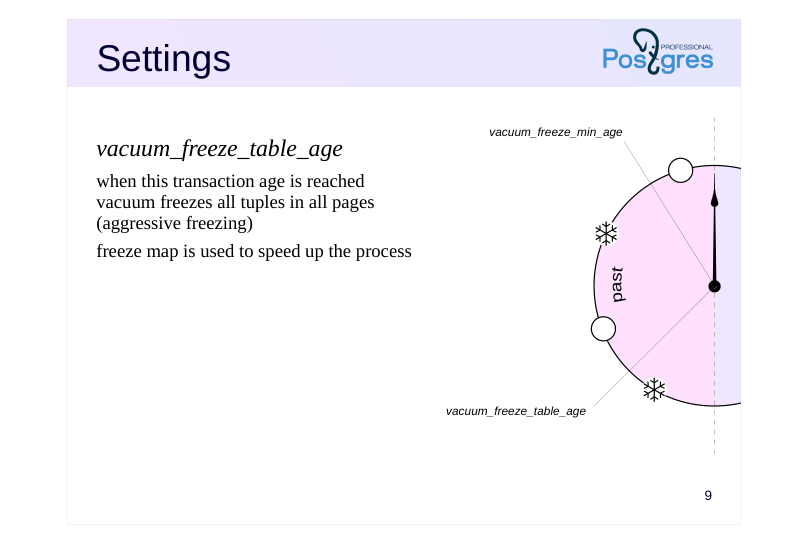 {#source-figure-009 caption=“Source slide page 9: Settings”}
vacuum\_freeze\_table\_age
- when this transaction age is reached vacuum freezes all tuples in all pages (aggressive freezing) freeze map is used to speed up the process
Speaker notes
The vacuum_freeze_table_age parameter determines the age of the transaction at which all tuples in table’s pages must be frozen. Such freezing is called aggressive.
Each table stores a transaction ID (pg_class.relfrozenxid) which guarantees that all older transaction IDs in the table are frozen. The age of this transaction is compared to the parameter value.
In order not to scan the entire table, a freeze map is maintained along with the visibility map. The freeze map tracks pages where all tuples are already frozen. Such pages can be skipped during freezing.
Even in aggressive mode, all tuples with transaction IDs newer than vacuum_freeze_min_age are not frozen. As a result, after freezing, the new relfrozenxid transaction age will not be equal to zero, it will be equal to vacuum_freeze_min_age. Thus, all table pages get frozen once every (vacuum_freeze_table_age − vacuum_freeze_min_age) transactions.
We have already mentioned that a too low value of the vacuum_freeze_min_age parameter increases vacuuming overhead. However, with higher values, aggressive freezing will occur more frequently, which is also undesirable. Setting this parameter requires finding a balance.
Page 10: Settings
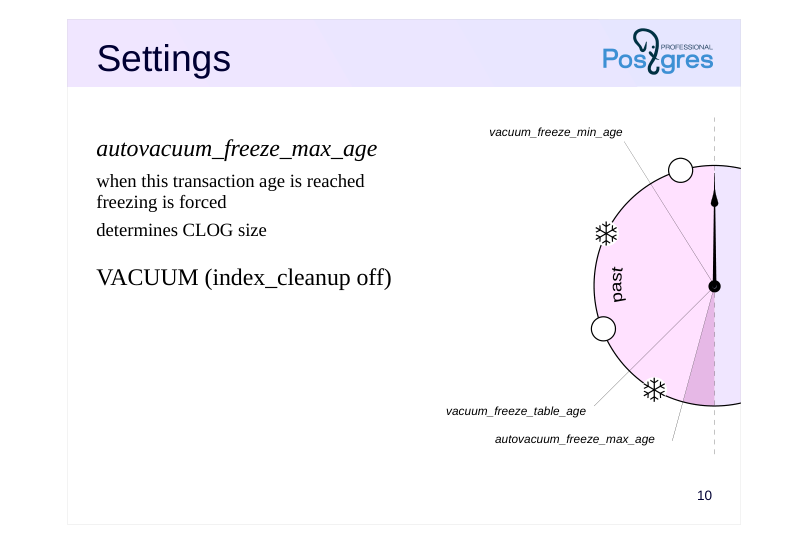 {#source-figure-010 caption=“Source slide page 10: Settings”}
autovacuum\_freeze\_max\_age
- when this transaction age is reached freezing is forced determines CLOG size
- VACUUM (index_cleanup off)
Speaker notes
The autovacuum_freeze_max_age parameter determines the age of the transaction at which the freezing will be forcibly triggered. Autovacuuming will be launched in order to prevent transaction ID overflow consequences even if it is disabled by other parameters.
This parameter also determines the size of the CLOG structure: the status of older transactions will definitely never be needed, so some of the files from the PGDATA/pg_xact can be deleted.
If an administrator realizes that autovacuuming will not have time to freeze the tuples before transaction ID overflow, it is possible to perform manual vacuuming with the index_cleanup off parameter. In this case, indexes will not be cleaned, and tuples in tables will be frozen faster as a result.
Page 11: Settings
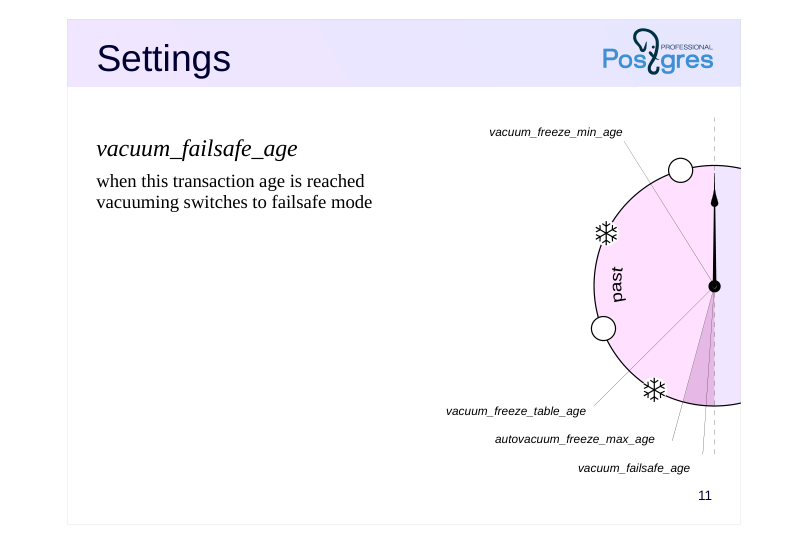 {#source-figure-011 caption=“Source slide page 11: Settings”}
vacuum\_failsafe\_age
- when this transaction age is reached vacuuming switches to failsafe mode
Speaker notes
The vacuum_failsafe_age parameter controls the activation of wraparound failsafe mechanism to speed up freezing of transaction IDs.
In this mode, throttling controlled by autovacuum_vacuum_cost_delay and vacuum_cost_delay parameters will be disabled. Some optional operations (such as index cleanup) will also be skipped. Such measures allow vacuuming to quickly freeze old transactions and switch to normal operation.
Page 12: Settings
Configuration parameters
- vacuum_freeze_min_age
- = 0 50 000 000
- vacuum_freeze_table_age
- = 150 000 000
- autovacuum_freeze_max_age = 200 000 000
- vacuum_failsafe_age
- = 1 600 000 000
- ↑?
- Table storage parameters
- autovacuum_freeze_min_age
- toast.autovacuum_freeze_min_age
- autovacuum_freeze_table_age
- toast.autovacuum_freeze_table_age
- autovacuum_freeze_max_age
- toast.autovacuum_freeze_max_age
Speaker notes
The default values are quite conservative.
The limit for autovacuum_freeze_max_age is about 2 billion transactions, but the default value is ten times smaller. We can increase the vacuum_freeze_table_age and autovacuum_freeze_max_age values to reduce overhead, but it is important to understand that if autovacuum fails to complete freezing in time (for example, due to an active transaction), the administrator will have little time to take action. Note that changing the autovacuum_freeze_max_age parameter requires a server restart.
The default value of vacuum_failsafe_age is significantly larger than the autovacuum_freeze_max_age, and if there is little time left before the transaction ID exhaustion, the failsafe mechanism will accelerate freezing.
Note that the server can adjust the vacuum_freeze_min_age, vacuum_freeze_table_age and vacuum_failsafe_age parameter settings based on the autovacuum_freeze_max_age value.
Most of the parameters can also be set for individual tables using storage parameters. This should only be done in special cases where a table requires specific treatment. Note that the parameter names at the table level differ slightly from the configuration parameter names.
Multitransactions (multixacts) and additional freezing settings for them are discussed in the Locks module.
https://www.postgresql.org/docs/16/runtime-config-client.html
https://www.postgresql.org/docs/16/runtime-config-autovacuum.html
Page 13: Freezing
Let’s set freezing parameters for demonstration. Small transaction age:
Age after which all pages will be frozen:
Disable automatic vacuuming to run it manually when needed.
Create a table with data. Set the minimum fillfactor so that each page contains only two rows.
Create a view to monitor hint bits in the first two pages of the table. Currently we are interested only in xmin and its related bits, since tuples with non-zero xmax will be cleaned up. In addition, we display the age of the xmin transaction.
To look into the visibility and freeze maps, we will use another extension:
Page 14: Page 14
Insert data. Let’s run vacuuming immediately to initialize the visibility map.
After vacuuming, both pages are marked in the visibility map (all_visible bit):
What is the age of the transaction that created the rows?
The age is 1; tuples with this transaction ID will not be frozen yet. Update a row in page zero. The new tuple will go to the same page due to the small fillfactor value.
Now page zero will be processed by freezing: Transaction age exceeds the vacuum_freeze_min_age value. The page has been modified and excluded from the visibility map.
Let’s run vacuuming.
Vacuuming processed the modified page. One tuple has both bits set, this is a frozen mark. Another tuple is too young, but it was also frozen during page processing (this allowed marking page zero in the freeze map):
Page 15: Page 15
Now both pages are marked in the visibility map (all tuples in them are live). Vacuuming will no longer process any of these pages, and unfrozen tuples in page one will remain unfrozen.
This is exactly the case where the vacuum_freeze_table_age parameter is required, which determines when to check pages marked in the visibility map, if they are not marked in the freeze map. Each table retains the highest transaction ID for which all tuples with lower xmin values are guaranteed to be frozen. Its age is compared with the parameter value.
Let’s simulate another transaction so that the age of the table’s relfrozenxid reaches the value of the vacuum_freeze_table_age parameter.
Now, since the entire table has been guaranteed to be checked, the frozen transaction ID can be increased. We are sure no older unfrozen transactions remain in the pages.
Here is what we get in the pages:
Page 16: Page 16
Both pages are now marked in the freeze map.
The last frozen transaction ID is also stored at the entire database level:
It is set to the minimum value from relfrozenxid of all tables in this database. If the age of datfrozenxid exceeds the value of the autovacuum_freeze_max_age parameter, autovacuuming will be forced.
Page 17: Manual Freezing
VACUUM
- freezes tuples by age according to settings
- VACUUM FREEZE
- forces freezing of tuples with xmin of any age
- also applies to VACUUM FULL, CLUSTER
- COPY … WITH FREEZE
- forces immediate freezing after loading
- table must be created or truncated within the same transaction
- may violate transaction isolation rules
Speaker notes
Despite the fact that freezing is performed during autovacuuming when necessary, it can sometimes be useful to manage freezing manually.
The VACUUM command, like autovacuuming, performs freezing according to settings.
If we execute the VACUUM FREEZE command, all tuples will be frozen regardless of transaction age (as if the vacuum_freeze_min_age and vacuum_freeze_table_age parameters are set to zero). When rebuilding a table using VACUUM FULL or CLUSTER commands, all rows are also frozen.
https://postgrespro.com/docs/postgresql/16/sql-vacuum
We can also freeze data during initial loading using the COPY command with the FREEZE parameter. To do this, the table must be created (or emptied by the TRUNCATE command) within the same transaction as the COPY command. Since frozen rows follow their own visibility rules, such rows will be visible in snapshots of other transactions violating normal isolation rules (for Repeatable Read or Serializable transactions), but this usually does not pose an issue. A detailed examination of this case is provided in the practice.
https://postgrespro.com/docs/postgresql/16/sql-copy
The current implementation of this freezing operation for tables having an associated TOAST table forms a visibility map for the main part of the table but not for the TOAST part. This leads to an additional scan of all pages during subsequent vacuuming.
Page 18: Takeaways
Transaction ID space is looped
- Sufficiently old tuples are frozen by vacuuming
- Freeze map is used for optimization
Page 19: Practice
- Use the pageinspect extension to check that when using the COPY … WITH FREEZE command, tuples are indeed frozen.
- Make sure that even at the Repeatable Read isolation level, rows loaded by the COPY… WITH FREEZE command become visible in the snapshot.
- By reducing the value of the autovacuum_freeze_max_age parameter and disabling autovacuum, reproduce the scenario of forced autovacuum triggering by executing an appropriate number of transactions. Note that the operation will not be performed immediately, but during the manual vacuuming of any table (or at server restart).
Speaker notes
- In order for transactions to be allocated permanent (not virtual) IDs, data must be changed in the transaction.
You can organize a loop in bash that calls psql with an update command:
Another option is to use PL/pgSQL to organize the loop. To do this, you can create a procedure that performs transaction commits or use a block with exception handling. When an exception is caught, the transaction will roll back to the implicit savepoint: a new nested transaction will actually start (see the Page Layout and Row Versions lesson).
The third option is to use the pgbench utility:
https://postgrespro.com/docs/postgresql/16/pgbench
Page 20: 1. Freezing during COPY WITH FREEZE
Let’s create a table and load several rows within the same transaction:
Check row versions:
2. COPY WITH FREEZE and Isolation
In another session, start a transaction with the Repeatable Read isolation level.
Page 21: Page 21
Note Note that this transaction should not access table t. Let’s truncate the table and load new rows into it within one transaction. If a concurrent transaction had accessed table t, the TRUNCATE command would wait for that transaction to complete.
Now the concurrent transaction sees the new data, so this breaks the isolation level:
3. Triggering Emergency Autovacuum
First, freeze all transactions in all databases. To do this, it is convenient to use the vacuumdb command:
Maximum age of unfrozen transactions across all databases:
Disable autovacuuming.
Page 22: Page 22
Reduce parameter values:
Server restart is required.
There are many ways to generate a large number of transactions; for example, we can use the pgbench utility. The utility initializes tables and executes 100000 transactions.
Executing one hundred thousand transactions may take considerable time; the –protocol=prepared option slightly speeds up the process by using prepared statements:
It can be seen that the age of unfrozen transactions exceeds the set threshold (100,000):
Executing the VACUUM command on any table will now trigger the autovacuum process.
Autovacuum worker has appeared among other processes:
Page 23: Page 23
And after a while, transactions will be frozen:
08 Lesson 08: WAL / Buffer Cache
This page is extracted from the official PDF into native Markdown. Slide text, code and speaker notes are kept in reading order; the original PDF and HTML remain the layout references. HTML source: dba2_08_wal_buffercache.html Archive: DBA2-handouts-16-en.zip PDF pages: 28
Page 1: WAL / Buffer Cache
Copyright
© Postgres Professional, 2016–2026 Authors: Egor Rogov, Pavel Luzanov, Ilya Bashtanov, Igor Gnatyuk Translated by: Elena Sharafutdinova Photo: Oleg Bartunov (Phu Monastery and Bhrikuti Peak, Nepal)
Use of Course Materials
Non-commercial use of course materials (presentations, demonstrations) is allowed without restrictions. Commercial use is possible only with the written permission of Postgres Professional. It is prohibited to make changes to the course materials.
Feedback
Please send your feedback, comments and suggestions to: edu@postgrespro.ru
Disclaimer
Postgres Professional assumes no responsibility for any damages and losses, including loss of income, caused by direct or indirect, intentional or accidental use of course materials. Postgres Professional company specifically disclaims any warranties on course materials. Course materials are provided “as is,” and Postgres Professional company has no obligations to provide maintenance, support, updates, enhancements, or modifications.
Page 2: Topics
- Buffer Cache Design and Usage
- Eviction Mechanism
- Bulk Eviction and Buffer Rings
- Tuning
- Local Cache for Temporary Tables
- Cache Prewarming
Page 3: Buffer Cache
 {#source-figure-003 caption=“Source slide page 3: Buffer Cache”}
Speaker notes
The function of the buffer cache is to smooth out the difference in performance of two types of memory: RAM (fast, but limited) and disk storage (slow, but large). To work with data, whether reading or modifying it, processes read pages into the buffer cache. While the page is in the cache, we save on I/O operations.
The buffer cache is located in the server’s shared memory and is structured as an array of buffers. Each buffer consists of space for one data page and a header. The header contains, among other things:
● Location of the page on the disk (file and page number)
● Buffer usage count (incremented each time the process reads or changes the buffer)
● A flag indicating that the data on the page has been modified and must eventually be written to disk (such a buffer is called dirty)
● A pin count tracking the number of processes currently working with the buffer content
The size of the buffer cache is set by the shared_buffers parameter. Changing this parameter requires a server restart.
The cache initially contains empty buffers, and all of them are chained into the list of free buffers. The purpose of the next victim pointer will become clear a bit later.
A hash table is used to quickly find the required page in the cache.
Page 4: Page in the Cache
 {#source-figure-004 caption=“Source slide page 4: Page in the Cache”}
Speaker notes
When a process needs to read a page, it first attempts to find it in the buffer cache using the hash table.
The file and the page number in the file are used as the hash key. The process finds the buffer number and quickly checks whether it really contains the page needed. As in any hash table, collisions are possible here; in this case, the process will have to check several pages.
If the required page is found in the cache, the process must pin the buffer (incrementing the pin count), and increment the buffer usage count. Since multiple processes can pin the same buffer simultaneously, a counter is used for this purpose, not a boolean flag.
While a buffer is pinned (pin count is greater than zero), the buffer is considered to be used and its contents should not change drastically. For example, a new tuple may be added into the page. This does not interfere with any operations due to multiversion concurrency control and visibility rules. However, a different page cannot be read into a pinned buffer.
Page 5: Page in the Cache
Create a table with one row:
Information about the contents of the buffer cache and its usage can be obtained using the pg_buffercache extension, which includes a view of the same name and additional functions:
For convenience, let’s create a view that decodes some of the columns. The condition for a database is required because the buffer cache contains data from the entire cluster. We can only decode information from the database we are connected to. Global objects are considered to belong to a database with OID 0.
The buffer cache already contains pages of the table; they appeared during the insertion:
The EXPLAIN command with the analyze and buffers options shows buffer cache usage during query execution:
Page 6: Page 6
The “Buffers: shared hit=1” line indicates that the page was found in the cache. After executing the query, the usage count increased by one:
Page 7: Reading into a Free Buffer
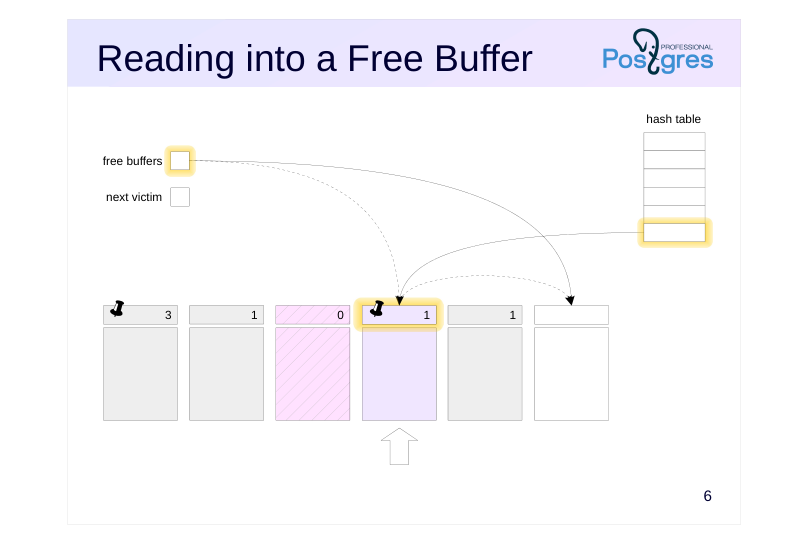 {#source-figure-007 caption=“Source slide page 7: Reading into a Free Buffer”}
Speaker notes
It may happen that the required page is not found in the cache. In this case, the page should be read from disk to any buffer.
If the free list contains buffers, one is selected from them first.
The buffer the pointer referred to is pinned, the required page is read into it, and the usage count is set to one.
The free buffer pointer moves to the next available buffer in the list, if any.
Besides, a reference to the loaded page must be written to the hash table so that it can be found in the future.
Page 8: Reading into a Free Buffer
 {#source-figure-008 caption=“Source slide page 8: Reading into a Free Buffer”}
Speaker notes
In the end, the last free buffer will be occupied.
Now the reference to a free buffer is empty. Consequently, in order to read a new page into any occupied buffer, we have to evict the page located there.
Buffers are returned to the free buffer list when a table is dropped or truncated, or when part of the tail pages are cut off during vacuuming, that is, in cases where the page in the buffer is not replaced by another one, but simply disappears.
Page 9: Reading into a Free Buffer
Let’s restart the server to reset the buffer cache.
There are free buffers in the cache:
Execute a query on the table:
The “Buffers: shared read=1” line indicates that the page had to be read from disk. Here it is:
The number of free buffers decreased:
Not only the read page got into the cache, but also pages of the system catalog tables that were needed by the planner.
Page 10: Reading with Eviction
 {#source-figure-010 caption=“Source slide page 10: Reading with Eviction”}
Speaker notes
The eviction mechanism uses a next victim pointer.
The clock-sweep algorithm circularly goes through all buffers, decrementing their usage counts. The first buffer with a usage count of zero that can be occupied by a new page will be selected.
The higher the buffer’s usage count (the more often it is used), the more likely it is to remain in the cache. To prevent excessive looping when counts are large, the maximum value of the usage count is limited to 5.
In our example, the process first accesses the buffer by pointer. The buffer is pinned (i.e., used by some process), so its page cannot be evicted. Nevertheless, we reduce the usage count by one and proceed to the next buffer.
Page 11: Reading with Eviction
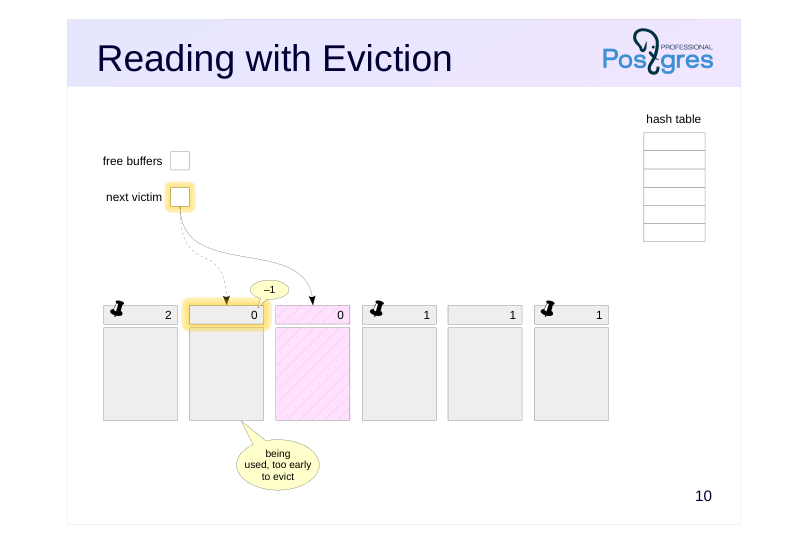 {#source-figure-011 caption=“Source slide page 11: Reading with Eviction”}
Speaker notes
The next buffer is not pinned, but its usage count is greater than zero.
We reduce the counter by one, giving the page a chance to remain in the cache.
Page 12: Reading with Eviction
 {#source-figure-012 caption=“Source slide page 12: Reading with Eviction”}
Speaker notes
Finally, we reach an unpinned buffer with a zero usage count. The page in this buffer will be evicted.
However, in our example, the buffer appears to be dirty, i.e., it contains modified data. Therefore, its page needs to be saved to disk first. To do this, the buffer is pinned (to show other processes that it is in use), after which the page is written to disk.
This is hardly a good situation since the process that is going to read the page has to wait until another page’s data is written. This effect is alleviated by checkpoint and background writer processes, which are covered in the Checkpoint lesson.
Page 13: Reading with Eviction
 {#source-figure-013 caption=“Source slide page 13: Reading with Eviction”}
Speaker notes
Once the page from a dirty buffer is written to disk, a new page is read into the free buffer as described earlier.
The reference to the next victim now points to the next buffer, and the newly loaded buffer has time to increase the usage count while the pointer makes a full circle through the buffer cache and comes back around.
Page 14: Tuning
Settings
- ↑
- shared_buffers = 128MB
- Buffer cache should contain active data
- if the size is too small, useful pages are constantly evicted
- if the size is too large, overhead grows pointlessly
- first approximation is 1/4 of RAM
- Double caching should be considered
- if a page is not in the DBMS cache, it may be found in the OS cache
- OS eviction algorithm is not aware of the database-specific features
Speaker notes
The cache size is set by the shared_buffers parameter. The default value of 128 MB is too low.
What do we need to consider to choose the appropriate value? Even the largest database has a limited data set that is actively processed.
Ideally, this set (plus some space for one-time data) must fit into the buffer cache.
If the cache size is smaller, actively used pages will constantly evict each other, thus leading to excessive I/O operations. A key indicator of this is when all pages in the cache have a high usage count.
However, with a large cache size, overhead for its maintenance will increase.
It is usually recommended to take 1/4 of RAM for the first approximation. However, it is important to understand that the optimal value depends not on the size of the RAM, but on the specific data and workload.
Note that PostgreSQL works with the disk via the operating system, so double caching occurs: pages are stored both in the buffer cache and in the OS cache. Therefore, a cache miss does not necessarily lead to actual physical I/O. However, the OS eviction algorithm is not aware of database-specific requirements.
https://postgrespro.com/docs/postgresql/16/runtime-config-resource#RUNTI ME-CONFIG-RESOURCE-MEMORY
Page 15: Tuning Cache Size
Using the pg_buffercache extension, you can monitor the state of the cache from different angles. In addition to information about how a particular page is presented in the cache, you can, for example, see the distribution of buffers by their popularity.
The pg_buffercache_usage_counts() function returns a number of shared buffers for each possible value of usage count. Like the pg_buffercache view, the function does not use buffer manager locks, so when working concurrently in the database, a slight inaccuracy in the results of the function is possible. Let’s examine the cached proportion and usage activity for each table:
Another function from the extension will show us summary information about the buffer cache:
Such queries can hint at how actively the buffer cache is being used and provide food for thought on whether to increase or decrease its size. It is important to note that such queries should be run several times: the numbers will change within certain limits, and the overall set of results may be inconsistent. Information similar to what the pg_buffercache_summary() and pg_buffercache_usage_counts() functions return can also be obtained using the pg_buffercache view. However, using the functions is less costly, which is convenient for monitoring systems.
Page 16: Bulk Eviction
 {#source-figure-016 caption=“Source slide page 16: Bulk Eviction”}
Speaker notes
During operations that perform bulk data reading or writing, there is a risk of evicting useful pages from the buffer cache with one-time data. To avoid this, so called buffer rings are used: only a small part of the buffer cache is dedicated for each operation. The eviction is carried out only within the ring, so the rest of the data in the buffer cache is not affected.
If dirty buffers appear in the ring during operation, they will be either removed from the ring or flushed to disk.
Page 17: Buffer Ring
Sequential reading
- 32 pages
- dirty buffer is excluded from the ring
- Vacuuming
- vacuum_buffer_usage_limit = 32
- dirty buffer is flushed to disk and page is evicted
- Bulk Writing
- ≤2048 pages
- dirty buffer is flushed to disk and page is evicted
Speaker notes
During a sequential scan of a table, a buffer ring of 32 pages is used. If dirty buffers appear while processing this data (as a result of setting hint bits or performing an UPDATE), they are removed from the ring, returned to the main cache, and will be subsequently evicted according to the general rules. The buffer removed from the ring is replaced by another buffer from the main cache. Such a strategy is designed for scenarios where the data is mainly read, not modified.
If another process scans the same table, it attaches to the existing buffer ring and later reads the pages that have been evicted before.
Vacuum also uses a ring, its size is set by the vacuum_buffer_usage_limit parameter. The default value of the parameter is quite small (32 pages), since slowing down vacuuming is usually less critical than slowing down user processes (an exception is aggressive vacuuming, where it can use the entire cache).
For bulk write operations such as COPY or CREATE TABLE AS SELECT, the ring is quite large (usually 2048 pages, but not more than 1/8 of the buffer cache).
Page 18: Bulk Eviction
A buffer ring is used to fully read tables larger than a quarter of the buffer cache. Cache size (in pages):
Insert rows into the table:
Restart the server to reset the buffer cache.
And reset the overall I/O statistics:
Read data from the table:
All data pages were read, but how many cache buffers do they occupy?
When scanning a large table, the ring size is 32 buffers. PostgreSQL version 16 introduced the pg_stat_io view, which shows I/O statistics from the DBMS’s perspective (OS-level caching is not taken into account).
Page 19: Page 19
The row with the normal context shows read-write operations in the shared part of the buffer cache, and bulkread shows operations in buffer rings. reads — number of reads from files hits — how many times a page was found in the cache reuses — number of buffer reuses in the buffer ring The difference between reads and reuses in the bulkread row equals the ring size (32). Reset the statistics and update all rows in the table. In this case, buffers with pages will be detached from the buffer ring and remain in the cache:
Now the cache contains all or almost all pages of the table, the number of which has doubled due to new row versions:
Let’s take a look at the statistics again.
The table is fully scanned once again through the buffer ring. At the same time, 32 pages remained in the ring from the previous scan, and the rest had to be read again. The modified pages are transferred one by one to the main cache; accesses to them are counted in the normal row. At the same time, updating each of the 30 thousand rows of the table requires several page accesses, thus the value in the hits field is quite large.
Page 20: Local Cache
Temporary Tables
- visible to only one session, so there is no point in using shared cache
- exist within one session, so their loss in a crash is acceptable
- Features
- no locks required
- memory is allocated on demand within temp_buffers
- standard eviction algorithm
- buffer ring mechanism is not used
Speaker notes
Temporary tables are an exception to the general rule. Since temporary data is visible to only one process, there is no need for them in the shared buffer cache. Moreover, temporary data exist only within one session, so it does not need to be protected against failures.
A lightweight local cache is used for temporary data.
Since the local cache is accessible to only one process, it does not require locks. Memory is allocated on demand (within the limit set by the temp_buffers parameter), since temporary tables are not used in all sessions. The local cache uses a standard eviction algorithm.
At the physical level, temporary tables are stored similarly to regular tables. The temp_tablespaces parameter specifies the tablespaces where temporary objects (temporary tables and their indexes) will be created when CREATE command does not explicitly specify a tablespace.
The temp_tablespaces parameter value can contain a list of tablespace names. When this list contains more than one name, PostgreSQL randomly selects one from the list when creating each temporary object. However, for subsequent objects created within the same transaction, the tablespaces are sorted sequentially. If the list contains an empty string (default value), PostgreSQL will use the default tablespace for the current database.
Page 21: Temporary Tables
Create a table with one row:
In the query execution plan, access to the local cache looks like “Buffers: local”:
We see that inserting the row caused the table to extend.
Page 22: Cache Prewarming
pg\_prewarm extension
- manual prewarming of the OS cache
- manual prewarming of the buffer cache
- automatic prewarming of the buffer cache upon server restart
Speaker notes
After a server restart, the buffer cache is empty, and it takes some time for it to prewarm, i.e., to get filled with the current, actively used data. Sometimes it can be useful to immediately read the contents of certain tables into the cache.
The pg_prewarm extension allows us to read manually some tables either into the OS cache, or the DBMS buffer cache.
The extension also allows us to restore automatically the contents of the buffer cache after a server restart. To do this, we need to add the extension library to shared_preload_libraries parameter.
https://postgrespro.com/docs/postgresql/16/pgprewarm
Page 23: Cache Prewarming
Let’s consider the most basic scenario for using the extension to prewarm up the cache.
Restart the server once again to ensure that the test table data is not in the cache:
Calling the pg_prewarm function without additional parameters fully reads the main fork of the specified table into the buffer cache:
Page 24: Takeaways
All data access runs through the buffer cache
- Rarely used pages are evicted, frequently used pages remain
- Buffer cache reduces I/O, but requires logging
Page 25: Practice
- Create a table and insert a number of rows into it. How many a) pages on the disk, b) buffers in the cache does the table occupy?
- Find out the number of dirty buffers in the cache at the moment. Use CHECKPOINT command to perform a checkpoint. How many dirty buffers are left now?
- Load the pg_prewarm extension library, restart the server and check that the contents of the buffer cache are restored.
Speaker notes
To check the contents of the buffer cache, use the pg_buffercache extension:
https://postgrespro.com/docs/postgresql/16/pgbuffercache.html
Page 26: 1. Table in the Cache
Let’s create a table:
Run VACUUM to ensure we have all forks:
How many pages on disk does the table occupy?
The main fork is:
The free space map:
The visibility map:
How many buffers in the cache does the table occupy?
Page 27: Page 27
2. Dirty Buffers in the Cache
Let’s execute a checkpoint:
No dirty buffers remain. Checkpoints are discussed in detail in a dedicated lesson.
3. Automatic Cache Prewarming
Add the pg_prewarm library and restart the server.
Now, a separate background process will dump the list of pages in the buffer cache to disk every pg_prewarm.autoprewarm_interval time units.
Read table t into the buffer cache:
Page 28: Page 28
You can either wait, or dump the page list manually:
The file contains the database, tablespace, and file IDs, the fork number, and the page number:
Let’s restart the server again.
After startup, the background process will read all pages listed in the file into the buffer cache.
Reset the parameter.
09 Lesson 09: WAL / Write-Ahead Log
This page is extracted from the official PDF into native Markdown. Slide text, code and speaker notes are kept in reading order; the original PDF and HTML remain the layout references. HTML source: dba2_09_wal_log.html Archive: DBA2-handouts-16-en.zip PDF pages: 22
Page 1: WAL / Write-Ahead Log
Copyright
© Postgres Professional, 2016–2026 Authors: Egor Rogov, Pavel Luzanov, Ilya Bashtanov, Igor Gnatyuk Translated by: Elena Sharafutdinova Photo: Oleg Bartunov (Phu Monastery and Bhrikuti Peak, Nepal)
Use of Course Materials
Non-commercial use of course materials (presentations, demonstrations) is allowed without restrictions. Commercial use is possible only with the written permission of Postgres Professional. It is prohibited to make changes to the course materials.
Feedback
Please send your feedback, comments and suggestions to: edu@postgrespro.ru
Disclaimer
Postgres Professional assumes no responsibility for any damages and losses, including loss of income, caused by direct or indirect, intentional or accidental use of course materials. Postgres Professional company specifically disclaims any warranties on course materials. Course materials are provided “as is,” and Postgres Professional company has no obligations to provide maintenance, support, updates, enhancements, or modifications.
Page 2: Topics
- Write-Ahead Log (WAL)
- Logical and Physical Structure of the WAL
- Write-Ahead Logging and Recovery
Page 3: Write-Ahead Log
Primary function
- to restore data consistency after a crash
- Mechanism
- when data is modified, the operation is also written to WAL
- WAL record reaches the disk earlier than the modified data
- crash recovery is achieved by replaying the lost operations using WAL
- records
Speaker notes
The fundamental purpose of the WAL is to restore data consistency after a crash that results in the loss of RAM contents, including the buffer cache. This ensures the Durability property (letter D in the ACID transaction properties).
When data is modified, a WAL record is created simultaneously, containing sufficient information to replay that operation. The WAL record must be flushed to disk before the modified page, that is why it is named as Write-Ahead Log.
After a crash, the system can read the WAL and replay the operations that were already performed but whose results had not been written to disk by that time.
https://postgrespro.com/docs/postgresql/16/wal-intro
Page 4: WAL-logged Operations
Changes to any pages in the buffer cache
- including table and index pages
- except for unlogged and temporary tables
- Transaction commits and aborts — CLOG buffers
- File operations
- creation and deletion of files
- addition and removal of file pages
- creation and deletion of directories
Speaker notes
It is required to log all operations that can lead to incomplete write of changes in case of a failure.
In particular, the following operations are WAL-logged:
● Changes to pages in the buffer cache (typically table and index pages). This is necessary since a modified page is not written to disk immediately.
● Transaction commits and aborts. Similarly, the status change occurs in the CLOG buffer and it is not written to disk immediately.
● File operations (creating and deleting files and directories, e.g., when a table is created). These operations must be synchronized with data changes.
The following operations are not WAL-logged:
● Operations on unlogged tables, as the name implies.
● Operations on temporary tables, since the lifetime of such tables does not exceed the lifetime of the session that created them.
Page 5: Logical Structure
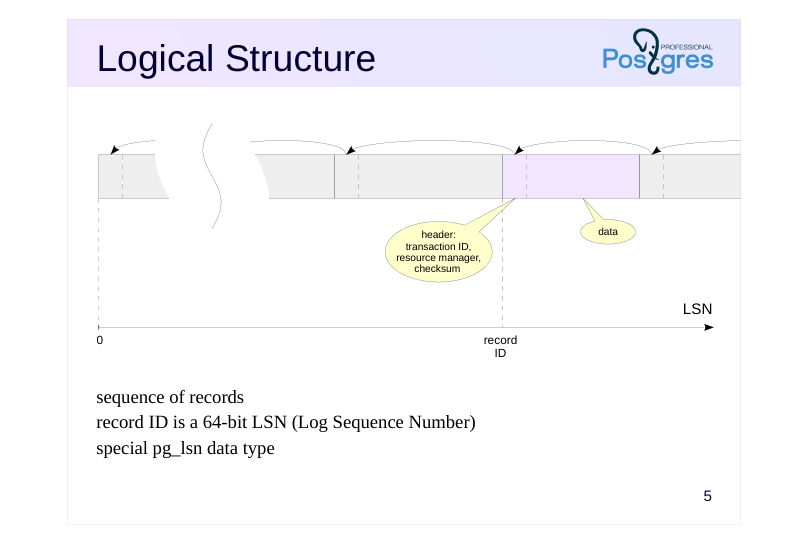 {#source-figure-005 caption=“Source slide page 5: Logical Structure”}
sequence of records record ID is a 64-bit LSN (Log Sequence Number) special pg_lsn data type
Speaker notes
Logically, we can describe WAL as a sequence of variable-length records. Each record contains data about a particular operation, preceded by a header. Among other things, the header includes:
● Transaction ID for the record.
● Resource manager, the system component responsible for this record that knows how to interpret the data in the record. There are separate managers for tables, various index types, transaction status, etc.
● Checksum (CRC).
Starting with version 16, extensions can create their own resource managers that use a custom format for their WAL records. This helps developers create extensions that implement new table and index access methods.
https://postgrespro.com/docs/postgresql/16/custom-rmgr
To refer to a particular record, the pg_lsn data type is used. It represents a 64-bit offset in bytes from the start of the WAL to the record.
The start of each record is aligned to a machine word boundary, which is one of the reasons for the binary incompatibility of WAL across different platforms.
https://postgrespro.com/docs/postgresql/16/datatype-pg-lsn
Page 6: Logical Structure
The list of resource managers will be shown by the pg_waldump utility:
LSN is displayed as two 32-bit hexadecimal numbers separated by a slash. Current WAL insert position:
Using the pg_waldump tool and the pg_walinspect extension, introduced in PostgreSQL 15, we can examine the contents of the WAL. Create a database and install the extension (to use the extension, the role must be a member of pg_read_server_files or be a superuser):
We need a small table:
Let’s get the current WAL position, then insert a row into the table:
Now the WAL position is as follows:
Page 7: Page 7
Examine the records written to the WAL:
The INSERT+INIT operation initializes a page and adds a tuple to it, the COMMIT operation commits the transaction. For the INSERT+INIT record, the WAL stores the data block containing field values of the inserted tuple. The extension allows us to see this data (in the block_data column, character codes of the inserted row can be identified):
Page 8: Physical Structure
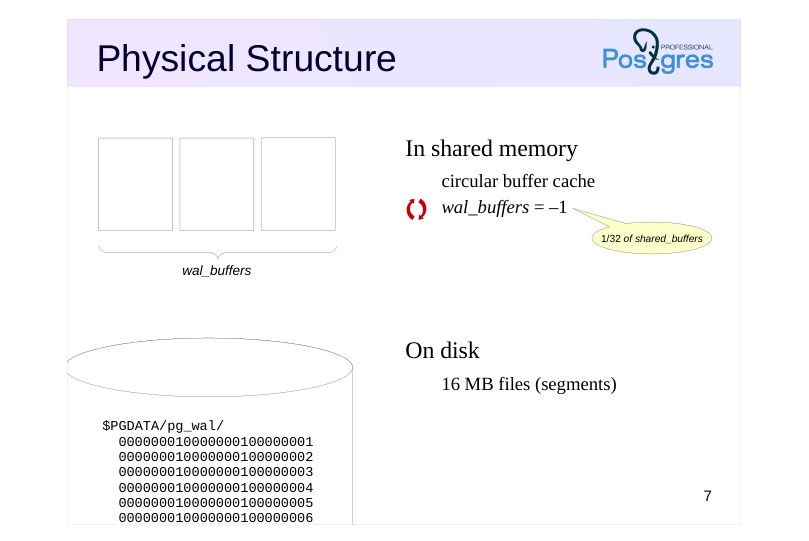 {#source-figure-008 caption=“Source slide page 8: Physical Structure”}
In shared memory
- On disk
Speaker notes
On disk, the WAL is stored as files (segments) in the PGDATA/pg_wal directory. Each file is 16 MB by default. The segment size can be set during cluster initialization.
WAL records are written to the current file. When it fills up, the system moves on to the next one.
In shared memory, special buffers are allocated for the WAL. The wal_buffers parameter specifies the size of the cache (the default value implies automatic setting: 1/32 of the buffer cache is allocated, but no less than 64 KB and no more than the size of one WAL segment).
The WAL cache is structured similarly to the buffer cache, but operates mainly as a circular buffer: records are added to the head, while they are flushed to disk from the tail.
Page 9: Physical Structure
Size of the WAL cache in shared memory:
All WAL files (segments) are located in the /var/lib/postgresql/16/main/pg_wal directory; they can also be listed using a special function:
File names consist of three numbers. The first is the timeline ID (used during archive recovery), and the next two are the high-order digits of the LSN. The file size can be set during cluster initialization; the default size is 16 MB. The INSERT+INIT record is located in this file:
Current WAL segment:
Page 10: Write-Ahead Logging
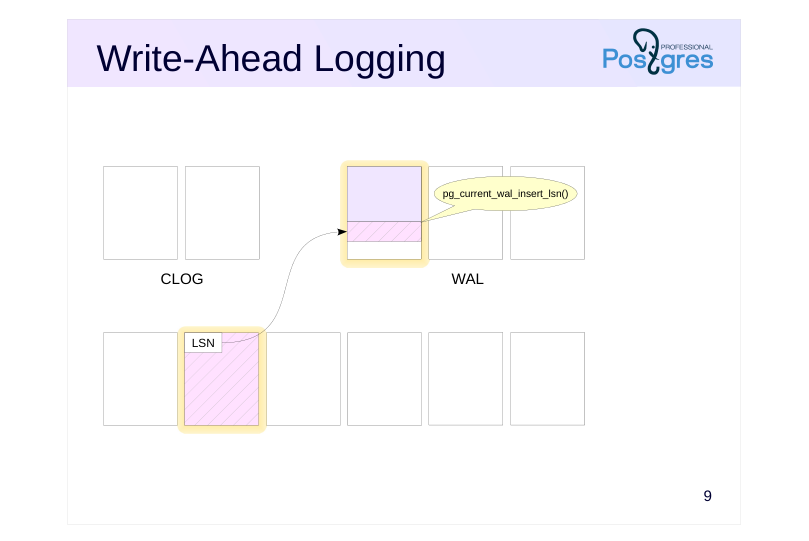 {#source-figure-010 caption=“Source slide page 10: Write-Ahead Logging”}
- • •
Speaker notes
Let’s illustrate the concept of Write-Ahead Logging discussed earlier. The slide shows three important areas of the shared memory:
● Buffer cache (size set byshared_buffers)
● WAL buffer cache described above (size set by wal_buffers)
● Transaction status cache, also known as CLOG (size of 128 pages)
When a data page is modified in the buffer cache, a WAL record is created. This record is placed in a WAL page, and a reference to the record (more precisely, its LSN + its length, i.e., the LSN of the next record) is written to a special LSN field in the data page header.
The current recording position can be obtained using the pg_current_wal_insert_lsn() function.
Page 11: Write-Ahead Logging
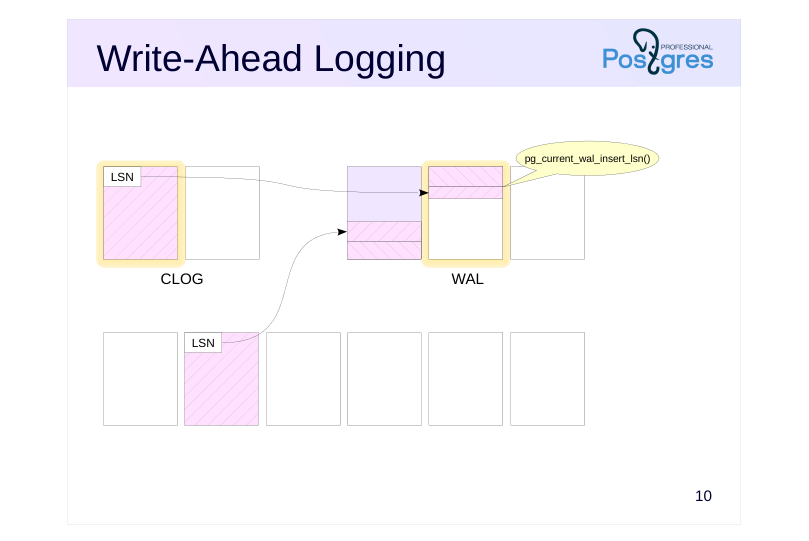 {#source-figure-011 caption=“Source slide page 11: Write-Ahead Logging”}
- • •
Speaker notes
Let’s assume the transaction is committed. Another WAL record is generated, the status bit is changed in a CLOG page, and a reference to this record is placed in the LSN field of the modified page.
When the record is inserted, the pg_current_wal_insert_lsn pointer moves forward.
Note that WAL records belonging to one transaction can be interleaved with records from other transactions, which may belong to any database within the cluster. The WAL is shared across the entire cluster.
Page 12: Write-Ahead Logging
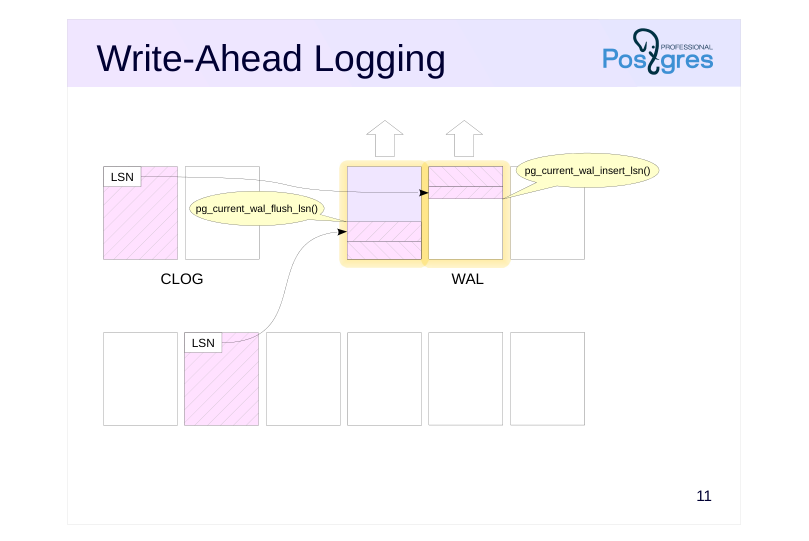 {#source-figure-012 caption=“Source slide page 12: Write-Ahead Logging”}
- • •
Speaker notes
At some point (the specific point will be covered in the WAL Tuning lesson), the WAL records that have not yet been written to disk must be flushed.
The pg_current_wal_flush_lsn() function shows the last record that has already been written to disk.
Page 13: Write-Ahead Logging
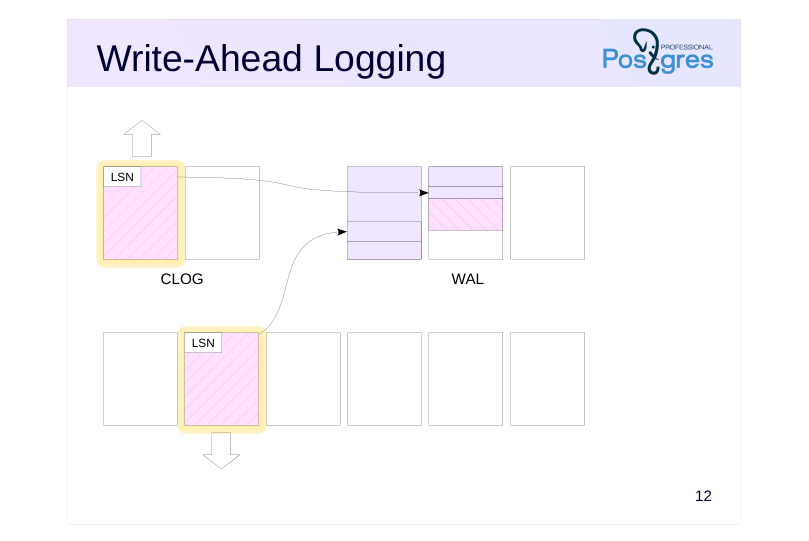 {#source-figure-013 caption=“Source slide page 13: Write-Ahead Logging”}
- • •
Speaker notes
Modified data pages can only be written to disk after their corresponding WAL records have been flushed. This sequence is controlled by tracking the LSN of the last modification to the page and the value of pg_current_wal_flush_lsn(). Meanwhile, the operation continues, and new WAL records are constantly being generated. For the page to be written, it is important that the WAL record with the LSN of its last modification must already be on disk.
If a data page needs to be written to disk (for instance, during page eviction from the buffer cache) but its corresponding WAL record has not yet been flushed, the WAL buffers are forcibly flushed to disk first.
Page 14: Write-Ahead Logging
Let’s examine the table page header. To do this, we need the extension:
Start a transaction.
Current position and current WAL segment:
Update a row in the table:
The WAL position has changed:
We will find this LSN (or a lower one, if additional records were written to the WAL) in the header of the modified page:
Let’s commit the transaction.
The WAL position has changed again:
Size of the WAL records (in bytes) corresponding to our transaction:
Of course, the WAL contains information about all activities across the entire cluster, but in this case we assume that no other operations are running in the system. Here are the actual records:
Page 15: Page 15
Note Note that due to alignment, the record length is usually less than the space it occupies. We can also see the WAL contents using the pg_waldump utility. It can work with an LSN range (as in this example), select records for a specific relation and fork, as well as for a specific page or transaction. Unlike the pg_walinspect extension, this utility can be used on a stopped server, but it requires read access to WAL files. So, we will execute the command as a superuser:
We can see the WAL record headers: the HOT_UPDATE operation related to the modified page (rel+blk), COMMIT operation with a timestamp.
Page 16: Recovery
Algorithm (simplified)
- during server startup after a crash
- (the cluster state in pg_control is not “shut down”):
- 1 For each WAL record:
- 1.1 Identify the page this record relates to
- 1.2 Apply the record if its LSN is greater than the LSN stored in the page
- 2 Overwrite unlogged tables with init files
Speaker notes
The server crash is identified at the subsequent server start. If the startup process spawned by the postmaster at the very beginning checks the pg_control file and finds out a status other than “shut down”, automatic recovery will be performed.
The startup process will read the WAL sequentially and apply the records to pages, if necessary. The need can be determined by comparing LSN of the page on disk with LSN of the WAL record. During recovery, pages are changed in the buffer cache, as in normal operation. To do this, the postmaster launches the necessary background processes.
WAL records are applied to files in a similar way: for example, if it is clear from a record that the file must exist, but it does not, the file is created.
At the end of the process, all unlogged tables are overwritten using the forks stored in the init files.
Starting with PostgreSQL 15, the system can prefetch WAL data during recovery using the mechanism controlled by the recovery_prefetch parameter. Its default value is try (prefetching is used if supported by the OS). When prefetch is enabled, the wal_decode_buffer_size parameter determines how far ahead the server will look into the WAL to identify the required page numbers.
The algorithm described here is simplified. In particular, we have not mentioned where to start reading WAL records from (this will be covered in the Checkpoint lesson).
Page 17: Takeaways
The use of buffers in RAM requires the use of WAL
- The WAL contains information required to replay operations after a crash and restore database consistency
- The WAL is always written to disk before the corresponding modified data pages are written
Page 18: Practice
- Create a table with a primary key and insert several rows into it. How many bytes do the generated WAL records occupy?
- What accounts for a relatively large number of them? Examine the headers of these WAL records and verify your assumptions.
- Modify the rows you inserted into the table. Modify the rows again, but do not commit the transaction. Simulate a crash by terminating the postmaster process. Start the server and verify that the committed changes are still present, while the uncommitted transaction has been aborted. Find the information about the crash recovery in the server log.
Speaker notes
You can use the pg_waldump tool or the pg_walinspect extension.
Use the command $ sudo kill -QUIT process-id
You can find the process ID in the first line of the postmaster.pid file located in the server’s PGDATA directory.
Page 19: 1. Size of WAL Records
First, note the starting position in the WAL:
Create a table and insert rows:
Note the ending position:
Size of the WAL records:
2. WAL Contents
WAL file:
We need the pg_walinspect extension:
Let’s look at the WAL records:
Page 20: Page 20
Page 21: Page 21
Initially (before the first COMMIT operation), there was significant activity with tables and indexes of the system catalog. This is why the total size of the WAL records is substantially larger than in the demonstration.
3. Crash Recovery
Update the rows:
Terminate the main server process.
Start the server.
Page 22: Page 22
Check the changes:
WAL:
10 Lesson 10: WAL / Checkpoint
This page is extracted from the official PDF into native Markdown. Slide text, code and speaker notes are kept in reading order; the original PDF and HTML remain the layout references. HTML source: dba2_10_wal_checkpoint.html Archive: DBA2-handouts-16-en.zip PDF pages: 25
Page 1: WAL / Checkpoint
Copyright
© Postgres Professional, 2016–2026 Authors: Egor Rogov, Pavel Luzanov, Ilya Bashtanov, Igor Gnatyuk Translated by: Elena Sharafutdinova Photo: Oleg Bartunov (Phu Monastery and Bhrikuti Peak, Nepal)
Use of Course Materials
Non-commercial use of course materials (presentations, demonstrations) is allowed without restrictions. Commercial use is possible only with the written permission of Postgres Professional. It is prohibited to make changes to the course materials.
Feedback
Please send your feedback, comments and suggestions to: edu@postgrespro.ru
Disclaimer
Postgres Professional assumes no responsibility for any damages and losses, including loss of income, caused by direct or indirect, intentional or accidental use of course materials. Postgres Professional company specifically disclaims any warranties on course materials. Course materials are provided “as is,” and Postgres Professional company has no obligations to provide maintenance, support, updates, enhancements, or modifications.
Page 2: Topics
- Checkpointer Process
- Background Writer Process
- Monitoring
Page 3: Checkpoint
Why Checkpoint Is Required
- Checkpoint Procedure
- Crash Recovery Algorithm
- Tuning
Page 4: Why Checkpoint Is Required
Size of stored WAL records
- which WAL segment to start recovery from?
- actively used page may not be evicted from cache
- Recovery time
- how long does crash recovery take?
Speaker notes
If no special measures are taken, an actively used page, once loaded into the buffer cache, might never get evicted. This means that crash recovery procedure will have to scan all the WAL records created since the server was started.
In practice, it is indeed unacceptable for two main reasons. First, WAL files take up a lot of space, and all of them have to be stored on the server. Second, the recovery time could be extremely long as countless WAL records need to be processed.
To prevent this, the checkpoint procedure flushes all dirty pages to disk without evicting them from the cache. A dedicated background process called checkpointer periodically performs a checkpoint. Once a checkpoint is completed, WAL records that precede its start are no longer required for recovery.
Page 5: Checkpoint Procedure
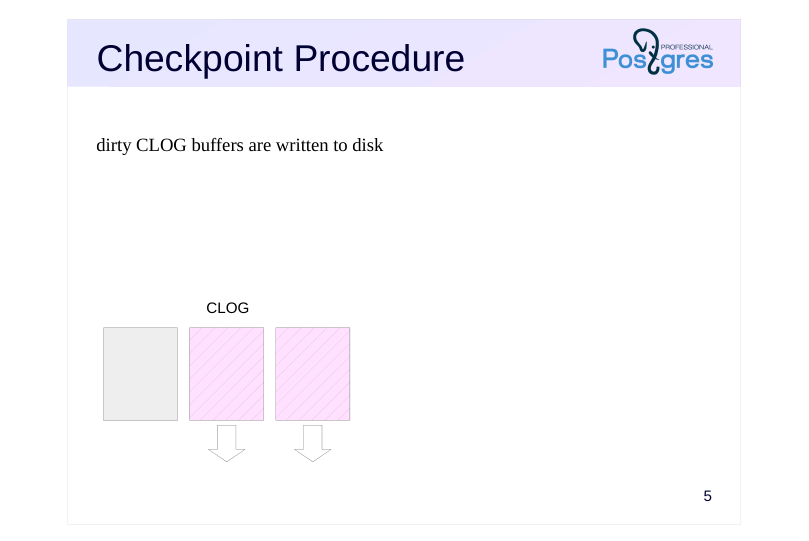 {#source-figure-005 caption=“Source slide page 5: Checkpoint Procedure”}
dirty CLOG buffers are written to disk
Speaker notes
Let’s examine in more detail what happens when a checkpoint is performed.
First, RAM contains structures other than the buffer cache whose contents must be persisted to disk.
In particular, the checkpoint flushes transaction status buffers (CLOG) to disk. Since the number of these buffers is small (only 128), they get written immediately.
Page 6: Checkpoint Procedure
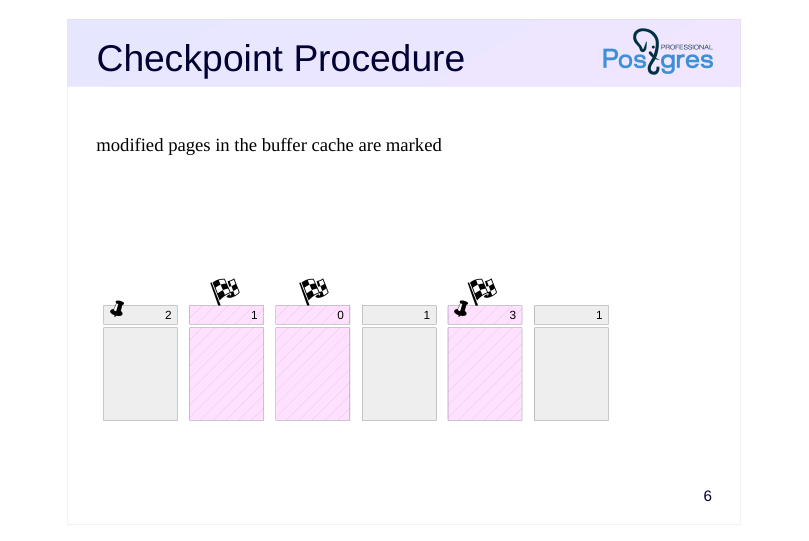 {#source-figure-006 caption=“Source slide page 6: Checkpoint Procedure”}
modified pages in the buffer cache are marked
Speaker notes
Second, the main function of a checkpoint is to flush all pages from the buffer cache that were dirty at the moment the checkpoint started.
Since the buffer cache can be very large, flushing all pages at once is problematic, as it would interrupt normal server operations and put excessive load on the I/O subsystem. Therefore, the checkpoint is spread out over time and turns from a point into an interval.
Initially, all pages modified up to this point are marked in the buffer header with a special flag…
Page 7: Checkpoint Procedure
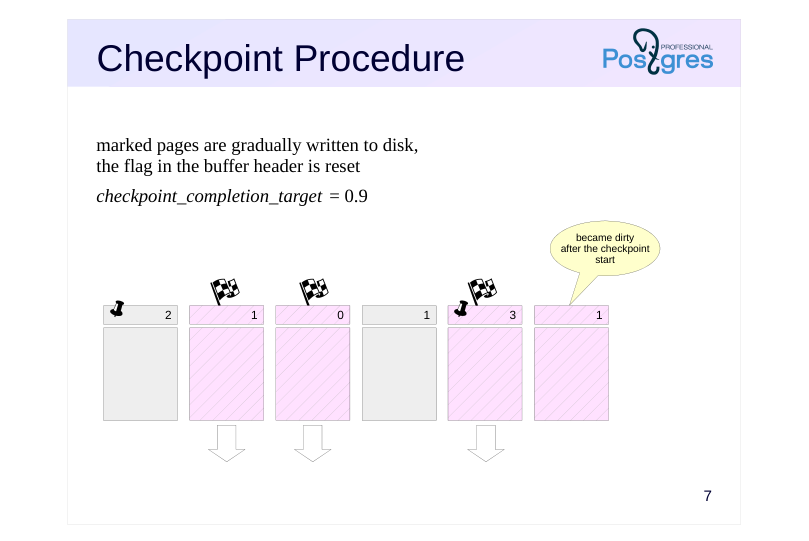 {#source-figure-007 caption=“Source slide page 7: Checkpoint Procedure”}
marked pages are gradually written to disk, the flag in the buffer header is reset
- checkpoint_completion_target = 0.9
Speaker notes
… and then the checkpoint gradually iterates through all the buffers and flushes the marked pages to disk. Note that the pages are only written to disk, but not evicted from the cache. Therefore, the checkpoint procedure ignores both the buffer’s usage count and pin count.
The marked buffers can also be written by backends, whichever reaches the buffer first. In any case, the flag is reset when the buffer is written, so the buffer will not be written twice.
Pages continue to change in the buffer cache during the checkpoint. However, newly dirty buffers are not processed by the checkpoint, as they were not dirty when it started.
The rate at which dirty buffers are written is controlled by the checkpoint_completion_target configuration parameter. It specifies the fraction of time between two adjacent checkpoints that should be used for writing pages. With the default value of 0.9, PostgreSQL should complete the checkpoint procedure shortly before the next scheduled one. Using values higher than the default 0.9 is not recommended, as the process may actually take a bit longer than specified by the parameter.
Page 8: Checkpoint Procedure
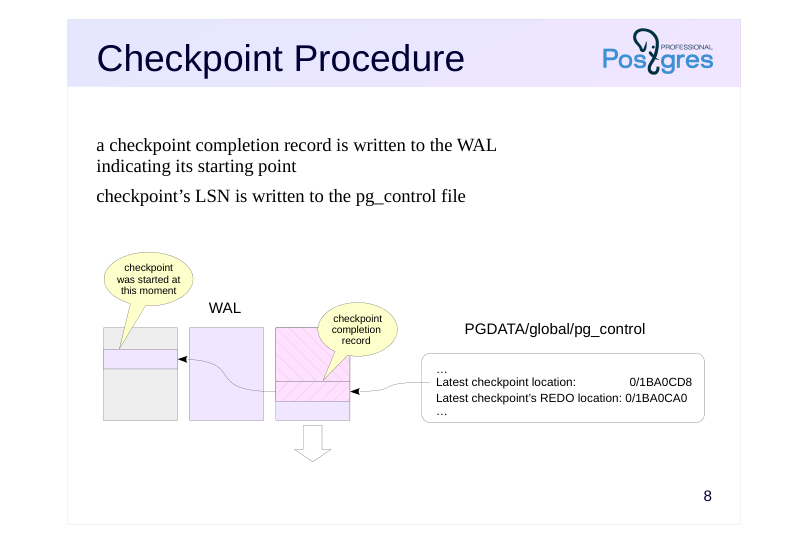 {#source-figure-008 caption=“Source slide page 8: Checkpoint Procedure”}
a checkpoint completion record is written to the WAL indicating its starting point
- checkpoint’s LSN is written to the pg_control file
Speaker notes
When completed, the checkpoint creates a WAL record marking the end of the checkpoint. This WAL record contains the LSN of the checkpoint’s start. Since the checkpoint does not write a WAL record when it starts, this LSN can reference any valid WAL record.
Besides, a reference to this WAL record is written to the PGDATA/global/ pg_control file. This allows the system to quickly identify the last completed checkpoint.
Page 9: Checkpoint
Examine /var/lib/postgresql/16/main/global/pg_control control file. This can be done using the pg_controldata utility.
We see a lot of reference information, with particular interest in the latest checkpoint data and cluster state “in production”. Let’s manually perform a checkpoint and see how this is reflected in the WAL and the control file.
Page 10: Page 10
A record is written to the WAL indicating the checkpoint completion (CHECKPOINT_ONLINE):
In the description of the record, the LSN of the checkpoint start (redo) is specified. Let’s compare with the control file data:
The LSN information is identical.
Page 11: Recovery
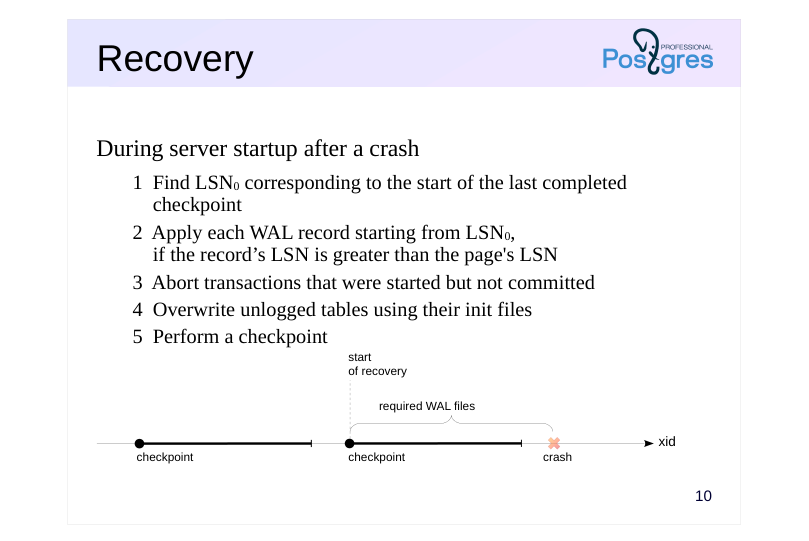 {#source-figure-011 caption=“Source slide page 11: Recovery”}
During server startup after a crash
- 1 Find LSN0 corresponding to the start of the last completed
- checkpoint
- 2 Apply each WAL record starting from LSN0,
- if the record’s LSN is greater than the page’s LSN
- 3 Abort transactions that were started but not committed
- 4 Overwrite unlogged tables using their init files
- 5 Perform a checkpoint
Speaker notes
If the server fails, at the subsequent start, the startup process detects this by looking into the pg_control file to find the status different from “shut down“. Automatic recovery is done in this case.
The process first reads the LSN of the last completed checkpoint record from that same pg_control file. From this record, the process determines LSN0, the starting position of that checkpoint.
(In case of recovery from a backup, the backup_label file is present, and the checkpoint record is read from that file instead. For more details, see the DBA3 course.)
Next, the startup process reads the WAL records one by one, starting from the determined position, sequentially applying records to pages, if necessary (the need is determined by comparing LSN of the on-disk page with LSN of the WAL record). Page modifications occur in the buffer cache, just as they do during normal operations.
Records related to CLOG pages restore the status of transactions. Transactions not committed by the end of the recovery are considered aborted; their changes are not visible in any data snapshots.
WAL records are applied to files in a similar way: for example, if it is clear from a record that the file should be created, but it does not exist, the file is created.
At the end of the process, all unlogged tables are overwritten using the templates stored in the init files. At this point, the startup process completes the recovery and performs a checkpoint.
Page 12: Crash Recovery
Now we simulate a crash by forcibly shutting down the server.
There are currently WAL records on disk, but table pages have not been flushed. Check the cluster state:
The state has not changed. Upon startup, PostgreSQL will detect the crash and initiate the recovery.
As we can see, the table and data have been recovered. Stop the instance correctly. When it is stopped, PostgreSQL performs a checkpoint to flush all data to disk.
Check the cluster state:
Now the state is “shut down,” which corresponds to a correct stop.
Page 13: Checkpoint frequency
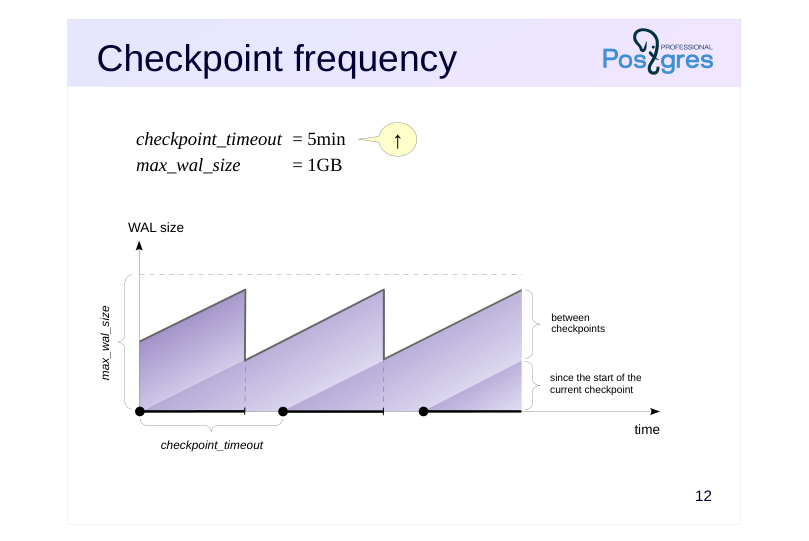 {#source-figure-013 caption=“Source slide page 13: Checkpoint frequency”}
↑
- checkpoint_timeout = 5min
- max_wal_size
- = 1GB
Speaker notes
Checkpoints are typically set up based on the following factors.
First, we need to determine an acceptable checkpoint frequency (based on the recovery time requirements and the size of WAL files generated during that period under normal load). The less frequently we need to run checkpoints, the better, as this reduces overhead.
The acceptable frequency is set using the checkpoint_timeout parameter (the default value of 5 minutes is too short, it is often increased up to 30 minutes).
However, the load may exceed our planned capacity and too many WAL records may be generated within the specified time. To prevent this, we specify the total permissible size of WAL records in the max_wal_size parameter.
For crash recovery, the server needs to keep WAL files from the start of the last completed checkpoint until the start of the current one (the size between checkpoints), plus WAL files that have accumulated during the current checkpoint. Therefore, the total WAL size can be estimated as:
(1 + checkpoint_completion_target) × size between checkpoints.
Thus, most checkpoints are performed on schedule, once every checkpoint_timeout. However, under high load, checkpoints are performed more frequently to manage not to exceed the max_wal_size limit.
Page 14: WAL File Size
Server stores WAL files
- required for recovery (typically < max_wal_size)
- not yet consumed by replication slots
- not yet archived, if continuous archiving is enabled
- not exceeding wal_keep_size limit
- not exceeding min_wal_size threshold (during recycling)
- Parameters
- max_wal_size
- = 1GB
- wal_keep_size
- = 0
- wal_recycle
- = on
- min_wal_size
- = 80MB
Speaker notes
Note that the size specified in the max_wal_size parameter can be exceeded. This is not a strict limit, but a target for the checkpointer, which regulates its intensity when flushing dirty buffers.
Moreover, the server cannot remove WAL files that have not been consumed by replication slots, and files that have not been archived during continuous archiving. This can lead to excessive disk space usage. So, when these features are used, continuous monitoring is essential.
In cases where a replica falls behind, we can use the wal_keep_size parameter to set a minimum amount of WAL files that will be kept after a checkpoint. While this does not guarantee that a specific WAL record will be kept until the replica needs it, it allows the replication to proceed without a replication slot.
By default, a certain number of WAL files are not deleted, instead they are renamed and reused. The min_wal_size parameter sets the minimum amount of WAL to keep. This avoids the overhead of repeatedly creating and deleting files. However, in copy-on-write filesystems, it is faster to create a new file, so it is recommended to disable recycling for them by setting wal_recycle=off.
https://postgrespro.com/docs/postgresql/16/wal-configuration
https://postgrespro.com/docs/postgresql/16/runtime-config-wal#RUNTIME-C ONFIG-WAL-CHECKPOINTS
Page 15: WAL Size
Start the instance again.
Set the minimum min_wal_size value and disable recycling so that no more than two segments remain after a checkpoint.
Insert rows into the table:
List of WAL files:
Let’s manually perform a checkpoint and examine the WAL again:
After the checkpoint, no more than two segments remain in WAL, including the one that was current at the start. And if there were any changes in the cluster after the start of the checkpoint, other segments could appear in the WAL.
Page 16: Background Writer
Background Writer Process
- Tuning
Page 17: Background Writer Process
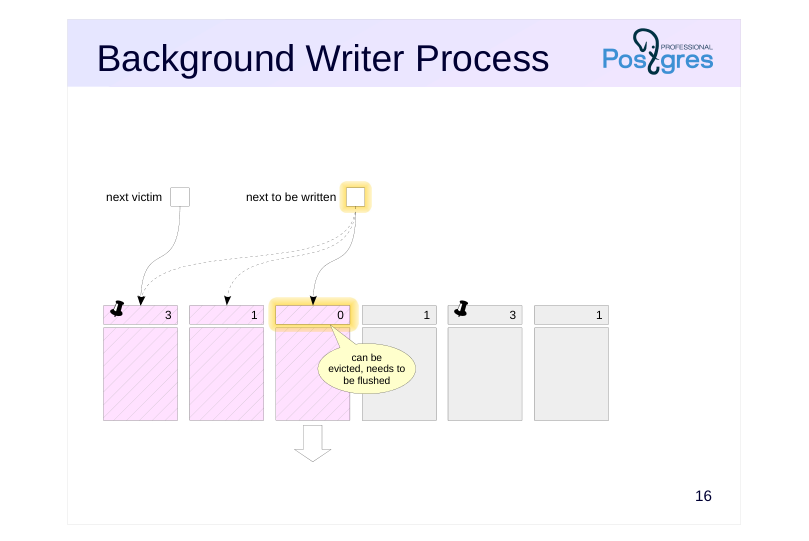 {#source-figure-017 caption=“Source slide page 17: Background Writer Process”}
Speaker notes
When a backend process needs to evict a page from the buffer cache, it may find that the buffer is dirty and will have to write its contents to disk. To reduce the frequency of such situations, there is also a background writer process (bgwriter) in addition to the checkpointer process.
The background writer uses the same buffer search algorithm as backends, but it operates its own pointer which can be ahead of the next victim pointer but never falls behind it.
The background writer flushes a buffer that meets all of the following criteria:
● Contain changed data (dirty)
● Not pinned (pin count = 0)
● Have usage count = 0
Thus, by running ahead, the background writer identifies buffers that are likely to be evicted soon. This strategy increases the probability that a victim buffer chosen by a backend is already clean.
Page 18: Background Writer Process
Algorithm
- sleep for bgwriter_delay
- if the average number of buffers requested per cycle is N, then write
- N × bgwriter_lru_multiplier ≤ bgwriter_lru_maxpages
- dirty buffers
- Parameters
- bgwriter_delay
- = 200ms
- bgwriter_lru_maxpages
- = 100
- bgwriter_lru_multiplier
- = 2.0
- bgwriter_flush_after
- = 512kB
Speaker notes
The background writer process operates in cycles of up to bgwriter_lru_maxpages, sleeping for bgwriter_delay between cycles.
(So, if bgwriter_lru_maxpages is set to zero, the background writer will be disabled.)
The exact number of buffers to write is determined by the average number of buffers recently requested by backends (using a moving average to smooth out variations between cycles while avoiding reliance on distant history). This calculated number of buffers is then multiplied by the bgwriter_lru_multiplier.
If the process does not find any dirty buffers (indicating no system activity), it enters a sleep state, from which it is awakened by a backend’s request for a buffer. After that, the process wakes up and resumes normal operation.
When large amounts of data need to be written, the server instructs the OS to perform an intermediate flush to storage (fsync) once the volume specified by the bgwriter_flush_after parameter is reached. This reduces transaction commit latency and the time needed for synchronization at the end of a checkpoint.
The background writer should be configured after checkpointer tuning is complete. Both processes together should keep up with writing dirty buffers before backends require them.
Page 19: Monitoring
Checkpoints
- checkpoint_warning = 30s
- log_checkpoints = on
- startup and checkpointer process statuses
- Dirty buffer writes by processes
- pg_stat_bgwriter and pg_stat_io views
Speaker notes
The checkpoint_warning parameter allows to issue a warning in the log if checkpoints are performed more often than defined by the value. If this occurs frequently, consider increasing max_wal_size or decreasing the checkpoint_timeout interval.
The log_checkpoints parameter, which is enabled by default, logs detailed information about each completed checkpoint.
When the server is in recovery mode, we can monitor the status of the startup and checkpointer processes using OS utilities, such as ps.
Statistics for processes writing dirty buffers (checkpoint, background writer, and backends), are displayed in the pg_stat_bgwriter view, and starting from version 16, in the pg_stat_io view.
In PostgreSQL version 17, a new pg_stat_checkpointer view will be introduced, which contains checkpointer process statistics currently found in pg_stat_bgwriter.
Page 20: Monitoring
The checkpoint_warning parameter issues a warning if checkpoints caused by exceeding the WAL size limit occur too frequently. Its default value is:
It should be adjusted to the checkpoint_timeout value. The log_checkpoints parameter allows us to log information about the checkpoints. It is enabled by default (starting from PostgreSQL 15):
Insert some data into the table and perform the checkpoint.
Here is the type of information available in the WAL:
Statistics for both the checkpointer and background writer are reflected in a single common view (originally both tasks were solved by one process; then their functions were separated, but the view remained).
checkpoints_timed — checkpoints on schedule (checkpoint_timeout) checkpoints_req — checkpoints by request (max_wal_size) and manual checkpoints buffers_checkpoint — pages flushed during checkpoints buffers_clean — pages flushed by the background writer buffers_backend — pages flushed by backends maxwritten_clean — number of stops upon reaching the bgwriter_lru_maxpages In a well-configured system, buffers_backend value should be significantly lower than the sum of buffers_checkpoint and buffers_clean. A high checkpoints_req value (compared to checkpoints_timed) indicates that checkpoints occur more frequently than intended.
Page 21: Page 21
However, the information about the amount of I/O provided by the pg_stat_bgwriter view is not quite accurate: the buffers_backend column reflects the results of not only client processes, but also some others (for example, autovacuuming). Relation file extend operations are added to the same column, although this is not a write from the buffer cache to disk. The pg_stat_io view we used earlier provides statistics in a more descriptive form:
writes — number of writes fsyncs — number of fsync calls extends — number of relation extend operations
Page 22: Takeaways
The checkpoint procedure limits the amount of stored WAL files and reduces recovery time
- The checkpointer and background writer processes flush dirty buffers to disk
- Backends can flush dirty buffers to disk, but as a last resort only
Page 23: Practice
1. Set up checkpoints to run every 30 seconds. Set both min\_wal\_size and max\_wal\_size parameters to 32 MB.
- Use the pgbench utility to generate a load of 100 transactions per second for several minutes.
- Get the WAL size generated during this period. 4. Review the statistics data and estimate the average size per checkpoint. Were all checkpoints executed on schedule? Explain the result.
- Reset the parameters to their default values.
Page 24: 1. Checkpoint Configuration
2. Load
Let’s initialize tables.
Reset statistics.
Note Note the current WAL position and start pgbench.
Page 25: 3. WAL File Size
4. Statistics
Number of scheduled and requested checkpoints:
Average WAL size per checkpoint:
Although the average WAL size per checkpoint does not exceed the set limit, some checkpoints were triggered off schedule. This indicates non-uniform streaming of WAL records (caused by autovacuum and other activity). Therefore, in production systems, measurements should be taken over sufficiently long time intervals.
5. Default Settings
11 Lesson 11: WAL / WAL Tuning
This page is extracted from the official PDF into native Markdown. Slide text, code and speaker notes are kept in reading order; the original PDF and HTML remain the layout references. HTML source: dba2_11_wal_tuning.html Archive: DBA2-handouts-16-en.zip PDF pages: 22
Page 1: WAL / WAL Tuning
Copyright
© Postgres Professional, 2016–2026 Authors: Egor Rogov, Pavel Luzanov, Ilya Bashtanov, Igor Gnatyuk Translated by: Elena Sharafutdinova Photo: Oleg Bartunov (Phu Monastery and Bhrikuti Peak, Nepal)
Use of Course Materials
Non-commercial use of course materials (presentations, demonstrations) is allowed without restrictions. Commercial use is possible only with the written permission of Postgres Professional. It is prohibited to make changes to the course materials.
Feedback
Please send your feedback, comments and suggestions to: edu@postgrespro.ru
Disclaimer
Postgres Professional assumes no responsibility for any damages and losses, including loss of income, caused by direct or indirect, intentional or accidental use of course materials. Postgres Professional company specifically disclaims any warranties on course materials. Course materials are provided “as is,” and Postgres Professional company has no obligations to provide maintenance, support, updates, enhancements, or modifications.
Page 2: Topics
- WAL Levels and Use Cases
- Write Reliability
- Performance
Page 3: WAL Levels
Settings
- the higher the level,
- the more information
- wal_level = replica
- is in the WAL
- Minimal
- crash recovery
- Replica
- point-in-time recovery, physical replication
- bulk data operations, locks, IDs of running transactions
- Logical
- logical replication
- information for logical decoding
Speaker notes
Beyond its primary purpose of restoring consistency after a crash, the WAL can be used in other scenarios, if additional information is recorded. Several WAL levels are available, set by the wal_level parameter.
The minimal level contains information needed only for crash recovery. Bulk data operations (such as CREATE TABLE AS SELECT, CREATE INDEX, etc.) are not logged; durability of these operations is guaranteed by immediately flushing the data to disk.
The replica level (the default) enables system recovery from hot backups created with the pg_basebackup utility. To achieve this, all data changes are logged, including bulk operations. This level also enables physical replication, i.e. streaming WAL records to another server (these topics are covered in the DBA3 course). For this purpose, the WAL includes information about certain locks.
The logical level is used for logical replication and it must be enabled on the publisher. In this case, the WAL includes additional information that makes it possible to accurately decode the meaning of operations from the WAL records.
The higher the level, the more information is written to the WAL, consequently increasing its total size.
Page 4: WAL Levels
Let’s use a new database.
Set the WAL level to minimal (this also requires setting max_wal_senders to zero and restarting the server).
Examine how CREATE TABLE AS SELECT is logged.
WAL size:
No WAL records are related to the row inserts into the table:
At the minimal level, changes made by CREATE TABLE AS SELECT, CREATE INDEX, TRUNCATE and some other statements are not logged. These operators always perform their own synchronization to ensure durability. The WAL contains only records necessary for crash recovery.
Page 5: Page 5
Drop the table, restore the default level (replica) and repeat the experiment.
Let’s see how CREATE TABLE AS SELECT is logged now.
WAL size has increased:
In addition to system catalog changes, the WAL now includes the following records: CREATE — relation file creation INSERT+INIT — row insertion into the table COMMIT — transaction commit
Page 6: Page 6
At the replica level, the WAL contains all data changes, they can be applied to a physical backup or a replica.
Page 7: Write Reliability
Caching
- Data Corruption
- Non-Atomic Page Writes
Page 8: Caching
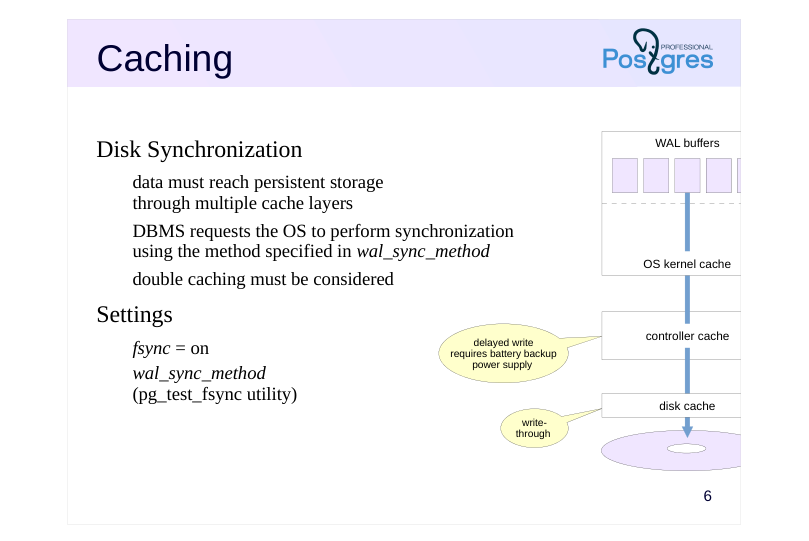 {#source-figure-008 caption=“Source slide page 8: Caching”}
Disk Synchronization
- data must reach persistent storage
- through multiple cache layers
- DBMS requests the OS to perform synchronization
- using the method specified in wal_sync_method
- double caching must be considered
- Settings
- fsync = on
- wal_sync_method
- (pg_test_fsync utility)
Speaker notes
Reliability is affected by several factors. Firstly, there are various cache layers between the database and persistent storage (such as a hard disk platter).
When durable writes are required, PostgreSQL uses the method specified in the wal_sync_method parameter. While there are several options, two main approaches exist: either issuing a sync command to the OS after writing (fsync, fdatasync), or opening/writing a file with a special flag that requests synchronization, and when applicable, direct I/O bypassing the OS cache. The pg_test_fsync tool helps determine the most suitable method for your specific OS and file system. Regardless of the method chosen, this operation incurs significant overhead.
The administrator should also ensure that data actually reaches the disk and is not delayed in controller or disk cache. If the controller cache defers writes, the controller should have a battery backup unit. For disks, write-through mode is recommended.
Technically, we can disable synchronization (using the fsync parameter), but this essentially eliminates any durability guarantees. The only reasonable scenario for disabling this parameter is temporarily boosting performance during operations where data can be easily restored (for example, initial data migration).
https://postgrespro.com/docs/postgresql/16/wal-reliability
Page 9: Data Corruption
WAL record checksums
- always enabled, CRC-32
- Page checksums
- should be enabled during cluster initialization
- overhead,
- increased
- WAL size
- Settings
- data_checksums
- ignore_checksum_failure = off
Speaker notes
Secondly, data can also be corrupted on storage media, when transmitted over interface cables, etc. Some of these errors are handled at the hardware level, but others are not.
For quick detection of an issue, checksums are always provided in WAL records.
Data pages can also be protected with checksums. While it is better to enable them during cluster initialization, they can also be activated later using the pg_checksums utility when the server is stopped. In a production environment, checksums must be enabled despite the overhead of their calculation and verification. This reduces the probability of undetected corruption.
We can check whether checksums are enabled using the data_checksums parameter (read-only). The ignore_checksum_failure parameter allows a transaction that read a corrupted page to continue without interruption, though it is not recommended to enable it in production environment.
Page 10: Non-Atomic Page Writes
Full page image
- page might be partially written if a crash occurs
- full page image (FPI) is written to the WAL
- upon its first modification after a checkpoint
- during recovery, WAL records are applied to the saved image
- Settings
- increases
- WAL size
- full_page_writes = on
- wal_compression = off
Speaker notes
Thirdly, there is an issue of atomicity of writing.
A data page is 8 KB in size (or larger: 16 KB, 32 KB), while at the low level, writing is done in blocks that are typically smaller (512 bytes, 4 KB, etc.). Therefore, in case of a power outage, a data page can be written partially. It is clear that during recovery, it makes no sense to apply regular WAL records to such a page.
To prevent this, PostgreSQL can write a full page image (FPI) to the WAL the first time a page is modified after a checkpoint. This feature is turned on/off by the full_page_writes parameter and should only be disabled if the file system and hardware themselves guarantee atomic writing.
When we encounter an FPI in the WAL during recovery, we definitely write it to disk (since it is more reliable, as it is protected by a checksum like all WAL records). Then we apply regular WAL records to this restored page.
Although PostgreSQL excludes unused space from FPIs, they still significantly increase WAL volume. If page checksums are enabled in the cluster, an additional WAL record is generated when hint bits are modified, reflecting the checksum change.
We can reduce WAL size by enabling FPI compression with the wal_compression parameter. Supported compression methods are pglz, lz4, and zstd. “On” selects the pglz method, “off” disables compression.
Page 11: Checksums
Create another table:
Here is the file containing the data:
Stop the server and change several bytes in the page (erase the LSN of the last WAL record from the header).
Stopping the server is not strictly necessary. This scenario requires the following: The page is written to disk and evicted from the buffer cache. Corruption occurs. The page is read from disk. Now start the server.
Let’s try to read the table:
The ignore_checksum_failure parameter allows us to try reading a table, despite the risk of getting corrupted data (e.g., if a backup is not available):
Page 12: Performance
I/O Pattern
- Synchronous Writing
- Asynchronous Writing
Page 13: I/O Pattern
Continuous writing
- sequential writes, no random access
- I/O pattern differs from the rest of the system
- under high load — placement on separate physical disks
- (symbolic link from PGDATA/pg_wal)
- Infrequent reading
- during recovery
- when walsender processes are running and the replica cannot keep up
- with receiving records
Speaker notes
During normal operation, WAL files are written continuously and sequentially. Since there is no random access, regular HDDs handle this I/O pattern perfectly well.
However, this I/O pattern differs significantly from how data files are accessed. Therefore, it is often more advisable to place the WAL on a separate physical disk (or disks) mounted to the server’s filesystem. Instead of the PGDATA/pg_wal directory, we should create a symbolic link pointing to the appropriate directory.
However, there is one situation where WAL files should to be read (besides the obvious case of crash recovery). It occurs when streaming replication is used and the replica cannot keep up with receiving WAL records while they are still cached in the primary server’s memory. In this case, the walsender process has to read the required data from disk. Interaction with replica is covered in detail in the Replication module of DBA3 course.
For monitoring and evaluating WAL performance, PostgreSQL version 14 introduced the pg_stat_wal view.
Page 14: Synchronous Writing
Algorithm
- when changes are committed, all accumulated WAL records are flushed,
- including the commit record
- waiting for commit_delay if at least commit_siblings transactions are active
- Properties
- durability is guaranteed
- response time increases
- Settings
- enable under
- heavy load of short
- synchronous_commit = on
- commit_delay
- = 0
- commit_siblings
- = 5
- transactions
Speaker notes
WAL records are written in one of two modes: synchronous (where transaction commit cannot proceed until all of the transaction’s WAL records are persisted to disk) and asynchronous (where the WAL is flushed by a background process at regular intervals).
Writing mode is set by the synchronous_commit parameter.
Since synchronization is time-consuming, it is advisable to perform it as infrequently as possible. To achieve this, the WAL writer process introduces a delay specified by the commit_delay parameter, but only when there are at least commit_siblings active transactions. This delay allows some transactions to complete, so their WAL records can be synchronized in a single operation.
The process then flushes WAL to disk up to the required LSN (or slightly higher if new records were added during the delay).
Synchronous writing guarantees durability: if a transaction is committed, all its WAL records are already on disk and will not be lost. The disadvantage of synchronous writing is that it increases response time (the COMMIT command does not return control until synchronization is completed) and reduces system performance.
Page 15: Asynchronous Writing
Algorithm
- write cycles every wal_writer_delay
- only completely filled pages are written;
- if no new full pages are available, the current one is written
- Properties
- consistency is guaranteed, but not durability
- committed changes can be lost (3 × wal_writer_delay)
- Settings
- can be
- changed at the
- transaction level
- synchronous_commit
- wal_writer_delay = 200ms
- wal_writer_flush_after = 1MB
Speaker notes
In asynchronous writing mode, the wal writer process flushes accumulated WAL records either after the wal_writer_delay time or when the wal_writer_flush_after size threshold is reached:
● If one or more pages in the buffers have been completely filled since the last flush, only those full pages (or part of them) are written. Note that the WAL cache operates as a ring buffer, only a continuous sequence of pages can be written at once. This approach prevents the same page from being synchronized several times under heavy write load.
● If no new full pages have appeared, the current (partially filled) page is written instead.
Asynchronous writing is more efficient than synchronous writing because a transaction commit does not wait for the write operation to complete. However, this comes at the cost of reduced reliability: committed data can be lost if a crash occurs within 3 × wal_writer_delay time after the commit.
The synchronous_commit parameter can be set per transaction. It allows to increase performance by trading off reliability of some transactions only.
https://postgrespro.com/docs/postgresql/16/wal-async-commit
In practice, both modes work together. WAL records of a long-running transaction are written asynchronously to free up WAL buffers. However, if a dirty data buffer needs to be flushed and its corresponding WAL record has not been written to disk yet, it will be immediately flushed in synchronous mode.
Page 16: Impact of Synchronous Commit on Performance
The default mode is synchronous commit.
Run a basic performance test using pgbench. First, initialize the required tables…
…and reset the WAL statistics:
Run the test for 10 seconds.
In the pgbench results, we focus on transaction count or throughput (tps); in the pg_stat_wal view, we analyze the number of write and sync operations.
Page 17: Page 17
Now let’s set asynchronous mode.
Reset accumulated statistics.
Run the test again.
In addition to the increased tps, we can see the source of the performance improvement: the number of WAL sync operations has decreased significantly. Obviously, the ratio may differ on a production system, but the performance is significantly higher in asynchronous mode.
Page 18: Takeaways
The WAL allows to restore consistency after a crash, but it can also be used for other purposes
- To ensure reliability, tuning is required not only at the DBMS level, but also at the OS, file system, and hardware levels
- Configuration allows a flexible trade-off between durability and performance
Page 19: Practice
- Examine how the full_page_writes parameter affects the size of WAL records.
- To do this, repeat a simple pgbench test given in the
- demonstration with different WAL settings. Before starting
- each test, perform a checkpoint.
- Explain the results.
- Calculate the compression ratio achieved by using wal_compression parameter.
Speaker notes
For a detailed analysis, you can use the pg_get_wal_stats function in the pg_walinspect extension.
Page 20: 1a. Full page writes = on
Let’s run the test for 10 seconds.
Examine WAL statistics:
Page 21: Page 21
Full page images (FPIs) make up a significant part of the overall WAL size.
1b. Full page writes = off
Let’s run the test for 10 seconds.
Examine WAL statistics:
WAL size decreased significantly since FPIs are no longer written to WAL.
Page 22: 2. Compression
Let’s run the test for 10 seconds.
Examine WAL statistics:
In this scenario, when the number of FPIs is still high, the WAL size decreases severalfold. Despite the additional CPU overhead, the benefits of compression are worthwhile when FPIs are enabled.
12 Lesson 12: Locks / Object-Level Locks
This page is extracted from the official PDF into native Markdown. Slide text, code and speaker notes are kept in reading order; the original PDF and HTML remain the layout references. HTML source: dba2_12_locks_objects.html Archive: DBA2-handouts-16-en.zip PDF pages: 34
Page 1: Locks / Object-Level Locks
Copyright
© Postgres Professional, 2016–2026 Authors: Egor Rogov, Pavel Luzanov, Ilya Bashtanov, Igor Gnatyuk Translated by: Elena Sharafutdinova Photo: Oleg Bartunov (Phu Monastery and Bhrikuti Peak, Nepal)
Use of Course Materials
Non-commercial use of course materials (presentations, demonstrations) is allowed without restrictions. Commercial use is possible only with the written permission of Postgres Professional. It is prohibited to make changes to the course materials.
Feedback
Please send your feedback, comments and suggestions to: edu@postgrespro.ru
Disclaimer
Postgres Professional assumes no responsibility for any damages and losses, including loss of income, caused by direct or indirect, intentional or accidental use of course materials. Postgres Professional company specifically disclaims any warranties on course materials. Course materials are provided “as is,” and Postgres Professional company has no obligations to provide maintenance, support, updates, enhancements, or modifications.
Page 2: Topics
- General Information about Locks
- Relation-and Other Object-Level Locks
- Predicate Locks
Page 3: General Information
Lock Function and Mechanism
- Locked Resources
- Performance Factors
- Duration of Locks
Page 4: Locks
Function: coordinate concurrent access to shared resources
- Mechanism
- before accessing a resource, a process acquires a lock,
- and releases it after access
- locks lead to queues and waits
- Alternatives
- multiversion concurrency control — several data versions
- optimistic locking — processes are not locked,
- but an error occurs in case of a conflict
Speaker notes
Locks are used to coordinate concurrent access to shared resources.
Concurrent access means simultaneous access by several processes. These processes can run either in parallel (if the hardware allows) or sequentially in a time-sharing mode.
Locks are unnecessary if there is no concurrency (only one process accesses the data at a time) or if there is no shared resource (for example, a shared buffer cache requires locks, while a local one does not).
Before accessing a resource protected by a lock, a process must acquire that lock. When the process no longer needs the resource, it releases the lock so that other processes can use it.
Certainly, sometimes a lock cannot be acquired: the resource might already be in use by another process. Then the process either joins a wait queue or retries acquiring the lock after a certain interval. In any case, the process is forced to idle while waiting for the lock to be released.
Sometimes, other, non-blocking strategies can be used. For example, in the the MVCC module we discussed the MVCC mechanism. Another example is optimistic locking, which does not lock the process but results in an error if a conflict occurs.
Page 5: Resources
Resource
- anything that can be identified
- Examples of resources
- stored objects: pages, tables, tuples, etc.
- data structures in shared memory (hash tables, buffers, etc.)
- abstract resources (integers)
Speaker notes
In general, a lock can protect any resource, as long as the resource can be unambiguously identified.
For example, a DBMS object such as a data page (identified by the filename and offset), a table (identified by oid in the system catalog), or a tuple (identified by its page and offset).
A data structure in RAM such as a hash table, buffer, etc. (identified by a previously assigned number) can also be a resource.
Sometimes it is even convenient to use abstract resources that have no physical meaning (identified by an integer).
Page 6: Performance Factors
Lock granularity
- granularity, level in the resource hierarchy
- for example: table → page → rows, hash table → buckets
- higher granularity means greater potential for parallelism
- Lock modes
- mode compatibility is determined by a matrix
- more compatible modes provide greater opportunities for parallelism
Speaker notes
Locking performance depends on numerous factors. We will examine only a few of them.
Granularity (level of detail) is important when resources form a hierarchy. For example, a table consists of pages which contain rows. All these objects can serve as resources. If a process needs only a few rows, but a lock is set at the table level, other processes will be unable to work with the remaining rows.
Therefore, the higher the granularity, the greater the potential for parallelism. However, it also increases the number of locks, whose information must be stored somewhere.
Locks can be acquired in various modes. The names of lock modes can be arbitrary; what matters is compatibility between modes.
The mode that is incompatible with any other mode is called exclusive. When modes are compatible, several processes can acquire a lock simultaneously; such modes are called shared.
In general, the more compatible modes exist, the greater the potential for parallelism.
Page 7: Duration of Locks
Long-term locks
- usually acquired up to the end of the transaction and pertain to stored data
- numerous lock modes
- developed “heavyweight” infrastructure, monitoring
- Short-term locks
- usually acquired for fractions of a second and pertain to structures in RAM
- minimal number of lock modes
- “lightweight” infrastructure, monitoring may not be available
Speaker notes
Based on duration, locks can be divided into long-term and short-term.
Long-term locks are acquired for a potentially long time (usually up to the end of the transaction) and most often relate to such resources as tables (relations) and rows. As a rule, PostgreSQL controls such locks automatically, though a user still has certain control over this process.
A large number of modes is typical of long-term locks to enable as many concurrent data operations as possible.
Long-term locks are usually supported by extensive infrastructure (e.g., queue management and deadlock detection) and monitoring tools.
Short-term locks are acquired for a short time (from a few CPU cycles to fractions of seconds) and usually relate to data structures in the shared memory. PostgreSQL controls such locks in a fully automated manner, you only need to be aware of their existence.
The minimum of modes (exclusive and shared) and a simple infrastructure are typical of short-term locks. Monitoring may not be available.
Page 8: Types of Locks
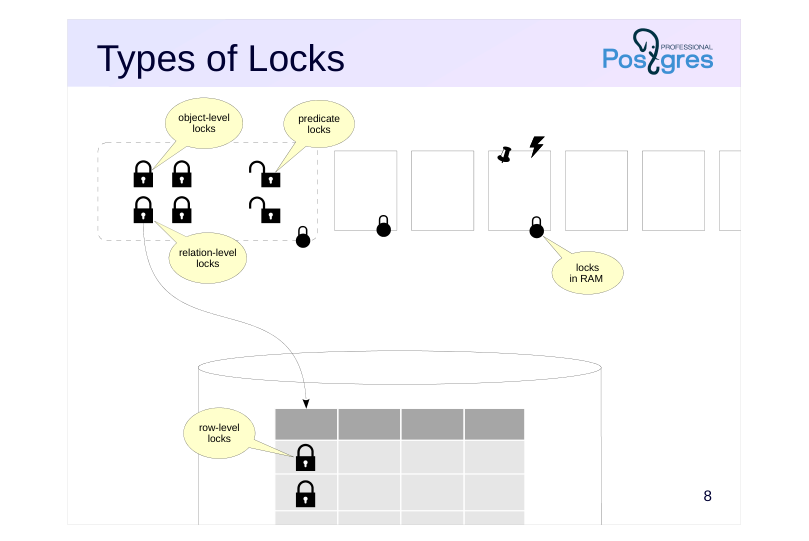 {#source-figure-008 caption=“Source slide page 8: Types of Locks”}
Speaker notes
PostgreSQL uses various types of locks.
Object-level locks pertain to long-term, “heavyweight” locks. Relations and other objects (e.g., schemas) serve as resources here.
Another class of locks (optimistic) is predicate locks.
Information about all these locks is stored uniformly in RAM. We will examine these types of locks in detail later in this lesson.
Among long-term locks, row-level locks are of particular interest. They are implemented differently from other long-term locks due to their potentially enormous number (imagine updating a million of rows in one transaction). We will cover these locks in the Row-Level Locks lesson.
Short-term locks include various locks on RAM structures. We will cover them in the Locks in RAM lesson.
Page 9: Object-Level Locks
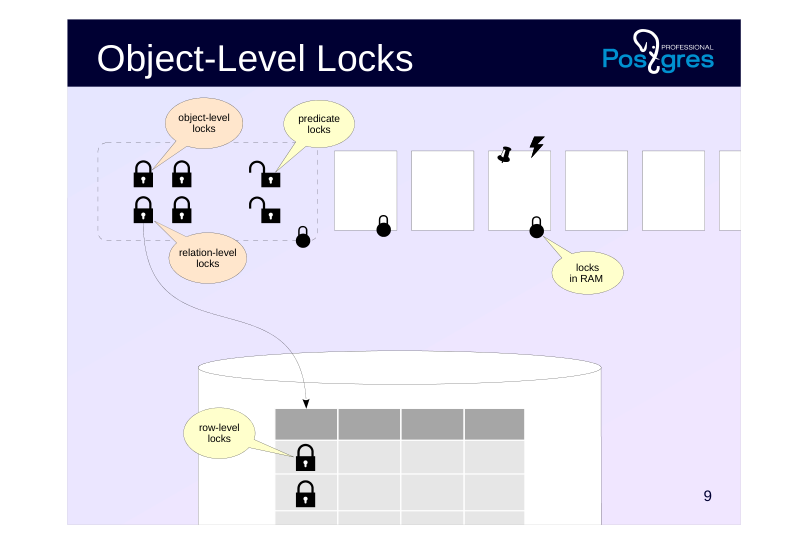 {#source-figure-009 caption=“Source slide page 9: Object-Level Locks”}
Page 10: Architecture
Information in the shared memory of the server
- pg_locks view:
- locktype — type of locked resource
- mode — lock mode
- Limited number
- max_locks_per_transaction × max_connections
- Infrastructure
- wait queue: waiting processes do not consume resources
- deadlock detection
Speaker notes
Let’s begin our study of locks with object-level locks, such as tables, indexes, pages, IDs of transactions, etc. These locks protect objects against change or use while an object is being modified, and serve a number of other needs.
Information about object-level locks is stored in the server’s shared memory. The number of locks is limited by the product of the values of two parameters: max_locks_per_transaction and max_connections (64 × 100 by default). The pool of locks is one for all transactions, that is, a transaction can acquire more locks than max_locks_per_transaction. The only important thing is that the total number of locks in the system does not exceed the set limit.
You can see all the locks in the pg_locks view.
When a resource is already locked and a transaction attempts to acquire a lock in an incompatible mode, it joins a wait queue and waits until the lock is released. Waiting transactions do not consume CPU resources: they fall asleep and wake up only when the resource is released. Several SQL commands allow to specify the NOWAIT keyword: in this case, trying to acquire a busy resource results in an error instead of waiting.
A deadlock situation is possible, where two or more transactions are waiting for each other. PostgreSQL automatically detects such deadlocks and aborts the endless wait.
Page 11: Relation Locks
Resource Type: Relation
- Modes
- Access Share
- SELECT
- Row Share
- SELECT FOR UPDATE/SHARE
- Row Exclusive
- UPDATE, DELETE, INSERT, MERGE
- Share Update Exclusive
- VACUUM, ANALYZE, ALTER TABLE,
- CREATE INDEX CONCURRENTLY
- Share
- CREATE INDEX
- Share Row Exclusive
- CREATE TRIGGER, ALTER TABLE
- Exclusive
- REFRESH MATERIALIZED VIEW
- CONCURRENTLY
- Access Exclusive
- DROP, TRUNCATE, REINDEX, VACUUM FULL,
- LOCK TABLE, ALTER TABLE,
- REFRESH MATERIALIZED VIEW
- allow
- concurrent
- change
- in the table
Speaker notes
A particularly important type of locks is relation (tables, indexes, sequences, etc.) locks. These locks are identified by the relation value in the pg_locks.locktype column.
They have 8 different modes as shown on the slide together with examples of SQL commands that use each mode. The compatibility matrix showing which locks can be acquired simultaneously is provided in the documentation.
Such a variety of lock modes is to allow as many operations as possible that refer to the same table (or index, etc.) to run concurrently.
The weakest mode is Access Share, which is acquired by the SELECT command. It is compatible with any modes except Access Exclusive, the strongest one. This means that a query does not interfere with other queries, data changes, or other operations, but prevents operations like dropping the table while data is being read from it.
Another example: Share mode (along with other stronger modes) is incompatible with commands that modify data. For example, the CREATE INDEX command blocks INSERT, UPDATE, and DELETE commands (and vice versa). Therefore, the CREATE INDEX CONCURRENTLY command exists, it uses Share Update Exclusive mode, which is compatible with such data changes (though the command takes longer to complete).
https://postgrespro.com/docs/postgresql/16/explicit-locking#LOCKING-TABL ES
Page 12: Wait Queue
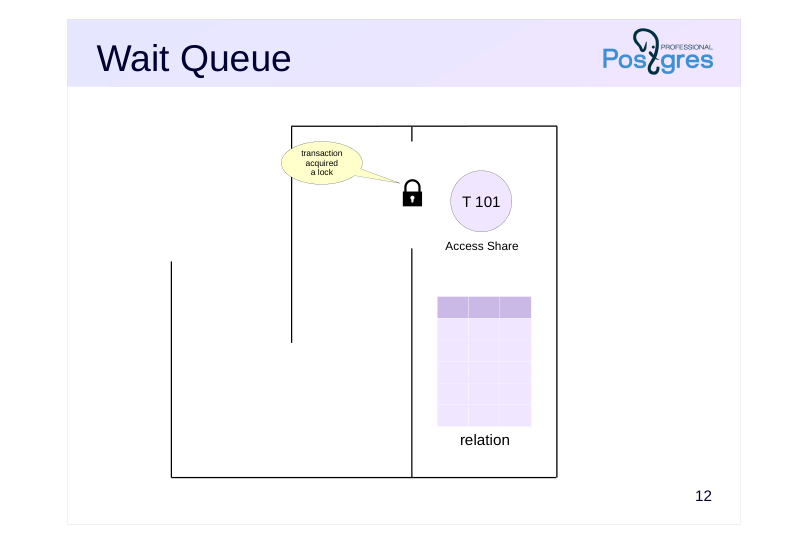 {#source-figure-012 caption=“Source slide page 12: Wait Queue”}
Speaker notes
The following example illustrates the consequences of acquiring an incompatible lock.
Initially, the SELECT command is executed on the table. It requests and acquires an Access Share lock.
Page 13: Wait Queue
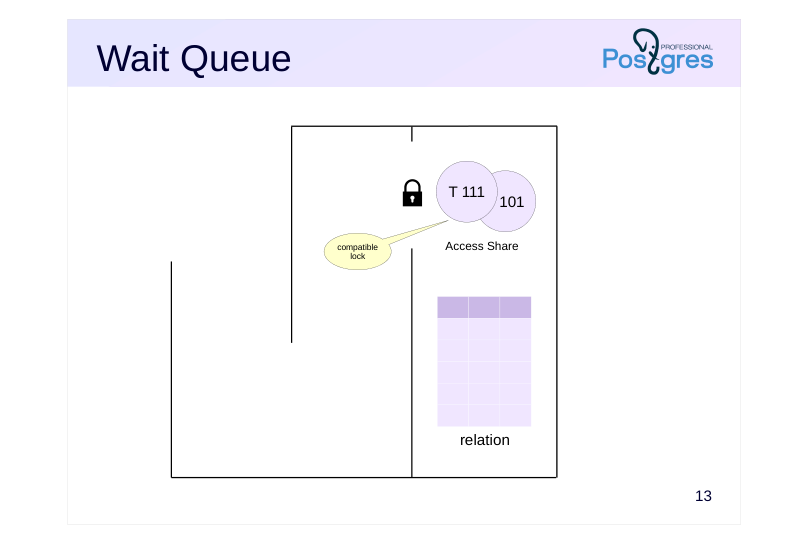 {#source-figure-013 caption=“Source slide page 13: Wait Queue”}
Speaker notes
Then another SELECT command requests an Access Share lock and acquires it, since the requested lock is compatible with the existing one.
Page 14: Wait Queue
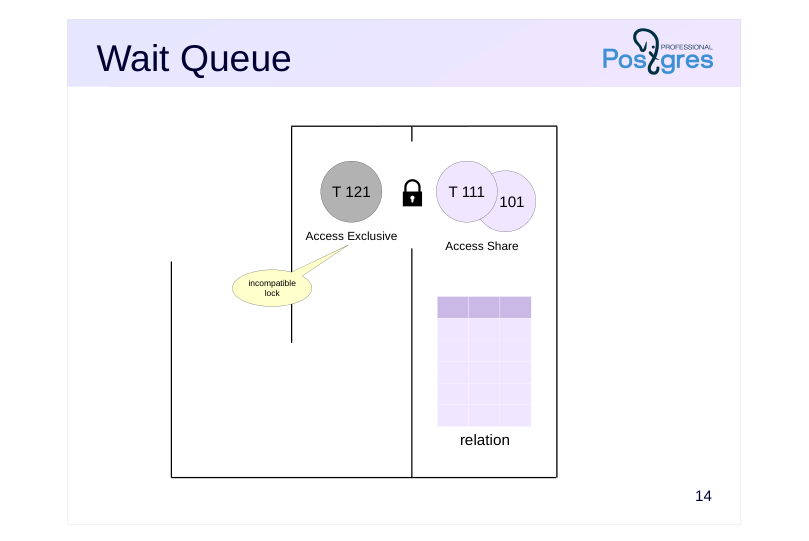 {#source-figure-014 caption=“Source slide page 14: Wait Queue”}
Speaker notes
After that the administrator runs the VACUUM FULL command, which requires an Access Exclusive lock that is incompatible with the existing Access Share locks. The transaction enters the wait queue.
Page 15: Wait Queue
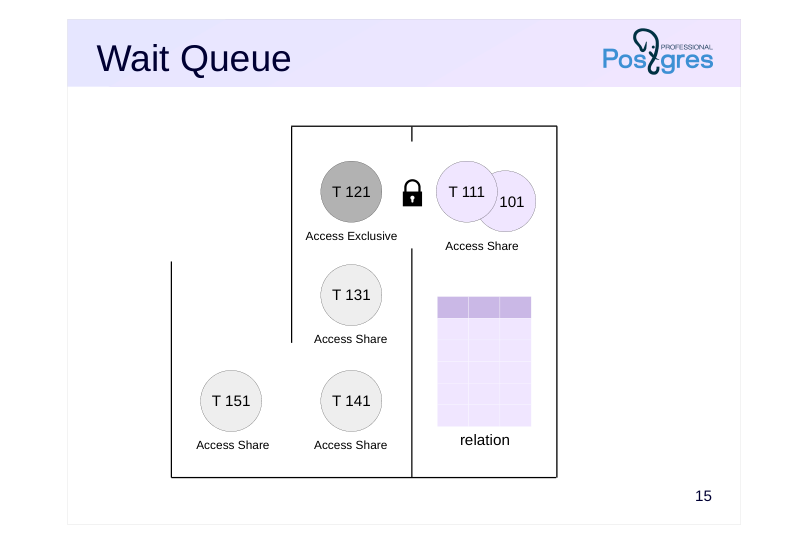 {#source-figure-015 caption=“Source slide page 15: Wait Queue”}
Speaker notes
Several more SELECT commands then occur in the system. Hypothetically, some of them could skip ahead while VACUUM FULL is waiting, but they all dutifully take their place behind VACUUM FULL.
Page 16: Wait Queue
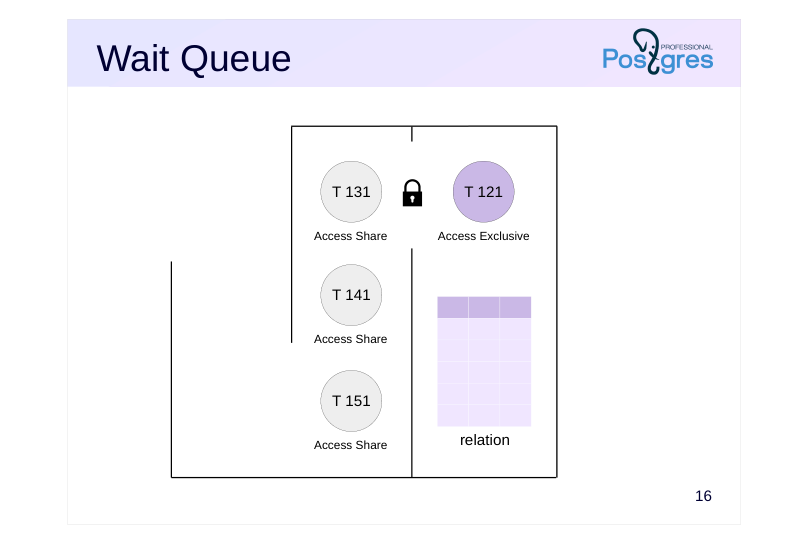 {#source-figure-016 caption=“Source slide page 16: Wait Queue”}
Speaker notes
Once the first two transactions with SELECT commands complete and release their locks, VACUUM FULL command starts to run.
Only when VACUUM FULL completes and releases the lock, all the queued SELECT commands can acquire Access Share locks and start execution.
So, an improperly executed command can paralyze work of the system for the time interval that is way longer than it takes to execute the command itself.
Routine vacuuming (and autovacuuming) may also need an exclusive lock at the end of its operation to truncate the table, i.e., to cut off the empty tail of the data file and return the space to the operating system. Vacuum should avoid long waits, so if issues arise, the truncation step can be disabled using the vacuum_truncate storage parameter or by running vacuum with the VACUUM (truncate off) option.
Page 17: Other Resources
Types
- Extend (adding pages to a relation file)
- Object (non-relation objects such as databases, schemas, etc.)
- Page (data page, used by certain index types)
- Tuple
- Advisory (advisory lock)
- Transactionid
- Virtualxid
- Modes
- exclusive
- shared
Speaker notes
Besides relations, there are several other types of locked resources. Their locks are acquired either in exclusive mode only, or in both exclusive and shared modes. These include:
● Extend used when adding pages to a relation’s file.
● Object to lock an object that is not a relation (such as databases, schemas, subscriptions, etc.).
● Page to lock a page (a rare lock, used by certain index types).
● Tuple used in some cases to prioritize several transactions waiting for a lock on the same row (for details, see the Row-Level Locks lesson of this module).
● Advisory for advisory locks (covered in detail further).
Transactionid and Virtualxid resource types are of particular interest. Each transaction holds an exclusive lock on both its virtual and permanent IDs, if assigned. This provides a simple way to wait for a transaction to complete: just request a lock on its ID. This is covered in detail in the Row-Level Locks lesson.
Page 18: Monitoring Tools
Messages in the Server Log
- log_lock_waits parameter:
- outputs a message when wait exceeds deadlock_timeout
- Current Locks
- pg_locks view
- pg_blocking_pids function
Speaker notes
Locks that occur in the system are necessary for maintaining integrity and isolation, but they can lead to undesirable waits. Such waits can be monitored in order to identify their causes and eliminate them whenever possible (for example, by changing the algorithm of the application).
Another way is to turn the log_lock_waits parameter on. In this case, information will get into the server message log if a transaction waited longer than deadlock_timeout (although the parameter for deadlocks is used, ordinary waits are meant here).
The second approach is to query the pg_locks view when a long-running lock occurs (or on a regular basis), examine blocked and blocking transactions (using the pg_blocking_pids function) and decode them with the help of pg_stat_activity.
Page 19: Relation and Other Object Locks
Let’s create a table of bank accounts. We will store the account number and the balance.
Start a transaction in the second session. We will need the backend process ID.
Which locks does the newly started transaction hold?
Only a lock on its own virtual transaction ID. Update a row in the table. What changes do we see?
A relation lock in RowExclusiveLock mode (which corresponds to the UPDATE command) and an exclusive lock on the transaction’s own permanent ID have been added (which was assigned when the transaction started modifying data). Now let’s try creating an index on the table in another session.
Page 20: Page 20
The command does not complete, it is waiting for a lock to be released. Which one?
We can see that the transaction attempted to acquire a ShareLock on the table but failed (granted = f). The waitstart column in this case shows the time when the backend started waiting for the lock. We can find the ID of the blocking process (or several IDs in the general case)…
…and look at information about the sessions they belong to:
Once the transaction completes, the locks are released and the index is created.
Page 21: Advisory Locks
Set by the application
- Duration
- until the end of the session
- until the end of the transaction
- Modes
- exclusive
- shared
Speaker notes
Advisory locks can be used when you need locking logic that is inconvenient to implement using regular locks. Advisory locks are set only by the application; PostgreSQL never enforces them automatically.
Names of functions related to advisory locks start with pg_advisory and may include additional descriptive keywords.
An advisory lock can be acquired until the end of the session (pg_advisory_lock function) or until the end of the transaction (pg_advisory_xact_lock).
Session-level locks are not released automatically when a transaction ends, unlike transaction-level locks; they require explicit release using pg_advisory_unlock function. So, session-level locks break the normal transactional behavior: a lock acquired within a transaction will persist in the session even if that transaction is rolled back. Similarly, if we release a lock in the transaction and abort it later, the lock will remain in the released state.
By default, advisory locks are acquired in exclusive mode. To use shared mode append “shared” to the function name, for example, pg_advisory_lock_shared and pg_advisory_unlock_shared.
https://postgrespro.com/docs/postgresql/16/explicit-locking#ADVISORY-LOC KS
Page 22: Advisory Locks
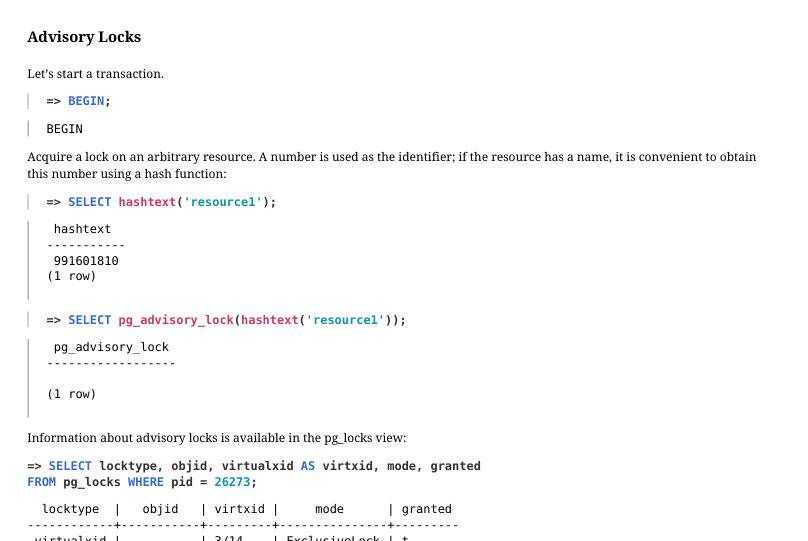 {#source-figure-022 caption=“Source slide page 22: Advisory Locks”}
Let’s start a transaction.
Acquire a lock on an arbitrary resource. A number is used as the identifier; if the resource has a name, it is convenient to obtain this number using a hash function:
Information about advisory locks is available in the pg_locks view:
If another session attempts to acquire the same lock, it will wait until the lock is released:
In this example, the lock lasts until the end of the session, not the transaction, as is typically the case.
A session that has acquired the lock can reacquire it even when other sessions are waiting in the queue.
The lock can be explicitly released:
However, in our example the session acquired the lock twice, so we need to release it one more time:
Page 23: Page 23
There are other variants of functions that acquire advisory locks until the end of the transaction, shared locks, etc. Here is the complete list:
Page 24: Predicate Locks
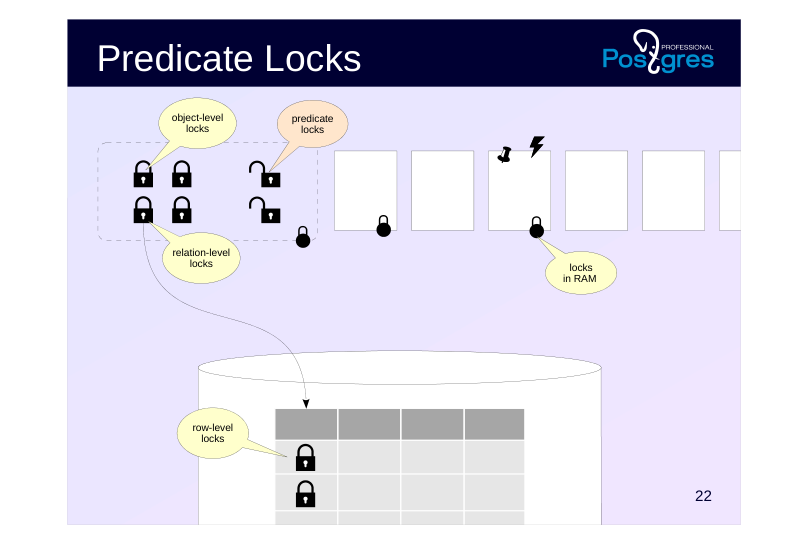 {#source-figure-024 caption=“Source slide page 24: Predicate Locks”}
Page 25: Predicate Locks
Task: implement Serializable isolation level
- used in addition to standard snapshot isolation
- optimistic locks, a historically established term
- Information in the shared memory of the server
- pg_locks view
- Limited number
- max_pred_locks_per_transaction × max_connections
Speaker notes
The predicate lock term dates back to time when early DBMSes made first attempts to implement Serializable isolation using locks. The idea was to lock not only specific rows, but also predicates. For example, when executing a query with the condition a > 10, you need to lock the a > 10 range to prevent phantom rows and other anomalies.
In PostgreSQL, the Serializable level is built on top of the existing snapshot mechanism, but the terminology has retained. In fact, these locks do not block anything; they are used to track data dependencies between transactions.
As with regular locks, information about predicate locks is shown in the pg_locks view, where they have a single special mode called SIRead (Serializable Isolation Read).
The number of predicate locks is limited by the product of the max_pred_locks_per_transaction and max_connections parameters (= 64 × 100).
Use of predicate locks imposes the requirement that all transactions should operate at the Serializable level to achieve full isolation. Dependency tracking only works for transactions that set predicate locks.
https://postgrespro.com/docs/postgresql/16/transaction-iso#XACT-SERIALIZ ABLE
https://wiki.postgresql.org/wiki/SSI
https://github.com/postgres/postgres/blob/REL\_16\_STABLE/src/backend/sto rage/lmgr/README-SSI
Page 26: Predicate Locks
Types of Resources
- Relation
- max_pred_locks_per_relation
- Page
- max_pred_locks_per_page
- Tuple
- escalation
- Mode
- SIRead
Speaker notes
Predicate locks are acquired at three levels.
During a full table scan, a lock is acquired at the table level.
During an index scan, locks are acquired on those index pages that match the access condition (predicate). In addition, locks are acquired at the level of individual tuples (which are not the same as the row-level locks discussed in the Row-Level Locks lesson).
As the number of predicate locks grows, automatic escalation occurs: instead of several fine‐grained locks, a single lock at a higher level is acquired.
When the number of tuple locks for a single page exceeds the max_pred_locks_per_page parameter value (default is 2), they are replaced by a single page-level lock.
When the number of page-or row-level locks for a single table (index) exceeds the max_pred_locks_per_relation parameter value, they are replaced by a single lock on the entire relation. The default value is −2; for negative numbers, the value is calculated as max_pred_locks_per_transaction / abs(max_pred_locks_per_relation).
Lock escalation can lead to false serialization failures, which reduces system throughput.
Page 27: Predicate Locks
Start a transaction at the Serializable isolation level and read one row using a sequential scan.
Check the locks:
A predicate lock has been placed on the entire accounts table, even though we are reading only one row.
Now let’s read one row using an index:
Locks:
When using an index scan, fine-grained predicate locks are acquired: locks on the index pages that were read; locks on the tuples that were read.
Page 28: Page 28
Page 29: Takeaways
Relation-level locks and other database object-level locks are used to coordinate concurrent access to shared resources
- wait queues and deadlock detection are supported
- advisory locks are used for resources not associated with stored objects
- Predicate locks are used to implement Serializable isolation
- do not block anything, track data dependencies between transactions
Page 30: Practice
- What locks does a transaction hold at the Read Committed isolation level after reading a single table row by its primary key? Run an experiment.
- Demonstrate automatic escalation of predicate lock granularity when reading table rows via an index. Show that this can lead to a false serialization failure.
- Configure the server to log information about lock waits that exceed 100 milliseconds. Reproduce a scenario that triggers such log messages.
Speaker notes
- In each of two transactions, read two rows from the table using an index and modify one of the read rows. Such transactions can be serialized. Set max_pred_locks_per_relation = 2 and repeat the experiment.
Page 31: 0. Preparation
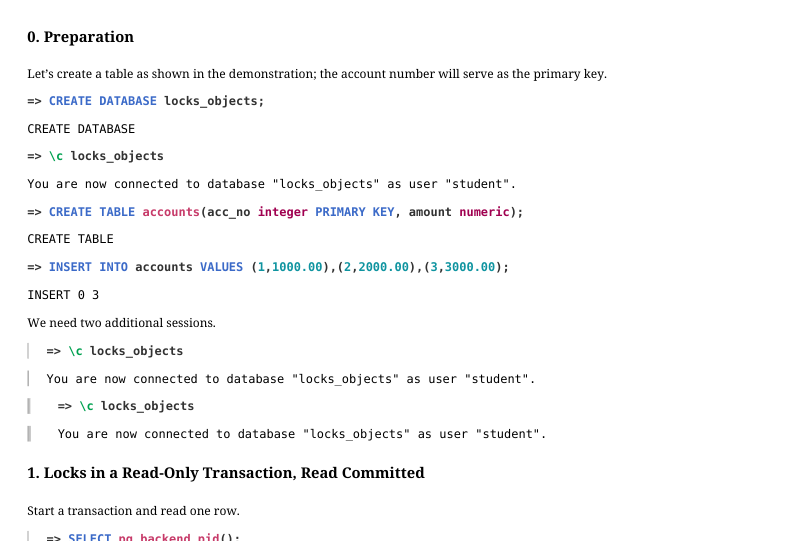 {#source-figure-031 caption=“Source slide page 31: 0. Preparation”}
Let’s create a table as shown in the demonstration; the account number will serve as the primary key.
We need two additional sessions.
1. Locks in a Read‐Only Transaction, Read Committed
Start a transaction and read one row.
Locks:
Here we see the following: An AccessShareLock on the accounts table; An AccessShareLock on the accounts_pkey index created for the primary key; An exclusive lock on its own virtual transaction ID. If we query locks from inside the same transaction, an additional lock on the pg_locks view appears:
Page 32: Page 32
 {#source-figure-032 caption=“Source slide page 32: Page 32”}
2. Predicate Lock Escalation
Start transactions at the Serializable isolation level in two sessions.
In the first session, read rows for accounts 1 and 3; in the second session, read rows for accounts 2 and 3.
The index page and individual tuples are locked:
Change the balance of the first account in the first session, and the second account in the second session.
The transactions are serializable:
Now configure lock escalation so that locking two tuples results in locking the whole table.
Page 33: Page 33
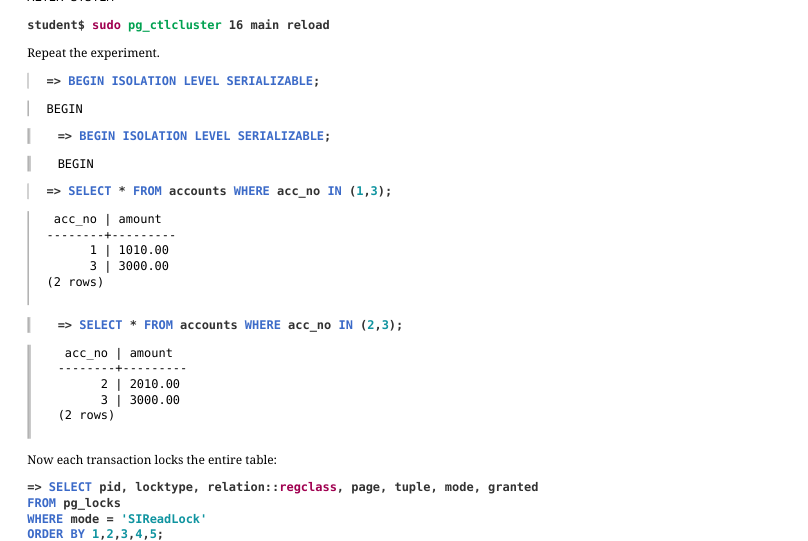 {#source-figure-033 caption=“Source slide page 33: Page 33”}
Repeat the experiment.
Now each transaction locks the entire table:
Change the balances…
…and commit the transactions.
Due to lock escalation, serialization is impossible.
3. Output into the Server Log
We need to change the following parameters:
Page 34: Page 34
Reproduce the lock.
In the first session add a delay and then finish the transaction.
Here is what appears in the log:
13 Lesson 13: Locks / Row-Level Locks
This page is extracted from the official PDF into native Markdown. Slide text, code and speaker notes are kept in reading order; the original PDF and HTML remain the layout references. HTML source: dba2_13_locks_rows.html Archive: DBA2-handouts-16-en.zip PDF pages: 32
Page 1: Locks / Row-Level Locks
Copyright
© Postgres Professional, 2016–2026 Authors: Egor Rogov, Pavel Luzanov, Ilya Bashtanov, Igor Gnatyuk Translated by: Elena Sharafutdinova Photo: Oleg Bartunov (Phu Monastery and Bhrikuti Peak, Nepal)
Use of Course Materials
Non-commercial use of course materials (presentations, demonstrations) is allowed without restrictions. Commercial use is possible only with the written permission of Postgres Professional. It is prohibited to make changes to the course materials.
Feedback
Please send your feedback, comments and suggestions to: edu@postgrespro.ru
Disclaimer
Postgres Professional assumes no responsibility for any damages and losses, including loss of income, caused by direct or indirect, intentional or accidental use of course materials. Postgres Professional company specifically disclaims any warranties on course materials. Course materials are provided “as is,” and Postgres Professional company has no obligations to provide maintenance, support, updates, enhancements, or modifications.
Page 2: Topics
- Exclusive and Shared Row‐Level Locks
- Multitransactions and Freezing
- Implementation of the Wait Queue
- Deadlocks
Page 3: Row-Level Locks
 {#source-figure-003 caption=“Source slide page 3: Row-Level Locks”}
Speaker notes
Although information about row-level locks is stored in tuples on disk, the wait queue for exclusive row locks is organized using tuple object locks.
Page 4: Architecture
Information is stored only in data pages
- xmax field in the tuple header + information bits
- nothing is stored in RAM
- Unlimited number
- large number does not impact performance
- Infrastructure
- wait queue is organized using object locks
Speaker notes
Due to MVCC, row‐level locks are required only to change data (or to prevent changes), they are unnecessary for reads.
While object locks have a dedicated lock in RAM for each resource, this approach does not work for rows: a separate lock for every row (there could be millions or billions of them) would incur excessive overhead and consume enormous amounts of RAM.
One approach to this problem is lock escalation: if N rows in a table are already locked, attempting to lock one more row triggers a lock on the entire table, and all the row-level locks are released. However, this approach would impact throughput.
PostgreSQL takes a different approach. Information about a row being locked is stored exclusively in the tuple header inside the data page. This information is represented by the ID of the locking transaction (xmax) and additional information bits.
This architecture allows PostgreSQL to support an unlimited number of row-level locks without consuming additional resources or degrading system performance.
The drawback of this approach is the complexity of managing lock queues. For this purpose, PostgreSQL still relies on object-level locks, though a minimal number of them is required (proportional to the number of processes rather than the number of locked rows).
Page 5: Exclusive Modes
Update No Key Update
- row deletion
- change of any fields,
- or change of all fields
- except for key fields
- UPDATE
- UPDATE
- (with key field changes)
- (without key field changes)
Speaker notes
There are 4 modes for locking a row (the mode is set in the tuple using additional information bits).
Two of these modes represent exclusive locks, which can be held by only one transaction at a time. The Update mode implies a complete change (or deletion) of a row, while the No Key Update mode allows changes only of fields that are not part of unique indexes (in other words, all foreign keys remain unchanged during such a modification).
The UPDATE command automatically selects the least restrictive appropriate lock mode; rows are typically locked in No Key Update mode.
https://postgrespro.com/docs/postgresql/16/explicit-locking#LOCKING-ROW S
Page 6: Exclusive Modes
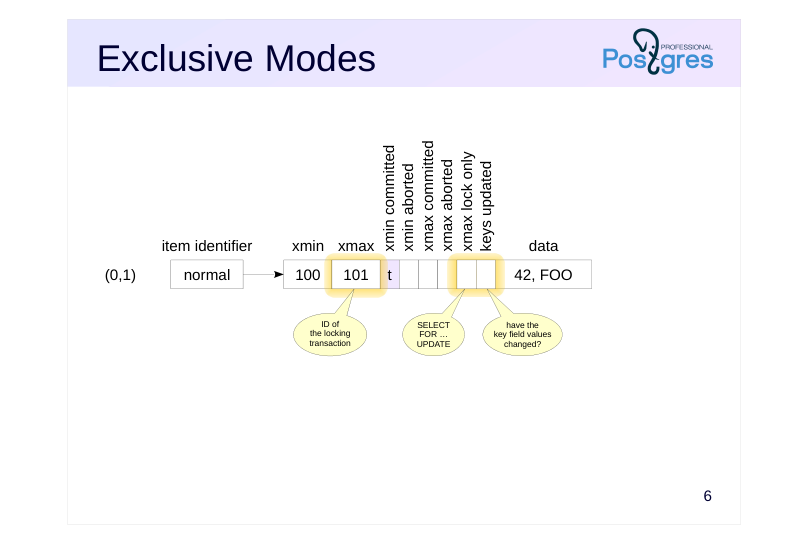 {#source-figure-006 caption=“Source slide page 6: Exclusive Modes”}
Speaker notes
When a row is updated or deleted, the xmax field of the current tuple is set to the ID of the current transaction. This xmax value, corresponding to an active transaction serves as a lock.
The same mechanism is used when a row is explicitly locked with SELECT FOR UPDATE, with an additional information bit (xmax lock only) set to indicate that the tuple remains current, even though it is locked.
The lock mode is determined by another hint bit (keys updated).
(In practice, a greater number of bits are used with more complex conditions and checks to maintain compatibility with earlier versions. However, these details are not fundamental.)
If another transaction attempts to update or delete a locked row in an incompatible mode, it is forced to wait for the xmax transaction to complete.
Page 7: Shared modes
Share Key Share
- prevents modification of
- prevents modification of
- any fields of the row
- key fields of the row
- SELECT FOR SHARE
- SELECT FOR KEY SHARE
- and foreign key checks
- Mode Compatibility Matrix
- Key
- No Key
- Share
- Share
- Update
- Update
- Key Share × Share × × No Key Update × × × Update × × × ×
Speaker notes
Two other modes represent shared locks, which can be held by several transactions simultaneously.
The Share mode is used when we need to read a row while ensuring it cannot be changed by another transaction.
The Key Share mode allows a row to be modified, but only in non-key fields. PostgreSQL automatically uses this mode, for example, during foreign key constraint checks.
The overall compatibility matrix is shown at the bottom of the slide. The matrix shows that:
● Exclusive modes conflict with each other.
● Shared modes are compatible with each other.
● The Key Share mode is compatible with the exclusive No Key Update mode (i.e., we can update non-key fields while ensuring the key remains unchanged).
https://postgrespro.com/docs/postgresql/16/explicit-locking#LOCKING-ROW S
Page 8: Shared modes
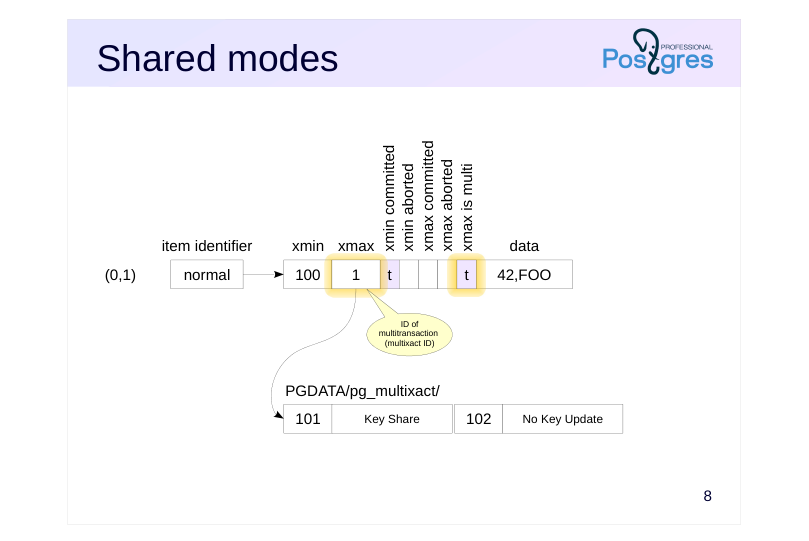 {#source-figure-008 caption=“Source slide page 8: Shared modes”}
Speaker notes
We discussed that a lock is represented by the ID of the locking transaction in the xmax field. Shared locks can be held by several transactions, but a single xmax field cannot store several IDs.
To handle shared locks, PostgreSQL uses multitransactions (MultiXact). They are assigned separate IDs that correspond to an entire group rather than a single transaction. To distinguish a multitransaction from a regular one, another information bit (xmax is multi) is used. Detailed information about the group members and the lock modes is stored in the PGDATA/ pg_multixact/ directory. The most recently accessed data is cached in the server’s shared memory buffers to speed up access.
Page 9: Freezing Configuration
Multitransaction Parameters
- vacuum_multixact_freeze_min_age
- = 5 000 000
- vacuum_multixact_freeze_table_age
- = 150 000 000
- autovacuum_multixact_freeze_max_age = 400 000 000
- vacuum_multixact_failsafe_age
- = 1 600 000 000
- Table Storage Parameters
- autovacuum_multixact_freeze_min_age
- toast.autovacuum_multixact_freeze_min_age
- autovacuum_multixact_freeze_table_age
- toast.autovacuum_multixact_freeze_table_age
- autovacuum_multixact_freeze_max_age
- toast.autovacuum_multixact_freeze_max_age
Speaker notes
Since multitransactions are assigned separate IDs that are written to the xmax field of tuples, the limited bitness of the counter creates the same challenges as with regular transaction IDs. This refers to the issue of wraparound, which was covered in the Freezing lesson of the MVCC module.
Therefore, IDs of multitransactions require a similar freezing process, i.e., old multixact IDs are replaced with new ones (or with ID of a regular transaction if the lock is currently held by only a single transaction).
Note that regular tuple freezing operates on the xmin field (if a tuple has a non-empty xmax field, it means either the tuple is already obsolete and will be cleaned up, or the xmax transaction was aborted and its ID is of no interest). For multitransactions, the problem lies in the xmax field of a current tuple that stays valid but can be repeatedly locked by different transactions in shared mode.
Multitransaction freezing is controlled by parameters similar to those used for regular freezing.
Page 10: Row-Level Locks
Row‐level locks is the most common type of locks. Let’s create a table of bank accounts as in the previous lesson.
Since row lock information is stored only in the tuples, we will use the familiar pageinspect extension.
Create a view that decodes the information bits we are interested in for the first three tuples.
Update the balance of the first account (key unchanged) and the number of the second account (key changed):
Check the view. Note that it shows only the first three (original) tuples.
The rows for the first and second accounts are locked, the xmax field contains the transaction ID of the locking transaction. The bits in the keys_upd column show that the rows are locked in different modes. Now in another session, request shared locks on the first and third accounts:
Page 11: Page 11
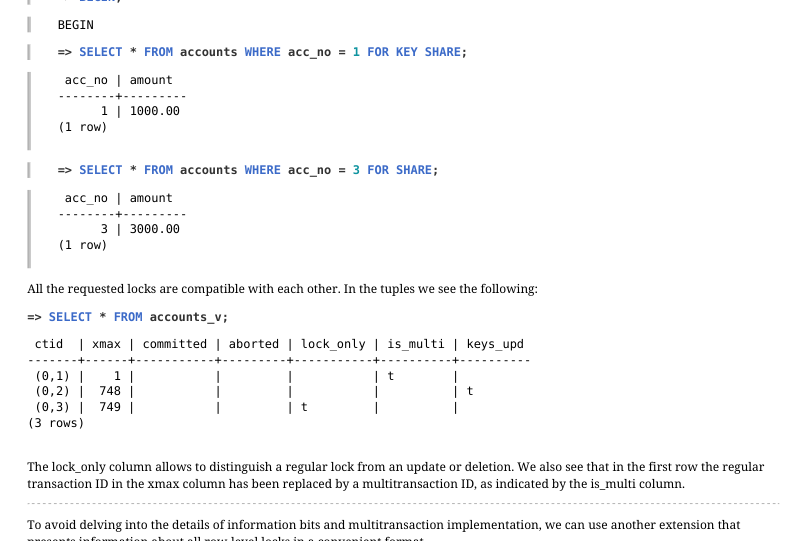 {#source-figure-011 caption=“Source slide page 11: Page 11”}
All the requested locks are compatible with each other. In the tuples we see the following:
The lock_only column allows to distinguish a regular lock from an update or deletion. We also see that in the first row the regular transaction ID in the xmax column has been replaced by a multitransaction ID, as indicated by the is_multi column. To avoid delving into the details of information bits and multitransaction implementation, we can use another extension that presents information about all row‐level locks in a convenient format.
The extension provides information about IDs of transactions, multitransactions, and modes of all locks.
Page 12: Wait Queue
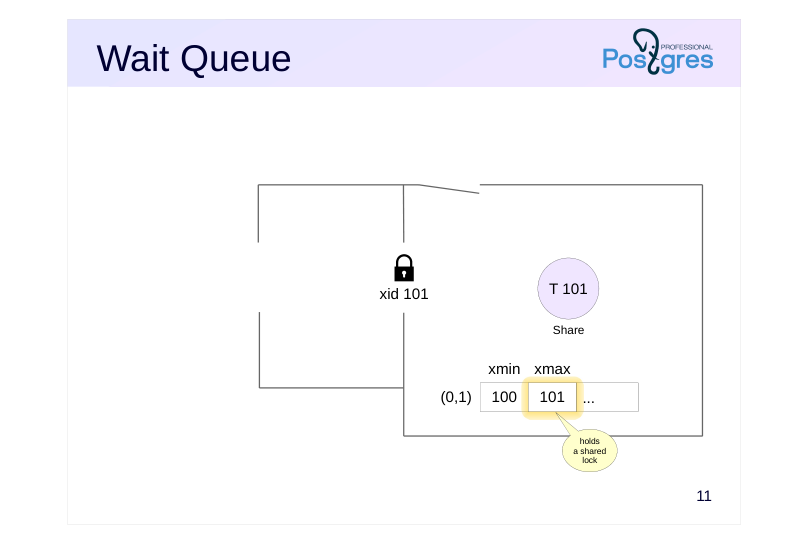 {#source-figure-012 caption=“Source slide page 12: Wait Queue”}
Speaker notes
To organize the wait queue, an additional object‐lock mechanism is used, with the information stored in RAM and visible in pg_locks.
Let’s assume that transaction 101 (as shown in the slide) has successfully locked a row in Share mode. The lock information is recorded in the tuple header, the ID of the transaction appears in the xmax field.
Page 13: Wait Queue
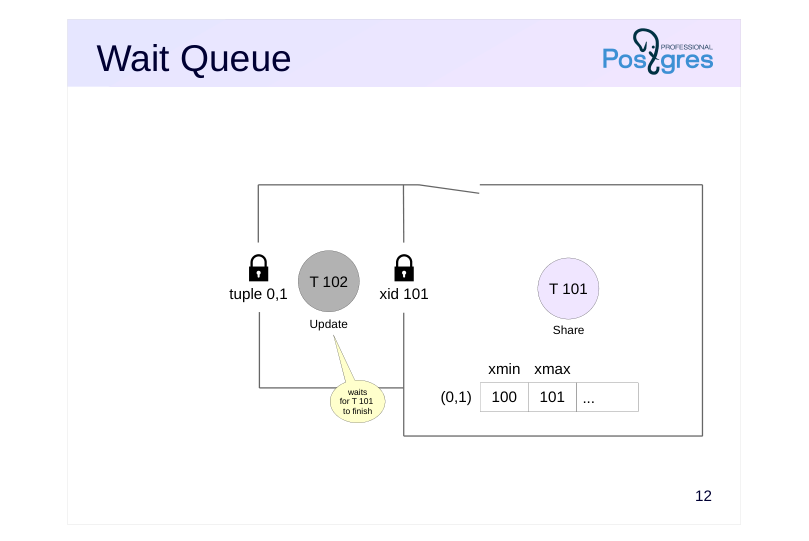 {#source-figure-013 caption=“Source slide page 13: Wait Queue”}
Speaker notes
Another transaction 102 that wants to acquire a lock accesses the row and sees that it is locked. If the lock modes conflict, the transaction needs to enter a wait queue so the system can wake it up when the lock is released. However, row-level locks do not provide this capability, they are not represented in RAM at all. They are simply bytes inside a data page.
As we saw in the Object-Level Locks lesson, each transaction holds an exclusive lock on its own ID. Since transaction 102 needs to wait for transaction 101 to complete (as row locks are only released when a transaction completes), it requests a lock on ID 101.
When transaction 101 completes, the locked resource is released (or simply disappears if committed), transaction 102 is awakened and can lock the row (by setting xmax = 102 in the corresponding tuple).
Additionally, the waiting transaction holds a lock on a tuple resource, indicating that it is first in the queue.
Page 14: Wait Queue
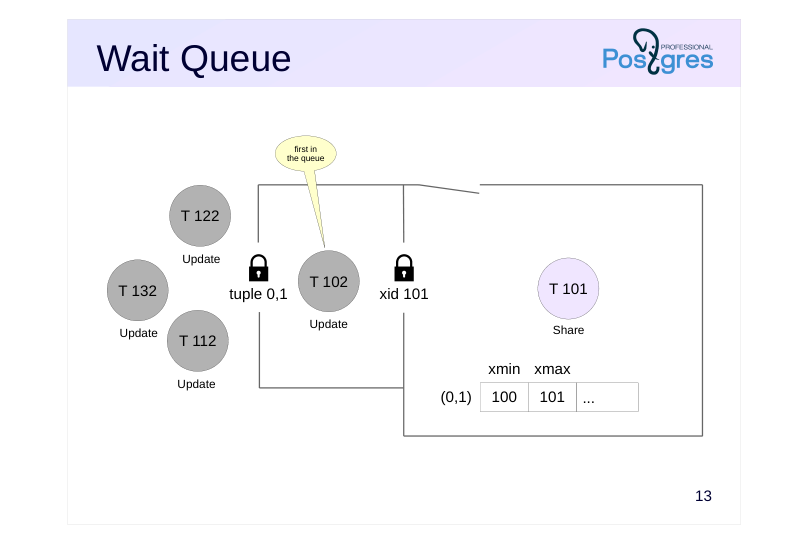 {#source-figure-014 caption=“Source slide page 14: Wait Queue”}
Speaker notes
When other transactions appear that conflict with the existing tuple lock (in our example, these are 112, 122, and 132), they first attempt to acquire a tuple lock on that same tuple.
Since the tuple lock is already held by transaction 102, the other transactions wait for it to be released. This creates a queue where there is one transaction at the front and others waiting behind.
If all arriving transactions joined the queue directly behind transaction 101, a race condition would occur whenever the lock was released. In an unlucky timing scenario, transaction 102 could wait indefinitely for the lock. The two-level locking scheme helps manage this contention more effectively.
We should avoid design decisions that involve frequent updates of the same row. This creates a hot spot that can degrade performance under heavy load.
Page 15: Wait Queue
For convenience, create a view over pg_locks that rolls up identifiers of different lock types into a single field:
Let one transaction lock a row in shared mode…
..and let another one try to update it:
In the pg_locks view we can see that the second transaction is waiting for the first to finish (granted = f), while holding a lock on the tuple (locktype = tuple):
Instead of manually analyzing pg_locks to see which process is blocking another one, we can call a function that returns the blocking process ID(s):
Page 16: Page 16
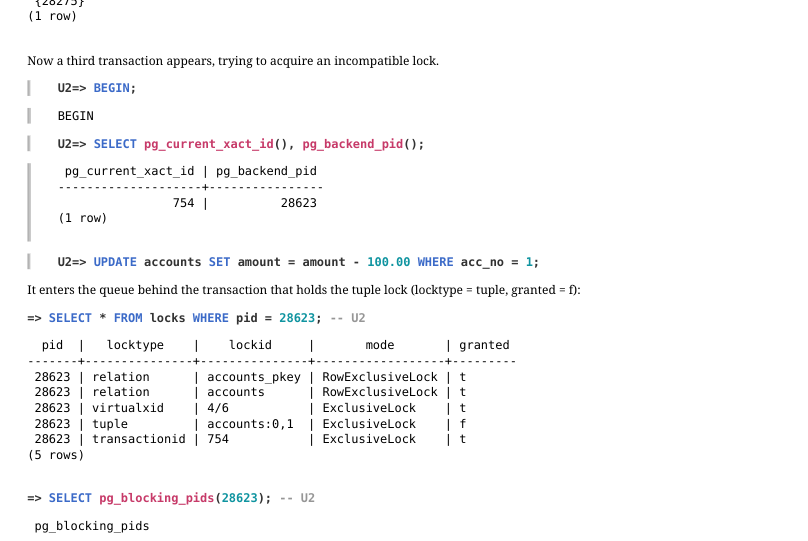 {#source-figure-016 caption=“Source slide page 16: Page 16”}
Now a third transaction appears, trying to acquire an incompatible lock.
It enters the queue behind the transaction that holds the tuple lock (locktype = tuple, granted = f):
Page 17: Wait Queue
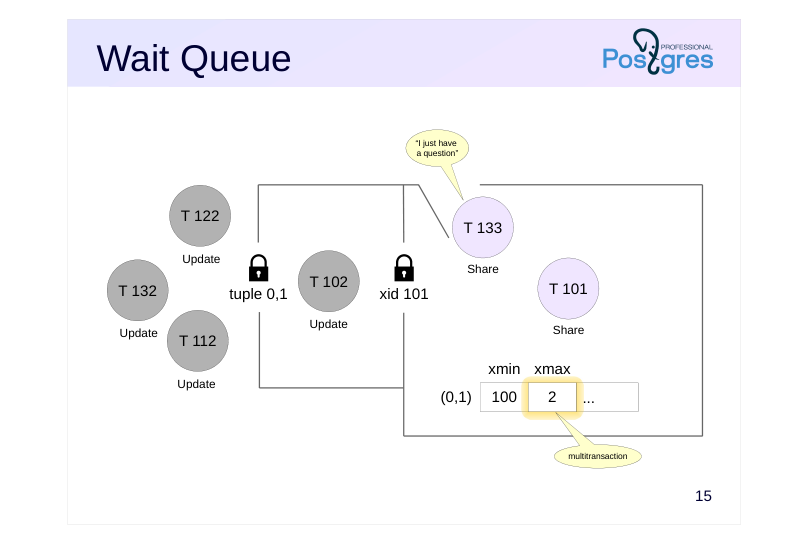 {#source-figure-017 caption=“Source slide page 17: Wait Queue”}
Speaker notes
In our example, transaction 101 has locked the row in shared mode. While transaction 102 is waiting for transaction 101 to complete, transaction 133 might come along wishing to acquire a shared lock on the row, which is compatible with transaction 101’s current lock.
Such a transaction does not wait in the queue — it acquires the lock immediately. In this case, the list of blocking transaction IDs 101 and 133 is combined into a multi‐transaction 2, whose ID will be recorded in the xmax field of the tuple.
Page 18: Wait Queue
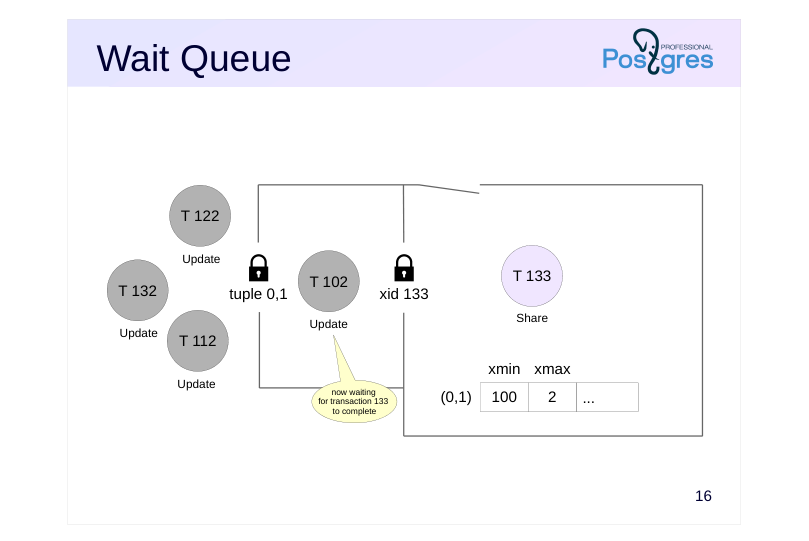 {#source-figure-018 caption=“Source slide page 18: Wait Queue”}
Speaker notes
When transaction 101 completes, transaction 102 will be awakened, but it will not be able to acquire the row‐level lock because the row is still locked by transaction 133. Transaction 102 will be forced to go back to sleep.
Under a continuous stream of shared locks, a write transaction may wait indefinitely. This situation is called locker starvation.
Note that this problem does not occur with object‐level locks (such as relation locks). In this case, each resource has its own lock in random access memory, and all waiting processes form a fair queue.
https://git.postgresql.org/gitweb/?p=postgresql.git;f=src/backend/access/hea p/README.tuplock;hb=HEAD
Page 19: Wait Queue
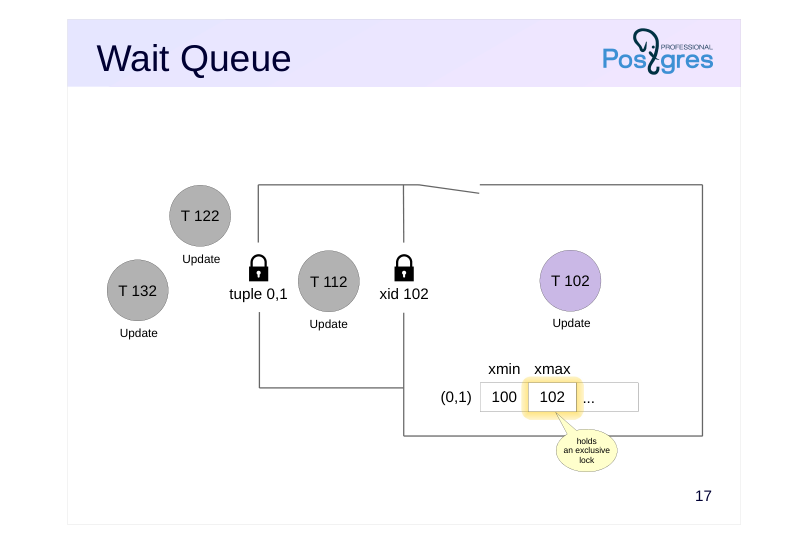 {#source-figure-019 caption=“Source slide page 19: Wait Queue”}
Speaker notes
Once transaction 133 completes, transaction 102 will be the first to write its own ID into the xmax field, after which it will release the tuple lock. Then one random transaction from all the remaining ones will manage to acquire the tuple lock and become first in the queue.
Page 20: Page 20
 {#source-figure-020 caption=“Source slide page 20: Page 20”}
In our experiment, a transaction that tries to lock the row in shared mode proceeds without waiting.
The tuple now contains a multitransaction:
After one of the transactions holding the row in shared mode finishes, another one continues to hold the lock.
The transaction that is first in the queue now waits for the remaining transaction to finish.
Note Note that the xmax field still contains the ID of the multitransaction, even though one of its member transactions has already completed. This ID can be replaced by another one (ID of a new multitransaction or a regular transaction) during vacuuming.
Now the second transaction holding the shared lock also finishes.
The transaction that was first in the queue gains access to the tuple:
Page 21: Page 21
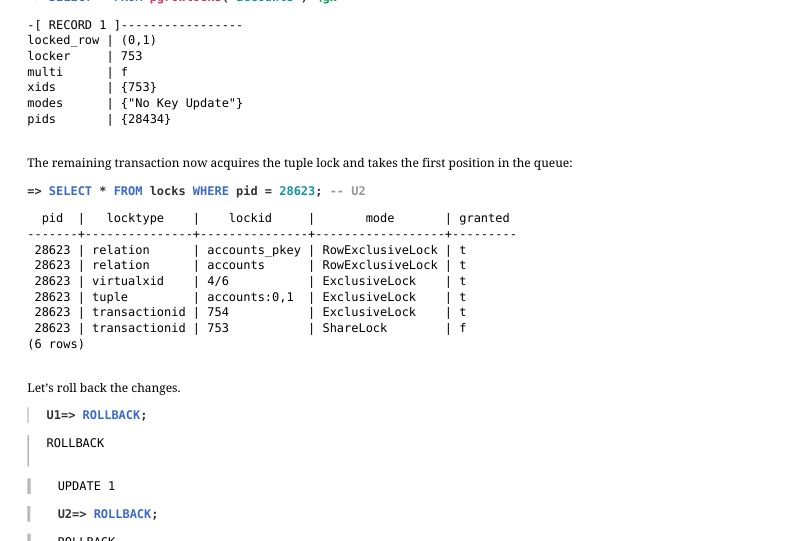 {#source-figure-021 caption=“Source slide page 21: Page 21”}
The remaining transaction now acquires the tuple lock and takes the first position in the queue:
Let’s roll back the changes.
How to Avoid Waiting for a Lock?
Sometimes it is more convenient to receive an error immediately when a resource is busy, rather than waiting for the lock to be released. The application can catch and handle such an error. For this purpose, several SQL commands (such as SELECT and some variants of ALTER) allow to specify the NOWAIT keyword. Lock the table by updating the first row:
The transaction receives an error immediately.
For advisory locks, there are functions that either acquire the lock immediately or return false in case of failure:
Page 22: Page 22
The UPDATE and DELETE commands do not support NOWAIT. You can first execute the command
and then, if the rows are locked successfully, modify or delete them. For example:
We get an error immediately without attempting to execute DELETE or UPDATE.
Another way to avoid waiting for row locks to be released is to use the SKIP LOCKED clause. Lock one row without specifying a particular account number:
In this case, the command skips the already locked first row and immediately acquires a lock on the second row.
For commands not related to row locking, NOWAIT cannot be used. In this case, we can set a short wait timeout. (By default, the timeout is zero, meaning endless waiting):
We get an error without a long wait for the resource to be released.
During vacuuming, we can specify that it should skip a table if it cannot acquire the lock immediately. This option becomes
Page 23: Page 23
particularly important when vacuuming the entire database:
Page 24: Deadlocks
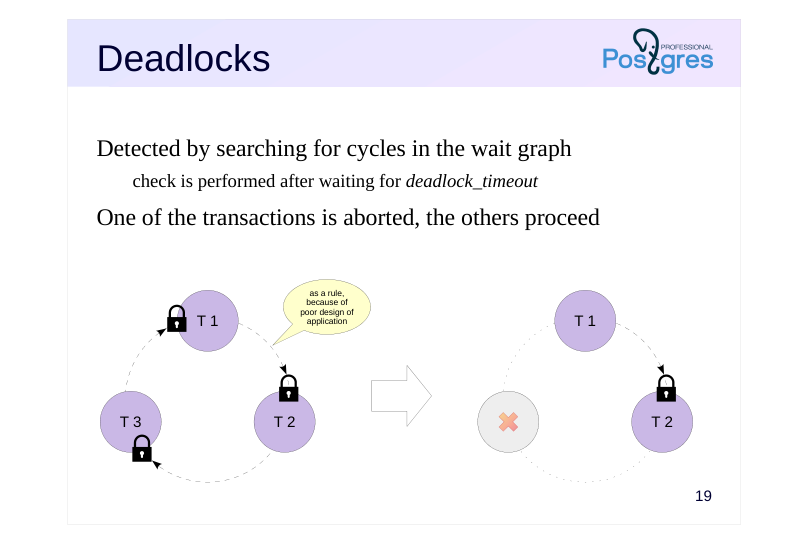 {#source-figure-024 caption=“Source slide page 24: Deadlocks”}
Detected by searching for cycles in the wait graph
- check is performed after waiting for deadlock_timeout
- One of the transactions is aborted, the others proceed
Speaker notes
A deadlock can occur when one transaction attempts to acquire a resource already held by another transaction, while that another transaction is simultaneously trying to acquire a resource held by the first one. A deadlock is also possible with several transactions; the slide shows an example involving three transactions.
A wait graph provides a clear visual representation of a deadlock. To create this graph, we remove specific resources and keep only transactions, marking their wait dependencies. If the graph contains a cycle (meaning that we can trace a path of arrows that leads back to the starting transaction) that is a deadlock.
Note that the locked resources are not necessarily rows; deadlock detection depends not on the resource type, but on the circular wait dependency among the transactions waiting for those resources to be released.
Once a deadlock has occurred, the involved transactions are trapped in an endless wait. Therefore, PostgreSQL automatically monitors for deadlocks. The check is performed when any transaction has been waiting for a resource longer than the time specified in the deadlock_timeout parameter. If a deadlock is detected, one of the transactions is forcibly aborted so that the others can proceed.
Deadlocks usually indicate that the application is poorly designed. Messages in the server log or a rising value of pg_stat_database.deadlocks are reasons to reconsider the causes.
https://postgrespro.com/docs/postgresql/16/explicit-locking#LOCKING-DEA DLOCKS
Page 25: Deadlocks
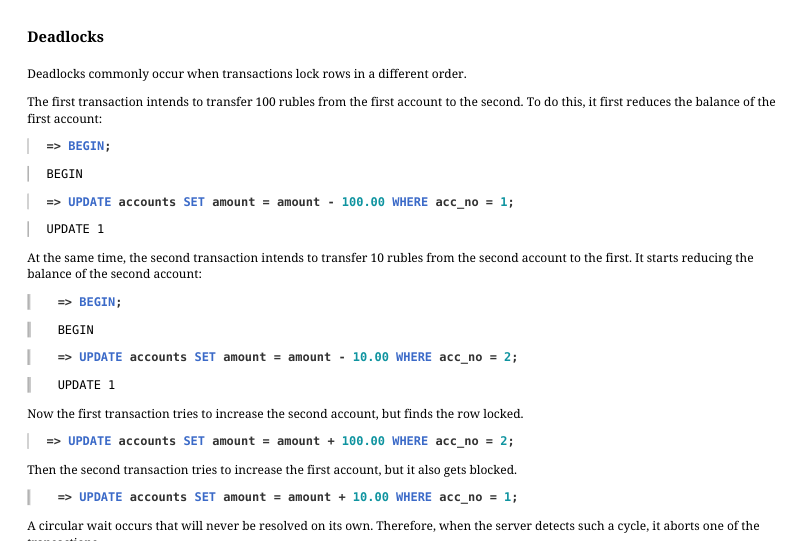 {#source-figure-025 caption=“Source slide page 25: Deadlocks”}
Deadlocks commonly occur when transactions lock rows in a different order. The first transaction intends to transfer 100 rubles from the first account to the second. To do this, it first reduces the balance of the first account:
At the same time, the second transaction intends to transfer 10 rubles from the second account to the first. It starts reducing the balance of the second account:
Now the first transaction tries to increase the second account, but finds the row locked.
Then the second transaction tries to increase the first account, but it also gets blocked.
A circular wait occurs that will never be resolved on its own. Therefore, when the server detects such a cycle, it aborts one of the transactions.
The right way to perform such operations is to lock resources in the same order. For example, in this case we can lock the accounts in ascending order by account number.
Page 26: Takeaways
Row locks are stored in data pages
- due to their potentially large number
- Wait queues and deadlock detection are provided by object-level locks
- complex locking schemes become necessary
Page 27: Practice
- Reproduce a scenario where the same row is updated by three UPDATE commands in different sessions. Examine the resulting locks in the pg_locks view and make sure that you understand all of them.
- Create a three-way deadlock. Can you analyze what happened by examining the log file afterward?
- Can two transactions, each executing a single UPDATE command on the same table, deadlock each other? Try to reproduce this scenario.
Page 28: 1. Row-Level Locks during Multiple Updates
For the sake of simplicity, let’s create a table without a primary key.
Create a view over pg_locks as in the demonstration:
The first transaction updates and thereby locks the row:
The second transaction does the same:
And the third one:
Page 29: Page 29
Locks for the first transaction:
Relation locks on pg_locks and locks in AccessShareLock mode are set on relations being read. A relation lock on the accounts in RowExclusiveLock mode is set when modifying the table. virtualxid and transactionid locks in ExclusiveLock mode are held by the transaction itself. Locks for the second transaction:
Compared to the first transaction: The locks on pg_locks and locks are absent because the second transaction has not accessed these relations. The transaction is waiting to acquire a transactionid lock for the first transaction in ShareLock mode. A tuple lock is held on the row being updated. Locks for the third transaction:
The transaction is waiting to acquire a tuple lock on the row being updated. You can see the overall picture of current waits in the pg_stat_activity view. For convenience, you can also include information about blocking processes:
Page 30: Page 30
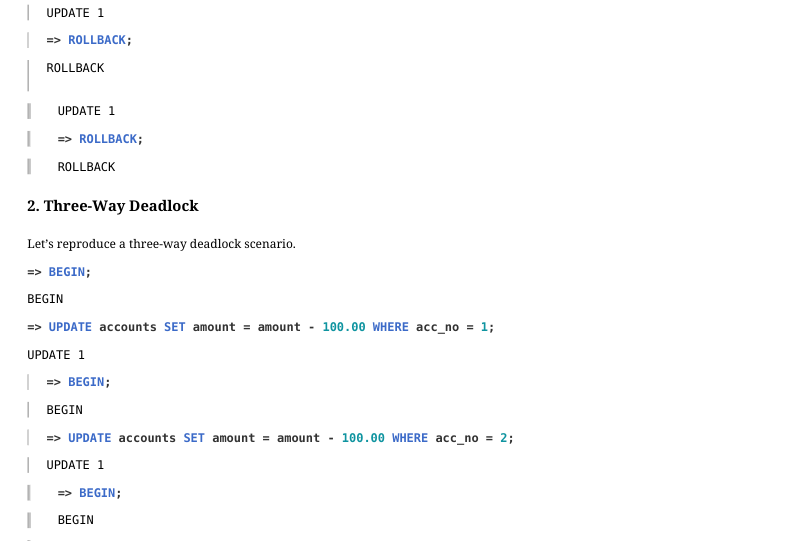 {#source-figure-030 caption=“Source slide page 30: Page 30”}
2. Three-Way Deadlock
Let’s reproduce a three-way deadlock scenario.
Here is the information about the deadlock you can find in the WAL:
Page 31: 3. Deadlock of Two UPDATE Statements
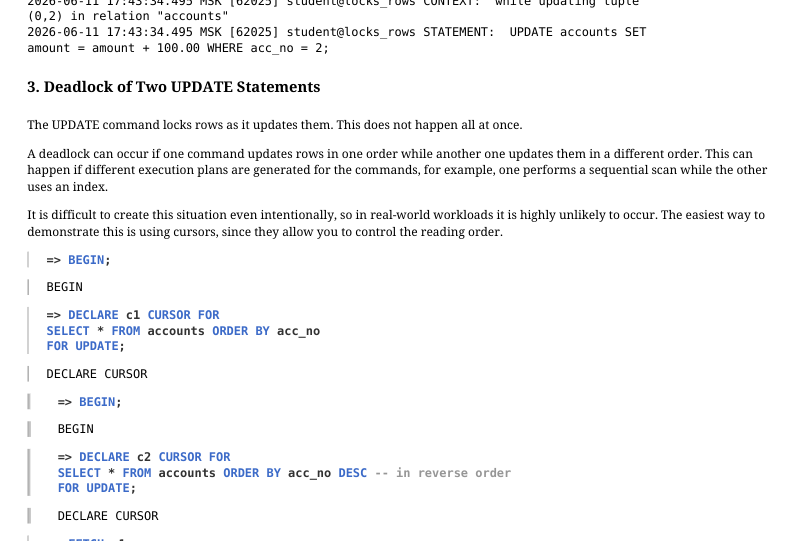 {#source-figure-031 caption=“Source slide page 31: 3. Deadlock of Two UPDATE Statements”}
The UPDATE command locks rows as it updates them. This does not happen all at once. A deadlock can occur if one command updates rows in one order while another one updates them in a different order. This can happen if different execution plans are generated for the commands, for example, one performs a sequential scan while the other uses an index. It is difficult to create this situation even intentionally, so in real‐world workloads it is highly unlikely to occur. The easiest way to demonstrate this is using cursors, since they allow you to control the reading order.
The second command is waiting for a lock…
A deadlock has occurred. After a while:
Page 32: Page 32
14 Lesson 14: Locks / Locks in RAM
This page is extracted from the official PDF into native Markdown. Slide text, code and speaker notes are kept in reading order; the original PDF and HTML remain the layout references. HTML source: dba2_14_locks_memory.html Archive: DBA2-handouts-16-en.zip PDF pages: 20
Page 1: Locks / Locks in RAM
Copyright
© Postgres Professional, 2016–2026 Authors: Egor Rogov, Pavel Luzanov, Ilya Bashtanov, Igor Gnatyuk Translated by: Elena Sharafutdinova Photo: Oleg Bartunov (Phu Monastery and Bhrikuti Peak, Nepal)
Use of Course Materials
Non-commercial use of course materials (presentations, demonstrations) is allowed without restrictions. Commercial use is possible only with the written permission of Postgres Professional. It is prohibited to make changes to the course materials.
Feedback
Please send your feedback, comments and suggestions to: edu@postgrespro.ru
Disclaimer
Postgres Professional assumes no responsibility for any damages and losses, including loss of income, caused by direct or indirect, intentional or accidental use of course materials. Postgres Professional company specifically disclaims any warranties on course materials. Course materials are provided “as is,” and Postgres Professional company has no obligations to provide maintenance, support, updates, enhancements, or modifications.
Page 2: Topics
- Locks in RAM
- Wait Event Monitoring
Page 3: Locks in RAM
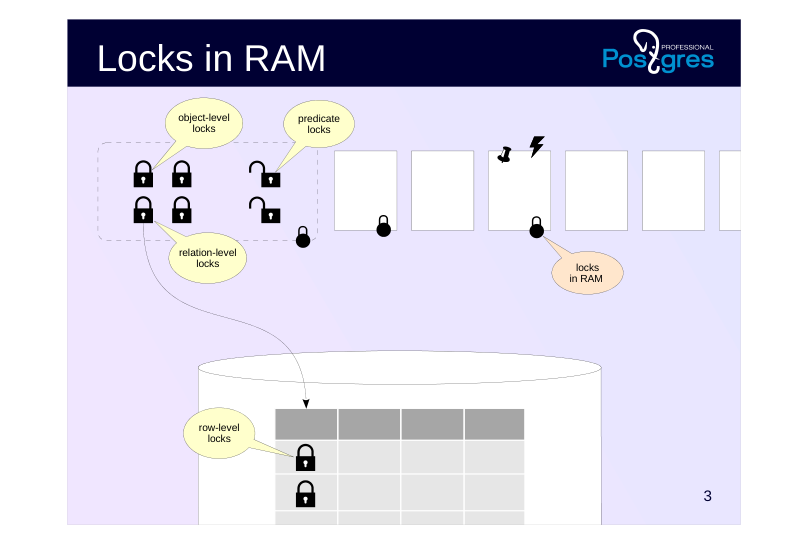 {#source-figure-003 caption=“Source slide page 3: Locks in RAM”}
Page 4: Spinlocks
Acquired for short periods
- a few CPU instructions
- Exclusive mode
- Monitoring is available
- pg_stat_activity
- No deadlock detection
- Spin loop
- atomic CPU instructions are used
Speaker notes
We have already covered long-term locks which typically remain active until the end of a transaction and support multiple modes. Simpler locks with lower overhead are used to protect data structures in shared memory accessed by multiple processes.
The simplest of them are spinlocks. They are meant to be acquired for very short time intervals (a few CPU instructions), they protect individual data fields from simultaneous changes.
Spinlocks are implemented using atomic CPU instructions, such as compare-and-swap (https://en.wikipedia.org/wiki/Compare-and-swap).
They can be acquired only in exclusive mode. If the resource is locked, the process enters an active waiting loop, repeatedly attempting to acquire the lock until it succeeds. This approach makes sense since spinlocks are used only in cases where the probability of a conflict is estimated as very low. There is also monitoring available for tracking wait events related to spinlocks.
However, spinlocks do not provide deadlock detection; preventing such scenarios is the responsibility of PostgreSQL developers.
Page 5: Lightweight Locks
Acquired for short periods
- typically fractions of a second
- Exclusive and shared modes
- Monitoring is available
- pg_stat_activity
- No deadlock detection
- “Unfair” queue
- shared locks allow read processes to bypass the queue
Speaker notes
The next category is lightweight locks (lwlocks).
They are acquired for a short period to work with a data structure (such as a hash table or a list of pointers). Lightweight locks are typically held for a short time, but during that time IO operations may occur, so the duration can sometimes become significant.
Two locking modes are supported: exclusive (for writing) and shared (for reading).
A wait queue is supported. However, while the lock is held in shared mode, other reading processes can bypass the queue. In highly concurrent systems under heavy load, this can lead to unpredictably long waits for processes that need to modify data (https://postgrespro.com/list/thread-id/2400193).
Deadlock detection is not provided, just as with spinlocks. Monitoring is available for lightweight locks.
Page 6: Buffer Pin
Acquired for the duration of buffer operations
- potentially for an extended period
- Shared mode
- Monitoring is available
- pg_stat_activity
- pg_buffercache
- No deadlock detection
- Passive waiting
- a pinned buffer is typically skipped
Speaker notes
Another type of lock, which we already covered in the Buffer Cache lesson of the WAL module is the buffer pin.
A list of processes working with the buffer is maintained for each buffer. Certain operations are prohibited on a pinned buffer. For example, we can insert a new row into a page (which other processes will not see due to MVCC), but we cannot replace a page with another one.
Typically, processes skip a pinned buffer and choose another one to avoid waiting. However, in some cases where a specific buffer is required, a lightweight lock in exclusive mode is requested. If necessary, the process waits until all other processes finish working with the buffer. This waiting is passive: the system wakes up the waiting process when the buffer is unpinned.
Deadlocks are impossible here, preventing such scenarios is the responsibility of PostgreSQL developers.
Wait events related to buffer pins can be monitored using the pg_stat_activity view. The current number of buffer pins is shown by the pg_buffercache extension.
Page 7: Example: Buffer Cache
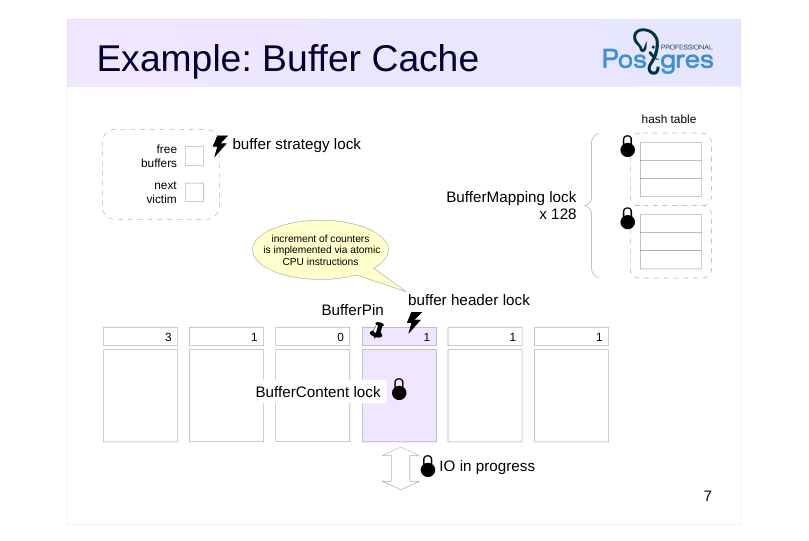 {#source-figure-007 caption=“Source slide page 7: Example: Buffer Cache”}
Speaker notes
To get a basic (incomplete) understanding of how and where locks are used, let’s look at the buffer cache as an example.
To access the hash table containing references to buffers, the process should acquire a lightweight BufferMapping lock in shared mode; or in exclusive mode if the table needs to be modified. To increase granularity, this lock is implemented as a tranche of 128 separate locks, each protecting its own portion of the hash table.
A process accesses a buffer header using a spinlock. Some operations (such as incrementing a counter) can be performed without explicit locks, using atomic CPU instructions.
To read the buffer’s contents, a BufferContent lock is required. Typically, it is acquired to read only item pointers, and after that, a buffer pin provides sufficient protection. To change the buffer contents, this lock is acquired in exclusive mode.
When a buffer is being read from disk (or written to disk), the IO in progress flag is set in its header. This signals to other processes that the page is being read, so they can queue up if they need the same page.
Pointers to free buffers and to the next victim are protected by a single spinlock called the buffer strategy lock.
Page 8: Example: WAL Buffers
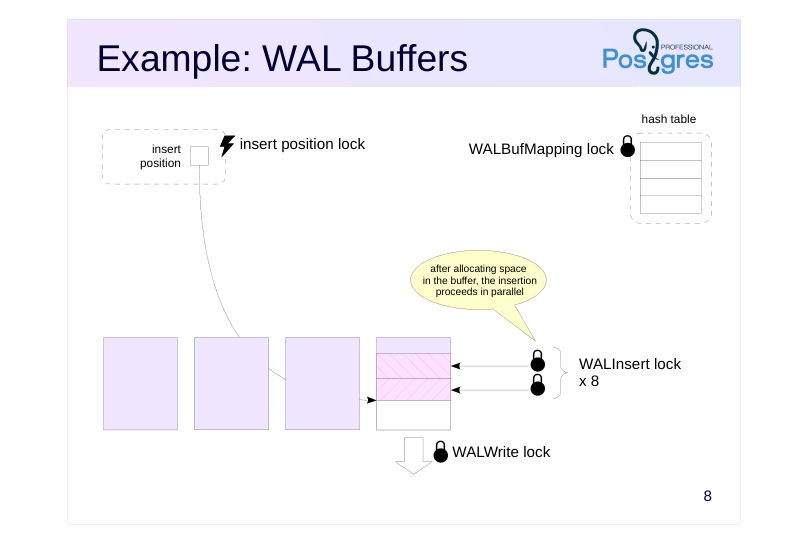 {#source-figure-008 caption=“Source slide page 8: Example: WAL Buffers”}
Speaker notes
WAL buffers provide another example.
The WAL cache also uses a hash table that contains mapping of pages to buffers. Unlike the buffer cache’s hash table, this hash table is protected by a single lightweight WALBufMapping lock, since the WAL cache is smaller (usually 1/32 of the buffer cache) and access to the buffers is more sequential.
Writing pages to disk is protected by the lightweight WALWrite lock, so that only one process can perform this operation at a time.
To create a WAL record, the process must first allocate space in a page. To do this, it acquires an insert position spinlock. When the space is allocated, the process copies the contents of the record into it. Copying can be performed by several processes simultaneously, therefore, recording is protected by a tranche of eight lightweight WALInsert locks.
The figure does not show all WAL-related locks, but this and previous examples should give a basic idea of how locks in RAM are used.
Page 9: Wait Event Monitoring
Wait events in pg\_stat\_activity and sampling
- Wait event types
Page 10: Wait Event Sampling
When a process is waiting for something, this information appears in the pg\_stat\_activity view
- wait_event_type — type of wait event
- wait_event — name of the specific wait event
- The information may be incomplete
- not all code locations where wait events can occur are covered
- The information reflects only the current moment
- the only way to observe behavior over time is through sampling
- a reliable picture emerges only with a large number of measurements
Speaker notes
The pg_stat_activity view is used for monitoring wait events. When a process (system or backend) cannot proceed with its work and is waiting for something, that wait event appears in the view. The wait_event_type column shows the type of wait event, while the wait_event column shows the name of the specific wait event.
Note that the view shows only waits that are properly handled in the source code. If the view does not show a wait event, this does not guarantee with 100% certainty that the process is not waiting for something.
Unfortunately, the only available information about wait events is the current information. No cumulative statistics are maintained. The only way to get a picture of wait events is sampling the state of the view at regular intervals. While there is no built‐in tool for this, extensions like pg_wait_sampling can be used.
https://github.com/postgrespro/pg\_wait\_sampling
Remember that sampling has a probabilistic nature: to get a reasonably reliable picture, the number of samples must be sufficiently high. Therefore, low‐frequency sampling does not provide accurate data, while increasing the frequency leads to higher overhead. For the same reason, sampling is useless for analyzing short-lived sessions.
Page 11: Wait Event Types
Locks
- pg_stat_activity.wait_event_type
- object lock
- Lock
- lightweight lock
- LWLock
- buffer pin
- BufferPin
- Other wait events
- input/output
- IO
- waiting for data from another process
- IPC
- waiting for data from the client
- Client
- waiting in an extension module
- Extension
- idle waiting
- Activity, Timeout
- Any remaining time is considered unaccounted
Speaker notes
Wait events can be categorized into several types. The locks we have examined represent a major category of wait events: object lock waits (Lock in the wait_event_type column), lightweight locks (LWLock), and buffer pins (BufferPin).
Processes can also wait for other types of events. IO wait events occur when a process needs to read or write data. A process might wait for the data it needs to operate, either from a client (Client) or another process (IPC).
Extensions can register their specific wait events.
There are also situations where a process is simply not doing any productive work. This category includes waits for background processes in their main loop (Activity) and timer waits (Timeout). These types of wait events are typically normal and do not indicate any problems.
Each type of wait event has a specific wait name: https://postgrespro.com/docs/postgresql/16/monitoring-stats#WAIT-EVENT-TABLE
If the name of a wait event is not defined, the process is not in the waiting state. This time should be considered as unaccounted for, since we are actually unaware of what exactly is happening at that moment.
In the following demonstration, we will use the FUSE filesystem (https://github.com/libfuse/libfuse) and the slowfs project based on it (https://github.com/nirs/slowfs) to slow down IO operations.
Page 12: Wait Event Monitoring
We can see current waits in the pg_stat_activity view, which shows information about active processes. Let’s select just a few fields:
Empty values indicate that the process is not waiting and is doing productive work. To get a reasonably complete picture of what a process is waiting for, we need to perform sampling at a certain frequency. Use the pg_wait_sampling extension. The extension is already installed in the OS of the course VM, but we need to add its library name to the shared_preload_libraries configuration parameter. Applying this parameter requires a server restart.
Now create the extension in the database.
The extension allows us to view a short history of wait events, which is stored in a ring buffer. What’s more interesting is to see the wait profile — cumulative statistics for the entire runtime. Let’s wait a few seconds and check the profile…
Given the lack of activity since server startup, most wait events fall into the Activity category (background processes waiting for work to appear) and the Client category (psql waiting for the user to send a query). Rows with empty event_type and event values correspond to situations where the process is not waiting (but it is running and consuming CPU time). The pg_wait_sampling.sample_cpu parameter controls whether these rows are displayed:
Page 13: Page 13
With default settings, the sampling frequency is 100 times per second. Therefore, to estimate wait duration in seconds, divide the count value by 100. To identify which process each wait event belongs to, add the pg_stat_activity view to the query:
Let’s run a load test using pgbench and observe how the picture changes.
Reset the collected profile and run a 30-second test in a separate process. Monitor how the profile changes in real time.
Page 14: Page 14
The wait events for the pgbench process will vary depending on the specific system. In our case, it is most likely to see wait events for WAL writing and synchronization (IO/WALSync, IO/WALWrite).
Lightweight Locks
It is always important to remember that if a wait event does not show up in the sampling data, it does not mean the wait never occurred. If it was shorter than the sampling interval (one hundredth of a second in our example), it might simply not appear in the sample. Therefore, lightweight locks most likely did not appear in the profile, but they would appear if we collected data over a long period. To make sure we see them, let’s connect to the slow cluster with a slowed-down filesystem, where every IO operation takes 1/10 of a second.
Reset the profile again and run the workload.
Page 15: Page 15
Now the main wait for the pgbench process is related to IO, specifically WAL writing, which is performed synchronously with each commit. Since writing WAL to disk is protected by the lightweight WALWriteLock (as we saw in the presentation slide), it also appears in the profile.
Page 16: Takeaways
Locks in RAM are implemented using different mechanisms
- spinlocks, lightweight locks, buffer pins
- short duration and lightweight infrastructure
- Monitoring of current wait events using the pg_stat_activity view
- sampling is required to observe behavior over time
Page 17: Practice
- An open cursor holds a buffer pin so that reading the next row can be performed more quickly. Check this using the pg_buffercache extension.
- Open a cursor on a table and, without closing the cursor, run VACUUM on that table. Will the vacuum wait for the buffer pin to be released?
- Repeat the experiment, this time running VACUUM FREEZE. Check that the buffer pin wait appears in the backend’s wait profile.
Speaker notes
- The pg_buffercache extension was covered in the WAL module, in the Buffer Cache lesson.
https://postgrespro.com/docs/postgresql/16/pgbuffercache
Page 18: 1. Buffer Pinning with an Open Cursor
Let’s start with the preliminary steps. Install the required extensions:
A table, as in previous practices:
Update the balance for account 2, this will create a dead tuple in the page:
Start a transaction, open a cursor, and fetch one row.
Check if the buffer is pinned:
Page 19: 2. Vacuuming a Pinned Buffer
Yes, pinning_backends = 1. Run vacuuming.
As we can see, the dead tuple was not removed: …tuples missed: 1 dead from 1 pages not removed due to cleanup lock contention. If a buffer is pinned, tuples cannot be removed from the page. However, vacuuming does not wait for the buffer to be released, the tuple will be cleaned up during the next vacuum cycle.
3. Freezing a Pinned Buffer
Let’s run vacuuming and freezing:
Vacuuming hangs until the cursor is closed. When an explicit freeze is requested, every page not marked in the freeze map must be processed. Otherwise, it is impossible to advance the pg_class.relfrozenxid horizon.
Page 20: Page 20
Wait event profile:
The BufferPin wait event indicates that vacuuming was waiting for a buffer to be released.
15 Lesson 15: Administration / Managing Extensions
This page is extracted from the official PDF into native Markdown. Slide text, code and speaker notes are kept in reading order; the original PDF and HTML remain the layout references. HTML source: dba2_15_admin_extensions.html Archive: DBA2-handouts-16-en.zip PDF pages: 19
Page 1: Administration / Managing Extensions
Copyright
© Postgres Professional, 2016–2026 Authors: Egor Rogov, Pavel Luzanov, Ilya Bashtanov, Igor Gnatyuk Translated by: Elena Sharafutdinova Photo: Oleg Bartunov (Phu Monastery and Bhrikuti Peak, Nepal)
Use of Course Materials
Non-commercial use of course materials (presentations, demonstrations) is allowed without restrictions. Commercial use is possible only with the written permission of Postgres Professional. It is prohibited to make changes to the course materials.
Feedback
Please send your feedback, comments and suggestions to: edu@postgrespro.ru
Disclaimer
Postgres Professional assumes no responsibility for any damages and losses, including loss of income, caused by direct or indirect, intentional or accidental use of course materials. Postgres Professional company specifically disclaims any warranties on course materials. Course materials are provided “as is,” and Postgres Professional company has no obligations to provide maintenance, support, updates, enhancements, or modifications.
Page 2: Topics
- Extensions in PostgreSQL
- Creation and Management of Extensions
- Update of Extensions
- Features of the pg_dump
Page 3: Extensibility of PostgreSQL
Features
- functions and programming languages
- data types, operators, access methods
- foreign data wrappers (FDW)
- Mechanisms
- modifiable system catalog
- API for external handlers
- loading and execution of user code
Speaker notes
Extensibility is the the core feature of PostgreSQL. It allows to add new functionality on the fly without changing the server code.
Thus, we can add programming languages and develop functions using them, define new types of data and operators to work with them, create new access methods for data types, develop foreign data wrappers to connect to external sources.
To make this possible, the PostgreSQL system catalog stores a large amount of information about database objects. This information is not hardcoded in the server source code. Users can modify the contents of the system catalog tables, thereby adding new objects and related functionality.
In addition, PostgreSQL source code has a large number of hooks and various APIs for connecting user functions. This enables the development of extensions such as pg_stat_statements, auto_explain, pldebugger, and many others.
The final key mechanism is the ability to load user code into server processes. For example, we can develop a shared library and incorporate it during operation.
https://postgrespro.com/docs/postgresql/16/extend-how
Note that the execution of poorly written user code by server processes can lead to catastrophic consequences. Only verified code from reliable sources should be trusted.
Page 4: Extensions
Group of related database objects
- creating all objects with a single command
- individual objects cannot be deleted
- pg_dump maintains relationships between objects
- tools for updating to a new version
- Sources
- core distribution (contrib)
- external extensions
- ability to create your own extensions
Speaker notes
There are situations when several database objects are logically related. For example, several data types, functions and operators, operator classes. Such a relationship can be made explicit using the extension mechanism.
This makes it easier to manage objects:
● All objects are created with a single command.
● Individual objects cannot be deleted, an extension can only be deleted completely.
● The relationships between objects are also maintained when creating a backup with the pg_dump utility.
● There are tools for managing extension versions.
PostgreSQL includes a significant number of useful extensions, some of which we have already used.
https://postgrespro.com/docs/postgresql/16/contrib
https://postgrespro.com/docs/postgresql/16/contrib-prog
Another source is PostgreSQL Extension Network (PGXN), an extension
network similar to CPAN for Perl: https://pgxn.org/
Extensions can also be distributed in other ways, including via package repositories of OS distributions.
Page 5: Creating an Extension
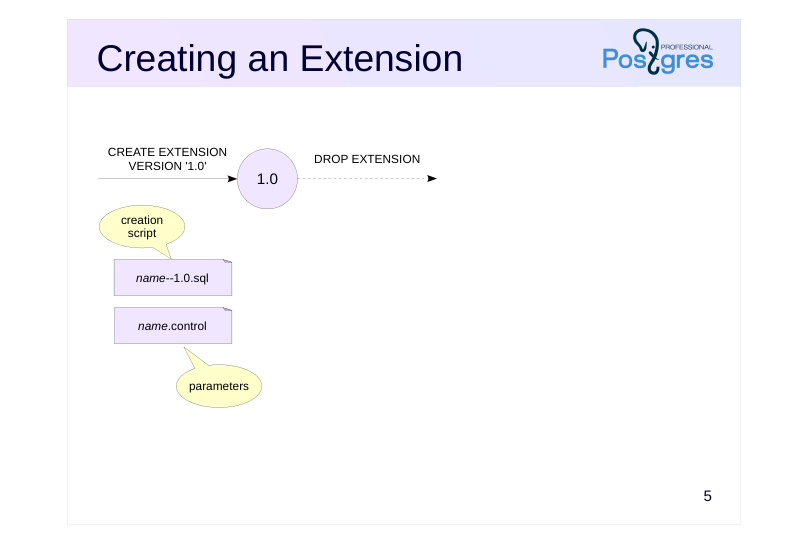 {#source-figure-005 caption=“Source slide page 5: Creating an Extension”}
Speaker notes
The extension is installed into the database using the CREATE EXTENSION command. This requires two files:
● Control file “name.control” with extension parameters
● Script for creating extension objects “name-version.sql”
The version is typically in the format “1.0,” “1.1,” etc., but this is not necessary: it can consist of any characters (but it should not contain “–” and begin or end with “-”).
The version is usually not specified in the CREATE EXTENSION command, since the current version is set in the control file (the default_version parameter) and is used by default.
Other parameters in the control file specify whether the extension’s objects can be relocated between schemas (relocatable), list dependencies on other extensions (requires), restrict installation to superusers only (superuser), etc.
https://postgrespro.com/docs/postgresql/16/extend-extensions
https://postgrespro.com/docs/postgresql/16/sql-createextension
The extension is removed by the DROP EXTENSION command. A separate script for deleting objects is not required.
https://postgrespro.com/docs/postgresql/16/sql-dropextension
Page 6: Installation of the Extension
The source code files for the UOM (Units of Measurement) training extension are located in the uom directory within the student home directory:
There is a control file with settings among the files:
default_version defines the default version; without this parameter, the version should be specified explicitly. relocatable indicates that the extension can be moved between schemas (we will discuss this later). encoding is required if non-ASCII characters are used. comment defines a comment for the extension. These are not all possible parameters, you can find the complete list in the documentation. Files shared across all database clusters of the same PostgreSQL version are located in the SHAREDIR directory:
In particular, files for installed extensions are stored in the SHAREDIR/extension directory. For example, the pg_buffercache extension files:
Extensions are typically installed using the make utility. If an extension requires compilation and PostgreSQL was installed from a package, you may also need to install a development package, which typically has dev in its name, such as postgresql-server-dev-16. The package includes everything necessary for building, including the PostgreSQL header files. Since our extension contains only SQL functions and does not require compilation or building, the Makefile only needs to copy the extension files to SHAREDIR/extension:
The EXTENSION variable specifies the extension name. The DATA variable lists the files to copy to SHAREDIR (excluding the control file). The last lines remain unchanged, they include the PGXS infrastructure for extension installation. The pg_config utility must be available, otherwise the PostgreSQL installation paths cannot be determined. Install the extension by running make install in its directory:
Page 7: Page 7
Extension installation is typically performed by a superuser whose environment may not include the PostgreSQL executable path. In this case, specify the pg_config location explicitly:
The list of extensions installed on the server and available for loading into the cluster databases is visible in the system catalog:
Standard databases have only the plpgsql extension installed. Here is the list of versions for our extension:
Page 8: Page 8
In PostgreSQL, extension versions are treated as names, not numbers. In other words, 1.1 and 1.2 are simply two different versions, their order is not defined. Let’s load version 1.0 of the uom extension into a new database:
The extension appears in the database. It contains a table and a function:
The objects are installed in the schema where they would be created by default, in this case, public. We could explicitly specify the schema when creating the extension:
The function converts length values between units:
The table stores a list of supported units of measurement:
The extension objects were created by the SQL script for version 1.0:
Page 9: Page 9
The first line prevents accidental manual execution of the script; the script should run only when CREATE EXTENSION is executed. When creating an extension, all commands run within a single transaction, which means that transaction control commands (as well as utility commands such as VACUUM) cannot be used here. The search_path will be set to the single schema where the extension objects are created. Objects belonging to an extension cannot be deleted directly:
However, the extension mechanism does not track changes made to the objects themselves. For example, adding a column to a table or altering a function will not cause an error. You should avoid making such changes to extension objects. The extension and its objects can be moved to another schema (relocatable=true):
Return it to public:
Page 10: Extension Update
 {#source-figure-010 caption=“Source slide page 10: Extension Update”}
Speaker notes
The extension version is updated using the ALTER EXTENSION UPDATE command. In this case, there must be an update script “name-old-version– new-version.sql” containing the commands necessary for updating.
We can also change the control file “name.control,” updating the current version and, possibly, other parameters.
If needed, there can also be a separate control file bound to the version. For example, if version 1.2 introduces a dependency on another extension, then it is better to indicate this dependency not in the main control file, but in an additional file for version 1.2. The parameters specified in the additional control file have priority over those in the main file.
The example on the slide shows update scripts 1.0→1.1 and 1.1→1.2. While a 1.0→1.2 script is possible, it is typically not required: the extension mechanism automatically determines the update path based on the available transitions between versions. For example, if version 1.0 is installed, it can be updated directly to version 1.2: the 1.0→1.1 script is automatically applied, followed by the 1.1→1.2 script.
Similar to creation, the target version is usually not specified during an update. In this case, the extension is updated to the latest version set in the main control file.
https://postgrespro.com/docs/postgresql/16/sql-alterextension
Page 11: Extension Versions and Update
Version 1.1 of the uom extension introduces a data type for length units, comparison operators for values of this type, and an operator class that enables indexing table columns of this type. The update file:
When creating a new version of an extension, two scenarios are possible: The database contains a previous version that needs to be updated. There is no previous version, so the later version needs to be created directly. Make sure that we can update from version 1.0 to 1.1. List available update paths:
Perform the update:
Page 12: Page 12
Now, let’s create version 1.1, first removing the extension, which deletes all its objects:
Create version 1.1 directly in a separate schema, ensuring object visibility:
To create version 1.1, the extension mechanism will first look for the uom–1.1.sql file, which does not exist. However, version 1.1 can be reached via a chain: first create version 1.0, then update to 1.1. This is the shortest path to version 1.1, and the only one in this case. Examine the uom data type. Comparison operators for length units are defined for it:
The new type can be used as a column data type:
Data in the table can be sorted:
Page 13: Page 13
You can create a B-tree index:
If we disable sequential scans for the planner, it will use the new index when executing the query:
pg\_dump Utility
The pg_dump utility exports only the CREATE EXTENSION command, not the commands that create the extension’s objects. Therefore, to restore from a backup, all extensions in use must be installed on the server. In the next version 1.2 of the extension a column named predefined is added to the table. This column is used to identify rows that were inserted into the table not by the extension script, but after the extension was created. Update file:
The script calls the pg_extension_config_dump function so that the utility exports only the table rows that meet the specified condition. We cannot simply delete and recreate the extension to update to version 1.2. The len column in table t prevents this:
If we are not willing to delete the table (or the len column), we should perform an update instead:
When no version is specified, the extension is updated to the default version set in the control file:
Page 14: Page 14
Now, besides CREATE EXTENSION, the logical backup file will also include data from the uom_ref table. If you back up the entire database, all installed extensions are included, which is usually acceptable. However, if you specify a schema during the export, extensions installed in that schema are not included:
Restoring the contents of the uom_ref table from such a backup will be impossible. To export specific extensions, specify their names using the –extension parameter. For this purpose, we should manage dependencies: if we export only the util schema in our case, the table public.t will not be included in the backup copy, despite its dependence on the extension:
When an extension is created, the privileges on its objects are stored in the system catalog. If privileges have changed by the time the export is performed, pg_dump will add commands to the backup to set up the new privileges.
Page 15: Takeaways
Extensibility is one of the most important features of PostgreSQL
- An extension is a package of related database objects
- The extension mechanism includes tools for version updates and pg_dump support
Page 16: Practice
- Install the uom extension and check if it appears in the list of available extensions.
- Create the uom extension without specifying a version. Check the version and the scripts that were executed.
- Add mile and yard to the reference table.
- Change access to the reference table: the SELECT privilege should be granted only to a specific role, not to all users.
- Check how the pg_dump exports extension objects: table, type, functions and operators, table contents, access privileges.
Speaker notes
Extension files are located in the uom subdirectory of the student home directory. The installation process is similar to the one used in the demonstration.
When adding the data, ensure that the value for new entries in the “predefined” column is set to false. Conversion factors:
1 mile = 1609.344 m 1 yard = 0.9144 m
Page 17: 1. Installation of the Extension
Let’s install the extension files:
Check that the extension is available for loading in the database:
2. Loading the Extension into the Database
Load the uom extension into a new database:
The extension version matches the default_version parameter value:
Since the uom–1.2.sql file exists for version 1.2, it is used to create the extension. For users updating from version 1.1 or 1.0, corresponding update paths are available.
3. Extending the Reference Table
Let’s add mile and yard. The predefined column is populated with the default value (false):
How many yards are in a mile?
Page 18: 4. Changing Access Privileges
Create a dedicated role to access the uom_ref table:
Only the new role can read from the table:
5. pg\_dump and Extension Objects
The list of tables to be exported by pg_dump is stored in pg_extension:
Run pg_dump:
Page 19: Page 19
Examine how pg_dump exports extension objects: The table, type, functions, and operators are not exported. They will be created by the CREATE EXTENSION command. The system where the restore is performed must have the same version of the extension that was during the export. The contents of newly added table rows are exported using a COPY command. Access privileges for the uom_ref table are generated as they were at the moment pg_dump was run. To properly export access privileges, the system catalog stores information about object privileges granted by extension creation scripts:
Without this information, it would be impossible to generate the REVOKE command.
16 Lesson 16: Administration / Localization
This page is extracted from the official PDF into native Markdown. Slide text, code and speaker notes are kept in reading order; the original PDF and HTML remain the layout references. HTML source: dba2_16_admin_localization.html Archive: DBA2-handouts-16-en.zip PDF pages: 32
Page 1: Administration / Localization
Copyright
© Postgres Professional, 2016–2026 Authors: Egor Rogov, Pavel Luzanov, Ilya Bashtanov, Igor Gnatyuk Translated by: Elena Sharafutdinova Photo: Oleg Bartunov (Phu Monastery and Bhrikuti Peak, Nepal)
Use of Course Materials
Non-commercial use of course materials (presentations, demonstrations) is allowed without restrictions. Commercial use is possible only with the written permission of Postgres Professional. It is prohibited to make changes to the course materials.
Feedback
Please send your feedback, comments and suggestions to: edu@postgrespro.ru
Disclaimer
Postgres Professional assumes no responsibility for any damages and losses, including loss of income, caused by direct or indirect, intentional or accidental use of course materials. Postgres Professional company specifically disclaims any warranties on course materials. Course materials are provided “as is,” and Postgres Professional company has no obligations to provide maintenance, support, updates, enhancements, or modifications.
Page 2: Topics
- Function of Localization
- Locales and their Categories
- Locale Providers
- Server Configuration
- Dates, Numbers and Currency Amounts
- Client Configuration
- Server and Client Messages
- Collations
Page 3: Function
Character encoding support
- character encodings for different languages
- character set conversion between server and client
- Locale-dependent functionality
- character sorting and comparison
- upper, lower, and initcap functions
- pattern matching
- to_char functions for dates, numbers, and currency amounts
- language for server and utility messages
Speaker notes
PostgreSQL localization features allow storing text in various character encodings. For example, for the French language all major character encodings are supported, including UTF8, LATIN1 (ISO 8859-1), LATIN9 (ISO 8859-15), and WIN1252.
A client application can operate in an encoding different from the server’s encoding. In such cases, character conversion between the client and server is performed automatically.
Beyond supporting various encodings, localization affects the operation of the following server functionalities:
● Character sorting, such as in ORDER BY clauses or in comparison operations (>, <)
● Case conversion in the upper, lower, and initcap functions
● Pattern matching in regular expressions and LIKE, SIMILAR TO operators, including case-insensitive search
● Formatting of dates, numbers, and currency amounts in the to_char functions
● Selecting the language for server and utility messages
https://postgrespro.com/docs/postgresql/current/multibyte#MULTIBYTE-CH ARSET-SUPPORTED
https://postgrespro.com/docs/postgresql/16/locale
Page 4: Locales and their Categories
Locales
- define the language, region, and character encoding,
- for example, fr_FR.UTF8
- installed in the operating system
- Locale categories and their corresponding parameters
- LC_COLLATE
- string sort order
- LC_CTYPE
- character classification
- LC_MESSAGES
- lc_messages
- language of messages
- LC_MONETARY
- lc_monetary
- formatting of currency amounts
- LC_NUMERIC
- lc_numeric
- formatting of numbers
- LC_TIME
- lc_time
- formatting of dates and times
Speaker notes
PostgreSQL relies on the localization capabilities provided by the operating system. Therefore, the locales required for the DBMS should be pre-configured in the OS.
Locales in the OS are typically specified in the “language_region.encoding” format. For example, fr_CA.UTF8 represents the French language as spoken in Canada (CA). Windows uses verbose locale names, such as French_Canada.1252.
The language and region determine cultural preferences such as character order, date formats, decimal separators, etc.
Sometimes it is necessary to combine the behavior of different locales. For example, to use French date and time formats while keeping server messages in English. PostgreSQL supports setting locale categories separately via corresponding configuration parameters of the same name.
Starting with PostgreSQL 16, the unchangeable server parameters for the LC_COLLATE and LC_CTYPE locale categories have been removed. To obtain information about a database’s locale now, you should query the pg_database system catalog table.
Page 5: Locale Providers
Standard libc library
- POSIX compliance
- External ICU library
- portable solution
- extensive additional features
Speaker notes
PostgreSQL supports various locale providers. Providers are libraries that supply locale data and implement sorting. The standard libc provider uses the system’s C library and provides its locales. These locales are used by most operating system utilities.
PostgreSQL also supports the ICU provider, which uses the external ICU library. ICU locale names are based on the IETF BCP 47 language tag standard. These tags have formats “language-region” or simply “language” (for example, fr-FR). When using ICU locales, PostgreSQL validates the names and transforms them to their canonical form according to the standard rules. The icu_validation_level parameter controls the message level for locale validation checks.
https://postgrespro.com/docs/postgresql/16/locale#ICU-LANGUAGE-TAG
https://www.rfc-editor.org/rfc/bcp/bcp47.txt
Information about the selected provider and database locale is stored in the pg_datlocprovider and daticulocale columns of the pg_database table. For several reasons, libc settings are required in all databases (even those using the ICU provider), so the datcollate and datctype columns always contain information about the libc locale.
Commands and utilities for setting locale parameters also allow us to explicitly select the provider. The libc provider is used by default.
https://postgrespro.com/docs/postgresql/16/locale#LOCALE-PROVIDERS
Page 6: Server Configuration
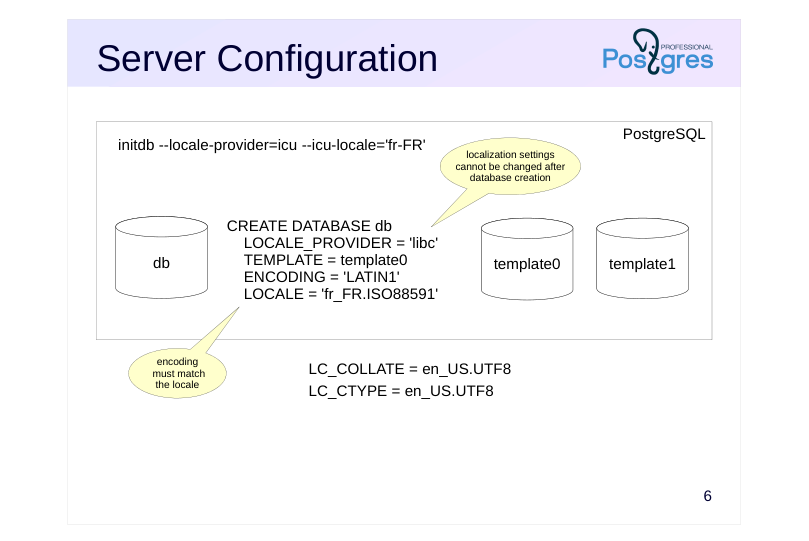 {#source-figure-006 caption=“Source slide page 6: Server Configuration”}
Speaker notes
When initializing the cluster, the provider and locale for template databases are set using options of the initdb utility. By default, the system uses the libc provider and the locale from the OS environment.
When a database is created, it inherits the localization settings of its template. To create a database with different localization settings, we should use the template0, as it is guaranteed not to contain any locale-specific data. We can change the provider, character encoding, and the LC_CTYPE and LC_COLLATE locale categories. Since the category values are typically the same, it is convenient to set them using a single parameter (option): LOCALE for libc and ICU_LOCALE for ICU.
The database encoding must be compatible with the LC_CTYPE and LC_COLLATE locale parameters of that database. The C and POSIX locales are compatible with any character set, while other libc provider locales each have only one character set that will function correctly. (An exception: on Windows, UTF-8 encoding can be used with any locale.) ICU provider locales are compatible with most encodings.
Page 7: Locales and Categories
The server OS already has locales installed with the French language support:
The localization parameters for the OS session are controlled by environment variables:
In addition to variables corresponding to locale categories, there are special variables: LC_ALL — when set, overrides all locale categories, even if they have been explicitly specified LANG — used for any locale categories that have not been explicitly set LANGUAGE — when set, takes precedence over LC_MESSAGES (explained in detail later) When PostgreSQL was installed from the package in the course VM, the main cluster was initialized using the OS session parameters and the libc provider. To set different values, you can use the –locale-provider, –locale (equivalent to LANG), and options for specific categories, for example:
PostgreSQL has four parameters that correspond to locale categories of the same name. Notice that there are fewer of them than in the OS:
These parameter values are written to the configuration file. Any user can modify the lc_monetary, lc_numeric, and lc_time parameters (context=user), while lc_messages can be changed only by a superuser. There are no corresponding server parameters for the LC_COLLATE and LC_CTYPE locale categories. When a backend starts, it resets the LC_ALL value and sets the OS environment variables for locale categories according to the lc_* configuration parameters. When a parameter is changed during a session, the backend sets the corresponding environment variable to match. The standard postgres, template0, and template1 databases use the LC_COLLATE and LC_CTYPE values, as well as the locale provider, that were set during cluster initialization. New databases by default copy the parameters of the template they use:
Page 8: Page 8
Dates and LC\_TIME
Configuration parameter for the corresponding locale category:
To use English month and day names in the to_char function’s format mask, add the TM prefix:
The same for French:
Reset the parameter to its original value:
The to_date and to_char functions let you explicitly specify the date and time format for input/output. The datestyle parameter affects implicit conversion between dates and text. Here are a few examples:
Page 9: Page 9
Numbers and LC\_NUMERIC
Configuration parameter for the corresponding locale category:
The following digit group separators (G) and decimal separators (D) are used in France:
The same for the United States:
Currency Amounts and LC\_MONETARY
Configuration parameter for the corresponding locale category:
The money data type adds a currency code to the amount:
However, note that a table with this type can store only one currency, which will change along with the LC_MONETARY:
Page 10: Page 10
Page 11: Client Configuration
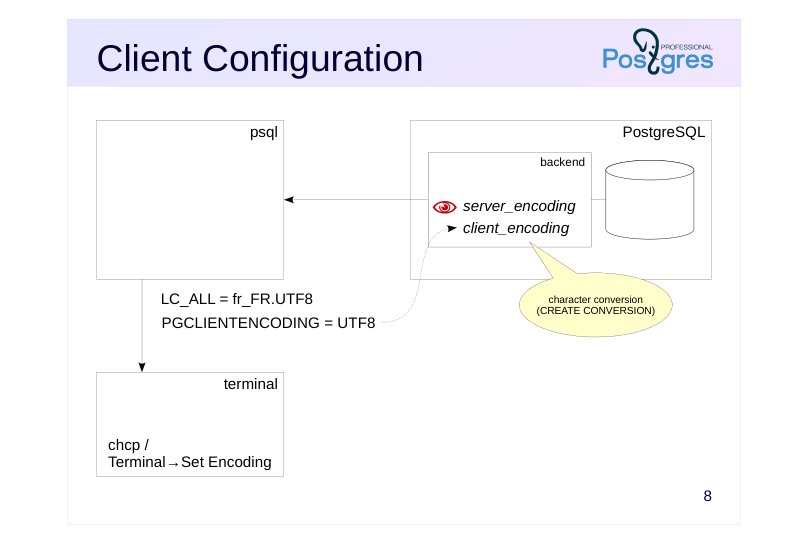 {#source-figure-011 caption=“Source slide page 11: Client Configuration”}
Speaker notes
To configure localization for a client application, we need to do the following.
● Check that the server settings are correct. As a minimum, ensure the correct database encoding is used (the unchangeable server_encoding parameter shows the encoding set when the database was created).
● Check that the required locales are installed in the client OS and configure the locale categories (the LC_* environment variables) in the OS session.
● Configure the application’s encoding and check the settings of the output device.
For example, psql on Windows may use the Windows-1252 encoding, in this case in the terminal (cmd.exe) run the chcp 1252 command and set a true type font (e.g., Lucida Console).
● After connecting to the database, check the client_encoding parameter. This parameter controls character set conversion between the client and server. If needed, set it to the application’s encoding. The client_encoding value can also be set using the PGCLIENTENCODING environment variable.
The backend automatically converts character set between the database encoding (server_encoding) and the client encoding (client_encoding). PostgreSQL comes preconfigured with the necessary character conversion routines for most encoding pairs, which are stored in the pg_conversion system catalog table. We can define an additional conversion routine using CREATE CONVERSION, though this is rarely needed in practice.
Page 12: Client and Server Working with Different Encodings
Create a database with LATIN1 encoding, while the client continues to use UTF8. Specify ICU as the locale provider. To create the database successfully, we need to use the template0: it is an empty database where indexes are guaranteed not to be corrupted by the encoding change:
In our case (creating a database with the ICU provider), we needed to specify the LC_CTYPE and LC_COLLATE parameters to match the chosen encoding.
Connect to admin_localization_latin1 and check that character conversion is working properly.
Client and server encodings:
The client (psql) sets the value of the client_encoding parameter. In interactive mode, the value is set based on the client’s encoding (the LC_CTYPE variable in the OS). But when running from a script, as in this demo, it is set to the database encoding. Let’s explicitly set the value to match the client locale:
Now characters will be correctly converted from UTF8 to LATIN1 and back:
Page 13: Page 13
List of available encoding conversions for LATIN1:
Page 14: Server Messages
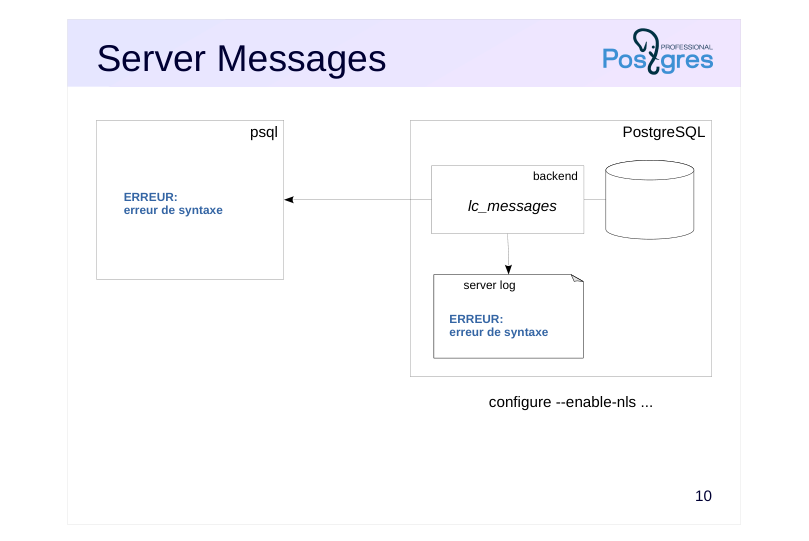 {#source-figure-014 caption=“Source slide page 14: Server Messages”}
Speaker notes
PostgreSQL server (and utility) messages are translated into several languages.
To display server messages in French, the PostgreSQL server must be compiled with national language support enabled (configure –enable-nls). Most packages are built with this option enabled.
The lc_messages configuration parameter controls the language of server messages.
Server messages are not only sent to the client but also recorded to the server log. When selecting a language other than English, make sure that your server log analysis tools support that language. For example, pgBadger works only with English messages.
More information on server message translation for translators and developers: https://postgrespro.com/docs/postgresql/16/nls
Page 15: Utility Messages
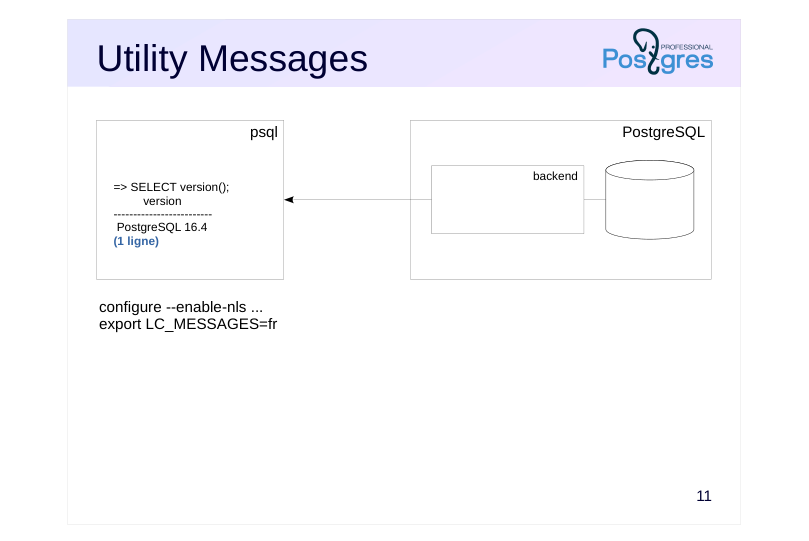 {#source-figure-015 caption=“Source slide page 15: Utility Messages”}
Speaker notes
PostgreSQL utilities (psql, pg_dump, etc.) also support multiple languages.
To display utility messages in a language other than English, the PostgreSQL client must be compiled with NLS support. The output language is set on the client via the LC_MESSAGES environment variable (the server parameter lc_messages affects only the server’s own messages, not the client’s).
Most operating systems (including Windows) check environment variables for message language in the following order: LANGUAGE, LC_ALL, LC_MESSAGES, LANG.
Page 16: Server and Client Messages
Server messages can be displayed in different languages. First, make sure that PostgreSQL was built with NLS support:
List of available languages and their message files can be found here:
Page 17: Page 17
To log a message, we use an incorrect command:
The server log records the same error message and the failed command itself. To display messages in French, change the lc_messages parameter.
Now the message is displayed to the client and logged in French. Look at the messages displayed by the psql client. They remain in English:
The language for messages from a client built with NLS support is determined by the LC_MESSAGES and LANGUAGE OS environment variables, with LANGUAGE taking precedence:
To fully localize the environment, set French for psql messages.
Now all messages are displayed in French.
Page 18: Collations
Database objects
- multiple collation rules within a single database
- populated during database creation
- Usage
- cluster
- database
- table column
- expression
- Standard collations
- default, C, POSIX
- unicode, ucs_basic
Speaker notes
PostgreSQL provides special objects called collations that enable different sorting and comparison methods for textual data within a single database.
Collations allow using a sort order different from the database default. They can be applied to table columns, domain definitions, and directly in expressions that sort or compare text strings. When creating a new collation, we specify the provider and character classification.
The initial set of collations is created during cluster initialization: collations are loaded for all locales available in the OS. Later, when new locales are added to the OS, we can load their collation rules into the database.
The standard C and POSIX collations behave identically and they are created for all server encodings. Under these collations, only Latin characters from A to Z are treated as letters, while all other characters are sorted according to their code points in the given encoding. The collation named default uses the LC_COLLATE, LC_CTYPE, and provider values defined at database creation. Additionally, the unicode and ucs_basic collations defined in the SQL standard are also available.
All available collations can be viewed in the pg_collation system catalog table.
https://postgrespro.com/docs/postgresql/16/collation
Page 19: libc Provider
Character order
- depends on the implementation in the OS
- library version is tracked
- Used by default
- for the cluster and database
Speaker notes
Collations in PostgreSQL that use the libc provider behave identically to those in the OS. However, various OS may implement the libc library differently. Consequently, sorting for the same locales may differ depending on the database server’s OS. If an application needs to support database operations across different operating systems (including logical replication), make sure that collation works consistently across all platforms.
A more serious potential issue is installing a new version of the libc library in the OS. For example, this can happen when migrating to a server with a newer OS version. Changes to the collations used by the database in the new libc version can lead to incorrect index operation and other issues.
Page 20: ICU Provider
Character order
- depends on the library version rather than the OS
- library version is tracked
- Additional features
- control over the sorting order of character groups
- custom collations
Speaker notes
To use the ICU provider for collations, PostgreSQL must be built with ICU library support. The ICU library and its collations work identically across all operating systems.
The ICU library allows modifications to collations without changing the language or region. We can specify different sorting orders for individual character groups. For example, which character group should come first: letters, digits or currency symbols; uppercase or lowercase letters. We can configure these rules by including the corresponding parameters in the language tag.
Additional collations are defined using a special syntax, with examples provided in the demonstration.
https://postgrespro.com/docs/postgresql/16/collation#ICU-CUSTOM-COLLA TIONS
Page 21: Collations
Let’s unset the variable and restart psql to return to English.
During cluster initialization, special objects called collations are created in the system catalog of each database, based on the information about locales installed in the OS. Initial collations in the database:
Collations for French obtained from the OS:
Page 22: Page 22
Note Note that only collations compatible with the current database’s encoding are displayed, so the command output may vary for different databases within the same PostgreSQL instance. Collations for the ICU provider are created only if the server was built with –with-icu option. Such collations are named using a language tag with an “-x-icu” suffix to distinguish them from libc locales.
Page 23: ICU Collations
The sorting order for the default collation differs from the order for fr-CA-x-icu. Accents are usually compared left-to-right, but in Canadian French they are compared right-to-left:
The COLLATE keyword following an expression (in ORDER BY) explicitly specifies the collation. By default, the collation set in database locale parameters is used. ICU library capabilities allow flexible customization of sorting for specific character groups by defining new collations with parameters specified as part of a language tag. Default sort places digits and letters after currency symbols:
Create a new collation where currencies come after digits:
And another collation where, in addition to the previous one, letters come before digits:
Check the sorting:
If the collation parameters mentioned above do not meet your needs, you can customize the sort order by defining specific collations:
Page 24: Page 24
Page 25: Determinism
Deterministic collations
- string equality is based on byte-for-byte match
- Non-deterministic collations
- strings consisting of different bytes can be considered equal
- greater flexibility
- lower performance
- do not support LIKE and other operations
Speaker notes
A collation can be either deterministic or non-deterministic, depending on the type of comparison.
Deterministic comparisons consider strings equal only if they consist of identical bytes. In non-deterministic comparisons, strings can be considered equal even if their byte sequences differ. For example, in Unicode the French letter é (e-acute) can be represented either as a single character, Latin Small Letter E with Acute (U+00E9), or composed of the regular letter “e” (U+0065) combined with the acute accent (U+0301).
All standard collations are deterministic. Custom collations are also deterministic by default.
Non-deterministic collations offer greater flexibility: for instance, we can define a unique constraint that ignores case or diacritical marks. However, deterministic collations generally provide higher performance. Moreover, non-deterministic collations do not support certain operations, such as pattern matching.
Page 26: Nondeterministic Collations
Define a nondeterministic collation for case-insensitive sorting:
Now strings in different cases can be equal:
However, pattern matching is not possible for non-deterministic collations:
Page 27: Changes Tracking
Changing the provider library causes issues with:
- sorting of index keys
- string comparisons in integrity constraints
- string comparisons in queries,
- etc.
- The library version number is stored in the system catalog
- When the installed version changes, a warning is issued
- libc does not guarantee version stability and cross-platform compatibility
Speaker notes
Changes in the provider library that alter comparison behavior can affect the collations used in the database and lead to the following problems:
● Incorrect query execution due to broken ordering of index keys
● Data corruption due to changed string comparison behavior in CHECK constraints and triggers
● Incorrect results due to changed string comparison behavior in queries, procedural code, and row-level security policies
To prevent data corruption, PostgreSQL issues warnings when library changes might affect existing collations.
When a collation is created, the current version number of the library is stored in the system catalog, in the pg_collation and pg_database tables. Each time the collation is used, the stored version number is compared with the current one, and warnings are generated if they do not match.
If a mismatch is detected, you should rebuild any indexes that use the changed collation, and also review all procedures, constraints, and queries that use that collation.
It is important to remember that, unlike ICU, the libc provider does not guarantee consistent collation behavior even when library versions match.
Page 28: Changes in Provider Libraries
When a collation is created, the library version reported by the OS is stored in the system catalog. If the library version changes in the OS, a warning about the version mismatch will be issued every time the collation is used. You can compare versions with a query:
Changes in a collation can lead to incorrect index operation. If this happens, it is recommended to rebuild indexes using the new version of the collation. After that, you can update the version in the system catalog using the ALTER COLLATION … REFRESH VERSION, and warnings will no longer be displayed. Query to get a list of objects that depend on collations requiring an update:
The same check is performed for collations at the database level. The pg_database_collation_actual_version function shows the current collation version in the OS:
If the version of the collation set for the database does not match the library version in the OS, a warning is issued when connecting to the database. In this case, it is recommended to rebuild indexes that use the default collation. After that, you can update the version number stored in pg_database using the ALTER DATABASE … REFRESH COLLATION VERSION.
Page 29: Takeaways
The necessary locales for the DBMS must be installed in the OS before initializing a cluster
- The client and server can operate using different character encodings with automatic character conversion
- Server and client messages are available in many languages
- Collations rely on external libraries, and changes to these libraries can result in data corruption and incorrect results
Page 30: Practice
- Transfer data between databases with different encodings.
- Create a database using the LATIN1 character encoding.
- Create a table and insert rows containing French accent
- characters. Create a backup of the database using the pg_dump
- utility. Restore the table from the backup into a database with
- UTF8 encoding.
- Get the number for today’s day of the week. Does this number depend on localization settings?
Speaker notes
- To create a database with LATIN1 encoding:
● Make sure the required locale is installed in the OS.
● In the CREATE DATABASE command, use the template0 and the ENCODING and LOCALE parameters.
- Use the to_char function to get the day of the week number.
Valid date format patterns:
https://postgrespro.com/docs/postgresql/16/functions-formatting#FUNCTION S-FORMATTING-DATETIME-TABLE
Page 31: 1. Database Encodings
Let’s check that the OS has locales with iso88591 encoding:
Create databases with LATIN1 and UTF8 encodings:
Connect to the database with LATIN1 encoding:
Check that the client and server use different encodings:
Create a table containing a string with French accents:
Page 32: Page 32
Create a logical backup:
The backup content is exported in the database encoding (LATIN1), and the file begins with a command that sets the client_encoding parameter to match that same LATIN1 value. Restore the table into the admin_localization_utf8 database:
Because client_encoding is set during restoration, characters are automatically converted. Let’s check that the French accents were transferred correctly:
2. Get the Day of the Week Number
Current date and time localization settings:
There are two format patterns for getting the day of the week number: ID — week starts on Monday D — week starts on Sunday
The day of the week number does not depend on localization settings, including the lc_time parameter:
17 Lesson 17: Administration / Server Upgrade
This page is extracted from the official PDF into native Markdown. Slide text, code and speaker notes are kept in reading order; the original PDF and HTML remain the layout references. HTML source: dba2_17_admin_upgrade.html Archive: DBA2-handouts-16-en.zip PDF pages: 37
Page 1: Administration / Server Upgrade
Copyright
© Postgres Professional, 2016–2026 Authors: Egor Rogov, Pavel Luzanov, Ilya Bashtanov, Igor Gnatyuk Translated by: Elena Sharafutdinova Photo: Oleg Bartunov (Phu Monastery and Bhrikuti Peak, Nepal)
Use of Course Materials
Non-commercial use of course materials (presentations, demonstrations) is allowed without restrictions. Commercial use is possible only with the written permission of Postgres Professional. It is prohibited to make changes to the course materials.
Feedback
Please send your feedback, comments and suggestions to: edu@postgrespro.ru
Disclaimer
Postgres Professional assumes no responsibility for any damages and losses, including loss of income, caused by direct or indirect, intentional or accidental use of course materials. Postgres Professional company specifically disclaims any warranties on course materials. Course materials are provided “as is,” and Postgres Professional company has no obligations to provide maintenance, support, updates, enhancements, or modifications.
Page 2: Topics
- Version Numbering and General Considerations
- Minor Upgrade
- Major Upgrade
Page 3: Server Versions
Major versions (9.6, 10, 11, …)
- community support for 5 years
- functionality is added and modified
- new version is not binary compatible with the previous one
- upgrading always requires special procedures
- Minor releases (16.1, 16.2, …)
- bug and security fixes only
- binary compatibility is guaranteed
- in most cases replacing the executables is sufficient
Speaker notes
PostgreSQL version number consists of two components: the major version number and the minor release number. Before version 10, the major version number consisted of two digits (9.5, 9.6); starting with version 10, it switched to a single digit (10, 11). The minor release number is the last digit after the dot (for example, 2 in 16.2).
Minor releases serve exclusively to fix bugs found in the major version. They maintain binary compatibility (on the same platform). Therefore, upgrading to the next minor release is straightforward and is recommended as soon as it becomes available.
A new major version introduces functional changes: some features are added, modified, or, less frequently, removed. In this case, binary compatibility is not maintained. PostgreSQL will refuse to work with a database cluster if you try to connect a newer version of the executables to an older database cluster.
Upgrading a major version requires special steps. In addition to upgrading the database server, you may also need to update your application. The main reasons for upgrading to a new version are the introduction of new features and the end of support for the old version (5 years after release). Due to the complexity of the process, it is common to skip several versions, for example, upgrading directly from version 13 to 16, etc.
https://postgrespro.com/docs/postgresql/16/upgrading
Page 4: General Considerations
Release Notes
- study the Migration section of all intermediate versions
- Testing the upgrade in a stage environment
- identify potential issues in advance
- automate the process to reduce downtime
- Fallback plan
- in case issues arise during the upgrade of the production server
Speaker notes
Regardless of the type of upgrade being performed, it is important to pay attention to several key points.
Always carefully review the Release Notes appendix of the documentation. Its Migration section covers all incompatibilities and non-standard steps required for the upgrade.
For example, if you are planning to upgrade from version 15.4 to 16.13 (the latest minor release of the chosen major version as of the preparation of the course materials), you need to review all the release notes for versions 15.4 through 15.17 (the latest minor release for version 15), and 16.0 through 16.13.
The upgrade should be tested in a stage environment equivalent to production, followed by application testing. It helps identify potential issues and refine and automate the upgrade procedure.
This significantly reduces the risk of issues when upgrading the production server, though it does not eliminate it entirely. Therefore, it is always necessary to have a (tested) fallback plan in case of upgrade failure. Such a plan could be, for example, a standby or a backup, depending on your acceptable downtime requirements.
Page 5: Minor Upgrade
Minor upgrade
- Using physical standbys
Page 6: Minor Upgrade
16.3
- installing the new version packages (server, client, extensions)
- restarting the server
- updating extensions and performing additional steps if required
- 16.4
- simplicity – forced service interruption
Speaker notes
To upgrade the server to the next minor release, you need to do the following:
- Install the new executables.
If PostgreSQL was installed from packages, install new versions of the packages (server, client, extensions). Some package managers, particularly apt in Ubuntu, automatically restart the server, which is usually undesirable.
If PostgreSQL was built from source code, you need to run make install.
Restart the server. After the restart, the server will be running the new version. Client service is interrupted for the duration of the restart.
After the restart, you may need to update extensions (ALTER EXTENSION … UPDATE) and perform additional steps specified in the Release Notes. However, in most cases, it is not required.
Page 7: apt install
Upgrading with OS tools
- May restart the server automatically
- the needrestart utility
Speaker notes
If PostgreSQL was installed from a package, the OS can upgrade its version automatically. In Ubuntu, this is done using the following command
sudo apt-get install –only-upgrade package-name
or
sudo apt install package-name
During such an upgrade, the server is usually restarted automatically, which can be inconvenient. This behavior can be configured. Details are provided in the documentation of the needrestart utility:
https://github.com/liske/needrestart
Page 8: Reducing Downtime
Server restart process
- new connections are prohibited
- smart
- waits for all sessions to complete
- fast
- forcibly terminates all sessions (by default)
- a checkpoint is performed
- Checkpoint
- manually before restarting the server
- PgBouncer
- pauses during server restart
- open transactions continue to execute, while all new ones are suspended
Speaker notes
Service interruption can be reduced, and in some cases, eliminated entirely.
What happens during a server restart?
Firstly, PostgreSQL stops accepting new connections (clients receive a “shutdown in progress” error).
Secondly, depending on the shutdown mode, the server either waits for active sessions to complete or terminates them forcibly. The latter is implied by the management utility by default, but it is probably not the best choice for a production environment if the server primarily handles OLTP workloads (short queries).
Thirdly, a final shutdown checkpoint is performed to flush data from RAM buffers to disk (as discussed in the WAL module). When the buffer cache is large, this process can take significant time. Therefore, it might be advisable to first run a manual CHECKPOINT before restarting the server. In this case, the final checkpoint will still be performed, but much faster.
If PgBouncer (https://pgbouncer.org) is used, it makes sense to pause it during the restart. In this case (transaction mode is implied), active transactions continue executing while all new ones will be queued. Therefore, for an OLTP application, the restart appears as increased database response time.
Page 9: Replication
primary standby
- standby is
- upgraded first
- standby has caught up with the primary, switchover
- primary
- standby
- enables upgrades with zero or minimal service interruption
Speaker notes
If the system uses physical replication and has a mechanism for seamless user switchover between servers, the upgrade procedure can be performed without service interruption.
To achieve this, the standby is upgraded first. During its restart, the primary handles the entire load. Since the versions are binary compatible, replication continues to work between the upgraded standby and the primary that has not been upgraded yet. In the vast majority of cases, replication also works in the opposite direction (from the upgraded server to the server running the older release), but backward compatibility is not guaranteed. That’s why it is safer to upgrade the standby first.
After standby restart, it catches up with the primary, the primary is stopped, and a switchover to the standby is performed. Upon starting the former primary, it connects to the new primary as a standby (this may require running the pg_rewind utility; the entire procedure is covered in detail in the DBA3 course).
Page 10: Minor Upgrade
Check the current PostgreSQL version:
There is a more recent version in the repository:
Let’s upgrade to version 16.14 by updating the postgresql-16 package using the OS package manager:
Note Note that the postgresql-client-16 package was also updated and the server has been restarted.
Check the version number again:
Page 11: Major Upgrade
Logical backup with pg\_dumpall
- The pg_upgrade utility
- Logical replication
Page 12: pg_dumpall
- installing packages and initializing the cluster
- disconnecting users (read-only mode)
- logical backup (dump)
- restoring from a backup (psql)
- collecting statistics
- startup
- allows changing platform, bitness, database encoding, etc. – long upgrade time, requires significant disk space
Speaker notes
The simplest way to upgrade to a major version is to create a logical backup and restore it on another server running the new version. (A logical backup is a set of SQL commands that recreate the database; see the DBA3 course for details).
Firstly, install the new version and initialize the database cluster (some package managers perform initialization automatically during installation).
If you are deploying the new server on the same machine, make sure the data directories do not overlap. Packages are typically built to meet this requirement (for example, /var/lib/postgresql/15/ and /var/lib/postgresql/16/). Modify the configuration files of the new cluster by applying settings from the running server.
You can create a backup while the server is running, but all users must be disconnected (only read‐only access is allowed), since changes made after the backup procedure starts will not be included.
After that, start the new server and restore the prepared backup. Then you need to collect statistics; without it, the optimizer cannot build efficient query plans.
Once you have completed all necessary checks, the old server directories (executables, PGDATA contents, and custom tablespaces) can be removed.
Page 13: pg_dumpall
Speeding up data migration
- individually for each database
- Space optimization
- Statistics collection
- $ vacuumdb –analyze-in-stages
- dump_stat extension
- Quick validation
Speaker notes
Although pg_dumpall creates a backup of the entire cluster, it always runs in a single-threaded mode. Restoration uses psql, so it is also single-threaded.
If hardware resources allow, you can save the cluster’s global objects using pg_dumpall, and then back up each database individually in directory format using pg_dump in parallel mode. In this case, recovery can also be performed in parallel using the pg_restore utility. See the DBA3 course for details.
To optimize disk space, you can skip storing the dump file and simply pipe the output of pg_dumpall directly into psql.
To collect at least some statistics as quickly as possible, you can do it in three stages. You can try to start using the database after the second stage. Another option is to use the dump_stat extension:
https://postgrespro.com/docs/postgrespro/16/dump-stat
When testing the upgrade in a stage environment, you can first perform a schema-only migration (without data). This facilitates early detection of possible issues.
It is recommended to use the utilities from the new (already installed) version, as they may include improvements not available in the previous version.
Page 14: PostgreSQL 15 Cluster
 {#source-figure-014 caption=“Source slide page 14: PostgreSQL 15 Cluster”}
Stop the 16 main cluster to avoid accidental connections to it.
The data directory /var/lib/postgresql/15/prod contains a PostgreSQL 15 database cluster.
Create a tablespace and a database.
Create a table in the newly created tablespace:
Install the pgaudit extension:
Page 15: Page 15
The pg\_dumpall Utility
Create a logical backup of the entire cluster. The server must be running, but changes made after pg_dumpall starts will not be included in the backup.
The backup that we created is a text file containing SQL commands. It includes commands for creating databases:
And commands for creating tables:
It also includes commands for creating cluster-wide objects such as roles and tablespaces, for example:
We will not restore the backup on the PostgreSQL 16 server; you will perform this step in the practice.
Page 16: pg_upgrade
Applicability requirements
- in the new version, only the format of internal system data changes
- binary compatibility is maintained in all other aspects,
- including type representations and data files
- REG types are not used in the databases
- upgrade from version 8.4 or later
- upgrade to the version matching the utility
Speaker notes
The second and most common upgrade method is using the pg_upgrade utility, which can transform files of the cluster to a format compatible with the new major version.
https://postgrespro.com/docs/postgresql/16/pgupgrade
The utility can be used because major version upgrade typically changes the system catalog tables, while leaving data and index file formats unchanged. Therefore, only a small portion of the data needs to be modified, leaving the bulk of it untouched. The new cluster must be compatible with the old one in terms of bitness, encoding, and locale settings.
In some versions, the binary representation of data types changes, though this happens quite rarely. In such cases, the utility cannot perform the upgrade, but it will at least identify where the problematic type is used. This will help you resolve the issue manually before upgrading.
There are some additional limitations as well. For example, the utility cannot upgrade a cluster if any of the databases use REG types (except for regtype, regclass, and regrole).
When pg_upgrade runs, it checks that its own version and the versions of all executables involved in the upgrade process match the version of the new server. The utility supports upgrading from any version starting with 8.4 to the version that corresponds to the utility itself. Therefore, pg_upgrade version 16 can only upgrade an old server to version 16, not to version 15. Downgrading the server is not possible.
Page 17: pg_upgrade
 {#source-figure-017 caption=“Source slide page 17: pg_upgrade”}
- fast upgrade, typically no additional disk space required – limited applicability
Speaker notes
First, let’s look at the general (simplified) sequence of steps for an upgrade using pg_upgrade.
Install the new server and initialize (but do not start) the new cluster. This step is identical to the upgrading procedure using pg_dumpall.
Then stop the old server and run the pg_upgrade utility. Let’s outline what it does:
● The old server is started temporarily to create a logical backup of the cluster-wide objects and the schema of all databases. This is precisely the information for which binary compatibility is not maintained.
● The new server is started temporarily to perform necessary applicability checks and to restore the global objects and data schema from the backup.
● Data migration is performed: either by copying, hard linking, or cloning (for copy-on-write file systems).
Once the utility completes its work, the new cluster becomes an upgraded version of the old one. Finally, post-upgrade steps are performed, such as collecting statistics and updating extensions.
A huge advantage of pg_upgrade is its capability to perform extremely fast upgrades of clusters of any size, with no need for additional disk space (when using hard links). However, this utility is not always applicable.
Page 18: pg_upgrade
 {#source-figure-018 caption=“Source slide page 18: pg_upgrade”}
Speaker notes
Let’s take a closer look at what happens to the file systems of the old and new clusters during an upgrade.
Step 1. Packages for the new version are installed, and the new cluster is initialized. The new server is shut down and contains no user objects — only the standard databases and the system catalog.
The old server continues to run.
Note that the new cluster must be initialized using the same locale as the old one.
Page 19: PostgreSQL 16 Cluster
PostgreSQL 16 is already installed, and the cluster has been initialized in /var/lib/postgresql/16/prod directory. Check that the server is running and using the same locale as PostgreSQL 15, then stop it.
Stop the server.
Checking Upgrade Feasibility
Before performing the actual upgrade, it is a good idea to run pg_upgrade in check mode with the –check option. Since we plan to use hard links instead of copying data files, we also specify the –link option. We also need to specify the paths to the executables and data directories for both the old and new versions. Note that the program operates under the OS user postgres, since it needs access to the data directories. It is important that the versions of pg_upgrade and other server utilities (pg_controldata, initdb) match the versions of the client utilities they invoke (pg_dump, pg_dumpall, pg_restore, psql, vacuumdb). Otherwise, an error will occur. Since we updated both the server and client packages to version 16.14, this requirement is satisfied:
You should pay attention to the authentication settings. The utility needs local superuser access to both clusters since it starts and stops the servers during operation. We already have such access rights, but in general cases you may need to temporarily modify the pg_hba.conf file. The pg_upgrade utility also needs write access to create various temporary files in a dedicated working
Page 20: Page 20
directory pg_upgrade_output.d within the new cluster’s data directory. The servers are started sequentially on port 50432 to prevent accidental user connections; the port number can be specified explicitly if necessary.
The utility has detected an issue: the new cluster is missing some libraries. Let’s check the list:
This is the library of the extension we installed, which is required by an index in the admin_upgrade database. It must also be installed for the new version.
Don’t forget to configure the server to load the library into each backend process’s memory:
Check again.
Page 21: Page 21
Now the clusters are compatible.
Page 22: pg_upgrade
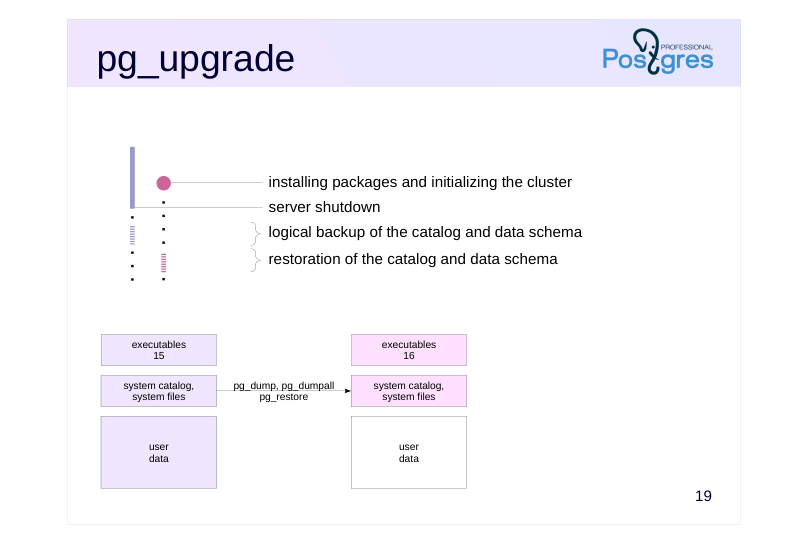 {#source-figure-022 caption=“Source slide page 22: pg_upgrade”}
Speaker notes
Step 2. The old server is stopped, and the pg_upgrade utility is started. It creates a backup of the catalog and schemas for all databases using the pg_dump and pg_dumpall utilities in a special –binary-upgrade mode, which preserves file numbering (this mode is not intended for regular use and is not officially supported):
pg_dumpall –globals-only –binary-upgrade pg_dump –schema-only –binary-upgrade
After that these objects are restored to the new server using pg_restore (these utilities are covered in detail in the DBA3 course). The directory names for databases and tablespaces, as well as the file names of the relations, remain unchanged after the upgrade.
All these steps are completed fairly quickly — the completion time does not depend on the amount of data in the cluster.
After this step, the system catalog of the new cluster will match that of the old cluster, except for changes in the data format (this is why a logical backup is used for it instead of a physical one). In fact, all databases and all objects within them will be created in the new cluster, but the system catalog will reference data files that do not exist yet.
The pg_upgrade utility performs many other quite complex operations. It freezes all transactions in the new cluster (to avoid dependency on IDs of transactions that were used there), copies the transaction status (CLOG), copies information about multixacts, and sets the transaction ID counter to the value retrieved from the old cluster.
Page 23: pg_upgrade
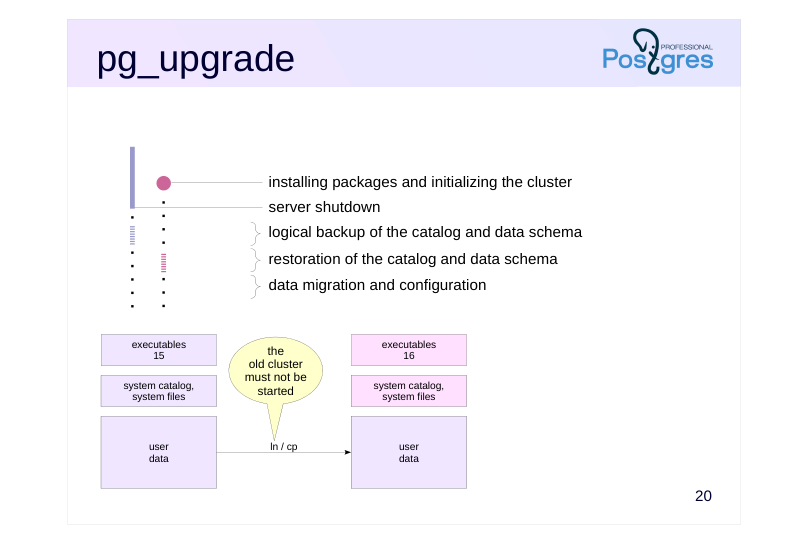 {#source-figure-023 caption=“Source slide page 23: pg_upgrade”}
Speaker notes
Step 3. The pg_upgrade utility performs the user data migration.
At this point, the data files of the new cluster are either copied from the files of the old one or linked to them via hard links.
Note that if data files are copied, the old cluster remains completely untouched by the upgrade. This means you can return to it at any time if something goes wrong during the process.
However, when hard links are used, the data files are shared between the clusters: identical file names in both clusters point to the same filesystem inodes. Therefore, once the new cluster is started for the first time, the old cluster can no longer be started safely. This upgrade mode requires a backup plan.
Copy-on-write filesystems offer a third option: cloning (–clone). It combines the advantages of both previous approaches: fast data migration and the ability to start both clusters.
After the user data has been migrated, the utility’s final task is to set the OID counter to the value from the old cluster (this is done via the pg_resetwal utility).
The administrator should update extensions, collect statistics, and set up routine backups for the upgraded cluster.
Page 24: The Upgrade
Perform the upgrade using hard links.
Page 25: Page 25
Before starting the server, you should transfer any configuration changes from the old server to the new one. We will skip this step since we are working with default settings. Check the results.
The upgrade has been successful: we have access to the contents of the old cluster.
Tablespaces
Look at the tablespace files:
A subdirectory is created within the tablespace directory for each version, preventing any file conflicts. As can be seen from the number in square brackets (inode), the files in the old and new version directories actually share the same content.
Post-Upgrade Tasks
When we install a new PostgreSQL version, the shared libraries for installed extensions are replaced, but at the database object level, the extension version remains unchanged:
The utility detected this and generated a script to update extensions in all databases:
Let’s run it.
Page 26: Page 26
In our case, the extension developers did not provide an upgrade script, so we have to delete and reinstall the extension.
The pg_upgrade utility generated another script to delete the old cluster files:
And it reminded us to gather statistics. The –analyze-in-stages option collects statistics in three stages, each time increasing accuracy, so the optimizer can start building plans as early as possible.
Page 27: pg_upgradecluster
Wrapper
- pg_dump + pg_restore
- -method=dump
- pg_upgradecluster
- pg_upgrade
- -method=upgrade
- old cluster is switched to a different port
- configuration files are copied
- pg_dump: allows changing the locale
- pg_upgrade: file copying or hard links
- Not applicable to tablespaces
Speaker notes
The pg_upgradecluster wrapper in Ubuntu simplifies cluster upgrades in straightforward scenarios. By default, it uses the logical backup method, but it also supports upgrades via pg_upgrade in both file copying and hard link modes.
The new cluster is configured to use the same port, while the old cluster is reconfigured to use a different (unused) port and manual startup. The utility copies the configuration files to the new cluster, so additional tuning of these files may be required afterward.
When upgrading via logical backup, you can change the locale or specific locale categories.
However, if the cluster contains custom tablespaces, the upgrade must be performed manually, as the utility does not support this configuration.
Page 28: Physical Replication
Standbys must be recreated
- upgrade is mandatory (to maintain binary compatibility)
- pg_upgrade cannot be used (due to non-deterministic behavior)
- Option 1 (pg_basebackup)
- deploy new standbys from a physical backup taken after upgrading the
- primary server
- reliable, but time-consuming
- Option 2 (rsync)
- leverage the fact that data files remain unchanged
- applicable only on Unix systems and only when using hard links
- fast, but complex
Speaker notes
When using physical replication, additional challenges arise. The case is that the primary and all its standbys must be upgraded simultaneously. Connecting a primary of one version to a standby of another version will most likely lead to data loss.
Another important point: a standby cannot be upgraded using pg_upgrade. Such an upgrade does not provide a 100% guarantee that two identical instances will remain identical after the upgrade.
The standard approach is to discard the existing standbys and create new ones from scratch. To do this, you need to take a base backup of the primary and deploy a new standby from it (this procedure is covered in detail in the DBA3 course). This can be quite a time-consuming process.
However, if you are using a Unix-based OS and the primary was upgraded using hard links, you can significantly speed up the deployment of new standbys. This results in time saving comparable to that achieved by pg_upgrade for the primary. To achieve this, you need to use the rsync utility correctly.
Page 29: Physical Replication
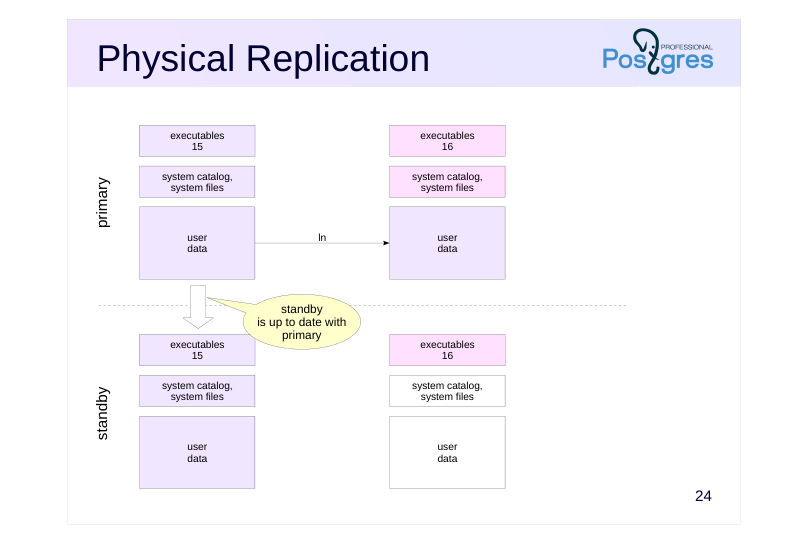 {#source-figure-029 caption=“Source slide page 29: Physical Replication”}
Speaker notes
The primary has been upgraded, but the new server has not been started yet. The standby is shut down after it has fully caught up with the primary (so the data files are identical).
The new server version is installed on the standby, but the cluster is not initialized yet.
Page 30: Physical Replication
 {#source-figure-030 caption=“Source slide page 30: Physical Replication”}
Speaker notes
Next, rsync is run to copy both clusters from the primary to the standby in a single command.
In this mode, rsync recognizes that:
● The old and new clusters share common data files.
● The data files of the old cluster are identical on both the primary and standby (to avoid dependency on volume, only file sizes are compared not their contents).
● Therefore, there is no need to physically copy the data files to the standby; it is enough to create hard links.
As a result, rsync only needs to copy the files related to the system catalog, which are small in size.
This process is described in the pg_upgrade documentation (https://postgrespro.com/docs/postgresql/16/pgupgrade), including the exact commands to be executed. Unfortunately, the documentation does not explain why these specific commands are necessary. For a detailed understanding of this matter, check out the developer discussion:
https://www.postgresql.org/message-id/flat/54C95E66.1000309@agliodbs.c om
Page 31: Logical Replication
- creating the publication
- creating the data schema and subscribing to the publication
- data synchronization
- switchover
- enables upgrades with zero or minimal service interruption – complex setup, does not replicate the data schema and DDL commands, requires additional disk space, etc.
Speaker notes
It is possible to perform a major version upgrade with zero downtime (or minimal downtime) by using logical replication.
To do this, you need to install and properly configure a new server instance. Publications are created on the old server for all changes across all databases. Subscriptions to these publications are created on the new server with data synchronization. Once the data is synchronized, switch the users to the new server, remove the subscriptions, and stop the old server.
Built‐in logical replication has been introduced in PostgreSQL 10. While this feature is under active development, it is still far from ideal: data schemas, DDL commands, and sequence data are not replicated. These limitations make this approach more complex and less attractive than using pg_upgrade.
Page 32: Takeaways
Minor upgrade is simple replacement of executables
- physical replication can help avoid service interruption
- Major upgrade
- logical backup (pg_dumpall)
- upgrade utility (pg_upgrade)
- logical replication
- physical replication complicates the procedure
- immediately create a physical backup after the upgrade
Page 33: Practice
- In PostgreSQL 15 cluster, create a user with password authentication.
- As the new user, create a table with a column of uom type in the database.
- Upgrade the cluster from version 15 to version 16 using a logical backup. During the upgrade, ensure that all data is placed in a separate tablespace.
- Verify that the upgrade was successful: check server availability, user authentication, and table contents.
Speaker notes
- PostgreSQL 15 is already installed with a cluster initialized in the /var/postgresql/15/prod directory, and the server is running on port 5433. Local connections are trusted, and password authentication is configured for TCP/IP connections. The cluster has a single role called postgres with superuser privileges.
To initially connect to the cluster, use the following command:
psql -p 5433 -U postgres
We recommend stopping the main cluster to avoid accidental connecting to it during the practice.
When creating a new user, specify a password. Remember to update the authentication settings in pg_hba.conf for the new user.
The uom data type is available in the extension of the same name (see the Managing Extensions lesson).
PostgreSQL 16 is already installed with a cluster initialized in /var/postgresql/16/prod, similar to the prod cluster for version 15.
To place the data in a separate tablespace, first create the tablespace and then edit the backup file to set it as the default tablespace for the database.
To preserve authentication settings, apply the same changes to the pg_hba.conf file that were made in the old cluster.
Page 34: 1. User and Authentication in Cluster 15
Stop the main cluster to avoid accidental connections, and start the 15 prod cluster:
The dbuser user:
Add a rule for the new user at the beginning of pg_hba.conf:
Check the result:
Add the password to .pgpass to avoid typing it manually (though when working through this practice task, it is better to skip this step, otherwise it is not clear whether password authentication works or if it is just the trusted local access).
2. Table in Cluster 15
First, create a database:
The uom data type is available in the uom extension. Install version 1.1:
Page 35: Page 35
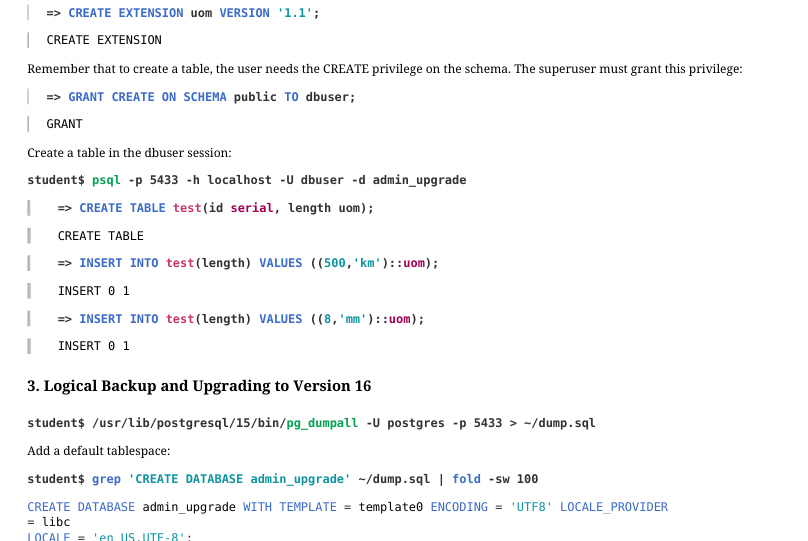 {#source-figure-035 caption=“Source slide page 35: Page 35”}
Remember that to create a table, the user needs the CREATE privilege on the schema. The superuser must grant this privilege:
Create a table in the dbuser session:
3. Logical Backup and Upgrading to Version 16
Add a default tablespace:
Let’s stop the server.
We do not transfer the postgresql.conf settings, although in production environments that would be necessary. Modify pg_hba.conf the same way we did for version 15:
Create the directory for the tablespace.
Start the cluster 16 and create the tablespace as the superuser.
Install the extension:
Page 36: Page 36
Restore the cluster from the backup:
Page 37: Page 37
You will get an error when creating the postgres role since it already exists; this is normal.